warning light AUDI A5 CABRIOLET 2011 Owner's Manual
[x] Cancel search | Manufacturer: AUDI, Model Year: 2011, Model line: A5 CABRIOLET, Model: AUDI A5 CABRIOLET 2011Pages: 364, PDF Size: 86.48 MB
Page 37 of 364
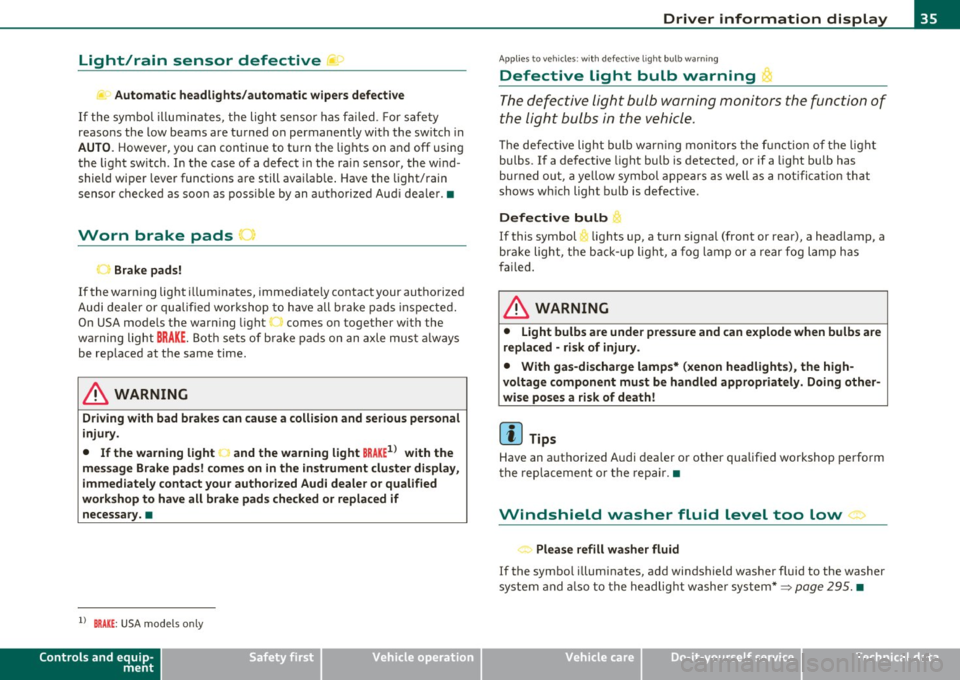
Light/rain sensor defective ~c.,
Automatic headlights/automatic wipers defective
If the symbo l illumina tes, the ligh t senso r has fa iled. For s afe ty
reasons the low beams are turned on permanently with the sw itch in
AUTO . However, you can continue to t urn the lights on and off usi ng
the light sw itch . In the case of a defect in the ra in sensor, the wi nd
shield wiper lever functions are still avai lab le . Have the light/rain
senso r chec ked as soo n as poss ible by an a utho riz ed Aud i dea le r.•
Worn brake pads u
Brake pads!
If the warn ing light illum inates, immediately contact your autho rized
Audi dea ler or qu alified wor kshop to h ave all b rake pad s in sp ecte d.
On USA mode ls the warn ing light comes on together w it h the
w ar ning light
BRAKE . Both se ts of b rake pads on an axle mus t always
be rep laced at the same time.
& WARNING
Driving with bad brakes can cause a collision and serious personal
injury .
• If the warning light J and the warning light BRAKE1> with the
message Brake pads! comes on in the instrument cluster di splay,
immediately contact your authorized Audi dealer or qualified
workshop to have all brake pads checked or replaced if
necessary. •
ll BRAKE: USA mode ls on ly
Controls and equip
ment Safety first
Driver information display
A
pp lies to veh icles : wit h defective ligh t bulb wa rning
Defective Light bulb warning t
Th e def ective light bul b warning monitors the function of
the li ght bulbs in the vehicle.
Th e defe ct ive light bulb war ning moni tor s the functio n of the lig ht
bulbs. If a de fective light bu lb is detected, or if a light bu lb has
bur ned out, a ye llow symbol appears as well as a n otifi cat io n that
shows w hich light bu lb is defective.
Defective bulb
~ If this symbol lights up, a t urn signa l (front or rear), a headlamp, a
br ak e light, t he b ack- up ligh t, a fog lamp o r a rear f og l am p has
fai led.
& WARNING
• Light bulbs are under pressure and can explode when bulbs are
replaced -risk of injury .
• With gas-discharge lamps* (xenon headlights ), the high
voltage component must be handled appropriately . Doing other
wise poses a risk of death!
[ i ] Tips
Have an a uth orized Audi dea ler o r other qualified workshop pe rform
t he rep lacemen t or t he repai r.•
Windshield washer fluid level too low >
< . .., Please refill washer fluid
If the symbo l illum inates, add windsh ield washer f luid to the washer
sy ste m a nd also to the he adlig ht w ashe r system* =>
page 295. •
Vehicle care Technical data
Page 38 of 364

Driver information display
Fuel supply too low I
When the symbol illuminates, this means there are about 2.1
gallons (8 liters) of fuel left in the fuel tank. Time to refuel!
=;, page 275.
If the symbol lights up, even when there is ample fue l in the tank, and
the text
TANK SYSTEM MALFUNCTION! CONTACT WORKSHOP
appears in the display, there is a fault in the system. Contact a quali
fied workshop to have the fault rectified. •
Applies to veh icles: w ith batte ry vol tage warning
Battery voltage L:
If battery power drops into the range where it can limit the ability of
the engine to start, this the symbol appears in the instrument
cluster display with the following driver message battery charge low:
Indicates charging by being driven.
While this driver notification is displayed, you have to be prepared for
limited starting capability.
Driver message appears and goes out again
If this driver message appears after the ignition is turned on or while
driving and it goes out again after a while, the battery has been
adequately recharged.
Driver message appears and does not go out again
If this driver notification appears after the ignition is turned on or
wh ile driving and does not go out again, the battery's state of charge
is not in the optimal range. Starting capability is restricted. Have the
battery checked at an authorized Audi dealer or other qualified work
shop as soon as possible. •
Check engine oil ~
, Add oil, max x qt (l). You may continue driving
If the . symbol lights up displaying this driver message, then add a
maximum of 1 liter at your earliest opportunity~
page 284. •
Engine oil level ~i.
c,,-Please check oil level
When the symbol illuminates, check the engine oi l level as soon as
possible~
page 284. Top off the oil at your earliest opportunity
~page284. •
Engine oil sensor defective
Oil level! Sensor defective
,., _,..
If the symbol illuminates, contact your authorized Audi dealer and
have the oi l sensor inspected. Until you have this done, check the oil
level each time you refuel just to be on the safe side~
page 284. •
Applies to vehicles: with engine speed limitation
Engine speed limitation -~
Do not exceed max. engine speed of XXXX rpm
Th e ·, symbol illuminates when there is an engine control malfunc
tion . The ind icator light 'in the instrument cluster also illuminates.
Th e engine speed is limited to the speed displayed in the driver infor
mation system. Keep in mind that the engine speed will not exceed
the va lue displayed in the driver information system, for example
when downshifti ng.
Please go to an author ized Audi dealer or other qualified workshop to
have the malfunction repaired. •
Page 48 of 364
Opening and closing
-Tur n the me chanical key i n th e lo ck of the d river's door to
the lock position @=> & in "General descr iption" on
pag e 41.
If the power locki ng system f ail s, there is eme rge ncy locki ng for the
passenger 's door=>
page 47.
& WARNING
Read and follow all WARNINGS=> & in "General descript ion" on
page 41.
[IJ Tips
• After the ignit ion is swi tched on, the power locking sys tem swi tch
and the unlocking button for the rear lid
c;:; i n the door are enabled .•
Locking and unlocking the vehicle from
inside
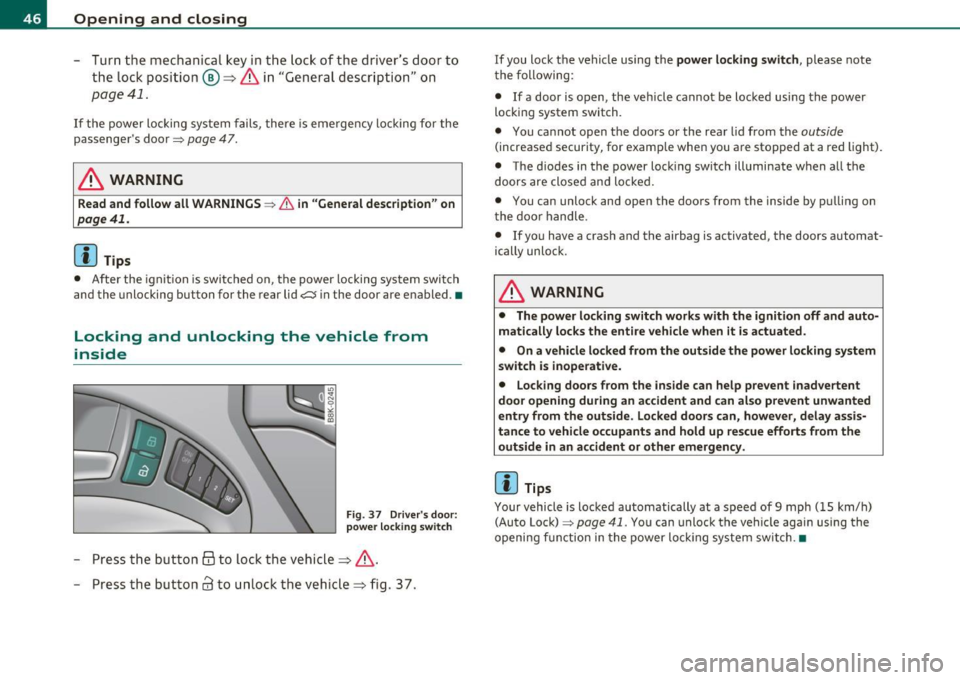
Fig . 37 D river 's door :
power lo cking switch
- Press the b utto n @ to lo ck the vehicl e=> & .
- Press the but ton
63 to u nloc k the veh icle => fig. 37.
If you lock the vehicle using the power locking switch , please note
t he following:
• If a door is open, the veh icle cannot be locked using the power
loc kin g system switch.
• You ca nnot open the doors or the rear lid from the
outside
(increased security, for examp le when you are sto pped at a red light).
• The diodes in the power loc king switch ill uminate when a ll the
doors are close d an d lock ed .
• You can unlock and open the doors from the inside by p ulling on
t he doo r handle .
• If yo u have a crash and the airbag is activated, the doors automat
ically unlo ck.
& WARNING
• The power locking switch works with the ignition off and auto
matically locks the entire vehicle when it is actuated .
• On a vehicle locked from the outside the power locking system
switch is inoperati ve.
• Locking doors from the inside can help prevent inadvertent
door opening during an accident and can al so prevent unwanted
entry from the outside. Locked doors can, however, delay assis
tance to vehicle occupants and hold up rescue efforts from the outside in an accident or other emergency .
[IJ Tips
Your vehicle is loc ked automatically at a speed of 9 mph ( 15 km/h)
(Auto Lock)=>
page 41. You can unlock t he vehicle again using the
openi ng f unction in the power loc king system sw itch. •
Page 54 of 364
Power top
• A message in the instrument cluster display will alert you if a
protection function was activated or if there is a malfunction
=>page 52.
• The power top can also be operated manually if there is a malfunc
tion=>
page 57, "Power top emergency operation" . Have you autho
rized Audi dealer correct the cause of the malfunction as soon as
possible .
• If parking the vehicle with the power top open, remember that the
vehicle interior will not be protected from the weather or from unau
thorized entry. Closing the power top before leaving the vehicle is
recommended. If you leave items in the vehicle, lock them in the
trunk .•
Power top operation
The indicator light monitors the power top.
The . indicator light illuminates for approximately 2 seconds when
the ignition switches on to check the function and then goes out
again. The indicator light also:
• illuminates when the power top opens or closes.
• blinks if the power top switch is operated but the conditions for
opening or closing the power top are not met . A warning message
also appears in the instrument cluster display=>
page 52, "E rror
message in the instrument cluster display" .
• if the power top did not open or close completely.
[ i J Tips
The indicator light stays on if the power top was opened manually. •
Error message in the instrument cluster
display
An error message appears if the power top cannot open
or close.
Several conditions must be met for the power top to open or close
automatically.
An error message in the instrument cluster display indicates if one of
the conditions is not met or there is a malfunction.
Power top: please close rear lid
The luggage compartment lid must be closed when the power top is
opening or closing. This error message appears in the instrument
cluster display if the luggage compartment lid is not closed.
Storage bay not lowered. Please remove
obstruction
The power top storage bay must lower when the power top is
opening. This error message appears in the instrument cluster
display if the storage bay is not lowered . If the storage bay does not
lower automatically because of objects in the luggage compartment,
remove the objects that are in the way from the storage bay area.
Otherwise, you can operate the power top storage bay manually
=>page 55.
Power top: cannot be used
This error message appears if the convertible cannot open or close
automatically because of safety reasons or if there is a malfunction.
The following causes are possible:
• Vehicle speed too high: Power top operation is deactivated and an
error message appears if the vehicle speed is too high. Reduce the
vehicle speed and operate the switch again to open or close the power
top.
• Battery voltage too low: The power top cannot be operated if the
battery voltage is too low. This ensures there will be enough battery
~
Page 55 of 364
voltage left to start the vehicle. The power top can be operated again after the eng ine is sta rted .
• Rollo ve r prot ection acti ve: If the power top is operated cont inu
ously for an extended pe riod o f time, rollover protec tion w ill act ivate
to prevent damage to the hydraulic unit . T his protect ive function
prevents the power top from opening or close for app rox imately 15
to 30 m inutes . It w ill function again after that=>&.
• Malfun ct ion : Fa ilure of system components is one possible cause
for malfunction.
If this happens, you can also operate the power top
by hand =>
page 57.
Power top not secure
This message appears with a war ning to ne if the powe r top is not
completely closed or open and the vehicle speed is above 50 km/h .
Reduce the ve hicle speed below 50 km/h and use the sw itch to open
or close the power top completely .
& WARNING
Never d rive when the power top is not lo cked co rre ctly. The wind
from driving could cau se the power top to open. This can re sult in
injuries and dam age to the vehicle. •
Opening or closing the power top~
Contro ls a nd e quip
m en t
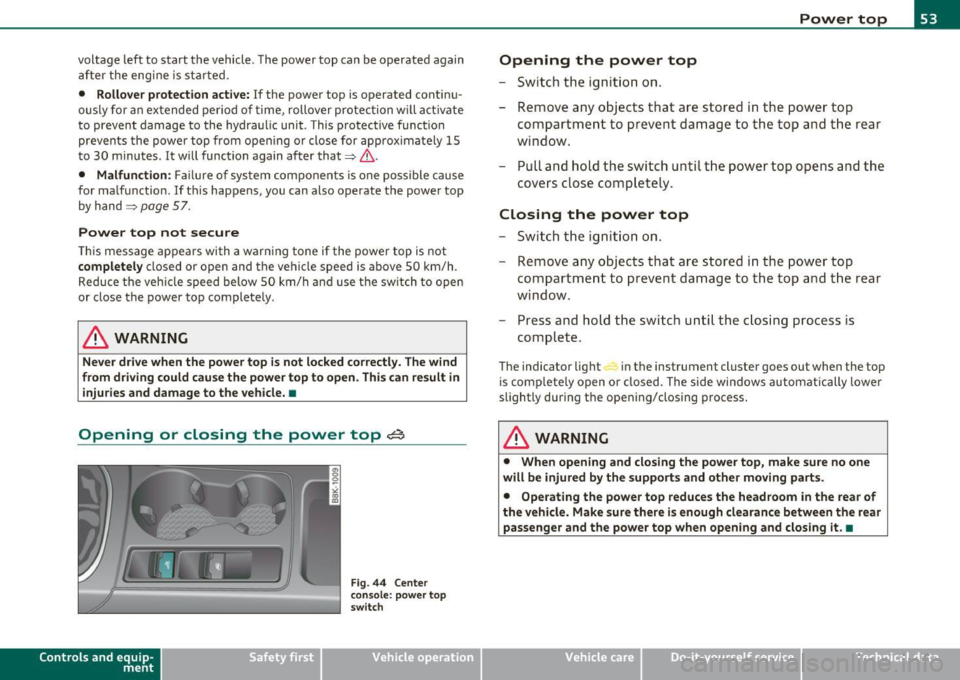
Fig . 4 4 Center
co nsole: p ow er top
sw itch
Vehicle OP-eration
Power top
Opening the power top
- Switch the ignition on.
- Remove any objects that are stored in the power top
compartment to prevent damage to the top and t he rear
window .
- Pull and hold the switch until the power top opens and the
covers close co mpletely.
Closing the power top
-Swi tch th e ign it io n on.
- Remove any objec ts that are stored in the power top
compar tment to p revent da mage to the top a nd t he rear
window.
- Press and hold the switch until the c losing process is
complete.
The indicator light in the instrument clu ster goes out when the top
is com pletely open or closed . The side windows a utomatically lower
slightly during the opening/closing process.
& WARNING
• When opening and closi ng the powe r top , make sure no one
will be injured by the support s and other m oving part s.
• Operating the power top reduces the headroom in the rear of
the vehicle . Make sure there is enough clearan ce between the rear
pas senger and the power top when opening and closing it .•
Vehicle care Do-it-yourselt service iTechnical data
Page 58 of 364
Power top
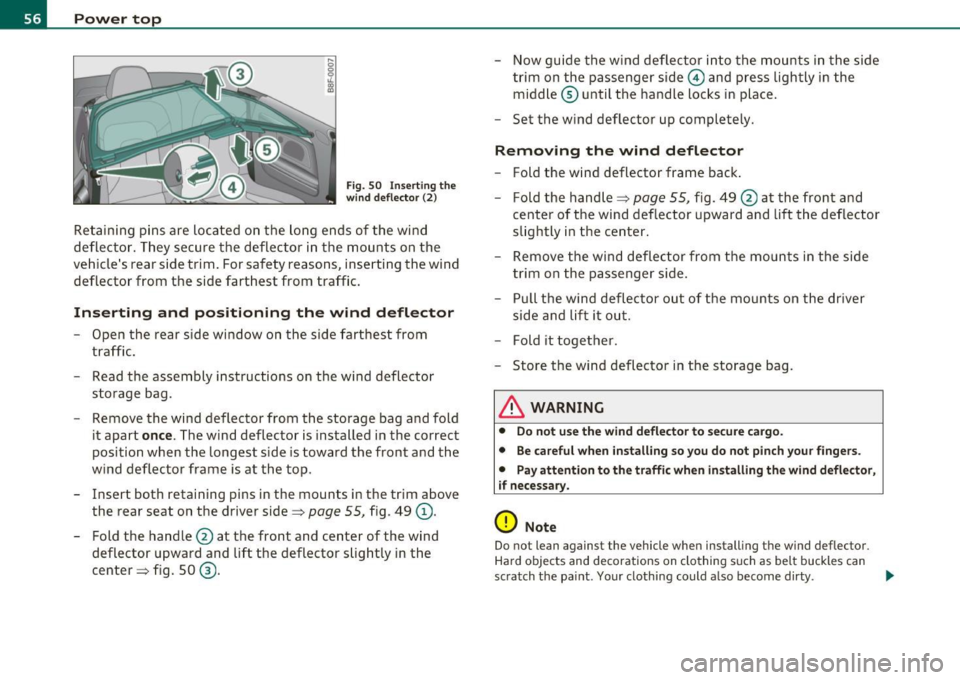
Fig. 5 0 Inse rt in g th e
wind d eflec tor (2)
Reta ining p ins are located on the lo ng en ds of the wind
deflector . They secure the deflector in the mounts on the
vehicle's rear s ide trim . For safety reasons, inserting the win d
deflector from the side farthest from traff ic.
Inserting and positioning the wind deflector
- Open th e rear side wi ndow on the side fa rt hes t from
t raffic.
- Read the assembly instructions on the wind deflector
storage bag.
- Remove the wind deflector from the storage bag a nd fold
i t apart
once . The wind deflector is installed in the correct
position when the longest side is toward the front and the
wind deflector fra me is at the top .
- Insert both retaining pins in the mounts in the t rim above
the rear seat on the driver side=>
page 55, fig . 49 (D .
- Fold the handle @ at the front and center of the w ind
deflector upward and lift the deflector slig htly in the
center => fig. 50
® ·
- Now gu ide th e w ind deflector into the mounts in the sid e
tr im o n the passenger s ide
0 and press ligh tly i n the
midd le ® until the handle locks in place .
- Set t he w ind deflector up completely .
Removing the wind deflector
-Fold the w ind deflector frame bac k.
- Fold the handle=>
page 55, fig. 49 @ at the front and
center of the wind deflector upward and lift the deflector
slightly in the center .
- Remove the win d deflector fro m the mounts in the si de
tr im on the passenger side .
- Pull the wind de flector out of the moun ts on the driver
side and lift it out.
- Fold it toget her .
- Store the wind deflector in the storage bag.
& WARNING
• Do not u se the wind deflector t o se cure cargo .
• Be ca refu l when installing so you do not pinch your fingers.
• Pay attenti on to the traffi c when in stalling the wind defle ctor ,
i f necessary.
0 Note
Do not lean against the vehicle when install ing the wind deflector .
H ar d obje cts and decorations on clo thing such as belt buckles can
scratch the paint . Your clothing could also become dirty . _,,,
Page 66 of 364

Clear vision
& WARNING
Automatic headlights are only intended to assist the driver. They
do not relieve the driver of his responsibility to check the head
lights and to turn them on manually according to th e current light
and visibility conditions . For example, fog cannot be detected by
the light sensors. So always switch on the headlights under these
weather conditions and when driving in the dark
io.
[ i ) Tips
• The light sensor for headlight cont rol is located in the rear view
m irror mo unt. You s hou ld therefore not apply a ny st ic kers to the
windshield in th is area in order to prevent malfunct ions or fa ilures.
• T he sensitivity leve l for the light se nsor set a t the factory ca n be
changed in the MMI menu~
page 65 in the automatic driving lights
fu nction .
• When you remove your key from t he ign itio n while the veh icle's
lights a re tu rned on, a bu zzer sounds as long as t he driver's doo r is
open.
• Please obey a ll laws when us ing t he lig htin g systems desc ribed
here.
• The coming home/ leav ing home function is ava ilab le only with the
switch in the AU TO position. •
Appli es to veh icles : w ith fog lights
Fog lights
Fig . 67 Fog light
switch
- To tur n on the fog lights }D, press bu tton (D ~ fig. 6 7.
- To turn on the rear fog ligh ts
0$ , press butto n@ .
Fog lights
The side marker lights or low beams must be switc hed on . W hen the
fog lights are switc hed on, the gree n check light at t he edge of the
switch co m es on.
If automat ic dr iv ing light control AUTO is activated , the low beams
a re sw itched on whe n the fog lights are t urned on.
Rear fog lights
Low beams o r side m arke r lig hts w ith fog ligh ts m ust be t urned on .
When the rear fog lig hts are tur ned on, the ye llow check lig ht at the
edge of the swi tch comes on.
0 Note
Th e rear fog lights sho uld on ly be tur ned o n in accordance with traff ic
reg ulat io n, as the lights a re br ight for following traffic. •
Page 67 of 364
Adjusting exterior Lighting
The functions are selected in the radio or in the fv1fv1I.
- Select: Function button [CAR)> E xterior lighting .
Coming home
The coming home function ensures that after
turn ing off the ignit ion
and ope ning the dri ver' s door
the ve hicle per iphery is illuminated in
the dark . In add ition, the fron t fog lights, the ta il ligh ts and the
l icense p late ligh t are t urned on . The powe r-on time can be set for a
period from O (off) to 60 seconds .
Leaving home
The leaving home functions ensures that
when unloc king , the vehicle
periphery is illum inated in the da rk. In add it io n, the fron t fog ligh ts,
the tai l lights and the license p late light are turned on . This funct ion
can be turned on and off.
Autom atic driving light s*
When the lig ht sw itc h i s in the AUTO => page 63 pos it ion, the switch
on po int of the lights can be changed in the automatic driving light
function.
Daytime running lights*
Th e daytime running lig hts ca n be turned on or off using this func
tion. If the funct ion is act ive, the daytime running l ights are tu rned
on a utoma tica lly w hen the ignition is sw itche d on .
In the versions for some countr ies it is not poss ible to switch off the
daytime running lights or they may not have dayt ime runn ing lig hts.
[ i ] Tips
The coming home/leaving home function is available on ly with the
switch in the AU TO position .•
Controls and equip
ment Safety first
Clear v
ision
Daytime running Lights
When you turn on the ignition the daytime running lights
will come on aut omatically .
USA models
Th e daytime running lights a re a ct ivated when t he lig ht swit ch
=>
page 63, fig. 66 is in the O position or the AUTO position (on ly in
daylig ht condit ions) . The daytime running lights function ca n be
turned on and off in the radio or MMI* menu
E xterior lighting
=> page 65 .
Canada models
Th e daytime r unning lights are activ ated w hen the light switch
=> page 63 , fig . 66 is in the O position, oo oc position or the AUTO posi
tion (only in day light condit ions) . The dayt ime running lights funct ion
cannot be turned off .
& WARNING
Never use daytime running lights to see where you are going. They
are not bright enough and will not l et you see far enough ahead
for s afety , especiall y at dusk or wh en it is dark. Be aware of
change s in outside light condition s when you are dri ving and
respond b y switching on your low beams
io.
0 Note
Always be aware of change s in outside light condition s whil e you
are driving. Respond in time to fading d aylight by turning the light
s witch to po sition
io (or "AUTO ") to turn on your headlight s.•
Vehicle care Technical data
Page 68 of 364

Clear vision
Instrument lighting
The basic brightness of the illumination for the instru
ments, the center console and the display can be
adjusted .
-Press the knob to release it.
N ~ 0 0 ,;
"'
lighting
Rotating the knob to the right"+" will increase the basic
brightness when it is dark.
- Rotating the knob to the left"-" will decrease the basic
brightness when it is dark.
- Pressing the knob will prevent unintentional changes.
(I] Tips
The illumination for the instrument cluster lights up whenever you
switch on the ignition with the vehicle headlights off . As the daylight
fades, the instrument cluster illumination likewise dims automati
cally and will go out completely when the outside light is very low.
This feature is meant to remind you to switch on the headlights when
outside light conditions become poor. •
Appli es to veh icles : wi th xenon headlights
Xenon headlights
After starting the engine , the xenon headlights are automatically
adjusted to the load and angle of the vehicle (for example, during
acceleration and braking). This prevents oncoming traffic from expe
riencing unnecessary headlight glare from your xenon headlights .
If the system is not operating properly, a warning symbol in the Auto
Check Control is displayed~
page 37. •
Ap plies to vehi cles: with adap tive light
Adaptive light
When driving around bends, the relevant area of the road
is better illuminated.
Fig. 69 Adaptive light
when driving
The benefit of adaptive light is that the curve and the edge of the road
are better illuminated ~ fig. 69. Dynamic adaptive light is controlled
automat ically, depending on vehicle speed and steering wheel angle.
When driving around bends, the headlights are controlled according
to steering wheel angle . So that there is no black hole ahead of the
vehicle , the two main beams pivot at different angles. .,.
Page 72 of 364
Clear vision
©·Single wipe
© -Clean the windshield. To eliminate water droplets, the wind
shield wiper performs one afterwipe operation after several seconds
while driving. You can switch this function off by moving the lever to
posit ion© within 10 seconds of the afterwipe operation. The after
wipe function is reactivated the next time the ignition is switched on.
Cleaning the headlights*. The headlight washer system* only func
tions when the light is switched on. The headlights are automat ically
cleaned the first time and every fifth time the lever is moved to posi
tion ®· They are also cleaned every time you hold the lever in pos it ion
© for longer than 2 seconds.
& WARNING
• The rain sensor is only intended to assist the driver . The driver
is still responsible for manually switching the wipers on according
to the visibility conditions.
• The windshield may not be treated with water-repelling wind
shield coating agent s. Unfavorable conditions, such as wetness,
darkness, low sun, can result in increased glare. Wiper blade
chatter is also possible.
• Properly functioning windshield wiper blades are required for
a clear view and safe driving=>
page 71, "Replacing windshield
wiper blades" .
0 Note
• In the case of frost, check whether the windshield wiper blades are
frozen to the windshie ld . Switching on the windshield wipers can
damage the wiper blades!
• Prior to using a car wash, the windshield wiper system must be
switched off (lever in position 0). This helps to prevent unintentional
switching on and damage to the windshield wiper system .
[I] Tips
• The w indshield wipe rs are switched off when the ignition is turned
off . Activate the windshield wipers after the ignition is switched back
on by mov ing the windshield w iper lever to any position.
• Worn or dirty windshield wiper blades result in streaking. This can
affect the rain sensor* function. Check your windshie ld wiper blades
regularly.
• The washer fluid nozzles of the w indshield washer system are
heated at low temperatures when the ignition is on .
• When stopping temporar ily, e.g . at a traffic light, the set speed of
the windshield w ipers is automatically reduced by one speed .•
Service position
The windshield wiper blades are replaced in the service
position.
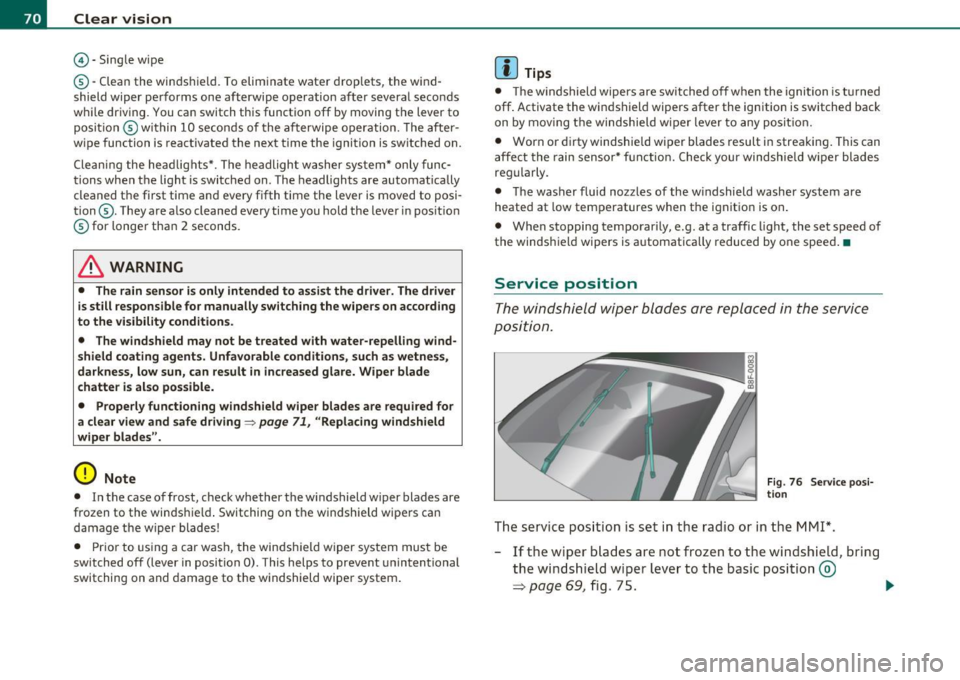
Fig . 76 Service posi
tion
The service position is set in the radio or in the MMI*.
- If the wiper blades are not frozen to the windshield, bring
the windshield wiper lever to the basic position ®
=> page 69, fig. 75. .,_