top AUDI A5 CABRIOLET 2011 Owner's Guide
[x] Cancel search | Manufacturer: AUDI, Model Year: 2011, Model line: A5 CABRIOLET, Model: AUDI A5 CABRIOLET 2011Pages: 364, PDF Size: 86.48 MB
Page 62 of 364
Power top
-Remove the emergency key. •
Step 5: Closing the power top
The power top must be positioned by hand.
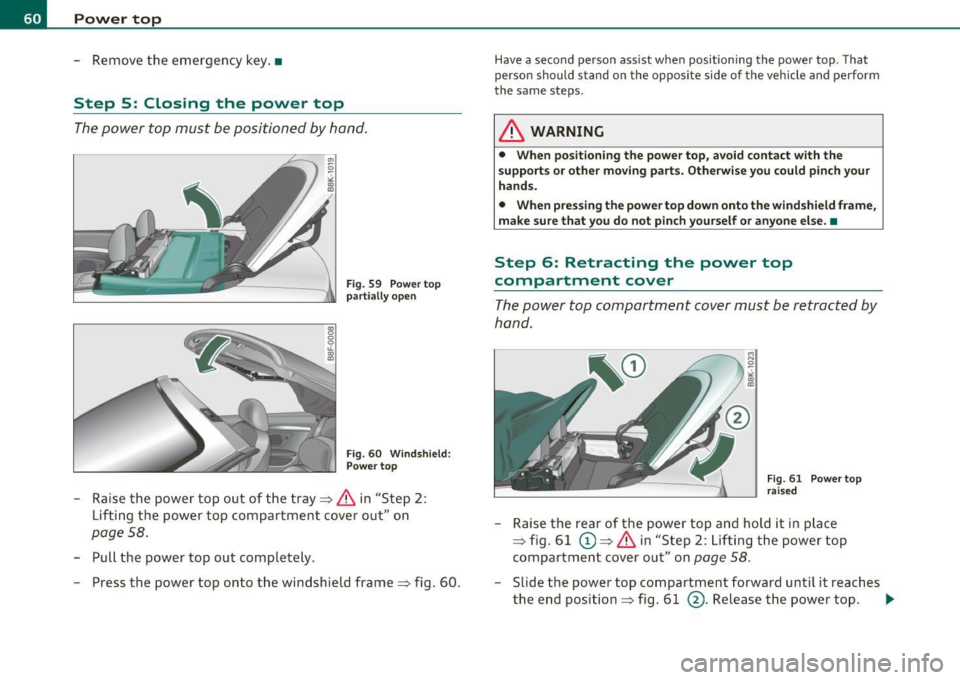
Fig. 59 Power top
partially open
Fig . 60 Windshield :
Power top
- Raise the power top out of the tray~ & in "Step 2 :
Lifting the power top compartment cover out" on
page 58.
-Pull the power top out completely .
- Press the power top onto the windshield frame~ fig. 60 .
Have a second person assist when positioning the power top . That
person should stand on the opposite side of the vehicle and perform
the same steps.
& WARNING
• When positioning the power top, avoid contact with the
supports or other moving parts. Otherwise you could pinch your
hands.
• When pressing the power top down onto the windshield frame,
make sure that you do not pinch yourself or anyone else. •
Step 6: Retracting the power top
compartment cover
The power top compartment cover must be retracted by
hand.
~ 0
;i; co a,
Fig. 61 Power top
raised
- Raise the rear of the power top and hold it in place
~ fig. 61 (D ~ & in "Step 2 : Lifting the power top
compartment cover out" on
page 58.
-Slide the power top compartment forward until it reaches
the end position ~ fig. 61
@. Release the power top. .,
Page 63 of 364
& WARNING
Do not pinch yourself or others when closing the power top
compartment. •
Step 7: Locking the power top
The locking system for the power top latches are located
on the inside of the power top.
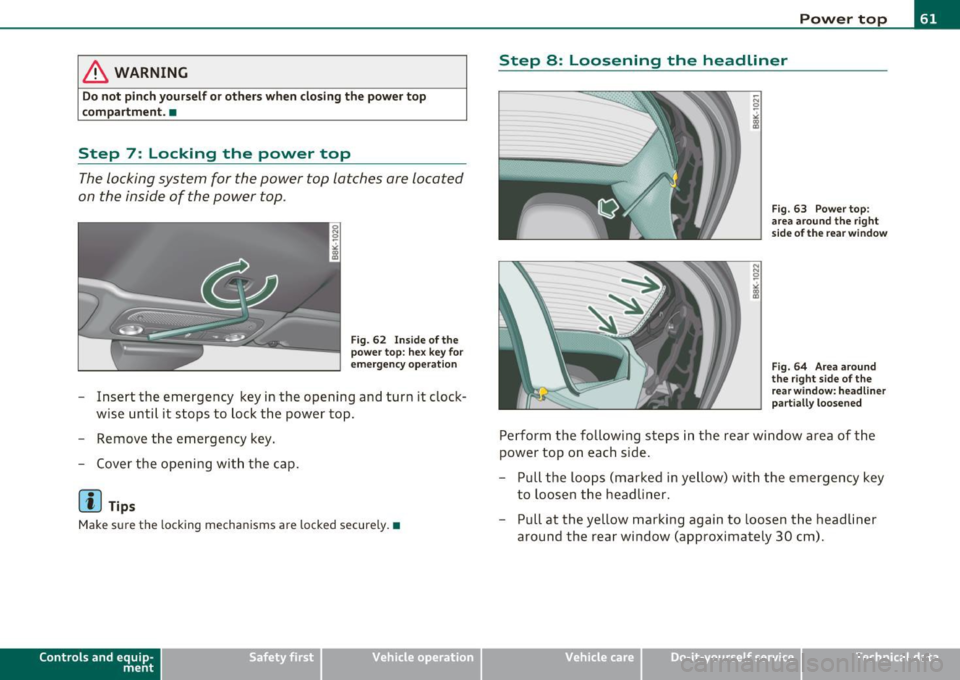
Fig. 62 Inside of the
power top: hex key for
emergency operation
- Insert the emergency key in the opening and turn it clock
wise until it stops to lock the power top.
- Remove the emergency key.
- Cover the opening with the cap.
(J] Tips
Make sure the locking mechanisms are locked securely. •
Contro ls a nd e quip
m en t Vehicle
OP-eration
Power top
Step 8: Loosening the headliner
Fig. 63 Power top:
area around the right
side of the rear window
Fig. 64 Area around
the right side of the
rear window: headliner
partially loosened
Perform the following steps in the rear window area of the
power top on each side.
- Pull the loops (marked in yellow) with the emergency key
to loosen the headliner.
- Pull at the yellow marking again to loosen the headliner
around the rear window (approximately 30 cm).
Vehicle care Do-it-yourselt service iTechnical data
Page 64 of 364
Power top
Step 9: Securing the latch
. . : . . . . .. ·
. . .
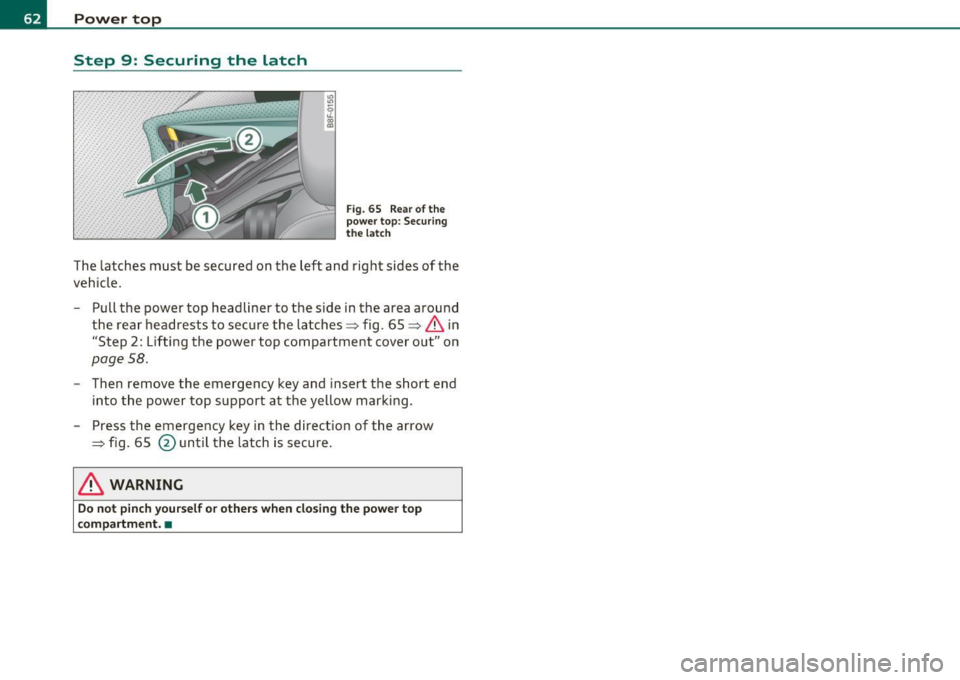
Fig. 65 Rea r of the
powe r top: Securing
t he latc h
The latches must be secured on the left and right sides of the
vehicle.
- Pull the power top headliner to the side in the area around
the rear headrests to secure the latches=> fig. 65 =>
& in
"Step 2: Lift ing the power top compartment cover out" on
page 58.
- Then remove the emergency key and insert the short end
into the power top s upport at the yellow marking.
- Press the emergency key in the d irection of t he arrow
=> fig. 65
@ until t he latch is secure .
& WARNING
Do not pinch y ou rself or other s when clo sing the power top
compartment. •
Page 72 of 364
Clear vision
©·Single wipe
© -Clean the windshield. To eliminate water droplets, the wind
shield wiper performs one afterwipe operation after several seconds
while driving. You can switch this function off by moving the lever to
posit ion© within 10 seconds of the afterwipe operation. The after
wipe function is reactivated the next time the ignition is switched on.
Cleaning the headlights*. The headlight washer system* only func
tions when the light is switched on. The headlights are automat ically
cleaned the first time and every fifth time the lever is moved to posi
tion ®· They are also cleaned every time you hold the lever in pos it ion
© for longer than 2 seconds.
& WARNING
• The rain sensor is only intended to assist the driver . The driver
is still responsible for manually switching the wipers on according
to the visibility conditions.
• The windshield may not be treated with water-repelling wind
shield coating agent s. Unfavorable conditions, such as wetness,
darkness, low sun, can result in increased glare. Wiper blade
chatter is also possible.
• Properly functioning windshield wiper blades are required for
a clear view and safe driving=>
page 71, "Replacing windshield
wiper blades" .
0 Note
• In the case of frost, check whether the windshield wiper blades are
frozen to the windshie ld . Switching on the windshield wipers can
damage the wiper blades!
• Prior to using a car wash, the windshield wiper system must be
switched off (lever in position 0). This helps to prevent unintentional
switching on and damage to the windshield wiper system .
[I] Tips
• The w indshield wipe rs are switched off when the ignition is turned
off . Activate the windshield wipers after the ignition is switched back
on by mov ing the windshield w iper lever to any position.
• Worn or dirty windshield wiper blades result in streaking. This can
affect the rain sensor* function. Check your windshie ld wiper blades
regularly.
• The washer fluid nozzles of the w indshield washer system are
heated at low temperatures when the ignition is on .
• When stopping temporar ily, e.g . at a traffic light, the set speed of
the windshield w ipers is automatically reduced by one speed .•
Service position
The windshield wiper blades are replaced in the service
position.
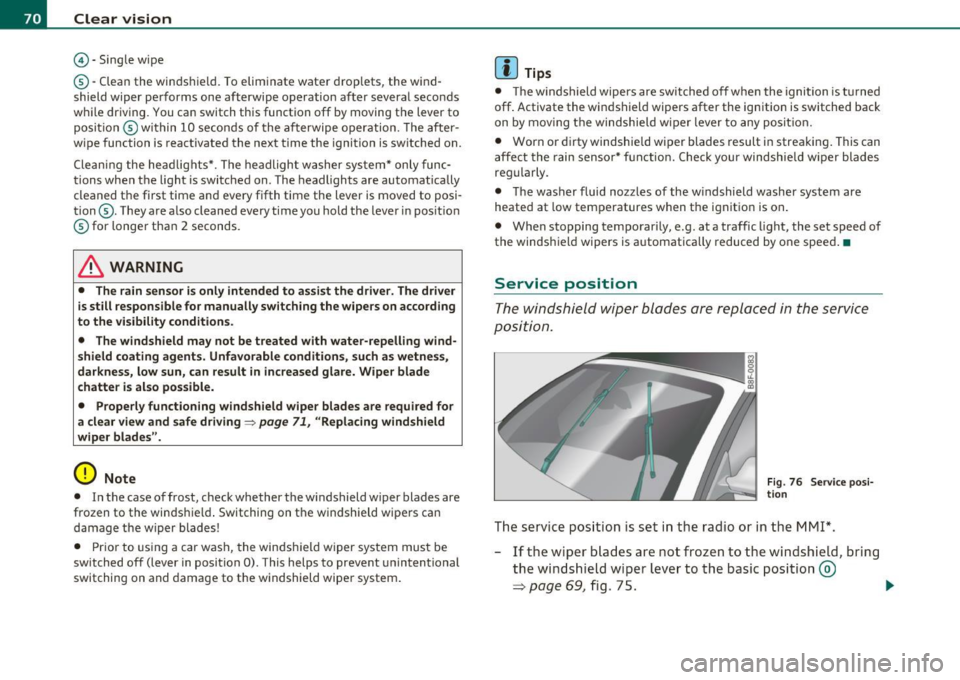
Fig . 76 Service posi
tion
The service position is set in the radio or in the MMI*.
- If the wiper blades are not frozen to the windshield, bring
the windshield wiper lever to the basic position ®
=> page 69, fig. 75. .,_
Page 79 of 364
Seats and storage
General recommendations
Why is your seat adjustment so important?
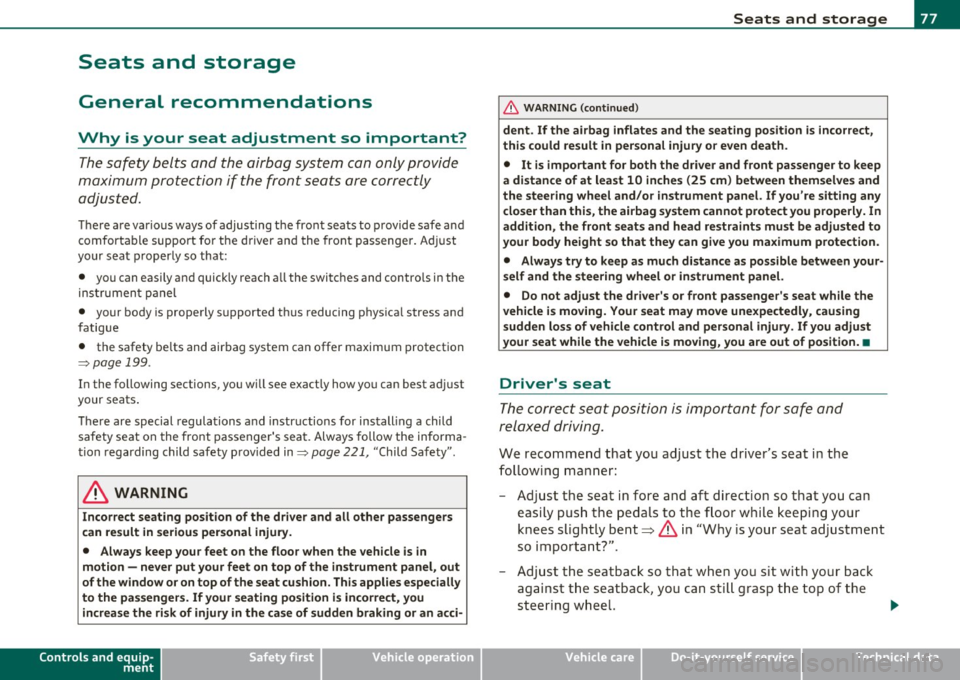
The safety belts and the airbag system can only provide
maximum protection if the front seats are correctly
adju sted.
Th ere a re various ways of adjusting t he front seats to provide safe and
comfortable support for the driver and the front passenger . Ad just
your seat properly so that :
• you can easily and quickly reach a ll the switc hes and contro ls in the
ins trumen t pa nel
• your body is properly supported thus reducing phys ica l stress and
fatigue
• the safety be lts and airbag system can offer maximum protection
=>
page 199 .
In the following sections, you w ill see exact ly how you can best ad just
your sea ts .
Th ere are special regulations a nd instr uctions for install ing a child
safety seat on the front passenger's sea t. Always follow the informa
tion regarding child safety p rovided in=>
page 221, "Child Safety ".
& WARNING
Incorrect seating posit ion of the dri ver and all other passengers
can result in seriou s personal injury.
• Always keep your feet on the floor when the vehicle is in
motion -never put your feet on top of the instrument panel, out
of the window o r on top of the seat cush ion. This applies especially
to the passengers.
If your seating po sition is incorrect, you
increase the ri sk of injury in the case of sudden braking or an acci-
Controls and equip
ment Safety first
Seats and storage
& WARNING
(con tinu ed)
dent . If the airbag inflates and the seating position is incorrect ,
this could result in per sonal injury or even death .
• It is important for both the dri ver and front passenger to keep
a distan ce of at least 10 inche s (25 cm) between themselves and
the steering wheel and /or instrument panel. If you 're sitting any
closer than this , the airbag system cannot protect you properly. In
addition, the front seats and head restraints must be adjusted to
your body height so that they can give you maximum protection .
• Always try to keep as much distance as possible between your
self and the steering wheel or instrument panel.
• Do not adjust the driver's or front passenger 's seat while the
vehicle is moving. You r seat may move unexpectedly , causing
sudden loss of vehicle control and personal injury . If you adjust
your seat while the vehicle is moving , you are out of position. •
Driver's seat
The correct seat position is important for saf e and
re lax ed driving.
W e recomme nd that you a djust the drive r's sea t in the
f ollowing man ner :
- Ad just the seat in fore and aft direction so that you can
easily pus h the pedals to the floor w hile keeping your
knees slightly bent=>
& in "Why is yo ur seat a djus tme nt
so importa nt?" .
- Adjust the seatback so that when yo u sit with yo ur back
agai nst t he seatback , you can st ill grasp t he top of the
steering w heel. ..,
Vehicle care Technical data
Page 80 of 364
Seats and storage
-Adjust the head restraint so the upper edge is as even as
possible with the top of your head. If that is not possible,
try to adjust the head restraint so that it is as close to this
position as possible=>
page 82.
& WARNING
Never place any objects in the driver's footwell. An object could
get into the pedal area and interfere with pedal function. In case
of sudden braking or an accident, you would not be able to brake
or accelerate. •
Front passenger's seat
Always move the front passenger seat into the rearmost
position.
To avoid contact with the airbag while it is deploying, do not
sit any closer to the instrument panel than necessary and
always wear the three-point safety belt provided adjusted
correctly. We recommend that you adjust the passenger's
seat in the following manner:
- Bring the backrest up to an (almost) upright position.
Do
not ride with the seat reclined.
- Adjust the head restraint so the upper edge is as even as
possible with the top of your head. If that is not possible,
try to adjust the head restraint so that it is as close to this
position as possible=>
page 82.
-Place your feet on the floor in front of the passenger's
seat. •
Power front seat adjustment
Seat adjustment controls
The operating logic for the switches corresponds to the
construction and function of the seat.
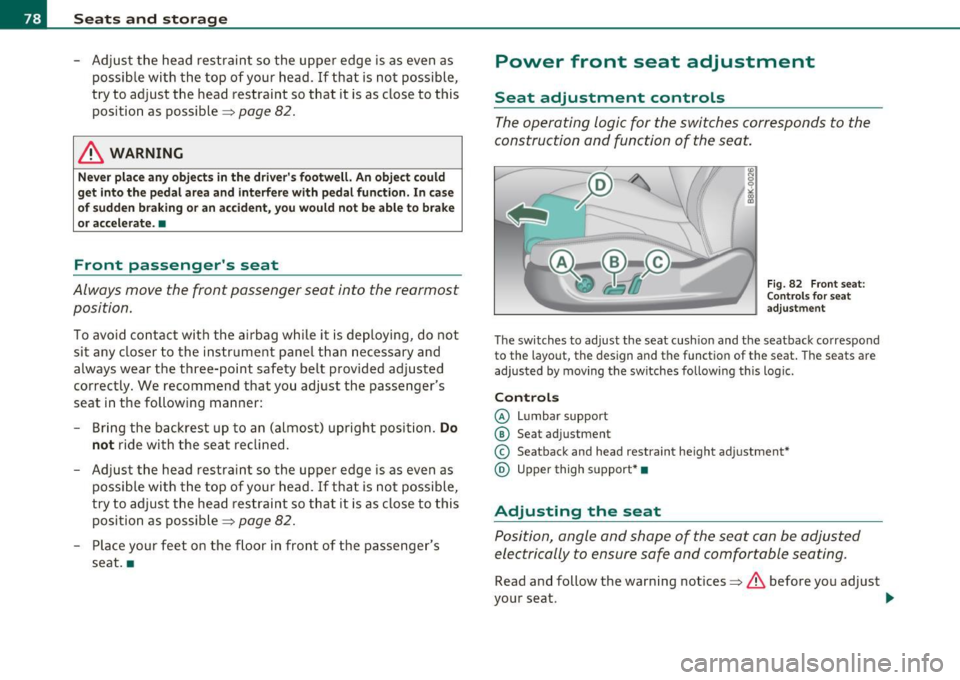
Fig. 82 Front seat:
Controls for seat
adjustment
The switches to adjust the seat cushion and the seatback correspond
to the layout, the design and the function of the seat. The seats are
adjusted by moving the switches following this logic.
Controls
© Lumbar support
© Seat adjustment
© Seatback and head restraint height adjustment*
@ Upper thigh support* •
Adjusting the seat
Position, angle and shape of the seat can be adjusted
electrically to ensure safe and comfortable seating.
Read and follow the warning notices=>.&, before you adjust
your seat.
~
Page 82 of 364

Seats and storage Folding down the front seatbacks
- Lift the latch=> page 79, fig. 83.
- Tilt the seatbac k forward.
Moving the front seats forward
-Press and hold the switch@ until the seat has reached the
desired position.
Moving front seats back
- Press and hold the switch @ until the seat has reached the
des ired position. The seat stops automatically when it has
reached its starting position again .
To make it easier to enter and leave the rear seat, the seatbacks of the
front seats can be folded forward and the head restraints are auto
matically lowered. At the same time, the front seats can be moved
forward and back.
When the front seats a re moved forward, their orig inal position is
stored . When it is moved back, the seat automatically stops in this
posit ion. To move the seat even further back, you have to release the
switch @ and reactivate it.
T he head rest raints from the front seats, depending on the seat
height that has been set, are automatically retracted when the seat
backs are folded down. They return to their original position again
when the seatbacks for the front seats are ra ised .
(I) Tips
With the driver's or passenger's door closed, the corresponding
switch to move the seat is inoperative.•
Seat memory
Applies to veh icles : wit h seat memo ry
Memory for driver's seat
The seat adjustment settings for two drivers can be
stored using the memory buttons in the driver's door .
Fig. 84 Driver 's door:
Seat memory
In addition to the setting for the driver's seat, the exterior rear view
mirror setting ca n be stored and reca lled through seat memory if the
vehicle is properly equipped.
Storing and recalling settings
With the help of the memory buttons 1 and 2 ~ fig. 84 the settings
for two different drivers can be stored and recalled~
page 81.
The current settings are also automatically stored on the remote
control key being used when the vehicle is locked. When the vehicle is
unlocked, the settings stored on the remote contro l key being used
are automatically recalled.
Turning seat memory on and off
If the [ ON/OFF] switch is depressed , the seat memory is inoperative.
The word
OFF in the [ ON/OFF] sw itch illuminates .
All the stored settings are retained. We recommend using the
I ON/OFF] switch and deact ivating the seat memory if the vehicle is .,
Page 84 of 364
Seats and storage
Applie s to vehicles : wi th seat mem ory and MM I
Seat adjustments in MMI
The passenger's seat can be adjusted to various positions
by the driver.
Convenience side view
Select: Function button I CAR]> Seat adjustment>
Passenger's seat
> Convenience side view.
-Continue to press the control knob until the adjustment
process is complete.
Seat symmetry
- Select: Function button I CAR]> Seat adjustment >
Passenger's seat > Seat symmetry .
-Continue to press the control knob until the adjustment
process is complete .
Using the Convenience side view function, the passenger's seat is
adjusted so that the driver has the best possible view to the right.
When the Convenience side view is set, the specific position of the
dr iver's seat is taken into consideration.
Us ing the
Seat symmetry function, the passenger's seat can be
moved to the same position as the driver's seat. The settings for the
driver's seat are imported and set automatically. •
Head restraints
Applies to veh icles: with adjustable head restraints
Front head restraints
Fig. 8S Front seat:
Adjusting head
restraint electrically
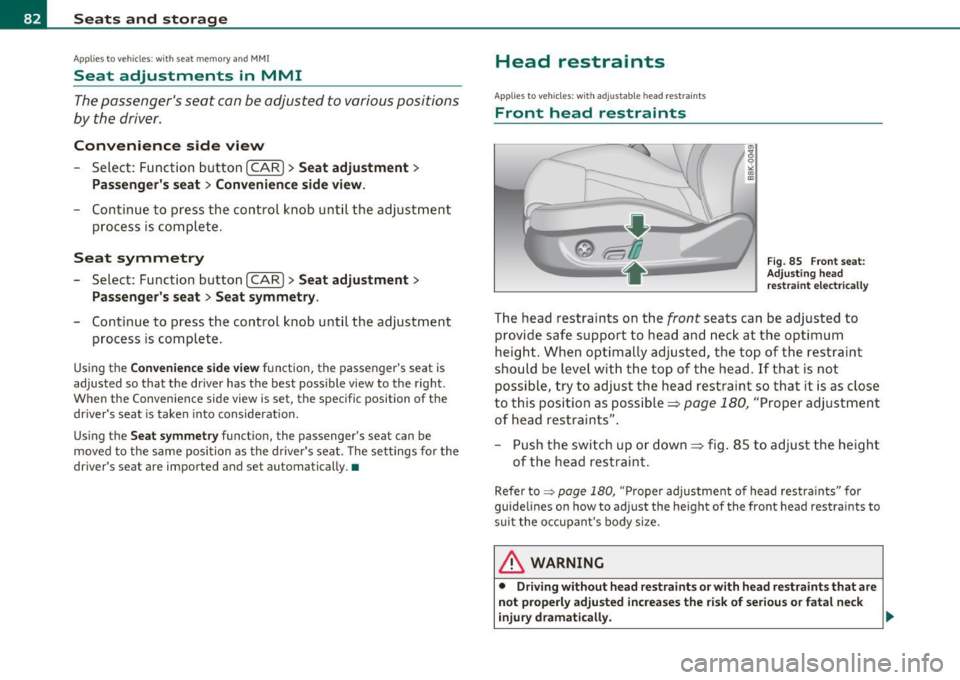
The head restraints on the front seats can be adjusted to
provide safe support to head and neck at the optimum
height. When optimally adjusted , the top of the restraint
should be level with the top of the head. If that is not possible, try to adjust the head restraint so that it is as close
to this position as possible~
page 180, "Proper adjustment
of head restraints".
- Push the switch up or down~ fig. 85 to adjust the height
of the head restraint.
Refer to:::::, page 180, "Proper adjustment of head restraints" for
guidelines on how to adjust the he ight of the front head restraints to
suit the occupant 's body size.
& WARNING
• Driving without head restraints or with head restraints that are
not properly adjusted increases the risk of serious or fatal neck
injury dramatically. .,
Page 85 of 364
& WARNING (continued )
• Read and heed all WARNINGS => page 180.
[ i J Tips
Cor rect ly ad just ed h ead r est ra int s and safe ty b elt s a re an extre mely
effective combination of safety features .•
Ap plies to veh icle s: wi th front arm rest
Front armrest
The center armrest can be adjusted to several levels.
Adjusting the center armrest
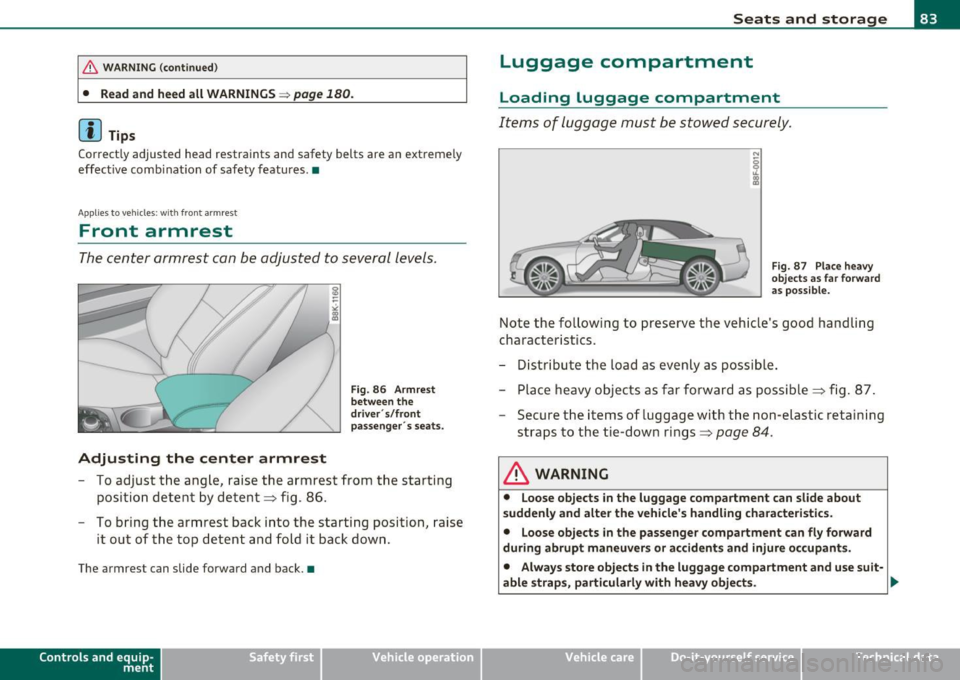
Fig. 86 Armrest
between the
driver · s/front
passenger· s seats .
- To adjust the angle , raise the armrest from the starting
pos ition detent by detent ::::> fig . 86 .
- To bring the armrest back into the starting position, raise
i t out of the top d etent and fold it back down .
The arm re st can slide forw ard a nd bac k.•
Con tro ls a nd e quip
m en t Vehicle
OP-eration
Seats and storage
Luggage compartment
Loading luggage compartment
Items of luggage must be stowed se curely.
Fig. 87 Place heavy
objects as far forward
as possible.
Note the following to preserve the vehicle's good handling
cha ract eris tics.
- Distribute the load as evenly as poss ible.
- Place heavy objects as far forward as possible ::::> fig. 87 .
- Secure the items of luggage with the non -elast ic retaining
straps to the ti e-down rings ::::>
page 84 .
& WARNING
• Loose objects in the luggage compartment can slide about
suddenly and alter the vehicle's handling characteristics.
• Loose objects
in the passenger compartment can fly forward
during abrupt maneuvers or accidents and injure occupants.
• Always store objects in the luggage compartment and use suit·
able straps, particularly with heavy objects.
~
Vehicle care Do-it-yourselt service iTechnical data
Page 89 of 364

• Only use the c igarette ligh ter socket as a powe r source for e lec
tr ical a ccesso ries f or short dur ations. Use the socke ts * in the ve hicle
when a powe r so urce is needed fo r lo nger durations.
[I] Tips
When the eng ine is of f and accessories ar e st ill plugged in and are on,
the ve hicl e battery can sti ll be draine d.•
Storage
General overview
There are num er ous pla ce s to stor e item s in your v eh ic le .
Glove com par tm en t =>page 87
& WARNING
• Always remove objects from the instrument panel. Any items
not put away could slide around inside the vehicle while driving or
when accelerating or when applying the brake s or when driving
around a corner .
• When you are driving make sure that anything you may have
placed in the center console or other sto rage locat ions cannot fall
out into the footwells. In case of sudden braking you would not be
able to brake, depress the clutch or accelerate. •
Controls and equip
ment Safety first
Seats and storage
Glove compartment
Th
e g lov e comp artmen t is i llum inat ed and c an be lo cked.
To open glove compartment
Fig. 94 Glov e
c om partment
- Pull the h andl e i n th e dir e ct ion of t he arro w ~ fig . 9 4 and
swi ng th e co ver d own to o pen.
To close glove compartment
-Push t he gl ove co mpa rtment lid upward u ntil t he lock
engages.
T he re are holders for a pen and a pad of paper in the glove compart
me nt lid.
On t he right s ide in the glove compartment is a holder with the key
body into w hich t he eme rgency key mus t be clip ped to be able to start
the vehicle.
& WARNING
To reduce the risk of personal injury in an accident or sudden stop, always keep the glove compartment closed while driving. •
Vehicle care Technical data