brake AUDI A5 CABRIOLET 2011 Workshop Manual
[x] Cancel search | Manufacturer: AUDI, Model Year: 2011, Model line: A5 CABRIOLET, Model: AUDI A5 CABRIOLET 2011Pages: 364, PDF Size: 86.48 MB
Page 174 of 364
Ill HomeLink® ..__ ______________ _
Applies to veh icles : w ith Homelin k® un iversa l remote control
Programming the Homel ink ® transmitter
The transmitter is programmed in two phases . For rolling
code transmitters, a third phase is also necessary .
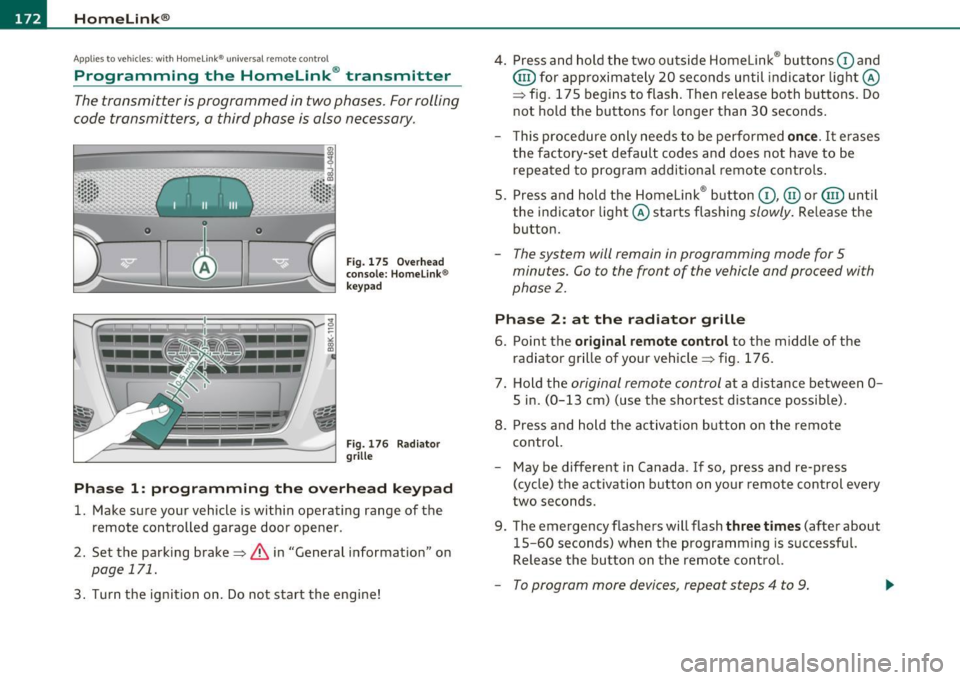
0
ct
Fig. 175 Ove rh ead
console: Homelink ®
keypad
F ig. 176 Rad iator
grille
Phas e 1: prog ramming th e ove rhead k eypad
1. Make sure your vehicle is within operating range of the
remote controlled garage door opener .
2. Set the parking brake=>&, in "General information " on
page 171.
3. Turn the ignition on . Do not start the engine! 4
. Press and hold the two outside Homelink ® buttons
G) and
@ for approximately 20 seconds until indicator light@
=> fig. 175 begins to flash . Then release both buttons . Do
not hold the buttons for longer than 30 seconds .
- This procedure only needs to be performed
once. It erases
the factory-set default codes and does not have to be repeated to program additional remote controls .
S. Press and hold the Homelink ® button
G) , @ or@ until
the indicator light@ starts flashing
slowly . Release the
button .
-The system will remain in programming mode for 5
minutes. Co to the front of the vehicle and proceed with
phase
2 .
Phase 2: at the radiator grille
6. Po int the original remote control to the middle of the
radiator grille of your vehicle=> fig. 176.
7 . Hold the
original remote control at a distance between O
S in. (0 -13 cm) (use the shortest distance possible).
8 . Press and hold the activation button on the remote
control.
- May be different in Canada . If so, press and re-press
(cycle) the act ivation button on your remote control every
two seconds.
9. The emergency flashers will flash
three t imes (after about
15-60 seconds) when the programm ing is successful.
Release the button on the remote control.
- To program more devices , repeat steps 4 to 9.
Page 184 of 364
........ _D_ r_iv _i_ n .... g=-- S_ a_f _e _Ly ,.__ ______________________________________________ _
& WARNING (continued)
• Always make sure that all vehicle occupants stay in a proper
seating position and are properly restrained whenever the vehicle
is being used. •
Driver and passenger side footwell
Applies to veh icles : w ith Knee ai rbags
Important safety instructions
& WARNING
Always make sure that the knee airbag can inflate without inter·
ference. Objects between yourself and the airbag can increase the
risk of injury in an accident by interfering with the way the airbag
deploys or by being pushed into you as the airbag deploys.
• No persons (children) or animals should ride in the footwell in
front of the passenger seat. If the airbag deploys, this can result in serious or fatal injuries.
• No objects of any kind should be carried in the footwell area in
front of the driver's or passenger's seat. Bulky objects (shopping bags, for example) can hamper or prevent proper deployment of
the airbag. Small objects can be thrown through the vehicle if the
airbag deploys and injure you or your passengers. •
Pedal area
Pedals
The pedals must always be free to move and must never
be interfered with by a floor mat or any other object.
Make sure that all pedals move freely without interference and that
nothing prevents them from returning to their original positions .
Only use floor mats that leave the pedal area free and can be secured
with floor mat fasteners.
If a brake circuit fails, increased brake pedal travel is required to bring
the vehicle to a full s top.
& WARNING
Pedals that cannot move freely can cause loss of vehicle control
and increase the risk of serious injury .
• Never place any objects in the driver's footwell. An object could
get into the pedal area and interfere with pedal function. In case
of sudden braking or an accident, you would not be able to brake
or accelerate!
• Always make sure that nothing can fall or move into the
driver's footwell. •
Floor mats on the driver side
Always use floor mats that can be securely attached to
the floor mat fasteners and do not interfere with the free
movement of the pedals.
- Make sure that the floor mats are properly secured and
cannot move and interfere with the pedals~& .
Page 185 of 364
________________________________________________ D_ r_ i_ v _i_n ""'g "-- S_a_ f_ e_ l _,,y'-- __
Use only floor mats that leave the pedal area unobstructed and that
are firmly secured so that they cannot slip out of position . You can
obtain suitable floor mats from your authorized Audi dealer.
Floor mat fasteners are installed in your Audi.
Floor mats used in your vehicle must be attached to these fasteners.
Properly securing the floor mats will prevent them from sliding into
positions that could interfere with the pedals or impair safe opera
tion of your vehicle in other ways .
& WARNING
Pedals that cannot move freely can result in a loss of vehicle
control and increase the risk of serious personal injury.
• Always make sure that floor mats are properly secured.
• Never place or install floor mats or other floor coverings in the
vehicle that cannot be properly secured in place to prevent them
from slipping and interfering with the pedals or the ability to
control the vehicle.
• Never place or install floor mats or other floor coverings on top
of already installed floor mats. Additional floor mats and other
coverings will reduce the size of the pedal area and interfere with
the pedals.
• Always properly reinstall and secure floor mats that have been
taken out for cleaning.
• Always make sure that objects cannot fall into the driver foot
well while the vehicle is moving. Objects can become trapped under the brake pedal and accelerator pedal causing a loss of
vehicle control. •
Controls and equip ment Safety first Vehicle operation
Stowing luggage
Loading the luggage compartment
All
luggage and other objects must be properly stowed
and secured in the luggage compartment.
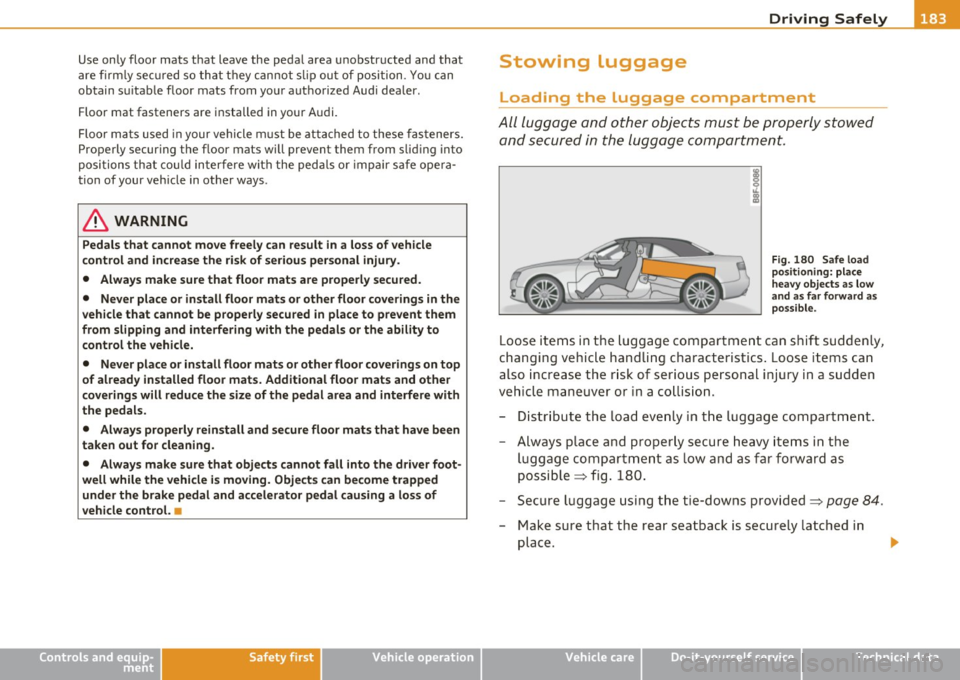
Fig . 180 Safe load
positioning: place
heavy objects as low
and as far forward as
possible.
Loose items in the luggage compartment can shift suddenly,
changing vehicle handling characteristics. Loose items can
also increase the risk of serious personal injury in a sudden
vehicle maneuver or in a collision.
- Distribute the load evenly in the luggage compartment.
- Always place and properly secure heavy items in the
luggage compartment as low and as far forward as
possible => fig. 180.
- Secure luggage using the tie-downs provided=>
page 84.
-Make sure that the rear seatback is securely latched in
place .
Vehicle care Do-it-yourself service Technical data
Page 243 of 364

Intelligent technology
--------------------------------------------------' "---.L==--
The system operates across the entire speed range in combination
w ith the ABS sys tem. If the A nti-L o ck Brak e System (A BS) mal fun c
tions, the ESP will also shut down.
How the system works
The Anti-Lock Brake System (ABS), Elect ronic D ifferential Lock (EDL)
and the Anti-Slip Regul ation System (AS R) are in teg rated in the e lec
tronic stab ilizat ion program . In addition to the data prov ided by
th ese fun ctions, the ESP control unit re quires addi tional meas ure
ment data provided by hig h pe rformance senso rs . The ro tat ional
speed of the vehicle about its vertical axis, veh icle acceleration in the
fore-and-a ft and lateral d irect ions, the brake pressure , a nd the
steerin g ang le are all measured .
Th e d irec tion in whi ch the driver w ishes to tra ve l is d ete rm ined wi th
the a id of the steering a ngle and ve hicle speed and is con tinually
c omp ared wi th the a ctu al b ehavior o f the ve hicl e. If t he two do no t
match, for example, when the vehicle starts hydroplani ng on a wet
roa d, E SP w ill automatica lly bra ke the approp riate whee l to correct
the problem.
Th e ve hicle is t hen stab ilized by the fo rces acting on the whee l during
bra king .
If the ve hicl e is oversteering (the vehicle tu rns too s harp ly
and the rear whee ls slide toward the outside of a curve), the brakes
a re mainly a pplied on the whee l tha t is o n the o uts ide of t he curve. In
the case of a vehicle that is
understeering (the vehicle does not turn
shar ply enough and push es out o f a curve), the b rakes are ap plied as
needed on the whee l th at is on the inside of the curve or additionally
on the ot her wheels . An acoustic s ignal indicates w hen ESP bra ke
applica tion cuts in=> &.
T he system operates across the entire speed range in combination
w ith the A BS system =>
page 245. If the A nti-Lo ck Br ake Sys tem
(ABS) ma lfunctions, the ESP w ill be o ut of act ion as we ll.
Activating
When you turn on the engine, ESP wi ll automatica lly be activated and
w ill pe rfor m a self- tes t. As soo n as t he tes t is c om plete d, th e sys tem
is in normal operating mo de.
Controls and equip
ment Safety first Vehicle operation
Yo
u can activate a deactivated ESP or deactivated ESP/ ASR if required
b y pressi ng the =>
page 240, fi g. 2 13 => page 240, fig. 2 12 bu tton.
Wh en they are activated, the message
Stabilisation program on
appears briefly in t he di sp lay .
Deactivating
The ES P shoul d no rma lly be acti va te d a ll the tim e. I f necess ary, y ou
can deact ivate A nti-Slip Reg ulat io n (ASR) or th e Electro nic Sta biliza
t ion Progr am ( ES P) by p ress ing the button =>
page 2 40, fig. 213.
• Deactivating ASR: Tap th e button . In cer tain exceptional s itua
t ions (e.g. driving with tire chains), the Anti -Slip Reg ulation (ASR) can
be dea ct iva te d =>
page 242. The m ess age ASR off Caution! Limited
driving stability
a pp ears in the d isp lay as well.
• Deactivating ESP/ASR Press the but ton for mor e tha n 3 seconds .
With the ESP/ASR deactivated, t he ESP check light comes o n, see
=>
p age 14. The m ess age Warning! Restri cted stability ap pears in
the display as we ll.
& WARNING
The Electronic Stabilization Program is nevertheless subje ct to the
laws of physics . It is particularly important to pay attention to
this fact on wet and slippery roads. It is therefore important that
you always adapt your driving to the condition of the road and
traffic conditions . Do not allow the increased safety provided by
the Electronic Stabilization Program system to lull you into accepting additional safety risks .
u
Vehicle care Do-it-yourself service Technical data
Page 244 of 364
Intelligent t echnology
---------------------------------------
Electronic differential lock (EDL)
The elec tronic differen tial lock monitors the rotational
speed of the drive wheels.
G en era l not es
The electronic differentia l lock (EDL) helps the ca r to sta rt moving,
accelerate and climb a gradient on surfaces provid ing poor or almost
no grip . W ithout ED L, this would be d iff icu lt, if not impossible.
How the sy stem works
The EDL operates automatically. It mo nitors the rota tional speed of
wheels with the help of the ABS sensors=>
page 245. If a not iceab le
slip is detected at the wheels (e.g. on slippery g round on one side),
the spinn ing wheels are braked and power is transferred to the other
wheels . This is done up to a speed of about 60 mph (100 km/h).
No ises from the brake system signal that wheel sp in is being
controlled.
Driv ing off
When d riving off, always be s ure to keep road conditions in mind as
you accelerate. If one drive wheel spins because it is on a surface with
less grip, apply
plenty of throttle until the car starts to move.
O verheating of bra kes
To prevent the disc b rake of the bra ked wheel from ove rhea ting if
subjected to excessive loads on this wheel, the EDL cuts out tempo
ra rily. The vehicle remains operat io nal and be haves in the same way
as a veh icle without EDL.
As soon as the brake has coo led down, EDL switches on again auto
matically.
Electronic limited slip differential
In vehicles w ith front wheel drive *, an e lectron ic lim ited slip d ifferen
tial engages when driving on curves . The brakes are applied spec ifi
cally to the front wheel that is on the inside of the curve. T his m ini
m izes sliding on the front wheels and enables precise and neutral dr
iv ing t hrouge curves. The electronic lim ited slip differentia l does
no t engage whe n driving in we t cond it io ns or snow.
& WARNING
• Wh en acc elerating on slipp ery s urface s, such a s on ice or snow,
always be careful when depre ssing the accele rator pedal. Even
with the EDL and the electroni c limited slip differential working,
the dr ive wh eels can spin and reduce you r ability to control your
c ar . -Ri sk of cra sh!
• The increased safet y afforded b y EDL and the electronic l imited
slip differ ential d oes not mean th at you can take safety risks .
Alw ay s adapt your d riving st yle to the road c onditions and traffi c
si tuation.
[ i ] Tips
If a fa ult occurs in the ABS, the EDL is also not funct ioning. This is
ind icated by the ABS warn ing light=>
page 15 . •
Anti-Slip Regulation System (ASR)
The Anti-Slip Regulation System prevents the driven
wheels from spinning when the car is a ccelerating.
General notes
T he Anti-Slip Regu lation System (ASR) is in tegrated in the electronic
stabilization program (ESP) . When the veh icle starts up and acceler
a tes, the wheels are preven ted from sp inning by adjust ing the engine
power to match the amount of grip ava ilable from the road surface.
How the system works
ASR performs automatica lly, i.e. without the driver's intervent ion.
With the a id o f the ABS sensors=>
page 245, ASR moni tors the speed
of the driven wheels. If the wheels start to spin, engine torque is
reduced automatically unti l the tires find enough grip to lock onto
the road s urface. The system is active across the entire speed range . .,
Page 245 of 364

Intelligent technology
--------------------------------------------------' "---.L==--
The ASR works in conjunction with the ABS. If a malfunction should
occur in the ABS, the ASR w ill also be out of action.
Activating
The ESP is automatically activated when the engine is started and it
performs a self-test. You can activate a deactivated ASR if required by
pressing the=>
page 240, fig. 213 button. When it is activated, the
message
ESP/ASR on appears briefly in the display .
Deactivating
You can deactivate the ASR if required by pressing the button (for less
than 3 seconds) =>
page 240, fig. 213. With the ASR deactivated , the
ESP check light comes on, see=>
page 14 . The message ASR off
appears in the display as well. The ASR can be deactivated at any
speed .
The ASR should normally be activated a ll the time. Only in certain
exceptional situations when some slip is desirable does it make sense
to deactivate the ASR. Examples:
• when driving with tire chains
• when driving in deep snow or on loose ground and
• when rocking the vehicle loose after it has become stuck .
When the abnormal situation is over, you should activate the ASR again.
& WARNING
The increased safety afforded by ASR does not mean that you can
take safety risks. Always adapt your driving style to the road
conditions and traffic situation.
[I] Tips
To ensu re that the ASR works properly, all four whee ls must be fitted
with ident ical t ires. Any differences in rolling radius of the t ires can
cause the system to reduce eng ine power when this is not desired.
See also=>
page 307, "New tires and replacing tires and wheels". •
Safety first
Braking
General information
What affects braking efficiency?
Operating conditions and driving habits
The brakes on today's automobiles are still subject to wear,
depending la rgely on ope rating conditions and driving habits=>& .
On vehicles that are either driven mostly in stop-and-go city traffic or
are driven hard, the brake pads should be checked by your authorized
Audi dealer more often than specified in the
Warranty & Mainte
nance booklet.
Failure to have your brake pads inspected can result
in reduced brake performance .
On steep slopes, you should use the braking effect of the engine. This
way, you prevent unnecessary wear on the brake system. If you must
use your brakes, do not hold the brakes down continuously. Pump the
brakes at intervals.
Noises may occur when brak ing depending on the speed, braking
force and outside cond itions such as temperatu re and humid ity.
Moisture or road salt
If you are driving faster than 31 mph (50 km/h) and the windshield
wipers are on, the brake pads will briefly touch the brake discs in
regula r interva ls so as to improve reaction time when braking on wet
surfaces. You, the driver, will not not ice anything.
Under certain condit ions, for example, when driving through water or
very heavy rai n, or even after washing your vehicle, the braking effect
can be reduced due to moisture (or in free zing conditions ice) on the
bra ke pads. A few careful brake applications should dry off the brake
pads or remove any ice coatings.
Th e effectiveness of the brakes can be reduced when the vehicle is
dr iven on a salt-covered road and the brakes are not used. H ere too,
you should clean off accumu lated salt coating from brake discs and
pads with a few careful applications of the brake=>&,.
Vehicle care Technical data
Page 246 of 364

Intelligent technology
'-------------------------------------------------
Corrosion
T he re may be a te ndency fo r d irt to build u p on the bra ke pads and
co rrosion to form on the d iscs if the car is not dr iven reg ularly o r only
for short trips with litt le use of the bra kes .
If the brakes a re not used freq uen tly, or if co rrosion has formed o n
the discs, it is advisable to clean off the pads and discs by braking
fir mly a few times from a mode rat ely h igh spee d~ & .
Faults in the brake system
If yo u sh ou ld noti ce a sudden increase in b rake peda l trave l, then one
of the two brake circu its may have failed~& .
Low brake fluid level
Ma lfunctions can occ ur in t he brake system if the brake fluid level is
t oo low. The bra ke f lu id level is moni tore d elec tron ically.
Brake lin ing wear status
Brake lin ing wear may be checked by v isua l inspect ion of the condi
tion of the brake pads throu gh the open ings in the whee l.
If neces
sary, the whe el may be removed fo r thi s insp ection~
page 320,
"Changing a w hee l".
& WARNING
• You should perform braking maneuvers for the purpose of
cleaning the brake system only if road conditions permit. Other
road users must not be put at risk - you may cau se an accident!
• Before descending a steep grade, reduce speed and shift trans
mission into a lower gear or lower driving range. Do not ride the
brakes or hold the pedal down too long or too often . This could
cause the brakes to get hot and diminish braking efficiency.
• Do not "ride the brakes " by resting your foot on the pedal when
you do not intend to brake . This may cause the brakes to overheat ,
premature wear and increased stopping distance.
• Under certain climatic and operating condition s such as
passing through water , driving in heavy rain or after washing the
& WARNING (co ntinued )
vehicle, the effectiveness of the brakes can be reduced . In winter,
ice can ac cumulate on the brake pads, linings, dis cs and drums.
Carefully apply brakes for a test. Brakes will dry and ice coatings
will be cleaned off after a few careful brake appli cations.
• Driving for an extended period of time on salt-covered roads
without u sing your brakes can also affect braking efficiency . Clean
off accumulated salt coating from b rake discs and pads with a few
careful brake applic ations.
• If you damage the front spoiler, or if you install a different
spoiler, be sure the air flow to the front brakes i s not obstructed .
Otherwise the brake system could overheat reducing the effective
ness of the entire brake system.
• Failure of one brake circuit will impair the braking capability
resulting in an increased stopping di stance. Avoid driving the
vehicle and have it towed to the nearest authorized Audi dealer or
qualified workshop.
n
Brake booster
The b roke boost er odds extra broking po wer.
The bra ke boos ter wor ks wi th v acuum pressure whi ch is crea ted o nly
when the eng ine is ru nning~ &.
& WARNING
• Never let the vehicle roll to a stop with the engine shut off.
• If the brake booster is not working, for example when towing
your vehicle , or because the brake booster has somehow been
damaged, the brake pedal mu st be pressed considerably harder to
make up for the lack of booster assistance. •
Page 247 of 364
Intelligent technology
--------------------------------------------------' '----'----
Functioning of Anti-Lock Brake System
(ABS}
ABS prevents the wheels from locking up under braking.
The ABS contributes effectively to vehicle control since it prevents the
w heels from
locking whe n the brakes are applied . This means t hat t he
vehicle rema ins steerable and is less likely to skid.
With ABS you do not need to pump the brake. Ju st hold the brake
pedal down .
However, do not expect the ABS to shorten braking distance under all
circu mstances. When d riving on gr ave l o r on new ly falle n snow o n top
of icy s urfaces, braking distance may be even longer, therefore, under
t he se c ir cu mstances, i t is especially importa nt that you dr ive slowly
and with great care.
How the ABS system works
An a utomat ic check is made when a speed of about 12 mph (20 km/h)
is reached. When this happens, a pumping noise can be heard.
If an individ ual w heel beg ins to rotate too slow ly in relat ion to vehicle
speed and tends to lock, t he ABS automat ic al ly reduces brake pres
sure to prevent t hat wheel from locking .
Thi s automatic adjustment process w ill cause a
slight vibrat ion of
t he bra ke ped al and some noises to aler t you th at vehicle s peed mus t
be adapted to existing road and traff ic conditions.
& WARNING
Although the ABS is very effective , always remember that braking
capability i s limited by tire traction . Always adjust your driving
speed acco rding to the road and traffic condition s. Do not let the
extra safety afforded by the ABS tempt you into taking extra risk s.
T he ABS cannot overcome the laws of physics .
Controls and equip ment Safety first Vehicle operation
(I] Tips
•
If ABS is no t fun ct io ni ng prope rly, a wa rning light will come on .
See =>
page 15.
• If a fault occurs in the A BS, the EDL is also not functioning . This is
indicated by t he ABS warn ing light .•
Brake assist
Brake assist is designed to achieve the optimum braking
effect.
Bra ke ass ist helps to i ncrease the effe ctive br aking power and thus to
achieve a shorte r stopping distance . If the d river presses the brake
peda l very quickly, brake assist automatically boosts the bra king
force to the max imum level, up to the po int whe re the anti-lock b rake
function (ABS) intervenes to stop t he wheels from locki ng . You
should then keep the br ake peda l pressed unti l the veh icle has braked
to the required speed . Brake ass ist switches itself off as soon as you
re le ase the br ake pedal.
& WARNING
Please remember that the accident risk always increases if you
drive too fast , especially in corners or on a slippery road , or if you
follow the vehicle ahead of you too clo sely. Increased ri sk of an
accident cannot be compensated for even by brake assist , so
alway s maintain a safe speed .•
Vehicle care Do-it-yourself service Technical data
Page 252 of 364
Driving and environment
Driving and environment
The first 1,000 miles (1,500 km)
and afterwards
New engine
The engine needs to be run-in during the first 1,000 miles
(1,500 km) .
For the first 600 miles (1,000 kilometers):
Do not use full throttle .
- Do not drive at engine speeds that are more than 2/3 of
t h e m aximimum permitted RP M.
- Avoi d high engine speeds .
From 600 to 1,000 miles (1,000 to 1,500
kilometers):
- Spe eds can
gradually be inc reased to th e maximu m
permissib le road o r engin e sp ee d.
During and after break-in period
- Do not rev the engine up to high speeds w hen it is cold.
This applies whet her th e tra nsmission is i n N (N eutral) or
1n gear .
After the break-in period - Do not exceed max imum e ngi ne spee d und er any circu m
s ta nces .
- Upshi ft i nto the next hi gher g ear
befor e reachi ng the red
ar ea at t he end o f th e t achometer scale =>
pag e 8.
Dur ing the first f ew ho urs of d riving, the engine 's interna l frictio n is
higher than later when a ll the mov ing pa rts have been b ro ken in . How
we ll thi s brea k-in p roce ss is do ne depe nds to a considerable exte nt on
the way the veh icle is driven dur ing the first 1,000 m iles ( 1,500 ki lo
me te rs).
0 Note
E xtremely high engine s peeds a re au tom atic ally re duced . H owever,
these rpm limits are program med fo r a n engine we ll run-in, not a new
eng ine .
For the sake of the environment
Do not drive w it h u nnecessari ly h igh eng ine speeds -upsh ifting early
saves fuel, reduces noise and protec ts the env ironment .•
New tires
If y our v ehic le is ru nni ng on new t ires, d rive very ca refu lly for
the firs t 350 miles ( 500 kilome ters) afte r fitt ing .
& WARNING
New tires tend to be slippery and must also be "broken-in ". Be
sure to remember this during the first 350 miles (500 kilome
ters ). Brake gently. Avoid following closely behind other vehicle s
or other situations that might require sudden, hard brak ing. •
Page 253 of 364
Driving and environment
----------------------------------------------'
New brake pads
- -
Remem ber th at new brake pads do not have a full braking
e ffe ct du ring the first 250 mi les (400 ki lo mete rs) afte r they
are in sta lle d .
N ew br ake pads have to be " burnishe d in" before they have op tim al
grab~ &-
Dur ing the break-in period, you sho uld avoid putting severe loads on
the brakes . Severe loads include, for example, sudden ha rd bra king,
in part icu lar at very high s peeds o r, for example, on mountain passes .
& WARNING
New brake pads don't have the best stopping power and must be
" broken-in " during the in itial 100 to 150 miles (150 to 200 kilo
meters) of normal city driving. You can compensate for this by
pressing the brake pedal mor e firmly . This also applies later when
new pads are installed. n
Avoid damaging the vehicle
When yo u are driving on poor roads, or over c urbs, steep ramps, etc.,
ma ke ce rtain that low-lying pa rts su ch as spoilers and exhaust system
parts do not bottom out and get damaged .
This is es peciall y tr ue for veh icle s wi th low-slung chass is (sports
chassis)" and fully loaded vehicles. •
Driving through water on roads
Note the following to avoid vehicle damage w hen drivi ng through
water, fo r examp le on floode d roa ds:
Controls and equip
ment Safety first Vehicle operation
•
The wate r must not be any higher than the bottom of the vehicle
body .
• Do not drive faster than wa lking speed.
& WARNING
After driving through water , mud , slush , etc ., the brakes may be
slow to take effect because of wet brake rotors and pads . Dry the
brakes first by braking carefully to resto re the full braking effect.
0 Note
Vehicle components such as the engine, transmiss ion, suspension or
ele ct ric al sy stem can be severe ly d amaged by driv ing thro ugh wa ter.
[ i ] Tips
• C heck the de pth o f th e wate r before driving thr oug h it.
• Do not stop the vehicle, drive in reverse or switch the engine off
w he n dr iving throug h wate r.
• Keep in m ind that oncoming vehicles may c reate waves t hat raise
t he water leve l and make it too deep fo r yo ur vehicle t o drive thr oug h
safely.
• Avoid drivi ng through sal t wa ter because it can cause corros io n.
Catalytic converter
It is very important th at your emission control s ystem
( c a ta lytic co n verter) is functionin g proper ly to e nsure
th at y our ve hicl e is ru nn in g in an en vir onm entally sound
m ann er.
- Alwa ys use lead- free g asoline=> p ag e 274, "Fuel sup ply".
- Never ru n the tan k down a ll the way to empty . .,
Vehicle care Do-it-yourself service Technical data