key AUDI A5 CABRIOLET 2011 Workshop Manual
[x] Cancel search | Manufacturer: AUDI, Model Year: 2011, Model line: A5 CABRIOLET, Model: AUDI A5 CABRIOLET 2011Pages: 364, PDF Size: 86.48 MB
Page 165 of 364

______________________________________________________ P_a _ r_ k_ a_ s_s _i _ s _t __ _
Please note that low objects already signaled by a warning can disap
pear from the system's detection range and will not continue to be
signaled.
If the distance to an obstacle remains the same, the vo lume of the
distance warning is gradually reduced after about 4 seconds.
Approaching another obstacle will result in the distance warning
sounding at the normal volume again.
Malfunctions in the system
If a warning tone is aud ible for about five seconds when you turn on
the ignition , there is a malfunction in the system. Have the problem
corrected by your authorized Audi dealer.
Keep the sensors in the rear bumper clean and free from ice so that
the acoustic park assist system can function properly.
& WARNING
• Sensors have dead spaces in which objects cannot be detected.
Be especially alert for small children and animals, since they are
not always detected by the sensors.
• The Acoustic Parking System is not a substitute for the driver's
own caution and alertness. Ultimate respon sibility always
remains with the driver during parking and similar maneuvers.
Always watch where you are driving.
• You should always adjust the volume and frequency of the
chimes so that you can easily hear the acoustic distance warning
even if the radio is playing, the air-conditioner blower is on High
or there is a high level of outside noise .
- Check the settings whenever anyone else has driven the
vehicle before you.
0 Note
• Remember that low obstacles for which a warning has already
been issued may "dive" below the system 's sensing zone if the veh icle
is be ing backed up closer . In this case, the warning sound shutting off
Controls and equip
ment Safety first
does not ind
icate that you have cleared the obstacle . Instead, impact
is immin ent.
• Objects such as trai ler hitches, chains, narrow posts or fences
covered by a thin layer of paint may not always be detec ted by the
system . They can still damage your vehicle w ithout warning .
lI] Tips
Keep the sensors in the rear bumper clean and free of snow and ice so
that the aco ustic parking assist system can function properly.•
Applies to ve hicle s: wit h pa rkin g system (re ar)
Adjusting the chimes
The volume and the pitch (frequency) of the chimes can
be adjusted in the radio or in the /11/111*.
Rear volume adjustment
-Select: [CAR]> Parking system .
- Select Rear volume if you want to change the volume of
the rear signal generator.
Rear frequency adjustment
- Select: [CAR]> Parking system.
- Select Rear frequency when you want to change the
frequency of the rear audible signal generator.
When adjusting the volume and frequency, the new sett ing will
sound for approx. 2 seconds from each audib le signal generator. The
vol ume and frequency settings are automatically stored and assigned
to the master key with remote control. .,_
Vehicle care Technical data
Page 172 of 364
![AUDI A5 CABRIOLET 2011 Workshop Manual lffl!I.__ __ P_a _ r_ k_ a_ s_ s_is _ t ____________________________________________________ _
(I] Tips
• The warn ing tones can a lso be adjusted d irectly by the v isua l
display or](/img/6/57571/w960_57571-171.png "AUDI A5 CABRIOLET 2011 Workshop Manual lffl!I.__ __ P_a _ r_ k_ a_ s_ s_is _ t ____________________________________________________ _
(I] Tips
• The warn ing tones can a lso be adjusted d irectly by the v isua l
display or")
lffl!I.__ __ P_a _ r_ k_ a_ s_ s_is _ t ____________________________________________________ _
(I] Tips
• The warn ing tones can a lso be adjusted d irectly by the v isua l
display or the picture from the rearview camera . Simp ly press the
S ettings cont rol button .
• Changed settings are activated when parking system is switched
on again .
• T he settings are automatically stored and assigned to the remote
control key .•
Ap plies to vehicles: w ith pa rking System (rear) a nd rea r-view ca mera
Acoustic parking system error message
If a warning tone is audible for abo ut five seconds when you tur n on
the ignition, the re is a ma lfunction in the system. Have the problem
corrected by your authorized Audi dea ler.
Keep the se nsors i n the rea r bumper clean and free from ice so t hat
the acoustic park assist system can function properly. •
Page 174 of 364
Ill HomeLink® ..__ ______________ _
Applies to veh icles : w ith Homelin k® un iversa l remote control
Programming the Homel ink ® transmitter
The transmitter is programmed in two phases . For rolling
code transmitters, a third phase is also necessary .
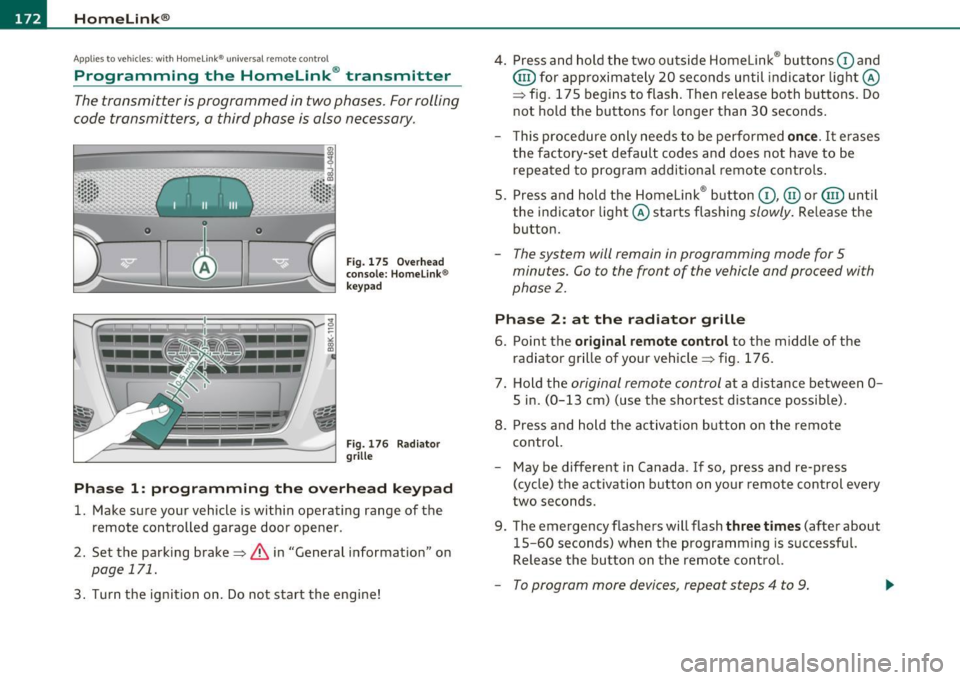
0
ct
Fig. 175 Ove rh ead
console: Homelink ®
keypad
F ig. 176 Rad iator
grille
Phas e 1: prog ramming th e ove rhead k eypad
1. Make sure your vehicle is within operating range of the
remote controlled garage door opener .
2. Set the parking brake=>&, in "General information " on
page 171.
3. Turn the ignition on . Do not start the engine! 4
. Press and hold the two outside Homelink ® buttons
G) and
@ for approximately 20 seconds until indicator light@
=> fig. 175 begins to flash . Then release both buttons . Do
not hold the buttons for longer than 30 seconds .
- This procedure only needs to be performed
once. It erases
the factory-set default codes and does not have to be repeated to program additional remote controls .
S. Press and hold the Homelink ® button
G) , @ or@ until
the indicator light@ starts flashing
slowly . Release the
button .
-The system will remain in programming mode for 5
minutes. Co to the front of the vehicle and proceed with
phase
2 .
Phase 2: at the radiator grille
6. Po int the original remote control to the middle of the
radiator grille of your vehicle=> fig. 176.
7 . Hold the
original remote control at a distance between O
S in. (0 -13 cm) (use the shortest distance possible).
8 . Press and hold the activation button on the remote
control.
- May be different in Canada . If so, press and re-press
(cycle) the act ivation button on your remote control every
two seconds.
9. The emergency flashers will flash
three t imes (after about
15-60 seconds) when the programm ing is successful.
Release the button on the remote control.
- To program more devices , repeat steps 4 to 9.
Page 175 of 364

HomeLink® -_______________ __.
10. Press and hold the trained Homelink ® button and
observe the indicator light©~
page 172, fig. 175 .
- If the indicator light is solid/continuous, programming is
complete and your device should activate when you press
and release the trained Homelink ® button.
- If the indicator light blinks rapidly for 2 seconds and is
then a solid/continuous light, proceed with phase 3 to program a rolling code device .
Phase 3: rollin g code progr amm ing
- A second person on a ladder who can safely reach the
garage door opener motor is recommended.
11. Locate the "learn" button on the garage door opener
motor (refer to the operating instructions for the opener,
as the location of this button may vary by manufacturer) .
12. Press and release the learn button on the garage door opener motor.
- Note: once the button is pressed, there are 30 sec ond s in
which to initiate the next step.
13. On the Homelink ® keypad inside the vehicle, firmly press
and hold the Homelink ® button previously programmed
in phases 1 and 2 for two seconds and release. Repeat this
sequence
twice .
-Some vehicles may require the press/hold/release
sequence up to three times to complete the training
process.
-HomeLink ® should now activate your rolling code
equipped device.
Con tro ls a nd e quip
m en t Vehicle
OP-eration
If the 5 minute time limit is exceeded, the em erge ncy fla shers w ill
fla sh on e t ime
to indicate that the process has been terminated. In
this case, repeat steps 4 through 9 .
If the emergency flashers do not flash
three times (after about 15-
60 seconds), programming was not successful. In this case, repeat
steps 4 through 9.
Remote control un its for garage door openers in Canada are set to
stop transmitt ing radio frequency signals after two seconds. This
time may not be sufficient for the Home link ® system to learn the
rad io frequency signal. Perform all other steps as described above .•
Applies to veh icles: with Homelin k® universal re mote cont rol
Operating the Homelink ® transmitter
The HomeLink ® transmitter works in the some manner as
the original hand held remote control that come with the
system.
Fig. 177 Overhead
conso le: Homeli nk®
k ey pad
- Press the appropriate programmed button G),@ or @
to activate the desired remote control function
~ & in
"General information" on
page 171. •
Vehicle care Do-it-yourselt service iTechnical data
Page 176 of 364
1111....__H_ o_ m __ e_L _ i_n _k_ ®_ • _________________________________________________ _
Applies to veh icles : w ith Home link® un iversa l remote cont rol
Reprogramming a single button
A Homelink ® button can be reprogrammed individually
without affecting the other button allocations .
Programming the overhead keypad
Press the appropriate Homelink ® button until the indi
cator light begins flashing slowly.
At the radiator grille
1. Point the original remote control to the middle of the
radiator grille of your vehicle~
page 172, fig. 176.
2.
Hold the original remote control at a distance between O
S
in . (0-13 cm) (use the shortest distance possible) .
3. Press and hold the activation button on the remote
control.
4. The emergency flashers will flash
three times (after about
15-60 seconds) when the programming is successful.
Now release the button on the remote control.
- If the device utilizes a rolling code, please follow phase 3
of ~
page 172, "Programming the Homelink ® trans
mitter" for rolling code programming.
This procedure will cause the existing programming on the
Homelink® button to be erased! •
Applies to vehicles: with Home link® un iversa l remote cont rol
Erasing the programming of the
Homelink ® transmitter
When you erase the programming, the programming on
all three of the transmitter channels with be lost!
- Perform steps 1 to 4 as described on~ page 172, "Phase
1: programming the overhead keypad".
When completed, the Homelink® system will be in the programming
mode and is then ready to learn the codes for remote controlled
devices.
[I) Tips
• Programmed buttons cannot be eras ed individually.
• For security reasons you are advised to erase the programming of
the HomeLink ® system before you sell your vehicle. •
Page 194 of 364
___ s_a_ f_ e_ t_ y _ b_e _l_t _s ___________________________________________ _
Safety be lts attach passe ngers to t he car an d give th em the benef it of
b ei ng s lo we d d own mor e gentl y or "so ftly" throu gh th e "give" in the
sa fety bel ts, crush z ones a nd oth er safety feat ures engin eered in to
today 's vehicles . By "absor bing" the kinetic e ner gy over a lo ng er
p eriod of time, th e saf ety belts make the forces o n th e body mor e
"to lerable" and less likely to ca use inju ry .
Alt hou gh the se ex amp les a re based on a fr ontal col lis ion, safety bel ts
can a lso s ubstantially red uce the risk of in jur y in other ki nds of
cras hes. So , whe ther you 're o n a long tri p o r ju st go in g to th e co rner
sto re, a lways b uckle up a nd make sure others do, too. Accident statis
t ics s how t hat vehi cle occupan ts properly wea rin g safety belts have a
lower risk of bei ng in jured and a muc h better cha nce of s urvivi ng an
acc ident. Properly usi ng safety belts also greatly increases the ability
of the supp lemental a irbags to do t heir job in a co llisio n. For this
reason, wea ring a safety belt is lega lly re quir ed in most countries
including muc h of th e Uni ted Stat es and Canad a.
Altho ugh your Audi is equipped with a irbags, yo u still have to wear
t he s afety bel ts provi ded. Fr ont airba gs, for ex ample, are activ ated
only in some fro nta l collisions . T he front a irbags are not activated in
all fr ont al collis ions, in side and re ar co llisions, in ro ll overs or in cases
w her e th er e is no t enough d ecelerat io n t hroug h im pac t to th e fron t
o f th e ve hicle. T he same goes for the ot he r air bag sys tems in yo ur
Audi. So, always wear your saf ety be lt and make sure eve rybody in
your vehicle is properly restrai ned! •
Important safety instructions about safety
belts
S afety bel ts m ust alw ays b e co rre ctly po sitio ned a cross
t he str ongest bones o f your bo dy.
- Al ways we ar saf ety be lts as illustra te d an d descri bed i n
this c hapter.
- M ake sure that your s afet y be lts are alw ays re a dy f or use
a nd a re n ot d amaged .
& WARNING
Not wearing safety belts or wearing them improperly increases
the risk of serious personal injury and death. Safety belts can work only when used correctly.
• Always fasten your safety belts correctly before driving off and
make sure all passengers are correctly restrained.
• For maximum protection , safety belts must always be posi
tioned properly on the body.
• Never strap more than one person, including small children,
into any belt.
• Never place a safety belt over a child sitting on your lap.
• Always keep feet in the footwell in front of the seat while the
vehicle is being driven.
• Never let any person ride with their feet on the instrument
panel or sticking out the window or on the seat.
• Never remove a safety belt while the vehicle is moving. Doing
so will increase your risk of being injured or killed.
• Never wear belt s twisted .
• Never wear belts over rigid or breakable objects in or on your
clothing, such as eye glasses, pens, keys, etc., as these may cause
injury .
• Never allow safety belts to become damaged by being caught
in door or seat hardware.
• Do not wear the shoulder part of the belt under your arm or
otherwise out of position.
• Several layers of heavy clothing may interfere with correct
positioning of belts and reduce the overall effectiveness of the
system .
• Always keep belt buckles free of anything that may prevent the
buckle from latching securely . .._
Page 197 of 364
Safety belt position
Correct belt position is the key to getting maximum
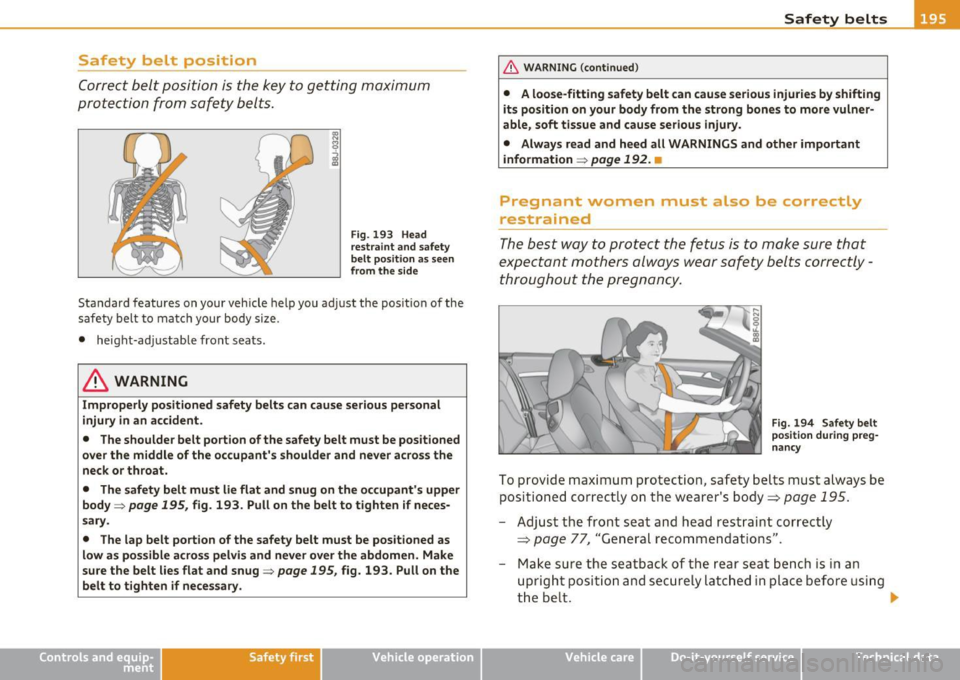
protection from safety belts.
Fig. 193 Head
restraint and safety
belt pos ition as seen
from the side
Standard features on your vehicle help you adjust the position of the
safety belt to match your body size.
• height-adjustable front seats.
& WARNING
Improperly positioned safety belts can cause serious personal
injury in an accident.
• The shoulder belt portion of the safety belt must be positioned
over the middle of the occupant's shoulder and never across the
neck or throat.
• The safety belt must lie flat and snug on the occupant's upper
body =>
page 195, fig. 193. Pull on the belt to tighten if neces
sary.
• The lap belt portion of the safety belt must be positioned as
low as possible across pelvis and never over the abdomen. Make
sure the belt lies flat and snug=>
page 195, fig. 193. Pull on the
belt to tighten if necessary.
Safety first Vehicle OP-eration
Safety belts
& WARNING (continued)
• A loose-fitting safety belt can cause serious injuries by shifting
its position on your body from the strong bones to more vulner
able, soft tissue and cause serious injury.
• Always read and heed all WARNINGS and other important
information =>
page 192. •
Pregnant women must also be correctly
restrained
The best way to protect the fetus is to make sure that
expectant mothers always wear safety belts correctly -
throughout the pregnancy.
Fig. 194 Safety belt
position during preg·
nancy
To provide maximum protection, safety belts must always be positioned correctly on the wearer's body ===>
page 195.
- Adjust the front seat and head restraint correctly
===> page 77, "General recommendations".
- Make sure the seatback of the rear seat bench is in an
upright position and securely latched in place before using
the belt. •
I .
Vehicle care Do-it-yourselt service iTechnical data
Page 250 of 364
Intelligent technology
'-------------------------------------------------
vi dual components. It regulates consumption, so that more electrical
energy is not being used than is being generated and ensures an
optimal state of charge for the battery .
[I] Tips
• But even energy management cannot negate the limits of physics.
Consider that the power and life of a battery are limited.
• If starting ability is threatened, you are informed by a warning
~ page 249, "Driver notification in the instrument cluster display" .•
What you should know
The highest priority is given to maintaining starting capa
bility.
Th e battery is severe ly taxed in short-distance driving, in city traffic
and during the cold time of year. Abundant electrical energy is
required, but only a little is generated.
It is also critical if the engine
is not running and electrical components are turned on. In this
instance energy is being consumed but none is being generated.
It is in prec ise ly these sit uations that you will notice energy manage
ment actively regulating the distribution of energy.
Vehicle stands for an extended period
If you do not drive your vehicle over a period of several days or weeks,
electrical components are gradually cut back or sw itched off. This
reduces energy consumption and maintains starting capability over a
longer period.
Take into consideration that when you unlock your vehicle, some
convenience functions, such as the remo te key or power seat adjust
ment, may not be available. The convenience functions will be avail
able again when you turn on the ignition and start the engine.
W ith the engine turned off
If you listen to the radio, for example, with the engine turned off or
use other MMI functions, the battery is being discharged .
If starting capability is jeopardized due to energy consumption, the
following warning appears in the MMI display:
Please start engine, otherwise system will switch off in
3 minutes.
Th e warn ing indicates that the system will be turned off automati
cally after 3 m inutes. If you wish to continue using the functions, you
have to start the engine.
With the engine running
Although electrica l energy is generated when the vehicle is being
driven, the battery can become discharged. This happens most ly
when little energy is being generated and a great deal consumed and
the battery's state of charge is not optimal.
T o br ing the ene rgy balance back into equilibrium, consumers which
require especially large amounts of energy are temporarily cut back
or switched off. Heating systems in particular require a great deal of
energy .
If you notice, for example, that the heated seats* or the
heated rear window are not heating, they have been temporarily cut
back or switched off. These systems will be ava ilable again as soon as
the energy ba lance has been restored.
You will also notice that engine idle speed has been increased
slightly. This is normal and not a cause for concern. By increasing
eng ine id le speed the additional energy required is generated and the
battery is charged. •
Page 275 of 364
Cleaning and protection Ill
---------------=---------=----
& WARNING
Be aware: The engine compartment of any motor vehicle is a
potentially hazardous area.
• Before working in the engine compartment, be sure to read the
information =:>
page 272.
• Before reaching into the front plenum panel, always remove
the ignition key. Otherwise, the windshield wiper system could unintentionally be switched on, possibly causing personal injury
from the moving wiper linkage.
• Never reach into the area around or touch the radiator fan. The
auxiliary fan is temperature controlled and can switch on suddenly
- even when the ignition is off.
• Do not wash, wax or dry the engine with the engine running.
Moving or hot parts could injure you.
• Do not clean the underside of the chassis, fenders, wheel
covers, or other hard to reach parts without protecting your hands
and arms. You may cut yourself on sharp-edged metal parts.
• Always read and heed all WARNINGS and other information
=:>
page 260. •
Safety first Vehicle care Technical data
Page 280 of 364
Fuel supply and filling your fuel tank
• The fuel filler flap of your vehicle is not locked when you lock the
vehicle from the inside. •
Unlocking the fuel filler flap by hand
You can open the fuel filler flap by hand if the power
locking system should fail.
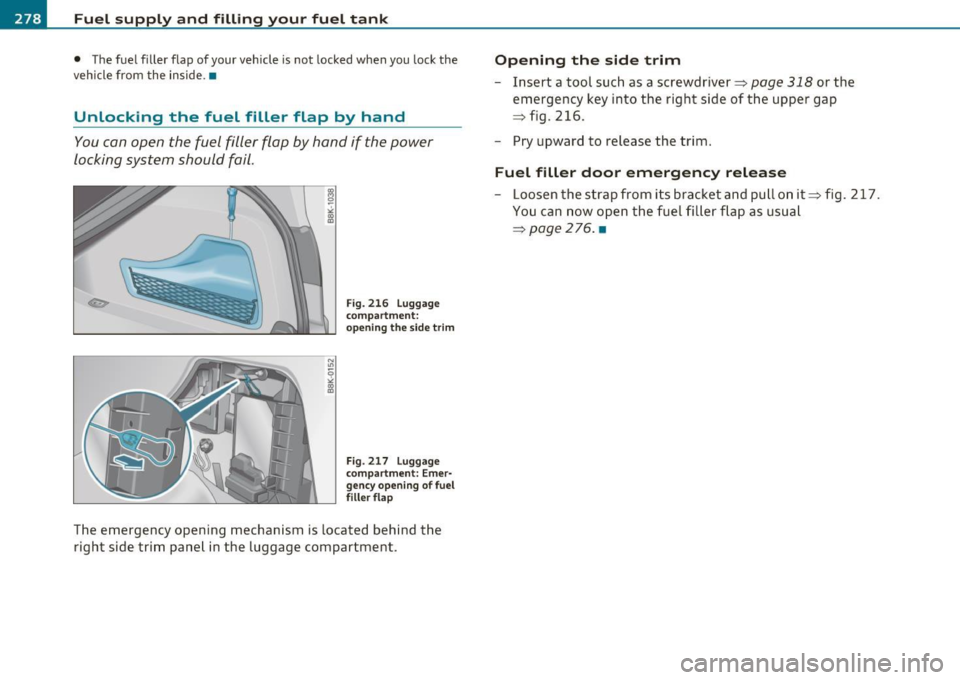
F ig. 216 L ugg age
co mpar tme nt:
ope nin g th e side trim
F ig. 217 Luggag e
co mpart ment: Em er
gency o peni ng of fue l
f iller flap
The emergency opening mechanism is located behind the
right side trim panel in the luggage compartment .
Opening the side trim
- Insert a tool such as a screwdriver=> page 318 or the
emergency key into the right side of the upper gap
=> fig. 216.
- Pry upward to release the trim.
Fu el filler door em ergency releas e
-Loosen the strap from its bracket and pull on it=> fig. 217.
You can now open the fue l fi ller flap as usual
=>page 276 . •