key AUDI A5 CABRIOLET 2011 Service Manual
[x] Cancel search | Manufacturer: AUDI, Model Year: 2011, Model line: A5 CABRIOLET, Model: AUDI A5 CABRIOLET 2011Pages: 364, PDF Size: 86.48 MB
Page 129 of 364
____________________________________________ A_ d_ a.._p _t_ i_ v _e_ c_r_u _ i_ s _e_ c_o_ n_ t_r _o _l __ ffl'II
[I) Tips
• If the adaptive cruise control initiates brak ing, the hydraulic brake
system is under pressure. Therefore, the brake pedal distance is
shorter and the peda l "feels" harder.
• Adaptive cruise control is switched off after pressing the foot
brake. The speed saved up this poi nt can be resumed.
• To resume the saved speed, release the brake pedal and press the
control lever:::::,
page 120, "Turning adaptive cruise control off
temporari ly".
• If you use the accelerator to go faster than the speed of the object
ahead of you, the
driver intervention prompt will not be accompa
nied by a warn ing s ignal.
• If the speed you prev iously set is exceeded, the indicator light in
the speedometer will switch off .•
A pplie s to vehicles: w ith adapt iv e cru is e control
MMI settings
Individual settings for adaptive cruise control can be
selected in the fV/fVII*.
Settings for the driving program can be adjusted individually
to the particular user and saved in the MMI*.
- Select:
[CAR] function button > Adaptive Cruise Control >
Driving program.
Setting the driving program
In the driving program menu you can adjust the characterist ics of
adaptive cruise contro l to what you want using
dynamic , standard or
comfort.
Controls and equip
ment Safety first
Saving settings
Your individual settings are automatica
lly saved and assigned to the
remote control key being used (remote key storage) . If the key is
given to another person, the saved settings remain as they are. •
System limitations
Applies to vehicles : with adapt ive cruise cont rol
General information
Some driving situations which affect the function of the
radar sensor are described below.
When driving, the adaptive cru ise contro l is governed by physical and
system-specified limits. Also, under certain circumstances, the ACC
system may react unexpectedly or late from the driver's point of view.
Therefore, always be attentive and intervene, if necessary:
• when driving around curves :::::,
page 128
• when vehicles in front are not in line with your vehicle:::::, page 128
• when other vehicles are changing lanes:::::, page 128
• when other vehicles are difficult to detect :::::, page 129.
& WARNING
The radar sensor's vision can be reduced by rain, snow and heavy
spray. This can result in vehicles driving ahead being inadequately
detected or, in some circumstances , not detected at all. If neces
sary, take action yourself!•
Vehicle care Technical data
Page 133 of 364
Adaptive cruise control -____________ __._ __ _
App lies to ve hicl es: wi th a daptive cruise co ntro l
Settings in the MMI
The settings of the Audi braking guard are performed in
the MMI* .
Settings regarding the system and the early warning can be
adjusted to the respective user and saved in the MM!*.
Switching the syst em on and off
- Press the [CAR]function button .
- Select
Audi brak ing guard . The Audi b raking gua rd menu
appears.
- Select
System on to switch the system on or off to switch
the system off .
Switching the early warning on and off
- Press the [ CAR] function button .
- Select
Audi braking guard . The Audi braking guard menu
appea rs .
- Select
Early warning on to switch the acoustic and optical
warning on or
off to switch the system off .
(I) Tips
When handing over the keys to another person , the p revious settings
are adopted if the Audi braking guard is activated~
page 43. •
Controls and equip
ment Safety first
A
pp lies to ve hicles : w ith ada ptiv e cr uise cont ro l
Driver's information in the instrument
cluster display
braking guard ac tiv at ed
This driver's information appears when a brake jolt has been carried
out due to an acute war ning .
brak ing guard off
T his dr iver's info rmation appears when the system has been deacti
vated via the MMI. Furthermore the information appears each t ime
shortly after the beginning of the jou rney when the system is
switched off.
T his driver's information also appears when the system is not avai l
able due to a malfunct ion or if you switch the ESP/ ASR off
~ page 240. In this state the system no longer warns of a pending
collision .•
Vehicle care Technical data
Page 137 of 364
Audi lane assist -_______________________________ lff'II
Applie s to vehicles: w ith lane assist
Setting the warning time and steering
wheel vibration
You c an use the radio or MM I* to adjust the warning time
and steerin g wheel vibration.
Setting the warning time
- Press the [ CA R] function button .
- Selec t
Systems * in the CAR men u.
- Selec t
Audi lane assist .
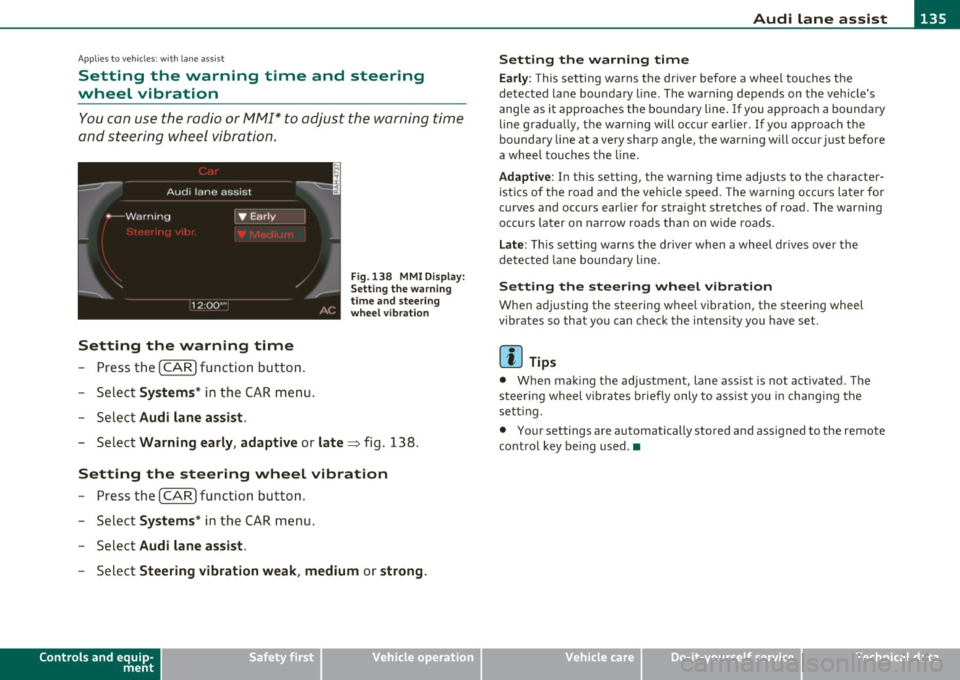
Fig. 13 8 MMI D isplay:
S ettin g the w arning
time an d stee ring
w he el vibr ation
- Select Warning early , adaptive or late => fig. 138.
Setting the steering wheel vibration
-Press th e [ CAR] function bu tt o n.
- Select
Systems * in the CAR men u.
- Select
Audi lane assist .
-Selec t Steering vibration weak , medium or strong .
Controls and equip
ment Safety first
Setting the warning time
Earl
y: This setting wa rns the driver before a wheel touches the
detected la ne bounda ry l ine. The warn ing depends on the vehicle's
angle as it approaches the bo undary line . If you app roach a bounda ry
line gradua lly, t he war ning will occ ur earlier. If you app roach the
boundary line at a very sharp angle, the warning will occur just before
a whee l touches the line.
Adapti ve : In this setting, the warning time adjusts to the character
ist ics o f th e road and the veh icle speed . The wa rning occurs later for
c u rves and occurs ear lier for straight stretches of road. The warn ing
occurs later on narrow roads t han on w ide roads .
Late: This setti ng warns the d river when a whee l dr ives over the
detected lane boundary line.
Setting the steer ing wheel vibration
When ad justing the steering wheel vib ration, the steer ing wheel
vibrates so that yo u can c hec k t he intens ity you have set.
(I) Tips
• Whe n mak ing t he ad justment, lane ass ist is not act ivated. The
steering wheel v ibrates briefly only to assist you in chang ing the
se tt ing.
• Your settings are automatically stored and assigned to the remote
cont rol key being used. •
Vehicle care Technical data
Page 144 of 364
111'..__A_ u_ d_ i_ s_ i_ d_ e _ a_ s_s _i_s _t _________________________________________________ _
(I) Tips
• Side assist is not act ive when the basic br ightness is adj usted. The
signal light comes on briefly to he lp you make the adjustment .
• Your settings are automatically stored and assigned to the remote
cont rol key being used .•
A ppli es to vehic les : w ith si de assist
General information
Side assist has limits and cannot detect vehicles under all road and
weathe r conditions . Please remember system limitat ions and never
re ly on t he system, espec ially w hen:
• driving t hrough curves =>
page 142,
• lanes a re of differe nt widths => page 142. •
Ap plies to veh icles : w it h side ass ist
When driving through curves
Side assist cannot detect vehicles in curves with a turning radius of
less than 3 28 feet (1 00 m).
When driving through a cu rve, it is possible that side assist may
reg iste r a vehi cle two l anes over, and the sign al on the o utside m irro r
wi ll li ght up .•
A pp lies to vehicles : wi th si de assist
Lane width
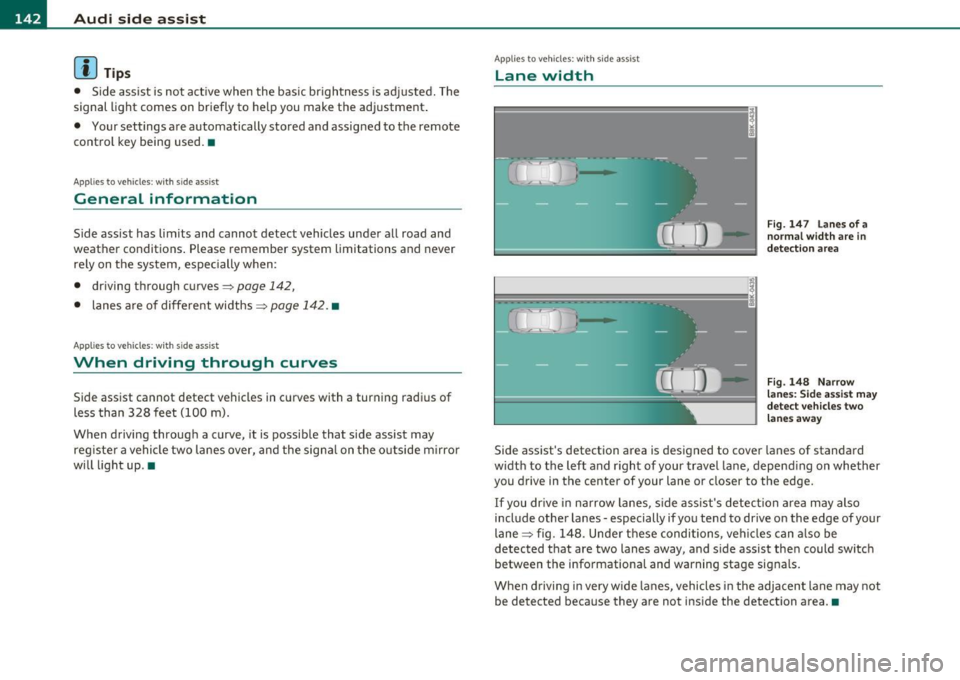
Fig. 147 L an es of a
norma l width are in
det ection ar ea
Fig . 148 N arrow
l a n es : Si de assis t may
dete ct ve h icl es tw o
lane s away
Side assist 's detection area is designed to cover lanes of standard
w idt h to the left and r ight of your travel lane, depend ing on whether
you drive in the center of your lane or closer to the edge.
If you dr ive in narrow lanes, s ide ass is t's detec tion area may also
include other la nes -especially if you tend to drive on the edge of your
lane => fig. 148. Unde r th ese condi tions, ve hicl es can a lso be
detected t hat are two lanes away, and s ide assist the n could switc h
between the info rmationa l and warning stage signals.
When drivi ng i n very w ide la n es, vehicles in the adjacent lane may not
be detected because they are not inside the detection a rea .•
Page 148 of 364
llffl..__A_ u_d_ i _d _r_ i_v _e _ s_e _ l_ e _ c_ t _______________________________________________ _
Applie s to veh icl es : w ith A udi d riv e se lect
Selecting the driving mode
You can choose between COMFORT, AUTO, DYNAMIC and
INDIVIDUAL* modes.
en • 2 ,;
~- =========::::: LP
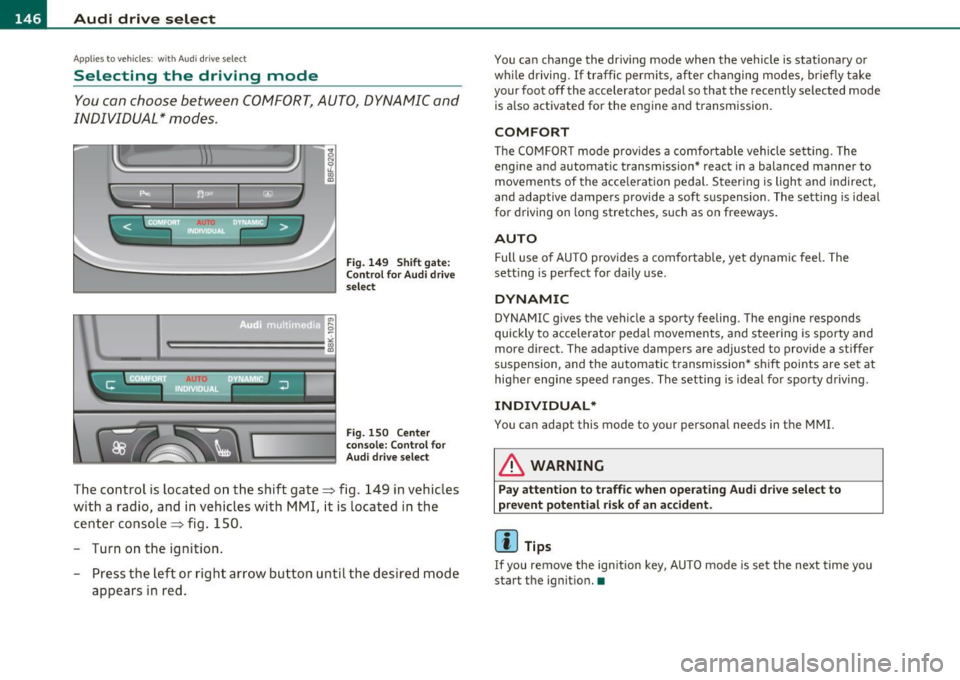
Fig. 149 Shift gate:
Control for Audi drive
select
Fig . 1S0 Ce nter
console: Control for
Audi drive select
The control is located on the shift gate~ fig. 149 in vehicles
with a radio, and in vehicles with MMI, it is located in the
center console~ fig. 150.
- Turn on the ignition .
- Press the left or right arrow button u ntil the desired mode
appears in red.
You can change the driving mode when the vehicle is stationary or
whil e driving. If traffic permits, after changing modes, briefly take
your foot off the accelerator pedal so that the recently selected mode
is also activated for the eng ine and transmission .
COMFORT
The COMFORT mode provides a comfo rtable vehicle se tting. The
engine and automatic t ransm ission* react in a balanced manner to
movements of the acce leration pedal. Steering is light and indirect,
and adaptive dampe rs provide a soft s uspension . The setting is ideal
for driving on long stretches, such as on freeways .
AUTO
Full use of AUTO provides a comfortable, yet dynamic feel. The
sett ing is perfect for daily use .
DYNAMIC
DYNAMIC gives the vehicle a sporty feeling. The eng ine responds
quickly to accelerator pedal movements, and steering is sporty and
more direct. The adaptive dampers are adjusted to provide a stiffer
suspension, and the automatic transmission* shift points are set at
higher engine speed ranges. The setting is ideal for sporty driving.
INDIVIDUAL*
You can adapt this mode to your personal needs in the MMI.
& WARNING
Pay attention to traffic when operating Audi drive select to
prevent potential risk of an accident .
(I] Tips
If you remove the ignition key, AUTO mode is set the next time you
start the ignition. •
Page 149 of 364
________________________________________________ A_u_ d_i_ d_ r_iv _ e_ s_ e _ le_ c_t __ l!'II
Applies to vehicles : w ith MMI and Audi drive select
Setting the INDIVIDUAL mode
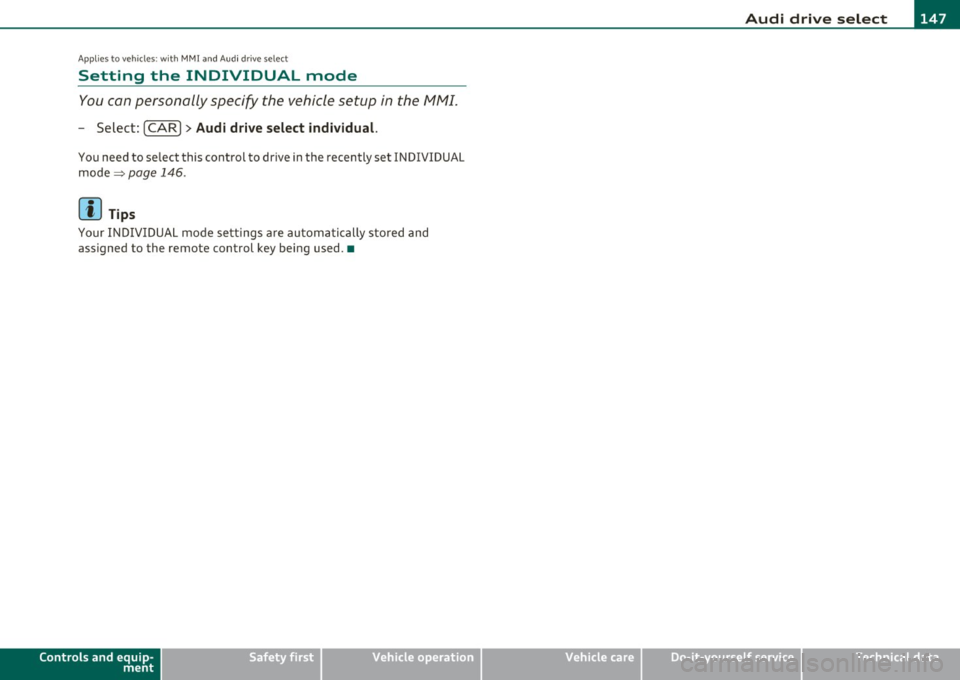
You can personally specify the vehicle setup in the /11/\11.
-Select : [CAR]> Audi drive select individual.
You need to select this control to drive in the recently set INDIVIDUAL
mode ~
page 146.
[ i ] Tips
Your IN DIV IDUA L mode se tt ings a re automa tically sto red and
assigned to the remote control key being used. •
Controls and equip
ment Safety first
Vehicle care Technical data
Page 153 of 364
Transmission -
----------------
- Step on the brake peda l. At the same time press and hold
the interlock button on the s ide of the gear selector knob
=:> fi g. 153 wi th your thumb until you have moved the
selector lever to the des ired position .
Automatic selector lever lock
The se lector lever is locked in the P and N positions w hen the ignition
is turned on . To move the leve r from these pos it ions the driver must
dep ress the brake peda l. As a reminder to the d river, the following
warning appears in the instrument cluster display when the se lector
is in
P and N:
When stationary apply footbrake while selecting gear
A time delay e lement prevents t he selector leve r from lock ing when
it is moved throug h the
N posit ion (going from R to D ). The lock ing
element will lock the se lector lever if the lever is left in N (Neutra l) for
more tha n app rox imately 1 second, w ithout t he b rake pedal be ing
pressed.
A t speeds above about 3 mp h (5 km/h) the A utomat ic Shi ft Lock is
automatically deactivated in t he
N position .
Interlock button
The lock button on the selector lever prevents the lever from being
a cciden tally shifted in to cert ain posi tions . Pressing this b utton deac
tivates the selector lever lock. Depend ing on the direction of the
shift, the se lector leve r locks a t different positions. The pos itions are
highlighted in the illustrat io n =>
page 150, fig. 153 .
Igni tion key safety interlock
The key cannot be removed from the ignition unless the selector lever
is in the
P pa rk position. When the igni tion key is removed, the
selector lever will be locked in the
P position. •
Controls and equip
ment Safety first
Applies
to vehicles : with au toma tic transmiss ion
Kick-down
The kick -down feature allows the vehicle to generate
maximum acceleration .
When you press the accelerator peda l beyond the resis tance po int
that is reached at full throttle, the transmission will select a lower
gear rat io b ased on vehicle speed and e ngine RPM . The engine R PM
will be controlled to produce maximum vehicle acceleration as long
as you con tinue to press the acceler ator pedal beyond t his resistance
point .
& WARNING
Be careful when using the kick-down featu re on slippery roads.
Rapid a cceleration may cau se the vehicle to skid .•
App lies to veh icles: with automatic trans mission
Dynamic shift program (DSP)
The automati c transmi ssion is electronically controlled .
The transmiss ion is self adapting and will automatically select the
bes t sh ift p rogram su ited to the dr iv ing cond it io ns and dr iving style .
Th e transmission will select one of the
economy programs when you
drive at a steady speed or a gradually c hanging speed without heavy
acce le ration . This ac hieves optimum fuel efficiency, with early
upshifting and delayed downshifting.
Th e transm iss ion will au tomatically se lect the
s porty shift p rograms
when you dr ive at higher speeds, or w ith heavy acceleration and
frequently chang ing speeds . Upshifts a re de layed to make full use of
engine power . Downs hifting takes place at higher engine speeds than
in the economy programs . _.,
Vehicle care Technical data
Page 156 of 364
ffl..__T_ r_a _n_ s_ m_ is_ s_io _ n ___________________________________________________ _
Applies to veh icles : with automat ic tr ansm ission
Emergency release of the selector lever
If the vehicle's power supply fails, the selector lever can
be released in an emergency.
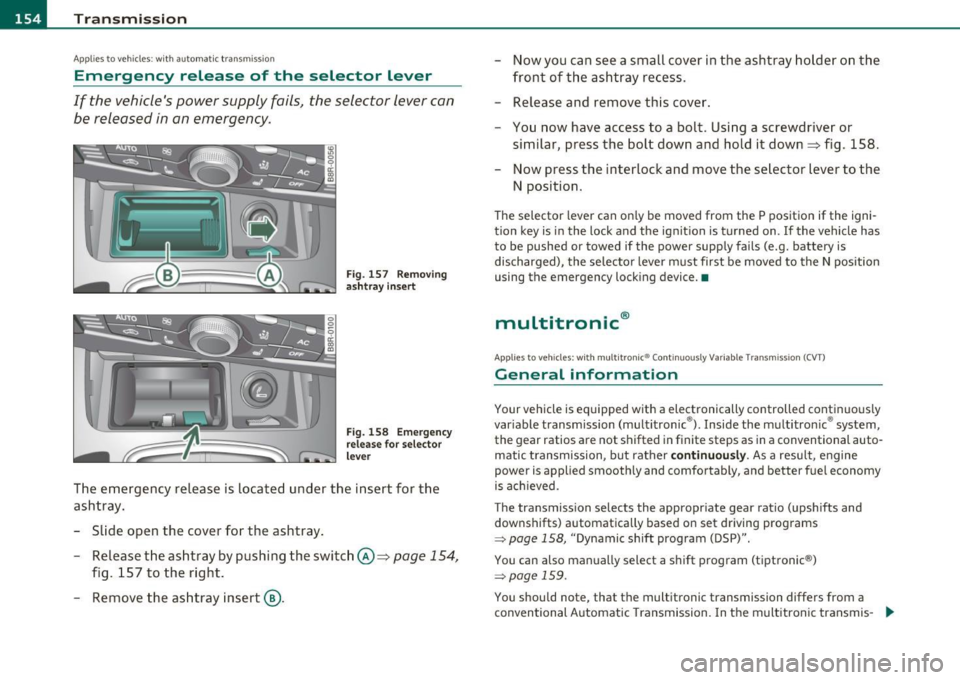
Fig . 157 Removing
ashtr ay in sert
Fig. 158 Emerge ncy
release for selector
lever
The emergency release is located under the insert for the
ashtray.
- Slide open the cover for the ashtray .
- Release the ashtray by pushing the switch @=>
page 154,
fig. 157 to the right.
- Remove the ashtray insert@. -
Now you can see a small cover in the ashtray holder on the
front of the ashtray recess.
- Release and remove this cover.
- You now have access to a bolt. Using a screwdriver or
similar, press the bolt down and hold it down=> fig . 158.
Now press the interlock and move the selector lever to the
N position.
Th e selector lever can on ly be moved from the P position if the igni
tion key is in the lock and the ignit ion is turned on . If the vehicle has
to be pushed or towed if the power supply fails (e.g. battery is
discharged), the selector lever must first be moved to the N position
using the emergency locking device. •
multitronic®
Applies to veh icle s: with mu lt it ron ic® Con tinuously Variable Transmission (CVT)
General information
Your vehicle is equipped with a electronically controlled continuous ly
var iable transmission (multitronic ®). Inside the multitronic ® system,
the gear ratios are not shifted in finite steps as in a conventional auto
matic t ransmission, but rather
continuously. As a result, engine
power is applied smoothly and comfortably, and better fuel economy
is ach ieved .
The transmission selects the appropriate gear ratio (upshifts and
downshifts) automatically based on set driving programs
~ page 158, "Dynamic shift program (DSP)".
You can also manually select a shift program (tiptronic ®)
~ page 159 .
You shou ld note, that the multitronic transmission differs from a
conventional Automatic Transmission . In the multitronic transmis-
9J,,
Page 160 of 364
1111 ...... __ T _r_ a_ n _ s_ m __ is_ s_io _ n _____________________________________________________ _
warning appears in the instrument cluster display when the selector
is in
P and N:
When stationary apply footbrake while selecting gear
A time delay element prevents the selector lever from locking when
it is moved through the
N position (going from R to D). The locking
element will lock the selector lever if the lever is left in N (Neutral) for
more than approximately 1 second, without the brake pedal be ing
pressed .
At speeds above about 3 mph (5 km/h) the Automatic Shift Lock is
automatically deactivated in the
N position.
Interlock button
The lock button on the selector lever prevents the lever from being
accidentally shifted into certain positions. Pressing this button deac
tivates the selector lever lock. Depending on the direction of the
shift, the selector lever locks at different positions. The positions are
high light ed in the illustrat ion~
page 157 , fig. 161.
Ignition key safety interlock
The key can not be removed from the ignition unless the selector lever
is in the
P park position. When the ignition key is removed, the
selector lever w ill be locked in the
P pos it ion .•
Ap plies to v ehicles : w ith mult itronic ® Contin uously Var iable Transm issio n (C VT)
Kick-down
The kick-down feature allows the vehicle to generate
maximum acceleration.
When you press the accelerator pedal beyond the resistance point
that is reached at full throttle, the transmission will select a lower
gear ratio based on vehicle speed and engine RPM . The engine RPM
w ill be co ntro lled to produce maximum vehicle acceleration as long
as you continue to press the accelerato r pedal beyond th is resistance
point .
& WARNING
Be careful when using the kick-down feature on slippery roads.
Rapid acceleration may cause the vehicle to skid. •
Applies to veh icl es: w it h mul tit ro nic® Con tin uous ly Va ria bl e Tran smis s io n ( CVT)
Dynamic shift program (DSP)
The multitronic ® transmission is electronically
controlled .
The transmission selects the appropriate gear ratio (upshifts and
downshifts) automatically based on preset d riving programs.
The transmission will select one of the
economy programs when you
drive at a steady speed or a gradua lly changing speeds without heavy
acceleration . Th is gives best fuel eff iciency, with early upshifting and
delayed downshifting.
Th e transmission will automatically select the
sporty shift programs
when you dr ive at higher speeds, or w ith heavy acceleration and
frequently changing speeds. Upshifts are delayed to make full use of
eng ine power . Downshifting takes place at higher engine speeds than
in the economy programs.
Th e selection of the most suitab le shift program is a continuous,
automatic process. The driver can a lso make the transmission switc h
to a sporty program by
quickly pressing down the gas pedal.
This causes the transmiss ion to sh ift down into a lower gear ratio and
makes quick acceleration possible (to pass another vehicle) You do
not need to press the gas pedal into the kickdown range. After the
transmission has upshifted, the original program is selected
according to your driving style.
An additional shift prog ram allows the automatic t ransmission to
select the proper gear for uph ill and downh ill grad ients.
This prevents the transmiss ion from shifting up and down unneces
sari ly on hills. The transmission will shift down to a lower gear ratio _,,,
Page 163 of 364
____________________________________________________ T _r_a _n_ s_m _ i_s _s_ i_ o _ n_---J_
Applies to vehicles : with mult itron ic® Continuous ly Variab le Transm ission (CVT)
Emergency release for selector lever
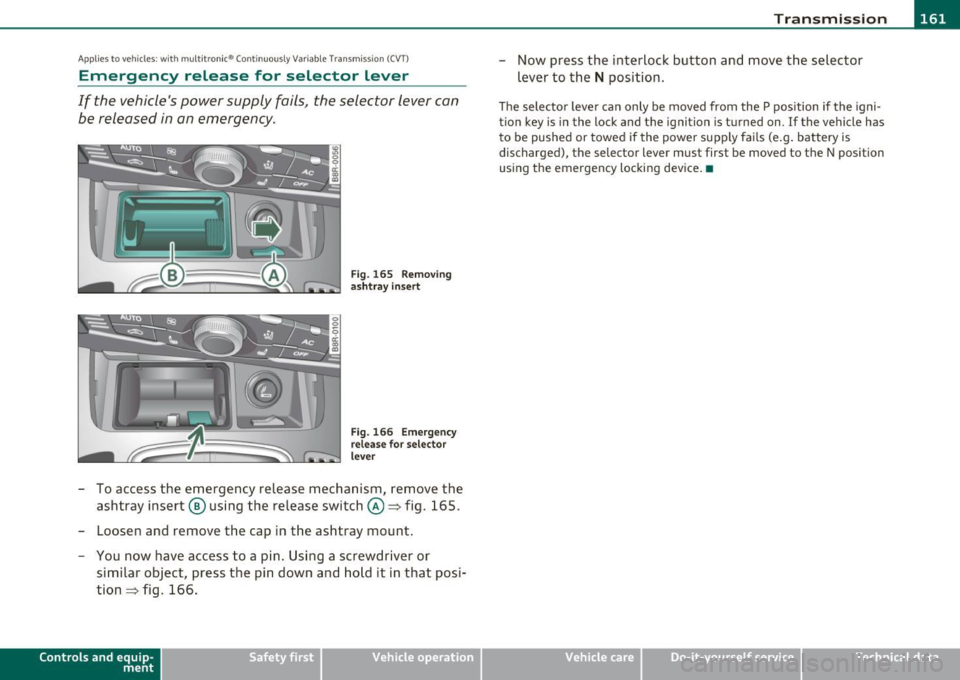
If the vehicle 's power supply fails, the selector lever can
be released in an emergency.
Fig . 165 Removing
ashtray insert
Fig. 166 Emergency
release for selector
lever
- To access the emergency release mechanism, remove the
ashtray insert @ using the release switch@~ fig. 165.
- Loosen and remove the cap in the ashtray mount.
- You now have access to a pin. Using a screwdriver or
similar object, press the pin down and hold it in that posi
tion~ fig. 166.
Contro ls a nd e quip
m en t Vehicle
OP-eration
-Now press the interlock button and move the selector
lever to the
N position.
The selector lever can only be moved from the P position if the igni
tion key is in the lock and the ignition is turned on. If the vehicle has
to be pushed or towed if the power supply fails (e.g. battery is
discharged) , the selector lever must first be moved to the N position
using the emergency locking device. •
Vehicle care Do-it-yourselt service iTechnical data