wheel AUDI A5 CABRIOLET 2011 Owners Manual
[x] Cancel search | Manufacturer: AUDI, Model Year: 2011, Model line: A5 CABRIOLET, Model: AUDI A5 CABRIOLET 2011Pages: 364, PDF Size: 86.48 MB
Page 5 of 364
Reporting Safety Defects . . . . . . . 185
Active rollover protection system 186
Safety belts . . . . . . . . . . . . . . . . . . . 189
General notes ............ ..... 189
Why safety belts? ............. 190
Safety belts ........... ....... 193
Safety be lt pretensioners ....... 197
Airbag system ........ ........ 199
Important things to know ...... 199
F ron t airbags . . . . . . . . . . . . . . . . . 203
Mon itoring the Advanced Airbag
Sys tem .................. ... .
Knee airbags ................. .
S ide airbags . .. .............. .
Child Safety .. .. .......... .... .
Important things to know ..... .
Child safety seats ............ .
Installing a child safety seat ... .
LATCH Lowe r anchorages and
tethers for children ........... .
Additional Information 210
215
218
221
221
227
231
234
238
Vehicle operation
...... 240
Intelligent technology ........ 240
Notice abou t data recorded by
vehicle control modules . . . . . . . . 240
E lectronic Stab ilizat ion Program
(ESP) ................... ..... 240
Braking . . . . . . . . . . . . . . . . . . . . . . 24 3
Servotronic ® -advanced power
steer ing system .......... ..... 24 6
Driving with your quattro ® . . . . . . 246
En ergy management .......... . 24 7
Driving and environment ...... 250
The first 1,000 miles (1,50 0 km)
and afterwards ............... 250
Avoid damaging the vehicle ..... 251
Controls and equip
ment Safety first
Driving through w.ater
on roads . 251
Catalytic converter . . . . . . . . . . . . 251
Operate your vehicle economica lly
a nd minimize pollut ion . . . . . . . . 252
Trailer tow ing 255
Driving with a trailer . . . . . . . . . . . 255
T railer tow ing t ips ... .......... 257
Vehicle care ...... ........ 260
Cleaning and protect ion ...... 260
General information . . . . . . . . . . . 260
Care of exterior . . . . . . . . . . . . . . . 260
Care of interior . . . . . . . . . . . . . . . 268
Fuel supply and filling your fuel
tank ... ... ................ ....
274
Gasoline . ................ .... 274
Fu el tank .............. ....... 275
Checking and filling . . . . . . . . . . . 279
E ngine hood . . . . . . . . . . . . . . . . . . 279
Engin e oil . . . . . . . . . . . . . . . . . . . . 282
Engine cooling system . . . . . . . . . 286
Brake fl uid . . . . . . . . . . . . . . . . . . . 289
Bat tery . . . . . . . . . . . . . . . . . . . . . . 290
Windshield/headl ight washer
conta iner . . . . . . . . . . . . . . . . . . . . 295
Tire s and wheels ......... ..... 296
Ti res
296
Ti re pressure monitoring system 314
Do-it-yourself service . 318
What do I do now? 318
T runk escape handle ........... 318
Vehicle tool kit ............. ... 318
Space-saving spare tire (compact
spare tire) .................... 319
Changing a wheel . . . . . . . . . . . . . 320
Table of contents
Fuses and bulbs ............ . .
Electrica l fuses .............. .
Bul bs ..................... . .
Emergency situations ....... .
General ............ ......... .
Starting by pushing or towing ..
St arting with jumper cables ... .
Use of jumper cab les ....... .. .
Emergency tow ing w ith
commercial tow truck ........ .
Lift ing vehicle .... ........... .
Technical data
General informat ion
Explanation of technical data .. .
Vehicle identification ......... .
Weights .................... .
Dimensions ................. .
Data .......... ............... .
211 hp, 2.0 lit er 4 -cyl. e ngi ne .. .
Consum er Information ...... .
Warranty coverages .......... .
Operating your vehicle outside the
U.S.A. or Canada .......... ... .
Aud i Service Repair Manua ls and
Literature ......... .......... .
Maintenance ............... . .
Additional accessories ,
modif ications and parts
replacement ............... . .
Declaration of Compliance,
Telecommun ications and
E lectroni c Systems ........... .
Alphabetical index ....
328
328
332
333
333
333
333
334
336
338
340
3 40
3 40
340
341
341
342
342
343
343
343
343
343
345
3 46
3 48
Vehicle operation Vehicle care Do-it-yourself service Technical data
Page 9 of 364
Instruments and controls
General illustration
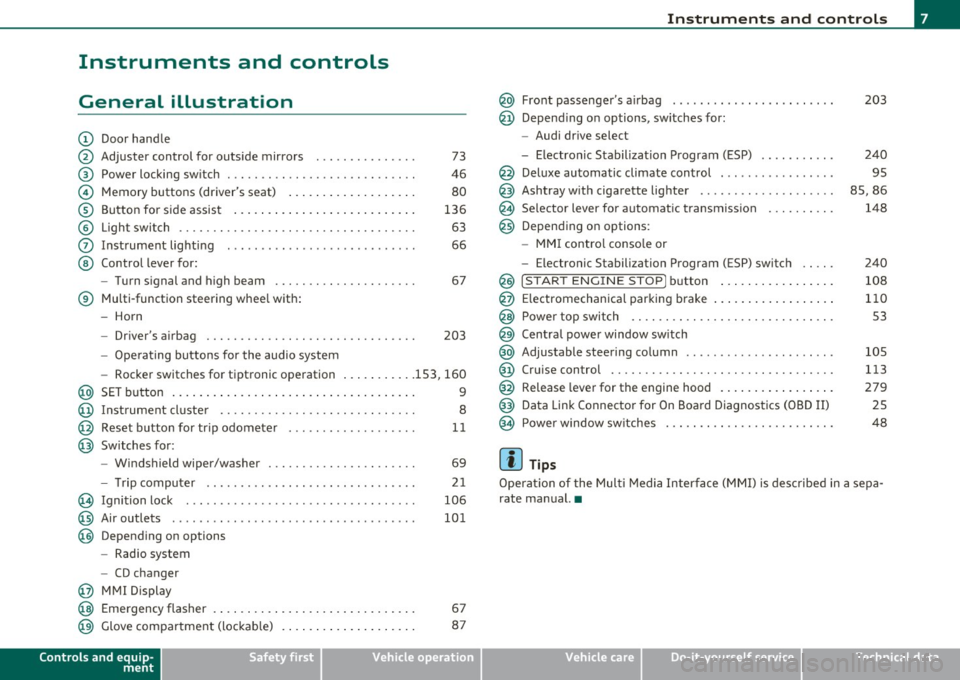
(D Door handle
@ Adjuster control for outside mirrors . . . . . . . . . . . . . . . 73
@ Power locking switch . . . . . . . . . . . . . . . . . . . . . . . . . . . . 46
© Memory buttons (driver's seat) . . . . . . . . . . . . . . . . . . . 80
® Button for side assist . . . . . . . . . . . . . . . . . . . . . . . . . . . 136
© Light switch . . . . . . . . . . . . . . . . . . . . . . . . . . . . . . . . . . . 63
0 Instrument lighting . . . . . . . . . . . . . . . . . . . . . . . . . . . . 66
@ Control lever for:
- Turn signal and high beam . . . . . . . . . . . . . . . . . . . . . 67
® Multi-function steering wheel with:
- Horn
- Driver's airbag . . . . . . . . . . . . . . . . . . . . . . . . . . . . . . . 203
-Operating buttons for the audio system
- Rocker switches for tiptronic operation ... .. ...... 153, 160
@ SET button . . . . . . . . . . . . . . . . . . . . . . . . . . . . . . . . . . . . 9
@ Instrument cluster . . . . . . . . . . . . . . . . . . . . . . . . . . . . . 8
@ Reset button for trip odometer . . . . . . . . . . . . . . . . . . . 11
@ Switches for:
- Windshield wiper/washer . . . . . . . . . . . . . . . . . . . . . . 69
- Tr ip computer .. .......... . .. .... .. .. .... ... .
@ Ignition lock ..... .. .................. ... .. ... .
@ Air outlets ........... ... .. ..... ... ........... .
@ Depending on options
- Radio system
- CD changer
@ MMI Display 21
106
101
@ Emergency flasher . . . . . . . . . . . . . . . . . . . . . . . . . . . . . . 67
@ Glove compartment (lockab le) . . . . . . . . . . . . . . . . . . . . 87
Controls and equip
ment Safety first
Instruments and controls
@ Front passenger
's airbag . . . . . . . . . . . . . . . . . . . . . . . . 203
@ Depending on options, sw itches for :
- Audi drive select
- Electronic Stabilization Program (ESP) . . . . . . . . . . . 240
@ Deluxe automatic climate control . . . . . . . . . . . . . . . . . 95
@ Ashtray with cigarette lighter . . . . . . . . . . . . . . . . . . . . 85, 86
@ Se lector lever for automat ic transmission . . . . . . . . . . 148
@ Depending on options:
- MMI control console or
- Electronic Stabilization Program (ESP) switch . . . . . 240
@ !START ENGINE STOP] button . . . . . . . . . . . . . . . . . 108
@ Electromechanical parking brake . . . . . . . . . . . . . . . . . . 110
@ Power top switch . . . . . . . . . . . . . . . . . . . . . . . . . . . . . . S3
@ Central power window switch
@ Adjustable steering column . . . . . . . . . . . . . . . . . . . . . . 105
@ Cruise control . . . . . . . . . . . . . . . . . . . . . . . . . . . . . . . . . 113
@ Release lever for the engine hood . . . . . . . . . . . . . . . . . 279
@ Data Link Connector for On Board Diagnostics (OBD II) 25
@ Power window sw itches . . . . . . . . . . . . . . . . . . . . . . . . . 48
[ i ] Tips
Operation of the Multi Media Interface (MMI) is described in a sepa
rate manual. •
Vehicle care Technical data
Page 18 of 364
Instruments and warning/indicator lights
There is a malfunction in th e ABS when:
• T he warning/in dicator lig ht does not illuminate when you switch
on the ig nition.
• T he warning/indicator lig ht does not go o ut a fter a f ew seconds.
• The warning/ind icator light illuminates while dr iving.
The brake sy stem will still re spond e ven without the a ssistance of
the ABS system. See your authorized Audi dealer as soon as
pos sible to restore full braking performance.
For more info rmation
regard ing the ABS=>
page 245 .
The ABS warning light and the brake warning light come on
together. The ABS will not work and you will notice a change in
brak ing response and performance.
Malfunction in the brake system
If the brake warning light=> page 17 and the ABS warning ill uminate
together there may be a malfu nction in the A BS, and the re may also
be a malfunction in the brake system itself=> &.
In the event o f a
malfun ct ion in the brake system the warning/indi
cator light
BRAKE ( U SA mode ls)/ ((j)) (Canada models) in the instrument
cl uster flashes . By p ress ing the
! SE T) button, you can bring up a
dr iver message w hic h e xplains the malfunct io n in more detail. Please
note =>
page 30.
Malfun ction in the electron ic different ial lock (EDL)
T he EDL wo rks together with the ABS. The ABS warn ing lig ht wi ll
come on if there is a malfunction in the EDL system=>
page 242. See
your authorized A udi d ea le r as soon as poss ible .
& WARNING
• If the (USA models )/ (Canada models ) warning light
does not go out, or if it comes on while driving , the ABS system is
not working properly. The vehicle can then be stopped only with
the standard brakes (without ABS). You will not have the prote c-
& WARNING (c on tinued )
tion ABS prov ides. Contact your author ized Audi dealer as soon as
possible.
• USA models: If the BRAKE warning light and the f \. warning
light come on together, the rear wheels could lock up first under
hard braking . Rear wheel lock -up can cause loss of veh icle control
and an a ccident . Have your vehicle repaired immediately by your
author ized Aud i dealer or a qualified workshop . Drive slowly and
avoid sudden, hard brake application s.
• Canada models : If the brake warning light ((j)) and the ABS
warning light
~ c ome on together, the rear wheel s could lo ck up
first under hard b raking.
Rear wheel lock-up can cause loss of
vehicle control and an accident . Have your vehicle repaired imme
d iately by your authorized Audi dealer or a qual ified workshop .
Drive slowly and avoid sudden, hard brake applications. •
Electromechanical parking brake
=[ (USA models) / (®) (Canada models)
The warning/indicator light moni tors the electrome chan
ical parkin g brake .
With the pa rking bra ke ap plied a nd the ign it ion turned on, the
wa rning/indicator light i lluminates. Afte r th e ignit ion has been
turn ed off , the wa rni ng/ind ic a tor lig ht cont in ues to illum ina te fo r
about 30 seconds. If the par king b rake is applied with the ign ition
tur ned off , the w arning/ind ic a tor light illumi nate s fo r abo ut 3 0
seconds.
Th e warning/in dicator light will go out when the parking brake is
re leased .
If the warn ing/ indicator light flashes cont inuous ly
after applying the
p arki ng brake, braki ng fo rce is no t suffi cien t to prevent the vehicle
from rolling unintentionally. Please note the following: .,_
Page 19 of 364
• If the slope of the ground is too steep to park the ve hicle, the addi
tional d rive message appears
Caution: Vehicle parked too steep .
• In the event of a parking brake malfunction, the ye llow symbol
appea rs in the ins trument cl uster d isp lay and the driver message
Parking brake malfunction! is displayed . Have the malfunction
repaire d as soon as possible by an au thori zed A udi dealer o r any o ther
qualified workshop .•
Brake system BRAKE (USA
models)
/ (CD) (Canada models)
The warning/indi cat or li ght flas hes if brake fluid le vel is
lo w, if there is an AB S syst em malf unctio n or a parki ng
brak e malfunction.
Th e light illum inates w he n th e ignition is turned on. It goes out after
the engine has been started . This indicates that the brake war ning
light is functioning properly.
If the brake warning light does not light up when the engine is
cranking , there may be a malfunct ion in the electr ical system. In
this ca se, contact an authorized Audi dealer.
If the brake system warning/ind icator light flashes, there is a brake
system malfunction. By press ing the [SET ] button, you can bring up a
dr iver message w hich expl ains the ma lfun ct io n in more deta il
:::>page 30.
If the A BS fails, t he A BS warn ing/ indi cato r light ....
s., (U SA
mode ls)/ (Canada mode ls) flashes together with the brake system
wa rning/indica tor ligh t==> & .
(USA models):
If the wa rning lig ht BRAKE and the warn ing l ight f'l ill u
minate together, immediate ly contact your author ized Audi dealer or
qualif ied wo rkshop to have all bra ke pads inspected::::>
page 35.
When the light comes on, an audible warn ing signal is also given.
Controls and equip
ment Safety first
Instruments and warning
/indicator lights
& WARNING
• USA models: If the BRAKE warning light and the I warning
light come on together, the rear wheel s could lock up first under
hard braking . Rear wheel lock-up can cause loss of vehicle control
and an accident. Have your vehicle repai red immediately by you r
authorized Audi dealer or a qualified workshop. Drive slowly and
avoid sudden, hard brake applications.
• Canada models : If the brake warning light ((j)) and the ABS
warning light
~ come on together , the rear wheels could lock up
first under hard braking . Rear wheel lock-up can cause loss of
vehicle control and an accident. Have your vehicle repaired imme
diately by your authorized Audi dealer or a qualified workshop .
Drive slowly and avoid sudden , hard brake applications.
• If the brake warning /indicator light does not go out after a few
second s and the parking brake released , or lights up while you are
driving , the fluid level in the brake fluid reservoir i s too low. If you
believe that it is safe to do so , proceed immediately at low speed
to the neare st authorized Audi dealer or qualified repair facility
and have the brake system inspected .
• Always keep in mind that after several brake applications, you
will need greater pressure on the brake pedal to stop your vehicle.
Do not rely on strained brake s to re spond with maximum stopping
power in critical situations. You must allow fo r increased braking
di stan ce s. The extra distance used up by fading brakes could lead
to an accident. •
Vehicle care Technical data
Page 32 of 364

Driver information display
you have to stop immediately and turn off the engine. The coolant
pump is not working anymore--danger of damage to the engine! •
Brake system malfunction
A malfunction in the brake system must be repaired as
soon as possible.
If the warning/indicator light BRAKE (USA models)/ ((D)
(Canada models) in the instrument cluster flashes, there is a
brake system malfunction . A driver message appears as well
to explain the malfunction in more detail. The driver warning
goes out after about S seconds, but it can be brought up at
any time by pressing the
!SET] button again.
Stop the Vehicle and Check the Brake Fluid
- Stop the vehicle.
-Check the brake fluid level=>
page 289.
- Seek professional assistance if necessary .
Warning ! Fault in brake system. Contact
workshop
- Drive carefully to the nearest authorized Audi dealer or other qualified workshop and have the malfunction
corrected =>
&.
Parking brake Please get to a repair shop
- If this symbol appears when the vehicle is stationary or
after the ignition is turned on, check to see if the parking brake can be released. Drive to an authorized Audi dealer
or other qualified workshop as soon as possible and have
the malfunction corrected. If the parking brake cannot be
opened, then take it to an expert at an authorized Audi
dealer.
- If the symbol appears while you are driving, it is possible that the traction control or the emergency brake has malfunctioned. It is possible that the parking brake
cannot be applied. It is also possible that the parking
brake cannot be released after it has been applied. Drive
to an authorized Audi dealer or other qualified workshop
to have the malfunction corrected.
If the ABS system malfunctions, the ABS warning/indicator light illu
minates together with the brake system malfunction warning/indi
cator light~& .
& WARNING
• Always observe the warnings in~ page 2 72, "Engine compart
ment", before opening the hood and checking the brake fluid.
• Driving with low brake fluid is a safety hazard. Stop the car and
get professional assistance.
• USA models: If the BRAKE warning light and the i, warning
light come on together, the rear wheels could lock up first under
hard braking. Rear wheel lock-up can cause loss of vehicle control
and an accident . Have your vehicle repaired immediately by your
authorized Audi dealer or a qualified workshop. Drive slowly and
avoid sudden, hard brake applications.
• Canada models: If the brake warning light (CD) and the ABS
warning light come on together, the rear wheels could lock up .,_
Page 33 of 364

& WARNING (continued)
first under hard braking. Rear wheel lock-up can cause loss of
vehicle control and an accident. Have your vehicle repaired imme diately by your authorized Audi dealer or a qualified workshop.
Drive slowly and avoid sudden, hard brake applications. •
Engine cooling system malfunction -•-
A malfunction in the engine cooling system must be repaired as soon as possible.
If the - t-symbol flashes in the display, either the engine
coolant
temperature is too high or the engine coolant level is
too low. A driver message appears as well to explain the
malfunction in more detail. The driver warning goes out after
about 5 seconds, but it can be brought up at any time by
pressing the
[SET] button again.
Switch off engine and check coolant level
- Pull off the road.
- Stop the vehicle.
- Turn off the engine .
- Check coolant level==>
page 287.
- Add coolant if necessary ==> page 288.
- Continue driving only after the engine coolant
warning/indicator light goes out.
- Contact your authorized Audi dealer for assistance if
necessary .
If the engine coolant level is correct, then the radiator fan may be the
cause of the malfunction.
Controls and equip
ment Safety first
Driver information display
& WARNING
•
If your vehicle should break down for mechanical or other
reasons, park at a safe distance from moving traffic, turn off the
engine and turn on the hazard warning lights=>
page 67, "Emer
gency flashers
A".
• Never open the hood if you see or hear steam or coolant
escaping from the engine compartment· you risk being scalded.
Wait until you can no longer see or hear steam or coolant
escaping.
• The engine compartment of any vehicle is a dangerous area.
Before you perform any work in the engine compartment, turn of
the engine and allow it to cool. Follow the warning stickers
=> page 2 72, "Engine compartment".
0 Note
Do not continue driving if the-~- symbol illuminates. There is a
malfunction in the engine cooling system -you could damage your
engine. •
Engine oil pressure malfunction
immediate service or repair. Driving with a low oil pres
sure indication is likely to cause severe engine damage.
If the 'l=:7: symbol on the display flashes, the engine oil pres
sure is too low. A driver message appears as well to explain
the malfunction in more detail. The driver warning goes out
after about 5 seconds, but it can be brought up at any time by
pressing the
[SET] button again.
Switch off engine! Oil pressure too low
-Stop the vehicle.
Vehicle care Technical data
Page 36 of 364

Driver information display
Battery in remote control key :::>page 39
--
Elect romechan ical => page 112
par king b rake
-
Engine speed limitat ion * =>page 36
adaptive light* defect ive => page 37
Ignition lock malfunction ::::>page37
Adapt ive dampers * :::>page 37
Windshield w iper defectiv e :::>page 37
--
Significant loss of air pressu re* => page 315
Ti re pressu re m onito ring sys-=> page 315
tern * (malfunction)
[I] Tips
The speed warnings warning thres ho ld 1 and warning threshold 2
v are also yellow symbols in some mo dels . The wa rnin g is always
show n as a sma ll symbol in the uppe r area of t he d isp lay
=> page 26 . •
Ap plies to ve hicle s: with Aud i d rive se le ct
Dynamic steering f?i
1:.;,. Dynamic steering : Sy stem malfunct ion
Th is driver message and the symbol appear when a system
ma lfunction occurs dur ing trave l. Yo u can continue to dr ive carefully
at a reduced speed to a q ua lified workshop. Steering can be more difficult or sens
it ive than usua l. The steering wheel can a lso be at a n
ang le w hen d riving s traight .
Dynamic steering : initialization
If this driver message appears and the indicator light is f lash ing on
t he inst rument pane l, dynam ic steering is being reini tial ized . On ce
you start the engine after t his is finished , the steering wheel w ill be
e a sy to move. Re- ini tia lizat ion mig ht be necess ary if th e s teering
wheel was moved hard to the left and right while the veh icle was not
movi ng. The disp lay goes o ut as soon as initialization is complete .
& WARNING
Have the dynamic steering sy stem malfun ction repaired a s soon
as possible by an authorized Audi dealer or any qualified workshop
- risk of accident!
[ i ] Tips
Th e dynamic steering st abili ty systems are no t ava ila bl e in the event
of a system ma lfunct io n.•
App lie s to v eh icl es: w it h co nv en ience key
Key not in vehicle 7
., Key not in vehicle
Thi s remin der appears along wi th the .... symbol if the maste r key is
removed from the vehicle with t he e ngine running . It is intended to
remind you (e.g. w hen c hanging dr ive rs) not to co ntinue t he journey
w ithout the master key.
If t he master key is no longer in t he ve hicl e, yo u can not swi tch off the
ign ition after stopping the engine and you also cannot start the
eng ine a gain. You also cannot lock the vehicle from the ou ts ide. •
Page 68 of 364

Clear vision
Instrument lighting
The basic brightness of the illumination for the instru
ments, the center console and the display can be
adjusted .
-Press the knob to release it.
N ~ 0 0 ,;
"'
lighting
Rotating the knob to the right"+" will increase the basic
brightness when it is dark.
- Rotating the knob to the left"-" will decrease the basic
brightness when it is dark.
- Pressing the knob will prevent unintentional changes.
(I] Tips
The illumination for the instrument cluster lights up whenever you
switch on the ignition with the vehicle headlights off . As the daylight
fades, the instrument cluster illumination likewise dims automati
cally and will go out completely when the outside light is very low.
This feature is meant to remind you to switch on the headlights when
outside light conditions become poor. •
Appli es to veh icles : wi th xenon headlights
Xenon headlights
After starting the engine , the xenon headlights are automatically
adjusted to the load and angle of the vehicle (for example, during
acceleration and braking). This prevents oncoming traffic from expe
riencing unnecessary headlight glare from your xenon headlights .
If the system is not operating properly, a warning symbol in the Auto
Check Control is displayed~
page 37. •
Ap plies to vehi cles: with adap tive light
Adaptive light
When driving around bends, the relevant area of the road
is better illuminated.
Fig. 69 Adaptive light
when driving
The benefit of adaptive light is that the curve and the edge of the road
are better illuminated ~ fig. 69. Dynamic adaptive light is controlled
automat ically, depending on vehicle speed and steering wheel angle.
When driving around bends, the headlights are controlled according
to steering wheel angle . So that there is no black hole ahead of the
vehicle , the two main beams pivot at different angles. .,.
Page 79 of 364
Seats and storage
General recommendations
Why is your seat adjustment so important?
The safety belts and the airbag system can only provide
maximum protection if the front seats are correctly
adju sted.
Th ere a re various ways of adjusting t he front seats to provide safe and
comfortable support for the driver and the front passenger . Ad just
your seat properly so that :
• you can easily and quickly reach a ll the switc hes and contro ls in the
ins trumen t pa nel
• your body is properly supported thus reducing phys ica l stress and
fatigue
• the safety be lts and airbag system can offer maximum protection
=>
page 199 .
In the following sections, you w ill see exact ly how you can best ad just
your sea ts .
Th ere are special regulations a nd instr uctions for install ing a child
safety seat on the front passenger's sea t. Always follow the informa
tion regarding child safety p rovided in=>
page 221, "Child Safety ".
& WARNING
Incorrect seating posit ion of the dri ver and all other passengers
can result in seriou s personal injury.
• Always keep your feet on the floor when the vehicle is in
motion -never put your feet on top of the instrument panel, out
of the window o r on top of the seat cush ion. This applies especially
to the passengers.
If your seating po sition is incorrect, you
increase the ri sk of injury in the case of sudden braking or an acci-
Controls and equip
ment Safety first
Seats and storage
& WARNING
(con tinu ed)
dent . If the airbag inflates and the seating position is incorrect ,
this could result in per sonal injury or even death .
• It is important for both the dri ver and front passenger to keep
a distan ce of at least 10 inche s (25 cm) between themselves and
the steering wheel and /or instrument panel. If you 're sitting any
closer than this , the airbag system cannot protect you properly. In
addition, the front seats and head restraints must be adjusted to
your body height so that they can give you maximum protection .
• Always try to keep as much distance as possible between your
self and the steering wheel or instrument panel.
• Do not adjust the driver's or front passenger 's seat while the
vehicle is moving. You r seat may move unexpectedly , causing
sudden loss of vehicle control and personal injury . If you adjust
your seat while the vehicle is moving , you are out of position. •
Driver's seat
The correct seat position is important for saf e and
re lax ed driving.
W e recomme nd that you a djust the drive r's sea t in the
f ollowing man ner :
- Ad just the seat in fore and aft direction so that you can
easily pus h the pedals to the floor w hile keeping your
knees slightly bent=>
& in "Why is yo ur seat a djus tme nt
so importa nt?" .
- Adjust the seatback so that when yo u sit with yo ur back
agai nst t he seatback , you can st ill grasp t he top of the
steering w heel. ..,
Vehicle care Technical data
Page 95 of 364
![AUDI A5 CABRIOLET 2011 Owners Manual The rear window defogger can be t urned o n permanently by press ing
t he
IQlil] bu tton for more t han two seconds . This rema ins s tored until
the ignition is switched off . A](/img/6/57571/w960_57571-94.png "AUDI A5 CABRIOLET 2011 Owners Manual The rear window defogger can be t urned o n permanently by press ing
t he
IQlil] bu tton for more t han two seconds . This rema ins s tored until
the ignition is switched off . A")
The rear window defogger can be t urned o n permanently by press ing
t he
IQlil] bu tton for more t han two seconds . This rema ins s tored until
the ignition is switched off . A rea r window defogger that was
switched on also remains stored for 1 S minutes after the ignition is
switched off .
I f the eng ine is restarted within these 15 minutes, the rear window
defogger is activa ted for 10 to 20 minu tes, depending on o utside
temperature. When a vehicle is parked for a short time, the rear
window defogger does not need to be m anually act ivated aga in.
<£' For the sake of the environment
As soon as the rear window is clear, yo u should switc h the rear
w indow defogger off. The reduced power consumption has a benefi
cial effec t on fue l cons umption. •
Applies to vehicles : w ith del uxe automatic climate con tro l
AC mode !AC]
Deactivating
- Press the [AC] button .
Activating
-Press the !AC ] button again .
The coo ling system is turned on in AC mode . The heating and ventila
tion system is controlled automatically .
W Tips
If the LED in the switch continues to illuminate after AC mode has
been t urned off( = turning the AC off), there is a fau lt in an air-condi
tioning component . Please consult an authorized dealership if there
is an operat ing problem. •
Contro ls a nd e quip
m en t Vehicle
OP-eration
Applies to veh icles : with deluxe a utomatic climate control
Air vents Warm and cold
Air distribution determines the air flow from the indi
vidual vents .
4 '
Fig. 99 Ins trument panel: Loca tio n of ai r vent s
Vents @and ®
- Rotate the thum bwheel loca ted next to the ou tlet to open
or cl ose it .
- To adjust the direction of the airflow from the outlet,
move the tab in the center of the outlet in the desired
direction . T he direction of the air delivered from the vents
can be a djusted horizontally and vertica lly.
The air outlets are actuated either automatically or manually
depending on the operat ing mode se lected. Heated or unheated
fresh a ir o r cooled air flows from the vents .
Vehicle care Do-it-yourselt service iTechnical data