manual transmission AUDI A5 CABRIOLET 2011 Owners Manual
[x] Cancel search | Manufacturer: AUDI, Model Year: 2011, Model line: A5 CABRIOLET, Model: AUDI A5 CABRIOLET 2011Pages: 364, PDF Size: 86.48 MB
Page 9 of 364
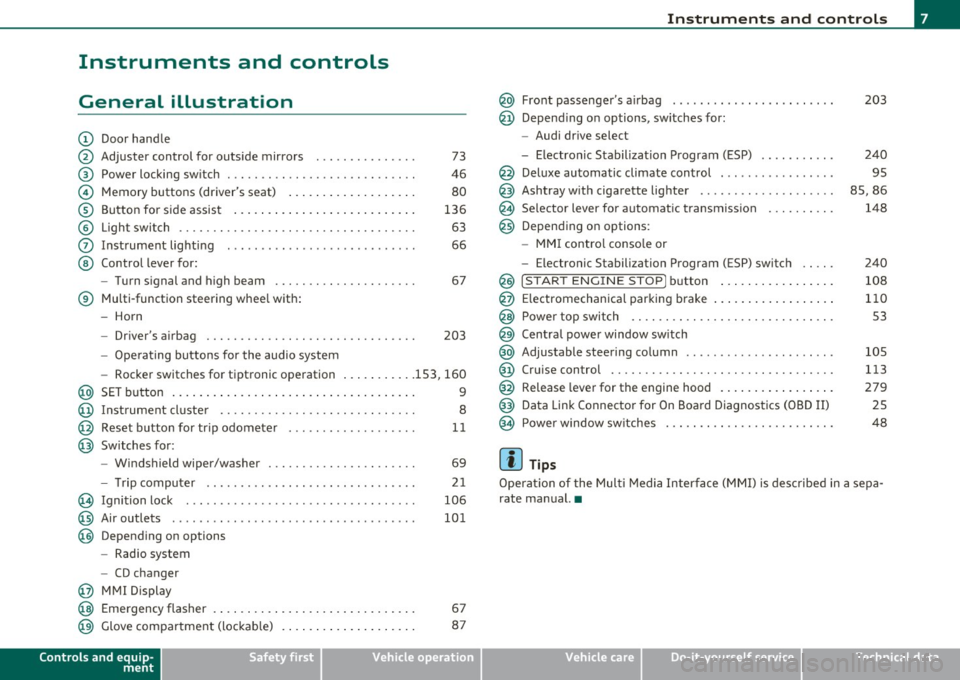
Instruments and controls
General illustration
(D Door handle
@ Adjuster control for outside mirrors . . . . . . . . . . . . . . . 73
@ Power locking switch . . . . . . . . . . . . . . . . . . . . . . . . . . . . 46
© Memory buttons (driver's seat) . . . . . . . . . . . . . . . . . . . 80
® Button for side assist . . . . . . . . . . . . . . . . . . . . . . . . . . . 136
© Light switch . . . . . . . . . . . . . . . . . . . . . . . . . . . . . . . . . . . 63
0 Instrument lighting . . . . . . . . . . . . . . . . . . . . . . . . . . . . 66
@ Control lever for:
- Turn signal and high beam . . . . . . . . . . . . . . . . . . . . . 67
® Multi-function steering wheel with:
- Horn
- Driver's airbag . . . . . . . . . . . . . . . . . . . . . . . . . . . . . . . 203
-Operating buttons for the audio system
- Rocker switches for tiptronic operation ... .. ...... 153, 160
@ SET button . . . . . . . . . . . . . . . . . . . . . . . . . . . . . . . . . . . . 9
@ Instrument cluster . . . . . . . . . . . . . . . . . . . . . . . . . . . . . 8
@ Reset button for trip odometer . . . . . . . . . . . . . . . . . . . 11
@ Switches for:
- Windshield wiper/washer . . . . . . . . . . . . . . . . . . . . . . 69
- Tr ip computer .. .......... . .. .... .. .. .... ... .
@ Ignition lock ..... .. .................. ... .. ... .
@ Air outlets ........... ... .. ..... ... ........... .
@ Depending on options
- Radio system
- CD changer
@ MMI Display 21
106
101
@ Emergency flasher . . . . . . . . . . . . . . . . . . . . . . . . . . . . . . 67
@ Glove compartment (lockab le) . . . . . . . . . . . . . . . . . . . . 87
Controls and equip
ment Safety first
Instruments and controls
@ Front passenger
's airbag . . . . . . . . . . . . . . . . . . . . . . . . 203
@ Depending on options, sw itches for :
- Audi drive select
- Electronic Stabilization Program (ESP) . . . . . . . . . . . 240
@ Deluxe automatic climate control . . . . . . . . . . . . . . . . . 95
@ Ashtray with cigarette lighter . . . . . . . . . . . . . . . . . . . . 85, 86
@ Se lector lever for automat ic transmission . . . . . . . . . . 148
@ Depending on options:
- MMI control console or
- Electronic Stabilization Program (ESP) switch . . . . . 240
@ !START ENGINE STOP] button . . . . . . . . . . . . . . . . . 108
@ Electromechanical parking brake . . . . . . . . . . . . . . . . . . 110
@ Power top switch . . . . . . . . . . . . . . . . . . . . . . . . . . . . . . S3
@ Central power window switch
@ Adjustable steering column . . . . . . . . . . . . . . . . . . . . . . 105
@ Cruise control . . . . . . . . . . . . . . . . . . . . . . . . . . . . . . . . . 113
@ Release lever for the engine hood . . . . . . . . . . . . . . . . . 279
@ Data Link Connector for On Board Diagnostics (OBD II) 25
@ Power window sw itches . . . . . . . . . . . . . . . . . . . . . . . . . 48
[ i ] Tips
Operation of the Multi Media Interface (MMI) is described in a sepa
rate manual. •
Vehicle care Technical data
Page 150 of 364
ffl..__T_ r _a_ n_s _ m_ i_ s _s_ i_ o _ n _________________________________________________ _
Transmission
Automatic transmission
Applies to vehicles: with automatic transm ission
General information
Your vehicle is equipped with an electronically controlled automatic
transmiss ion. Upshifting and downshifting takes place
automati
cally.
The transmission is also equipped with tiptronic ®. It allows the driver
to shift gears
manually if desired~ page 152 . •
Applies to vehicles : with automatic transm ission
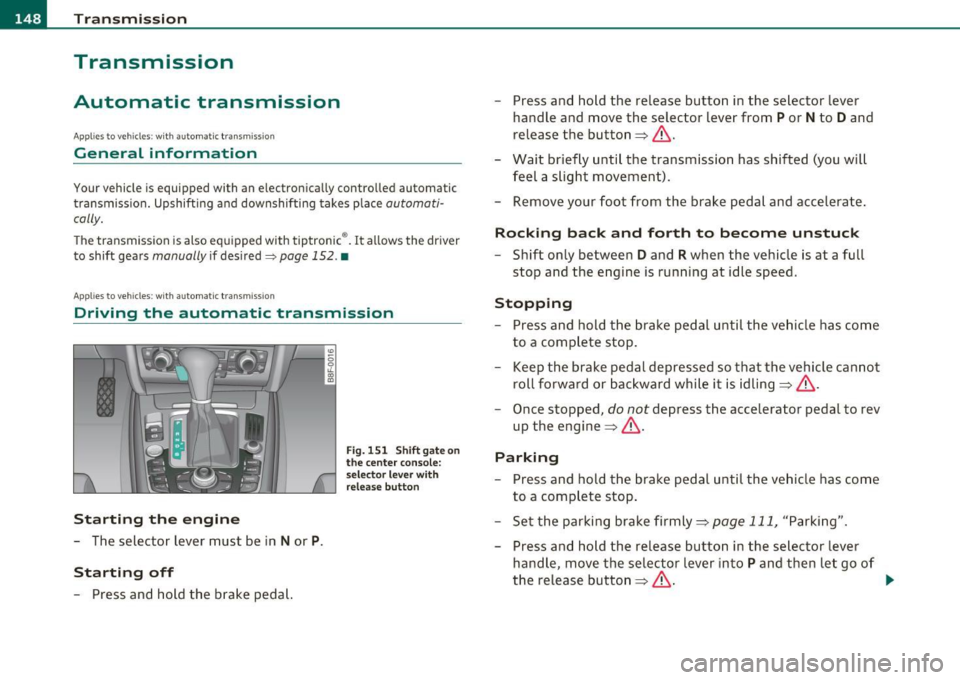
Driving the automati c transmission
St arting the engine
- The selector lever must be in Nor P.
St arting off
- Press and hold the brake pedal.
Fig. 151 Shift ga te on
t he center conso le:
selector leve r with
release butt on
- Press and hold the release button in the selector lever
handle and move the selector lever from
P or N to D and
release the button~ & .
- Wait briefly until the transmission has shifted (you will
feel a slight movement).
- Remove your foot from the brake pedal and accelerate .
Rocking back and forth to become unstuc k
-Shift only between D and R when the vehicle is at a full
stop and the engine is running at idle speed.
Stopp ing
- Press and hold the brake pedal until the vehicle has come
to a complete stop .
Keep the brake pedal depressed so that the vehicle cannot
roll forward or backward while it is idling~& .
- Once stopped,
do not depress the accelerator pedal to rev
up the engine~ &.
Parking
-Press and hold the brake pedal until the vehicle has come
to a complete stop .
- Set the parking brake firmly~
page 111, "Parking".
- Press and hold the release button in the selector lever
handle, move the selector lever into
P and then let go of
the release button~ & - .,
Page 152 of 364
ffl..__T_ r_a _n_ s_ m_ is_ s_io _ n ___________________________________________________ _
R -Reverse
Th e transmission will automatically select the lowest gear ratio when
you shift into reverse.
Select
R only when the vehicle is at a full stop and the engine is
running at idle speed=>
& in "Driving the automatic transmission"
on
page 148 .
Before you move the selector lever to R, press both the button in the
handle of the selector lever
and the brake pedal at the same time.
When the ignition is on, the backup lights illum inate when the
selector lever is moved into
R.
N -Neutral
The transmission is in neutral in this position . Shift to this position
for standing with the brakes applied~
page 150.
When the vehicle is stationary or at speeds below 3 mph (5 km/h),
you must always apply the footbrake before and while moving the
lever out of
N.
D -Normal position for driving forward
Position Dis for normal city and highway driving. It ranges from zero
to top speed and all gears shift automatically, depending on engine
load, driving speed and automatically selected shift programs.
When the vehicle is stationary or at speeds below 3 mph (5 km/h),
you must always apply the foot brake before and while moving the
lever to
D out of N .
In certa in circumstances it may be advantageous to temporarily
switch to the manual shift program to manually select gear ratios to
match specific driving conditions~
page 152.
S -Sport position*
Select this position for sportier performance. In this position, the
transmission will not upshift as soon, allowing the vehicle to use the
increased power available at higher engine speeds to achieve livelier
acceleration . When the vehicle
is stationary or at speeds below 3 mph (5 km/h),
you must always apply the foot brake before and while moving the
lever to
S out of N.
& WARNING
Read and follow all WARNINGS=> & in "Driving the automatic
transmission" on
page 148 .
0 Note
Coasting downhill with the transmission in N and the engine not
running will result in damage to the automatic t ransmiss ion and
possibly the catalytic converter. •
Applies to vehicles: with automat ic transmissio n
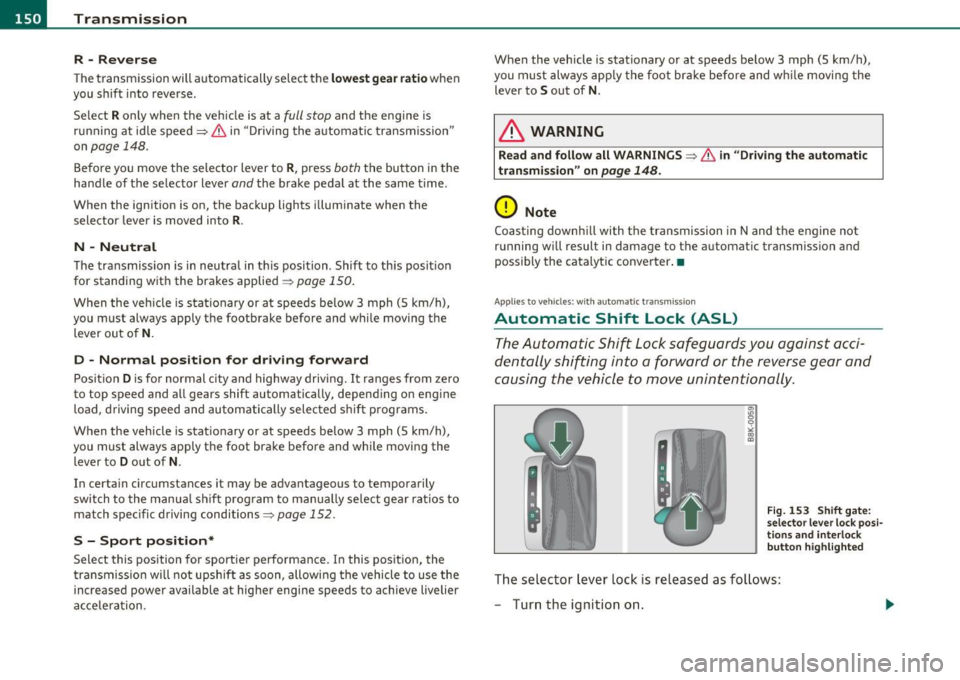
Automatic Shift Lock (ASL)
The Automatic Shift Lock safeguards you against acci
dentally shifting into a forward or the reverse gear and
causing the vehicle to move unintentionally.
Fig. 153 Shift gate:
selector lever lock posi
tions and interlock
button highlighted
Th e selector lever lock is released as follows:
- Turn the ignition on.
Page 154 of 364
-Transmission .n,..__ ______________ _
The selection of the most suitable shift program is a continuous,
automatic process. The driver can also make the transmission switch
to a sporty program by
quickly pressing down the gas pedal.
This causes the transmission to shift down to a lower gear to achieve
rapid acceleration, e .g . for quickly passing another vehicle. You do
not need to press the gas pedal into the kick-down range. After the
transmission has upshifted, the original program is selected
according to your driving style.
An additional shift program allows the automatic transmission to
select the proper gear for uphill and downhill gradients.
This keeps the transmission from shifting up and down unnecessarily
on hills. The transmission will shift down to a lower gear when the
driver presses the brake pedal on a downhill gradient. This makes use
of the braking effect of the engine without the need to shift down
manually. •
Applie s to veh icles: w it h au tomatic transm iss io n
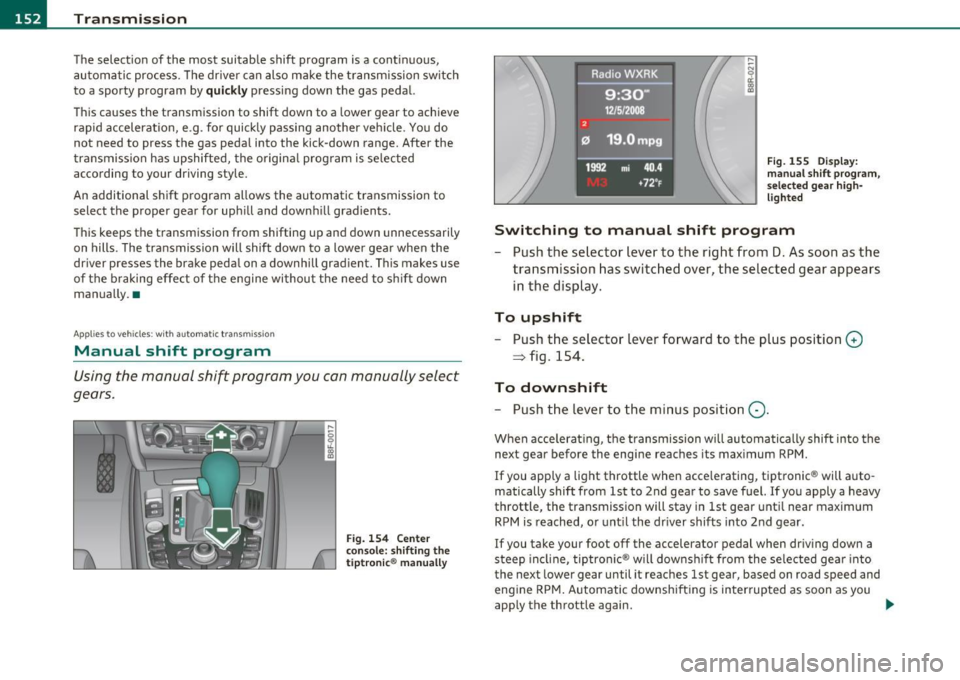
Manual shift program
Using the manual shift program you con manually select
gears.
Fig. 154 Center
console: shifting the
tiptronic ® manually
Fig. 155 Display:
manual shift program,
selected gear high
lighted
Switching to manual shift program
- Push the selector lever to the right from D. As soon as the
transmission has switched over, the selected gear appears
in the display.
To upshift
-Push the selector lever forward to the plus position 0
~ fig. 154.
To downshift
- Push the lever to the minus pos ition Q .
When accelerating, the transmission will automatically shift into the
next gear before the engine reaches its maximum RPM.
If you apply a light throttle when accelerating, tiptronic ® will auto
matically shift from 1st to 2nd gear to save fuel. If you apply a heavy
throttle, the transmission will stay in 1st gear until near maximum
RPM is reached, or until the driver shifts into 2nd gear.
If you take your foot off the accelerator pedal when driving down a
steep incline, tiptronic ® will downshift from the selected gear into
the next lower gear until it reaches 1st gear, based on road speed and
eng ine RPM. Automatic downshifting is interrupted as soon as you
app ly the throttle again. _.
Page 155 of 364
![AUDI A5 CABRIOLET 2011 Owners Manual Transmission Ill _______________ ___.
(]] Tips
• When you shift into the next lower gear, the transmission w ill
downshift only when there is no possibility of over-revving the](/img/6/57571/w960_57571-154.png "AUDI A5 CABRIOLET 2011 Owners Manual Transmission Ill _______________ ___.
(]] Tips
• When you shift into the next lower gear, the transmission w ill
downshift only when there is no possibility of over-revving the")
Transmission Ill _______________ ___.
(]] Tips
• When you shift into the next lower gear, the transmission w ill
downshift only when there is no possibility of over-revving the
eng ine.
• When the kick-down comes on, the transmission will shift down to
a lower gear, depending on vehicle and engine speeds.
• tiptronic ® is inoperative when the transmission is in the fai l-safe
mode. •
Applies to vehicles: w ith tip tro nic -steer ing wheel
Steering wheel with tiptronic ®
The shift buttons on the steering wheel allow the driver to
shift gears manually.
Fig . 156 Steering
wheel: Shift buttons
-To downshift, touch the button on the left 0-
- To upshift, touch the button on the right G).
The shift buttons are activated when the selector lever is in D, Sor in
the manual shift program (tiptronic).
Of course, you can cont inue to use the manual shift program with the
selector lever on the center console. •
Contro ls a nd e quip
m en t Vehicle
OP-eration
Applies to ve hicles : with automa tic t ransmiss ion
Automatic transmission malfunction 0
In the event of a system malfunction, the automatic transmission
switches to emergency operation mode .
Gearbox malfunction: you can continue driving
You can cont inue to drive the vehicle. See an authorized Audi dealer
or other qualified workshop at the next opportunity .
Gearbox malfunction: you can continue driving (limited
funct ionality )
There is a serious system malfunction:
• Th e program shifts only into certain gears.
• The engine may sta ll.
• It is not poss ible to restart the engine if it has been sw itched off .
• Co ntinuing to drive could result in subsequent damage.
0 Note
If the transmission switches to fail-safe mode, you sho uld take the
vehicle to an authorized Audi dealers hip as soon as poss ible to have
the condition corrected. •
Vehicle care Do-it-yourselt service iTechnical data
Page 156 of 364
ffl..__T_ r_a _n_ s_ m_ is_ s_io _ n ___________________________________________________ _
Applies to veh icles : with automat ic tr ansm ission
Emergency release of the selector lever
If the vehicle's power supply fails, the selector lever can
be released in an emergency.
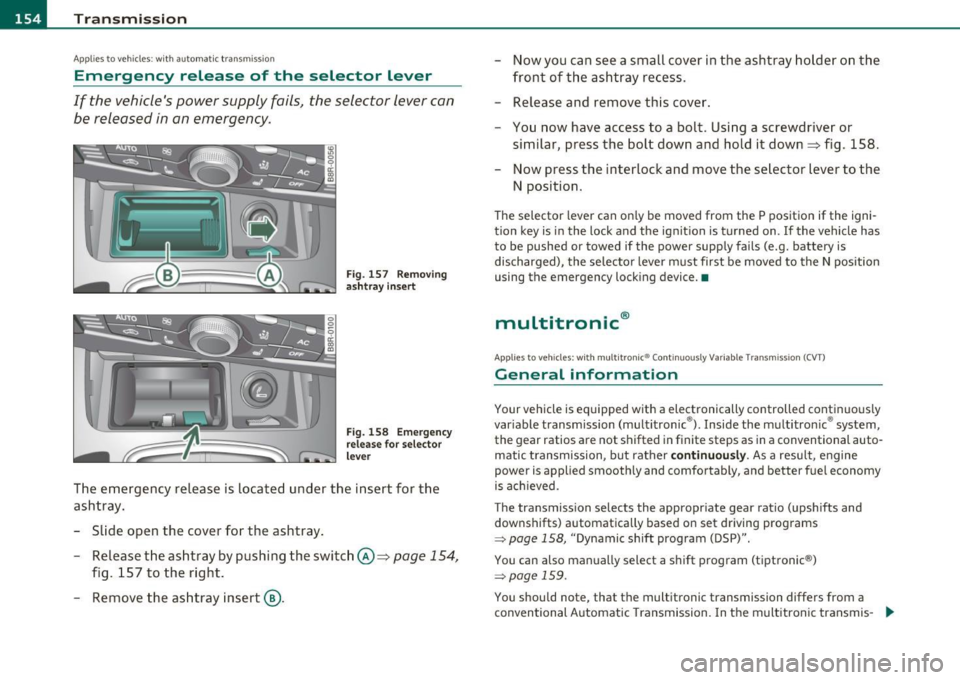
Fig . 157 Removing
ashtr ay in sert
Fig. 158 Emerge ncy
release for selector
lever
The emergency release is located under the insert for the
ashtray.
- Slide open the cover for the ashtray .
- Release the ashtray by pushing the switch @=>
page 154,
fig. 157 to the right.
- Remove the ashtray insert@. -
Now you can see a small cover in the ashtray holder on the
front of the ashtray recess.
- Release and remove this cover.
- You now have access to a bolt. Using a screwdriver or
similar, press the bolt down and hold it down=> fig . 158.
Now press the interlock and move the selector lever to the
N position.
Th e selector lever can on ly be moved from the P position if the igni
tion key is in the lock and the ignit ion is turned on . If the vehicle has
to be pushed or towed if the power supply fails (e.g. battery is
discharged), the selector lever must first be moved to the N position
using the emergency locking device. •
multitronic®
Applies to veh icle s: with mu lt it ron ic® Con tinuously Variable Transmission (CVT)
General information
Your vehicle is equipped with a electronically controlled continuous ly
var iable transmission (multitronic ®). Inside the multitronic ® system,
the gear ratios are not shifted in finite steps as in a conventional auto
matic t ransmission, but rather
continuously. As a result, engine
power is applied smoothly and comfortably, and better fuel economy
is ach ieved .
The transmission selects the appropriate gear ratio (upshifts and
downshifts) automatically based on set driving programs
~ page 158, "Dynamic shift program (DSP)".
You can also manually select a shift program (tiptronic ®)
~ page 159 .
You shou ld note, that the multitronic transmission differs from a
conventional Automatic Transmission . In the multitronic transmis-
9J,,
Page 159 of 364
____________________________________________________ T_r_a _ n_ s_m_ i_ s _s_ i_ o _ n __ ffllll
Before you move the selector lever to R, press both, the button in the
hand le of the se lec tor lever
and the brake peda l at the same t ime.
When the ignition is on, the backup lights illuminate when the
selector lever is moved into
R.
N -Neutral
Shift to this position for standing with brakes applied=> page 157.
When the vehicle is stat ionary o r at speeds below 3 mph (5 km/h),
you must always apply the footbrake before and while moving the
lever ou t of
N .
Do not use N for coasting downh ill.
D -Normal dri ving po sition for f orward
Depending on the load on the engine, veh icle speed and the dynamic
cont rol program, the t ransm ission wi ll se lect the
o ptimal gear ratio.
In certa in circumstances it may be advantageous to temporarily
switch to the manua l shift program to manually select gear ratios to
match specific driving conditions=>
page 159.
When the vehicle is stat ionary or at speeds below 3 mph (5 km/h),
you must always apply the footbrake before and wh ile moving the
lever to
D out of N .
S -Sport po sition
Select this position for sportier performance. In this position, the
transm ission will not upsh ift as soon, allowing the veh icle to use the
increased power available at higher engine speeds to achieve livelier
accelera tion.
When the vehicle is stat io nary or at speeds below 3 mph (5 km/h),
you must always app ly the foot brake before and while moving the
lever to
S out of N.
& WARNING
Read an d follo w all W ARNINGS => & in " Drivin g the mul ti
tronic ®" on
pag e 155.
Controls and equip
ment Safety first
0 Note
Coast
ing downh ill with the transmission in N and the engine not
operating will resu lt in damage to the automatic transmission and
poss ibly the cata lytic conve rter. •
App lies to veh icles: w ith mult itronic ® Continuously Va riab le T ransmiss ion (CVT)
Automatic Shift Lock (ASL)
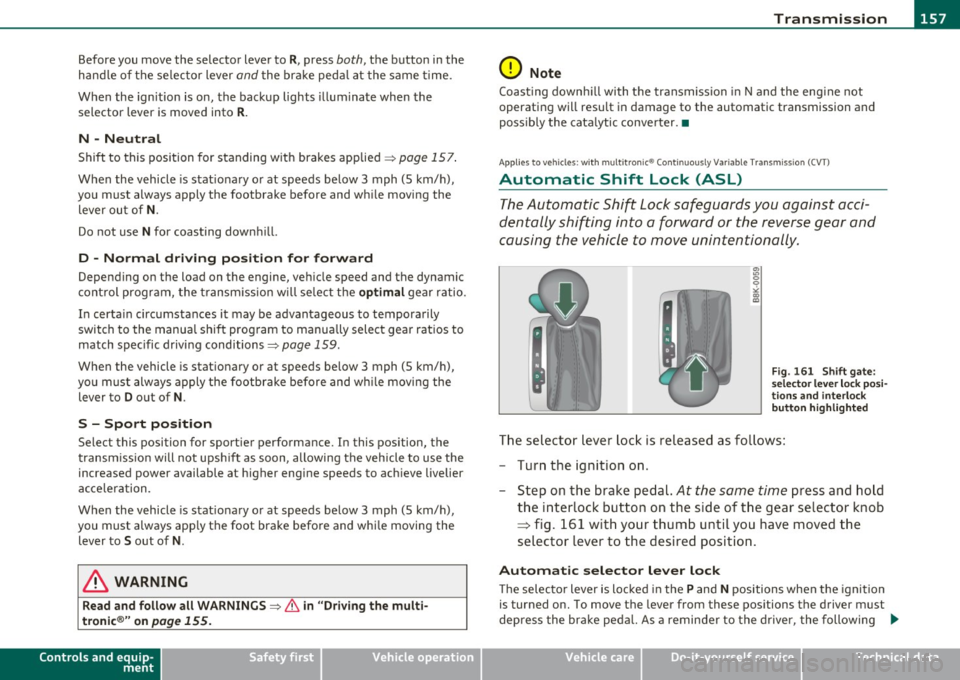
The Automatic Shift Lock safeguards you against acci
dentally shifting into a forward or the reverse gear and
causing the vehicle to move unintentionally.
"' "' 0 9
"' ::l
F ig. 16 1 Shi ft ga te:
s e lec tor lev er l ock pos i
t ions and i nterlo ck
b utton h ighlig hted
The selector lever lock is released as fo llows :
- Turn the ignit ion on.
- Step on the brake pedal.
At the some time press and hold
the interlock button on the side of the gear se lector knob
=> fig. 161 w ith your thumb until you have moved the
selector lever to the desired position .
Automatic selector le ver l ock
Th e selecto r lever is locked in th e P and N positions when the ignition
is turned on. To move the lever from these pos itions the driver must
depress the brake peda l. As a reminder to the drive r, the following .,_
Vehicle care Technical data
Page 161 of 364
____________________________________________________ T _r_a _n_ s_m _ i_s _s_ i_ o _ n _ ___._
when the driver presses the brake pedal on a downhill gradient . This
makes use of the braking effect of the engine w ithout the need to
shift down manually .
If you are driving in hills and mounta ins, the transmission will contin
uously adjust the gear ratio to the road grade. If you press the brake
pedal when driving downhill, the transmission will downshift auto
matically. This increases the brak ing effect of the engine.
If the cru ise control is on when you are traveling downhill, the trans
mission will automatica lly select a lower gear ratio in order to main
tain the set vehicle speed. Th is will cause the engi ne speed to
increase. •
Applies to vehi cles : wit h mul tit ro nic ® Co nt in uous ly Variabl e Tra ns missi on (CVT )
tiptronic ® manual shift program
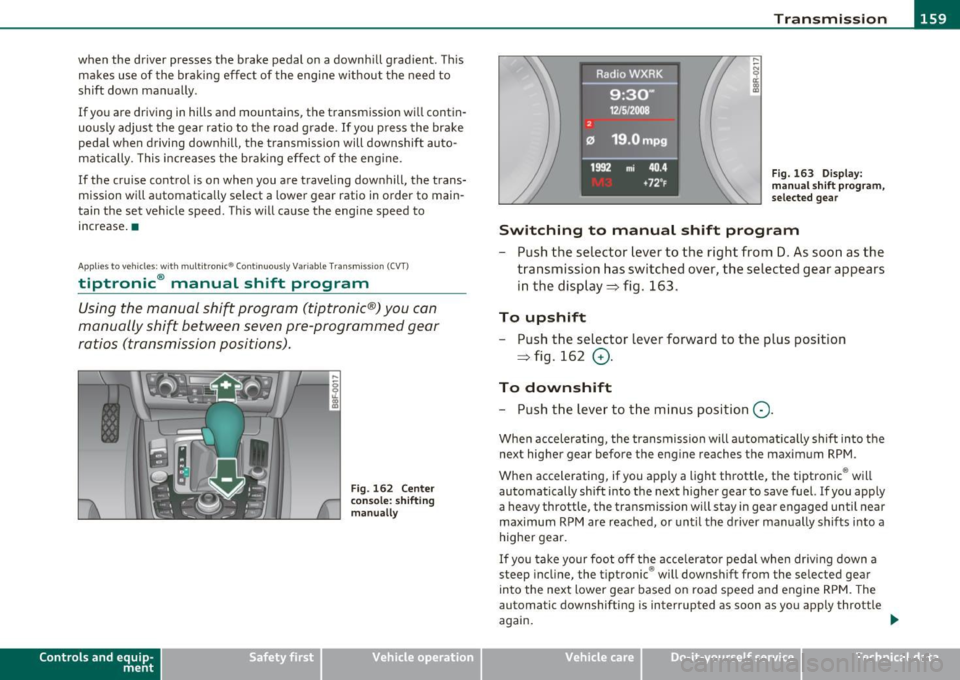
Using the manual shi~ program (tiptronic®) you can
manually shift between seven pre-programmed gear
ratios (transmission positions) .
Contro ls a nd e quip
m en t
Fig. 162 Center
console: shifting
manually
Vehicle OP-eration
Fig. 163 Di splay:
man ual shift program,
selected gear
Switching to manual shift program
- Push the selector lever to the right from D. As soon as the
transmission has switched over, the selected gear appears
in the display ~ fig . 163.
To upshift
- Push the selector lever forward to the plus position
~ fig . 162
0 -
To downshift
- Push the lev er to the minus position Q.
When accelerating, the transmission will automatically shift into the
next higher gear before the engine reaches the maximum RPM .
When accelerating, if you apply a light throttle, the tiptronic ® will
automatically shift into the next higher gear to save fuel. If you apply
a heavy throttle, the transmiss ion wi ll stay in gear engaged until near
maximum RPM are reached, or until the driver manually shifts into a
higher gear.
If you take your foot off the accelerator pedal when dr iv ing down a
steep incline, the tiptronic ® will downshift from the selected gear
into the next lower gear based on road speed and engine RPM. The
automatic downshifting is interrupted as soon as you apply throttle
again.
Vehicle care Do-it-yourselt service iTechnical data
Page 162 of 364
ffl..__T_ r_a _ n_ s_m_ i _s_ s_ io_ n _____________________________________________________ _
(I) Tips
• When you sh ift into the next lower gea r, the engine will downshift
only wh en th ere i s no poss ib ility o f ov er-revv ing.
• When the kick -down comes on, the transm is sion wi ll shift down to
a low er gear dep ending on v ehicl e and engine sp eeds.
• The tiptron ic ® is inoperat ive when the transm ission is in the fa il
saf e mode .•
Ap plies to ve hic les : w it h mu ltitronic ® Continu ous ly Var ia bl e Tra nsm issi on ( CVT)
Steering wheel with tiptronic ®
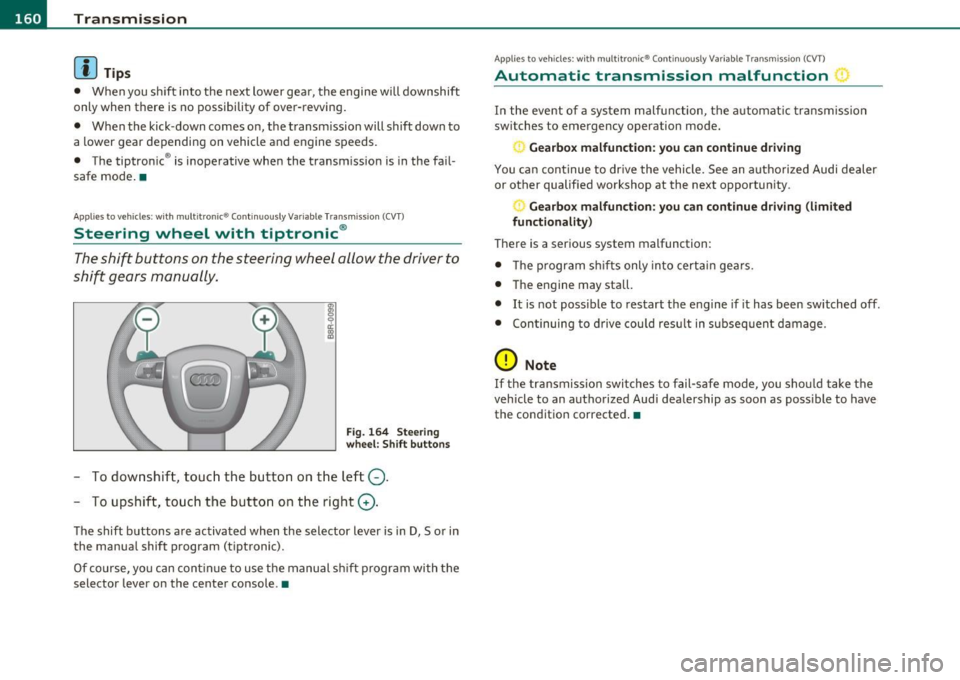
The shift buttons on the steering wheel allow the driver to
shift gears manually.
F ig . 1 64 Steeri ng
whe el: Shift butt ons
- To downshift, touc h the bu tton on the l eft Q.
- To upshift, to uch th e button on t he right G).
The shift buttons a re activated when the se lector lever is in D, So r in
the manua l shift prog ram (tiptron ic).
Of co urse, yo u can con tinue to use t he manual sh if t progr am with t he
selector lever on the center console .•
App lies to veh icles : w ith multitron ic® Conti nuous ly Var ia bl e Transm ission (CVT)
Automatic transmission malfunction :)
In the event of a system malfunction, the automatic tra nsm iss ion
swi tches to emergency opera tion mode .
Gearbox malfunction: you can continue driving
You ca n con tinue to dr ive the vehicle . See an autho rized Audi dealer
o r othe r qualif ied workshop at the next opportunity .
Gearbox malfunction : you can continue dr iving (limited
functionality)
There is a serious system malfunction:
• T he program sh if ts only into certa in ge ars .
• T he engine may sta ll.
• It is not poss ible to restart the engine if it has been switched off.
• Con tinuing to d rive cou ld res ult in subseq uen t damage .
0 Note
If the tra nsmission switc hes to fail-safe mode , you sho uld take t he
vehicle to an authorized Aud i dealership as soon as poss ible to have
the cond ition corr ecte d.•
Page 342 of 364
___ G_ e_n_ e_r _a _ l_ in_ f_o _r_ m_ a_ t_io _ n _______________________________________________ _
General information
Explanation of technical data
Some of the technical data listed in this manual requires
further explanation.
The technical data for your vehicle is listed in the charts starting on
~ page 342 . This sect ion prov ides genera l information, notes and
restrictions which app ly to this data .•
Veh icle identification
The key data is given on the vehicle identification number
(VIN) plate and the vehicle data sticker.
F ig. 256 V ehicle I den
t ifi ca tion Nu mbe r
(V IN ) pl ate: locat io n
o n d river's s id e d ash
p an el Fi
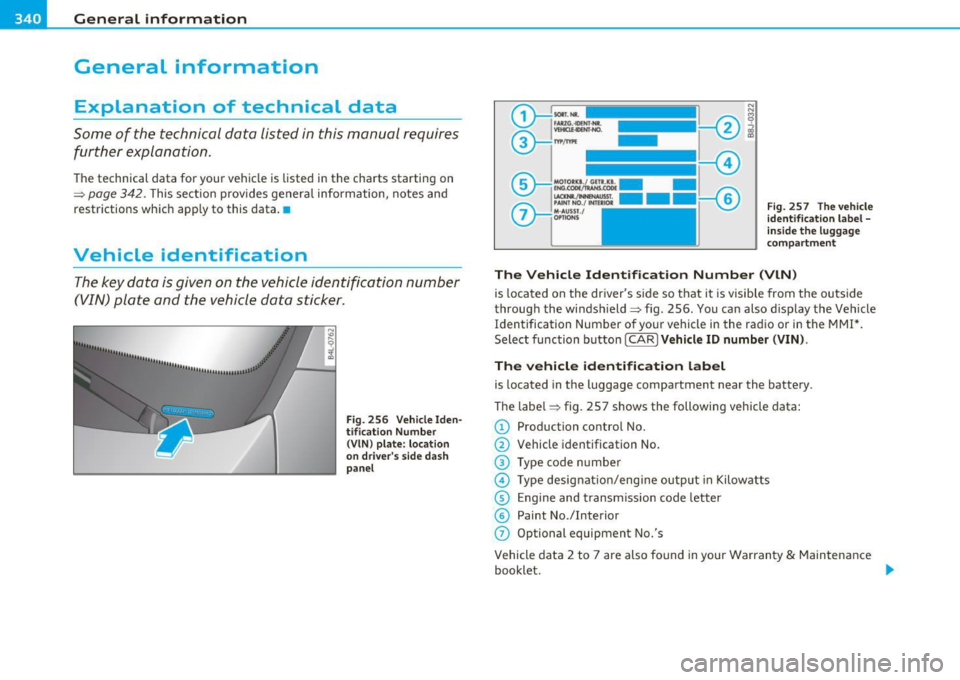
g. 257 The vehi cle
i d enti ficati on l abel -
in side the l ugga ge
co mpa rtme nt
The Vehicle Id ent ifi cat ion Number (VlN )
is located on the driver's s ide so that it is visible from the outside
throug h the windsh ield ~ fig . 256 . You can also d isp lay the Vehicle
Identification Number of your vehicle in the radio or in the MMI*.
Select function button [ CAR
l Veh icle ID numb er (VIN) .
The vehicle identifica tion label
is located in the luggage compartment near the battery .
The label~ fig . 257 shows the following vehicle data:
© Production control No.
@ Vehicle identification No.
® Type code n umber
@ Type designat io n/eng ine output in Kilow atts
© Engine and transmission code letter
© Paint No./Interior
(j) Optional equipment No.'s
Vehicle data 2 to 7 are also found in your Warranty
& Maintenance
booklet . .,,