top AUDI A5 CABRIOLET 2011 Owners Manual
[x] Cancel search | Manufacturer: AUDI, Model Year: 2011, Model line: A5 CABRIOLET, Model: AUDI A5 CABRIOLET 2011Pages: 364, PDF Size: 86.48 MB
Page 4 of 364
Table of contents
Table of contents
Vehicle literature ..... .
About this Owner's Manual ............. ...... .
Controls and
equipment .............. .
Instruments and controls ... .
General illustration ........... .
Instruments and
warning/indicator Lights ..... .
Instruments ................ .
Warning/indicator ligh ts ...... .
Driver information display ... .
Introduction ............ ... . .
Tri p com puter ......... ...... .
Eff iciency program ........... .
On-Board Diagnostic system (OBD) ....................... .
Speed warning sys tem ....... . .
Au to Check Control ........... .
Opening and closing ...... ... .
Keys ........... ... .......... .
Power locking system ........ .
Opening and closing rear lid/trunk
lid ....... ... ......... ...... .
Em erge ncy unlo cking of the
luggage compartment lid ..... .
Pow er windows ........ .. .. .. . 4
5
6
7
7
8
8
12
18
18
21
2 4
2S
26
27
38
38
41
47
48
48 Power top
............. ...... .
Automatic power top ......... .
Wind deflector .............. .
Power top emergency operat ion
Clear vision ............... ... .
Lig hts ....... ...... .... ... .. .
Interio r lights ............... .
Vis ion . ... ................ .. .
Wiper and washer system .... .
Mirror s .................. ... .
Digital compass ............ .
Seats and storage ........... .
G eneral recommendat ions .... .
Power front seat adjustment .. .
Seat memory ................ .
Head restrain ts .............. .
Front armrest ... .... ....... . .
Luggage compartment ....... .
Beverage holders ............ .
Ashtray ..................... .
Cigar ette lighter ......... .... .
S torage ............. ... .. .. .
Warm and cold .............. .
Delux e automatic climate control
Deluxe automatic climate control
p lu s ................... · · · · · ·
S eat heat ing .. .. ............ .
On the road ....... .......... .
Steer ing ................ ... . .
Ign it ion lock and ignition switch
Starting and stopping the engine
with conven ience ke y ........ . .
E lect romechanical parking brake
51
51
55
57
63
63
68
69
69 72
75
77
77
78
80
82
83
83
8S
8S
86
87
88
88
95
103
105
105
106
108
110
Cru ise control . . . . . . . . . . . . . . . . 113 Adaptive cruise control
116
Speed and distance control
system ............... ....... .
116
Driver informati on .......... ... 122
System limitation s ............ 127
Audi braking guard . . . . . . . . . . . . 129
Audi Lane assist ......... ...... 132
Lane assist ................... 132
Audi side assist ............... 136
Lane change ass istant ...... ... 136
No tes ...... ........ .......... 143
Audi drive select .............. 145
Driving settings ............... 145
T ransmission ........... ...... 148
Automatic transm iss ion . . . . . . . . 148
mult it ron ic® .. ................ 154
Park assist . . . . . . . . . . . . . . . . . . . . 162
Parking system . . . . . . . . . . . . . . . . 162
Park ing s ystem (rear) . . . . . . . . . . 162
Parking system (rear, with rear-
vi ew camera) . . . . . . . . . . . . . . . . .
164
Homelink ®
Universal remote control
171
171
Safety first . . . . . . . . . . . . . . . 17 6
D riving Safely ................. 176
Genera l notes . . . . . . . . . . . . . . . . . 176
Proper occupan t seating
posit ions . . . . . . . . . . . . . . . . . . . . .
178
Driver and passenger side
footwell . . . . . . . . . . . . . . . . . . . . . .
182
Pedal area . . . . . . . . . . . . . . . . . . . . 182
Stow ing luggage . . . . . . . . . . . . . . 183
Page 6 of 364
Vehicl e literatur e
Vehicle literature
In addition to th is Owner's Manual, your Audi comes w ith the
• MMI Operating Instructions
• Warranty
& Maintenance booklet .
If you are missing one of these publications, or if you believe that the
information is not complete, contact your autho rized A udi dea le r for
assistance.
MMI Operating Instructions
contain detailed description of the Audi Mu lti Media Interface (MMI)
including the nav igat ion system, the sound system and the hand held
phone.
The Warranty & Maintenance booklet
explains how you can keep your Audi in top driving condition by having
it serviced regularly and contains deta iled informat io n about the
warranties covering your Audi. Always have the booklet with you
when you take your veh icle to an authorized Aud i deale r for serv ice .
Your Audi Service Adviser will record each schedu led service and can
answer any quest ions you may have regard ing how to ma inta in your
vehicle .
In Canada,
the vehicle literature is also avai lable in French. To obtain a copy,
contact yo ur dealer or wri te to:
Au Canada, on peut se procurer un exemplaire en fran~ais de ce docu
ment aupres du concess ionnaire ou de:
Volkswagen Canada, Inc.
Client Ass istance
Assistance a la Clientele
777 Bay ly St reet, West,
Ajax, Ontario LlS 7G7
If you sell your Audi
all literature shou ld be left in the veh icle to make the Warranty terms
as well as all operating , safety and maintenance information avail
ab le to the next owner.
If you change your address or if you bought
this Audi used
be sure to send in a "Notice of Address Change"/ "Notice of Used Car
Purchase" post card. Th is card can be found in the Warranty
& Main
tenance book let or obta ined from your author ized A udi dealer.
It i s in your own int eres t th at we a re a ble to c ont act you should th e
need aris e.•
Page 7 of 364
About this Owner's Manual
This owner's manual contains important information, tips, sugges
tions, and warnings for the use of your vehicle.
Make sure that this owner's manual is always located in the vehicle .
This is especially important if you allow other people to drive the
vehicle, or if you sell it.
This owner's manual describes the
equipment range specified for
this model at the editorial deadline date. Some of the equipment
described here will only be available at a later date, or only in specific
markets .
Some sections in this owner's manual do not apply to all vehicles. In
that case, the
range of applicability is given at the beginning of the
section, e. g., "Applies to vehicles: with Advanced Parking System". In
addition, optional equipment is indicated by an asterisk"*".
The details in the
illustrations may be different from those in your
vehicle, and are intended to be viewed as a basic guide.
You will find a
table of contents at the beginning of this book, which
displays all topics described in this manua l in order of appearance.
You will find an alphabetical
index at the end of this book.
All
directions , such as "left", "right", "front", "back", are relative to
the direction of travel.
* optional equipment
.,. This section continues on the next page.
• Indicates the
end of a section .
® Registered trademarks are identified with a®. If this symbol is
missing, it is no guarantee that the terms can be used freely.
=> & Cross-reference to a "WARNING!" within a section. For indica
tion with a page number, the corresponding "WARNING!" can be
found outside of the section .
Controls and equip
ment Safety first Vehicle operation
About this Owner's Manual
& WARNING
Text with this symbol
contains important information on safety
and how to reduce the risk of personal injury or death .
0 Note
Text with this symbol draws your attention to potential sources of
damage to you r vehicle.
ci' For the sake of the environment
Text with th is symbol contains information about the environment
and how you can help protect it.
[I) Tips
Text with this symbol contains spec ia l tips and other information
about getting the most out of your vehicle and its feat ures. •
Vehicle care Do-it-yourself service Technical data
Page 9 of 364
Instruments and controls
General illustration
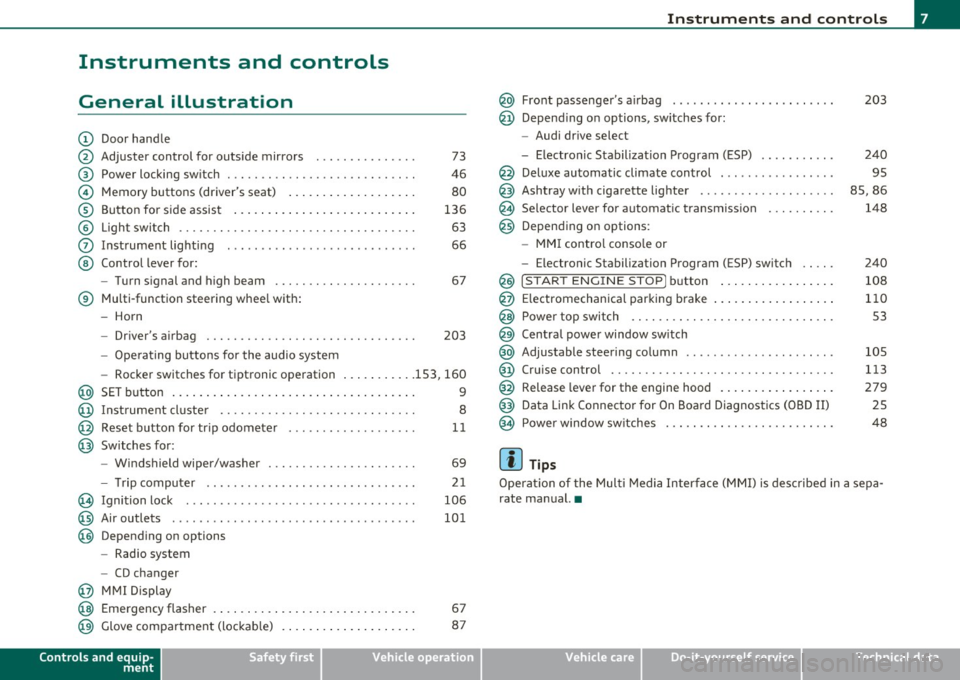
(D Door handle
@ Adjuster control for outside mirrors . . . . . . . . . . . . . . . 73
@ Power locking switch . . . . . . . . . . . . . . . . . . . . . . . . . . . . 46
© Memory buttons (driver's seat) . . . . . . . . . . . . . . . . . . . 80
® Button for side assist . . . . . . . . . . . . . . . . . . . . . . . . . . . 136
© Light switch . . . . . . . . . . . . . . . . . . . . . . . . . . . . . . . . . . . 63
0 Instrument lighting . . . . . . . . . . . . . . . . . . . . . . . . . . . . 66
@ Control lever for:
- Turn signal and high beam . . . . . . . . . . . . . . . . . . . . . 67
® Multi-function steering wheel with:
- Horn
- Driver's airbag . . . . . . . . . . . . . . . . . . . . . . . . . . . . . . . 203
-Operating buttons for the audio system
- Rocker switches for tiptronic operation ... .. ...... 153, 160
@ SET button . . . . . . . . . . . . . . . . . . . . . . . . . . . . . . . . . . . . 9
@ Instrument cluster . . . . . . . . . . . . . . . . . . . . . . . . . . . . . 8
@ Reset button for trip odometer . . . . . . . . . . . . . . . . . . . 11
@ Switches for:
- Windshield wiper/washer . . . . . . . . . . . . . . . . . . . . . . 69
- Tr ip computer .. .......... . .. .... .. .. .... ... .
@ Ignition lock ..... .. .................. ... .. ... .
@ Air outlets ........... ... .. ..... ... ........... .
@ Depending on options
- Radio system
- CD changer
@ MMI Display 21
106
101
@ Emergency flasher . . . . . . . . . . . . . . . . . . . . . . . . . . . . . . 67
@ Glove compartment (lockab le) . . . . . . . . . . . . . . . . . . . . 87
Controls and equip
ment Safety first
Instruments and controls
@ Front passenger
's airbag . . . . . . . . . . . . . . . . . . . . . . . . 203
@ Depending on options, sw itches for :
- Audi drive select
- Electronic Stabilization Program (ESP) . . . . . . . . . . . 240
@ Deluxe automatic climate control . . . . . . . . . . . . . . . . . 95
@ Ashtray with cigarette lighter . . . . . . . . . . . . . . . . . . . . 85, 86
@ Se lector lever for automat ic transmission . . . . . . . . . . 148
@ Depending on options:
- MMI control console or
- Electronic Stabilization Program (ESP) switch . . . . . 240
@ !START ENGINE STOP] button . . . . . . . . . . . . . . . . . 108
@ Electromechanical parking brake . . . . . . . . . . . . . . . . . . 110
@ Power top switch . . . . . . . . . . . . . . . . . . . . . . . . . . . . . . S3
@ Central power window switch
@ Adjustable steering column . . . . . . . . . . . . . . . . . . . . . . 105
@ Cruise control . . . . . . . . . . . . . . . . . . . . . . . . . . . . . . . . . 113
@ Release lever for the engine hood . . . . . . . . . . . . . . . . . 279
@ Data Link Connector for On Board Diagnostics (OBD II) 25
@ Power window sw itches . . . . . . . . . . . . . . . . . . . . . . . . . 48
[ i ] Tips
Operation of the Multi Media Interface (MMI) is described in a sepa
rate manual. •
Vehicle care Technical data
Page 11 of 364
Warning light in the instrument cluster display-1-
If the _L warning light in the i nstrument clus ter display flashes, this
can mean one of two things: either the coo lant
temperature is too
high, or the coolant
level is too low ~ page 31 .
If the needle is well in the uppe r area of the gauge, the coo lant
temperature is too high.
Stop the vehicle, switch the engine off, and
allow it to cool.
If th e war ning light comes o n ag ain af ter driv ing a
short distance, contact an author ized Aud i dea ler or othe r qualified
wor ksh o p.
& WARNING
• Alway s observe the warn ing in :::} page 272, "Engine compart·
ment ", before opening the hood and checking the engine coolant
level.
• Never open the engine hood if you see or hear steam, or if you
s ee engin e coolant dripping from the engine compartment. You
could burn yourself . Let the engine cool off first so that you cannot
hear or see any steam or engine coolant .
0 Note
• Mounting add ition al lights o r accesso ries in fron t of the a ir inlets
reduces the cooling effect of the radiator . At high outside tempera
tur es o r high engine load, the eng ine could ove rhe at.
• The front spo iler has been designed to properly d istribute the
c oo lin g air when the vehicle is moving. If the sp oi ler is d amaged, this
co uld reduce the cooling eff ect and the eng ine could then overheat .
Ask your au thor ized A udi dealer for assis tance .•
Con tro ls a nd e quip
m en t Vehicle
OP-eration
Instruments and warning /indicator lights
Tachometer (engine rev counter)
The tachomete r in dic ates t he engine RPM (revoluti ons
pe r mi nutes) .
If engine RPM drops below 1,500, you shou ld downsh ift to the next
lower ge ar. T he red area at the end of the s cale i ndi cates max imum
permissible engine RPM after the brea k-in per iod. Before reaching
t his area, move t he selector lever to po sition "D (Dr ive)" or ease yo ur
foot off t he accelerator pedal.
0 Note
T he tachometer needle @~ page 8, fig. 2 should o nly br iefly be in
t he red zone: yo u co uld damage your eng ine! T he beg inning of the red
zone varies depe nd ing o n the eng ine.
~ For the sake of the environment
Upshifting early saves fuel and redu ces engine noise .•
[S ET] button
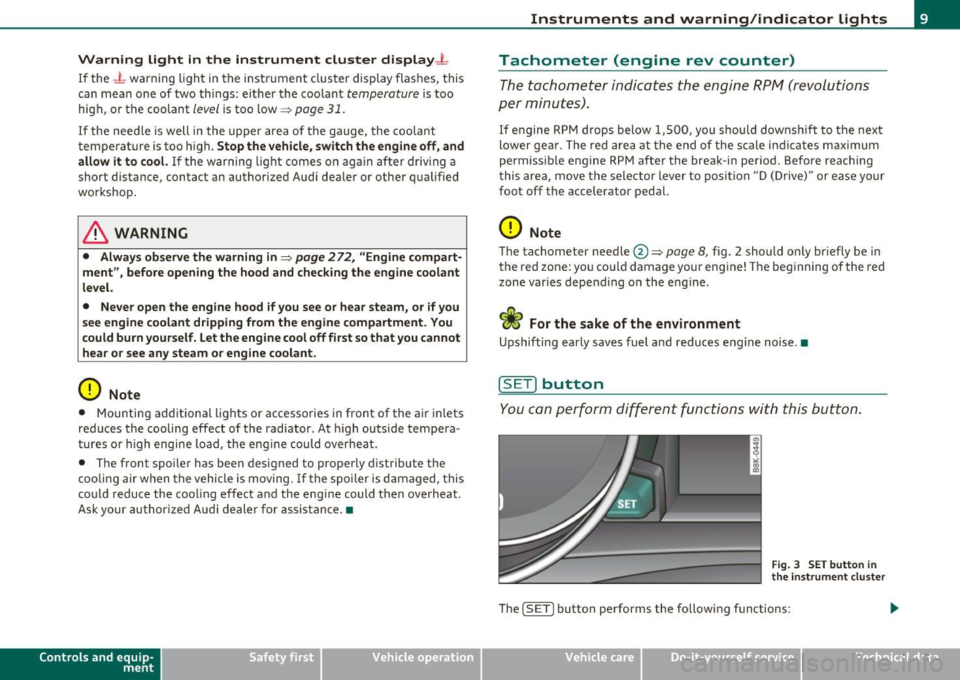
You c an per form d iffere nt fu nctions with t his but ton.
Fig . 3 SET butto n in
the instrume nt clu ste r
Th e !SE TI bu tto n performs the fo llow ing f unct io ns:
Vehicle care Do-it-yourselt service iTechnical data
Page 14 of 364
Instruments and warning /indicator lights
Warning/indicator lights
Overview
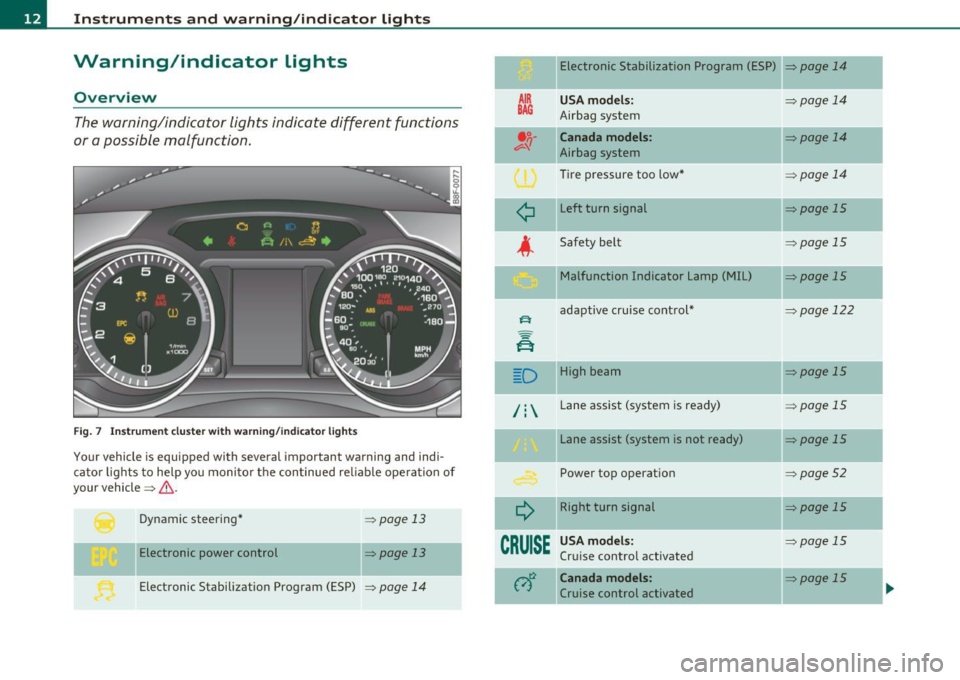
The warning/indicator lights indicate different functions
or a possible malfunction.
F ig . 7 Inst rum ent cluster with wa rning/in dicato r lig hts
Your vehicle is equipped with several important warning and indi
cato r lights to he lp yo u moni to r the continued re liable ope ration of
your vehicle =>& .
Dynamic steering *
Electronic power control =>
page 13
=> page 13
Electronic Stabilization Program (ESP)
=> page 14
Electronic Stabilization Program (ESP) => page 14
AIR
BAG
¢
USA model s:
Airbag system
Canada models:
Airbag system
Tire pressure too low *
Left turn signal
Safety belt Malfunction Indicator Lamp (MIL)
adapt ive cruise cont rol*
D High beam
/ : Lane assist (system is ready)
¢
CRUISE
Lane assist (system is not ready)
Power top operation
Right turn signal
USA model s:
Cru ise control activated
Canada models :
Cruise control activated =>
page 14
=>
page 14
=> page 14
=>page 15
=>page 15
=>page 15
=:-page 122
=:- page 15
=> page 15
:>page 15
=>page 52
=>page 15
=> page 15
=:- page 15
-
Page 15 of 364
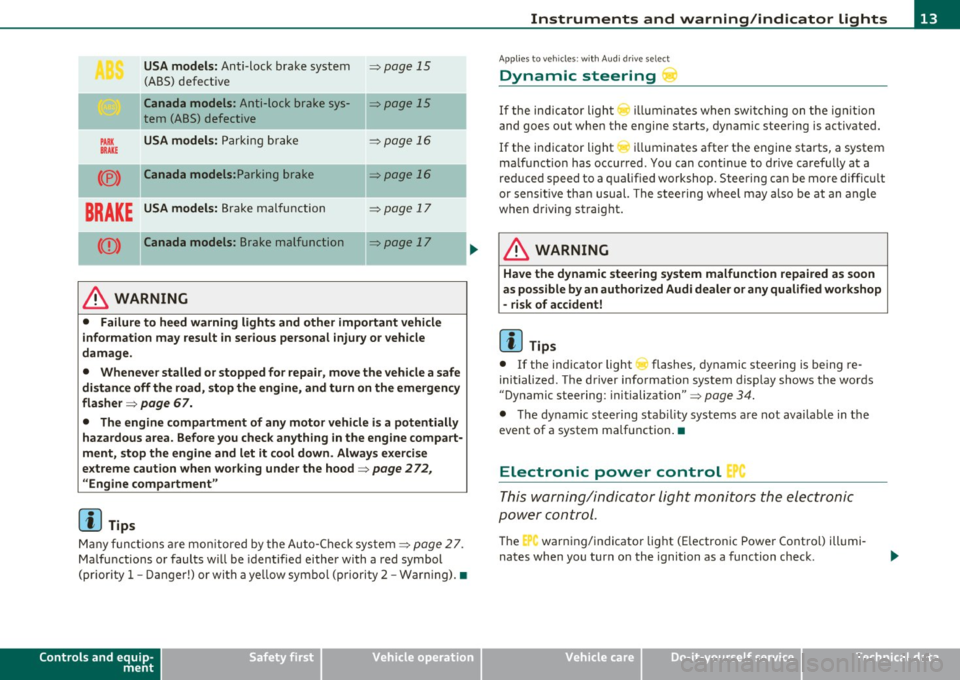
USA models: Anti-lock brake system ~ page 15
(ABS) defective
Ca nada models : Anti-lock brake sys-~ page 15
tern (ABS) defective
PARK USA models: Parki ng b rake ~ page 16
BRAKE
(® ) Canada models: Parking brake ~ page 16
BRAKE USA models: Brake malfunction ~ page 17
(Q) ) Canada mode ls : Brake malfunction ~ page 17
----·-
& WARNING
• Failure to heed warning light s and other important vehicle
information may result in serious personal injury or vehicle
damage .
• Whenever stalled or stopped for repai r, move the vehicle a safe
di stance off the road, stop the engine, and turn on the emergency
flasher ~
page 67.
• The engine compartment of any motor vehicle i s a potentially
hazardous area. Before you check anything in the engine compart
ment, stop the engine and let it cool down . Always exercise
e x treme caution when wor king under the hood~
page 2 72 ,
"Engine compartment "
[I] Tips
Many f unct io ns ar e mon itored by the Auto-Chec k system ~ page 27.
Ma lfu nctions or faults w ill be identified eithe r with a red symbol
(pr io rit y
1 -Danger!) or with a ye llow symbol (priori ty 2 -War ning). •
Controls and equip
ment Safety first
Instruments and warning
/indicator lights
App lies to ve hicles : w ith Au di dr ive select
Dynamic steering
If the ind ic a tor light () illumina te s w hen swi tching on t he ig nition
and goes ou t when the engine starts, dynamic steering is activated.
If the ind icator light
r ill uminates after the engine sta rts, a system
ma lfunct ion has occurred . Yo u can co ntinue to drive caref ully at a
re duced speed to a qualified workshop. Steering can be more diffic ult
or sensit ive tha n usual. The stee ring w heel may a lso be at an angle
when driving straight.
& WARNING
Have the dynamic steering sy stem malfunction repaired as soon
as possible by an author ized Audi d ealer
or any qualified workshop
- risk of accident!
[ i ] Tips
• If the indicator light ~ flashes, dynamic stee ring is being re
initialized. The d river info rmation system display shows the words
"Dynamic steering : initiali zation" ~
page 34.
• The dy namic steering stab ility systems a re not availab le in the
event of a system ma lfunction .•
Electronic power control '
This warning/indicator Light monitors t he electronic
pow er control .
The C'., warning/indicator light (E lectronic Powe r Cont rol) illumi
nates when you turn o n the ignition as a function check .
Vehicle care Technical data
Page 18 of 364
Instruments and warning/indicator lights
There is a malfunction in th e ABS when:
• T he warning/in dicator lig ht does not illuminate when you switch
on the ig nition.
• T he warning/indicator lig ht does not go o ut a fter a f ew seconds.
• The warning/ind icator light illuminates while dr iving.
The brake sy stem will still re spond e ven without the a ssistance of
the ABS system. See your authorized Audi dealer as soon as
pos sible to restore full braking performance.
For more info rmation
regard ing the ABS=>
page 245 .
The ABS warning light and the brake warning light come on
together. The ABS will not work and you will notice a change in
brak ing response and performance.
Malfunction in the brake system
If the brake warning light=> page 17 and the ABS warning ill uminate
together there may be a malfu nction in the A BS, and the re may also
be a malfunction in the brake system itself=> &.
In the event o f a
malfun ct ion in the brake system the warning/indi
cator light
BRAKE ( U SA mode ls)/ ((j)) (Canada models) in the instrument
cl uster flashes . By p ress ing the
! SE T) button, you can bring up a
dr iver message w hic h e xplains the malfunct io n in more detail. Please
note =>
page 30.
Malfun ction in the electron ic different ial lock (EDL)
T he EDL wo rks together with the ABS. The ABS warn ing lig ht wi ll
come on if there is a malfunction in the EDL system=>
page 242. See
your authorized A udi d ea le r as soon as poss ible .
& WARNING
• If the (USA models )/ (Canada models ) warning light
does not go out, or if it comes on while driving , the ABS system is
not working properly. The vehicle can then be stopped only with
the standard brakes (without ABS). You will not have the prote c-
& WARNING (c on tinued )
tion ABS prov ides. Contact your author ized Audi dealer as soon as
possible.
• USA models: If the BRAKE warning light and the f \. warning
light come on together, the rear wheels could lock up first under
hard braking . Rear wheel lock -up can cause loss of veh icle control
and an a ccident . Have your vehicle repaired immediately by your
author ized Aud i dealer or a qualified workshop . Drive slowly and
avoid sudden, hard brake application s.
• Canada models : If the brake warning light ((j)) and the ABS
warning light
~ c ome on together, the rear wheel s could lo ck up
first under hard b raking.
Rear wheel lock-up can cause loss of
vehicle control and an accident . Have your vehicle repaired imme
d iately by your authorized Audi dealer or a qual ified workshop .
Drive slowly and avoid sudden, hard brake applications. •
Electromechanical parking brake
=[ (USA models) / (®) (Canada models)
The warning/indicator light moni tors the electrome chan
ical parkin g brake .
With the pa rking bra ke ap plied a nd the ign it ion turned on, the
wa rning/indicator light i lluminates. Afte r th e ignit ion has been
turn ed off , the wa rni ng/ind ic a tor lig ht cont in ues to illum ina te fo r
about 30 seconds. If the par king b rake is applied with the ign ition
tur ned off , the w arning/ind ic a tor light illumi nate s fo r abo ut 3 0
seconds.
Th e warning/in dicator light will go out when the parking brake is
re leased .
If the warn ing/ indicator light flashes cont inuous ly
after applying the
p arki ng brake, braki ng fo rce is no t suffi cien t to prevent the vehicle
from rolling unintentionally. Please note the following: .,_
Page 19 of 364
• If the slope of the ground is too steep to park the ve hicle, the addi
tional d rive message appears
Caution: Vehicle parked too steep .
• In the event of a parking brake malfunction, the ye llow symbol
appea rs in the ins trument cl uster d isp lay and the driver message
Parking brake malfunction! is displayed . Have the malfunction
repaire d as soon as possible by an au thori zed A udi dealer o r any o ther
qualified workshop .•
Brake system BRAKE (USA
models)
/ (CD) (Canada models)
The warning/indi cat or li ght flas hes if brake fluid le vel is
lo w, if there is an AB S syst em malf unctio n or a parki ng
brak e malfunction.
Th e light illum inates w he n th e ignition is turned on. It goes out after
the engine has been started . This indicates that the brake war ning
light is functioning properly.
If the brake warning light does not light up when the engine is
cranking , there may be a malfunct ion in the electr ical system. In
this ca se, contact an authorized Audi dealer.
If the brake system warning/ind icator light flashes, there is a brake
system malfunction. By press ing the [SET ] button, you can bring up a
dr iver message w hich expl ains the ma lfun ct io n in more deta il
:::>page 30.
If the A BS fails, t he A BS warn ing/ indi cato r light ....
s., (U SA
mode ls)/ (Canada mode ls) flashes together with the brake system
wa rning/indica tor ligh t==> & .
(USA models):
If the wa rning lig ht BRAKE and the warn ing l ight f'l ill u
minate together, immediate ly contact your author ized Audi dealer or
qualif ied wo rkshop to have all bra ke pads inspected::::>
page 35.
When the light comes on, an audible warn ing signal is also given.
Controls and equip
ment Safety first
Instruments and warning
/indicator lights
& WARNING
• USA models: If the BRAKE warning light and the I warning
light come on together, the rear wheel s could lock up first under
hard braking . Rear wheel lock-up can cause loss of vehicle control
and an accident. Have your vehicle repai red immediately by you r
authorized Audi dealer or a qualified workshop. Drive slowly and
avoid sudden, hard brake applications.
• Canada models : If the brake warning light ((j)) and the ABS
warning light
~ come on together , the rear wheels could lock up
first under hard braking . Rear wheel lock-up can cause loss of
vehicle control and an accident. Have your vehicle repaired imme
diately by your authorized Audi dealer or a qualified workshop .
Drive slowly and avoid sudden , hard brake applications.
• If the brake warning /indicator light does not go out after a few
second s and the parking brake released , or lights up while you are
driving , the fluid level in the brake fluid reservoir i s too low. If you
believe that it is safe to do so , proceed immediately at low speed
to the neare st authorized Audi dealer or qualified repair facility
and have the brake system inspected .
• Always keep in mind that after several brake applications, you
will need greater pressure on the brake pedal to stop your vehicle.
Do not rely on strained brake s to re spond with maximum stopping
power in critical situations. You must allow fo r increased braking
di stan ce s. The extra distance used up by fading brakes could lead
to an accident. •
Vehicle care Technical data
Page 25 of 364
Efficiency program*
The efficiency program can help you to use less fuel => page 24. •
Operation
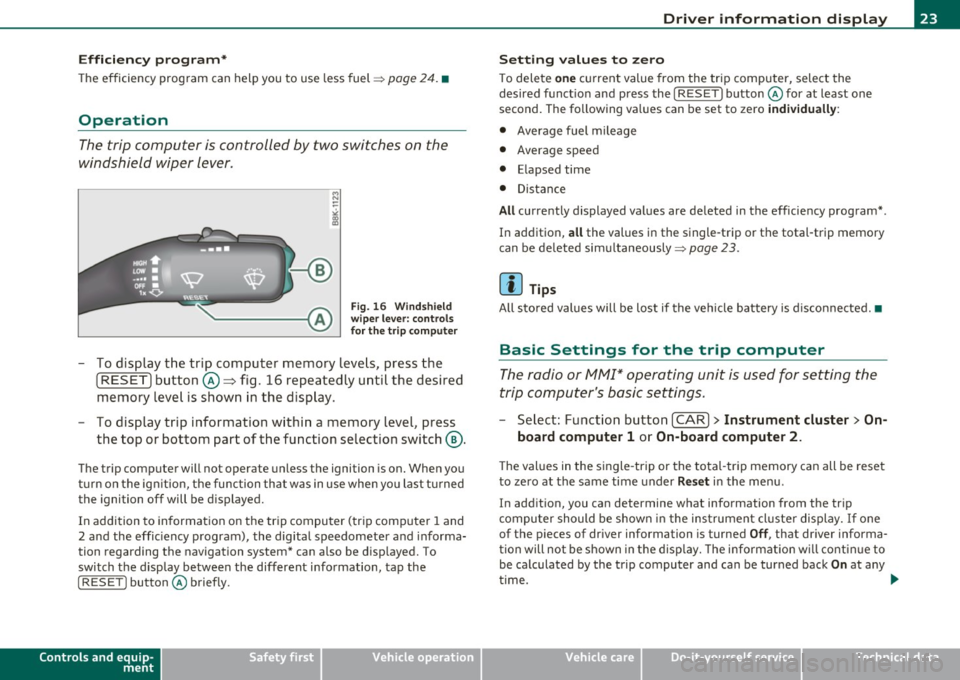
The trip computer is controlled by two switches on the
windshield wiper lever.
B
Fig. 16 Windshield
wiper lever: controls
for the trip computer
-To display the trip computer memory levels, press the
[ RESET) button@=> fig. 16 repeatedly until the desired
memory level is shown in the display .
- To display trip information within a memory level, press
the top or bottom part of the function selection switch ®·
The trip computer will not operate unless the ignition is on. When you
turn on the ign ition, the function that was in use when you last turned
the ignition off will be displayed.
In addition to information on the trip computer (trip computer 1 and
2 and the effic iency program), the digital speedometer and informa
tion regarding the navigation system* can also be disp layed. To
switch the display between the different information, tap the
I RESET ] button@ briefly.
Controls and equip
ment Safety first
Driver information display
Setting
values to zero
To delete one current value from the trip computer, select the
desired funct io n and press the
I RESET] button @for at least one
second. The fo llowing va lues can be set to zero
individually :
• Average fuel mileage
• Average speed
• Elapsed time
• Distance
All currently displayed values are deleted in the efficiency program* .
In addition,
all the values in the single-trip or the total-trip memory
can be deleted simultaneously =>
page 23.
(I] Tips
All stored values will be lost if the vehicle battery is disconnected. •
Basic Settings for the trip computer
The radio or MM!* operating unit is used for setting the
trip computer's basic settings.
-Select: Function button [CAR)> Instrument cluster > On-
board computer 1
or On-board computer 2.
Th e val ues in the single-trip or the total-trip memory can all be reset
to zero at the same time under
Reset in the menu .
In addition, you can determine what information from the trip
computer should be shown in the instrument cluster display.
If one
of the p ieces of driver information is turned
Off , that driver informa
tion will not be shown in the disp lay. The information w ill continue to
be calculated by the trip computer and can be turned back
On at any
time. ..,_
Vehicle care Technical data