ESP AUDI A5 CABRIOLET 2013 User Guide
[x] Cancel search | Manufacturer: AUDI, Model Year: 2013, Model line: A5 CABRIOLET, Model: AUDI A5 CABRIOLET 2013Pages: 290, PDF Size: 72.35 MB
Page 44 of 290
42 Power top
Power top
Automatic power top
General information
The sophisticated design of the fabric power
top allows you to operate it easily and quickly.
You can open and close the power top while
driving as long as the vehicle is traveling be
low 30 mph. When open, the power top is
stored in a special compartment which is
equipped with a cover.
Under normal conditions, the power top is
wind- and waterproof . In rare cases, small
droplets of water may form under extreme
weather conditions such as torrential or pro longed rain. That is normal and no cause for
concern.
F ollow the maintenance instructions to main
tain the attractive appearance of the converti ble and to ensure that it does not leak
<=> page 19 7, Power top care. Also observe
the following:
- Only open and close the power top when it is
clean. Sharp-edged particles of dirt can
scratch the rear window when the power top
is folded and can cause abrasion that result
in damage to the power top over time. You
should also remove ice and snow before
opening the power top.
- Never remove snow and ice with sharp
edged objects. You can remove ice from the
rear window w ith a standard ice scraper .
- You should on ly open the power top when it
is completely dry. Opening the power top
and stowing it in the compartment when it
is wet can cause marks on the top that de
tract from its appearance. Mildew can also
form if the power top is stowed for an ex
tended period of time when it is wet.
- Do not leave the power top open for several
weeks at a time. Always close it between
uses to prevent discoloration and creases
from forming. This is especially important if
it was not completely dry when stowed.
- Opening or closing the power top in temper
atures below 32 °F
(0 °() is not recommend- ed because the flexibility of the fabric
de
creases is sub-zero temperatures .
A WARNING
--When operating the power top, make
sure the function is not affected by wind
or other factors and that it does not in
terfere w ith other dr ivers.
- Never drive when the power top is not
locked correctly. The wind from driving
could cause the power top to open . This
can result in injuries and damage to the
veh icle.
- When opening and closing the power
top, make sure no one will be injured by
the supports and other moving parts.
- Operating the power top reduces the
headroom in the rear of the vehicle.
Make sure there is enough clearance be
tween the rear passenger and the power
top when opening and closing it.
-
-When operat ing the power top, visibility
to the rear is limited . Avo id operat ing the
top while driving in reverse.
(D Note
-Always make sure there is enough clear
ance above the vehicle so the power top
is not damaged when opening and clos
ing it.
- Do not store any objects in the power top
compartment to avoid damage when
opening the top.
@ Tips
- To prevent the battery from discharg ing,
do not open or close the power top re
peated ly when the engine is switched
off.
-A message in the instrument cluster dis
play will a lert you if a protection function
was activated or if there is a malfunction
<=>page 43.
-The power top can also be operated
manually if there is a malfunction
<=> page 47, Power top emergency op
eration.
Have you authorized Audi dealer .,..
Page 54 of 290
52 Clear vis ion
Clear vision
Lights
Switching the lights on and off
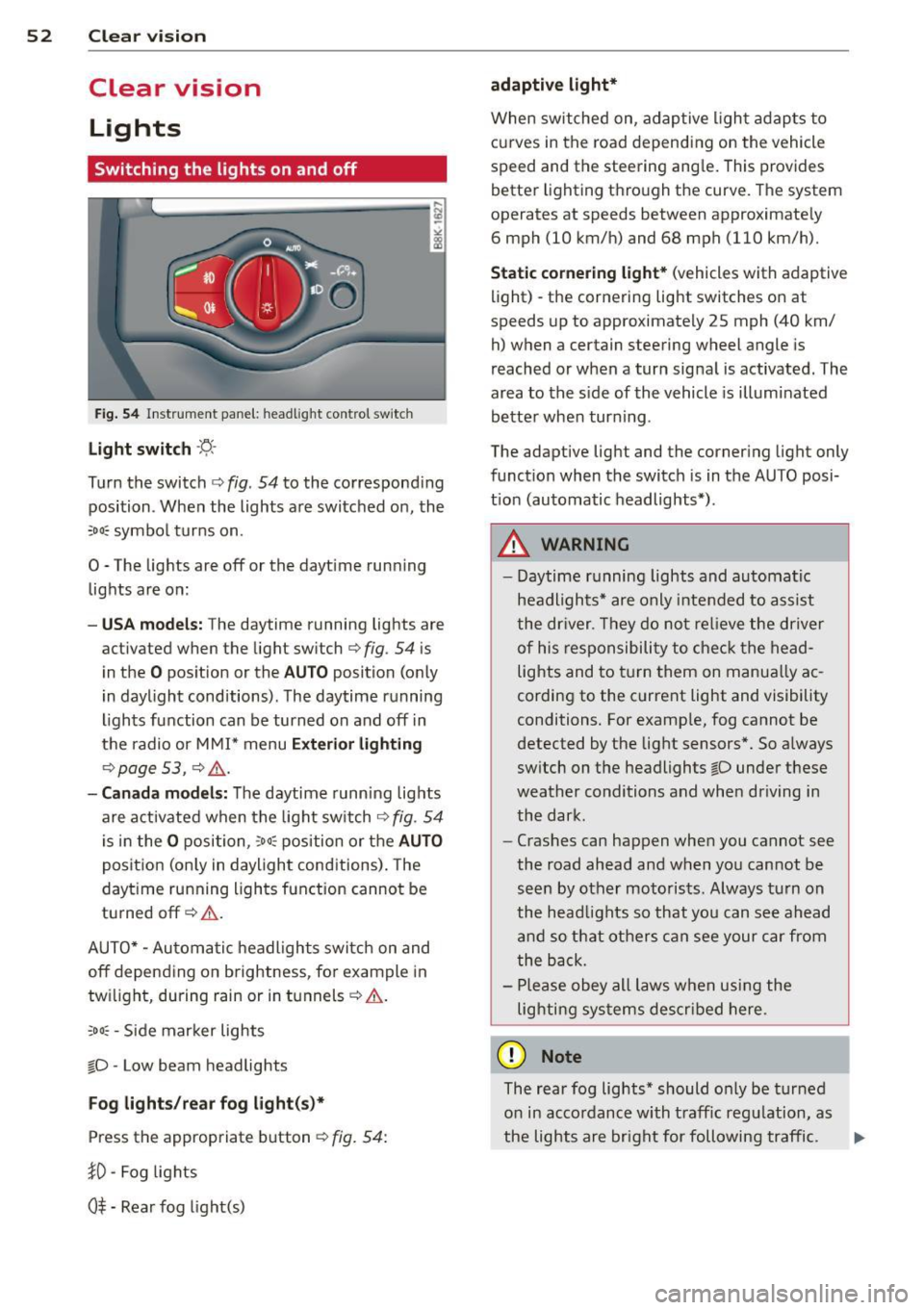
Fig . 54 Instr ument pane l: headlight con trol switch
Light switch -~ -
Turn the switch c:> fig . 54 to the correspond ing
position . When the lights are switched on, the
,o o~ symbo l tu rns on.
0 -The lights are off or the dayt ime run ning
lights are on:
- USA models: The daytime running lights are
activated when the light sw itch
c:> fig . 54 is
i n the
O position or the AUTO position (o nly
in dayl ight conditions) . The daytime running
lights function can be turned on and off in
the radio or M MI* menu
Exterior lighting
c:> page 53 , c:> ,&..
-Canada model s: The daytime runn ing lig hts
are activated when the light sw itch
c:> fig . 54
is in the
O p osition, :o o; position or the AUTO
pos it ion (on ly in daylight cond itions) . The
dayt ime running lights function cannot be
tu rned off
c:> &. .
AUTO* -Au toma tic h eadlights switch on and
off depending on b rightness, fo r example in
tw ilight, during rain or in t unnels
c:> &. .
:o o; -Side mar ker lights
io -Low beam headlights
Fog lights /rear fog light( s)*
Press the appropriate b utton c:> fig. 54:
}0 -Fog lights
0$ -Rear fog light(s)
adaptive light*
When switched on, adap tive ligh t ad apts to
curves in the road depending on the vehicle
speed and the steering ang le . This provides
b etter l ighting t hro ugh the curve . The system
operates at speeds between app roximate ly
6 mph (10 km/h) and 68 mph (110 km/h).
Static cor nering light* (vehicles with adaptive
light) - the cornering light switches on at
speeds up to approximately 25 mph (40 km/
h) when a certain steering wheel angle is
reached or when a turn sig na l is activated. The
area to the s ide of the vehicle is illumi nated
be tte r when tur ning .
The adaptive light and the co rnering light only
funct ion when the switch is in the AU TO posi
t ion (automatic headlights*) .
A WARNING
--
- Daytime r unning lights and automatic
headlights* are only inte nded to assist
the dr iver . Th ey do not re lieve the driver
o f his re sp onsibili ty to check t he head
lights and to t urn them on manua lly ac
cordin g to the c urrent light and visibility
conditions . For examp le, fog cannot be
detected by the light sensors *. So a lways
sw itch on t he headlights
io under these
wea ther conditions and when driving in
the dark.
- Cras hes can happen whe n you cannot see
the road ahead and when yo u cannot be
see n by other moto ris ts. Always tu rn on
the head lig hts so that yo u can se e ahead
and so th at others can see your car fr om
the b ack.
- Pl ease obey all laws w he n usi ng the
lighting sys tems descr ibed here.
(D Note
The rear fog lights * should o nly be tur ned
o n in acco rdanc e with t raff ic regu lation, as
the lights are bright for following traffic. ..,
Page 55 of 290
@ Tips
-The light sensor * for headl ight control is
l ocated in the rear view m irror mount.
You should therefore not apply any st ick
ers to the windsh ield in this area in order
to prevent malfunctions or failures .
- Some exterior lighting functions can be
ad justed
¢ page 53.
-When yo u remove you r key from the igni
tion w hile the vehicle's lights are turned
on, a buzzer sounds as long as the driv
er's door is open .
- In cool or damp weather, t he ins ide of
the headlights, turn signa ls and tail
li ghts can fog ove r due to the tem pera
ture diffe ren ce betwe en the inside and
outside. They will clear shor tly after
swi tching t hem on. This d oes not aff ect
the service life of the ligh ting.
- In the even t of a ligh t sensor malfunc
tion, the drive r is no tifie d in the inst ru
ment cluster disp lay ~
page 2 2.
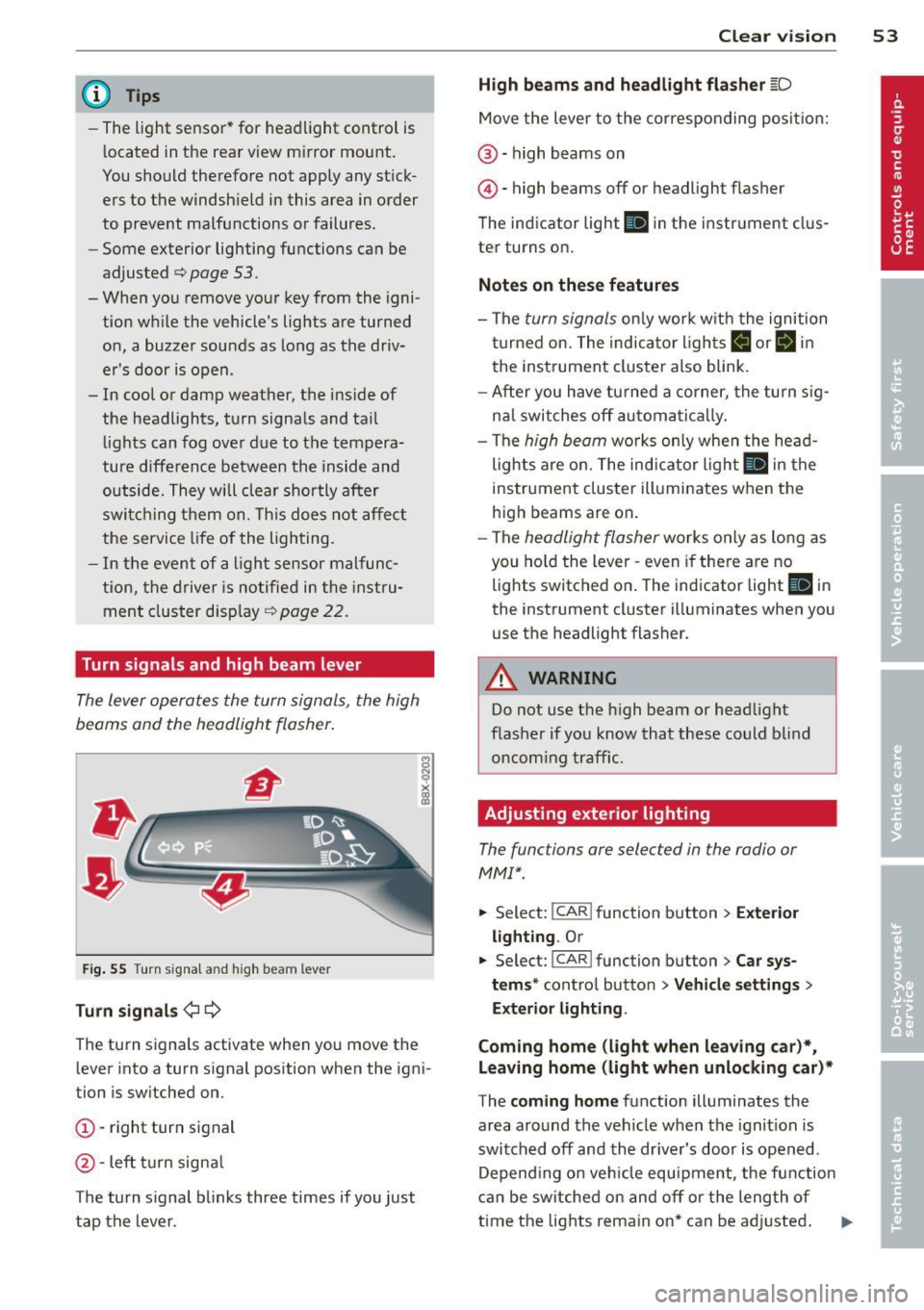
Turn signals and high beam lever
The lever operates the turn signal s, the high
b eams and th e headlight flash er.
F ig. 55 Turn sig na l an d high beam leve r
Turn signals ¢i ¢
Th e turn s ignals activate when you move the
l ever into a turn s ignal position when the ign i
tion i s sw itched on.
(D -right turn signal
@ -Left turn signa l
T he turn s ignal b links three times if you just
tap the lever .
Clear vision 5 3
High beams and headlight flasher @:D
Move the lever to the corresponding posit io n:
@ -high beams on
@-high beams off or headlight flasher
T he ind icator light
II in the instr ument clus
ter turns on .
Notes on these features
-The turn signals on ly wor k w it h t he ignition
t urned on. The indica tor l igh ts
11 or II in
the instrument cluste r also blink .
- Aft er you have tu rned a corner, the turn s ig
na l swi tches off au tom atically .
- The
high beam wo rks only when the head
lights a re on. The indicator Ligh t. in the
i nstrumen t clus ter illuminates when the
high beams are on .
- The
headligh t flasher works on ly as long as
you ho ld the lev er -even if the re are no
lights switched o n. The ind icator light
Ill i n
the inst rument cluster illuminates when you
use the headlight flasher .
&_ WARNING
Do not use the high beam or head light
flasher if you kn ow that these could b lind
oncom ing traffic.
Adjusting exterior lighting
The functions are selec ted in the radio or
MM!* .
.. Select : I CAR! function b utton > Exter io r
light ing . Or
.. Select: I CAR I func tion button > Car sys
tems *
control button > Vehicle settings >
Exterior Lighting .
Coming home (light when leaving car )*,
Leaving home (light when unlocking car)*
T he coming home function illumi nates the
area around the vehicle when the ignition is
switched off and the dr iver's door is open ed.
Depend ing o n ve hicl e equ ipment, t he function
can be switched on and off or the length of
time the lig hts remain on* can be ad justed . .._
Page 58 of 290
56 Clear vis ion
Turn the knob to the desired position :
Q/P -In t his position , you can adjust the
driver's and front passenger's exter ior mirrors
by turn ing the knob in the des ired direction.
(jjjl -The mirrors are heated depending on the
outside temperatu re.
P assenger exterio r m irro r tilt func tion*
( onl y with memor y for ext erior mirrow s)
To help you see the curb when backing into a pa rking space, the surface of the m irror t ilts
slightly . The knob m ust be in the
P posit ion
for this to happen .
You can adjust the ti lted mirror surface by
turning the knob in the desired direction .
When you move out of reverse and into anoth
e r gear, the new mirror posi tion is stored and
assigned to the key you are using.
The mirror goes back into its origina l posit io n
once yo u drive forward f aster than 9 mph
(15 km/h) or switch the ignition off .
_& WARNING
Curved mirror s urfaces (convex or spheri
cal *) increase your field of view . Remem
ber that vehicles or other objects will ap
pear smaller and farther away than when
seen in a flat m irror. If you use this mirror
to estimate distances of following veh icles
when changing lanes, you could estimate incorrectly and cause an accident .
{CT) Note
- If you wash the vehicle in an automatic
ca r wash, you must fold the exterior m ir
r o rs in to reduce the r isk of damage to
the mirrors .
(i) Tips
- The exterior mirror settings are stored
with the memory funct ion* c::>
page 64.
-If there should be a ma lfunct ion in the
electrical system, you can st ill adjust the
exter ior mirrors by press ing the edge of
the m irror. Dimming the mirrors
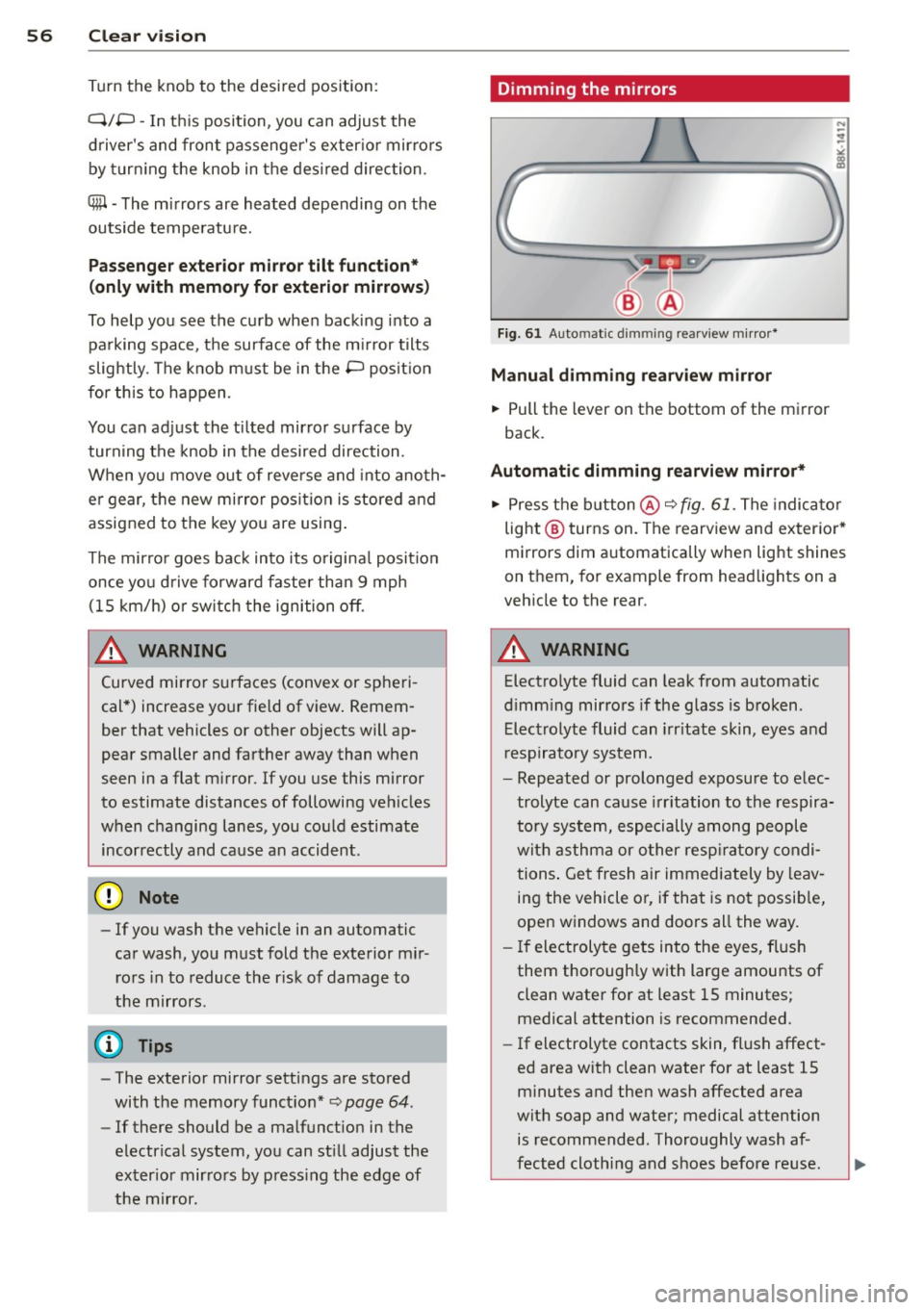
F
ig. 61 Auto ma tic dimming rearview m irro r*
Manu al di mm ing re a rvi ew mirro r
• Pull the lever on th e bottom of the mirror
back .
Automat ic dimming rearvi ew mirror *
....
• Press the button @c::> fig. 61. The indicator
light @turns on . The rearview and exterior*
mirrors dim automatically when light shines
on them, for example from headlights on a
veh icle to the rear.
_& WARNING ..__
Electrolyte fluid can leak from automatic
d imm ing mirrors if the glass is broken .
Electrolyte fluid can irr itate skin, eyes and
r espiratory system.
- Repeated or prolonged exposure to e lec
trolyte can cause irritation to the respira
tory system, especially among people
with asthma or o ther resp ira to ry condi
tions . Get fresh air immediately by leav
ing the vehicle or, if that is no t possib le,
open windows and doors all the way.
- If electroly te gets into the eyes, flush
them thoroughly with large amounts of
clean water for at least 15 minutes; medical attention is recommended.
- If electrolyte contacts skin, fl ush affect
ed area with clean water for at least 15
minutes and then wash affected area
with soap and water; medical attention
is recommended. Thoroughly wash af
fected cloth ing and shoes before reuse.
Page 60 of 290
58 Clear vis ion
Cleanin g the headlights* . The headlight wash
er system* op erates on ly when the headlights
a re on. If you move the lever to pos ition
® ·
the head lights are washed in intervals.
A WARNING
- The ra in sensor is only intended to assist
the driver . The dr iver is still responsible
for manually sw itching the w ipers on ac
co rding to the vis ibility conditions .
- The windshie ld may not be treated w it h
water-repe lling windshie ld coat ing
age nts. Unfavorable conditions, such as
wetness , darkness, low sun, can res ult in
incre ase d gla re. Wiper b lade ch atter is
also possible .
- P roperly fu nctioning windshie ld w iper
blades are required for a clear view and
sa fe dr iving
¢ page 58, Replacing
windshield wiper blades.
(D Note
- In the c ase of fro st, check whether the
winds hield wiper blad es are frozen to
the windshie ld. Switching on the wind
s h ield wipers can damage the wiper
blades!
- Prior to using a car wash, the win dshield
wipe r system must be switched
off (lever
i n position @). This helps to prevent un
i ntent ional sw itchi ng on and damage to
t h e windshie ld w iper system .
- The w indshield wipers are switched
off
when the ignition is turned off . Activate
the windshie ld w ipers afte r the ignit ion
i s sw itched back on by mov ing t he wind
s h ield wiper leve r to any pos it io n.
- Worn or dirty windsh ie ld w iper blades
r esult in streaking . T h is can affect the
r ain senso r* function . Ch eck your wind
s h ield wiper blades regularly.
- The was her fluid nozzles of the wind
s h ield washer system are heated at low
temper atures w hen the ignit ion i s on.
- When stop ping temporarily , (e.g. at a
traff ic light) the se t speed of the wi nd- shield wipers is automatically
reduced by
one s peed.
Replacing windshield wiper blades
Wiper blad es in good condition help k eep th e
windshield clear.
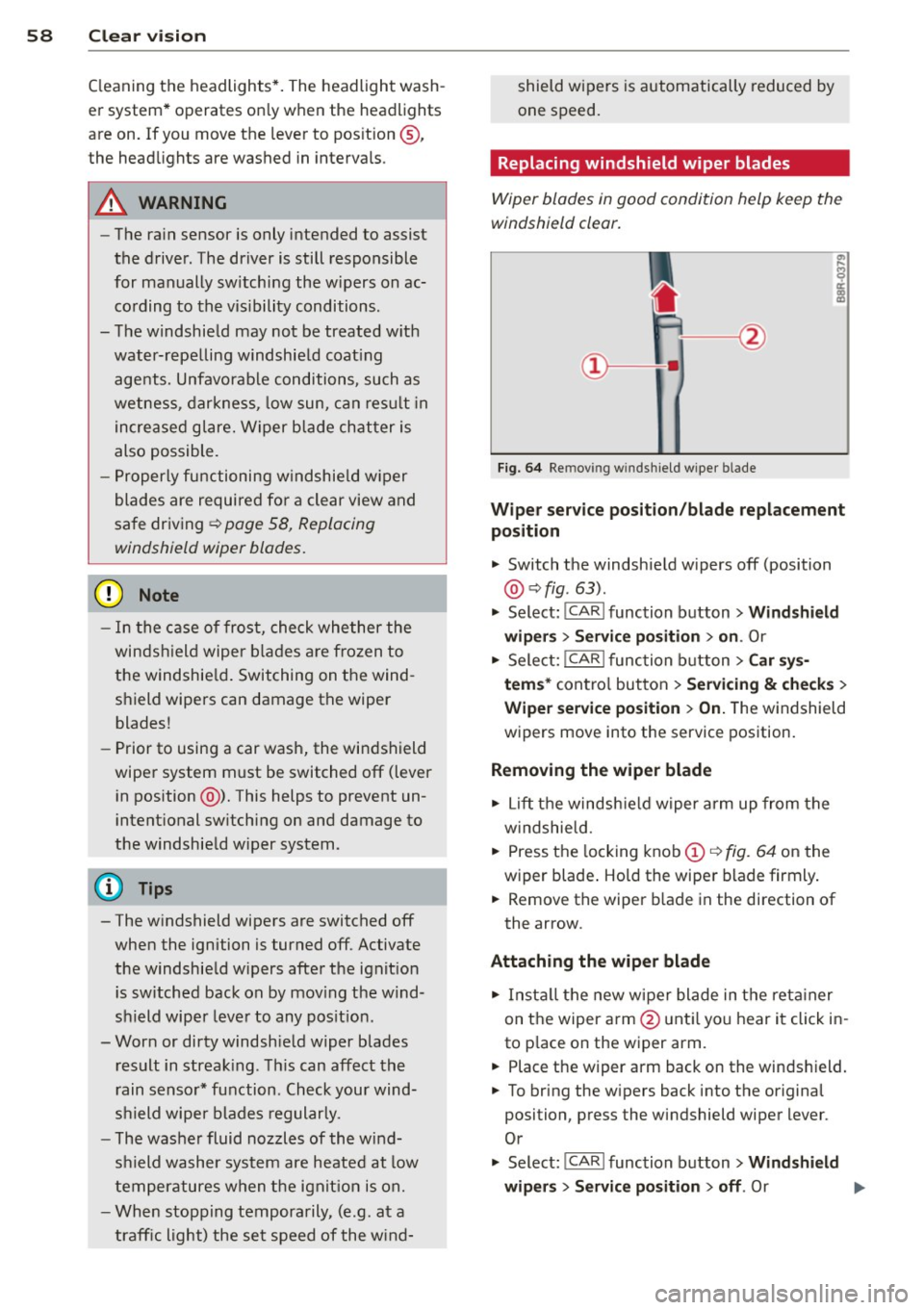
Fi g. 6 4 Re mov ing w indsh ie ld wipe r bl ade
Wiper service posit ion /blade replacement
position
" Switch the windsh ie ld w ipers off (position
@ ¢fig. 63).
" Select: !CAR ! function b utton> Wind shield
wip ers> Service po sition > on .
Or
" Select:
I CAR I func tion button > Car sy s
tem s*
con tro l but ton > Servicing & checks >
Wiper service po sition > On.T he windsh ield
w ipers move into the service pos ition.
Removing the wiper blade
" Lift t he windsh ie ld w iper a rm up from the
w indshie ld.
" Press the locking knob
(D c::> fig. 64 on the
wiper blade . Ho ld the wipe r blade firmly .
" Remove the wiper b lade in the direction of
the arrow .
Attaching the wiper blade
" In st all the new w ipe r blade in t he reta iner
on t he wiper a rm @ unt il yo u hear i t click in
to p lace on the wiper arm.
" Place the wiper arm back on the winds hield.
" To bring the w ipers back into the origina l
position, press the windshield wiper lever .
Or
" Select :
!CAR ! function button> Windshield
wipers
> Service position > off . Or
Page 63 of 290
Seats and storage
General recommen
dations
Why is your seat adjustment so important?
The safety belts and the airbag system can
only provide maximum protection if the front
seats are correctly adjusted.
There are various ways of adjusting the front
seats to provide safe and comfortable support
for the driver and the front passenger. Adjust
your seat properly so that :
- you can easily and quick ly reach all the
switches and controls in the instrument
panel
- your body is properly supported thus reduc ing physical stress and fatigue
- the safety belts and airbag system can offe r
maximum protection
¢ page 140.
I n the following sections, you will see exactly
how you can best adjust your seats .
There are special regulations and instructions
for installing a child safety seat on the front passenger's seat. Always follow the informa
tion regard ing child safety provided in
¢ page 161, Child Safety.
.&_ WARNING
-
Refer to ¢ page 121, Driving Safely for
important information, tips, suggestions
and warnings that you should read and fol
low for your own safety and the safety of
your passengers.
.&_ WARNING
Incorrect seating position of the driver and
all other passengers can result in serious
personal injury.
- Always keep your feet on the floor when
the vehicle is in motion -never put your
feet on top of the instrument panel, out of the w indow or on top of the seat cush
ion. This app lies especially to the passen-
S eat s an d sto rage 61
gers . If your seating position is incorrect,
you increase the risk of injury in the case
of sudden braking or an accident . If the
airbag inflates and the seating position
is incorrect, this cou ld result in pe rsonal
in jury or even death.
- It is important for both the driver and front passenger to keep a distance of at least 10 inches (25 cm) between them
selves and the steering wheel and/or in
s trumen t panel. If you're s itting any
closer than th is, the airbag system can
not protect you properly. In addition, the
front seats and head restraints m ust be
adj usted to your body height so that they
can give you max imum protect ion.
- Always try to keep as much distance as
possible between yourself and the steer
ing wheel or instrument panel.
- Do not adjust the driver's or front pas senger's seat whi le the vehicle is moving.
Your seat may move unexpectedly, caus
ing sudden loss of veh icle control and
pe rsonal injury. If you adjust you r seat
while the veh icle is moving, you are ou t
of po sit ion.
Driver's seat
The correct seat position is important for safe
and relaxed driving .
We recommend that you adjust the dr iver's
seat in the follow ing manner:
.., Adjust the seat in fore and aft direction so
that you can easily push the pedals to the
floor wh ile keeping your knees slightly bent
¢ .&, in Why is your seat adjustment so im
portant? on page 61 .
"" Adjust the seatback so that when you sit
w ith your back against the seatback , you can
s ti ll grasp the top of t he steering wheel.
... App lies to vehicles with adjustable head re
straints: Adjust the head restraint so the up
per edge is as even as possible wit h the top
of your head. If that is not possib le, try to
adjust the head restraint so that it is as .,.
Page 64 of 290
62 Seats and storage
close to this position as possible
¢page 64.
A WARNING
Never place any objects in the driver's foot
well. An object could get into the pedal area and interfere with pedal function. In
case of sudden braking or an accident, you
would not be able to brake or accelerate .
Front passenger's seat
Always move the front passenger seat into
the rearmost position.
To avoid contact with the airbag while it is de
ploying, do not sit any closer to the instru
ment panel than necessary and always wear
the three-point safety belt provided adjusted correctly . We recommend that you adjust the
passenger's seat in the following manner:
• Bring the backrest up to an (almost) upright
position. Do not ride with the seat reclined.
• Applies to vehicles with adjustable head re
straints: Adjust the head restraint so the up
per edge is as even as possible with the top
of your head. If that is not possible, try to
adjust the head restraint so that it is as
close to this position as possible
¢ page 64.
• Place your feet on the floor in front of the
passenger's seat.
Front seats
Power seat adjustment
Applies to vehicles: with power adjustab le seats
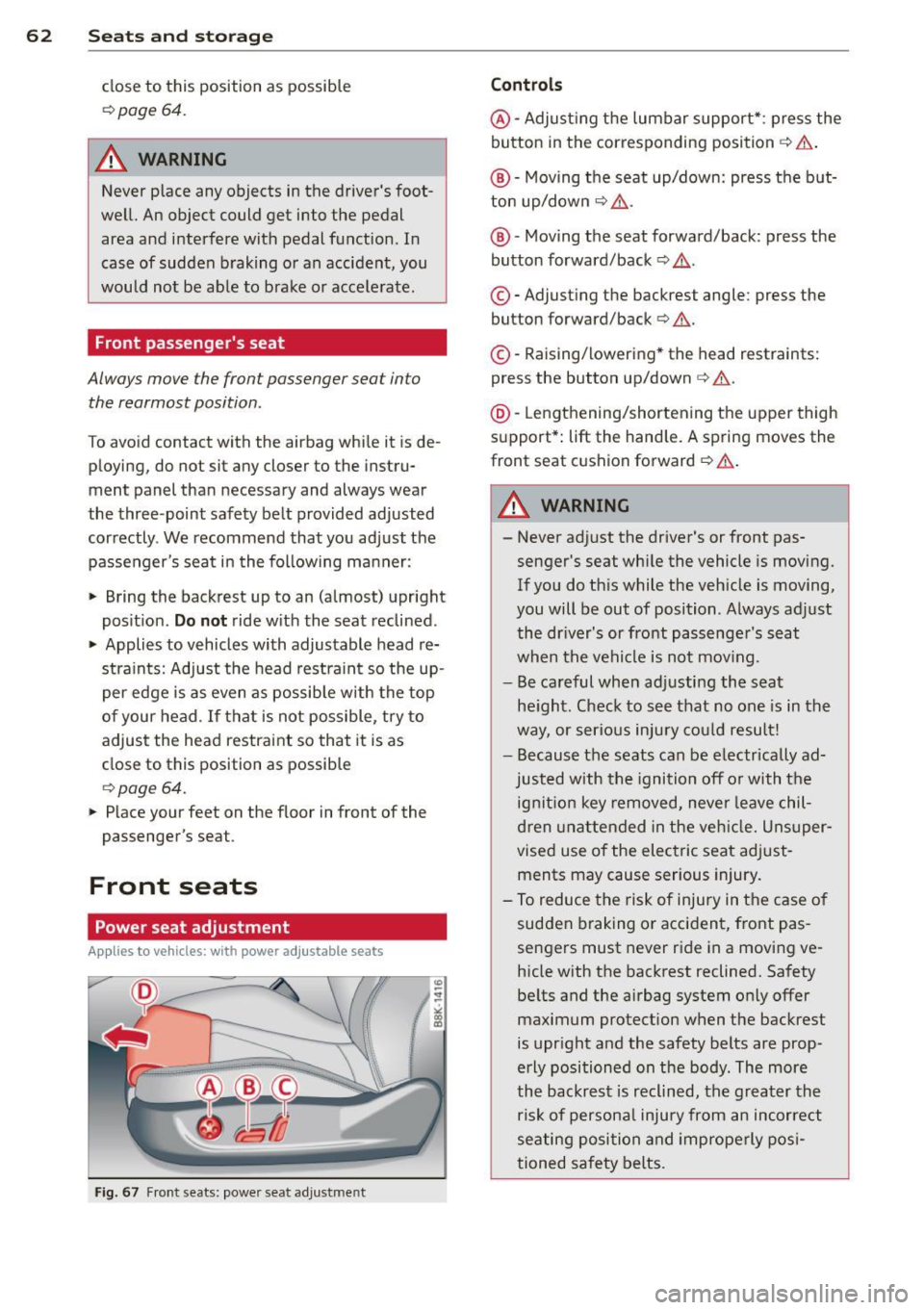
Fig. 67 Front seats: power seat adjustment
Controls
@-Adjusting the lumbar support* : press the
button in the corresponding position ¢ .&, .
@ -Moving the seat up/down: press the but
ton up/down ¢ .&, .
@ -Moving the seat forward/back: press the
button forward/back¢ .&,.
©-Adjusting the backrest angle: press the
button forward/back¢ .&..
©-Raising/lowering * the head restraints:
press the button up/down¢.&. .
@ -Lengthening/shortening the upper thigh
support* : lift the handle. A spring moves the
front seat cushion forward ¢ .&. .
A WARNING
---Never adjust the driver's or front pas
senger's seat while the vehicle is moving.
If you do this while the vehicle is moving,
you will be out of position . Always adjust
the driver's or front passenger's seat
when the vehicle is not mov ing.
- Be careful when adjusting the seat
height. Check to see that no one is in the
way, or serious injury could result!
- Because the seats can be electrically ad
justed with the ignition off or with the
ignition key removed, never leave chil
dren unattended in the vehicle. Unsuper
vised use of the electric seat adjust
ments may cause serious injury.
- To reduce the risk of injury in the case of
sudden braking or accident, front pas
sengers must never ride in a moving ve
hicle with the backrest reclined. Safety
belts and the airbag system only offer maximum protection when the backrest
is upright and the safety belts are prop
erly positioned on the body. The more
the backrest is reclined, the greater the
risk of personal injury from an incorrect
seating position and improperly posi
tioned safety belts.
Page 65 of 290
Power easy entry function
Applies to vehicles: with power ad justable seats
The easy entry function makes it easier for
the rear passengers to enter and leave the ve
hicle.
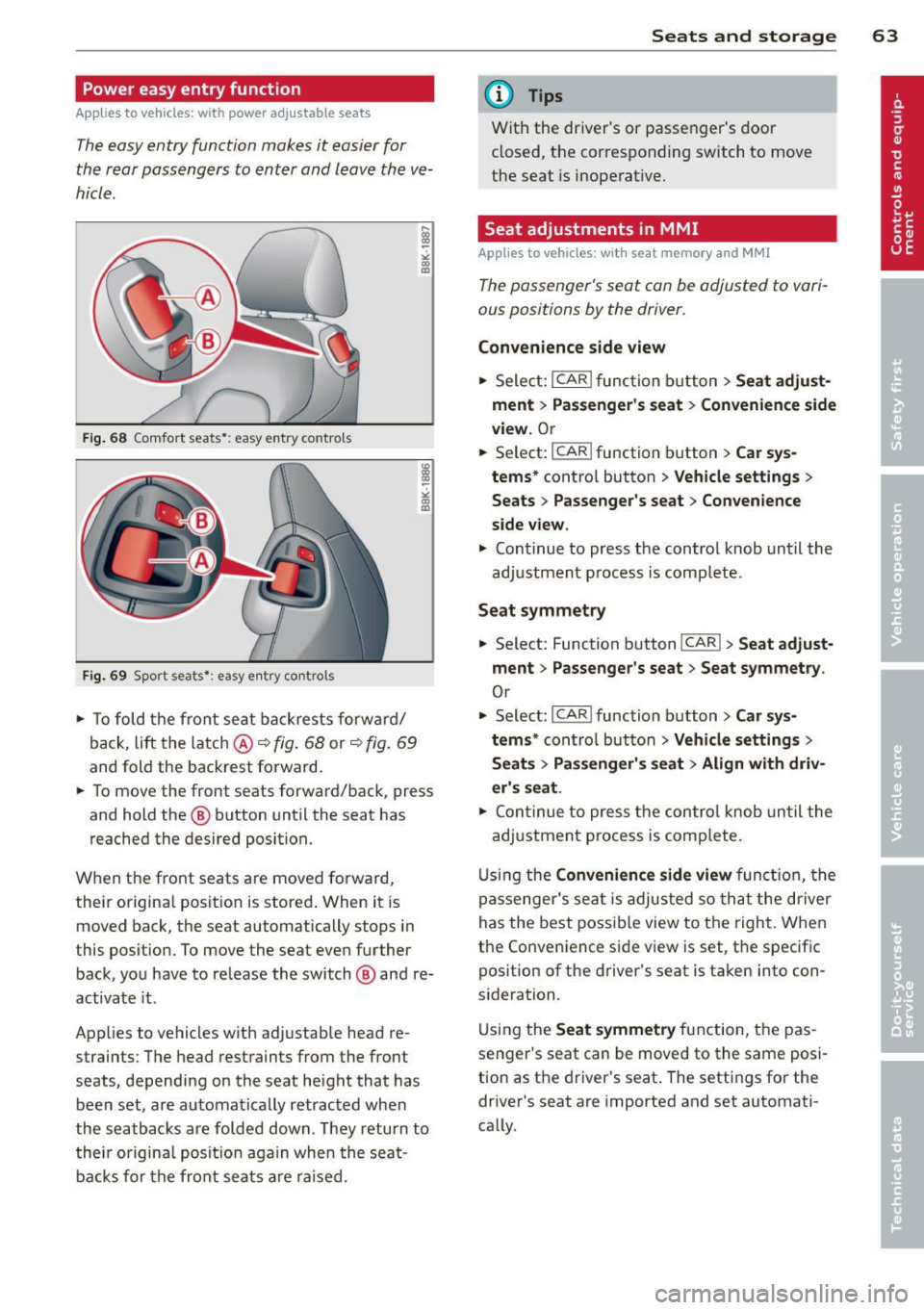
F ig. 6 8 Comfort seats•: easy entry contro ls
Fi g. 69 Spor t seats •: easy e ntry co ntrols
.,. To fold t he front seat ba ckrests f orwar d/
back,
lift t he latch @ c:::> fig. 68 or c:::> fig. 69
and fold the backrest fo rward.
.,. To move the front seats forward/back, press
and hold the @ button until the seat has
reached the desired position.
When the front seats are moved fo rward,
their origina l posit ion is stored . When it is
moved back, the seat automatically stops in
this posit ion. To move the seat eve n further
back, you have to re lease the switch @ and re
activa te it .
Applies to vehicles w ith ad justab le head re
straints : T he head restraints from the front
seats, dependi ng on the seat he ight that has
been set, are au tomatically retrac ted when
the seatbacks are folded down . They return to
thei r origina l posi tion aga in whe n the seat
b ac ks f or th e fron t sea ts ar e ra ised .
Seats and storage 63
@ Tips
Wit h the driver's or passe nger's door
cl osed, the c orresponding switch to move
the seat is inoperat ive.
Seat adjustments in MMI
Applies to vehicles: wit h seat memory and MMI
The passenger's seat can be adjusted to vari
ous positions by the driver.
Convenience side view
.,. Sele ct: I CAR I func tion b utton > Seat adju st
ment > Passenger's seat > Convenience side
view.
O r
--... Select: I CAR !function button > Car sys-
tems*
contro l button > Vehicle settings >
Seats > Passenger's seat > Convenience
side view .
.,. Cont inue to press the control knob until the
adj ustment p rocess is comp lete.
Seat symmetry
.,. Select: Function b utton !CAR !> Seat adjust
ment > Passenger's seat > Seat symmetry .
Or
.,. Select: !CAR !function button> Car sys
tems *
control but to n > Vehicle settings >
Seats > Pas senger' s seat > Align with driv
er's seat.
.,. Co nti nue to press the con trol knob unti l the
adj ustment process is comp lete.
U si ng the
Convenience side view fun ction, the
pas senger 's se at is adjus ted so th at the driver
has the best poss ible view to the right. Whe n
the Conven ience s ide v iew is set, the specific
position of the d river's seat is taken into con
s ideration .
U sin g the
Seat symmetry fu nction, the pas
senger's seat can be moved to the same posi
tion as the d river's seat . The settings for the
driver's seat are imported and set automati
cally.
Page 72 of 290
70 Warm and cold
Warm and cold Climate controls
Description
The climate control system warms, cools and
adds humidity to the air in the vehicle interior.
It is the most effect ive when the windows and
sunroof are closed . If there is a build-up of
heat inside the vehicle, ventilation can help to
speed up the cooling process.
I n all heating mode functions except
defrost,
the blower on ly switches to a higher speed
once the engine coolant has reached a certain
temperature.
Condensat ion from the cooling system can
drip and form a puddle of water under the ve
hicle. This is normal and does not mean there
is a leak.
Pollutant filter
The pollutant filter removes pollutants s uch
as dust and pollen from the air.
The air pollutants filter must be changed at
the intervals spec ified in you r Warranty
&
Maintenance booklet, so that the air condi
tioner can properly work.
If you drive your vehicle in an area with h igh
a ir po llution, the fi lter may need to be
changed more frequently than specified in
your Aud i Wa rranty
& Ma intenance booklet. If
in doubt, ask your authorized Audi Service Ad
visor for advice .
Key coded settings
The climate control settings are automat ically
stored and assigned to the remote control key
that is in use. These settings are different
when the power top is open or closed .
A WARNING
Reduced visibility is dangerous and can
cause accidents. -
- For safe driving it is very important that
all windows be free of ice, snow and con
densation.
- Comp letely familiarize yourself with the
proper use and function of the heating
and ventilation system and especially how to defog and defrost the windows.
- Never use the windshield wiper/washer
system in freez ing weather unt il you
have warmed the windshield first, using
the heating and ventilation system. The
washer solution may freeze on the wind shie ld and reduce visib ility.
(D Note
- If you suspect that the air conditioner has been damaged, switch the system
off to avoid further damage and have it
inspected by a qualified dealership.
- Repairs to the Audi air conditioner re
quire special technical know ledge and
special tools. Contact an authorized Aud i
dea ler fo r assistance.
@ For the sake of the environment
By reducing the amount of fuel you use,
you also reduce the amount of pollutants
emitted into the air.
(D Tips
- Keep the air intake s lots (in fro nt of the
w indshield) free from ice, snow and de
bris in order to maintain the proper func
tion of the climate control system.
- The energy management system may
switch the seat heating* or rear window
defroster off temporarily . These systems
are available again as soon as the energy
balance has been restored.
- Air escapes through vents under the rear
window. When placing items of clothing
on the luggage compartment cover, en
sure that the openings are not covered.
Page 86 of 290
84 On the road
Cruise control
Switching on
The cruise control system makes it possible to
drive at a constant speed starting at 20 mph
(30 km/h).
0
f
®t
0
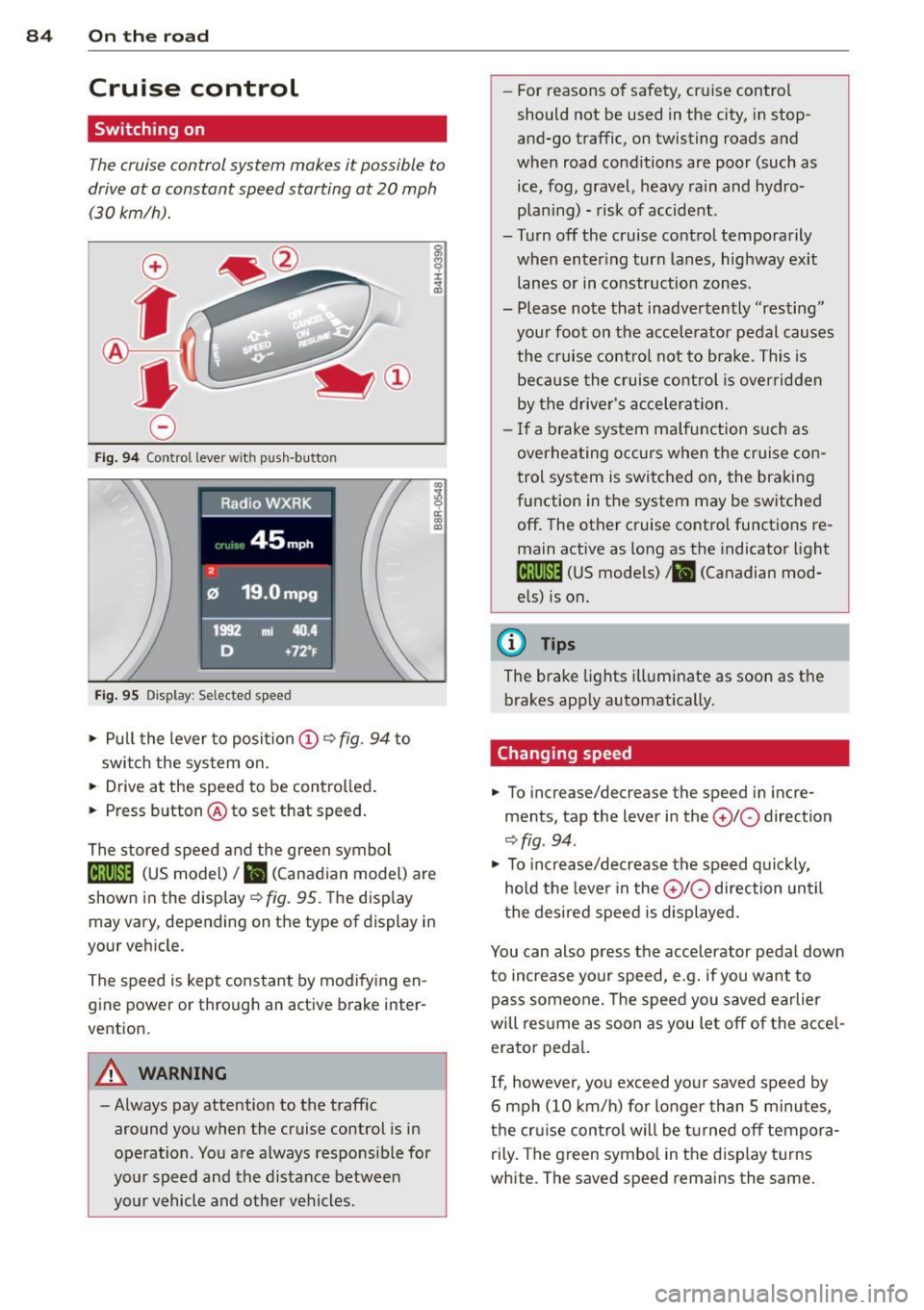
Fig. 94 Control lever w it h push-button
Fig. 95 Dis pl ay: Selected speed
"' Pull the lever to position (D 9 fig . 94 to
switch the system on.
"' Drive at the speed to be controlled .
"' Press button @ to set that speed.
I :i:. ... a,
The stored speed and the green symbol
lij;(l)~i4 (US model) 1B (Canadian model) are
shown in the display
r:::;, fig. 95. The display
may vary, depending on the type of display in
your veh icle.
The speed is kept constant by modifying en
gine power or through an active brake inter
vention.
A WARNING
- Always pay attention to the traffic
around you when the cruise control is in
operation. You are always responsible for
your speed and the distance between
your vehicle and other vehicles. -
For reasons of safety , cruise control
should not be used in the city, in stop
and-go traffic, on twisting roads and
when road conditions are poor (such as ice, fog, gravel, heavy rain and hydro
plan ing) - risk of accident.
- Turn off the cruise control temporarily
when enter ing turn lanes, highway exit
lanes or in constr uction zones .
- Please note that inadve rtently "resting"
your foot on the accelerator pedal causes
the cruise control not to brake. This is
because the cruise control is overridden
by the drive r's acceleration.
- If a brake system malfunction such as
overheating occurs when the cruise con
trol system is switched on, the braking
function in the system may be switched
off . The other cruise control functions re
main active as long as the indicator light
[ff;(l)~i4 (US models) ;B (Canadian mod
els) is on.
(D Tips
The brake lights illuminate as soon as th e
brakes app ly automatically.
Changing speed
"' To incre ase/decrease the speed in incre
ments, tap the lever in the
010 direction
r:::;, fig . 94 .
"' To increase/decrease the speed quic kly,
hold the lever in the
010 direction until
the desired speed is displayed.
You can also press the accelerator pedal down
to increase your speed, e .g. if you want to
pass someone. The speed you saved earlier
will res ume as soon as you let off of the acce l
erator pedal.
If, however, you exceed your saved speed by
6 mph (10 km/h) for longer than 5 minutes,
the cruise control wil l be turned off tempora
rily. The green symbol in the disp lay turns
white. The saved speed remains the same.