key AUDI A5 CABRIOLET 2013 User Guide
[x] Cancel search | Manufacturer: AUDI, Model Year: 2013, Model line: A5 CABRIOLET, Model: AUDI A5 CABRIOLET 2013Pages: 290, PDF Size: 72.35 MB
Page 38 of 290
36 Opening and clo sing
- You cannot open the doors or the rear lid
from the
outside (increased security, for ex
amp le when you are stopped at a red light).
- The diodes in the power locking switch illu
minate when all the doors are closed and
locked .
- You can unlock and open the doors from the
inside by pulling on the door hand le .
- If you have a crash and the airbag is activat
ed, the doors automatically un lock .
.&_ WARNING
- The power locking switch works with the
ignition off and automatically locks the
entire vehicle when it is actuated .
- On a vehicle locked from the outs ide the
power locking system switch is inopera
t ive .
- locked doors make it more difficult for
emergency workers to get into the vehi
cle, which puts lives at risk . Do not leave
anyone beh ind in the veh icle, especially
children.
(D Tips
Your vehicle is locked automatically at a speed of
9 mph (15 km/h) (Auto lock)
~ page 31. You can unlock the veh icle
again using the opening f unction in th e
power locking sys tem switch
@I.
Setting power locking
In the radio/MM!*, you can set which doors
the central locking system will unlock.
• Select : I CARI function button > C e ntral lock
ing .
Or
• Se lect:
~IC_A_R~I funct ion button > Car s ys·
tem s*
control button > Vehicl e settings >
(Central lo cking )* .
Sing le door un locking /Unlock do ors* -
you
can specify which doors un lock when you open
the veh icle .
- Se lecting
off /All and pressing the I@ b utton
on the remote cont ro l key unlocks the entire
vehicle . -
Selecting
on/Dri ver and pressing the~ but
ton on the remote control key once un locks
only the driver 's door. In vehicles w ith a con
ven ience key*, only the door whose handle
you pull will unlock. If you press the
@J but
ton tw ice, the entire vehicle will un lock .
If
you p ress the I@ b utton, t he ent ire ve hicle
w ill always lock.
Luggage comp. lock /Lock e xterior trunk han
dle -
If you select On, you can no longer ope n
t h e luggage compartment usi ng the rea r lid
hand le ~
fig . 25 . In this case, the rear lid can
be opened with the
l=I button on the master
k ey~
fig . 20.
Ton e when locking -if you select On, a tone
will sound when yo u lock the vehicle .
Auto Lock/Lock when dri ving -if you select
On, the entire vehicle w ill lock automatica lly
when the speed reaches
9 mph ( 1 5 km/h) .
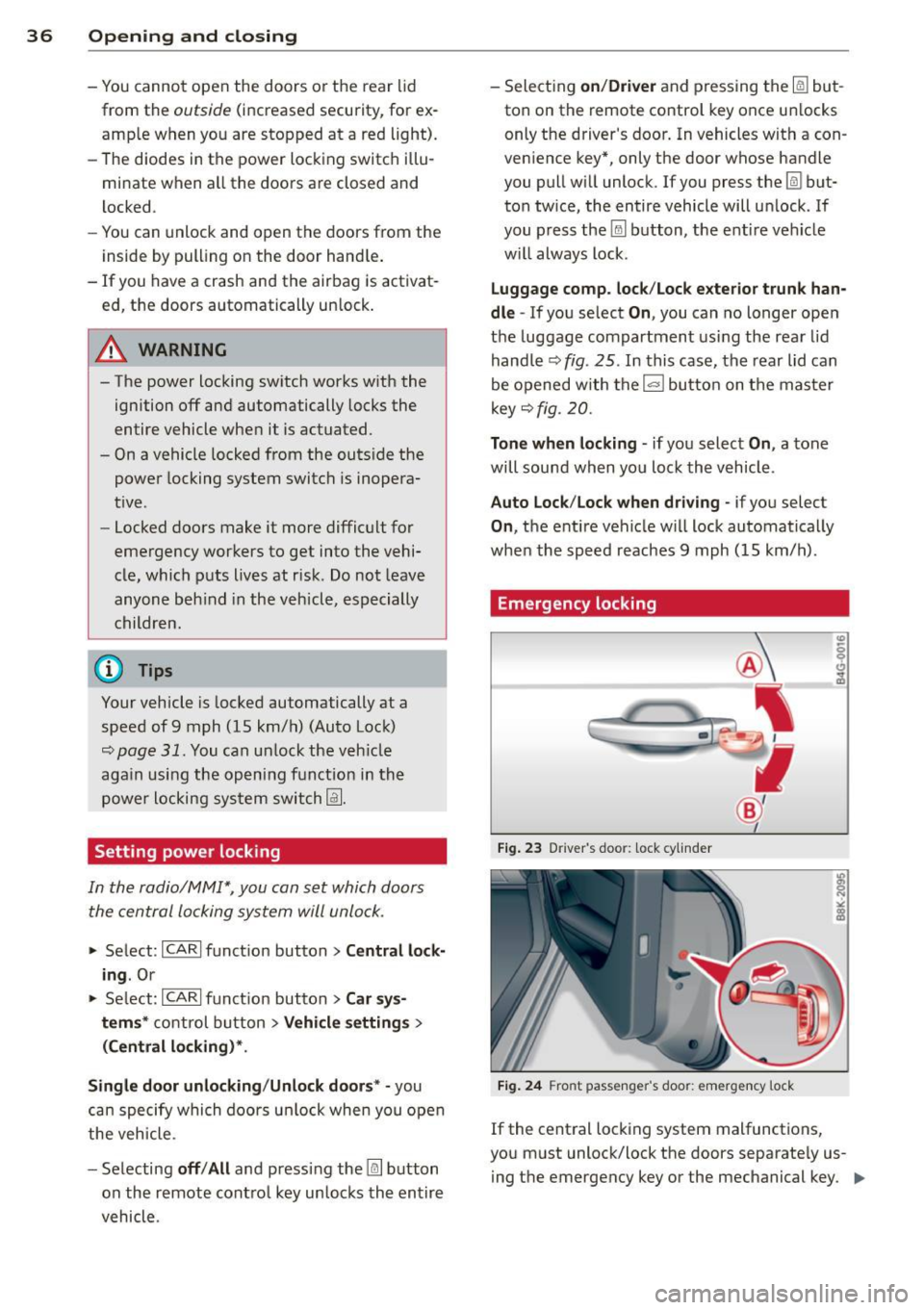
Emergency locking
Fig. 23 D river 's doo r: lock cy linder
Fig. 24 Fro nt passenger 's doo r: emergency lock
If the central locking system malfunctions,
you must unlock/lock the doors separate ly us
i ng the emergency key or the mechanical key. .,.
Page 39 of 290
Unlocking/ loc king th e dri ver' s door with
th e m ech anical k ey
• Remove the mechanical key¢ page 33.
• To unlock the driver's door, turn the key to
the open position@¢
fig. 23.
• To lock the driver's door, move the selector
lever to the P position (automatic transmis
s ion) and turn the key
o nc e to the close posi
tion
@ ¢&. in General description on
page 31.
Locking the front pa ssenger' s door with
th e mechanical ke y
The emergency lock is located on the rear side
of the front passenger's door.
It is on ly visible
when the door is open.
• Remove the mechanical key¢
page 33.
• Pull the cover cap out of the opening
¢fig. 24.
• Insert the key i n the inside slot and turn it
all the way to the right.
Once the front passenger's door has been
closed, you cannot open it again from the out
side. The door can be opened from the inside
by pulling the doo r handle.
A WARNING
Read and follow a ll WARNINGS¢ ,1. in
General description on page 31.
@ T ips
After the ign ition is swi tched on, the pow
er locking system switch is enab led.
Electronic immobilizer
The immobilizer prevents your vehicle from
being started by unauthorized persons.
-
I nside the key there is a computer chip. This
ch ip automatically activates/deactivates the
e lectronic immob ilizer.
Appli es to v eh icl es with ign ition lock :
The electronic immobilizer deactivates auto
mat ica lly when you insert the remote control
key into the ignition lock.
It activates again
Op enin g an d clos ing 3 7
automatica lly when you remove the remote
control key from the ignition lock.
Applies to veh icles with convenien ce ke y:
If the remote control key is located inside the
vehicle and you press the
I START ENGINE STOPI button, the electro nic
immobilizer deactivates a utomatically. If you
switch the ignition
off and remove the remote
control key from the vehicle, the electronic immobilizer activates again automatically.
A WARNING
-
Always take the key with you when you
leave the vehicle. The key can disarm the
electronic engine immobilizer and permit
an unauthorized person to start the engine
and enable operation of the vehicle sys
tems such as power w indow or power sun
roof leading to serious personal injury.
© Tips
- T he veh icle cannot be started if an unau
tho rized key is used. The vehicle may not
start if another radio device s uch as a key
for another ve hicle or a transponder is
located on the key ring .
- For Declaration of Comp liance to United
States FCC and Ind ustry Canada reg ula
tions ¢
page 2 72.
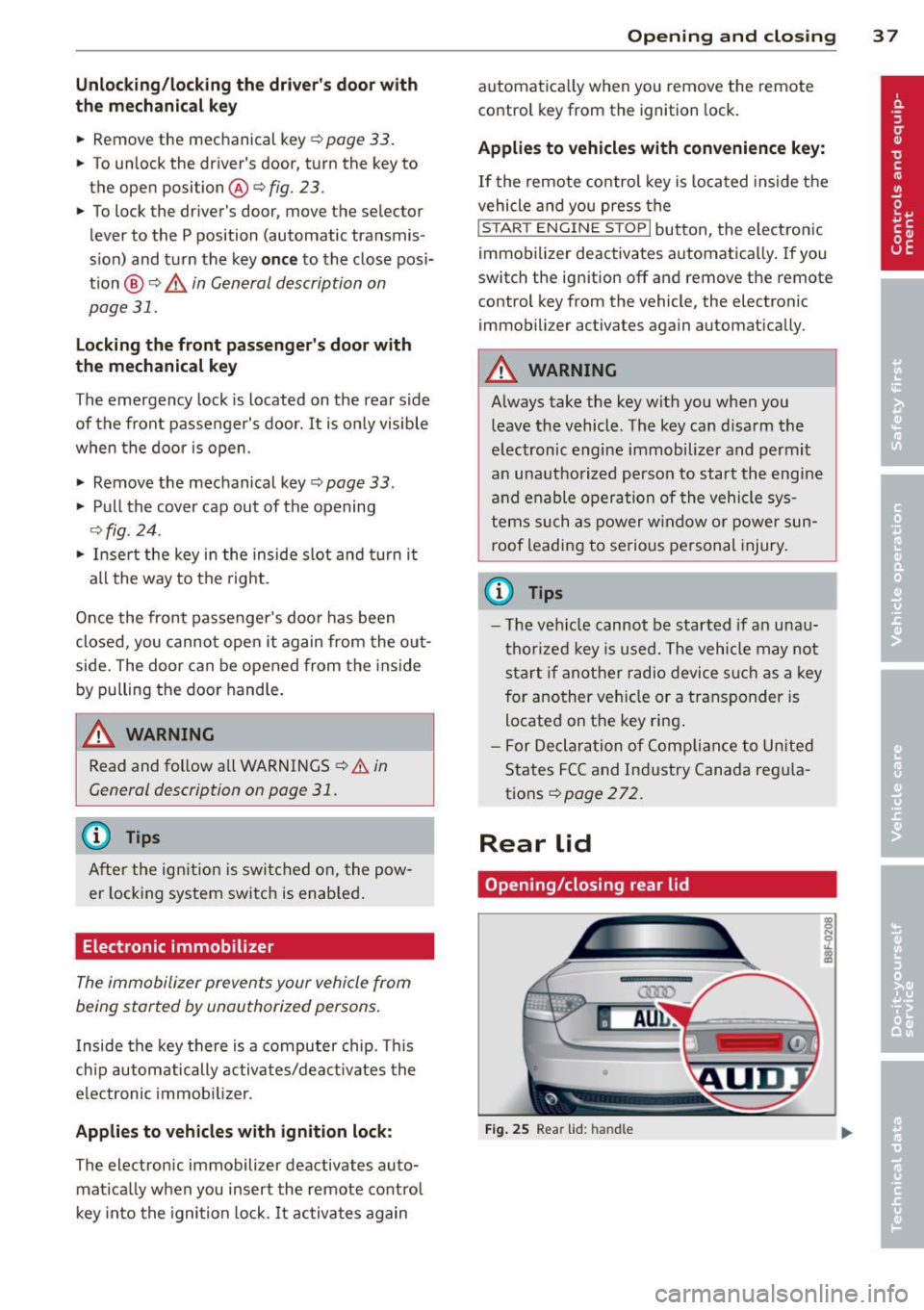
Rear lid
Opening /closing rear lid
F ig . 25 Rear lid: handle
Page 40 of 290
38 Openin g and clo sing
Opening th e re ar lid
.,. Press the button cs on the remote cont ro l
master key for at least one second. The rear
lid unlocks and opens slightly . Or
.,. Press the handle on the rear lid
r=;,fig. 25.
Closing th e re ar lid
.,. Pu ll t he rear lid down at the grip on the in
side and allow it to drop gently to close it
¢ ,& .
~ WARNING
-After closing the rear lid, always pull up
on it to make sure that it is properly
closed. Otherwise it could open suddenly
when the vehicle is moving.
- To help prevent po isonous exhaust gas
from being drawn into the veh icle, al
ways keep the rear lid closed while driv
ing. Never transport objects larger than
those which fit comp letely into the lug
gage area, because then the rear lid can
no t be fu Uy closed .
- Never leave you r vehicle unattended es
pecially with the rea r lid left ope n. A
child could crawl into the car through the
l u ggage compartment and pull the lid
shut, becoming trapped and unab le to
get out. To reduce the risk of persona l in
jury, never let children play in or around your vehicle . A lways keep the rear lid as
well as the vehicle doors closed when not in use.
- Always ensure that no one is w ith in
range of the rear lid whe n it is mov ing, in
part icu lar close to the h inges - fingers or
hands can be pinched .
@ Tips
When the vehicle is locked , the rear lid can
be opened separately by pressing the but
ton
cs on the maste r key . When you close
the r ear lid agai n, it locks automatically .
Emergency unlocking of the luggage
compartment lid
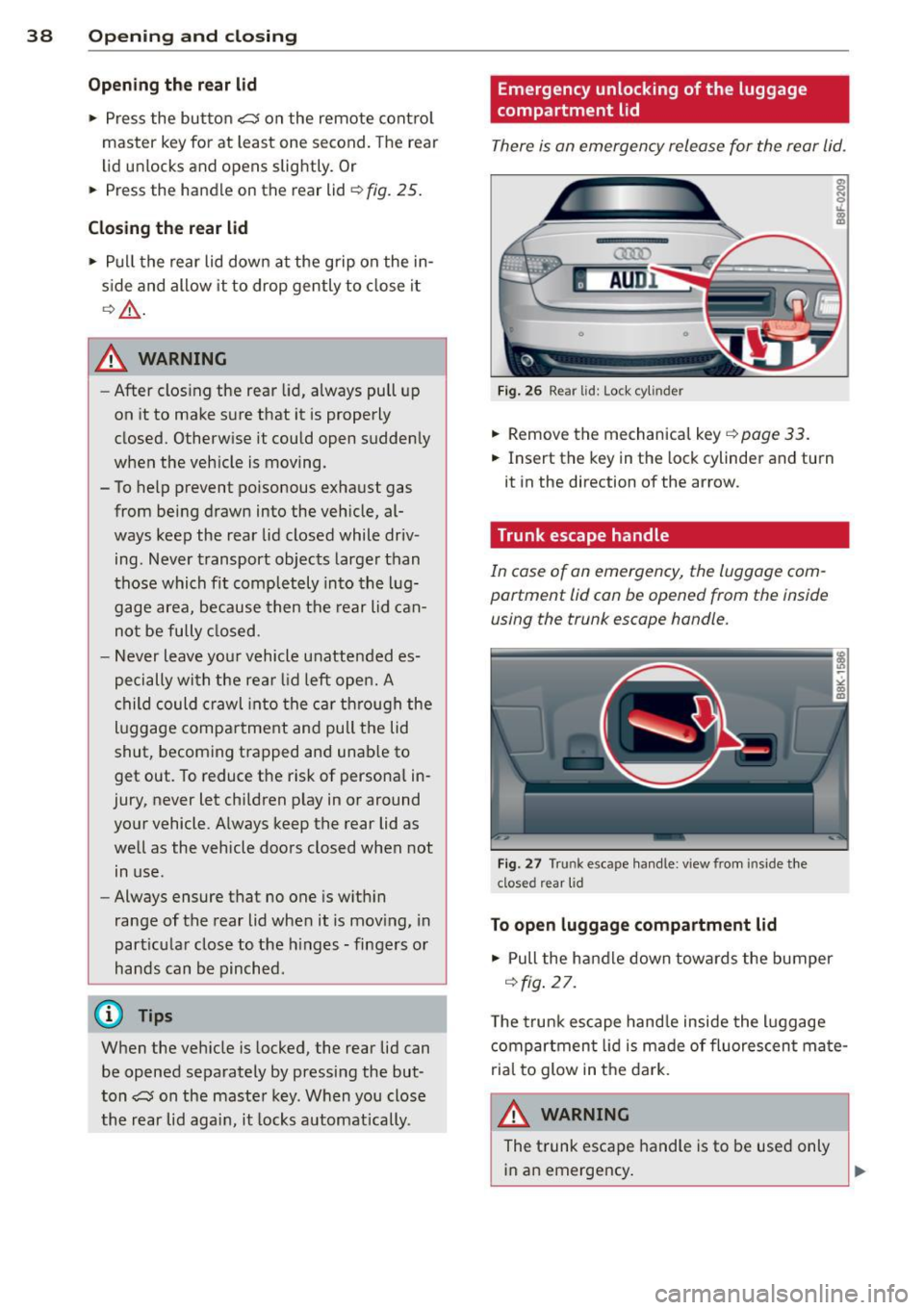
There is an emergency release for the rear lid .
AUDl
F ig . 26 Re ar lid: Lo ck cy linder
.,. Remove the mechanical key r::;, page 33.
.,. Insert the key in the lock cylinder and turn
it in the direction of the arrow.
· Trunk escape handle
In case of on emergency , the luggage com
portment lid can be opened from the inside using the trunk escape handle.
F ig . 27 Tru nk escape han dle: v iew from inside the
clos ed r ear lid
To open luggage compartment lid
.,. Pull the handle down towards the bumper
¢fig . 27 .
The trunk escape hand le inside the l uggage
compartment lid is made of fluorescen t mate
rial to glow in t he dark.
A WARNING
The t runk escape handle is to be used only
in an emergency .
Page 41 of 290
@ Tips
The emergency release lever should never
be used as a handle for closing the lug-
gage compartment lid.
Power windows
Controls
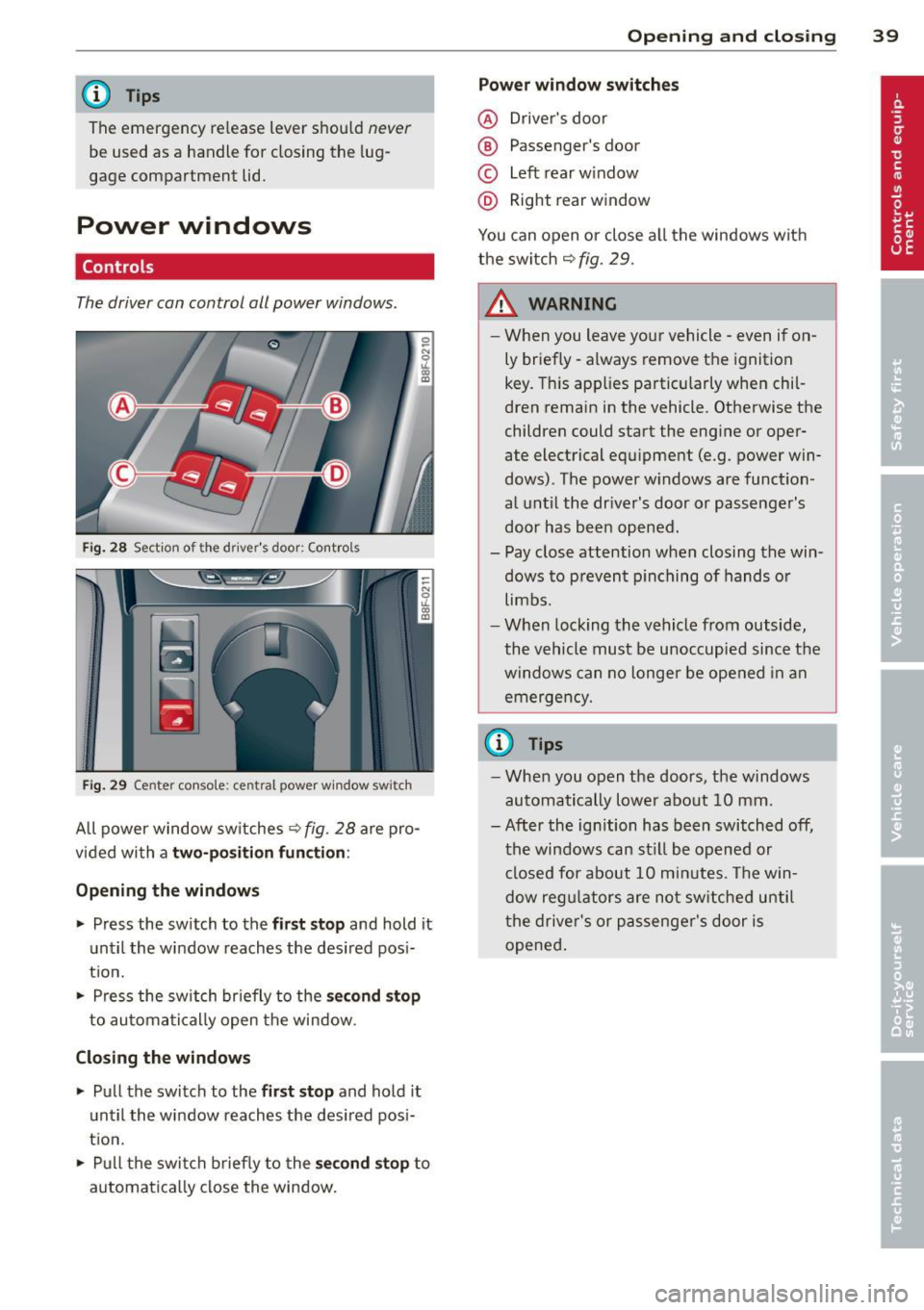
The driver can control all power windows .
Fig. 28 Sectio n of the dr ive r's d oor: Control s
l
I I
I
Fig. 29 Cente r con sole: cen tral power window sw it c h
All power window switches Q fig. 28 are pro
v id ed with a
two-position function:
Opening the windows
.,. Press the switch to the first stop and hold it
until the window reaches the desired pos i
t ion .
.. Press the switch briefly to the
se co nd stop
to automatically open the window.
Closing the windows
.,. Pull the switch to the first stop and hold it
until the window reaches the desired pos i
tion .
.,. Pull the switch brief ly to the
second stop to
automatical ly close the window.
Opening and closing 39
Power window switches
@ Driver's door
® Passenger's door
© Left rear window
@ Right rear window
You can open or close a ll the windows with
the switch
Q fig. 29.
_&. WARNING ..-
- When you leave your vehicle - even if on-
ly briefly -always remove the ignition
key. This applies particularly when chil
dren remain in the vehicle. Otherwise the
children could start the engine or oper
ate electrical equ ipment (e.g . power win
dows). The power w indows are function
al until the driver's door or passenger's
door has been opened.
- Pay close attention when closing the win dows to prevent pinching of hands or
limbs.
- When locking the vehicle from outside,
the vehicle must be unoccupied since the
windows can no longer be opened in an
emergency.
{D Tips
- When you open the doors, the windows
automatically lower about
1 0 mm .
- After the ignition has been switched off, the windows can st ill be opened or
closed for about
10 minutes. The win
dow regu lators are not switched until
the driver's or passenger's door is
opened .
Page 42 of 290
40 Opening and clo sing
Convenience opening/closing
The windows can be opened and closed with
the mechanical key or the emergency key.
@
' ~-~
® '
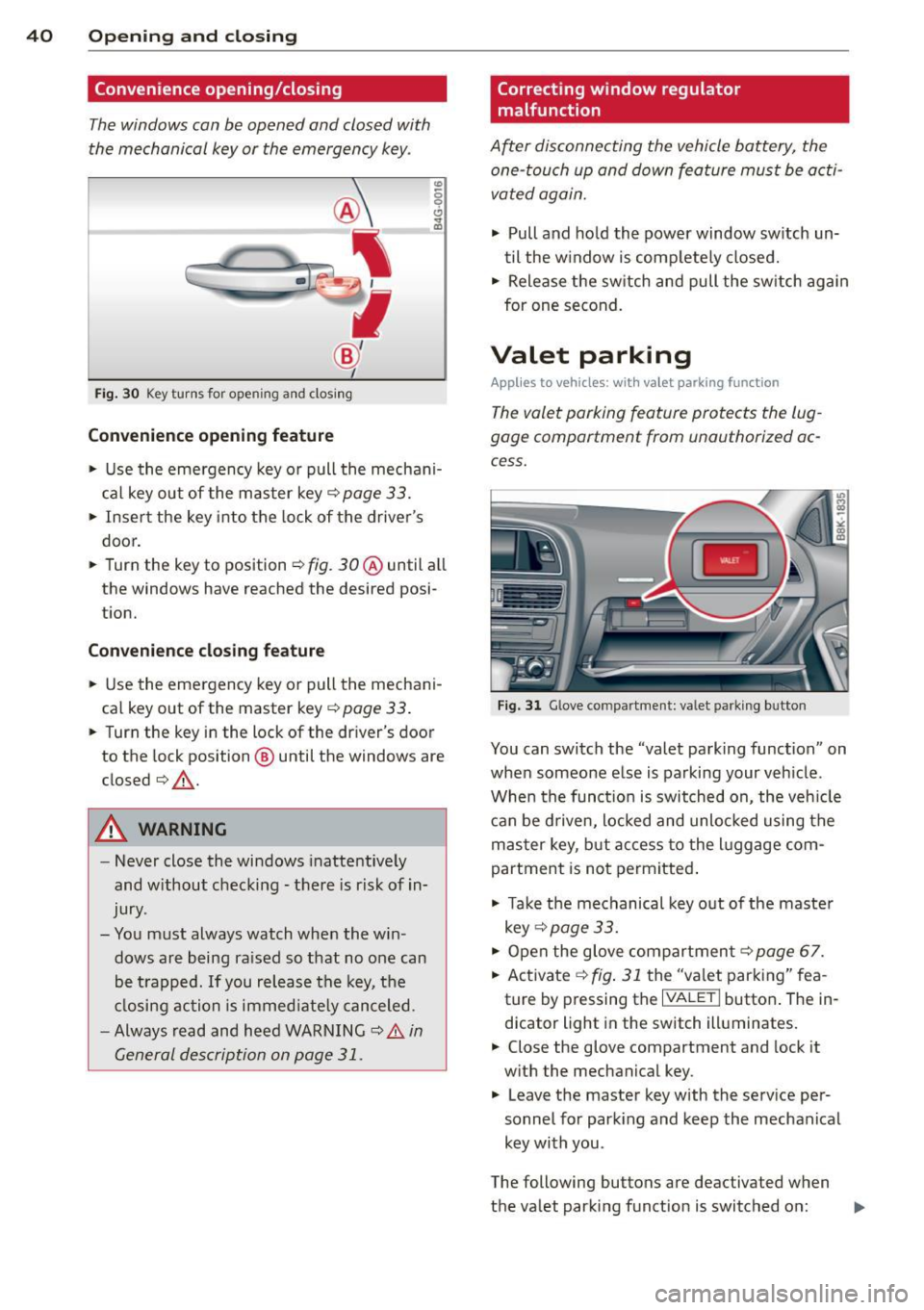
Fig . 30 Key turns for open ing a nd clos ing
Conv eni ence open ing fe ature
"' 0 0 0
" m
• Use the emergency key or pull the mechani
cal key out of the master key¢
page 33.
• Insert the key into the lock of the drive r's
door.
• Turn the key to position ¢
fig. 30@ until a ll
the windows have reached the desired posi
t ion.
Con venience clo sing f eature
• Use the eme rgency key or pull the mechani
cal key out of the master key¢
page 33 .
• Turn the key in the lock of the driver's door
to the lock position @ until the windows are
closed¢ &.
A WARNING
-Never close the windows inattentive ly
and w ithout checking -there is risk of in
jury.
- You must always watch when the win dows are being ra ised so that no one can
be t rapped. If you release the key, the
closing action is immed iate ly canceled.
- Always read and heed WARNING ¢
A in
General description on page
31 .
Correcting window regulator
malfunction
After disconnecting the vehicle battery, the
one-touch up and down feature must be activated again.
• Pull and ho ld the power window sw itch un
til the w indow is completely closed.
• Release the sw itch and pull the sw itch again
for one second.
Valet parking
Applies to vehicles: with va let parking function
The valet parking feature protects the lug
gage compartment from unauthorized ac
cess.
Fi g. 31 Glove compartment: valet parking button
You can switch the "valet parking function" on
when someone else is parking your veh icle .
When the funct io n is switched on, the veh icle
can be d riven, Locked and unlocked using the
master key, but access to the l uggage com
partment is not permitted .
• Take the mechanical key out of the maste r
key ¢
page 33.
• Open the glove compartment¢ page 67.
• Activate ¢
fig. 31 the "valet parking" fea
ture by pressing the
I VALET I butto n. The in
dicator light in the switch illuminates.
• Close the glove compartment and lock it
with the mechanical key .
• Leave the master key with the service per
sonnel for park ing and keep the mechanical
key with you .
The following buttons are deactivated when
the valet parking function is switched on: ..,_
Page 43 of 290
-1<=>1 button on the master key
- Handle in the rear lid
When the valet parking feature is act ivated,
the message
Val et par king activat ed appears
i n the ins trument cluster display when you
switch the ignition on. Opening and clo
sin g 41
Page 46 of 290
44 Power top
Reduce the vehicle speed below 50 km/h and
use the switch to open or close the powe r top
comp lete ly.
.&_ WARNING
Never drive when the powe r top is not
locked co rrectly. The w ind from dr iv ing
co uld cause t he power top to open. Th is
can r esult in injuries a nd damage to th e
veh icle .
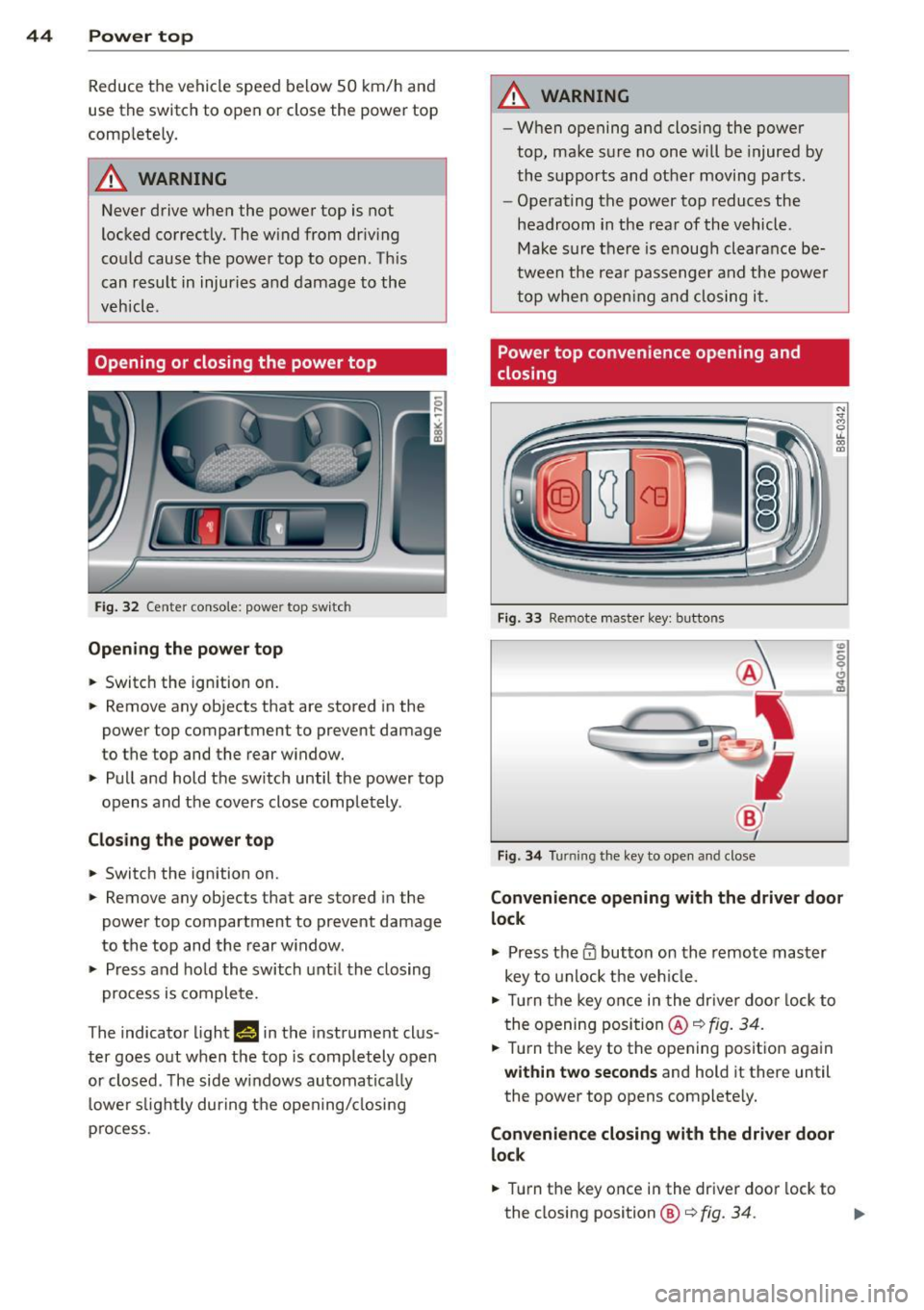
Opening or closing the power top
Fig. 32 Ce nte r conso le : powe r top sw itc h
Opening the power top
.. Switc h the ign ition on .
-
.. Remove any objects that are stored in the
power top compartment to preve nt damage
to the top and t he rear w indow .
.. Pull and hold t he swi tc h until t he power top
opens and the cov ers close compl ete ly .
Closing the power top
.. Switch the ignition on .
.. Remove any objects that are stored in the
power top compartment to prevent damage
to the top and the rear w indow .
.. Press and ho ld the swi tch unt il t he closing
pro cess is co m plete.
T he indicato r light
1#§ 111 the instrument clus
ter goes o ut w hen the top is compl etely open
or closed . T he side w indows automa tica lly
l owe r slig htl y during t he open ing/ closing
p rocess.
.&_ WARNING
-- Wh en opening and closing the powe r
top, ma ke s ure no on e w ill be injur ed by
the supp orts and ot her movi ng pa rts .
- Ope rat ing the power top reduces the
headroom in the rea r of the vehicl e.
M ake sur e th ere i s enoug h clear an ce be
twee n the rea r passenger an d the power
t o p whe n openin g an d clos ing i t.
Power top convenience opening and
closing
Fi g. 33 Remote maste r key : butto ns
Fig . 34 Turnin g the key to ope n an d close
Convenience opening with the driver door
lock
.,. Press them butto n on th e r emo te ma ster
key to unlock t he ve hicle.
.. Tu rn the key on ce i n t he drive r do or l ock to
t he openi ng posi tion @~
fig. 34 .
.. Tur n the key to t he opening posit io n aga in
within two seconds and hold it there until
the power top opens complete ly.
Convenience closing with the driver door
lock
.. Turn the key once in the driver door lock to
the closing position@¢
fig. 34. ..,.
Page 47 of 290
.. Turn the key to the closing position again
within two second s and ho ld it there until
the power top closes completely.
Convenience opening with the
convenience key*
.. Press the 0 button on the convenience key*
to unlock the vehicle.
Convenience closing with the convenience key*
.. Press the l'.I'.I button on the convenience key *
to lock the vehicle .
Releasing the key stops the opening or closing
process
immediately.
_& WARNING
- When opening and closing the power
top, make sure no one will be injured by
the supports and other moving parts .
- Operating the power top red uces the
headroom in the rear of the vehicle.
Make sure there is enough clearance be
tween the rear passenger and the power
top when opening and closing it.
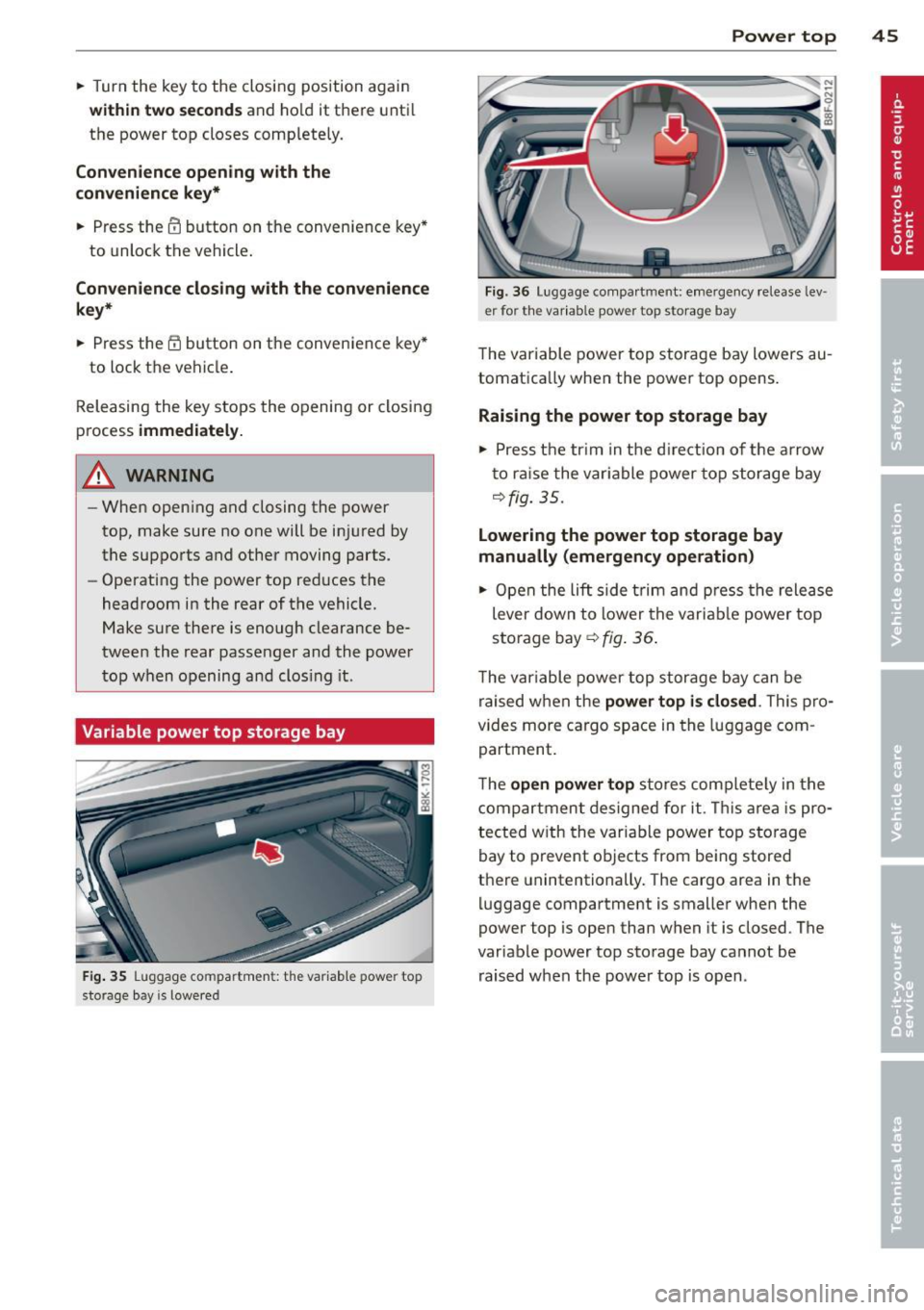
Variable power top storage bay
F ig . 35 Luggage compartmen t: the var iab le power top
sto rage bay is lowered
Power top 45
Fig . 36 Luggage compa rtment: emergency release Lev ·
er for the var iable power top storage bay
The variable power top storage bay lowers au
tomatica lly when the power top opens.
Raising the power top storage bay
.. Press the tr im in the d irection of the arrow
t o ra ise the variable power top storage bay
¢fig. 35.
Lowering the power top storage bay
manually (emergency operation)
.. Open the lift side trim and press the release
lever down to lower the variab le power top
storage bay¢
fig. 36 .
The variable power top storage bay can be
raised when the
power top is closed . This pro
vides more cargo space in the luggage com
partment.
The
open power top stores complete ly in the
compartment designed for it. This area is pro ·
tected with the variable power top storage
bay to prevent objects from being stored
there unintentionally. The cargo area in the
luggage compartment is smaller when the
power top is open than when it is closed. The
variable power top storage bay cannot be
raised when the power top is open .
Page 49 of 290
Power top emergency
operation
General information
The power top can be closed by hand if there
is a malfunction .
~ Activate the parki ng b rake.
~ Open the windows
~ Remove the key from the ignit ion.
Only close the powe r top ma nually in an eme r
gency. The best solu tion is to have your au
thor ized Audi dealer co rrect the cause of the
mal func tion.
Powe r top emergency operation consists of
the following steps:
- Unlocking the power top compartment
cover:
The cover on the power top compart
ment must be released by hand .
-Closing the power top: The power top must
be l ifted o ut of the tray and close d.
- Locking the power top: The powe r top
latches must be locked with the emergency
key .
A WARNING
- W hen positioning th e power top, avoid
co nta ct wi th th e suppo rts or o ther mov
ing parts. Make su re al l of the windows
are lowered . Otherw ise you cou ld pi nch
yo ur hands.
- N ever dr ive when the power top is not
locked correct ly . The win d from drivin g
cou ld cause t he power to p to open . This
can res ult in injuries and damage to the
vehicle .
@ Tips
Have a second person assist when clos ing
the power top . Posit io ning t he power top
is easier when t here is a second person to
he lp.
-
Power top 4 7
Step 1: Unlocking the power top
compartment cover
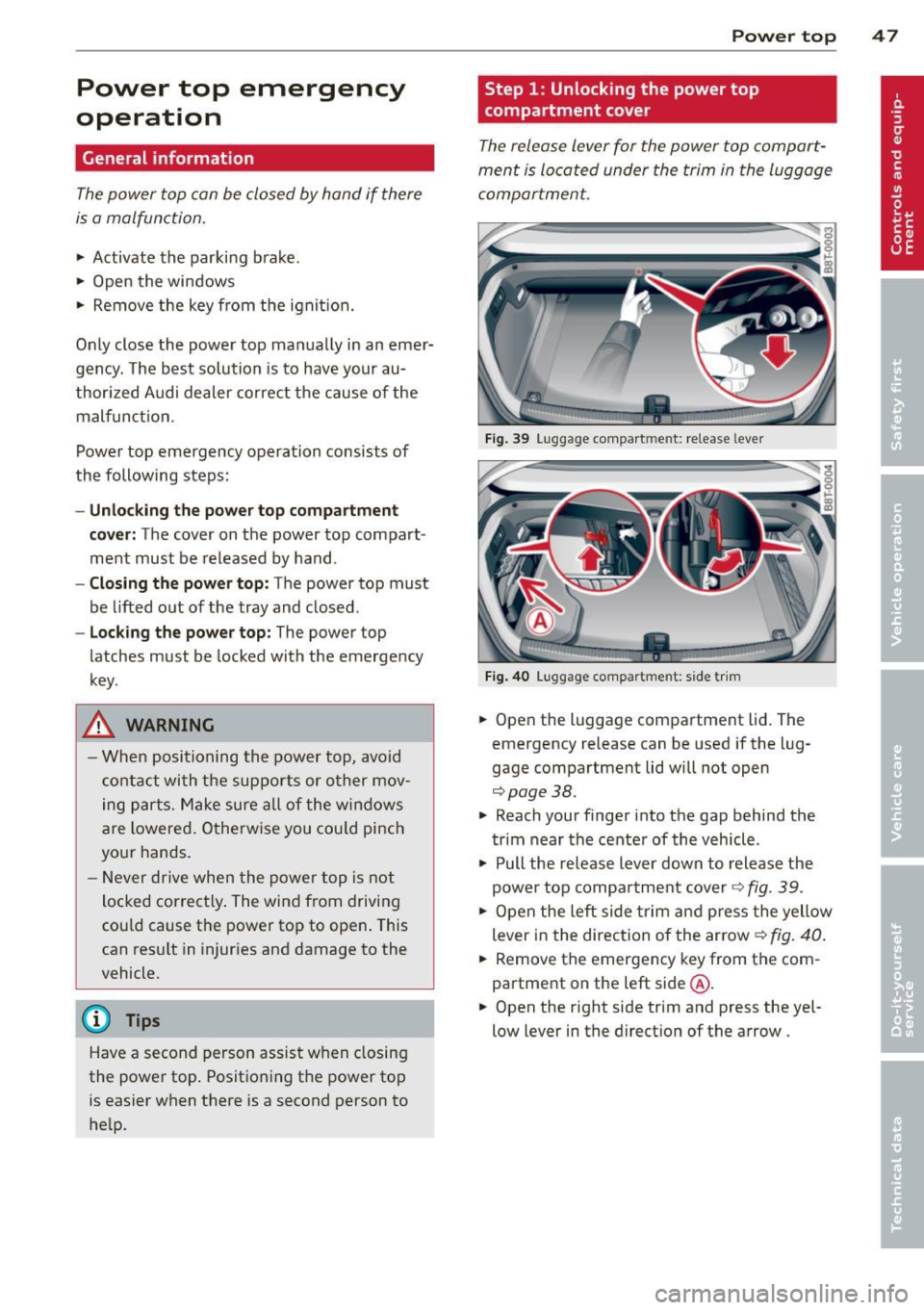
T he release lever for the powe r top compart
ment is lo cated under the trim in the luggage
compartmen t.
Fig. 39 Lugg ag e compart men t: re lease lever
Fig. 40 Lu gg ag e compart ment: s ide trim
~ Open the luggage compa rtment lid. The
emergency release can be used if the l ug
gage compartment lid wi ll not open
c::;,page 38.
~ Reach your f inger into the gap behind the
t rim near the cente r of the vehicle .
~ Pull the release lev er down to release the
power to p compa rtment cover
c::;, fig . 39 .
~ Open the left side trim an d press the yellow
lever in the direction of the arrow ¢
fig. 40.
~ Remove the emergency key from t he com
partment on the left side @.
~ Open the r ight side trim and press the yel
low lever in the direct ion of the arrow .
Page 51 of 290
Step 4: Closing the power top
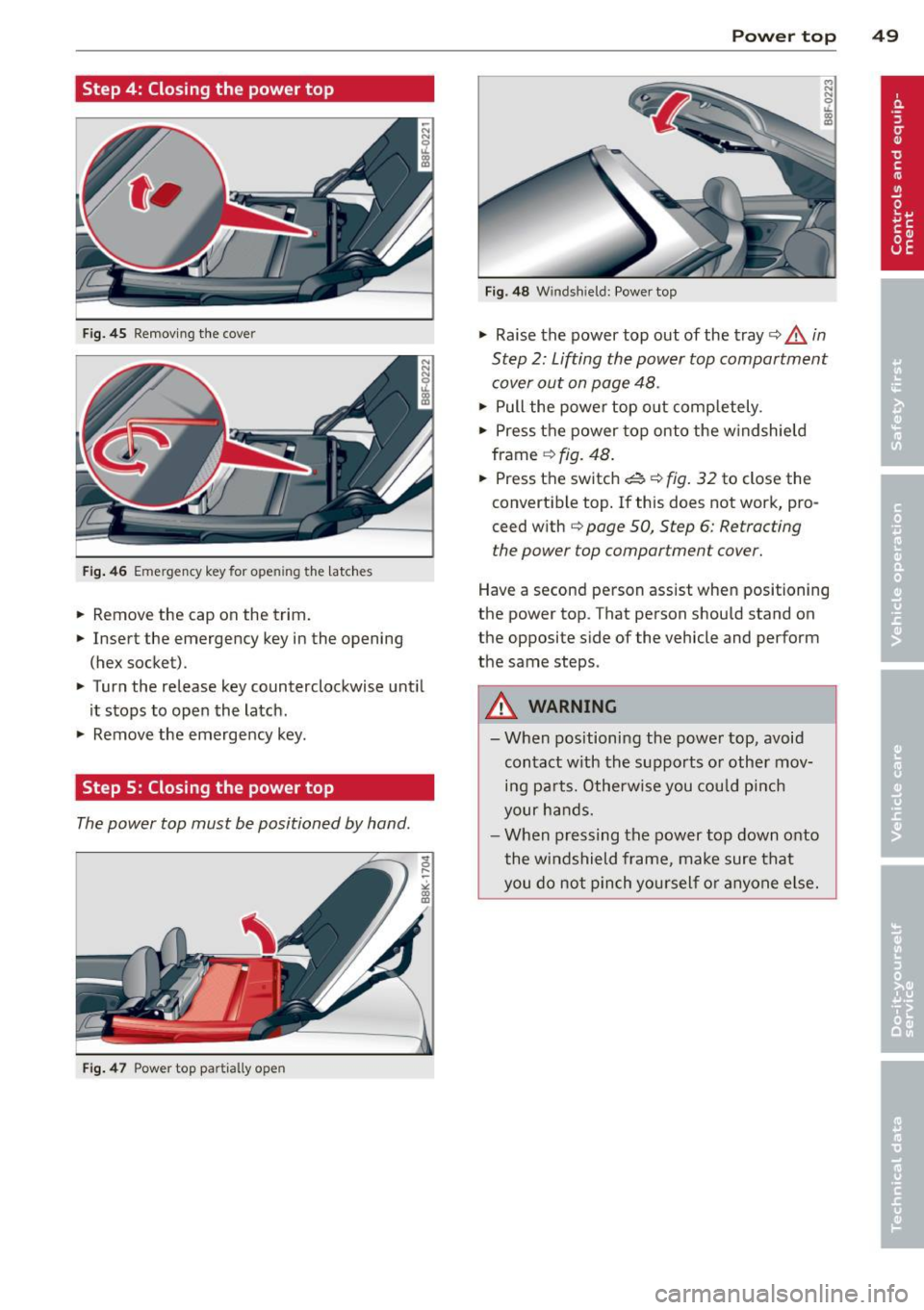
Fig . 4 5 Remov ing the cove r
Fig. 46 Eme rgency key for ope ning the latc hes
.. Remove the cap on the trim.
.. Insert the emergency key in the opening
(hex socket) .
.. Turn the release key counterclockwise unt il
it stops to ope n the latch.
.. Remove the emergency key.
Step S: Closing the power top
The power top must be positioned by hand .
Fig. 4 7 Powe r top pa rtially open
Power top 49
Fig . 4 8 W ind shield: Power top
.. Raise the power top out of the tray ¢ A in
Step 2: Lifting the power top compartment
cover out on page 48 .
.. Pull the power top o ut completely .
.. Press the power top onto the w indshield
frame
¢ fig . 48 .
.. Press the switch ~ ¢ fig . 32 to close the
convertible top . If this does not work, pro
ceed w ith
¢ page SO, Step 6: Retracting
the power top compartment cover.
Have a second person assist whe n positioning
the power top . That person should stand on
the opposite side of the vehicle and perform
the same steps.
A WARNING
-
-When positioni ng the power top, avo id
contact w ith the s upports o r other mov
i n g pa rts. Otherwise you cou ld pinch
your ha nds.
- W hen pressing the pow er top down onto
the wi ndshield frame, make sure that
you do not p in ch you rself or anyo ne e lse .