key AUDI A5 CABRIOLET 2013 Owner's Manual
[x] Cancel search | Manufacturer: AUDI, Model Year: 2013, Model line: A5 CABRIOLET, Model: AUDI A5 CABRIOLET 2013Pages: 290, PDF Size: 72.35 MB
Page 52 of 290
50 Power top
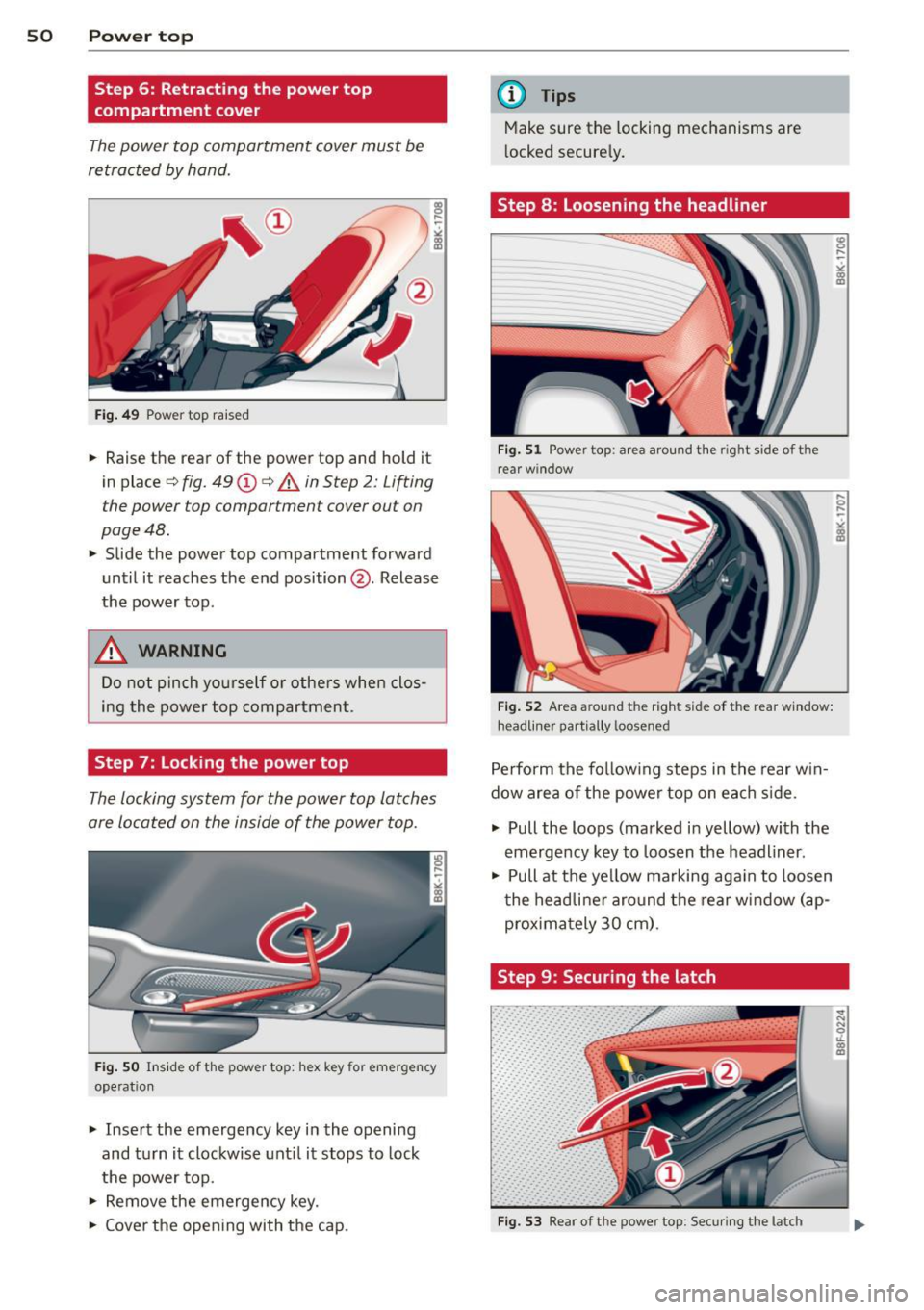
Step 6: Retracting the power top
compartment cover
The power top compartment cover must be
retracted by ha nd.
F ig . 49 Pow er top rai sed
.,.. Raise the rear of the power top and hold it
in place ¢
fig. 49@¢ A in Step 2: Lifting
the power top compartment cover out on
page 48 .
.,.. Slide the power top compartment forward
until it reaches the end position @. Release
the power top .
&_ WARNING
Do not pinch yo urself or othe rs when clos
ing the power top compartment .
Step 7: Locking the power top
The Locking system for the power top Latches
are located on the inside of the power top.
Fi g. 50 In sid e of t he pow er to p: hex ke y fo r em erge ncy
ope rat ion
.,.. Insert the emergency key i n the opening
and turn it clockwise unt il it stops to lock
the power top .
.,.. Remove the emergency key.
.,.. Cover the open ing with the cap.
(D Tips
Make sure the locking mechanisms are
l ocked secure ly .
Step 8: Loosening the headliner
F ig . 51 Power top : ar ea arou nd the righ t s ide o f th e
r ea r wi ndow
Fi g. 52 Area aroun d t he r ight side of the rear w indow:
h eadli ne r p artiall y loose ned
Perform the fo llow ing steps in the rear w in
dow area of the powe r top on each s ide .
.,.. Pull the loops (ma rked i n yellow) with the
emergency key to loosen the headlin er .
.,.. Pull at the ye llow marking aga in to loosen
t he headli ne r aro und the rear w indow (ap
prox ima tely 30 cm) .
Step 9: Securing the latch
Fig. 53 Rear of t he powe r top : Secu ring t he latc h
., 0 ....
~
"'
Page 53 of 290
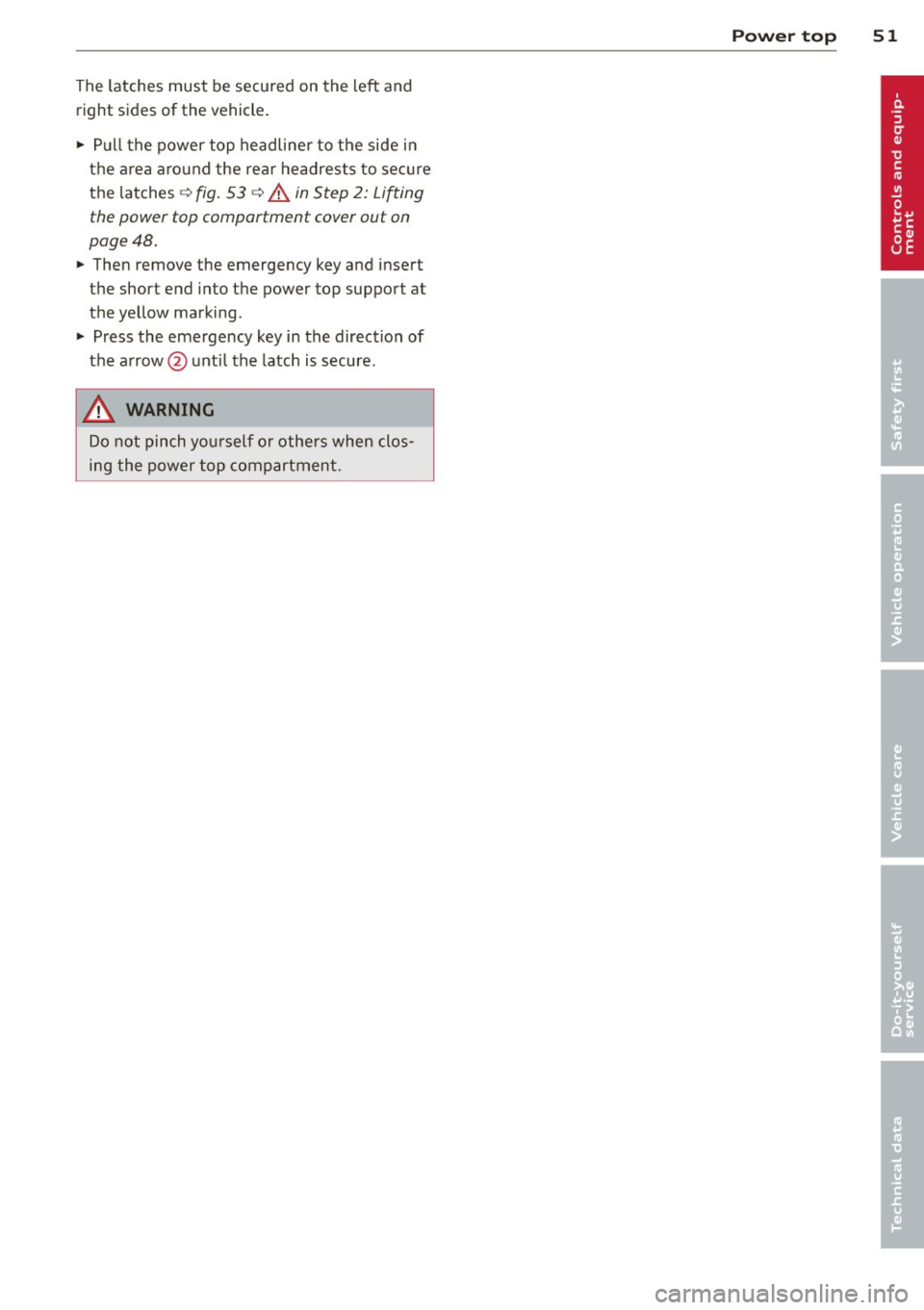
The latches must be secured on the left and
right sides of the vehicle .
.,. Pull the power top headline r to the side in
the area around the rear headrests to sec ure
the latches ¢
fig. 53 ¢.& in Step 2: Lifting
the power top compartment cover out on
page 48 .
... Then remove the emergency key and insert
the short end into the power top support at
the ye llow marking .
... Press the emergency key in the direction of
the a rrow @unt il the latch is secure .
.&, WARNING
Do not pinch yo urself o r othe rs when clos
ing the power top compartment.
Power top 51
Page 55 of 290
@ Tips
-The light sensor * for headl ight control is
l ocated in the rear view m irror mount.
You should therefore not apply any st ick
ers to the windsh ield in this area in order
to prevent malfunctions or failures .
- Some exterior lighting functions can be
ad justed
¢ page 53.
-When yo u remove you r key from the igni
tion w hile the vehicle's lights are turned
on, a buzzer sounds as long as the driv
er's door is open .
- In cool or damp weather, t he ins ide of
the headlights, turn signa ls and tail
li ghts can fog ove r due to the tem pera
ture diffe ren ce betwe en the inside and
outside. They will clear shor tly after
swi tching t hem on. This d oes not aff ect
the service life of the ligh ting.
- In the even t of a ligh t sensor malfunc
tion, the drive r is no tifie d in the inst ru
ment cluster disp lay ~
page 2 2.
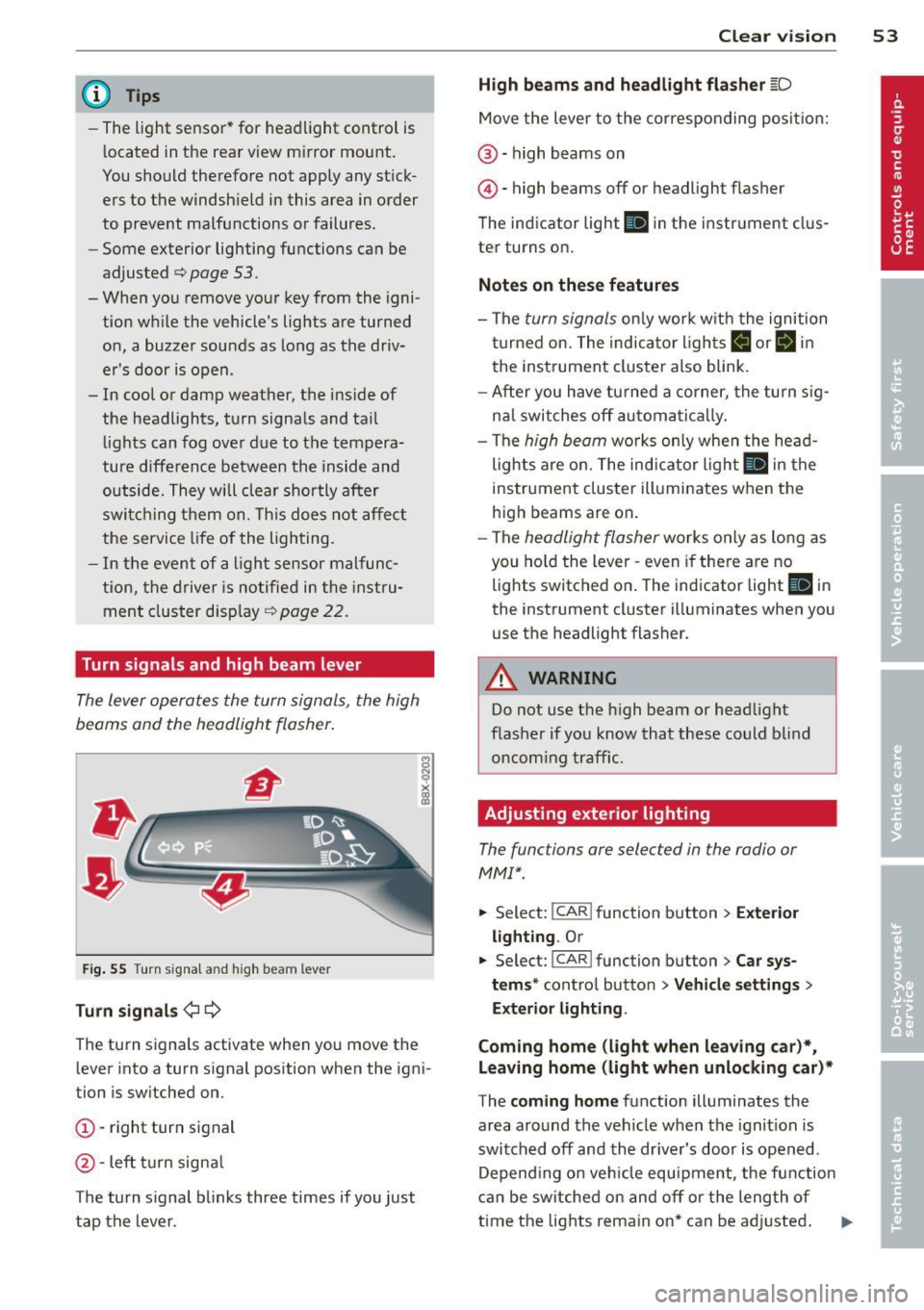
Turn signals and high beam lever
The lever operates the turn signal s, the high
b eams and th e headlight flash er.
F ig. 55 Turn sig na l an d high beam leve r
Turn signals ¢i ¢
Th e turn s ignals activate when you move the
l ever into a turn s ignal position when the ign i
tion i s sw itched on.
(D -right turn signal
@ -Left turn signa l
T he turn s ignal b links three times if you just
tap the lever .
Clear vision 5 3
High beams and headlight flasher @:D
Move the lever to the corresponding posit io n:
@ -high beams on
@-high beams off or headlight flasher
T he ind icator light
II in the instr ument clus
ter turns on .
Notes on these features
-The turn signals on ly wor k w it h t he ignition
t urned on. The indica tor l igh ts
11 or II in
the instrument cluste r also blink .
- Aft er you have tu rned a corner, the turn s ig
na l swi tches off au tom atically .
- The
high beam wo rks only when the head
lights a re on. The indicator Ligh t. in the
i nstrumen t clus ter illuminates when the
high beams are on .
- The
headligh t flasher works on ly as long as
you ho ld the lev er -even if the re are no
lights switched o n. The ind icator light
Ill i n
the inst rument cluster illuminates when you
use the headlight flasher .
&_ WARNING
Do not use the high beam or head light
flasher if you kn ow that these could b lind
oncom ing traffic.
Adjusting exterior lighting
The functions are selec ted in the radio or
MM!* .
.. Select : I CAR! function b utton > Exter io r
light ing . Or
.. Select: I CAR I func tion button > Car sys
tems *
control button > Vehicle settings >
Exterior Lighting .
Coming home (light when leaving car )*,
Leaving home (light when unlocking car)*
T he coming home function illumi nates the
area around the vehicle when the ignition is
switched off and the dr iver's door is open ed.
Depend ing o n ve hicl e equ ipment, t he function
can be switched on and off or the length of
time the lig hts remain on* can be ad justed . .._
Page 57 of 290
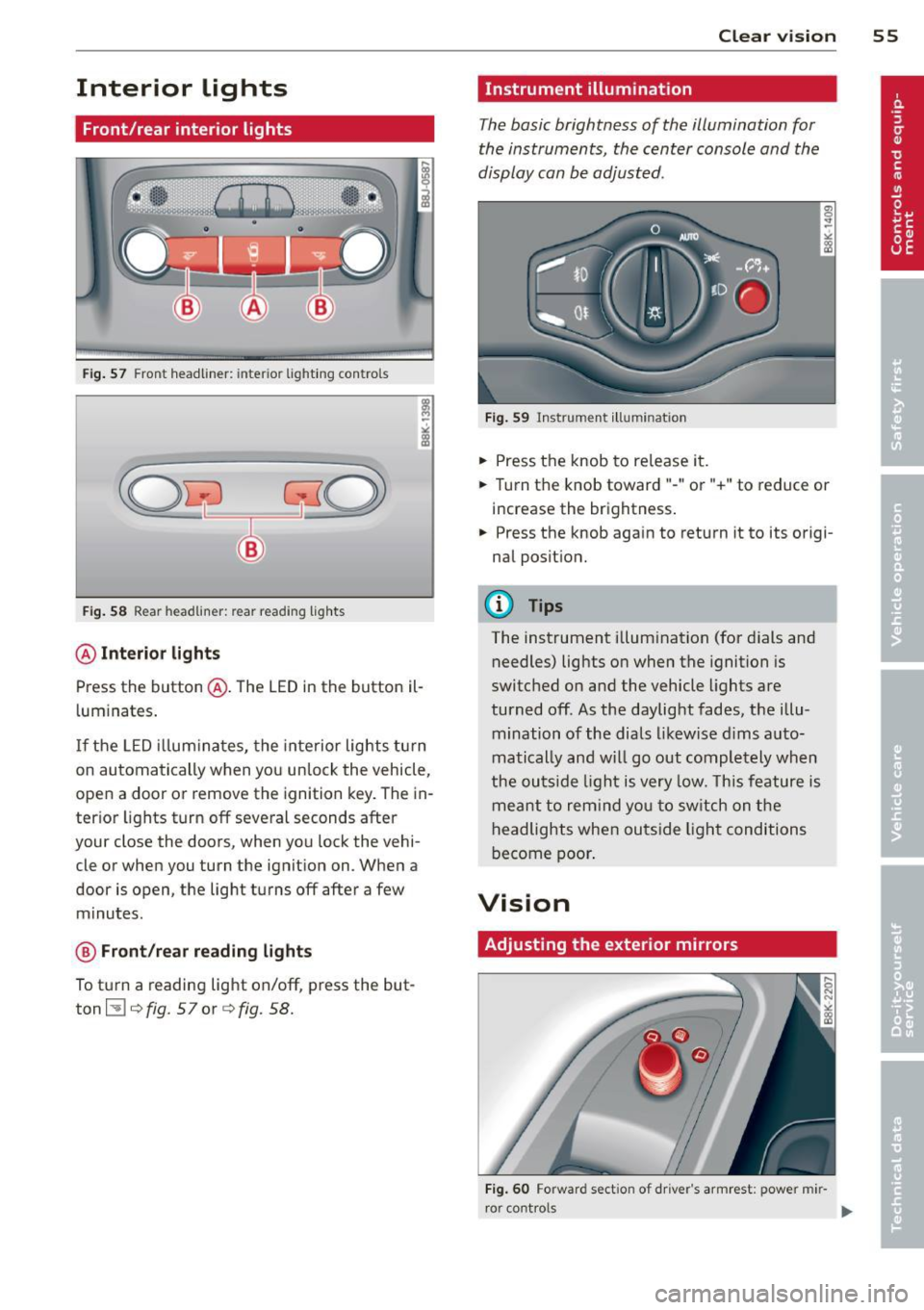
Interior lights
Front/rear interior lights
Fig. 57 Front headliner: inter ior lighti ng controls
Fig. 58 Rear headlin er: rear reading lights
@ Interior lights
Press the button @. The LED in the button il
l uminates .
If the LED illuminates, the interior lights turn
on automatically when you unlock the vehicle,
open a door or remove the ignition key. The in
terior lights turn off several seconds after
your close the doors, when you lock the vehi
cle or when you turn the ignition on. When a
door is open, the light turns off after a few
minutes.
@ Front/rear reading lights
To turn a reading light on/off, press the but
ton ~¢
fig. 57or ¢fig. 58.
Clear vision 55
Instrument illumination
The basic brightness of the illumination for
the instruments, the center console and the
display can be adjusted.
Fig. 59 Instrument illumination
.,. Press the knob to release it .
.. Turn the knob toward"-" or"+" to reduce or
increase the brightness .
.,. Press the knob aga in to return it to its origi
nal position.
(D Tips
The instrument illumination (for dials and
needles) lights on when the ignition is
switched on and the vehicle lights are
turned off. As the daylight fades, the illu
mination of the dials likewise dims auto
matically and will go out completely when
the outside light is very low. This feature is
meant to remind you to switch on the
headlights when outside light conditions
become poor.
Vision
Adjusting the exterior mirrors
Fig. 60 Forward sect ion of dr iver 's armrest: power mir
r or cont rols
Page 58 of 290
56 Clear vis ion
Turn the knob to the desired position :
Q/P -In t his position , you can adjust the
driver's and front passenger's exter ior mirrors
by turn ing the knob in the des ired direction.
(jjjl -The mirrors are heated depending on the
outside temperatu re.
P assenger exterio r m irro r tilt func tion*
( onl y with memor y for ext erior mirrow s)
To help you see the curb when backing into a pa rking space, the surface of the m irror t ilts
slightly . The knob m ust be in the
P posit ion
for this to happen .
You can adjust the ti lted mirror surface by
turning the knob in the desired direction .
When you move out of reverse and into anoth
e r gear, the new mirror posi tion is stored and
assigned to the key you are using.
The mirror goes back into its origina l posit io n
once yo u drive forward f aster than 9 mph
(15 km/h) or switch the ignition off .
_& WARNING
Curved mirror s urfaces (convex or spheri
cal *) increase your field of view . Remem
ber that vehicles or other objects will ap
pear smaller and farther away than when
seen in a flat m irror. If you use this mirror
to estimate distances of following veh icles
when changing lanes, you could estimate incorrectly and cause an accident .
{CT) Note
- If you wash the vehicle in an automatic
ca r wash, you must fold the exterior m ir
r o rs in to reduce the r isk of damage to
the mirrors .
(i) Tips
- The exterior mirror settings are stored
with the memory funct ion* c::>
page 64.
-If there should be a ma lfunct ion in the
electrical system, you can st ill adjust the
exter ior mirrors by press ing the edge of
the m irror. Dimming the mirrors
F
ig. 61 Auto ma tic dimming rearview m irro r*
Manu al di mm ing re a rvi ew mirro r
• Pull the lever on th e bottom of the mirror
back .
Automat ic dimming rearvi ew mirror *
....
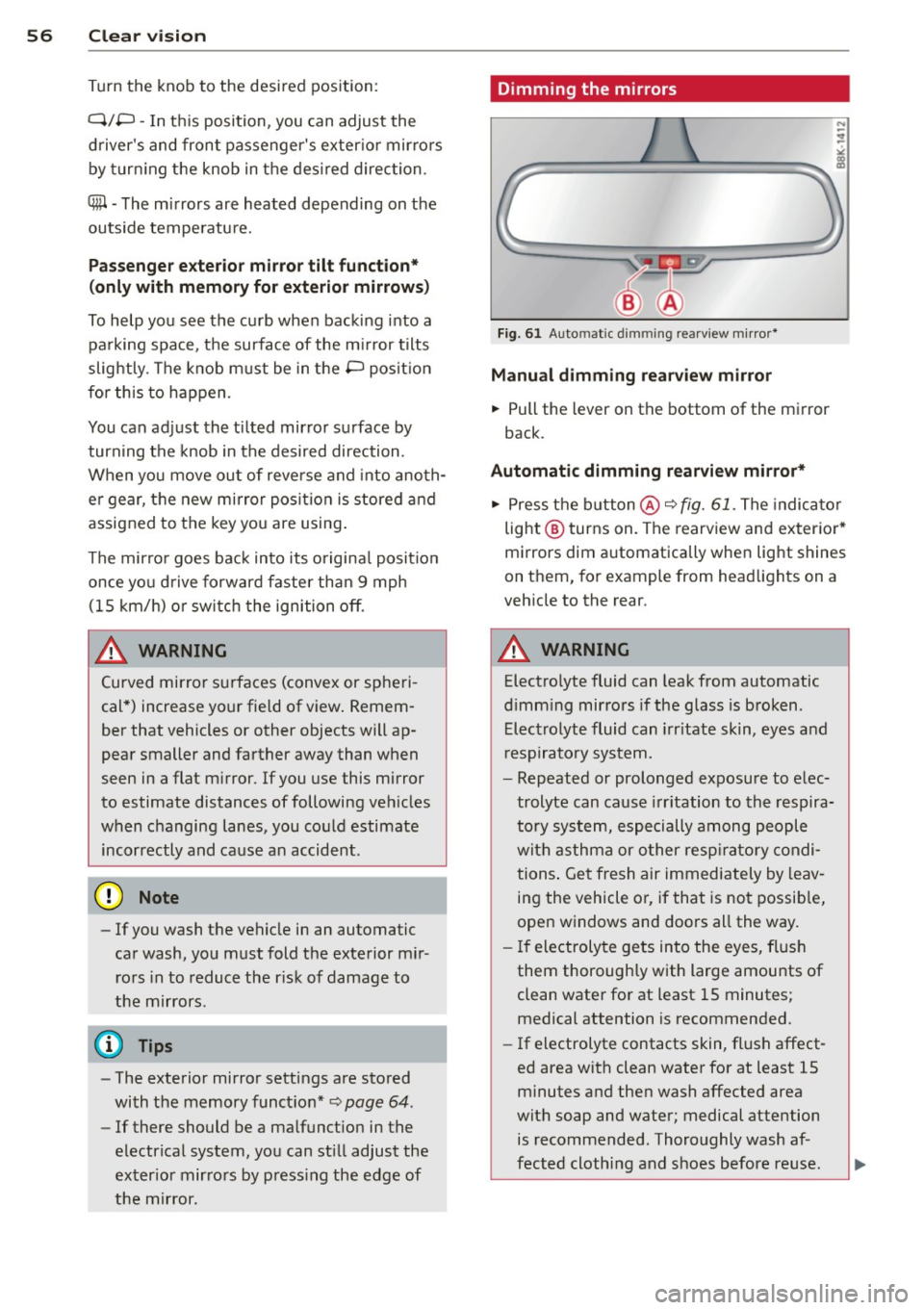
• Press the button @c::> fig. 61. The indicator
light @turns on . The rearview and exterior*
mirrors dim automatically when light shines
on them, for example from headlights on a
veh icle to the rear.
_& WARNING ..__
Electrolyte fluid can leak from automatic
d imm ing mirrors if the glass is broken .
Electrolyte fluid can irr itate skin, eyes and
r espiratory system.
- Repeated or prolonged exposure to e lec
trolyte can cause irritation to the respira
tory system, especially among people
with asthma or o ther resp ira to ry condi
tions . Get fresh air immediately by leav
ing the vehicle or, if that is no t possib le,
open windows and doors all the way.
- If electroly te gets into the eyes, flush
them thoroughly with large amounts of
clean water for at least 15 minutes; medical attention is recommended.
- If electrolyte contacts skin, fl ush affect
ed area with clean water for at least 15
minutes and then wash affected area
with soap and water; medical attention
is recommended. Thoroughly wash af
fected cloth ing and shoes before reuse.
Page 64 of 290
62 Seats and storage
close to this position as possible
¢page 64.
A WARNING
Never place any objects in the driver's foot
well. An object could get into the pedal area and interfere with pedal function. In
case of sudden braking or an accident, you
would not be able to brake or accelerate .
Front passenger's seat
Always move the front passenger seat into
the rearmost position.
To avoid contact with the airbag while it is de
ploying, do not sit any closer to the instru
ment panel than necessary and always wear
the three-point safety belt provided adjusted correctly . We recommend that you adjust the
passenger's seat in the following manner:
• Bring the backrest up to an (almost) upright
position. Do not ride with the seat reclined.
• Applies to vehicles with adjustable head re
straints: Adjust the head restraint so the up
per edge is as even as possible with the top
of your head. If that is not possible, try to
adjust the head restraint so that it is as
close to this position as possible
¢ page 64.
• Place your feet on the floor in front of the
passenger's seat.
Front seats
Power seat adjustment
Applies to vehicles: with power adjustab le seats
Fig. 67 Front seats: power seat adjustment
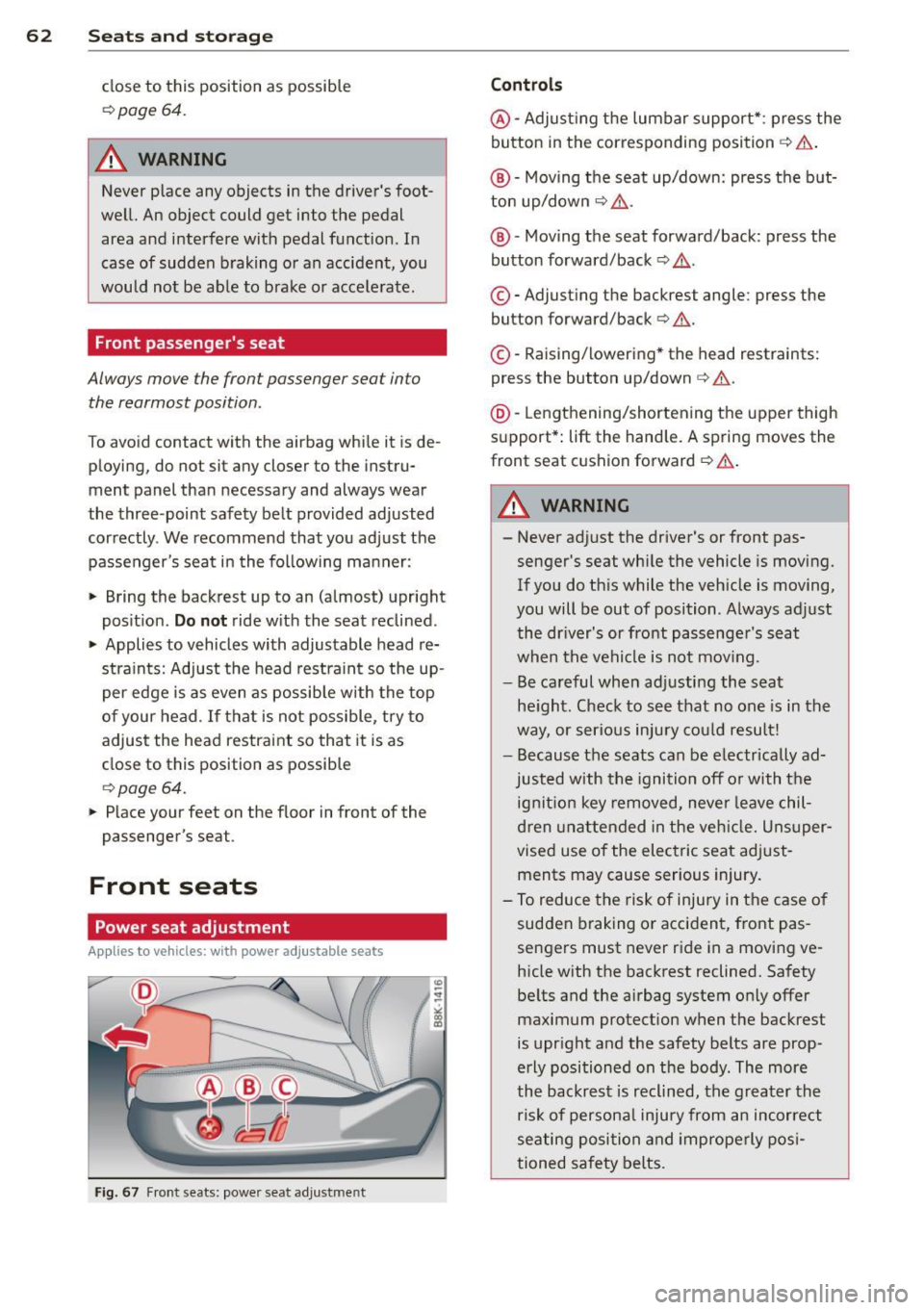
Controls
@-Adjusting the lumbar support* : press the
button in the corresponding position ¢ .&, .
@ -Moving the seat up/down: press the but
ton up/down ¢ .&, .
@ -Moving the seat forward/back: press the
button forward/back¢ .&,.
©-Adjusting the backrest angle: press the
button forward/back¢ .&..
©-Raising/lowering * the head restraints:
press the button up/down¢.&. .
@ -Lengthening/shortening the upper thigh
support* : lift the handle. A spring moves the
front seat cushion forward ¢ .&. .
A WARNING
---Never adjust the driver's or front pas
senger's seat while the vehicle is moving.
If you do this while the vehicle is moving,
you will be out of position . Always adjust
the driver's or front passenger's seat
when the vehicle is not mov ing.
- Be careful when adjusting the seat
height. Check to see that no one is in the
way, or serious injury could result!
- Because the seats can be electrically ad
justed with the ignition off or with the
ignition key removed, never leave chil
dren unattended in the vehicle. Unsuper
vised use of the electric seat adjust
ments may cause serious injury.
- To reduce the risk of injury in the case of
sudden braking or accident, front pas
sengers must never ride in a moving ve
hicle with the backrest reclined. Safety
belts and the airbag system only offer maximum protection when the backrest
is upright and the safety belts are prop
erly positioned on the body. The more
the backrest is reclined, the greater the
risk of personal injury from an incorrect
seating position and improperly posi
tioned safety belts.
Page 67 of 290
profiles for the driver . The memory function is
operated through the master key and the memory buttons in the driver's door.
The driver's seating profi le is stored and as
signed to the master key each time the vehicle
is locked. The seating profile is recalled auto
mat ically when the veh icle is unlocked. If two
people use one vehicle , it is recommended
that each person always uses "their own"
master key .
Up to 2 seat profiles can be stored in the
memory buttons in the driver's door. Once
they are stored, these seat profiles can be se lected at any time.
In addition to the driver 's seat settings, you
can also store and access the exterior mirror
adjustment settings* using the remote con
trol key or memory button .
Remote control key
Applies to vehicles: with seat memory
To assign the driver 's seat settings to the re
mote control key when locking the vehicle, the
function must be activated in the radio or
MMI*
~ Select: I CAR I function button > Seat adjust
ment
> Driver's seat > Remote control key >
on.Or
~ Select: I CAR I f u nct ion button > Car sys
tems*
control button > Vehicle settings>
Seats > Driver 's seat > Remote control key
> On.
(D Tips
If you do not want another driver's set
tings to be assigned to the remote key,
switch off the memory function using the
rad io or
MMI* or the ! ON/OFF I button
¢page 65.
Seats and storage 65
Memory buttons
Applies to vehicles: wit h seat memory
Fig. 73 Driver's door: memo ry funct ion buttons
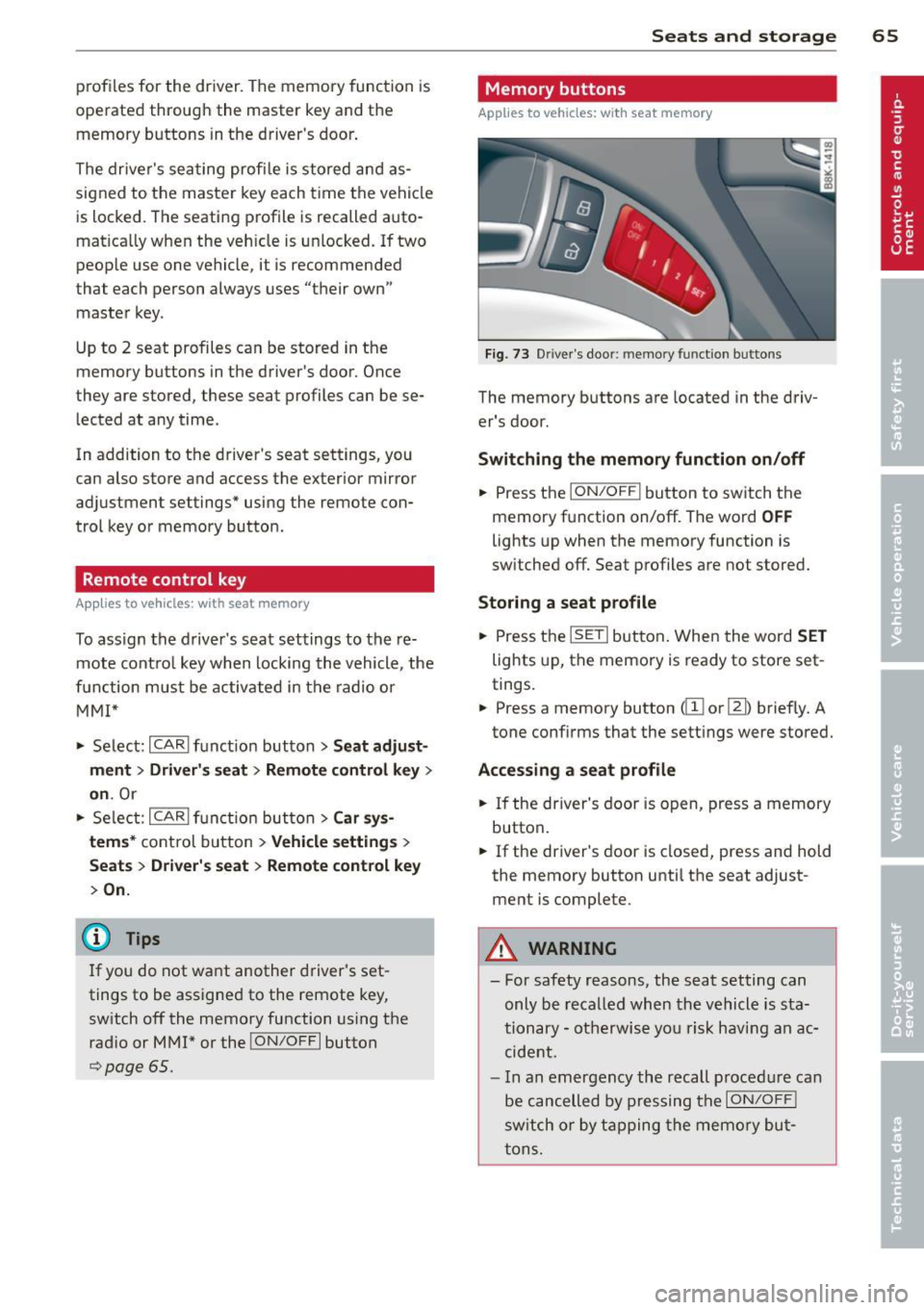
The memory buttons are located in the driv
er's door.
Switching the memory function on/off
~ Press the ION/OF F! button to switch the
memory function on/off. The word
OFF
lights up when the memory function is
sw itched off. Seat profiles are not stored.
Storing a seat profile
~ Press the ISETI button. When the word SET
lights up, the memory is ready to store set
tings.
~ Press a memory button dII or [Ii) briefly. A
tone conf irms that the settings were stored.
Accessing a seat profile
~ If the driver's door is open, press a memory
button .
~ If the driver's door is closed, press and hold
the memory button until the seat adjust
ment is complete.
A WARNING
- For safety reasons, the seat setting can only be recalled when the vehicle is sta
tionary -otherwise you risk having an ac
cident.
- I n an emergency the recall procedure can
be cancelled by pressing the
I ON/OFF !
switch or by tapping the memory but
tons.
Page 69 of 290
(upholder
Fig. 76 Ce nter console: front cupholder
Fig. 77 (upho lde r• in th e rear
Front beverage holders
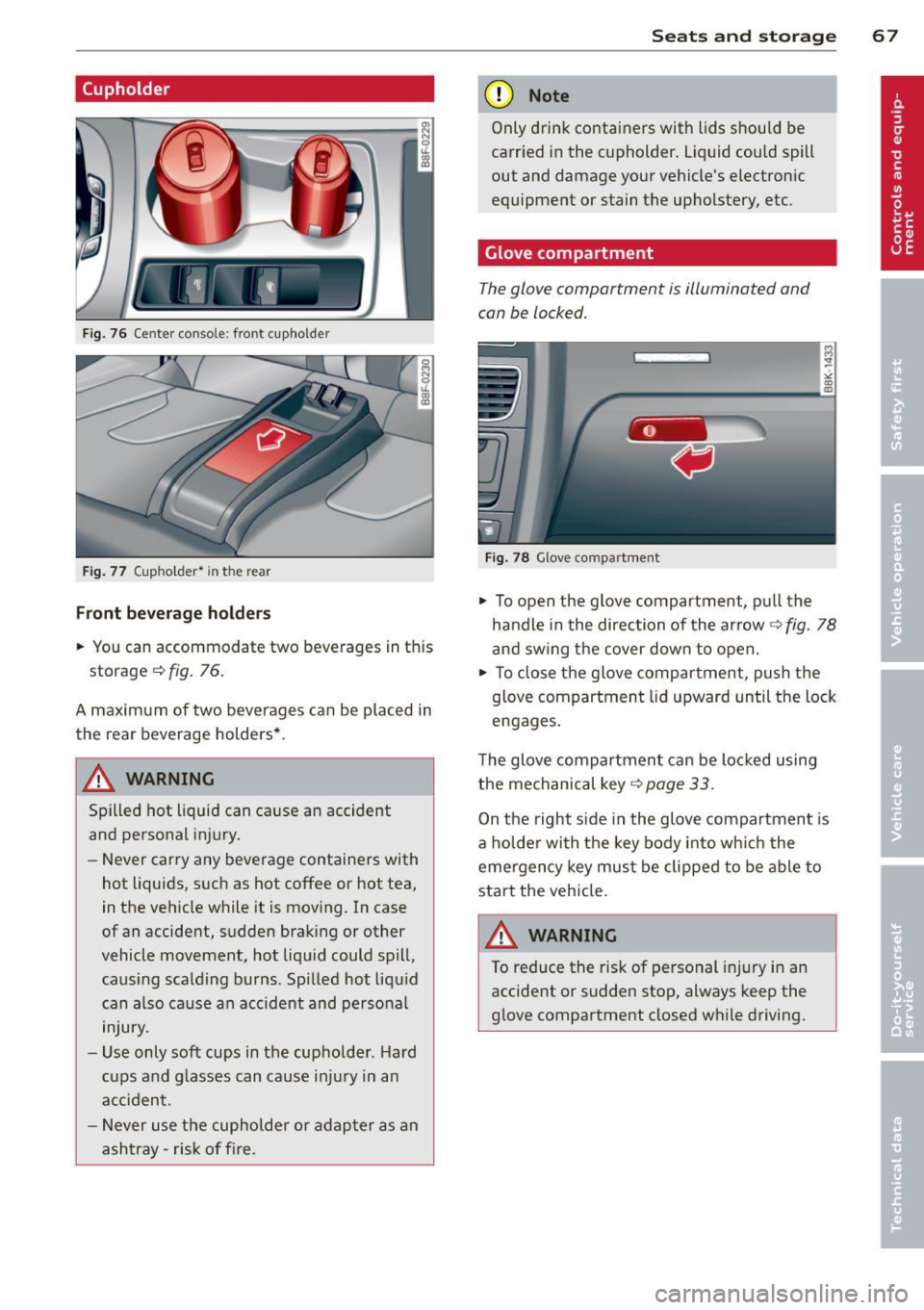
.,. You can accommodate two beverages in th is
storage
c::> fig . 76.
A maximum of two beverages can be placed in
the rear beverage holders* .
A WARNING
Spilled hot liquid can cause an accident
and personal injury.
-
-Never carry any beverage containers with
hot liquids, such as hot coffee or hot tea,
in the vehicle while it is moving. In case
of an accident, sudden braking or other
vehicle movement, hot liqu id could spill,
causing scald ing burns . Sp illed hot liquid
can a lso cause an accident and personal
injury .
- Use only soft cups in the cupholder . H ard
cups and g lasses can cause injury in an
accident.
- Never use the cupholder or adapter as an
ashtray- risk of fire.
Seats and storage 67
(D Note
Only drink containers with lids should be
carried in the cupholder. L iquid could spill
out and damage your vehicle's electron ic
equipment or stain t he upho lstery , etc.
Glove compartment
The glove compartment is illuminated and
can be locked.
r, - ---, 1
Fig. 78 G love com partment
.,. To open the glove compartment, pull the
handle in the direction of the ar row
c::> fig. 78
and swing the cover down to open .
.,. To close the glove compartment, push the
glove compartment lid upward until the lock
engages .
The glove compartment can be locked using
the mechanical key
c::> page 33.
On the right s ide in the glove compartment is
a holder with the key body into which the
eme rgency key must be clipped to be able to
start the vehicle.
/!\. WARNING
To reduce the risk of personal injury in an
accident or sudden stop, always keep the
glove compartment closed while driving.
-
Page 72 of 290
70 Warm and cold
Warm and cold Climate controls
Description
The climate control system warms, cools and
adds humidity to the air in the vehicle interior.
It is the most effect ive when the windows and
sunroof are closed . If there is a build-up of
heat inside the vehicle, ventilation can help to
speed up the cooling process.
I n all heating mode functions except
defrost,
the blower on ly switches to a higher speed
once the engine coolant has reached a certain
temperature.
Condensat ion from the cooling system can
drip and form a puddle of water under the ve
hicle. This is normal and does not mean there
is a leak.
Pollutant filter
The pollutant filter removes pollutants s uch
as dust and pollen from the air.
The air pollutants filter must be changed at
the intervals spec ified in you r Warranty
&
Maintenance booklet, so that the air condi
tioner can properly work.
If you drive your vehicle in an area with h igh
a ir po llution, the fi lter may need to be
changed more frequently than specified in
your Aud i Wa rranty
& Ma intenance booklet. If
in doubt, ask your authorized Audi Service Ad
visor for advice .
Key coded settings
The climate control settings are automat ically
stored and assigned to the remote control key
that is in use. These settings are different
when the power top is open or closed .
A WARNING
Reduced visibility is dangerous and can
cause accidents. -
- For safe driving it is very important that
all windows be free of ice, snow and con
densation.
- Comp letely familiarize yourself with the
proper use and function of the heating
and ventilation system and especially how to defog and defrost the windows.
- Never use the windshield wiper/washer
system in freez ing weather unt il you
have warmed the windshield first, using
the heating and ventilation system. The
washer solution may freeze on the wind shie ld and reduce visib ility.
(D Note
- If you suspect that the air conditioner has been damaged, switch the system
off to avoid further damage and have it
inspected by a qualified dealership.
- Repairs to the Audi air conditioner re
quire special technical know ledge and
special tools. Contact an authorized Aud i
dea ler fo r assistance.
@ For the sake of the environment
By reducing the amount of fuel you use,
you also reduce the amount of pollutants
emitted into the air.
(D Tips
- Keep the air intake s lots (in fro nt of the
w indshield) free from ice, snow and de
bris in order to maintain the proper func
tion of the climate control system.
- The energy management system may
switch the seat heating* or rear window
defroster off temporarily . These systems
are available again as soon as the energy
balance has been restored.
- Air escapes through vents under the rear
window. When placing items of clothing
on the luggage compartment cover, en
sure that the openings are not covered.
Page 77 of 290
On the road
Steering
Manually adjustable steering wheel
The steering wheel position is fully adjustable
up and down and forward and back .
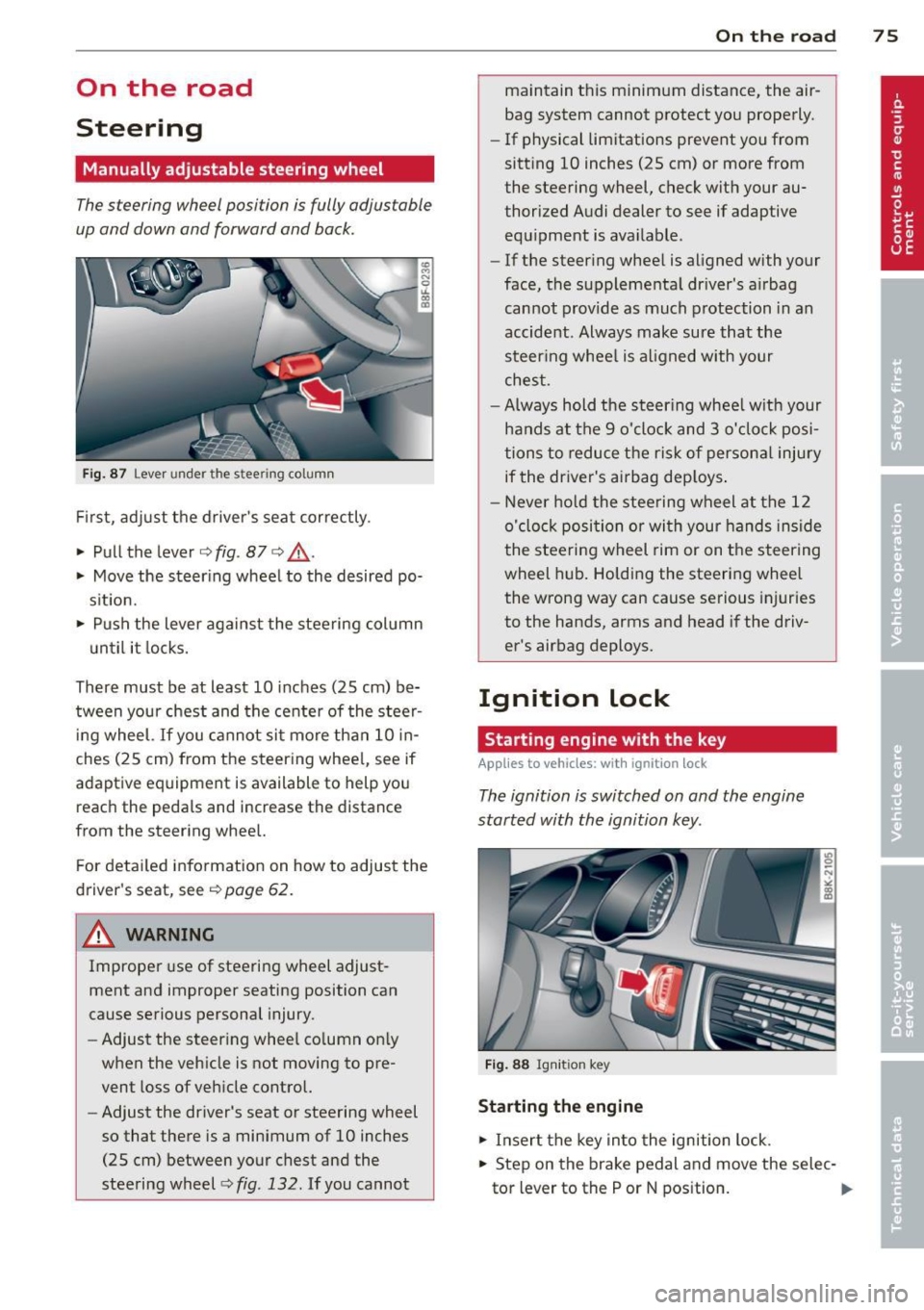
Fig. 87 Lever under the stee ring column
First, adjust the driver's seat correctly.
• Pull the lever
¢fig . 87 ¢ Lo,.
• Move the steering wheel to the desired po
s it ion.
• Push the lever against the steering col umn
u ntil it locks.
There must be at least 10 inches (25 cm) be
tween your chest and the center of the stee~
ing wheel.
If you cannot sit more than 10 in
ches (25 cm) from the steering wheel, see if
adaptive equipment is available to help you
reach the peda ls and increase the distance
from the steering wheel.
F or detailed information on how to adjust the
driver's seat, see
¢ page 62.
& WARNING
Improper use of steering wheel adjust
ment and improper seating position can
cause serious personal injury .
- Adjust the steering whee l co lumn on ly
when the vehicle is not moving to pre
vent loss of vehicle control.
- Adjust the driver's seat or steering wheel
so that there is a minimum of 10 inches
(25 cm) between your chest and the
steering wheel¢
fig. 132. If you cannot
On th e road 7 5
maintain this minimum distance, the air
bag system cannot protect you properly.
- If physical limitations prevent you from
sitting 10 inches (25 cm) or more from
the steering wheel, check with your au
thorized Audi dealer to see if adaptive equipment is available .
- If the steering wheel is aligned with your
face, the supplementa l driver's a irbag
cannot provide as much protection in an
accident . Always make sure that the
steer ing whee l is al igned w ith your
chest .
- Always hold the steer ing whee l w ith your
hands at the 9 o'clock and 3 o'clock posi
tions to reduce the risk of persona l injury
if the driver's airbag dep loys .
- Never hold the stee ring wheel at the 12
o'clock position or wi th your hands inside
the stee rin g wheel rim or on the steering
wheel hub. Holding the steering wheel
the wrong way can cause serious injuries
to the hands, arms and head if the driv
er's airbag deploys.
Ignition lock
Starting engine with the key
App lies to vehicl es: wi th igni tion lo ck
The ignition is switched on and the engine
started with the ignition key .
Fig. 88 Igni tion key
St arting th e engin e
• Insert the key into the ignition lock .
• Step on the brake pedal and move the selec-
tor lever to the P or N pos ition. ..,.