warning lights AUDI A5 CABRIOLET 2013 User Guide
[x] Cancel search | Manufacturer: AUDI, Model Year: 2013, Model line: A5 CABRIOLET, Model: AUDI A5 CABRIOLET 2013Pages: 290, PDF Size: 72.35 MB
Page 25 of 290
Instruments and warning/indicator lights 23
A WARNING ,~
Contact your authorized Audi dealer or a
qualified workshop if the sport differential
is faulty or malfunctioning. The repa ir
must be performed by trained personnel
using the correct oil in order to ensure
safety.
~ Ignition lock
m Ignition lock defective
There is a malfunct ion in the electron ic ign i
tion lock. Please go to an autho rized Audi
dealer o r othe r qualified workshop to have the
mal funct ion repaired.
¢i ¢ Turn signals
Whenever you use the left B or the right B
turn signa l, the indicator light blinks. When
you use the emergency flashers, both indica
tor lights flash.
I f one of the turn signal light bulbs burn out,
the turn signal will blink twice as fast as nor
mal. Carefully drive to your authorized Audi
dealer immediately to have the malfunct ion
corrected.
Page 54 of 290
52 Clear vis ion
Clear vision
Lights
Switching the lights on and off
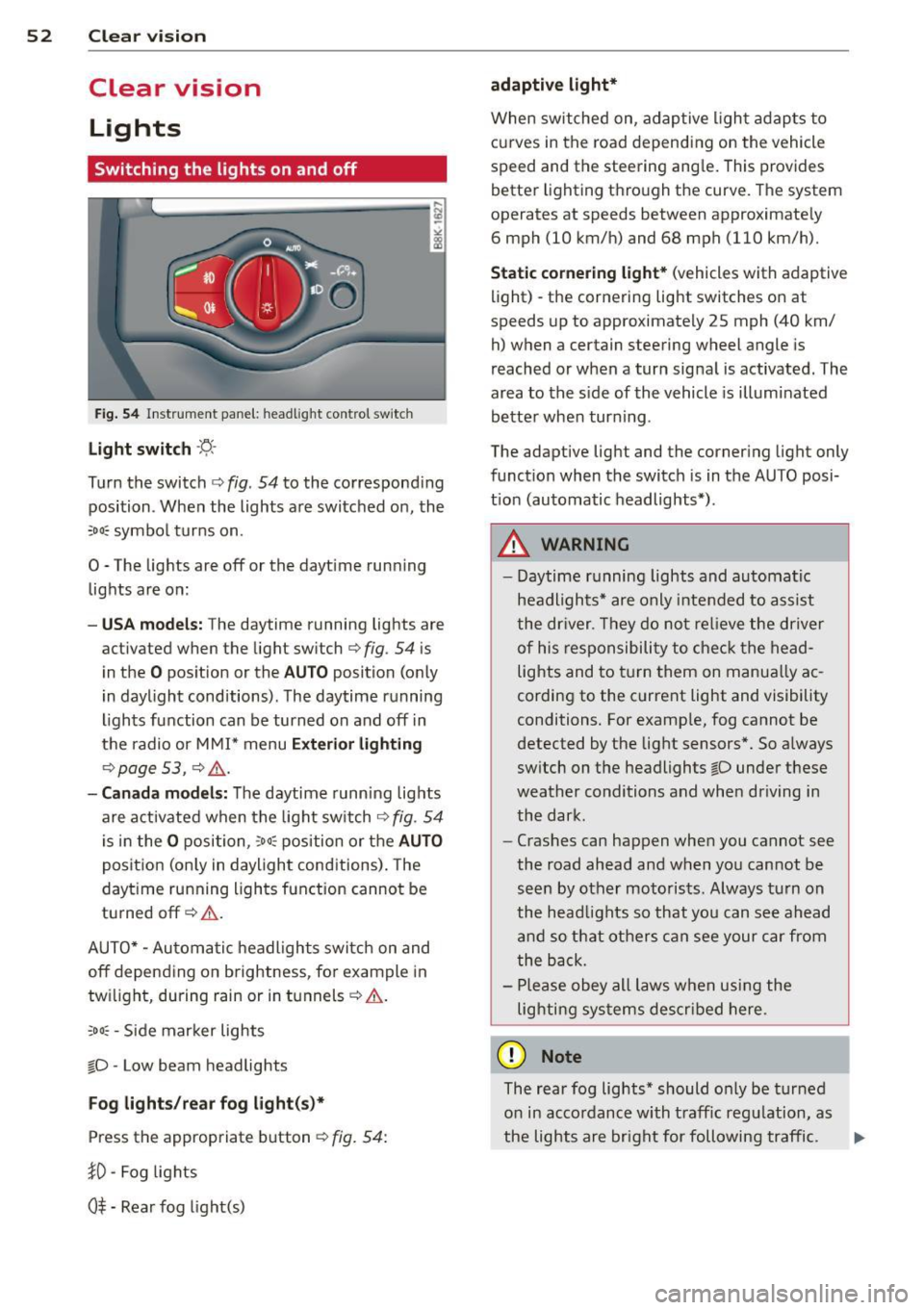
Fig . 54 Instr ument pane l: headlight con trol switch
Light switch -~ -
Turn the switch c:> fig . 54 to the correspond ing
position . When the lights are switched on, the
,o o~ symbo l tu rns on.
0 -The lights are off or the dayt ime run ning
lights are on:
- USA models: The daytime running lights are
activated when the light sw itch
c:> fig . 54 is
i n the
O position or the AUTO position (o nly
in dayl ight conditions) . The daytime running
lights function can be turned on and off in
the radio or M MI* menu
Exterior lighting
c:> page 53 , c:> ,&..
-Canada model s: The daytime runn ing lig hts
are activated when the light sw itch
c:> fig . 54
is in the
O p osition, :o o; position or the AUTO
pos it ion (on ly in daylight cond itions) . The
dayt ime running lights function cannot be
tu rned off
c:> &. .
AUTO* -Au toma tic h eadlights switch on and
off depending on b rightness, fo r example in
tw ilight, during rain or in t unnels
c:> &. .
:o o; -Side mar ker lights
io -Low beam headlights
Fog lights /rear fog light( s)*
Press the appropriate b utton c:> fig. 54:
}0 -Fog lights
0$ -Rear fog light(s)
adaptive light*
When switched on, adap tive ligh t ad apts to
curves in the road depending on the vehicle
speed and the steering ang le . This provides
b etter l ighting t hro ugh the curve . The system
operates at speeds between app roximate ly
6 mph (10 km/h) and 68 mph (110 km/h).
Static cor nering light* (vehicles with adaptive
light) - the cornering light switches on at
speeds up to approximately 25 mph (40 km/
h) when a certain steering wheel angle is
reached or when a turn sig na l is activated. The
area to the s ide of the vehicle is illumi nated
be tte r when tur ning .
The adaptive light and the co rnering light only
funct ion when the switch is in the AU TO posi
t ion (automatic headlights*) .
A WARNING
--
- Daytime r unning lights and automatic
headlights* are only inte nded to assist
the dr iver . Th ey do not re lieve the driver
o f his re sp onsibili ty to check t he head
lights and to t urn them on manua lly ac
cordin g to the c urrent light and visibility
conditions . For examp le, fog cannot be
detected by the light sensors *. So a lways
sw itch on t he headlights
io under these
wea ther conditions and when driving in
the dark.
- Cras hes can happen whe n you cannot see
the road ahead and when yo u cannot be
see n by other moto ris ts. Always tu rn on
the head lig hts so that yo u can se e ahead
and so th at others can see your car fr om
the b ack.
- Pl ease obey all laws w he n usi ng the
lighting sys tems descr ibed here.
(D Note
The rear fog lights * should o nly be tur ned
o n in acco rdanc e with t raff ic regu lation, as
the lights are bright for following traffic. ..,
Page 55 of 290
@ Tips
-The light sensor * for headl ight control is
l ocated in the rear view m irror mount.
You should therefore not apply any st ick
ers to the windsh ield in this area in order
to prevent malfunctions or failures .
- Some exterior lighting functions can be
ad justed
¢ page 53.
-When yo u remove you r key from the igni
tion w hile the vehicle's lights are turned
on, a buzzer sounds as long as the driv
er's door is open .
- In cool or damp weather, t he ins ide of
the headlights, turn signa ls and tail
li ghts can fog ove r due to the tem pera
ture diffe ren ce betwe en the inside and
outside. They will clear shor tly after
swi tching t hem on. This d oes not aff ect
the service life of the ligh ting.
- In the even t of a ligh t sensor malfunc
tion, the drive r is no tifie d in the inst ru
ment cluster disp lay ~
page 2 2.
Turn signals and high beam lever
The lever operates the turn signal s, the high
b eams and th e headlight flash er.
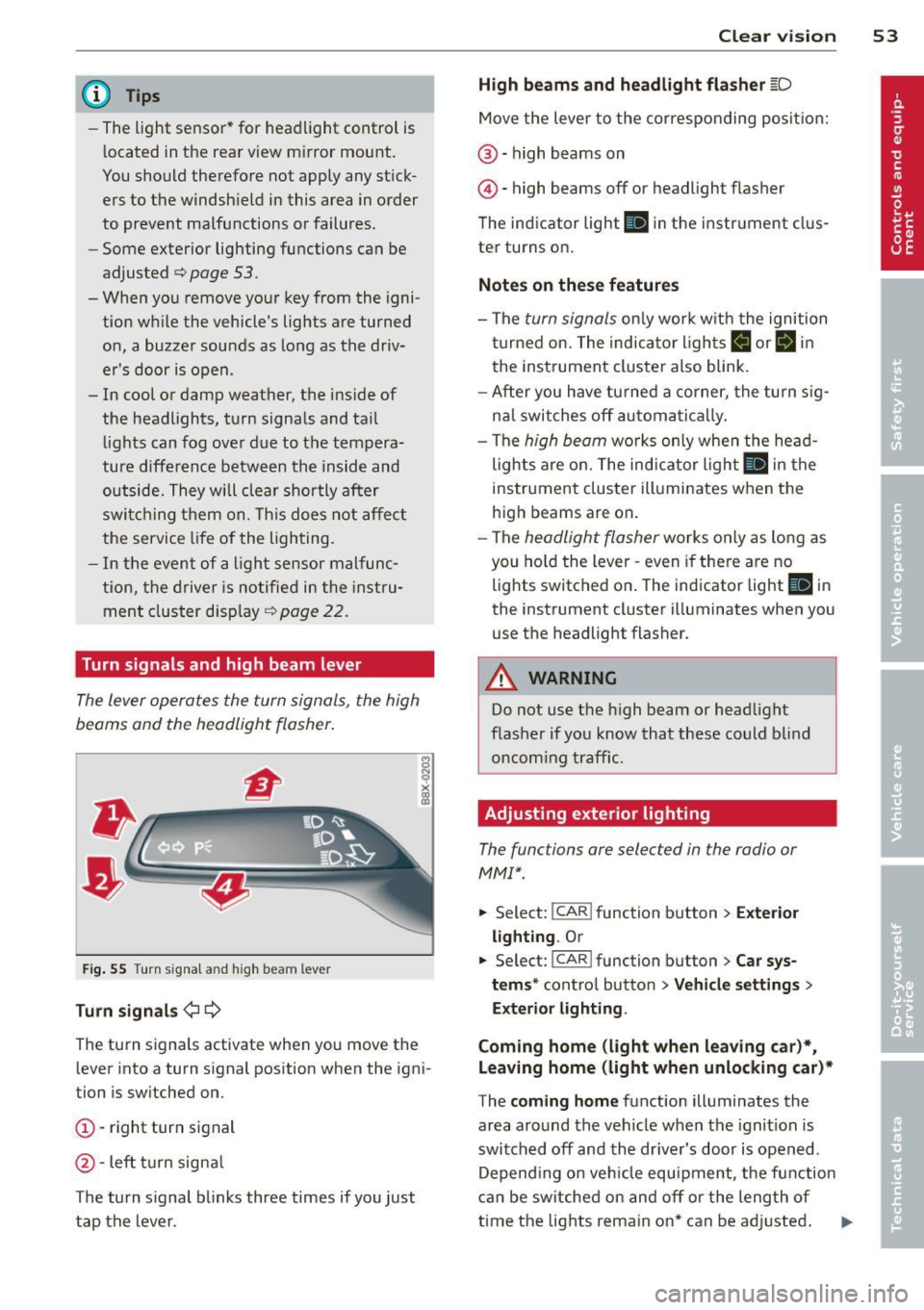
F ig. 55 Turn sig na l an d high beam leve r
Turn signals ¢i ¢
Th e turn s ignals activate when you move the
l ever into a turn s ignal position when the ign i
tion i s sw itched on.
(D -right turn signal
@ -Left turn signa l
T he turn s ignal b links three times if you just
tap the lever .
Clear vision 5 3
High beams and headlight flasher @:D
Move the lever to the corresponding posit io n:
@ -high beams on
@-high beams off or headlight flasher
T he ind icator light
II in the instr ument clus
ter turns on .
Notes on these features
-The turn signals on ly wor k w it h t he ignition
t urned on. The indica tor l igh ts
11 or II in
the instrument cluste r also blink .
- Aft er you have tu rned a corner, the turn s ig
na l swi tches off au tom atically .
- The
high beam wo rks only when the head
lights a re on. The indicator Ligh t. in the
i nstrumen t clus ter illuminates when the
high beams are on .
- The
headligh t flasher works on ly as long as
you ho ld the lev er -even if the re are no
lights switched o n. The ind icator light
Ill i n
the inst rument cluster illuminates when you
use the headlight flasher .
&_ WARNING
Do not use the high beam or head light
flasher if you kn ow that these could b lind
oncom ing traffic.
Adjusting exterior lighting
The functions are selec ted in the radio or
MM!* .
.. Select : I CAR! function b utton > Exter io r
light ing . Or
.. Select: I CAR I func tion button > Car sys
tems *
control button > Vehicle settings >
Exterior Lighting .
Coming home (light when leaving car )*,
Leaving home (light when unlocking car)*
T he coming home function illumi nates the
area around the vehicle when the ignition is
switched off and the dr iver's door is open ed.
Depend ing o n ve hicl e equ ipment, t he function
can be switched on and off or the length of
time the lig hts remain on* can be ad justed . .._
Page 58 of 290
56 Clear vis ion
Turn the knob to the desired position :
Q/P -In t his position , you can adjust the
driver's and front passenger's exter ior mirrors
by turn ing the knob in the des ired direction.
(jjjl -The mirrors are heated depending on the
outside temperatu re.
P assenger exterio r m irro r tilt func tion*
( onl y with memor y for ext erior mirrow s)
To help you see the curb when backing into a pa rking space, the surface of the m irror t ilts
slightly . The knob m ust be in the
P posit ion
for this to happen .
You can adjust the ti lted mirror surface by
turning the knob in the desired direction .
When you move out of reverse and into anoth
e r gear, the new mirror posi tion is stored and
assigned to the key you are using.
The mirror goes back into its origina l posit io n
once yo u drive forward f aster than 9 mph
(15 km/h) or switch the ignition off .
_& WARNING
Curved mirror s urfaces (convex or spheri
cal *) increase your field of view . Remem
ber that vehicles or other objects will ap
pear smaller and farther away than when
seen in a flat m irror. If you use this mirror
to estimate distances of following veh icles
when changing lanes, you could estimate incorrectly and cause an accident .
{CT) Note
- If you wash the vehicle in an automatic
ca r wash, you must fold the exterior m ir
r o rs in to reduce the r isk of damage to
the mirrors .
(i) Tips
- The exterior mirror settings are stored
with the memory funct ion* c::>
page 64.
-If there should be a ma lfunct ion in the
electrical system, you can st ill adjust the
exter ior mirrors by press ing the edge of
the m irror. Dimming the mirrors
F
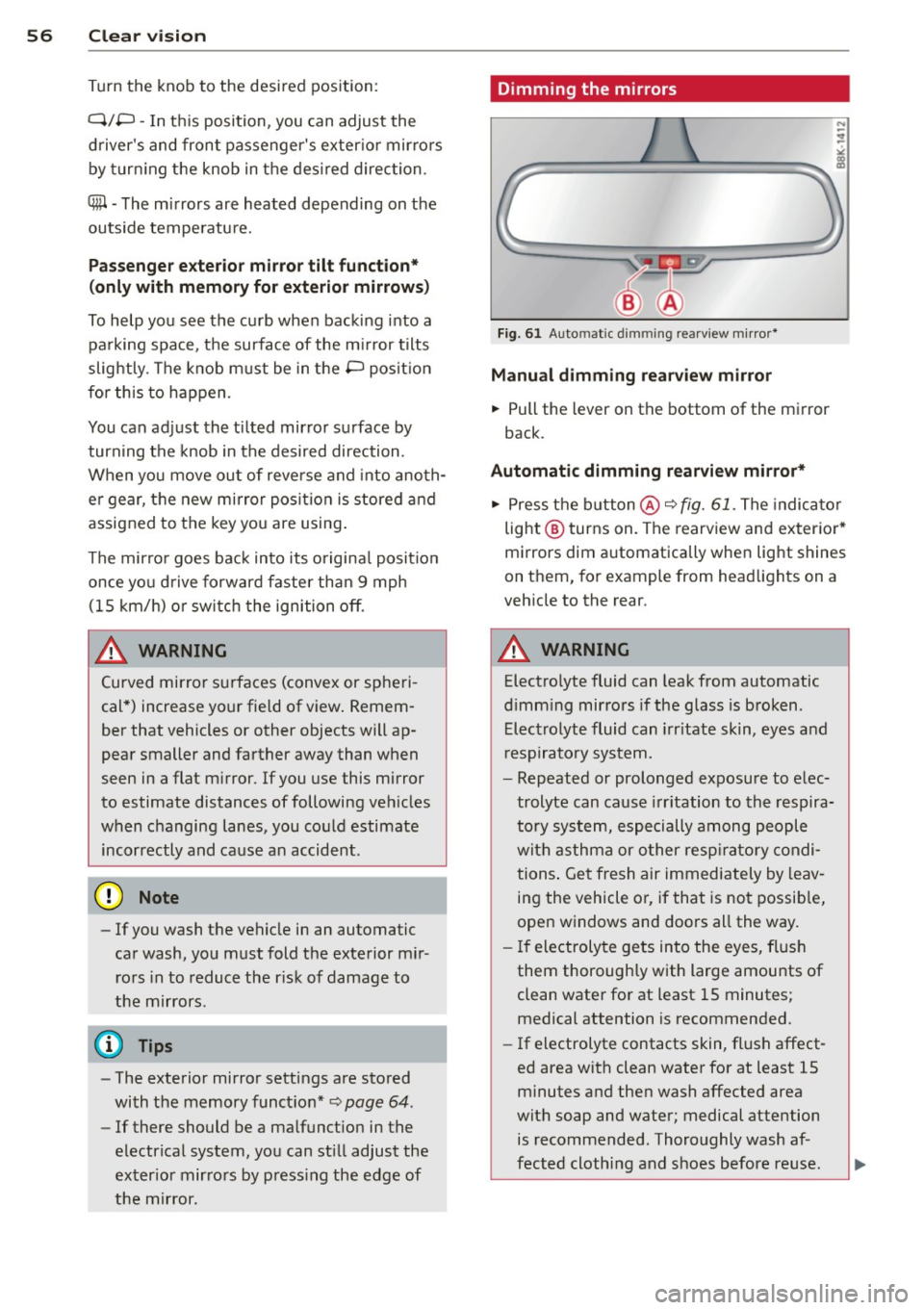
ig. 61 Auto ma tic dimming rearview m irro r*
Manu al di mm ing re a rvi ew mirro r
• Pull the lever on th e bottom of the mirror
back .
Automat ic dimming rearvi ew mirror *
....
• Press the button @c::> fig. 61. The indicator
light @turns on . The rearview and exterior*
mirrors dim automatically when light shines
on them, for example from headlights on a
veh icle to the rear.
_& WARNING ..__
Electrolyte fluid can leak from automatic
d imm ing mirrors if the glass is broken .
Electrolyte fluid can irr itate skin, eyes and
r espiratory system.
- Repeated or prolonged exposure to e lec
trolyte can cause irritation to the respira
tory system, especially among people
with asthma or o ther resp ira to ry condi
tions . Get fresh air immediately by leav
ing the vehicle or, if that is no t possib le,
open windows and doors all the way.
- If electroly te gets into the eyes, flush
them thoroughly with large amounts of
clean water for at least 15 minutes; medical attention is recommended.
- If electrolyte contacts skin, fl ush affect
ed area with clean water for at least 15
minutes and then wash affected area
with soap and water; medical attention
is recommended. Thoroughly wash af
fected cloth ing and shoes before reuse.
Page 60 of 290
58 Clear vis ion
Cleanin g the headlights* . The headlight wash
er system* op erates on ly when the headlights
a re on. If you move the lever to pos ition
® ·
the head lights are washed in intervals.
A WARNING
- The ra in sensor is only intended to assist
the driver . The dr iver is still responsible
for manually sw itching the w ipers on ac
co rding to the vis ibility conditions .
- The windshie ld may not be treated w it h
water-repe lling windshie ld coat ing
age nts. Unfavorable conditions, such as
wetness , darkness, low sun, can res ult in
incre ase d gla re. Wiper b lade ch atter is
also possible .
- P roperly fu nctioning windshie ld w iper
blades are required for a clear view and
sa fe dr iving
¢ page 58, Replacing
windshield wiper blades.
(D Note
- In the c ase of fro st, check whether the
winds hield wiper blad es are frozen to
the windshie ld. Switching on the wind
s h ield wipers can damage the wiper
blades!
- Prior to using a car wash, the win dshield
wipe r system must be switched
off (lever
i n position @). This helps to prevent un
i ntent ional sw itchi ng on and damage to
t h e windshie ld w iper system .
- The w indshield wipers are switched
off
when the ignition is turned off . Activate
the windshie ld w ipers afte r the ignit ion
i s sw itched back on by mov ing t he wind
s h ield wiper leve r to any pos it io n.
- Worn or dirty windsh ie ld w iper blades
r esult in streaking . T h is can affect the
r ain senso r* function . Ch eck your wind
s h ield wiper blades regularly.
- The was her fluid nozzles of the wind
s h ield washer system are heated at low
temper atures w hen the ignit ion i s on.
- When stop ping temporarily , (e.g. at a
traff ic light) the se t speed of the wi nd- shield wipers is automatically
reduced by
one s peed.
Replacing windshield wiper blades
Wiper blad es in good condition help k eep th e
windshield clear.
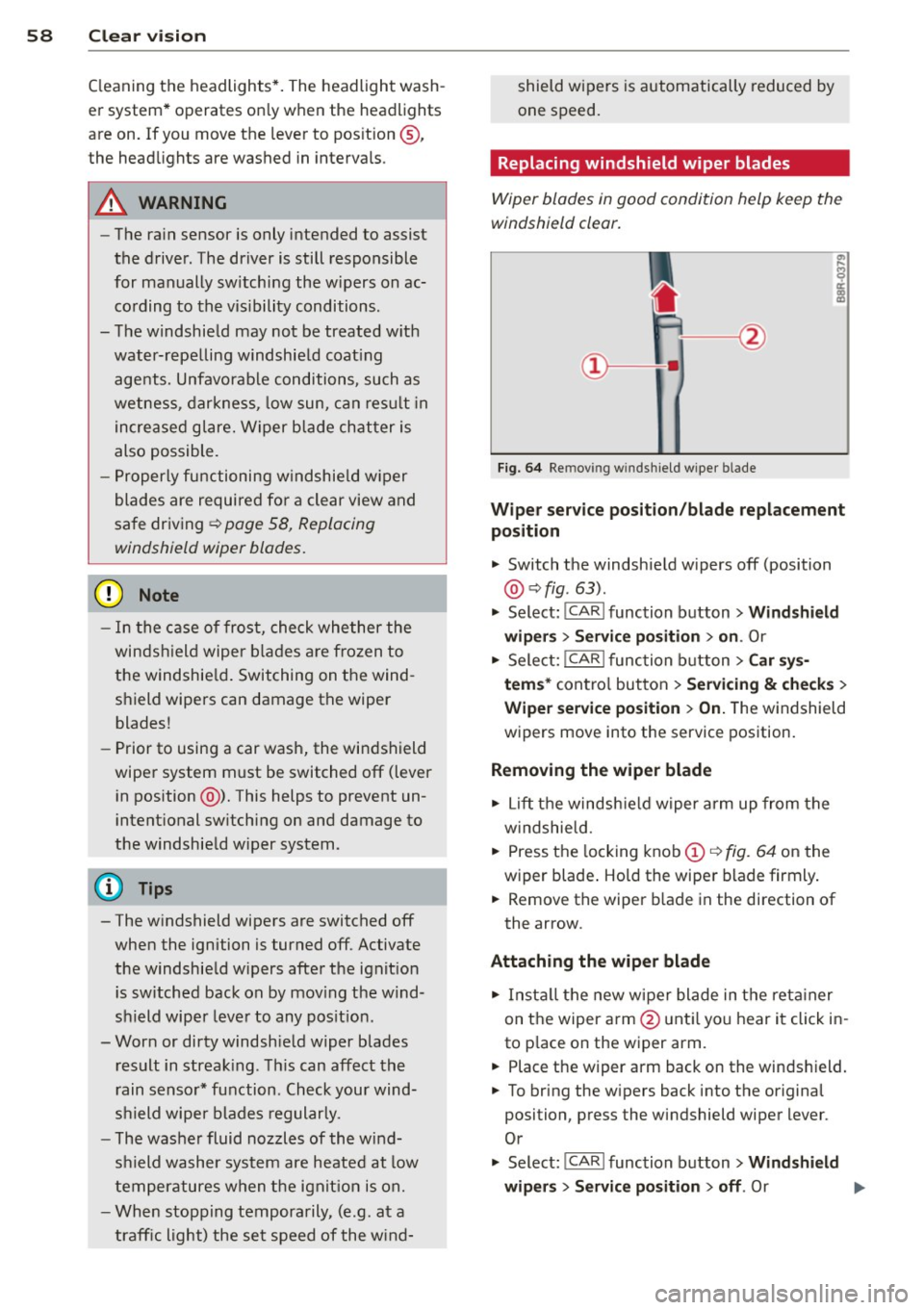
Fi g. 6 4 Re mov ing w indsh ie ld wipe r bl ade
Wiper service posit ion /blade replacement
position
" Switch the windsh ie ld w ipers off (position
@ ¢fig. 63).
" Select: !CAR ! function b utton> Wind shield
wip ers> Service po sition > on .
Or
" Select:
I CAR I func tion button > Car sy s
tem s*
con tro l but ton > Servicing & checks >
Wiper service po sition > On.T he windsh ield
w ipers move into the service pos ition.
Removing the wiper blade
" Lift t he windsh ie ld w iper a rm up from the
w indshie ld.
" Press the locking knob
(D c::> fig. 64 on the
wiper blade . Ho ld the wipe r blade firmly .
" Remove the wiper b lade in the direction of
the arrow .
Attaching the wiper blade
" In st all the new w ipe r blade in t he reta iner
on t he wiper a rm @ unt il yo u hear i t click in
to p lace on the wiper arm.
" Place the wiper arm back on the winds hield.
" To bring the w ipers back into the origina l
position, press the windshield wiper lever .
Or
" Select :
!CAR ! function button> Windshield
wipers
> Service position > off . Or
Page 67 of 290
profiles for the driver . The memory function is
operated through the master key and the memory buttons in the driver's door.
The driver's seating profi le is stored and as
signed to the master key each time the vehicle
is locked. The seating profile is recalled auto
mat ically when the veh icle is unlocked. If two
people use one vehicle , it is recommended
that each person always uses "their own"
master key .
Up to 2 seat profiles can be stored in the
memory buttons in the driver's door. Once
they are stored, these seat profiles can be se lected at any time.
In addition to the driver 's seat settings, you
can also store and access the exterior mirror
adjustment settings* using the remote con
trol key or memory button .
Remote control key
Applies to vehicles: with seat memory
To assign the driver 's seat settings to the re
mote control key when locking the vehicle, the
function must be activated in the radio or
MMI*
~ Select: I CAR I function button > Seat adjust
ment
> Driver's seat > Remote control key >
on.Or
~ Select: I CAR I f u nct ion button > Car sys
tems*
control button > Vehicle settings>
Seats > Driver 's seat > Remote control key
> On.
(D Tips
If you do not want another driver's set
tings to be assigned to the remote key,
switch off the memory function using the
rad io or
MMI* or the ! ON/OFF I button
¢page 65.
Seats and storage 65
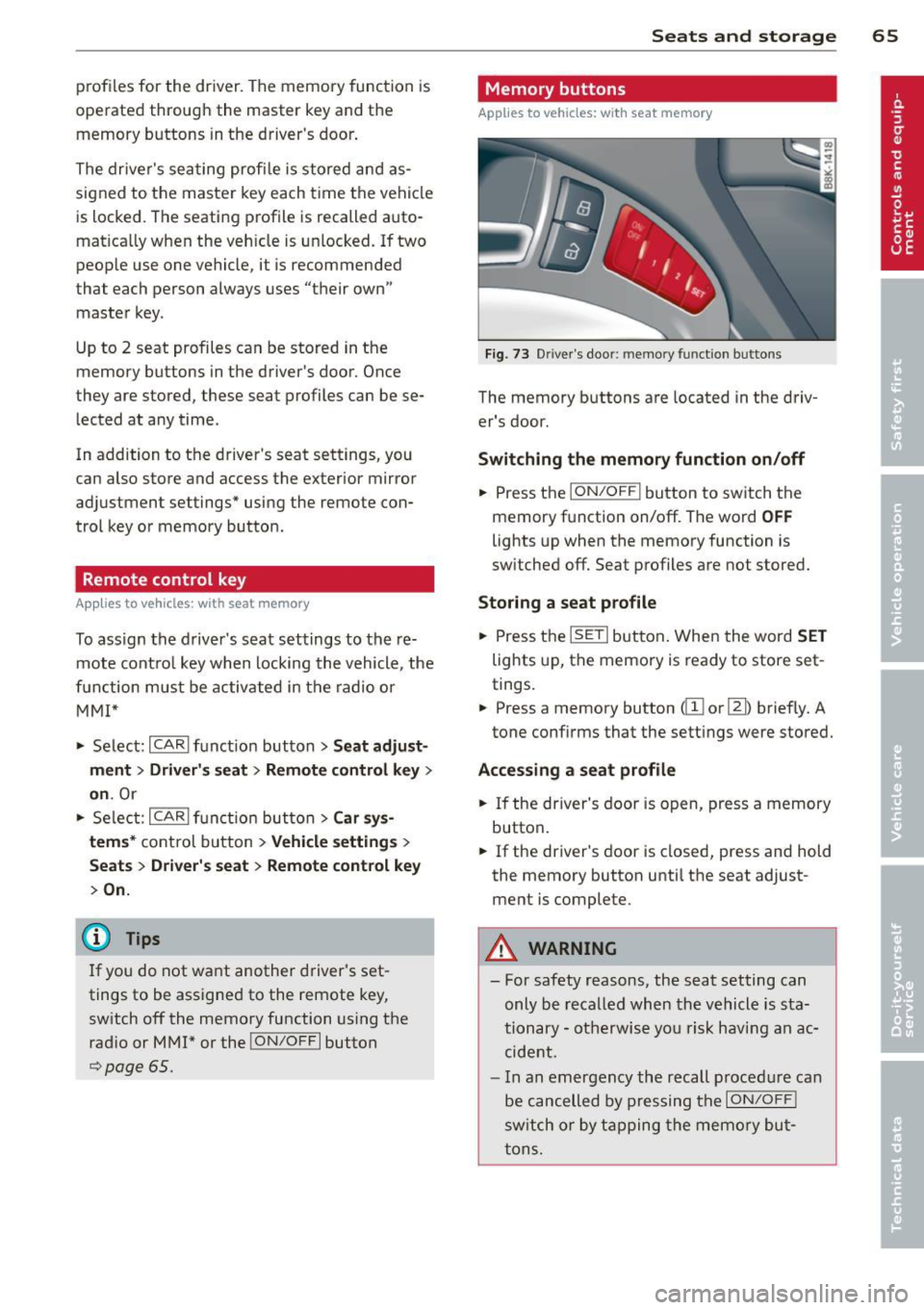
Memory buttons
Applies to vehicles: wit h seat memory
Fig. 73 Driver's door: memo ry funct ion buttons
The memory buttons are located in the driv
er's door.
Switching the memory function on/off
~ Press the ION/OF F! button to switch the
memory function on/off. The word
OFF
lights up when the memory function is
sw itched off. Seat profiles are not stored.
Storing a seat profile
~ Press the ISETI button. When the word SET
lights up, the memory is ready to store set
tings.
~ Press a memory button dII or [Ii) briefly. A
tone conf irms that the settings were stored.
Accessing a seat profile
~ If the driver's door is open, press a memory
button .
~ If the driver's door is closed, press and hold
the memory button until the seat adjust
ment is complete.
A WARNING
- For safety reasons, the seat setting can only be recalled when the vehicle is sta
tionary -otherwise you risk having an ac
cident.
- I n an emergency the recall procedure can
be cancelled by pressing the
I ON/OFF !
switch or by tapping the memory but
tons.
Page 81 of 290

note that electrica l equipment such as
exterior lights wi ll switch off as well
when that happens.
Switching engine off
App lies to vehicles: with conve nien ce key
.,. Bring your vehicle to a complete stop.
.,. Move the selector lever to the P or N posi
t ion.
... Press the
!START E NGIN E STOPI button
~fig. 91.
St eering lock
The steering locks when you turn the engine
off us ing the
I STAR T ENGINE STOP I button
and open the dr iver's door . The locked steer
ing he lps prevent vehicle theft.
E mergenc y off
If necessary, the eng ine can be sw itched off
with the selector lever in the R or D/S pos i
tions. To do so, step on the brake peda l and
press and hold the
I STAR T ENGINE STOP I but
ton vehicle speed must be less than 6 mph
(10 km/h).
.&, WARNING
-Never t urn off the eng ine be fore the ve
hicle has come to a complete stop . The
f ull function of the brake booster and the
power steering is not guaranteed . You
must use more force to turn or brake if
necessary. Because you cannot steer and
brake as you usua lly would, this could
lead to c rashes and serious injur ies.
- For safety reasons, you should always
park your vehicle with the se lector lever
in P . Otherwise, the veh icle could i nad
vertent ly roll away .
- The rad iator fan can continue to run for
up to 10 minutes eve n after you have
tu rned off the eng ine and removed the
ignition key. The radiator fan can also
turn on again i f the engine coolant hea ts
up because of intense sunlight or hea t
build -up in the engine compartment.
On th e ro ad 79
-Always take the key w ith you whenever
you leave your ve hicle. Otherw ise, the
e ngine could be started or electrical
equipment such as the power windows
could be operated. This can lead to seri
ous injury.
(D Note
If the engine has been under heavy load
for an extended period, heat bu ilds up in
the eng ine compartment after the eng ine
i s sw itched off - there is a r is k of damag ing
the e ngine. A llow the eng ine to run at id le
for abo ut two minutes before switching it
off.
Driver messages
I g nition i s on
This message appears and a warning tone
sounds if you open the d river's door when the
ignition is sw itched on .
No key ident ified
This message appears when the
I S TART ENGINE STOP I button is pressed if
there is no master key ins ide the ve hicle or if
the system does not recognize it . For exam
ple, the master key cannot be recognized if it
i s covered by an object (e .g . aluminum brief
case) which
screens the radio s ignal. Electron
ic dev ices such as cell p ho nes can also inte r
f ere with the radio s ignal.
Pr ess brake p edal to start engine
This message appears if you do not press the
brake pedal to start the eng ine .
Shift to N or P to start engine
T h is message appears w hen a ttempt ing to
star t the eng ine if the selecto r lever for the
automatic transmiss ion is not in the P or N
pos ition . The engine can only be started with
the se lector in these positions.
Is the ke y in the vehicle ?
Page 82 of 290
80 On the road
This message appears if the master key is re
moved from the vehicle with the engine run
n ing.
If the master key is no longer in the ve
hicle, you cannot switch on the ignition after
stopping the engine and you also cannot start
the eng ine again . Moreover, you can not lock
the veh icle from the outside w ith the key.
Shift to P otherwise vehicle can roll away.
Doors do not lock if lever is not in
P.
This message appears for safety reasons
a long w ith a warning signa l. It appears if the
selector lever for the automat ic transm iss ion
is not in the P position when switch ing off the
ignition . Move the selector lever to the P pos i
tion, othe rwise the ve hicle is not secured
against rolling away . You also cannot lock the
vehi cle using the locking bu tton* on the door
han dle or using the remote key.
Convenience key defective! Use ignition lock
This message appears if the eng ine must be
started or stopped using the ignition key and
not the
I STAR T ENGIN E ST OP ! button .
Electromechanical
parking brake
Operation
The electromechanicol parking brake replaces
the hand brake.
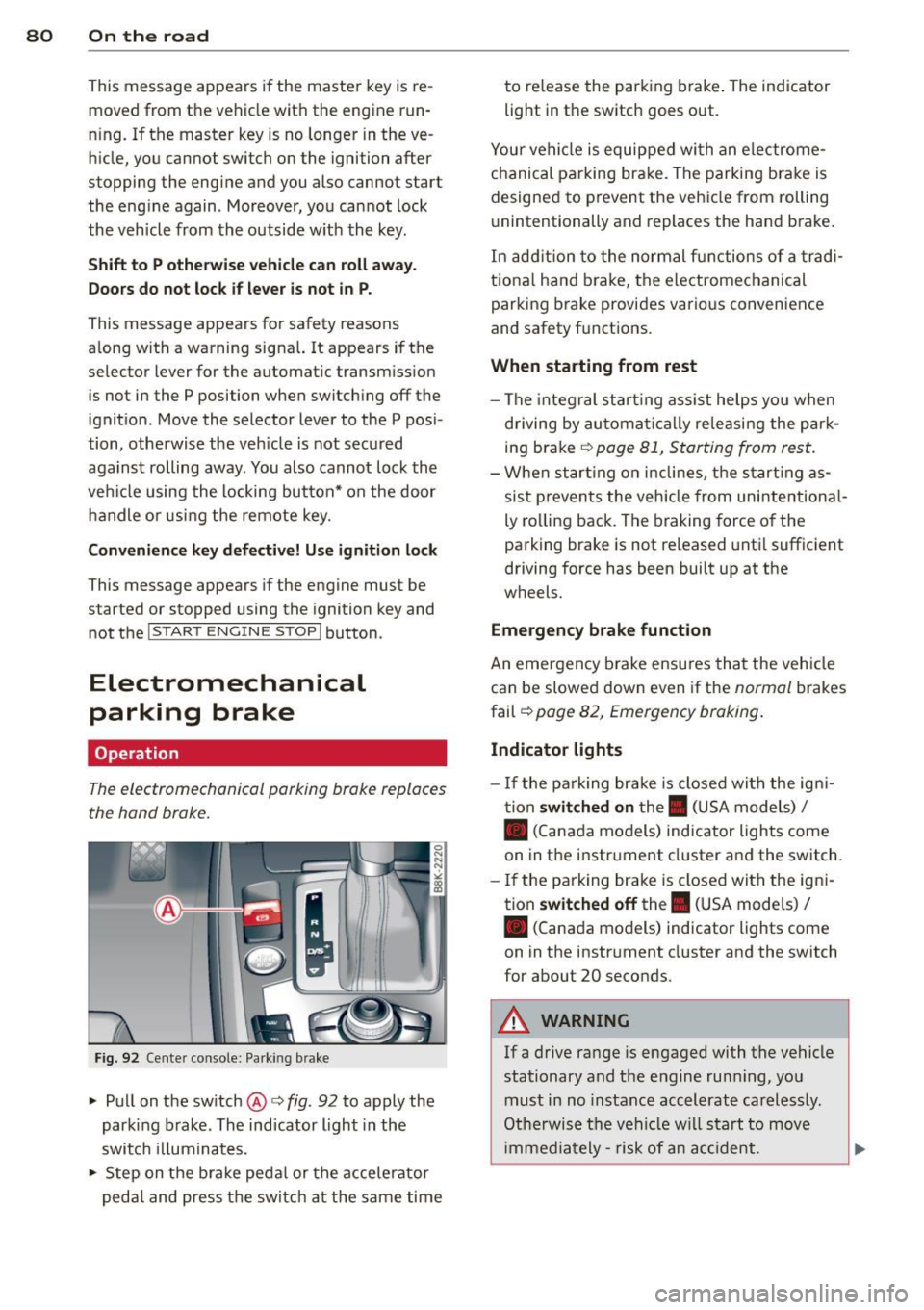
F ig. 92 Cente r console: Parking brake
.., Pull on the switch @c:> fig. 92 to apply the
parking brake. The indicator light in the
switch illum inates .
.., Step on the brake peda l or the accele rator
pedal and press the switch at the same time to re
lease the par king brake . The indicator
light in the switch goes out.
Your vehicle is equipped wi th an electrome
chanical parking brake . The parking brake is
designed to prevent the vehicle from rolling
u nintentionally and replaces the hand brake.
In addition to the normal fun ctions of a tradi
tiona l hand b rake, the electromechanical
parking brake provides various convenience
and safety f unctions .
When starting from rest
-The integral start ing assist helps you when
driving by automatica lly re leasing the par k
ing brake
c:> page 81, Starting from rest.
-When starting on inclines, the starting as
sist prevents the vehicle from unintentiona l
ly ro lling back. The braking force of the
parking brake is not released until sufficient
driving force has been built up at the
wheels.
Emergency brake function
An eme rgency b rake ensures that the vehicle
can be slowed down even if the
normal brakes
fail c:>
page 82, Emergency braking .
Indicator lights
- If the parking brake is closed with the igni
tion
switched on the. (USA models) I
• (Canada models) ind icator lights come
on in the instr ument cluster and the switch .
- If the parking brake is closed with the igni
tion
switched off the . (USA models) I
• (Canada models) indicator lights come
on in the instrument cluster and the switch
for about 20 seconds .
A WARNING
-
If a drive range is engaged with the vehicle
stationary and the engine runn ing , you
must in no instance accelerate carelessly.
Otherwise the vehicle will start to move
i mmed iately- risk of an acc ident.
Page 86 of 290
84 On the road
Cruise control
Switching on
The cruise control system makes it possible to
drive at a constant speed starting at 20 mph
(30 km/h).
0
f
®t
0
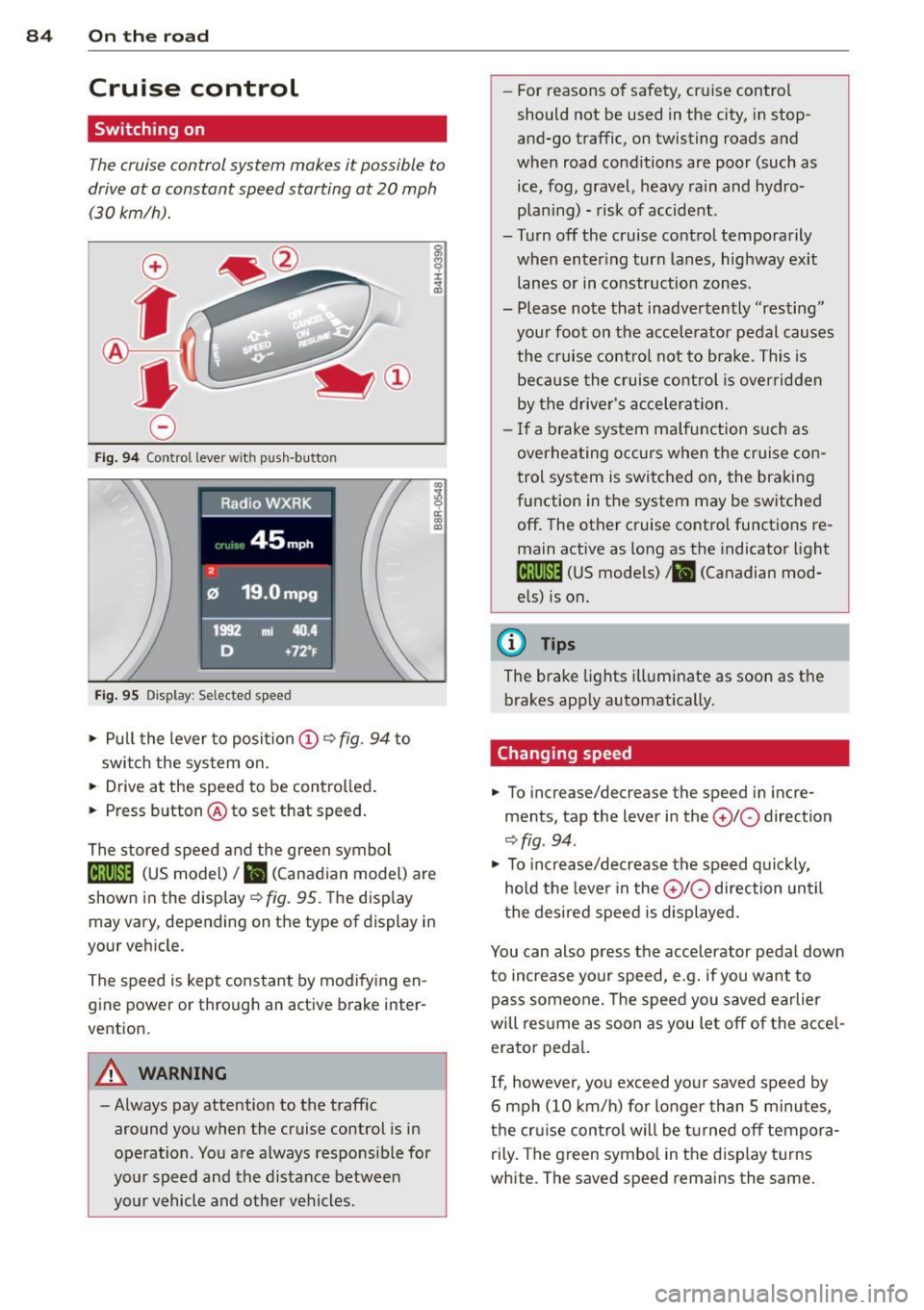
Fig. 94 Control lever w it h push-button
Fig. 95 Dis pl ay: Selected speed
"' Pull the lever to position (D 9 fig . 94 to
switch the system on.
"' Drive at the speed to be controlled .
"' Press button @ to set that speed.
I :i:. ... a,
The stored speed and the green symbol
lij;(l)~i4 (US model) 1B (Canadian model) are
shown in the display
r:::;, fig. 95. The display
may vary, depending on the type of display in
your veh icle.
The speed is kept constant by modifying en
gine power or through an active brake inter
vention.
A WARNING
- Always pay attention to the traffic
around you when the cruise control is in
operation. You are always responsible for
your speed and the distance between
your vehicle and other vehicles. -
For reasons of safety , cruise control
should not be used in the city, in stop
and-go traffic, on twisting roads and
when road conditions are poor (such as ice, fog, gravel, heavy rain and hydro
plan ing) - risk of accident.
- Turn off the cruise control temporarily
when enter ing turn lanes, highway exit
lanes or in constr uction zones .
- Please note that inadve rtently "resting"
your foot on the accelerator pedal causes
the cruise control not to brake. This is
because the cruise control is overridden
by the drive r's acceleration.
- If a brake system malfunction such as
overheating occurs when the cruise con
trol system is switched on, the braking
function in the system may be switched
off . The other cruise control functions re
main active as long as the indicator light
[ff;(l)~i4 (US models) ;B (Canadian mod
els) is on.
(D Tips
The brake lights illuminate as soon as th e
brakes app ly automatically.
Changing speed
"' To incre ase/decrease the speed in incre
ments, tap the lever in the
010 direction
r:::;, fig . 94 .
"' To increase/decrease the speed quic kly,
hold the lever in the
010 direction until
the desired speed is displayed.
You can also press the accelerator pedal down
to increase your speed, e .g. if you want to
pass someone. The speed you saved earlier
will res ume as soon as you let off of the acce l
erator pedal.
If, however, you exceed your saved speed by
6 mph (10 km/h) for longer than 5 minutes,
the cruise control wil l be turned off tempora
rily. The green symbol in the disp lay turns
white. The saved speed remains the same.
Page 99 of 290
Audi adaptive cruise control and braking guard 97
the tachometer @and is also shown briefly
in the display @<:::>
fig. 108.
Switching Audi adaptive cruise control off
~ Push the lever away from you into position
@ until it clicks into place. The message
ACC off appears.
@ Indicator lights
II-Adaptive cruise control is switched on. No
vehicles are detected up ahead. The stored
speed is ma intained.
I-A moving vehicle is detected up ahead .
The adaptive cruise control system regulates
the speed and distance to the moving vehicle
ahead and acce lerates/brakes automatica lly.
I -When automatic braking is not able to
keep enough distance to a previously detected
mov ing vehicle up ahead, you must take con
trol and brake
c:> page 99, Request for driver
intervention.
© Display
If adaptive cruise control is not shown in the
d isplay, you can call it up with the
I RES ET I
button c:> page 24.
Based on the symbols in the d isplay, you can
determine if the system is maintaining a dis
tance to the vehicle ahead and what that dis
tance is.
No vehicle -No vehicle ahead was detected.
White vehicle -A vehicle ahead was detected .
Red vehicle -Prompt for the driver to take ac
tion
c:> page 99.
Both arrows on the scale © indicate the dis
tance to the vehicle ahead . No ar row appears
when the vehicle is on an open road and there
is no object ahead . If an object is detected
ahead, the arrow moves on the scale.
The green zone on the scale shows the stored
distance. For information on changing the
stored distance, refer to
c:> page 98. If the
distance selected is too close or may soon be
come too close, the arrows move into the red
zone on the scale.
A WARNING
Improper use of the adaptive cruise con
trol can cause collisions, other accidents
and serious personal injuries.
- Pressing the
!SET ! button when driv ing at
speeds below 20 mph (30 km/h), w ill au
tomatically accelerate the vehicle to
20 mph (30 km/h), which is the mini
mum speed that can be set.
@ Tips
-If you switch the ignit ion or the adaptive
cruise control off, the set speed is erased
from the system memory.
- The electronic stab ilizat ion control
(ESC)
and the anti-slip-regulat ion (ASR) are au
tom atica lly turned on when the adaptive
cruise control is turned on. Both systems
cannot be turned off if the adaptive
cruise control is turned on .
Changing the speed
Applies to vehicles: with Aud i adapt ive c ruise control
0
f
jJ
0
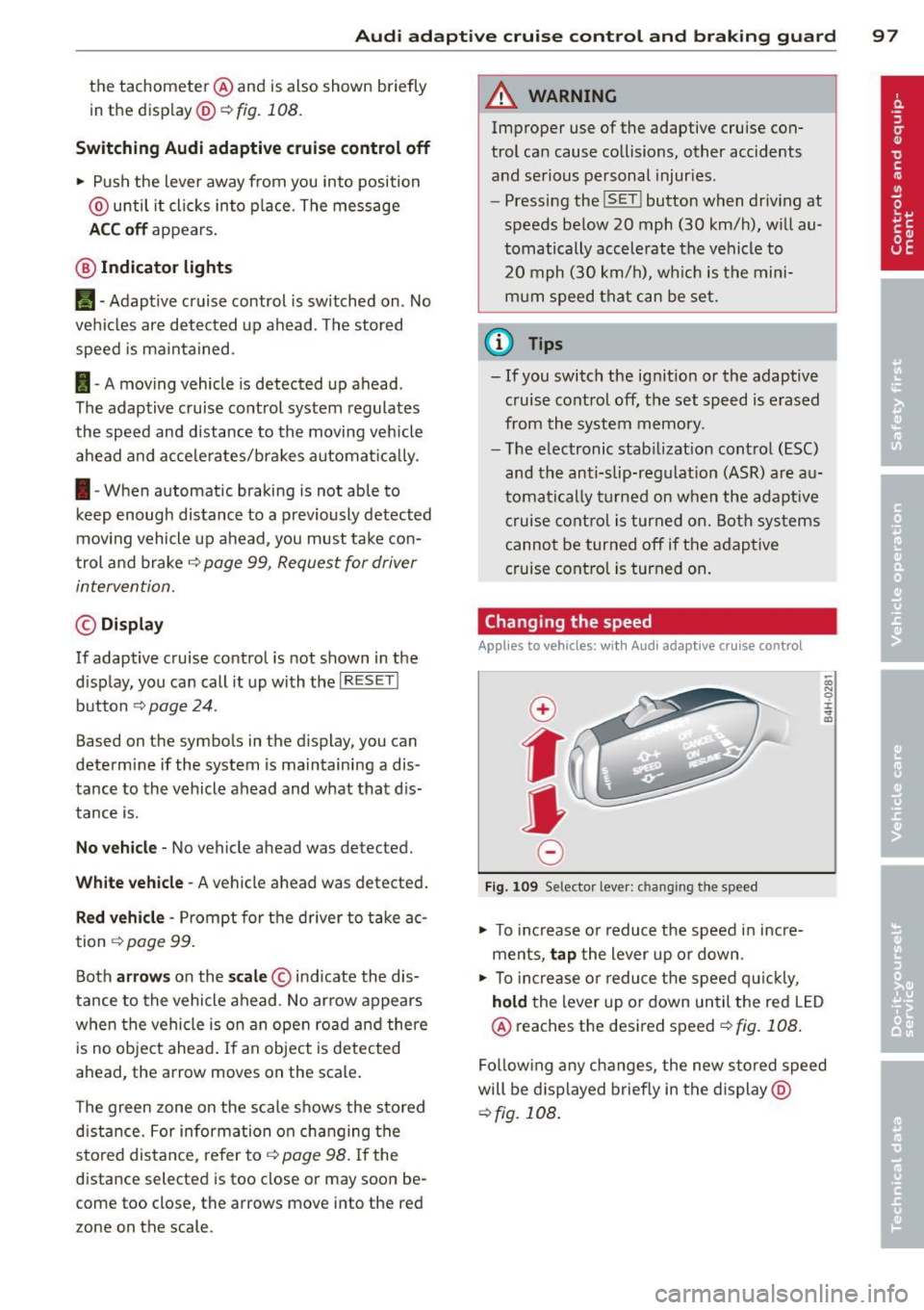
Fig. 109 Selector lever: ch anging the speed
~ To increase o r reduce the speed in incre
ments,
tap the lever up or down.
-0:, N 0 ± ... a)
~ To incr ease o r reduce the speed quickly,
hold the lever up or down until the red LED
@ reaches the desired speed
c:>fig . 108 .
Following any changes, the new stored speed
will be displayed briefly in the display @
c:>fig. 108 .