brake AUDI A5 CABRIOLET 2013 Owner's Guide
[x] Cancel search | Manufacturer: AUDI, Model Year: 2013, Model line: A5 CABRIOLET, Model: AUDI A5 CABRIOLET 2013Pages: 290, PDF Size: 72.35 MB
Page 99 of 290
Audi adaptive cruise control and braking guard 97
the tachometer @and is also shown briefly
in the display @<:::>
fig. 108.
Switching Audi adaptive cruise control off
~ Push the lever away from you into position
@ until it clicks into place. The message
ACC off appears.
@ Indicator lights
II-Adaptive cruise control is switched on. No
vehicles are detected up ahead. The stored
speed is ma intained.
I-A moving vehicle is detected up ahead .
The adaptive cruise control system regulates
the speed and distance to the moving vehicle
ahead and acce lerates/brakes automatica lly.
I -When automatic braking is not able to
keep enough distance to a previously detected
mov ing vehicle up ahead, you must take con
trol and brake
c:> page 99, Request for driver
intervention.
© Display
If adaptive cruise control is not shown in the
d isplay, you can call it up with the
I RES ET I
button c:> page 24.
Based on the symbols in the d isplay, you can
determine if the system is maintaining a dis
tance to the vehicle ahead and what that dis
tance is.
No vehicle -No vehicle ahead was detected.
White vehicle -A vehicle ahead was detected .
Red vehicle -Prompt for the driver to take ac
tion
c:> page 99.
Both arrows on the scale © indicate the dis
tance to the vehicle ahead . No ar row appears
when the vehicle is on an open road and there
is no object ahead . If an object is detected
ahead, the arrow moves on the scale.
The green zone on the scale shows the stored
distance. For information on changing the
stored distance, refer to
c:> page 98. If the
distance selected is too close or may soon be
come too close, the arrows move into the red
zone on the scale.
A WARNING
Improper use of the adaptive cruise con
trol can cause collisions, other accidents
and serious personal injuries.
- Pressing the
!SET ! button when driv ing at
speeds below 20 mph (30 km/h), w ill au
tomatically accelerate the vehicle to
20 mph (30 km/h), which is the mini
mum speed that can be set.
@ Tips
-If you switch the ignit ion or the adaptive
cruise control off, the set speed is erased
from the system memory.
- The electronic stab ilizat ion control
(ESC)
and the anti-slip-regulat ion (ASR) are au
tom atica lly turned on when the adaptive
cruise control is turned on. Both systems
cannot be turned off if the adaptive
cruise control is turned on .
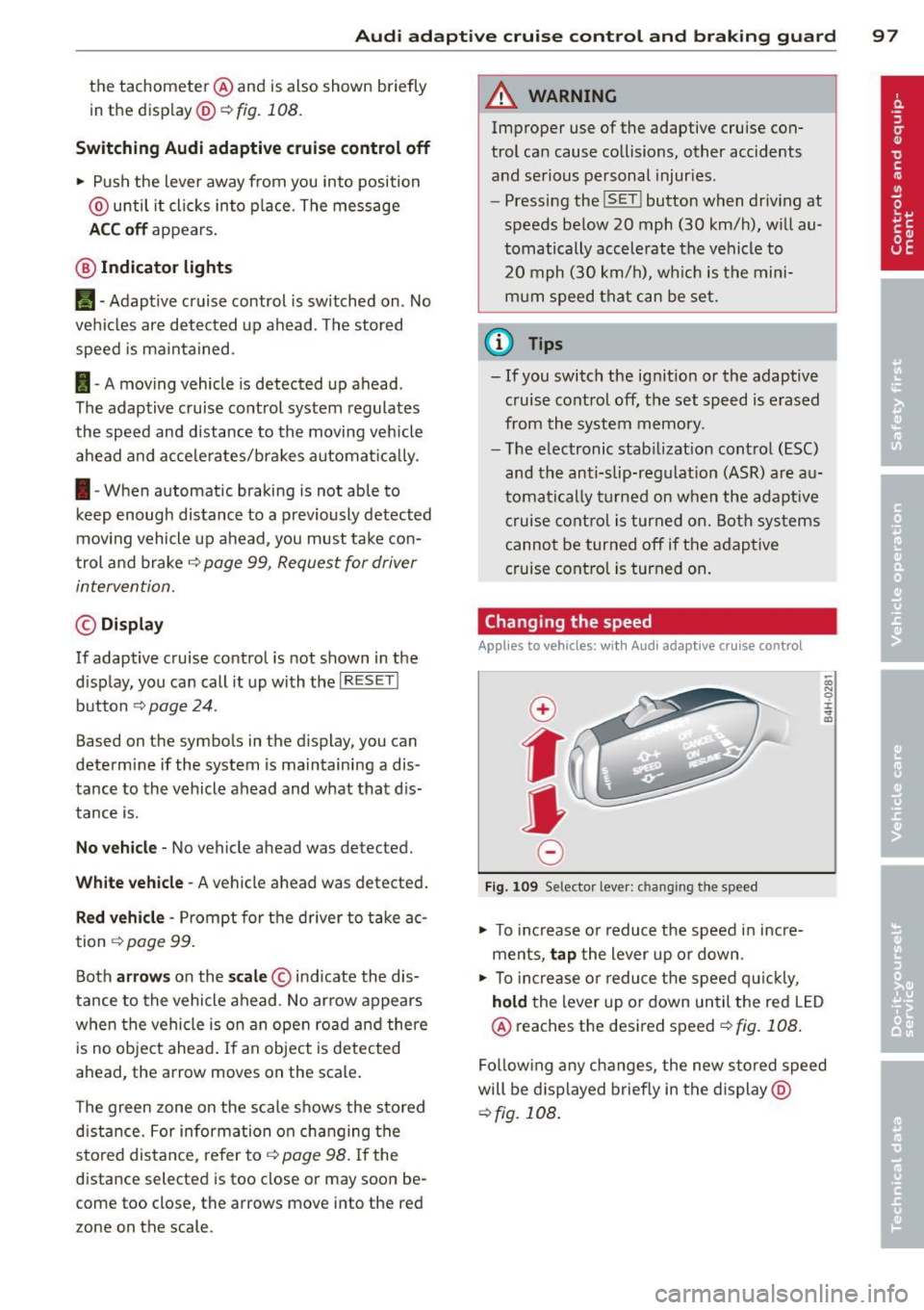
Changing the speed
Applies to vehicles: with Aud i adapt ive c ruise control
0
f
jJ
0
Fig. 109 Selector lever: ch anging the speed
~ To increase o r reduce the speed in incre
ments,
tap the lever up or down.
-0:, N 0 ± ... a)
~ To incr ease o r reduce the speed quickly,
hold the lever up or down until the red LED
@ reaches the desired speed
c:>fig . 108 .
Following any changes, the new stored speed
will be displayed briefly in the display @
c:>fig. 108 .
Page 100 of 290
98 Audi adapti ve cruise control and bra king gu ard
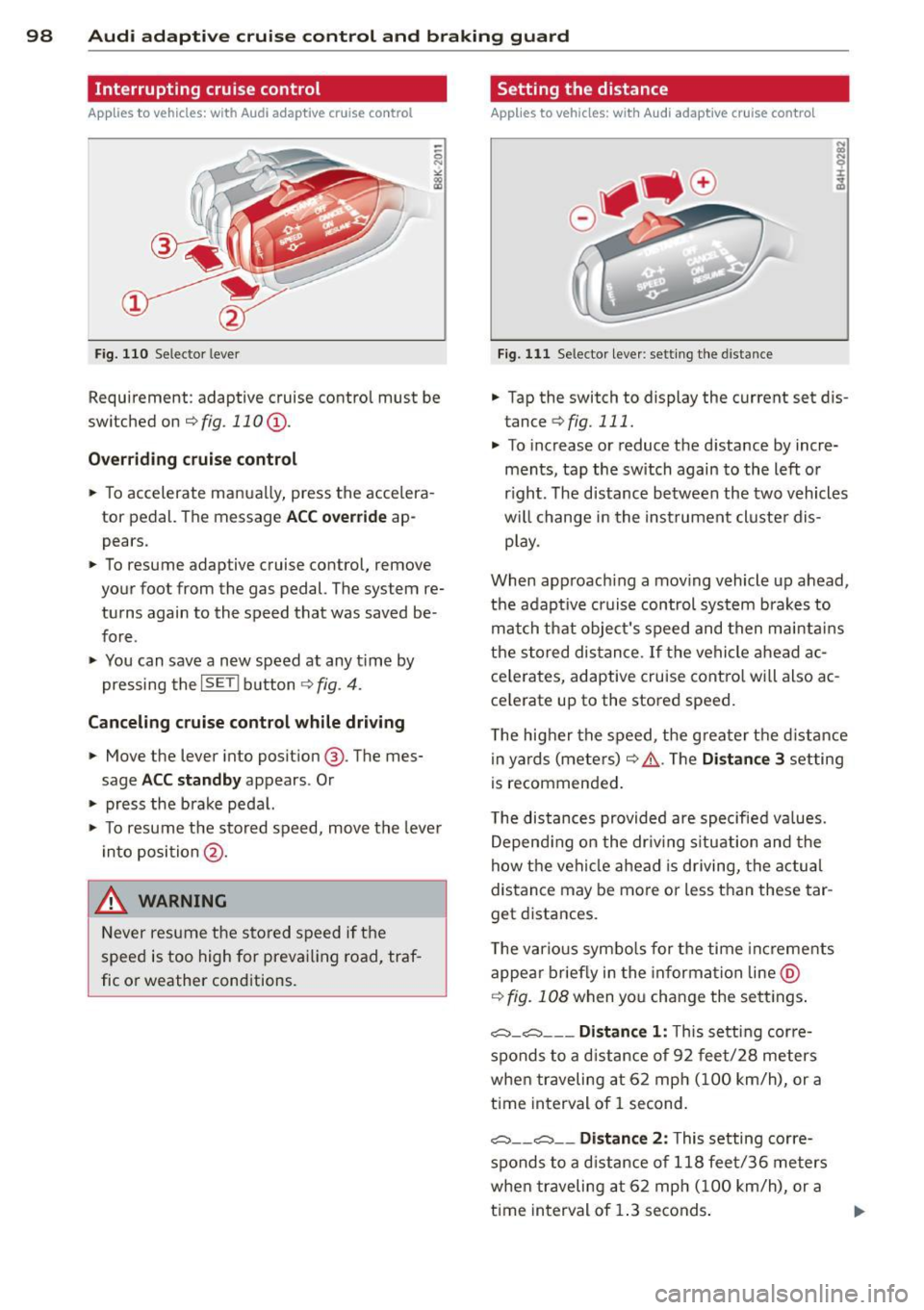
Interrupting cruise control
App lies to vehicles: with Audi adaptive cruise control
Fig. 110 Selector lever
Requirement: adaptive cruise contro l must be
switched on
¢fig.110 (i).
Ove rrid ing crui se contr ol
.. To accelerate manually, press the accelera
tor pedal. The message
ACC o ver ride ap
pears .
.. To resume adaptive cruise control, remove
your foot from the gas pedal. The system re
turns again to the speed that was saved be
fore .
.. You can save a new speed at any t ime by
pressing the
I SETI button ¢ fig. 4 .
Canceling crui se control while dri ving
.. Move the lever into posit ion @. The mes
sage
ACC sta ndb y appears . Or
.. press the brake pedal.
.. To resume the stored speed, move the leve r
into position @.
&_ WARNING
Never resume the stored speed if the
speed is too high for prevailing road, traf
fic or weather cond itions.
Setting the distance
Applies to vehicles: wit h Audi adapt ive cr uise contro l
Fig. 111 Selector lever : sett ing t he d istance
.. Tap the switch to display the current set dis
tance
¢ fig. 111 .
.. To increase or reduce the distance by incre
ments, tap the switch again to the left or
r ight. The distance between the two vehicles
w ill change in the instrument cluster dis
p lay .
When approach ing a mov ing vehicle up ahead,
the adaptive cruise control system brakes to
match that object's speed and then ma inta ins
the stored dis tance. If the vehicle ahead ac
ce le rates, adaptive cruise contro l will also ac
ce lerate up to the stored speed.
T he higher the speed, the greater t he d istance
in yards (mete rs)
c:::> /1. . The Di stan ce 3 setting
is recommended .
T he distances provided are specified va lues .
Depend ing on the dr iv ing s ituation and the
how the veh icle ahead is driving, the actual
distance may be more or less than these tar
get d istances.
T he various symbo ls for the time inc reme nts
appear briefly in the information line @
¢ fig. 108 when you change the se ttings .
,:;:::::,_c:::::, ___ Distance 1 : This setting corre-
sponds to a d istance of 92 feet/28 meters
when traveling at 62 mph (100 km/h), or a
t ime interval of 1 second.
,:;:::::, __ ,:;:::::, __ Distanc e 2: This setting corre
sponds to a d istance of 118 feet/36 meters
when traveling at 62 mph (100 km/h), or a
t ime interval of 1.3 seconds .
Page 102 of 290
100 Audi adaptive cruise control and braking guard
Audi braking guard
Descript ion
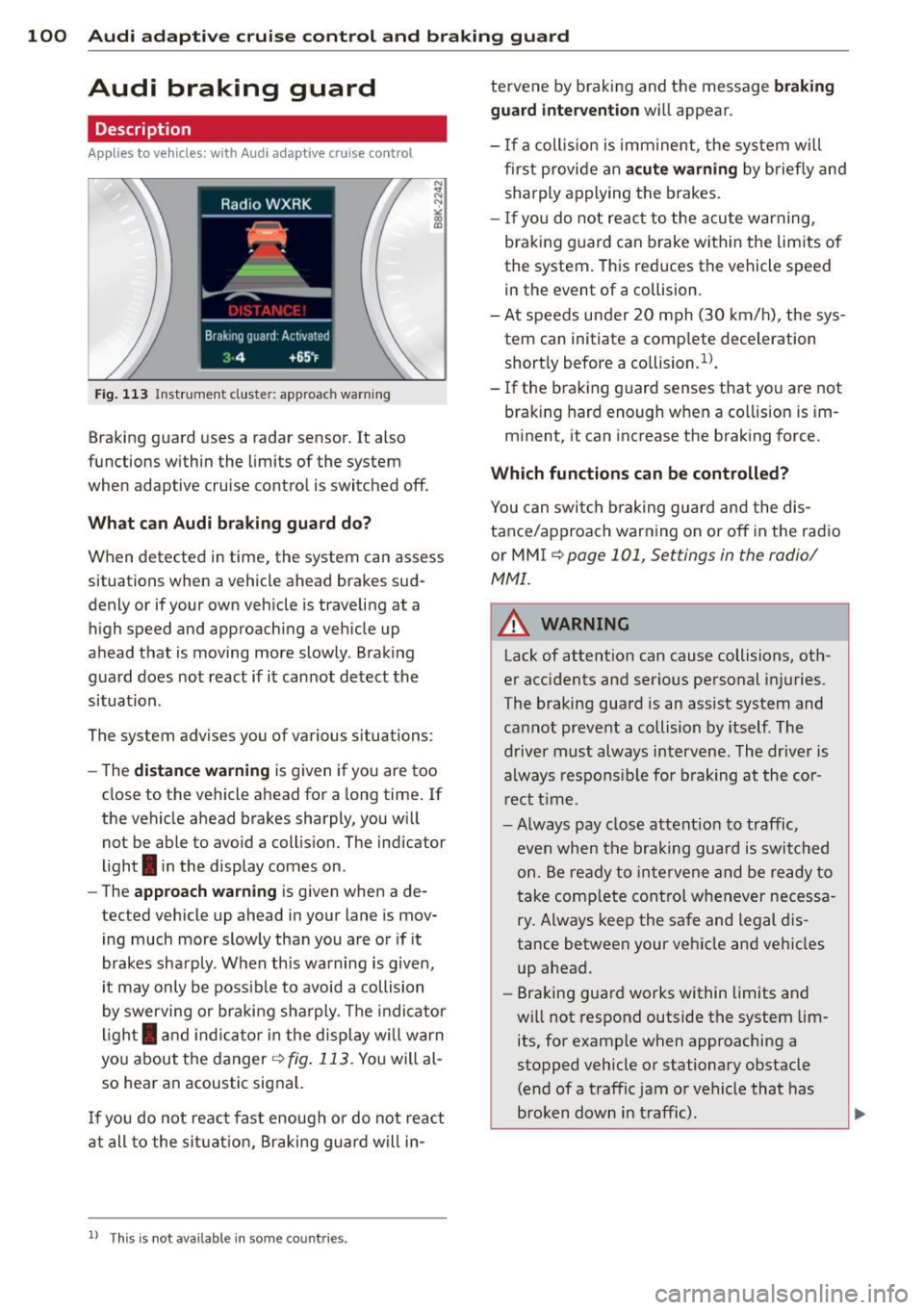
Applies to vehicles: with Audi adaptive cruise control
Fig. 113 Instrument cluste r: approach warn ing
Braking guard uses a radar sensor. It also
functions within the limits of the system
when adaptive cruise control is switched off .
What can Audi braking guard do?
When detected in time, the system can assess
situations when a vehicle ahead brakes sud
denly or if your own vehicle is traveling at a
high speed and approaching a vehicle up
ahead that is moving more slowly . Braking
guard does not react if it cannot detect the
situation.
The system advises you of various situations :
- The
distance warning is given if you are too
close to the vehicle ahead for a long time. If
the vehicle ahead brakes sharply, you will
not be able to avoid a collision. The indicator
light
I in the display comes on .
- The
approach warning is given when a de
tected vehicle up ahead in your lane is mov ing much more slowly than you are or if it
brakes sharply . When th is warning is given,
it may only be possib le to avoid a collision
by swerving or braking sharply . The indicator
l ight
I and indicato r in the display will warn
you about the danger
¢ fig. 113 . You will al
so hear an acoustic signal.
I f you do not react fast enoug h or do not react
at all to the situat ion , Braking guard will in-
ll This is not available in some co un tri es .
tervene by braking and the message braking
guard intervention
wi ll appear.
- If a coll is ion is imminent, the system wi ll
fi rst provide an
acute warning by briefly and
sharply applying the brakes.
- If you do not react to the acute warning,
braking guard can brake within the lim its of
the system. This reduces the vehicle speed
in the event of a collision .
- At speeds under 20 mph (30 km/h), the sys
tem can initiate a comp lete deceleration
short ly before a co llision .
1
).
- If the braking guard senses that you are not
brak ing hard enough when a co llision is im
minent, it can increase the braking force.
Which functions can be controlled?
You can switch braking guard and the dis
tance/approach warning on or off in the radio
or MMI
¢ page 101, Settings in the radio/
MMI.
A WARNING
-Lack of attention can cause collisions, oth
er accidents and serious personal injuries.
The braking guard is an assist system and
cannot prevent a collision by itself. The
driver must always intervene. The dr iver is
always responsible for braking at the cor
rect time .
- Always pay close attent ion to traffic,
even when the braking guard is switched
on. Be ready to intervene and be ready to
take complete control whenever necessa
ry. Always keep the safe and legal dis
tance between your vehicle and vehicles
up ahead.
- Braking guard works within limits and
will not respond outside the system lim
its, for examp le when approaching a
stopped vehicle or stationary obstacle (end of a traffic jam or vehicle that has
broken down in t raffic).
Page 103 of 290
Audi adaptive cru ise control and brakin g guar d 101
-Always remember that the radar sensor
for the braking guard works only within
defined detection and range limits that
may prevent the proper detection of oth
er vehicles.
- The radar sensor's function and range
can be reduced by rain, snow and heavy
spray. Moving vehicles up ahead may not be promptly detected or may not be de
tected at al l.
- Reflective surfaces includ ing crash barr i
ers or tunnel ent ran ces may impair the
function of the radar sensor.
- You can cance l the braking that is initiat
ed by the system by braking yourself, by
accelerating noticeab ly or by swerving.
- Bra king guard error messages
<> page 101.
-Keep in mind that braking guard can
brake unexpectedly . Always secure any
ca rgo or objects that you are transport
i ng to reduce the risk of d amage or in
ju ry.
Settings in the radio/MM!
Applies to vehicles: with Audi adaptive cruise co ntrol
~ Se lect: I CARI f unction button > Car sys
tems*
control button > Driver assist > Audi
braking guard .
Or
~ Select: ICARlf unct ion button> Audi brak -
ing guard .
System -
Switch Audi braking g uard On and
Off . When you switch the ignition on, the
message
Aud i braking guard off appears if
the system is sw itched off .
Early warning -The distance and app roac h
warn ings in the display can be switched
On /
Off .
(D Tips
-Your settings are automatically stored
and ass igned to the remote control key
being used at the t imes the settings are
made. -
If you switch the ASR/ESC off, braking
guard switches off automatically
<> page 181.
- Switch braking guard off when you a re
loading the vehicle onto a vehicle carrier,
train, ship or other type of transporta
t ion. This can prevent undesired warn
ings from the braking gua rd system.
Messages
App lies to vehicles : wit h Aud i adapt ive c ruise contro l
Braking guard : Off
This driver message appears if the system is
turned off via the radio/MMI *. Otherwise, if
the system is turned off, the informat ion ap
pears every t ime shortly after the start of the
trip.
B raking guard : Activated
T h is dr iver message appears if sharp b rake
pressure was applied due to an acu te warning.
•••
Three white dots appear if a sett ing cannot be
selected w ith the operating lever. For exam
ple, this happens if you want to raise/lower
the speed even though there was no previous
ly saved speed.
ACC: Sensor blocked
This message appears if the sensor v iew is ob
structed, for examp le by leaves, snow, heavy
spray or d i rt . Clean the sensor<>
fig. 103.
ACC: not available
T he driver mess age appears if there is a mal
f un ction. The adapt ive cr uise con tro l tu rns off.
A chime sounds as a reminder . Have the sys
tem checked by an authorized Audi dea ler or
authorized Aud i Service Fac ility.
ACC : unavailable
The dr iver message appears if, for example,
t h e b ra ke tempe rat ure is too hig h. T he adap
t ive cr uise cont ro l is temporar ily u nava ilable.
A ch ime sounds as a remin der .
Shift lever position!
Page 104 of 290
102 Audi adaptive cruise control and bra king guard
The driver message appears i f the se lector lev
er is shifted to the N position. The adaptive
cr uise control is not available wh ile in this po
sition .
Stabilization control (ESC)
This message appears if the e lectronic stabili
z ation control (ES C) is taking action to stabi
lize the vehicle . Th e adaptive cru ise con trol
turns off . A chime sounds as a reminder .
Speed too low
This message appears if the current speed is
too low
to set or to maintain the desired
speed .
The speed being saved must be at least
20 mph (30 km/h) . The cruise control is
turned off for speeds lower than 12 mph
(20 km/h) . The adapt ive cruise control re
mains turned on fo r speeds above 95 mph
(1S0 km/h) (overr ide) .
It will stabi lize again at
95 mph (150 km/h) when the driver takes his
foot off of the gas pedal.
Parking brake!
The driver message appears when the park ing
brake is activated . Adaptive cru ise cont rol is
turned off . A chime sounds as a reminder.
Page 119 of 290
Homelink®
Universal remote
control
Description
Applies to vehicles: with Home link
The HomeLink universal remote control con
be programmed with the remo te control for
devices that ore already present.
With Home Link, you can control devices such
as the garage door, secu rity systems, ho use
lights , etc. comfortably from the inside of you
veh icle .
H omelink makes it poss ible for you to rep lace
t hree different remote controls from dev ices
in your home with one un ive rsal remo te. Th is
featu re works for most garage door and exte
rior door motor signals. Programming the in
d ividual remote control for your remote con
trol takes p lace near the center of the radiator
grille. There is a control module attached at
this location .
A one-t ime programm ing of the sensor must
be performed before you are able to use sys
tems with Homelink. If the system does not activate after performing the one-t ime pro
gramming, check whether the system uses a rolling code
¢ page 120 for veh ides without
the MMI*.
& WARNING
-
-Never use the Homelink ® transmi tter
with any garage door opener that does have not the sa fety stop and reverse fea
ture as requ ired by federa l safety stand
ards. Th is includes any garage door open
er mode l manufactured before April 1,
1982.
- A garage door opener which cannot de
tect an object, signaling the door to stop
and reverse does not meet current feder
al safety standards . Us ing
a garage door
opener without these features increases
r isk of serious inj ury or death.
Homelink ® 11 7
-For safety reasons never re lease the
parking brake or start the eng ine while
anyone is standing in front of the vehicle .
- A garage door or an estate gate may
sometimes be set in motion when the
Homelink ® remote control is being pro
grammed. If the device is repeatedly ac
tivated, th is can overstrain motor and
damage its e lectrical compon ents -an
overheated mo to r i s
a fire hazard!
- To avo id possib le injuries or property
damage, please always make abso lutely
certa in that no person s or objects are lo
cated in the range of motion of any
equ ipment being operated .
(0 Tips
-If you would like more information on
Homelink ®, where to purchase the
Home link ® compatib le products, or
would like to purchase the Homelink ®
Home Lighting Package, please ca ll toll
free: l-800-355-3515.
- For Declaration of Compliance to United
States FCC and Industry Canada reg ula
tions ¢
page 2 72.
- For security reasons, we recommend that
you clear the programmed b uttons be
fore selling the veh icle.
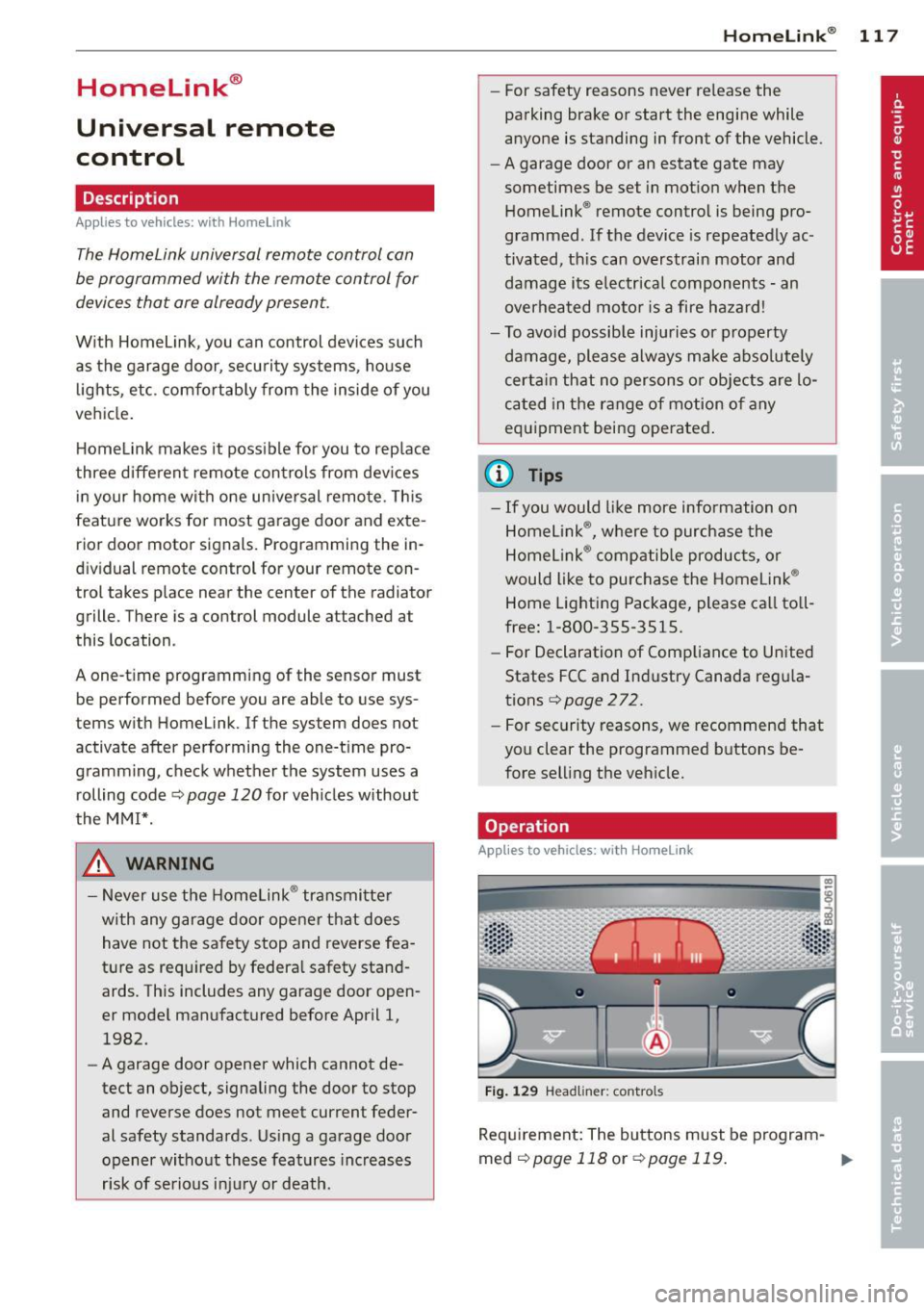
Operation
App lies to vehicles : with Homeli nk
Fig . 1 29 Head li ner: controls
Req uirement : The buttons must be program-
med
c!) page 118 or ¢ page 119. ..,_
Page 128 of 290
126 Driving Saf ely
Driver and passenger
side footwell
Important safety instructions
Appl ies to vehicles: with knee airbags
A WARNING
Always make sure that the knee a irbag can
inflate without interference . Objects be
tween yourself and the airbag can increase
the risk of injury in an acc ident by inte rfer
ing w ith the way the a irbag deploys or by
being p ushed into you as the airbag de
ploys .
- No persons (ch ildren) or animals should
ride in the footwell in front of the pas
senger seat. If the airbag deploys, this
can res ult in serious or fata l injuries .
- No objects of any k ind sho uld be carried
in the footwe ll area in front of the driv
er's or passenger's seat . Bulky objects
(shopping bags, for example) can ham
per or prevent proper deployment of the
airbag . Small objects can be thrown
through the vehicle if the airbag deploys
and injure you o r your passengers .
Pedal area
Pedals
The pedals must always be free to move and
must never be interfered with by a floor mat
or any other object.
M ake sure tha t all pedals move freely witho ut
i nte rfe rence and that nothing prevents them
from retu rning to the ir origina l posi tions.
Only use floo r mats that leave the peda l area
free and can be secured wit h floor mat fasten
e rs.
If a b rake circuit fails, increased b rake pedal
trave l is required to bring the vehicle to a full
stop.
A WARNING
Pedals that cannot move free ly can cause
l oss of veh icle control and increase the risk
of ser ious injury .
- Never p lace any objects in the drive r's
footwell . An object cou ld get into the
pedal area and inte rfe re with pedal func
tion . In case of sudde n brak ing o r an ac
cident, yo u wo uld not be a ble to brake or
acceler ate !
- Always ma ke s ure that no thing can fall
or move into the driver's footwel l.
Floor mats on the driver side
Always use floor mats that can be securely
attached to the floor mat fast eners and do
not interfere with the free movement of the
pedals.
.. Make s ure that the floor mats are properly
secured and canno t move and in terfere with
t he peda ls
£:=? &, .
Use on ly f loor mats that leave the pedal area
u nobst ructed and that are firmly secu red so
t h at t hey cannot slip o ut of position . You ca n
obta in suitab le floor mats from yo ur autho r
ized Audi dea ler .
Floor mat fastene rs are insta lled in your Audi.
Floor mats used in your vehicle must be at
tached to these fastene rs. Prope rly securing
the floor mats will prevent them from sliding
i nto posi tions that cou ld interfere with the
peda ls o r impa ir safe ope rat io n of yo ur vehicle
i n othe r ways.
A WARNING
Pedals that cannot move free ly can result
in a loss of vehicle control and inc rease the
risk of ser ious persona l injury .
- Always make sure that floor mats are properly secu red.
- Never p lace or ins tall floor mats o r othe r
floor coverings in the vehicle that cannot
be properly secured in p lace to prevent
them from slipping and interfer ing with
lill>
Page 129 of 290
the pedals or the ability to control the
vehicle.
- Never place or install floor mats or other
floor coverings on top of already insta l
led floor mats . Additional floor mats and
other coverings will reduce the size of
the pedal area and interfere with the
pedals.
- Always property reinstall and secure floor
mats that have been taken out for clean
ing .
- Always make sure that objects cannot fall into the driver footwell wh ile the ve
hicle is moving. Objects can become
t rapped under t he brake pedal and accel
erator peda l causing a loss of veh icle
control.
Stowing Luggage
Loading the luggage compartment
All luggage and other objects must be prop
erly stowed and secured in the luggage com
portment.
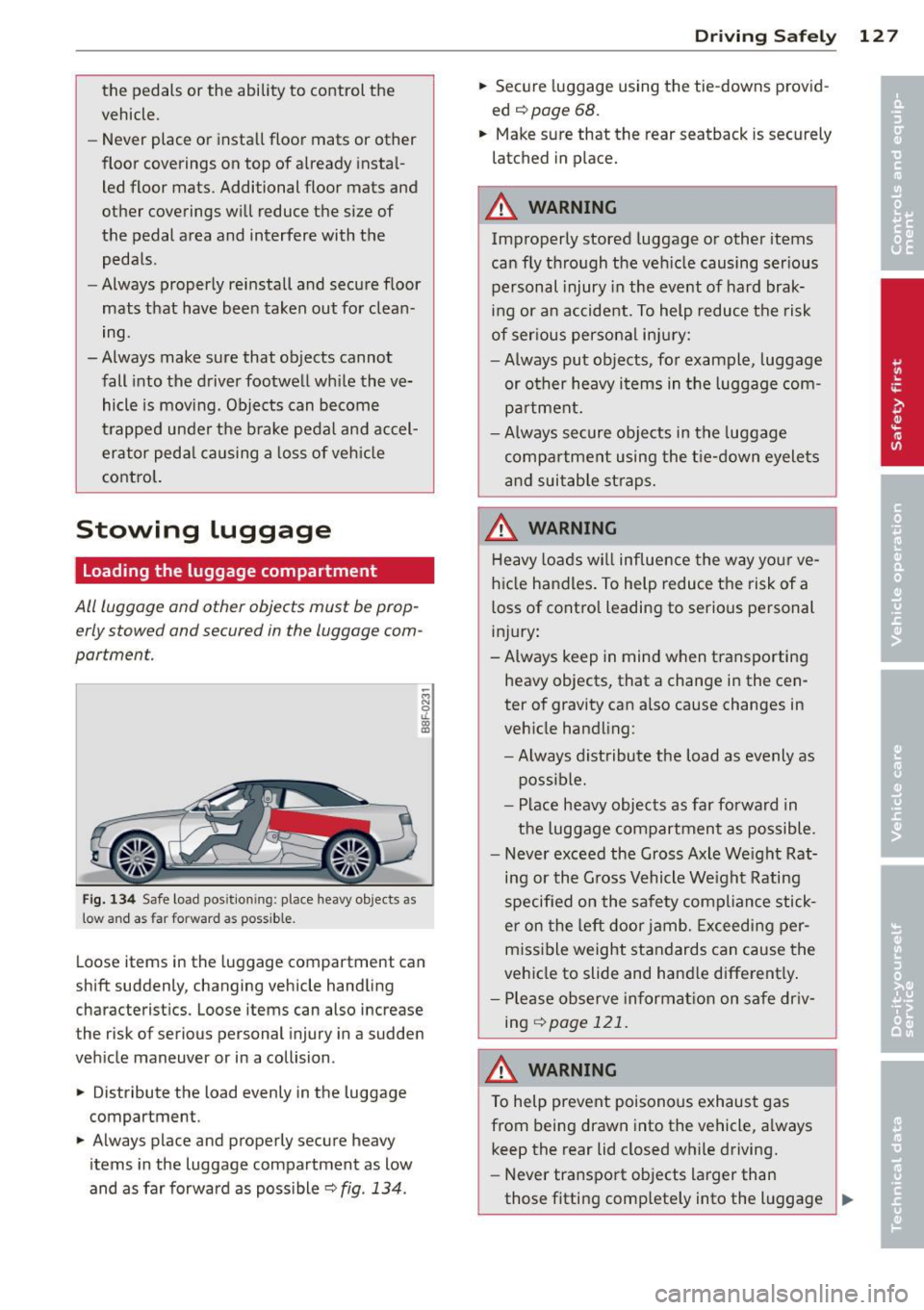
F ig. 134 Safe load pos ition ing: place heavy objects as
low a nd as fa r forwa rd as possible .
-M N 0 u.
ill
Loose items in the luggage compartment can
shift suddenly, changing vehicle handling
characterist ics. Loose items can also increase
the risk of serious personal injury in a sudden
veh icle maneuver or in a collision .
.. Distribute the load evenly in the luggage
compartment.
.. Always place and properly secure heavy
items in the luggage compartment as low
and as far forward as poss ible
c::> fig . 134 .
Drivin g Sa fely 12 7
.. Secure luggage using the tie-downs provid
ed
c::> page 68.
.. Make sure that the rear seatback is securely
latched in place.
A WARNING
Improperly stored luggage or other items
can fly through the ve hicle causing ser ious
pe rsonal injury in the event of hard brak
ing or an accident . To help reduce the risk
of ser ious persona l injury:
- Always put objects, for example, luggage
or other heavy i tems in the luggage com
pa rtment.
- Always secure objects in the luggage
compa rtment using the t ie-down eyelets
a nd suitab le st raps.
A WARNING
Heavy loads w ill influence the way yo ur ve
hicle handles. To help reduce the risk of a
loss of contro l leading to serious personal
i nj ury :
-Always keep in mind w hen transporting
heavy objects, that a change in the cen
ter of gravity can a lso cause changes in
veh icle handling:
- Always distribute t he load as evenly as
possible.
- Place heavy objects as far forward in
the luggage compartment as possible .
- Never exceed the Gross Axle We ight Rat
ing or the G ross Vehicle We ight Rating
specified on the safety compliance stick
e r on the left door jamb. Exceeding per
miss ible weight standards can cause the
vehicle to slide and hand le different ly .
- Ple ase observe in format ion on sa fe dr iv
ing
<::> page 121.
A WARNING
To help prevent poisonous exhaus t gas
from being drawn into the vehicle, a lways
keep the rear lid closed while driving.
- Never transport objects larger than
those fitting comp letely into the l uggage _..
Page 181 of 290
Intelligent technology Notice about data
recorded by vehicle
control modules
Your vehicle is not equipped with an Event Da
ta Recorder (EDR), installed by some manu
facturers for the express purpose of capturing
data for retrieval after an accident or crash
event. EDR's are sometimes called "crash re
corders".
Some state laws restrict the retr ieval or down
loading of data stored by EDR's that were in
stalled in a vehicle for the express purpose of
retrieving data after an accident or crash
event without the owner's consent.
Although your vehicle is not equipped with an
EDR, it is equipped with a number of electron
ic control modules for various vehicle systems
such as, for examp le, engine function, emis
sion control, as well as for the airbags and
safety belts.
These electronic control modules also record
vehicle-related data during norma l vehicle op
eration for diagnostic and repair purposes.
The recording capacity of the electronic con
trol modules is limited to data (no sound is re
corded) and only a small amount of data is ac
tually recorded over a very limited period of
time and stored when a system fault or other
condition is sensed by a control unit. Some of
the data then stored may relate to vehicle
speed, direction, braking as we ll as restraint
system use and performance in the event of a
crash or other condition. Stored data can only be read and downloaded with special equip
ment.
Electronic Stabilization
Control (ESC)
Description
ESC helps to improve road holding and vehicle
dynamics to help reduce the probability of
skidding and loss of veh icle control. It works
only when the engine is running. ESC detects
Intelligent technology 179
certain difficult driving situations, including
when the vehicle is beginning to spin (yaw)
out of control and helps you to get the veh icle
back under control by se lectively braking the
wheels, and/or reducing engine power and
providing steering ass istance to help hold the
vehicle on the driver's intended course. The in
dicator light
JjJ in the instrument cluster
blinks when ESC is taking action to help you
control the vehicle.
ESC has limitations .
It is important to remem
ber that ESC cannot overcome the laws of
physics.
It will not always be able to help out
under all conditions you may come up against.
For example, ESC may not always be able to
help you master situations where there is a
sudden change in the coefficient of friction of
the road surface. When there is a section of dry road that is suddenly covered with water,
slush or snow, ESC cannot perform the same
way it would on the dry surface. If the vehicle
hydroplanes (rides on a cushion of water in
stead of the road surface), ESC will not be
able to help you steer the vehicle because con
tact with the pavement has been interrupted
and the vehicle cannot be braked or steered .
During fast cornering, particularly on winding
roads, ESC cannot always deal as effectively
with difficult driving situations than at lower
speeds. When towing a trailer, ESC is not able
to help you regain control as it would if you
were not tow ing a trailer.
A lways adjust your speed and driving style to
road, traffic and weather conditions. ESC can
not override the vehicle's physical limits, in
crease the available traction, or keep a vehicle
on the road if road departure is a result of
driver inattention. Instead, ESC improves the
poss ibility of keeping the vehicle under con
trol and on the road dur ing extreme maneu
vers by using the driver's steering inputs to
help keep the vehicle going in the intended di
rection. If you are traveling at a speed that
causes you to run off the road before ESC can
provide any assistance, you may not experi
ence the benefits of ESC.
•
•
Page 182 of 290
180 Intelligent technology
ESC includes and/or works together with the
anti-lock brake system (ABS), brake assist sys
tem, anti-slip regulation (ASR) , e lectronic dif
ferential lock (EDL), dynamic steering" and
e lectronic interaxle differentia l lock* /selective
wheel torque control* . ESC is switched on all
the t ime. I n certa in s ituations whe n you need
l ess t raction, you can switch off ASR by p ress
i ng the bu tto n
[ru ¢ fig. 167 or ¢ fig. 168. Be
sure to sw itch ASR on ag ain when you no lon
ger need less trac tion.
Anti -lock braking system (ABS)
ABS prevents t he wheels from locking up
when braking. The veh icle can still be st eered
even d uring ha rd b rak ing . Apply steady p res
sure to the br ake pedal. Do no t pu mp the ped
a l. A puls ing in t he bra ke peda l ind icates that
the system is he lping yo u to b rake the vehicle .
Brake assist system
The brake assist system can decrease bra king
d ista nce. It increases braking powe r w hen the
d river p resses the brake pedal quickl y in eme r
gency situa tions . You mus t press and ho ld the
brake peda l until the situation is over. In
ve hicles with adaptive cruise contro l", the
brake assist system is more sensit ive if the
d ista nce detected to t he vehicle a head is too
smal l.
Anti-slip regulation (ASR)
ASR reduces engi ne power when the drive
wheels begin to spin and adapts the fo rce to
the road condit ions. This makes it easier to
start, accelerate and drive up hills.
Electronic diffe rential lock (EDL )
The EDL brakes wheels that are spinning and
tra nsfers t he d rive powe r to the other d rive
wheel or whee ls if the vehicle is equipped with
all-wheel drive*. This function is available up
to about 60 mph (100 km/h).
In extreme cases, EDL a utomatica lly switches
off to help keep the bra ke on the braked whee l
from overheating. EDL will switch on aga in au
tomatically when conditions have returned to
normal.
Dynamic steering*
On vehicles wi th dynam ic s teering *, ESC he lps
sta bilize the steer ing in crit ica l sit uat ions.
Electronic interaxle differential lock*/
selective wheel torque control*
T he ele ctroni c in te raxle di fferentia l lock ( fron t
whee l drive) o r th e se lective whee l torque
control (all -whee l drive) operates when driv
ing t hro ugh cu rves. The front wheel on the in
s ide of the c urve or both whee ls on the inside
of the curve are braked selectively as needed .
Th is mi nimizes sliding in the front wheels and
allows for more precise d rivi ng through
cu rves . The a ppl icable syste m may not acti
vate when dr iv ing in wet o r snowy cond itions.
_&. WARNING
- E SC, A BS, ASR, ED L d ynam ic steering *
a nd the elect roni c in ter ax le d ifferenti al
loc k* /se lective whee l torque control *
cannot ove rcome the laws of physics .
This is especia lly important on slippery
or wet r oads. If the systems beg in acting
to stabilize your veh icle, yo u should im
mediately change you r speed to match
the road and t raff ic conditions. Do not
let the increased safety prov ided by
t hese systems temp t you to ta ke r is ks.
Doing so will increase the risk of a lo ss of
veh icle cont ro l, col lision an d ser io us per
sonal injur ies.
- Always adapt your speed to ro ad, traff ic
an d wea ther conditions . The risk of los
ing contro l of t he vehicle increases when
driving too fast, es pec ially through
curves and on slippery or wet roads, and
when dr iv ing too close to vehicles up
a head. ESC, ABS, the brake ass ist sys
t e m, ASR, EDL dynam ic s teer ing* and the
elec tronic inte raxle differe ntia l lock*/se
lective whee l to rque contr ol* cannot p re
vent co lli sion s.
- Always accelerate wi th special care on
eve n smooth s urfaces su ch as those that
'
ar e we t or covered w ith i ce and snow.
T he drive whee ls can spin even w ith
-
these assistance systems that can not ~