mirror AUDI A5 CABRIOLET 2013 Owners Manual
[x] Cancel search | Manufacturer: AUDI, Model Year: 2013, Model line: A5 CABRIOLET, Model: AUDI A5 CABRIOLET 2013Pages: 290, PDF Size: 72.35 MB
Page 57 of 290
Interior lights
Front/rear interior lights
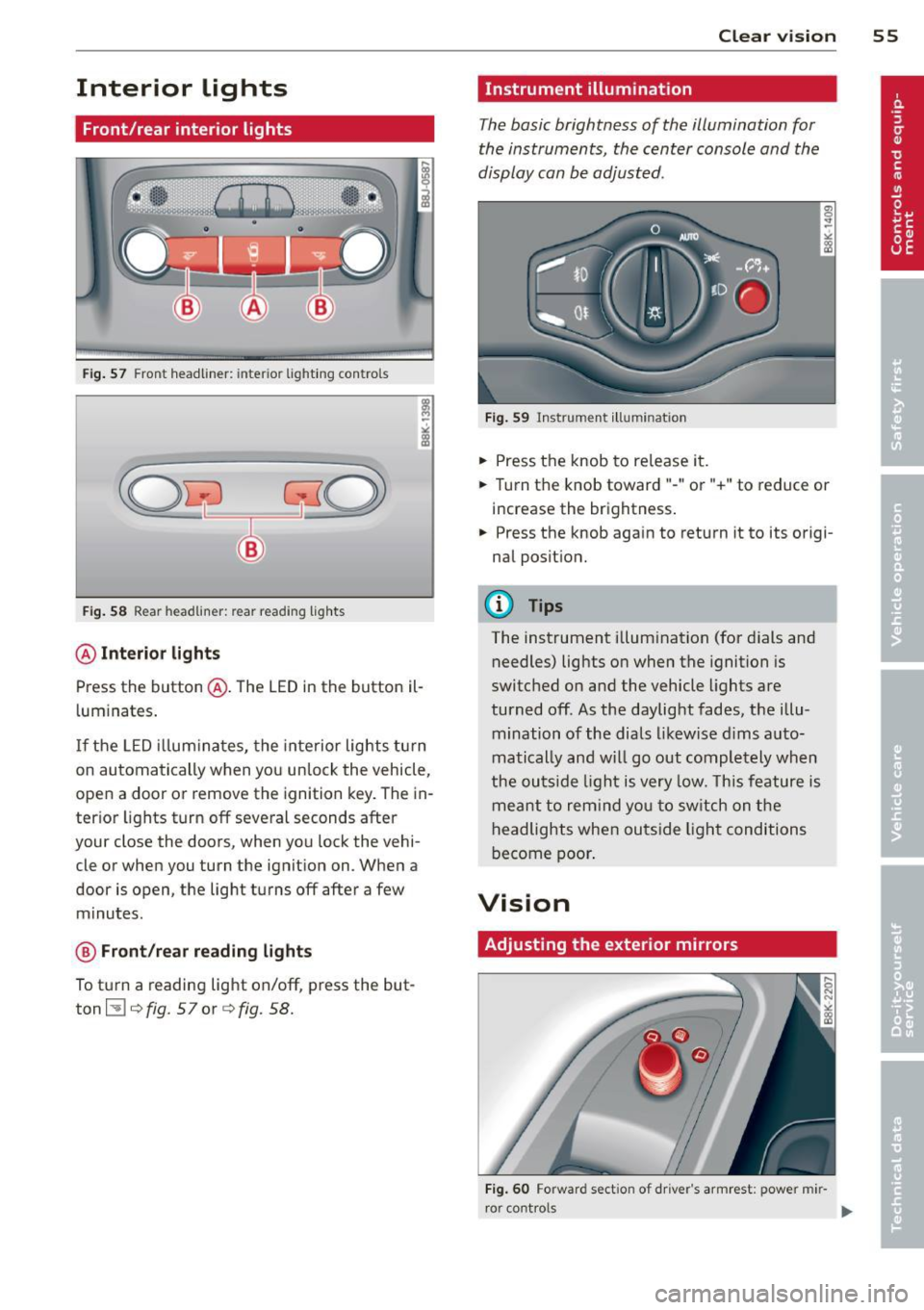
Fig. 57 Front headliner: inter ior lighti ng controls
Fig. 58 Rear headlin er: rear reading lights
@ Interior lights
Press the button @. The LED in the button il
l uminates .
If the LED illuminates, the interior lights turn
on automatically when you unlock the vehicle,
open a door or remove the ignition key. The in
terior lights turn off several seconds after
your close the doors, when you lock the vehi
cle or when you turn the ignition on. When a
door is open, the light turns off after a few
minutes.
@ Front/rear reading lights
To turn a reading light on/off, press the but
ton ~¢
fig. 57or ¢fig. 58.
Clear vision 55
Instrument illumination
The basic brightness of the illumination for
the instruments, the center console and the
display can be adjusted.
Fig. 59 Instrument illumination
.,. Press the knob to release it .
.. Turn the knob toward"-" or"+" to reduce or
increase the brightness .
.,. Press the knob aga in to return it to its origi
nal position.
(D Tips
The instrument illumination (for dials and
needles) lights on when the ignition is
switched on and the vehicle lights are
turned off. As the daylight fades, the illu
mination of the dials likewise dims auto
matically and will go out completely when
the outside light is very low. This feature is
meant to remind you to switch on the
headlights when outside light conditions
become poor.
Vision
Adjusting the exterior mirrors
Fig. 60 Forward sect ion of dr iver 's armrest: power mir
r or cont rols
Page 58 of 290
56 Clear vis ion
Turn the knob to the desired position :
Q/P -In t his position , you can adjust the
driver's and front passenger's exter ior mirrors
by turn ing the knob in the des ired direction.
(jjjl -The mirrors are heated depending on the
outside temperatu re.
P assenger exterio r m irro r tilt func tion*
( onl y with memor y for ext erior mirrow s)
To help you see the curb when backing into a pa rking space, the surface of the m irror t ilts
slightly . The knob m ust be in the
P posit ion
for this to happen .
You can adjust the ti lted mirror surface by
turning the knob in the desired direction .
When you move out of reverse and into anoth
e r gear, the new mirror posi tion is stored and
assigned to the key you are using.
The mirror goes back into its origina l posit io n
once yo u drive forward f aster than 9 mph
(15 km/h) or switch the ignition off .
_& WARNING
Curved mirror s urfaces (convex or spheri
cal *) increase your field of view . Remem
ber that vehicles or other objects will ap
pear smaller and farther away than when
seen in a flat m irror. If you use this mirror
to estimate distances of following veh icles
when changing lanes, you could estimate incorrectly and cause an accident .
{CT) Note
- If you wash the vehicle in an automatic
ca r wash, you must fold the exterior m ir
r o rs in to reduce the r isk of damage to
the mirrors .
(i) Tips
- The exterior mirror settings are stored
with the memory funct ion* c::>
page 64.
-If there should be a ma lfunct ion in the
electrical system, you can st ill adjust the
exter ior mirrors by press ing the edge of
the m irror. Dimming the mirrors
F
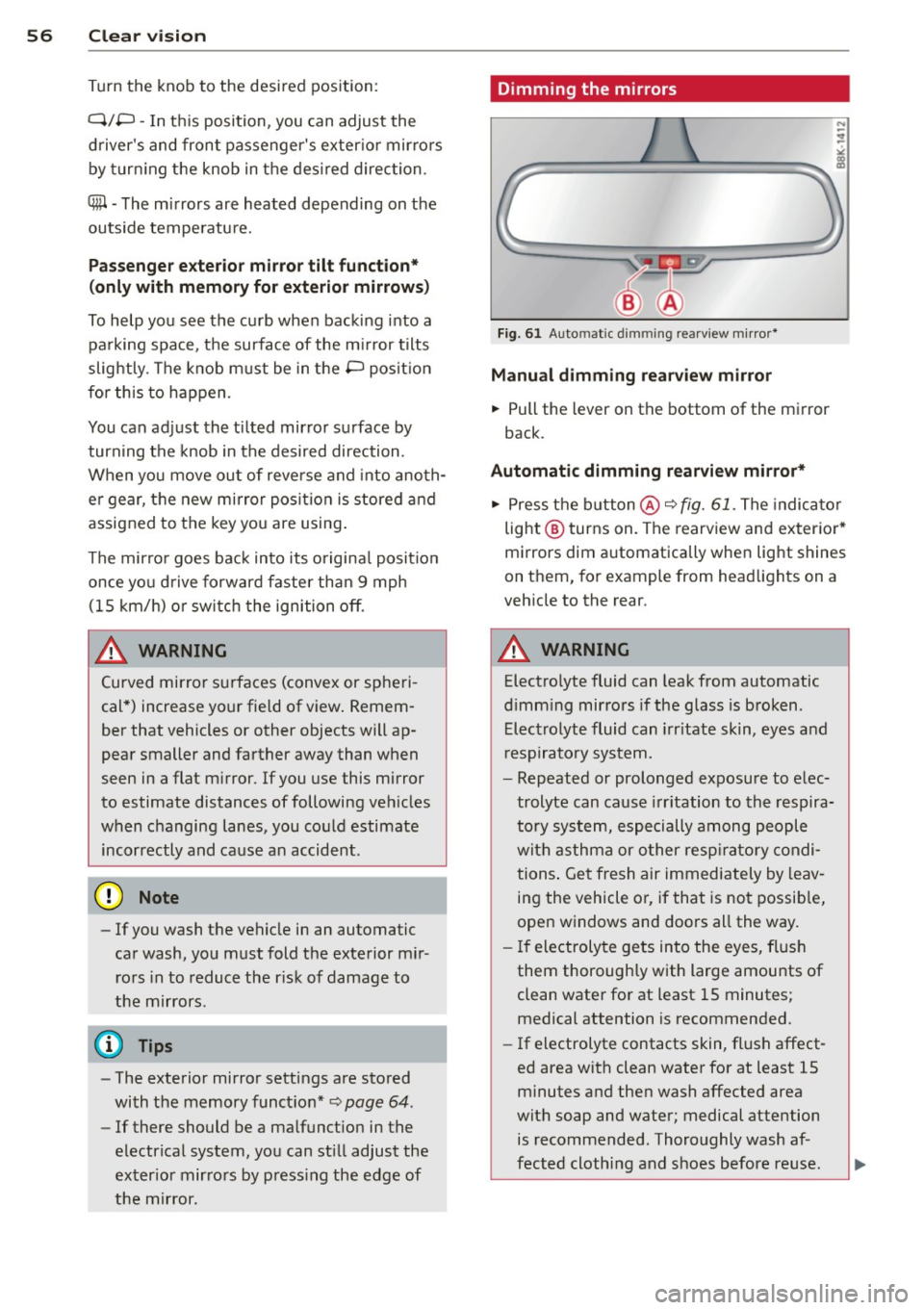
ig. 61 Auto ma tic dimming rearview m irro r*
Manu al di mm ing re a rvi ew mirro r
• Pull the lever on th e bottom of the mirror
back .
Automat ic dimming rearvi ew mirror *
....
• Press the button @c::> fig. 61. The indicator
light @turns on . The rearview and exterior*
mirrors dim automatically when light shines
on them, for example from headlights on a
veh icle to the rear.
_& WARNING ..__
Electrolyte fluid can leak from automatic
d imm ing mirrors if the glass is broken .
Electrolyte fluid can irr itate skin, eyes and
r espiratory system.
- Repeated or prolonged exposure to e lec
trolyte can cause irritation to the respira
tory system, especially among people
with asthma or o ther resp ira to ry condi
tions . Get fresh air immediately by leav
ing the vehicle or, if that is no t possib le,
open windows and doors all the way.
- If electroly te gets into the eyes, flush
them thoroughly with large amounts of
clean water for at least 15 minutes; medical attention is recommended.
- If electrolyte contacts skin, fl ush affect
ed area with clean water for at least 15
minutes and then wash affected area
with soap and water; medical attention
is recommended. Thoroughly wash af
fected cloth ing and shoes before reuse.
Page 59 of 290
-If swallowed and person is conscious,
rinse mouth with water for at least 15
minutes . Do not induce vomiting unless
instructed to do so by medical professio
nal. Get medical attention immediately.
(D Note
Liquid electrolyte leaking from broken mir
ror glass will damage any plastic surfaces
it comes in contact with . Clean up spilled
electrolyte immediately with clean water
and a sponge.
@ Tips
- Switching off the dimming function of
the inside rear view mirror also deacti
vates the automatic dimm ing function of
the exterior mirrors .
-Automatic dimming for the mirror only
operates properly if the light striking the
inside mirror is not hindered by other ob
jects.
- The automatic dimming mirrors do not
dim when the interior lighting is turned
on or the reverse gear is selected .
Sun visors
._[ _ __,!
Fig. 62 Driver's s ide: s un visor
The sun visors for the driver and passenger
can be pulled out of their brackets in the cen
ter of the vehicle and turned towards the
doors
(D .
The mirror light switches on when the cover
over the vanity mirror @opens .
Clear vision 5 7
Wiper and washer
system
Switching the windshield wipers on
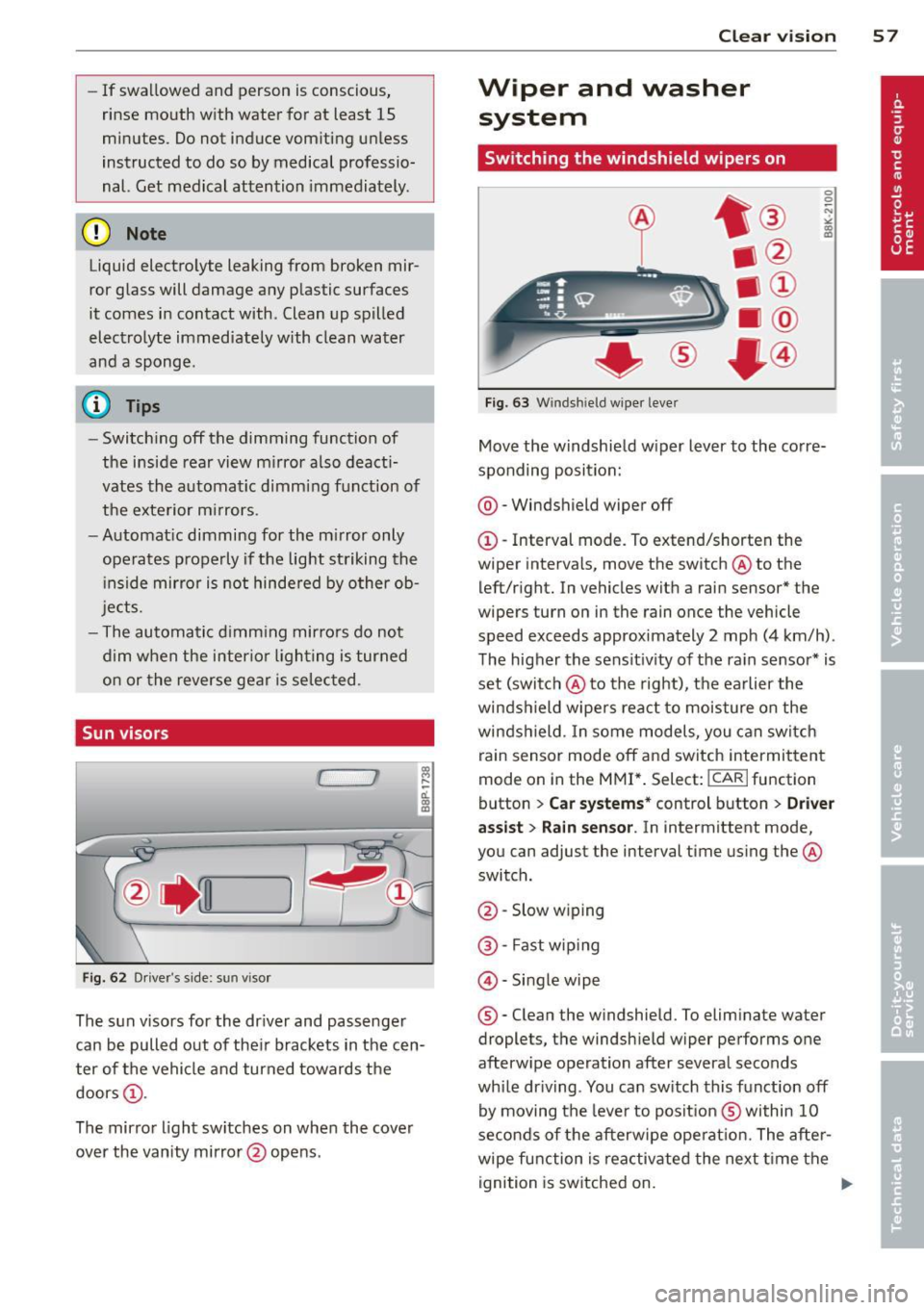
Fig. 63 Win dshi eld w ipe r leve r
Move the windshield wiper lever to the corre
sponding position:
@-Windshield wiper off
CD-Interval mode . To extend/shorten the
wiper intervals, move the switch @to the
left/right. In vehicles with a rain sensor* the
wipers turn on in the rain once the vehicle
speed exceeds approximately 2 mph (4 km/h) .
The higher the sensitivity of the rain sensor* is
set (switch @to the right), the earlier the
windshield wipers react to moisture on the
windshield. In some models, you can switch
rain sensor mode off and switch intermittent
mode on in the MMI* . Select:
!CAR I function
button
> Car systems* control button > Driver
assist
> Rain sensor. In intermittent mode,
you can adjust the interval time using the@
switch.
@ -Slow wiping
® -Fast wiping
©-Single wipe
® -Clean the windshield. To eliminate water
droplets, the windshield wiper performs one
afterwipe operation after several seconds
while driving . You can switch this function off
by moving the lever to position ® within 10
seconds of the afterwipe operation. The after
wipe function is reactivated the next time the
ignition is switched on.
...
Page 61 of 290
.. Select : ICARlfunctio n button> Car sys
tems *
control button > Servicing & check s >
Wiper serv ice po sition > Off .
A WARNING
-If the windshield wipers smear the wind
shield, clean the w iper blades with w ind
shield washer fluid .
If the wiper blades
are extremely d irty, you can also clean
them w ith a soft sponge or cloth.
- For your safety, you should replace the
wiper blades once or twice a year . See
yo ur autho riz ed Aud i deale r for replace
ment blades.
(D Note
- The w indshield wiper blades must only
be replaced when in the serv ice position!
Otherwise, yo u ris k damaging the pai nt
on the hood or the windshield wiper mo
tor .
- You sho uld not move yo ur vehicle or
press the w indshie ld w iper lever when
the wiper arms are folded away from the
windshield . The windshield wipers would
move back into the ir origina l position
and could damage the hood and w ind
s h ield.
- To help prevent damage to the wiper sys
tem, always loosen blades which are fro
zen to the windsh ield befo re operat ing
wipers.
- To help prevent damage to wiper blades,
do not use gasoline, kerosene, pa int
th inner, or othe r solvents on or nea r the
wipe r blades.
- To help prevent damage to the wiper
arms or other compone nts, do not at
tempt to move the w ip ers by hand.
@ Tips
- Commerc ial hot waxes applied by auto
matic car washes affect the how eas ily
the g lass su rface can be cleaned .
- You can also use the service pos ition, for
example, if you want to protect the
windsh ield from ic ing by using a cover .
Clear vision 59
Digital compass
Switching the compass on and off
Applies to vehicles: with digital compass
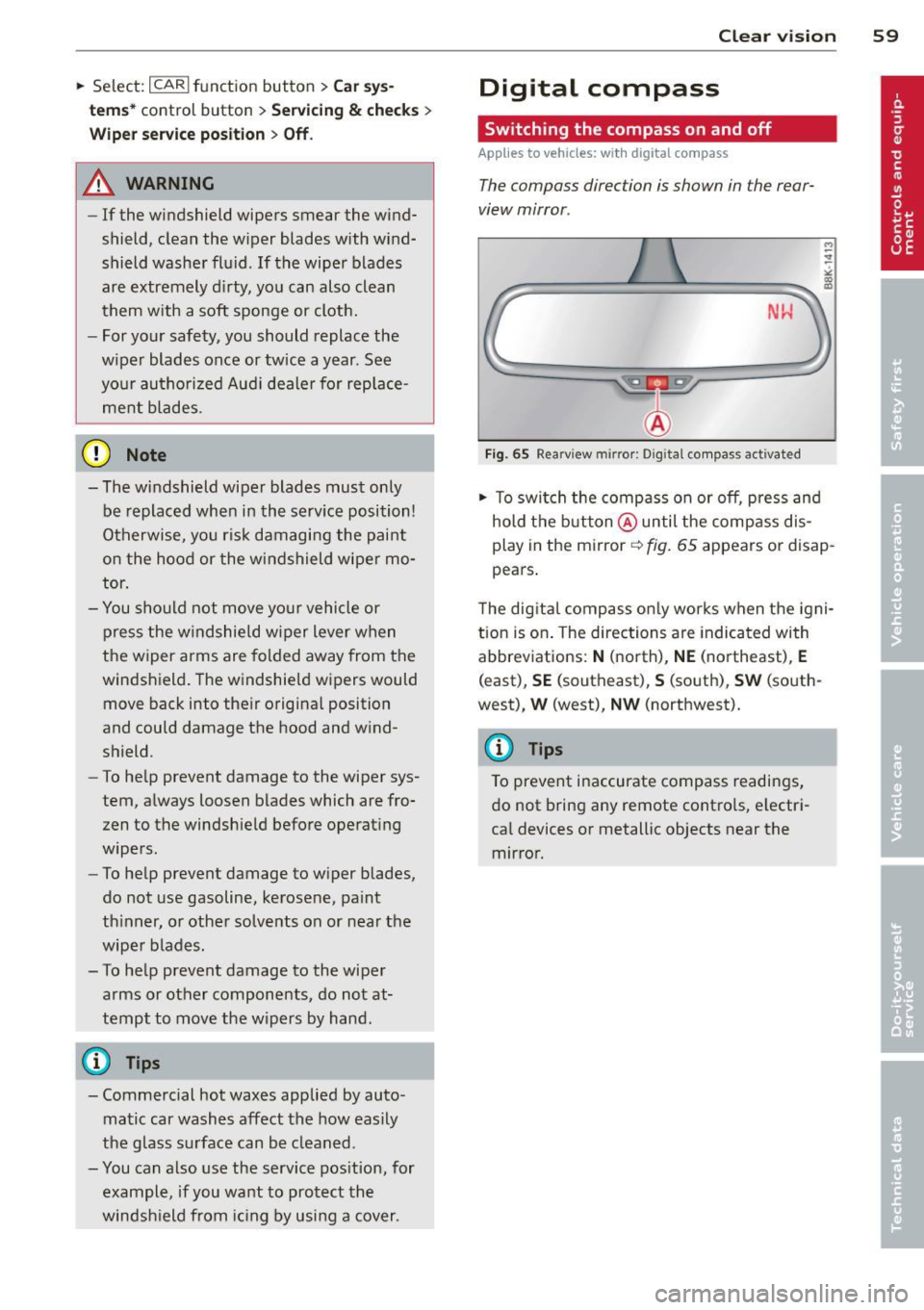
The compass direction is shown in the rear
view mirror .
NW
Fig. 65 Rearv iew mirro r: Digita l co mpass activated
.. To swi tch the compass on or off, p ress and
hold t he b utton @until the comp ass dis
play in the mirror~
fig. 65 appears or disap
pears .
T he dig ital compass o nly works when the igni
tion is on . The directions are indicated with
abbreviations:
N (north), NE (northeast), E
(east), SE (southeast), S (south), SW (so uth
west),
W (west), NW (northwest).
(D Tips
To prevent inaccurate compass readings ,
do not b ring any remote contro ls, electr i
ca l devices or metallic objects near the
mirror.
Page 62 of 290
60 Clear vis ion
Adjusting the magnetic zone
A ppl ies to vehicles: with digital compass
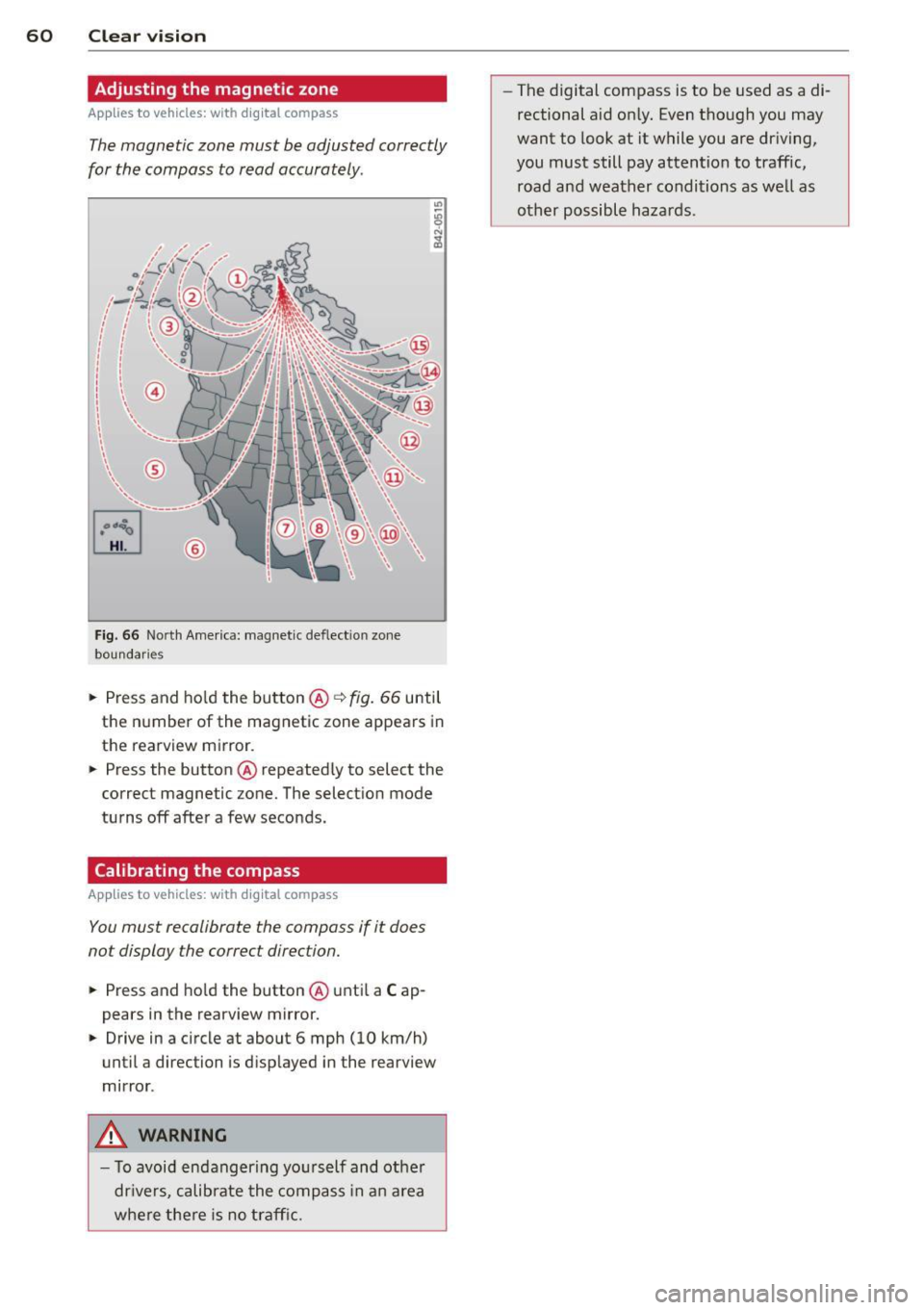
The magnetic zone must be adjusted correctly
for the compass to read accurately .
Fig. 66 North Amer ica: magnet ic deflect ion zo ne
bo undar ies
• Press and ho ld the button @ ~fig. 66 until
the n umber of the magnetic zone appears in
the rearview m irror.
• Press the button @repeated ly to select the
correct magnetic zone. The select ion mode
tu rns off afte r a few seconds.
Calibrating the compass
A ppl ies to veh icles : with d ig ital compass
You must recalibrate the compass if it does
not display the correct direction.
• Press and ho ld the button @unti l a C ap
pears in the rearview mirror.
• Drive in a circle at about 6 mph (10 km/h)
until a direction is d isp layed in the rearview
mirror .
.&, WARNING
- To avoid endangering yo urself and other
dr ivers, calibrate the compass in a n area
where the re is no traff ic. -
The digital compass is to be used as a di
rectional aid on ly. Even though you may
want to look at it while you are dr iving,
you must still pay attention to traffic, road and weather conditions as we ll as
other possible hazards.
Page 67 of 290
profiles for the driver . The memory function is
operated through the master key and the memory buttons in the driver's door.
The driver's seating profi le is stored and as
signed to the master key each time the vehicle
is locked. The seating profile is recalled auto
mat ically when the veh icle is unlocked. If two
people use one vehicle , it is recommended
that each person always uses "their own"
master key .
Up to 2 seat profiles can be stored in the
memory buttons in the driver's door. Once
they are stored, these seat profiles can be se lected at any time.
In addition to the driver 's seat settings, you
can also store and access the exterior mirror
adjustment settings* using the remote con
trol key or memory button .
Remote control key
Applies to vehicles: with seat memory
To assign the driver 's seat settings to the re
mote control key when locking the vehicle, the
function must be activated in the radio or
MMI*
~ Select: I CAR I function button > Seat adjust
ment
> Driver's seat > Remote control key >
on.Or
~ Select: I CAR I f u nct ion button > Car sys
tems*
control button > Vehicle settings>
Seats > Driver 's seat > Remote control key
> On.
(D Tips
If you do not want another driver's set
tings to be assigned to the remote key,
switch off the memory function using the
rad io or
MMI* or the ! ON/OFF I button
¢page 65.
Seats and storage 65
Memory buttons
Applies to vehicles: wit h seat memory
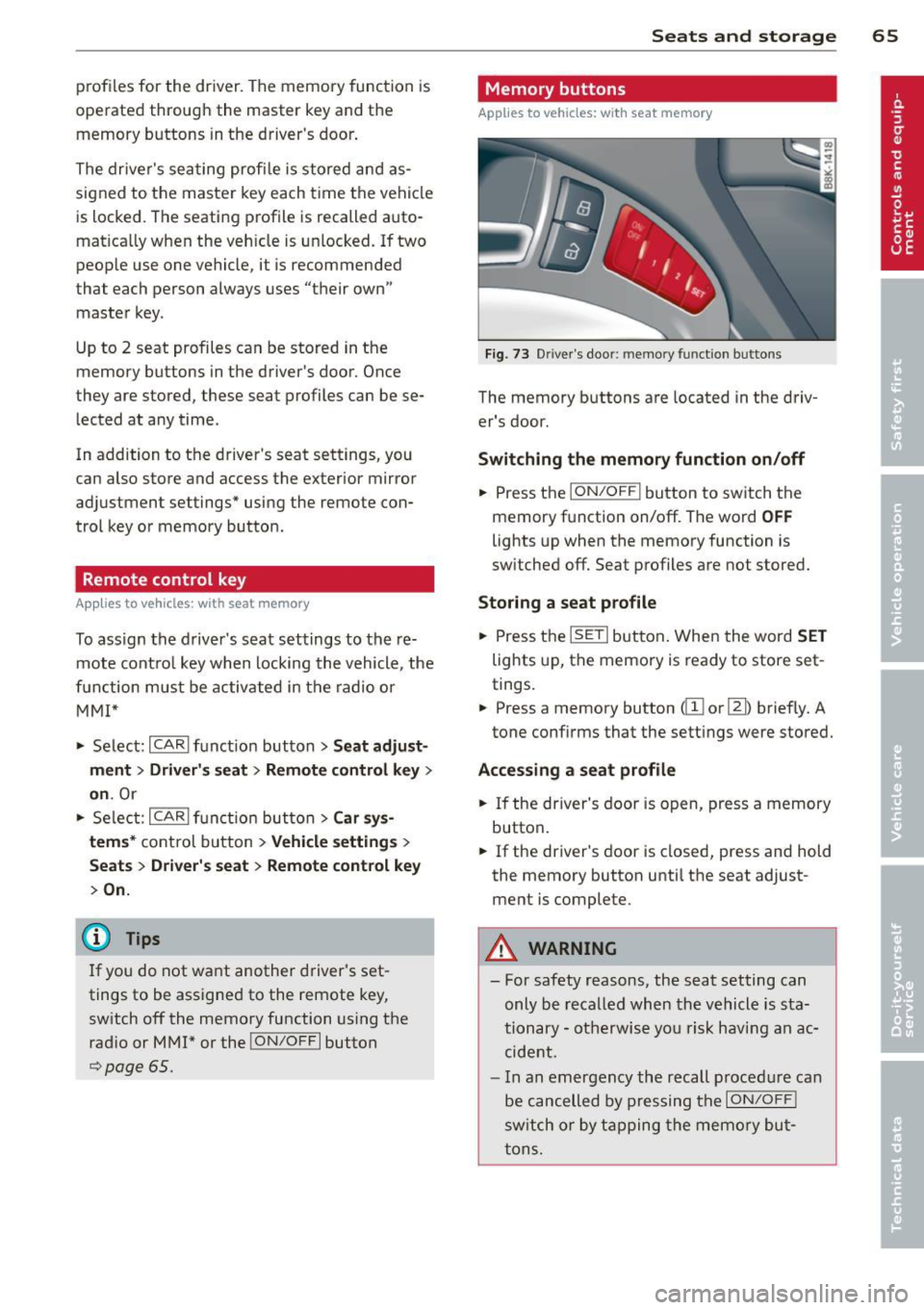
Fig. 73 Driver's door: memo ry funct ion buttons
The memory buttons are located in the driv
er's door.
Switching the memory function on/off
~ Press the ION/OF F! button to switch the
memory function on/off. The word
OFF
lights up when the memory function is
sw itched off. Seat profiles are not stored.
Storing a seat profile
~ Press the ISETI button. When the word SET
lights up, the memory is ready to store set
tings.
~ Press a memory button dII or [Ii) briefly. A
tone conf irms that the settings were stored.
Accessing a seat profile
~ If the driver's door is open, press a memory
button .
~ If the driver's door is closed, press and hold
the memory button until the seat adjust
ment is complete.
A WARNING
- For safety reasons, the seat setting can only be recalled when the vehicle is sta
tionary -otherwise you risk having an ac
cident.
- I n an emergency the recall procedure can
be cancelled by pressing the
I ON/OFF !
switch or by tapping the memory but
tons.
Page 105 of 290
Audi side assist Lane change assistant
Description
Applies to vehicles: with Audi side assist
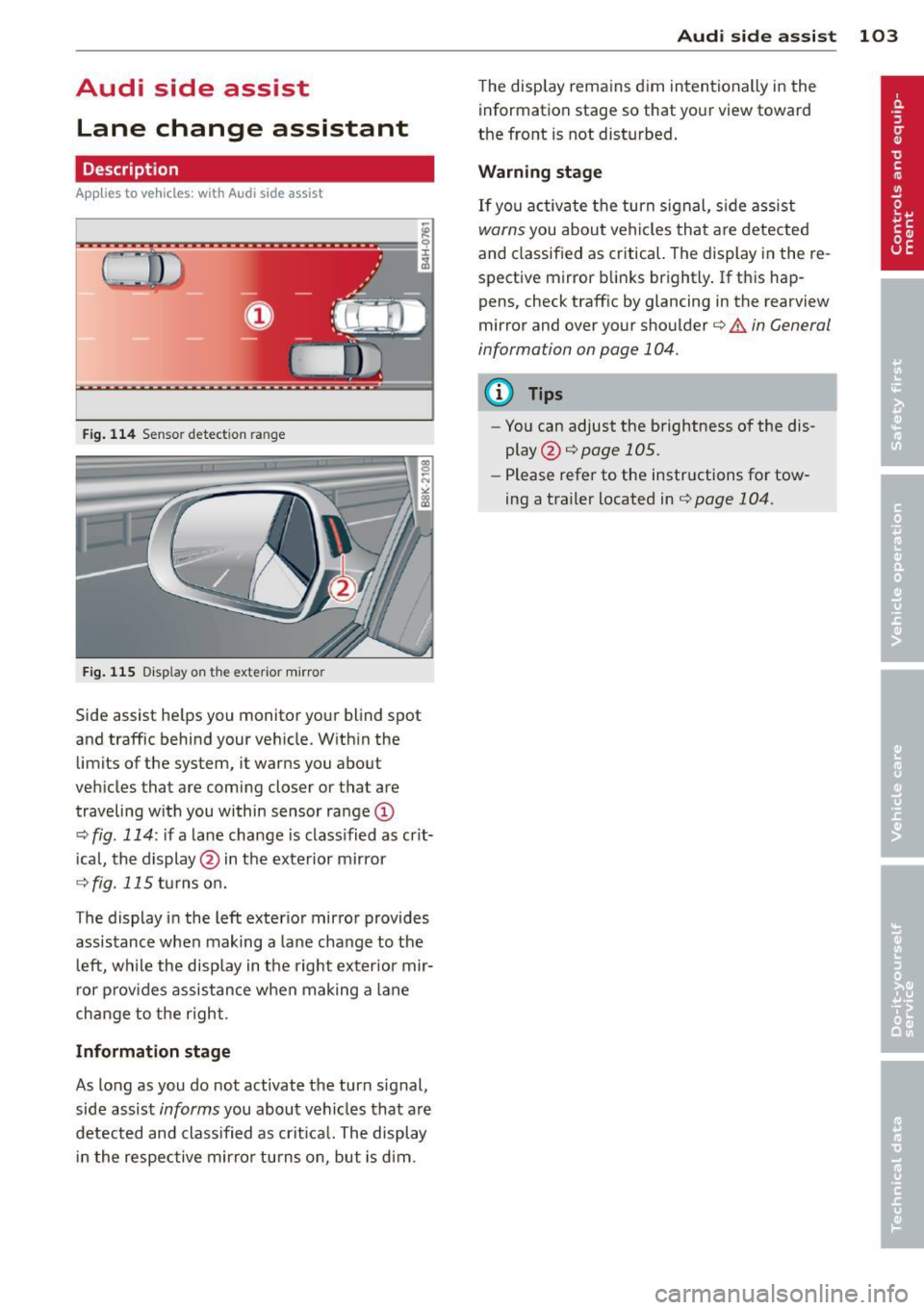
Fig . 114 Sensor dete ction ra n ge
Fig . 115 Disp la y on th e e xterio r mirro r
Side assist he lps you mon itor your blind spot
and traffic behind you r veh icle. W ith in the
limits of the system, it warns you about
vehicles that are coming closer or tha t are
traveling w ith you within sensor ra nge
(D
c::, fig . 114 : if a lane change is class ified as crit
ical, the display @ in the exterior mirror
c::> fig. 115 turns on.
The display in the left exterior mirror provides
assistance when making a lane change to t he
l eft, while the display in the right exter ior mir
r or p rov ides assistance when making a lane
change to t he right .
Information stage
As long as you do not activate the turn signal,
side assist
informs you about vehicles that are
detected and class ified as crit ical. The display
i n the respec tive mirro r turns o n, but is d im .
Aud i side assist 103
The display remains d im intentionally in the
information stage so that your view toward
the front is not disturbed .
Warning st age
If you activate the turn signal, s ide assist
warns you about veh icles that are detected
and classified as critical. The display in the re
spective mirror blinks brightly . If this hap
pens, check traff ic by glanc ing in the rearview
mirror and over your shoulder¢
A in General
information on page 104 .
@ Tips
-You can adjust the brightness of the dis
play @¢
page 105 .
-Please refer to the instructions fo r tow
ing a trailer located in¢
page 104.
Page 106 of 290
104 Audi side assist
General information
App lies to vehicles: with Audi side assist
®
©
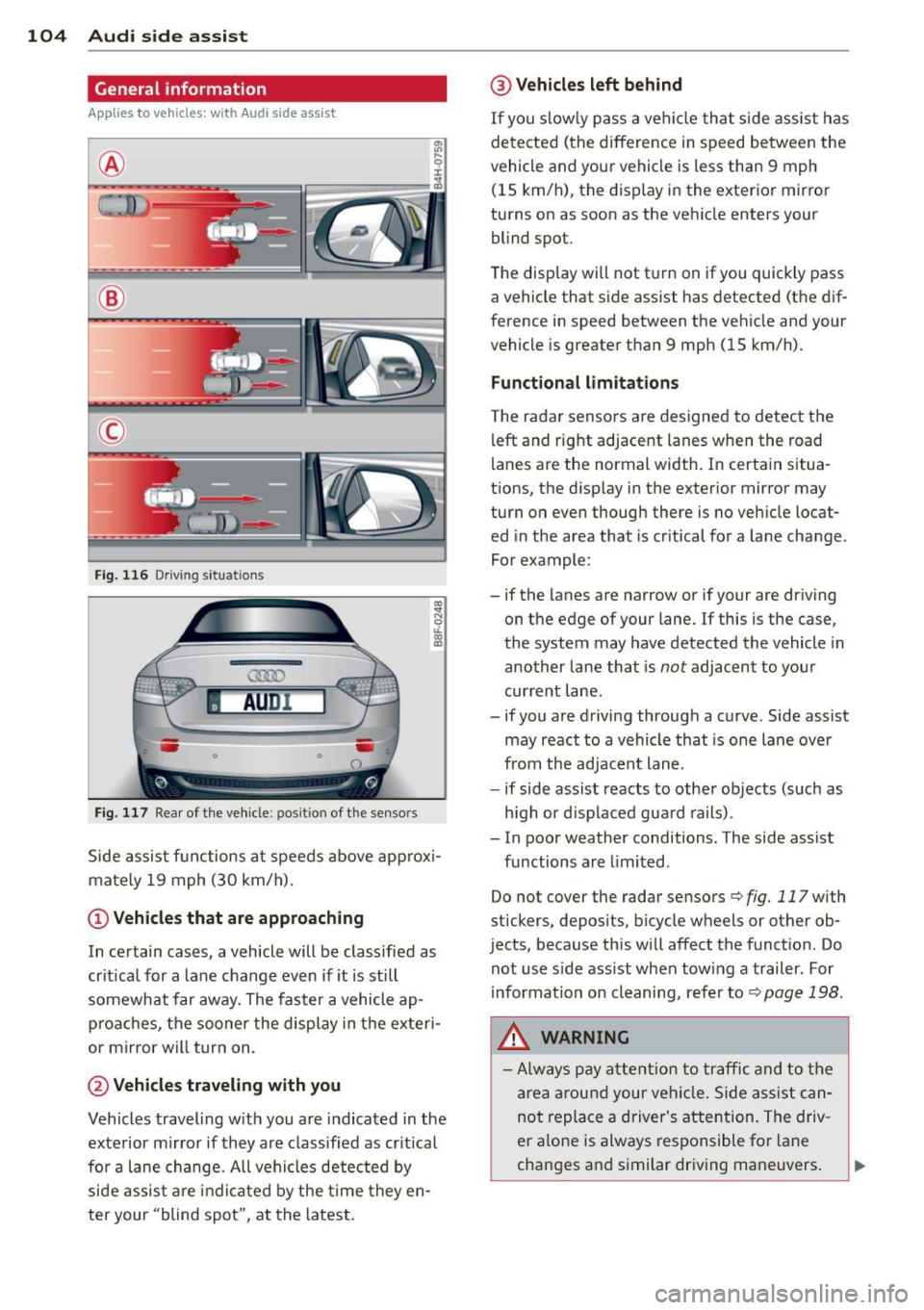
Fig. 116 Driving sit u at ions
F ig . 11 7 Rea r of th e ve hicle: positio n of t he se nso rs
Side assis t fu nctions at speeds above app rox i
ma tely 19 mph (30 km/h).
(D V ehicles that are approaching
In certain cases, a vehicle will be classified as
cr itical for a lane change
even if it is still
somewhat far away. The fas ter a vehicle ap
p ro aches, the sooner the disp lay in the exteri
or m irror will t urn on.
@ Vehicles traveling with you
Vehicles traveling w ith you are indicated in the
exterior m irror if they are classified as cr it ical
for a lane change. All vehicles detec ted by
side assis t are in dicated by the time they en
ter your "blind spot", at the latest.
@ Vehicles left behind
If you s low ly pass a ve hicl e tha t sid e ass ist has
dete cted (t he difference in s peed between the
vehicle and you r vehicle is less than 9 mph
(15 km/h), the display in the exter ior mirror
turns on as soon as the vehicle enters your
blind spot.
The display wi ll not t urn on if you quickly pass
a vehicle that s ide assist has detected (the dif
ference in speed between the ve hicle and your
vehicle is greater than 9 mph (15 km/h).
Functional lim itations
T he radar senso rs are designed to detect the
left and right adjacent lanes whe n the road
l anes a re the normal width. In certain situa
t ions, the d isp lay in the exterior mirror may
turn on
even though there is no ve hicle locat
ed in the area that is cr itical for a la ne cha nge.
Fo r example:
- if the lanes are narrow or if your are driving
on th e edge of your lane. If this is the case,
the system may have detected the vehicle in
another la ne that is
not adjacent to you r
cur rent lane .
- if you a re driving throug h a c urve . Side assist
may react to a vehicle that is one lane ove r
from the ad jacent lane .
- if side assist reacts to other objects (such as
high or d isp laced gua rd rails) .
- In poor weather conditions. The side assist
fu nctions are limited .
Do not
cover the radar sensors c::> fig. 117 with
stickers, depos its, bicycle wheels or other ob
jects, because this will affect the funct ion. Do
not use s ide ass ist when towing a trailer . For
i nforma tion on cleaning, refe r to
c::> page 198 .
&_ WARNING
-Always pay a ttention t o traffic and to th e
ar ea arou nd your vehi cle. Side a ssist c an
no t repl ace a driver 's atte ntion. The driv
er a lone is always res ponsible fo r lane
cha nges a nd similar driving maneuvers.
Page 107 of 290
-Improper reliance on the side assist sys
tem can cause collisions and serious
personal injury:
- Never rely only on side assist when
changing lanes.
- Always check rear view mirrors to make
sure that it is safe to change lanes.
- Side assist cannot detect all vehicles un
der all conditions- danger of accident!
- Please note that side assist indicates
there are approaching vehicles, or
vehicles in your blind spot, only after
your vehicle has reached a driving speed
of at least 19 mph (30 km/h).
- In certain situations, the system may not
function or its function may be limited.
For example:
- if vehicles are approaching or being left
behind very quickly. The display may
not turn on in time.
- in poor weather conditions such as
heavy rain, snow or heavy mist .
- on very wide lanes, in tight curves or if
there is a rise in the road surface .
Vehicles in the adjacent lane may not
be detected because they are outside
of the sensor range.
(D Note
The sensors can be displaced by impacts or
damage to the bumper, wheel housing and
underbody. This can affect the system .
Have your authorized Audi dealer or au
thorized Audi Service Facility check their
function.
(D Tips
- If the window glass in the driver's door
or front passenger's door has been tint
ed, the display in the exterior mirror may be misinterpreted.
- For Declaration of Compliance to United
States FCC and Industry Canada regula
tions
~page 272.
Audi side assist 105
Activating and deactivating
Applies to vehicles : wi th Aud i side ass ist
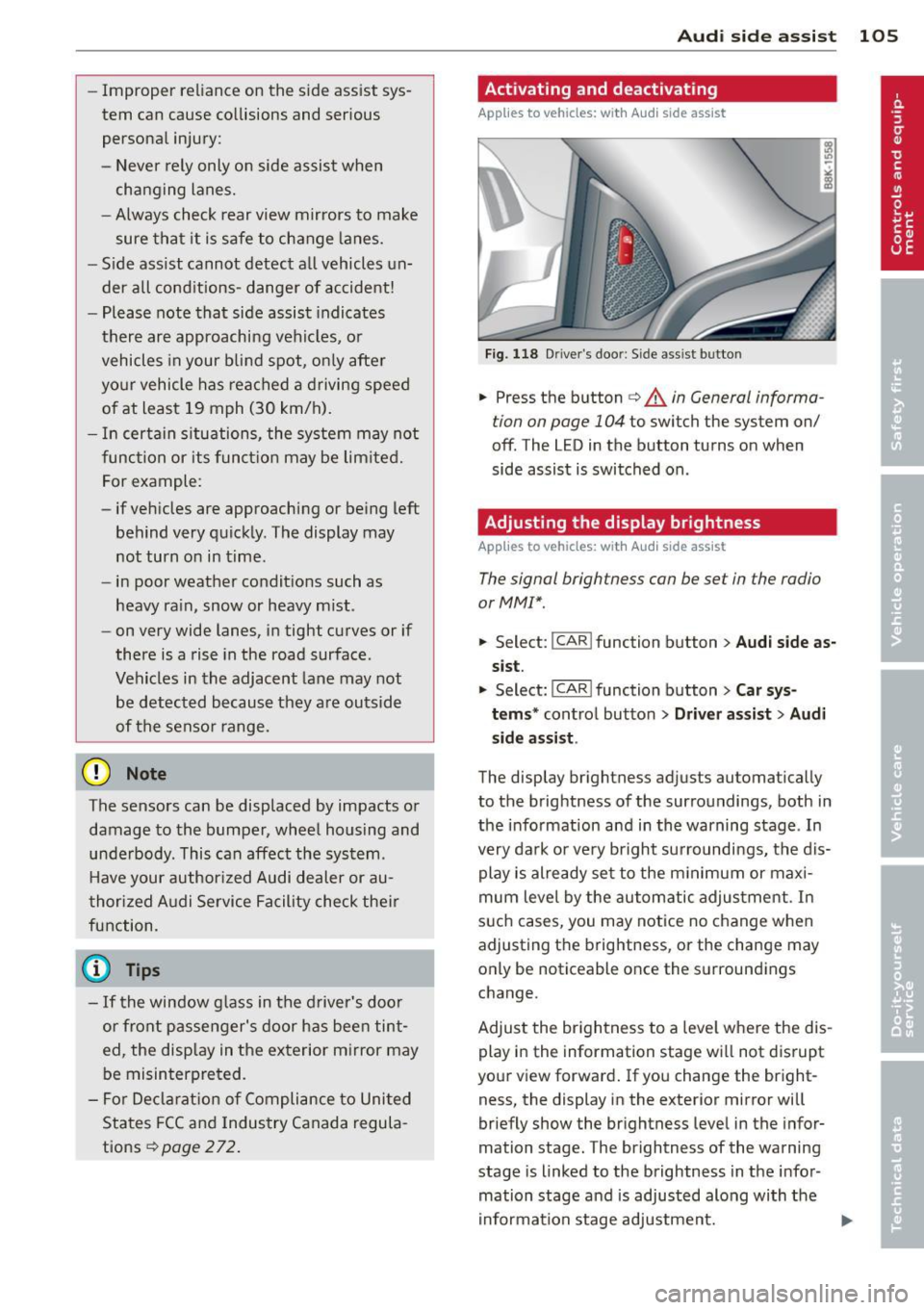
Fig. 118 Driver 's doo r: Side assis t button
.,. Press the button c> .&. in General informa
tion on page 104
to switch the system on/
off . The LED in the button turns on when
side assist is switched on.
Adjusting the display brightness
App lies to vehicles: wit h Audi side ass ist
The signal brightness can be set in the radio
orMMI* .
.,. Select: I CAR I function button > Audi side as
sist.
.,. Select: I CAR ! function button > Car sys
tems*
control button > Driver assist > Audi
side assist .
The display brightness adjusts automatically
to the brightness of the surroundings, both in
the information and in the warning stage . In
very dark or very bright surroundings, the dis play is already set to the minimum or maxi
mum level by the automatic adjustment. In
such cases, you may notice no change when
adjusting the brightness, or the change may
only be noticeable once the surroundings
change.
Adjust the brightness to a level where the dis
play in the information stage will not disrupt
your view forward. If you change the bright
ness, the display in the exterior mirror will
briefly show the brightness level in the infor
mation stage. The brightness of the warning
stage is linked to the brightness in the infor
mation stage and is adjusted along with the
information stage adjustment.
Page 115 of 290
The accuracy of the orientation lines and blue
surfaces diminis hes if:
- the rear view camera does not prov ide a re li
able image, for examp le, in poor vis ibility
conditions or if the lens is dirty,
- the image on the screen is not visible due to
sun g lare and reflection .
Caring for th e rear view came ra lens
The rear view camera is located above the rear
license plate b racket . Fo r the pa rking assist to
ope rate, the lens,=:,
fig. 124 must be kept
clean:
- Dampen the lens with a househo ld alcohol
based glass cleane r, and clean the lens with
a dry cloth
,=:, CD.
- Remove s now with a hand brush and ice
prefe rably with a de-icing spray
,=:, (D .
A WARNING
- T he pa rking aid cannot repla ce the dr iv
er's attention. The driver a lone is respon
sible for parking and similar driving ma
neuvers .
- Always keep your eyes on the vehicle's
su rroundings, using the rear view mirror
as well.
- Do not a llow yourse lf to be d istracted
from traffic by the rear view camera pic
tures.
- If the position and the installation ang le
of the camera has changed, fo r example,
after a rear end collision, do not continue
to use the system for safety reasons. Have it checked by a qua lified dealership.
(D Note
- Low obstacles already signaled by a
warning can disappear from the system's
detection range as they are approached
and will not continue to be signaled . Ob
jects such as barrier cha ins, trailer draw
bars, thin pa inted ve rtical po les o r fe n
ces may not be detected by t he system,
pos ing risk of damage.
- Never use warm or hot water to remove
s n ow or ice from the rear view camera
.
P ark a ssis t 113
lens -dange r of crack format ion on the
lens !
- When cleani ng the lens, never use prod
ucts that a re ab rasive.
Switching on/off
Applies to vehicles: with parking system (rear, with rear
view camera)
The rear view camera switches on automati
cally together with the acoustic park assist
when you put the vehicle in reverse.
Switching on
"' Put the veh icle in reverse gear, the acoust ic
parking system with rear view camera is ac
tivated automat ica lly. Act ivat ion of the
acoust ic par king system is confirmed by a
brief ac knowledgement sou nd.
Switching off
"' Drive faster than 9 mph (15 km/h) , or
"' take the vehicle out of reverse gear . The
acoust ic park ing system is immediate ly de
activated, and the rea r view came ra p icture
is deact ivated a utomat ically afte r a pe riod
o f abo ut 1 5 seconds , or
"' switch off the ignition.
T he de lay in deact ivat ing the came ra prov ides
an unin terrup ted view beh ind the ve hicle es
pe cially when mane uver ing in tig ht park ing
spaces and prevents the picture from t urning
off the every time you shift out of reverse .
If the wa rning mess age ap pears in the dis play
but not the rea r view came ra p icture, read and
confirm the warni ng message. The acoustic
distance signal is always active .
If you press a fu nction button on the M MI
control console, the rea r view came ra p icture
disappears . The rear view camera picture reap
pears the next time yo u pa rk.
Fur the r in forma tion on the warning mess age
and the MMI con tro l conso le can be found in
the MMI instruction book let.
Ill-