radio AUDI A5 CABRIOLET 2014 User Guide
[x] Cancel search | Manufacturer: AUDI, Model Year: 2014, Model line: A5 CABRIOLET, Model: AUDI A5 CABRIOLET 2014Pages: 286, PDF Size: 70.4 MB
Page 39 of 286

Unlocking/ loc king th e dri ver' s door with
th e m ech anical k ey
• Remove the mechanical key ¢ page 33.
• To un lock the driver's door, turn the key to
the open position@¢
fig. 23.
• To lock the driver's door, move the selector
lever to the P position (automatic transmis
s ion) and turn the key
o nc e to the close posi
tion
@ ¢&. in General description on
page 31.
Locking the front pa ssenger' s door with
th e mechanical ke y
The emergency lock is located on the rear side
of the front passenger's door.
It is on ly visible
when the door is open.
• Remove the mechanical key
¢ page 33 .
• Pull the cover cap out of the opening
¢ fig . 24.
• Inse rt the key in the inside slot and turn it
all the way to the right .
Once the front passenger's door has been
closed , you cannot open it again from the out
side. The door can be opened from the inside
by pulling the door handle.
A WARNING
Read and follow all WARNINGS¢ ,1. in
General description on page 31.
@ T ips
After the ign ition is swi tched on, the pow
er locking system switch is enab led.
Electronic immobilizer
The immobilizer prevents your vehicle from
being started by unauthorized persons.
-
I nside the key there is a computer chip . T his
ch ip automatically activates/deactivates the
e lectronic immob ilizer.
Appli es to v eh icl es with ign ition lock :
The electronic immobilizer deactivates auto
mat ica lly when you insert the remote control
key into the ignition lock.
It activates again
Op enin g an d clos ing 3 7
automatica lly when you remove the remote
control key from the ignition lock.
Applies to veh icles with convenien ce ke y:
If the remote control key is located inside the
vehicle and you press the
I STAR T ENGINE ST OPI button, the electro nic
immobilizer deactivates a utomatically. If you
switch the ignition
off and remove the remote
cont rol key from the vehicle, the electronic
immobili zer activates again automatically.
A WARNING
-
Always take the key with you when you
leave the vehicle . The key can disarm the
electronic engine immobilizer and permit
an unauthorized person to start the engine
and enable operation of the vehicle sys
tems such as power w indow or power sun
roof leading to serious personal injury.
© Tips
- T he veh icle cannot be started if an unau
tho rized key is used. The vehicle may not
start if another radio device s uch as a key
for another ve hicle or a transponder is
located on the key ring .
- For Declaration of Comp liance to United
States FCC and Ind ustry Canada reg ula
tions¢
page 267.
Rear lid
Opening /closing rear lid
F ig . 25 Rea r lid: han dle
Page 53 of 286

Clear vision Lights
Switching the lights on and off
F ig . 54 Instrument pane l: headlight control switch
Light switch ·'t/,·
Turn the switch c> fig . 54 to the correspond ing
position . When the lights are switched on, the
:oo: symbol turns on.
0 • The lights are off or the dayt ime running
lights are on:
- USA mod els : The daytime running lights are
activated when the light sw itch
c> fig . 54 is
in the
O position or the AUTO position (only
in daylight conditions) . The daytime running
lights function can be turned on and off in
the radio or MMI* menu
E xterior li ghtin g
¢page 52, c> &_ .
-Ca nada mod els: The daytime runn ing lights
are activated when the light sw itch
¢ fig . 54
is i n the O position, :oo : position or the AUTO
posit ion (on ly in daylight cond itions). The
daytime running lights function cannot be
turned off¢&. .
AUTO* -Automatic headlights switch on and
off depending on b rightness, for example in
tw ilight, during rain or in tunnels¢,& .
:oo: -Side marker lights
~D -Low beam headlights
Fog light s/rear fog ligh t(s)*
Press the appropriate button c> fig. 54:
1D -Fog lights
0$ -Rear fog light(s)
Clear vi sion 51
adaptive light*
When switched on, adaptive ligh t adap ts to
curves in the road depend ing on the vehicle
speed and the steering ang le. This provides
better lighting through the curve. The system
operates at speeds between approximately 6 mph (10 km/h) and 68 mph (110 km/h).
Sta tic corner ing light * (vehicles with adaptive
light) -the cornering light switches on at
speeds up to approximately 25 mph (40 km/ h) when a certain steering wheel angle is
reached or when a turn signal is activated. The
area to the s ide of the vehicle is illuminated
better whe n turn ing .
The adaptive light and the cornering light only
function when the switch is in the AUTO posi
tion (automatic headlights*) .
A WARNING
-Daytime running lights and automatic
headlights* are only intended to ass ist
the driver . T hey do no t re lieve the driver
of his responsibility to chec k the head
lights and to t urn them on manua lly ac
cording to the current light and visibility
conditions. For examp le, fog cannot be
detected by the light sensors*. So a lways
switch on the headlights
~D under these
weather conditions and when driving in
the dark .
- Cras hes can happen when you cannot see
the road ahead and when you cannot be
seen by other motorists. Always turn on
the head lights so that you can see ahead
and so that others can see your car from
the back.
- Please obey all laws when using the
lig hting sys tems described here.
(D Note
The rear fog lights* should on ly be turned
on in accordance with t raff ic regulation, as
the lights are bright for following traffic. ..,.
Page 54 of 286

52 Clear vis ion
@ Tips
- The light sensor* for headlight control is
located in the rear view m irror mount.
You should therefore not apply any st ick
ers to the windsh ield in this area in order
to prevent malfunctions or failures.
- Some exterior lighting functions can be
adjusted
¢page 52.
- When you remove your key from the igni
tion while the vehicle's lights are turned
on, a buzzer sounds as long as the driv
er's door is open .
- In cool or damp weather, the ins ide of
the headlights, turn signals and tail lights can fog over due to the tempera
ture difference between the inside and
outside. They will clea r shor tly after
switching them on. This does not affect
the service life of the lighting.
- In the even t of a light sensor malfunc
tion, the driver is no tified in the instru
ment cluster disp lay¢
page 22.
Turn signals and high beam lever
The lever operates the turn signals, the high
beams and the headlight flasher .
Fig. 55 Tu rn s ig na l and hig h beam lever
Turn sign als ¢i ¢
The turn signals activate when you move the
l ever into a turn s ignal pos ition when the ign i
tion is switched on.
(D -right turn signal
@-left tur n signa l
The turn s ignal blinks three times if you just
tap the lever .
High be ams and headlight flasher [D
Move the lever to the correspon ding posit io n:
@ -high beams on
@ -high beams off or headlight flasher
The indicator light
ii in the instrument cl us
te r turns on .
Notes on thes e features
-The turn signals on ly wor k w ith the ignition
t ur ned on. The indicator ligh ts
Ct or a in
the instrument cluster also blink.
- After you have turned a co rner, the turn s ig
na l switches off au toma tically .
- The
high beam works on ly w hen the head
lights a re on. The ind icator ligh t
II in the
instrument cluster illuminates when the
high beams are on .
- The
headlight flasher works o nly as long as
you ho ld the lever -even if there a re no
lights switched on . The indicator light
II in
the instrument cluster illuminates when you
use the headlight flasher.
A WARNING
--
Do not use the h igh beam or headlight
flasher if you know that these could blind
oncom ing traffic.
Adjusting exterior lighting
The functions ore selected in the radio or
MMI" .
.,. Select: !CARI function button> Exte rior
light ing .
Or
.,. Select: !CARI function button > Car systems *
control button > Vehicle s etting s> Exterior
lighting .
Coming home (light when leav ing car }*,
Leav ing home (light when unlocking car )*
The coming home function illuminates the
area around the vehicle when the ignition is
switched off and th e dr ive r's door is open ed.
Depend ing on veh icle equ ipment, the function
can be switched on and off or the length of
time the lig hts remain on* can be ad justed . ..,.
Page 59 of 286
Cleaning the headlights*. The headlight wash
er system* operates only when the headlights
are on. If you move the lever to position@,
the headlights a re washed in intervals .
_& WARNING
-The rain sensor is only intended to assist
the driver. The driver is still responsible
for manually switching the wipers on ac cording to the visibility conditions.
- The windshield may not be treated with
water-repelling windshield coating
agents. Unfavorable conditions, such as
wetness , darkness, low sun, can result in
increased glare. Wiper blade chatter is
also possible.
- Properly functioning windshield wiper
blades are required for a clear view and
safe driving ¢
page 57, Replacing
windshield wiper blades.
(D Note
- In the case of frost, check whether the
windshield wiper blades are frozen to
the windshield. Switching on the wind
shield wipers can damage the wiper blades!
- Prior to using a car wash, the windshield
wiper system must be switched
off (lever
in position @). This helps to prevent un
intentional switching on and damage to
the windshield wiper system .
- The windshield wipers are switched
off
when the ignition is turned off . Activate
the windshield wipers after the ignition is switched back on by moving the wind
shield wiper lever to any position.
- Worn or dirty windshield wiper blades result in streaking . This can affect the
rain sensor* function . Check your wind
shield wiper blades regularly.
- The washer fluid nozzles of the wind
shield washer system are heated at low
temperatures when the ignition is on.
- When stopping temporarily, (e.g . at a
traffic light) the set speed of the wind-
Clear vision 5 7
shield wipers is automatically reduced by
one speed.
· Cleaning windshield wiper blades
Clean the windshield wiper blades when they
begin to leave streaks. Use a soft cloth and
glass cleaner to clean the windshield wiper blades.
.. Place the windshield wiper arms in the se rv
ice position. Refer to¢
page 57.
.. Lift the wiper arm away from the front win
dow.
_& WARNING
Dirty windshield wiper blades can impair
your view. This can lead to accidents.
Replacing windshield wiper blades
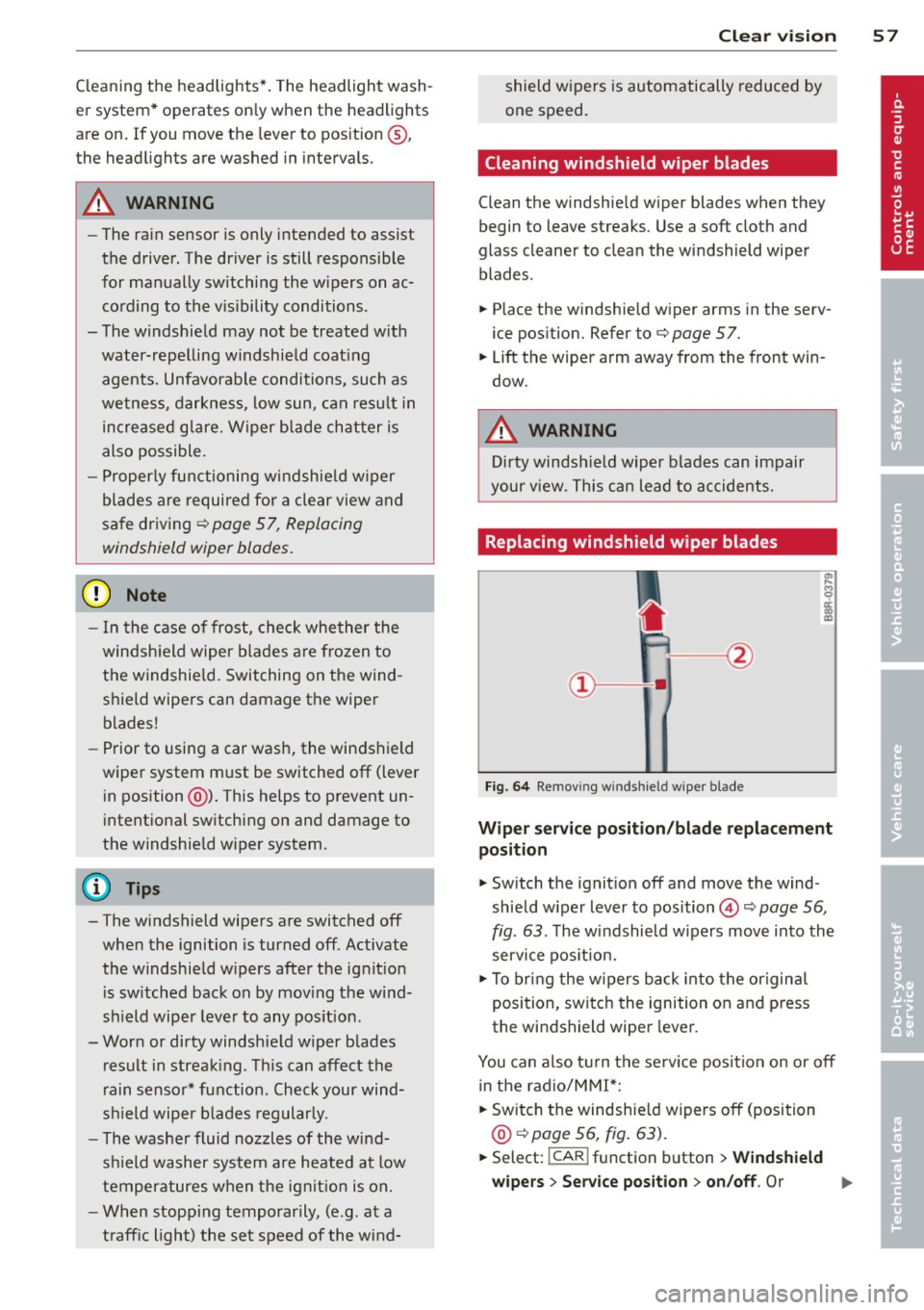
Fig. 64 Remov ing w in d sh iel d w iper blade
Wiper service position/blade replacement
position
.. Switch the ignition off and move the wind
shield wiper lever to position©¢
page 56,
fig . 63.
The windshield wipers move into the
service position.
.. To bring the wipers back into the original
position, switch the ignition on and press
the windshield wiper lever.
You can also turn the service position on or
off
in the radio/MM!*:
.. Switch the windshield wipers
off (position
@ ¢page 56, fig. 63).
.. Select: !CAR ! function button > Windshield
wipers
> Service position > on/off . Or
Page 66 of 286

64 Seats and storage
Seat memory
Description
Applies to vehicles: with memory function
The memory function allows you to quickly
and easily sto re and recal l personal seating
p rofiles for the dr iver. The memo ry func tion is
operated through the master key and the
memory buttons in the driver's door .
The driver's seating profi le is stored and as
sig ned to the master key each t ime the vehi cle
is locked . When you open the door, the seat
profile is automatically recalled. If two people
use one vehicle, it is recommended that each
person always uses "their own" master key.
Up to 2 seat profiles can be stored in the
memory buttons in the driver's door . Once
they are stored, these seat profiles can be se
lected at any time.
I n addition to the driver 's seat settings , you
can also store and access the exterior mirror
adj ustment settings* using the remote con
trol key or memory button.
Remote control key
App lies to vehicles: with seat memory
To assign the driver's seat settings to the re
mote contro l key when locking the vehicle, the
function must be activated in the radio or
MMI*
~ Se lect : ICAR I function button> Seat adj ust
ment
> D river's s eat > Remote co ntrol key >
on. Or
~ Select : ~I C,....A~R~ I fu nct ion but ton > Car sys tem s*
control button > Vehi cle setting s > Seat s>
Driv er' s seat > Remo te cont rol ke y> On .
(D Tips
If you do not want another d river's set
tings to be assigne d to the remote key,
sw itch off the memory function u sing the
rad io or MMI* or the
!ON/O FF I button
r=)poge 64.
Memory buttons
Applies to vehicles: with seat memory
Fig . 73 Driver's door: memo ry function buttons
The memory b uttons are located in the driv
er's door.
Switching the memo ry function on /off
~ Press the ION/OFF ! button to sw itch the
memory fu nction on/off . The word
OFF
lights up when the memory function is
sw itched off. Seat profiles are neither stored
nor recalled.
Storing a seat p rofile
~ Press the ISETI button. When the word SE T
lights up, the memory is ready to store set
tings.
~ Press a memory button dII or [Ii ) briefly . A
tone conf irms that the settings were stored.
Accessing a seat profile
~ If the driver's door is open and the ignition
is switched off, press the memory button.
~ If the driver's door is closed or the ignition is
sw itched on, press and hold the memory
button until the seat adjustment is com
plete .
_&. WARNING
-For safety reasons ., the seat setting can
only be re called when the vehicle is s ta
tionary - otherwise yo u risk hav ing an ac
cident.
- I n an emerge ncy the recall p roced ure ca n
be cancelled by pressing t he
ION/OFF !
switch or by ta pping the memo ry but
tons .
Page 72 of 286
70 Warm and cold
Operation
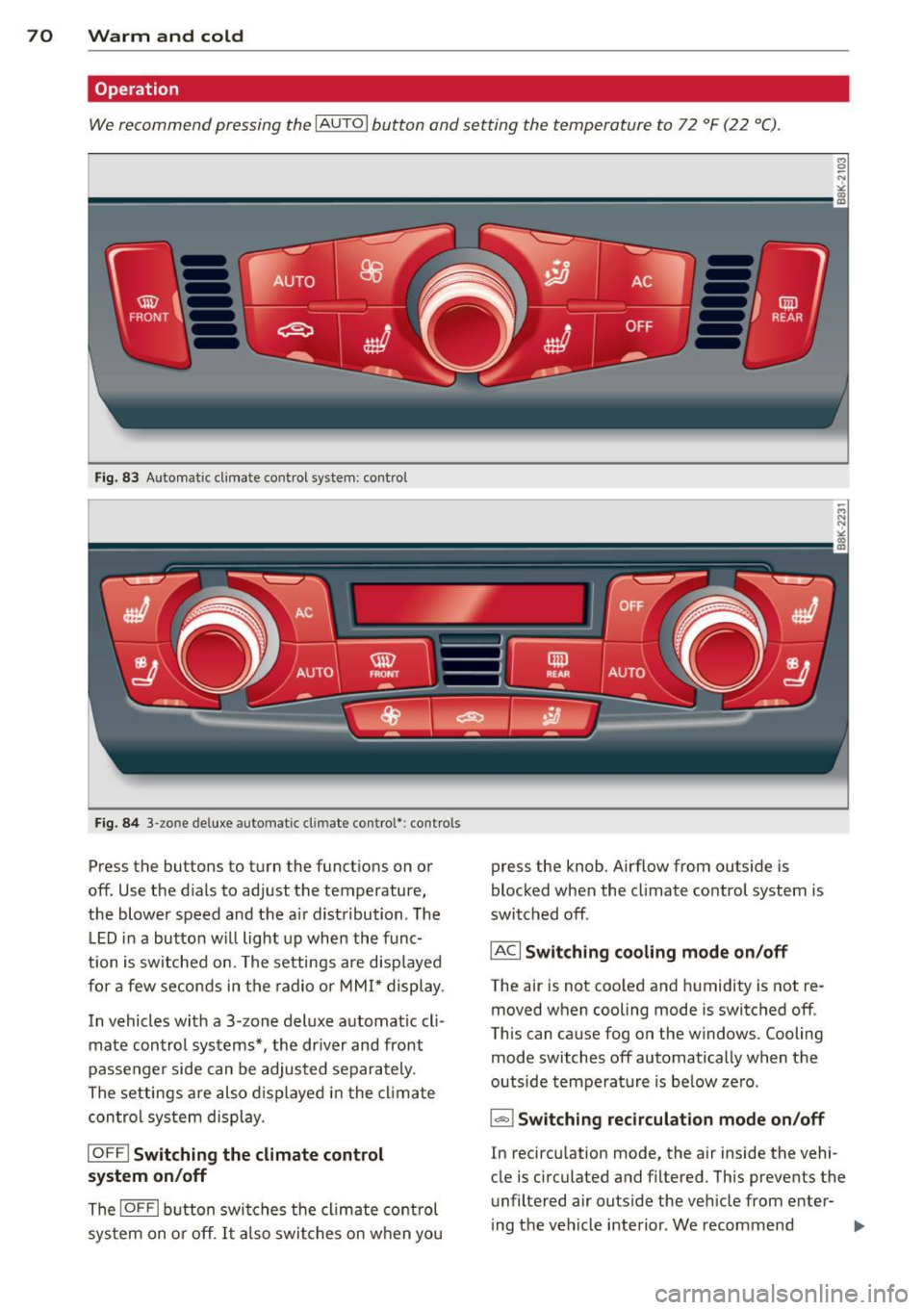
We recommend pressing the IAUTOI button and setting the temperature to 72 °F (22 °C) .
Fig. 83 Automat ic cl imate control system: control
Fig. 84 3-zo ne de luxe automatic cl imate contro l' : contro ls
Press the buttons to turn the funct ions on or
off. Use the d ials to adjust the temperature,
the blower speed and the a ir distribution . The
LED in a button will light up when the func
tion is switched on. The settings are disp layed
for a few seconds in the radio or MMI* display.
In vehicles with a 3 -zone deluxe automat ic cl i
mate control systems*, the dr iver and front
passenger side can be adjusted separately .
The settings are also displayed in the climate
control sys tem display.
IOFF I Switching the climate control
system on/off
The IOFFI button switches the climate control
sys tem on or off . It also switches on when you press the knob. Airflow from outside
is
blocked when the climate control system is
switched off .
IAC I Switching cooling mode on/off
The air is not coo led and humidity is not re
moved when cooling mode is switched off .
This can cause fog on the windows. Cooling
mode switches off automatically when the
outside temperature is below ze ro .
1- 1 Switching recirculation mode on/off
In recircu lation mode, the air inside the vehi
cle is c irculated and filtered. This prevents the
unfiltered air outside the vehicle from enter
ing the vehicle interior . We recommend
Page 74 of 286
7 2 Warm and cold
(D Note
To avoid damage to the heating e lements
in the seats, do not kneel on the seats or
place heavy loads on a small area of the
seat .
Setup
The basic climate control settings can be ad
justed in the radio or MM!* .
.. Se lect : ICAR !function button>
A /C control
button. Or
.. Se lect : ICAR !funct ion button>
Ca r sy st e m s*
control button > AC .
Automatic re ci rculation*
When switched on, automatic recirculation
controls the recirculation mode automatica lly.
If the windows fog up, press the I@ FRONTI
button .
Synchronization*
When synchronization is sw itched on, the
same settings are applied to both the driver
and front passenger, except for the seat heat ing/ventilat ion *. Synchronization switches off
when you adjust the settings on the front pas
senger's side.
You can a lso switch synchronization on by
press ing and holding the knob on the driver's
side.
Suppl ementary heater
The supplementa ry heate r warms the interio r
of vehicles with flexib le fue l engines more
quickly . The supplementary heater is control
led automatically in the
Auto setting.
Upper cabin heating
Applies to vehicles: with upper cabin heating
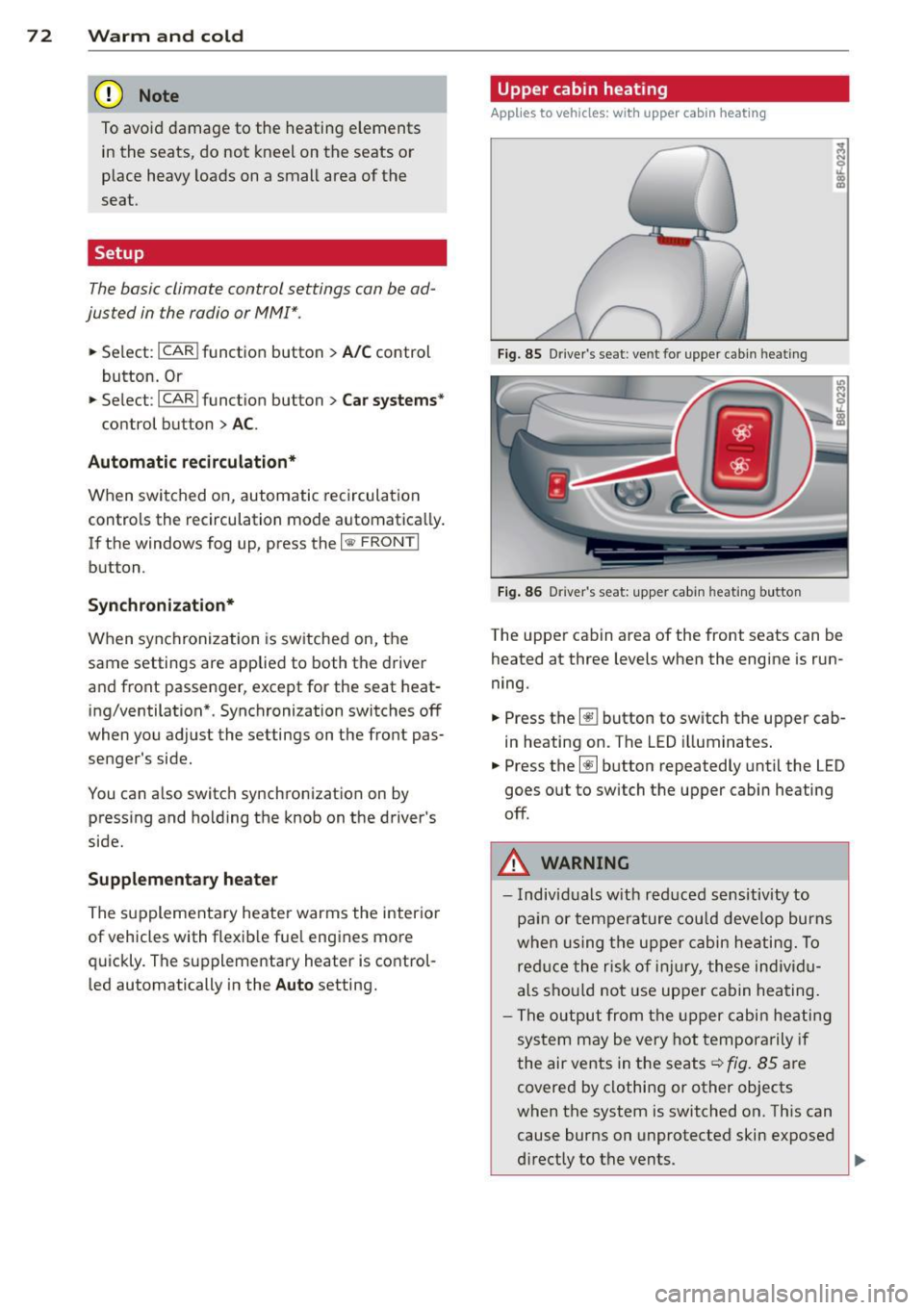
Fig. 85 Driver's sea t: ve nt for upper cab in heat ing
F ig . 86 D river's seat: upper cab in heating button
The upper cab in area of the front seats can be
heated at three levels when the engine is run
ning.
.. Press the~ button to switch the upper cab
in heating on. The LED illuminates .
.. Press the~ button repeatedly until the LED
goes out to switch the upper cabin heating
off.
A WARNING
--
- Individuals w ith reduced sensitivity to
pa in or temperature cou ld deve lop burns
when using the u pper cabin heating. To
red uce the risk of inju ry, these individu
a ls sho uld not use upper cabin heating.
- The output from the upper cabin he atin g
sys tem m ay be very hot tempora rily if
the air vents in the seats~ fig. 85 are
covered by clothing or other objects
when the system is switched on. Th is can
cause burns on unprotected skin exposed
d irectly to the vents .
~
Page 80 of 286

78 On the road
note that e lectrica l equipment such as
exterior lights wi ll switch off as well
when that happens .
Switching engine off
Applies to vehicles: with conven ience key
._ Bring your vehicle to a complete stop.
._ Move the selector lever to the P or N pos i
t ion .
._ Press the
I START ENGINE STOPI button
9 page 77, fig. 91.
Steering lock
The steering locks when you turn the engine
off us ing the
I STAR T ENGINE STOP I button
and open the dr iver's door. The locked steer
i ng helps prevent vehicle theft .
Emergency off
If necessary, the engine can be sw itched off
with the selector lever in the R or D/S pos i
tions. To do so, step on the brake pedal and
press and hold the
I START ENGINE STOP I but
ton vehicle speed must be less than 6 mph (10 km/h).
_& WARNING
- N ever turn off the eng ine before the ve
hicle has come to a comple te stop . The
f ull function o f the brake booster and the
powe r steering is not guara nteed . You
must use more force to turn or brake if
necessary. Because you cannot steer and
brake as you usually would, this could
lead to crashes and serious injur ies.
- For safety reasons, you should always
park your vehicle with the se lector lever
in P. Otherwise, the ve hicle could inad
vertent ly roll away.
-The rad iator fan can continue to ru n for
up to 10 m inutes even afte r yo u have
tu rned off the eng in e and removed the
ignition key. The radiator fa n can also
t u rn on again i f th e e ngine cool ant hea ts
up because of intense sunlight or hea t
build -up in the engine compartment. -
Always take the key with you whenever
you leave your veh icle. Otherw ise, the
engine could be started or electrical
equ ipment such as the power windows
could be ope rated. This can lead to seri
ous injury.
(D Note
If the engine has been under heavy load
for an extended period, heat bu ilds up in
the e ngine compartment after the eng ine
i s sw itched off - there is a r isk of damag ing
the engine. Allow the engine to run at id le
fo r about two minutes before switching it
off.
Driver messages
Ignition i s on
This message appears and a warning tone
sounds if you open the driver's door when the
ignition is sw itched on.
No key ident ified
This message appears when the
I S TART ENGINE STOPI button is pressed if
t h ere is no master key ins ide the ve hicle or if
the system does not recognize it. For exam
ple, the master key cannot be recognized if it
i s covered by an object (e.g . al uminum brief
case) which
screens the radio s ignal. Electron
i c dev ices such as cell phones can also i nte r
f ere with the radio s ignal.
Pres s bra ke p edal to start engine
This message appears if you do not press the
brake pedal to start the eng ine .
Shift to N or P to start engine
Th is mess age appears w hen at tempt ing to
sta rt the eng ine if the selecto r lever for the
automatic transmission is not in the P or N
pos ition . The engine can only be started with
the selecto r in these positions.
Is the key in the vehicle ?
Page 84 of 286

82 On the road
Speed warning 2
Storing warning 2 is recommended if you al
ways want to be reminded of a certain speed,
for example when yo u are traveling in a coun
try that has a general maximum speed limit,
or if you do not want to exceed a specified
speed for winter tires.
The . (USA models)
I. (Canada models)
speed warning 2 symbol appears in the dis play when you exceed the stored speed limit.
Unlike warning 1, it will not go out until the
vehicle speed drops below the stored speed limit.
Setting speed warning 2 ¢page
82.
(D Tips
Even though your vehicle is equipped with
a speed warning system, you should still
watch the speedometer to make sure you
are not driving faster than the speed lim it.
Speed warning 1: setting a speed limit
Warning threshold 1 is set by the I SET ! but
ton.
Fig. 93 SET button in the instrument clus ter
Storing the maximum speed
.,. Drive at the desired maximum speed .
.,. Press the
!SET I button in the instrument
panel display
9 fig . 93 for 1 second .
Resetting the maximum speed
.,. Drive the vehicle at a speed of at least
3 mph (5 km/h)
.,. Press the
!SET I butto n for more than 2 sec
onds . T
he . (USA models)/ . (Canada models)
speed warning symbo l wi ll appear briefly in
the d isp lay when you release the
!SET! button
to indicate that the maximum speed has been
stored successfully.
T he maximum speed remains stored until it is
changed by pressing the
! SET ! button again
briefly or until it is deleted by a lengthy push
on the button.
Speed warning 2: setting a speed limit
The radio or fv1fv1I* control unit is used to set,
change or delete warning threshold
2.
.,. Select: !CARI function button > Instrument
cluster> Speed warning. Or
.,. Select: !CARI function button> Car systems *
control button > Driver assist > Speed warn
ing.
Warning threshold 2 can be set in the speed
range starting from 20 mph to 150 mph (30
km/h to 240 km/h). Sett ings can each be ad
justed in intervals of 6 mph (10 km/h) .
Page 100 of 286

98 Audi adapti ve cruise control and bra king gu ard
<:::::> __ _ <:::::> _ Dista nc e 3: This setting corre-
sponds to a distance of 164 feet/SO meters
when traveling at 62 mph (100 km/h), or a
time interva l of 1.8 seconds.
<:::::> ____ <:::::> Dista nce 4 : This setting corre-
sponds to a distance of 210 feet/64 meters
when traveling at 62 mph (100 km/h), or a
time interva l of 2 .3 seconds.
A WARNING
Following other vehicles too closely in
creases the risk of collisions and serious
personal injury.
- Setting short distances to the traffic
ahead reduces the t ime and distance
available to br ing your vehicle to a safe
stop and ma kes it even mo re necessa ry
to pay close attention to traffic.
- Always obey applicable traffic laws, use
good judgment, and select a safe follow
ing dis tance for the traffic, road and
weather condit ions.
(0 Tips
- Di stanc e 3
is set automatically each time
you sw itch the ignition on.
- Your standa rd settings are automatically
stored and assigned to the remote con
trol key bei ng used.
Setting the driving program
Ap plies to vehicles: with Audi adaptive cruise co ntrol
Depending on the se lected driving program
and d istance, driving behavior when accelerat
ing will vary from dynamic to comfortab le .
Setting the driving program for vehicles
w ithout Audi dr ive s elect*
• In the radio/MM I*, select: I CAR ! function
button
> Adapti ve c ruis e control > Driv ing
p rog .
> comf ort , s tanda rd or dy nam ic. Or
• Se lect :
I CAR I function button > Car system s*
control button > Driv er as sist > Adapt ive
crui se c ontrol > Driv ing program *
> Com
f o rt, Standard
or Dynami c. S
etting the driving mod e for vehicles w ith
Audi dri ve select*
Refer to¢ page 107.
(D Tips
Your settings are automatical ly stored and
assigned to the remote control key being
used .
· Request for driver intervention
App lies to vehicles: wit h Audi adapt ive c ruise contro l
Fig. 1 12 In strument cluster: request for driver inter ·
vent ion
In certa in situations, the system will p rompt
you to take action. This could happen, for ex
amp le, if braking by the adaptive cruise con
tro l system is not enough to maintain enough
distance to the veh icle ahead.
The instrument cluster will warn you about
the danger ¢
fig. 112:
-A red vehicle is p ictured in the display.
- The text
DISTANCE! appears in the status
ba r.
- The red indicator light . blinks.
- In addition, a warning tone sounds.