buttons AUDI A5 CABRIOLET 2014 Owners Manual
[x] Cancel search | Manufacturer: AUDI, Model Year: 2014, Model line: A5 CABRIOLET, Model: AUDI A5 CABRIOLET 2014Pages: 286, PDF Size: 70.4 MB
Page 11 of 286

(!) Door handle
@
®
©
®
®
Power locking sw it ch
Memory buttons (dr iver's seat)
Button for side ass ist
A ir outlets
Control leve r for :
- Turn signal and high beam
0 Multifunction steering wheel
with:
- Horn
- Driver's airbag ...... ... .. .
- Audio/video , telephone and
navigation buttons
- Rocker switches for tiptron ic
operation .... .... ... .... .
@ ISETI button .... ....... .... .
® Instrument cluster ......... .
@ Reset button for trip odometer
@ Switches for:
- Windsh ield wiper/washer
- Trip computer ............ .
@ Ignition lock .. ....... ... .. .
@ Adjustable steer ing column
~ Control leve r fo r:
- Cruise contro l .. ... ... .... .
- adaptive cruise contro l ... .. .
@ Instrument lighting .. ... ... .
@ Release lever for the engine
hood .. .. .. ............. .. .
@ Data Link Conne ctor for On
Board Diagnos tic s (OBD II) . .. .
@ Light switch ........... .. .. .
@ Adjuster control for outside mir-
35
64
102
52
144
89 11
1 0
1 2
56
25
74
74
83
93
54
206
29
5 1
rors . . . . . . . . . . . . . . . . . . . . . . 54
@ Power window switches . . . . . . 39
@ Radio-Disp layll or MM I-Display
@ Depending on options:
- Radio system
- CD changer
l) The imag e in t he d ispl ay will app ea r e ither in mu lt ipl e
col ors or in a singl e co lor , de pen din g o n th e vehicl e
e q ui pment. Th e m ulti co lo r im age w ill be use d i n this
O w ner's M anual becau se bo th mu lt i co lo r and sin gle
col or vers io ns are almost iden tic al.
In strument s and control s 9
@) Emergency flasher ....... .. .
@ Glove compartment (lockable)
@ Front passenger's airbag .....
@ Depending on options, switches
for :
- drive select .............. .
- Electron ic Stabilization Con -
trol ....... ... ..... ..... .
@ Del uxe a utomatic climate con-
tro l .. .. .. .... .. . .. .. ..... .
@ Selector lever for automatic
transmission ......... ..... .
@ Ashtray with cigarette lighter
@ Depend ing on options:
- MMI cont ro l conso le or
- drive select ......... ..... .
- Electron ic Stabili zation Con-
trol button .............. .
@ Central power w indow switch
@ Powe r top switch ... ........ .
@ I START ENG IN E STOPI button
@ Electromechanical parking
brake . ... .... ... .. .. ..... .
(D Tips
53
66
144
106
179
69
87
65 ,65
106
17 9
44
77
79
- Some of the equipment o r fea tures
shown in the genera l ill ustration may be
standard equipment on your vehicle or
may be optional eq uipment depending
on your model. A lways ask your author
ized Aud i dea ler if you have a quest ion
about your vehicle.
- Operat ion of the Multi Med ia Interface
(MMI) is described in a separate manual.
Page 36 of 286

34 Openin g and clo sing
@ For the sake of the environment
Dispose of dead batteries proper ly so as
not to pollute the environment.
@ Tips
The replacement battery must be the
same specification as the original.
Emergency unlocking of the ignition key
In the event of malfunctions in the electrical
system, it may happen that you cannot re move the ignition key .
,. Remove the mechanical key r::¢> page 33.
,. Lock the veh icle using the mechanica l key
r::¢> page 3 6.
,. Have the electrical system inspected by an
authorized Audi dealership.
Locking and unlocking the vehicle with
the remote control
Fig . 20 Remote master key: funct ion buttons
,. Press button 0 to unlock the veh icle
r::¢> fig. 20.
,. Press button fij to lock the vehicle¢ .&. in
General description on page 31.
,. Press button C::5 briefly to unlock the rear
lid.
,. Press the bu tton
e::5 for a t least o ne second
to open t he rear lid.
,. Push the red
IPANICI button to activate the
panic function . The horn sounds and the
tu rn s ignals flash . Push the red
I PANIC I but
ton again to deactivate the panic function.
If the vehicle is unlocked and no door, the rear
lid or the hood is opened within 60 seconds, the vehicle locks itself again automatica
lly.
T his feature prevents the vehicle from being
accidentally left unlocked over a long period
of time.
It depends on t he settings in the radio or
MMI * whether the entire vehicle is unlocked
or on ly certain doors¢
page 36.
On vehicles wi th a utomatic transm ission, the
selector lever must be in the P position, other
wise the vehicle cannot be locked.
.&_ WARNING
--
Read and follow all WARNINGS i::> & in
General description on page 31.
(D Tips
- In order to make sure the locking f unc
tion is work ing, you should a lways keep
your eye on the vehicle to make s ure it is
properly locked .
- Do not use the remote cont rol if yo u are
inside the car, otherw ise you may unin
tentionally lock the vehicle, and then you
would set off the anti-theft alarm whe n
you try to sta rt the engine or open a
door. In case this happens anyhow, push
the unlock button@.
- Use the pa nic function o nly if you a re in
an eme rgency s ituation.
-Add itiona l remote co ntrol key functions
¢page 40.
Page 42 of 286
40 Opening and clo sing
Convenience opening/closing
The windows can be opened and closed with
the mechanical key or the emergency key.
@
' ~-~
® '
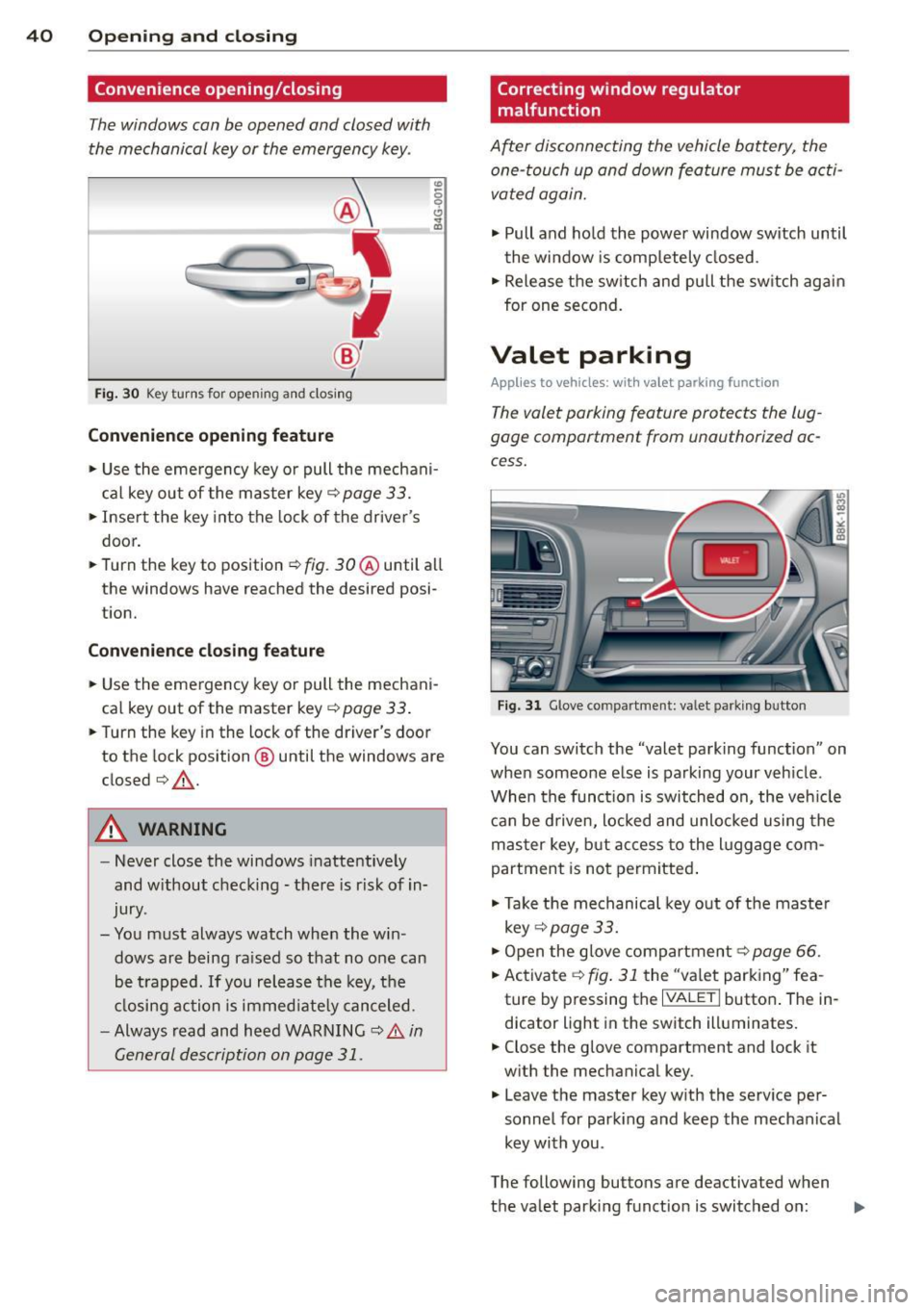
Fig . 30 Key turns for open ing an d clos ing
Conv eni ence open ing fe ature
"' 0 0 0
" m
• Use the eme rgency key or pull the mechani
cal key out of the master key¢
page 33.
• Inse rt the key into the lock of the driver's
door.
• Turn the key to position
~ fig. 30 @ until all
the windows have reached the desired posi
t ion.
Con venience clo sing f eature
• Use the emergency key or pull the mechani
cal key out of the master key¢
page 33 .
• Turn the key in the lock of the dr iver's door
to the lock position @ until the windows are
closed¢ &.
A WARNING
-Never close the windows inattentive ly
and w ithout checking -there is risk of in
jury.
- You must always watch when the win dows are being ra ised so that no one can
be t rapped. If you release the key, the
closing action is immed iate ly canceled.
- Always read and heed WARNING ¢
A in
General description on page
31.
Correcting window regulator
malfunction
After disconnecting the vehicle battery, the
one-touch up and down feature must be activated again.
• Pull and ho ld the power window switch until
the window is completely closed.
• Release the sw itch and pull the switch again
for one second.
Valet parking
App lies to vehicles: wit h va le t parking function
The valet parking feature protects the lug
gage compartment from unauthorized ac
cess.
F ig . 31 Glove compartme nt: valet parking button
You can switch the "valet parking function" on
when someone else is parking your veh icle .
When the funct io n is switched on, the veh icle
can be d riven, locked and unlocked using the
master key, but access to the l uggage com
partment is not permitted .
• Take the mechanical key out of the maste r
key ¢
page 33.
• Open the glove compartment¢ page 66.
• Activate ¢
fig. 31 the "va let parking" fea
ture by p ressing the
I VALET I button . The in
dicator light in the switch illuminates.
• Close the glove compartment and lock it
w ith the mechanical key .
• Leave the master key w ith the serv ice pe r
sonnel for park ing and keep the mechanical
key with you .
The following buttons are deactivated when
the valet parking function is switched on: ..,_
Page 66 of 286

64 Seats and storage
Seat memory
Description
Applies to vehicles: with memory function
The memory function allows you to quickly
and easily sto re and recal l personal seating
p rofiles for the dr iver. The memo ry func tion is
operated through the master key and the
memory buttons in the driver's door .
The driver's seating profi le is stored and as
sig ned to the master key each t ime the vehi cle
is locked . When you open the door, the seat
profile is automatically recalled. If two people
use one vehicle, it is recommended that each
person always uses "their own" master key.
Up to 2 seat profiles can be stored in the
memory buttons in the driver's door . Once
they are stored, these seat profiles can be se
lected at any time.
I n addition to the driver 's seat settings , you
can also store and access the exterior mirror
adj ustment settings* using the remote con
trol key or memory button.
Remote control key
App lies to vehicles: with seat memory
To assign the driver's seat settings to the re
mote contro l key when locking the vehicle, the
function must be activated in the radio or
MMI*
~ Se lect : ICAR I function button> Seat adj ust
ment
> D river's s eat > Remote co ntrol key >
on. Or
~ Select : ~I C,....A~R~ I fu nct ion but ton > Car sys tem s*
control button > Vehi cle setting s > Seat s>
Driv er' s seat > Remo te cont rol ke y> On .
(D Tips
If you do not want another d river's set
tings to be assigne d to the remote key,
sw itch off the memory function u sing the
rad io or MMI* or the
!ON/O FF I button
r=)poge 64.
Memory buttons
Applies to vehicles: with seat memory
Fig . 73 Driver's door: memo ry function buttons
The memory b uttons are located in the driv
er's door.
Switching the memo ry function on /off
~ Press the ION/OFF ! button to sw itch the
memory fu nction on/off . The word
OFF
lights up when the memory function is
sw itched off. Seat profiles are neither stored
nor recalled.
Storing a seat p rofile
~ Press the ISETI button. When the word SE T
lights up, the memory is ready to store set
tings.
~ Press a memory button dII or [Ii ) briefly . A
tone conf irms that the settings were stored.
Accessing a seat profile
~ If the driver's door is open and the ignition
is switched off, press the memory button.
~ If the driver's door is closed or the ignition is
sw itched on, press and hold the memory
button until the seat adjustment is com
plete .
_&. WARNING
-For safety reasons ., the seat setting can
only be re called when the vehicle is s ta
tionary - otherwise yo u risk hav ing an ac
cident.
- I n an emerge ncy the recall p roced ure ca n
be cancelled by pressing t he
ION/OFF !
switch or by ta pping the memo ry but
tons .
Page 72 of 286
70 Warm and cold
Operation
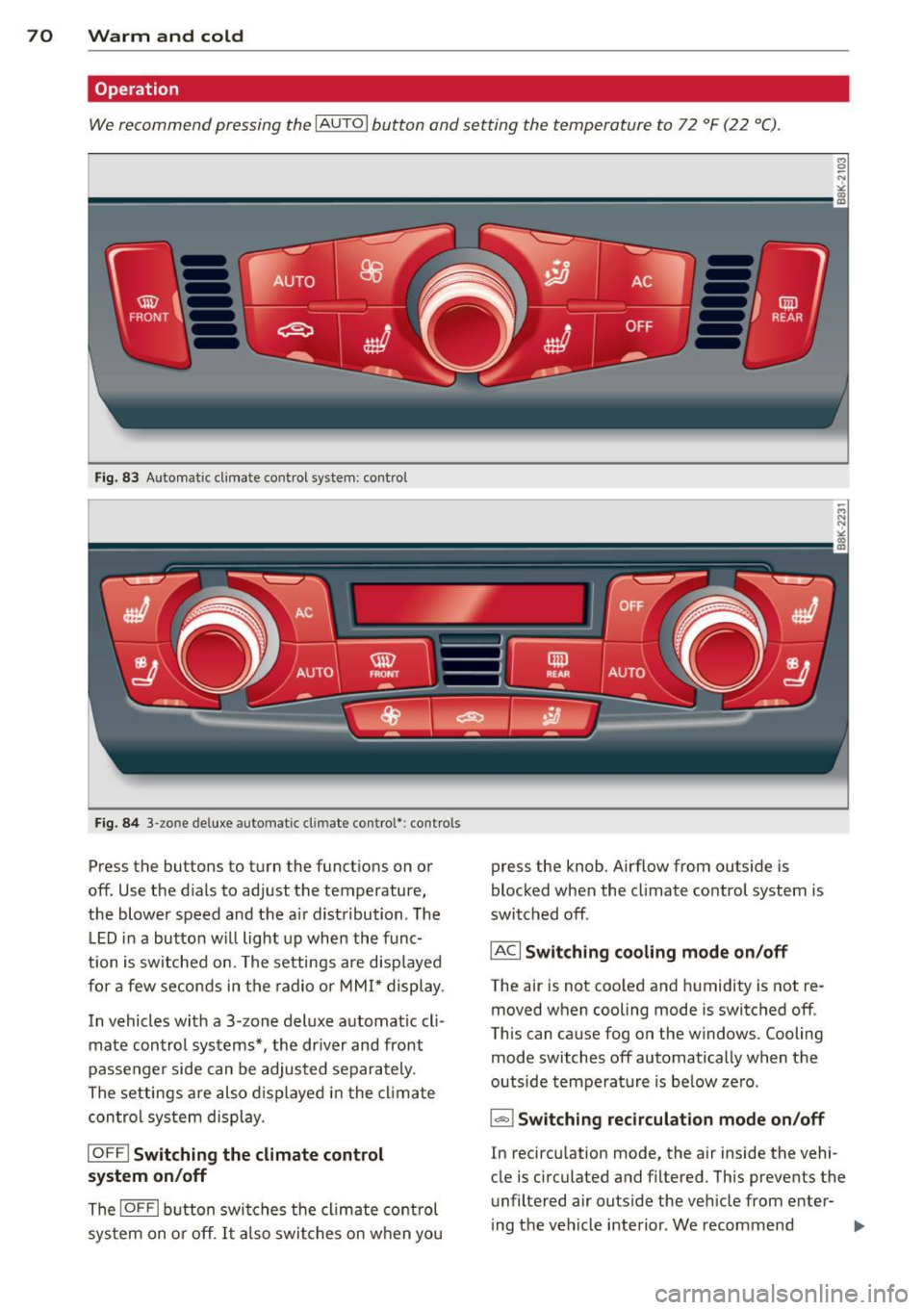
We recommend pressing the IAUTOI button and setting the temperature to 72 °F (22 °C) .
Fig. 83 Automat ic cl imate control system: control
Fig. 84 3-zo ne de luxe automatic cl imate contro l' : contro ls
Press the buttons to turn the funct ions on or
off. Use the d ials to adjust the temperature,
the blower speed and the a ir distribution . The
LED in a button will light up when the func
tion is switched on. The settings are disp layed
for a few seconds in the radio or MMI* display.
In vehicles with a 3 -zone deluxe automat ic cl i
mate control systems*, the dr iver and front
passenger side can be adjusted separately .
The settings are also displayed in the climate
control sys tem display.
IOFF I Switching the climate control
system on/off
The IOFFI button switches the climate control
sys tem on or off . It also switches on when you press the knob. Airflow from outside
is
blocked when the climate control system is
switched off .
IAC I Switching cooling mode on/off
The air is not coo led and humidity is not re
moved when cooling mode is switched off .
This can cause fog on the windows. Cooling
mode switches off automatically when the
outside temperature is below ze ro .
1- 1 Switching recirculation mode on/off
In recircu lation mode, the air inside the vehi
cle is c irculated and filtered. This prevents the
unfiltered air outside the vehicle from enter
ing the vehicle interior . We recommend
Page 91 of 286

Hill descent control
Applies to vehicles: with multitronic/S tronic/tiptronic
The hill descent control system assists the
driver when driving down declines.
Hill descent control is activated when these
lector lever is in D/S and you press the brake
pedal. The transmission automatically selects
a gear that is suitable for the incline . Hill de
scent control tries to maintain the speed ach
ieved at the time of braking, within physical
and techn ica l limitations. It may still be nec
essary to adjust the speed with the brakes.
H ill descent control switches
off once the de
cline levels out or you press the accelerator
pedal.
On vehicles w ith the cruise control system*
¢ page 83, hill descent control is also activat
ed when the speed is set.
.&, WARNING
Hill descent control cannot overcome
physical limitations, so it may not be able
to maintain a constant speed under all
conditions. Always be ready to app ly the
brakes.
Manual shift program
App lies to vehicles: with multitronic/S tronic/tiptronic
Using the manual shift program you can
manually select gears.
F ig. 99 Center console: shifting t he gea rs manually
Transmission 89
Fig . 100 Stee ring whee l: Shift buttons*
Gear selection with selector lever
The tiptronic mode can be selected either with
the vehicle stat ionary or on the move .
.,. Push the se lector lever to the right from D/
5. An M appears in the instrument cluster
display as soon as the transmission has
shifted .
.,. To upshift, push the selector lever forward
to the plus position
0 ¢ fig. 99 .
.,. To downshift, push the lever to the minus
position
0 .
Gear selection with paddle levers*
The shift buttons are activated when these
l ector lever is in D/S or the tiptronic manual
shift program.
.,. To upshift, touch the button on the right
0
¢ fig. 100 .
.,. To downshift, touch the button on the left
0 .
.,. If you do not press a sh ift button within a
short time while in the D/S posit ion, the
transmission will return to automatic mode.
To keep shifting using the shift buttons,
move the selector lever to the right out of
the D/S position.
The transm ission automatically shifts up or
down before critical engine speed is reached .
The transmission only allows manual sh ifting
when the engine speed is within the permit
ted range.
(D Tips
-When you shift into the next lower gear,
the transmission will downshift only
Page 119 of 286

Homelink
Universal remote
control
Description
Applies to vehicles: with Home link
The HomeLink universal remote control can
be programmed with the remote control for
devices that are already present.
With Home Link, you can control devices such
as the garage door, security systems, house
lights , etc. comfortably from the inside of you
vehicle.
Homelink makes it possible for you to rep lace
three different remote controls from dev ices
in your home with one universal remote. Th is
feature works for most garage door and exte
rior door motor signals. Programming the in
dividual remote control for your remote con
trol takes place near the center of the radiator
grille. There is a control module attached at
this location .
A one-time programming of the sensor must be performed before you are able to use sys
tems with Homelink. If the system does not activate after performing the one-time pro
gramming, check whether the system uses a rolling code¢
page 120 for vehicles without
the
MMI*.
& WARNING
-
- Never use the Homelink transmitter
with any garage door opener that does
have not the safety stop and reverse fea
ture as requ ired by federa l safety stand
ards. Th is includes any garage door open
er mode l manufactured before April 1,
1982.
-A garage door opener which cannot de
tect an object, signaling the door to stop
and reverse does not meet current feder
al safety standards . Using a garage door
opener without these features increases
risk of serious injury or death.
Homelink 11 7
-For safety reasons never re lease the
parking brake or start the engine while
anyone is standing in front of the vehicle .
- A garage door or an estate gate may
sometimes be set in motion when the
Homelink remote control is being pro
grammed. If the device is repeatedly ac
tivated, th is can overstrain motor and
damage its electrical components - an
overheated mo to r i s a fire haza rd!
- To avoid possib le injuries or property
damage, please always make abso lutely
certa in that no persons or objects are lo
cated in the range of motion of any
equipment being operated.
(0 Tips
- If you would like more information on
Homelink, where to purchase the Home
Link compat ible products, or would like
to purchase the Home Link Home Light
ing Package, please call toll-free :
1-800-355-3515.
-For Declaration of Compliance to United
States FCC and Industry Canada regula
tions ¢
page 267.
-For security reasons, we recommend that
you clear the programmed b uttons be
fore selling the vehicle.
Operation
App lies to vehicles : with Homeli nk
Fig. 129 H ead li ner: controls
Req uirement: The buttons must be program-
med
c!) page 118 or ¢ page 119. ..,_
Page 120 of 286

118 Homelink
• To open the garage door, press the p rogram
med button . The LED @will light up or
flash.
• To close the garage door, pre ss the button
again.
@ Tips
To open the garage door, press the button, but do not press it for longer ten seconds
or the Homelink module will switch to
programming mode.
Programming the transmitter (version A)
Appl ies to vehicles: with Home link and MMI
Fig. 130 Dista nce between t he ra d iato r grille and t he
hand tran sm itter
You can p rogram the fixed code and ro lling
code systems using the descr ibed procedure.
Programming the button
• Turn the ign ition on .
• The re a re two ways to program the button :
P res s the but ton
¢ page 117, fig. 129 tha t
you wou ld like to p rogram. Use the instruc
tions that appear in the MM I* to pe rform
the p rogramming. Or
• Se lect : ICAR ifunct ion button>
Car sy stems*
con trol but ton > Vehicle sett ing s> Garage
door opener
> Program garage door open·
er .
If this path is not ava ilable, program
Homelink as desc ribed in vers ion B
.;, page 119.
• Se lect t he button t hat yo u wo uld like to p ro
gram.
• Fo llow the ins tructions in the MMI* .
• If the garage door open ing must also be
synchronized w it h the Homel ink modu le, refer to the owner
's manua l for the garage
door opener .
Remote con tro l unit s fo r garage door ope ne rs
in Canada are se t to stop t ransmi tting radio
frequency signa ls afte r two seconds . This time
may not be sufficient for the Homelink sys
tem to learn the radio frequency signa l. Per
form all other steps as described above.
Erasing /Clearing the programmed button
s etting s
• To erase all of the programmed buttons at
the same time, select : ICAR !function b utton
> Car Systems * control butto n > Vehicle set·
tings
> Garag e door opener > Clear pro·
gram setting s> Yes .
The prog rammed but
tons can not be erased individua lly. Repro
gram the buttons if ne cess ary.
• Reprogr am an individua l bu tton in the same
manner that you wou ld for the one-time
programming .
Displaying the version /status /country
code
• Sele ct: !CAR I function bu tton > Car sy stem s*
contro l but to n > Vehicle settings > Garage
door opener
> Version information .
(D Tips
- Programming throug h the MMI* is not
possible with all infotainment systems.
If this is the case , program Homelink as
descr ibed in version B
c:) page 119.
-The required distance betwee n the hand
transm itter and the Homelink module in
the radiator gr ille¢
fig. 130 depends on
the system that you are prog ramming .
- Depending on the mode l of the garage
door opener, you may need to release the
butto n on the remote and press it again
w hen programming. When program ·
m ing a new device, keep the butto n
presse d for at least 15 seconds before
t ry ing ag ain w ith the transmit ter in a dif
fere nt posi tion. W atch o ut for the emer
gency flasher during tha t time.
Page 121 of 286

Programming the transmitter (version B)
A pplies to vehicles: with Horne link
Fig. 131 Distance between the radiato r grille and the
hand transmitte r
Programming: phase 1 on the control unit
1. Switch on the ig nit ion (do not start the
engine) .
2. Press and hold both of the outer Home
Link buttons
r=>page 117, fig. 129 until
the LED @ turns off completely (about
20
seconds). This procedure clears the stand
ard codes that were set at the factory and
does
not need to be repeated again to
program the other buttons.
3. Briefly press the Homelink button that
you would like to program .
4 . Wait until the LED@ beg ins to blink
quickly. The Home Link modu le wi ll now
remain in learning mode for
5 minutes .
5. Now stand in front of your vehicle with
the original hand transmitter for the ga rage door opener or for the device that
you would like to allocate to the Home
Link button.
Programming: phase 2 on the radiator
grille
6. Hold the original hand transmitter some
what towards the center of your vehicle's radiator griller=>
fig. 131.
7. Now activate (press) the hand transmit
ter.
8 . Pay attention to the turn signals for your
vehicle when activating the hand trans
mitter. If th e emergency flashers blink
three times, the programming was suc
cessful. If the emergency flasher only
blinks one time, the 5 minute time limit
Homelink 119
for the adaptation has expired or the pro
gram ming was unsuccessful. Repeat the
programming from step 3 on the controls
or se lect another distance from the radia
tor grille.
9. If the garage door or other devices still
fail to be activated w ith the Homelink
control buttons after programming is
completed, it is possible that these sys
tems might be working with a rolling code
instead of the normal fixed code.
A Roll
ing code programming must be per
formed
r=> page 120 .
Program the remaining two buttons acc ord ing
to the instructions mentioned above . Begin
similarly with the 3rd step if the program
ming connection was successful for the first
button.
Remote control units for garage door openers
in Canada are set to stop transmitting radio
frequency signa ls after two seconds. This time
may not be suffic ient for the Homelink sys
tem to learn the radio frequency signal. Per
form all other steps as described above.
Erasing the buttons
.,. Switch on the ignition (do not start the en
gine).
.,. Press and hold both of the outer buttons un
til the LED@ turns off completely (about
20 seconds) to erase all of the buttons si
multaneously .
.,. Programmed buttons cannot be erased indi
vidua lly. Reprogram the buttons if necessa
ry.
Reprogramming the buttons
.,. Switch on the ignition (do not start the en
gine).
.,. To reprogram an individua l button, press
and hold the button until the LED @ starts
to fla sh quickly (after about ten seconds).
Release the button immedia tely. The Home
L ink module will now remain in learning
mode for 5 minutes.
.,. Continue with step 5.
Page 122 of 286
120 Homelink
-Programming using the Homelink but
tons is not poss ible with all infotainment
systems. If this is the case, program Homelink as described in vers ion A
¢ page 118.
-The requ ired distance between the hand
transmitter and the Homelink module in
the radiator grille
¢ fig . 131 depends on
the system that you are programming.
- Depend ing on the model of the garage
door opener, you may need to release the
button o n the remote and press it again
when prog ramming . W hen p rogram
ming a new dev ice, keep the button
pressed for a t le ast 15 se con ds before
trying again wi th the transmitte r in a dif
ferent posit ion . Watch out for the emer
gency flasher during that time.
Programming the rolling code
App lies to vehicles: with Home link
Additionally, a rolling code programming for
the Homelink universal remote control is re
quired for some systems.
Identifying the rolling code
"' Press the prev io usly progr amme d Homelink
bu tton aga in and ho ld it down .
"' Look at th e LED @¢
page 117, fig . 129 . If
the LED b links quickly, the features, s uch as
the garage door opene r, are equipped with
t he rolling code .
"' Program the rolling code as follows :
Activating the g arage door opene r motor
unit
"' Locate the setting button on the garage
door opener motor unit . The exact location
and co lor of t he button may vary depend ing
on the ga rage door opener ma nufactu rer .
"' Press the sett ing button on the ga rage door
opener motor unit (usually th is w ill act ivate
a "se tting ligh t disp lay" on the mo to r u nit).
Now you w ill have abo ut
30 second s time to
perform the HomeLink button programming
on the cont ro ls.
Programming on the controls
"' Press the Homelink bu tton tha t was a lready
programmed and hol d for two seconds .
"' To end ro llin g code programming , press and
hold t he Home link button for two seconds
aga in.
"' The Home link button may need to be press
ed a t hird t ime to end the adjustment proce
dure for some ga rage doo r openers .
After the controls have been programmed, the
garage door opener shou ld recognize the
Homelink signa l and operate when the Home
Lin k button is pressed . N ow you may prog ram
t h e other buttons as needed .
(D Tips
- Programming the rolling code can be
perfor med quicke r and more easily with
the help of a se cond person .
- If d iff iculties should ar ise when pro
gramming the rolling code, consult the
operating instructions fo r th e garage
door opener or o ther dev ices for po ssible
so lutions.