ECO mode AUDI A5 CABRIOLET 2015 User Guide
[x] Cancel search | Manufacturer: AUDI, Model Year: 2015, Model line: A5 CABRIOLET, Model: AUDI A5 CABRIOLET 2015Pages: 268, PDF Size: 66.88 MB
Page 71 of 268

Warm and cold
Operation
We recommend pressing the !AUTO I button and setting the temperature to 72 °F (22 °C).
Fig. 83 Automatic cl imate control system: control
Fig. 84 3-zone del ux e automatic climate controt•: controls
Press the buttons to turn the functio ns on or off.
Use the dials to adjust the temperature, the
b lower speed and the air distrib ution . The LED in
a button will light up when the function is
switched on. The settings are displayed for a few
seconds in the radio or MMI* display.
In vehicles with a 3-zone del uxe automat ic cl i
mate control systems*, the dr iver and front pas
senger side can be adjusted separately. The set·
tings are also disp layed in the climate control
M system display. N
ci LL co
rl I.O
"' N
"' rl
IOFF I Switching the climate control system
on/off
The i OFF i button switches the climate contro l
system on or off. It also sw itches on when you
press the knob. Airflow from outside is blocked
when the climate control system is switched off.
IA/Cl Switching cooling mode on/off
The air is not coo led and humidity is not removed
when cool ing mode is switched off. This can
cause fog on the windows . The cooling mode is
switched off automatically at low outside tern· peratures. .,.
69
Page 72 of 268
Warm and cold
l= I Swit ching recir culation m ode on /off
In recirculation mode, the air ins ide the vehicle is
circu lated and filtered . This prevents the unfil
tered air outside the vehicle from entering the
ve hicle interior . We recommend switching recir
culation mode on when driving through a tunne l
or when sitting in traffic
c:> ,&. .
The IAU TOI button or lllll> F RONT I button switches
recirculation mode off .
IAUTOI Switching automatic mode on
Automatic mode ma inta ins a constant tempera
ture inside the vehicle. A ir temperature, airflow
and ai r distribution are controlled automatica lly .
Adjusting th e tempe ratur e
Temperatures between 60 °F (+16 °C) and 84 °F
( + 28 °C) can be set. Outside of this range,
LO or
HI will appear in the cl imate control system dis
p lay. At both of these settings, the climate con
trol system r uns continuously at maximum cool
i n g or heating power. There is no temperat ure
regulation.
~ Ad justing the airflow
You can adjust the a irf low manually to su it yo ur
needs . To have the airf low regulated automatica l
ly, press the
IAUTO I button .
~ Adjusting the air distribution
You can manually se lect the vents where the air
will flow. To have the air distr ibution reg ulated
automatically , press the
!AUTO ! button.
QJ Adjusting seat h eating *
Pressing the button sw itches the seat heating on
at the h ighest setting (level 3) . The LEDs indicate
the tempe ratu re leve l. To reduce the tempe ra
ture, press the button again . To switch the seat
heating off, press the button repeatedly unt il the
L ED turns off .
Afte r 10 minutes, the seat heat ing automat ica lly
sw itches from level 3 to leve l 2.
~ Adjust ing seat ventilation*
Pressing the button switches the seat ventilation
on at the highest setting (level 3) . The LEDs indi-
70
cate the ventilation level. To reduce the ventila
tion level, press the button again. To switch the
seat ventilation off , press the button repeatedly
u nt il the LED turns off .
I@ FRONT I Switch the defro ste r on /off
The w indshield and side windows are defrosted
or cleared of condensation as q uickly as possib le.
The maximum amount of air f lows mainly from
the vents below the windshield. Recirculation
mode switches off. The temperature should be
set to 72 °F (22 °C) or h igher. The temperature is
controlled automat ically.
The
! AUTO ! button switches the defroster off.
lliil REAR I Switch ing rear window he ater on /
off
The rear window heater on ly operates when the
engine is runn ing . It switches off automatically
after a few minutes, depending on the outside
temperature.
To prevent the rear window heater from switch ing off automatically, press and hold the
I Cliil REARI
button for more than 2 seconds. This remains
stored until the ignit ion is switched off.
Air vents
You can open and close the center and rear air
vents using the th umbwhee ls . The levers adjust
the d irection of the airflow from the vents.
In vehicles with a 3-zone deluxe automa tic cli
mate control system*, you can adjust the air tem
perature in the rear by turning the thumbwhee l
toward the red side to make it warmer or toward
the blue side to make it cooler.
A WARNING
- Do not use the recircu lation for extended
periods of time. The windows could fog up
since no fresh air can enter the vehicle. If
the wi ndows fog up, press the air rec ircula
tion button again immed iate ly to sw itch off
the air recirc ulation func tion or selec t de
frost.
- I ndivid ua ls w ith red uced sensitivity to pain
or tempera ture could develop burns when
using the seat heating f unction . To reduce
-
Page 82 of 268
Driving
appears in the display . The symbol's appearance
m ight be diff erent in some models.
The speed warning system has two warn ing
thresholds that function independently of each
other and that have somewhat different purpos
es:
Speed warning 1
You ca n use speed wa rning 1 to set the maximum
speed while yo u are driving. This setting w ill re
main in effect unt il you tu rn
off the ignition , as
suming that you have not c hanged or reset the
setting .
The . (USA models) /. (Can ada mode ls)
speed war ning symbol in the wa rni ng
1 display
appears when you exceed the maximum speed.
It
goes o ut when the speed fa lls below the stored
maximum speed.
The speed wa rning symbo l w ill also go out if the
speed
exceeds t he stored maximum speed by
mo re tha n about 25 mp h
(40 km/h) for at least
10 seconds. The stored maximum speed is de let
ed.
Speed warn ing 2
S toring wa rn ing 2 is recommended if you always
want to be reminded of a certain speed, for ex
ample when you are trave ling in a co unt ry that
has a genera l maxim um speed limit, or if you do
not want to exceed a specified speed for w inter
tires .
The . (USA models)
I. (Canada mode ls)
speed warn ing 2 symbo l appears in the disp lay
when yo u exceed the stored speed limit. Unlike
warn ing 1, it will not go out until the veh icle
speed d rops be low the stored speed limit .
Sett ing speed warning 2
c::> page 80.
(D) Tips
Even tho ugh your vehicle is equip ped with a
spee d war ning system, you s ho ul d still watch
the speedometer to make sure you are not
driving faster than t he speed limit.
80
Speed warning 1: setting a speed limit
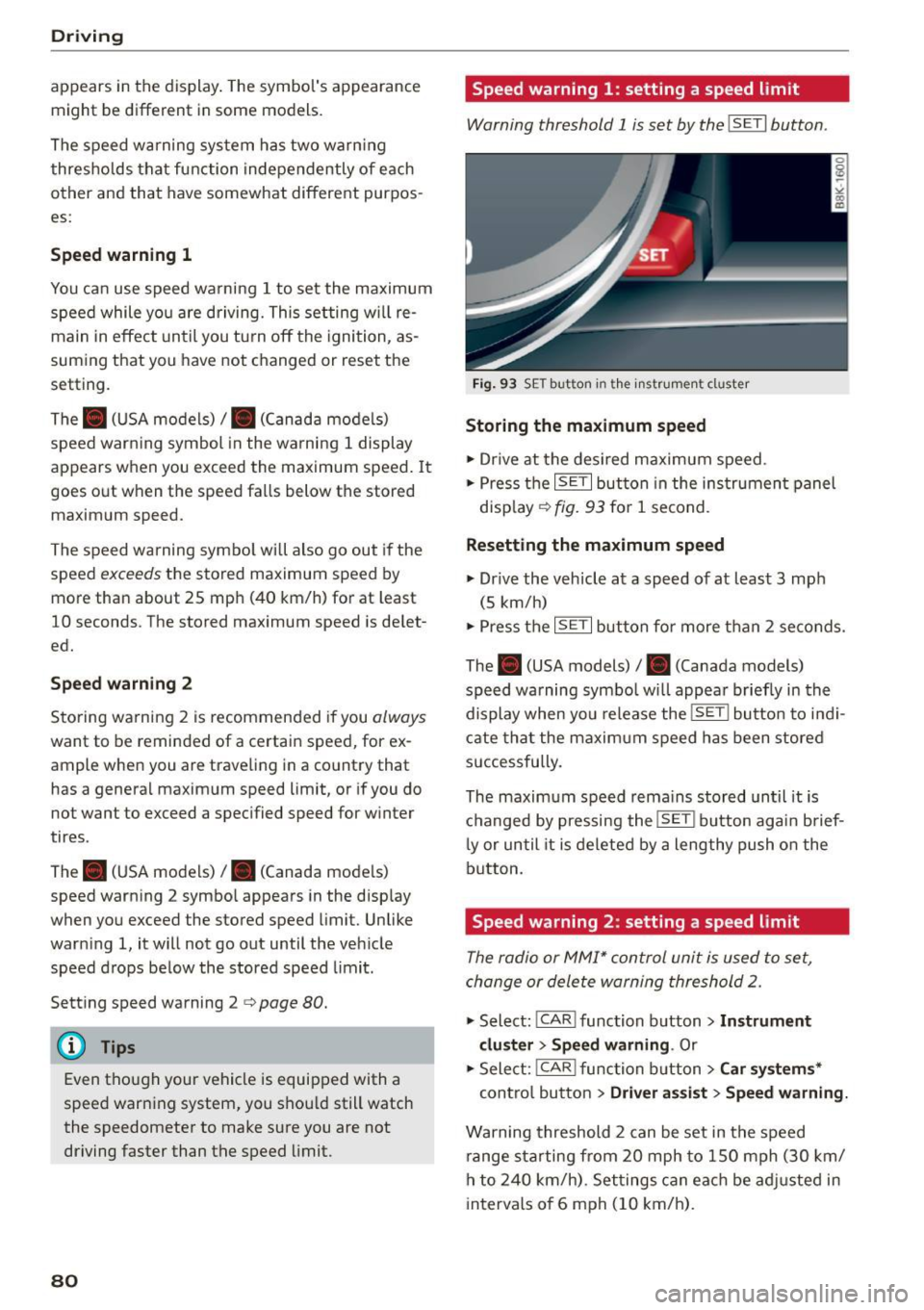
Warning threshold 1 is set by the ISETI button .
Fig. 9 3 SE T button in the instru men t cl uster
Storing the maximum speed
.,. Dr ive at the desi red maximum s peed .
.,. Press t he
ISE TI but ton in the ins trumen t panel
disp lay ¢
fig. 93 for 1 second .
Resetting the maximum speed
.,. Dr ive the veh icle at a speed of at leas t 3 mph
(5 km/h)
.,. Press the
~ 1s =ET= I button fo r more t han 2 seconds.
The . (USA models)/ . (Canada models)
speed warning symbo l wi ll appea r briefly in the
display when you release the
ISE T! bu tton to i ndi
cate tha t the m axim um speed has been stored
successfully.
The maxim um speed r ema ins stored until it is
c h anged by pressing the
ISE TI b ut ton aga in brief
l y or until it is deleted by a lengthy push o n the
bu tton.
Speed warning 2: setting a speed limit
The radio or MMI* control unit is used to set,
change or dele te warning threshold
2.
.,. Select : ICAR ! function b utton> Instrument
cluster > Speed warning .
Or
.,. Select: I CAR I func tion button > Car sy stem s*
contro l bu tton > Dri ver a ssist> Speed warning.
Warning threshold 2 can be set in the speed
r ange starting from 20 mph to 150 mph (30 km/
h to
2 4 0 km/h) . Se ttings can eac h be ad justed in
intervals o f 6 mph (10 km/h) .
Page 85 of 268
M N
ci u.. co ,...., \!) 1.1'1
N 1.1'1 ,....,
Automatic transmission
multitronic, S tronic,
tiptronic
Introduction
Appl ies to vehicles: with multitronic/5 tronic/tiptronic
The automatic transmission is controlled elec
tronically. The transmission upshifts or down
shifts automatically depending on which drive
program is se lected.
When a
moderate driving style is used, the
transmission selects the most economica l driving
mode. It will then change up early and delay the
downshifts to give better fuel economy .
The transmission switches to a sporty mode after
a kick-down or when the driver uses a
sporty driv
ing style
characterized by quick accelerator pedal
movements, heavy acceleration, frequent
changes in speed and traveling at the maximum
speed .
If desired, the driver can also se lect the gears
manually (tiptronic mode) q page 83.
Various automatic transmissions may be instal
led, depending on the model:
multitronic transmission
The multitronic transmission is a continuously
variable transmission. Power is transferred using
a mu ltidisk clutch. In contrast to conventional
automatic transmissions using shifting opera
tions, the transmission ratio in the continuously
variable transmission is changed continuous ly.
This optimi zes the comfort level and conserves
fuel.
S tronic transmission
The 5 tronic is a dual-clutch transmission. Power
is transferred using two clutches that work inde
pendently from one another. They replace the
torque converter used in conventional automatic
transmissions and allow the vehicle to accelerate
without a noticeable interruption in traction .
tiptronic transmission
In the tiptronic transmission, power is transfer
red by a torque converter.
Automatic transmission
Selector lever positions
Applies to vehicles: with multitronic/S tronic/tiptronic
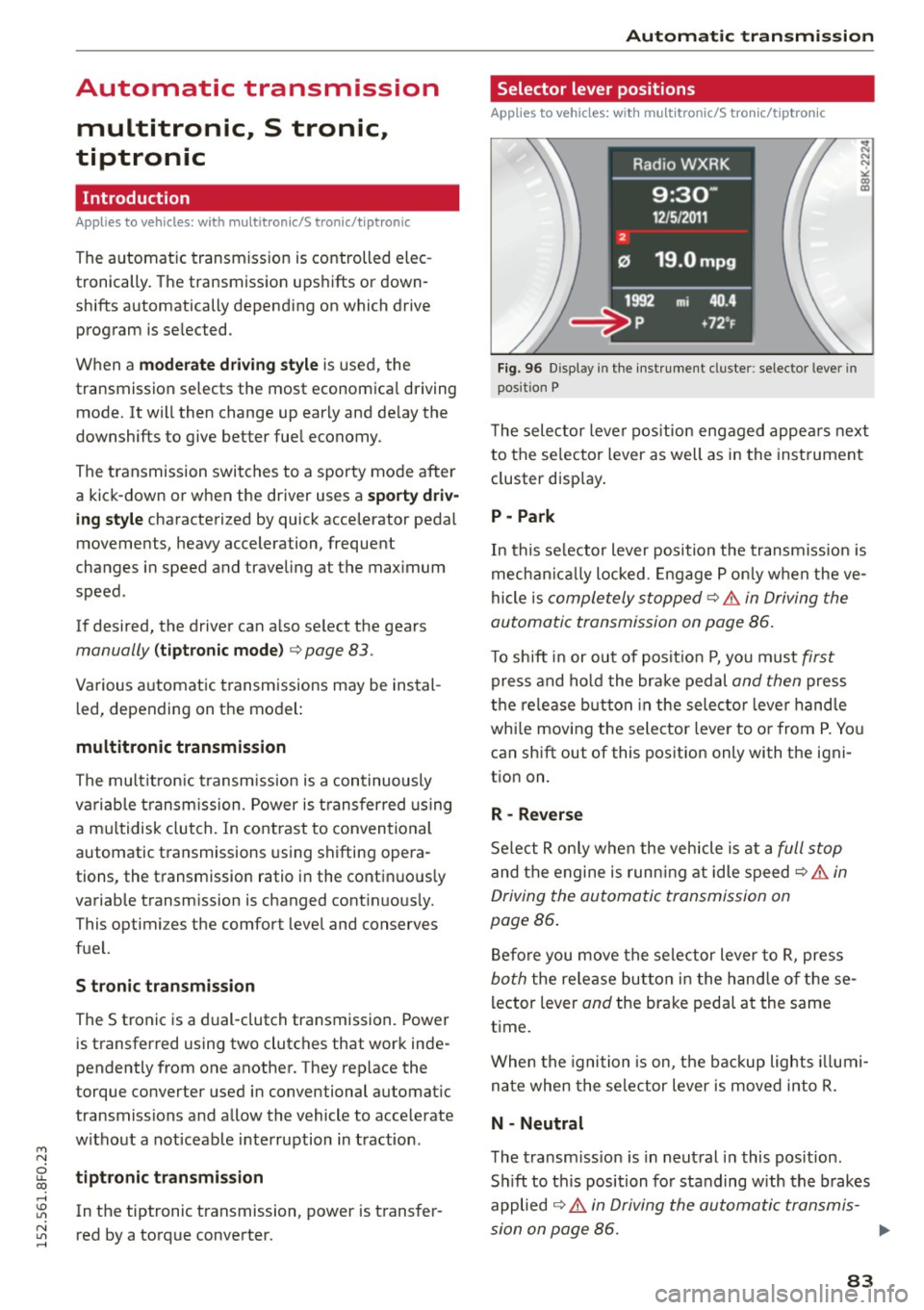
Fig. 96 Disp lay in the instrument cluster: selec tor lever in
position P
T he selector lever position engaged appears next
to the se lector lever as well as in the instrument
cluster display.
P -Park
In this se lector lever position the transmission is
mechanically locked . Engage P only when the ve
hicle is
completely stopped~.&. in Driving the
automatic transmission on page 86.
To shift in or out of posit ion P, you must first
press and hold the brake pedal and then press
the release button in the selector leve r handle
whi le moving the selector lever to or from P. You
can shift out of this position only with the igni
tion on.
R - Reverse
Select R only when the vehicle is at a full stop
and the engine is running at idle speed~ .&. in
Driving the automatic transmission on
page 86 .
Before you move the selector lever to R, press
both the release button in the hand le of these
lector lever
and the brake pedal at the same
time .
When the ignition is on, the backup lights illumi
nate when the selector lever is moved into R.
N -Neutral
The transmission is in neutral in this position .
Sh ift to this position for standing with the brakes
applied
~ .&. in Driving the automatic transmis-
sion on page 86. .,.
83
Page 86 of 268

Automatic transmission
When the vehicle is stationary or at speeds below
1 mph (2 km/h), you must always apply the foot
brake before and while moving the lever out of N.
DIS -Normal position for driving forward
In the D/S position, the transmission can be oper
ated either in the normal mode Dor in the sport
mode S . To select the sport mode S, pull these
lector lever back brief ly. Pulling the lever back
again will se lect the normal mode D . The inst ru
ment cluster display shows the selected driving
mode.
In the
normal mode D , the transmission auto
matically selects the suitable gear ratio . It de
pends on engine load, vehicle speed and driving
style.
Select the
sport mode S for sporty driving. The
vehicle makes full use of the engine 's power .
Shifting may become noticeable when accelerat
ing.
When the vehicle is stationary or at speeds below 1 mph (2 km/h), you must a lways apply the foot
brake before and while moving the lever to D/S
out of N.
A WARNING
Read and follow all WARNINGS¢.&. in Driv
ing the automatic transmission on
page 86.
(D Note
Coast ing downh ill with the transmission in N
and the engine not running will result in dam
age to the automatic transmission and possi
bly the catalytic converter.
@ Tips
- On vehicles with drive select* , you can ad
just the sporty sh ift characteristics in the
Dynamic driving mode .Swill appear in the
instrument cluster display instead of D.
-If you accidentally select N while driving,
take you r foot off the accelerator pedal im
mediately and wait for the engine to slow
down to idle before selecting D/S.
84
-If there is a power fai lure, the selector lever
wi ll not move out of the P position. The
emergency release can be used if this hap
pens ¢
page 89.
Automatic Shift Lock (ASL)
Applies to vehicles: with mult itronic/5 tronic/tiptron ic
The Automatic Shift Lock safeguards you against
occidentally shifting into a forward or the re
verse gear and causing the vehicle to move unin
tentionally.
Fig. 97 Sh ift gate: se lector lever lock pos it ions and re lease
button high lig hted
The selector lever lock is released as follows:
.,. Turn the ignition on.
.,. Step on the brake pedal.
At the some time
press and hold the release button on the side of
the gear selector knob¢
fig. 97 with your
thumb until you have moved the selector lever
to the desired position .
Automatic selector lever lock
The selector lever is locked in the P and N posi
tions when the ignition is turned on . You must
press the brake pedal and the release button to
select another posit ion. As a reminder to the
driver, the following warning appears in the in
strument cluster display when the selector is in P
and N:
When stationary apply brake pedal while select
ing gear
The Automatic Shift Lock only functions when the
vehicle is stat ionary or at speeds below 1 mph
(2 km/h).
Page 88 of 268
Automatic transmission
This prevents too much stress from being placed
on the locking mechanism.
Vehicles with multitronic transmission: Your vehi
cle is equipped with
hill hold assist allowing you
to start while on an incline. The system is activat
ed when the brake pedal is pressed down and
held
for a few seconds. The brake pressure will
hold for
a momen t after the brake pedal loosens
t o preven t the vehicle from rolling backwards
while starting up .
A WARNING
- The vehicle can also roll when the engine is
stopped .
- Unintended vehicle movement can cause se rious injury .
- Never leave your vehicle with the engine
running while in gear.
If you must leave your
vehicle when the engine is running, activate
the parking brake and move the selector lev
er to
P.
-Power is still transmitted to the wheels
when the engine is running at idle. To pre
vent the vehicle from "creeping", you must
keep your foot on the brake when the engine
is running and the selector lever is in 0/5 or
R or "tiptronic" mode is selected.
- Do not press the accelerator pedal when changing the selector lever position while
the vehicle is stationary and the engine is
running .
- Never shift into R or P while driving.
- Before driving down a steep slope, reduce
your speed and shift into a lower gear with
"tiptronic".
- Do not ride the brakes or press the brake
pedal too often or too long when driving
down a hill. Constant braking causes the
brakes to overheat and substantially re
duces braking performance, increases brak
ing distance or causes complete failure of
the brake system .
- To prevent the vehicle from rolling back
when stopping on inclines, always hold it in
place with the brake pedal or parking brake.
- Never hold the vehicle on an incline with a
slipping clutch. The clutch opens automati-
86
cally when it becomes too hot from the
overload. An indicator lamo
[ O ] illuminates
and a driver message appears
¢ page 88
when the clutch is overloaded.
- If the engine must remain running, never
have any driving position engaged when
checking under the hood . Make sure these
lector lever has securely engaged and is
locked in P with the parking brake set
¢ page 195. Otherwise, any increase in en
gine speed may set the vehicle in motion,
even with the parking brake applied.
(D Note
- 5 tronic- and tiptronic transmission: When
stopping on an incline, do not try to hold
the vehicle in place by pressing the accelera
tor pedal while a driving gear is selected.
This can cause the transmission to overheat
and can damage it. Activate the parking
brake or press the brake pedal to prevent
the vehicle from rolling.
- 5 tronic- and tiptronic transmission: Allow
ing the vehicle to roll when the engine is
stopped and the selector lever is in N will
damage the transmission because it is not
lubricated under those circumstances .
(D Tips
For safety reasons, the parking brake is re
leased automatically only when the driver's
safety belt is engaged in the buckle .
· Hill descent control
App lies to vehicles: wit h mult itronic/S tronic/tiptronic
The hill descent control system assists the driver
when driving down declines.
Hill descent control is activated when the selec
tor lever is in 0/5 and you press the brake pedal.
The transmission automatically selects a gear
that is suitable for the incline. Hill descent con
trol tries to maintain the speed achieved at the
time of braking, within physical and technical
limitations.
It may still be necessary to adjust the
speed with the brakes. .,.
Page 90 of 268

Automatic transmi ssion
Appli es to v ehicle s w ith a S tronic- / tiptronic
t ra nsm ission
When you depress the acce lerator pedal beyond
the resistance po int, the automatic transmiss ion
downshifts into a lower gear, dependi ng o n ve hi
cle speed and engi ne speed. The ups hift into the
next h igher gea r tak es place once the max imum
specified engine speed is r eached.
A WARNING
Please note that the drive whee ls can spin if
kick-down is used on a smooth slippery road -
there is a r is k of s kidding.
Launch Control Program
Applies to vehicles: with S tronic
The Launch Control Program provides the best
acceleration possible when starting from a stop.
Requirement: The engine must be at operating
temperature and the steering wheel must not be
turned.
"' Press the
!.!1 O FF I button ¢ page 171 while the
engine is runn ing . The
II indicator light illumi
nates in the instrument cluste r and
Stabil iza
tion contr ol (ESC ): Sport . Warning ! Restricte d
s tabilit y
appears in the d river informat ion sys
tem display.
"' Move the selecto r lever to the D/S position to
select sport mode (S) or select the
d ynamic
driving mode in drive select * ¢page 104.
"'Press the brake peda l strongly with your left
foot and hold it down for at least 1 second.
"' At the same time, press the accelerator pedal
down completely with your right foot until the
engine reaches and maintains a h igh RPM .
"' Remove your foot from t he brake pedal wit hin 5
seconds¢
& -
A WARNING
-Always adapt you r driving to the traffic flow.
- Only use the La unch Control P rog ram when
road and t ra ffi c condi tions a llow i t and oth
er dr ivers will not be endangered or annoyed
by your driving and the vehicle's accelera
t ion .
88
-Please note that the driving wheels can spin
and the vehicle can b reak away when sport
mode is switched on, espec ially when the
road is slippery.
- Once you have accelerated, you should
sw itch sport mode
off by pressing the
I;-; OFFI button.
(D Tips
- The transmission temperature may increase
signif icant ly after using the Launch Control
Program. If that happens, the program may
not be availab le for a few minutes . It will be
available again after a cool-down per iod .
- When accelerating using the Launch Control
program, a ll vehicle parts are subject to
heavy loads. This can result in increased
wea r.
Transmission malfunction
Applies to vehicles: wi th mul titronic/ 5 tronic/t iptronic
rm Transmi ssion : Pres s brak e pedal and sele ct
gear again.
Press the brake peda l and select the desired se
l ector lever position again. You ca n then cont inue
driv ing.
rm Transmission overh eating : Plea se dri ve con
servativel y.
The transm ission temperature has increased s ig
nificantly due to the sporty driving manner . Drive
i n a less spo rty manne r unt il the temperatu re re
turns to the norma l range and the ind icator light
switches of.
rm Tran smission ma lfun ction: You can continue
driv ing
There is a system malfunct ion in the transmis
s ion. You may conti nue driving. Drive to your au
thorized Audi dea ler or qua lified repa ir facility
soon to have the malfunction corrected.
rm Transmission malfunction: Lim ited d riving
functional ity
There is a system malfunct ion i n the t ransmis-
s ion. The transm ission is switching to emergency
mode. This mode on ly shifts into certain gears or .,.
Page 97 of 268
M N
ci LL co
rl I.O
"' N
"' rl
Audi adapt ive crui se cont rol and bra king gu ard
~ -- -~ -Di sta nce 3: This setting corresponds
to a distance of 164 feet/SO meters when trave l
ing at 62 mph (100 km/h), or a t ime interval of
1.8 seconds.
~ -- --~ Dista nc e 4: This setting corresponds
to a distance of 210 feet/64 meters when trave l
ing at 62 mph (100 km/h), or a t ime interval of
2 .3 seconds.
A WARNING
Following other vehicles too closely increases
the risk of collisions and ser ious personal in
jury.
- Setting short distances to the traffic ahead
reduces the time and distance available to
br ing your vehicle to a safe stop and makes
it even mo re necessary to pay close atten
tion to traffic.
- Always obey applicable traffic laws, use
good judgment, and select a safe following
distance for the traffic, road and weather
condit ions.
¢j) Tips
- Di stance
3 is set automatically each time
you switch t he ignition on.
- Your standa rd settings are automatically
stored and assigned to the remote contro l
k ey being used.
Setting the driving program
Applies to vehicles: with Audi adaptive cruise control
D epending on the se lected dr iv ing program and
distance, driving behavior when accelerating will
vary from dynamic to comfortab le .
Setting th e driving program for v ehicl es
without Audi d rive s elect*
~ In the radio/MMI*, select: !CAR !function but
ton >
Adapti ve c ru is e control > D riv ing prog. >
comfo rt, stand ard or d y namic . Or
~ Select : !CAR I function button> Ca r sy ste m s*
co ntrol button > D river ass ist > Adap tive cru ise
cont ro l
> Dr iving progr am * > Comfort, Stand
ard
or D ynamic . Setting the driving mode for vehicles w
ith
Audi dri ve select*
Refer to ¢ page 104.
(D Tips
Your settings are automatical ly stored and as
signed to the remote control key being used.
Request for driver intervention
Applies to vehicles: with Audi adaptive cruise control
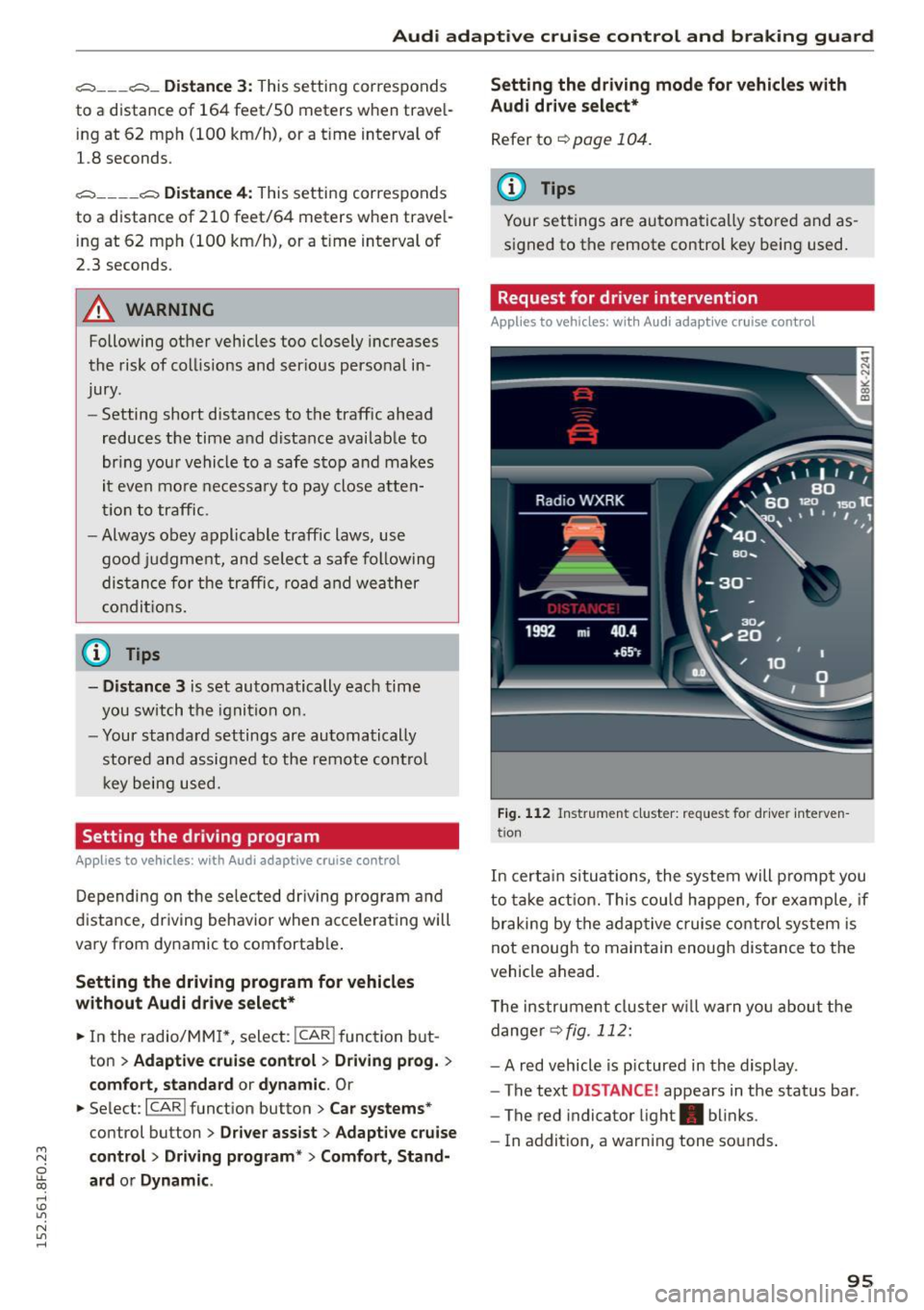
Fig . 1 12 Instr ume nt cluster: reques t fo r dr ive r inte rven
t ion
In certa in situations, the system will prompt you
to ta ke act ion. This cou ld happen, fo r example , if
braking by the adaptive c ruise control system is
not enough to maintain enough distance to the
vehicle ahead.
T he instrument cluster w ill warn you abou t the
dange r
~fig. 112:
-A red vehicle is p ictured in the display .
- The text
DISTANCE! appears in the status bar .
- The red indicator light . blinks .
- In addition, a warning tone sounds .
95
Page 105 of 268
M N
ci u.. co ,...., \!) ..,.,
N ..,., ,....,
Audi drive select Driving settings
Introduction
App lies to vehicles: with Audi drive select
Drive select provides the possibi lity to experience
d ifferent types of vehicle settings in one vehicle.
F or instance, using the three
Comfort, Auto and
Dynamic modes, the driver can switch from a
sporty to a comfortable driving mode with the
press of a button.
Addit ionally, in vehicles with
MM I*, the vehicle
setup for
Individual* mode can be customized by
you. This makes it possib le to combine settings
such as a sporty engine tuning with comfortab le
steering .
A WARNING
-
Improper use of the Audi drive select can
cause collisions, other acc idents and serious
personal injury.
Description
App lies to vehicles: with Audi drive select
The vehicle setup in each mode depends on the
veh icle's featu res . However, the engine, automat
ic transmission and steering are always involved.
Engine and automatic transmission
Depending on the mode, the engine and the au
tomatic transmission respond quicker or in a
more balanced manner to accelerator pedal
movements. In the sporty dynamic mode, the au
tomatic transmission shifts at higher RPMs .
Steering
The steering adapts in terms of steering effort
and steering ratios. Ind irect steer ing that moves
eas ily, like the steering in comfort mode, is best
suited to long drives on a highway. In contrast,
dynamic mode provides sporty, direct stee ring.
The follow ing applies to vehicles with dynam ic
steer ing*: the steering ratio changes based on ve
hicle speed in order to maintain optimum steer
ing effort for the dr iver at all times. This sets the
steer ing to be less sensitive at higher speeds in
Audi drive select
order to provide improved vehicle control. At re
duced speeds, however, steering is more direct in
order to keep the steering effort as m inima l as
possib le when the driver is maneuvering the vehi
cle. At low and average speeds, dynamic steering
additionally provides more responsive steering performance.
Adaptive dampers*
The adaptive dampers* use sensors to record in
formation regarding steering movements, braking and acceleration operations by the driver,
road surface, driving speed, and load. This makes
i t possible to adapt damping to the driving situa
t ion virtually in real t ime . Drive select also makes
it possible to sat isfy the desire for sporty suspen
s ion (Dynamic) and comfortab le suspension
(Comfort) without giving up ba lanced tuning (Au
to) .
Sport differential*
As a component of the all whee l dr ive system
(quattro)
~ page 174, the sport differential* dis
tributes the driving power to the rear axle de
pending on the situation. The dist ribution of
power varies depending on the mode selected.
The goal is a high level of agility and ability to ac
ce lerate on curves. The vehicle is very responsive
to steering.
Audi adaptive cruise control*
T he behavior when accelerating can be adjusted
from comfortable to sporty, depending on the
drive select mode. Adaptive cruise control also
responds to the driving behavior of the vehicle
ahead in a more conservative or sporty manner.
Engine sound*
The sound of the engine is adapted to the select
ed mode and ranges from subtle to sporty.
(D Tips
- In some models, the maximum vehicle
speed can only be reached in the
Auto and
Dynamic modes.
- For vehicles with an automatic transmis-
sion, selecting the
Dynamic mode results in ..,.
103
Page 147 of 268
M N
ci u.. co ,...., \!) 1.1"1
N 1.1"1 ,....,
@ Tips
If the weight-sensing mat in the front passen
ger seat detects an empty seat, the front air
bag on the passenger side will be turned off,
and
PASSENGER AIR BAG OFF will stay on.
Repair, care and disposal of the airbags
Parts of the airbag system are installed at many
different places on your Audi. Installing, remov ing , servicing or repairing a part in an area of the
vehicle can damage a part of an airbag system and prevent that system from working properly in a collision.
There are some important things you have to know to make sure that the effectiveness of the
system will not be impaired and that discarded
components do not cause injury or pollute the
environment.
A WARNING
-
Improper care, servicing and repair proce
dures can increase the risk of personal injury
and death by preventing an airbag from de
ploying when needed or deploying an airbag
unexpectedly:
- Never cover, obstruct, or change the steer
ing wheel horn pad or airbag cover or the in
strument panel or modify them in any way .
- Never attach any objects such as cup holders
or telephone mountings to the surfaces cov
ering the airbag units .
- For cleaning the horn pad or instrument panel, use only a soft, dry cloth or one mois
tened with plain water. Solvents or cleaners could damage the airbag cover or change
the stiffness or strength of the material so
that the airbag cannot deploy and protect
properly.
- Never repair, adjust, or change any parts of
the airbag system.
- All work on the steering wheel, instrument
panel, front seats or electrical system (in
cluding the installation of audio equipment,
cellular telephones and CB radios, etc.)
must be performed by a qualified technician
Airbag system
who has the training and special equipment
necessary.
- For any work on the airbag system, we
strongly recommend that you see your au
thorized Audi dealer or qualified workshop.
- Never modify the front bumper or parts of
the vehicle body.
- Always make sure that the side airbag can
inflate without interference:
- Never install seat covers or replacement
upholstery over the front seatbacks that
have not been specifically approved by
Audi .
- Never use additional seat cushions that
cover the areas where the side airbags in
flate.
- Damage to the original seat covers or to
the seam in the area of the side airbag
module must always be repaired immedi
ately by an authorized Audi dealer.
- The airbag system can be activated only
once. After an airbag has inflated, it must
be replaced by an authorized Audi dealer or
qualified technician who has the technical
information, training and special equipment
necessary.
- The airbag system can be deployed only
once . After an airbag has been deployed, it
must be replaced with new replacement
parts designed and approved especially for
your Audi model version. Replacement of complete airbag systems or airbag components must be performed by qualified work
shops only. Make sure that any airbag serv
ice action is entered in your Audi Warranty
&
Maintenance booklet under AIRBAG RE
PLACEMENT RECORD.
- In accidents when an airbag is deployed, the
vehicle battery separates the alternator and
the starter from the vehicle electrical sys tem for safety reasons with a pyrotechnic
circuit interrupter .
- Work on the pyrotechnic circuit interrupt
er must only be performed by a qualified
dealer -risk of an accident!
- If the vehicle or the circuit interrupter is
scrapped, all applicable safety precautions
must be followed.
145