brake AUDI A5 CABRIOLET 2015 User Guide
[x] Cancel search | Manufacturer: AUDI, Model Year: 2015, Model line: A5 CABRIOLET, Model: AUDI A5 CABRIOLET 2015Pages: 268, PDF Size: 66.88 MB
Page 48 of 268
Power top
Power top emergency
operation
General information
The power top can be closed manually if there is
a malfunction .
• Set the parking brake .
• Open the windows.
• Switch the ignition off.
• To reduce pressu re in the power top hydrau lics,
pull the~ button for approximately 10 to 15
seconds
¢ page 42, fig. 35 .
Only close the power top manual ly in an emer
gency . Have a second person help yo u. Drive to an
authorized Audi dealer or author ized repair facili
ty immediately to have the malf unction correct
ed.
A WARNING
- There is a risk of pinching your hands or in
juring other people during all steps in the power top emergency operation process.
- Make sure all w indows are open during
emergency operation.
- Do not hold the power top supports or
other moving parts.
- Never dr ive when the power top is not
locked correct ly. The wind from driv ing
could cause the power top to open . This can
result in injuries and damage to the vehicle.
(1) T ips
The vehicle headliner is not clipped in and the
power top compa rtment cover is not locked
after using the power top emergency opera
tion procedure. Drive to an authorized Audi
dea ler or authorized repa ir facility immed iate
ly to have the malfunction corrected.
46
.
Step 1 : Releasing the power top storage
bay lid
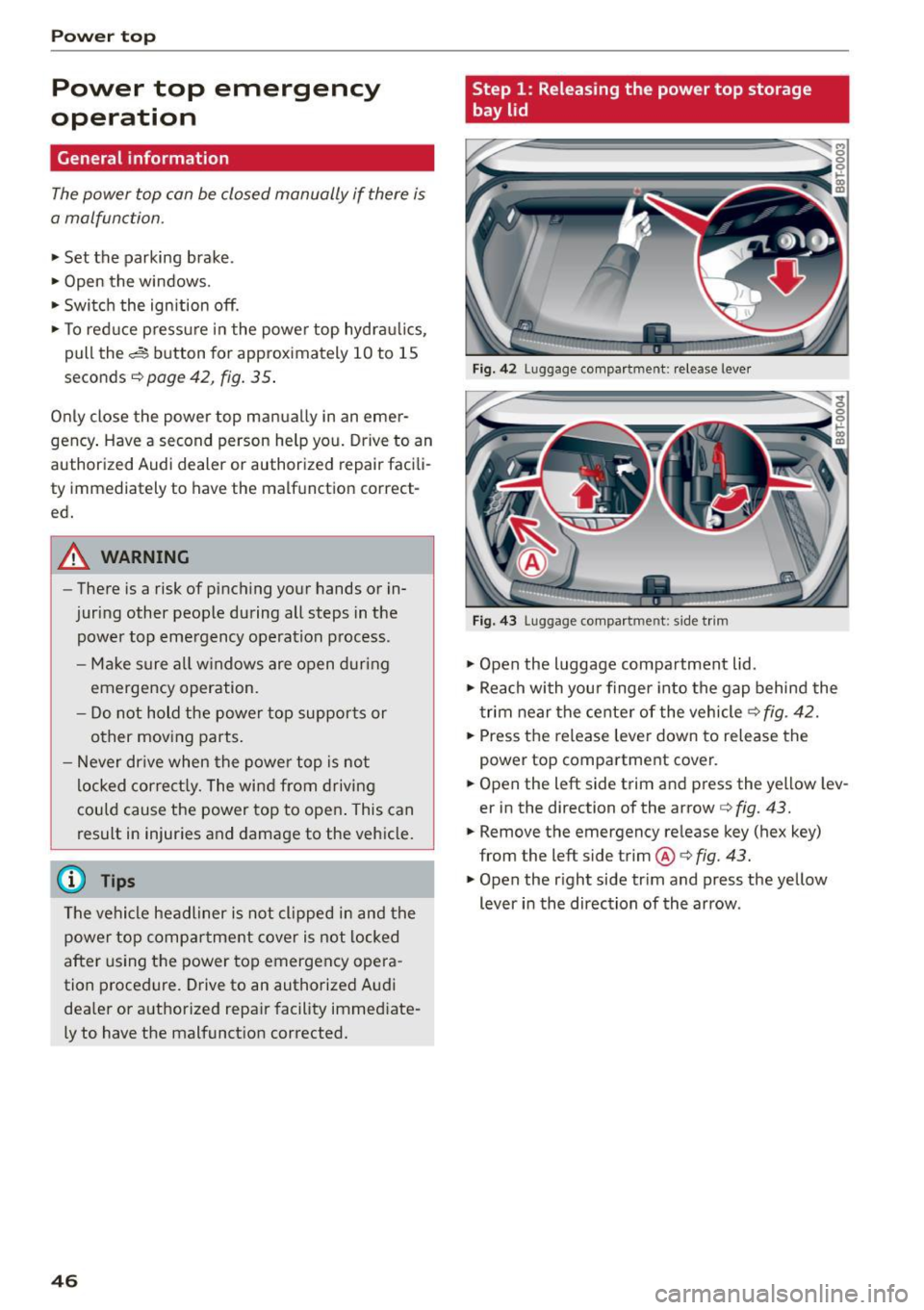
Fig. 42 Luggage compartme nt: release lever
Fig. 43 Luggage compartme nt: side tr im
• Open the luggage compartment lid.
• Reach with you r finger into the gap behind the
t rim near the center of the vehicle¢
fig. 42.
• Press the release lever down to release the
power top compartment cover.
• Open the left side trim and press the yellow lev
er in the direction of the arrow ¢
fig. 43.
• Remove the emergency release key (hex key)
from the left side trim®¢
fig. 43.
• Open the right side tr im and press the yellow
lever in the direction of the arrow .
Page 62 of 268
Seats and storag e
sudden braking or an accident, yo u wo uld not
be able to brake or accelerate.
Front passenger's seat
Always move the front passenger seat into the rearmost position.
To avo id contact w it h the airbag wh ile i t is de
p loying, do not sit any closer to the inst rument
panel than necessary and always wear the three
point safety belt provided adjusted correctly. We
recommend that you adjust the passenger's seat in the following manner:
.,. Bring the backrest up to an (a lmost) upright
position .
Do not ride with the seat reclined .
.,. Applies to vehicles with adjustable head re
straints: Adjust the head restra int so the upper
edge is as even as poss ible with the top of your
head. If that is not possib le, try to adjust the
head restraint so that it is as close to this posi
tion as poss ible
¢ page 62.
.,. Place your feet on the floor in fron t of the pas
senger's seat.
Front seats
Power seat adjustment
Applies to veh icles: w ith power adj ustable seats
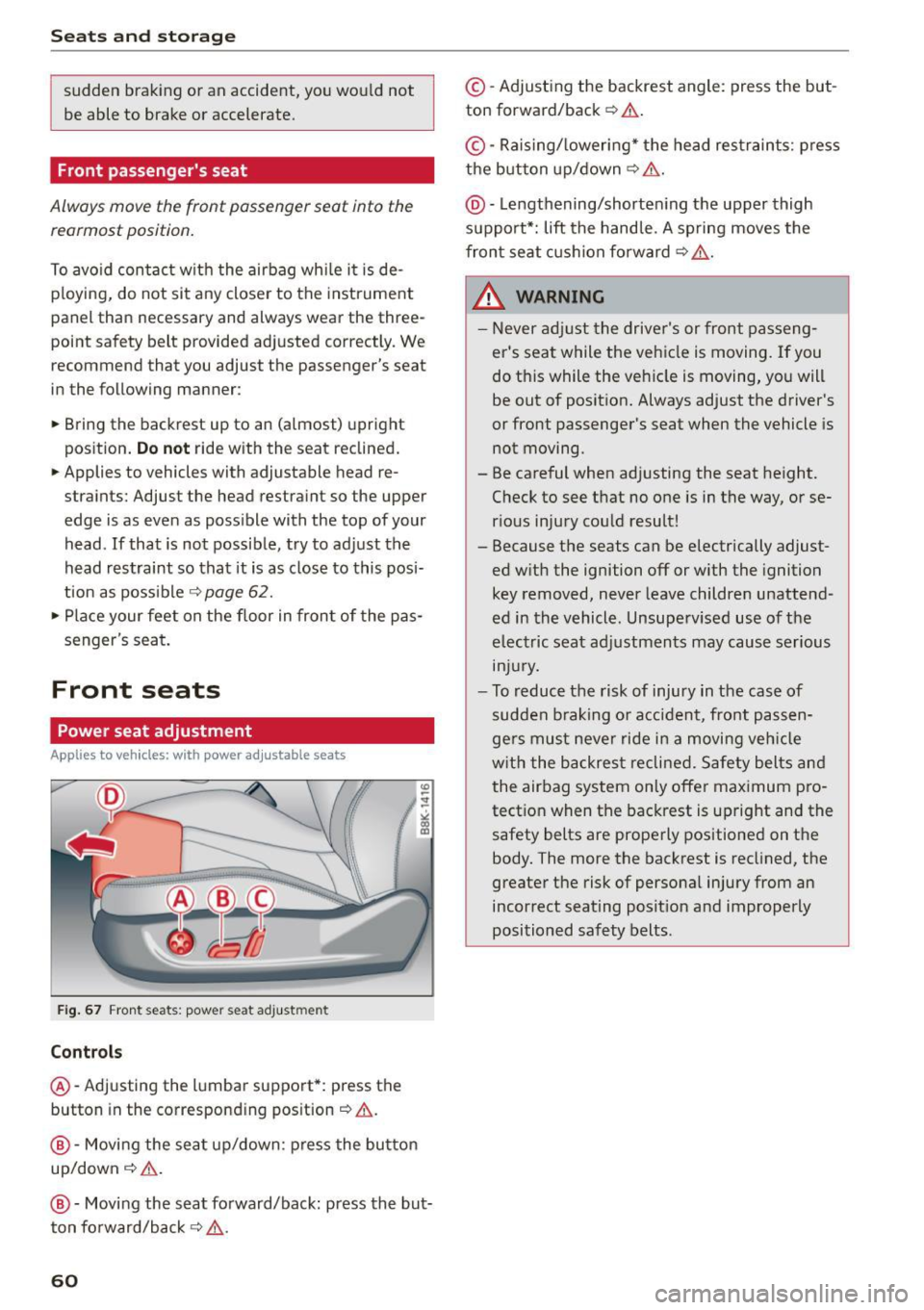
F ig . 67 Front seats : power seat adju stment
Controls
@-Adjusting the l umbar support*: press the
button in the correspond ing pos ition¢ .&.
@-Movi ng the seat up/down: press the button
up/down~ &.
@ -Moving the seat forward/back: press the but
ton fo rward/back
~ 11:-:,. .
60
©-Adjusting the backrest angle: press the but
ton forward/back ¢.& .
©-Raising/ lowering* the head res traints: p ress
the button up/down~ &.
@ -Lengthening/shorte ning the upper thigh
support*: lift the hand le. A sp ring moves the
fron t seat c ushion fo rward ¢
,&..
& WARNING -
-Never ad just the driver's or front passeng
er's seat while the vehicle is moving. If you
do this while the veh icle is moving , yo u will
be out of posit ion. Always adjust the driver 's
or front passenger's seat when the vehicle is
not moving .
- Be careful when adjusting the seat height. Check to see that no one is in the way, or se
r ious injury cou ld result!
- Because the seats can be electrically adjust
ed w ith the ignition off or with the ignition
key removed, never leave childre n unattend
ed in the vehicle. Unsuperv ise d use of the
electric seat adj ustments may cause serious
m Ju ry.
- To reduce the risk of injury in the case of
sudden b raking or accident, fro nt passen
ge rs must neve r ride in a moving veh icle
w it h the backres t reclined. Safety bel ts an d
the air bag system on ly offer ma ximum pro
tect io n when the backrest is upright and the
safety belts are properly positioned on t he
body. The more the backrest is recl ined, the
greater the risk of persona l injury from an
incorrect seating posit ion and improperly
positioned safety belts.
Page 66 of 268
Seats and storag e
Ashtray
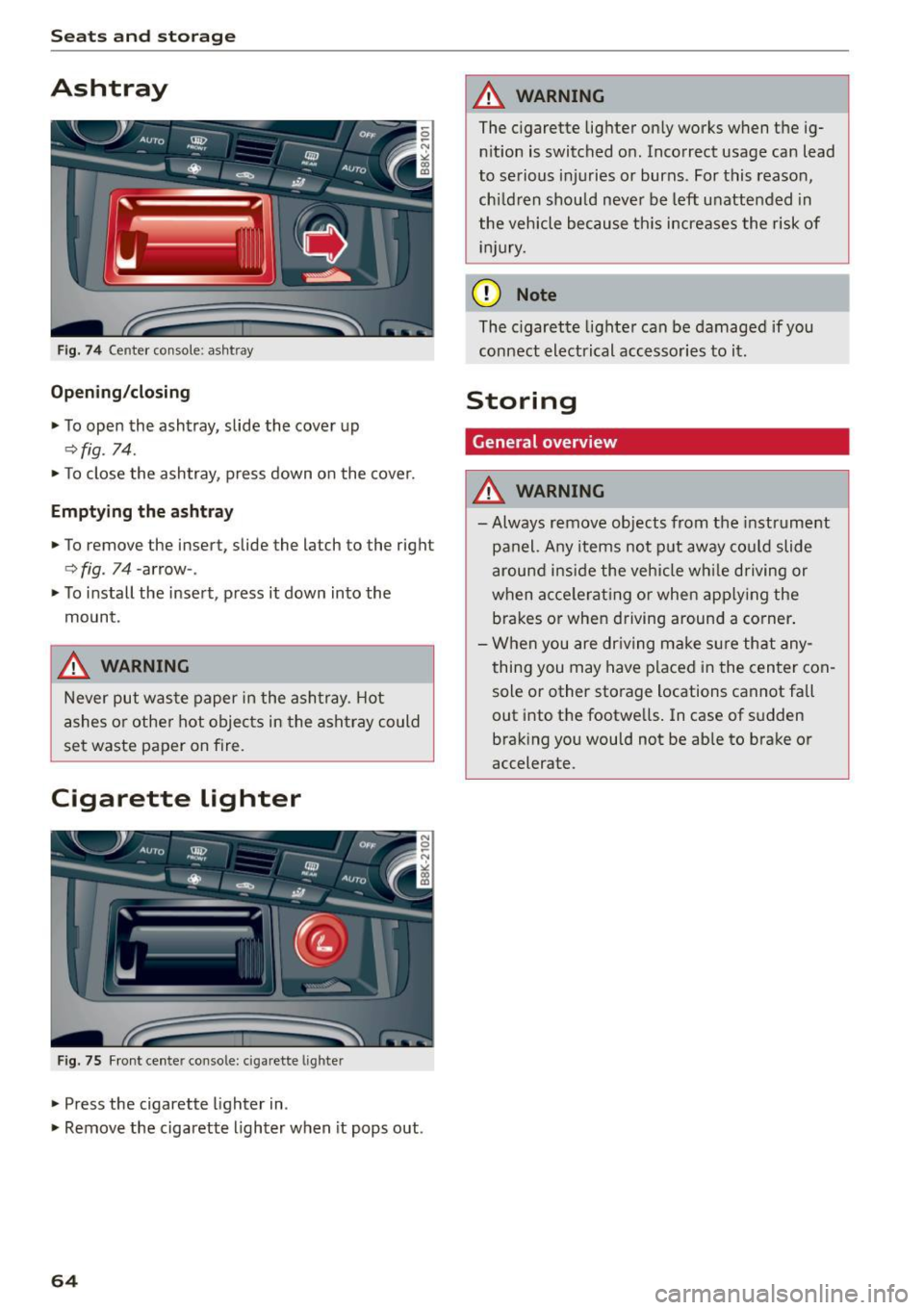
Fig. 74 Center console: ashtray
Open ing /closing
.,. To open the ashtray, slide the cover up
~fig. 74 .
.,. To close the ashtray, press down on the cover.
Empt ying th e asht ray
.,. To remove the insert, slide the latch to the right
c> fig. 74 -arrow- .
.,. To i nstall the insert, press it down into the
mount.
,&. WARNING
-
Never put waste paper in the ashtray. Hot
ashes or other hot objects in the ashtray could
se t waste paper on fire.
Cigarette Lighter
Fig. 75 Fr ont center console: cigarette l ighte r
.,. Press the cigarette lighter in .
.,. Remove the cigarette lighter when it pops out .
64
,&. WARNING
The cigarette lighter on ly wo rks when the ig
n ition is switched o n. Incorrect usage can lead
to serious injuries or burns. For this reason,
ch ildren shou ld never be left unattended in
the vehicle because th is increases the risk of
i nju ry.
(D Note
The c igarette lighter can be damaged if you
connect electrical accesso ries to it .
Storing
General overview
,&. WARNING
-Always remove objects from the instr ument
panel. Any items not put away cou ld slide
around i nside the vehicle wh ile driving or
when acce lerat ing o r when app ly ing the
brakes or when driving around a corner .
- When you are dr iving make sure that any
thing you may have placed i n the center con
sole or other storage locations cannot fall
out into the footwells. In case of s udden
brak ing you would not be able to brake or
accelerate.
Page 75 of 268
M N
ci LL co
rl I.O
"' N
"' rl
Driving
Steering
Manually adjustable steering wheel
The steering wheel position is fully adjus table up
and down and forward and back .
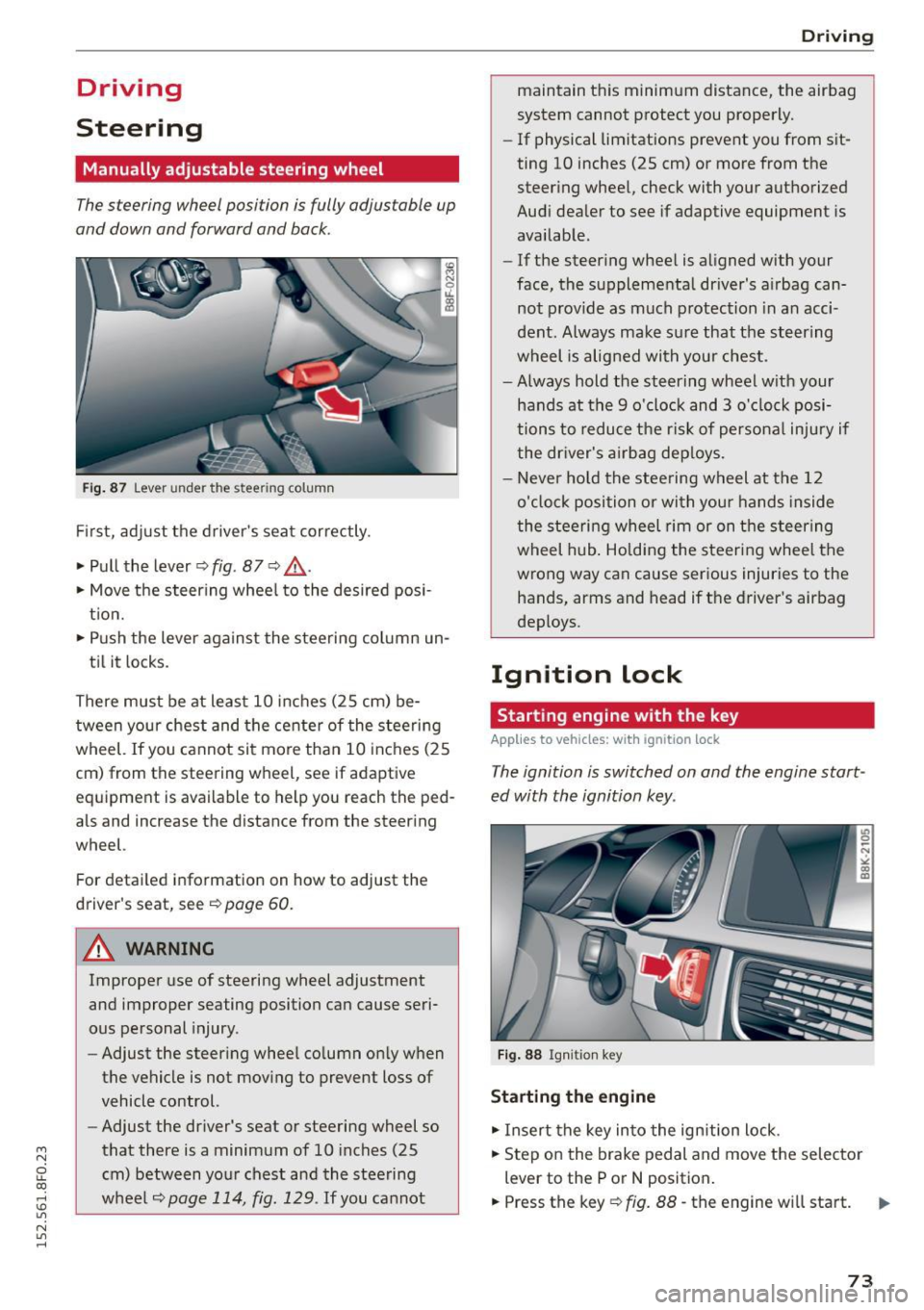
Fig. 87 Lever under the st eering column
First, adjust the driver's seat correctly.
• Pull the lever~
fig. 87 <=? .&, .
• Move the steering wheel to the desired posi
tion.
• Push the lever against the steering column un-
til it locks.
There must be at least 10 inches (25 cm) be tween your chest and the center of the steering
wheel. If you cannot sit more than 10 inches (25
cm) from the steering wheel, see if adaptive
eq uipm ent is available to help you reach the ped
als and increase the distance from the steering
wheel.
Fo r detailed information on how to adjust the
driver's seat, see
~page 60 .
.&_ WARNING
Improper use of steering wheel adjustment
and improper seating position can cause seri
ous personal injury.
- Adjust the steering wheel column only when
the vehicle is not moving to prevent loss of
vehicle control.
- Adjust the driver's seat or steering wheel so
that there is a minimum of 10 inches (25
cm) between your chest and the steering
wheel
~page 114, fig. 129 . If you cannot
-
Driving
maintain this minimum distance, the airbag
system cannot protect you properly.
-If phys ical limitations prevent you from sit
ting 10 inches (25 cm) or more from the
steering wheel, check with your authorized
Audi dealer to see if adaptive equipment is
available.
- If the steering wheel is aligned with your
face, the supplemental driver's airbag can
not provide as much protection in an acci
dent. Always make sure that the steering
wheel is aligned with your chest.
- Always hold the steering wheel with your
hands at the 9 o'clock and 3 o'clock posi
tions to reduce the risk of personal injury if
the driver's airbag deploys.
- Never hold the steering wheel at the 12
o'clock position or with your hands inside
the steering wheel rim or on the steering
wheel hub. Holding the steering wheel the
wrong way can cause serious injuries to the
hands, arms and head if the driver's airbag
deploys .
Ignition lock
Starting engine with the key
Applies to vehicles: with ignition lock
The ignition is switched on and the engine start
ed with the ignition key .
Fig. 88 Ignition key
Starting the engine
• Insert the key into the ignition lock .
• Step on the brake pedal and move the selector
lever to the P or
N position.
• Press the key~
fig. 88 -the engine will start.
73
Page 77 of 268

M N
ci LL co
rl I.O
"' N
"' rl
.. Tak e the adapter for the emergency key out of
the glove compartment
r=:> fig. 89.
.. Push the emergency key r=:> fig. 90 fully into the
adapter. Make sure that the Audi rings are fac
ing up.
.. Press the emergency key in the adapter down
until it latches audibly.
.. Insert the adapter with the emergency key for
ward into the ignition switch . The engine can
now be started as usual.
Stopping the engine
Applies to vehicles: with ig ni tion lock
.. Bring the vehicle to a full stop.
.. Automatic transmission: Move the selector lev
er to the P or N position.
.. Press on the ignition key. The engine is turned
off .
.. You can now remove the key.
Steering lock
The steering locks when you remove the ignition
k ey. The locked steering helps prevent vehicle
theft.
Emergency off
If it is necessary in unusual circumstances, the
engine can be switched off while the vehicle is
moving. The engine will be switched off if you
press on the key for an extended period.
A WARNING
- Never turn off the engine before the vehicle
has come to a complete stop. The full func
tion of the brake booster and the power
steering is not guaranteed . You must use
more force to turn or brake if necessary. Be
cause you cannot steer and brake as you
usually would, this could lead to crashes
and serious injuries.
- For safety reasons, you should always park
your vehicle with the selector lever in P. Oth
erwise, the vehicle could inadvertently roll
away.
- The radiator fan can continue to run for up
to 10 minutes even after you have turned
off the engine and removed the ignition key.
Driving
The radiator fan can also turn on again if the
engine coolant heats up because of intense
sunlight or heat build-up in the engine com
partment.
- Always take the key with you whenever you
leave your vehicle. Otherwise, the engine
could be started or electrical equipment
such as the power windows could be operat
ed. This can lead to serious injury.
- Never leave children or persons requiring as
sistance unattended in the vehicle. The
doors can be locked using the remote trans
mitter, preventing people from escaping
from the veh icle on their own in the event of
an emergency. Depending on the time of
year, people inside the vehicle can be ex
posed to very high or very low tempera
tures.
(D Note
If the engine has been under heavy load for
an extended period, heat builds up in the en
gine compartment after the engine is switch
ed off -there is a risk of damaging the engine.
Allow the engine to run at idle for about two minutes before switching it off.
Convenience key
Starting the engine
Applies to vehicles: wi th convenience key
The !START E NGIN E STOPI button switches the
ignition on and starts the engine.
Fig. 91 Center console : START ENGINE STOP button
Starting the engine
.. Step on the brake pedal and move the selector
lever to P or N
¢ &_ . .,.
75
Page 78 of 268

Driving
"'Press on the I START ENGINE STOPI button
¢fig. 91 -the engine wi ll start.
Switching the ignition on /off
If you would like to sw itch the ignition on with
out start ing the e ng ine, fo llow these steps:
"' Press the
!START ENGINE STOPI button with -
out pressing the brake pedal.
"'T o sw itch the ignition off, press the but to n
again.
If the engine sho uld not start immed iately, the
starting p rocess is a utomat ically stopped after a
short time. Repeat sta rting procedure.
When starting the engine, major e lectr ica l loads
are sw itched off temporar ily .
After a cold engine is started, there may be a brief period of increased noise because oil pres
sure must first build up in the hydraulic valve ad
justers. This is normal and not a cause for con
cern.
_& WARNING
- Never allow t he engine to ru n in co nfine d
spaces -dange r of asp hyxiation.
- Never turn off the engine unti l the vehicle
h as come to a comp lete stop.
- Always ta ke t he key with yo u w heneve r you
leave your vehi cle. Otherw ise, the eng ine
c ou ld be started or ele ct rical eq uipment
s u ch as the power w indows co uld be operat
ed. This can lead to serious injury.
- Never leave ch ild ren o r persons requ iring as
sistance unattended in the vehicle. The doo rs can be locked using the remote trans
mitter, preventing peop le from escap ing
from the vehicle on their own in the event of
an emergency. Depending on the time of
year, people inside the vehicle can be ex
posed to very high o r ve ry low tempe ra-
tu res.
(D Note
- Avoid high eng ine rpm, fu ll throttle and
heavy engine loads until the engine has
r eached operating tempe rat ure - otherwise
you r isk eng ine damage.
76
-
@ For the sake of the environment
Do not let the engine run while pa rked to
warm up. Begin dr iv ing immediately. Th is re
d uces unnecessary em issions.
(!} Tips
- After starting a col d en gine, t here may be a
br ie f per iod of increased noise because the
oil pressure must first bui ld up in the hy
draulic valve adjusters. This is norma l and
not a cause for concern.
- If you leave the veh icle with the ignition
switched on, the ig nition w ill switch off af
ter a ce rtain period of time. Please note that
e lect rical equipment such as exte rior lights
wi ll switch off as well when that happens.
Switching engine off
App lies to vehicles: wi th convenience key
"' Br ing your vehi cle to a comple te stop.
"' Move the se lector lever to the P o r N pos ition.
"' Press the
I START ENGINE STOP ! button
r=>poge 75, fig. 91.
Steering lock
The steer ing lo cks w hen yo u tur n the eng ine off
u sing the
I START ENGINE STOP I button a nd open
the d river's doo r. The loc ked steering helps pre
vent ve hicle theft .
Emergency off
If necessary, the e ngine can be switched off with
the se lec to r lever in the R or D/S posi tions. The
engine s tops if you press a nd ho ld the
I START ENGI NE STOP I button at speeds below
6 mph (10 km/ h) and press the brake peda l.
_& WARNING
-Never turn off the engine before the vehicle
has come to a complete stop. The full func
tion of the brake booster and the power
steer ing is not guaranteed. You must use
more force to turn or b rake if necessary. Be
caus e you cannot stee r and brake as you
usually wo uld, this cou ld lead to crashes
a nd se rio us in juries.
~
Page 79 of 268

M N
ci LL co
rl I.O
"' N
"' rl
-For safety reasons, you should always park
your vehicle with the selector lever in P. Oth
erwise, the vehicle could inadvertently roll
away .
- The rad iator fan can continue to run for up
to 10 m inutes even after you have turned
off the engine and removed the ignition key .
The rad iator fan can also turn on aga in if the
engine coolant heats up be cause of intense
s u nlight or heat bui ld-up in the engine com
partment.
- Always ta ke t he key with you wheneve r you
leave your vehicle. Otherwise, the eng ine
cou ld be started or electrical eq uipment
s u ch as the power windows cou ld be operat
ed. This can lead to serious injury.
(D Note
If the e ng ine has been under heavy load for
an extended per iod, heat builds up in the en
gine compartment after the engine is swi tch
ed off -there is a risk of damag ing the engine.
Allow the engine to run at idle for about two
m inutes before switch ing it off.
Driver messages
Ignitio n is on
This message appears and a war ning tone sounds
if you open the driver's door when the ignition is
switched on.
No ke y ide ntifi ed
This message appears when the
I STAR T ENGIN E STOP I button is pressed if t here
i s no master key inside the vehicle o r if the sys
tem does not recogni ze it. For example, the mas
ter key ca nnot be recognized if it is covered by an
object (e .g . alum inum br ie f case) which
screens
the radio signal. Electronic devices such as cell
phones can also interfere w ith the rad io signa l.
Press br ake pedal to sta rt engine
This message appears if you do not press the
b rake peda l to s tart the engine.
Shift to N or P to start engine
Dr ivi ng
This message appears when attempt ing to start
t h e engine if the se lector lever for the automatic
transmission is not in the P or N position. The en
gine can on ly be started w ith the selector in
these positions.
El I s the key in the vehicle?
T his mess age appears if the mas ter key is re
moved from the vehicle wi th the e ngine runn ing .
If the master key is no longer in the ve hicle, you
cannot switch on the ignition after stopping the
engine and you also cannot start the engine
again . Moreover, you cannot lock the vehicle from
t h e outside with the key.
Shift to P otherwise vehicle can roll away . Door s
do not lo ck
if le ve r is not in P.
This message appears for safety reasons along
with a warning signal. It appea rs if the selector
lever for the automatic transmission is not in the
P position when switch ing off the ignition. Move
the selector lever to the P position, otherwise the
vehicle is not secured against rolling away. You
also cannot lock the vehicle us ing the locking
button* on the door handle o r us ing t he remote
key .
Convenience key defe cti ve! Use ign ition lock
This message appears if the engine must be
started or stopped using the ign ition key and not
the
I STAR T ENGINE ST OP ! button.
Electromechanical
parking brake
Operation
The electromechanical parking broke replaces
the hand broke.
Fig . 92 Center co nso le: Pa rk in g b ra ke
77
Page 80 of 268
Driving
"'Pu ll on the switch @ ¢fig. 92 to apply the
parking brake . The indicator lights in the switch
and . (USA models)/ . (Canada mode ls) in
the inst ru ment cluste r il lum inate.
"' With the ign ition switched on, step on the
brake pedal or the accelerator pedal and press
the switch @ at the same t ime to release the
parking b rake . The indicator lights in the switch
and . (USA models)/ . (Canada mode ls) in
the instr ument cluster go o ut.
Your veh icle is equipped w ith an electromechan i
cal parking b rake. The par king b rake is designed
to p revent the veh icle from rolling unintentional
ly and replaces the hand brake.
In addition to the norma l funct ions of a tradit ion
a l hand bra ke, the e lectromechan ical pa rking
b rake provides var ious convenience and safety
f u nctions.
When start ing f rom rest
- The integral starting assist helps you when
driv ing by automat ically releasing the parking
brake ¢
page 78, Starting from rest.
-When sta rting on inclines , the starting assist
prevents the vehicle from un intent ionally roll
ing back. The bra kin g for ce of the par kin g b rake
is no t released until sufficien t driv ing fo rce has
been built up at the wheels .
Emergency brake function
An emergency brake ensures that the vehicle ca n
be slowed down even if the
normal brakes fa il
¢ page 79, Emergency braking.
A WARNING
If a drive range is eng age d with the vehicle
stationary and the engine running, you mus t
in no instance accelerate careless ly . Otherwise
the vehicle will start to move immed iate ly
r isk of an accident.
(D Tips
- If the parking brake is applied with the igni
tion switched off, the indicator lights in the
switch and -(USA models) . (Cana
da models) in t he instrument cl uster will go
out after a certa in period of time.
78
- Occasional noises when the pa rking brake is
applied an d released a re norma l and are not
a cause for concern .
- Whe n the vehicle is pa rked, the park ing
brake goes through a self-test cycle at regu
lar intervals. Any associated noises are nor
ma l.
Parking
"'Press the brake pedal to stop the veh icle .
"' Pull the sw itch @¢
page 77, fig. 92 to set the
parking brake .
"' Move the se lector lever to P.
"' Tur n the engine off ¢_& .
"' When on inclines or de clines, turn the steering
wheel so that the veh icle will roll into the curb
if it begins to move.
A WARNING
-
- When you leave your vehicle -even if only
briefly - always remove the ignition key. This
applies pa rticularly when children remain in
the vehicle . Otherwise the ch ild ren could
start t he engine, release the parking b rake
or operate elect rical equipment (e.g. power
w indows). There is the risk of an acc ident.
- When the veh icle is locked, no one -part icu
larly no t chi ld ren shou ld remain in the ve hi
cle. Lo cked doors m ake it more d ifficul t for
emergency workers to get into the veh icle -
putting lives at risk.
Starting from rest
The star ting assist function ensures that the
parking brake is released automatically upon
starting .
Stopping and applying parking brake
"' Pull the sw itch @¢ page 77, fig. 92 to apply
the par kin g b rake.
Starting and automatically releasing the
parking brake
"' When you sta rt to dr ive as usual, the park ing
bra ke is automatically released and yo ur vehicle
beg ins to move. .,_
Page 81 of 268
M N
ci u.. co ...... \!) ..,.,
N ..,., ......
When stopping at a traffic signal or stopp ing in
city traffic on vehicles with an automatic trans
miss ion, the park ing brake can be applied . T he
vehicle does not have to be held with the foot
brake. The parking brak e eliminates the tendency
to creep with a drive range engaged . As soon as
you dr ive off as usual , the parking brake is re
leased automatically and the veh icle starts to
move.
Starting on sl opes
When starting on inclines, the star ting ass ist pre
vents the vehicle from unintentionally rolling back. The braking force of the parking brake is
not released until sufficient driv ing force has
been b uilt up at the whee ls .
(D Tips
For safety reasons, the park ing brake is re
leased automatically only when the dr iver's
safety belt is engaged in the buckle.
Starting off w ith a trailer
T o prevent rolling back unintentionally on an in
cline, do the following:
.,. Keep the switch@q page 77, fig . 92 pulled
and depress the accelerator . The park ing b rake
stays applied and prevents the vehicle from
ro lling bac kward .
.. You can release the switc h @ once you are su re
t h at you a re developing enough driving force at
the whee ls by depressing the acce lerator .
D epending on the weight o f the r ig (veh icle and
trai ler) and the seve rity of the in cli ne, you may
roll backwards as you sta rt. Yo u can prevent roll
i n g bac kwards by ho lding the parking brake
switch @ pulled out and acce lerating -just as
you would when starting on a hill with a conven
tional hand brake .
Driving
Emergency braking
In the event that the conventional brake system
fails or locks .
.. In an emergency, pull the sw itch @ q page 77,
fig . 92 and continue to pull it to slow your vehi
cle down with the parking brake .
.. As soon as you release the switch @ or accele r-
ate, the b ra ki ng process stops.
If you pull the switch @and hold it above a
speed of about 5 mph (8 km/h), the emergency braking function is i nitiated . The vehicle is b raked
at all fo ur whee ls by act ivati ng the hydrau lic
brake system. The br ake performan ce is s imi la r
to maki ng a n emergency stop
q &. .
In order not to act ivate the eme rgency braking by
mis take, an aud ib le warn ing tone (buz ze r)
sounds when the swi tc h @ is p ulled. As soon as
the switch @ is re lease d, or the acce le rator pedal
is depressed, emergency braking stops.
A WARNING
=
Emergency braking should on ly be used in an
emergency, when the norma l foot brake has
failed or the brake peda l is obstructed. Us ing
the parking brake to perfo rm emergency brak
ing will slow your vehicle down as if you had
made a full bra ke application . T he laws of
physics cannot be suspended ev en with ESC
and its a ssociated components (A BS, ASR,
E DS). In co rners and when road o r we ather
conditions are ba d, a f ull brake applica tion
can cause the ve hicl e to skid o r the rear end to
b reak away -risking an accident.
Speed warning system
Overview
The speed warning sys tem helps you to keep your
driving speed below a set speed limit.
The speed warn ing system warns if the driver ex
ceeds a previous ly s tored maximum speed. A
warning tone will sound as soon as the veh icle
speed exceeds the set speed by about 3 mph
(3 km/h) . At the same time, a warning symbo l
79
Page 83 of 268
M N
ci LL co
rl I.O
"' N
"' rl
Cruise control system
Switching on
The cruise control system makes it possible to
drive at a constant speed starting at 20 mph (30
km/h) .
0
f
®t
0
Fig. 94 Control lever with push-bu tton
Fig. 95 Display : Selected speed
al M 0 ±
ti
~ 0 er: a,
"'
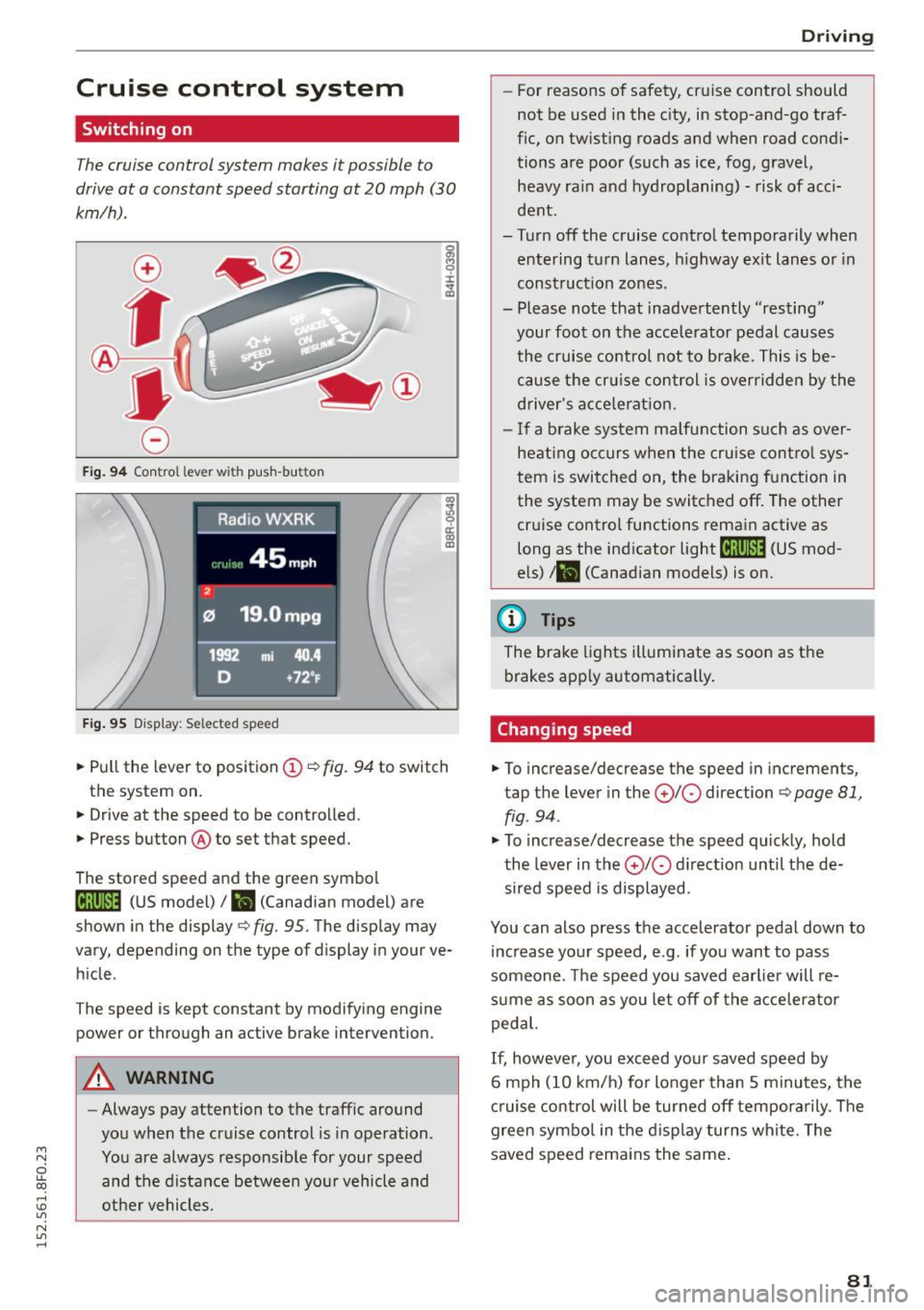
• Pull the lever to position (D ¢ fig. 94 to switch
the system on.
• Drive at the speed to be controlled.
• Press button @to set that speed.
The stored speed and the green symbol
[lj;(i )~i4 (US model)/ l'I (Canadian model) are
shown in the display ¢
fig. 95. The display may
vary, depending on the type of display in your ve
hicle .
The speed is kept constant by modifying engine
power or through an active brake intervention.
A WARNING
-Always pay attention to the traffic around
you when the cruise control is in operation.
You are always responsible for your speed and the distance between your vehicle and
other vehicles.
Driving
- For reasons of safety , cruise control should
not be used in the city, in stop-and-go traf
fic, on twisting roads and when road condi
tions are poor (such as ice, fog, gravel, heavy ra in and hydroplaning) - risk of acci
dent .
- Turn off the cruise control temporarily when entering turn lanes , highway exit lanes or in
construction zones.
- Please note that inadvertently "resting" your foot on the accelerator pedal causes
the cruise control not to brake. This is be
cause the cr uise control is overridden by the
driver's accele rat ion.
- If a brake system malfunction such as over
heating occurs when the cruise control sys
tem is switched on, the braking function in
the system may be switched off . The other
cruise control functions remain active as
long as the ind icator
light til;rnM4 (US mod
els)
t l'I (Canadian models) is on.
(D Tips
The brake lights illuminate as soon as the
brakes apply automatically.
Changing speed
• To increase/decrease the speed in incremen ts,
tap the lever in the
(£)10 direction ¢ page 81,
fig . 94 .
"'To increase/decrease the speed quickly, hold
the lever in the
010 direct ion until the de
sired speed is displayed.
You can also press the accelerator pedal down to increase your speed, e.g . if you want to pass
someone . The speed you saved earlier will re
sume as soon as you let off of the accelerator
pedal.
If, however, you exceed your saved speed by
6 mph (10 km/h) for longer than 5 minutes, the
cruise control will be turned off temporarily . T he
green symbo l in the display turns white. The
saved speed remains the same .
81