instrument cluster AUDI A5 CABRIOLET 2015 User Guide
[x] Cancel search | Manufacturer: AUDI, Model Year: 2015, Model line: A5 CABRIOLET, Model: AUDI A5 CABRIOLET 2015Pages: 268, PDF Size: 66.88 MB
Page 45 of 268
M N
ci LL co
rl I.O
"' N
"' rl
(D Note
-To prevent damage to the power top:
- do not store any objects in the powe r top
compartment.
- make sure the re is enough space above
the vehicle when open ing or closing the
power top.
- To reduce the risk of damage, make su re
there are no fragile objects within the stor
age bay's range of motion.
(D Tips
- To prevent the battery from draining, do not
open or close the power top repeatedly
when the engine is switched off.
- A message will appear in the instrument cluster display if there is a power top ma l
funct ion
~ page 44.
- The power top can also be operated manual
l y if there is a malfunct ion ¢
page 46,
Power top emergency operation. The cause
of the malfunction should be corrected by
an a uthorized Audi dea ler or authorized re
pair facility as soon as possible.
- The vehicle is not protected from the weath
er or from unauthorized entry if the vehicle
is left parked with the power top open. Lock
any objects you are leaving in the vehicle in
the luggage compartment. Close the power
top before leaving the vehicle.
- The side windows lower slightly automati
cally when opening/closing the power top.
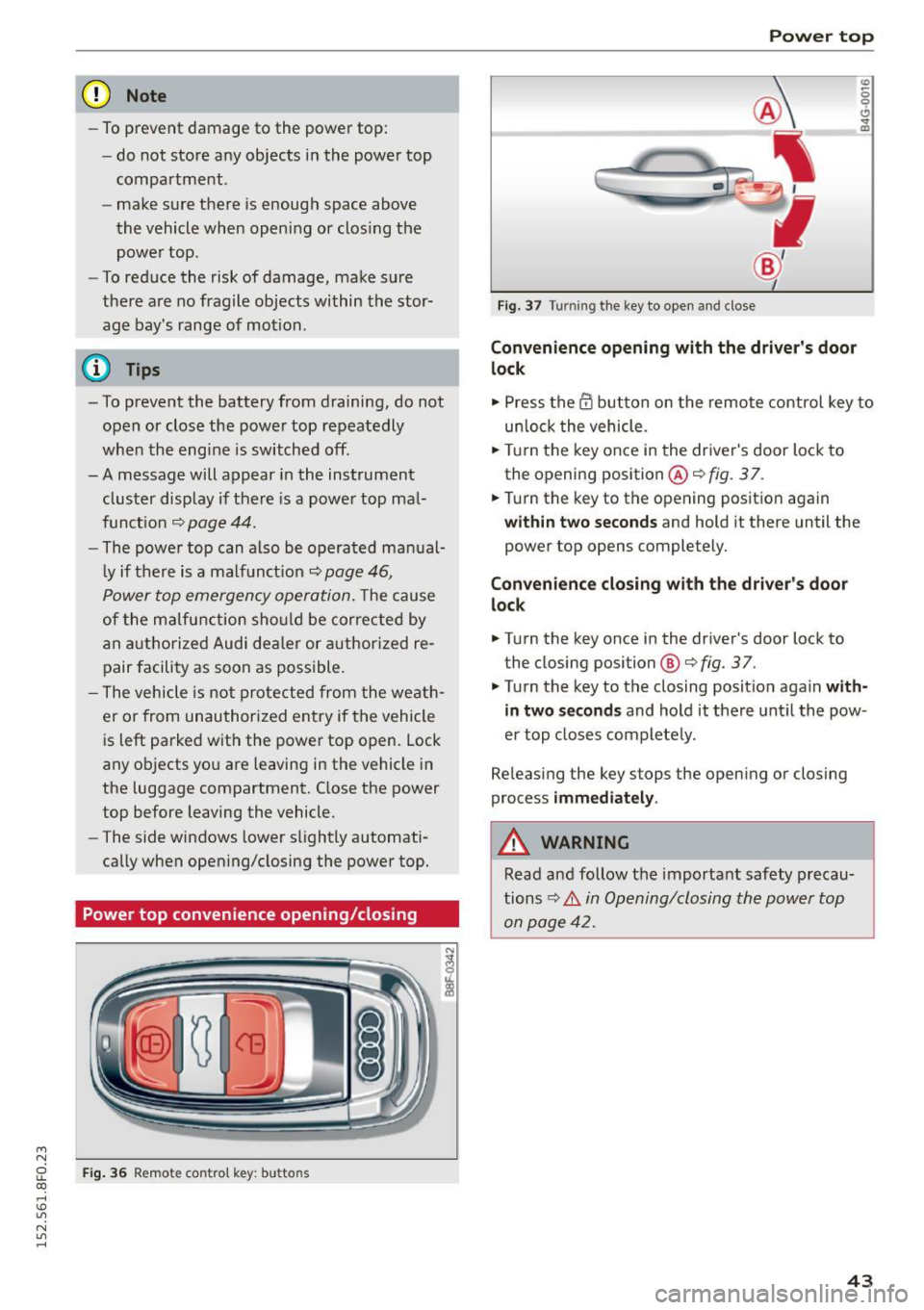
Power top convenience opening/closing
F ig . 36 Remote control key: buttons
Power top
Fig. 37 Turning the key to open and close
Convenience opening with the driver 's door
lock
0
0 ... m
"" Press the@ button on the remote control key to
un loc k the vehicle .
.,. Turn the key once in the driver's door lock to
the opening position @¢
fig. 3 7.
.,. Turn the key to the opening position again
wi thin two seco nds and hold it there until the
power top opens completely.
Conv enience closing with th e dri ver's door
lo ck
.,. Turn the key once in the driver's door lock to
the closing position@¢
fig. 37.
.,. Turn the key to the closing position aga in with
in t wo se cond s
and hold it there unt il the pow
er top closes completely.
Releasing the key stops the opening or closing
process
i mm ed ia te ly .
A WARNING
Read and follow the important safety precau
tions
c:> .&. in Opening/closing the power top
on page 42.
4 3
Page 80 of 268
Driving
"'Pu ll on the switch @ ¢fig. 92 to apply the
parking brake . The indicator lights in the switch
and . (USA models)/ . (Canada mode ls) in
the inst ru ment cluste r il lum inate.
"' With the ign ition switched on, step on the
brake pedal or the accelerator pedal and press
the switch @ at the same t ime to release the
parking b rake . The indicator lights in the switch
and . (USA models)/ . (Canada mode ls) in
the instr ument cluster go o ut.
Your veh icle is equipped w ith an electromechan i
cal parking b rake. The par king b rake is designed
to p revent the veh icle from rolling unintentional
ly and replaces the hand brake.
In addition to the norma l funct ions of a tradit ion
a l hand bra ke, the e lectromechan ical pa rking
b rake provides var ious convenience and safety
f u nctions.
When start ing f rom rest
- The integral starting assist helps you when
driv ing by automat ically releasing the parking
brake ¢
page 78, Starting from rest.
-When sta rting on inclines , the starting assist
prevents the vehicle from un intent ionally roll
ing back. The bra kin g for ce of the par kin g b rake
is no t released until sufficien t driv ing fo rce has
been built up at the wheels .
Emergency brake function
An emergency brake ensures that the vehicle ca n
be slowed down even if the
normal brakes fa il
¢ page 79, Emergency braking.
A WARNING
If a drive range is eng age d with the vehicle
stationary and the engine running, you mus t
in no instance accelerate careless ly . Otherwise
the vehicle will start to move immed iate ly
r isk of an accident.
(D Tips
- If the parking brake is applied with the igni
tion switched off, the indicator lights in the
switch and -(USA models) . (Cana
da models) in t he instrument cl uster will go
out after a certa in period of time.
78
- Occasional noises when the pa rking brake is
applied an d released a re norma l and are not
a cause for concern .
- Whe n the vehicle is pa rked, the park ing
brake goes through a self-test cycle at regu
lar intervals. Any associated noises are nor
ma l.
Parking
"'Press the brake pedal to stop the veh icle .
"' Pull the sw itch @¢
page 77, fig. 92 to set the
parking brake .
"' Move the se lector lever to P.
"' Tur n the engine off ¢_& .
"' When on inclines or de clines, turn the steering
wheel so that the veh icle will roll into the curb
if it begins to move.
A WARNING
-
- When you leave your vehicle -even if only
briefly - always remove the ignition key. This
applies pa rticularly when children remain in
the vehicle . Otherwise the ch ild ren could
start t he engine, release the parking b rake
or operate elect rical equipment (e.g. power
w indows). There is the risk of an acc ident.
- When the veh icle is locked, no one -part icu
larly no t chi ld ren shou ld remain in the ve hi
cle. Lo cked doors m ake it more d ifficul t for
emergency workers to get into the veh icle -
putting lives at risk.
Starting from rest
The star ting assist function ensures that the
parking brake is released automatically upon
starting .
Stopping and applying parking brake
"' Pull the sw itch @¢ page 77, fig. 92 to apply
the par kin g b rake.
Starting and automatically releasing the
parking brake
"' When you sta rt to dr ive as usual, the park ing
bra ke is automatically released and yo ur vehicle
beg ins to move. .,_
Page 82 of 268
Driving
appears in the display . The symbol's appearance
m ight be diff erent in some models.
The speed warning system has two warn ing
thresholds that function independently of each
other and that have somewhat different purpos
es:
Speed warning 1
You ca n use speed wa rning 1 to set the maximum
speed while yo u are driving. This setting w ill re
main in effect unt il you tu rn
off the ignition , as
suming that you have not c hanged or reset the
setting .
The . (USA models) /. (Can ada mode ls)
speed war ning symbol in the wa rni ng
1 display
appears when you exceed the maximum speed.
It
goes o ut when the speed fa lls below the stored
maximum speed.
The speed wa rning symbo l w ill also go out if the
speed
exceeds t he stored maximum speed by
mo re tha n about 25 mp h
(40 km/h) for at least
10 seconds. The stored maximum speed is de let
ed.
Speed warn ing 2
S toring wa rn ing 2 is recommended if you always
want to be reminded of a certain speed, for ex
ample when you are trave ling in a co unt ry that
has a genera l maxim um speed limit, or if you do
not want to exceed a specified speed for w inter
tires .
The . (USA models)
I. (Canada mode ls)
speed warn ing 2 symbo l appears in the disp lay
when yo u exceed the stored speed limit. Unlike
warn ing 1, it will not go out until the veh icle
speed d rops be low the stored speed limit .
Sett ing speed warning 2
c::> page 80.
(D) Tips
Even tho ugh your vehicle is equip ped with a
spee d war ning system, you s ho ul d still watch
the speedometer to make sure you are not
driving faster than t he speed limit.
80
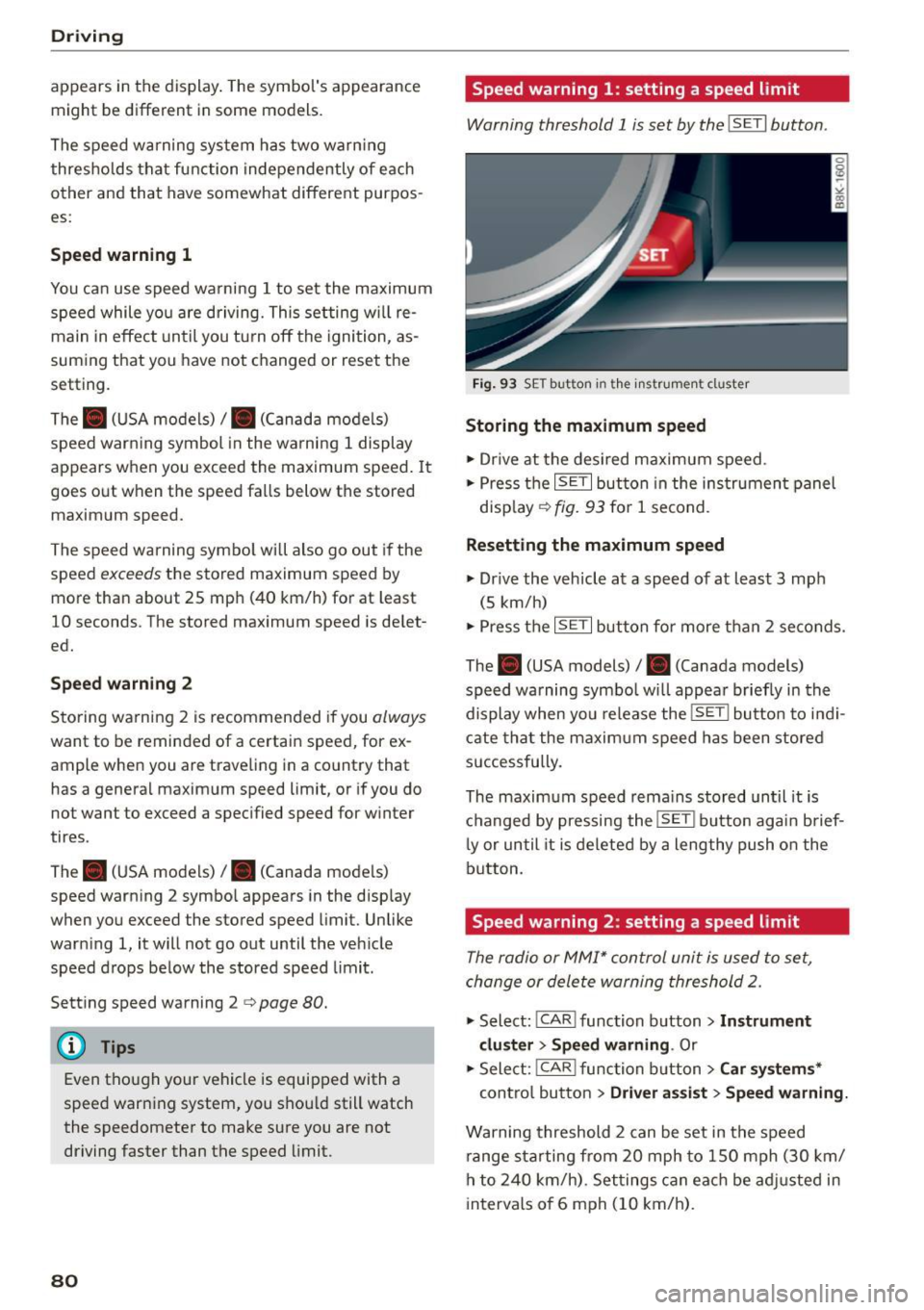
Speed warning 1: setting a speed limit
Warning threshold 1 is set by the ISETI button .
Fig. 9 3 SE T button in the instru men t cl uster
Storing the maximum speed
.,. Dr ive at the desi red maximum s peed .
.,. Press t he
ISE TI but ton in the ins trumen t panel
disp lay ¢
fig. 93 for 1 second .
Resetting the maximum speed
.,. Dr ive the veh icle at a speed of at leas t 3 mph
(5 km/h)
.,. Press the
~ 1s =ET= I button fo r more t han 2 seconds.
The . (USA models)/ . (Canada models)
speed warning symbo l wi ll appea r briefly in the
display when you release the
ISE T! bu tton to i ndi
cate tha t the m axim um speed has been stored
successfully.
The maxim um speed r ema ins stored until it is
c h anged by pressing the
ISE TI b ut ton aga in brief
l y or until it is deleted by a lengthy push o n the
bu tton.
Speed warning 2: setting a speed limit
The radio or MMI* control unit is used to set,
change or dele te warning threshold
2.
.,. Select : ICAR ! function b utton> Instrument
cluster > Speed warning .
Or
.,. Select: I CAR I func tion button > Car sy stem s*
contro l bu tton > Dri ver a ssist> Speed warning.
Warning threshold 2 can be set in the speed
r ange starting from 20 mph to 150 mph (30 km/
h to
2 4 0 km/h) . Se ttings can eac h be ad justed in
intervals o f 6 mph (10 km/h) .
Page 85 of 268
M N
ci u.. co ,...., \!) 1.1'1
N 1.1'1 ,....,
Automatic transmission
multitronic, S tronic,
tiptronic
Introduction
Appl ies to vehicles: with multitronic/5 tronic/tiptronic
The automatic transmission is controlled elec
tronically. The transmission upshifts or down
shifts automatically depending on which drive
program is se lected.
When a
moderate driving style is used, the
transmission selects the most economica l driving
mode. It will then change up early and delay the
downshifts to give better fuel economy .
The transmission switches to a sporty mode after
a kick-down or when the driver uses a
sporty driv
ing style
characterized by quick accelerator pedal
movements, heavy acceleration, frequent
changes in speed and traveling at the maximum
speed .
If desired, the driver can also se lect the gears
manually (tiptronic mode) q page 83.
Various automatic transmissions may be instal
led, depending on the model:
multitronic transmission
The multitronic transmission is a continuously
variable transmission. Power is transferred using
a mu ltidisk clutch. In contrast to conventional
automatic transmissions using shifting opera
tions, the transmission ratio in the continuously
variable transmission is changed continuous ly.
This optimi zes the comfort level and conserves
fuel.
S tronic transmission
The 5 tronic is a dual-clutch transmission. Power
is transferred using two clutches that work inde
pendently from one another. They replace the
torque converter used in conventional automatic
transmissions and allow the vehicle to accelerate
without a noticeable interruption in traction .
tiptronic transmission
In the tiptronic transmission, power is transfer
red by a torque converter.
Automatic transmission
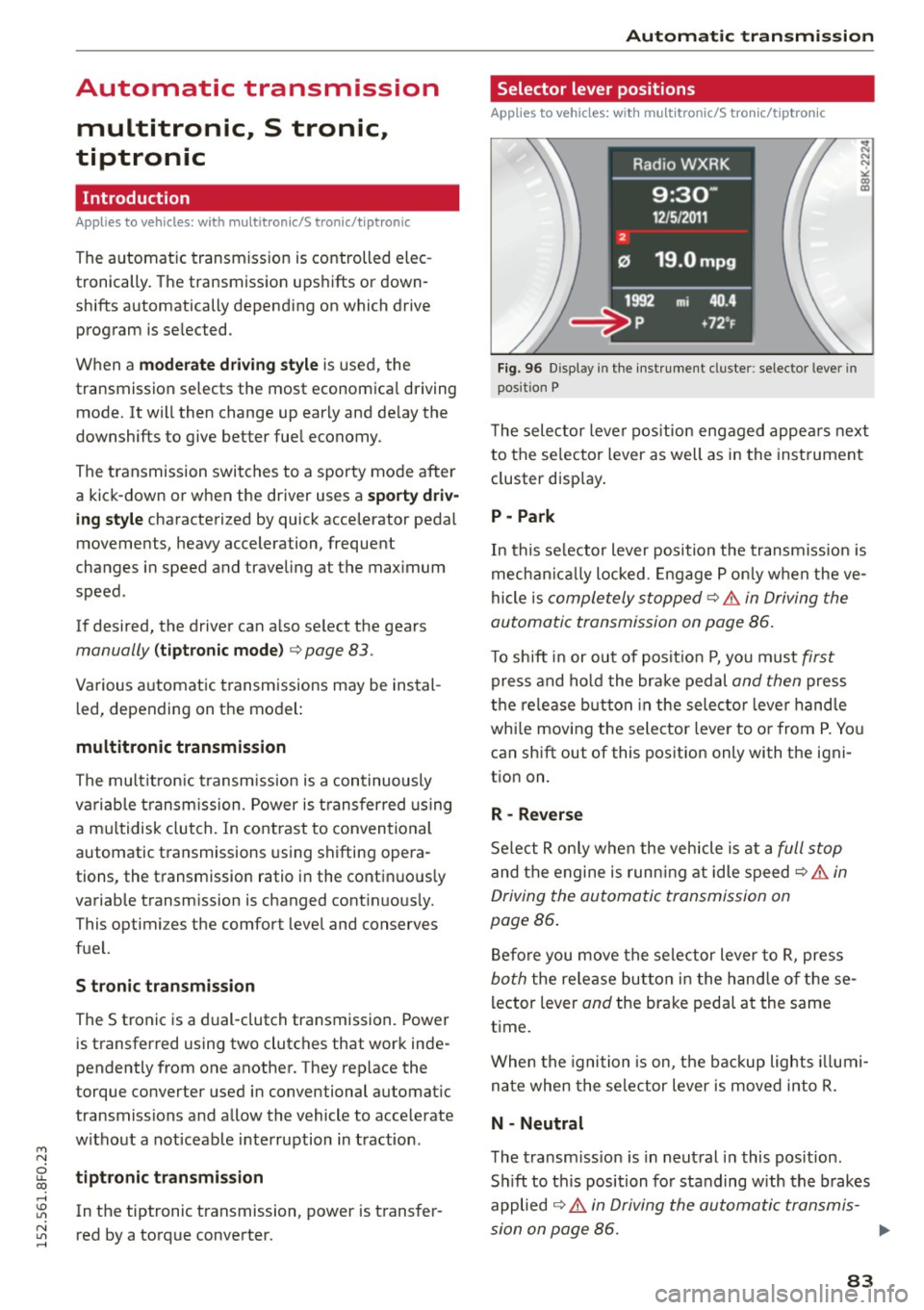
Selector lever positions
Applies to vehicles: with multitronic/S tronic/tiptronic
Fig. 96 Disp lay in the instrument cluster: selec tor lever in
position P
T he selector lever position engaged appears next
to the se lector lever as well as in the instrument
cluster display.
P -Park
In this se lector lever position the transmission is
mechanically locked . Engage P only when the ve
hicle is
completely stopped~.&. in Driving the
automatic transmission on page 86.
To shift in or out of posit ion P, you must first
press and hold the brake pedal and then press
the release button in the selector leve r handle
whi le moving the selector lever to or from P. You
can shift out of this position only with the igni
tion on.
R - Reverse
Select R only when the vehicle is at a full stop
and the engine is running at idle speed~ .&. in
Driving the automatic transmission on
page 86 .
Before you move the selector lever to R, press
both the release button in the hand le of these
lector lever
and the brake pedal at the same
time .
When the ignition is on, the backup lights illumi
nate when the selector lever is moved into R.
N -Neutral
The transmission is in neutral in this position .
Sh ift to this position for standing with the brakes
applied
~ .&. in Driving the automatic transmis-
sion on page 86. .,.
83
Page 86 of 268

Automatic transmission
When the vehicle is stationary or at speeds below
1 mph (2 km/h), you must always apply the foot
brake before and while moving the lever out of N.
DIS -Normal position for driving forward
In the D/S position, the transmission can be oper
ated either in the normal mode Dor in the sport
mode S . To select the sport mode S, pull these
lector lever back brief ly. Pulling the lever back
again will se lect the normal mode D . The inst ru
ment cluster display shows the selected driving
mode.
In the
normal mode D , the transmission auto
matically selects the suitable gear ratio . It de
pends on engine load, vehicle speed and driving
style.
Select the
sport mode S for sporty driving. The
vehicle makes full use of the engine 's power .
Shifting may become noticeable when accelerat
ing.
When the vehicle is stationary or at speeds below 1 mph (2 km/h), you must a lways apply the foot
brake before and while moving the lever to D/S
out of N.
A WARNING
Read and follow all WARNINGS¢.&. in Driv
ing the automatic transmission on
page 86.
(D Note
Coast ing downh ill with the transmission in N
and the engine not running will result in dam
age to the automatic transmission and possi
bly the catalytic converter.
@ Tips
- On vehicles with drive select* , you can ad
just the sporty sh ift characteristics in the
Dynamic driving mode .Swill appear in the
instrument cluster display instead of D.
-If you accidentally select N while driving,
take you r foot off the accelerator pedal im
mediately and wait for the engine to slow
down to idle before selecting D/S.
84
-If there is a power fai lure, the selector lever
wi ll not move out of the P position. The
emergency release can be used if this hap
pens ¢
page 89.
Automatic Shift Lock (ASL)
Applies to vehicles: with mult itronic/5 tronic/tiptron ic
The Automatic Shift Lock safeguards you against
occidentally shifting into a forward or the re
verse gear and causing the vehicle to move unin
tentionally.
Fig. 97 Sh ift gate: se lector lever lock pos it ions and re lease
button high lig hted
The selector lever lock is released as follows:
.,. Turn the ignition on.
.,. Step on the brake pedal.
At the some time
press and hold the release button on the side of
the gear selector knob¢
fig. 97 with your
thumb until you have moved the selector lever
to the desired position .
Automatic selector lever lock
The selector lever is locked in the P and N posi
tions when the ignition is turned on . You must
press the brake pedal and the release button to
select another posit ion. As a reminder to the
driver, the following warning appears in the in
strument cluster display when the selector is in P
and N:
When stationary apply brake pedal while select
ing gear
The Automatic Shift Lock only functions when the
vehicle is stat ionary or at speeds below 1 mph
(2 km/h).
Page 89 of 268
M N
ci LL co
rl I.O
"' N
"' rl
Hill descent control switches off once the decline
levels out or you press the accelerator pedal.
On vehicles w ith the cruise control system*
¢ page 81, hill descent control is also activated
when the speed is set.
&,_ WARNING
H ill descent control cannot overcome physical
limitations, so it may not be able to maintain
a constant speed under all conditions. Always
be ready to apply the brakes.
Manual shift program
A ppl ies to vehicles: w ith mul titr onic /S tronic/t iptronic
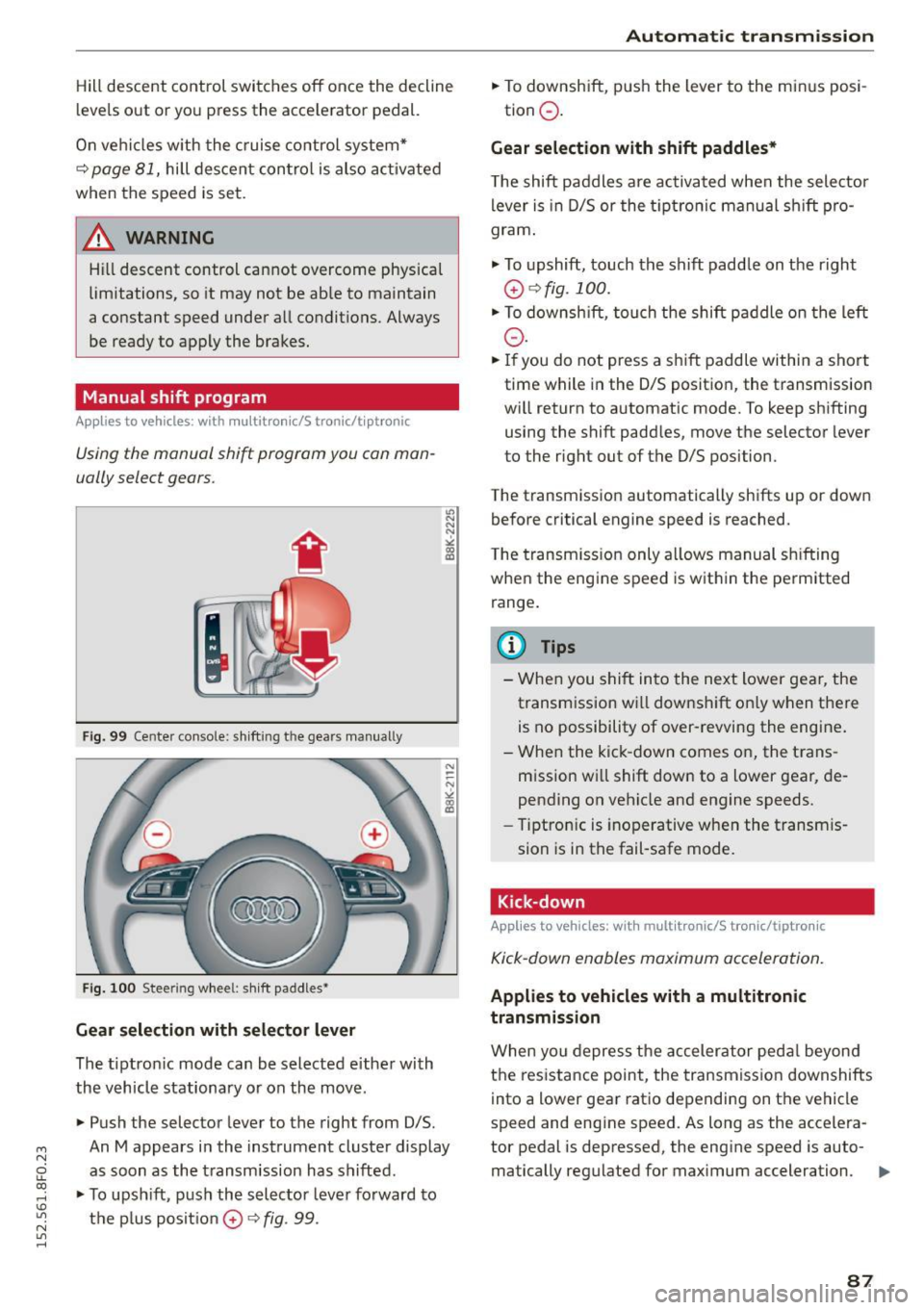
Using the manual shift program you can man
ually select gears.
Fig. 99 Center console: shift ing t he gears manually
Fig. 100 Steer ing wheel : sh ift paddles•
Gear selection with selector lever
The tiptronic mode can be selected either with
the vehicle stationary or on the move.
• Push the selector lever to the right from 0/5.
"' N N N ,.:i
~
An M appears in the instrument cluster display
as soon as the transmission has shifted .
• To upshift, push the selector lever forward to
the plus posit ion
0 ¢ fig . 99.
Automatic transmission
• To downshift, push the lever to the minus posi-
tion
0 .
Gear selection with shift paddles*
The shift paddles are activated when the selector
lever is in D/5 or the tiptronic manual sh ift pro
gram .
.,. To upshift, touch the shift padd le on the right
0 ¢ fig. 100.
• To downshift , touch the shift paddle on the left
0-
• If you do not press a shift paddle within a short
time while in the 0/5 position, the transmission
will return to automatic mode. To keep shifting using the shift paddles, move the selector lever
to the rig ht out of the 0/5 position.
The transmission automatically shifts up or down before critical engine speed is reached.
The transmission only allows manual shifting
when the engine speed is within the permitted
range.
@ Tips
- When you shift into the next lower gear, the
transm ission wi ll downshift on ly when there
is no possibility of over-revving the engine.
- When the kick -down comes on, the trans
mission will shift down to a lower gear, de
pending on vehicle and engine speeds.
- Tiptronic is inoperative when the transm is
sion is in the fail-safe mode.
Kick-down
Applies to vehicles: wit h mult itronic/S tro nic/tiptro nic
Kick-down enables maximum acceleration.
Applies to vehicles with a multitronic
transmission
When you depress the accelerator pedal beyond
the resistance point , the transmission downshifts
into a lower gear ratio depending on the vehicle
speed and engine speed. As long as the accelera
tor pedal is depressed, the engine speed is auto-
matically regulated for maximum acceleration.
1111>-
87
Page 94 of 268

Audi adaptive cruise control and braking guard
Audi adaptive cruise
control
De script ion
Applies to veh icles: with Audi adaptive cruise co ntrol
F ig. 106 Detect ion range
What can Audi adaptive cruise control do?
The adaptive cruise control works in conjunction
with a radar sensor instal led in the front of the
vehicle
¢ page 90, fig. 103, which is subject to
designated system limits¢
page 92. Stationary
objects are disregarded.
On open roads w ith no traff ic, adaptive cruise
control works like a regula r cruise control system.
The stored speed is mainta ined . When approach
ing a moving vehicle detected up ahead, the
adaptive cruise control system automatically
slows down to match that vehicle's spe ed and
then maintains the distance that the d river previ
ously stored. A s soon as the system does not de
t ec t a vehicle up ahead, adap tive cruise control
accelerates back up to the stored speed .
Which functions can be controlled?
When you switch adaptive cruise control on, you
can set the current speed as the "control speed"
¢ page 92 , Swit ch ing on and off.
When driving, you can stop cruise control
¢
pag e 94 or change the speed ¢ page 93 at
any time.
You can a lso set the distance to the object ahead
and set the adaptive cr uise control driving pro
gram
¢ page 94.
92
Switch ing on and off
Applies to vehicles: with A udi adaptive cruise contro l
Fig. 107 Selector le ve r: switc hin g o n/off
Fig. 108 I ns trume nt cl ust er: Au di ada ptive cruise control
You can set any speed between 20 mph and 95
mph (30 and 150 km/h).
Indicator lamps and messages in the instrument cluster display inform you about the current sys
tem status and settings.
Switching Audi adaptive cruise control on
.. Pull the lever toward you into position (D
¢ fig. 107 . ACC standby appears in the instru
ment cluster display .
Setting the speed and activating regulation
.. To set the current speed, press the ISET I button
¢
page 11, fig. 4. The set speed is shown in the ..,.
Page 96 of 268

Audi adaptive cruise control and braking guard
Interrupting cruise control
Applies to veh icles: w ith Audi adaptive cruise co ntrol
Fig. 110 Selector leve r
Requirement : adaptive cruise control must be
switched on
¢ fig . llO (i).
Overriding cruise control
• To accelerate manually, press the acce lerator
pedal. The message
ACC override appears .
• To resume adaptive cruise control, remove your
foot from the gas pedal. The system returns
again to the speed that was saved before.
• You can save a new speed at any time by press·
ing the
ISETI button r:::;, page 11, fig. 4.
Canceling cruise control while driving
• Move the lever into position @. The message
ACC standby appears . Or
• press the brake pedal.
• To resume the stored speed, move the lever in
to position
@ .
,& WARNING
Never resume the stored speed if the speed is
too high for prevailing road, traffic or weather
conditions.
94
Setting the distance
App lies to vehicles: wit h Audi adapt ive cru ise contro l
Fig. 111 Selector lever: setting the d istance
• Tap the switch to display the current set dis
tance
¢ fig . 111 .
• To increase or reduce the distance by incre·
ments, tap the switch again to the left or right.
The distance between the two veh icles will
change in the instrument cluster display .
When approach ing a mov ing vehicle up ahead,
the adapt ive cruise control system brakes to
match that object's speed and then mainta ins
the stored distance. If the vehicle ahead acceler
ates, adaptive cruise contro l will also accelerate
up to the stored speed.
The higher the speed, the greater the distance in
yards (meters)
r:::;, A . The Distance 3 setting is
recommended.
The distances prov ided are specified va lues . De
pending on the driving situation and the how the
vehicle ahead is driving, the actua l dis tance may
be more or less than these target distances.
The var ious symbols for the time increments ap
pear briefly in the information line@r:::;,
page 92,
fig. 108 when you change the settings .
o;:'.'.:>_o;:'.'.:> ___ Distance 1: This setting corresponds
to a distance of 92 feet/28 meters when travel·
i ng at 62 mph (100 km/h), or a time i nterva l of 1
second.
o;:'.'.:> __ o;:'.'.:> __ Distance 2: This setting corresponds
to a distance of 118 feet/36 meters when travel
i ng at 62 mph (100 km/h), or a time i nterva l of
1.3 seconds.
Page 97 of 268
M N
ci LL co
rl I.O
"' N
"' rl
Audi adapt ive crui se cont rol and bra king gu ard
~ -- -~ -Di sta nce 3: This setting corresponds
to a distance of 164 feet/SO meters when trave l
ing at 62 mph (100 km/h), or a t ime interval of
1.8 seconds.
~ -- --~ Dista nc e 4: This setting corresponds
to a distance of 210 feet/64 meters when trave l
ing at 62 mph (100 km/h), or a t ime interval of
2 .3 seconds.
A WARNING
Following other vehicles too closely increases
the risk of collisions and ser ious personal in
jury.
- Setting short distances to the traffic ahead
reduces the time and distance available to
br ing your vehicle to a safe stop and makes
it even mo re necessary to pay close atten
tion to traffic.
- Always obey applicable traffic laws, use
good judgment, and select a safe following
distance for the traffic, road and weather
condit ions.
¢j) Tips
- Di stance
3 is set automatically each time
you switch t he ignition on.
- Your standa rd settings are automatically
stored and assigned to the remote contro l
k ey being used.
Setting the driving program
Applies to vehicles: with Audi adaptive cruise control
D epending on the se lected dr iv ing program and
distance, driving behavior when accelerating will
vary from dynamic to comfortab le .
Setting th e driving program for v ehicl es
without Audi d rive s elect*
~ In the radio/MMI*, select: !CAR !function but
ton >
Adapti ve c ru is e control > D riv ing prog. >
comfo rt, stand ard or d y namic . Or
~ Select : !CAR I function button> Ca r sy ste m s*
co ntrol button > D river ass ist > Adap tive cru ise
cont ro l
> Dr iving progr am * > Comfort, Stand
ard
or D ynamic . Setting the driving mode for vehicles w
ith
Audi dri ve select*
Refer to ¢ page 104.
(D Tips
Your settings are automatical ly stored and as
signed to the remote control key being used.
Request for driver intervention
Applies to vehicles: with Audi adaptive cruise control
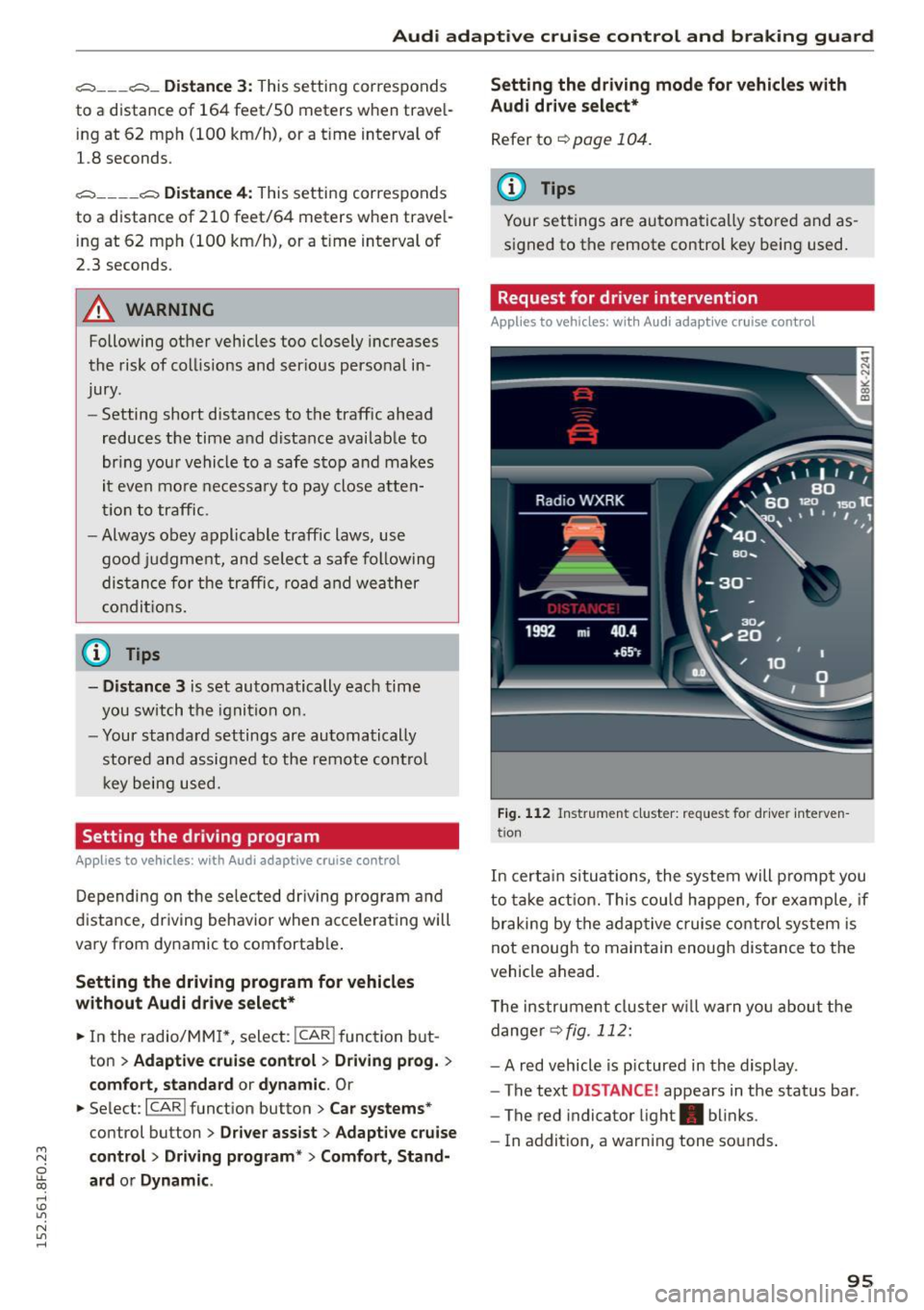
Fig . 1 12 Instr ume nt cluster: reques t fo r dr ive r inte rven
t ion
In certa in situations, the system will prompt you
to ta ke act ion. This cou ld happen, fo r example , if
braking by the adaptive c ruise control system is
not enough to maintain enough distance to the
vehicle ahead.
T he instrument cluster w ill warn you abou t the
dange r
~fig. 112:
-A red vehicle is p ictured in the display .
- The text
DISTANCE! appears in the status bar .
- The red indicator light . blinks .
- In addition, a warning tone sounds .
95
Page 98 of 268

Audi adaptive cruise control and braking guard
Audi braking guard
Description
Applies to veh icles: w ith Audi adaptive cruise co ntrol
Fig. 113 Instrument cluster : approach warn ing
Braking guard uses a radar sensor. It also func
tions within the limits of the system when adap
tive cruise control is switched off.
What can Audi braking guard do?
When detected in time, the system can assess
situations when a vehicle ahead brakes suddenly
or if your own vehicle is traveling at a high speed
and approaching a vehicle up ahead that is mov
ing more slowly . Braking guard does not react if it
cannot detect the situation .
The system advises you of various situations:
- The
distance warning is given if you are too
close to the vehicle ahead for a long time. If the
vehicle ahead brakes sharply, you will not be
able to avoid a collision. The indicator light.
in the display comes on .
- The
approach warning is given when a detected
vehicle up ahead in your lane is moving much
more slowly than you are or if it brakes sharply .
When this warning is given, it may only be pos
s ib le to avoid a collision by swerving or braking
sharply. The indicator light . and indicato r in
the display will wa rn you about the danger
¢ fig. 113 . You will also hear an acoustic signa l.
If you do not react fast enough or do not react at
all to the situation, Braking guard will intervene
by braking and the message
braking guard inter
vention
will appear.
ll Thi s is not available in so me c oun tries.
96
- If a co llision is imminent, the system wi ll first
provide an
acute warning by br iefly and sharply
app ly in g the brakes.
- If you do not react to the acute warning, brak
ing guard can brake within the limits of the sys
tem. This reduces the vehicle speed in the event
of a collision.
- At speeds under 20 mph (30 km/h), the system
can initiate a complete deceleration shortly be
fore a collisionl l_
-If the braking guard senses that you are not
braking hard enough when a collision is immi
nent, it can increase the braking force.
Which functions can be controlled?
You can switch braking guard and the distance/
approach warning on or off in the radio or MMI
¢page
97, Settings in the radio/MM!.
A WARNING
Lack of attent ion can cause collisions, other
accidents and ser ious personal injuries. The
braking guard is an assist system and cannot
prevent a coll is ion by itself. The dr iver must
always intervene. The driver is always respon
sib le for braking at the correct time.
- Always pay close attent ion to traffic, even
when the braking guard is switched on. Be
ready to intervene and be ready to take com
plete control whenever necessary. Always
keep the safe and legal distance between
your vehicle and vehicles up ahead.
- Braking guard works within limits and will
not respond outside the system limits, for
examp le when approaching a stopped vehi
cle or stationary obstacle (end of a traffic
jam or vehicle that has broken down in traf
fic).
- Always remember that the radar sensor for
the braking guard works only w ith in defined
detection and range limits that may prevent
the proper detection of other vehicles.
- The radar sensor's function and range can
be reduced by rain, snow and heavy spray.
Moving vehicles up ahead may not be
-