remote control AUDI A5 CABRIOLET 2015 User Guide
[x] Cancel search | Manufacturer: AUDI, Model Year: 2015, Model line: A5 CABRIOLET, Model: AUDI A5 CABRIOLET 2015Pages: 268, PDF Size: 66.88 MB
Page 65 of 268
M N
ci LL co
rl I.O
"' N
"' rl
Memory function
Description
Applies to vehicles: with memory function
The memory function allows you to quick ly and
eas ily store and recall personal seating profiles
for the driver. The memo ry function is operated
through the master key and the memory buttons
in the driver's door.
The driver's seating profile is stored and assigned
to the master key each time the veh icle is locked.
When you open the door, the seat profile is auto
matically recalled. If two people use one vehicle,
it is recommended that each person always uses
"their own" master key.
Up to 2 seat profiles can be stored in the memory
buttons in the driver's door. Once they are stored,
these seat profiles can be selected at any time .
I n addition to the driver's seat settings, you can
also store and access the exterior mirror adjust ment settings* using the remote control key or
memory button.
Remote control key
Applies to vehicles: with seat memory
To assign the driver's seat settings to the remote
control key when locking the vehicle, the function
must be activated in the radio or
MM!*
• Select: I CARI function button > Seat adjust·
ment > Driver's seat > Remote control key
>
on .Or
• Select: ~IC _A _ R~I function button> Car systems*
control button > Vehicle settings > Seats >
Driver's seat> Remote control key> On .
(D Tips
If you do not want another driver's settings to
be assigned to the remote key, switch off the
memory function using the radio or
MMI* or
the
I ON/OFF I button ~ page 63.
Seats and storage
Memory buttons
Applies to vehicles: with seat memory
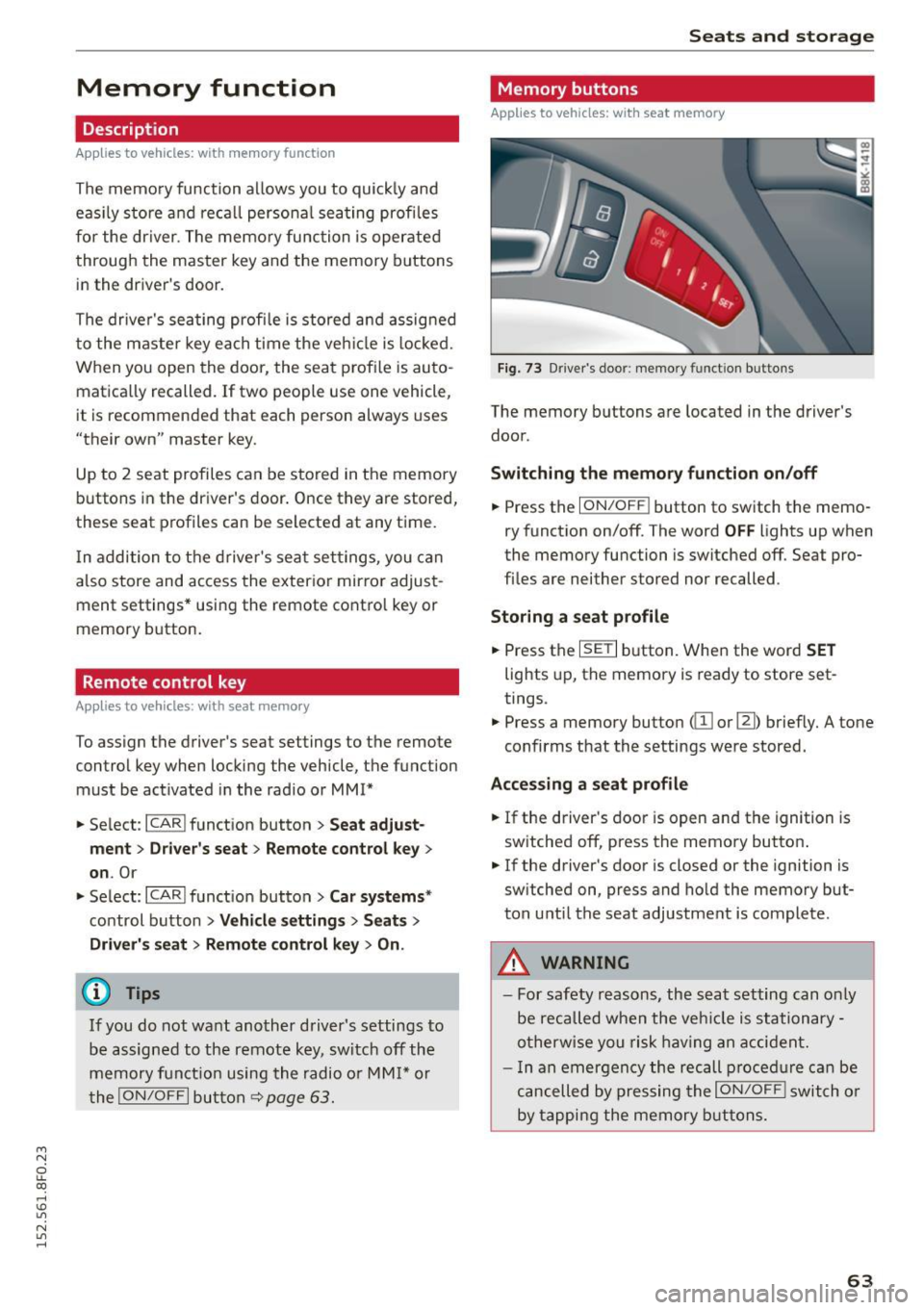
Fig. 73 Driver's door: memory func tion buttons
The memory buttons are located in the driver's
door.
Switching the memory function on/off
.,. Press the ION/OFF ! button to switch the memo
ry function on/off. The word
OFF lights up when
the memory function is switched off. Seat pro
files are neither stored nor recalled .
Storing a seat profile
.,. Press the ISETI button. When the word SET
lights up, the memory is ready to store set
tings.
• Press a memory button
(ill or [II) briefly. A tone
confirms that the settings were stored.
Accessing a seat profile
.,. If the driver's door is open and the ignition is
switched off, press the memory button .
.,. If the driver's door is closed or the ignition is
switched on, press and hold the memory but
ton until the seat adjustment is complete.
.8, WARNING
- For safety reasons, the seat setting can only
be recalled when the vehicle is stationary -
otherwise you risk having an accident.
- In an emergency the recall procedure can be
cancelled by pressing the
ION/OFF I switch or
by tapping the memory buttons.
63
Page 70 of 268

Warm and cold
Warm and cold Climate control system
Description
The climate control system warms, cools and
adds humidity to the air in the vehicle interior. It
is the most effective when the windows and pow
er top are closed.
If there is a build-up of heat in
side the vehicle , ventilation can help to speed up
the cooling process.
In all heating mode functions except
defrost, the
blower only switches to a higher speed once the
engine coolant has reached a certain tempera
ture.
Condensation from the cooling system can drip
and form a puddle of water under the vehicle.
This is normal and does not mean there is a leak.
Pollutant filter
The pollutant filter removes pollutants such as
dust and pollen from the air.
The air pollutants filter must be changed at the
intervals specified in your Warranty & Mainte
nance booklet, so that the air conditioner can
properly work.
If you drive your vehicle in an area with high air pollution , the filter may need to be changed
more frequently than specified in your Audi War
ranty
& Maintenance booklet. If in doubt, ask
your authorized Audi Service Advisor for advice.
Key coded settings
The climate control settings are automatically
stored and assigned to the remote control key
that is in use . These settings are different when
the power top is open or closed.
_& WARNING
Reduced visibility is dangerous and can cause
accidents.
68
- For safe driving it is very important that all
windows be free of ice, snow and condensa
tion.
- Completely familiarize yourself with the
proper use and function of the heating and
ventilation system and especially how to de
fog and defrost the windows .
- Never use the windshield wiper/washer sys
tem in freezing weather until you have
warmed the windshield first, using the heat
ing and ventilation system . The washer solu
tion may freeze on the windshield and re
duce visibility .
(U;) Note
- If you suspect that the air conditioner has
been damaged, switch the system off to
avoid further damage and have it inspected
by a qualified dealership.
- Repairs to the Audi air conditioner require
special technical knowledge and special
tools. Contact an authorized Audi dealer for
assistance.
@ For the sake of the environment
By reducing the amount of fuel you use, you
also reduce the amount of pollutants emitted
into the air.
(D Tips
- Keep the air intake slots (in front of the
windshield) free from ice, snow and debris in order to maintain the proper function of
the climate control system.
- The energy management system may switch
the seat heating* or rear window defroster
off temporarily. These systems are available
again as soon as the energy balance has
been restored.
- Air escapes through vents under the rear
window. When placing items of clothing on
the luggage compartment cover, ensure
that the openings are not covered.
Page 97 of 268
M N
ci LL co
rl I.O
"' N
"' rl
Audi adapt ive crui se cont rol and bra king gu ard
~ -- -~ -Di sta nce 3: This setting corresponds
to a distance of 164 feet/SO meters when trave l
ing at 62 mph (100 km/h), or a t ime interval of
1.8 seconds.
~ -- --~ Dista nc e 4: This setting corresponds
to a distance of 210 feet/64 meters when trave l
ing at 62 mph (100 km/h), or a t ime interval of
2 .3 seconds.
A WARNING
Following other vehicles too closely increases
the risk of collisions and ser ious personal in
jury.
- Setting short distances to the traffic ahead
reduces the time and distance available to
br ing your vehicle to a safe stop and makes
it even mo re necessary to pay close atten
tion to traffic.
- Always obey applicable traffic laws, use
good judgment, and select a safe following
distance for the traffic, road and weather
condit ions.
¢j) Tips
- Di stance
3 is set automatically each time
you switch t he ignition on.
- Your standa rd settings are automatically
stored and assigned to the remote contro l
k ey being used.
Setting the driving program
Applies to vehicles: with Audi adaptive cruise control
D epending on the se lected dr iv ing program and
distance, driving behavior when accelerating will
vary from dynamic to comfortab le .
Setting th e driving program for v ehicl es
without Audi d rive s elect*
~ In the radio/MMI*, select: !CAR !function but
ton >
Adapti ve c ru is e control > D riv ing prog. >
comfo rt, stand ard or d y namic . Or
~ Select : !CAR I function button> Ca r sy ste m s*
co ntrol button > D river ass ist > Adap tive cru ise
cont ro l
> Dr iving progr am * > Comfort, Stand
ard
or D ynamic . Setting the driving mode for vehicles w
ith
Audi dri ve select*
Refer to ¢ page 104.
(D Tips
Your settings are automatical ly stored and as
signed to the remote control key being used.
Request for driver intervention
Applies to vehicles: with Audi adaptive cruise control
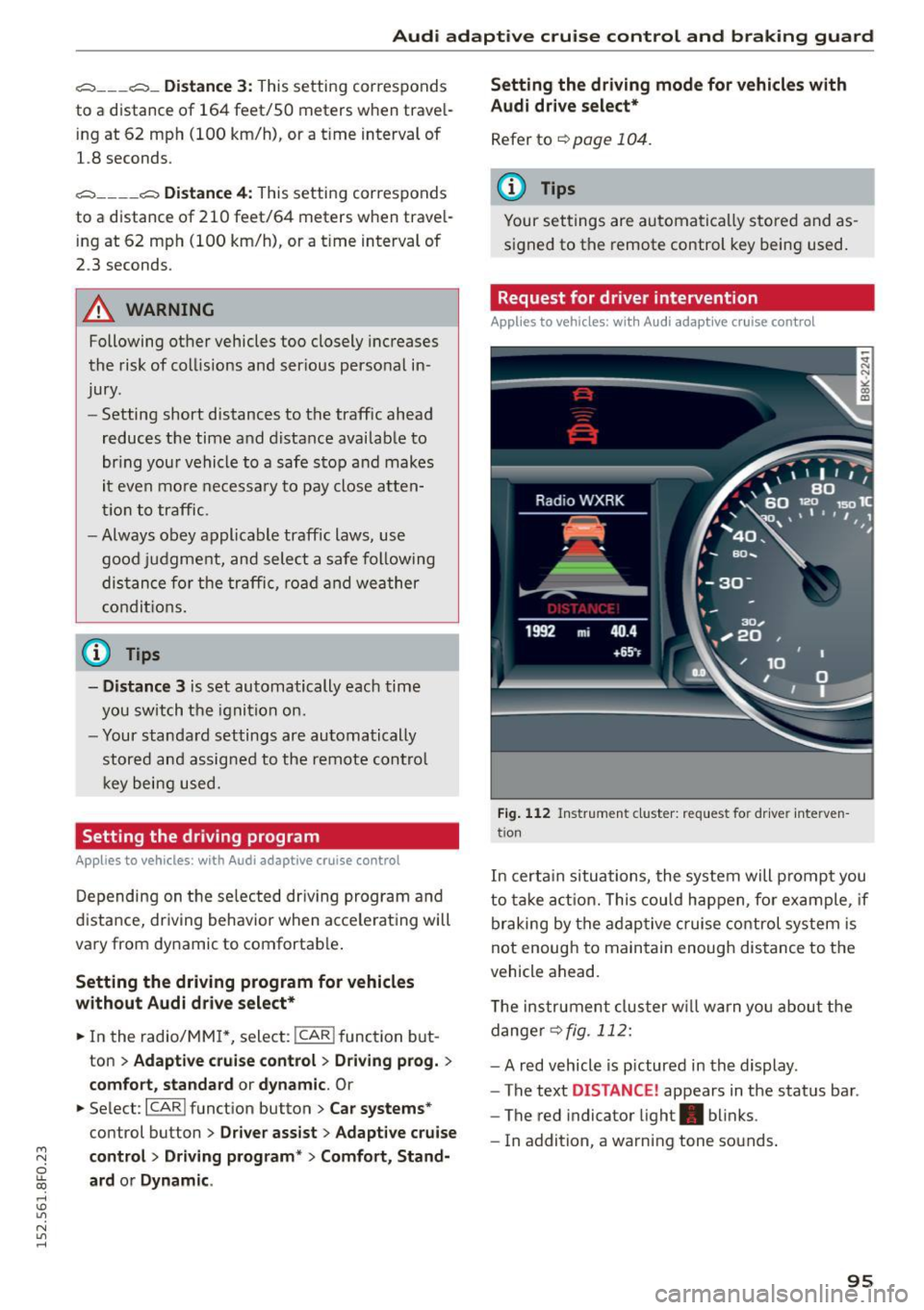
Fig . 1 12 Instr ume nt cluster: reques t fo r dr ive r inte rven
t ion
In certa in situations, the system will prompt you
to ta ke act ion. This cou ld happen, fo r example , if
braking by the adaptive c ruise control system is
not enough to maintain enough distance to the
vehicle ahead.
T he instrument cluster w ill warn you abou t the
dange r
~fig. 112:
-A red vehicle is p ictured in the display .
- The text
DISTANCE! appears in the status bar .
- The red indicator light . blinks .
- In addition, a warning tone sounds .
95
Page 99 of 268

M N
ci u.. co ,...., \!) 1.1"1
N 1.1"1 ,....,
Audi adaptive cruise control and braking guard
promptly detected or may not be detected
at all.
- Reflective surfaces including crash barriers
or tunnel entrances may impair the function
of the radar sensor.
(D Tips
- You can cancel the braking that is initiated by the system by braking yourself, by accel
erating noticeably or by swerving.
- Braking guard error messages
Q page 97.
- Keep in mind that braking guard can brake
unexpectedly. Always secure any cargo or
objects that you are transporting to reduce
the risk of damage or injury.
Settings in the radio /MMI
App lies to vehicles: with Audi adaptive cruise co ntrol
... Select : I CARI function button > Car systems*
control button > Driver assist> Audi braking
guard .
Or
... Select :
~I C-A-R~I function button > Audi braking
guard.
System -
Switch Audi braking guard On and Off.
When you switch the ignition on, the message
Audi braking guard off appears if the system is
switched off.
Early warning -The distance and approach warn
ings in the display can be switched
On/Off.
(D Tips
-Your settings are automatically stored and
assigned to the remote control key being
used at the times the settings are made.
- If you restrict or switch off the ESC, the
braking guard also switches itself off
¢ page 171.
- Switch braking guard off when you are load
ing the vehicle onto a vehicle carrier, train,
ship or other type of transportation . This
can prevent undesired warnings from the
braking guard system.
Messages
Applies to vehicles: wi th Aud i adap tive c ruise control
Braking guard: Off
This driver message appears if the system is
turned off via the radio/MMI*. Otherwise, if the
system is turned off, the information appears ev
ery time shortly after the start of the trip.
The driver message also appears if the system is
not available due to a malfunction or if the ESC is
not switched on
¢ page 171. If this is the case,
the system will not provide warnings about a possible collision.
Braking guard: Activated
This driver message appears if sharp brake pres
sure was applied due to an acute warning .
•••
Three white dots appear if a setting cannot be se
lected with the operating lever. For example, this
happens if you want to raise/lower the speed
even though there was no previously saved
speed .
ACC: Sensor blocked
This message appears if the sensor view is ob
structed, for example by leaves, snow, heavy
spray or dirt. Clean the sensor~
page 90,
fig. 103.
ACC: not available
The driver message appears if there is a malfunc
tion. The adaptive cruise control turns off. A
chime sounds as a reminder. Have the system
checked by an authorized Audi dealer or author
ized Audi Service Facility.
ACC: unavailable
The driver message appears if, for example, the
brake temperature is too high. The adaptive
cruise control is temporarily unavailable . A chime
sounds as a reminder.
Shift lever position!
The driver message appears if the selector lever
is shifted to the N position. The adaptive cruise
control is not available while in this position. .,..
97
Page 104 of 268

Audi side assist
(D Tips
-Side assist is not active while you are mak
ing the adjustment.
- Your settings are automatically stored and
assigned to the remote control key being
used.
Driver messages
Applies to veh icles: w ith Aud i side ass ist
If side assist switches off by itself, the LED in the
button turns
off and a message will appear in the
instrument cluster display:
Audi side assist unavailable: Sensors blocked
The radar sensors' vision is affected. Do not cover
the area in front of the sensors with bike wheels,
stickers, dirt or other objects. Clean the area in
front of the sensors, if necessary ¢
page 100,
fig. 117.
Audi side assist: Currently unavailable
Side assist cannot be switched on temporarily be
cause there is a malfunction (for example, the
battery charge level may be too low).
Audi side assist: System fault!
The system cannot guarantee that it will detect
vehicles correctly and it is switched off . The sen
sors have been displaced or are faulty. Have the
system checked by an authorized Audi dealer or
authorized Audi Service Facility soon.
Audi side assist: Unavailable when towing
Side assist switches off automatically when a fac
tory-installed trailer hitch is connected to the
electrical connector on the trailer. There is no
guarantee the system will switch off when using
a retrofitted trailer hitch. Do not use side assist
when towing a trailer.
102
Page 107 of 268
M N
ci u.. co ,...., \!) 1.1'1
N 1.1'1 ,....,
Systems Comfort
Adapti ve dampers *
comfortable
Sport differenti al* ba la nced
Adaptive cruise control * comfortable
Engin e sound * subtle
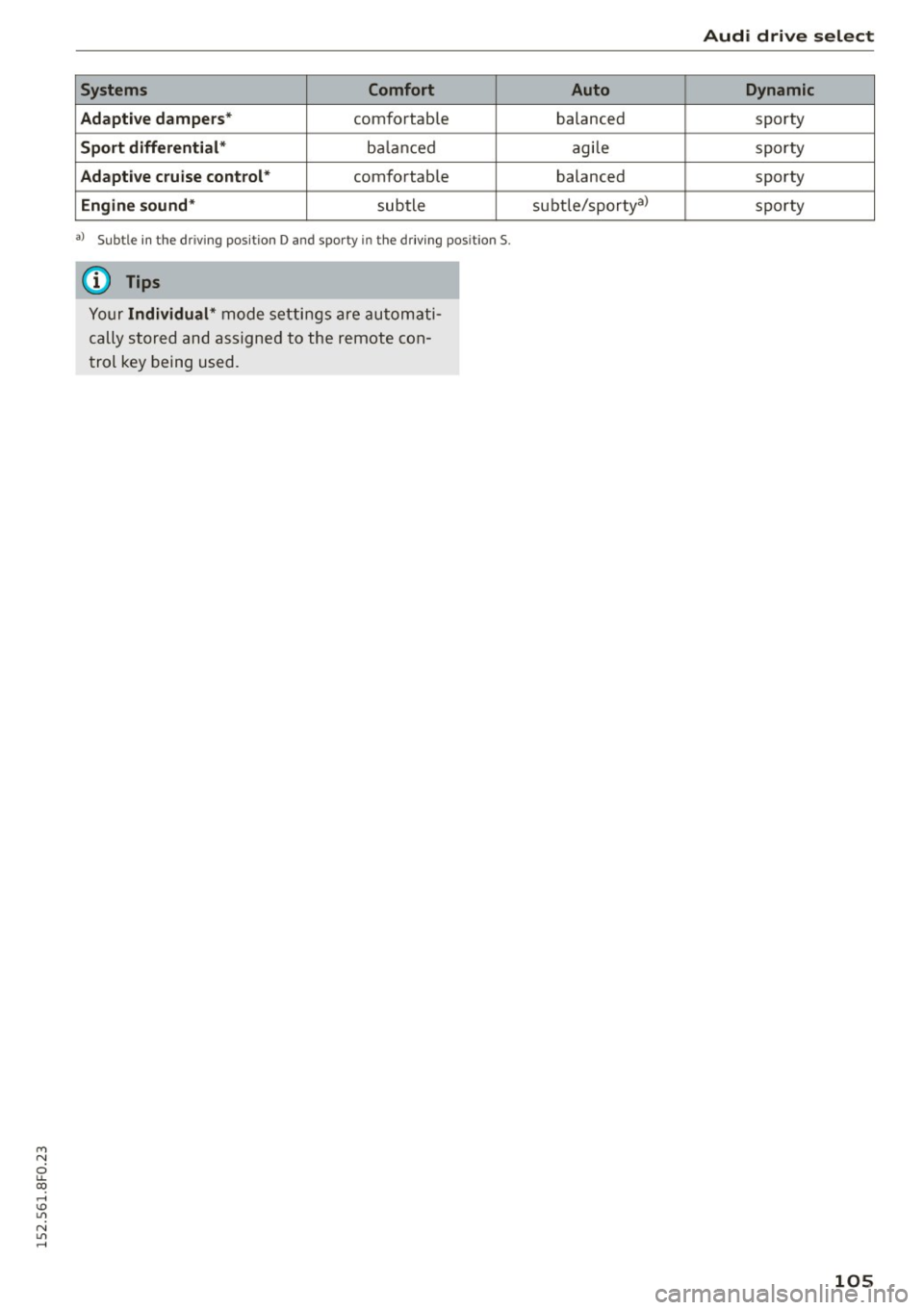
al Subt le in the dri ving pos itio n D and spo rty i n th e d rivin g pos ition S .
(D Tips
Your Individual* mode se ttings are au tom ati
cally stored and assigne d to the remote con
trol key being used.
Audi drive select
Auto Dynamic
balanced sporty
agi le sporty
balanced sporty
su bt le/ sportya)
sp orty
105
Page 109 of 268

M N
ci LL co
rl I.O
"' N
"' rl
,&_ WARNING
-Sensors have dead spaces in which objects
cannot be detected . Be especially alert for
small chi ldren and animals, since they are
not always detected by the sensors .
- The acoustic parking system is not a substi
tute for the dr iver's own caution and alert
ness. Ultimate responsibility always remains
with the driver during parking and sim ilar
maneuvers . A lways watch where you are
dr iv ing .
- You should always adjust the volume and
frequency of the warning tones so that you
can eas ily hear the acoustic distance warn
ing
even if the radio is playing, the air-cond i
tioner blower is on High or there is a high
level of outs ide no ise.
- Check the settings whenever anyone else
has driven the vehicle be fore you.
(D Note
- Remember that low obstacles for whic h a
warning has already been issued may "dive"
below the system 's sensing zone if the vehi
cle is being backed up closer . In this case,
the warn ing sound shutting off does
not in
dicate that you have cleared the obstacle.
Instead, impact is imm inent.
- Objects such as trailer h itches, cha ins, nar
row posts or fences covered by a thin layer
of pa int may not a lways be detected by the
system. They can still damage your vehicle
wi thou t warn ing.
{O) Tips
Keep the sensors in the rear bumper clean
and free of snow and ice so that the acoust ic
parking assist system can f unction properly.
Adjusting the warning tones
Applies to vehicles: with parking system (rear)
The warning tones can be adjusted in the MMI*.
• Select : ICARI function button > Parking system.
Or
• Se lect :
I C ARI funct ion button > Car syste m s*
control button> Dr iver a ssist> Parking aid .
Parking Sy stem
- Rear volum e -rear sensor vo lume
- Rea r fre quenc y -rear sensor frequency
- Mu sic vo lume while parking -when the park-
ing system is switched on, the vo lume of the
active audio source is lowered.
The newly adjusted value is briefly hea rd from
the signal generator . T he settings are automat i
ca lly stored and assigned to the master key w ith
remote control.
Rear parking system
with rearview camera
Introduction
Applies to vehicles: with parking system (rear, with rear view
camera)
F ig . 1 21 Park ing mode 1: reve rse pa rking
Fig . 1 22 Park ing mode 2: parallel parking
Vehicles with the parking system are equipped
with a
rear vi ew ca mera in addi tion to the acous
t ic pa rking system.
You can choose between two modes to ass ist you
with pa rking. For example, you can use "parking
mode l" when park ing in a parking sp ace or ga
rage ¢
fig. 121. When you wan t to park parallel
to the edge of the street, select "park ing mode
2" ¢ fig. 122 . 11>
107
Page 114 of 268

Parkin g Sys tem
sw ings out more than the vehicle rear . Main
tain plenty of distance from an obstacle so
that your outside mirror or a corner of your
veh icle does not collide w ith any obstacles -
danger of accident!
(D Tips
The left or right orientation lines and surfaces
w ill be displayed, depending on the turn sig
nal being used.
Adjusting the display and warning tones
Applies to vehicles: w ith parking system (rear, with rear view
camera)
The display and warning tones ore adjusted in
the radio or MMI*.
.. Se lect: ICARlfunct ion button> Parking sy stem .
Or
.. Se lect: ICAR I function button> Car system s*
control button > D riv er a ss is t> Par king aid .
D isplay
- Off -when the pa rking system is switched on,
o nl y aud ible signals are given.
- On -when the pa rking system is switched on,
the p icture from the rear view camera is dis
played.
Warning tones
- Rea r volume -
rear sensor volume
-Rear frequenc y -rear sensor frequency
- Music volume wh ile pa rking -when the pa rk-
ing system is switched on, the volume of the
active aud io source is lowered .
The newly adjusted value is briefly heard from
the signal generator. The settings are automati
cally stored and assigned to the remote control key .
A WARNING
- Always make sure that the volume and fre
quency of the wa rning tones is adj usted so
that you can eas ily hear the acoust ic dis
tan ce signal even if the radio is p laying, the
air-con ditione r blower is on High or t here is
a high level of outside noise .
112
-Check the settings whenever someone else
has dr iven the vehicle before you .
@ Tips
-The warn ing tones can also be adjusted di
rectly from the rear view camera image.
Simply press the Settings * cont ro l button .
- Changed settings are activated when park
ing assist is switched on again.
Error messages
Applies to vehicles: with parking system (rear, with rear view
camera)
If a warning tone is aud ible for about five sec
onds when you turn on the ignition, there is a malfunction in the system. Have the problem cor
rected by your author ized Audi dealer .
Keep the sensors in the rea r bumper clean and
free from ice so that the aco ustic park assist sys
tem can function properly .
Page 253 of 268
means that you risk both a substantia l reduction
in the operational safety of your vehicle and an
increased wear of vehicle parts~.& .
Author ized Audi dealers w ill perform this work in
a professiona l and competent manner or , in spe
cial cases, refer you to a professional company
that spec ializes in such modifications.
A WARNING
Improper repairs and modifications can
change the way vehicle systems work and
cause serious personal injury .
(D Note
If emergency repairs must be performed e lse
where, have the veh icle examined by an au
thorized Audi dealer as soon as possib le.
Declaration of
Compliance, Telecommu
nications and Electronic
Systems
Radio Frequency Devices and Radiocommunica
tion Equipment User Manual Notice .
The manufacturer is not responsible for any radio
or TV interference caused by unauthorized modi
f ications to this equ ipment .
Device s
The fo llow ing devices each comp ly w ith FCC Part
15.19, FCC Part 15.21 and RSS-Gen Issue
1:
- Adaptive cruise control*
- Convenience key*
- Side assist*
- Cell phone package*
- Electronic immob ilizer
- Homelink universal remote control*
- Remote control key
FCC Part 15.19
This device compl ies with pa rt 15 of the FCC
~ Rules. Opera tion is subjec t to the following two
ci u.. conditions : co ,...., \!) 1.1'1
N l/'I ,....,
Co nsum er information
(1) This device may not cause harm ful interfe r
ence , and
(2) this device must accept any inte rfe rence re
ce ived, incl ud ing in terference that may cause un
desired operation.
FCC Part 15.21
CAUT ION:
Changes or mod ificat ions not expressly approved
by the party responsible for compliance could
vo id the user's authori ty to ope rate the equ ip
me nt.
RSS-Gen Is sue 1
Operation is subject to the follow ing two condi
tions:
(1) this device may not ca use interference, and
(2) this devi ce must ac cep t any inte rference , in
cl ud ing interference that may cause undesired
operation of the device .
251
Page 255 of 268

M N
ci u.. co
Automatic transmission . . . . . . . . . . . . . . . . . 83
Automatic Shift Lock (ASL) . . . . . . . . . . . . . 84
Driving . . . . . . . . . . . . . . . . . . . . . . . . . . . . . 85
Emergency mode . . . . . . . . . . . . . . . . . . . . . 88
Emergency release . . . . . . . . . . . . . . . . . . . . 89
Kick-down . . . . . . . . . . . . . . . . . . . . . . . . . . . 87
Manual shift program . . . . . . . . . . . . . . . . . 87
Removal lock (ignition key) . . . . . . . . . . . . . 73
Selector lev er . . . . . . . . . . . . . . . . . . . . . . . . 83
Automatic wipers . . . . . . . . . . . . . . . . . . . . . . S5
Auto Safety Hotline . . . . . . . . . . . . . . . . . . . 120
Average speed . . . . . . . . . . . . . . . . . . . . . . . . . 24
Avoid damaging the vehicle . . . . . . . . . . . . . 177
B
Battery . . . . . . . . . . . . . . . . . . . . . . . . . . . . . . 16
Battery location inside the luggage compart-
ment .... .. ................. .. ..... 205
Charge level . . . . . . . . . . . . . . . . . . . . . . . . 175
Charging . . . . . . . . . . . . . . . . . . . . . . . . . . . 206
Energy management . . . . . . . . . . . . . . . . . 17 5
Important warnings when working on the
battery . . . . . . . . . . . . . . . . . . . . . . . . . . . . 205
Jump starting . . . . . . . . . . . . . . . . . . . . . . . 240
Replacing the battery . . . . . . . . . . . . . . . . 207
Working on the battery . . . . . . . . . . . . . . . 205
Before driving . . . . . . . . . . . . . . . . . . . . . . . . 113
Belt positioner . . . . . . . . . . . . . . . . . . . . . . . 127
Belt tension ers . . . . . . . . . . . . . . . . . . . . . . . 130
Bio -ethanol (Fuel) . . . . . . . . . . . . . . . . . . . . . 191
Blended gasoline . . . . . . . . . . . . . . . . . . . . . 190
Blower (automatic climate control) . . . . . . . . 70
Booster seats . . . . . . . . . . . . . . . . . . . . . . . . 160
B rake fluid
Changing the brake fluid . . . . . . . . . . . . . . 204
Checking the brake fluid level . . . . . . . . . . 203
Brake system
Anti-lock braking system . . . . . . . . . . . . . . . 19
Brake fluid spec ifications for refill and re
placement . . . . . . . . . . . . . . . . . . . . . . . . . 204
Brake light defective . . . . . . . . . . . . . . . . . . 21
Brake power assist unit ............... 172
Brakes... .. ................. .. .... . 172
Ceramic brakes . . . . . . . . . . . . . . . . . . . . . . 172
Elect romech anical parking brake . . . . . . . . 77
; Warning/indicator lights . . . . . . . . . . . . . . . 15
~ Worn brake pads symbol . . . . . . . . . . . . . . . 20 ,....,
Index
Braking
Brake assist . . . . . . . . . . . . . . . . . . . . . . . . 170
Emergency brak ing funct ion . . . . . . . . . . . . 79
braking gua rd . . . . . . . . . . . . . . . . . . . . . . . . . 90
Messages . . . . . . . . . . . . . . . . . . . . . . . . . . . 97
Settings . . . . . . . . . . . . . . . . . . . . . . . . . . . . 97
Break-in period Brak e pads . . . . . . . . . . . . . . . . . . . . . . . . . 172
Tires . . . . . . . . . . . . . . . . . . . . . . . . . . . . . . 177
Breaking in . . . . . . . . . . . . . . . . . . . . . . . . . . 177
New tires 216
Bulbs . . . . . . . . . . . . . . . . . . . . . . . . . . . . . . . 239
C
California Proposition 65 Warning . . . . . . . 196
Battery specific . . . . . . . . . . . . . . . . . . . . . 206
Capacities . . . . . . . . . . . . . . . . . . . . . . . . . . . 246
Engine oil . . . . . . . . . . . . . . . . . . . . . . . . . . 197
Care . . . . . . . . . . . . . . . . . . . . . . . . . . . . . . . . 184
Cargo area
refer to Luggag e compartment ...... 65, 118
Catalytic converter . . . . . . . . . . . . . . . . . . . . 178
Center armrest . . . . . . . . . . . . . . . . . . . . . . . . 62
Central locking . . . . . . . . . . . . . . . . . . . . . . . . 29
Central locking switch . . . . . . . . . . . . . . . . . 33
Convenience key . . . . . . . . . . . . . . . . . . . . . . 32
Remote control key . . . . . . . . . . . . . . . . . . . 32
Cerami c brake rotors
New brake pads . . . . . . . . . . . . . . . . . . . . . 172
Certification . . . . . . . . . . . . . . . . . . . . . . . . . 251
Changi ng engine oil . . . . . . . . . . . . . . . . . . . 200
Checking Engin e coolant level. . . . . . . . . . . . . . . . . . 201
Child restraints Danger of using child restraints in the front
seat . . . . . . . . . . . . . . . . . . . . . . . . . . . . . . . 133
Where can I get additional informat ion
about child restraints and their use? . . . . 168
Child restraint system anchors . . . . . . . . . . 16S
Child safety . . . . . . . . . . . . . . . . . . . . . . . . . . 1S2
Important sa fety instructions for using child
safety seats . . . . . . . . . . . . . . . . . . . . . . . . 155
Installing a c hild restraint using the LATCH
system . . . . . . . . . . . . . . . . . . . . . . . . . . . . 167
253