warning lights AUDI A5 CABRIOLET 2015 Owner's Manual
[x] Cancel search | Manufacturer: AUDI, Model Year: 2015, Model line: A5 CABRIOLET, Model: AUDI A5 CABRIOLET 2015Pages: 268, PDF Size: 66.88 MB
Page 76 of 268

Driving
Sw itching the ignition on /off
If you would like to switch the ignition o n wit h
out starting the engine, fo llow these steps:
• Inse rt the key into the ignition lock.
• Press the key brief ly
wi thout p ress ing the b rake
pedal.
• To sw itch the ignition off , press the key again.
When starting the engine, major e lectr ica l loads
are sw itched off temporar ily.
You ca n only remove the key with the ignition
sw itched off .
If the engine should not start immedia tely , the
starti ng process is automatically stopped after a
short time . Repeat sta rting procedure .
A WARNING
-Never allow the engine to run in confined
spaces - dange r of asp hyxiation.
- Never remove the ignition key from the ign i
t ion loo k while the vehicle is moving . Other
wise, the steering lock cou ld sudden ly en
gage and you would not be able to steer the
vehicle.
- Always ta ke the key with yo u wheneve r you
leave your vehi cle. Otherwise, the engine
could be started or electrical eq uipment
s uch as the power windows cou ld be operat
ed . T his can lead to ser ious injury.
- Never leave ch ildren or persons requiring as
sistance unattended in the vehicle. The
doors can be locked using the remote trans
mitter, preventing peop le from escap ing
from the vehicle on their own in the event of an emergency . Depending on the time of
year, people inside the vehicle can be ex posed to very high o r very low tempe ra
t ur es.
([) Note
Avoid high engine rpm, full throttle and heavy
eng ine loads until the eng ine has reached op
erati ng temperature - otherwise you risk en
gine dam age.
74
-
@) For the sake of the env ironment
Do not let the engine run while pa rked to
warm up. Begin dr iv ing immediately. Th is re
d uces unnecessary em iss ions .
@ Tips
-If the key cannot be removed from the igni
t ion lock, you have to pu ll the mechan ica l
key out of the master key in order to be able
to lock the vehicle
c::, page 32.
- After starting a co ld engine, there may be a
br ief per iod of increased noise because the
oil pressure must first build up in the hy
draulic valve adjusters. This is norma l and
not a cause fo r concern .
- If you leave the veh icle with the ignition
switched on, the ig nition w ill switch off af
ter a ce rtain period of t ime . Pleas e note tha t
ele ct rical eq uipme nt such as e xterior lights
w ill switch off a s well when that hap pens.
Starting the vehicle with the emergency
key
Applies to vehicles: with ignition lock
You can use the emergen cy key as an igni tion key
in an emergency.
F ig. 89 G love co mp art men t: Adapte r fo r em erge ncy key
Fi g. 9 0 Insert e merg ency key into t he ad ap ter
Page 78 of 268

Driving
"'Press on the I START ENGINE STOPI button
¢fig. 91 -the engine wi ll start.
Switching the ignition on /off
If you would like to sw itch the ignition on with
out start ing the e ng ine, fo llow these steps:
"' Press the
!START ENGINE STOPI button with -
out pressing the brake pedal.
"'T o sw itch the ignition off, press the but to n
again.
If the engine sho uld not start immed iately, the
starting p rocess is a utomat ically stopped after a
short time. Repeat sta rting procedure.
When starting the engine, major e lectr ica l loads
are sw itched off temporar ily .
After a cold engine is started, there may be a brief period of increased noise because oil pres
sure must first build up in the hydraulic valve ad
justers. This is normal and not a cause for con
cern.
_& WARNING
- Never allow t he engine to ru n in co nfine d
spaces -dange r of asp hyxiation.
- Never turn off the engine unti l the vehicle
h as come to a comp lete stop.
- Always ta ke t he key with yo u w heneve r you
leave your vehi cle. Otherw ise, the eng ine
c ou ld be started or ele ct rical eq uipment
s u ch as the power w indows co uld be operat
ed. This can lead to serious injury.
- Never leave ch ild ren o r persons requ iring as
sistance unattended in the vehicle. The doo rs can be locked using the remote trans
mitter, preventing peop le from escap ing
from the vehicle on their own in the event of
an emergency. Depending on the time of
year, people inside the vehicle can be ex
posed to very high o r ve ry low tempe ra-
tu res.
(D Note
- Avoid high eng ine rpm, fu ll throttle and
heavy engine loads until the engine has
r eached operating tempe rat ure - otherwise
you r isk eng ine damage.
76
-
@ For the sake of the environment
Do not let the engine run while pa rked to
warm up. Begin dr iv ing immediately. Th is re
d uces unnecessary em issions.
(!} Tips
- After starting a col d en gine, t here may be a
br ie f per iod of increased noise because the
oil pressure must first bui ld up in the hy
draulic valve adjusters. This is norma l and
not a cause for concern.
- If you leave the veh icle with the ignition
switched on, the ig nition w ill switch off af
ter a ce rtain period of time. Please note that
e lect rical equipment such as exte rior lights
wi ll switch off as well when that happens.
Switching engine off
App lies to vehicles: wi th convenience key
"' Br ing your vehi cle to a comple te stop.
"' Move the se lector lever to the P o r N pos ition.
"' Press the
I START ENGINE STOP ! button
r=>poge 75, fig. 91.
Steering lock
The steer ing lo cks w hen yo u tur n the eng ine off
u sing the
I START ENGINE STOP I button a nd open
the d river's doo r. The loc ked steering helps pre
vent ve hicle theft .
Emergency off
If necessary, the e ngine can be switched off with
the se lec to r lever in the R or D/S posi tions. The
engine s tops if you press a nd ho ld the
I START ENGI NE STOP I button at speeds below
6 mph (10 km/ h) and press the brake peda l.
_& WARNING
-Never turn off the engine before the vehicle
has come to a complete stop. The full func
tion of the brake booster and the power
steer ing is not guaranteed. You must use
more force to turn or b rake if necessary. Be
caus e you cannot stee r and brake as you
usually wo uld, this cou ld lead to crashes
a nd se rio us in juries.
~
Page 80 of 268
Driving
"'Pu ll on the switch @ ¢fig. 92 to apply the
parking brake . The indicator lights in the switch
and . (USA models)/ . (Canada mode ls) in
the inst ru ment cluste r il lum inate.
"' With the ign ition switched on, step on the
brake pedal or the accelerator pedal and press
the switch @ at the same t ime to release the
parking b rake . The indicator lights in the switch
and . (USA models)/ . (Canada mode ls) in
the instr ument cluster go o ut.
Your veh icle is equipped w ith an electromechan i
cal parking b rake. The par king b rake is designed
to p revent the veh icle from rolling unintentional
ly and replaces the hand brake.
In addition to the norma l funct ions of a tradit ion
a l hand bra ke, the e lectromechan ical pa rking
b rake provides var ious convenience and safety
f u nctions.
When start ing f rom rest
- The integral starting assist helps you when
driv ing by automat ically releasing the parking
brake ¢
page 78, Starting from rest.
-When sta rting on inclines , the starting assist
prevents the vehicle from un intent ionally roll
ing back. The bra kin g for ce of the par kin g b rake
is no t released until sufficien t driv ing fo rce has
been built up at the wheels .
Emergency brake function
An emergency brake ensures that the vehicle ca n
be slowed down even if the
normal brakes fa il
¢ page 79, Emergency braking.
A WARNING
If a drive range is eng age d with the vehicle
stationary and the engine running, you mus t
in no instance accelerate careless ly . Otherwise
the vehicle will start to move immed iate ly
r isk of an accident.
(D Tips
- If the parking brake is applied with the igni
tion switched off, the indicator lights in the
switch and -(USA models) . (Cana
da models) in t he instrument cl uster will go
out after a certa in period of time.
78
- Occasional noises when the pa rking brake is
applied an d released a re norma l and are not
a cause for concern .
- Whe n the vehicle is pa rked, the park ing
brake goes through a self-test cycle at regu
lar intervals. Any associated noises are nor
ma l.
Parking
"'Press the brake pedal to stop the veh icle .
"' Pull the sw itch @¢
page 77, fig. 92 to set the
parking brake .
"' Move the se lector lever to P.
"' Tur n the engine off ¢_& .
"' When on inclines or de clines, turn the steering
wheel so that the veh icle will roll into the curb
if it begins to move.
A WARNING
-
- When you leave your vehicle -even if only
briefly - always remove the ignition key. This
applies pa rticularly when children remain in
the vehicle . Otherwise the ch ild ren could
start t he engine, release the parking b rake
or operate elect rical equipment (e.g. power
w indows). There is the risk of an acc ident.
- When the veh icle is locked, no one -part icu
larly no t chi ld ren shou ld remain in the ve hi
cle. Lo cked doors m ake it more d ifficul t for
emergency workers to get into the veh icle -
putting lives at risk.
Starting from rest
The star ting assist function ensures that the
parking brake is released automatically upon
starting .
Stopping and applying parking brake
"' Pull the sw itch @¢ page 77, fig. 92 to apply
the par kin g b rake.
Starting and automatically releasing the
parking brake
"' When you sta rt to dr ive as usual, the park ing
bra ke is automatically released and yo ur vehicle
beg ins to move. .,_
Page 83 of 268
M N
ci LL co
rl I.O
"' N
"' rl
Cruise control system
Switching on
The cruise control system makes it possible to
drive at a constant speed starting at 20 mph (30
km/h) .
0
f
®t
0
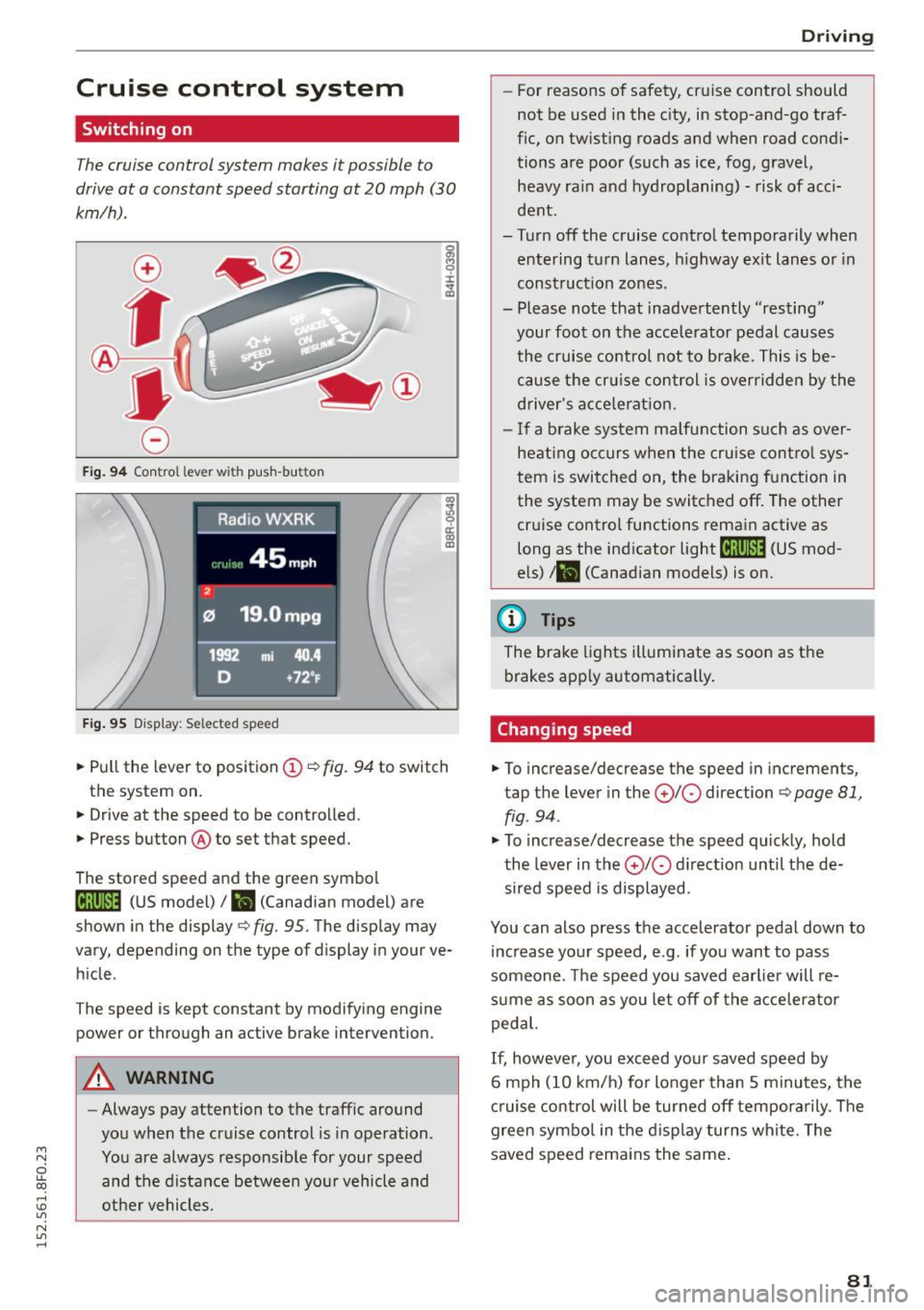
Fig. 94 Control lever with push-bu tton
Fig. 95 Display : Selected speed
al M 0 ±
ti
~ 0 er: a,
"'
• Pull the lever to position (D ¢ fig. 94 to switch
the system on.
• Drive at the speed to be controlled.
• Press button @to set that speed.
The stored speed and the green symbol
[lj;(i )~i4 (US model)/ l'I (Canadian model) are
shown in the display ¢
fig. 95. The display may
vary, depending on the type of display in your ve
hicle .
The speed is kept constant by modifying engine
power or through an active brake intervention.
A WARNING
-Always pay attention to the traffic around
you when the cruise control is in operation.
You are always responsible for your speed and the distance between your vehicle and
other vehicles.
Driving
- For reasons of safety , cruise control should
not be used in the city, in stop-and-go traf
fic, on twisting roads and when road condi
tions are poor (such as ice, fog, gravel, heavy ra in and hydroplaning) - risk of acci
dent .
- Turn off the cruise control temporarily when entering turn lanes , highway exit lanes or in
construction zones.
- Please note that inadvertently "resting" your foot on the accelerator pedal causes
the cruise control not to brake. This is be
cause the cr uise control is overridden by the
driver's accele rat ion.
- If a brake system malfunction such as over
heating occurs when the cruise control sys
tem is switched on, the braking function in
the system may be switched off . The other
cruise control functions remain active as
long as the ind icator
light til;rnM4 (US mod
els)
t l'I (Canadian models) is on.
(D Tips
The brake lights illuminate as soon as the
brakes apply automatically.
Changing speed
• To increase/decrease the speed in incremen ts,
tap the lever in the
(£)10 direction ¢ page 81,
fig . 94 .
"'To increase/decrease the speed quickly, hold
the lever in the
010 direct ion until the de
sired speed is displayed.
You can also press the accelerator pedal down to increase your speed, e.g . if you want to pass
someone . The speed you saved earlier will re
sume as soon as you let off of the accelerator
pedal.
If, however, you exceed your saved speed by
6 mph (10 km/h) for longer than 5 minutes, the
cruise control will be turned off temporarily . T he
green symbo l in the display turns white. The
saved speed remains the same .
81
Page 95 of 268
M N
ci LL co
rl I.O
"' N
"' rl
Audi adapt ive crui se cont rol and bra king gu ard
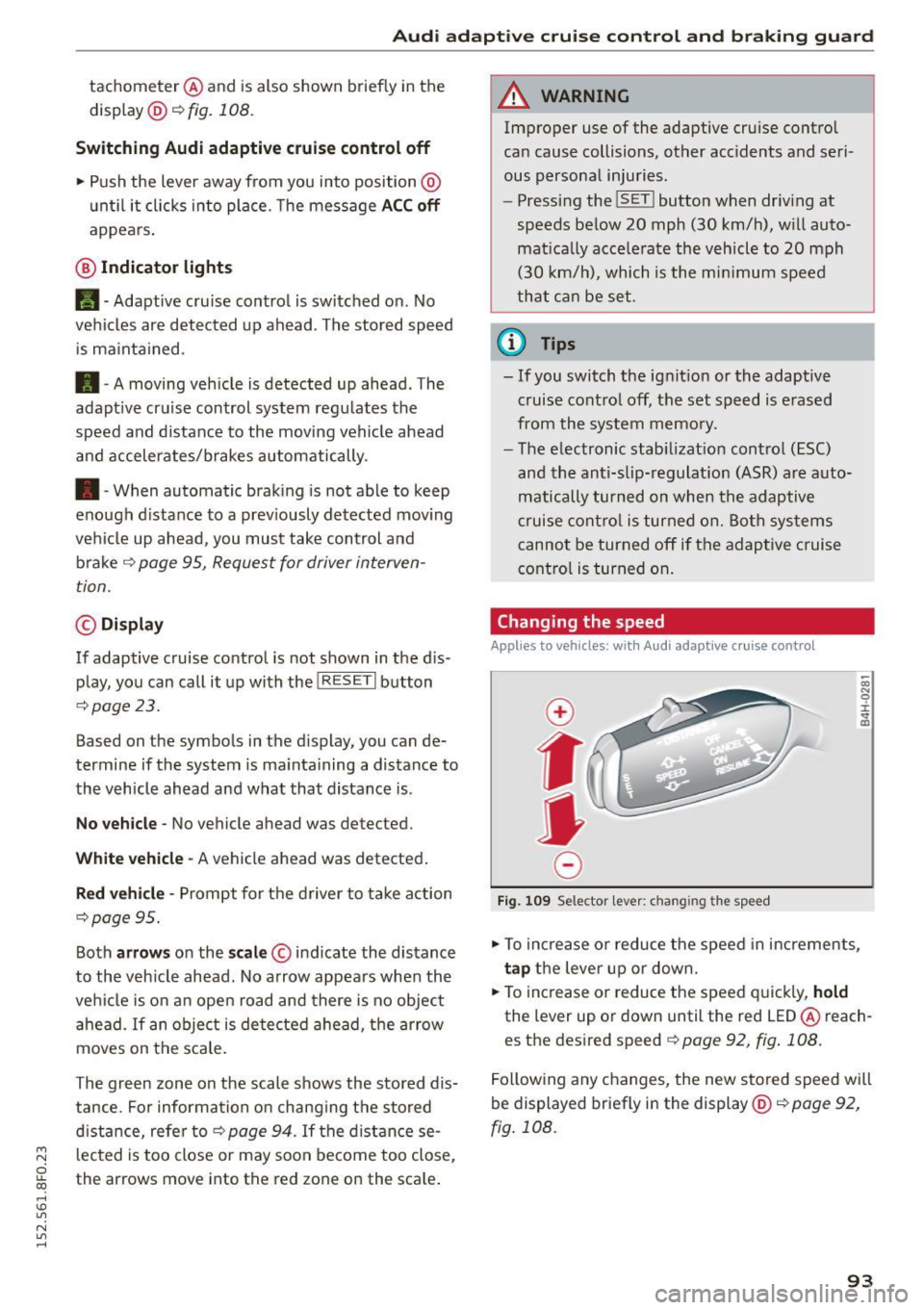
tachometer @and is also shown briefly in the
display @c:>
fig. 108.
Swit ching Audi adapti ve c ru is e contr ol off
~ Push the lever away from you into position @
unt il it clicks into place. The message
AC C off
appea rs .
@ Indicator lights
II -Adaptive cru ise control is switched on. No
vehicles are detected up ahead . The stored speed
i s ma inta ined.
• -A moving vehicle is detected up ahead . The
adapt ive cruise control system regulates the
speed and distance to the moving vehicle ahead
and accelerates/brakes automatically .
• -When automatic braking is not able to keep
enough d istance to a prev iously detected mov ing
vehicle up ahead, you must take control and
brake ¢
page 95, Request for driver interven
tion.
© Displa y
If adaptive cruise control is not shown in the d is
play, you can call it up with the !RESE TI button
¢page 23.
Based on the symbo ls in the d isplay, you can de
termine if the system is ma inta ining a distance to
the vehicle ahead and what that distance is .
N o v ehicl e -No vehicle ahead was detected.
Wh it e v ehi cle -A vehicle ahead was detected .
Red v ehicl e -Prompt for the d river to take action
¢page 95.
Both arrows on the scale © indicate the distance
to the veh icle ahead. No arrow appears when the
vehi cle is on an open road and there is no object
ahead .
If an object is detected ahead, the arrow
moves on the scale.
The green zone on the scale shows the stored dis
tance . For informa tion on chang ing the stored
d ista nce, refe r to¢
page 94 . If the distance se
l ected is too close or may soon become too close,
the arrows move into the red zone on the scale .
A WARNING
Improper use of the adaptive cruise control
can cause collisions, other accidents and se ri
ous personal injuries.
- Pressing the !SET ! button when driving at
speeds below 20 mph (30 km/h), w ill auto
matica lly accelerate the vehicle to 20 mph
(30 km/h), which is the mi nimum speed
that can be set.
a) Tips
- If you switch the ignit ion or the adaptive
cruise control off, the set speed is erased
from the system memo ry.
- The electronic stab ilizat ion cont rol (ESC)
and the anti-slip-reg ulat ion (ASR) are a uto
matically turned on when the adaptive
cruise contro l is turned on. Both systems
cannot be turned off if the adaptive c ruise
control is turned on .
Changing the speed
Applies to vehicles: wit h Aud i adapt ive cru ise control
0
f
•
0
Fig . 109 Selector lever: chang ing the speed
~ To increase o r reduce the speed in increments,
tap the lever up or down.
~ To increase o r reduce the speed q uickly, hold
the lever up or down until the red LED @ reach
es the des ired speed ¢
page 92, fig . 108.
Following any changes, the new stored speed wi ll
be displayed briefly in the display @¢
page 92,
fig . 108 .
93
Page 115 of 268
Driving safety
Basics
Safe driving habits
Please remember -safety first!
This chapter contains important information,
tips, instructions and warnings that you need to
read and observe for your own safety, the safety
of your passengers and others . We have summar
ized here what you need to know about safety
belts, airbags , chi ld restraints as well as child
safety. Your safety is for us
priority number 1. Al
ways observe the informat ion and warn ings in
this section - for your own safety as well as that
of your passengers .
The information in this section app lies to all
model ve rsions of your vehicle . Some of the fea
tures described in this sections may be standard
equipment on some models, or may be optional
eq uipment on others .
If you are not sure, ask
your authorized Audi dealer.
A WARNING
- Always make sure that you follow the in
struct ions and heed the WARNINGS in this
Manual. It is in your interest and in the in
terest of your passengers.
- Always keep the complete Owne r's Litera
ture in your Aud i when you lend or sell your
vehicle so that this important info rmation
will always be ava ilable to the driver and
passenge rs.
-
- Always keep the Owner's literature handy so
that you can find it easily if you have ques
tions.
Safety equipment
The safety features are part of the occupant re
straint system and work together to help reduce
the risk of injury in a wide variety of accident sit
uations.
M
6 Your safety and the safety of your passenge rs
~ should not be left to chance. Advances in tec h-,...., \!) 1.1'1
N 1.1'1 ,....,
nology have made a var iety of fea tures available
to help reduce the r isk o f injury in an accident.
Dr ivin g s afet y
The following is a list of just a few of the sa fety
features in your A udi:
- sophisticated s afety be lts fo r drive r and a ll pas-
senger seat ing pos itions,
- be lt fo rce limi ters for the front seats,
- belt pretensioners for the seats,
- head restra ints for each seating posit ion,
- front airbags,
- side airbags in the front seats,
- special LATCH anchorages for child rest raints,
- ad justab le steer ing column.
These ind iv idual safety features, can wo rk to
gether as a system to he lp p rotect you and you r
passengers in a w ide range of accidents . T hese
f ea tures cannot work as a system if they are not
always cor rect ly adjusted and correctly used .
Safet y is eve rybod y's res pon sibilit y!
Important things to do before driving
Safety is everybody 's job! Vehicle and occupant
safety always depends on the informed and care
f1,1l driver .
For you r safety and the safety of your passen
gers,
b efore driv ing alway s:
.,. Make sure that all lights and signals are operat
ing correctly .
.,. Make sure that the tire pressure is co rrect .
.,. Make s ure that all w indows are clean and afford
good vis ibility to the outs ide.
.,. Sec ure all luggage and other items caref ully
qpage 64.
.,. Make s ure that nothing can interfere with the
pedals.
.,. Adjust front seat, head restraint and mirrors
correctly for your height .
.,. Instruct passengers to adjust the head re
straints according to the ir height .
.,. Make su re to use the r ight child restraint cor
rectly to protect ch ildren
q page 152, Child
safety.
.,. Si t properly in your seat and ma ke s ure that
your passengers do the same
q page 59, Seats
and storage. .,.
113
Page 126 of 268
Safety belt s
Safety belts
General information
Always wear safety belts!
Wearing safety belts correctly saves lives!
This chapter explain s why safety be lts are neces
sary, how they work and how to adjust and wear
them correctly.
.. Read all the information that fo llows and heed
all of the instructions and WARNINGS.
&_ WARNING
Not wearing safety belts or wearing them im
properly increases the risk of serious personal
injury and death.
- Safety belts are the single most effective
means available to reduce the risk of serious
injury and death in automobile accidents.
For your protection and that of your passen
gers, always correct ly wear safety belts
when the vehicle is moving.
- Pregnant women, injured, or physically im
paired persons must also use safety belts.
L ik e all veh icle occupants, they are more
likely to be seriously injured if they do not
wear safety be lts . The best way to protect a
fetus is to protect the mother - throughout
the ent ire pregnancy.
Number of seats
Your Audi has a total of four seating positions:
two in the front and two in the rear. Each seating
position has a safety belt .
&_ WARNING
Not wearing safety belts or wearing them im
properly increases the risk of serious personal
injury and death.
- Never strap more than one person, includ
ing small ch ildren, into any belt. It is espe
cially dangerous to place a safety belt over a
child sitting on your lap.
- Never let more people ride in the vehicle
than there are safety belts available.
124
-Be sure everyone riding in the vehicle is
properly restrained with a separate safety
belt or child restraint.
Safety belt warning light
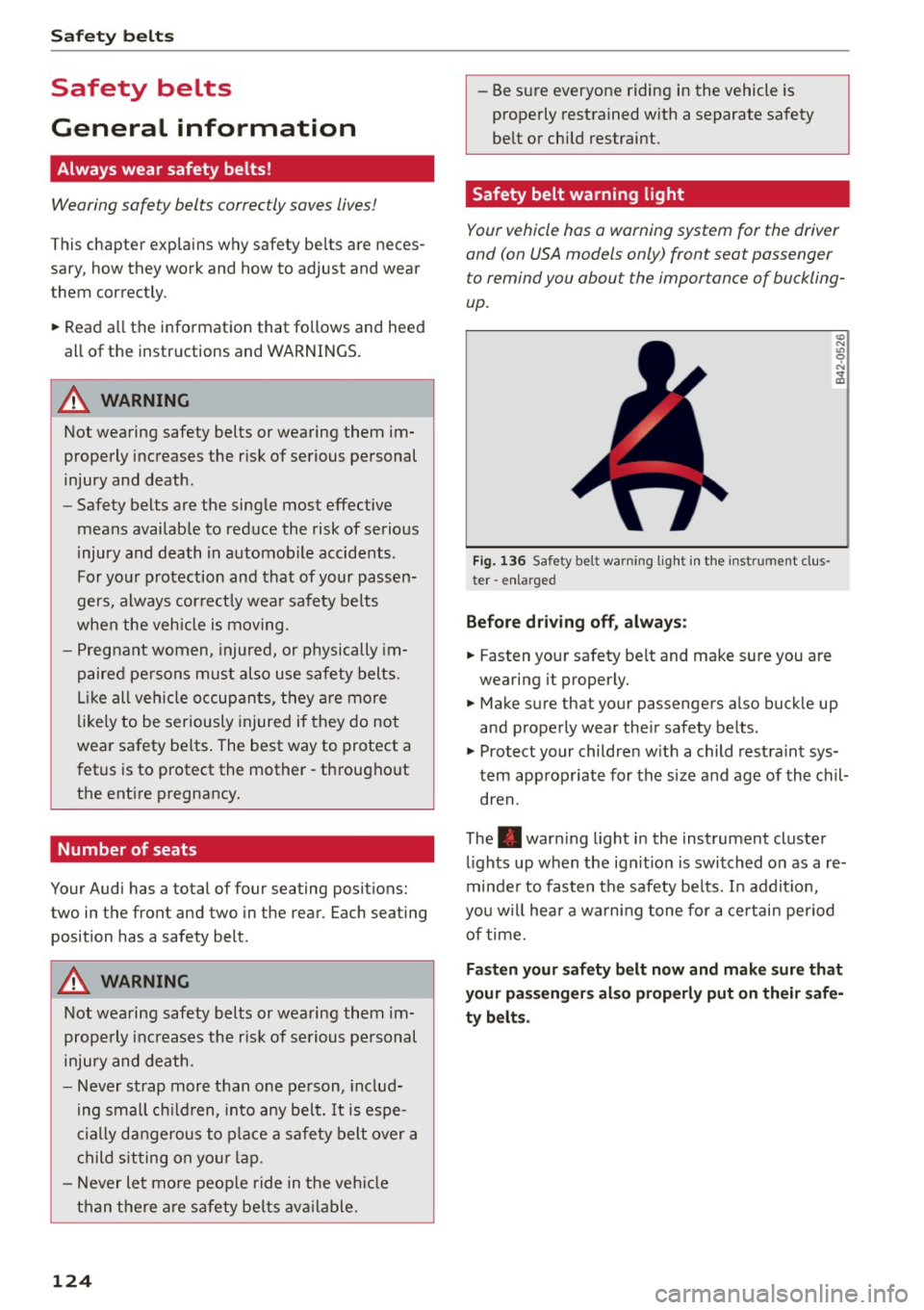
Your vehicle has a warning system for the driver
and (on USA models only) front seat passenger
to remind you about the importance of buckling
up .
Fig. 136 Safety belt warning light in the instrument cl us
ter -enlarged
Before driving off, always:
.. Fas ten your safety belt and make sure you are
wearing it properly.
(0
"'
"' 0 N
and properly wear the ir safety belts .
.. Protect your children w ith a child restraint sys
tem appropriate for the siz e and age of the chil
dren.
The . warn ing light in the instrument cluster
lights up when the ign it ion is switched on as a re
minder to fasten the safety be lts. In addit io n,
you w ill hear a warning tone for a certain period
of time.
Fasten your safety belt now and make sure that
your passengers also properly put on their safe
ty belts.
Page 174 of 268

Smart Technology
The following situations are exceptions where it
may be usefu l to switch on sport mode to allow
the wheels to spin : -
Rocking the vehicle to free it when it is stuck
- Driv ing in deep snow or on loose ground
- Dr iv ing with snow chains
Sport mode on ESC/ASR off Sport mode off or
ESC /ASRon
Behavior
The ESC and ASR stabiliza- The stabilization funct ion is The full stabilization func-
tion fu nct ions are limited not
available¢ ,&.. ESC and
tion of the ESC and ASR is
¢ ,&. .
ASR are switched
off. available again.
Operation Press the I!> OF F! button Press and hold the I!> OF FI Press the I!> OF F! button
briefly . button longer than 3 sec-again.
onds .
Indicator II turns on. JI and lf'lii•li~ turn on. II turns off or II and
lights lf'lii•l~~ turn off.
Driver mes- Stabilization control (ESC): Stabilization control (ESC): Stabilization control
sages Sport. Warning! Re stricted off. Warning! Restricted (ESC):
On
stability stability
It is only possible to turn off the ASR up to 30
mph (SO km/h) for veh icles wi th front whee l
drive . At about
45 mph (70 km/h) it automatica l
ly turns on again. It is possible to turn
off the
ASR at any speed for vehicles with all whee l
drive.
A WARNING
-
You should only sw itch sport mode on or
switch ESC/ASR
off if your driving ab ilities and
road condit io ns perm it .
- The stabilization function is limited when
sport mode is switched on. The dr iv ing
wheels could spin and the veh icle cou ld
swerve, especially on slick or slippery road
surfaces.
- There is no vehicle stabilization when ESC/
ASR are switched
off.
(D Tips
ESC/ASR cannot be switched off or sport
mode cannot be switched on when cruise con
trol or adaptive cru ise control* is sw itched on .
172
Braking
What affects broking efficiency?
New brake pads
During the first 250 miles (400 km), new brake
pads do not possess their full braking effect, they
have to be "broken in" first¢,&. . You can com
pensate for this slightly reduced braking power
by pushing harder on the brake pedal. Avoid
heavy braking loads during the break-in period.
Operating conditions and driving habits
The brakes on today's automobiles are still sub
ject to wear, depending largely on operating con
ditions and driving habits~,&. . On vehicles that
are either driven most ly in stop-and -go city traf
fic or are driven hard, the brake pads should be
checked by your authorized Audi dealer more of
ten than specified in the
Warranty & Mainte
nance booklet .
Failure to have your brake pads
i nspected can result in reduced brake perform
ance .
On steep slopes, you should use the braking ef
fect of the engine . This way, you prevent unnec
essary wear on the brake system. If you must use
your brakes, do not hold the brakes down contin
uously. Pump the brakes at intervals.
Page 176 of 268

Smart Technolog y
Clean off accumulated salt coating from
brake discs and pads w ith a few carefu l
brake applications .
- If you damage the front spoiler, or if you in
stall a d ifferent spoiler, be sure the air flow
to the front brakes is not obstructed. Other
wise the brake system could overheat reduc
ing the effectiveness of the entire brake sys
tem.
- Failure of one brake c ircuit will impair the
braking capab ility result ing in an increased
stopp ing distance. Avoid driving the veh icle
and have it towed to the nearest autho rized
Audi dealer or qualified workshop.
- Never let the vehicle ro ll to a stop with the
engine shut off .
- If the brake booster is not work ing, the
brake pedal must be pressed considerably
harder to make up for the lack of booste r as
sistance .
Electro-mechanical
power assist, dynamic
steering
The electro-mechanical power assist helps the
driver when steering.
Power steering adapts electronically based on
the vehicle speed .
Indicator lights and me ssages
• Stee ring defe cti ve! D o not dr ive vehicle!
If this indicator light tu rns on and stays on and
this message appears, the power steering may
have fai led .
Do
not contin ue driving. See yo ur authorized
Aud i dealer o r a qua lified repair facility for assis
tance.
l ;r- ij Dynami c steering : S ys te m fault! You can
c on tinu e dr iving
If the indicator light turns on and the message
appears, the steer ing may be more difficult to
move or mo re sensitive than us ual. The steer ing
wheel may also be at an ang le when dr iv ing
straight.
174
Drive slowly to your authorized Audi dea ler or
qualified workshop to have the ma lf u nction cor
rected.
' -r, ij Dynamic ste ering: i nitializing
If this driver message appears and the indicator
li ght is flashing on the i nstrume nt pane l, dynam
i c steer ing* is being rein it ia lized . After sta rting
the engine, the steer ing whee l w ill move sligh tly.
Re-initialization might be necessary if the steer
ing whee l was moved hard to th e left and right
whi le the vehicle was not moving . The display
goe s out as soon as initiali zation is comp lete.
A WARNING
,-
H ave the dynamic steering* system malfunc-
tion repaired as soon as possible by an author
ized Audi dealer or qualified workshop - r isk
of accid ent!
@ Tips
- If the . or 'T fl indicator light only stays on
for a short time, you may cont inue driving.
- The dynamic steering* stab ility system s are
not availab le in the event of a system mal
function .
- For add itional information on dynamic
steering*, refer to<=> page 103 .
Driving with your quattro
Applies to vehicles : wit h all -w hee l drive
With all-wheel drive , all four wheels are driven .
General information
With a ll-wheel drive, power is distrib uted to a ll
fo ur wheels . This happens automatica lly depend
i ng on your driving style and the road conditions
at the t ime . See also <=> page 1 70 .
A center d ifferential distributes the driving power
variab ly to the front and rear ax le. It works to
gether w ith select ive whee l torque control , which
activates when drivi ng throug h curves
¢ page 171 . W ith the sport diffe rential*, power
distribution to the rear wheels is var iable and can
be ad justed with d rive select ¢ page 103 .
1111-
Page 181 of 268
M N
ci u.. co ,...., \!) 1.1'1
N 1.1'1 ,....,
on necessary precautions e.g. corrosion preven
tion, maintenance and storage. Pay attention to
addit ional information concern ing the battery.
Refer to
c> page 204.
Economical and environ
mentally-friendly driving
General
Your personal style of driving will determine the
economy of your vehicle, as well as exhaust and
noise levels.
Fu el economy, environmental impact , and wear
on your engine, brakes and tires largely depend
on three factors:
- your persona l dr iving style
- operating conditions
- technical limitations
If you anticipate what you need to do next and
drive economically, you can easily cut your fuel
consumption by 10-15 percen t. This sec tion will
give you some tips on how you can help the envi
ronment and your pocketbook .
(!) Tips
The consumpt ion estimates as published by
ENVIRONMENTAL PROTECTION AGENCY (EPA)
and Transport Canada may not correspond to
your actual consumption on the road, which
w ill vary depending upon vehicle load and
speed, road and weather conditions, trip
length, etc.
Drive smoothly and keep a lookout ahead
Vehicles use the most fuel when they are acceler
ating.
" Avoid unnecessary accelerating and braking.
Vehicles use the most fuel when they are acceler
ating . If you anticipate what is going to happen
next, you will need to brake less and, thus, accel
e rate less. Let the vehicle coast whenever possi
ble - for example when yo u see that the next traf
fic light is red .
Driving and the environment
Avoid full throttle
Driving at moderate speeds saves fuel and im
proves your mileage .
"Try and keep well below your car's maximum
speed.
Acce lerat ing gently reduces fue l consumption,
engine wear, and does not disturb the environ
ment .
Fuel consumption, exhaust emissions and engine
noise increase disproportionately at high speeds.
If you drive at approximate ly three quarters of
top speed, fuel consump tion will be reduced by
one half. Never drive faster than the posted
speed l imit and weather cond itions permit .
Reducing unnecessary idling
Even when your car is jus t idling it burns up fuel.
" Shut the eng ine off when you are not driving
the vehicle.
" Do not warm up the vehicle by lett ing the en-
gine run at idle.
It makes sense to shut off the engine in traffic
jams, when wa iting for tra ins to pass a t railroad
crossings, or at traffic lights that have long waits
on red . Turning the engine
off for just 30-40 sec
onds saves more fue l than is burned starting the
. . engine again.
It takes a long t ime for the engine to warm up
fully when it is running at idle. However, wear
and noxious emissions are especially high when
the engine is warming up. So you should drive
away as soon as you sta rt the engine and avoid
running at high rpms wh ile the engine is st ill
warming up.
(D Note
Do not leave engine idling unatt ended afte r
starting .
If warning lights should come on to
indicate improper operation, they would go
un heeded . Extended idling also produces
heat, which could result in overheating or oth
er damage to the vehicle or other property.
179