brake AUDI A5 CABRIOLET 2017 Owner's Manual
[x] Cancel search | Manufacturer: AUDI, Model Year: 2017, Model line: A5 CABRIOLET, Model: AUDI A5 CABRIOLET 2017Pages: 266, PDF Size: 66.64 MB
Page 81 of 266
a:,
a:,
...... N
l'
N
...... 0
0
LL co
The maximum speed rema ins stored until it is
chang ed by press ing the
!SE Ti button again brief
l y or unt il it is deleted by a lengthy push on the
button .
Speed warning 2: setting a speed limit
The radio or MM!* control unit is used to set,
change or delete w arning threshold
2 .
• Se lect : I CAR I function button> Instrument
cluster
> Speed warning . Or
• Se lect: I CAR i funct ion button > C ar sy stem s*
contro l button > Dri ver a ssist > Speed wa rning .
Warning threshold 2 can be set in the speed
range start ing from 20 mph to 150 mph (30 km/
h to 240 km/h) . Settings can each be ad justed in
intervals of 5 mph (10 km/h).
Cruise control system
Switching on
The cruise control system makes it possible to
drive at a constant speed starting at
20 mph (30
km/h).
0
f
~
0
F ig . 93 Co ntrol leve r wit h pus h-butto n
Fig. 9 4 Disp lay : Se lecte d speed
D rivi ng
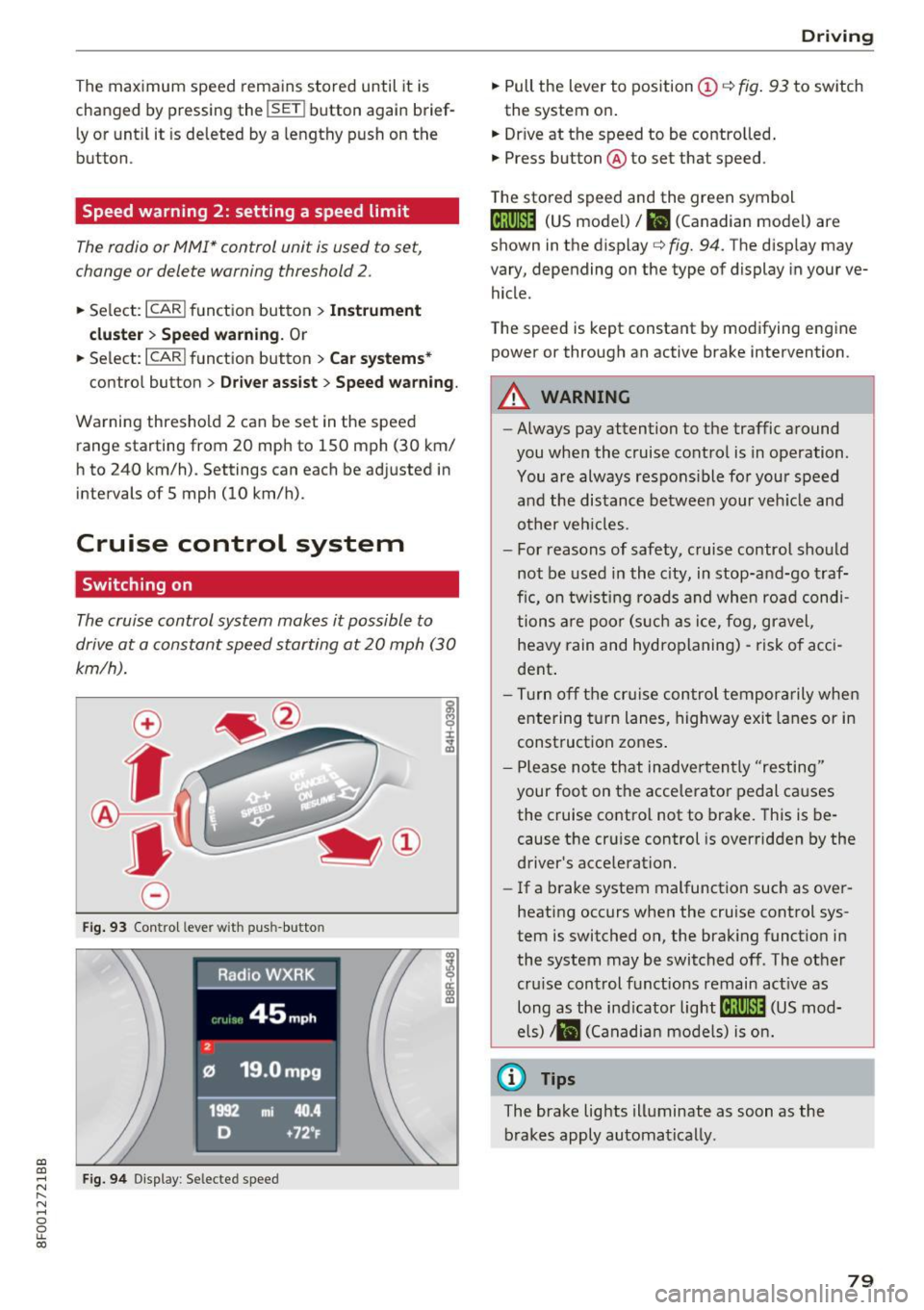
• Pull the lever to position (D c::> fig . 93 to sw itch
the system on .
• Dr ive at the speed to be contro lled .
• Press button @to set that speed .
T he sto red speed and the green symbol
@;\1)~14 (US mode l)/ El (Canadian model) are
shown in the display
c::> fig. 94. The d isp lay may
vary, depending on the type of display in you r ve
hicle .
The speed is kept constant by modifying engine power or through an act ive brake intervention .
_& WARNING
-Always pay attention to the traffic a round
you when the cruise contro l is in operation.
You are always respons ible fo r your speed
a nd the distance betwee n your ve hicle and
other veh icles.
- For reasons of safety, c ruise control sho uld
not be used in the c ity, in stop-an d-go t raf
fic, on tw ist ing roads and whe n roa d condi
tions a re poo r (s uch as ice, f og, gravel,
heavy rain and hydroplaning) -ris k of a cci
dent .
- Tu rn off the cr uise con trol te mpor arily whe n
e ntering t urn lanes, highway exit lanes or in
construct ion zones .
- P lease no te th at inadve rten tly "resting"
your foot on the acce lerator pedal causes
the cruise control not to brake. This is be
cause the cr uise control is overridden by the
driver's acce leration.
- If a b rake system malfunction such as ove r
heating occurs when the cruise control sys
tem is switched on, the brak ing funct io n in
the system may be switched of f. The other
cru ise control functions remain act ive as
long as the ind icator
light @;\1)~14 (US mod
e ls)
,ii (Ca nadian mo dels) is on .
@ Tips
The brake lights illuminate as soon as the
brakes apply automa tically.
79
Page 83 of 266
Automatic transmission multitronic, S tronic,
tiptronic
Introduction
Applies to: vehicle s with multitronic/S tronic/tiptronic
The automatic transmission is cont rolled e lec
tronica lly. The transmission upshifts or down
shifts automatically depending on which drive program is selected.
When a
moderate drivi ng style is used, the
transmission selects the most economical driving
mode. It will then change up early and delay the
downshifts to give better fuel economy.
The transm ission switches to a sporty mode afte r
a kick -down or when the driver uses a
s po rt y
d riv ing sty le
characterized by quick accelerator
pedal movements, heavy acce leration, frequent
changes in speed and traveling at the maximum
speed.
If desired, the driver can also select the gears
manually { tip tron ic mode) 9 page 81.
Various automatic transmissions may be instal
led, depending on the model :
multitronic transmission
The multitronic transmission is a cont inuous ly
va riable t ransmiss ion. Power is transferred using
a mu ltidisk clutch. In contrast to conventiona l
automatic transmissions using shifting opera
tions, the transmission ratio in the continuous ly
variable transmiss ion is changed continuously.
This optimizes the comfort level and conserves
fuel.
S tr onic transmi ssion
The S tronic is a dua l-clutch transmiss ion . Power
is transferred using two clutches that work inde
pendently from one another. They replace the
torque converter used in conventional automatic
transmissions and allow the vehicle to accelerate
without a noticeable interruption in tract ion.
a:,
a:,
...... tip tron ic tran smis sion N r--.
~ In the tiptron ic transmission, power is transfer-
fi:' red by a torque converter. 00
Autom atic tran sm iss ion
Selector lever positions
Applies to: vehicles wit h mult itron ic/S tro nic/t iptronic
F ig. 95 Display in the instrument cl uste r: se lector lever in
posit ion P
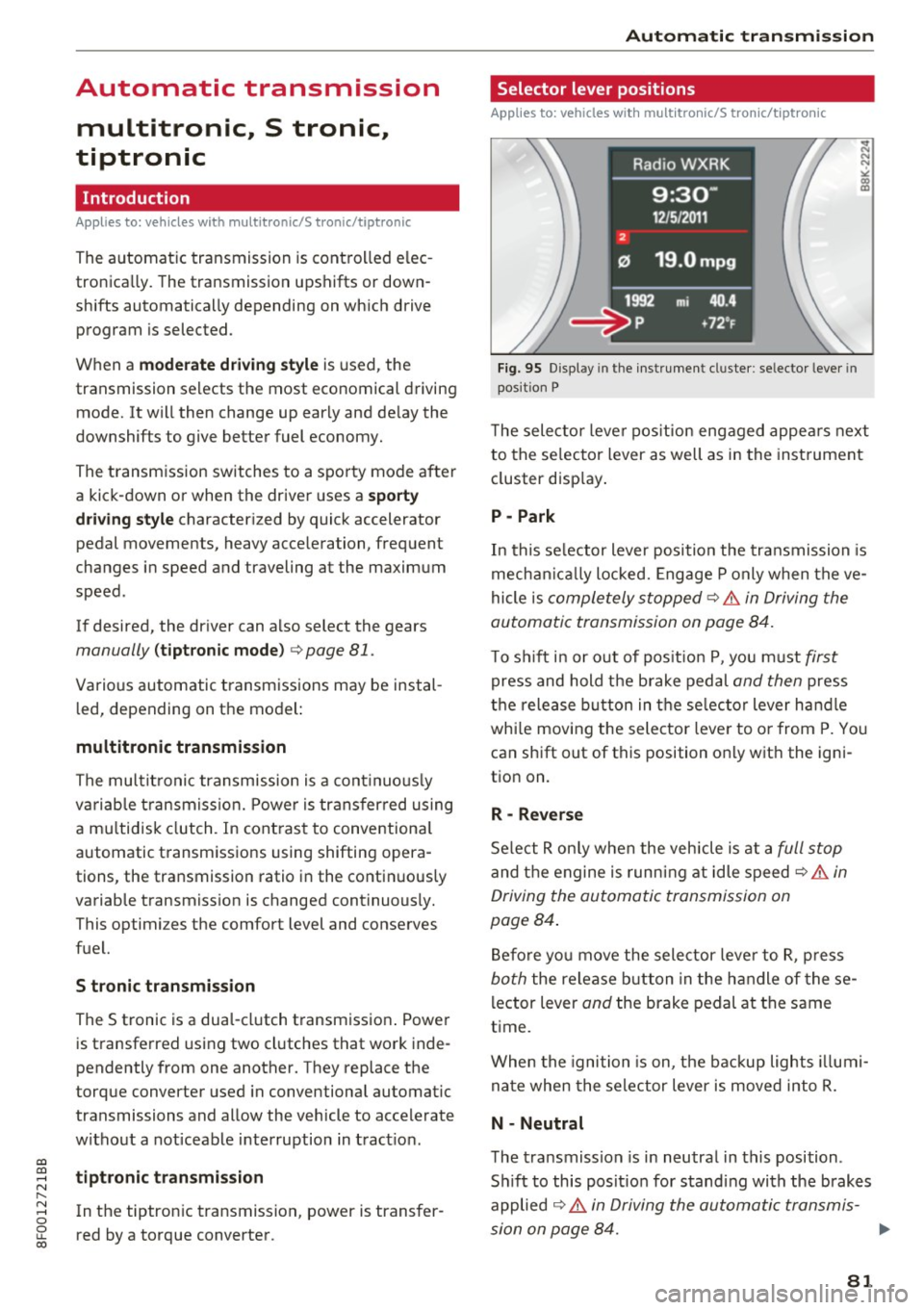
T he selector leve r pos ition engaged appea rs next
to the se lector lever as well as in the instrument
cluster disp lay .
P -Park
In this se lector lever position the transmission is
mechan ica lly locked. Engage P only when the ve
hicle is
completely stopped~.&. in Driving the
automatic transmission on page 84.
T o s hift i n or out of pos it ion P, you must first
press and hold the brake pedal and then press
t h e release button in the se lec tor lever ha ndle
whi le mov ing the selector lever to o r from P. Yo u
can shift out of this position on ly with the igni
tion on.
R -Reverse
Se lect R on ly when the vehicle is at a full stop
and the engine is runn ing at idle speed C? .&. in
Driving the automatic transmission on
page 84 .
Before yo u move the selector leve r to R, p ress
both the release b utton in the handle of these
l ector lever
and the brake pedal at the same
time.
When the ignition is on, t he backup lights illumi
na te when the selector lever is moved into R.
N -Neutral
The transmiss ion is in neutral in this position .
S hi ft to this posit io n for standing with the brakes
applied
~ .&. in Driving the automatic transmis-
sion on page 84. ..,
81
Page 84 of 266

Automatic transmission
When the vehicle is stationary or at speeds below 1 mph (2 km/h), you must always app ly the foot
brake before and while moving the lever out of N.
D /S -Normal position for driving forward
In the D/S posi tion, the transmission can be op
erated e ither in the no rma l mode Do r in the
sport mode S. To select the sport mode S, pull
the selector lever back briefly. P ulling the lever
back again w ill select the normal mode D. The in
strument cluster display shows the selected dr iv
ing mode.
In the
normal mode D, the transmission auto
mat ica lly selects the suitab le gear ratio. It de
pends on eng ine load, vehicle speed and driving
style.
Select the
s port mode S for sporty driving. The
veh icle makes fu ll use of the engine 's power.
Shifting may become noticeab le when acce lerat
ing.
When the vehicle is stationary or at sp eeds below
1 mph (2 km/h), you must always app ly the foot
brake before and while moving the lever to D/S
out of N.
A WARNING
Read and follow all WARNINGS cc> .& in Driv
ing the automatic transmission on
pag e 84.
(D Note
Coasting down hill with the transm iss ion in N
and the engi ne not run ning will result in dam
age to the automatic transmission and poss i
bly the catalytic converte r.
@ Tips
- On vehicles wit h drive select*, you can ad
ju st the sporty shift characteristics in the
Dynamic dr iv in g mod e.Swi ll appea r in th e
in st ru ment cl uster display instead of D.
-If you accide nta lly select N while driv ing,
take yo ur foot off the a cceler ator ped al im
med iately an d wait for the e ngine to slow
d own to idle bef ore se lec ting D/S.
82
- If there is a powe r failure, t he se lector lever
wi ll not move out of the P position. The
eme rgency re lease can be used if th is hap
pens
q page 8 7 .
Automatic Shift Lock (ASL)
App lies to : vehicles wi th mult itro nic/S t ro ni c/ tip tronic
The Automatic Shift Lock safeguards you against
accidentally shifting into a forward or the re
verse gear and causing the vehicle to move unin
tentionally.
Fig. 96 Sh ift gate : se lec to r lever lock pos it io ns and re lease
but ton high lig hted
The selector lever lock is re leased as follows:
.,. Tur n the ignition on.
.,. Step on the bra ke pedal.
At the same time
press and hold the release button on the side of
the gear selector knob
cc> fig. 96 with your
thumb until you have moved the selector lever
to the desired position .
Automatic selector leve r lock
The selector lever is locked in the P and N posi
tions when the ign itio n is turned on . You must
press the brake peda l and the release button to
select another posit ion. As a rem inder to the
driver, the following warn ing appears i n the in
str ume nt cluster d isp lay when the se lector is in P
and N:
When stat ionary apply brake pedal while select
ing gear
The Automatic Shift Lock only functions whe n the
vehicle is stat ionary or at speeds be low 1 mph
(2 km/h) .
Page 85 of 266
At speeds above about 1 mph (2 km/h) the Auto
matic Shift Lock is automatically deactivated in
the N position.
A time delay element prevents the selector lever
from locking when it is moved through the N po
sition (going from R to D/S). The locking e lement
will lock the se lector lever if the lever is left in N
(Neutral) for more than approx imately 2 sec
onds, without the brake pedal being pressed.
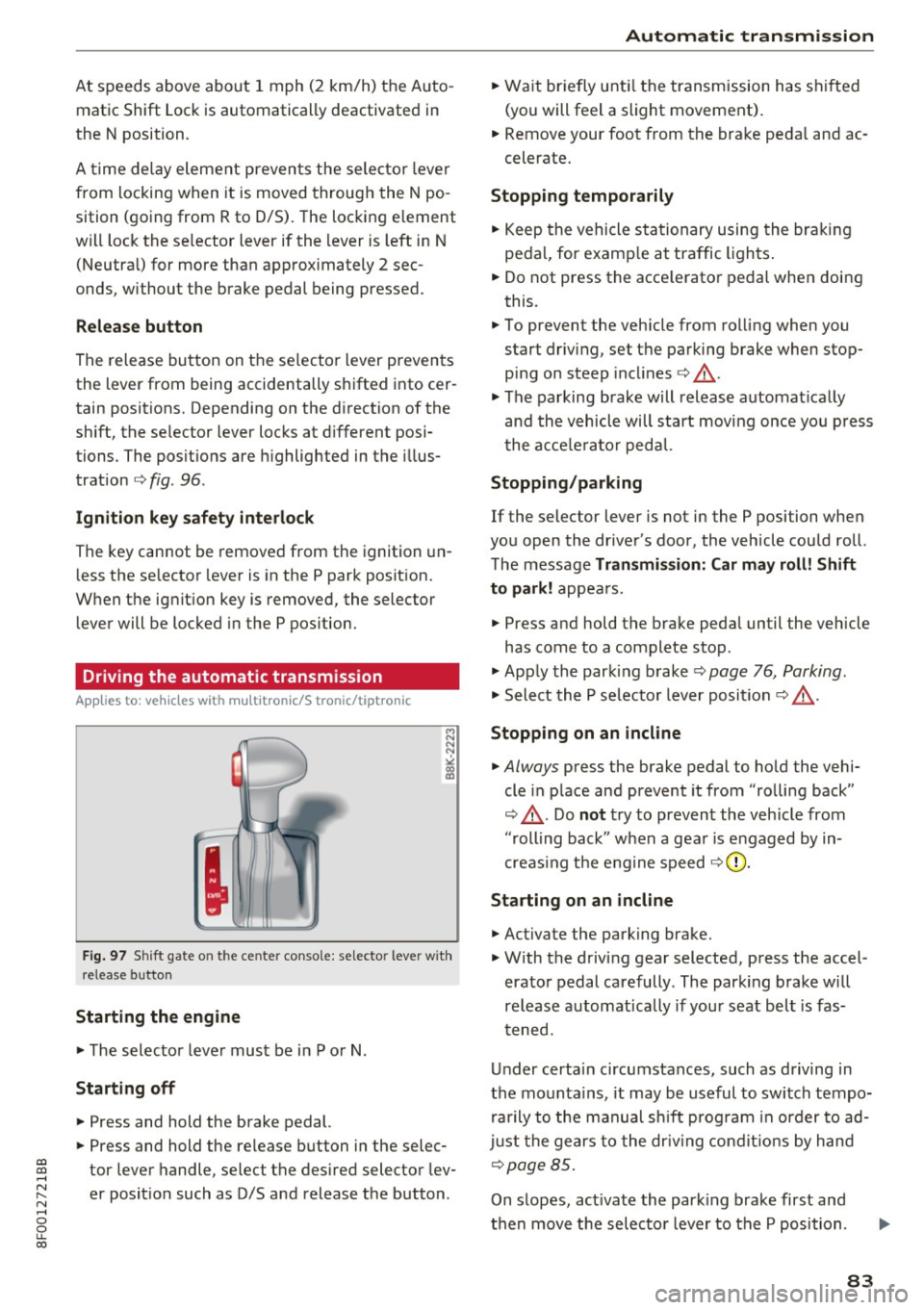
Release button
The release button on the se lector lever prevents
the lever from being accidentally sh ifted into cer
tain positions. Depending on the d irection of the
shift, the selector lever locks at d ifferent posi
tions . The positions are highlighted in the illus
tration ¢
fig. 96 .
Ignition key safety interlock
The key cannot be removed from the ignition un
less the selector lever is in the P park posit ion.
When the ignit ion key is removed, the selector
lever will be locked in the P pos ition .
Driving the automatic transmission
App lies to: ve hicles with multitro nic/S tronic/tiptronic
Fig . 97 S hift gate o n the ce nte r conso le: selecto r leve r w ith
release button
Starting the engine
~ The selector lever must be in P or N.
Starting off
~ Press and hold the brake pedal.
~ Press and hold the release button in the selec-
a:,
a:, tor lever handle, select the des ired selector lev-......
~ er position such as D/S and release the button. N ...... 0
0
LL 00
Automatic transm ission
~ Wait briefly unti l the transmission has shi fted
(you will feel a slight movement).
~ Remove your foot from the brake pedal and ac
celerate.
Stopping temporarily
~ Keep the vehicle stationary using the braking
pedal, for examp le at traffic lights.
~ Do not press the acce lerator pedal when doing
this .
~ To prevent the veh icle from rolling when you
start driv ing, set the parking brake when stop
p in g on steep incl ines ¢.&_ .
~ The parking brake will release automat ically
and the vehicle will start moving once you press
the acce le rator pedal.
Stopping/parking
If the selector lever is not in the P position when
you open the driver's door, the vehicle could roll.
The message
Transmission: Car may roll! Shift
to park!
appea rs.
~ Press and hold the brake pedal until the vehicle
has come to a complete stop .
~ Apply the parking brake ¢ page 76, Parking.
~ Select the P selector lever position ¢ .&_ .
Stopping on an incline
~ Always press the brake pedal to hold the vehi
cle in place and prevent it from "rolling back"
¢ .&_ . Do
not try to prevent the vehicle from
"rolling back" when a gear is engaged by in
creas ing the engine speed
¢0.
Starting on an incline
~ Activate the parking brake.
~ With the driving gear selected, press the accel
erator pedal carefully . The park ing brake will
release automatically if your seat belt is fas
t ened.
Under certain circumstances, such as driving in
the mountains , it may be useful to switch tempo
rarily to the manual shift program in order to ad
just the gears to the driv in g conditions by hand
¢page 85.
On slopes, act ivate the park ing brake first and
then move the selecto r lever to the P position.
83
Page 86 of 266
Automatic transmission
This prevents too much stress from being placed
on the locking mechanism.
Vehicles with multitronic transmission: Your ve hicle is equipped with
hill hold assist allowing
you to start while on an incline. The system is ac
tivated when the brake pedal is pressed down
and held
for a few seconds. The brake pressure
will hold for
a moment after the brake pedal
loosens to prevent the vehicle from rolling back
wards while starting up.
A WARNING
- The vehicle can also roll when the engine is
stopped.
- Unintended vehicle movement can cause se rious injury.
- Never leave your vehicle with the engine
running while in gear. If you must leave
your vehicle when the engine is running, ac tivate the parking brake and move the selec
tor lever to P.
- Power is still transmitted to the wheels
when the engine is running at idle. To pre
vent the vehicle from "creeping", you must
keep your foot on the brake when the en
gine is running and the selector lever is in 0/
Sor R or "tiptronic" mode is selected.
- Do not press the accelerator pedal when changing the selector lever position while
the vehicle is stationary and the engine is
running.
- Never shift into R or P while driving.
- Before driving down a steep slope, reduce
your speed and shift into a lower gear with
"tiptronic".
- Do not ride the brakes or press the brake
pedal too often or too long when driving
down a hill. Constant braking causes the
brakes to overheat and substantially re
duces braking performance, increases brak
ing distance or causes complete failure of
the brake system.
- To prevent the vehicle from rolling back
when stopping on inclines, always hold it in
place with the brake pedal or parking brake.
- Never hold the vehicle on an incline with a
slipping clutch. The clutch opens automati-
84
cally when it becomes too hot from the
overload. An indicator lamo
[O ] illuminates
and a driver message appears
c::;, page 86
when the clutch is overloaded.
- If the engine must remain running, never
have any driving position engaged when
checking under the hood. Make sure these
lector lever has securely engaged and is
locked in P with the parking brake set
¢page 193. Otherwise, any increase in en
gine speed may
set the vehicle in motion,
even with the parking brake applied.
(D Note
- S tronic- and tiptronic transmission: When
stopping on an incline, do not try to hold
the vehicle in place by pressing the accelera
tor pedal while a driving gear is selected.
This can cause the transmission to overheat
and can damage it. Activate the parking
brake or press the brake pedal to prevent
the vehicle from rolling.
- S tronic- and tiptronic transmission: Allow
ing th@ vehicle to roll when th@ engine is
stopped and the selector lever is in N will
damage the transmission because it is not
lubricated under those circumstances.
(D Tips
For safety reasons, the parking brake is re
leased automatically only when the driver's
safety belt is engaged in the buckle.
· Hill descent control
App lies to: vehicles with mult itron ic/S tron ic/t iptronic
The hill descent control system assists the driver
when driving down declines .
Hill descent control is activated when the selec
tor lever is in D/S and you press the brake pedal.
The transmission automatically selects a gear
that is suitable for the incline. Hill descent con
trol tries to maintain the speed achieved at the
time of braking, within physical and technical
limitations. It may still be necessary to adjust the
speed with the brakes. ..,..
Page 87 of 266
a:,
a:,
...... N
" N ...... 0
0
LL co
Hill descent control switches off once the decline
levels out or you press the accelerator pedal.
On vehicles w ith the cruise control system*
¢ page 79, hill descent control is also activated
when the speed is set.
&,_ WARNING
H ill descent control cannot overcome physical
limitations, so it may not be able to maintain
a constant speed under all conditions. Always
be ready to apply the brakes.
Manual shift program
A ppl ies to: ve hicles w ith mul titronic/S tronic/tip troni c
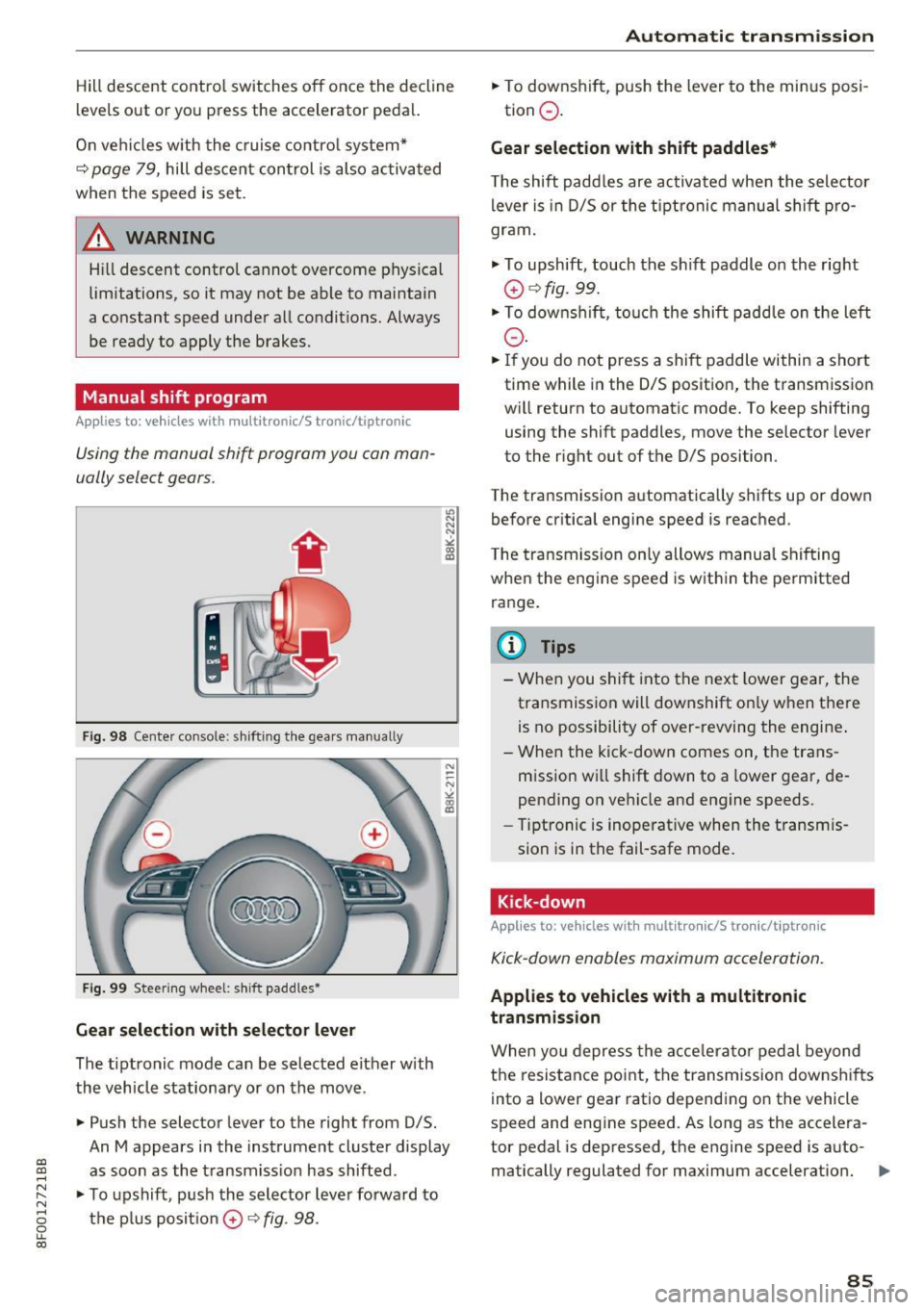
Using the manual shift program you can man
ually select gears.
Fig. 98 Cente r console: shifting the gea rs manua lly
Fig. 99 Steering wheel: shift paddles•
Gear selection with selector lever
The tiptronic mode can be selected either with
the vehicle stationary or on the move.
• Push the selector lever to the right from D/5.
"' N N N ,.:i
~
An M appears in the instrument cluster display
as soon as the transmiss ion has shifted.
• To upshift, push the selector lever forwa rd to
the plus posit ion
0 ¢ fig . 98.
Automatic transmission
• To downshift, push the lever to the minus posi-
tion
0 .
Gear selection with shift paddles*
The shift paddles are activated when the selector
lever is in D/5 or the tip tronic manual shift pro
gram.
• To upshift, touch the sh ift paddle on the right
0 ¢fig. 99.
• To downshift, touch the shift paddle on the left
0-
• If you do not press a shift paddle within a short
time while in the 0/5 position, the transmission
wi ll return to automatic mode. To keep shifting
using the shift paddles, move the selector lever
to the right out of the D/S position.
The transmission automatically shifts up or down before critical engine speed is reached .
The transmission only allows manual shifting
when the engine speed is within the permitted
range.
@ Tips
- When you shift into the next lower gear, the
transmission will downshift on ly when there
is no possibility of over-revving the engine .
- When the kick-down comes on, the trans
mission will shift down to a lower gear, de
pending on vehicle and engine speeds.
- Tiptronic is inoperative when the transmis
sion is in the fail-safe mode.
Kick-down
Applies to : vehicles wi th mult itro nic/S tro nic/t ipt ronic
Kick-down enables maximum acceleration.
Applies to vehicles with a multitronic
transmission
When you depress the acce lerator pedal beyond
the resistance point, the transmission downshifts
into a lower gear ratio depending on the vehicle
speed and engine speed. As long as the accelera
tor pedal is depressed, the engine speed is auto-
matically regulated for maximum acceleration.
Ill>
85
Page 88 of 266

Automatic transmissio n
Appli es to vehicl es with a S troni c-/ tiptronic
t ran smissi on
When you depress the accelerator peda l beyond
the resistance point, the automatic t ransmission
downshifts into a lower gear, depending on vehi
cle s peed and engi ne speed. The upshift into the
next h igher gear takes place once the maximum
specif ied e ngine speed is reached.
A WARNING
Please note that the drive whee ls can spin if
kick-down is used on a smooth s lippery road -
there is a risk of skidding.
Launch Control Program
A pp lies to: ve hicles w ith S tro nic
The Launch Control Program provides the best
acceleration possible when starting from a stop.
Requirement: The engine must be at operating
temperature and the steer ing wheel must not be
turned .
"' Press the
lfl O FF ! button ¢ page 168 while the
engine is run ning . T he
II indicator light illumi
nates in the instrument cluste r and
Stabil iza
tion control (ESC ): Sp ort. Warning! R estricted
s tab ilit y
appears in the d river informat ion sys
tem display.
"' Move the selecto r lever to the D/S position to
select sport mode (S) or select the
d ynami c
driving mode in drive select * ¢page 102.
"'Press the brake pedal strongly with your left
foot and hold it down fo r at least 1 second.
"' At the same t ime, press the acce lerator pedal
down completely with your right foot until the engine reaches and maintains a high RPM .
"' Remove your foot from the b rake pedal within
S seconds ¢
&-
A WARNING
-Always adapt yo ur driv ing to the traffic flow.
- Only use the La unch Control Prog ram when
ro ad and tra ffic conditions allow it and oth
er drivers will not be endangered or an
noyed by you r driving and the vehicle 's ac
celeration.
86
- Please note that the d riving wheels can spin
and the vehicle can b reak away when sport
mode is switched on, espec ially when the
road is slippery .
- Once you have acce lerated, you should
sw itch sport mode off by pressing the
I ~ OFFI button .
(D Tips
-The transmission temperat ure may increase
significant ly after using the Launch Contro l
Program. If that happens, the program may
not be ava ilable for a few minutes . It will be
available again afte r a cool-down period .
- When accelerating using the Launch Control
program, all vehicle pa rts a re subject to
heavy loads . This ca n result in increased
wea r.
Transmission malfunction
App lies to: vehicles wi th mult itro nic/S tro nic/ tip tronic
I>] Tran smi ssion : Pres s brake ped al and select
gear again.
P ress the b rake peda l and select the desired se
l ector lever posi tion again. Yo u can then co nti nu e
driv ing.
I>] Tran smiss ion ov erheating: Plea se drive con
servativel y.
The transmission temperature has increased sig
nificantly due to t he sporty dr iving ma nner . Drive
i n a less spo rty manner unti l the temperature re
turns to t he norma l range and the i ndicator light
switches of.
I>] Tran smiss ion malfun ct ion : You can co ntinue
driv ing
There is a system malfunction in the transmis
s io n. You may continue driving. Dr ive to your au
thorized Audi dea ler or qua lified repair facility
soon to have the ma lfunction corrected .
I>] Transmission malfunct ion : Limited dri ving
functional ity
There is a system malfunction in the transmis-
s ion. The t ransmission is switch ing to emergency
mode. This mode only s hifts into certain gears or ..,_
Page 90 of 266

Audi adaptive cruise control and braking guard
Audi adaptive cruise
control and braking
guard
Introduction
A pp lies to: ve hicles w ith Aud i adapt ive cruise co ntro l
The adaptive cruise contro l system assists the
driver by regulating vehicle speed and helping to
maintain a set distance to the veh icle ahead ,
within the limits of the system. If the system de
tects a moving vehicle up ahead, adaptive cruise
control can brake and then accelerate your vehi
cle. This helps to make driving more comfortable
on long highway stretches.
The braking guard system can warn you about an
impending collision and initiate braking maneu
vers
c> page 94.
Adaptive cruise control and braking guard have
technical limitations that you must know, so
please read th is section carefully, understand
how the system works and use them properly at
all times.
General information
General information
A pplies to : ve hicles w ith Aud i adapt ive cruise co ntrol
Fig. 102 Front of t he veh icle: Posit ion of radar sensor
The area that contains the radar sensor
c> fig. 102 must never be covered by st ickers or
other objects or obstructed with dirt, insects,
snow or ice that w ill interfere w ith the adaptive
cruise control system and braking guard. For in
formation on cleaning, refer to
c> page 182. The
same appl ies for any modifications made in the
front area .
88
The function of the adaptive cruise control sys
tem and braking guard is limited under some
condit ions:
- Objects can only be detected when they are
within sensor range
<:!) page 90, fig . 105.
-The system has a limited ability to detect ob
jects that are a short distance ahead, off to the
side of your vehicle or moving into your lane.
- Some k inds of veh icles are hard to detect; for
example motorcycles, veh icles with high
ground clearance or overhanging loads may be
detected when it is too late or they may not be
detected at all.
- When driving through curves
c:::> page 89.
- Stationary objects i::!) page 89 .
& WARNING
-Always pay attention to traffic when adaptive
cruise control is switched on and braking
guard is active. As the driver, you are still re
sponsible for starting and for maintaining
speed and distance to other objects . Braking
guard is used to assist you . The driver must
a lways take act ion to avoid a collision . The
driver is always responsible for braking at the
cor rect time.
- Improper use of adaptive cruise contro l can
cause collisions, other accidents and serious
personal injury.
- Never let the comfort and convenience that
adapt ive cr uise control and braking guard
offe r distract you from the need to be alert
to traffic conditions and the need to remain
in full control of your ve hicle at all times,
- Always remember that the adaptive cruise
control and braking guard have limits -they
will not slow the vehicle down or maintain
the set distance when you dr ive towards an
obstacle or something on or near the road
that is not moving, such as vehicles stopped
in a traff ic jam, a stalled or disabled veh icle.
If registered by the radar sensor, veh icles o r
obstacles that are not moving can trigger a
coll ision warning and if confirmed by the
video camera, an acute collision warning. ..,
Page 91 of 266
Audi ada pti ve c ruise contr ol and br akin g gu ard
-For safety reasons, do not use adapt ive
cruise contro l when driv ing on roads with
many curves, when the road surface is in
poor condit ion and/or in bad weather (such
as ice, fog, gravel, heavy rain and hydroplan
ing) . Us ing the system under these condi
t ions could result in a collision .
- Switch adaptive cruise contro l off tempora
rily when driving in turn ing lanes, on ex
pressway exits or in const ruc tion zones. This
preven ts the vehicle from accelerating to
the set speed when in these situat ions .
- T he adapt ive cr uise con trol system will no t
br ake by i tself if you pu t your foot on the ac
celerator peda l. Doing so can override the
speed and distance regulation.
- Whe n approaching stat ionary obje cts such
as stopped traffic, adapt ive cruise control
will not respo nd and braking guard will have
limited function .
- The adaptive cruise control system and
brak ing guard do not react to peop le, ani
ma ls, objects crossing the road or oncom ing
objects.
- The function of the radar sensor can be af
fected by reflective objects such as guard
rai ls, t he entrance to a tunnel, heavy rain or
ice.
- Never follow a veh icle so closely that you
cannot stop your vehicle safely . The adap
t ive cr uise control cannot slow or brake the
vehicle safely when you follow another veh i
cle too close ly. Always remember th at the
au tom atic b raking function ca nnot br ing the
vehicle to a sudden or emergency stop un
der these conditions .
- T o preven t unintended operation, always
switch AC C off when i t is not be ing used.
(D Note
The sensor can be disp laced by impacts o r
damage to the bumper, whee l housing and
underbody. That co uld affect the adaptive
cru ise con trol sys tem and braking guard.
a:i Have your a uthorized Audi dea ler or author-a:i
;:::: ized Aud i Service Facility check their function.
" N .... 0
0
LL co
In curves
Applies to: vehicles with Audi adaptive cruise control
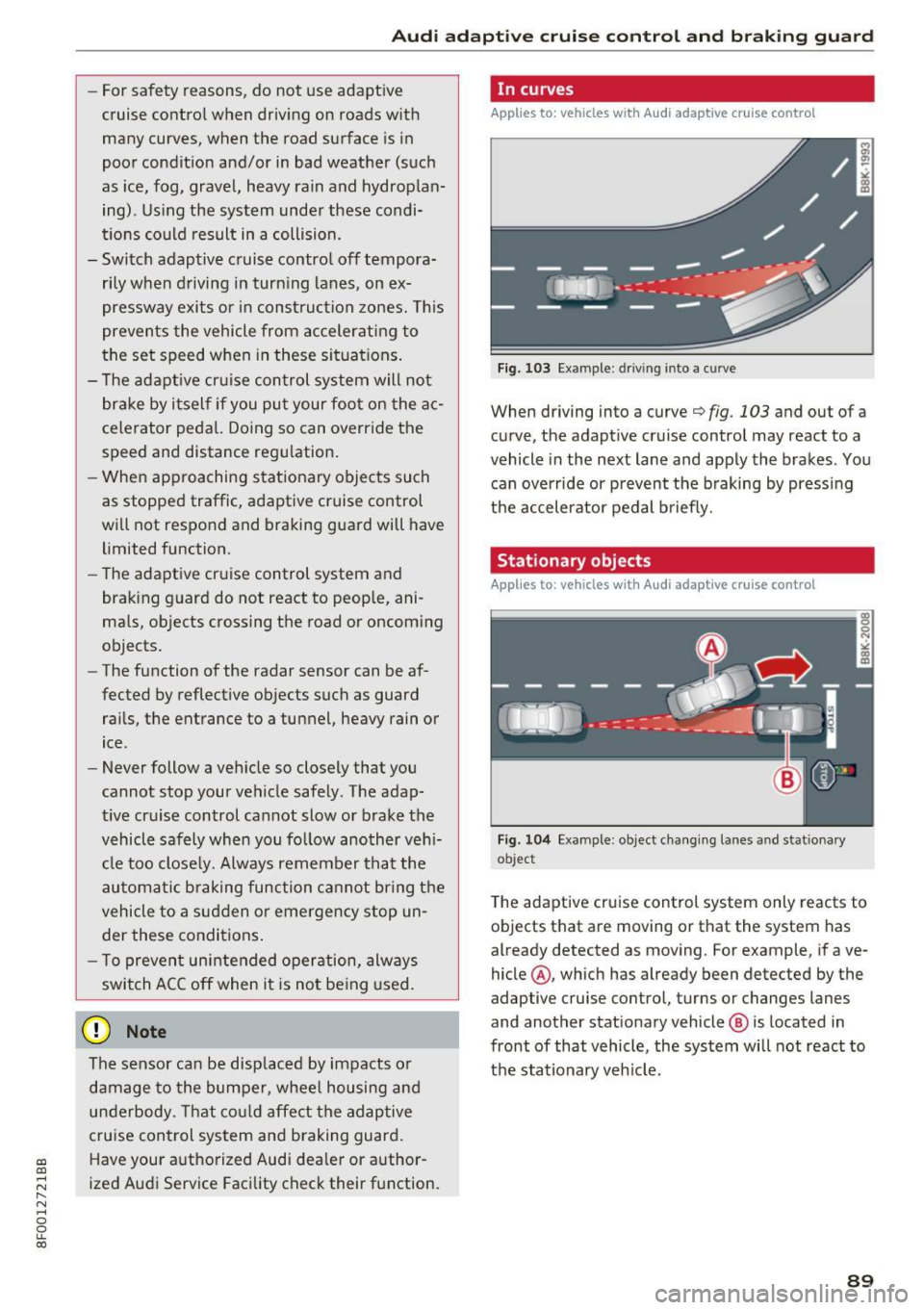
F ig. 103 Ex amp le : d ri ving int o a c urve
When driving into a curve¢ fig. 103 and out of a
curve, the adapt ive cruise control may react to a
vehicle in the next lane and apply the brakes . Yo u
can override or prevent the b raking by press ing
the accelerator pedal b riefly.
Stationary objects
Applies to: vehicles with Audi adaptive cruise control
Fi g. 10 4 Example: object c hang ing lanes a nd st ationary
ob ject
The adaptive cruise control system only reacts to
objects that are moving or that the system has
already detected as moving. For example, if ave
hicle @, which has already been detected by the
adaptive cruise control, turns or changes lanes
and another stat ionary vehicle @ is located in
front of that vehicle, the system will not react to
t h e stationary veh icle.
89
Page 93 of 266

a:,
a:,
...... N
" N ...... 0
0
LL co
Audi ada pti ve c ruise contr ol and br akin g gu ard
tachometer @and is also shown briefly in the
display @¢
fig. 10 7.
Switching Audi adapti ve c ru is e control off
~ Push the lever away from you into position @
un til it clicks into place. The message
AC C off
appea rs.
@ Indic ator lights
II -Adapt ive cru ise control is switched on . No
vehicles are detected up ahead . T he stored speed
is ma inta ined .
• -A moving vehicle is detected up ahead . T he
adapt ive cruise control system regulates the
speed and distance to the moving vehicle ahead
and accelerates/brakes automatically.
• -When automatic braking is not able to keep
enough d ista nce to a previo usly detected moving
vehicle up ahead, you must take contro l and
brake ¢
page 93, Request for driver interven
tion .
© Displa y
If adaptive cruise control is not shown in the dis
play, you can call it up with the
I RES ET I button
¢ page 21.
Based on the symbols in the display, you can de
termine if the system is ma inta ining a distance to
the vehicle ahead and what that distance is .
N o v ehicl e -No vehicle ahead was detected.
W hite vehi cle -A veh icle ahead was detected .
Red vehi cle -Prompt for the driver to take action
¢ page 93.
Both arr ow s on the sc ale © indicate the distance
to the veh icle ahead. No arrow appears when the
vehicle is on an open road and there is no object
ahead .
If an object is detected ahead, the arrow
moves on the scale.
The green zone on the scale shows the stored dis
tance . For informa tion on changing the stored
d ista nce, refer to ¢
page 92. If the distance se
lected is too close or may soon become too close,
the arrows move into the red zone on th e scale .
A WARNING
Improper use of the adaptive cruise control
can cause collisions, other accidents and seri
ous personal injuries .
- Press ing the
ISETI button when driving at
speeds below 20 mph (30 km/h) , will auto
matica lly acce lerate the veh icle to 20 mph
(30 km/h), wh ic h is the minimum speed
that c an be set.
a) Tips
- If you switch the ignition or the adaptive
cruise control off, the set speed is erased
from the system memory .
- The electronic stabilization control (ESC)
and the anti-slip-regulation (ASR) are auto
matically turned on when the adaptive
cruise control is t urned on . Both systems
cannot be turned off if the adaptive cru ise
control is turned on.
Changing the speed
Appl ies to: vehicles wi th Audi ada ptive c ruise con trol
0
f
•
0
Fi g. 108 Se lector leve r: c han gin g the speed
~ To increase or reduce the speed in increments,
ta p the lever up or down.
~ To increase or reduce the speed q uickly, h o ld
the lev er up or down until the red LED @ reach
es the des ir e d speed
¢ pag e 90, fig. 107.
Following any changes , the new stored speed will
be displayed briefly in the display@¢
page 90,
fig. 107 .
91