warning AUDI A5 CABRIOLET 2017 Workshop Manual
[x] Cancel search | Manufacturer: AUDI, Model Year: 2017, Model line: A5 CABRIOLET, Model: AUDI A5 CABRIOLET 2017Pages: 266, PDF Size: 66.64 MB
Page 75 of 266

a:,
a:,
...... N
l'
N
...... 0
0
LL co
.. Push the emergency key¢ fig. 89 fully into the
adapt er. Make sure that th e Audi rings are fac
ing up .
.. Press the eme rgency key in the adapter down
until i t latches audibly .
.. Insert the adapter with the emergency key for
ward into the ignition switch. The engine can
now be started as usual.
('O Tips
The emergency key should not be stored in
side the vehicle .
Stopping the engine
Applies to: vehicles with ig ni tion lock
.. Bring the vehicle to a full stop .
.. Automatic transmission: Move the selector lev
er to the P or N position .
.. Press on the ignition key. The engine is turned
off.
.. You can now remove the key .
Steering lock
The steering locks when you remove the ignition
key. The locked steering helps prevent vehicle
theft.
Emergency off
If it is necessary in unusual circumstances , the
engine can be switched off while the vehicle is
moving . The engine will be switched off if you
press on the key for an extended period.
A WARNING ,-
- Never turn off the engine before the vehicle
has come to a complete stop. The full func
tion of the brake booster and the power
steering is not guaranteed. You must use
more force to turn or brake if necessary . Be
cause you cannot steer and brake as you
usually would, this could lead to crashes
and serious injuries.
- For safety reasons, you should always park
your vehicle with the selector lever in P.
Otherwise, the vehicle could inadvertently
roll away .
Driving
-The radiator fan can continue to run for up
to 10 minutes even after you have turned
off the engine and removed the ignition key.
The radiator fan can also turn on again if the
engine coolant heats up because of intense
sunlight or heat build-up in the engine com
partment.
- Always take the key with you whenever you
leave your vehicle. Otherwise, the engine
could be started or electrical equipment
such as the power windows could be operat
ed. This can lead to serious injury.
- Never leave children or persons requiring as
sistance unattended in the vehicle. The
doors can be locked using the remote trans
mitter, preventing people from escaping
from the vehicle on their own in the event of an emergency. Depending on the time of
year, people inside the vehicle can be ex posed to very high or very low tempera
tures .
(D Note
If the engine has been under heavy load for
an extended period, heat builds up in the en
gine compartment after the engine is switch
ed off -there is a risk of damaging the engine.
Allow the engine to run at idle for about two
minutes before switching it off.
Convenience key
Starting the engine
Applies to : vehicles wit h co nvenience key
The !S TAR T ENGINE ST OPI button switches the
ignition on ond storts the engin e.
Fig. 90 Cente r conso le : START ENGINE STOP bu tton
73
Page 76 of 266
Driving
Starting the engine
.,. Step on the b rake pedal and move the se lector
l ever to P o r N
¢ &, .
... Press on the r.l S::-:: T=- A,,., R ""T=-= E~ N":"'. G::- I ;-:N:-:-.:= E-;:Se:;T;=-;: O" P~I button
¢ fig.
90-the engine will start .
Switching the ignition on/off
If yo u wou ld like to switch the ign ition on with
ou t starting the eng ine, fo llow these steps:
.,. Press t he
I STAR T ENGIN E ST OPI button with
out
pressing the brake pedal.
.,. To switc h the ign ition off, press t he bu tton
again.
I f t he engine should not start immed iate ly, the
starting p rocess is a utomat ica lly stopped afte r a
short t ime. Repe at st arting procedu re .
When start ing the e ng ine, major elect rical loads
are switched off temporarily.
After a cold engine is started, there may be a b rief period of increased no ise beca use oil pres
sure must first bui ld up in the hydraulic valve ad
justers. This is no rmal a nd not a cause for con
cern.
.&, WARNING
- Never allow t he eng ine to run in confine d
spa ces -danger of asphyxiation.
- Never t urn off the engine until the vehi cle
has come to a comp lete stop.
- Always take the key wi th you w henever you
leave you r vehicle. Othe rw ise, the eng ine
c ould be sta rted o r ele ctrical eq uipment
s u ch as the power windows co uld be operat
ed. This can lead to se rious injury.
- Never leave children or pe rsons requiring as
sistance unattended i n the vehicle. The
doo rs can be loc ked using the remote trans
mitter, prevent ing people from escaping
from the vehicle on the ir own in the event of
an emergency . Depend ing o n the t ime of
year, peop le inside the vehicle can be ex
posed to very hig h or very low tempe ra-
t u r es.
74
-
(D Note
Avoid high engine rpm, full throttle and heavy
engine loads unti l the engine has reached op
e rating tempe rature -otherwise you risk en
gine damage.
@ For the sake of the environment
Do not let the eng ine run wh ile pa rked to
warm up. Beg in d riving immed iate ly. Th is re
duces unnecessary emissions.
(D Tips
- After starting a co ld eng ine, the re may be a
br ief per iod of increased noise because the
oil pressure must first build up in the hy
dra ulic valve adjusters . Th is is norma l and
not a cause for concern .
- If you leave the ve hicle w ith the ignition
switched on, the ig nition w ill switch off af
ter a ce rtain per iod of t ime . Please note that
elect rical equipment such as exte rior lights
w ill swi tch off as we ll when that happens.
Switching engine off
Applies to: vehicles with convenience key
.,. Br ing your vehi cle to a comple te stop .
.,. Move the se lector lever to the P or N position .
... Press the
I STAR T ENGINE S TOP I button
¢ page 73, fig. 90.
Steering lock
The steer ing locks when yo u turn the eng ine off
u sing t he
I S TART ENGI NE STOPI button and
open the driver's doo r. The locked steering he lps
prevent veh icle theft.
Emergency off
I f necessary, the eng ine can be switched off w ith
t h e se lec to r l ever in t he R or D/S posit ions. The
engine s tops if you press and hold the
I S T AR T EN GINE S TOP ! button at speeds be low
6 mph (10 km/ h) and press the brake pedal. .,,.
Page 77 of 266

a:,
a:,
...... N r--. N ...... 0
0
LL 00
A WARNING ,~
- Never turn off the engine before the veh icle
has come to a comp lete stop. T he f ull func
t io n of the brake booster and the power
steering is no t gua ran teed. You must us e
more for ce to turn or b rake if ne cessa ry. Be
c a use you ca n no t steer a nd bra ke as you
u sually wou ld, thi s could lead to crashes
and ser ious injuries .
- F or sa fe ty reasons, you should always par k
yo ur vehicle wi th t he selec tor lever in P .
Otherwise, the ve hicl e cou ld inadvertently
roll away.
- The radia tor fan can continue to run fo r up
to 10 m inutes even afte r you have turned
off the engine and removed t he ignition key.
The radiato r fan can also turn on again if the
engi ne coolant heats up because of intense
s u nlight or heat bui ld-up in the engine com
partmen t.
- Always take the key with you whenever you
leave your vehicle. Othe rw ise, the engine
cou ld be sta rted o r electrical e quipme nt
s u ch as the power windows co uld be opera t
ed. This can lead t o se rious inj ury.
0 Note
If the engine has been under heavy load for
an exte nded per iod, heat builds up in the en
g in e compa rtment after the eng ine is switch
ed off -there is a risk of damaging the eng ine.
Allow t he engine to r un at idle fo r abo ut two
m inu tes befo re swit chi ng i t off .
Driver messages
Ignition is on
This message appea rs and a warning tone sounds
if you open t he d river's doo r when the ignition is
sw itche d on.
No key identified
This message appea rs when the
I S TAR T ENGINE STOPI button is pressed if the re
is no master key ins ide the ve hicle or if the sys
tem does not recognize it . For examp le, the mas
ter key cannot be recognized if it is cove red by an
D riving
object (e .g. al uminum brief case) which screens
t h e radio signal. Electronic devices such as ce ll
phones can a lso interfe re with the radio signal.
Pre ss brake pedal to start engine
T h is message appears if you do not p ress the
bra ke peda l to s tart t he engine.
Shift to N or P to start engine
This message appears w hen attempting to start
the engine if the se lector lever for the automatic
transm ission is not in the P or N position. The en
gine can on ly be started with the se lector in
these positions .
I!! Is the key in the vehicle?
This message appears if the mas ter key is re
moved from the veh icle with the engine r unning .
If the master key is no longer in the vehicle, you
cannot sw itch on the ign ition after stopping the
engine a nd you also cannot start the engine
again . Moreover, you cannot lock the vehicle
from the o uts ide with the key .
Shift to P otherwise vehicle can roll away. Doo rs
do not lock if le ver is not in P.
This message appears for safety reasons along
with a warning signal. It appears if the selector l ever for the automat ic transmission is not in the
P position when switch ing off the ign ition. Move
t h e se lector lever to the P position, otherw ise the
vehicle is no t secured against roll ing away. Yo u
also cannot lock the vehicle us ing t he lock ing
button * on t he doo r handle o r using t he remo te
k ey.
Convenienc e key defective! Use ignition lock
This message appears if the engine must be
started or stopped using the ignition key and not
th e
I S TA RT ENGINE ST OPI button .
75
Page 78 of 266
Driving
Electromechanical
parking brake
Operation
The electromechanical parking brake replaces
the hand brake.
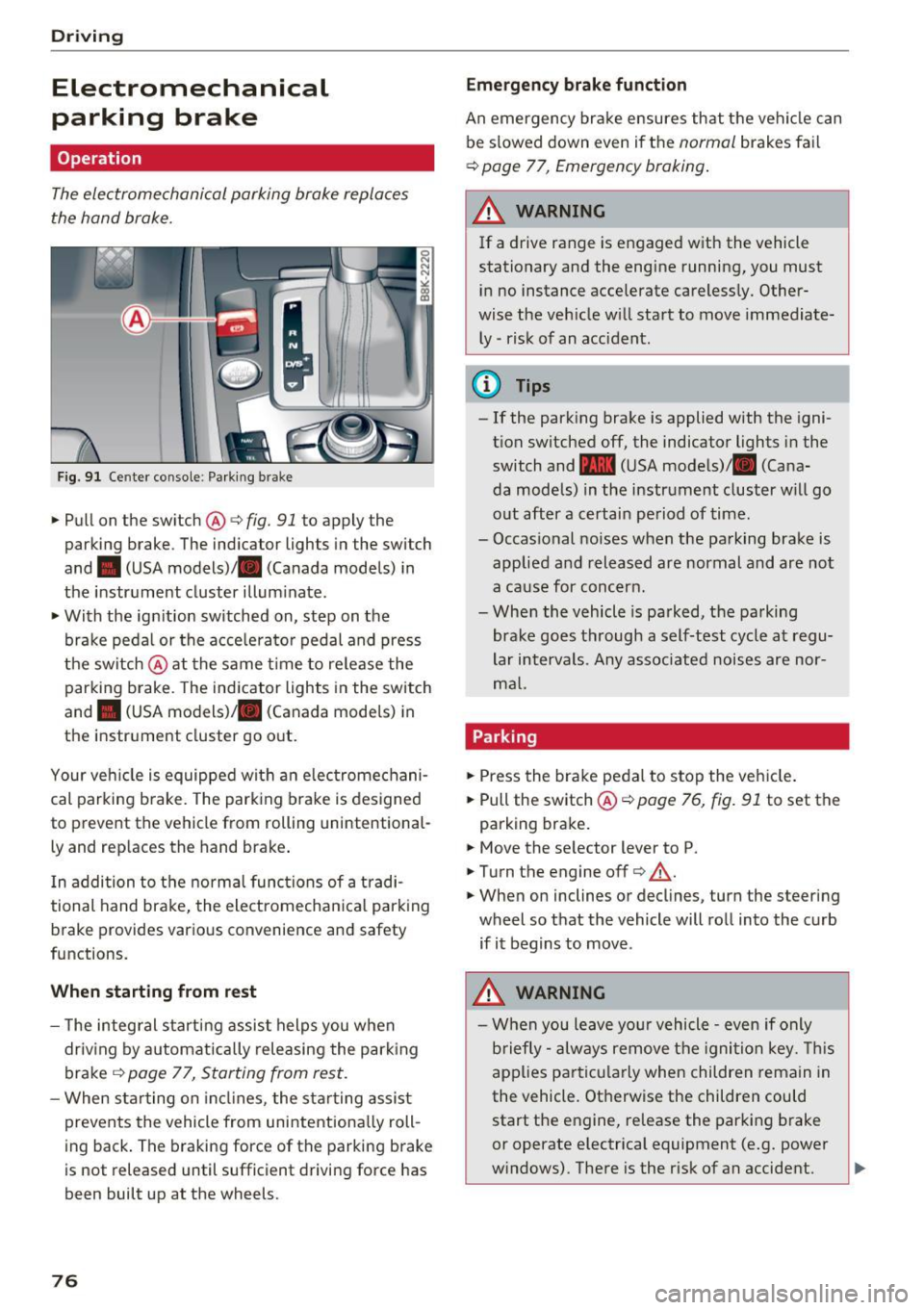
Fig. 91 Ce nter conso le: Park ing brak e
~Pullon the switch @c:>fig. 91 to apply the
parking brake . The ind icator lights in the switch
and . (USA
models) ;II (Canada models) in
the instr ument cluster illum inate.
~ With the ign ition switched on, step on the
brake peda l or the acce lerato r pedal and press
t he switch @at the same t ime to re lease the
parking brake . The indicator lights in the switch
and . (USA
models) ;II (Canada models) in
the instr ument cluster go o ut.
Your ve hicle is equipped wi th an elec tromechani
cal parking b rake. The park ing brake is designed
to prevent the vehicle from rolling un intent ional
ly and rep laces the hand brake .
I n addition to t he norma l func tions of a tradi
tional hand brake, the electromecha nica l park ing
b rake provides various convenience and safety
functions.
When starting from rest
- T he integ ral s tart ing assist helps you when
driv ing by a utomat ically releasing the park ing
brake ¢
page 77, Starting from rest .
-When starting on in cli nes, the sta rting assist
prevents the vehicle from unintentiona lly roll
ing back . The braking forc e of the park ing b rake
is not released until sufficient drivi ng force has
been built up at the wheels.
76
Emergency brake funct ion
An emergency bra ke ensures th at the vehicle can
be s lowed down even if t he
normal brakes fa il
c:> page 77, Emergency braking .
A WARNING
-
If a drive range is e ngaged w ith the vehicle
stationary and the engine running, you must
i n no instance accelerate careless ly. Other
wise the veh icle w ill start to move immediate
ly -risk of an accident.
(D Tips
- If the park ing brake is applied with the igni
t ion switched off, the indicator lights in the
switch and -(USA mode ls)/ . (Cana
da models) in the instrument cluster w ill go
o ut after a certai n pe riod of time.
- Occasional noises when the pa rking brake is
applie d and released are normal and are not
a ca use for conc ern.
- Whe n the vehicle is parked, the parking
brake goes through a self-test cycle at regu
lar intervals. Any associated noise s are nor
m al.
Parking
~ Press the bra ke peda l to stop the ve hicle.
~ Pull the switch@¢ page 76, fig. 91 to set the
parking bra ke .
~ Move the se lector lever to P.
~ T urn the engine off¢.&,. .
~ When on inclines or decl ines, turn the steer ing
wheel so that the vehicle will ro ll into the curb
if it begins to move .
.&_ WARNING
-W hen you leave yo ur vehicle -even if only
b riefly- always re move t he igni tion key. This
app lies p art ic ula rly when children remain in
the vehicle. Ot herwise the children could
start the e ngine, re lease the parking brake
or operate electrica l equipment (e .g. power
w indows) . The re is the r isk of an accident.
Page 79 of 266
a:,
a:,
...... N r--. N ...... 0
0
LL 00
-When the vehicle is locked, no one - part icu
larly not children should remain in the vehi
cle. Locked doors make it more diff icu lt for
emergency workers to get into the vehicle -
putt ing lives at risk.
Starting from rest
The starting assist function ensures that the
parking brake is released automatically upon
starting .
Stopping and applying parking brake
~ Pull the switch @9 page 76, fig. 91 to apply
the parking brake.
Starting and automatically releasing the
parking brake
~ When you start to drive as usual, the parking
brake is automatica lly released and your vehicle
begins to move.
When stopping at a traffic signal or stopping in
city traffic on vehicles w ith an automatic trans
miss ion, the park ing brake can be applied. The
vehicle does not have to be held with the foot brake . The park ing brake eliminates the tendency
to creep with a drive range engaged. As soo n as
you dr ive off as usual, the parking brake is re
leased automatically and the veh icle starts to
move.
Starting on slopes
When starting on inclines, the start ing assist pre
vents the vehicle from unintentionally rolling
back. The braking force of the parking brake is
not released until sufficient driving force has
been built up at the wheels.
(D Tips
For safety reasons, the parking brake is re
leased automatically only when the driver's
safety belt is engaged in the buckle.
Driving
Starting off with a trailer
To prevent rolling back unintentionally on an in
cline, do the following:
~ Keep the switch @9 page 76, fig. 91 pulled
and depress the accelerator. The parking brake
stays applied and prevents the vehicle from
rolling backwa rd .
~ You ca n release the sw itch @once you a re sure
that you are develop ing enough dr iv in g force at
t he wheels by depressing the accelerator.
Depending on the weight of the rig (vehicle and
trailer) and the severity of the incline, you may
roll backwards as you start. You can prevent roll
i ng backwards by holding the pa rking brake
swi tch @ pulled out and accelerating -just as
you wou ld when starting on a hill with a conven
t iona l hand brake .
Emergency braking
In the event that the conventional broke system
foils or locks.
~ I n an emergency, pull the switch@Q page 76,
fig. 91 and continue to pull it to slow your vehi
cle down with the parking brake.
~ As soon as you re lease the switch @or acceler-
ate, the braking process stops .
If you pull the switch @and hold it above a
speed of about 5 mph (8 km/h), the emergency
braking f unction is init iated. The vehicle is braked
at all four whee ls by activating the hydraulic
brake system . The brake performance is s imilar
to making an emergency stop
Q .& .
In order not to activate the emergency braking by
mistake, an audible warning tone (buzzer)
sounds when the switch @is pulled . As soon as
the switch @ is released, or the accelerator pedal
i s depressed, emergency braking stops .
A WARNING
Emergency braking should only be used in an
emergency, when the normal foot bra ke has
failed or the brake pedal is obstructed. Using
the parking brake to perform emergency
braking w ill slow your vehicle down as if you
77
Page 80 of 266
Driving
had made a fu ll brake application. The laws of
physics cannot be suspended even with ESC
and its associated components ( ABS, ASR,
EDS) . In corners and when road or weather
conditions are bad, a ful l brake application
can cause the vehicle to sk id or the rea r end to
break away- r isk ing an accide nt.
Speed warning system
Overview
The speed warning system helps you to keep your
driving speed below a set speed limit.
The speed warning system warns if the driver ex
ceeds a prev ious ly stored max imum speed. A
warn ing tone wi ll sound as soon as the vehicle
speed exceeds the set speed by about
3 mph
(3 km/h) . At the same time, a warning symbo l
appears in the display. The symbol 's appearance
might be d ifferent in some models.
The speed warning system has two warn ing
thresho lds that funct ion independent ly of each
other and that have somew hat different purpos
es:
Speed warn ing 1
You can use speed warn ing 1 to set the maximum
speed wh ile you are dr iving . This setting wi ll re
main in effect unti l yo u turn
off the ignition, as
sum ing that you have not changed or reset the
sett ing .
The . (USA models)/ . (Canada mode ls)
speed warning symbol in the wa rning
1 display
appears when you exceed the maximum speed . It
goes out when the speed falls below the stored
maximum speed .
The speed warning symbo l will also go out if the
speed
exceeds the stored maximum speed by
more than about 25 mph (40 km/h) for at least
10 seconds . The stored maximum speed is de let
ed.
Speed warn ing 2
Stor ing warning 2 is recommended if yo u always
want to be reminded of a certain speed, for ex
ample when you are traveling in a country that
78
has a general maximum speed limit, or if you do
not want to exceed a specified speed for winter
tires.
The . (USA models)
I. (Canada models)
speed warning 2 symbol appears in the display
when you exceed the stored speed limit. Unlike
warning
1, it will not go out unt il the vehicle
speed drops below the stored speed limit.
Setting speed warning
2 c;, page 79.
(D Tips
Eve n t hough yo ur vehicle is e quipped w ith a
speed w arning system, you should still wa tch
the speedome ter to ma ke sure you are no t
d rivin g faste r than the speed lim it.
Speed warning 1: setting a speed limit
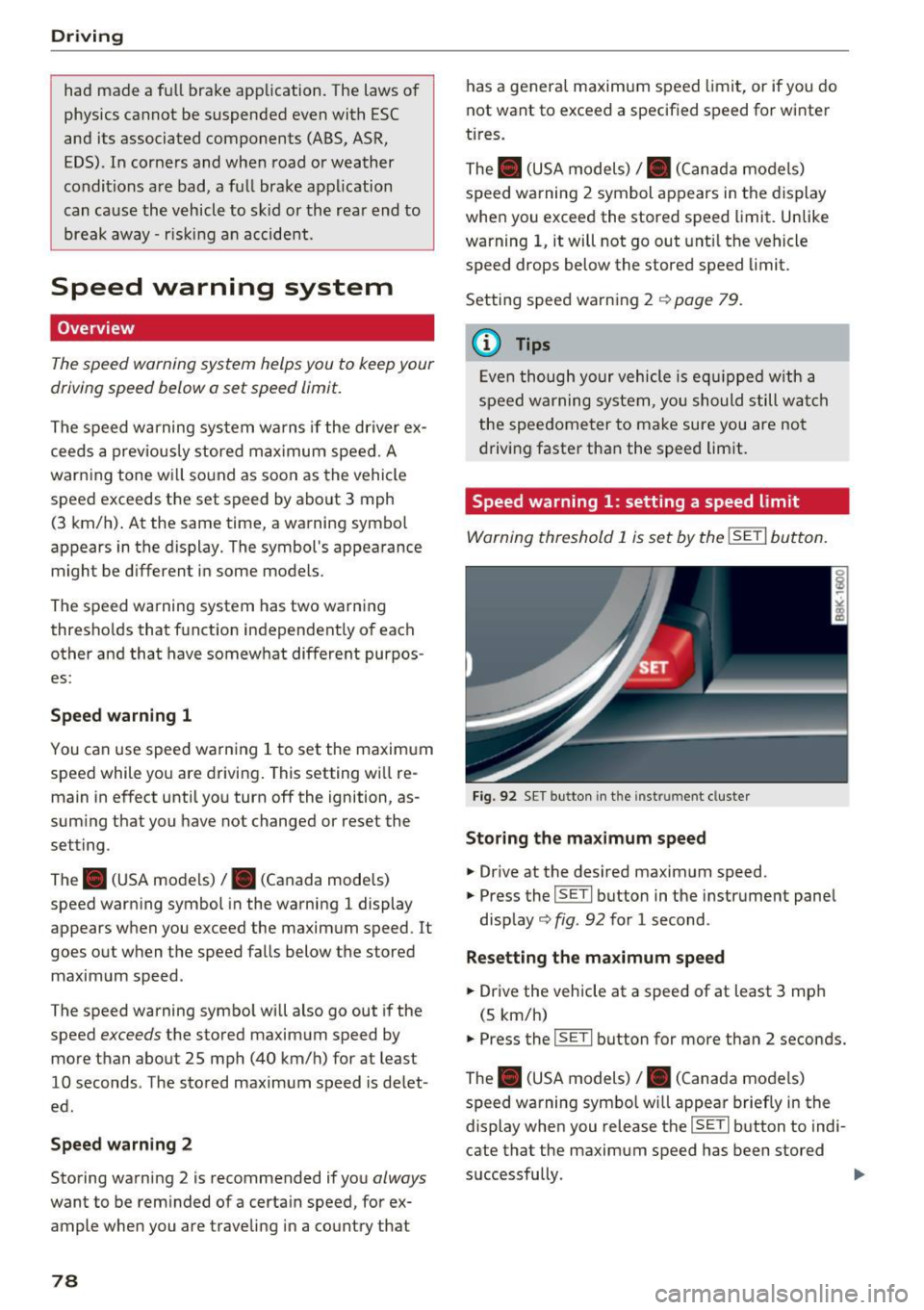
Warning threshold 1 is s et by the !SE TI button.
Fig. 92 SET butt on in t he in strum en t cl uste r
Storing the maximum speed
.. Drive at the desired maximum speed .
.. Press the
!SET I button in the instrument pane l
disp lay
c;, fig. 92 for 1 second .
Resetting the maximum speed
.. Drive the vehicle at a speed of at least 3 mp h
(5 km/h)
.. Press the
~ 1s=E T= I button for more than 2 seconds.
The . (USA models)
I. (Canada mo dels)
speed warning symbo l w ill appear brief ly in the
display when you release the
!SE TI button to indi
cate that the maximum speed has been stored
successfully.
Page 81 of 266
a:,
a:,
...... N
l'
N
...... 0
0
LL co
The maximum speed rema ins stored until it is
chang ed by press ing the
!SE Ti button again brief
l y or unt il it is deleted by a lengthy push on the
button .
Speed warning 2: setting a speed limit
The radio or MM!* control unit is used to set,
change or delete w arning threshold
2 .
• Se lect : I CAR I function button> Instrument
cluster
> Speed warning . Or
• Se lect: I CAR i funct ion button > C ar sy stem s*
contro l button > Dri ver a ssist > Speed wa rning .
Warning threshold 2 can be set in the speed
range start ing from 20 mph to 150 mph (30 km/
h to 240 km/h) . Settings can each be ad justed in
intervals of 5 mph (10 km/h).
Cruise control system
Switching on
The cruise control system makes it possible to
drive at a constant speed starting at
20 mph (30
km/h).
0
f
~
0
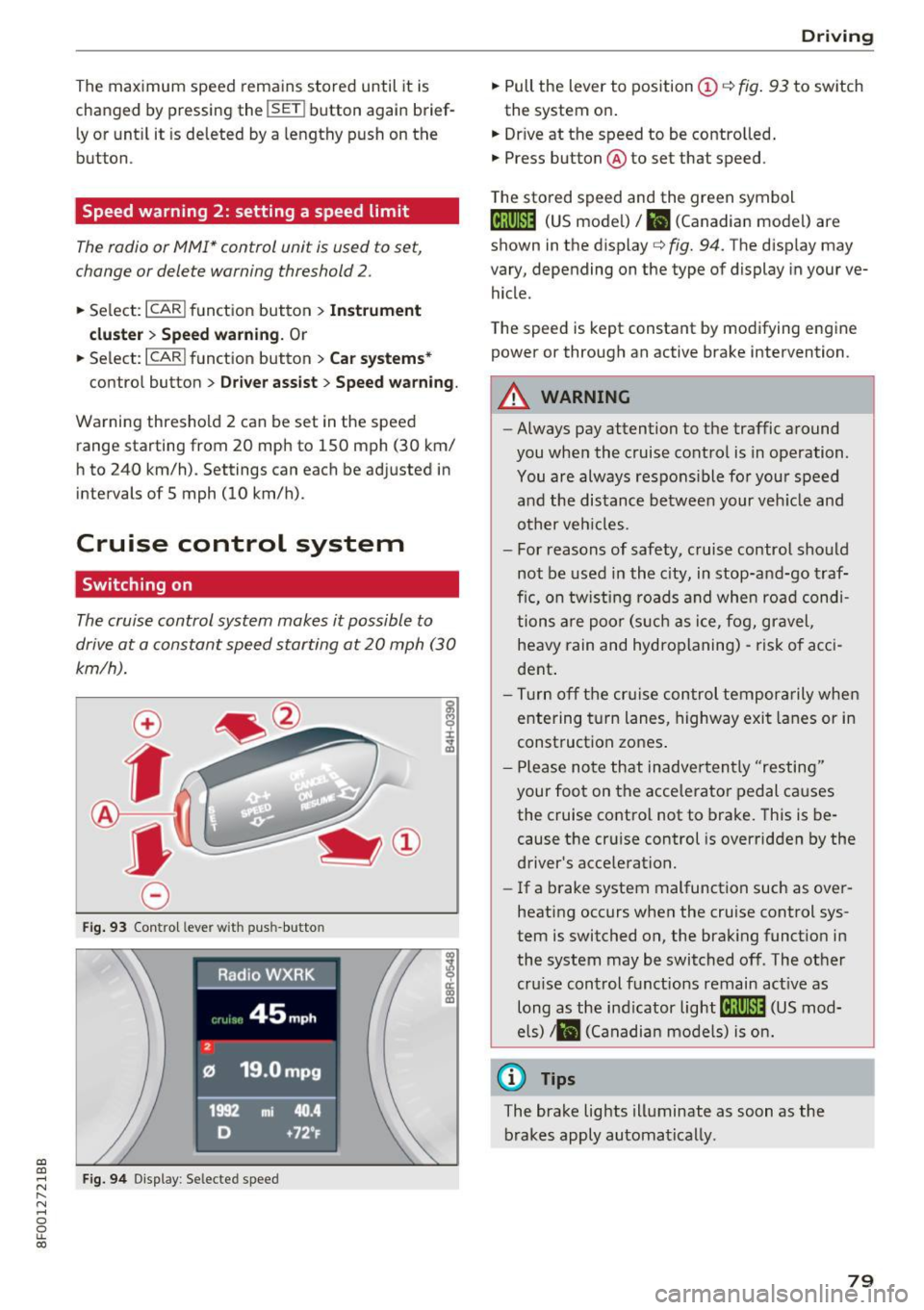
F ig . 93 Co ntrol leve r wit h pus h-butto n
Fig. 9 4 Disp lay : Se lecte d speed
D rivi ng
• Pull the lever to position (D c::> fig . 93 to sw itch
the system on .
• Dr ive at the speed to be contro lled .
• Press button @to set that speed .
T he sto red speed and the green symbol
@;\1)~14 (US mode l)/ El (Canadian model) are
shown in the display
c::> fig. 94. The d isp lay may
vary, depending on the type of display in you r ve
hicle .
The speed is kept constant by modifying engine power or through an act ive brake intervention .
_& WARNING
-Always pay attention to the traffic a round
you when the cruise contro l is in operation.
You are always respons ible fo r your speed
a nd the distance betwee n your ve hicle and
other veh icles.
- For reasons of safety, c ruise control sho uld
not be used in the c ity, in stop-an d-go t raf
fic, on tw ist ing roads and whe n roa d condi
tions a re poo r (s uch as ice, f og, gravel,
heavy rain and hydroplaning) -ris k of a cci
dent .
- Tu rn off the cr uise con trol te mpor arily whe n
e ntering t urn lanes, highway exit lanes or in
construct ion zones .
- P lease no te th at inadve rten tly "resting"
your foot on the acce lerator pedal causes
the cruise control not to brake. This is be
cause the cr uise control is overridden by the
driver's acce leration.
- If a b rake system malfunction such as ove r
heating occurs when the cruise control sys
tem is switched on, the brak ing funct io n in
the system may be switched of f. The other
cru ise control functions remain act ive as
long as the ind icator
light @;\1)~14 (US mod
e ls)
,ii (Ca nadian mo dels) is on .
@ Tips
The brake lights illuminate as soon as the
brakes apply automa tically.
79
Page 82 of 266

Driving
Changing speed
~ T o inc rease/decrease the speed in increments,
t a p the lever in the
0 10 d irec tion ¢ page 79 ,
fig . 93.
~ To increase/decrease the speed quickly, ho ld
the leve r in the
0 10 direction until the de
s ired speed is displayed.
You can a lso press the accelerator pedal down to
increase yo ur speed, e .g. if you want to pass
someone . T he speed yo u saved earlier wi ll re
sume as soon as yo u let off of the acce lerato r
pedal.
If, however, you exceed your saved speed by
6 mph ( 10 km/h) for longer than S m inutes, the
cru ise control will be turned off temporarily. The
green symbol in the d isp lay turns white. The
saved speed rema ins the same .
Presetting your speed
You can preset your desired speed while the vehi
cle is not moving.
~ Switc h on the ignition.
~ P ull lever into position @¢ page 79, fig . 93.
~ P ress the lever in the 0 or 0 direction to in-
crease or decrease your speed.
~ Release t he lever to save that speed .
This f unction makes it possib le, for examp le, to
save the speed yo u want before dr iving on the
h ighway . Once on t he h ighway, ac tivate the
cru ise con trol by pu lling the lever toward
(D .
Switching off
Temporary deactivation
~ P ress the b rake pedal, o r
~ Press t he leve r into posit io n @ (not clic ked i nto
place) ¢
page 79, fig. 93, or
~ D rive for longer t han S minu tes at mo re th an
6 mph (10 km/ h) above the stored speed.
Switching off completely
~ P ress lever into position @(clicked into place),
o r
~ Swi tch the ign ition of f.
80
The speed you saved will be retained if the cr uise
contro l has been switched off temporarily . To re
sume t he saved speed, let up on the bra ke an d
pull the lever to position
(D .
Switc hing the ignit ion off erases the saved speed .
_& WARNING
You should only return to the save d spee d if it
is not too fast for the current traff ic condi
tions -ris k of an accident!
Page 84 of 266

Automatic transmission
When the vehicle is stationary or at speeds below 1 mph (2 km/h), you must always app ly the foot
brake before and while moving the lever out of N.
D /S -Normal position for driving forward
In the D/S posi tion, the transmission can be op
erated e ither in the no rma l mode Do r in the
sport mode S. To select the sport mode S, pull
the selector lever back briefly. P ulling the lever
back again w ill select the normal mode D. The in
strument cluster display shows the selected dr iv
ing mode.
In the
normal mode D, the transmission auto
mat ica lly selects the suitab le gear ratio. It de
pends on eng ine load, vehicle speed and driving
style.
Select the
s port mode S for sporty driving. The
veh icle makes fu ll use of the engine 's power.
Shifting may become noticeab le when acce lerat
ing.
When the vehicle is stationary or at sp eeds below
1 mph (2 km/h), you must always app ly the foot
brake before and while moving the lever to D/S
out of N.
A WARNING
Read and follow all WARNINGS cc> .& in Driv
ing the automatic transmission on
pag e 84.
(D Note
Coasting down hill with the transm iss ion in N
and the engi ne not run ning will result in dam
age to the automatic transmission and poss i
bly the catalytic converte r.
@ Tips
- On vehicles wit h drive select*, you can ad
ju st the sporty shift characteristics in the
Dynamic dr iv in g mod e.Swi ll appea r in th e
in st ru ment cl uster display instead of D.
-If you accide nta lly select N while driv ing,
take yo ur foot off the a cceler ator ped al im
med iately an d wait for the e ngine to slow
d own to idle bef ore se lec ting D/S.
82
- If there is a powe r failure, t he se lector lever
wi ll not move out of the P position. The
eme rgency re lease can be used if th is hap
pens
q page 8 7 .
Automatic Shift Lock (ASL)
App lies to : vehicles wi th mult itro nic/S t ro ni c/ tip tronic
The Automatic Shift Lock safeguards you against
accidentally shifting into a forward or the re
verse gear and causing the vehicle to move unin
tentionally.
Fig. 96 Sh ift gate : se lec to r lever lock pos it io ns and re lease
but ton high lig hted
The selector lever lock is re leased as follows:
.,. Tur n the ignition on.
.,. Step on the bra ke pedal.
At the same time
press and hold the release button on the side of
the gear selector knob
cc> fig. 96 with your
thumb until you have moved the selector lever
to the desired position .
Automatic selector leve r lock
The selector lever is locked in the P and N posi
tions when the ign itio n is turned on . You must
press the brake peda l and the release button to
select another posit ion. As a rem inder to the
driver, the following warn ing appears i n the in
str ume nt cluster d isp lay when the se lector is in P
and N:
When stat ionary apply brake pedal while select
ing gear
The Automatic Shift Lock only functions whe n the
vehicle is stat ionary or at speeds be low 1 mph
(2 km/h) .
Page 86 of 266
Automatic transmission
This prevents too much stress from being placed
on the locking mechanism.
Vehicles with multitronic transmission: Your ve hicle is equipped with
hill hold assist allowing
you to start while on an incline. The system is ac
tivated when the brake pedal is pressed down
and held
for a few seconds. The brake pressure
will hold for
a moment after the brake pedal
loosens to prevent the vehicle from rolling back
wards while starting up.
A WARNING
- The vehicle can also roll when the engine is
stopped.
- Unintended vehicle movement can cause se rious injury.
- Never leave your vehicle with the engine
running while in gear. If you must leave
your vehicle when the engine is running, ac tivate the parking brake and move the selec
tor lever to P.
- Power is still transmitted to the wheels
when the engine is running at idle. To pre
vent the vehicle from "creeping", you must
keep your foot on the brake when the en
gine is running and the selector lever is in 0/
Sor R or "tiptronic" mode is selected.
- Do not press the accelerator pedal when changing the selector lever position while
the vehicle is stationary and the engine is
running.
- Never shift into R or P while driving.
- Before driving down a steep slope, reduce
your speed and shift into a lower gear with
"tiptronic".
- Do not ride the brakes or press the brake
pedal too often or too long when driving
down a hill. Constant braking causes the
brakes to overheat and substantially re
duces braking performance, increases brak
ing distance or causes complete failure of
the brake system.
- To prevent the vehicle from rolling back
when stopping on inclines, always hold it in
place with the brake pedal or parking brake.
- Never hold the vehicle on an incline with a
slipping clutch. The clutch opens automati-
84
cally when it becomes too hot from the
overload. An indicator lamo
[O ] illuminates
and a driver message appears
c::;, page 86
when the clutch is overloaded.
- If the engine must remain running, never
have any driving position engaged when
checking under the hood. Make sure these
lector lever has securely engaged and is
locked in P with the parking brake set
¢page 193. Otherwise, any increase in en
gine speed may
set the vehicle in motion,
even with the parking brake applied.
(D Note
- S tronic- and tiptronic transmission: When
stopping on an incline, do not try to hold
the vehicle in place by pressing the accelera
tor pedal while a driving gear is selected.
This can cause the transmission to overheat
and can damage it. Activate the parking
brake or press the brake pedal to prevent
the vehicle from rolling.
- S tronic- and tiptronic transmission: Allow
ing th@ vehicle to roll when th@ engine is
stopped and the selector lever is in N will
damage the transmission because it is not
lubricated under those circumstances.
(D Tips
For safety reasons, the parking brake is re
leased automatically only when the driver's
safety belt is engaged in the buckle.
· Hill descent control
App lies to: vehicles with mult itron ic/S tron ic/t iptronic
The hill descent control system assists the driver
when driving down declines .
Hill descent control is activated when the selec
tor lever is in D/S and you press the brake pedal.
The transmission automatically selects a gear
that is suitable for the incline. Hill descent con
trol tries to maintain the speed achieved at the
time of braking, within physical and technical
limitations. It may still be necessary to adjust the
speed with the brakes. ..,..