warning AUDI A5 CABRIOLET 2017 Owner's Manual
[x] Cancel search | Manufacturer: AUDI, Model Year: 2017, Model line: A5 CABRIOLET, Model: AUDI A5 CABRIOLET 2017Pages: 266, PDF Size: 66.64 MB
Page 33 of 266
a:,
a:,
,....,
N
" N ,....,
0
0
LL co
~ & in General description on page 2 7. Do not
reach inside the door handle.
The vehicle can be locked and un locked at any
door. The remote contro l key cannot be more
than 1.5 m away from the door handle. It makes
no difference whether the master key is in your
jacket pocket or in your brief case.
If yo u grip the door handle while locking, this can
adversely affect the lock ing function .
It is not possible to re-open the doo r for a b rief
period directly after closing it . This allows you to
ens ure that the doo rs are prope rly locked .
It depends on the sett ings i n the rad io or M MI*
whether the entire veh icle is unlocked or one of
the doors
~ page 32.
A WARNING
Read and follow all WARNINGS ~&. in Gener
al description on page 2
7 .
@ Tips
If your vehicle has been stand ing fo r an ex
t ended pe riod, please note the fo llow ing :
- The proximity sensors are deactivated after
a few days to save power. You then have to
pull on the door h andle once to unlo ck the
vehicle and a second time to open the vehi
cle.
- To prevent the battery from being d is
charged and to preserve your vehicle's abili
ty to start fo r as long as possib le, the ener
gy management system gradually switches
off unnecessary convenience functions. It is
possible that you will not be able to unlock
your vehicle using these convenience func tions .
- For Declaration of Compliance to Un ited
States FCC and Industry Canada regu lations
<::;> page 2 49.
Op enin g an d clos ing
Locking and unlocking the vehicle from
inside
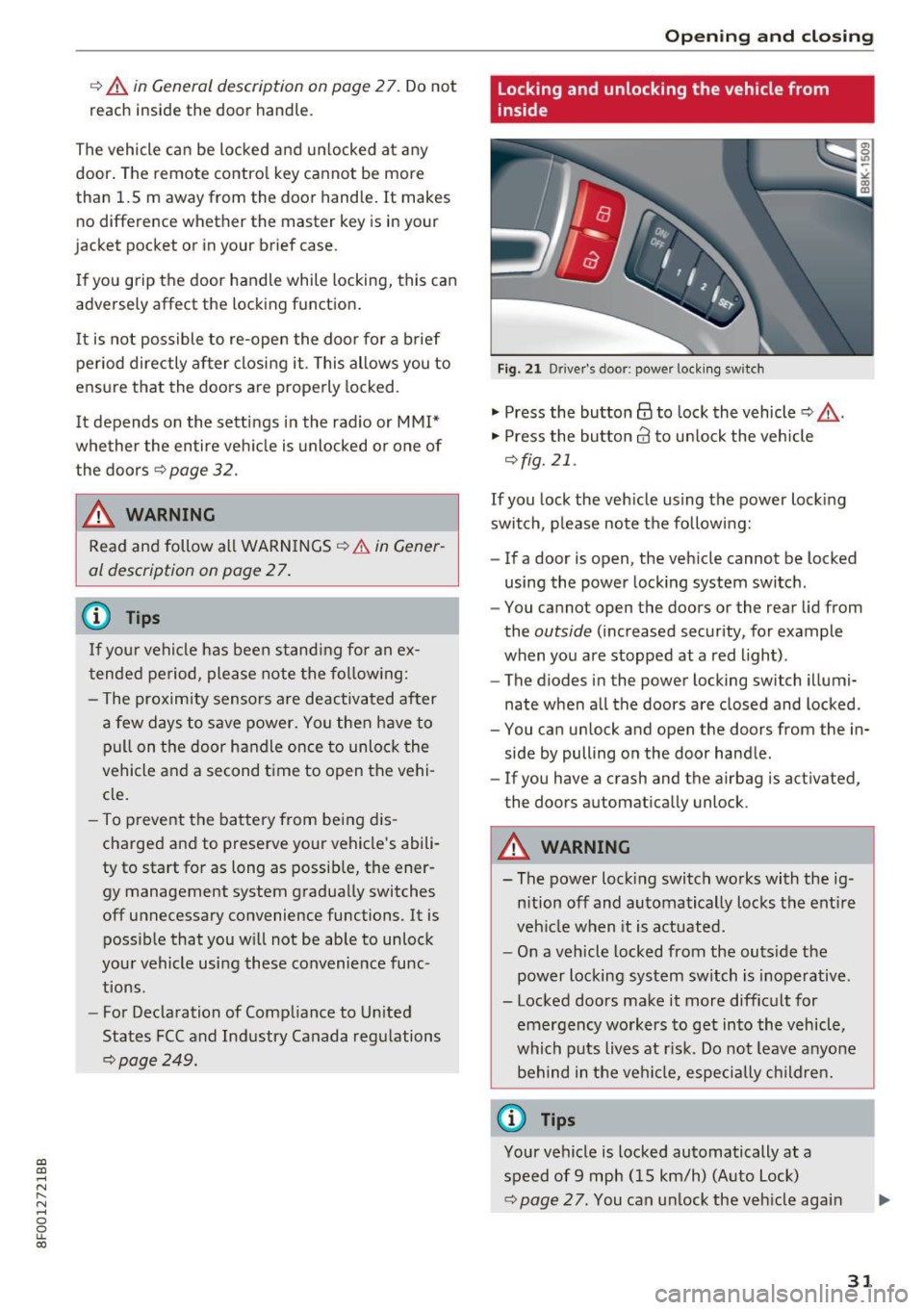
Fig. 2 1 Drive r's door; power lock ing sw itch
"' Press the button @ to lock the vehicle ~ ,&. .
"' Press the button 63 to un lock the veh icle
~ fig. 21.
If you lock the veh icle using the power lock ing
switch, p lease note the following:
- If a door is open, the veh icle cannot be locked
using the power locking system switch .
- You cannot open the doors or the rear lid from
the
outside (increased security, for example
when you are stopped at a red light) .
- The diodes in the power locking switch illumi
nate when a ll the doors are closed and locked .
- You can unlock and open the doors from the in
side by pulling on the door handle .
- If you have a crash and the airbag is act ivated,
the doors automatically unlock .
A WARNING
--The power lock ing switch works with the ig-
n ition off and automatically locks the ent ire
veh icle when it is actuated.
- On a vehicle locked from the outs ide the
power locking system switch is inoperative .
- Locked doors make it more difficult for emergency workers to get into the vehicle,
which puts lives at r isk. Do not leave anyo ne
behind in the ve hicl e, especially children.
@ Tips
Your vehicle is locked automatically at a
speed of 9 mph (15 km/h) (Auto Lock)
<::;> page 27. You can un lock the veh icle agai n
31
Page 35 of 266
a:,
a:,
...... N
" N ...... 0
0
LL co
Once the front passenger's door has been closed,
you cannot open it again from the outside. The
door can be opened from the inside by pulling
the door hand le.
A WARNING
Read and follow all WARNINGS¢&. in Gener
al description on page 2
7 .
@ Tips
After the ignition is switched on, the power
locking system switch is enabled.
Electronic immobilizer
The immobilizer prevents your vehicle from being
started by unauthorized persons .
Inside the key there is a computer chip. This chip
automatically activates/deactivates the electron ic immobilizer.
Applies to vehicles with ignition lock:
The electronic immobilizer deact ivates automati
cally when you insert the remote control key into
the ignition lock . It activates again automatically
when you remove the remote control key from
the ignition lock .
Applies to vehicles with convenience key:
If the remote control key is located inside the ve
hicle and you press the
I START ENGINE STOPI
button , the electronic immobilizer deactivates
automatically. If you switch the ignition off and remove the remote control key from the vehicle,
the electronic immobilizer activates again auto
matically .
A WARNING
Always take the key with you when you leave
the vehicle. The key can disarm the electronic
eng ine immobi lizer and permit an unauthor
ized person to start the engine and enable op
erat ion of the vehicle systems such as power
window or power sunroof leading to serious
personal injury.
Open ing and closing
(D Tips
-The vehicle cannot be started if an unau
thorized key is used. The vehicle may not
start if another radio device such as a key
for another veh icle or a transponder is lo
cated on the key ring.
- For Declaration of Compliance to United
States FCC and Industry Canada regulations
¢ page 249.
Luggage compartment
Lid
Opening /closing rear lid
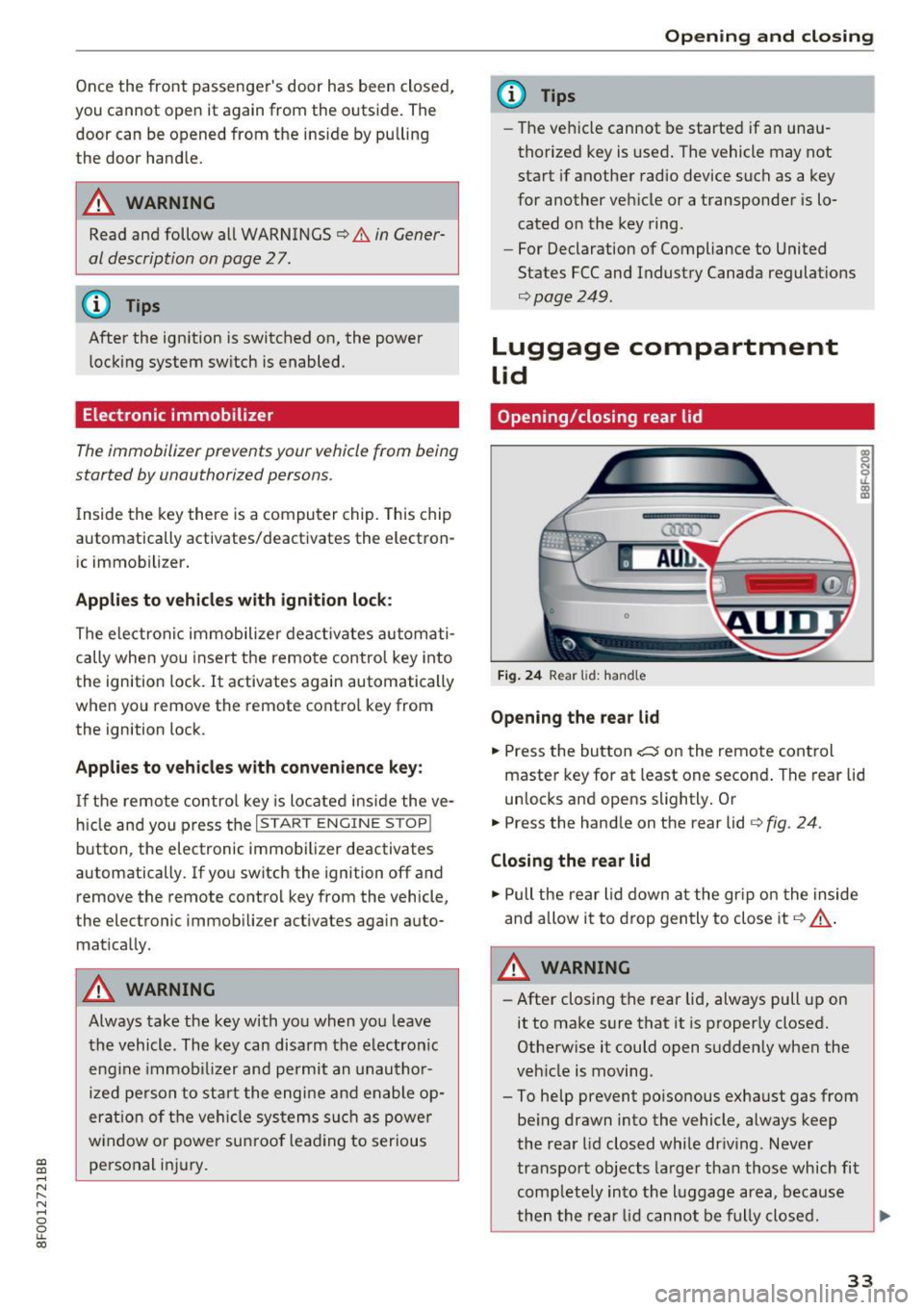
Fig. 24 Rear lid: handle
Opening the rear lid
.. Press the button ~ on the remote control
master key for at least one second . The rear lid
unlocks and opens slightly. Or
.. Press the handle on the rear lid ¢
fig. 24.
Closing the rear lid
.. Pull the rear lid down at the gr ip on the inside
and allow it to drop gently to close it
Q &_.
A WARNING
-After closing the rear lid, always pull up on
it to make sure that it is properly closed.
Otherwise it could open suddenly when the
veh icle is moving.
- To help prevent po isonous exhaust gas from
being drawn into the vehicle, always keep
the rear lid closed while driving . Never
transport objects larger than those which fit
comp letely into the lu ggage area, because
then the rear lid cannot be fully closed. .,._
33
Page 36 of 266
Opening and clo sin g
- Never leave your vehicle unattended espe
c ially w ith the rear lid left open. A child
could crawl into the car through the luggage
compartment and pull the lid shut, becom
ing trapped and unable to get out . To re
duce the risk of persona l injury, never let
children p lay in or around your veh icle. Al
ways keep the rear lid as well as the vehicle
doors closed when not in use .
- Always ensure that no one is within range of
the rear lid when it is moving, in particular
close to the hinges -fingers or hands can be
pinched .
© Tips
When the vehicle is locked, the rear lid can be
opened separa tely by p ressing the button
e:5
on the master key . When you close the rear
lid again, it locks automatically .
Emergency unlocking of the luggage
compartment lid
There is an emergency release for the rear lid.
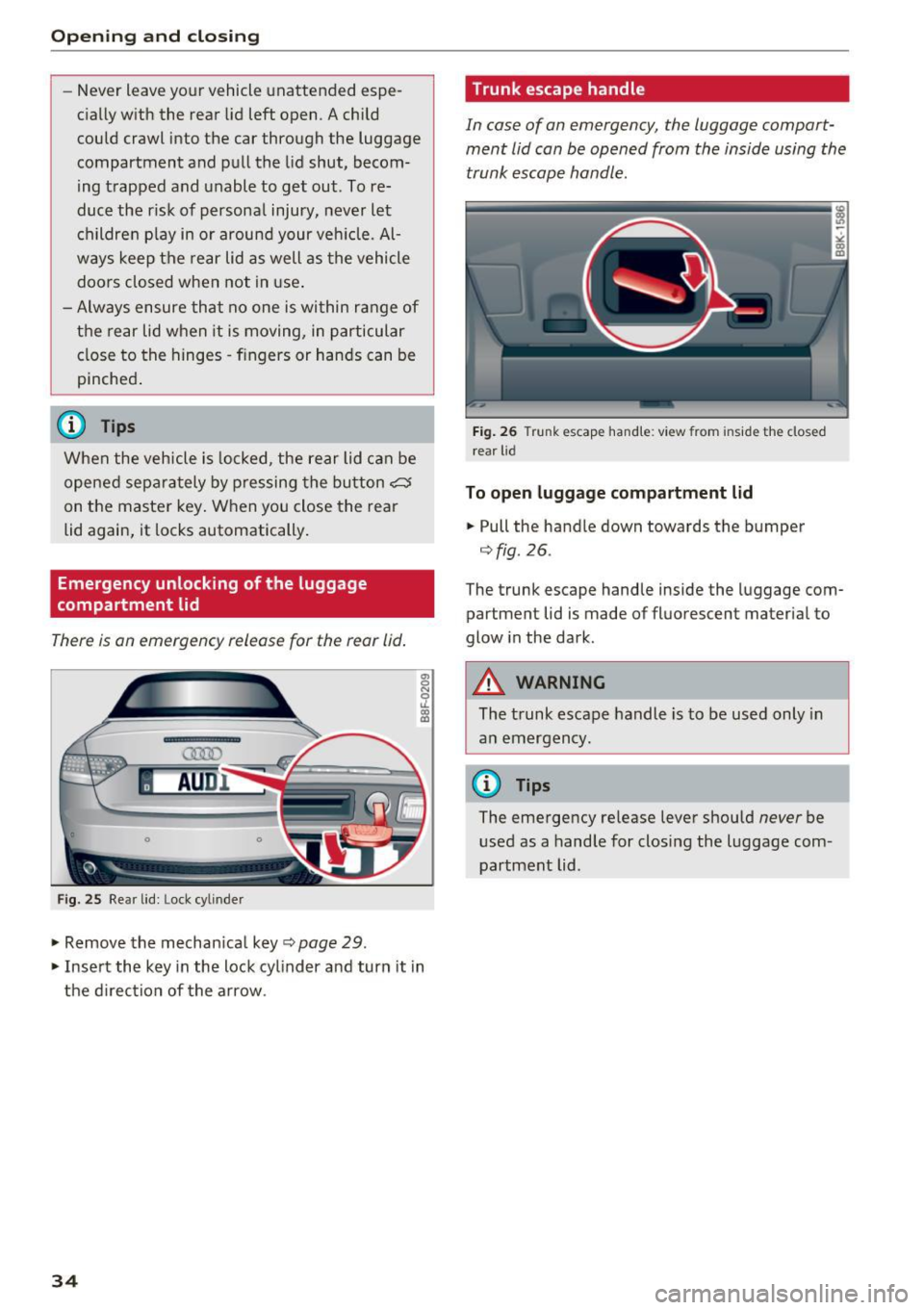
Fig . 25 Rear lid: Lock cylinder
.,. Remove the mechan ica l key c:> page 29 .
.,. Inse rt the key in the lock cylinder and turn it in
the d irec tion of the arrow .
34
Trunk escape handle
In case of an emergency, the luggage compart
ment lid can
be opened from the inside using the
trunk escape handle.
Fig . 26 Trunk escape handle: view from ins ide the closed
r ear lid
To open lugg age compartment lid
.. Pull the handle down towards the bumper
c:>fig . 26.
The trunk escape handle inside the luggage com
partment lid is made of fluorescent material to
glow in the dark .
&_ WARNING
The trunk escape handle is to be used only in
an emergency.
(D Tips
The emergency release lever should never be
used as a handle for closing the luggage com
partment lid.
Page 37 of 266
a:,
a:,
...... N
" N ...... 0
0
LL co
Power windows
Controls
The driver can control all power windows.
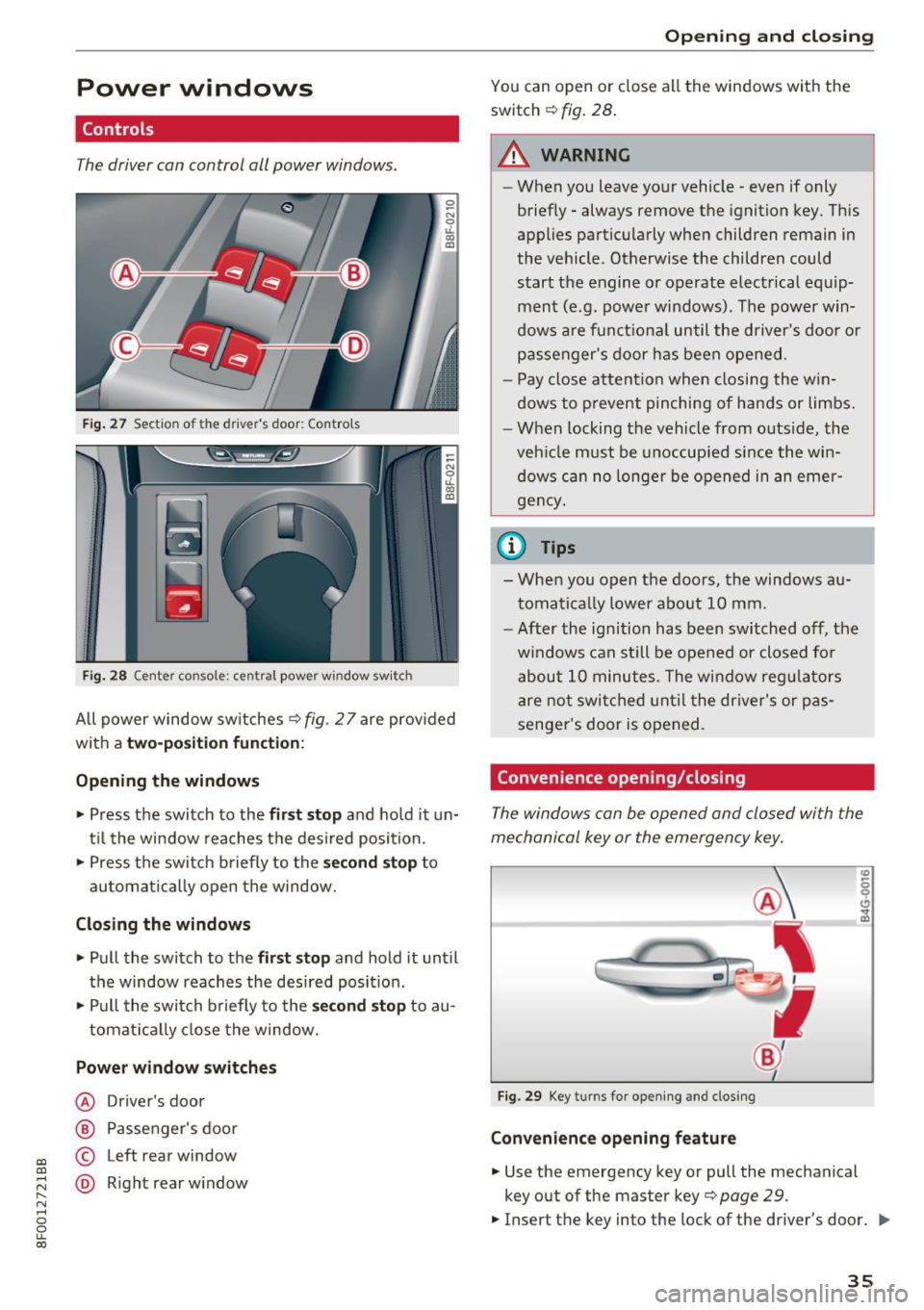
Fig. 27 Section of the driver's door: Controls
l
l
f
I
I !
I
Fig. 28 Center console : central power window switch
All power window switches ¢ fig. 2 7 are provided
with a
two-position function:
Opening the windows
"'Press the switch to the first stop and hold it un
til the window reaches the desired position.
"' Press the switch briefly to the
second stop to
automatically open the window.
Closing the windows
"' Pull the switch to the first stop and hold it until
the window reaches the desired position.
"' Pull the switch briefly to the
second stop to au-
tomatically close the window.
Power window switches
@ Driver's door
@ Passenger 's door
© Left rear window
@ Right rear window
Opening and closing
You can open or close all the windows with the
switch ¢
fig. 28.
.&_ WARNING
-
-When you leave your vehicle -even if only
briefly - always remove the ignition key. This
applies particularly when children remain in
the vehicle. Otherwise the children could start the engine or operate electrical equip
ment (e.g. power windows). The power win
dows are functional until the driver's door or
passenger's door has been opened.
- Pay close attention when closing the win
dows to prevent pinching of hands or limbs.
- When locking the vehicle from outside, the
vehicle must be unoccupied since the win
dows can no longer be opened in an emer
gency.
(D Tips
- When you open the doors, the windows au
tomatically lower about 10 mm.
- After the ignition has been switched off, the
windows can still be opened or closed for
about 10 minutes. The window regulators
are not switched until the driver's or pas
senger's door is opened.
Convenience opening/closing
The windows can be opened and closed with the
mechanical key or the emergency key.
Fig. 29 Key turns for opening and closing
Convenience opening feature
"'Use the emergency key or pull the mechanical
key o ut of the master key¢
page 29.
.,. Insert the key into the lock of the driver's door . ..,_
35
Page 38 of 266
Opening and closing
• Turn the key to position c::> fig. 29@ until all
the windows have reached the desired position .
Convenience closing feature
• Use the emergency key or pu ll the mechanical
k ey out of the master key
c::> page 29.
• Turn the key in the lock of the d river 's door to
the lock pos ition @ unt il the windows are
closed
c::> A .
.&_ WARNING
- Never close the windows inattentively and
without checking -there is risk of injury.
- You must always watch when the windows
are being raised so that no one can be trap
ped. If you release the key, the closing ac
t ion is immediately canceled.
- Always read and heed WARN ING
c::> .&. in
General description on page 2
7 .
Correcting window regulator malfunction
-
After disconnect ing the vehicle battery, the one
t ou ch up and down feature mus t be ac tivated
again.
• Pull and hold the pow er window switch until
the window is completely closed.
• Release the switch and pull the sw itch again for
one second .
Valet parking
Applies to: ve hicles with valet parkin g fu nctio n
The valet parking feature protects the luggage
compartment from unauthorized access .
-
Fig. 30 Glove compar tmen t: valet park ing bu tton
36
You can switch the "valet parking function" on
when someone else is park ing your vehicle. When
the function is switched on, the vehicle can be
driven , locked and unlocked using the master
key, but access to the luggage compartment is
not permitted .
• Take the mechanical key out of the master key
c::> page 29.
• Open the glove compartment c::> page 63.
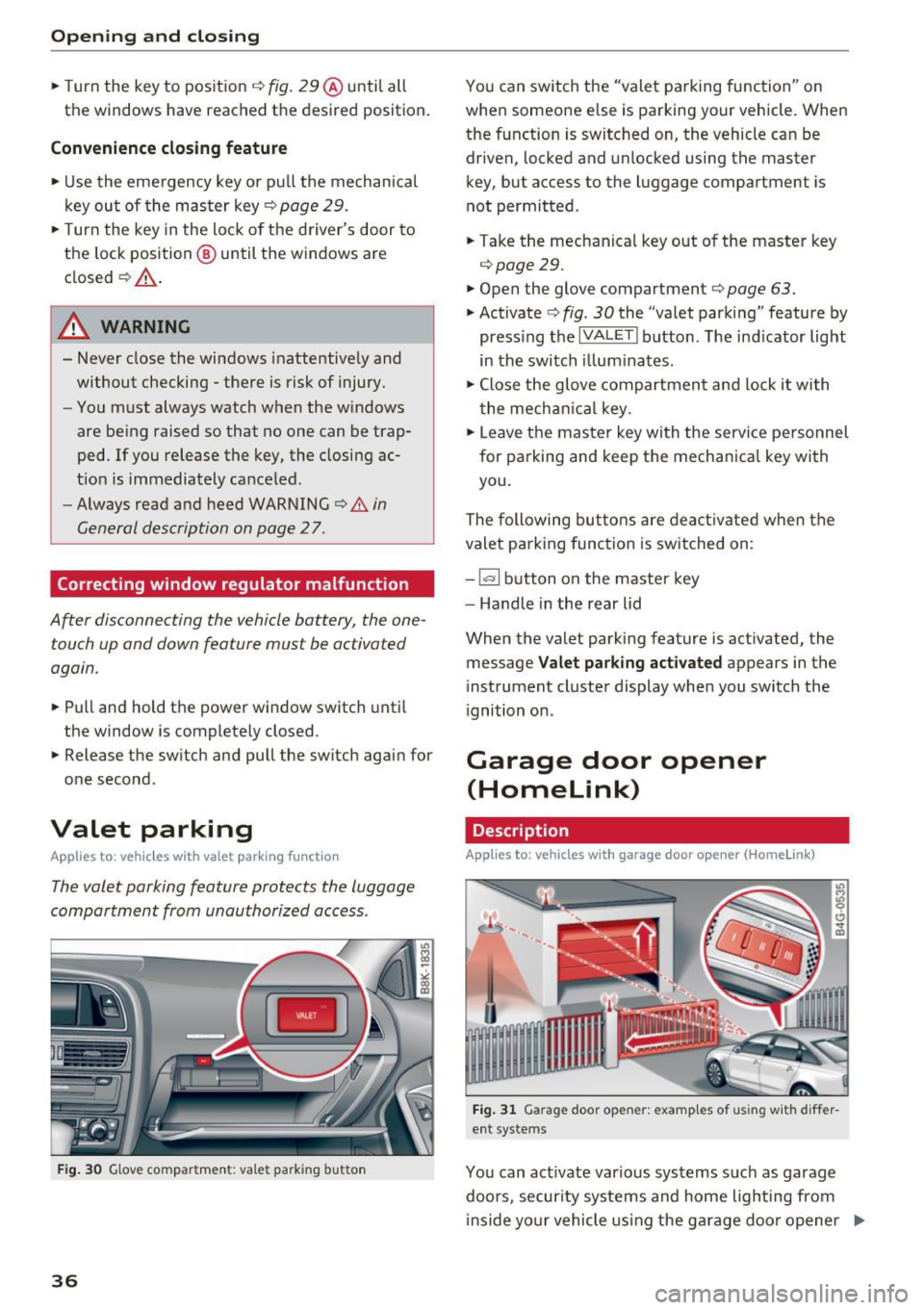
• Activate c::> fig . 30 the "valet parking" feature by
press ing the
I VA LET I button. The ind icator light
in the switch illuminates.
• Close the glove compartment and lock it with
the mechan ical key.
• Leave the master key with the service pe rsonnel
for parking and keep the mechanical key with
you.
The following buttons are deactivated when the
valet parking function is switched on :
-
~ button on the master key
- Handle in the rear lid
When the valet parking feature is activated, the message
Valet parking activated appears in the
instrument cluster display when you switch the
i gnition on.
Garage door opener
(Homelink)
Description
Applies to: vehicles with garage door opener (Homelink)
Fig. 31 Garag e doo r op ener: examp le s of using with diffe r
ent systems
You can act ivate various systems such as garage
doors , secur ity systems and home lighting from
i nside yo ur vehicle using the garage door opener .,..
Page 39 of 266
a:,
a:,
...... N
" N ...... 0
0
LL co
(Home link). There are three buttons for this in
the vehicle headliner that can be in used in p lace
of up to three hand-held transm itters.
To operate sys tems using the gar age door open
er, the three b uttons in the roof headliner must
be programmed first.
A WARNING
Make sure no people or objects are in the im
mediate v icin ity of the eq uipment when us ing
or programming the garage door opener. Peo
ple can be inju red and objects can be dam
aged if they ar e caught in the eq uipment.
{!) Tips
- Fo r secu rity reasons , we recommend that
you clear the programmed buttons before
se lling the vehicle .
- For additional in format ion about Homelink,
v is it www.homelink .com.
- Fo r Decla ration of Comp liance to Un ited
States FCC and Industry Canada regu lations
¢ page 249.
Operation
App lies to: vehicles with garage door opener (Homelink)
Fig. 32 Head liner: co ntro l uni t
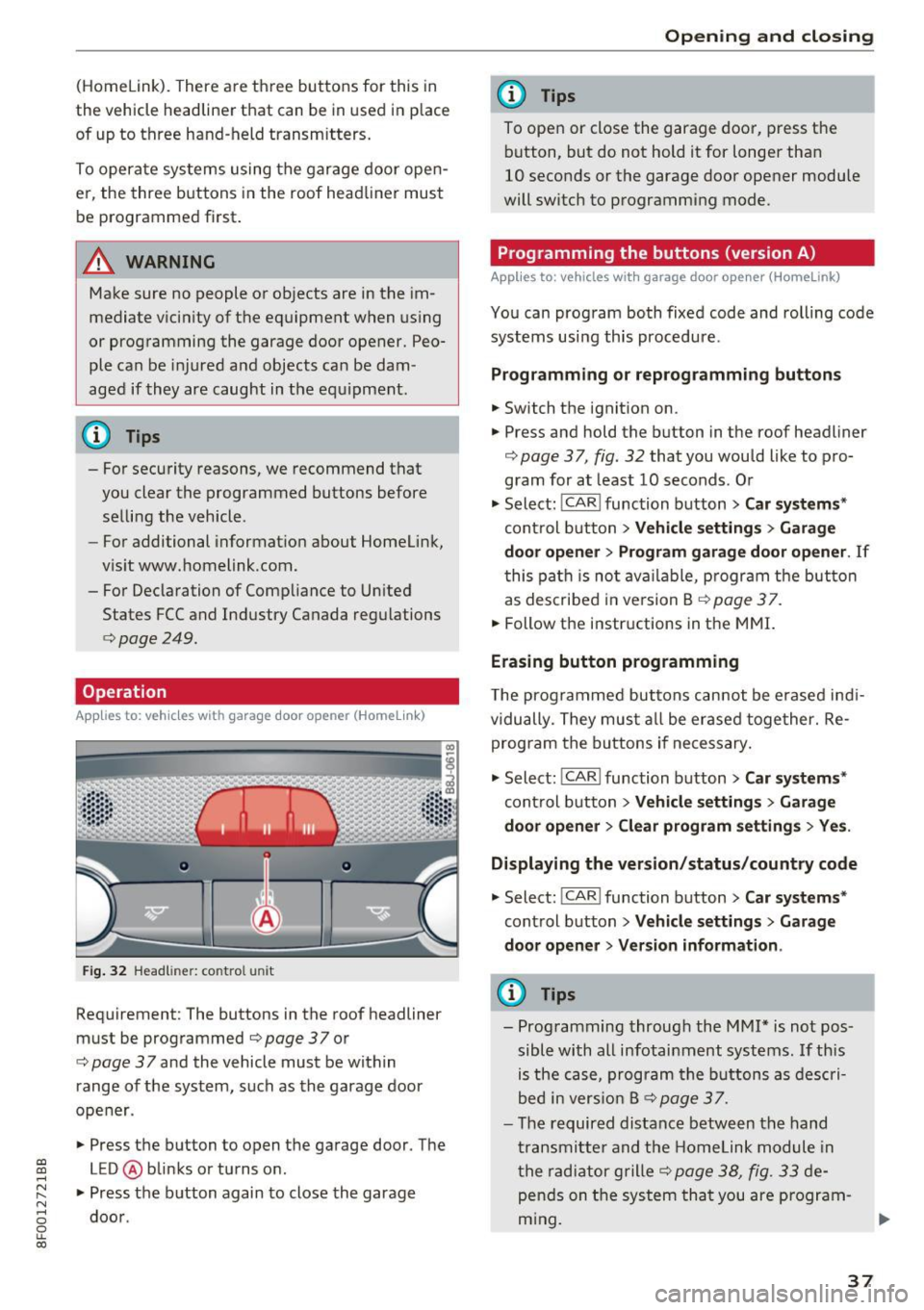
Requirement : The buttons in the roof headliner
must be prog rammed
¢page 37 or
¢
page 37 and the vehicle must be within
range of the system, such as the garage door
ope ner .
.,. Press the button to open t he ga rage door. The
LED @ blinks or tu rns o n.
.,. Press the b utton again to close the garage
doo r.
Open ing and closing
(D Tips
To ope n or close the garage doo r, press the
b utton, but do not hold it for longer than
10 seconds or the garage door opener module
will sw itch to programming mode .
Programming the buttons (version A)
Applies to: vehicles wit h garage door opener (Home Link)
You can program both fixed code and rolling code
systems using this procedure .
Programming or reprogramming buttons
.,. Switch the ignit ion on.
.,. Press and hold the b utton in the roof headliner
¢
page 37, fig. 32 that you would like to p ro
gram for at least 10 seconds . Or
.,. Select:
!CAR I function b utton> Car systems*
con trol b utton > Vehicle settings > Garage
door opener > Program garage door opener .
If
this pa th is no t availab le, progr am t he but ton
as des cribe d in version B
¢ page 37 .
.,. Follow the i nstr uctions in the MMI.
Erasing button programming
T he prog ra m med butto ns can not be e rased ind i
vidually. They mu st all be erase d toge ther. Re
prog ram the b uttons if ne cessary .
.,. Select:
!CAR ! function b utto n> Car system s*
cont rol b utton > Vehicle settings > Garage
door opener > Clear program settings > Yes .
Displaying the version/status/country code
.,. Select : !CAR l function button> Car syst ems *
cont rol button > Vehicle settings > Garage
door opener > Version information .
(D Tips
-Prog ramming throug h the MMI* is no t pos
sible with all infotainm ent systems . If th is
is the c ase , p rogra m the button s as des cri
bed i n vers io n B ¢
page 3 7.
- The requir ed distance betwe en th e hand
tr an smitte r and the Homelink module in
t he radia tor grille ¢
page 38, fig . 33 de
p en ds on t he system tha t you are p rogram
m ing .
37
Page 42 of 266
Power top
Power top
Automatic power top
General information
The power top opens and closes automatically.
The entire power top is stored in the power top
compartment. The power top may be opened or
closed at speeds up to
30 mph (50 km/h).
Under normal conditions, the power top is wind
and waterproof. In rare cases, small droplets of
water may form under extreme weather condi
tions such as torrential or prolonged rain. That is
normal and no cause for concern.
Follow the care instructions to keep the roof
from leaking and to maintain its appearance over
time
¢ page 182, Care and cleaning . Also ob
serve the following:
- Only open and store the power top when it is
clean and dry . Sharp dirt particles can cause
damage to the rear window and the power top.
If the power top is stored when damp, dents
can form. If left stored for a long period of
time, mildew and other damage can develop .
- Do not leave the power top open for several
weeks or the creases in it may become discol
ored.
- Remove ice and snow before opening the power
top. Do not use any sharp edged objects to re
move ice and snow or the power top could be
scratched or damaged . The rear window may be
cleared with a standard ice scraper .
- Do not open the power top when temperatures
are below 32 °F
(0 °() . The fabric used in the
power top loses its elasticity when tempera-
tu res are below freezing.
40
Opening/closing the power top
Fig. 34 Cente r conso le : power top sw itch
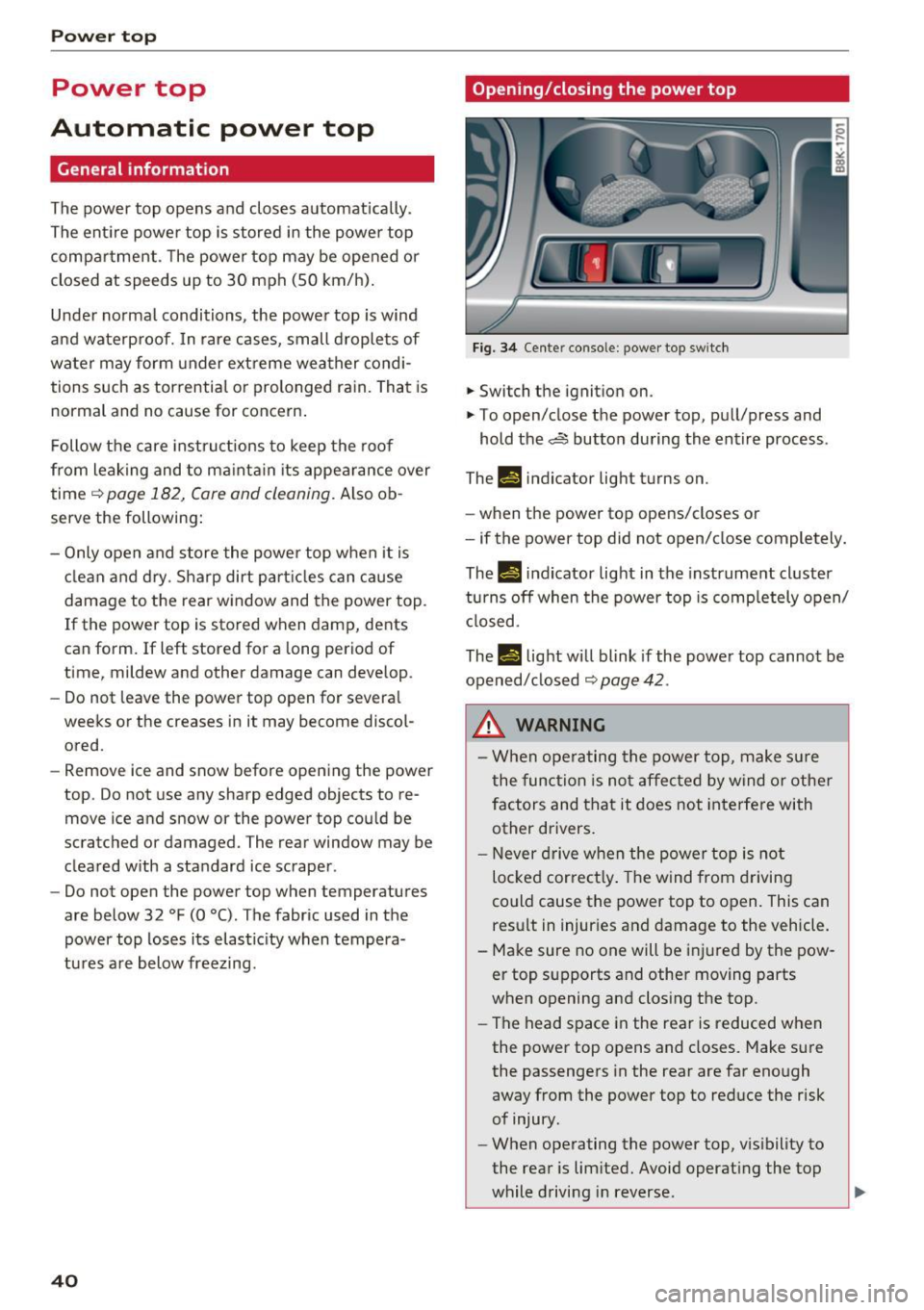
.. Switch the ignition on .
.,. To open/close the power top, pull/press and
hold the,,:;,§$ button during the entire process .
Th-f!.-) indicator light turns on.
- when the power top opens/closes or
- if the power top did not open/close completely.
Th.,
14 indicator light in the instrument cluster
turns off when the power top is completely open/
closed.
The
II light will blink if the power top cannot be
opened/ closed
¢ page 42 .
,&, WARNING
- When operating the power top, make sure
the function is not affected by wind or other
factors and that it does not interfere with
other drivers.
- Never drive when the power top is not
locked correctly. The wind from driving
could cause the power top to open. This can result in injuries and damage to the vehicle.
- Make sure no one will be injured by the pow
er top supports and other moving parts
when opening and closing the top.
- The head space in the rear is reduced when
the power top opens and closes. Make sure
the passengers in the rear are far enough
away from the power top to reduce the risk
of injury .
- When operating the power top, visibility to
the rear is limited. Avoid operating the top
while driving in reverse.
Page 43 of 266
a:,
a:,
...... N
" N ...... 0
0
LL co
(D Note
-To prevent damage to the power top:
- do not store any objects in the power top
compartment .
- make sure there is enough space above
the vehicle when opening or closing the power top.
- To reduce the risk of damage, make sure
there are no fragile objects within the stor
age bay's range of motion.
(D Tips
- To prevent the battery from draining, do not
open or close the power top repeatedly
when the engine is switched off.
- A message will appear in the instrument
cluster display if there is a power top mal
funct ion ¢
page 42.
-The power top can also be operated manual
l y if there is a malfunction
c:> page 44,
Power top emergency operation. The ca use
of the malfunction should be corrected by
an a uthorized Audi dea ler or authorized re
pair facility as soon as possible.
- The vehicle is not prote cted from the weath
er or from unauthorized entry if the vehicle
is left parked with the power top open. Lock
any objects you are leaving in the vehicle in
the luggage compartment. Close the power
top before leav ing the vehicle.
- The side windows lower slightly automati
cally when opening/closing the power top.
Power top convenience opening/closing
Fig . 35 Remote control key: buttons
Powe r top
Fig. 36 Turning the key to open and close
Conven ienc e opening with the driver's door
l o ck
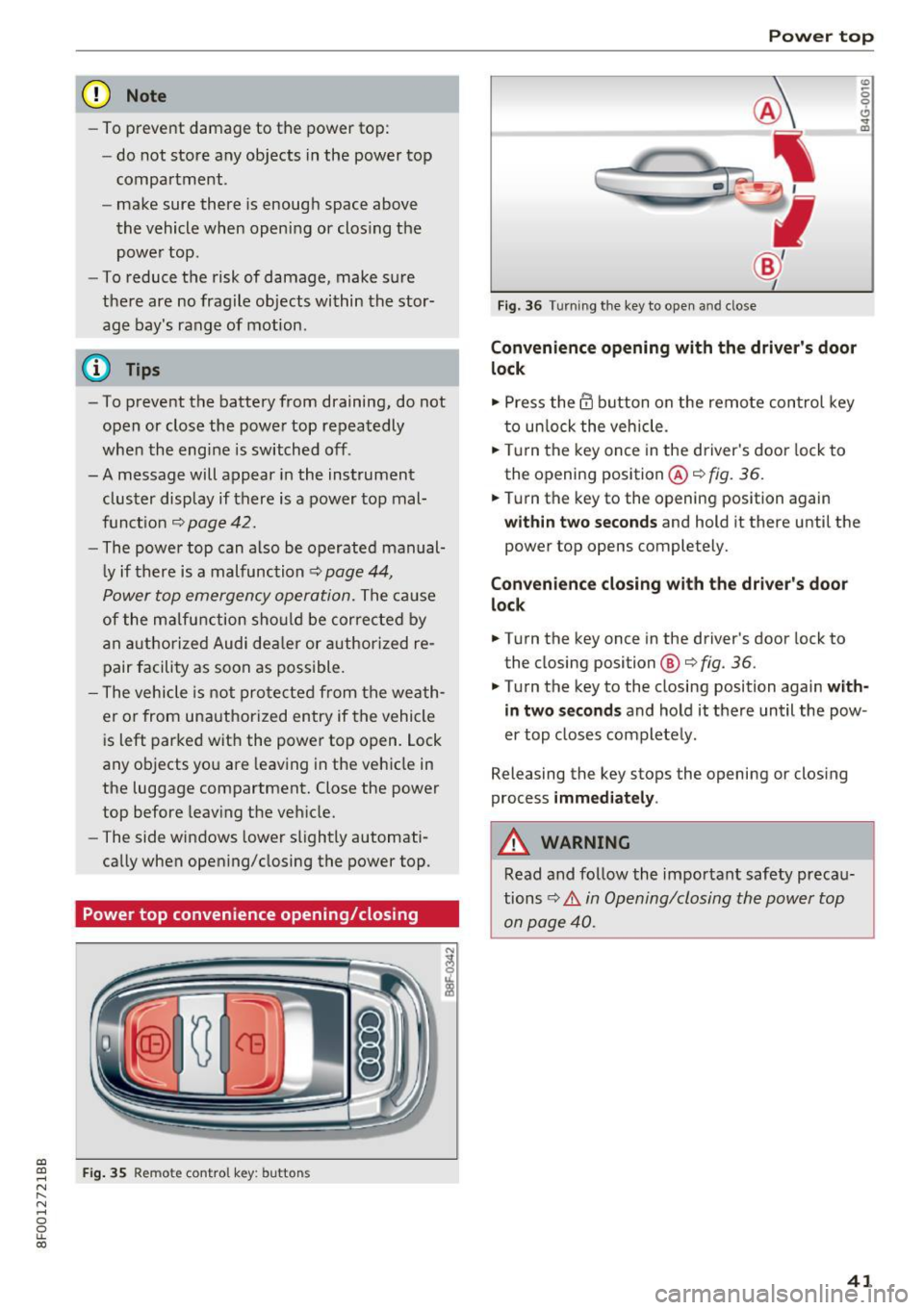
.,. Press the @ button on the remote control key
to unlock the vehicle .
.,. Tu rn the key once in the driver's door lock to
the opening position @¢
fig. 36.
0
0 ... m
.,. Turn the key to the opening position again
within tw o second s and hold it there until the
power top opens completely.
Convenienc e closing with the dri ver's door
lock
.,. Turn the key once in the driver's door lock to
the closing position @¢
fig. 36.
.,. Turn the key to the closing position again with
in tw o second s
and hold it there until the pow
er top closes completely .
Releasing the key stops the opening or clos ing
process
imm edi ate ly .
A WARNING
Read and follow the important safety precau
tions~ .&.
in Opening/closing the power top
on page 40.
41
Page 44 of 266
Power top
Variable power top storage bay
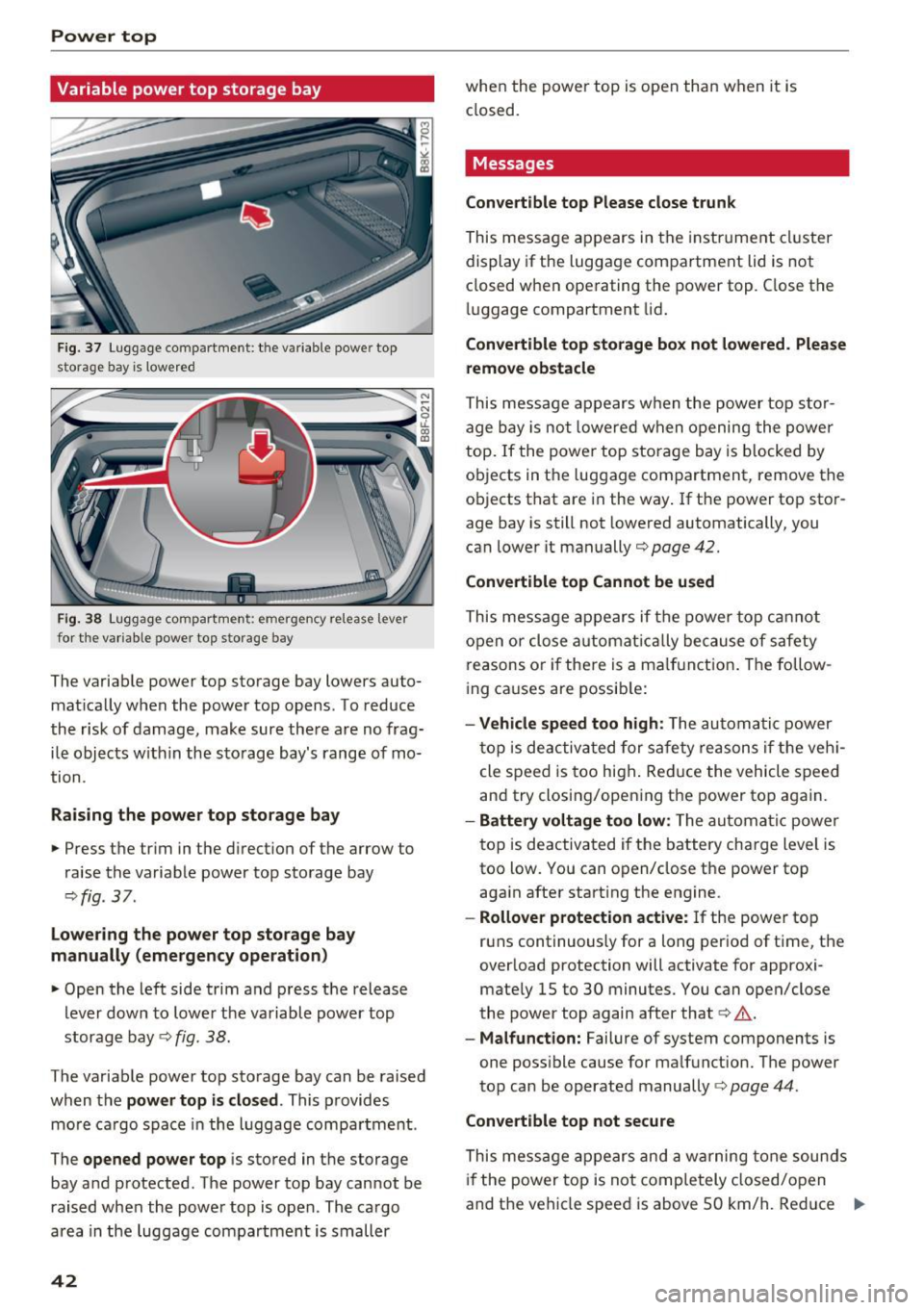
Fig . 37 Luggage compartment: the variable powe r top
storage bay is lowe red
F ig. 38 Luggage compartment : emergency release lever
for t he va riable power top sto rage bay
The variab le power top storage bay lowers auto
mat ically when the power top opens. To reduce
the risk of damage, make sure the re are no frag
ile objects w ithin the sto rage bay's range of mo
tion .
Raising the power top storage bay
• Press the trim in the direct ion of the arrow to
raise the variable power top storage bay
¢ fig . 37.
lowe ring the power top storage bay
manually (emergency operation )
• Open the left side trim and press the release
lever dow n to lowe r th e variable power top
storage bay ¢
fig. 38.
The variable power top storage bay can be raised
when the
pow er top is closed . This provides
mo re ca rgo space in the luggage compa rtment .
The
opened power top i s stored in the storage
bay and protected. The power top bay cannot be
raised when the power top is open. The cargo
area in the luggage compartment is smaller
42
whe n the powe r top is open tha n when it is
closed.
Messages
Convertible top Please close trunk
This message ap pears in the instrume nt cl uster
display if the luggage compa rtment lid is not
closed w hen ope rating the power top. C lose the
lu ggage compartment lid.
Convertible top storage box not lowered . Please
remo ve obstacle
This message appears w hen the power top s to r
age bay is not lowe re d when opening the power
top.
If the power top storage bay is b locked by
ob jects in t he luggage compartment, remove the
objects that are in the way . If t he power top sto r
age bay is still not lowered automatically, you
can lower it manually
c:;,poge42.
Convertible top Cannot be used
This message appears if the power top c annot
open or clo se a utomat ically because of safety
reasons o r if the re is a ma lf u nct ion . The follow
i ng ca uses are possib le:
- Vehicle speed too high : The automatic p ower
t op is deac tiva ted for safe ty reason s if t he ve hi
cle speed is too high . Red uce the vehicle speed
and try closing/open ing t he power top again.
- Battery voltage too low: The automa tic powe r
top is deactivated i f the battery cha rge level is
too low. You can o pen/close the power top
aga in after start ing the engine .
-Rollover p rotection acti ve: If the power top
runs continuously for a long period of time, the
overload protection will activate for approxi
mate ly 15 to 30 minutes. You can open/close
the power top again after that
c:> .&. .
-Malfunction: Failure of system components is
one poss ible cause for ma lfunction. The power
top can be operated manually¢
page 44.
Convertible top not secure
This message ap pears and a warning tone soun ds
if the power top is not completely closed/ open
and t he vehicle speed is above 50 km/h. Reduce .,.
Page 45 of 266
the vehicle speed and try closing/opening the power top again.
A WARNING
Never drive when the power top is not locked
co rrectly. The w ind from dr iving co uld cause
the power top to open. This can result in inju
r ies and damage to the vehicle.
Wind deflector
A ppl ies to: ve hicles with wind defl ecto r
The wind deflector reduces turbulence in the pas
senger compartment and makes driving more comfortable.
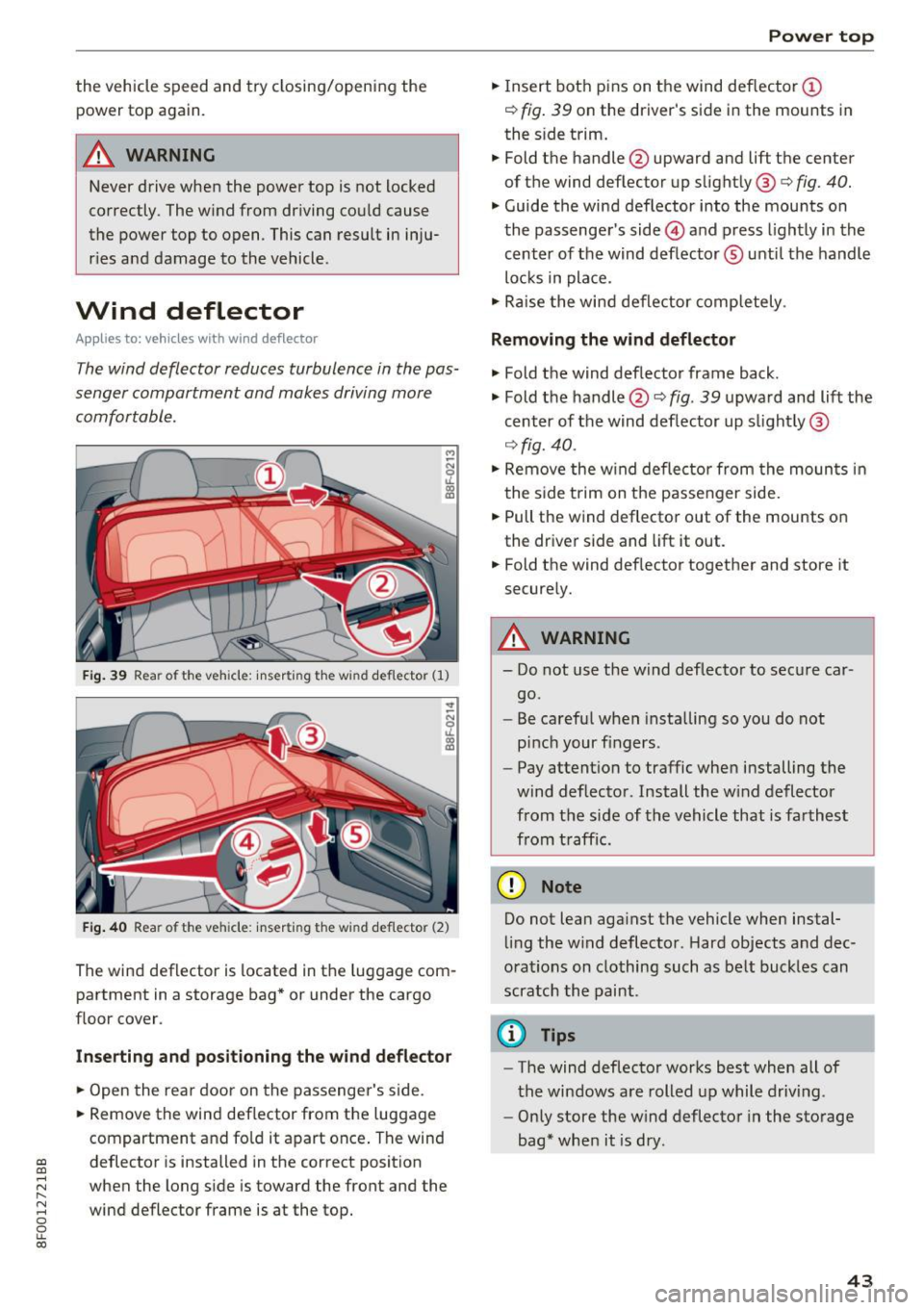
F ig. 3 9 Rear of the veh icle: inserti ng t he w ind deflector (1)
Fig. 40 Rea r of the veh icle: inser ting t he w ind def lector (2)
The wind deflector is located in the luggage com
partment in a storage bag * or under the cargo
f loor cover .
Inserting and positioning the wind deflector
.,. Open the rea r door on the passenger 's side.
.. Remove the wind deflector from the luggage
compartment and fold it apart once . The wind
~ deflector is installed in the correct position
;:::: when the long s ide is toward the front and the
I'-
~ wind deflector frame is at the top. 0
0
LL co
Power top
.,. Insert both pins on the wind deflector @
¢
fig . 39 on the driver's side in the mounts in
the s ide trim .
.. Fold the handle @upward and
lift the center
of t he wind deflector up s light ly @
c> fig. 40.
.,. Guide the wind deflector into the mou nts on
the passenge r's side @ and press lightly in the
center of the wind def lector ® unti l the handle
lo ck s in pla ce .
.,. Ra ise the wind deflector completely .
Removing the wind deflector
.,. Fold the wind def lector frame back.
.,. Fold the handle @¢
fig. 39 upwa rd and lift the
c e nter of the wind def lector up s light ly @
¢ fig. 40 .
.. Remove the w ind de flec tor from the moun ts in
t he s ide trim on t he passenger side .
.. Pull the wind deflector out of the mounts on
the dr iver side and lift it out .
.. Fold the wind def lector together and store it
secure ly.
A WARNING
-- Do not use the wind deflector to sec ure car
go.
- Be ca ref ul when insta lling so you do not
p inc h your fingers.
- Pay attent ion to traffic when installing the
wind deflector. Install the w ind deflector
from the side of the vehicle that is far thest
from t raff ic.
Q) Note
Do not lean aga inst the vehicle when instal
lin g the w ind deflector . Hard objects and dec
ora tions on clothing such as be lt buck les can
scra tch the paint .
(D Tips
-The wind deflector works best when all of
the windows a re rolled u p while driv ing .
- Only store the w ind deflector in the storage
bag* when it is dry.
43