airbag AUDI A5 CABRIOLET 2017 Owners Manual
[x] Cancel search | Manufacturer: AUDI, Model Year: 2017, Model line: A5 CABRIOLET, Model: AUDI A5 CABRIOLET 2017Pages: 266, PDF Size: 66.64 MB
Page 5 of 266
a:,
a:,
...... N r--. N ...... 0
0
LL 00
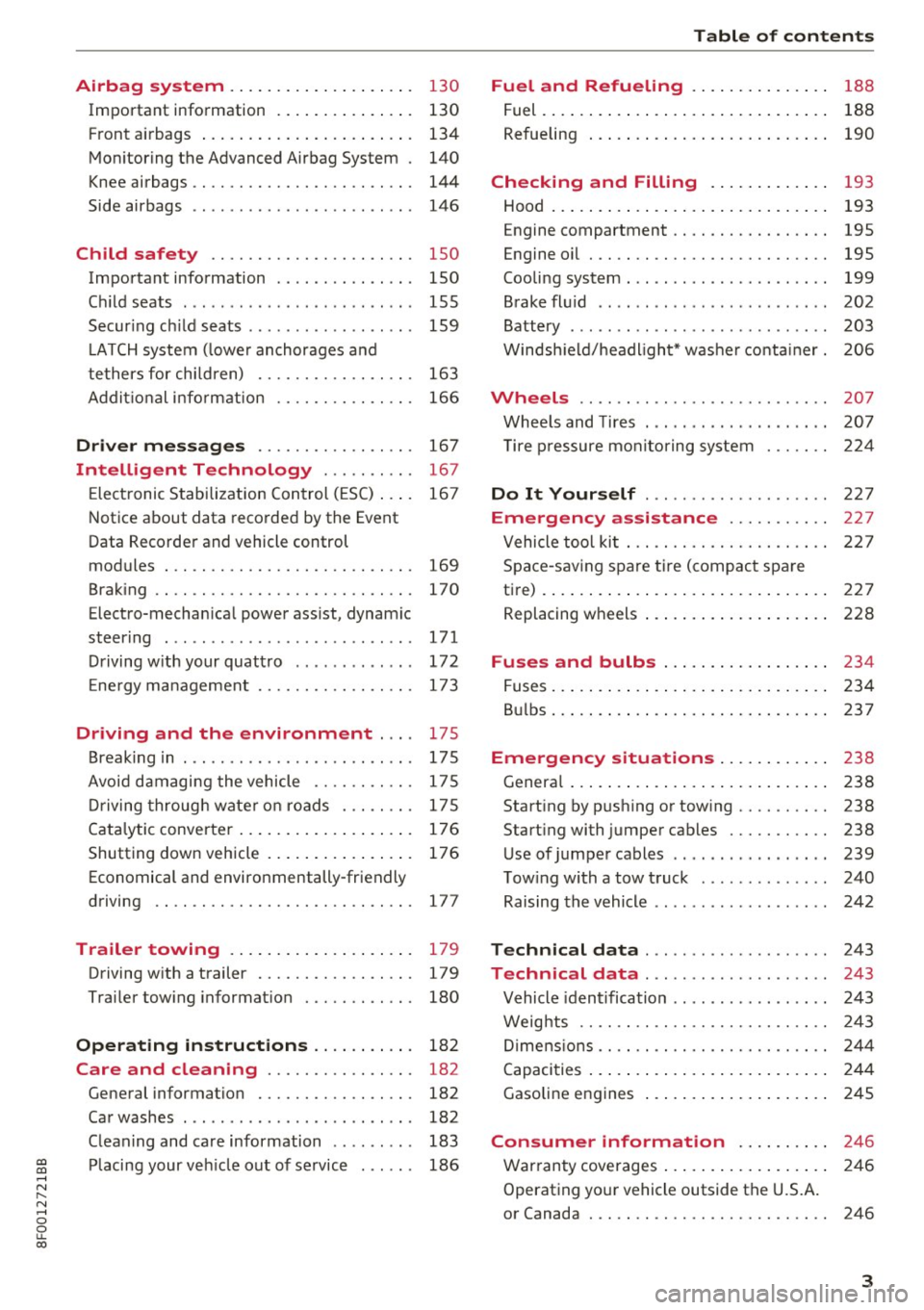
Airbag system .. .. .... ... .. .. .... . 130
Important information . . . . . . . . . . . . . . . 130
F ront a irbags . . . . . . . . . . . . . . . . . . . . . . . 134
Mon itoring the Advanced Airbag System . 140
K nee airbags . . . . . . . . . . . . . . . . . . . . . . . . 144
Side airbags . . . . . . . . . . . . . . . . . . . . . . . . 146
Ch ild safety . . . . . . . . . . . . . . . . . . . . . . 150
Important information . . . . . . . . . . . . . . . 150
C hi ld seats . . . . . . . . . . . . . . . . . . . . . . . . . 155
Secur ing c hild seats . . . . . . . . . . . . . . . . . . 159
L ATCH system ( lower anchorages a nd
tethers for chi ld ren) . . . . . . . . . . . . . . . . . 163
Addit io nal info rmat ion 166
Driver messages . . . . . . . . . . . . . . . . . 167
In telligent Technology . . . . . . . . . . 167
E lectronic Stabilization Control ( ESC) . . . . 16 7
N otice about data recorded by the Event
Data Recorde r and vehicle control
modules . . . . . . . . . . . . . . . . . . . . . . . . . . . 169
Brak ing . . . . . . . . . . . . . . . . . . . . . . . . . . . . 170
Electro-mechan ica l power assist, dynamic
steer ing . . . . . . . . . . . . . . . . . . . . . . . . . . . 171
D riving w ith your quatt ro . . . . . . . . . . . . . 172
E ne rgy management . . . . . . . . . . . . . . . . . 173
Driving and the environment .... 175
Break ing in . . . . . . . . . . . . . . . . . . . . . . . . . 17 S
Avoi d damagi ng the vehicle . . . . . . . . . . . 175
D riving throug h wate r on roads . . . . . . . . 17 5
Cata lytic conve rte r. .. .... ... .. .. .... . 176
Shutting down veh icle . . . . . . . . . . . . . . . . 176
Economical and environmentally-friendly
driving . . . . . . . . . . . . . . . . . . . . . . . . . . . . 177
Trailer towing . . . . . . . . . . . . . . . . . . . . 179
Driving w ith a t railer . . . . . . . . . . . . . . . . . 179
T rai ler tow ing informat ion . . . . . . . . . . . . 180
Operating instructions . . . . . . . . . . . 182
Care and cleaning . . . . . . . . . . . . . . . . 182
Gene ral information . . . . . . . . . . . . . . . . . 182
Car washes . . . . . . . . . . . . . . . . . . . . . . . . . 182
C lean ing and care information . . . . . . . . . 183
Pl acing your ve hicle out of se rvice . . . . . . 186
Table of contents
Fuel and Refueling . . . . . . . . . . . . . . .
188
Fuel. ... .. .. .. .. .. .... . ..... ... .. .. 188
Refueling . . . . . . . . . . . . . . . . . . . . . . . . . . 190
Checking and Filling . . . . . . . . . . . . . 193
Hood . . . . . . . . . . . . . . . . . . . . . . . . . . . . . . 193
Engine compartment . . . . . . . . . . . . . . . . . 195
Engine oil . . . . . . . . . . . . . . . . . . . . . . . . . . 195
Cooling system . . . . . . . . . . . . . . . . . . . . . . 199
Brake fl uid . . . . . . . . . . . . . . . . . . . . . . . . . 202
Battery . . . . . . . . . . . . . . . . . . . . . . . . . . . . 203
W indsh ield/headlight* washer conta iner. 206
Wheels ........ .. ................. 207
Whee ls and Tires . . . . . . . . . . . . . . . . . . . . 207
T ire p ressure monito ring sys tem 224
Do It Yourself . . . . . . . . . . . . . . . . . . . . 227
Emergency a ssistance . . . . . . . . . . . 227
Vehicle too l ki t . . . . . . . . . . . . . . . . . . . . . . 227
Space -sav ing spare tir e ( compac t spare
t ire) . . . . . . . . . . . . . . . . . . . . . . . . . . . . . . . 227
Replacing w heels . . . . . . . . . . . . . . . . . . . . 228
Fuses and bulbs . . . . . . . . . . . . . . . . . . 234
Fuses ... .. .. .. .. .. .... . ..... ... .. .. 234
B ul bs ... .. .. .. .. .. .... . ..... ... .. .. 237
Emergency situations . . . . . . . . . . . . 238
Genera l . . . . . . . . . . . . . . . . . . . . . . . . . . . . 238
Start ing by pushing or tow ing . . . . . . . . . . 238
Start ing with jumper cables . . . . . . . . . . . 238
Use of jumper cables . . . . . . . . . . . . . . . . . 239
T ow ing with a tow t ruck . . . . . . . . . . . . . . 240
Raising the vehicle . . . . . . . . . . . . . . . . . . . 242
Technical data . . . . . . . . . . . . . . . . . . . . 243
Technical data . . . . . . . . . . . . . . . . . . . . 243
Vehicle iden tification . . . . . . . . . . . . . . . . . 243
Weig hts . . . . . . . . . . . . . . . . . . . . . . . . . . . 243
Di mens ions . . . . . . . . . . . . . . . . . . . . . . . . . 244
Capacities . . . . . . . . . . . . . . . . . . . . . . . . . . 2 44
Gasoline engines . . . . . . . . . . . . . . . . . . . . 245
Consumer informat ion ...... .. .. 246
War ranty coverages . . . . . . . . . . . . . . . . . . 246
Operating your vehicle outside the U.S.A.
or Canada . . . . . . . . . . . . . . . . . . . . . . . . . . 246
3
Page 9 of 266
a:,
a:,
...... N r--. N ...... 0
0
LL 00
CD
@
®
©
®
®
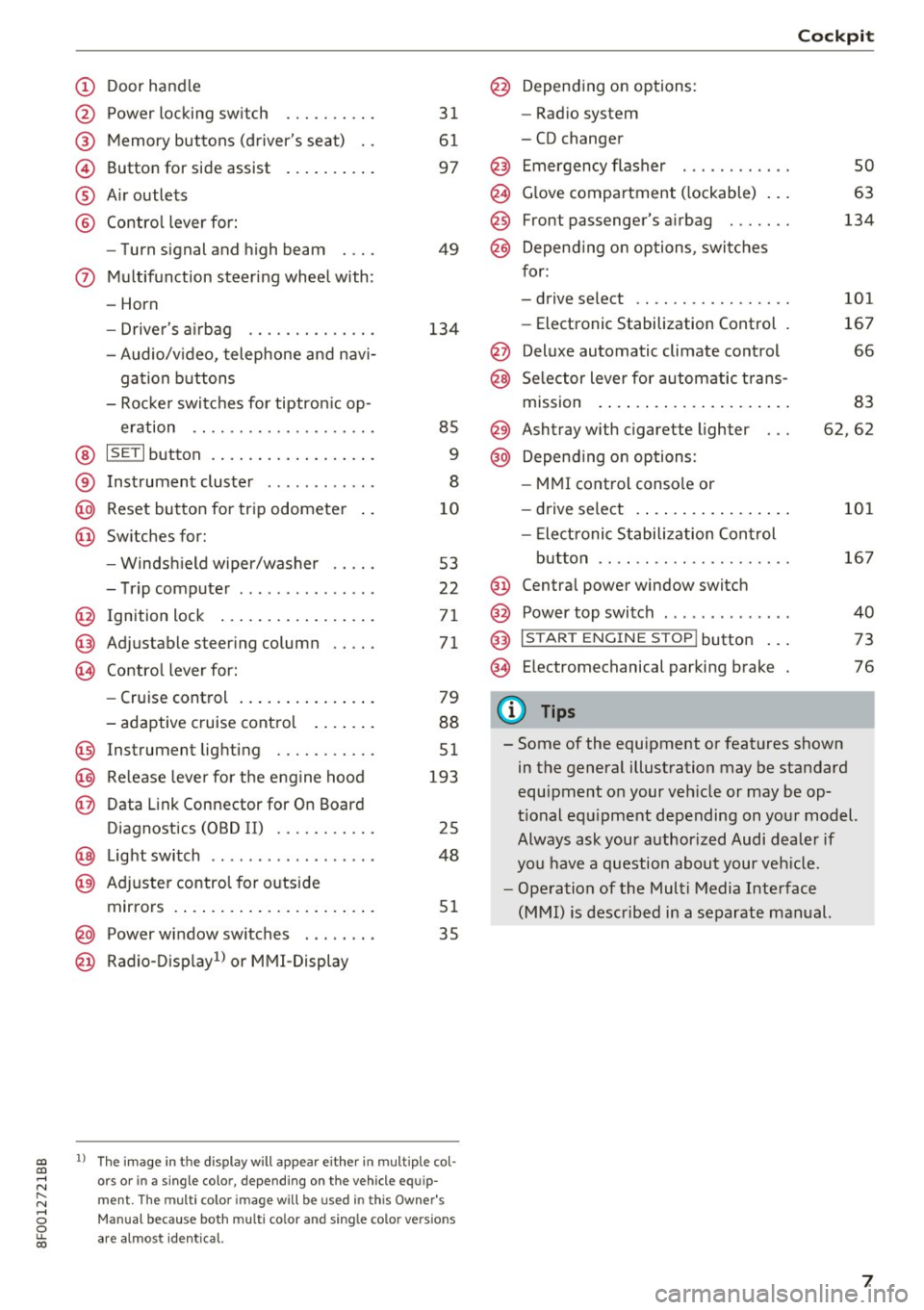
Door handle
Power locking switch
Memory buttons (driver's seat) . .
Button for side assist
A ir outlets
Contro l lever for:
- Turn signal and high beam
0 Multifunction steering wheel with:
- Horn
- Driver's airbag ........... .. .
- Audio/v ideo, telephone and nav i-
gation buttons
- Rocker switches for tiptron ic op -
eration .. ............. .. .. .
@ ISETI button ................ . .
® Instrument cluster ........... .
@
@ Reset button for trip odometer
Switches for:
- Windsh ield wiper/washer
- Trip computer .............. .
I gnition lock ................ .
Adjustable steering column
Contro l lever for:
- Cruise control .............. .
- adaptive cruise control ..... . .
@ Instrument lighting ........ .. .
@ Release lever for the engine hood
@ Data Link Connector for On Board
Diagnostics (OBD II) ........ .. .
@ Light switch ..... ....... ..... .
@ Adjuste r contro l for outside
mirrors . ... ................ . .
@ Power window switches . .. .... .
@ Radio-Display1l or MMI -Display
31
61
97
49
134
85
9
8
10
53
22
71
71
79
88
51
193
25
48
51
35
ll The image in t he d is pl ay wil l appear either in m ultiple col
o rs or in a single colo r, depending on the vehicle e quip
ment. The multi co lor im age will be used in this Owne r's
Man ual bec ause both multi co lor and single co lo r ve rsio ns
ar e almo st identica l.
@ Depending on options:
- Radio system
- CD changer
Emergency flasher
G love compartment ( lockable) .. .
Front passenger's airbag ...... .
Depend ing on options, switches
for:
- drive select .. .............. .
- Electronic Stabilization Control .
@ Deluxe automatic climate control
@ Selector lever for automatic trans-
mission . ... .. .. ............ .
@ Ashtray with cigarette lighter
@ Depending on options:
- MMI control console or
- drive select . ... ............ .
- Elect ronic Stabilization Control
button .. .. .. .. ............ .
@ Centra l power window switch
@ Power top switch . ............ .
@ I S TAR T ENGINE S TOP I button .. .
@ Electromechanical parking brake
0) Tips
Cockpit
so
63
134
101
167
66
83
62,62
101
167
40
73
76
- Some of the equipment or features shown in the general illustration may be standard
equipment on your veh icle or may be op
tional equ ipment depending on your model.
Always ask your authorized Audi dealer if
you have a question about your vehicle.
- Operation of the Multi Media Interface
(MMI) is described in a separate manual.
7
Page 29 of 266
a:,
a:,
...... N r--. N ...... 0
0
LL 00
Opening and closing
Central locking
General description
The power locking system locks or unlocks all
doors and the rear lid simultaneously.
You can lock and unlock the vehicle centrally. You
have the following choices:
- Remote master key ¢
page 30,
-Door handles with convenience key*
O?page 30,
-Lock cylinder at the dr iver's door ¢ page 32,
or
- Power lock ing switch ins ide ¢
page 31.
Automatic lo cking
The automat ic locking feature locks all the vehi
cle doors and the rear lid when you drive faster
than 9 mph ( 15 km/h) .
The car is unlocked again once the ignition key is
removed . In addition, the veh icle can be unlocked
if the opening function in the power locki ng sys
tem sw itch or at one of the door levers is actuat
ed. The A uto Lock funct io n can be tu rned on and
off in the rad io or MM I*
¢ page 32.
Additionally, in the event of a crash with airbag
deployment the doors are automatically un
l ocked to allow access to the veh icle.
Selective unlocking
When you lock the vehicle, the power locking sys
tem will lock the doors and the rear lid . When
unlocking, yo u can set in the rad io or MMI*
whether
only the d river 's doo r o r the entire vehi
cle shou ld be un loc ked
¢ page 32.
Anti-theft alarm w arning system
If the anti-theft alarm warning system detects a
break-in into the vehicle, acoust ic and visual
warn ing s ignals a re triggered.
The anti-theft warning system is activated auto
mat ically when you lock the vehicle. It is deact i
vated when unlocking using the remote key, with the mechanical key, and w hen you switch on the
i gnit io n.
Op ening and cl osing
The alarm also t urns off when the alarm cycle has
expi red.
Turn signals
When you unlock the veh icle, the turn s ignals
flash twice, when yo u lock it once. If they do not
flash, one of the doors, the l uggage compa rt
ment lid or the hood is no t locked or the ignition
is still switched on.
Unintentionally locking yourself out
In the following cases there safeguards to p re
ven t you locking your remo te mas te r key in the
vehicle:
- The vehicle does not loc k w ith the power lock
ing sw itch
¢ page 31 if the d river 's doo r is
open.
- On veh icles with co nvenience key*, if the most
re cent ly used master key is in the l uggage com
pa rtment, the rear lid is a utomatically unlocked
aga in after it is closed.
Do not lock your veh icle w ith the remote master
key or conven ience key* until all doors and the
rea r lid are closed . In this way yo u avoid loc king
yoursel f out acc identally .
A WARNING
=
-When you leave the vehicle, always remove
the ignition key and take it with you. This
will prevent passengers (children, fo r exam
ple) from accidentally being locked in the
veh icle should they accidentally press the
power locking sw itch in the front doors.
- Do not leave children ins ide the vehicle un
supervised . In an emergency it would be im
possible to open the doors from the outside
without the key.
(D Tips
- In the event of a crash wit h airbag dep loy
ment all locked doors will be automatically
unlocked to give access to the vehicle occ u
pants from the o utside.
- If the power locking system sho uld mal
function, you can lock the driver's door us ing the mechan ica l key ¢
page 32.
27
Page 33 of 266
a:,
a:,
,....,
N
" N ,....,
0
0
LL co
~ & in General description on page 2 7. Do not
reach inside the door handle.
The vehicle can be locked and un locked at any
door. The remote contro l key cannot be more
than 1.5 m away from the door handle. It makes
no difference whether the master key is in your
jacket pocket or in your brief case.
If yo u grip the door handle while locking, this can
adversely affect the lock ing function .
It is not possible to re-open the doo r for a b rief
period directly after closing it . This allows you to
ens ure that the doo rs are prope rly locked .
It depends on the sett ings i n the rad io or M MI*
whether the entire veh icle is unlocked or one of
the doors
~ page 32.
A WARNING
Read and follow all WARNINGS ~&. in Gener
al description on page 2
7 .
@ Tips
If your vehicle has been stand ing fo r an ex
t ended pe riod, please note the fo llow ing :
- The proximity sensors are deactivated after
a few days to save power. You then have to
pull on the door h andle once to unlo ck the
vehicle and a second time to open the vehi
cle.
- To prevent the battery from being d is
charged and to preserve your vehicle's abili
ty to start fo r as long as possib le, the ener
gy management system gradually switches
off unnecessary convenience functions. It is
possible that you will not be able to unlock
your vehicle using these convenience func tions .
- For Declaration of Compliance to Un ited
States FCC and Industry Canada regu lations
<::;> page 2 49.
Op enin g an d clos ing
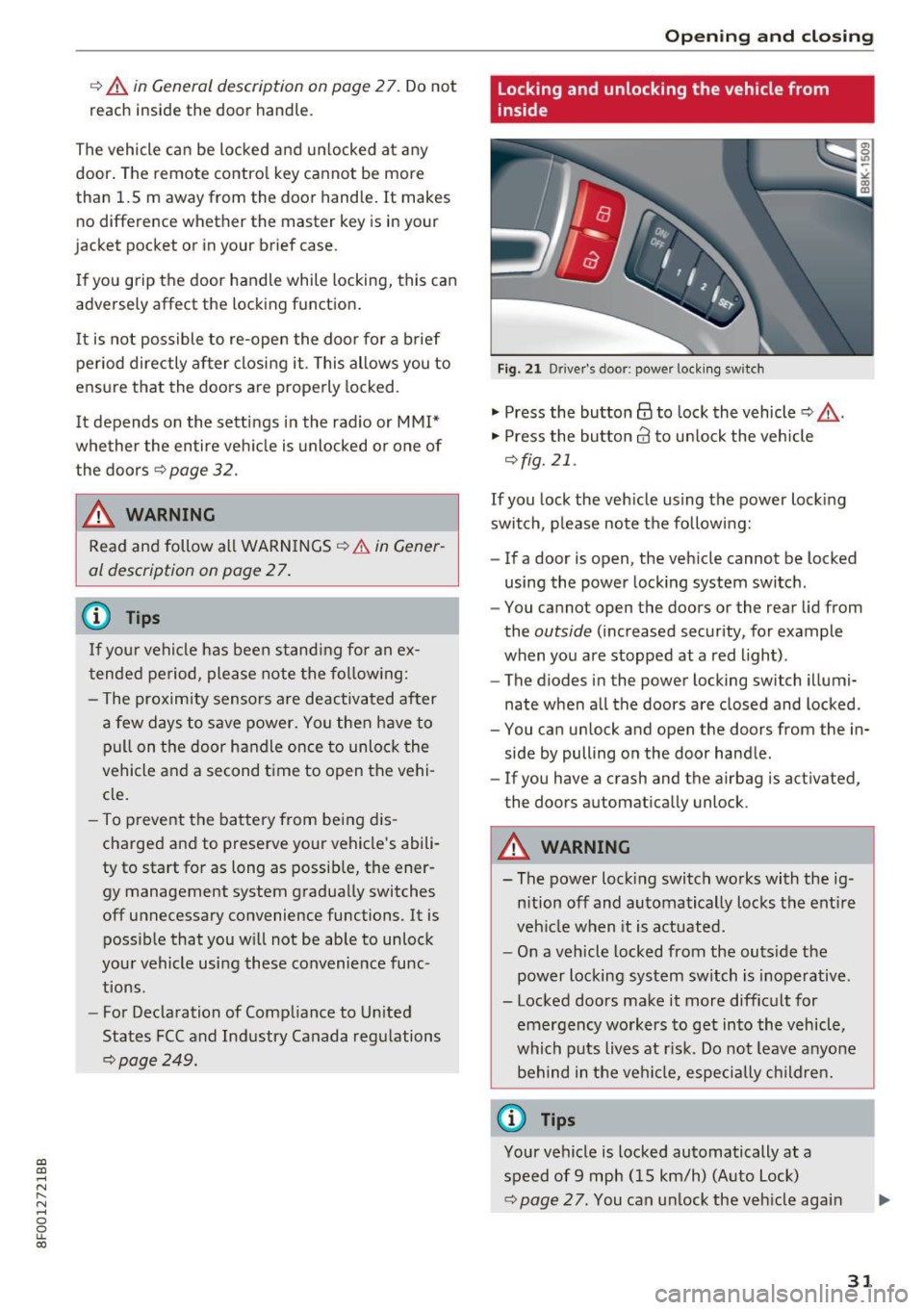
Locking and unlocking the vehicle from
inside
Fig. 2 1 Drive r's door; power lock ing sw itch
"' Press the button @ to lock the vehicle ~ ,&. .
"' Press the button 63 to un lock the veh icle
~ fig. 21.
If you lock the veh icle using the power lock ing
switch, p lease note the following:
- If a door is open, the veh icle cannot be locked
using the power locking system switch .
- You cannot open the doors or the rear lid from
the
outside (increased security, for example
when you are stopped at a red light) .
- The diodes in the power locking switch illumi
nate when a ll the doors are closed and locked .
- You can unlock and open the doors from the in
side by pulling on the door handle .
- If you have a crash and the airbag is act ivated,
the doors automatically unlock .
A WARNING
--The power lock ing switch works with the ig-
n ition off and automatically locks the ent ire
veh icle when it is actuated.
- On a vehicle locked from the outs ide the
power locking system switch is inoperative .
- Locked doors make it more difficult for emergency workers to get into the vehicle,
which puts lives at r isk. Do not leave anyo ne
behind in the ve hicl e, especially children.
@ Tips
Your vehicle is locked automatically at a
speed of 9 mph (15 km/h) (Auto Lock)
<::;> page 27. You can un lock the veh icle agai n
31
Page 52 of 266
Lights and Vision
The co ming home and leaving h ome functions
only operate when it is dark and t he light switch
is in the AUTO position
~ page 48, fig. 53.
Auto headlights*
W hen the light swi tch is in the A UTO ~ page 48
position, the sw itch-on po int of the lights can be
cha nged in the automatic driving light function.
Daytime running lights
USA models :
You can switch the daytime r unning
lights
on and off .
Canada models: The funct ion cannot be tu rned
off .
It is activated automatically each t ime the ig
n ition is switched on.
Tra vel mode*
The headlight beam is asymmetrical. This pro
vides stronger illumination on the side of the
road on which you are driving.
If you are driving
in a cou ntry that dr ives on the opposite side of
the road from you r own country, this will cause
g lar e fo r oncom ing dr ive rs . To p revent glare:
- Travel mode must be selected in veh icles w ith
Xenon headlights* .
- In vehicles with halogen headlights, certain
areas of the headlight lenses must be cove red
with waterproof adhesive covers that prev ent
l ight from passing through. For more informa
tion, ple ase see you r auth orized Audi dea le r or
a uthorized repair fa ci lity .
When travel mode is ac tiva ted, a disp lay in
t he dr ive r inf orm ation sys tem in dicates this
e ach t ime yo u sw itch the ignition on .
50
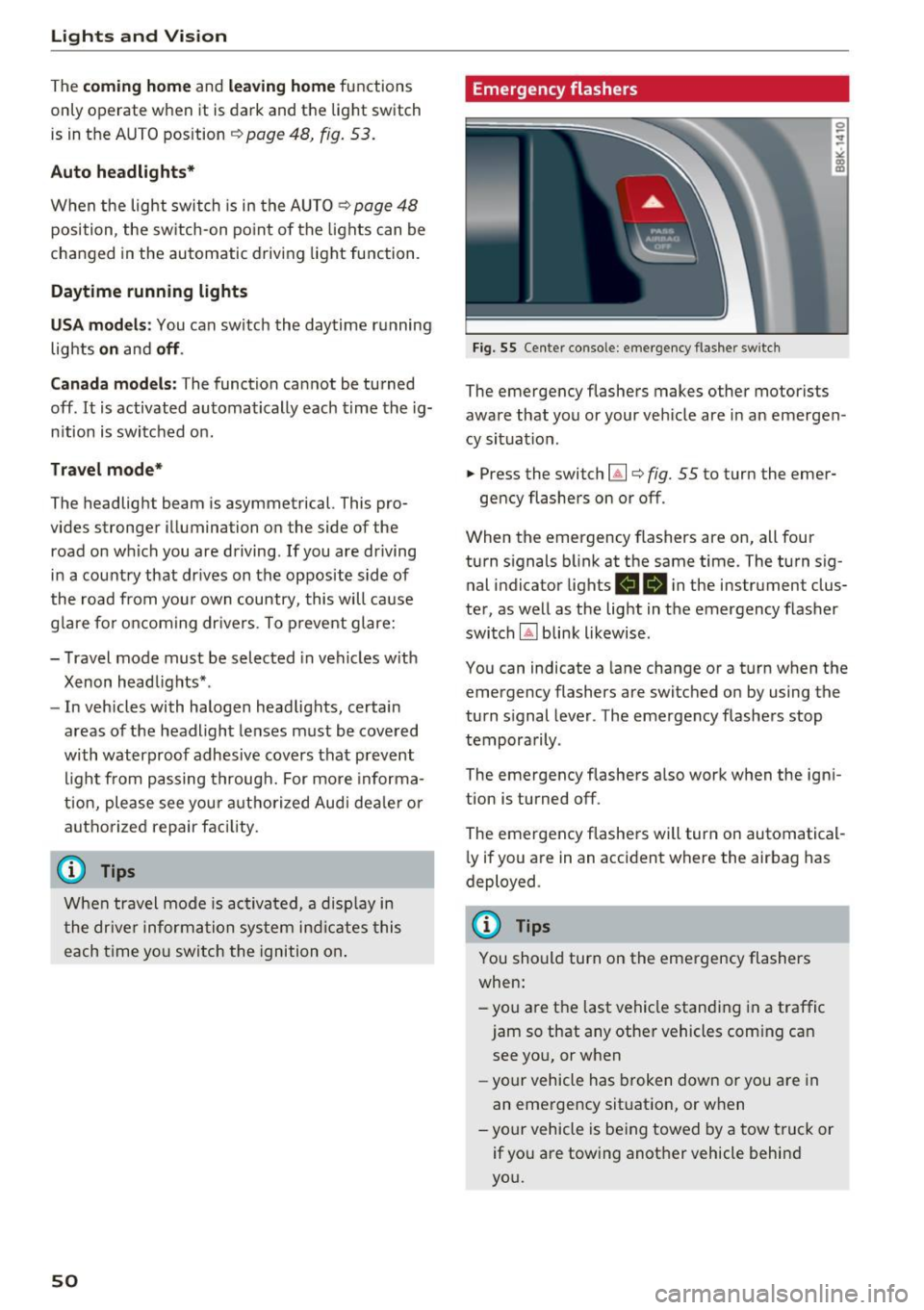
Emergency flashers
Fig. 55 Center console: emergency flashe r switc h
The emergency flashers makes other motorists
aware that you or your ve hicle are in an emergen
cy situat io n .
.. Press the switch~¢
fig. 55 to turn the emer-
gency flashers on or off .
When the emergency flashers are on, all four
turn s ignals b link at the same time. The turn sig
nal indicator lights
RB i n the instrument clus
ter, as well as the light in t he emergency flasher
switch
IA] blink likewise .
You can indicate a lane change or a turn when the
emergency flashers are switched on by using the
turn signal lever . The emergency flashers stop
tempora rily .
The emergency flashe rs a lso work when the igni
tion is turned off.
The emergency flashers will turn on automatical
l y if you a re in an accident where the airbag has
deployed .
@ Tips
You should turn on the emergency flashers
when:
-you are the last vehicle standi ng in a traffic
jam so that any other vehicles com ing can
see yo u, or when
- yo ur ve hicle has broken down or yo u are in
an eme rge ncy sit uat ion, or w hen
-your vehicle is be ing towed by a tow tru ck or
if yo u are towing another vehicle behin d
you.
Page 59 of 266
a:,
a:,
...... N r--. N ...... 0
0
LL 00
Seats and storage
General information
Why is your seat adjustment so important?
The safety belts and the airbag system can only
provide maximum protection if the front seats are corr ectly adjusted .
There are various ways of adjusting the front
seats to provide safe and comfortable support
for the driver and the front passenger . Adjust
your seat properly so that:
- you can easily and quickly reach all the switches
and controls in the instrument panel
- your body is properly supported thus reducing
physical stress and fatigue
- the safety belts and a irbag system can offer
maximum protection
Q page 130.
In the following sections, you will see exact ly
how you can best adjust your seats.
There are spec ial regulations and instr uctions for
installing a child safety seat on the front pas
senger's seat . Always fo llow the information re
garding child safety provided in
¢ page 150,
Child safety.
A WARNING -
Refer to Q page 111, Driving safety for im
portant information, tips, suggestions and
warnings that you should read and follow for
your own safety and the safety of yo ur pas
senge rs.
A WARNING
Incorrect seat ing position of the driver and all
other passengers can result in serious person
al injury .
- Always keep yo ur feet on the floor when the
vehicle is in motion -never pu t your feet on
top of the instrument pane l, out o f the win
dow or on top of the seat cushion. This ap
plies especially to the passengers. If your
seating pos it ion is incorrect, you increase
the risk of injury in the case of sudden brak
ing or an accident. If the airbag inflates and
Seat s and sto rage
the seating position is incorrect, this could
result in persona l injury or even death.
- It is important for both the driver and front
passenger to keep a distance of at least
10 inches (25 cm) between themselves and
the steering wheel and/or instrument pan
el. If you're sitt ing any closer than this, the
airbag system cannot protect you properly .
In addition, the front seats and head re
stra ints must be adjusted to you r body
he ight so that they can g ive you maximum
p rotection.
- Always try to keep as much dis tance as pos
sible between yourself and the steer ing
wheel or instrument pane l.
- Do not adjust the driver's o r front passeng
er 's seat while the veh icle is moving . Your
seat may move unexpectedly, causing sud
den loss of vehicle contro l and personal in
jury. If you ad just your seat while the veh icle
is moving, you are out of pos ition.
Driver's seat
The correct seat position is important for safe
and relaxed driving.
We recommend that you adjust the driver's seat
in the following manner:
.,. Adjust the seat in fo re and aft direction so tha t
you c an ea sil y push the pedals to the floor
while keeping yo ur knees s light ly bent ¢.&.
in
Why is your seat adjustment so important? on
page
57.
.,. Adj ust the seatback so that when you sit with
your back against the seatback, you can still
grasp the top of the steering wheel.
.,. App lies to ve hicles w ith ad justable head re
stra ints: Adjust the head rest raint so the upper
edge is as even as possible w ith the top of your
head. If t hat is not possible , try to adjust the
he ad restraint so that it is as close to this pos i
tion as possible ¢
page 60.
A WARNING ~
Never place any objects in the driver 's foot-
well. An object could get into the pedal area and interfere with pedal function. In case of
57
Page 60 of 266
Sea ts and stor age
sudden braking or an accident, you would not
be able to brake or accelerate.
Front passenger's seat
Always move the front passenger seat into the
rearmost position.
To avoid contact with the a irbag while it is de
p loying, do not sit any closer to the instrument
panel than necessary and a lways wear the three
point safety belt provided adjusted correctly. We
recommend that you adjust the passenger's seat
in the following manner:
.,. Bring the backrest up to an (a lmost) upright
position .
Do not ride with the seat reclined.
.,. Applies to vehicles with adjustable head re
straints: Adjust the head restra int so the upper
edge is as even as poss ible with the top of your
head. If that is not possible, try to adjust the
head restraint so that it is as close to th is posi
tion as poss ible
¢ page 60.
.,. Place your feet on the floor in front of the pas
senger's seat.
Front seats
Power seat adjustment
App lies to: vehicles with power adjustable seats
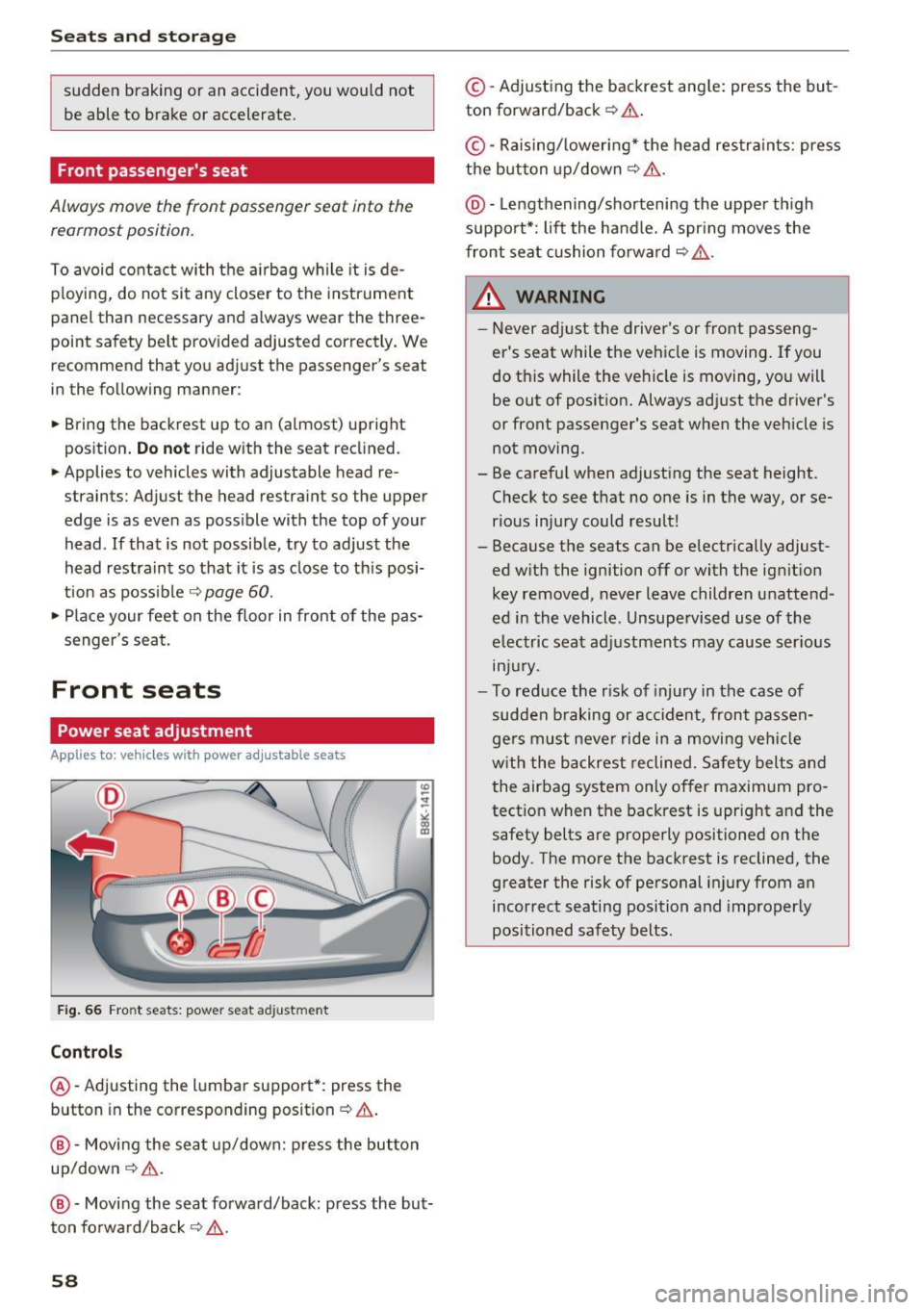
Fig . 66 Fro nt seats: power seat adjustment
Controls
@ -Adjusting the lumba r support*: press the
button in the corresponding position¢& .
@-Movi ng the seat up/down: p ress the but ton
up/down¢ &.
@ -Moving the seat forward/back: press the but
ton forwa rd/back ¢,& .
58
©-Adjusting the backrest ang le: press the but
ton forward/back ¢
.&..
©-Raising/ lower ing* the head restra ints: press
the button up/down ¢& .
@ -Lengthening/sho rtening the upper th igh
suppo rt*: lift the handle. A spr ing moves the
front seat cushion forward ¢
,&.
& WARNING
-Never ad just the driver's or front passeng
er's seat while the vehicle is moving.
If you
do this while the veh icle is moving, you will
be out of posit ion. Always ad just the driver's
or front passenger's seat when the vehicle is
not moving .
- Be carefu l when adjusting the seat height .
Check to see that no one is in the way, or se
rious injury could result!
- Because the seats can be electrically adjust
ed w ith the ignition off or with the ig nition
key removed, never leave children unattend
ed in the vehicle. Unsupe rvised use of the
electric seat adj ustments may cause ser ious
m Jur y.
- To red uce the r isk of injury in the case of
sudden b raking or acc ident, front passen
ge rs must neve r ride in a moving ve hicle
w it h the backrest reclined. Sa fety belts and
the airbag system on ly offer maximum pro
tect ion when the backrest is upr ight and the
safety belts are properly positioned on the
body. The more the backrest is reclined, the
greater the risk of personal injury from an
incorrect seating position and improper ly
positioned safety belts.
-
Page 73 of 266

a:,
a:,
,....,
N
" N ,....,
0
0
LL co
Driving
Steering
Manually adjustable steering wheel
The steering wheel position is fully adjus table up
and down and forward and back .
Fig. 86 Lever under the ste ering column
Fi rst, ad just t he driver 's sea t correct ly.
• Pull the lever ¢
fig. 86 ¢ .&, .
• Move the steer ing whee l to the desired posi
t ion.
• Push the lever against the steeri ng column un-
ti l it locks .
There must be a t least 10 inches (25 cm) be
tween your chest and the center of the stee rin g
wheel. If yo u cannot sit mo re than 10 inches (25
cm) from the steering wheel, see if adaptive
equipment is available to help you reach the ped
als and increase the distance from the steering
wheel.
F or detai led information on how to adjust the
driver's seat, see
¢ page 58 .
.&_ WARNING
Improper use of steering whee l adjustment
and improper seating position can cause ser i
ous pe rsonal injury.
- Adjust the steer ing whee l co lumn on ly w hen
the vehicle is not mov ing to prevent loss of
vehicle control.
- Adjust the driver's seat or steering wheel so
that there is a min imum of 10 inches (25
cm) betwee n your chest and t he s teer ing
wheel
¢page 112, fig. 128 . If you ca nnot
-
D rivi ng
maintain t his minimum distance, the airbag
system cannot p rotect yo u proper ly.
- If physical limitations prevent you from sit
ting 10 inches (25 cm) or more from the
steer ing whee l, check with your author ized
Audi dealer to see if adaptive equipment is
ava ilable.
- If the steer ing whee l is aligned w ith your
face, the supplementa l driver's a irbag can
not provide as much protect io n in an acc i
dent. Always make sure that the steer ing
wheel is aligned with you r chest.
- Always hold the steering wheel with your
hands at the 9 o'clock and 3 o' clock posi
tions to reduce the risk of pe rso nal inju ry if
the dr iver's a irbag dep loys .
- Never ho ld the stee ring wheel at the 12
o'cl ock position or wi th you r hands inside
the stee rin g wheel rim or on t he s teer ing
wheel h ub. Holding the stee ring w heel the
wrong way can cause serious inj uries to the
hands, arms and head if the driver's airbag
deploys .
Ignition lock
Starting engine with the key
Applies to: vehicles with ignition lock
The ignition is switched on and the engine start·
ed with the ignition key .
Fig . 87 Ig nition key
Starting the engine
• Insert the key into the ignition lock .
• Step on the brake pedal and move the sele ctor
lever to the P or N position .
• Press the key ¢
fig. 87 -the engine will start.
71
Page 113 of 266
a:,
a:,
,....,
N r--. N ,....,
0
0
LL 00
Driving safety
Basics
Safe driving habits
Please remember -safety first!
This chapter contains important information,
tips, instructions and warnings that you need to read and observe for your own safety, the safety
of your passengers and others . We have summar
ized here what you need to know about safety
belts, airbags, child restraints as well as child
safety. Your safety is for us
priority number 1. Al
ways observe the information and warnings in
this section - for your own safety as well as that
of your passengers.
The information in this section applies to all
model versions of your vehicle. Some of the fea
tures described in this sections may be standard
equipment on some models, or may be optional
equipment on others. If you are not sure, ask
your authorized Audi dealer.
A WARNING
- Always make sure that you follow the in
structions and heed the WARNINGS in this
Manual. It is in your interest and in the in
terest of your passengers .
-
-Always keep the complete Owner's Litera
ture in your Audi when you lend or sell your
vehicle so that this important information
will always be available to the driver and passengers.
-Always keep the Owner's literature handy so
that you can find it easily if you have ques
tions.
Safety equipment
The safety features are part of the occupant re
straint system and work together to help reduce the risk of injury in a wide variety of accident sit
uations.
Your safety and the safety of your passengers
should not be left to chance. Advances in tech
nology have made a variety of features available
to help reduce the risk of injury in an accident.
Driving safety
The following is a list of just a few of the safety
features in your Audi:
- sophisticated safety belts for driver and all pas-
senger seating positions,
- belt force limiters for the front seats,
- belt pretensioners for the seats,
- head restraints for each seating position,
- front airbags,
- side airbags in the front seats,
- special LATCH anchorages for child restraints,
- adjustable steering column.
These individual safety features, can work to gether as a system to help protect you and your
passengers in a wide range of accidents. These
features cannot work as a system if they are not
always correctly adjusted and correctly used.
Safety is everybody's responsibility!
Important things to do before driving
Safety is everybody 's job! Vehicle and occupant
safety always depends on the informed and care
f1,1/ driver.
For your safety and the safety of your passen
gers,
before driving always:
.,. Make sure that all lights and signals are operat
ing correctly .
.,. Make sure that the tire pressure is correct .
.,. Make sure that all windows are clean and afford
good visibility to the outside.
.,. Secure all luggage and other items carefully
qpage 62.
.,. Make sure that nothing can interfere with the
pedals.
.,. Adjust front seat, head restraint and mirrors
correctly for your height .
.,. Instruct passengers to adjust the head re
straints according to their height.
.,. Make sure to use the right child restraint cor
rectly to protect children
¢ page 150, Child
safety.
.,. Sit properly in your seat and make sure that
your passengers do the same
q page 57, Seats
and storage.
Ill>
111
Page 114 of 266
Driving safety
• Fasten your safety be lt and wear it properly . Al
so instruct your passengers to fasten their
safety be lts properly ¢
page 122.
What impairs driving safety?
Safe driving is directly related to the condition of
the vehicle, the driver as well as the driver 's abili
ty to concentrate on the road without being dis
tracted .
The driver is responsible for the safety of the ve
h icle and all of its occupants. If your ability to
drive is impaired, safety risks for everybody in the
veh icle increase and you also become a hazard to
everyone else on the road ¢.&, .Therefore :
• Do not let yourself be distracted by passengers
or by using a cellular telephone .
• NEVER drive when your driving ability is im
paired (by medications, alcohol, drugs, etc.) .
• Observe all traff ic laws, rules of the road and
speed limits and plain common sense .
• AL WAYS ad just you r speed to road, traffic and
weathe r cond itions.
• Take frequent breaks on long trips. Do not d rive
for more than two ho urs at a stretch .
• Do NOT drive when you are tired, under pres
s u re or when you are stressed .
A WARNING
Impaired driv ing safety increases the risk of
ser ious personal injury and death whe never a
vehicle is being used .
112
.
Correct passenger
seating positions
Proper seating position for the driver
The proper driver seating position is important
for safe, relaxed driving.
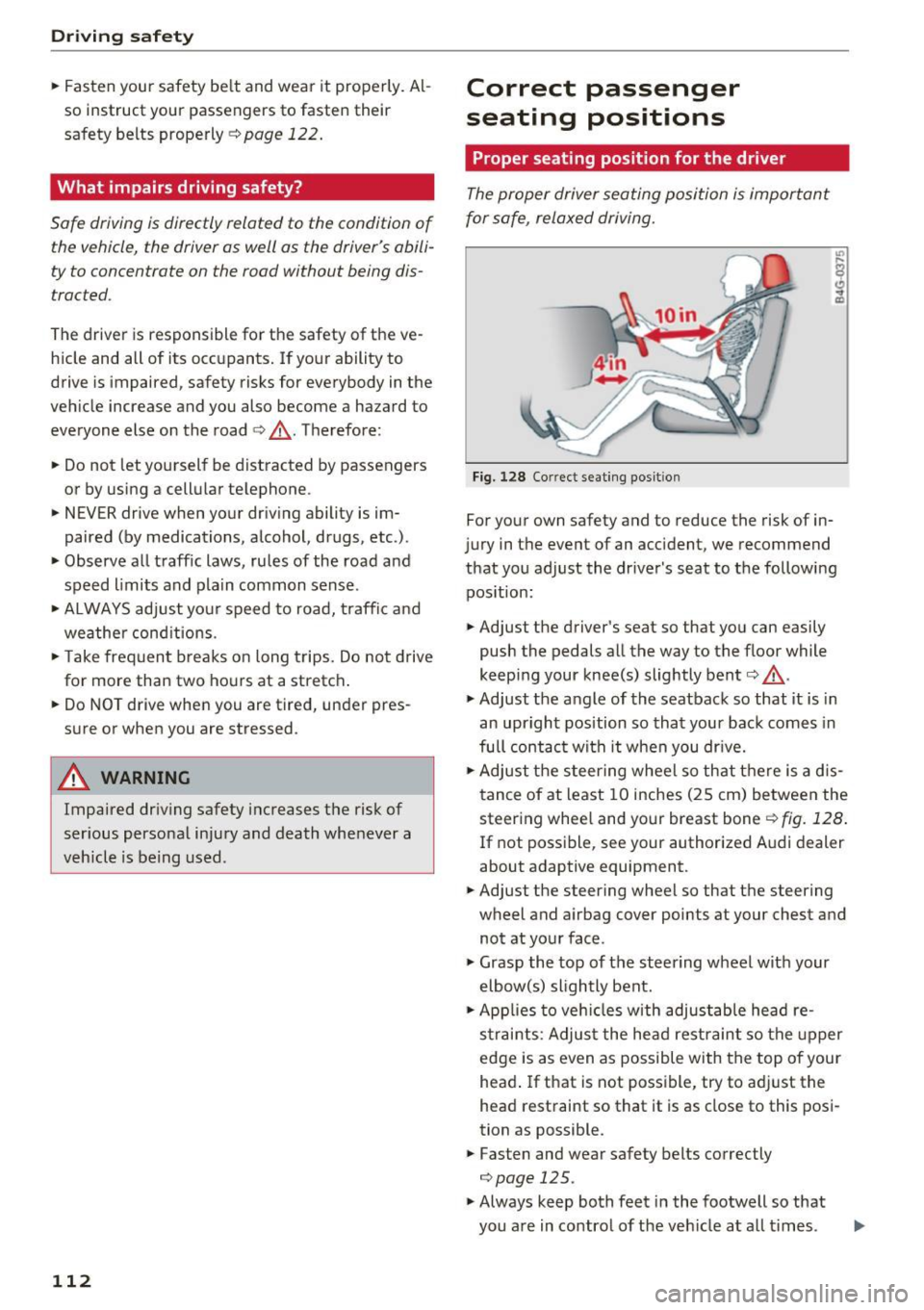
Fig. 128 Co rrect seat ing pos it ion
For your own safety and to reduce the risk of in
jury in the event of an acc ident, we recommend
that you adjust the drive r's seat to the following
pos ition:
• Ad just the driver's seat so that you can easily
push the pedals all the way to the floor while
keeping your knee(s) slightly bent¢.&, .
• Ad just the angle of the seatback so that it is in
an upright position so that your back comes in
full contac t with it when you dr ive.
• Ad just the steer ing wheel so that t here is a d is
t ance of at least 10 inches (25 cm) between the
steer ing whee l and your breast bone ¢
fig. 128.
If not possible, see your authorized A udi dealer
about adaptive equipment.
• Ad just the steering wheel so that the steering
wheel and airbag cover points at your chest and
not at yo ur face .
• Grasp the top of the steer ing wheel with your
elbow(s) sligh tly bent.
• App lies to veh icles with adjustable hea d re
s trai nts: Adjus t the head restraint so the upper
edge is as even as possible with the top of your
head . If that is not possible, try to ad just the
head restraint so that it is as close to this pos i
tion as possible .
• Fasten and wear safety belts correctly
¢ page 125.
• Always keep both feet in the footwell so that
you are in contro l of the veh icle at a ll times .