ignition AUDI A5 COUPE 2008 User Guide
[x] Cancel search | Manufacturer: AUDI, Model Year: 2008, Model line: A5 COUPE, Model: AUDI A5 COUPE 2008Pages: 313, PDF Size: 13.86 MB
Page 22 of 313

Driver information system
20Driver information systemIntroductionGeneral notes
The driver information system in the instrument cluster
shows you the status of various on-board systems at a
glance.The display for the driver information system is in the centre of the
instrument cluster.
The system runs a check on certain components and functions
when the ignition is switched on and while the vehicle is moving. It
gives an audible warning if a fault should occur or if servicing is
required, and a red or yellow warn ing symbol (in some cases with a
corresponding driver message) ap pears in the dashboard display.
The system will also display information for the radio and CD player
and (if fitted) the route guidance directions from the navigation
system* . For further information on these systems, please refer to
the MMI operating manual.
On some models the display of information shown in the instru-
ment cluster differs from the illustrations used here.
The driver information system includes the following functions:
Note
If a fault should occur, the display will show a red or yellow warning
symbol. A red warning symbol indicates a serious malfunction
⇒ page 30 . A yellow warning symbol indicates a less serious
malfunction , or other item requiring attention ⇒page 34 .
Fig. 8 Dashboard:
Display in instrument
cluster (automatic
gearbox)
CD and radio display
⇒page 21
Outside temperature
⇒page 21
Gear-change indicator
⇒page 21
Digital speedometer*
⇒page 22
Door catches/boot lid warning
⇒page 23
Service interval display
⇒page 23
Auto-check control*
⇒page 29
Driver messages
⇒page 30
Speed warning
⇒page 28
On-board computer*
⇒page 25
Selector lever positions for automatic gearbox*
⇒page 131
document_0900452a8179700c.book Seite 20 Donnerstag, 22. März 2007 10:19 10
--4 -
-T
-+
[]]
+-
•
Page 25 of 313
Driver information system23
Controls
Safety
Driving tips
General maintenance
Self-help
Technical data
Door catches / boot lid warning
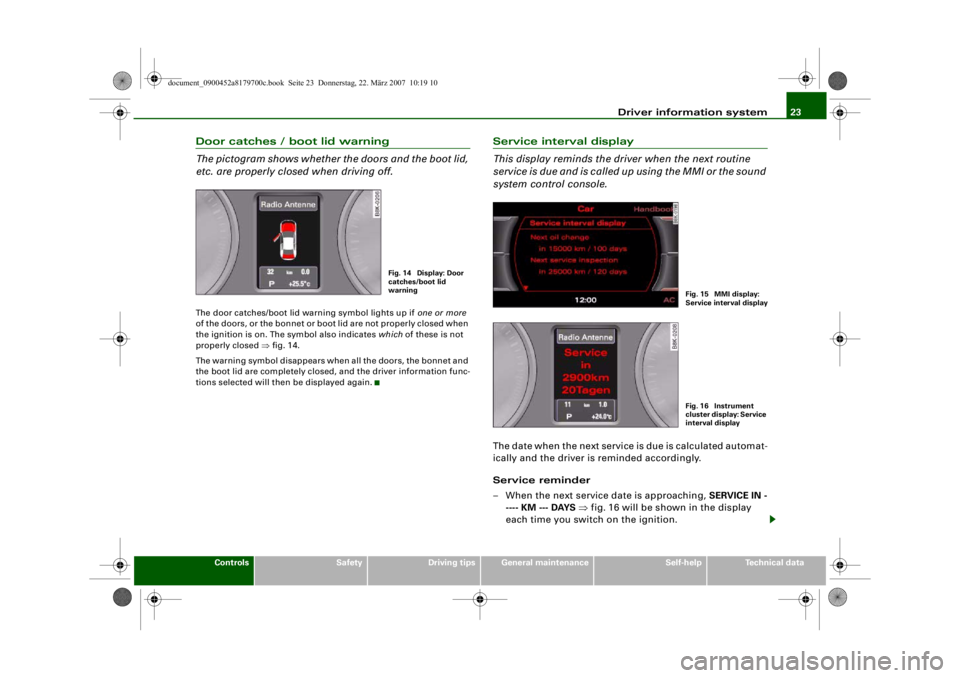
The pictogram shows whether the doors and the boot lid,
etc. are properly closed when driving off.The door catches/boot lid warning symbol lights up if one or more
of the doors, or the bonnet or boot lid are not properly closed when
the ignition is on. The symbol also indicates which of these is not
properly closed ⇒fig. 14.
The warning symbol disappears when all the doors, the bonnet and
the boot lid are completely closed, and the driver information func-
tions selected will then be displayed again.
Service interval display
This display reminds the dri ver when the next routine
service is due and is called up using the MMI or the sound
system control console.The date when the next service is due is calculated automat-
ically and the driver is reminded accordingly.
Service reminder
– When the next service date is approaching, SERVICE IN -
---- KM --- DAYS ⇒ fig. 16 will be shown in the display
each time you switch on the ignition.
Fig. 14 Display: Door
catches/boot lid
warning
Fig. 15 MMI display:
Service interval displa
y
Fig. 16 Instrument
cluster display: Service
interval display
document_0900452a8179700c.book Seite 23 Donnerstag, 22. März 2007 10:19 10
--4 -
-T
-+ +-
•
Page 26 of 313

Driver information system
24
– The remaining time and distance to the next service are indicated every time the ignition is switched on, until the
service becomes due.
Service due
–When a service is due, Service! will appear in the display as soon as you switch on the ignition. The display reverts
back to the standard display after about 5 seconds.
Displaying the service interval
– Select: Function selector button > Service interval
display ⇒ page 23, fig. 15.
Resetting the oil change interval display
– Select: Function selector button > Service interval
display > Reset oil change interval .Displaying distance to next service
You can have the distance to the next service displayed on the MMI
screen ⇒page 23, fig. 15. The remaining distance to the next
service is updated every time the ignition is switched on (starting at
500 km after a service has been performed).
On a new vehicle, the display wi ll always show the following
message for the first 500 km.
SERVICE IN ----- KM --- DAYS
Caution
The system cannot calculate the figures for the service indicator if
the battery is disconnected from the vehicle, so no service reminder
can be displayed during this time. Please remember that keeping to
the correct service intervals is most important for the service life
and residual value of the vehicle (and especially for the life of the
engine). The period between two services must never be longer than the time specified in the Service Schedule, even if you only
cover a low mileage during this time.
Note
•
Do not reset the display between oil changes - otherwise the
display will be incorrect.
•
The information in the service interval display remains intact if
the battery is disconnected.
•
The distance to the next service cannot be called up if the system
has detected a Priority 1 fault (red symbol).
•
If the service was not performed by a qualified workshop, the oil
change interval display can only be set to “fixed service intervals” of
15,000 km. If you wish to continue with the “LongLife” service, you
will need to have the oil change interval display reset by a qualified
workshop.
CARCAR
document_0900452a8179700c.book Seite 24 Donnerstag, 22. März 2007 10:19 10
--4 -
-T
-+
•
+-
0
Page 28 of 313

Driver information system
26
Note•
The displays for fuel consumption (average and current
consumption), fuel range and speed are shown in metric units. You
can change the measurement units on the MMI display.
•
The information in the memory is cancelled if the battery is
disconnected.
Applies to vehicles: with on-board computerMemory
The on-board computer has two automatic journey
memories.Press RESET button ⇒ fig. 20 to switch back and forward
between the functions of on-board computers 1 and 2.
The number in the display ⇒fig. 19 indicates which of the two
memories is currently in use. The figure 1 means that the display is
showing the information in the single journey memory (on-board
computer 1). The figure 2 means that the display is showing the
information in the total journey memory (on-board computer 2).
Single journey memory (on-board computer 1)
The single journey memory processes the information on a journey
from the time the ignition is switched on until it is switched off. If the journey is resumed
within two hours after the ignition is
switched off, the new figures are automatically included in the
calculation. The memory is automatically deleted when you resume
driving, if the journey is interrupted for more than two hours.
Total journey memory (on-board computer 2)
Unlike the single journey memory, the total journey memory is not
erased automatically. In this way, you can determine the period for
which you wish the on-board computer to supply figures.
Applies to vehicles: with on-board computerControls
The on-board computer is controlled by means of two
switches on the windscreen wiper lever.– Press the top or bottom of the function selector switch ⇒ fig. 20. This displays the on-board computer read-
outs one after the other.The on-board computer can only be operated while the ignition is
switched on. When the ignition is switched on, the display shows
the function that was last selected.
As well as the figures from the on-board computer (computer 1 or
2), the display can also show information from the digital speedom-
Fig. 19 On-board
computer: Memory 1
AB
Fig. 20 Windscreen
wiper lever: On-board
computer controls
AA
document_0900452a8179700c.book Seite 26 Donnerstag, 22. März 2007 10:19 10
--4 -
-
[I)
T
•
•
-+ +-
Page 30 of 313

Driver information system
28Speed warning functionApplies to vehicles: with speed warning functionIntroduction
The speed warning function can help you keep below a
pre-set maximum speed.The speed warning function will warn you if the vehicle exceeds the
pre-set maximum speed. The system gives an audible warning
signal if the set speed is exceeded by about 3 km/h. A warning
symbol will also appear in the display . On some models the symbol
may look slightly different.
The speed warning function has two different warning speeds,
which operate independently and serve slightly different purposes:
Speed limit warning 1
With speed limit warning 1, the maximum speed can be changed
while driving. The speed limit that has been set remains stored until
the ignition is switched off, or until it is changed or cleared.
The speed limit warning symbol
for speed limit warning 1 will
appear in the display if you exceed the pre-set speed. It goes out
again if the speed is reduced below the set speed limit.
The symbol also goes out if the speed is increased to more than
about 40 km/h above the set speed for at least 10 seconds. This
cancels the speed limit that was originally set.
Setting speed limit warning 1 ⇒page 28 .
Speed limit warning 2
You are recommended to store this speed limit warning if you
always wish to be reminded of a particular speed limit. This could
be when driving in countries with general speed limits, or if you
need to keep below a particular speed when winter tyres are fitted,
etc. The speed limit warning symbol
for speed warning 2 will appear
in the display if you exceed the pre-set speed. Unlike speed limit
warning 1, the warning symbol only goes out once the road speed
has dropped below the stored value again.
Setting speed limit warning 2 ⇒page 29 .
Note
Please bear in mind that, even with the speed warning function, it is
still important to keep a check on the car's speed with the speedom-
eter and to observe the statutory speed limits.Applies to vehicles: with speed warning functionSetting speed li mit warning 1
You can use the button to set, alter or cancel speed
limit warning 1.Selecting speed limit
– Drive at the desired maximum speed.
– Press the button in the instrument cluster ⇒fig. 22
for one second.
SET
Fig. 22 Detail of the
instrument cluster:
SET button
SET
document_0900452a8179700c.book Seite 28 Donnerstag, 22. März 2007 10:19 10
--4 -
-T
rn
•
-+
D
+-
Page 31 of 313

Driver information system29
Controls
Safety
Driving tips
General maintenance
Self-help
Technical data
Clearing speed limit
– Drive the vehicle at a minimum of 5 km/h.
– Press the button for at least 2 seconds.The speed warning symbol
lights up briefly in the display to
confirm that the selected speed has been stored. The speed limit
that has been set remains stored until another speed is set with a
brief push of the button, or until the memory is cleared with a long
push of the button.
When the speed limit has been cleared, the display will show a
crossed-out warning symbol .
Applies to vehicles: with speed warning functionSetting speed limit warning 2
You can use the MMI* or sound system control console to
set, alter or cancel speed limit warning 2.– Select: Function selector button > Instrument cluster > Speed warning.•
Speed warning on/off - to activate or deactivate the speed
warning function ⇒ fig. 23.
•
Speed warning - to set the speed above which a warning signal
will sound.
Speed limit warning 2 can be adjusted in increments of 10 km/h
between 30 and 240 km/h.
Auto-check controlIntroductionThe auto-check control checks important components and vehicle
systems. These background checks are run constantly, as long as
the ignition is switched on.
A message is displayed in the inst rument cluster if a fault should
occur or if any maintenance or repairs are urgently required. This is
accompanied by an audible warning signal. Depending on the
priority of the fault, a red or yello w warning symbol lights up in the
display.
The red symbols indicate a serious malfunction, whereas the yellow
ones represent other malfunctions or items requiring attention.
Additional messages to assist the driver may be shown with the red
or yellow symbols.
Automatic gearbox* function test
The auto-check control automatically checks the vehicle systems
when the ignition is switched on. If the selector lever is in position
P or N, the following instruction will appear:
When stationary apply footbrake while selecting gear
When a gear (R, D etc.) is selected, this message disappears and the
auto-check control function is displayed.
The driver message will disappear 30 seconds after switching on
the ignition or earlier, if there are other driver messages or malfunc-
tions.
SET
Fig. 23 MMI display:
Setting speed limit
warning 2
CAR
document_0900452a8179700c.book Seite 29 Donnerstag, 22. März 2007 10:19 10
--4 -
-T
•
•
-+ +-
Page 32 of 313

Driver information system
30If one or more faults are detected, the driver information message
(as above) will disappear about 15 seconds after the engine has
been started and the appropriate fault symbol(s) will appear in the
display. The warning display will be accompanied by the corre-
sponding warning chime.Driver messages
Additional messages to assist the driver are displayed
together with the warning symbols in the instrument
cluster.For example, the following driver message will appear if the selector
lever for the automatic gearbox* is not in position P when you
switch off the engine:
Shift to P, otherwise vehicle can roll away. Doors do not lock if
lever is not in P
The ignition key can only be withdr awn when the selector lever is in
this position. Similar messages will be displayed if other functions
of this kind cannot be carried out.
Driver messages and red symbols
If a red warning symbol appears in the display, it will automatically
be accompanied by the corresponding driver message. For example, in the event of an oil pressure malfunction the oil pres-
sure symbol
will appear in the display. In addition, the following
message will appear:
Switch off engine and check oil level
The message will disappear from the display after about 5 seconds.
If required, the message can be called up again by briefly pressing
the button ⇒fig. 24.
Driver messages and yellow symbols
If a yellow warning symbol appears in the display, it will automati-
cally be accompanied by the corresponding driver message.
For example, if the symbol
appears (windscreen washer fluid
low), the display will also show the message:
Please top up washer fluid
The message will disappear after a few seconds. If required, the
message can be called up again by briefly pressing the
button.
Red symbols
A red symbol warns of a serious malfunction.–Stop the vehicle.
Fig. 24 Instrument
cluster: SET button
SET
SET
Fig. 25 Display:
Symbol for serious
malfunction
document_0900452a8179700c.book Seite 30 Donnerstag, 22. März 2007 10:19 10
--4 -
-T
•
D
-+
D
•
+-
Page 33 of 313
Driver information system31
Controls
Safety
Driving tips
General maintenance
Self-help
Technical data
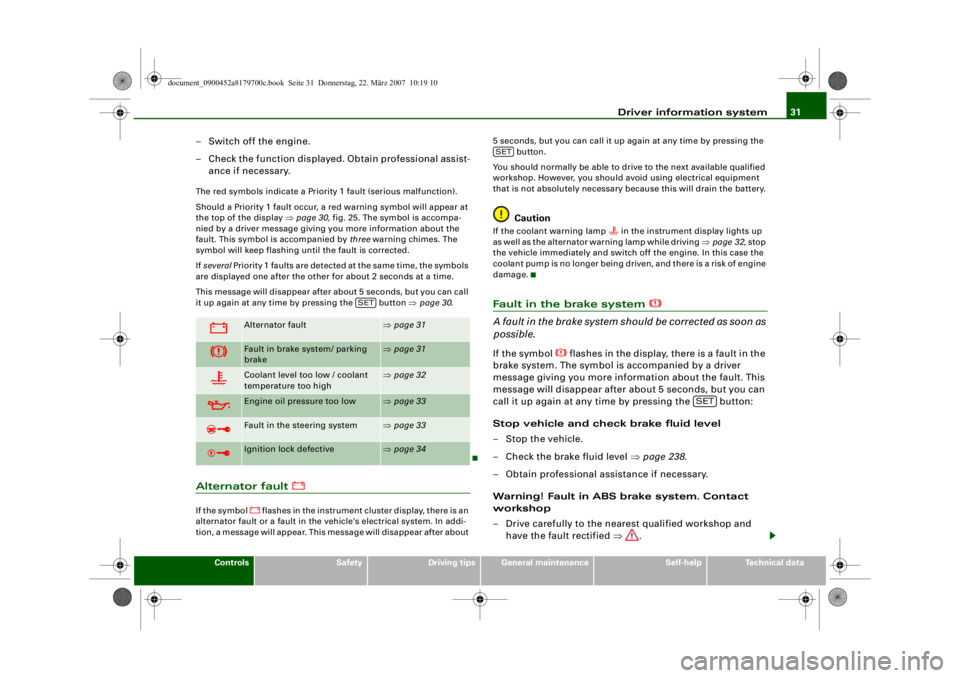
– Switch off the engine.
– Check the function displayed. Obtain professional assist-
ance if necessary.The red symbols indicate a Priority 1 fault (serious malfunction).
Should a Priority 1 fault occur, a red warning symbol will appear at
the top of the display ⇒page 30, fig. 25. The symbol is accompa-
nied by a driver message giving you more information about the
fault. This symbol is accompanied by three warning chimes. The
symbol will keep flashing until the fault is corrected.
If several Priority 1 faults are detected at the same time, the symbols
are displayed one after the other for about 2 seconds at a time.
This message will disappear after about 5 seconds, but you can call
it up again at any time by pressing the button ⇒page 30 .Alternator fault
If the symbol
flashes in the instrument cluster display, there is an
alternator fault or a fa ult in the vehicle's electrical system. In addi-
tion, a message will appear. This message will disappear after about 5 seconds, but you can call it up again at any time by pressing the
button.
You should normally be able to dr ive to the next available qualified
workshop. However, you should avoid using electrical equipment
that is not absolutely necessary because this will drain the battery.
Caution
If the coolant warning lamp
in the instrument display lights up
as well as the alternator warning lamp while driving ⇒page 32 , stop
the vehicle immediately and switch off the engine. In this case the
coolant pump is no longer being driven, and there is a risk of engine
damage.
Fault in the brake system
A fault in the brake system shou ld be corrected as soon as
possible.If the symbol
flashes in the display, there is a fault in the
brake system. The symbol is accompanied by a driver
message giving you more information about the fault. This
message will disappear after about 5 seconds, but you can
call it up again at any time by pressing the button:
Stop vehicle and check brake fluid level
– Stop the vehicle.
– Check the brake fluid level ⇒page 238 .
– Obtain professional assistance if necessary.
Warning! Fault in ABS brake system. Contact
workshop
– Drive carefully to the nearest qualified workshop and have the fault rectified ⇒.
Alternator fault
⇒page 31
Fault in brake system/ parking
brake
⇒page 31
Coolant level too low / coolant
temperature too high
⇒page 32
Engine oil pressure too low
⇒page 33
Fault in the steering system
⇒page 33
Ignition lock defective
⇒page 34
SET
SET
SET
document_0900452a8179700c.book Seite 31 Donnerstag, 22. März 2007 10:19 10
--4 -
-T
CD
•
D
-+ +-
D
-
•
Page 34 of 313

Driver information system
32
Parking brake ! Please contact workshop
– If the symbol appears after you switch on the ignition when the vehicle is stationary, please check whether you
can release the parking brake. If this is possible, you
should drive without delay to the nearest qualified work-
shop and have the fault rectified. If the parking brake
cannot be released you should obtain professional
assistance.
– If this symbol should appear while driving, there may be a malfunction in the drive-away assist or the emergency
brake functions. You may not be able to apply the parking
brake. It is also possible that you cannot release the
parking brake after it has been applied. Drive the vehicle
to a qualified workshop and have the fault repaired.If the ABS fails, the ABS warning lamp
will light up together with
the brake warning symbol
⇒ .
WARNING
•
Before opening the bonnet and ch ecking the brake fluid level,
observe the warning information on ⇒page 231, “Working on
components in the engine compartment”.
•
If the brake fluid level in the reservoir is too low, this could
result in an accident. Do not drive on. You should obtain profes-
sional assistance.
•
If the brake warning lamp lights up together with the ABS
warning lamp, this can mean that the control function of the ABS
is out of action. As a result the rear wheels can lock relatively
easily when braking. This could caus e the tail of the vehicle to skid
sideways. Drive carefully to the nearest qualified workshop and
have the fault rectified.
Note
The warning lamp
in the instrument cluster will start flashing as
well if there is a fault in the brake system.
Fault in the cooling system
Faults in the cooling system must be rectified immedi-
ately.If the
symbol flashes in the display, this means that
either the coolant temperature is too high or the coolant
level is too low. The symbol is accompanied by a driver
message giving you more information about the fault. This
message will disappear after about 5 seconds, but you can
call it up again at any time by pressing the button:
Switch off engine, check coolant level
–Stop the vehicle.
– Switch off the engine.
– Check the coolant level ⇒page 236.
– Add more coolant if necessary ⇒page 236 .
– Wait for the symbol to go out before driving on.
– Obtain professional assistance if necessary.
If the coolant level is correct, the overheating may be caused by a
malfunction of the radiator fan.
If the alternator warning lamp lights up as well ⇒page 31 , it is
possible that the drive belt has broken.
SET
document_0900452a8179700c.book Seite 32 Donnerstag, 22. März 2007 10:19 10
--4 -
-
[I]
T
•
-+
D
+-
Page 36 of 313

Driver information system
34
WARNING
The vehicle must not be towed if th ere is a fault in the electronic
steering lock: the steering will be locked and the vehicle cannot be
steered. Towing a vehicle with l ocked steering can cause an acci-
dent.
Note
On some models the symbol may look slightly different.Ignition lock defective
A fault in the ignition lock must be rectified immediately.If the symbol
flashes in the display, there is a malfunc-
tion in the electronic ignition lock. The symbol is accompa-
nied by a driver message gi ving you more information
about the fault. This message will disappear after about
5 seconds, but you can call it up again at any time by
pressing the button:
Ignition lock defective. Contact workshop!
– Do not switch off the engine.
– Drive the vehicle without delay to a qualified workshop and have the fault repaired.
The ignition cannot be switched off if there is a fault in the elec-
tronic ignition lock. For this reason, you should drive the vehicle
without delay to a qualified workshop and have the cause of the
fault repaired.
If the vehicle is equipped with the advanced key* feature, you
should not switch off the engine wi th the Stop/Start button because
it cannot be started again after the ignition has been switched off.
Note
On some models the symbol may look slightly different.Yellow symbols
A yellow symbol indicates a malfunction or other item
requiring attention.Yellow symbols indicate a Priority 2 fault.
Yellow symbols are accompanied by one warning chime. The
symbol is accompanied by a driver message giving you more infor-
mation about the fault. This me ssage will disappear after about
5 seconds, but you can call it up again at any time by pressing the button.
The function indicated should be checked as soon as possible. The
yellow symbol will only go out wh en the fault has been rectified.
If several Priority 2 fa ults are detected at th e same time, the symbols
are displayed one after the other for about 2 seconds at a time.
SET
Fi g . 2 6 D i s p la y : Yel l o w
warning symbol
SET
document_0900452a8179700c.book Seite 34 Donnerstag, 22. März 2007 10:19 10
--4 -
-
~I& __ I
_[I] __ •
T
[I]
•
-+
D
+-