ignition AUDI A5 COUPE 2008 Owner's Guide
[x] Cancel search | Manufacturer: AUDI, Model Year: 2008, Model line: A5 COUPE, Model: AUDI A5 COUPE 2008Pages: 313, PDF Size: 13.86 MB
Page 52 of 313
Doors and windows
50Electric windowsControls
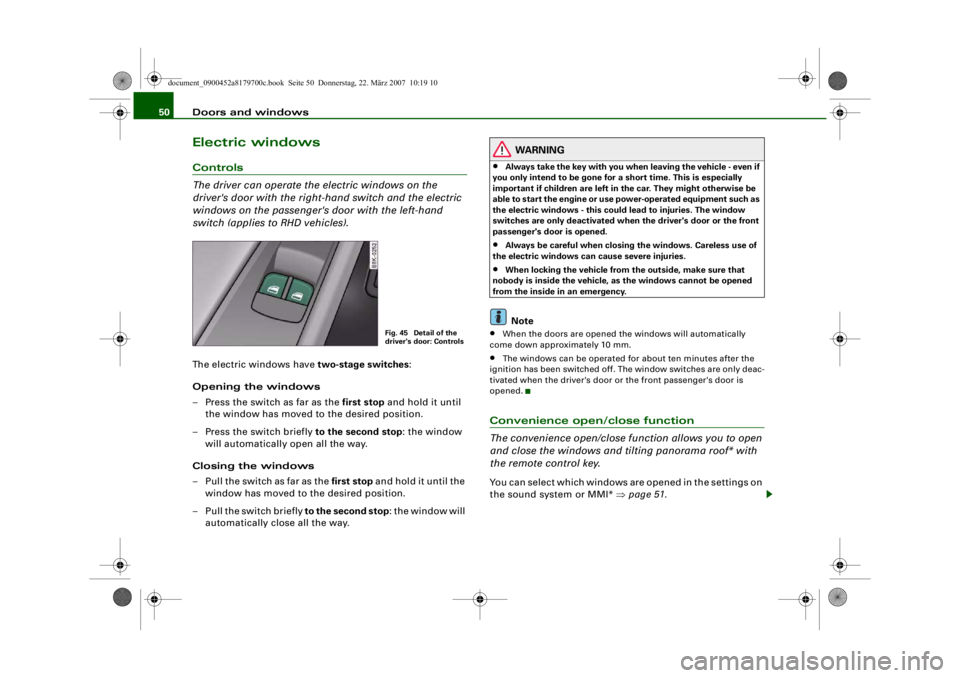
The driver can operate the electric windows on the
driver's door with the right- hand switch and the electric
windows on the passenger's door with the left-hand
switch (applies to RHD vehicles).The electric windows have two-stage switches:
Opening the windows
– Press the switch as far as the first stop and hold it until the window has moved to the desired position.
– Press the switch briefly to the second stop: the window
will automatically open all the way.
Closing the windows
– Pull the switch as far as the first stop and hold it until the
window has moved to the desired position.
– Pull the switch briefly to the second stop : the window will
automatically close all the way.
WARNING
•
Always take the key with you when leaving the vehicle - even if
you only intend to be gone for a short time. This is especially
important if children are left in the car. They might otherwise be
able to start the engine or use power-operated equipment such as
the electric windows - this could lead to injuries. The window
switches are only deactivated when the driver's door or the front
passenger's door is opened.
•
Always be careful when closing the windows. Careless use of
the electric windows can cause severe injuries.
•
When locking the vehicle from the outside, make sure that
nobody is inside the vehicle, as the windows cannot be opened
from the inside in an emergency.Note
•
When the doors are opened the windows will automatically
come down approximately 10 mm.
•
The windows can be operated for about ten minutes after the
ignition has been switched off. The window switches are only deac-
tivated when the driver's door or the front passenger's door is
opened.
Convenience open/close function
The convenience open/close function allows you to open
and close the windows and ti lting panorama roof* with
the remote control key.You can select which windows are opened in the settings on
the sound system or MMI* ⇒page 51 .
Fig. 45 Detail of the
driver's door: Controls
document_0900452a8179700c.book Seite 50 Donnerstag, 22. März 2007 10:19 10
--4 -
-T
-+
[I]
+-
•
Page 54 of 313

Doors and windows
52Tilting panorama roofApplies to vehicles: with tilting panorama roofTilting open and closedThe tilting panorama roof is operated via a switch ⇒fig. 47.
Tilting open
– Press the switch to tilt open the panorama roof. Press the switch again to stop at any intermediate position.
Closing
– Pull the switch to close the tilting panorama roof. Pull the switch again to stop at any intermediate position.The tilting panorama roof can be opened or closed for about ten
minutes after the ignition has been switched off. However, the
switch is deactivated immediately when the driver's door or
passenger's door is opened.
Sun blind
The tilting panorama roof is equipped with a sliding sun blind for
protection against sunlight. Take ho ld of the handle to open and
close the sun blind.
WARNING
Take care when closing the tilting panorama roof. Careless or
uncontrolled use can cause injuries. For this reason, always take
out the ignition key when leaving the vehicle.
Caution
You should always close the tiltin g panorama roof when leaving the
car. Sudden rain could seriously damage the upholstery and elec-
tronic equipment inside the vehicle.
Note
It is advisable to close the sun blind when the vehicle is left standing
in the sun.Applies to vehicles: with tilting panorama roofClosing the tilting panorama roof by overriding the safety cut-outThe tilting panorama roof mechanism is equipped with a
safety cut-out . If the force required to close the roof is too
high, the panorama roof will tilt up to the fully open posi-
tion. It can now be closed by overriding the safety cut-out.
– Immediately after the tilting panorama roof opens auto-
matically, pull and hold the switch ⇒fig. 47 until the
panorama roof is closed ⇒.The safety cut-out tilts the panorama roof to the fully open position.
When this happens, it is possible to close the panorama roof within
approximately 5 seconds by overriding the safety cut-out.
Fig. 47 Detail of head-
liner: Switch for tilting
panorama roof
document_0900452a8179700c.book Seite 52 Donnerstag, 22. März 2007 10:19 10
--4 -
-
--- I&
~-----
T
0 [JJ
•
-+ +-
Page 55 of 313
Doors and windows53
Controls
Safety
Driving tips
General maintenance
Self-help
Technical data
WARNING
Take care when closing the tilting panorama roof. Careless or
uncontrolled use can cause injuries. For this reason, always take
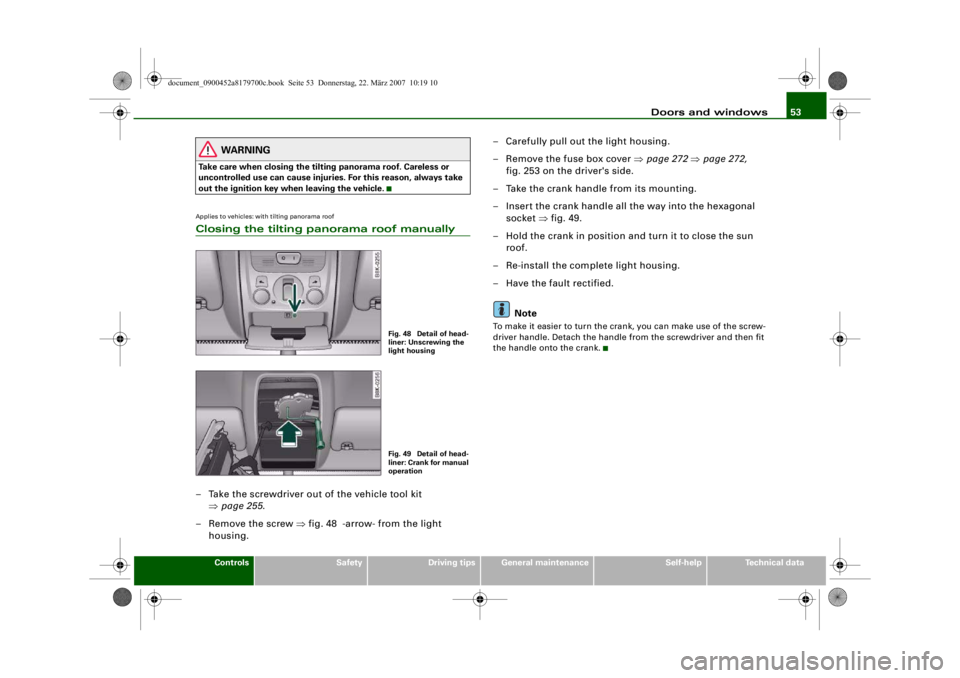
out the ignition key when leaving the vehicle.Applies to vehicles: with tilting panorama roofClosing the tilting panorama roof manually– Take the screwdriver out of the vehicle tool kit
⇒page 255 .
– Remove the screw ⇒fig. 48 -arrow- from the light
housing. – Carefully pull out the light housing.
– Remove the fuse box cover
⇒page 272 ⇒ page 272,
fig. 253 on the driver's side.
– Take the crank handle from its mounting.
– Insert the crank handle all the way into the hexagonal socket ⇒fig. 49.
– Hold the crank in position and turn it to close the sun roof.
– Re-install the complete light housing.
– Have the fault rectified.
Note
To make it easier to turn the crank, you can make use of the screw-
driver handle. Detach the handle from the screwdriver and then fit
the handle onto the crank.
Fig. 48 Detail of head-
liner: Unscrewing the
light housingFig. 49 Detail of head-
liner: Crank for manual
operation
document_0900452a8179700c.book Seite 53 Donnerstag, 22. März 2007 10:19 10
--4 -
-T
•
-+
[I]
•
+-
Page 56 of 313

Lights and vision
54Lights and visionLightsSwitching lights on and off
Switching on automatic headlights* (AUTO)
– Turn the light switch to AUTO ⇒ fig. 50.
Switching on the side lights
– Turn the light switch to position
.
Switching on dipped headlights
– Turn the light switch to position
.
Switching off the lights
– Turn the light switch to position O.
The dipped beam headlights will only work with the ignition on.
The symbol
next to the light switch will light up when the side
lights or headlights are on. Automatic headlight control (AUTO)*
When the switch is set to AUTO
, the headlights switch on automati-
cally according to the ambient light conditions, for instance in a
tunnel, at sunset, or in the rain or snow. The
symbol lights up
when the dipped headlights are on. The headlights are switched on,
regardless of the light conditions, when you switch on the fog
lights.
The headlights are switched off automatically when you switch off
the ignition.
On vehicles with a rain sensor, the headlights switch on automati-
cally after several windscreen wiper cycles. The instrument lighting
does not switch on, however.
While using the automatic headligh ts you can activate the main
beam headlights as normal if this function has been activated in the
MMI. However, if you switch on the main beam headlights while
using the AUTO function and then do not switch back to the dipped
headlights setting, only the dipped headlights will come on the next
time you switch on the AUTO function. To be able to use the main
beam headlights again you must first pull the main beam lever back
to the "off" position and then push it forward to "on".
Malfunction of light sensor
If a malfunction should occur in the light sensor, the instrument
cluster will show the message:
Automatic headlights/ automatic wipers defective
For safety reasons, the dipped beam headlights will then be
switched on permanently when the light switch is set to the AUTO
position. However, you can still switch the lights on and off in the
normal way with the light switch. You should have the light sensor
checked by a qualified workshop as soon as possible.
Fig. 50 Dashboard:
Light switch
document_0900452a8179700c.book Seite 54 Donnerstag, 22. März 2007 10:19 10
--4 -
-T
-+ +-
Page 57 of 313

Lights and vision55
Controls
Safety
Driving tips
General maintenance
Self-help
Technical data
WARNING
The automatic headlights are only intended to assist the driver.
The driver must always ensure that the headlights are used when
required, and may have to switch them on manually when the light
conditions or visibility are poor. For example, the light sensors are
not able to detect fog. Therefore, you should always switch on the
headlights
in these conditions and when driving after dark.
Note
•
The light sensor for automatic head light control is located in the
mounting for the interior mirror. Do not affix any stickers on this
section of the windscreen to avoid malfunctioning of the sensor.
•
The default sensitivity of the li ght sensor, which is set at the
factory, can be changed in the MMI menu Auto headlights
⇒ page 56 .
•
If the lights are left on after the key has been taken out of the
ignition lock, a buzzer sounds when the driver's door is opened.
•
The use of the lighting described here is subject to the relevant
statutory requirements.
•
The coming home/leaving home function is active only when the
light switch is set to AUTO.
Fog lights– Press button ⇒fig. 51 to switch on the front fog lights
.
– Press button to switch on the rear fog lights
.
Front fog lights
The side lights or headlights must be switched on. The green diode
at the edge of the switch lights up when the front fog lights are
switched on.
When the headlights are set to AUTO, the dipped headlights are
switched on automatically when you switch on the front fog lights.
Rear fog lights
The headlights or side lights an d the front fog lights must be
switched on.
The yellow diode at the edge of the switch lights up when the rear
fog lights are switched on.
If you are towing a trailer or cara van equipped with a rear fog light
on a vehicle with a factory-fitted towing bracket, only the rear fog
light on the trailer or caravan will light up.
Fig. 51 Switch for
front fog lights
A1A2
document_0900452a8179700c.book Seite 55 Donnerstag, 22. März 2007 10:19 10
--4 -
-T
[I]
-+ +-
•
Page 58 of 313

Lights and vision
56
CautionTo avoid dazzling the tr affic behind you, the rear fog light should
only be used in accordance with statutory regulations.Exterior lighting settings
You can change the settings for these functions on the
sound system or MMI*.– Select: Function selector button > Exterior lighting.Coming home
The coming home function lights up the area round the vehicle after
dark when the ignition has been swit ched off and the driver's door
opened. It switches on the fog lights, rear lights and number plate
lights. This function can be set to operate for a time interval
between 0 (off) and 30 or 60 seconds.
Leaving home
The leaving home function lights up the area round the vehicle after
dark when the vehicl e is unlocked. It switches on the fog lights, rear
lights and number plate lights. Th e function can be switched on or
off as required. Auto headlights*
When the light switch is set to AUTO
⇒page 54 , you can make the
headlights switch on earlier or later by changing the Auto head-
lights setting.
Daytime running lights (daylight headlights)*
This function can be used to switch the daytime running lights on
and off as required. When the function is activated, the daytime
running lights are switched on au tomatically when the ignition is
switched on.
On vehicles for some markets the daytime running lights cannot be
switched off if the vehicle has halogen headlights.
Note
The coming home/leaving home function is active only when the
light switch is set to AUTO.Applies to vehicles: with headlight range controlHeadlight range control
When the dipped beam headlights are switched on, the
range of the headlights can be adjusted to suit the load
being carried.
Fig. 52 MMI display:
Exterior lighting
CAR
Fig. 53 Headlight
range control
document_0900452a8179700c.book Seite 56 Donnerstag, 22. März 2007 10:19 10
--4 -
-T
•
[I]
-+
•
+-
Page 59 of 313

Lights and vision57
Controls
Safety
Driving tips
General maintenance
Self-help
Technical data
– Turn the thumbwheel
⇒ page 56, fig. 53 to the appro-
priate setting.
Adjustment settings
The settings correspond roughly to the following load conditions:
Two front occupants, luggage compartment empty
All seats occupied, luggage compartment empty
All seats occupied, luggage compartment loadedDriver only, luggage compartment loaded
Caution
Always adjust the headlights to avoid dazzling oncoming traffic.
Make sure you lower the headlights when the vehicle is carrying a
heavy load.Instrument lighting
The background lighting of the instruments, the centre
console and the display can be adjusted as required.– Briefly press the knob to release it.
– Turn the button clockwise +” to increase the brightness
of the instrument lighting in dark conditions. – Turn the button anti-clockwise -” to reduce the bright-
ness of the instrument lighting in dark conditions.
– Press the knob in again to prevent the setting from being changed unintentionally.
The instrument lighting (dials and needles), the centre console illu-
mination and the illumination of the displays are regulated by a
light sensor incorporated in the instrument cluster. In bright condi-
tions any changes made to the brigh tness of the instrument lighting
have no effect.
Note
The instrument lighting (illumination of dials and needles) is
switched on when the ignition is on and the vehicle's lights are off.
The instrument lighting is dimmed automatically as the daylight
starts to fade; it is switched off completely when the light condi-
tions become very poor. This function is intended to remind the
driver to switch on the dipped-beam headlights in good time when
light conditions become poor.Applies to vehicles: with xenon headlight bulbsDynamic headlight range controlHeadlights with xenon gas-discharge bulbs automatically adapt to
suit the load being carried when the engine is switched on. The
headlights are also automatically adjusted when the vehicle is in
motion (e.g. when accelerating and braking).
AOAIAIIAIII
Fig. 54 Instrument
lighting
document_0900452a8179700c.book Seite 57 Donnerstag, 22. März 2007 10:19 10
--4 -
-T
0
•
-+
•
+-
•
Page 60 of 313
Lights and vision
58Applies to vehicles: with adaptive lightadaptive light
This feature provides better illumination when you drive
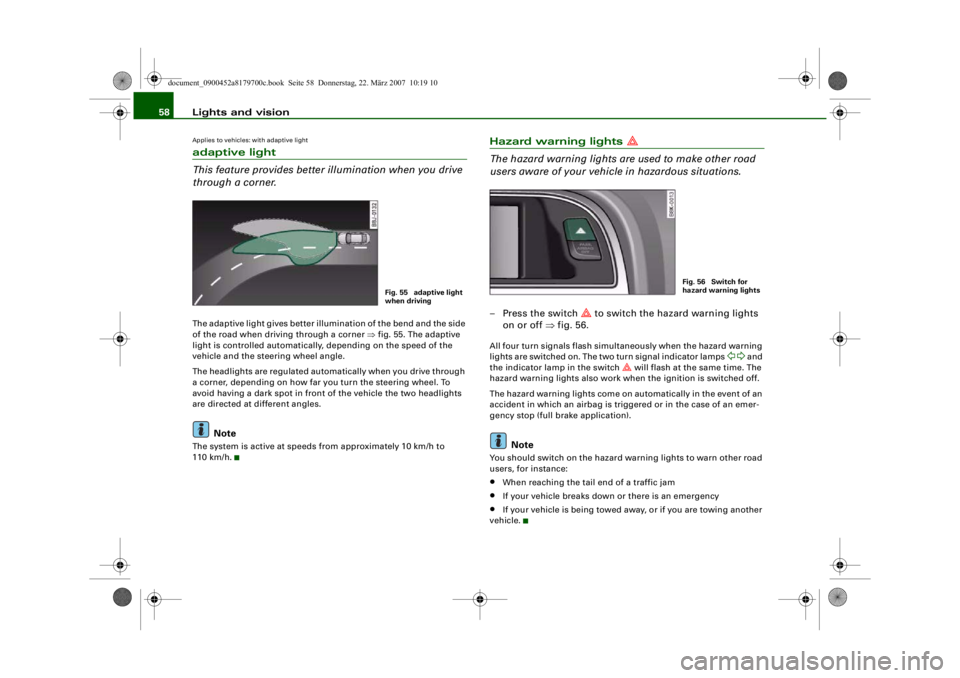
through a corner.The adaptive light gives better illumination of the bend and the side
of the road when driving through a corner ⇒fig. 55. The adaptive
light is controlled automatically, depending on the speed of the
vehicle and the steering wheel angle.
The headlights are regulated auto matically when you drive through
a corner, depending on how far you turn the steering wheel. To
avoid having a dark spot in front of the vehicle the two headlights
are directed at different angles.
Note
The system is active at speeds from approximately 10 km/h to
110 km/h.
Hazard warning lights
The hazard warning lights are used to make other road
users aware of your vehicle in hazardous situations.– Press the switch
to switch the hazard warning lights
on or off ⇒fig. 56.
All four turn signals flash simult aneously when the hazard warning
lights are switched on. The two turn signal indicator lamps
and
the indicator lamp in the switch
will flash at the same time. The
hazard warning lights also work when the ignition is switched off.
The hazard warning lights come on automatically in the event of an
accident in which an airbag is triggered or in the case of an emer-
gency stop (full br ake application).
Note
You should switch on the hazard warning lights to warn other road
users, for instance:•
When reaching the tail end of a traffic jam
•
If your vehicle breaks down or there is an emergency
•
If your vehicle is being towed away, or if you are towing another
vehicle.
Fig. 55 adaptive light
when driving
Fig. 56 Switch for
hazard warning lights
document_0900452a8179700c.book Seite 58 Donnerstag, 22. März 2007 10:19 10
--4 -
-T
-+ +-
[I]
•
•
Page 61 of 313
Lights and vision59
Controls
Safety
Driving tips
General maintenance
Self-help
Technical data
Turn signal and main beam lever
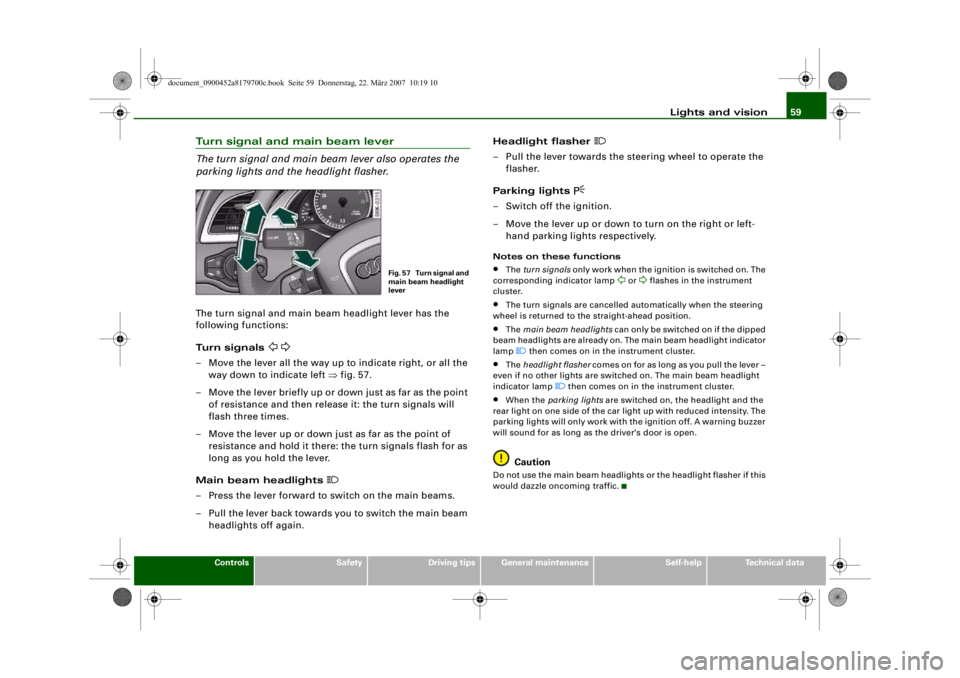
The turn signal and main beam lever also operates the
parking lights and the headlight flasher.The turn signal and main beam headlight lever has the
following functions:
Turn signals
– Move the lever all the way up to indicate right, or all the
way down to indicate left ⇒fig. 57.
– Move the lever briefly up or down just as far as the point of resistance and then rele ase it: the turn signals will
flash three times.
– Move the lever up or down just as far as the point of resistance and hold it there: the turn signals flash for as
long as you hold the lever.
Main beam headlights
– Press the lever forward to switch on the main beams.
– Pull the lever back towards you to switch the main beam headlights off again. Headlight flasher
– Pull the lever towards the steering wheel to operate the
flasher.
Parking lights
– Switch off the ignition.
– Move the lever up or down to turn on the right or left- hand parking lights respectively.Notes on these functions•
The turn signals only work when the ignition is switched on. The
corresponding indicator lamp
or
flashes in the instrument
cluster.
•
The turn signals are cancelled automatically when the steering
wheel is returned to the straight-ahead position.
•
The main beam headlights can only be switched on if the dipped
beam headlights are already on. The main beam headlight indicator
lamp then comes on in the instrument cluster.
•
The headlight flasher comes on for as long as you pull the lever –
even if no other lights are switched on. The main beam headlight
indicator lamp
then comes on in the instrument cluster.
•
When the parking lights are switched on, the headlight and the
rear light on one side of the car light up with reduced intensity. The
parking lights will only work with the ignition off. A warning buzzer
will sound for as long as the driver's door is open.Caution
Do not use the main beam headlights or the headlight flasher if this
would dazzle oncoming traffic.
Fig. 57 Turn signal and
main beam headlight
lever
document_0900452a8179700c.book Seite 59 Donnerstag, 22. März 2007 10:19 10
--4 -
-T
-+ +-
CD
•
Page 62 of 313
Lights and vision
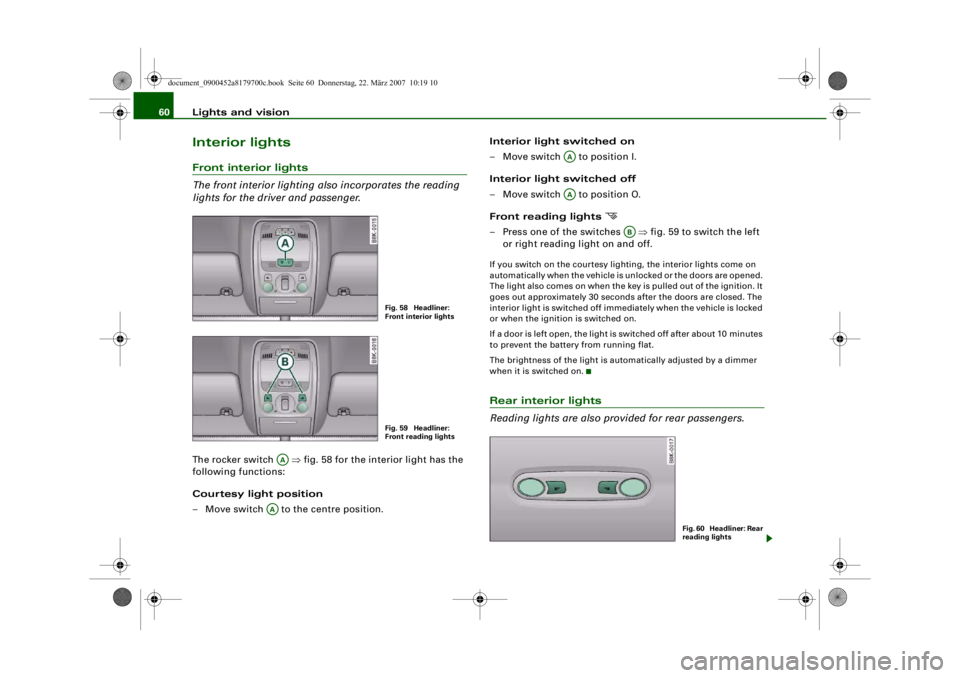
60Interior lightsFront interior lights
The front interior lighting also incorporates the reading
lights for the driver and passenger.The rocker switch ⇒ fig. 58 for the interior light has the
following functions:
Courtesy light position
– Move switch to the centre position. Interior light switched on
– Move switch to position I.
Interior light switched off
– Move switch to position O.
Front reading lights
– Press one of the switches
⇒fig. 59 to switch the left
or right reading light on and off.If you switch on the courtesy ligh ting, the interior lights come on
automatically when the vehicle is unlocked or the doors are opened.
The light also comes on when the ke y is pulled out of the ignition. It
goes out approximately 30 second s after the doors are closed. The
interior light is switched off immediately when the vehicle is locked
or when the ignition is switched on.
If a door is left open, the light is switched off after about 10 minutes
to prevent the battery from running flat.
The brightness of the light is automatically adjusted by a dimmer
when it is switched on.Rear interior lights
Reading lights are also provided for rear passengers.
Fig. 58 Headliner:
Front interior lightsFig. 59 Headliner:
Front reading lights
AA
AA
AAAA
AB
Fig. 60 Headliner: Rear
reading lights
document_0900452a8179700c.book Seite 60 Donnerstag, 22. März 2007 10:19 10
--4 -
-T
-+ +-
•