mirror AUDI A5 COUPE 2008 User Guide
[x] Cancel search | Manufacturer: AUDI, Model Year: 2008, Model line: A5 COUPE, Model: AUDI A5 COUPE 2008Pages: 313, PDF Size: 13.86 MB
Page 139 of 313
Audi parking system137
Controls
Safety
Driving tips
General maintenance
Self-help
Technical data
Audi parking systemParking aid systemsApplies to vehicles: with parking systemGeneral notes
Depending on the optional equipment fitted, there are
various parking aid systems to assist you when parking or
manoeuvring in tight spaces.parking system*:
The parking system comprises the rear acoustic parking aid
⇒ page 137 .
The rear acoustic parking system uses ultrasonic sensors to
measure the distance between the vehicle and an obstacle which
has been detected. There are four sensors which are located in the
rear bumper (two in the centre, two at the sides).
parking system plus*:
The parking system plus* comprises the rear and front acoustic
parking aid ⇒page 138 in conjunction with a graphic display.
The parking system plus* uses ultrasonic sensors to measure the
distance between the vehicle and an obstacle which has been
detected. There are a total of 8 sensors located in the front and rear
bumpers (2 in the centre and 2 on the side of each bumper).
parking system advanced*:
The parking system advanced* comprises the rear and front
acoustic parking aid in conjunction with the graphic display as well
as a reversing camera (Rear View) ⇒page 140 .
The reversing camera is located in the boot lid ⇒page 140, fig. 154
and assists the driver when parking or manoeuvring in tight spaces.
The reversing camera provides an image which is shown in the MMI display. It represents the mirror image of a section of the area
behind the vehicle ⇒
page 144, fig. 159.
Note
There is a slight delay in the picture display.parking systemApplies to vehicles: with parking systemRear parking aid
The parking aid gives an acoustic warning if it detects any
obstacles behind the vehicle.– Engage reverse gear. You will hear a short beep to
confirm that the rear parking aid has been activated. The
rear parking aid remains active for as long as the reverse
gear is engaged.The measuring range of the sensors in the rear bumper starts at
approximately :
Reversing
When the vehicle is reversing, the system starts to beep when it
registers an obstacle within its detection range (see above). The
warnings will beep increasingly rapidly as the vehicle approaches
the obstacle.Rear
Side
0.60 m
Centre
1.60 m
document_0900452a8179700c.book Seite 137 Donnerstag, 22. März 2007 10:19 10
--4 -
-T
----
[I)
•
-+ +-
Page 144 of 313
Audi parking system
142displayed on the MMI screen. The warnings will then return to the
normal volume if the vehicle approaches the detected obstacle
again.
Graphic display
The segments in the MMI display indicate the distance between the
vehicle and an obstacle. The number of segments shown depends
on the obstacle in front of or be hind the vehicle. The closer the
vehicle gets to the obstacle the closer the segments move towards
the vehicle in the graphic ⇒page 141, fig. 155. At the latest when
the penultimate segment is highlighted the vehicle has reached the
danger (collision) zone. The driver should then not move back-
wards/forwards any further ⇒.
The graphic display in the MMI screen ⇒page 149 can be switched
off. The acoustic proximity warning will, however, remain activated.
The graphic display will be deacti vated as soon as you press a func-
tion selector button on the MMI control console. The graphic
display in the MMI screen can also be switched on again manually
using the switch
. For more information on the MMI control
console please refer to the MMI Operating Manual.
Reversing camera (Rear View)
The mirrored image of the picture supplied by the reversing camera
⇒ page 145, fig. 160 is shown in the MMI display. The picture
supplied by the reversing camera also includes orientation lines
and area markings which are projected onto the image to assist you
when parking ⇒page 143 . The red line in the picture ⇒page 143,
fig. 156/ ⇒page 143, fig. 157 shows the collision zone. From here at
the latest, the driver should not reverse any further ⇒.
If your vehicle is near an obstac le, the proximity graphic will also
appear in the reversing camera image. This superimposed graphic
helps the driver to localise the critical area of the vehicle.
If the MMI screen is showing the graphic display you can switch to
the image of the reversing camera by pressing the control button
for the function Rear View ⇒ page 141, fig. 155. If the MMI screen is showing the
image of the reversing camera you
can switch to the graphic display by pressing the control button for
the function Graphic ⇒ page 145, fig. 160.
The image of the reversing camera in the MMI screen ⇒page 149
can be switched off. The acoustic proximity warning will, however,
remain activated.
The image of the reversing camera will be deactivated as soon as
you press a function selector button on the MMI control console.
The image of the reversing camera will be shown again the next
time you park the vehicle. The im age of the reversing camera can
also be switched on again manually using the switch
. For more
information on the MMI control console please refer to the MMI
Operating Manual.
WARNING
•
The sensors have blind spots in which obstacles are not regis-
tered. It is particularly important to ensure that there are no small
children or animals near the vehicle, as the sensors may not
always be able to detect them.
•
The parking aid cannot replace the full concentration of the
driver. The driver is always resp onsible for safety during parking
and other manoeuvres . Always keep a close watch on the area
around the vehicle.
•
Please note that low obstacles detected by the system may no
longer be registered by the sensor s as the car moves closer, so the
system will not give any further warning. Certain kinds of obsta-
cles (such as wire fences, chains, thin painted posts or trailer draw
bars, etc.) may not always be detected by the system (accident
risk).Note
•
There is a slight delay in the picture display.
•
You can change the settings fo r the graphic display and the
reversing camera in the MMI ⇒ page 149.
document_0900452a8179700c.book Seite 142 Donnerstag, 22. März 2007 10:19 10
--4 -
-T
-+ +-
[I]
Page 152 of 313
Audi parking system
150fig. 163. You can use the control buttons to switch between the Rear
View camera and Graphic display at any time as desired. The
settings selected on the sound system or MMI remain stored.
Setting “Graphic”:
If you have selected Graphic in the settings, the screen ⇒fig. 167
will automatically show the gr aphic display when the parking
system is activated.
Setting “Rear View”
If you have selected Rear View the reversing camera image
⇒ page 145, fig. 161 will be displayed whenever you activate the
parking system (both when reversing and when driving forwards).
Setting “Automatic”:
If you have selected Automatic the screen will automatically show
the reversing camera image when you engage reverse gear and the
graphic display when you drive forwards.
Setting “Off”:
If you select off the reversing camera and graphic display are both
deactivated. The acoustic parking aid will, however, remain acti-
vated.
Note
If you change the settings on th e sound system or MMI the changes
will not take effect until the next time you switch on the parking
system.
Special parking situationsApplies to vehicles: with parking system advancedParking next to an obstacle
When parking next to an obstacle it is important to keep
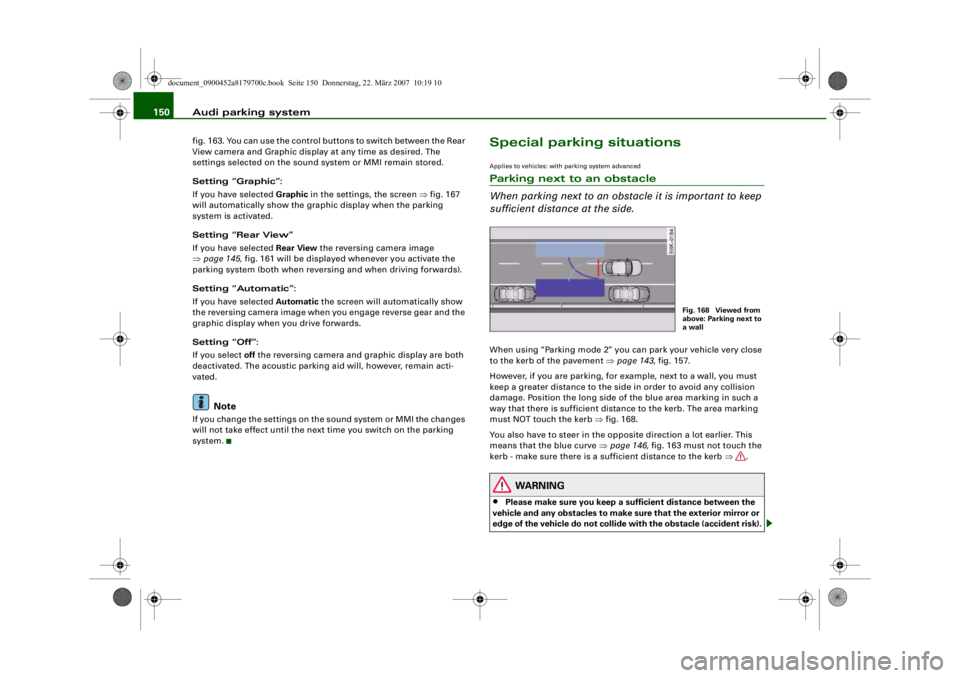
sufficient distance at the side.When using “Parking mode 2” you can park your vehicle very close
to the kerb of the pavement ⇒page 143, fig. 157.
However, if you are parking, for example, next to a wall, you must
keep a greater distance to the side in order to avoid any collision
damage. Position the long side of the blue area marking in such a
way that there is sufficient distance to the kerb. The area marking
must NOT touch the kerb ⇒fig. 168.
You also have to steer in the opposite direction a lot earlier. This
means that the blue curve ⇒page 146, fig. 163 must not touch the
kerb - make sure there is a sufficient distance to the kerb ⇒.
WARNING
•
Please make sure you keep a sufficient distance between the
vehicle and any obstacles to make sure that the exterior mirror or
edge of the vehicle do not collide wi th the obstacle (accident risk).
Fig. 168 Viewed from
above: Parking next to
a wall
document_0900452a8179700c.book Seite 150 Donnerstag, 22. März 2007 10:19 10
--4 -
-T
-+ +-
[I]
•
Page 153 of 313
Audi parking system151
Controls
Safety
Driving tips
General maintenance
Self-help
Technical data
•
The parking aid cannot replace the full concentration of the
driver. The driver is always resp onsible for safety during parking
and other manoeuvres. Always k eep a close watch on the area
around the vehicle.
•
When parking or manoeuvring do not rely solely on the MMI
display. Some objects (e.g. narrow posts or bars) may - due to the
resolution of the display screen - not be displayed in a satisfactory
manner or may not be displayed at all.
Applies to vehicles: with parking system advancedNote on distances
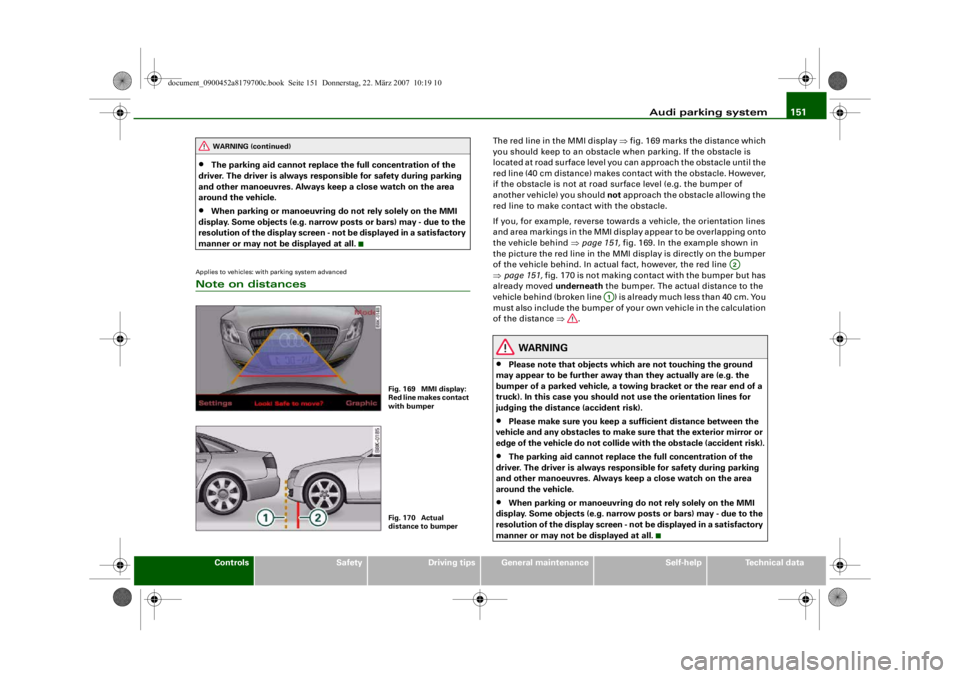
The red line in the MMI display ⇒fig. 169 marks the distance which
you should keep to an obstacle wh en parking. If the obstacle is
located at road surface level you can approach the obstacle until the
red line (40 cm distance) makes contact with the obstacle. However,
if the obstacle is not at road surface level (e.g. the bumper of
another vehicle) you should not approach the obstacle allowing the
red line to make contact with the obstacle.
If you, for example, reverse towards a vehicle, the orientation lines
and area markings in the MMI displ ay appear to be overlapping onto
the vehicle behind ⇒ page 151, fig. 169. In the example shown in
the picture the red line in the MMI display is directly on the bumper
of the vehicle behind. In actual fact, however, the red line
⇒ page 151, fig. 170 is not making contact with the bumper but has
already moved underneath the bumper. The actual distance to the
vehicle behind (broken line ) is already much less than 40 cm. You
must also include the bumper of yo ur own vehicle in the calculation
of the distance ⇒.
WARNING
•
Please note that objects which are not touching the ground
may appear to be further away than they actually are (e.g. the
bumper of a parked vehicle, a towing bracket or the rear end of a
truck). In this case you should not use the orientation lines for
judging the distance (accident risk).
•
Please make sure you keep a sufficient distan ce between the
vehicle and any obstacles to make sure that the exterior mirror or
edge of the vehicle do not collide with the obstacle (accident risk).
•
The parking aid cannot replace the full concentration of the
driver. The driver is always resp onsible for safety during parking
and other manoeuvres. Always keep a close watch on the area
around the vehicle.
•
When parking or manoeuvring do not rely solely on the MMI
display. Some objects (e.g. narrow posts or bars) may - due to the
resolution of the display screen - not be displayed in a satisfactory
manner or may not be displayed at all.
WARNING (continued)
Fig. 169 MMI display:
Red line makes contact
with bumperFig. 170 Actual
distance to bumper
A2
A1
document_0900452a8179700c.book Seite 151 Donnerstag, 22. März 2007 10:19 10
--4 -
-T
•
-+ +-
Page 154 of 313
Audi parking system
152Safety notesApplies to vehicles: with parking systemFault warning for the acoustic parking aidparking system:
If you hear a long beep when you engage reverse gear, the rear
parking aid is not functioning correctly.
parking system plus*/parking system advanced*:
If you hear a long beep for a few seconds when you engage reverse
gear and the diode in the switch
* starts flashing, there is a fault
in the rear and front parking system with graphic display.
You will be notified of a system fault
•
when you manually activate the parking system via the switch
* ⇒ page 138•
the first time you engage reverse gear after switching on the
ignition, or
•
immediately, if the fault is identified while you are using the
parking system.Note
If the system alerts you to a fault please have the fault rectified by
an Audi workshop or ot her qualified workshop.Applies to vehicles: with parking system advancedNotes on reversing cameraWe recommend that you practise parking with the reversing camera
in a quiet location (car park or similar) in order to become familiar
with the system, including the orientation lines and all the other
features. Ideally, the weather and light conditions should be good. Vehicles or other objects shown in
the MMI display appear to be
further away or closer, if:
•
you are reversing from a horizontal surface up a gradient or
down a hill,
•
you are reversing towards protruding objects,
•
the vehicle has been loaded with a greater load on the rear.
The accuracy of the orientation lines and the blue area markings
decreases if:
•
the reversing camera does not provide a reliable image, e.g. if
visibility is poor or the lens is dirty,
•
the sun is so dazzling that you cannot see the image on the
display screen.
How to clean the lens of the reversing camera:
•
Moisten the lens usin g a commercially available, alcohol-based
glass cleaning agent and clea n the lens with a dry cloth.
•
Remove snow using a small brush.
•
If possible, use de-icing spray to remove any ice ⇒.
WARNING
•
Even when using the reversing camera, the driver must still
keep a close watch on the area behind the vehicle and use the
mirrors.
•
For technical reasons, the reversing camera cannot show the
complete area behind the vehicle ⇒page 144, fig. 159. It is partic-
ularly important to ensure that there are no small children or
animals near the vehicle, as the reversing camera may not always
be able to detect th em (accident risk).
•
The parking aid cannot replace the full concentration of the
driver. The driver is always resp onsible for safety during parking
and other manoeuvres . Always keep a close watch on the area
around the vehicle.
document_0900452a8179700c.book Seite 152 Donnerstag, 22. März 2007 10:19 10
--4 -
-T
-+
0
+-
[I]
•
Page 165 of 313
Safe driving163
Controls
Safety
Driving tips
General maintenance
Self-help
Technical data
– Make sure that all lights and turn signals are working
properly.
– Check the tyre pressures.
– Make sure that all windows are clean and give good visi- bility to the outside.
– Secure all luggage and other items carefully ⇒page 77 .
– Make sure that no objects can interfere with the pedals.
– Adjust the front seat, head restraint and mirrors correctly.
– Make sure that the head restraints for all passengers are adjusted to the correct position.
– Make sure that children are protected with suitable safety seats and properly worn seat belts ⇒ page 185.
– Sit in the correct position in your seat and make sure that
your passengers do the same. ⇒page 70 .
– Fasten your seat belt correctly. Make sure that your passengers do the same ⇒page 170.What affects driving safety?
Safety on the road is directly related to how you drive, and
can also be affected by the passengers in the vehicle.The driver is responsible for th e safety of the vehicle and all
its occupants. If your ability to drive is impaired in any way,
you endanger yourself and other road users ⇒. There-
fore:
– Do not let yourself be distracted by passengers or by using a mobile phone, etc. – Never drive when your driving ability is impaired (by
medication, alcohol, drugs, etc.).
– Obey all traffic regulations and speed limits and always maintain a safe distance to the vehicle in front.
– Always adjust your speed to suit the road, traffic and weather conditions.
– Take frequent breaks on long trips. Do not drive for more than two hours without a stop.
– If possible, avoid driving when you are tired or stressed.
WARNING
•
Distractions while driving or any kind of impairment to your
driving ability increase the risk of accident and injury.
•
Do not store loose objects on the dashboard. These objects
could fly around the interior when the vehicle is moving (under
acceleration or whilst cornering) and distract the driver – this
could lead to an accident.
document_0900452a8179700c.book Seite 163 Donnerstag, 22. März 2007 10:19 10
--4 -
-T
-+
•
+-
•
Page 210 of 313
Towing a trailer
208Towing a trailerDriving the vehicle with a trailer or
caravanTechnical requirements
The towing bracket must comply with certain technical
requirements.Your car is intended mainly for transporting passengers and
luggage. However, if suitably equipped, it can also be used to tow a
trailer or caravan.
If the car is supplied with a factory-fitted towing bracket it will
already have the necessary technical modifications and meet the
statutory requirements.
A 13-pin socket is provided to make the electrical connection
between the car and the trailer. If the trailer has a 7-pin plug you can
use an adapter cable. This is available from Audi dealers.
WARNING
If a towing bracket is retrofitted, the installation should be carried
out by a qualified workshop.•
In particular in high outside tem peratures it is not possible to
drive up long steep gradients with out a suitable cooling system.
The engine would then overheat.
•
Incorrect installation can result in a safety risk.
Points to check before towingTrailer weights
Never exceed the maximum permitted trailer weights ⇒page 295 .If you do not load the trailer up
to the maximum permitted trailer
weight, you can then climb correspondingly steeper gradients.
The maximum trailer weights listed are only applicable for altitudes
up to 1000 m above sea level. With increasing altitude the engine
power and therefore the car's climbing ability are impaired because
of the reduced air density, so the maximum trailer weight has to be
reduced accordingly. The weight of the car and trailer must be
reduced by 10% for every further 1000 m (or part thereof). This
figure refers to the combined weight of the (loaded) vehicle and
(loaded) trailer.
The figures for the draw bar weight that appear on the identification
plate of the towing bracket are for certification purposes only. The
correct figures for your specific vehicle, which may be lower than
these figures for the towing bracket, are given in the registration
documents. Also refer to ⇒page 295 .
Distributing the load
Distribute loads in the trailer so th at heavy objects are as near to the
axle as possible. Loads carried in the trailer must be secured to
prevent them slipping.
Where possible, operate the trai ler with the maximum permitted
draw bar weight on the ball joint of the towing bracket, but do not
exceed the specified limit.
Tyre pressure
Check the tyre pressures on your car and adjust for “full load” condi-
tions (refer to the sticker listing the tyre pressures on the end face
of the driver's door). It may also be necessary to adjust the tyre pres-
sures on the trailer according to the recommendations of the trailer
manufacturer.
Exterior mirrors
Check whether you can see enough of the road behind the trailer
with the standard mirrors. If this is not the case you should have
document_0900452a8179700c.book Seite 208 Donnerstag, 22. März 2007 10:19 10
--4 -
-T
-+ +-
•
Page 211 of 313
Towing a trailer209
Controls
Safety
Driving tips
General maintenance
Self-help
Technical data
additional mirrors fitted. Both exterior mirrors should be mounted
on hinged extension brackets. Adjust the mirrors to give sufficient
vision to the rear.
Headlights
Before starting a journey, check
the headlight beam settings with
the trailer hitched up. If necessary, alter the height of the headlight
beams by means of the headlight range control ⇒page 56 .
Power supply
When you remove the ignition key the power supply to the trailer is
interrupted.
Removable ball joint coupling
Vehicles with a factory-fitted towing bracket are equipped with a
removable ball joint coupling. It is carried under the floor panel on
the left-hand side of the luggage compartment.
Note
We recommend having the car serviced between the normal inspec-
tion intervals if it used frequently for towing a trailer.Applies to vehicles: with towing bracketTrailer stabilisation system
Trailer stabilisation helps to reduce the risk of the vehicle
skidding when towing a trailer.When is the trailer stab ilisation system activated?
Trailer stabilisation is active when the following requirements are
met:•
The ESP must NOT be switched off ⇒page 196 ,
•
The trailer connector must be properly secured in the vehicle
socket.
•
Vehicle speed must be higher than approx. 60 km/h. How trailer stabilisation works:
In many cases, the driver can stabilise a swaying trailer by manually
braking the vehicle.
However, if the ESP detects that th
e trailer is swaying and this is
affecting the towing vehicle, it will automatically brake the vehicle
to stabilise the trailer by slowing it down. The warning lamp
will
light up in the instrument cluste r. If possible, do not turn the
steering wheel at this stage.
In order to warn traffic behind you, the brake lights will come on
during this automatic braking operation.
A trailer weighing less than 70% of the kerb weight of the towing
vehicle may sway quite considerably without the trailer stabilisation
system intervening. This can happen when the swaying movements
of the light-weight trailer are not or hardly passed on to the towing
vehicle and are therefore not detected by the ESP.
If the system for activating the trai ler brake lights is defective, this
will be indicated in the instrument cluster display ⇒page 36, “Bulb
monitor ”.
Requirements for correct functioning of the trailer
stabilisation system
If these conditions are not met in full, the trailer stabilisation system
will only intervene to a limited extent or not at all ⇒.
•
The electrical connection between the towing vehicle and the
trailer must be functioning correctly, without any defects.
•
The load on the trailer must be properly secured.
•
The tyre pressures on both the vehicle and the trailer must be
adapted to the load that is being carried.
•
Where possible, operate the trai ler with the maximum permitted
draw bar weight.
•
The trailer overrun brake must be set correctly. This is important
to ensure that the trailer can be braked correctly, to avoid the vehicle
and trailer “jack-knifing” and to pr event excess braking of the trailer.
document_0900452a8179700c.book Seite 209 Donnerstag, 22. März 2007 10:19 10
--4 -
-T
•
+-
Page 224 of 313
Care of vehicle and cleaning
222Plastic partsPlastic parts will come clean with regular washing. If this is not suffi-
cient, plastic parts should only be treated with a special solvent-free
plastic cleaning agent . Do not use paint cleaners, polishes or wax on
plastic parts.Paint damageMinor damage to the paint, such as scratches or stone chips, should
be touched up without delay before the metal starts to corrode. Suit-
able touch-up brushes or sprays for your car can be obtained from
an Audi dealer.
The number of the original paint finish on the vehicle is given on the
data sticker ⇒page 293 .
If corrosion is already visible it must be thoroughly removed by a
qualified workshop.Windows
Clear vision is an es sential safety factor.The windscreen must not be cleaned with insect remover or wax,
otherwise the windscreen wipers will not function properly
(juddering).
Traces of rubber, oil, grease or silicone can be removed with a
window cleaning solution or a silicone remover . Wax residue can
only be removed with a special cleaner. Your Audi dealer will be able
to provide you with more detailed information.
The windows should also be cleaned on the inside at regular inter-
vals.
Use a separate cloth or chamois to dry the windows. Cloths used for
waxing and polishing contain residues that will cause smears on the
glass.
WARNING
Do not use water-repellent coatings on the windscreen. In bad visi-
bility conditions such as light rain, low sun or when driving at
night these coatings can cause increased dazzle, which is a
serious safety hazard. Such coat ings can also cause the wiper
blades to judder.
Caution
•
Remove snow and ice from windows and mirrors with a plastic
scraper only. To avoid scratches caused by dirt on the glass, the
scraper should only be pushed in one direction and not moved to
and fro.
•
The heating element for the rear window is located on the inner
side of the window. To avoid damaging the heating element, do not
put stickers on the inner side of the window.
•
Never use warm or hot water to remove snow and ice from
windows and mirrors. This could cause the glass to crack!
Rubber seals (weatherstrips)The weatherstrips will remain pliable and last longer if they are
occasionally treated with a suitable care product (for example sili-
cone spray). This will also preve nt premature ageing and leaks. The
doors will be easier to open as well. If they are kept pliable, the door
seals will be less likely to freeze up in the winter.WheelsThe wheels require regular attention to preserve their appearance.
It is important to remove road salt and brake dust by washing the
wheels at regular intervals, otherwise the finish will be impaired.
document_0900452a8179700c.book Seite 222 Donnerstag, 22. März 2007 10:19 10
--4 -
-T
---- &
•
----CD
-+
•
•
+-
•
Page 275 of 313
Fuses and bulbs273
Controls
Safety
Driving tips
General maintenance
Self-help
Technical data
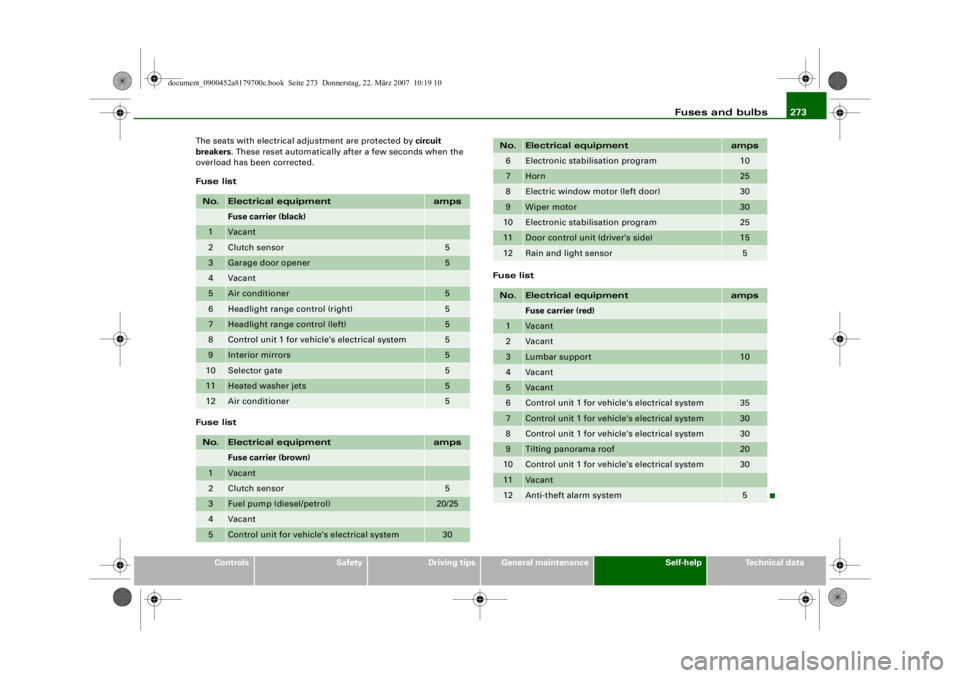
The seats with electrical adjustment are protected by circuit
breakers
. These reset automatically after a few seconds when the
overload has been corrected.
Fuse list
Fuse list Fuse list
No.
Electrical equipment
amps
Fuse carrier (black)
1
Vacant
2
Clutch sensor
5
3
Garage door opener
5
4
Vacant
5
Air conditioner
5
6
Headlight range control (right)
5
7
Headlight range control (left)
5
8
Control unit 1 for vehicle's electrical system
5
9
Interior mirrors
5
10
Selector gate
5
11
Heated washer jets
5
12
Air conditioner
5
No.
Electrical equipment
amps
Fuse carrier (brown)
1
Vacant
2
Clutch sensor
5
3
Fuel pump (diesel/petrol)
20/25
4
Vacant
5
Control unit for vehicle's electrical system
30
6
Electronic stab
ilisation program
10
7
Horn
25
8
Electric window motor (left door)
30
9
Wiper motor
30
10
Electronic stabilisation program
25
11
Door control unit (driver's side)
15
12
Rain and light sensor
5
No.
Electrical equipment
amps
Fuse carrier (red)
1
Vacant
2
Vacant
3
Lumbar support
10
4
Vacant
5
Vacant
6
Control unit 1 for vehicle's electrical system
35
7
Control unit 1 for vehicle's electrical system
30
8
Control unit 1 for vehicle's electrical system
30
9
Tilting panorama roof
20
10
Control unit 1 for vehicle's electrical system
30
11
Vacant
12
Anti-theft alarm system
5
No.
Electrical equipment
amps
document_0900452a8179700c.book Seite 273 Donnerstag, 22. März 2007 10:19 10
4----
--4 -
T
-
T
-
- -
- -
-
- -
-+
1111
--
+-
1111
-
-
1111
--
-
- -
- -
-
•
~
-
4-
---r