towing AUDI A5 COUPE 2008 User Guide
[x] Cancel search | Manufacturer: AUDI, Model Year: 2008, Model line: A5 COUPE, Model: AUDI A5 COUPE 2008Pages: 313, PDF Size: 13.86 MB
Page 140 of 313
Audi parking system
138When the vehicle is less than appro x. 0.30 m away from the obstacle
the warning tone will sound continuously. From here at the latest,
the driver should then not reverse any further.
The volume of the warning beeps will be gradually reduced after
about 4 seconds if the vehicle remains at a constant distance from
a detected obstacle (it will not be reduced if the obstacle is closer
than 0.30 m). The warnings will then return to the normal volume if
the vehicle approaches th e detected obstacle again.
Warning beeps
The warning beeps are produced by sound boxes. The volume and
pitch of the beeps can be adjusted in the MMI ⇒page 148 .
WARNING
•
The sensors have blind spots in which obstacles are not regis-
tered. It is particular ly important to ensure that there are no small
children or animals near the vehicle, as the sensors may not
always be able to detect them.
•
The parking aid cannot replace th e full concentration of the
driver. The driver is always resp onsible for safety during parking
and other manoeuvres. Always keep a close watch on the area
around the vehicle.
•
Please note that low obstacles detected by the system may no
longer be registered by the sensors as the car moves closer, so the
system will not give any further warning. Certain kinds of obsta-
cles (such as wire fences, chains, thin painted posts or trailer draw
bars, etc.) may not always be de tected by the system (accident
risk).Note
•
To ensure that the acoustic parking aid works properly, the
sensors must be kept clean and free of snow and ice. Please observe
the additional notes on ⇒page 152 .
•
Please refer to the notes on towing ⇒ page 147.
parking system plusApplies to vehicles: with parking system plusParking aid (front and rear), with display
The parking aid gives an acoust ic and a visual warning if
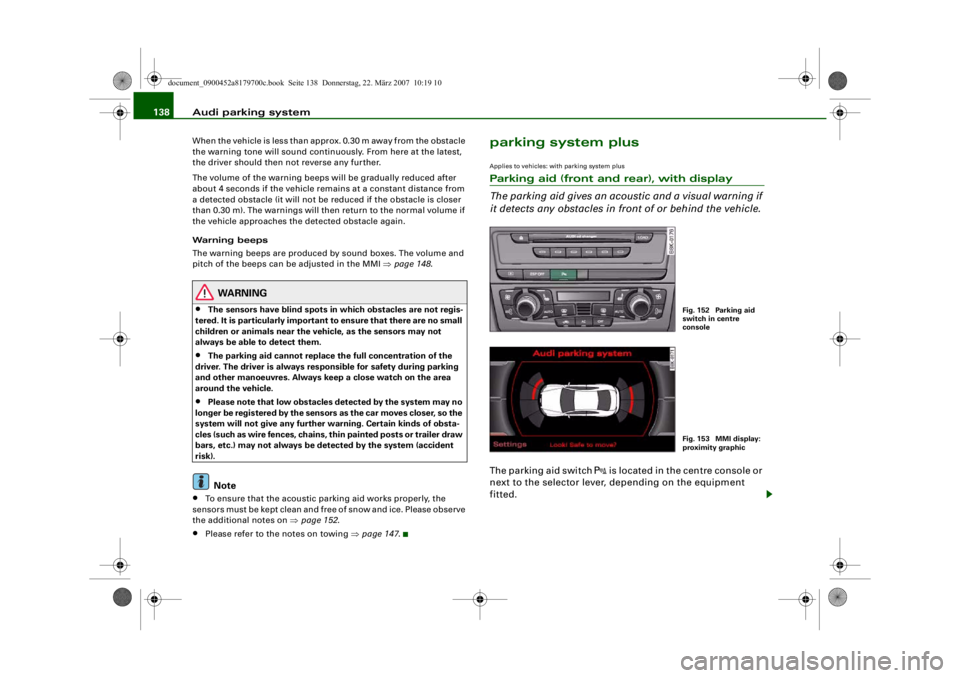
it detects any obstacles in front of or behind the vehicle.The parking aid switch
is located in the centre console or
next to the selector lever, depending on the equipment
fitted.
Fig. 152 Parking aid
switch in centre
consoleFig. 153 MMI display:
proximity graphic
document_0900452a8179700c.book Seite 138 Donnerstag, 22. März 2007 10:19 10
--4 -
-T
' • ~I
-+ +-
[I]
•
Page 142 of 313
Audi parking system
140reached the danger (collision) zone. The driver should then not
move backwards/forwards any further ⇒ .
The graphic display in the MMI screen ⇒page 149 can be switched
off. The acoustic proximity warning will, however, remain activated.
The graphic display will be deacti vated as soon as you press a func-
tion selector button on the MMI control console. The graphic
display will appear again the next time you park the vehicle. The
graphic display in the MMI screen can also be switched on again
manually using the switch
⇒ page 138, fig. 152. For more infor-
mation on the MMI cont rol console please refer to the MMI Oper-
ating Manual.
WARNING
•
The sensors have blind spots in which obstacles are not regis-
tered. It is particular ly important to ensure that there are no small
children or animals near the vehicle, as the sensors may not
always be able to detect them.
•
The parking aid cannot replace th e full concentration of the
driver. The driver is always resp onsible for safety during parking
and other manoeuvres. Always keep a close watch on the area
around the vehicle.
•
Please note that low obstacles detected by the system may no
longer be registered by the sensors as the car moves closer, so the
system will not give any further warning. Certain kinds of obsta-
cles (such as wire fences, chains, thin painted posts or trailer draw
bars, etc.) may not always be de tected by the system (accident
risk).Note
•
There is a slight delay in the picture display.
•
You can change the settings for the graphic display in the MMI
⇒ page 149 .
•
To ensure that the acoustic parking aid works properly, the
sensors must be kept clean and free of snow and ice. Please observe
the additional notes on ⇒page 152 .
•
Please refer to the notes on towing ⇒page 147 .
parking system advancedApplies to vehicles: with parking system advancedParking aid (front and rear), with display and reversing camera
The parking aid gives an acoustic and visual warning if it
detects any obstacles in front of or behind the vehicle. The
reversing camera provides further assistance when
parking.
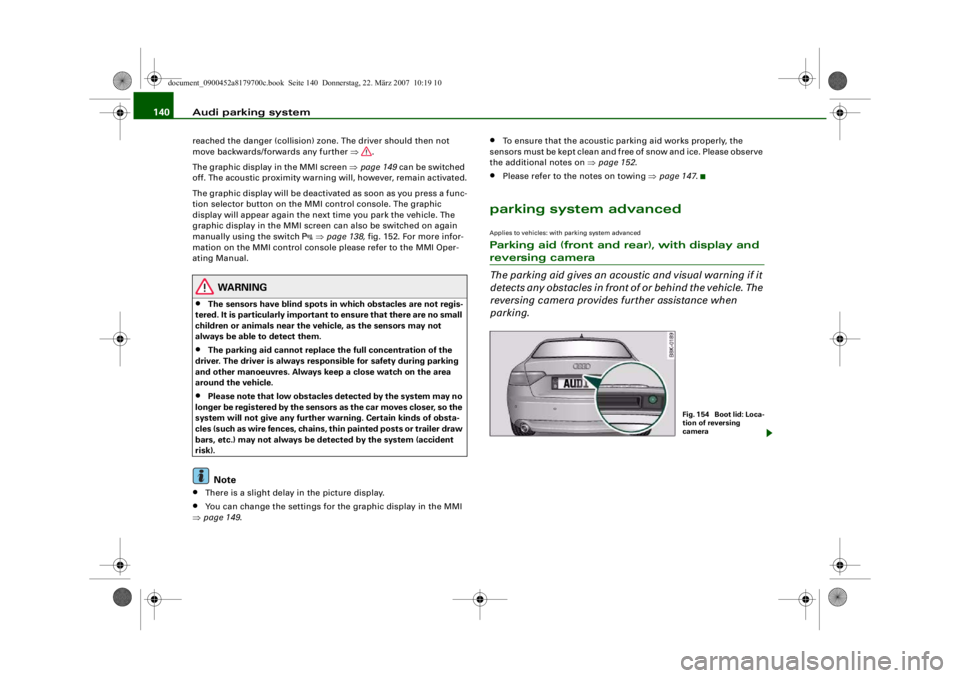
Fig. 1 54 Bo o t lid : Lo c a-
tion of reversing
camera
document_0900452a8179700c.book Seite 140 Donnerstag, 22. März 2007 10:19 10
--4 -
-T
•
-+ +-
[I)
Page 145 of 313
Audi parking system143
Controls
Safety
Driving tips
General maintenance
Self-help
Technical data
•
To ensure that the acoustic parking aid works properly, the
sensors and the lens of the reversing camera must be kept clean
and free of snow and ice. Please observe the additional notes from
⇒ page 152 onwards.
•
Please refer to the notes on towing ⇒page 147 .
Applies to vehicles: with parking system advancedReversing camera (Rear View)
The reversing camera image in the MMI display shows the
area behind the vehicle.
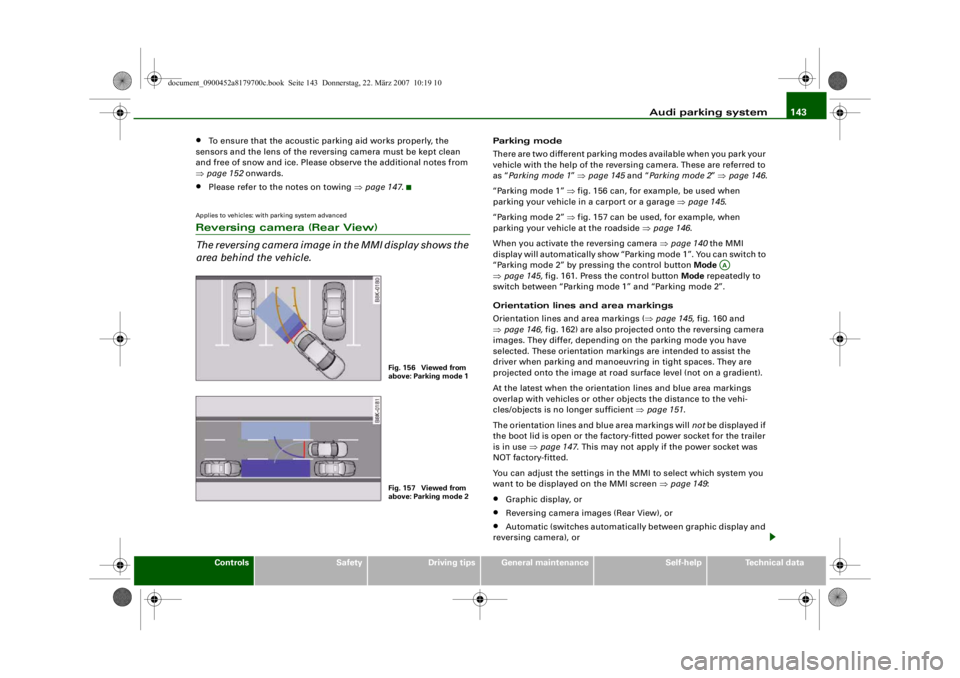
Parking mode
There are two different parking modes available when you park your
vehicle with the help of the reversing camera. These are referred to
as “Parking mode 1 ” ⇒ page 145 and “Parking mode 2 ” ⇒ page 146 .
“Parking mode 1” ⇒ fig. 156 can, for example, be used when
parking your vehicle in a carport or a garage ⇒page 145 .
“Parking mode 2” ⇒ fig. 157 can be used, for example, when
parking your vehicle at the roadside ⇒page 146 .
When you activate the reversing camera ⇒ page 140 the MMI
display will automatically show “Parking mode 1”. You can switch to
“Parking mode 2” by pressing the control button Mode
⇒ page 145, fig. 161. Press the control button Mode repeatedly to
switch between “Parking mode 1” and “Parking mode 2”.
Orientation lines and area markings
Orientation lines and area markings ( ⇒page 145, fig. 160 and
⇒ page 146, fig. 162) are also projected onto the reversing camera
images. They differ, depending on the parking mode you have
selected. These orientation markin gs are intended to assist the
driver when parking and manoeuvring in tight spaces. They are
projected onto the image at road surface level (not on a gradient).
At the latest when the orientation lines and blue area markings
overlap with vehicles or other objects the distance to the vehi-
cles/objects is no longer sufficient ⇒page 151 .
The orientation lines and blue area markings will not be displayed if
the boot lid is open or the factory-fitted power socket for the trailer
is in use ⇒page 147 . This may not apply if the power socket was
NOT factory-fitted.
You can adjust the settings in th e MMI to select which system you
want to be displaye d on the MMI screen ⇒page 149 :•
Graphic display, or
•
Reversing camera images (Rear View), or
•
Automatic (switches automatically between graphic display and
reversing camera), or
Fig. 156 Viewed from
above: Parking mode 1Fig. 157 Viewed from
above: Parking mode 2
AA
document_0900452a8179700c.book Seite 143 Donnerstag, 22. März 2007 10:19 10
--4 -
-T
•
-+ +-
Page 146 of 313
Audi parking system
144•
Off (no display).
The reversing camera can be sw itched on and off in the MMI
⇒ page 149 . The acoustic proximity warning will, however, remain
activated.
WARNING
•
The reversing camera has blind spots in which obstacles are
not registered. It is particularly important to ensure that there are
no small children or animals near the vehicle, as the reversing
camera may not always be able to detect them (accident risk).
•
The parking aid cannot replace th e full concentration of the
driver. The driver is always resp onsible for safety during parking
and other manoeuvres. Always keep a close watch on the area
around the vehicle.
•
Please note that low obstacles detected by the system may no
longer be registered by the sensors as the car moves closer, so the
system will not give any further warning. Certain kinds of obsta-
cles (such as wire fences, chains, thin painted posts or trailer draw
bars, etc.) may not always be de tected by the system (accident
risk).Note
•
There is a slight delay in the picture display.
•
To ensure that the reversing camera works properly, the lens of
the camera ⇒page 140, fig. 154 must be kept clean and free of
snow and ice. Please observe the additional notes on ⇒page 152 .
•
If the boot lid is open the angle covered by the camera will
change. For this reason, the image of the reversing camera will then
be shown without orientation li nes and blue area markings.
•
Please refer to the notes on towing ⇒ page 147.
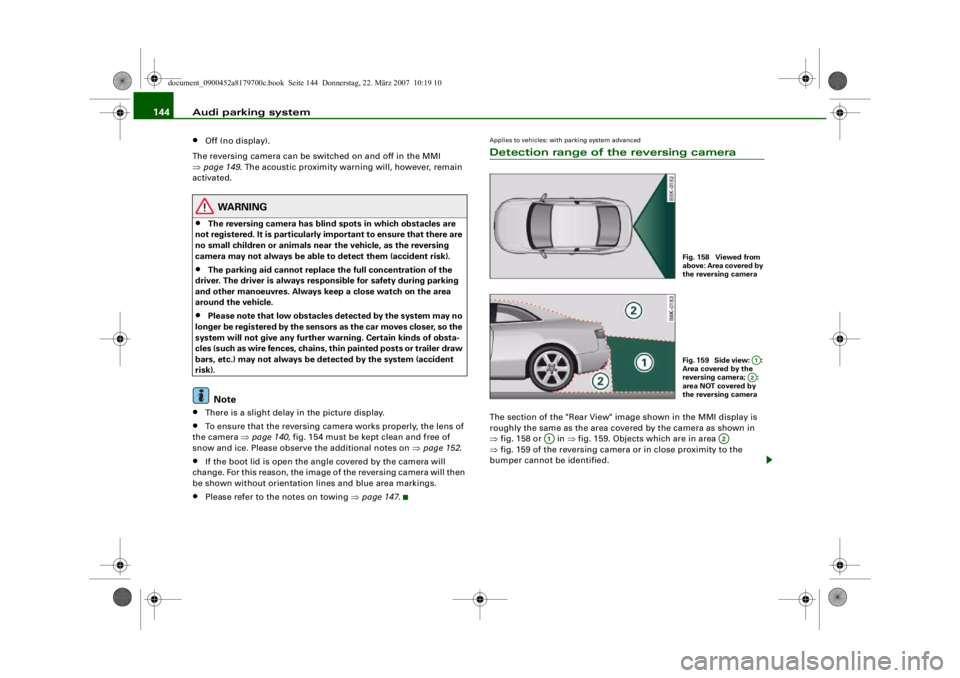
Applies to vehicles: with parking system advancedDetection range of the reversing cameraThe section of the "Rear View" image shown in the MMI display is
roughly the same as the area covered by the camera as shown in
⇒fig. 158 or in ⇒fig. 159. Objects which are in area
⇒ fig. 159 of the reversing camera or in close proximity to the
bumper cannot be identified.
Fig. 158 Viewed from
above: Area covered by
the reversing cameraFig. 159 Side view: :
Area covered by the
reversing camera; :
area NOT covered by
the reversing camera
A1A2
A1
A2
document_0900452a8179700c.book Seite 144 Donnerstag, 22. März 2007 10:19 10
--4 -
-T
-+ +-
[I]
•
Page 147 of 313
Audi parking system145
Controls
Safety
Driving tips
General maintenance
Self-help
Technical data
WARNING
Please note that objects which ar e not touching the ground may
appear to be further away than they actually are (e.g. the bumper
of a parked vehicle, a towing bracke t or the rear end of a truck). In
this case you should not use the orientation lines for judging the
distance (acc ident risk).Applies to vehicles: with parking system advancedParking mode 1
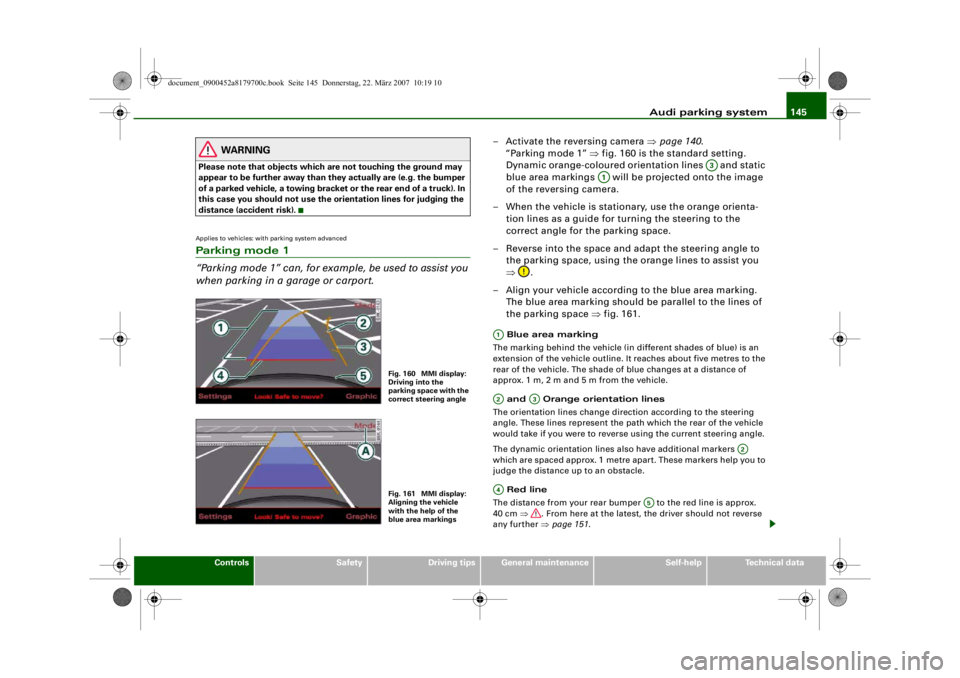
“Parking mode 1” can, for exam ple, be used to assist you
when parking in a garage or carport.
– Activate the reversing camera ⇒page 140 .
“Parking mode 1” ⇒fig. 160 is the standard setting.
Dynamic orange-coloured orientation lines and static
blue area markings will be projected onto the image
of the reversing camera.
– When the vehicle is stationary, use the orange orienta- tion lines as a guide for turning the steering to the
correct angle for the parking space.
– Reverse into the space and adapt the steering angle to the parking space, using the orange lines to assist you
⇒ .
– Align your vehicle according to the blue area marking.
The blue area marking should be parallel to the lines of
the parking space ⇒fig. 161. Blue area marking
The marking behind the vehicle (in different shades of blue) is an
extension of the vehicle outline. It reaches about five metres to the
rear of the vehicle. The shade of blue changes at a distance of
approx. 1m, 2m and 5m from the vehicle.
and Orange orientation lines
The orientation lines change direction according to the steering
angle. These lines represent the path which the rear of the vehicle
would take if you were to revers e using the current steering angle.
The dynamic orientation lines also have additional markers
which are spaced approx. 1 metre apart. These markers help you to
judge the distance up to an obstacle.
Red line
The distance from your rear bumper to the red line is approx.
40 cm ⇒. From here at the latest, the driver should not reverse
any further ⇒page 151 .
Fig. 160 MMI display:
Driving into the
parking space with the
correct steering angleFig. 161 MMI display:
Aligning the vehicle
with the help of the
blue area markings
A3
A1
A1A2
A3
A2
A4
A5
document_0900452a8179700c.book Seite 145 Donnerstag, 22. März 2007 10:19 10
--4 -
-T
•
0
-+ +-
Page 148 of 313
Audi parking system
146 Rear bumper
For better orientation the rear bump er of your vehicle is also shown
in the MMI display.
WARNING
Please note that objects which are not touching the ground may
appear to be further away than th ey actually are (e.g. the bumper
of a parked vehicle, a towing bracke t or the rear end of a truck). In
this case you should not use the orientation lines for judging the
distance (accident risk).
Caution
The MMI display shows the path of th e rear end of the vehicle if you
were to reverse using the current steering angle. NB: The front end
of the vehicle swings out further than the rear.
Note
•
To ensure that the reversing camera works properly, the lens of
the camera ⇒page 140, fig. 154 must be kept clean and free of
snow and ice. Please observe the additional notes on ⇒page 152 .
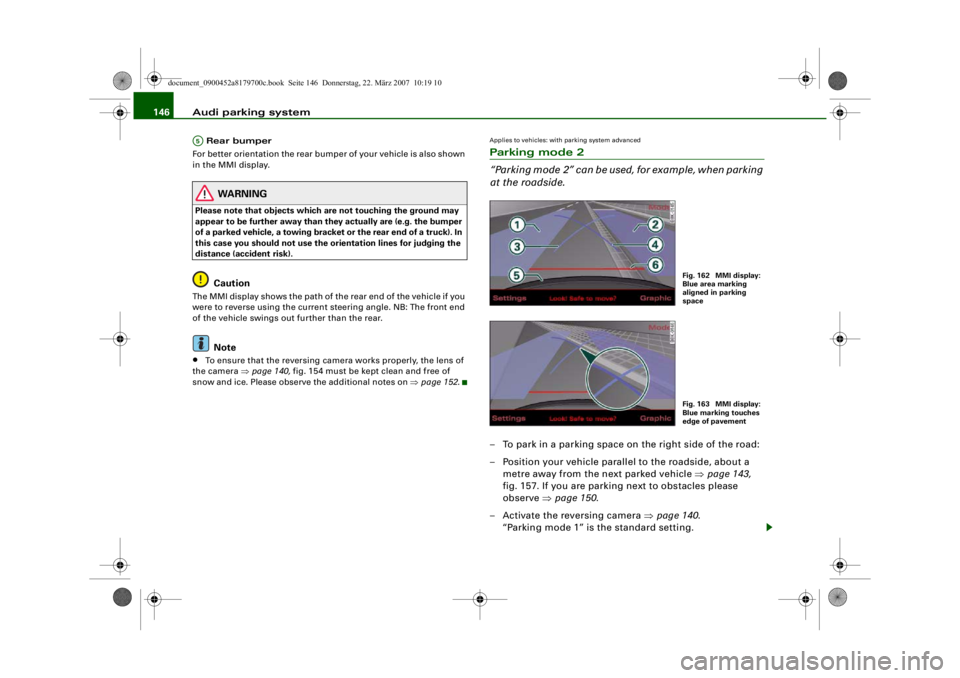
Applies to vehicles: with parking system advancedParking mode 2
“Parking mode 2” can be used, for example, when parking
at the roadside.– To park in a parking space on the right side of the road:
– Position your vehicle parallel to the roadside, about a
metre away from the next parked vehicle ⇒page 143,
fig. 157. If you are parking next to obstacles please
observe ⇒page 150 .
– Activate the reversing camera ⇒page 140.
“Parking mode 1” is the standard setting.
A5
Fig. 162 MMI display:
Blue area marking
aligned in parking
spaceFig. 163 MMI display:
Blue marking touches
edge of pavement
document_0900452a8179700c.book Seite 146 Donnerstag, 22. März 2007 10:19 10
--4 -
-T
0
-+
rn
+-
•
Page 149 of 313
Audi parking system147
Controls
Safety
Driving tips
General maintenance
Self-help
Technical data
– Press the control button for Mode ⇒page 145,
fig. 161. “Parking mode 2” ⇒fig. 162 will appear in the
MMI display.
– Reverse and align the position of your vehicle in such a
way that the dark blue area marking ⇒fig. 162
borders onto the vehicle be hind or onto the parking
space line marking. If you are not parking next to obsta-
cles ⇒page 150 the long side of the dark blue marking
should border onto the kerb. The complete dark blue
area marking must fit into the parking space ⇒page 143,
fig. 157.
– When the vehicle is stationary turn the steering wheel to the right as far as it will go.
– Reverse into the parking space. If you are not parking
next to obstacles ⇒ page 150 the dark blue marking
should touch the kerb ⇒page 146, fig. 163. Stop your
vehicle.
– Turn the steering wheel to the left as far as it will go (vehicle is stationary).
– Continue to reverse into the parking space until the vehicle is standing parallel to the kerb. When reversing
you must also keep a close watch on the front end of the
vehicle ⇒.You can use “Parking mode 2” to park on the left or the right side of
the road. For this reason, the blue markings are shown in various
shades of blue. The dark blue ar ea marking and the dark blue
curve are used when parking on the right side of the road. The
light blue area marking and the light blue curve are used
when parking on the left side of the road. When the turn signals are on, the
display will only show the mark-
ings for the relevant side. To change the display to the other side,
just switch on the opposite turn signals.
The light blue and dark blue cu r v e s s h o w y o u w h e n t o t u r n t h e
steering wheel in the other direction, i.e. when the curve touches
the kerb. ⇒page 146, fig. 163.
The distance from your rear bumper to the red line is approx.
40 cm. From here at the latest, th e driver should not reverse any
further ⇒page 151 .
WARNING
Please note that objects which are not touching the ground may
appear to be further away than th ey actually are (e.g. the bumper
of a parked vehicle, a towing bracke t or the rear end of a truck). In
this case you should not use the orientation lines for judging the
distance (accident risk).
Caution
The MMI display shows the path of the rear end of the vehicle if you
were to reverse using the current steering angle. NB: The front end
of the vehicle swings out further than the rear.
Note
To ensure that the reversing camera works properly, the lens of the
camera ⇒page 140, fig. 154 must be kept clean and free of snow
and ice. Please observe the additional notes on ⇒page 152 .Applies to vehicles: with parking system and towing bracketTo w i n g b r a c k e tOnce the electrical connector for the trailer socket is plugged in on
vehicles with a factory-fitted towing bracket the rear sensors for the
AAA2
A4
A2
A4
A1
A3
A3
A4
A5
A6
document_0900452a8179700c.book Seite 147 Donnerstag, 22. März 2007 10:19 10
--4 -
-T
-+
0
+-
rn
CD
•
Page 150 of 313
Audi parking system
148parking aid are NO LONGER activated when reverse gear is engaged.
This results in the following restrictions:
parking system:
There is no distance warning.
parking system plus*:
There is no rear distance warning ⇒page 138 . However, the system
will still give a warning when obstacles are detected while driving
forwards. The graphic display ⇒page 138, fig. 153 will switch over
to towing mode.
parking system advanced*:
There is no rear distance warning ⇒page 140 . However, the system
will still give a warning when obstacles are detected while driving
forwards. The graphic display ⇒page 141, fig. 155 will switch over
to towing mode. The image of the reversing camera will then be
shown without orientation lines and blue area markings.
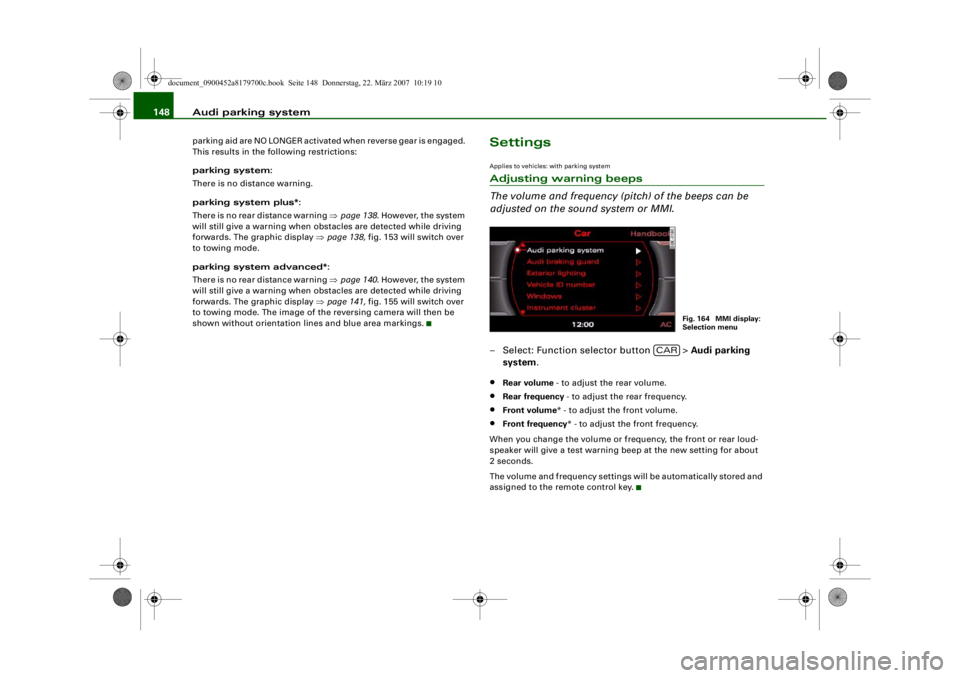
SettingsApplies to vehicles: with parking systemAdjusting warning beeps
The volume and frequency (pitch) of the beeps can be
adjusted on the sound system or MMI.– Select: Function selector button > Audi parking
system .•
Rear volume - to adjust the rear volume.
•
Rear frequency - to adjust the rear frequency.
•
Front volume* - to adjust the front volume.
•
Front frequency * - to adjust the front frequency.
When you change the volume or frequency, the front or rear loud-
speaker will give a test warning beep at the new setting for about
2 seconds.
The volume and frequency settings will be automatically stored and
assigned to the remote control key.
Fig. 164 MMI display:
Selection menu
CAR
document_0900452a8179700c.book Seite 148 Donnerstag, 22. März 2007 10:19 10
--4 -
-T
-+
•
+-
•
Page 153 of 313
Audi parking system151
Controls
Safety
Driving tips
General maintenance
Self-help
Technical data
•
The parking aid cannot replace the full concentration of the
driver. The driver is always resp onsible for safety during parking
and other manoeuvres. Always k eep a close watch on the area
around the vehicle.
•
When parking or manoeuvring do not rely solely on the MMI
display. Some objects (e.g. narrow posts or bars) may - due to the
resolution of the display screen - not be displayed in a satisfactory
manner or may not be displayed at all.
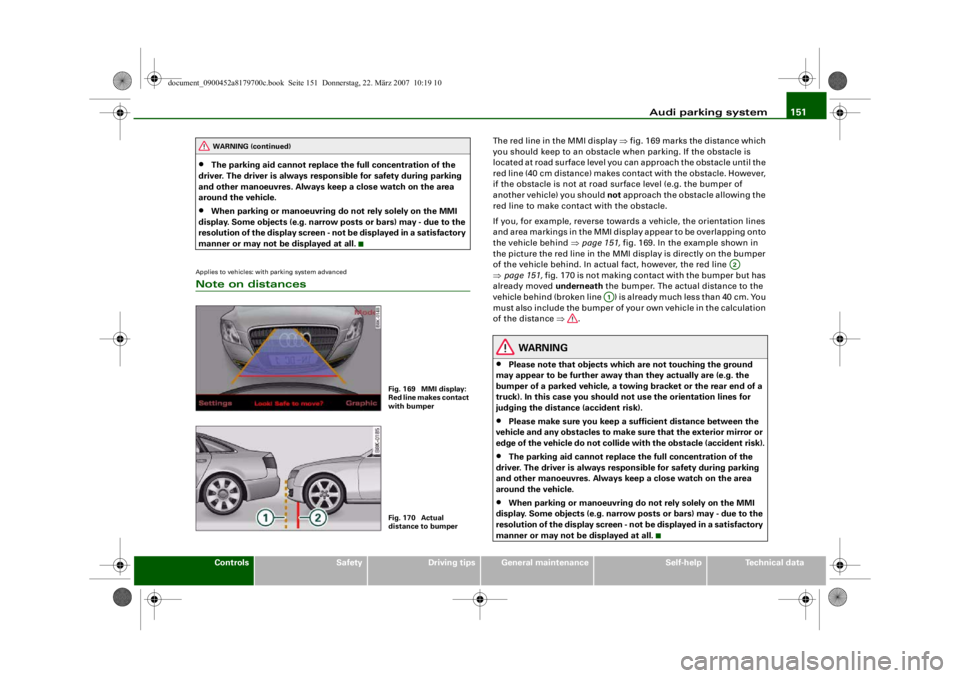
Applies to vehicles: with parking system advancedNote on distances
The red line in the MMI display ⇒fig. 169 marks the distance which
you should keep to an obstacle wh en parking. If the obstacle is
located at road surface level you can approach the obstacle until the
red line (40 cm distance) makes contact with the obstacle. However,
if the obstacle is not at road surface level (e.g. the bumper of
another vehicle) you should not approach the obstacle allowing the
red line to make contact with the obstacle.
If you, for example, reverse towards a vehicle, the orientation lines
and area markings in the MMI displ ay appear to be overlapping onto
the vehicle behind ⇒ page 151, fig. 169. In the example shown in
the picture the red line in the MMI display is directly on the bumper
of the vehicle behind. In actual fact, however, the red line
⇒ page 151, fig. 170 is not making contact with the bumper but has
already moved underneath the bumper. The actual distance to the
vehicle behind (broken line ) is already much less than 40 cm. You
must also include the bumper of yo ur own vehicle in the calculation
of the distance ⇒.
WARNING
•
Please note that objects which are not touching the ground
may appear to be further away than they actually are (e.g. the
bumper of a parked vehicle, a towing bracket or the rear end of a
truck). In this case you should not use the orientation lines for
judging the distance (accident risk).
•
Please make sure you keep a sufficient distan ce between the
vehicle and any obstacles to make sure that the exterior mirror or
edge of the vehicle do not collide with the obstacle (accident risk).
•
The parking aid cannot replace the full concentration of the
driver. The driver is always resp onsible for safety during parking
and other manoeuvres. Always keep a close watch on the area
around the vehicle.
•
When parking or manoeuvring do not rely solely on the MMI
display. Some objects (e.g. narrow posts or bars) may - due to the
resolution of the display screen - not be displayed in a satisfactory
manner or may not be displayed at all.
WARNING (continued)
Fig. 169 MMI display:
Red line makes contact
with bumperFig. 170 Actual
distance to bumper
A2
A1
document_0900452a8179700c.book Seite 151 Donnerstag, 22. März 2007 10:19 10
--4 -
-T
•
-+ +-
Page 170 of 313
Safe driving
168
WARNING
Any obstructions that restrict pedal travel can cause loss of
vehicle control and critical situations on the road.•
Never place objects in the driver 's footwell. Such objects could
move under the pedals and interfere with their proper function. In
the event of sudden braking or a change of direction, you would
not be able to use the pedals. This could result in a loss of control
and possibly cause an accident.
Floor mats on the driver's side
Use only floor mats which can be securely fastened in the
footwell and do not obstruct the pedals.– Make sure that floor mats are securely fastened and cannot interfere with the pedals ⇒.Use only floor mats that leave th e pedal area unobstructed and are
firmly secured to prevent them from slipping. You can obtain suit-
able floor mats from your dealer or a specialist retailer.
WARNING
Any obstructions that restrict pedal travel can cause loss of
vehicle control and increase the risk of serious personal injury. •
Always make sure that floor mats are properly secured.
•
Never lay or install additional floor mats or other floor cover-
ings over the existing floor mats; this would restrict the pedal area
and possibly obstruct the pedals, which could cause an
accident.
Stowing luggage safelyLuggage compartment
All luggage and other objects must be safely secured in
the luggage compartment.Loose items in the luggage compartment can shift suddenly
and cause a safety hazard or impair the handling of the
vehicle by changing the weight distribution.
– Distribute the load evenly in the luggage compartment ⇒page 77 .
– Place heavy items as far forward as possible in the luggage compartment and secure them properly.
– Use the fastening rings* provided ⇒page 169 or the
luggage net* for securing heavy items.
WARNING
•
Loose items in the luggage co mpartment can shift suddenly
and cause a safety hazard or impair the handling of the vehicle by
changing the weight distribution.
•
Always stow objects in the luggage compartment and secure
them on the fastening rings*.
•
Transporting heavy objects may affect the vehicle's handling by
shifting the centre of gravity – this could cause an accident. Take
extra care when driving and adjust your speed accordingly.
•
Never exceed the maximum axle loads or the maximum gross
weight for the vehicle ⇒page 295, “Performance, weights and
dimensions”. Exceeding the permitted axle loads or gross weight
limit can affect the vehicle's handling characteristics, and increase
the risk of accidents, personal injuries or damage to the vehicle.
•
Never leave your vehicle unatten ded when the boot lid is open.
Children could climb into the boot and close the boot lid from the
document_0900452a8179700c.book Seite 168 Donnerstag, 22. März 2007 10:19 10
--4 -
-T
•
-+ +-
•