trailer AUDI A5 COUPE 2008 User Guide
[x] Cancel search | Manufacturer: AUDI, Model Year: 2008, Model line: A5 COUPE, Model: AUDI A5 COUPE 2008Pages: 313, PDF Size: 13.86 MB
Page 145 of 313
Audi parking system143
Controls
Safety
Driving tips
General maintenance
Self-help
Technical data
•
To ensure that the acoustic parking aid works properly, the
sensors and the lens of the reversing camera must be kept clean
and free of snow and ice. Please observe the additional notes from
⇒ page 152 onwards.
•
Please refer to the notes on towing ⇒page 147 .
Applies to vehicles: with parking system advancedReversing camera (Rear View)
The reversing camera image in the MMI display shows the
area behind the vehicle.
Parking mode
There are two different parking modes available when you park your
vehicle with the help of the reversing camera. These are referred to
as “Parking mode 1 ” ⇒ page 145 and “Parking mode 2 ” ⇒ page 146 .
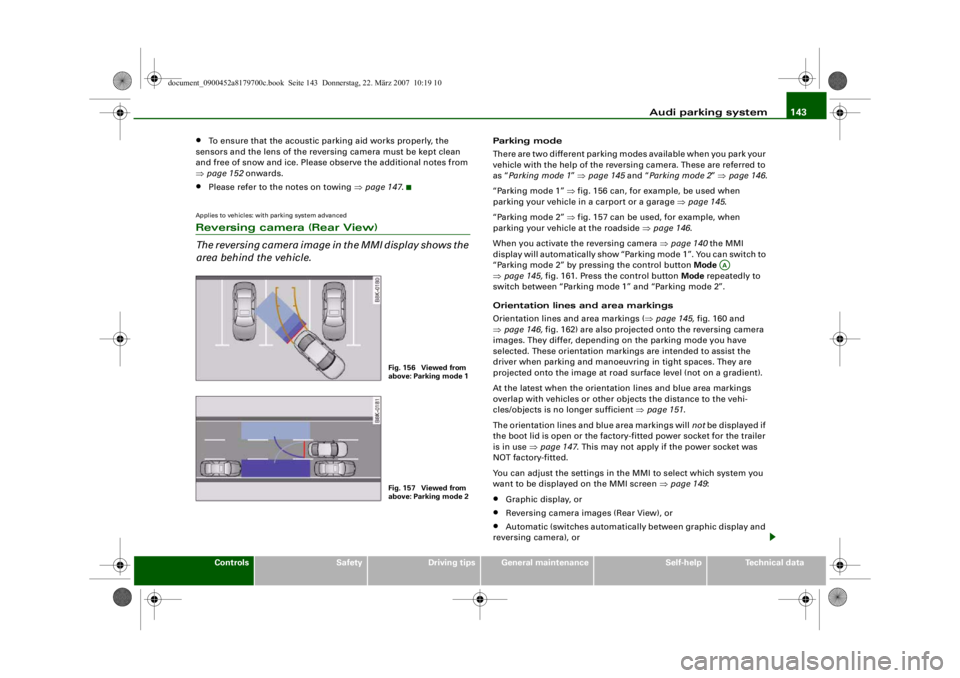
“Parking mode 1” ⇒ fig. 156 can, for example, be used when
parking your vehicle in a carport or a garage ⇒page 145 .
“Parking mode 2” ⇒ fig. 157 can be used, for example, when
parking your vehicle at the roadside ⇒page 146 .
When you activate the reversing camera ⇒ page 140 the MMI
display will automatically show “Parking mode 1”. You can switch to
“Parking mode 2” by pressing the control button Mode
⇒ page 145, fig. 161. Press the control button Mode repeatedly to
switch between “Parking mode 1” and “Parking mode 2”.
Orientation lines and area markings
Orientation lines and area markings ( ⇒page 145, fig. 160 and
⇒ page 146, fig. 162) are also projected onto the reversing camera
images. They differ, depending on the parking mode you have
selected. These orientation markin gs are intended to assist the
driver when parking and manoeuvring in tight spaces. They are
projected onto the image at road surface level (not on a gradient).
At the latest when the orientation lines and blue area markings
overlap with vehicles or other objects the distance to the vehi-
cles/objects is no longer sufficient ⇒page 151 .
The orientation lines and blue area markings will not be displayed if
the boot lid is open or the factory-fitted power socket for the trailer
is in use ⇒page 147 . This may not apply if the power socket was
NOT factory-fitted.
You can adjust the settings in th e MMI to select which system you
want to be displaye d on the MMI screen ⇒page 149 :•
Graphic display, or
•
Reversing camera images (Rear View), or
•
Automatic (switches automatically between graphic display and
reversing camera), or
Fig. 156 Viewed from
above: Parking mode 1Fig. 157 Viewed from
above: Parking mode 2
AA
document_0900452a8179700c.book Seite 143 Donnerstag, 22. März 2007 10:19 10
--4 -
-T
•
-+ +-
Page 146 of 313
Audi parking system
144•
Off (no display).
The reversing camera can be sw itched on and off in the MMI
⇒ page 149 . The acoustic proximity warning will, however, remain
activated.
WARNING
•
The reversing camera has blind spots in which obstacles are
not registered. It is particularly important to ensure that there are
no small children or animals near the vehicle, as the reversing
camera may not always be able to detect them (accident risk).
•
The parking aid cannot replace th e full concentration of the
driver. The driver is always resp onsible for safety during parking
and other manoeuvres. Always keep a close watch on the area
around the vehicle.
•
Please note that low obstacles detected by the system may no
longer be registered by the sensors as the car moves closer, so the
system will not give any further warning. Certain kinds of obsta-
cles (such as wire fences, chains, thin painted posts or trailer draw
bars, etc.) may not always be de tected by the system (accident
risk).Note
•
There is a slight delay in the picture display.
•
To ensure that the reversing camera works properly, the lens of
the camera ⇒page 140, fig. 154 must be kept clean and free of
snow and ice. Please observe the additional notes on ⇒page 152 .
•
If the boot lid is open the angle covered by the camera will
change. For this reason, the image of the reversing camera will then
be shown without orientation li nes and blue area markings.
•
Please refer to the notes on towing ⇒ page 147.
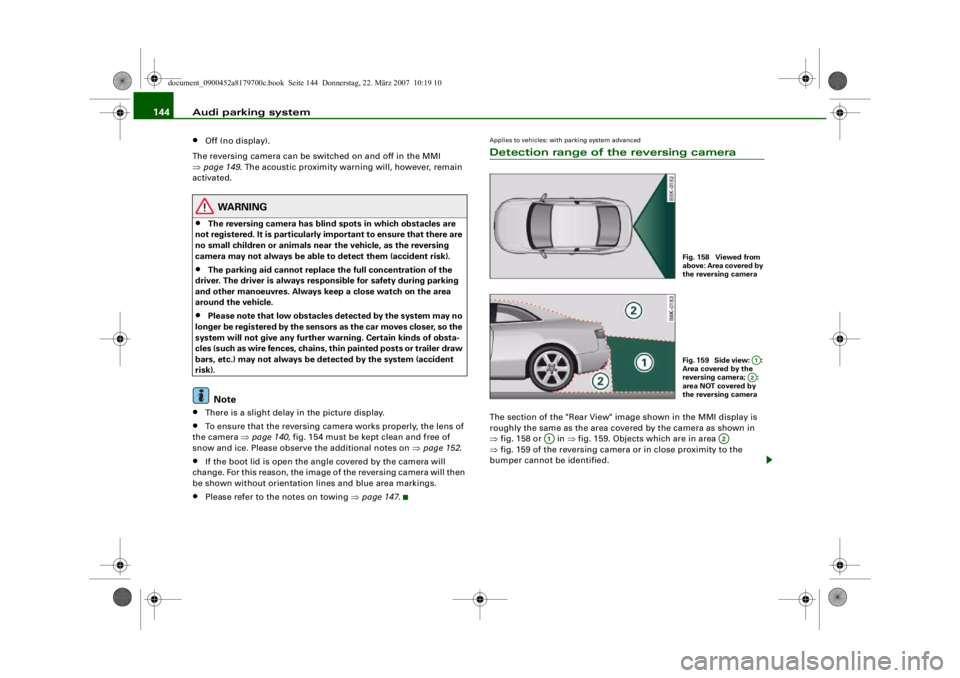
Applies to vehicles: with parking system advancedDetection range of the reversing cameraThe section of the "Rear View" image shown in the MMI display is
roughly the same as the area covered by the camera as shown in
⇒fig. 158 or in ⇒fig. 159. Objects which are in area
⇒ fig. 159 of the reversing camera or in close proximity to the
bumper cannot be identified.
Fig. 158 Viewed from
above: Area covered by
the reversing cameraFig. 159 Side view: :
Area covered by the
reversing camera; :
area NOT covered by
the reversing camera
A1A2
A1
A2
document_0900452a8179700c.book Seite 144 Donnerstag, 22. März 2007 10:19 10
--4 -
-T
-+ +-
[I]
•
Page 149 of 313
Audi parking system147
Controls
Safety
Driving tips
General maintenance
Self-help
Technical data
– Press the control button for Mode ⇒page 145,
fig. 161. “Parking mode 2” ⇒fig. 162 will appear in the
MMI display.
– Reverse and align the position of your vehicle in such a
way that the dark blue area marking ⇒fig. 162
borders onto the vehicle be hind or onto the parking
space line marking. If you are not parking next to obsta-
cles ⇒page 150 the long side of the dark blue marking
should border onto the kerb. The complete dark blue
area marking must fit into the parking space ⇒page 143,
fig. 157.
– When the vehicle is stationary turn the steering wheel to the right as far as it will go.
– Reverse into the parking space. If you are not parking
next to obstacles ⇒ page 150 the dark blue marking
should touch the kerb ⇒page 146, fig. 163. Stop your
vehicle.
– Turn the steering wheel to the left as far as it will go (vehicle is stationary).
– Continue to reverse into the parking space until the vehicle is standing parallel to the kerb. When reversing
you must also keep a close watch on the front end of the
vehicle ⇒.You can use “Parking mode 2” to park on the left or the right side of
the road. For this reason, the blue markings are shown in various
shades of blue. The dark blue ar ea marking and the dark blue
curve are used when parking on the right side of the road. The
light blue area marking and the light blue curve are used
when parking on the left side of the road. When the turn signals are on, the
display will only show the mark-
ings for the relevant side. To change the display to the other side,
just switch on the opposite turn signals.
The light blue and dark blue cu r v e s s h o w y o u w h e n t o t u r n t h e
steering wheel in the other direction, i.e. when the curve touches
the kerb. ⇒page 146, fig. 163.
The distance from your rear bumper to the red line is approx.
40 cm. From here at the latest, th e driver should not reverse any
further ⇒page 151 .
WARNING
Please note that objects which are not touching the ground may
appear to be further away than th ey actually are (e.g. the bumper
of a parked vehicle, a towing bracke t or the rear end of a truck). In
this case you should not use the orientation lines for judging the
distance (accident risk).
Caution
The MMI display shows the path of the rear end of the vehicle if you
were to reverse using the current steering angle. NB: The front end
of the vehicle swings out further than the rear.
Note
To ensure that the reversing camera works properly, the lens of the
camera ⇒page 140, fig. 154 must be kept clean and free of snow
and ice. Please observe the additional notes on ⇒page 152 .Applies to vehicles: with parking system and towing bracketTo w i n g b r a c k e tOnce the electrical connector for the trailer socket is plugged in on
vehicles with a factory-fitted towing bracket the rear sensors for the
AAA2
A4
A2
A4
A1
A3
A3
A4
A5
A6
document_0900452a8179700c.book Seite 147 Donnerstag, 22. März 2007 10:19 10
--4 -
-T
-+
0
+-
rn
CD
•
Page 207 of 313
Your vehicle and the environment205
Controls
Safety
Driving tips
General maintenance
Self-help
Technical data
Your vehicle and the environmentRunning inA new vehicle should be run in over a distance of 1,500 km. For the
first 1,000 km the engine speed should not exceed 2/3 of the
maximum permissible engine speed – do not use full throttle and do
not tow a trailer or caravan. From 1,000 to 1,500 km you can gradu-
ally increase the engine rpm and road speed.
During its first few hours of running, the internal friction in the
engine is greater than later on when all the moving parts have
bedded down.
How the vehicle is driven for the first 1,500 km also influences the
engine quality. After the first 1,500 km you should continue driving
at moderate engine speeds, in particular when the engine is cold.
This helps to reduce wear and tear on the engine and increases the
potential mileage which can be covered by the engine.
You should also avoid driving with the engine speed too low.
Change down to a lower gear when the engine no longer runs
“smoothly”. Excessively high engine speeds are prevented by an
automatic rev limiter.Emission control systemsCatalytic converter
Applies to vehicles with petrol engine: The vehicle must only be
used with unleaded petrol, otherwise the catalytic converter will be
destroyed.
Never run the tank completely dry. The irregular fuel supply can
cause misfiring, which would allow unburnt fuel to enter the
exhaust system, which could cause overheating and damage the
catalytic converter. Diesel particulate filter
Applies to vehicles
with diesel engine: The diesel particulate filter
can filter out almost all soot particles contained in the exhaust gas.
In normal driving conditions the filter is self-cleaning. Should the
self-cleaning function of the filter not be able to operate, e.g. when
the vehicle is continuously used only for short trips, the filter
becomes obstructed with soot and the symbol
for the diesel
particulate filter lights up ⇒page 37 .
WARNING
•
Because of the high temperatures which can occur in the emis-
sion control system (catalytic converter or diesel particulate
filter), do not park the vehicle where the exhaust can come into
contact with flammable materials under the car (e.g. on grass or
at the forest edge). - Fire hazard!
•
Do not apply any underseal agen ts in the area around the
exhaust system - fire hazard!
Driving abroadChanging over headlight dip settings
The asymmetric low beams of the headlights are designed to light
up the near side of the road more intensely. If you drive in a country
where traffic drives on the opposite side of the road to the home
country, this will dazzle oncoming traffic.
Headlights with halogen bulbs: To avoid dazzling oncoming traffic
you can apply opaque stickers to certain parts of the headlight
lenses.
Headlights with xenon gas-discharge bulbs*: The headlight dip
settings must be changed to avoid dazzling oncoming traffic. For
document_0900452a8179700c.book Seite 205 Donnerstag, 22. März 2007 10:19 10
--4 -
-T
-+
•
+-
•
Page 210 of 313
Towing a trailer
208Towing a trailerDriving the vehicle with a trailer or
caravanTechnical requirements
The towing bracket must comply with certain technical
requirements.Your car is intended mainly for transporting passengers and
luggage. However, if suitably equipped, it can also be used to tow a
trailer or caravan.
If the car is supplied with a factory-fitted towing bracket it will
already have the necessary technical modifications and meet the
statutory requirements.
A 13-pin socket is provided to make the electrical connection
between the car and the trailer. If the trailer has a 7-pin plug you can
use an adapter cable. This is available from Audi dealers.
WARNING
If a towing bracket is retrofitted, the installation should be carried
out by a qualified workshop.•
In particular in high outside tem peratures it is not possible to
drive up long steep gradients with out a suitable cooling system.
The engine would then overheat.
•
Incorrect installation can result in a safety risk.
Points to check before towingTrailer weights
Never exceed the maximum permitted trailer weights ⇒page 295 .If you do not load the trailer up
to the maximum permitted trailer
weight, you can then climb correspondingly steeper gradients.
The maximum trailer weights listed are only applicable for altitudes
up to 1000 m above sea level. With increasing altitude the engine
power and therefore the car's climbing ability are impaired because
of the reduced air density, so the maximum trailer weight has to be
reduced accordingly. The weight of the car and trailer must be
reduced by 10% for every further 1000 m (or part thereof). This
figure refers to the combined weight of the (loaded) vehicle and
(loaded) trailer.
The figures for the draw bar weight that appear on the identification
plate of the towing bracket are for certification purposes only. The
correct figures for your specific vehicle, which may be lower than
these figures for the towing bracket, are given in the registration
documents. Also refer to ⇒page 295 .
Distributing the load
Distribute loads in the trailer so th at heavy objects are as near to the
axle as possible. Loads carried in the trailer must be secured to
prevent them slipping.
Where possible, operate the trai ler with the maximum permitted
draw bar weight on the ball joint of the towing bracket, but do not
exceed the specified limit.
Tyre pressure
Check the tyre pressures on your car and adjust for “full load” condi-
tions (refer to the sticker listing the tyre pressures on the end face
of the driver's door). It may also be necessary to adjust the tyre pres-
sures on the trailer according to the recommendations of the trailer
manufacturer.
Exterior mirrors
Check whether you can see enough of the road behind the trailer
with the standard mirrors. If this is not the case you should have
document_0900452a8179700c.book Seite 208 Donnerstag, 22. März 2007 10:19 10
--4 -
-T
-+ +-
•
Page 211 of 313
Towing a trailer209
Controls
Safety
Driving tips
General maintenance
Self-help
Technical data
additional mirrors fitted. Both exterior mirrors should be mounted
on hinged extension brackets. Adjust the mirrors to give sufficient
vision to the rear.
Headlights
Before starting a journey, check
the headlight beam settings with
the trailer hitched up. If necessary, alter the height of the headlight
beams by means of the headlight range control ⇒page 56 .
Power supply
When you remove the ignition key the power supply to the trailer is
interrupted.
Removable ball joint coupling
Vehicles with a factory-fitted towing bracket are equipped with a
removable ball joint coupling. It is carried under the floor panel on
the left-hand side of the luggage compartment.
Note
We recommend having the car serviced between the normal inspec-
tion intervals if it used frequently for towing a trailer.Applies to vehicles: with towing bracketTrailer stabilisation system
Trailer stabilisation helps to reduce the risk of the vehicle
skidding when towing a trailer.When is the trailer stab ilisation system activated?
Trailer stabilisation is active when the following requirements are
met:•
The ESP must NOT be switched off ⇒page 196 ,
•
The trailer connector must be properly secured in the vehicle
socket.
•
Vehicle speed must be higher than approx. 60 km/h. How trailer stabilisation works:
In many cases, the driver can stabilise a swaying trailer by manually
braking the vehicle.
However, if the ESP detects that th
e trailer is swaying and this is
affecting the towing vehicle, it will automatically brake the vehicle
to stabilise the trailer by slowing it down. The warning lamp
will
light up in the instrument cluste r. If possible, do not turn the
steering wheel at this stage.
In order to warn traffic behind you, the brake lights will come on
during this automatic braking operation.
A trailer weighing less than 70% of the kerb weight of the towing
vehicle may sway quite considerably without the trailer stabilisation
system intervening. This can happen when the swaying movements
of the light-weight trailer are not or hardly passed on to the towing
vehicle and are therefore not detected by the ESP.
If the system for activating the trai ler brake lights is defective, this
will be indicated in the instrument cluster display ⇒page 36, “Bulb
monitor ”.
Requirements for correct functioning of the trailer
stabilisation system
If these conditions are not met in full, the trailer stabilisation system
will only intervene to a limited extent or not at all ⇒.
•
The electrical connection between the towing vehicle and the
trailer must be functioning correctly, without any defects.
•
The load on the trailer must be properly secured.
•
The tyre pressures on both the vehicle and the trailer must be
adapted to the load that is being carried.
•
Where possible, operate the trai ler with the maximum permitted
draw bar weight.
•
The trailer overrun brake must be set correctly. This is important
to ensure that the trailer can be braked correctly, to avoid the vehicle
and trailer “jack-knifing” and to pr event excess braking of the trailer.
document_0900452a8179700c.book Seite 209 Donnerstag, 22. März 2007 10:19 10
--4 -
-T
•
+-
Page 212 of 313
Towing a trailer
210•
In low outside temperatures , both the towing vehicle and the
trailer should be fitted with winter tyres.
WARNING
It is essential that you adjust your speed to suit the weather, road
and traffic conditions. Do not let the trailer stabilisation system
tempt you into taking any risks wh en driving – this can cause acci-
dents.•
The ESP and trailer stabilisatio n system cannot defy the laws
of physics. This should be kept in mind, particularly on slippery
and wet roads and when towing a trailer with a light load.
•
The trailer stabilisation system is functional, regardless of
whether the trailer has a mechanical overrun brake or not.
•
The trailer stabilisation system is not always able to detect
swaying of trailers with a light load and will therefore not inter-
vene.
•
A trailer can still “jack-knife” on slippery roads with little grip,
even if the towing vehicle is eq uipped with the trailer stabilisation
system.
•
Trailers with a high centre of gravity may even tip over before
they start to sway sideways.
•
If you are not towing a trailer, but the trailer socket is being
used (e.g. for an illuminated bicycl e rack), the trailer stabilisation
system may be activated in extreme driving conditions.
•
Please note the additional information and warnings
⇒ page 210 .
Notes on towing
Driving with a trailer always requires extra care.Weight distribution
Try to avoid towing a loaded trailer with an unladen vehicle. If this
cannot be avoided, drive extra slowly to allow for the unbalanced
weight distribution.
Speed
The stability of the car and trailer is reduced with increasing speed.
For this reason it is advisable not to drive at the maximum permis-
sible top speed in unfavourable road, weather or wind conditions.
This applies especially on a downhill gradient.
You should always reduce speed immediately if the trailer shows
the slightest sign of swaying. Never try to stop the swaying by accel-
erating further.
Always brake in good time. If the trailer has an overrun brake, apply
the brakes gently at first and then firmly. This will prevent the jerking
that can be caused by the trailer wheels locking. Change down in
good time before going down a steep hill so that you can use the
engine braking effect to slow down the vehicle.
Swaying and pitching can be reduced by stabiliser aids. We recom-
mend having stabiliser aids installed when towing trailers with a
high trailer weight. They can be purchased and installed at an Audi
dealer.
Overheating
When climbing long hills in hot weather with the engine running
fast in low gear, you should keep an eye on the coolant temperature
gauge ⇒page 11 . Reduce speed immediately if the needle moves to
the top end of the scale. If the temperature warning lamp
in the
instrument cluster should start flashing, stop the car and let the
engine cool down by running it at idling speed for a few minutes.
document_0900452a8179700c.book Seite 210 Donnerstag, 22. März 2007 10:19 10
--4 -
-T
-+ +-
•
•
Page 213 of 313
Towing a trailer211
Controls
Safety
Driving tips
General maintenance
Self-help
Technical data
Accessories
Before mounting equipment an d accessories (e.g. bicycle
rack) please observe the following notes.The equipment/accessories mounted must not protrude more than
700 mm from the ball joint .
The total weight (mounted equipment plus the load) must not
exceed 75 kg.
The maximum load depends on where the centre of gravity lies.
The maximum weight decreases as the distance between the centre
of gravity and the ball joint increases.
The following limits apply:
If the distance is 300 mm, the total weight (incl. the equipment
mounted) must not exceed 75 kg.
If the distance is 600 mm, the total weight (incl. the equipment
mounted) must not exceed 35 kg.
Only bicycle racks for a maximum of three bicycles may be used.
Equipment mounted on the towing bracket
We recommend that you only mount equipment (e.g. bicycle rack)
which has been approved by Audi on the ball joint. If you wish to
attach other equipment please make sure that it has been approved
by the manufacturer for use on the ball joint. If you mount unsuit- able equipment, this can cause dama
ge to the towing bracket. In an
extreme case, damage to the towing bracket could cause it to break
⇒ .
WARNING
•
If you wish to mount equipmen t which has not been approved
by Audi please ensure that it is suitable for use on Audi vehicles.
•
Use of unsuitable equipment can result in severe damage to
the towing bracket. The towing bracket could then break while
pulling a trailer and cause an accident.
•
Never use tools of any kind when fitting and removing the ball
joint. This coul d damage the mechanism wh ich locks the ball joint
in place and impair it s safety (accident risk).
Removable towing bracketApplies to vehicles: with removable towing bracketIntroduction
Special care is required when fitting and removing the
towing bracket.
Fig. 205 Load distribu-
tion of equipment and
accessories
A1A1
AAAB
Fig. 206 Luggage
compartment with
towing bracket
document_0900452a8179700c.book Seite 211 Donnerstag, 22. März 2007 10:19 10
4----
--4 -
T T
& &
@
~
~ ~
I
I Ol
I I
--
•
-+ +-
Page 214 of 313
Towing a trailer
212The removable ball joint attachment for the towing bracket is stored
under the floor panel on the left-h and side of the luggage compart-
ment.
The ball joint can be fitted and removed by hand.
WARNING
Never use tools of any kind when fitting and removing the ball
joint. This coul d damage the mechanism wh ich locks the ball joint
in place and impair it s safety (accident risk).
Note
•
Do not attempt to modify or repair the ball joint or other towing
bracket components.
•
Should you have any difficulties when using the towing bracket,
or suspect that it is not fitted properly, contact a qualified workshop.
•
Before setting off, always check that the ball joint is secured
properly ⇒page 214 .
•
Never disengage the ball joint with the caravan / trailer still
hitched or with a bicycle rack or similar accessory still attached.
•
It is advisable to remove the ball joint when you are not towing a
trailer. Fold the socket back to its original position so that the
mounting fixture is properly closed.
•
The ball joint must be removed if you intend to clean the car with
a steam cleaning attachment. Make sure that the mounting fixture
is properly closed.
•
For installation and removal of the ball joint we recommend that
the gloves provided be used.
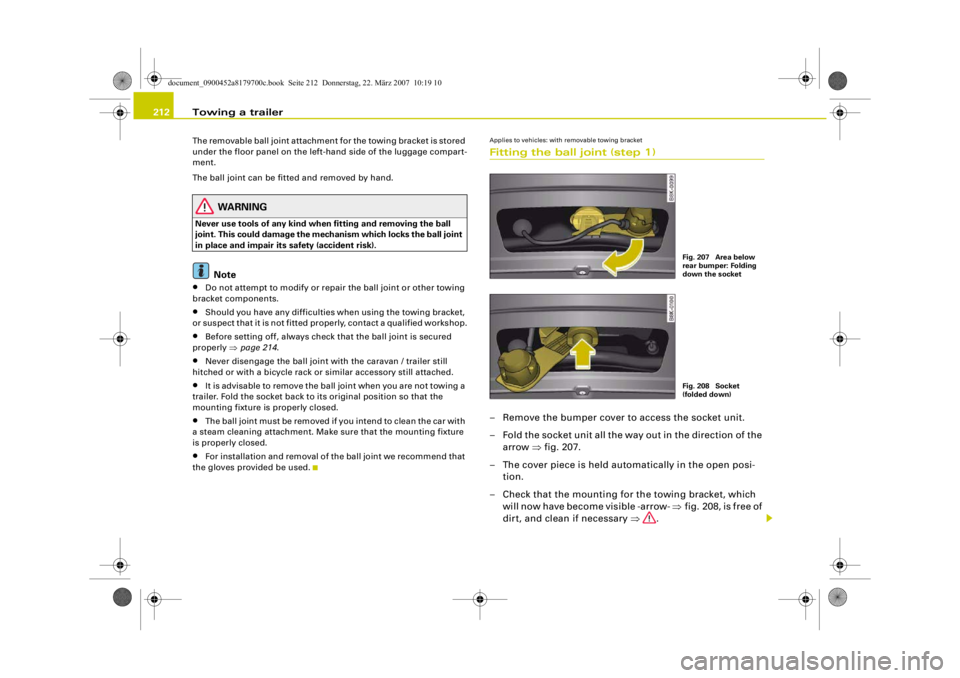
Applies to vehicles: with removable towing bracketFitting the ball joint (step 1)– Remove the bumper cover to access the socket unit.
– Fold the socket unit all the way out in the direction of the arrow ⇒fig. 207.
– The cover piece is held automatically in the open posi- tion.
– Check that the mounting for the towing bracket, which will now have become visible -arrow- ⇒fig. 208, is free of
dirt, and clean if necessary ⇒.
Fig. 207 Area below
rear bumper: Folding
down the socketFig. 208 Socket
(folded down)
document_0900452a8179700c.book Seite 212 Donnerstag, 22. März 2007 10:19 10
--4 -
-T
[I]
-+ +-
•
Page 215 of 313
Towing a trailer213
Controls
Safety
Driving tips
General maintenance
Self-help
Technical data
– Also check the shaft section of the ball joint and its asso-
ciated mechanical parts to make sure they are clean and
undamaged.Continued ⇒page 213, “Fitting the ball joint (step 2)”.
WARNING
It is important to keep the mounti ng fixture clean. Otherwise the
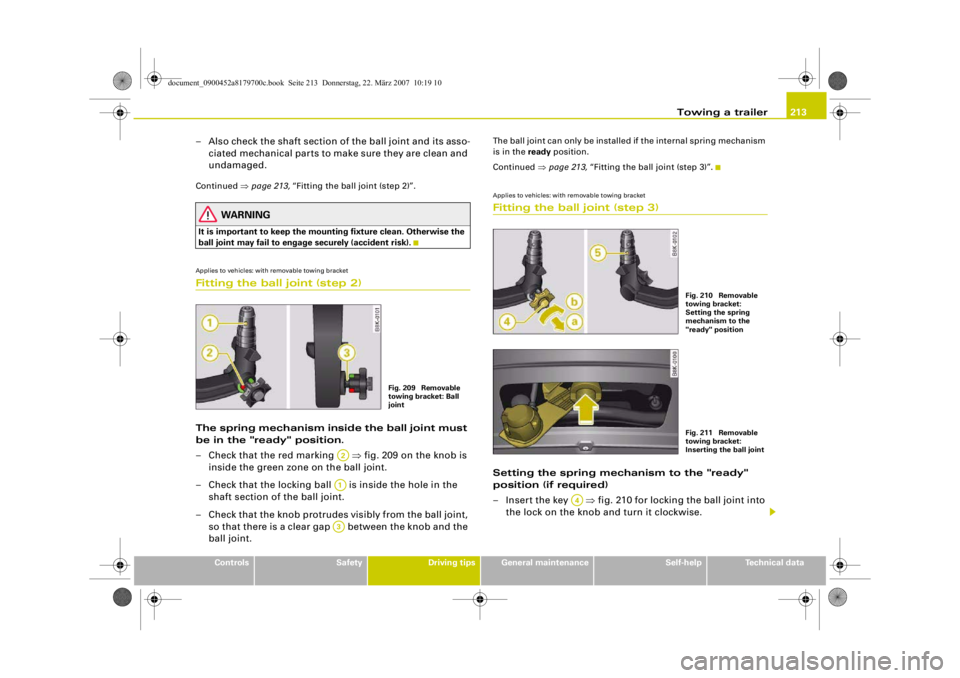
ball joint may fail to engage securely (accident risk).Applies to vehicles: with removable towing bracketFitting the ball joint (step 2)The spring mechanism inside the ball joint must
be in the "ready" position.
– Check that the red marking ⇒fig. 209 on the knob is
inside the green zone on the ball joint.
– Check that the locking ball is inside the hole in the shaft section of the ball joint.
– Check that the knob protrudes visibly from the ball joint, so that there is a clear gap between the knob and the
ball joint.
The ball joint can only be installed if the internal spring mechanism
is in the ready position.
Continued ⇒page 213, “Fitting the ball joint (step 3)”.Applies to vehicles: with removable towing bracketFitting the ball joint (step 3)Setting the spring mechanism to the "ready"
position (if required)
– Insert the key ⇒fig. 210 for locking the ball joint into
the lock on the knob and turn it clockwise.
Fig. 209 Removable
towing bracket: Ball
joint
A2A1A3
Fig. 210 Removable
towing bracket:
Setting the spring
mechanism to the
"ready" positionFig. 211 Removable
towing bracket:
Inserting the ball joint
A4
document_0900452a8179700c.book Seite 213 Donnerstag, 22. März 2007 10:19 10
--4 -
-T
•
-+ +-