ECO mode AUDI A5 COUPE 2010 User Guide
[x] Cancel search | Manufacturer: AUDI, Model Year: 2010, Model line: A5 COUPE, Model: AUDI A5 COUPE 2010Pages: 360, PDF Size: 84.39 MB
Page 31 of 360
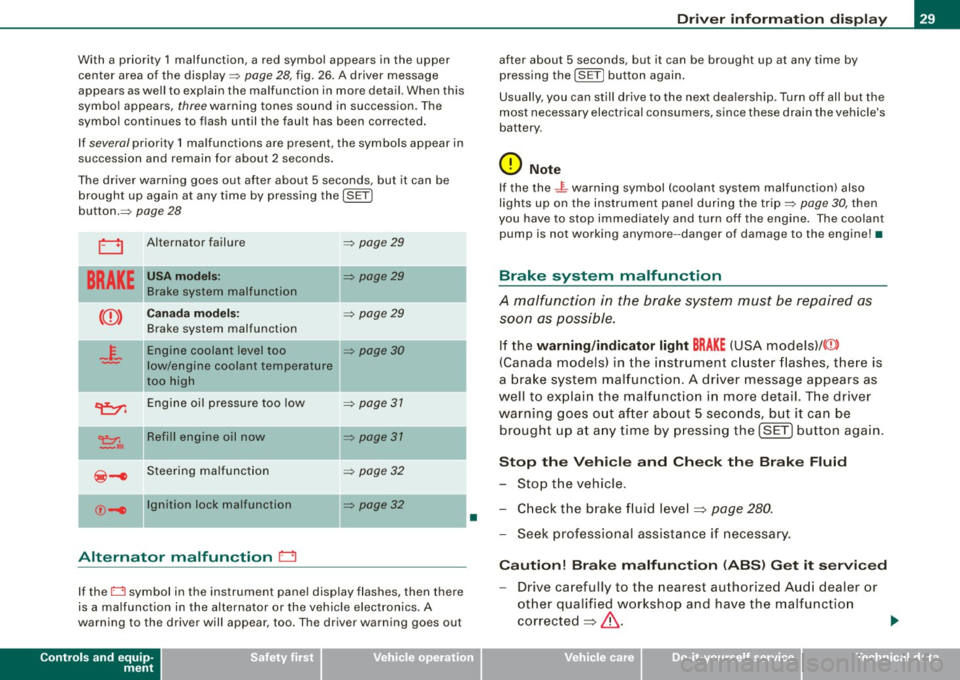
With a priority 1 malfunction, a red symbol appears in the upper
center area of the display=:>
page 28, fig. 26. A driver message
appears as well to explain the ma lfunction in more detail. When this
symbo l appears,
three warning tones sound in succession. The
symbol continues to flash until the fault has been corrected.
If
several priority 1 malfunctions are present, the symbols appear in
succession and remain for about 2 seconds .
T he driver warning goes out after about 5 seconds, but it can be
brought up again at any time by pressing the
I SE T]
button.=:>
page 28
LJ Alternator failure =:> page 29
BRAKE
USA model s: =:> page 29
Brake system malfunctio n
--
Ca nad a mod els: =:> page 29
Brake system malfunction
- F-Engine coolant level too =:> page 30
-low/engine coolant temperature
too high
~ Engine oil pressure too low =:> page 31
~,. Refill engin e oil now =:> page 31
~-e Steering ma lfunction =:> page 32
--
©-e Ignition lock malfunction
=:> page 32
Alternator malfunction 0
If the O symbol in the instrument pane l disp lay flashes, then there
is a malfunction in the alternator or the vehicle electronics. A
warning to the driver will appear, too . The driver warning goes out
Controls and equip
ment
•
Dr ive r informat ion di spl ay
after about 5 seconds, but it can be brought up at any time by
pressing the
ISETj button again .
Usually, you can still drive to the next dea lership . Turn off all but the
most necessary electrical consumers, since these drain the vehicle's
battery .
0 Note
If the the .JL warning symbol (coolant system ma lfunction) also
lights up on the instrument pane l during the trip=:>
page 30, then
you have to stop immediately and turn off the engine . The coolan t
pump is not working anymore --danger of damage to the engine! •
Brake system malfunction
A malfunction in the brake system must be repaired as
soon as possible.
If the warning /indi cator light BRAKE (USA models)/ (©)
(Canada models) in the i nstrument cluster flashes, there is
a brake sys tem mal funct ion . A driver message appears as
well to explain the malfunction i n more detail. T he driver
warning goes o ut after about 5 seco nds, but it ca n be
br ought up a t any time by p ressing the !SET] button aga in .
S top th e Vehi cle and Che ck the Brak e Fluid
- Stop the vehicle.
- Check the brake fluid level=> page
280 .
-Seek professional assistance if necessary .
Cauti on! Brake m alfun ction (ABS ) G et it s ervi ced
- Drive carefully to the nearest authorized Aud i dealer or
other qualified workshop and have the malfunction
corrected =>
&. .,_
I • •
Page 32 of 360
Driver information display
Parking brake Please get to a repair shop
-If this symbol appears when the vehicle is stationary or
after the ignition is turned on, check to see if the parking
brake can be released. Drive to an authorized Audi dealer
or other qualified workshop as soon as possible and have
the malfunction corrected. If the parking brake cannot be opened, then take it to an expert at an authorized Audi
dealer.
- If the symbol appears while you are driving, it is possible
that the traction control or the emergency brake has
malfunctioned. It is possible that the parking brake
cannot be applied. It is also possible that the parking
brake cannot be released after it has been applied. Drive
to an authorized Audi dealer or other qualified workshop
to have the malfunction corrected.
If the ABS system malfunctions, the ABS warning/indicator light illu
minates together with the brake system malfunction warning/indi
cator light=>& .
& WARNING
• Always observe the warnings in => page 263, "Engine compart
ment ", before opening the hood and checking the brake fluid.
• Driving with low brake fluid is a safety hazard. Stop the car and
get professional assistance.
• USA models: If the
BRAKE warning light and the warning
light come on together, the rear wheels could lock up first under
hard braking . Rear wheel lock-up can cause loss of vehicle control
and an accident. Have your vehicle repaired immediately by your
authorized Audi dealer or a qualified workshop. Drive slowly and
avoid sudden, hard brake applications.
• Canada models: If the brake warning light (Ci] and the ABS
warning light come on together, the rear wheels could lock up
& WARNING (continued)
first under hard braking. Rear wheel lock-up can cause loss of
vehicle control and an accident. Have your vehicle repaired imme
diately by your authorized Audi dealer or a qualified workshop.
Drive slowly and avoid sudden, hard brake applications. •
Engine cooling system malfunction _}_
A malfunction in the engine cooling system must be
repaired as soon as possible.
If the _p_ symbol flashes in the display, either the engine
coolant
temperature is too high or the engine coolant level
is too low. A driver message appears as well to explain the
malfunction in more detail. The driver warning goes out
after about 5 seconds, but it can be brought up at any time
by pressing the [ SET] button again.
Switch off engine and check coolant level
- Pull off the road.
- Stop the vehicle.
- Turn off the engine.
- Check coolant level~
page 278.
- Add coolant if necessary ~ page 279.
Continue driving only after the engine coolant
warning/indicator light goes out.
- Contact your authorized Audi dealer for assistance if
necessary.
If the engine coolant level is correct, then the radiator fan may be
the cause of the malfunction. ...
Page 34 of 360

Driver information display
Steering malfunction ~-
If there is a malfunction in the electronic steering column
lock, the steering cannot be unlocked.
If the @- symbol in the display blinks, there is a malfunc
tion in the electronic steering column lock. A driver
message appears as well to explain the malfunction in more
detail. The driver warning goes out after about 5 seconds, but it can be brought up at any time by pres sing the [SET]
button again.
Stop the vehicle and turn off the engine. Steering
defective
- Obtain professiona l assistance.
- Do
not tow your vehicle .
& WARNING
Your vehicle must not be towed in the event of a malfunction in the
electronic steering column lock because it cannot be steered due
to the locked steering. If it is towed with the steering locked , there
is the risk of an accident.
[ i ] Tips
The symbol's appearance might be different in some models.•
Ignition lock malfunction ©-
A malfunction in the ignition lock must be repaired imme
diately.
If the ©- symbol in the display blinks, there is a malfunction
in the electronic ignition lock. A driver message appears as
well to explain the malfunction in more detail. The driver warning goes out after about 5 seconds,
but it can be
brought up at any time by pressing the (SET] button again
Defective ignition switch Get it serviced!
-Do not turn the engine off.
- Drive immediately to an authorized service facility to
have the malfunction corrected.
If there is a malfunction in the electronic ignition lock, the ignition
cannot be turned off . Drive immediately to an authorized service
facility to have the cause of the ma lfunction corrected.
On vehicles with convenience key*, the engine should not be
switched off using the start/stop button because the engine cannot
be started again after the ignition has been switched off.
[ i ] Tips
The symbol's appearance might be different in some models. •
Yellow symbols
A yellow symbol means WARNING.
-en
9 a: gi
Fig. 27 Display: Yellow
warning symbol
Yellow symbols indicate a priority 2 malfunction -Warning!
Page 35 of 360
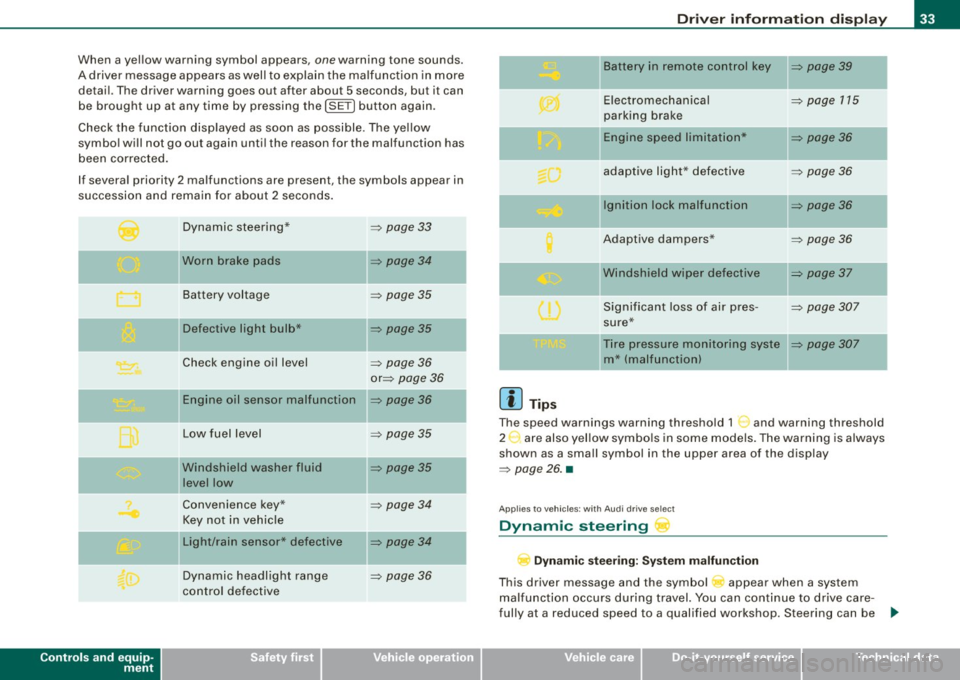
When a yellow warning symbol appears, one warning tone sounds.
A driver message appears as well to explain the malfunc tion in more
detail. The driver warning goes out after about 5 seconds, but it can
be brought up at any time by pressing the
!SE T) button again.
Check the function disp layed as soon as possible . The ye llow
symbol will not go out again until the reason for the malfunction has
been corrected.
If several priority 2 malfunctions are present, the symbols appear in
succession and remain for about 2 seconds .
Controls and equip
ment
Dynamic steering*
Worn brake pads
Battery voltage
II Defective light bulb*
Check engine oil level
Engine oil sensor malfunction
Low fuel level
Windshield washer fluid
level low
Convenience key*
Key not in vehicle
Light/rain sensor* defective
Dynamic headlight range
control defective =>
page 33
=> page 34
=>
page 35
=> page 35
-
=> page 36
or => page 36
=> page36
=> page 35
=> page 35
=> page 34
=> page 34
=> page 36
Dr ive r informat ion di spl ay
II Battery in remote control key => page 39
-
Electromechanical => page 115
parking brake
-Engine speed limitation* => page 36
adaptive light * defective => page 36
Ignition lock malfunction => page 36
Adaptive dampers* => page 36
"Windshield wiper defective => page 37
-
Significant loss of air pres -=> page 307
sure*
Tire pressure monitoring syste
=> page 307
m* (malfunction)
[ i ] Tip s
The speed warnings warning threshold 1 '") and warning threshold
2 :,. are also yel low symbo ls in some models. The warning is always
shown as a small symbol in the upper area of the display
=> page 26. •
Applies t o veh ic les: w ith Audi dri ve sele ct
Dynamic steering
D yn a m ic s te er ing : Syste m malfun cti on
This driver message and the symbol appear when a system
malfunction occurs during travel. You can continue to drive care
fully at a reduced speed to a qualified workshop. Steering can be .,_
I • •
Page 57 of 360
![AUDI A5 COUPE 2010 User Guide Adjusting exterior lighting
The functions are selected in the radio or MM/*.
Fig. 53 MMI Display:
Exterior l ighting
-Select: Function button [CAR]> Exterior lighting .
Coming home](/img/6/57582/w960_57582-56.png "AUDI A5 COUPE 2010 User Guide Adjusting exterior lighting
The functions are selected in the radio or MM/*.
Fig. 53 MMI Display:
Exterior l ighting
-Select: Function button [CAR]> Exterior lighting .
Coming home")
Adjusting exterior lighting
The functions are selected in the radio or MM/*.
Fig. 53 MMI Display:
Exterior l ighting
-Select: Function button [CAR]> Exterior lighting .
Coming home*
The coming home function ensures that after
turning off the igni
tion and opening the driver's door
the vehicle periphery is illumi
nated in the dark. In addition, the front fog lights, the tail lights and
the license plate light are turned on. The power-on time can be set
for a period from
O (off) to 30 or 60 seconds.
Leaving home*
The leaving home functions ensures that
when unlocking, the
vehicle periphery is illuminated in the dark. In addition, the front fog
lights, the tail lights and the license plate light are turned on. This
function can be turned on and off.
Auto headlights*
When the light switch is in the AUTO~
page 53 position, the switch
on point of the lights can be changed in the automatic driving light
function.
Controls and equip
ment
Clear vision
Daytime running lights
The daytime running lights can be turned on or off using this func
tion. If the function is active, the daytime running lights are turned
on automatically when the ignition is switched on.
[ i] Tips
The coming home/leaving home function * is available only with the
switch in the AUTO position . •
Daytime running lights
When you turn on the ignition the daytime running lights
will come on automatically .
USA models
The daytime running lights are activated when the light switch
~ page 53, fig. 51 is in the O position or the AUTO position (only in
daylight conditions). The daytime running lights function can be
turned on and off in the radio or
MMI* menu Exterior lighting
~ page 55.
Canada models
The daytime running lights are activated when the light switch
~ page 53, fig. 51 is in the O position, ooo: position or the AUTO posi
tion (only in daylight conditions). The daytime running lights func
tion cannot be turned off.
& WARNING
Never use daytime running lights to see where you are going. They
are not bright enough and will not let you see far enough ahead for
safety, especially at dusk or when it is dark. Be aware of changes
in outside light conditions when you are driving and respond by
switching on your low beams
io. ~
I • •
Page 58 of 360

Clear vision
0 Note
Always be aware of changes in outside light conditions while you
are driving. Respond in time to fading daylight by turning the light
switch to position
gO (or "AUTO") to turn on your headlights. •
Instrument lighting
The basic brightness of the illumination for the instru
ments, the center console and the display can be
adjusted.
Press the knob to release it.
Fig. 54 Instrument
lighting
- Rotating the knob to the right"+" will increase the basic
brightness when it is dark.
Rotating the knob to the left" -" will decrease the basic
brightness when it is dark.
- Pressing the knob will prevent unintentiona l changes.
0 Note
The instrument cluster and center console illumination (gauges and
needles) comes on when you switch on the ignition and the
vehicle headlights are off
.
Be aware of the following difference between
models built to US or Canadian specifications:
• USA models: illumination of the instrument cluster (gauges and
needles), dash and center console around the gearshift lever is
controlled by a light sensor located in the instrument panel. The
instrument panel illumination will automatically become dimmer
as the daylight fades away and eventually will go out completely
when outside light is very low. This is to remind you, the driver, to
switch on the headlights before it gets too dark.
• Canada models: instrument panel illumination will stay bright
regardless of the intensity of ambient light . Always be aware of
changes in outside light conditions while you are driving. Respond
in time to fading daylight by turning the light switch to position
gD
(or "AUTO" if your car is equipped with this feature) to turn on your
headlights. •
Applies to vehicles : w ith xenon head ligh ts
Xenon headlights
After starting the engine, the xenon headlights are automatically
adjusted to the load and angle of the vehicle (for example, during
acceleration and braking!. This prevents oncoming traffic from
experiencing unnecessary headlight glare from your xenon head
lights.
If the system is not operating properly, a warning symbol in the
Auto-Check Control is displayed
:::::> page 36. •
Page 63 of 360
[ i J Tips
• Pressing the button l~•~ l seve ral times consecutively can tr igger
the over load protection . The sun shade can only be
extended/re tracted again af ter a brief waiting period.
• The rea r window sun shade only functions when the vehicle inte
rio r is wa rmer than 23°F (-5°Cl. •
Wiper and washer system
Switching on the windshield wipers
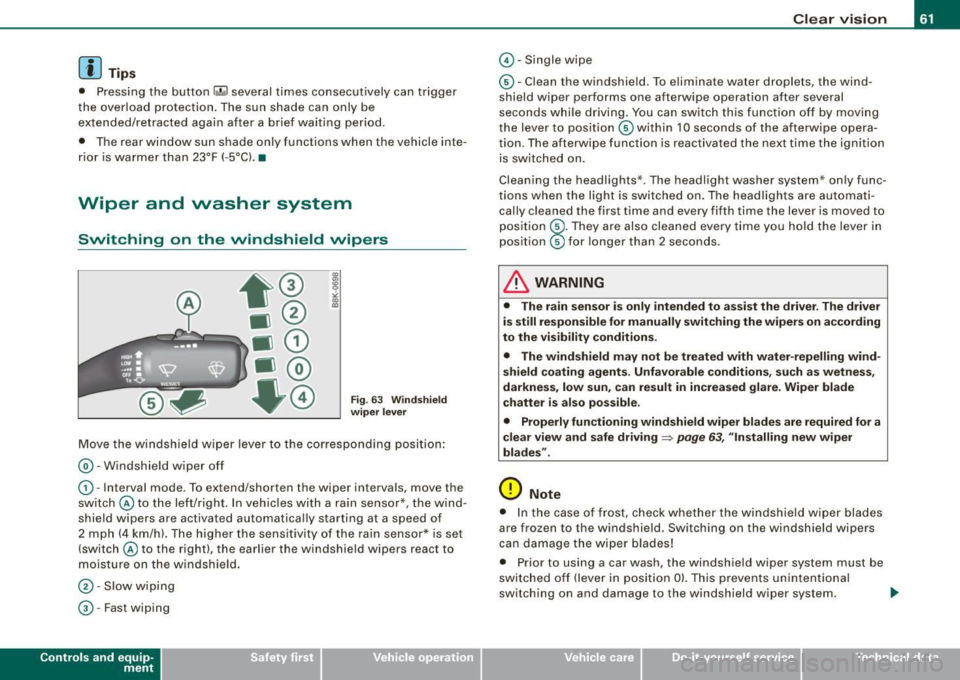
Fig. 6 3 Win dshield
w iper l ever
M ove the windshield w iper lever to the c orresp onding position :
@-Windshie ld w iper off
G) -Interva l mode. To extend/shorten the wiper inte rvals, move the
sw itc h @ to the lef t/right. In vehic les wi th a rain sensor*, the w ind
shield wipers are activated automatically starting at a speed of
2 mph (4 km/h). The higher the sensitivity of t he rain senso r* is set
(switch @to the right), the earlier the windshield wipers react to
moisture on the windshie ld.
@ -Slow wipi ng
© -Fast wiping
Con tro ls and eq uip
ment
Clear vision
© -Single wipe
© -C lean the windshie ld. To eliminate wate r droplets, the wind
shie ld wiper performs one afterwipe operation after several
seconds whi le d riving. You can switch this function off by moving
the lever to pos ition © within 10 seconds o f the afterwipe opera
tion. The afterwipe function is reactivated the next time the ignition
is sw itched on.
Cleaning the headlights *. The headlight washer system * only func
tions when the light is switched on . The headlights are automati
ca lly c leaned the first time and every fifth time the lever is moved to
pos ition
® · They are also cleaned every time you hold the lever in
pos ition © for longer than 2 seconds.
& WARNING
• The rain sen sor is only intended to a ssi st the driver . The driver
is still responsible for manually swit ching the wiper s on according
to the visibility conditions .
• The windshield may not be treated with water -repelling wind
s hield coating agents . Unfavorab le conditions , such as wetnes s,
darkness , low sun , can result in increased glare . Wiper bl ade
c hatter is also po ssible .
• Properly functioning windshield w iper blades are required for a
clear view and safe driving
~ page 63 , "Installing new wiper
blades ".
0 Note
• I n the case of frost, check whether the windshie ld wiper blades
are frozen to the windshield . Switching on the windshield wipers
ca n damage the wiper b lades !
• P rior to using a car wash, the windshield wiper system must be
switched off (lever in posi tion 0). This prevents un intentiona l
switching on and damage to the windshield wiper system. .,.
Vehicle care I I irechnical data
Page 66 of 360
Clear vision
Anti-glar e setting
- Move the small leve r (located on the bottom edge of the
mirror) to the rear. •
Applies to vehi cles: wit h a utom atica lly dimm in g ins id e mirro r
Automatically dimming inside mirror
The aut omatic dimming function can be turned on and off
if required.
Disabling auto dimming
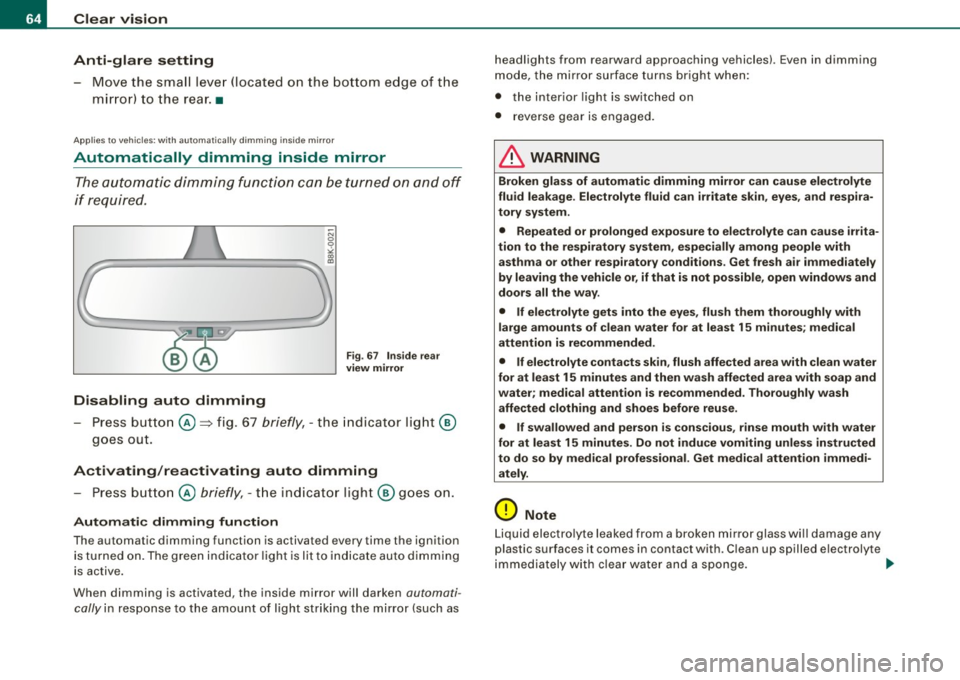
F ig . 6 7 Ins ide r ear
vi ew mirror
- Press button©=> fig. 67 briefly, -the indicator light @
goes out.
Activating /rea ctivating auto dimming
- Press button© briefly, -th e indicator ligh t@ goes on .
Automatic dimming fun ction
The automatic dimming function is activated eve ry time th e ignition
is turned on . The green indicator light is lit to indicate auto d imming
is active.
When dimming is activated , the inside mirror will darken automati
cally in response to the amount of light striking the mirror (such as headlights from rearward approaching vehicles). Even in dimming
mode,
the mirror surface t urns bright when:
• the inter ior light is switched on
• r everse gear is engaged.
& WARNING
Broken glas s of au tomati c dimming mir ror can cau se elect rol yte
flu id l eaka ge . Ele ctr olyte fluid can irritate s kin , eyes , and re s pir a
t o ry sy stem.
• Repeated or prolonged e xposure to el ectro lyte can cause irrita
ti on to the re spiratory sy stem , espe cially am ong people wi th
a sthm a or other re spirator y conditions . Get fr esh air immediatel y
by leavin g the vehicl e or , if that i s not po ssib le , open window s and
door s all the wa y.
• If electrolyte get s into the eye s, flu sh them thorough ly with
l a rge amou nts of cle a n wa ter for at le ast 15 mi nute s; me dic al
a tt ention is recommended .
• If ele ctrolyte cont acts sk in , flu sh affe cted are a w ith cle an w ater
for a t lea st 15 minute s and then wa sh affe cted ar ea with soap and
wa ter; medi cal attention is re commended . Thoroughl y w ash
affected cloth ing and shoe s before reu se .
• If swallo wed and person is consciou s, rinse mouth w ith w ater
for at lea st 1 5 minute s. Do no t indu ce vomiting unle ss instru cted
to do so by medi cal profess iona l. G et me dica l attenti on immedi
ately.
0 Note
Liquid electro lyte leaked from a broken mir ror glass wi ll damage any
plastic surfaces it comes in contact wi th . C lean up spilled electrolyte
immediately with c lear water and a sponge . ..
Page 69 of 360
Digital compass
Applies to vehicles: with di gital co mpass
Activating or deactivating the compass
The direction is displayed on the interior rear view mirror.
Fig . 69 Inside rear
view mirror : digital
co mpas s activated
To activate or deactivate, hold the@ button down until
the red display appears or disappears .
The digital compass only works with the ignition turned on. The
directions are displayed as initials :
N (North), NE (Northeast), E
(East), SE (Southeast), S (South), SW (Southwest), W (West), NW
(Northwest).
[ i ) Tips
To avoid inaccura te directions , do not allow any remote controls,
e lectrical systems, or metal parts close to the mirror. •
Contro ls and eq uip
ment
Clear vision
Ap plies to vehi cles: wit h dig ital compass
Setting the magnetic deflection zone
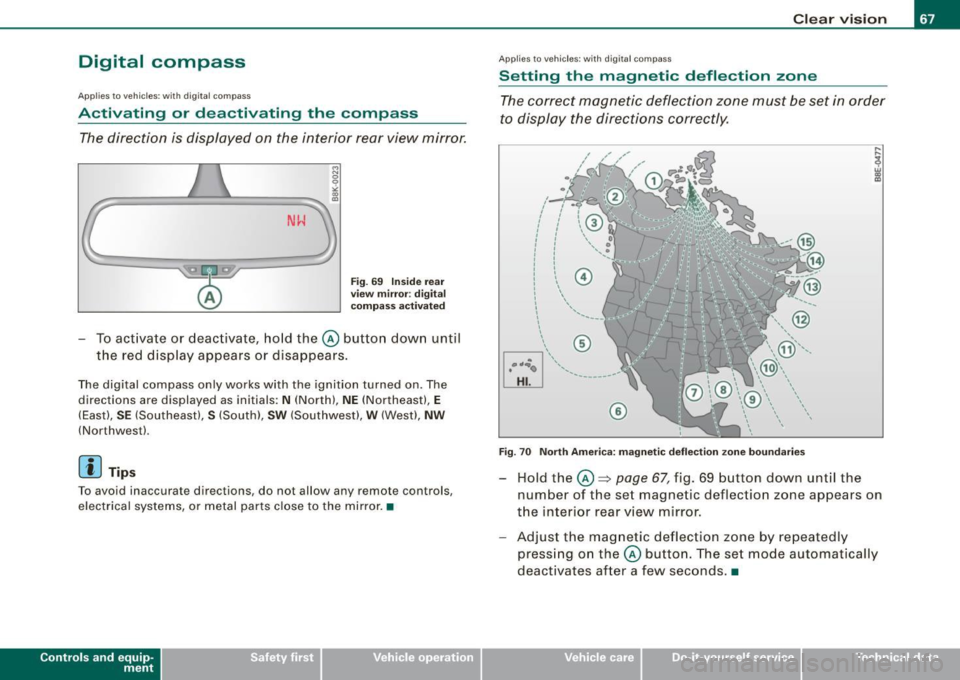
The correct magnetic deflection zone must be set in order
to display the directions correctly.
.
• ,_,;a;..~>, I I
I I
I I
I ' I I
I I
' I I I
I @ I
l '
l
I ' I ,, l ----
'
'
'
®
\, ,, ...... _______ ,.,.
©
@
Fig. 70 North America: magnetic deflection zone boundaries
Hold the@~ page 67, fig. 69 button down until the
number of the set magnetic deflection zone appears on
the interior rear view mirror.
Adjust the magnetic deflection zone by repeatedly
pressing on the @ button. The set mode automatically
deactivates after a few seconds . •
Vehicle care I I Technical data
Page 92 of 360
Warm and cold
Warm and cold
Deluxe automatic climate control
App lies to vehicles: with deluxe automat ic climate cont ro l
Description
The climate control system can be used to set a comfort
able temperature inside the vehicle.
The climate control system is a combination of a heating and venti
lation system as we ll a cooling system responsible for dehumid i
fying and cooling the air inside the vehicle.
The au tomatic c limate control system aut omatically mainta ins a
temperature once it has been set. The temperature of the air from
the vents, fan speed (air volume) and ai r distribution are also auto
matical ly adjusted . The system also takes into account strong
sun light so that manual adjustment is not necessary. So in almost
a ll cases,
automati c mode offers the best conditions fo r the com fort
of the occupants at all times of the year =>
page 92.
Please n ote the following :
The cooling mode lowers the humidity level inside the vehicle. This
prevents fogging up of the windows.
In the case of high outside humidi ty a nd temperatures,
condensa
tio n
can drip from the air conditioning system evaporator and form
a po ol under the vehicle . This is normal and not an indica tion of
leaks!
At low outside temperatures, the fan automatica lly switches to a
higher speed when the coolant reaches a sufficient temperature
except in the defroster position .
When star ting with ful l throttle, the compressor of the au toma tic
climate control system is temporari ly switched off to achieve full
engine power. To ensure engine cooling when the engine is under an extreme
load,
the compressor is switched off at high coo lant temperatures.
Pollutant filter
The pollutant filter (pa rticle fi lter) ensu res that impurit ies in the
outside air (e .g . dust, pollen) and odors are significant ly reduced or
stopped. The air is also fi ltered in recirculation mode .
The pol lutant fi lter e leme nt m ust be changed at the i nterva ls spec i
fied in the service plan so that the performance of the automatic
cli mate con trol syste m is not impaired.
If the effectiveness of the filter decreases prematurely due to oper
ation of the vehicle in areas with significant pollution, the f ilter
e lement must be changed between the speci fied s ervice dates.
K ey recognition
The current automatic climate contro l settings are automatica lly
stored and assigned to the mas ter key .
Energy managem ent
To p revent t he ba ttery from being discharged and t o res to re the
balance of energy, components which require large amounts of
ene rgy are temporarily cut back or switched off=>
page 241.
Heating systems in particu lar require a great deal of energy. If you
notice, for examp le, that the rear window heater is not heating, then
it has been temporarily reduced or switched o ff by
energy manage
ment .
These systems are available again as soon as the energy
balance has been restored .
& WARNING
Traffic safety require s all windo ws to be clear of ice , sn ow, and
condensation . Only then c an good visibility be ensured . Famil-
ia rize yourself with the co rre ct operation of the automatic climate
~