lock AUDI A5 COUPE 2010 User Guide
[x] Cancel search | Manufacturer: AUDI, Model Year: 2010, Model line: A5 COUPE, Model: AUDI A5 COUPE 2010Pages: 360, PDF Size: 84.39 MB
Page 32 of 360
Driver information display
Parking brake Please get to a repair shop
-If this symbol appears when the vehicle is stationary or
after the ignition is turned on, check to see if the parking
brake can be released. Drive to an authorized Audi dealer
or other qualified workshop as soon as possible and have
the malfunction corrected. If the parking brake cannot be opened, then take it to an expert at an authorized Audi
dealer.
- If the symbol appears while you are driving, it is possible
that the traction control or the emergency brake has
malfunctioned. It is possible that the parking brake
cannot be applied. It is also possible that the parking
brake cannot be released after it has been applied. Drive
to an authorized Audi dealer or other qualified workshop
to have the malfunction corrected.
If the ABS system malfunctions, the ABS warning/indicator light illu
minates together with the brake system malfunction warning/indi
cator light=>& .
& WARNING
• Always observe the warnings in => page 263, "Engine compart
ment ", before opening the hood and checking the brake fluid.
• Driving with low brake fluid is a safety hazard. Stop the car and
get professional assistance.
• USA models: If the
BRAKE warning light and the warning
light come on together, the rear wheels could lock up first under
hard braking . Rear wheel lock-up can cause loss of vehicle control
and an accident. Have your vehicle repaired immediately by your
authorized Audi dealer or a qualified workshop. Drive slowly and
avoid sudden, hard brake applications.
• Canada models: If the brake warning light (Ci] and the ABS
warning light come on together, the rear wheels could lock up
& WARNING (continued)
first under hard braking. Rear wheel lock-up can cause loss of
vehicle control and an accident. Have your vehicle repaired imme
diately by your authorized Audi dealer or a qualified workshop.
Drive slowly and avoid sudden, hard brake applications. •
Engine cooling system malfunction _}_
A malfunction in the engine cooling system must be
repaired as soon as possible.
If the _p_ symbol flashes in the display, either the engine
coolant
temperature is too high or the engine coolant level
is too low. A driver message appears as well to explain the
malfunction in more detail. The driver warning goes out
after about 5 seconds, but it can be brought up at any time
by pressing the [ SET] button again.
Switch off engine and check coolant level
- Pull off the road.
- Stop the vehicle.
- Turn off the engine.
- Check coolant level~
page 278.
- Add coolant if necessary ~ page 279.
Continue driving only after the engine coolant
warning/indicator light goes out.
- Contact your authorized Audi dealer for assistance if
necessary.
If the engine coolant level is correct, then the radiator fan may be
the cause of the malfunction. ...
Page 34 of 360

Driver information display
Steering malfunction ~-
If there is a malfunction in the electronic steering column
lock, the steering cannot be unlocked.
If the @- symbol in the display blinks, there is a malfunc
tion in the electronic steering column lock. A driver
message appears as well to explain the malfunction in more
detail. The driver warning goes out after about 5 seconds, but it can be brought up at any time by pres sing the [SET]
button again.
Stop the vehicle and turn off the engine. Steering
defective
- Obtain professiona l assistance.
- Do
not tow your vehicle .
& WARNING
Your vehicle must not be towed in the event of a malfunction in the
electronic steering column lock because it cannot be steered due
to the locked steering. If it is towed with the steering locked , there
is the risk of an accident.
[ i ] Tips
The symbol's appearance might be different in some models.•
Ignition lock malfunction ©-
A malfunction in the ignition lock must be repaired imme
diately.
If the ©- symbol in the display blinks, there is a malfunction
in the electronic ignition lock. A driver message appears as
well to explain the malfunction in more detail. The driver warning goes out after about 5 seconds,
but it can be
brought up at any time by pressing the (SET] button again
Defective ignition switch Get it serviced!
-Do not turn the engine off.
- Drive immediately to an authorized service facility to
have the malfunction corrected.
If there is a malfunction in the electronic ignition lock, the ignition
cannot be turned off . Drive immediately to an authorized service
facility to have the cause of the ma lfunction corrected.
On vehicles with convenience key*, the engine should not be
switched off using the start/stop button because the engine cannot
be started again after the ignition has been switched off.
[ i ] Tips
The symbol's appearance might be different in some models. •
Yellow symbols
A yellow symbol means WARNING.
-en
9 a: gi
Fig. 27 Display: Yellow
warning symbol
Yellow symbols indicate a priority 2 malfunction -Warning!
Page 35 of 360
When a yellow warning symbol appears, one warning tone sounds.
A driver message appears as well to explain the malfunc tion in more
detail. The driver warning goes out after about 5 seconds, but it can
be brought up at any time by pressing the
!SE T) button again.
Check the function disp layed as soon as possible . The ye llow
symbol will not go out again until the reason for the malfunction has
been corrected.
If several priority 2 malfunctions are present, the symbols appear in
succession and remain for about 2 seconds .
Controls and equip
ment
Dynamic steering*
Worn brake pads
Battery voltage
II Defective light bulb*
Check engine oil level
Engine oil sensor malfunction
Low fuel level
Windshield washer fluid
level low
Convenience key*
Key not in vehicle
Light/rain sensor* defective
Dynamic headlight range
control defective =>
page 33
=> page 34
=>
page 35
=> page 35
-
=> page 36
or => page 36
=> page36
=> page 35
=> page 35
=> page 34
=> page 34
=> page 36
Dr ive r informat ion di spl ay
II Battery in remote control key => page 39
-
Electromechanical => page 115
parking brake
-Engine speed limitation* => page 36
adaptive light * defective => page 36
Ignition lock malfunction => page 36
Adaptive dampers* => page 36
"Windshield wiper defective => page 37
-
Significant loss of air pres -=> page 307
sure*
Tire pressure monitoring syste
=> page 307
m* (malfunction)
[ i ] Tip s
The speed warnings warning threshold 1 '") and warning threshold
2 :,. are also yel low symbo ls in some models. The warning is always
shown as a small symbol in the upper area of the display
=> page 26. •
Applies t o veh ic les: w ith Audi dri ve sele ct
Dynamic steering
D yn a m ic s te er ing : Syste m malfun cti on
This driver message and the symbol appear when a system
malfunction occurs during travel. You can continue to drive care
fully at a reduced speed to a qualified workshop. Steering can be .,_
I • •
Page 36 of 360
Driver information display
more difficult or sensitive than usual. The steering wheel can also
be at an angle when driving straight.
Dynamic steering: initialization
If this driver message appears and the indicator light is flashing
on the instrument panel, dynamic steering is being reinitialized.
Once you start the engine after this is finished, the steering wheel
wi ll be easy to move. Re-initialization might be necessary if the
steering whee l was moved hard to the left and right while the
vehicle was not moving. The display goes out as soon as initializa
tion is complete .
& WARNING
Have the dynamic steering system malfunction repaired as soon
as possible by an authorized Audi dealer or any qualified work
shop -risk of accident!
[ i ] Tips
The dynamic steering stability systems are not available in the event
of a system malfunction. •
Applies to vehi cles: wit h conven ienc e key
Key not in vehicle
Key not in vehicle
This reminder appears along with the symbol if the master key is
removed from the vehicle with the engine running. It is intended to
remind you (e .g. when changing drivers) not to continue the journey
without the master key.
If the master key is no longer in the vehicle, you cannot switch off
the ignition after stopping the engine and you also cannot start the
engine again . You also cannot lock the vehicle from the outside .•
Ap plies to vehi cles : w it h li ght/ ra in sensor
Light /rain sensor defective C../1
...i-Automatic headlights /automatic wipers defective
If the symbo l il luminates, the light sensor has failed . For safety
reasons the low beams are turned on permanently with the switch
in
AUTO . However, you can continue to turn the lights on and off
using the light switch. In the case of a defect in the rain sensor, the
windshie ld wiper lever functions are still available. Have the
light/rain sensor checked as soon as possible by an authorized Audi
dea ler. •
Worn brake pads
Brake pads!
If the warning light illuminates, immediately contact your autho
rized Audi dealer or qualified workshop to have all brake pads
inspected . On USA models the warning light 't comes on together
with the warning light
BRAKE . Both sets of brake pads on an axle must
a lways be replaced at the same time .
& WARNING
Driving with bad brakes can cause a collision and serious personal
injury.
• If the warning light and the warning lig ht
BRAKE1
l with the
message Brake pads! comes on in the instrument cluster display ,
immediately contact your authorized Audi dealer or qualified
workshop to have all brake pads checked or replaced if
necessary .•
1 1 BRAK£ : USA models only
Page 38 of 360

Driver information display
Check engine oil ~
:... Please top off with max. 1 L of oil . You can keep driving.
If the .._. symbol lights up displaying this driver message, then add
a maximum of 1 liter at your earliest opportunity=>
page 275. •
Engine oil level 'I..!.
Please check oil level
When the symbol illuminates, check the engine oil level as soon as
possible =>
page 275. Top off the oil at your earliest opportunity
=>
page 275. •
Engine oil sensor defective --
,. Oil level! Sensor defective
If the symbol illuminates, contact your authorized Audi dealer and
have the oil sensor inspected . Until you have this done, check the oil
level each time you refuel just to be on the safe side=>
page 275. •
Applies to vehi cles: with engine spee d lim itation
Engine speed limitation
~ Engine speed maximum XXXX RPM
The / symbol illuminates when there is an engine control malfunc
tion . The indicator light • in the instrument cluster also illumi
nates. The engine speed is limited to the speed displayed in the
driver information system. Keep in mind that the engine speed will not exceed the value displayed in the driver information system, for
example when downshifting.
Please go to an authorized Audi dealer or other qualified workshop
to have the malfunction repaired. •
• Headlight range control defective )
, > Headlight range control defective !
If the symbol "', illuminates, the dynamic headlight range control is
no longer working properly. Have the system checked and repaired
at your authorized Audi dealer. •
Applies t o vehicl es: with a dapt iv e ligh t
Adaptive light defective .CJ
Adaptive Light defective
When this symbol illuminates, it means that adaptive light is
defective. Go to an authorized Audi dealer to have the headlights or
the control unit for the adaptive light repaired. •
Ignition lock malfunction ~
Ignition lock defective
If the symbol in the display comes on, there is a malfunction in
the electronic ignition lock. Please go to an authorized Audi dealer
or other qualified workshop to have the malfunction repaired. •
Applies to vehi cles : with Audi drive se lec t
Adaptive dampers
11
Adaptive dampers: system malfunction
If the symbol in the display comes on, there is a malfunction in the
adaptive dampers . Please go to an authorized Audi dealer or other
qualified workshop to have the malfunction repaired. •
Page 40 of 360
Opening and closing
Opening and closing
Keys
Key set
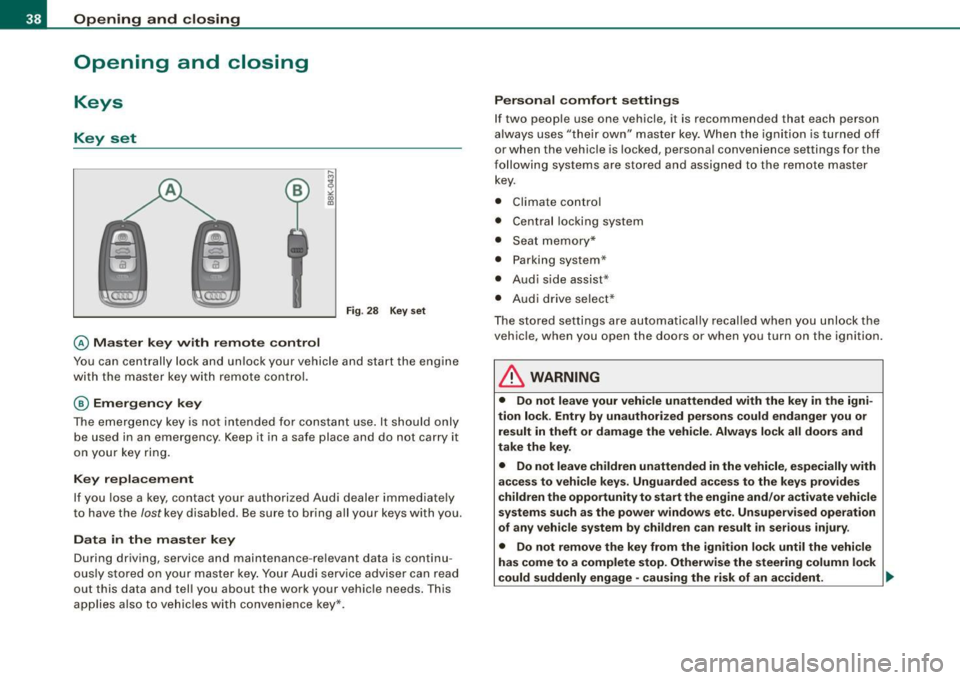
@ Ma ster key wi th remote control
Fi g. 28 Key set
You can centrally lock and unlock your vehicle and start the engine
with the master key with remote control.
@ Em erg ency key
The emergency key is not in tended for constant use . It sho uld only
be used in an emergency . Keep it in a safe place and do not carry it
on your key ring.
K ey repl aceme nt
If you lose a key, contact your authori zed Audi dealer immed iate ly
to have the
lost key disabled . Be sure to bring all your keys with you.
D ata in the ma ster key
During driving, service and maintenance -re levant data is continu
ously s tored on your master key . Your Audi service adviser can read
out this data and tel l you about the work your vehic le needs. This
applies als o to vehic les with convenience key*.
P ersonal comf ort settings
If two peop le use one vehicle, it is recommended that each person
always uses "their own" master key. When the igni tion is turned off
or when the vehicle is locked, persona l convenience settings for the
f ollowi ng sys tems are store d and assigned to the remot e master
key.
• Climate control
• Centra l locking system
• Seat me mory*
• Parking system *
• Audi side assist*
• Audi drive se lect*
T he stored setti ngs are automatically recalled when you unlock the
vehic le, when you open the doors or when you turn on the ignition.
& WARNING
• Do not leave your vehicle unattended with the key in the igni
tion lock . Entry by unauthorized per sons co uld end anger you or
result in theft or damage th e vehicle . Alway s lock all doors and
take the key .
• Do not leave children unattended in the vehicle , especiall y with
acce ss to vehi cle key s. Unguarded access to the key s prov ide s
children the opportunity to start th e engine and /or a ctivate vehicle
sys tem s such as the po wer windo ws et c. Un supervi sed oper ation
of any v ehi cle system by children can result in serio us injur y.
• Do not remove the key from the ig nition lock until the vehicle
ha s com e to a complete s top. Otherwi se the steering column lock
could suddenly engage -cau sing the ri sk of an accident. .,
Page 41 of 360

[ i J Tips
• The operation of the remote control key can be temporarily
disrupted by interference from transmitters in the vicinity of the
vehicle working in the same frequency range {e .g . a cell phone,
radio equipment).
• If you open the driver's door with the key left in the ignition lock,
a chime will sound. This is your reminder to remove the key and lock
the door.
• For security reasons, replacement keys are only available from
Audi dealers.
• For Declaration of Compliance to United States FCC and Industry
Canada regulations~
page 342. •
Check light in the master key
The check light in the master key provides information
about different conditions.
!
lJl
Fig. 29 Check light in
the master key
The check light comes on briefly once when a button is pressed, and
during an "inquiry" by the convenience key system.
Con tro ls and eq uip
ment
Opening and closing
If the check light does not come on, the battery is dead and has to
be replaced. In addition, when the battery is dead the symbol
appears in the instrument cluster display as well as the message :
Please change key battery
Battery replacement ~ page 39. •
Master key battery replacement
..
Fig. 30 Remote master
key: Removing the
mechanical key
Fig . 31 Remote master
key: Removing the
battery holder
We recommend having the battery changed by an autho
rized Audi dealer. However, if you wish to replace the dead
battery yourself, proceed as follows:
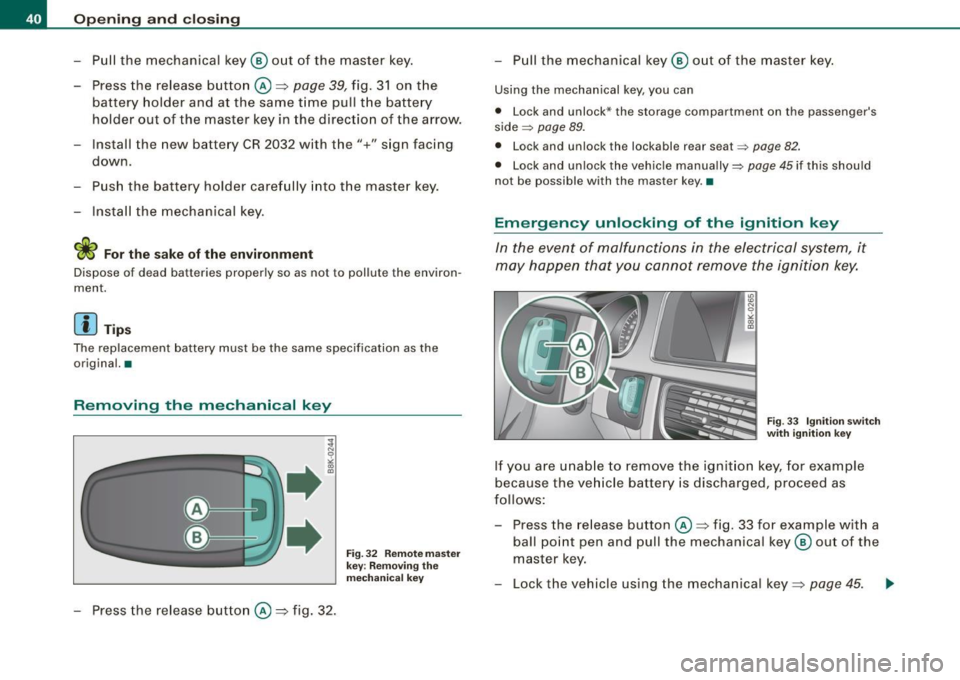
- Press the release button @=>fig. 30.
Vehicle care I I Technical data
Page 42 of 360
Opening and closing
- Pull the mechanical key ® out of the master key.
- Press the release button @~page
39, fig. 31 on the
battery holder and at the same time pull the battery
holder out of the master key in the direction of the arrow.
- Install the new battery CR 2032 with the"+" sign facing
down.
- Push the battery holder carefully into the master key .
- Install the mechanical key.
<£> For the sake of the environment
Dispose of dead batteries properly so as not to pollute the environ
ment.
[ i J Tips
The replacement battery must be the same specification as the
original. •
Removing the mechanical key
- Press the release button @~fig. 32.
Fig. 32 Remote master
key : Removing the
mechanical key
- Pull the mechanical key ® out of the master key.
Using the mechanical key , you can
• Lock and unlock * the storag e compartment on the passenger's
side
~ page 89.
• Lock and unlock the lockable rear se at ~ page 82.
• Lock and unlock the vehicle manually~ page 45 if this should
not be possible with the master key .•
Emergency unlocking of the ignition key
In the event of malfunctions in the electrical system, it
may happen that you cannot remove the ignition key.
Fig . 33 Ignition switch
with ignition key
If you are unable to remove the ignition key, for example
because the vehicle battery is discharged, proceed as
follows:
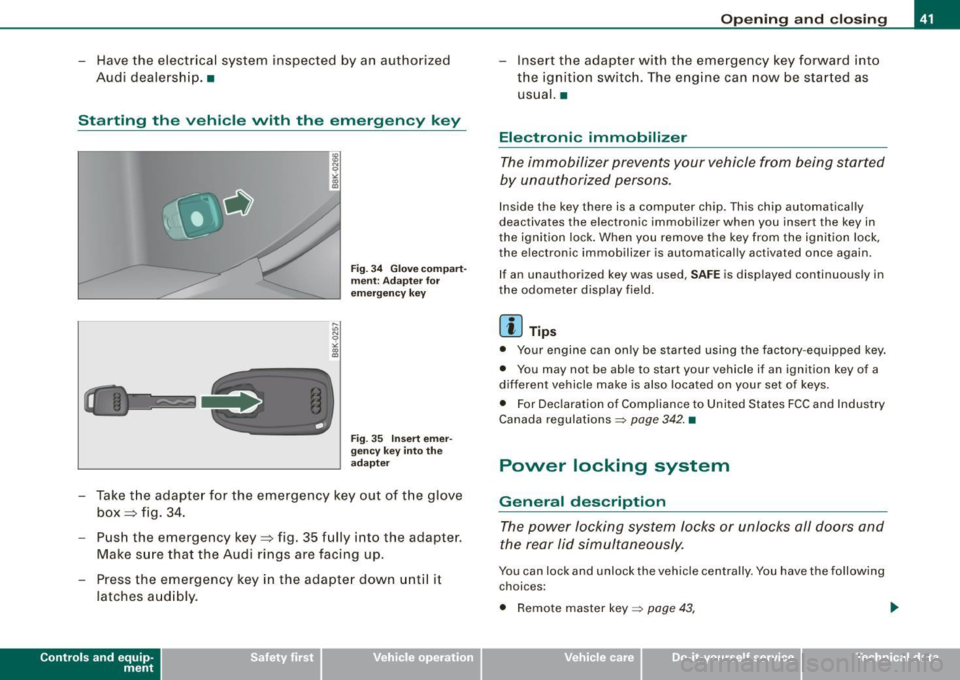
- Press the release button@~ fig. 33 for example w ith a
ball point pen and pull the mechanical key ® out of the
master key.
- Lock the vehicle using the mechanical key~ page
45. ..,_
Page 43 of 360
- Have the electrical system inspected by an authorized
Audi dealership. •
Starting the vehicle with the emergency key
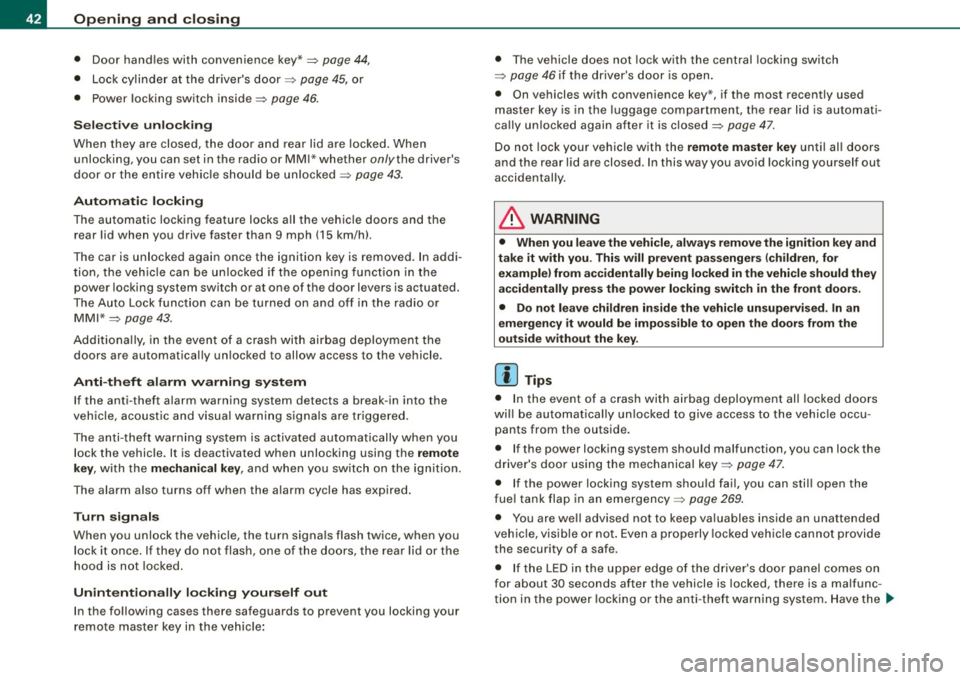
Fig. 34 Glove compart
ment: Adapter for
emergency key
Fig . 35 Insert emer
gency key into the
adapter
- Take the adapter for the emergency key out of the glove
box~ fig. 34.
- Push the emergency key~ fig. 35 fully into the adapter.
Make sure that the Audi rings are facing up.
- Press the emergency key in the adapter down until it
latches audibly.
Contro ls and eq uip
ment
Opening and closing
-Insert the adapter with the emergency key forward into
the ignition switch. The engine can now be started as
usual. •
Electronic immobilizer
The immobilizer prevents your vehicle from being started
by unauthorized persons.
Inside the key there is a computer chip. This chip automatically
deactivates the electronic immobilizer when you insert the key in
the ignition lock. When you remove the key from the ignition lock,
the elec tronic immobilizer is automatically activated once again.
I f an unauthorized key was used,
SAFE is displayed continuously in
the odometer display field.
[ i] Tips
• Your engine can only be started using the factory-equipped key.
• You may not be able to start your vehicle if an ignition key of a
different vehicle make is also located on your set of keys.
• For Declaration of Compliance to United States FCC and Industry
Canada regulations~ page 342. •
Power locking system
General description
The power locking system locks or unlocks all doors and
the rear lid simultaneously.
You can lock and unlock the vehicle centrally. You have the following
choices :
• Remote master key~ page 43, .,,.
Vehicle care
I I irechnical data
Page 44 of 360
Openin g a nd clo sin g
• Door hand les with convenience key*~ page 44,
• Lock cylind er at the dr iver's door~ page 45, or
• Power locking switch inside~
page 46.
Selec tive u nlo ck ing
When they are closed, the door a nd rear lid are locked . When
unlocking, you can set in the radio or MM I* whether
onlythe driver's
door or the entire vehic le should be unlocked~
page 43.
Autom atic lockin g
The automatic locking feature locks a ll the vehic le doors and the
rear lid when you drive faster than 9 mph (15 km/h).
The car is unlocked again once the ignition key is removed. In addi
tion, the vehicle can be unlocked if the open ing function in the
power locking system switch or at one of the door levers is actuated.
The Auto Lock function can be turned on and off in the radio or MMI *
~ page 43.
Additiona lly, in the event of a crash with airbag deployment the
doors are automatical ly un locked to allow access to the vehicle.
Anti -the ft alarm wa rning syste m
If the anti-theft alarm warning system detects a break -in into the
vehic le, acoustic and visual warn ing signa ls are triggered .
The anti-theft warning system is activated automatically when you lock the vehicle . It is deactivated when unlocking using the
re mot e
k ey ,
with the mechanical ke y, and when you switch on the ignition.
The alarm also turns off when the a larm cycle has expired.
T urn signal s
When you unlock the vehic le, the turn signals flash twice, when you
lock it once . If they do not flash, one of the doors, the rear lid or the
hood is not locked.
Unint ent ionally l ocking yours elf out
In the fo llowing cases there safeguards to prevent you locking your
remote master key in the vehic le : • T
he vehicle does not lock with the central locking switch
~ page 46 if the driver 's door is open.
• On vehicles with convenience key*, if the most recently used
master key is in the luggage compartment, the rear lid is automati
ca lly unlocked again after it is closed~
page 47.
Do not lock your vehicle with the remote master key until al l doors
and the rear lid are closed. In this way you avoid locking yourself out
accidentally .
& WARNING
• When you leave the vehicle , alway s remove the ignition key and
ta ke it with y ou. Thi s w ill pre vent pa ssenger s (children , for
exampl e) from a ccidentally being loc ked in the v ehicle should they
ac cident ally p ress the p ower locki ng switch in th e fron t door s.
• Do not l eave children in side the vehicle un supervi sed . In an
em ergen cy it w ou ld be impo ssible to open the door s from th e
out side without the key .
[ i ] Tips
• I n the event of a crash with airbag deployment all locked doors
wi ll be automatical ly un locked to give access to the vehic le occu
pants from the outside .
• If the power locking system should malfunction, you can lock the
driver's door using the mechanical key~
page 47.
• If the power locking system should fail, you can stil l open the
fue l tank flap in an emergency~
page 269.
• You are we ll advised not to keep valuables inside an unattended
vehic le, v isib le or not . Even a properly locked veh ic le cannot provide
the security of a safe.
• I f the LED in the upper edge of the driver's door panel comes on
for about 30 seconds after the vehicle is locked, there is a ma lfunc
tion in the power locking or the anti -theft warning system. Have the
~