lock AUDI A5 COUPE 2010 Workshop Manual
[x] Cancel search | Manufacturer: AUDI, Model Year: 2010, Model line: A5 COUPE, Model: AUDI A5 COUPE 2010Pages: 360, PDF Size: 84.39 MB
Page 144 of 360
• .___A_ u_ d_ i_s_ i_ d _e_ a_ s_ s_is _ t __________________________________________________ _
When driving through a curve, it is possible that side assist may
register a vehicle two lanes over, and the signal on the outside
mirror will light up.•
Applies to veh icles: with side assist
Lane width
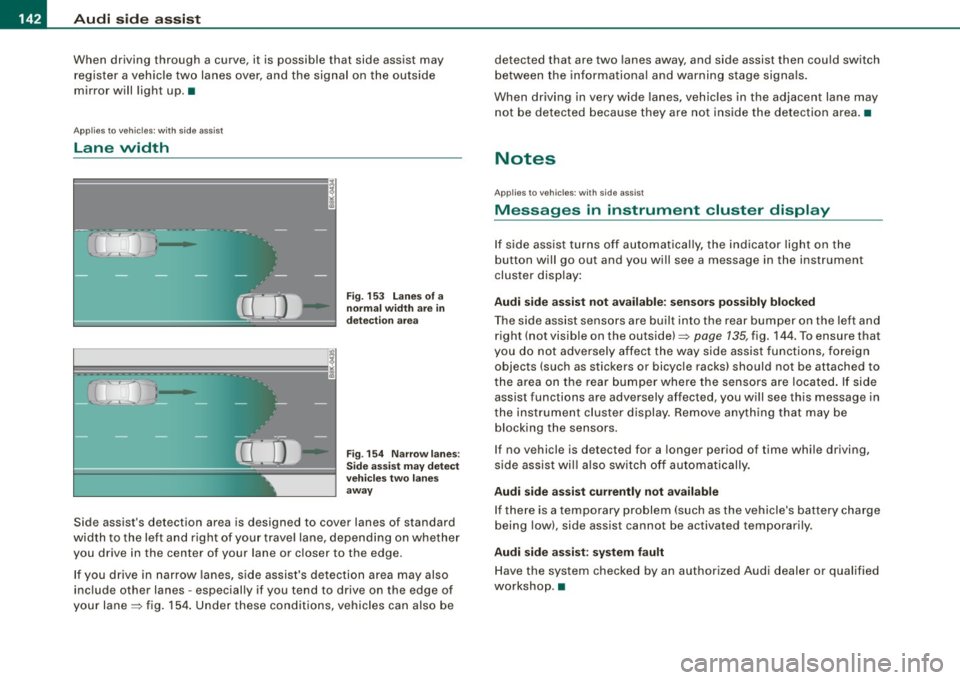
Fig. 153 Lanes of a
normal width are in
detection area
Fig. 154 Narrow lanes :
Side assist may detect
vehicles two lanes
away
Side assist's detection area is designed to cover lanes of standard
width to the left and right of your travel lane, depending on whether
you drive in the center of your lane or closer to the edge.
If you drive in narrow lanes, side assist's detection area may also
include other lanes -especially if you tend to drive on the edge of
your lane=> fig. 154. Under these conditions, vehicles can also be detected that are two
lanes away, and side assist then could switch
between the informational and warning stage signals.
When driving in very wide lanes, vehicles in the adjacent lane may
not be detected because they are not inside the detection area. •
Notes
Applies to vehicles: with side assist
Messages in instrument cluster display
If side assist turns off automatically, the indicator light on the
button will go out and you will see a message in the instrument
cluster display:
Audi side assist not available : sensors possibly blocked
The side assist sensors are built into the rear bumper on the left and
right (not visible on the outside)=? page 135, fig, 144. To ensure that
you do not adversely affect the way side assist functions, foreign
objects (such as stickers or bicycle racks) should not be attached to
the area on the rear bumper where the sensors are located. If side
assist functions are adversely affected, you will see this message in
the instrument cluster display. Remove anything that may be
blocking the sensors.
I f no vehicle is detected for a longer period of time while driving,
side assist will also switch off automatically.
Audi side assist currently not available
If there is a temporary problem (such as the vehicle's battery charge
being low), side assist cannot be activated temporarily.
Audi side assist: system fault
Have the system checked by an authorized Audi dealer or qualified
workshop. •
Page 145 of 360

___________________________________________________ A_ u _ d_i_ s---- id ___ e....:. a:..:s :..:s :..: i..::s :..:t __ ftllll
Ap plies to vehi cle s: w ith side a ssist
Safety tips
The side ass ist detec tion may be l imited w hen d riv ing ar ound
narrow street corners, on hi lly streets, and under poor weather
co nd ition s.
I t is possible that the radar sensors may also detect other objects,
suc h as high o r stagge red guardra ils .
S ide ass ist does not meas ure ac tua l la ne widt h. The syste m
assumes a fi xed lane width . Detection in the left and right lanes is
b ased on this assu med lan e wid th. Whe n driv in g o n na rro w roa ds or
when driving to the left or r ight of the c enter of a trave l lane, it is
po ssi ble that ve hic le s will be detec te d tha t are
no t in th e lane next
to the lane you are using .
& WARNING
• Improper reliance on the side assist system can cause colli
sions and serious personal injury:
-Never rely only on side assist when changing lanes .
- Always check rear view mirrors to make sure that it is safe to change lanes .
• Side assist cannot detect all vehicles under all condition s
danger of accident!
• Side a ssist cannot detect vehicles in time to alert you when
they approach from behind at very high speed , or fall drop back
very quickly.
• The radar sensor's
vision can be redu ced or entirely blocked by
rain, snow , and heavy spray . This can result in side assi st not
adequately detecting veh icles or , in some cases , not detecting
them at all . Always keep an eye on the direction you are traveling
and the relevant area around the vehicle.
Controls and equip
ment
& WARNING (continued )
• Please note that side assist indicates there are approaching
vehicles, or vehicles in your blind spot , only after your vehicle has
reached a driving speed of at least 19 mph 130 km/h).
• Side assist signal does not work around tight corners (turning
radius less than 328 feet, or 100 ml. • S ide assist is no replacement for the driver' s full attention. The
driver alone is responsible for lane changes and similar driving
maneuvers . Always keep an eye on the direction you are traveling
and the relevant area around the vehicle .
(D Note
To ensu re that side assist is not adversely affected , you sho uld not
b lock the area on the rear bumper where t he radar s ensors are
located with foreign objects (such as with stickers or bicycle racks) .
[ i ] Tips
If the positions of the radar sensors have been changed as a result
o f a re ar end -c olli sio n, for i nsta nce, have s ide ass ist c hecked by a n
authorized Audi dea ler for safety reasons .•
I • •
Page 149 of 360

____________________________________________________ T_ r_ a _n _s_ m_ i_ s _ s_ i_ o _ n _ ___._
Transmission
Manual transmission
Applies to vehicles: with manual transmission
Gearshift lever
The clutch pedal must be depressed all the way before
you can start the engine.
The manual transmission in your Audi is equipped with an
interlock-feature.
- Depress the clutch pedal all the way.
- Start the engine with the gearshift
lever in Neutral and
the clutch pedal depressed .
0 Note
Always depress the clutch pedal fully when changing gears. Do not
hold the vehicle on a hill with the clutch pedal partially depressed .
This may cause premature clutch wear or damage .
[ i J Tips
• Resting your hand on the gearshift lever knob while driving will
cause premature wear in the transmission.
• The back-up lights go on when you shift into Reverse with the
ignition on .•
Con tro ls and eq uip
ment
App lies to vehicles: with manual transm ission
Gearshift pattern (6-speed manual
transmission )
Engaging reverse gear (R)
Fig. 158 Gearshift
pattern: 6-s peed
manual transmission
- Move the shift lever all the way to the left, press it down,
then push it forward.
Especially after driving forward, stop the vehicle completely, shift
into
Neutral and rest the shift lever briefly in Neutral before shifting
into
Reverse. •
Automatic transmission
Applies to vehicles: wi th au tomat ic transmission
Introduction
Your vehicle is equipped with an electronically controlled 6 -speed
automatic transmission. Upshifting and downshifting takes place
automatically. ~
Vehicle care I I irechnical data
Page 151 of 360
_______________________________________________________ T_ ra_ n_s_ m __ is_s_ io_ n __ BII
& WA RNIN G (continu ed )
- Do not accelerate while sele cting a driving pos ition. At this
time the engine mu st be at idle speed so that undue stre ss is
not placed on the clutches in the transmiss ion .
- Remember: Even when stopped briefly with the automatic
transmission in D ,S or R, engine power is being transmitted to
the wheels. Your vehicle could "creep " forward or back ward .
When stopped , keep the brake pedal fully depressed and use
the parking brake if necess ary to keep the vehicle from rolling.
• If the selector lever i s unintentionally moved into N while you
are driving, take your foot off the accele rator pedal and wait for
the eng ine to return to idle speed before selecting a dr iving posi
tion.
• Never shift into R or P when the vehicle is in mot ion .
• Never get out of the driver 's seat when the engine is running .
• If you mu st get out of the vehicle , move the selector lever
securely into the
P pos ition and apply the parking brake firmly .
• If the engine must remain running , never have any driving po si
tion engaged when che cking under the hood. Make sure the
selector lever has securely engaged and is locked in
P with the
parking brake firmly set~ page
263 , "Engine compartment ".
Otherwise , any increase in engine speed may set the vehicle in
motion , even with the parking brake applied. •
Controls and equip
ment
Ap plies to vehicles: wit h auto matic tra nsmiss io n
Selector lever positions
This sec tion describes the selec tor l ever positi ons an d
dr iv ing ra ng es.
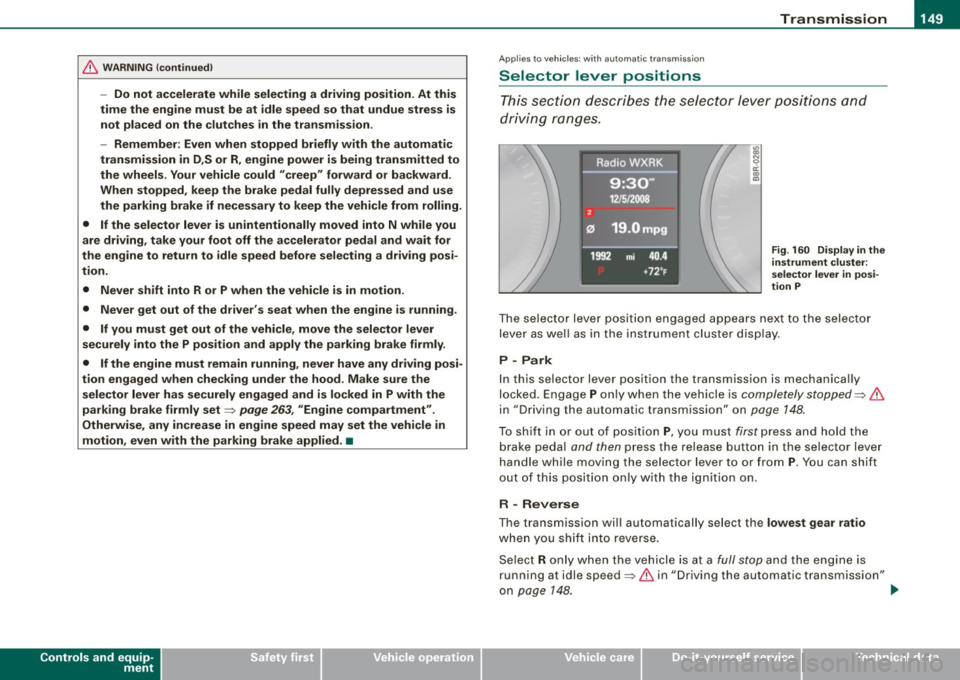
Fig . 160 Display in the
instrument clu ste r:
se lector lever in posi
tion P
The se le cto r lev er p osit io n engaged ap pears ne xt to the selec to r
lever as wel l as in the instrument cluster display .
P -Park
In this selecto r lever position the transmission is mechanica lly
lo cked. Engage
P o nly w hen th e vehicle is comple tely stopped ~ &
in "Driving the automatic transm ission" on page 148.
To s hift i n or out of positi on P, yo u m us t first p ress and h old the
b rake peda l and then press the re lease button in the se lector lev er
handle while moving the selector lever to o r from
P . You can shift
out o f this pos it io n only with the ig niti on on .
R - Reverse
The transmission wi ll automatically sel ect the lowest gear ratio
whe n you sh ift i nto reverse.
Se lec t R only w hen th e ve hicle is a t a
full stop an d the en gin e is
running at idle speed~
& in "Driving the automatic transmission"
on page
14 8. ~
I • •
Page 152 of 360
• ..__T_ r_a _n_ s_ m_ is_ s_i o _ n ______________________________________________________ _
Before you move the selector lever to R, press both the button in the
handle of the selector lever
and the brake pedal at the same time .
When the ignition is on , the backup lights illumina te when the
selector lever is moved into R.
N -N eutr al
The transmission is in neutral in this position. Shift to this position
for standing with the brakes applied=:>
page 150.
When the vehicle is stationary or at speeds below 3 mph (5 km/h) ,
you must always apply the footbrake before and while moving the lever out of
N .
D -N or mal pos itio n fo r d rivi ng forward
Posi tion Dis for normal city and highway driving . It ranges from zero
to top speed and all gears shift automatically, depending on engine load , driv ing spe ed and automa tically selected shift programs .
When the vehicle is s tationary or at speeds below 3 mph (5 km/h).
you must always apply the foot brake befo re and while moving the
lever to
D ou t of N.
In certain circumstances it may be advantageous to temporarily
switch to the manual shift program to manually select gear ratios to
match specific driving conditions=:>
page 152.
S -Sp o rt posit io n*
Select this pos ition for sportier performance. In this position, the
transmission will not upshift as soon , allowing the vehicle to use the
increased power available at higher engine speeds to achieve live
lier acceleration.
When the vehicle is stationary or at speeds below 3 mph (5 km/h) ,
you must always apply the foot brake befo re and while moving the
lever to
S out of N.
& WARNING
R ea d and foll ow all WARNIN GS =:> & in "Dri vin g th e a utom atic
tr an smi ssion " on
pag e 148.
0 Note
Coasting downhill with the transmission in N and the engine not
running will result in damage to the automa tic transmission and
possibly the catalytic converter. •
Applies t o ve hicl es: wit h automa tic trans mis si on
Automatic Shift Lock (ASL )
The Automatic Shift Lock safeguards you against acciden
tally shifting into a forward or the reverse gear and
causing the vehicle to move unintentionally.
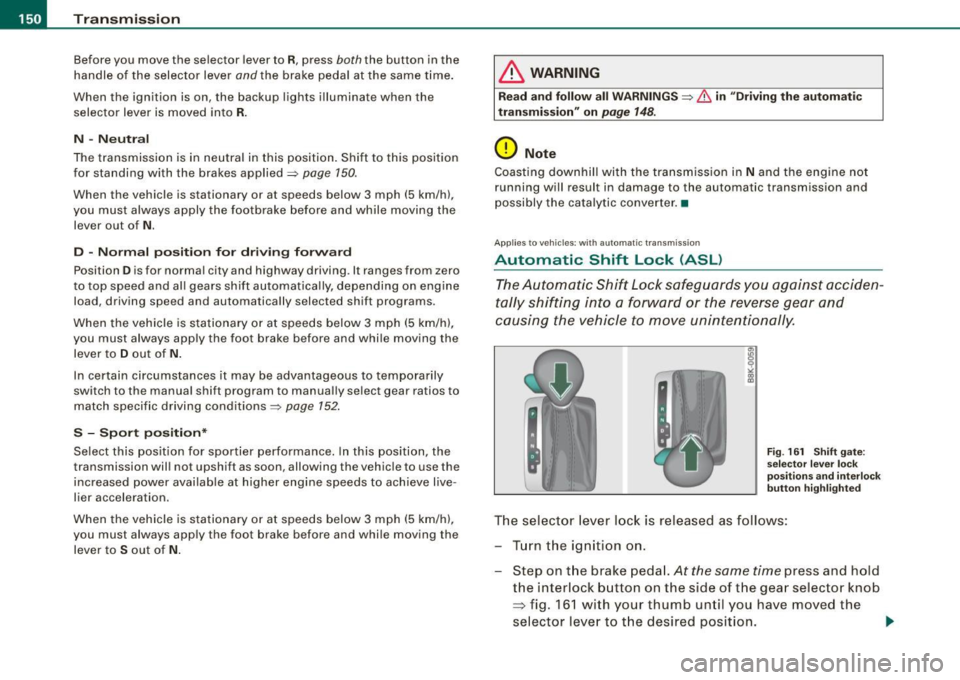
F ig . 16 1 Shift gate:
se lector le ver loc k
posit ions a nd int erl ock
butt on hi gh ligh ted
The selector lever l ock is released as follows :
Turn the ignit ion on .
Step on the brake peda l.
At the same time press and hold
the interlock button on the s ide of the gear selector knob
=> fig. 161 w ith your thumb until you have moved the
selector lever to t he desired position.
~
Page 153 of 360
Tra ns mi ssio n -
----------------
Aut omat ic selec to r l ever lock
The se lector lever is locked in the P and N positions when the igni
tion is turned on. To move the lever from these positions the driver
must depress the brake pedal. As a reminder to the driver, the
follow ing warning appears in the instrument cluster display when
the selector is in
P and N:
W hen sta tio nary app ly footbrake while selecting g ear
A time delay e lement prevents the selector lever from locking when
it is moved through the
N position (going from R to Dl. The locking
e lement will lock the selector lever if the lever is left in N (Neutral)
for more than approximately 1 second, without the brake peda l
being pressed.
At speeds above about 3 mph (5 km/h) the Automatic Shift Lock is
automatically deactivated in the
N position .
Interlock butt on
The lock button on the selector lever prevents the lever from being
accidentally shifted into certain positions. Pressing this button
deactivates the selector lever lock. Depending on the direction of
the shift, the selector lever locks at different positions. The positions
are highlighted in the illustration =>
page 150, fig. 161.
Igniti on key sa fe ty in te rlo ck
The key cannot be removed from the ignition unless the selector
lever is in the
P park position. When the ignition key is removed, the
selector lever wil l be locked in the
P position. •
Applies to vehicles : with automatic transm iss ion
Kick-down
The kick-down feature allows the vehicle to generate
maximum acceleration .
When you press the acce lerator pedal beyond the resistance point
that is reached at ful l throttle, the transmission wi ll select a lower
gear ratio based on vehic le speed and engine RPM. The engine RPM
Controls and equip
ment
wi ll be controlled to produce maximum vehic le acceleration as long
as you continue to press the accelerator pedal beyond this resis
tance point .
& WARNING
Be care ful whe n usi ng the kick -dow n fe atur e on slipp ery ro ads .
R apid acc eleration may cau se th e v ehicle to skid . •
App lies to vehicles : with automat ic transm ission
Dynamic shift program (DSP)
The aut omatic transmission is electronically controlled.
The transmission is se lf adapting and will a ut oma tica lly se lect the
best shift program suited to the driving conditions and driving style.
The transmission will select one of the
eco nom y programs when
you drive at a steady speed or a g radually changing speed without
heavy acceleration. This achieves optimum fuel efficiency, with early
upshifting and delayed downshifting.
The transmission will automatically select the
s p ort y shift programs
when you drive at higher speeds, or with heavy acceleration and
frequent ly changing speeds . Upshifts are delayed to make full use
of engine power . Downshifting takes place at higher engine speeds
than in the economy programs .
The se lect ion of the most su itable shift program is a continuous,
automatic process. The driver can also make the transmission
sw itch to a sporty program by
quick ly pressing down the gas peda l.
This causes the transmission to shift down to a lower gear to
achieve rapid acceleration, e.g. for quickly passing another vehicle .
You do not need to press the gas pedal into the kick-down range.
After the transm ission has upshifted, the original program is
selected accord ing to your driving sty le.
An additiona l shift program allows the automatic transmission to
select the proper gear for uph ill and downhi ll gradients. ..,.
I • •
Page 156 of 360
• ..__T_ ra_ n_s_ m_ i_ s _s_ i_ o _n ___________________________________________________ _
0 Note
If the transmission switches to fail-safe mode, you should take the
vehicle to an authorized Audi dealership as soon as possible to have
the condition corrected .•
A pplies to veh icles : with aut om at ic transmi ssio n
Emergency release of the selector lever
If the vehicle's power supply fails, the selector lever can
be released in an emergency.
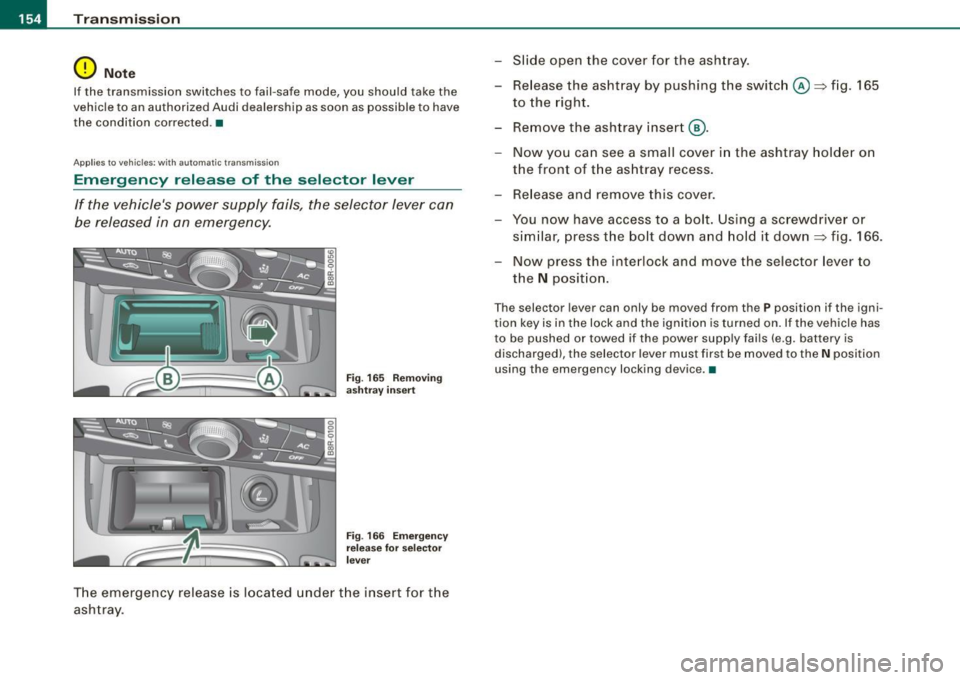
Fig. 165 Removing
ashtray insert
Fig. 166 Emergency
release for selector
lever
The emergency release is located under the insert for the
ashtray . -
Slide open the cover for the ashtray.
- Release the ashtray by pushing the switch@~ fig. 165
to the right.
- Remove the ashtray insert @.
- Now you can see a small cover in the ashtray holder on
the front of the ashtray recess.
- Release and remove this cover.
- You now have access to a bolt . Using a screwdriver or
similar, press the bolt down and hold it down ~ fig. 166.
Now press the interlock and move the selector lever to
the
N position.
Th e selector le ve r can only be moved from th e P position if the igni
tion key is in the lock and the ignition is turned on. If the vehicle has
to be pushed or towed if the power supply fails (e.g. battery is
discharged), the selector lever must first be moved to the
N position
using the emergency locking device. •
Page 172 of 360

___ D_ ri_v _i_n -=g=--- S_ a_ f _e___, ly'---------------------------------------------------
Proper occupant seating positi ·ons
Proper seating position for the driver
The proper driver seating position is important for safe,
relaxed driving.
Fig. 180 The correct
distance between
driver and steering
wheel
Fig. 181 Correct head
restraint position for
driver
For your own safety and to reduce the risk of injury in the
event of an accident, we recommend that you adjust the
driver's seat to the following position:
- Adjust the driver's seat so that you can easily push the
pedals all the way to the floor while keeping your knee(s)
slightly bent=:>& . - Adjust the angle of the seatback so that it is in an upright
position so that your back comes in full contact with it
when you drive.
- Adjust the steering wheel so that there is a distance of at
least 10 inches (25 cm) between the steering wheel and
your breast bone=:> fig. 180. If not possible, see your
authorized Audi dealer about adaptive equipment.
- Adjust the steering wheel so that the steering wheel and
airbag cover points at your chest and not at your face.
- Grasp the top of the steering wheel with your elbow(s)
slightly bent.
- Adjust the head restraint so that the upper edge is as even with the top of your head as possible but no lower
than eye level and so that it is as close to the back of your
head as possible =:> fig. 181.
- Fasten and wear safety belts correctly=:>
page 183.
- Always keep both feet in the footwell so that you are in
control of the vehicle at all times.
For detailed information on how to adjust the driver's seat, see
=> page 72.
& WARNING
Drivers who are unbelted, out of position or too close to the airbag
can be seriously injured by an airbag as it unfolds. To help reduce
the risk of serious personal injury:
• Always adjust the driver's seat and the steering wheel so that
there are at least 10 inches
125 cm) between your breastbone and
the steering wheel.
• Always hold the steering wheel on the outside of the steering
wheel rim with your hands at the 9 o'clock and 3 o'clock positions ..
Page 173 of 360

Driving Safely -
----------------
& WARNING (continued)
to help reduce the risk of personal injury if the driver's airbag
inflates.
• Never hold the steering wheel at the 12 o'clock position or with
your hands at other positions inside the steering wheel rim or on
the steering wheel hub . Holding the steering wheel the wrong way
can cause serious injuries to the hands, arms and head if the
driver's airbag deploys .
• Pointing the steering wheel toward your face decreases the
ability of the supplemental driver's airbag to protect you in a colli
sion.
• Always sit in an upright position and never lean against or
place any part of your body too close to the area where the airbags
are located .
• Before driving, always adjust the front seats and head
restraints properly and make sure that all passengers are properly
restrained.
• Never adjust the seats while the vehicle is moving. Your seat
may move unexpectedly and you could lose control of the vehicle.
• Never drive with the backrest reclined or tilted far back! The
farther the backrests are tilted back, the greater the risk of injury
due to incorrect positioning of the safety belt and improper
seating position.
• Children must always ride in child safety seats
=> page 213.
Special precautions apply when installing a child safety seat on
the front passenger seat
=> page 188 . •
Controls and equip
ment Safety first Vehicle operation
Proper seating position for the front
passenger
The proper front passenger seating position is important
for safe, relaxed driving.
For your own safety and to reduce the risk of injury in the
event of an accident, we recommend that you adjust the
seat for the front passenger to the following pos ition:
- Move the front passenger seat back as far as possible.
There must be a minimum of 10 inches (25 cm) between
the breastbone and the instrument panel
=> &.
- Adjust the angle of the seatback so that it is in an upright
position and your back comes in full contact with it
whenever the vehicle is moving.
- Adjust the head restraint so that the upper edge is as
even with the top of your head as possible but not lower
than eye level and so that it is as close to the back of your
head as possible .
- Keep both feet flat on the floor in front of the front
passenger seat.
- Fasten and wear safety belts correctly =>
page 183.
For detailed information on how to adjust the front passenger's
seat, see
=> page 69.
& WARNING
Front seat passengers who are unbelted, out of position or too
close to the airbag can be seriously injured or killed by the airbag
as it unfolds. To help reduce the risk of serious personal injury : .,
Vehicle care Do-it-yourself service Technical data
Page 178 of 360
___ o_ r_iv _ i _n....; g::;_ S_ a_f _e _ly=-- -------------------------------------------------
Loose items in the luggage compartment can shift
suddenly, changing vehicle handling characteristics. Loose
items can also increase the risk of serious personal injury in
a sudden vehicle maneuver or in a collision.
- Distribute the load evenly in the luggage compartment.
- Always place and properly secure heavy items in the
luggage compartment as low and as far forward as
possible
~ fig. 183.
Secure luggage using the tie-downs provided~
page 79.
- Make sure that the rear seat back is securely latched in
place.
& WARNING
Improperly stored luggage or other items can fly through the
vehicle causing serious personal injury in the event of hard braking or an accident. To help reduce the risk of serious personal injury:
• Always put objects , for example, luggage or other heavy items
in the luggage compartment.
• Always secure objects in the luggage compartment using the
tie-down eyelets and suitable straps.
& WARNING
Heavy loads will influence the way your vehicle handles. To help
reduce the risk of a loss of control leading to serious personal
injury:
• Always keep in mind when transporting heavy objects, that a
change in the center of gravity can also cause changes in vehicle
handling:
-Always distribute the load as evenly as possible.
& WARNING (continued)
-Place heavy objects as far forward in the luggage compart
ment as possible.
• Never exceed the Gross Axle Weight Rating or the Gross
Vehicle Weight Rating specified on the safety compliance sticker on the left door jamb. Exceeding permissible weight standards
can cause the vehicle to slide and handle differently.
• Please observe information on safe driving~
page 168.
& WARNING
To help prevent poisonous exhaust gas from being drawn into the
vehicle, always keep the rear lid closed while driving.
• Never transport objects larger than those fitting completely
into the luggage area because the rear lid cannot be fully closed.
• If you absolutely must drive with the rear lid open, observe the
following notes to reduce the risk of poisoning:
-Close all windows,
- Close the panoramic tilting sunroof*,
- Open all air outlets in the instrument panel,
- Switch off the air recirculation,
- Set the fresh air fan to the highest speed.
& WARNING
Always make sure that the doors, all windows, the panoramic
tilting sunroof* and the rear lid are securely closed and locked to
reduce the risk of injury when the vehicle is not being used.
• After closing the rear lid, always make sure that it is properly
closed and locked.
• Never leave your vehicle unattended especially with the rear lid
left open. A child could crawl into the vehicle through the luggage
compartment and close the rear lid becoming trapped and unable .,_