parking brake AUDI A5 COUPE 2010 User Guide
[x] Cancel search | Manufacturer: AUDI, Model Year: 2010, Model line: A5 COUPE, Model: AUDI A5 COUPE 2010Pages: 360, PDF Size: 84.39 MB
Page 117 of 360
On th e road 1111
-------------------'
Driver messages in the instrument cluster
Warning Vehicl e in cline is e xce ssive
This message appears when the parking brake is applied on an
incline that exceeds about 30%.
In this case the braking power of the park ing brake may
n ot be
adequ ate
to prevent the vehicle from rol ling unintentionally.
Pl ease release parking brake
Please note that for safety reasons the parking brake is re leased
automatically only if the driver's seat belt is fully engaged in the
buckle.
To relea se the parking brake pre ss the br ake pedal
This driver message appears when the switch to release the parking
brake was pressed. The parking brake can only be released if you
step on the brake pedal and at the same time press the switch or
you automatically release the parking brake wi th the starting assist
=> page 113.
Parking brake!
This driver message appears together with the yellow symbol
when there is a parking b rake ma lfunction.
M alfun ction sta rt ing a ssist
This driver message appears if the re is a starting assist ma lfunction .
The automatic release of the parking brake when starting is
malfunctioning. You have to release the parking brake manua lly by
pressing the switch. Have the problem corrected by an authorized
Audi dea ler .•
Con tro ls and eq uip
ment
Cruise control
Switching on
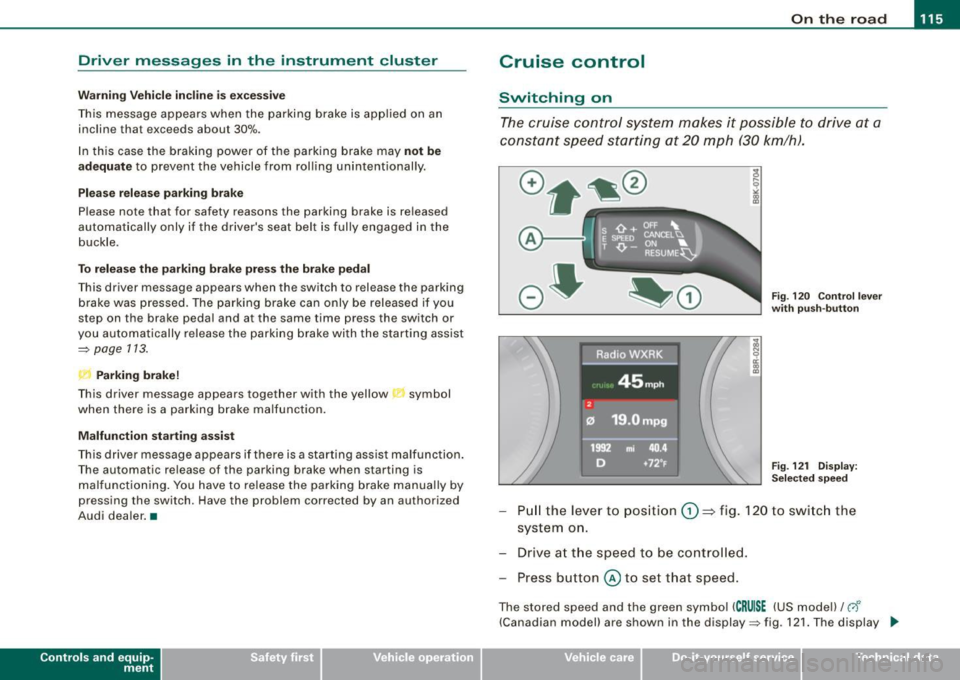
The cruise control system m akes it possible to drive at a
constan t speed starting at 20 mph (30 km/h) .
A--
Fig. 120 Con tro l l ever
w ith pu sh -butt on
Fig . 12 1 D ispla y:
Se lec te d sp ee d
Pull the lever to pos ition (D => fig. 120 to switc h the
system on.
Drive a t th e speed to be controlled .
Press button
© to set that speed.
The stored speed and the green symbol ( CRU ISE (US mode l)/ c,f'
(Canadian model) are shown in the display=> fig. 121. The display _.,
Vehicle care I I irechnical data
Page 121 of 360

_______________________________________________ A_ d_ a ---=- p_t_ i_v _e_ c_ r_ u_ i_ s _e_ c_ o_ n_t_ r _o _ l __ llll
& WARNING (continued)
• Always turn off adaptive cruise control when entering turn
lanes, highway exit lanes and construction zones or similar situa
tions because the vehicle will automatically accelerate to the
stored speed.
• Never rest your foot on the accelerator pedal, especially when
the adaptive cruise control is being used because doing so will override the braking function and prevent the brakes from being
applied by the system when it detects a situation when the brakes
must be applied.
• Always remember that the adaptive cruise control has limits -
it does not react when you drive towards an obstacle or some
thing else on or near the road that is not moving, such as vehicles stopped in a traffic jam, a stalled or disabled vehicle.
• Always remember that the adaptive cruise control cannot
detect a vehicle that is driving towards you in your traffic lane and
that it cannot detect narrow vehicles such as motorcycles and
bicycles .
[ i] Tips
• For safety reasons, the stored speed is deleted when the ignition
is turned off.
• The Electronic Stabilization Program (ESP) and the Anti -Slip
Regulation (ASR) cannot be deactivated when the adaptive cruise
control is switched on. If the ESP and the Anti -Slip Regulation (ASR)
has been deactivated and you then switch on the adaptive cruise
control, the ESP function will also be activated automatically.
• Damage caused by accidents (e.g. if the vehicle is damaged
when parking) can affect the radar sensor settings. This can cause
the system to malfunction or switch off completely.
• The radar sensor cover is heated. In winter conditions, you
should still check before driving to make sure it is free of ice and
snow. If necessary, clean the area near the radar sensor carefully
=>
page 118, fig. 122.
Controls and equip
ment
• To ensure that the radar sensor is not blocked, foreign objects
(e.g. stickers, add -on parts) must not cover the area near the radar
sensor=>
page 118, fig. 122. The area near the radar sensor must
not be painted, either.
• For Declaration of Compliance to United States FCC and Industry
Canada regulations =>
page 342. •
Applies to vehic les : with adaptive crui se cont rol
How does adaptive cruise control work?
Vehicles traveling ahead are detected with the aid of a
radar sensor.
I==;.===============-. ~
~
ll!
Fig. 123 Radar sensor
measurement range
A radar sensor is built into the front of the vehicle=> fig. 123, which
is subject to certain system limits=>
page 130. Stationary objects
are not taken into consideration. The system is intended to measure
the distance to reflective surfaces. The system responds after the
distance measurement has taken place. If a measurement is not
possible, the system does not respond.
Open road
When the road is clear, the adaptive cruise control works like cruise
control. It maintains a constant target speed specified by the driver .~
I • •
Page 130 of 360
• ..__A_ d_ a-'- p_t _iv _ e_ c_r _u _ i_s _e _ c_o_ n_t _r _o _l _____________________________________________ _
Engin e spee d !
The text message Engine sp ee d ! appears in vehicles with manual
transmission when the driver did not shift up or down in time while
using adaptive cruise contro l braking or accelerating, causing the
vehicle to exceed or not reach the perm itted limit speed. This
causes adaptive cruis e control to deactivate automatically . A chime
sounds as a reminder .
Parking brake !
The text message Parking brake! appears if emergency braking was
manually initiated with the Electromechanica l Parking Brake (EPBl.
The adaptive cruise contro l is turned off . This is accompanied by a
warning tone.
ESP a ctiv ati on
The text message ES P activati on appears if the E lectronic Stabil iza
tion Program (ESP ) has intervened . In this case the adapt ive cruise
control is automatical ly turned off . This is accompanied by a
warn ing tone.
Sp eed
The set speed in mph (Canada km/h ) a lways appears when saving or
changing the speed in adaptive cruise control~
page 121, "How is
the speed stored?" and~
page 121, "Changing stored speed".
Speed too low
The text message Speed too low appears if the cur ren t speed is too
low
to set or to hold the requested speed.
When setting a desired speed , it must be at leas t 20 mph (30 km/h).
At speeds below 12 mph (20 km/h), the cruise control is turned off.
In speeds over 95 mph (150 km/h), the system remains active and
resumes the speed of 95 mph (150 km /h) if the driver removes the
foot from the acce lerator .
Selec tor leve r posit io n!
The text message Selector lever po sition! appears when the
selector lever is moved to pos ition
N . In this position, adaptive
cruise control is no t avai lable. •
Applies to vehi cles : w it h ad apt ive crui se c ontr ol
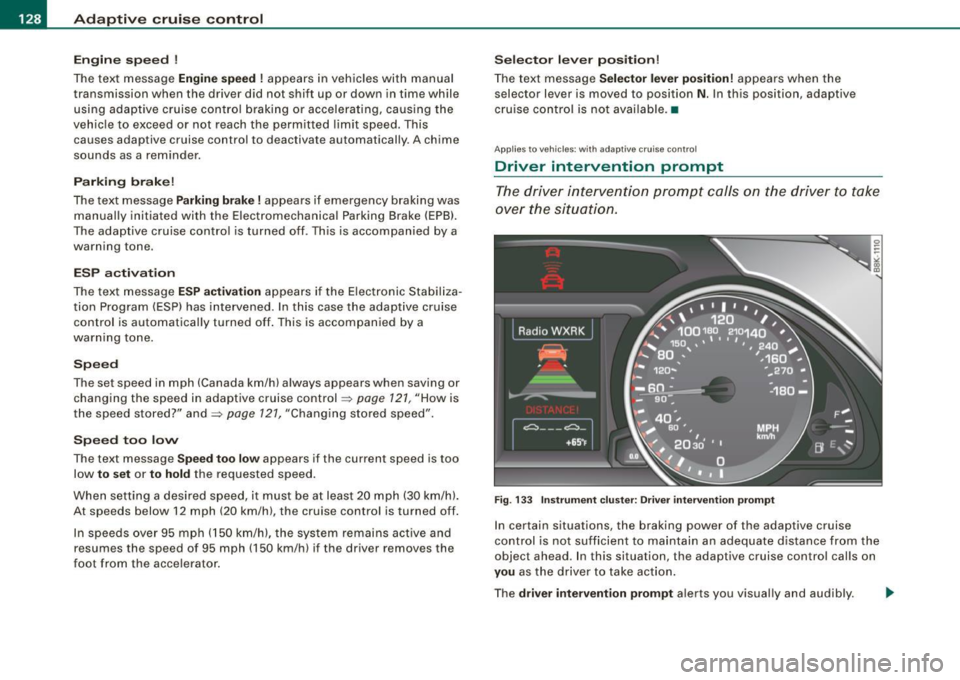
Driver intervention prompt
The dri ver i ntervention pr ompt c alls on the driver to take
ov er the situation.
F ig . 133 Instrument clu ster : Dr iv e r i nte rv enti on prompt
In certain situations, the braking power of the adaptive cruis e
control is not sufficient to maintain an adequate distance from the
objec t ahead . In this situation, th e adaptive cruise con trol cal ls on
you as the driver to take action .
The
driver intervent ion prompt alerts you visually and audibly. -.,
Page 150 of 360

• ..__T_ ra _ n_s_ m_ i_ s _s_ i_ o _ n ___________________________________________________ _
The transmission is also equipped with tiptronic. It allows the driver
t o shift gears
manually if desired => page 152. •
Applies to v ehi cles : w ith aut omati c tra nsm iss io n
Driving the automatic transmission
St artin g th e e ngin e
- The selector lever must be in
N or P.
Starting off
- Press and hold the brake pedal.
Fig. 159 S hift gate on
t h e ce nter co nso le :
selector lever with
re lease button
- Press and hold the release button in the selector lever
handle and move t he selector lever f rom
P or N to D and
release the button => & .
- Wait briefly until the transm ission has shif ted (you will
feel a sligh t movement).
Remove your foot from the brake pedal and accelerate.
Rocking back and forth to become unstu ck
- Sh ift only between
D and R w hen the vehicle is at a full
stop and the eng ine is running at idle speed . S
topp ing
- Press and hold the brake pedal until the vehicle has come
to a comp lete stop.
- Keep the brake pedal depressed so that the vehic le
cannot ro ll forward or backward while it is idling =>& .
- Once s topped,
do not depress the acce lerator pedal to
rev up the engine=>&.
P a rk in g
- Press and hold the brake pedal until the vehicle has come
to a comp lete stop.
Set the parking brake firmly=>
page 113, "Parking".
- Press and hold the release button in the selector lever
handle, move the selector leve r into
P and then let go of
the release button => & .
The selector lever must be in Nor P. If one of the driving positions
is engaged a safety switch will prevent the eng ine from being
started. See also=>
page 108 .
Before you move the selector lever from the P position, you must
a lways apply the brake pedal before and while depressing the
button in the handle of the se lector lever .
& WARNING
• Unintende d vehicle mov ement can cau se se rio us injur y.
- Wh en the sel ector l ever is in a driving posit io n, th e ve hicle
may c reep, ev en at idle speed . Th erefore d o no t re lease the
p ar king brak e or fo ot b ra ke u ntil you are rea dy to move,
be caus e po wer is tran sm itt ed to the wheels as s oon as a
dri ving po sition i s engag ed . ..,
Page 151 of 360
_______________________________________________________ T_ ra_ n_s_ m __ is_s_ io_ n __ BII
& WA RNIN G (continu ed )
- Do not accelerate while sele cting a driving pos ition. At this
time the engine mu st be at idle speed so that undue stre ss is
not placed on the clutches in the transmiss ion .
- Remember: Even when stopped briefly with the automatic
transmission in D ,S or R, engine power is being transmitted to
the wheels. Your vehicle could "creep " forward or back ward .
When stopped , keep the brake pedal fully depressed and use
the parking brake if necess ary to keep the vehicle from rolling.
• If the selector lever i s unintentionally moved into N while you
are driving, take your foot off the accele rator pedal and wait for
the eng ine to return to idle speed before selecting a dr iving posi
tion.
• Never shift into R or P when the vehicle is in mot ion .
• Never get out of the driver 's seat when the engine is running .
• If you mu st get out of the vehicle , move the selector lever
securely into the
P pos ition and apply the parking brake firmly .
• If the engine must remain running , never have any driving po si
tion engaged when che cking under the hood. Make sure the
selector lever has securely engaged and is locked in
P with the
parking brake firmly set~ page
263 , "Engine compartment ".
Otherwise , any increase in engine speed may set the vehicle in
motion , even with the parking brake applied. •
Controls and equip
ment
Ap plies to vehicles: wit h auto matic tra nsmiss io n
Selector lever positions
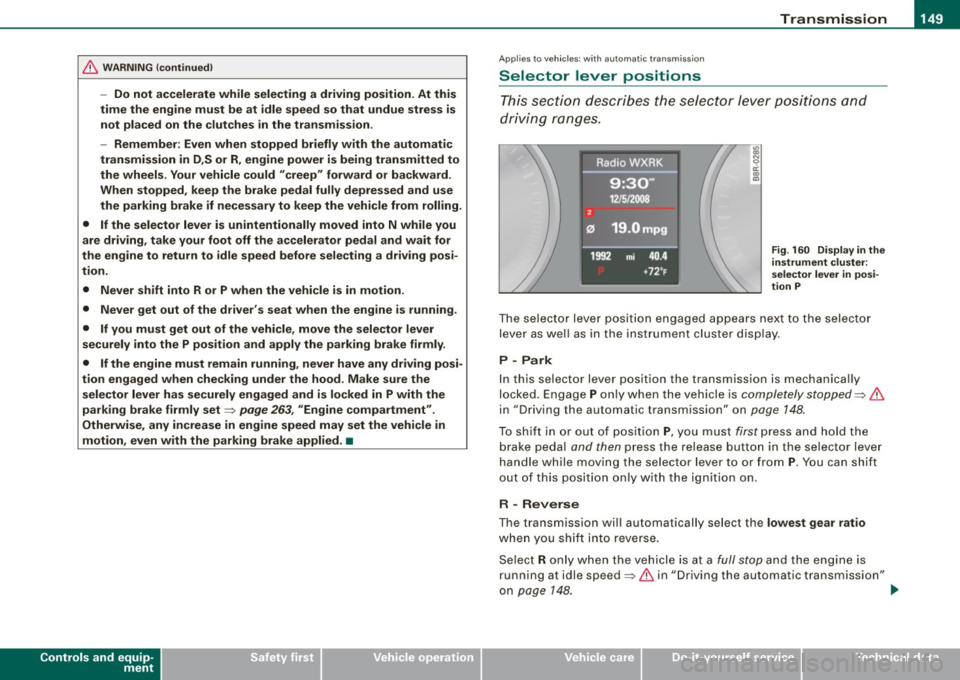
This sec tion describes the selec tor l ever positi ons an d
dr iv ing ra ng es.
Fig . 160 Display in the
instrument clu ste r:
se lector lever in posi
tion P
The se le cto r lev er p osit io n engaged ap pears ne xt to the selec to r
lever as wel l as in the instrument cluster display .
P -Park
In this selecto r lever position the transmission is mechanica lly
lo cked. Engage
P o nly w hen th e vehicle is comple tely stopped ~ &
in "Driving the automatic transm ission" on page 148.
To s hift i n or out of positi on P, yo u m us t first p ress and h old the
b rake peda l and then press the re lease button in the se lector lev er
handle while moving the selector lever to o r from
P . You can shift
out o f this pos it io n only with the ig niti on on .
R - Reverse
The transmission wi ll automatically sel ect the lowest gear ratio
whe n you sh ift i nto reverse.
Se lec t R only w hen th e ve hicle is a t a
full stop an d the en gin e is
running at idle speed~
& in "Driving the automatic transmission"
on page
14 8. ~
I • •
Page 166 of 360
• .___H_ o_ m _ e _L_i _ n _k _® ____________________________________________________ _
Homelink®
Universal remote control
Applies to vehic les: w ith Home link ® universal remote cont ro l
General information
The HomeLink® fe ature can le arn up to th ree r adio
fre quency codes for m ost c urrent transmitters used for
operating garage doors, es tate gates , home or outdoor
ligh ting sy stems, and other devices .
You m ust first pro gram the H omel in k® trans mitter befor e you can
use the system=>
page 165, "Programm ing th e Homelink® trans
m itter".
In order to pro gram t he Homelink® transmitter fo r devices utilizing
ro lling code, a second person on a ladder who can safe ly reach the
ga rage door o pene r m oto r is rec omm ended . It is also necessa ry to
locate the "learn" button on your garage door opener motor. Refer
to t he op era ting instructions for the opene r, as the loca tion and
co lor of this button may vary by manufacturer .
Y ou can still use the o rigina l remote c ontrol fo r th e dev ice at any
time.
& WARNING
• Never use the Homelinkl1JI transmitter with any garage door
opener that does have not the safety stop and reverse feature as
requ ired by federal safety standards . This in cludes any garage
door opener model manufactured before April 1, 1982.
• A garage door opener which cannot detect an object , signaling
the door to stop and reverse does not meet current federal safety
standards . Using a garage door opener without these features
increases risk of serious injury or death .
& WARNING (continued)
• For safety reasons never release the parking brake or start the
engine while anyone is standing in front of the vehicle.
• A garage door or an estate gate may sometimes be set in
motion when the Homelink ® remote control is being
programmed . If the devi ce is repeatedly activated , this can over
strain motor and damage its electrical components -an over
heated motor is a fire hazard!
• To avoid possible injuries or property damage , please always
make absolutely certain that no persons or objects are located in
the range of motion of any equipment being operated.
[ i ] Tips
• I f you wou ld l ik e mor e infor mation o n Hom elink®, w here to
purchase the Homelink ® compatib le products, or wou ld li k e to
pu rchase the Homeli nk® Home Ligh ting Package, please call t oll
free: 1 -8 0 0 -355 -3515.
• F or Dec lara tion of Compliance to U nite d Sta tes FCC an d Indu stry
C anada regulations=>
page 342 . •
Page 167 of 360
___________________________________________________ H_ o_m _ e_ L_ i_ n _k_ @_R _ __.1111
Applies to vehicles: with Homelin k® un iversal remote contro l
Programming the Homelink ® transmitter
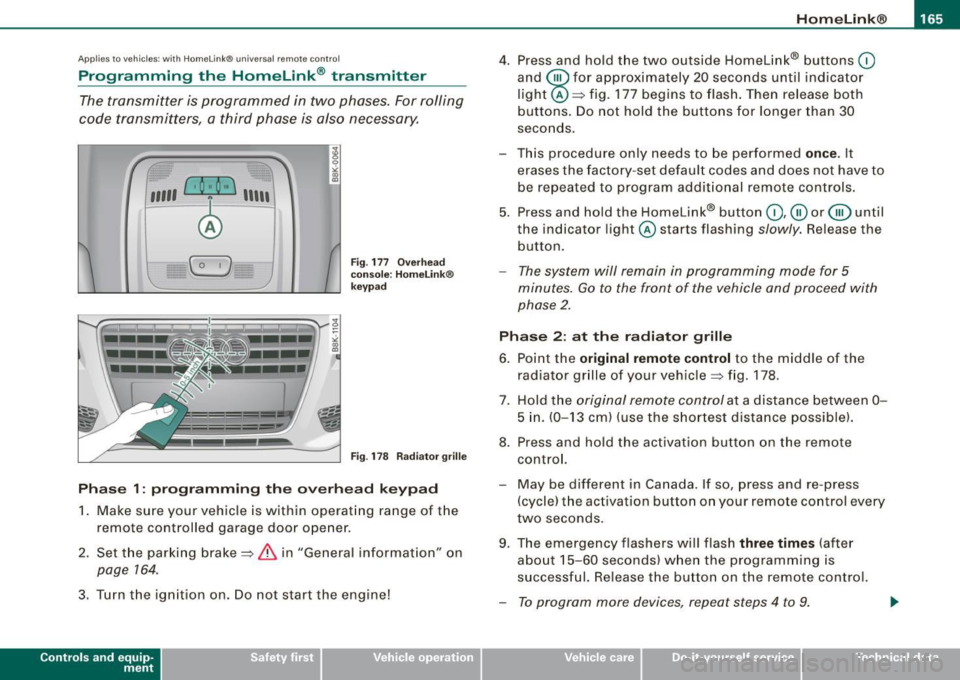
The transmitter is programmed in two phases. For rolling
code transmitters, a third phase is also necessary.
,,,,, r, o: o "'' '''"
Fig . 177 Overhead
console: HomeLink ®
keypad
Fig . 178 Radiator grille
Phase 1: programming the overhead keypad
1. Make sure your vehicle is within operating range of the
remote controlled garage door opener.
2. Set the parking brake==>
& in "General information" on
page 764.
3. Turn the ignition on. Do not start the engine!
Contro ls and eq uip
ment
4. Press and hold the two outside Homelink® buttons 0
and @for approximately 20 seconds until indicator
light@==> fig. 177 begins to flash. Then release both
buttons. Do not hold the buttons for longer than
30
seconds.
- This procedure only needs to be performed
once . It
erases the factory-set default codes and does not have to
be repeated to program additional remote controls.
5. Press and hold the Homelink® button
0,@ or@ until
the indicator light @starts flashing slowly. Release the
button.
- The system will remain in programming mode for 5
minutes.
Go to the front of the vehicle and proceed with
phase 2.
Phase 2: at the radiator grille
6. Point the
original remote control to the middle of the
radiator grille of your vehicle==> fig. 178.
7. Hold the original remote control at a distance between
0-
5 in. (0-13 cm) (use the shortest distance possible).
8. Press and hold the activation button on the remote control.
- May be different in Canada . If so, press and re -press
(cycle) the activation button on your remote control every
two seconds.
9. The emergency flashers will flash
three times (after
about
15 -60 seconds) when the programming is
successful. Release the button on the remote control.
- To program more devices, repeat steps 4 to 9.
Vehicle care I I irechnical data
Page 241 of 360

How the ABS system works
An au tomatic check is made when a speed of about 12 mph (20
km/h) is reached. When this happens, a pumping no ise can be
heard .
I f an individua l wheel begins to ro tate too s low ly in relation to
vehic le speed and tends to lock, the ABS automatical ly reduces
b rake pressure t o preven t tha t whee l from locking.
This automatic adjustment process wil l cause a
slight vibration of
t he brake peda l and some noises to ale rt you tha t veh ic le sp eed
must be adapted to existing road and traffic conditions.
in. WARNING
Although the ABS is very effe ctive , always remember that braking
c apability is limited by tire traction. Always adjust your driving
speed a ccording to the road and traffi c conditions. Do not let the
extra safety afforded by the ABS tempt you into taking extra risks.
The ABS c annot overcome the laws of physics .
[ i J Tips
• I f ABS is not functioning properly, a warning l ight wil l come on .
See
~ page 15.
• I f a fau lt occurs in the ABS, the EDL is also not funct ioning. This
is indicated by the ABS warning light .
Brake assist
Brake assist is designed to achieve the optimum brakin g
effect.
B rake a ssist hel ps to in crease the eff ective b raking powe r an d t hus
to achieve a shorter stopping distance. If the driver presses the
br ake pe dal ve ry q uickl y, br ake a ss is t auto matically boo sts t he
braking force to the maximum lev el, up to the point where the anti
lock b ra ke function (ABS) intervenes to stop the wheels from
Controls and equip
ment Safety first Vehicle operation
Intelligent technology
locking
. You shou ld then keep the brake pedal pressed until the
ve hic le has braked to the required spee d. Brake assist swi tches itse lf
off as soon as you release the brake pedal.
in. WARNING
Please remember that the accident r isk always increases if you
drive too fast , espe cially in corners or on a slippery road , or if you
follow the vehicle ahead of you too closely. Increa sed risk of an
accident cannot be compensated for even by brake as sist , so
always maintain a safe speed .•
Servotronic® -advanced power
steering system
The pow er st eer in g systems uses th e po we r of t he
run nin g eng ine to a llow prec ise s tee ring with lit tle eff ort.
The advanced S ervotronic ® power steering system senses the road
s p eed and electr onically a djusts power assis tance t o provide
comfortab le and safe steering response exactly matched to the
ve hicle speed .
Power steering wi ll n ot work if the eng ine is off. As a result, the
steering whee l wil l be hard to turn.
Th e power s teering flu id leve l is check ed during the sc hed uled
maintenance services .
0 Note
If there is an electronic ma lfunction, servotronic wi ll still function
like a conventi onal power s teer ing sys te m , pr ovi ding a constan t
steering support force that is no longer proportionate to the vehicle
speed. This is mo st noticeable when tu rning t he steering whee l at
low speeds {for examp le when parking), -more effort wi ll be
r equired than usual.
~
Vehicle care Do-it-yourself service Technical data
Page 252 of 360
___ T_ r _a_ il_e _r_ t_ o_ vv_ in__... g,_ __________________________________________________ _
Observe speed limits. In some areas, speeds for vehicles towing
trailers are lower than for regular vehicles.
Always apply brakes early. When driving downhill, shift into a lower gear to use the engine braking effect to slow the vehicle. Use of the
brakes a lone can cause them to overheat and fail.
Coolant temperature
The coolant temperature gauge=> page 8 must be observed care
ful ly . If the needle moves close to the upper end of the scale, reduce
speed immediately and/or turn off the air conditioner .
If the coolant temperature warning light in the instrument cluster
starts flashing
-F- , pul l off the road, stop and let the engine idle for
about two minutes to prevent heat build-up .
& WARNING
Anyone not properly restrained in a moving vehicle is at a much
greater risk in an accident. Never let anyone ride in your car who
is not properly wearing the restraints provided by Audi . •
Trailer towing tips
Important to know
----------------
Your vehicle handles differently when towing a trailer because of
the additional weight and different weight distribution. Safety,
performance and economy will great ly depend on how careful ly you
load your trailer and operate your rig.
Before you actual ly tow your trailer, pract ice turning, stopping and
backing up in an area away from traffic. Keep practicing unti l you
have become completely familiar with the way your vehicle -trailer
combination behaves and responds . Backing
up is difficult and requires practice . Backing up with a
t rai ler genera lly requires steering action opposite to that when
backing up your vehicle without a trailer .
Maintain a greater distance between your vehicle and the one in
front of you. You will need more room to stop . To compensate for
the trai ler, you wi ll need a larger than norma l turning radius.
When passing, remember that you cannot accelerate as fast as you
normally would because of the added load. Make sure you have
enough room to pass. After passing, al low plenty of room for your
trai ler before changing lanes again .
Avoid jerky starts, sharp turns or rapid lane changes.
[ i ] Tips
• Do not tow a trailer during the break -in period of your vehicle.
• If you tow a trailer, your Audi may require more frequent mainte
nance due to the extra load=>
page 339. •
Parking on a s•ope
Do not pork on a slope with a trailer. If it cannot be
avoided, do so only ofter doing the following:
When parking:
Apply the foot brake.
- Have someone p lace chocks under both the vehicle and
the trailer wheels.
With chocks in place, slow ly release the brakes until the
wheel chocks absorb the load.
- Turn the wheels towards the curb.
- Apply the parking brake.
Page 253 of 360

-Place an automatic transmission* in P, respectively a
manual transmission in first or reverse gear.
When restarting after parking :
- Apply the foot brake .
- Start the engine.
- Move t he selector lever to
D, respectively a manual trans-
mission in first gear.
- Release the parking brake and slowly pull out and away
from the wheel chocks.
- Stop and have someone retrieve the wheel chocks .
[ i ] Tips
If you move the selector lever of the automatic transmission * to P
before applying the parking b rake and before blocking the wheels,
you may have to use more force later to move the lever out of the P
position .•
Controls and equip
ment Safety first Vehicle operation
Trailer towing
Vehicle care Do-it-yourself service
Technical data