brake light AUDI A5 COUPE 2011 Owner's Manual
[x] Cancel search | Manufacturer: AUDI, Model Year: 2011, Model line: A5 COUPE, Model: AUDI A5 COUPE 2011Pages: 362, PDF Size: 84.88 MB
Page 133 of 362
Adaptive cruise control -____________ __,:_ __ _
Appli es to ve hicl es: wi th a daptive cruise cont rol
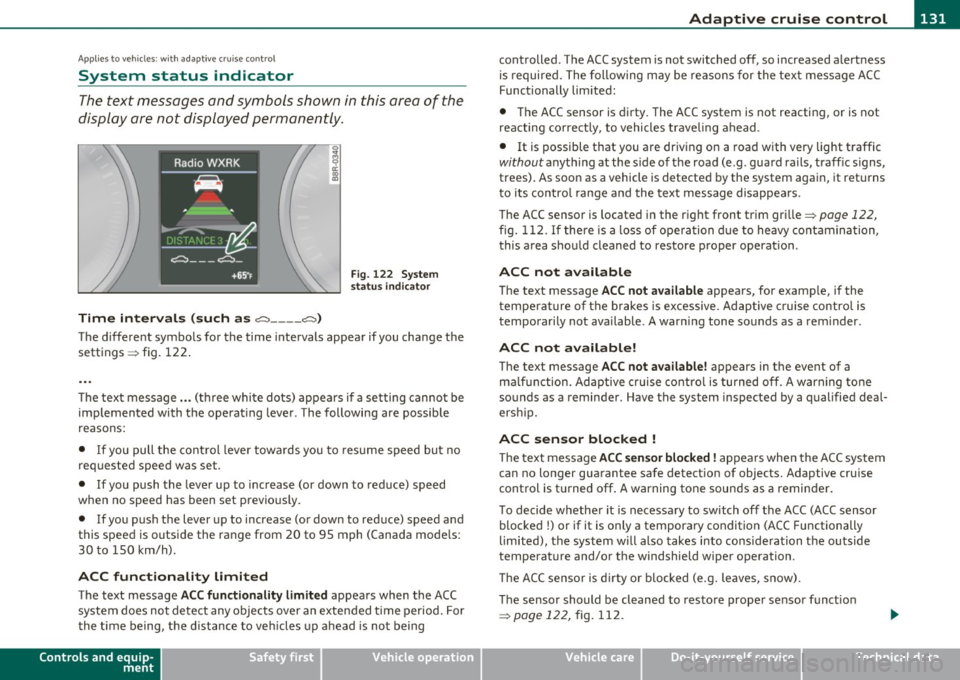
System status indicator
The text messages and symbols shown in this area of the
display are not displayed permanently .
Time intervals (such as e::::, ____ e::::,)
Fig. 122 System
status indicator
The different symbols for the time intervals appear if you change the
sett ings => fig. 122 .
Th e text message ... (three white dots) appears if a setting cannot be
implemented with the operating lever. The following are possible
reasons:
• If you pull the control lever towa rds you to resume speed but no
requested speed was set .
• If you push the lever up to increase (or down to reduce) speed
when no speed has been set previously.
• If you push the lever up to increase (or down to reduce) speed and
this speed is outside the range from 20 to 95 mph (Canada mode ls:
30 to 150 km/h) .
ACC functionality Limited
The text message ACC functionality limited appears when the ACC
system does not detect any objects over an extended time period. For
the time being, the distance to veh icles up ahead is not being
Controls and equip
ment Safety first
controlled
. The ACC system is not switched off, so increased alertness
is required. The following may be reasons for the text message ACC
Functionally limited:
• The ACC sensor is dirty. The ACC system is not reacting, or is not
reacting correctly, to vehicles traveling ahead.
• It is possible that you are driving on a road with very light traffic
without anything at the s ide of the road (e .g . guard rails, traff ic s igns,
trees). As soon as a vehicle is detected by the system again, it returns
t o its contro l range and the text message disappears.
The ACC sensor is located in the r ight front trim grille=>
page 122,
fig. 112. If there is a loss of operation due to heavy contamination,
this area should cleaned to restore proper operat ion .
ACC not available
The text message ACC not available appears, for examp le, if the
t empe rature of the brakes is excessive. Adaptive cruise control is
temporarily not available. A warning tone sounds as a rem inder .
ACC not available!
The text message ACC not available! appears in the event of a
ma lf unct ion. Adaptive cruise control is turned off. A warn ing tone
sounds as a reminder . Have the system inspected by a qualified deal
ersh ip.
ACC sensor blocked !
The text message ACC sensor blocked! appears when the ACC system
can no longer guarantee safe detection of objects. Adaptive cruise
control is turned off. A warning tone sounds as a reminder.
To decide whether it is necessary to switch off the ACC (ACC sensor
blocked
!) or if it is only a temporary condition (ACC Functionally
limited), the system w ill also takes into consideration the outside
temperature and/or the windshield wiper operation .
Th e ACC sensor is d irty or blocked (e.g. leaves, snow).
The sensor should be cleaned to restore prope r sensor funct ion
=>
page 122, fig. 112.
Vehicle care Technical data
Page 135 of 362
Adaptive cruise control ml ____________ __._ __ _
• A red vehicle is shown in the instrument cluster display
=>
page 132, fig. 123.
• The text
DISTANCE! appears in the status line .
• The indicator light in the Instrument cluster blinks red .
• A warning tone sounds.
[I) Tips
• If the adaptive cruise control initiates brak ing, the hydraulic brake
system is under pressure . Therefore, the brake pedal distance is
shorter and the pedal "feels" harder .
• Adaptive cruise control is switched off after press ing the foot
brake . The speed saved up this point can be resumed.
• To resume the saved speed, release the brake pedal and press the
control lever=>
page 126, "Turning adaptive cruise control off
temporarily ".
• If you use the accelerator to go faster than the speed of the object
ahead of you, the
driver intervention prompt will not be accompa
nied by a warn ing signal.
• If the speed you previously set is exceeded, the indicator light in
the speedometer will switch off.•
Applies to ve hicle s: with ad aptive cru ise co ntro l
MMI settings
Individual settings for adaptive cruise control can be
selected in the fv1fv1I*.
Settings for the driving program can be adjusted individually
to the particular user and saved in the MMI*.
- Select: [CAR] function button
> Adaptive Cruise Control >
Driving program .
Controls and equip
ment Safety first
Setting the driving program
In
the driving program menu you can adjust the character istics of
adaptive cru ise control to what you want using
dynamic , standard or
comfort.
Saving settings
Your individual settings are automatica lly saved and assigned to the
remote control key being used (remote key storage) . If the key is
given to another person, the saved settings remain as they are .•
System limitations
App lies to ve hicles : w it h ada ptiv e cr uise cont ro l
General information
Some driving situations which affect the function of the
radar sensor are described below.
When driving, the adaptive cru ise contro l is governed by physical and
system-specified limits. Also, under certain circumstances, the ACC
system may react unexpectedly or late from the driver's point of view.
Therefore, a lways be attentive and intervene, if necessary:
• when driving around curves=>
page 134
• when vehicles in front are not in line with your vehicle=> page 134
• when other ve hicles are changing lanes=> page 134
• when other veh icles are difficult to detect=> page 135.
& WARNING
The radar sensor's vision can be reduced by rain, snow and heavy
spray . This can result in vehicles driving ahead being inadequately
detected or , in some circumstances , not detected at all. If neces
sary, take action yourself!•
Vehicle care Technical data
Page 153 of 362
Transmission -_______________ ___.
The transmiss ion is also equipped with tiptronic . It allows the driver
t o shift gea rs
manually if desired ~ page 155 . •
Applies to vehicles: wit h au tom atic tr ansm ission
Driving the automatic transmission
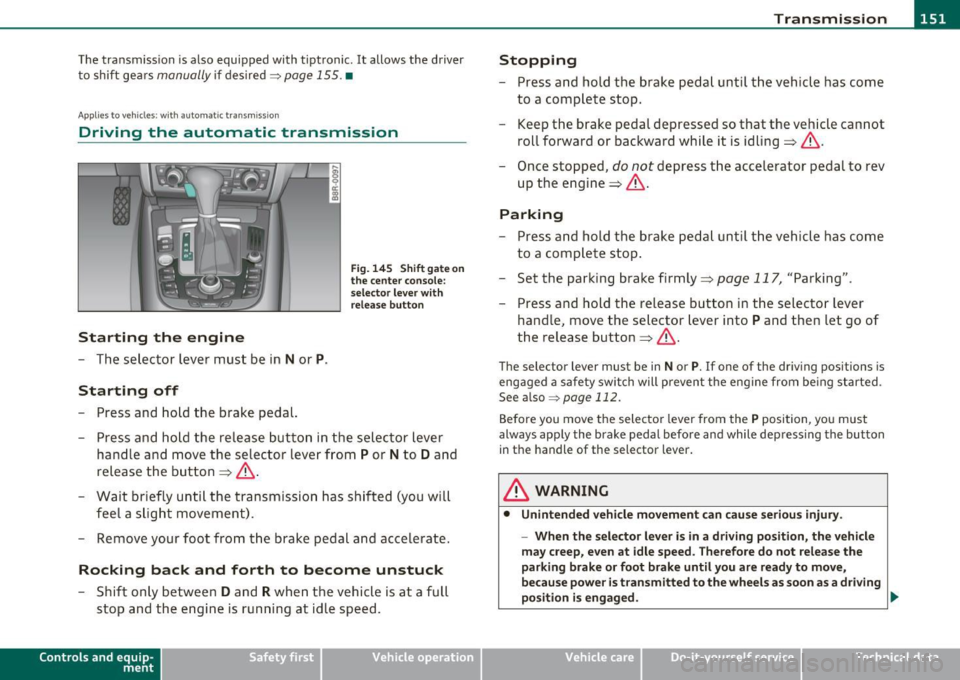
Starting the engine
- The se lector lever must be in N or P.
Starting off
- Press and hold the brake pedal.
Fi g. 14 5 Sh ift gat e on
the center con sole:
s e le ctor le ve r with
r e lea se b utton
- Press and ho ld the release button in the sel ector lever
handle a nd move the selector lever from
P or N to D and
release the but ton => &, .
- Wait briefly unti l the tran smission has shif ted (you will
feel a slight movement).
- Remove your foot from t he brake pedal and accelerate.
Rocking back and forth to become unstuck
- Shift o nly betwee n D and R when the ve hicle is at a full
stop and the engine is running at idle speed.
Con tro ls a nd e quip
m en t Vehicle
OP-eration
Stopping
-Press and hold the brake peda l unti l th e vehicle has come
to a complete stop.
- Keep the brake pedal depressed so that the veh icle can not
roll forward or backward while it is idling => &, .
- Once stopped,
do not depress t he accelerator pedal to rev
up the engine=> &,.
Parking
-Press and ho ld the brake peda l unt il the veh icle has come
to a compl ete stop .
- Set the parking brake firmly=>
page 117, "Parking" .
- Press and hold the release button in the selector lever
handle, move the selector lever into
P and then let go of
the release button=>&, .
The selector lever must be in Nor P. If one of the dr iv ing positions is
engaged a safety swi tch will prevent the eng ine from be ing started.
See also ~
page 112.
Before you move the selecto r lever from the P position, yo u must
always apply the brake pedal befo re and while depressing the button
in the handle of the selector lever .
& WARNING
• Unintended vehicle movement can c ause seriou s injur y.
- When th e selector l ever is in a driv ing po sition, the vehicl e
m ay creep , even at idle speed. Therefore do not relea se the
parking bra ke or foot brak e until you are ready to mov e,
because power is t ransmitted to the wheel s as soon as a dri ving
po sition i s engaged . ._
Vehicle care Do-it-yourselt service iTechnical data
Page 155 of 362
Transmission Ill _______________ ___.
Before you move the selector lever to R, press both the button in the
hand le of the se lec tor lever
and the brake peda l at the same t ime .
When the ignition is on, the backup lights illuminate when the
selector lever is moved into
R .
N -Neutral
The transmission is in neutral in this position. Sh ift to th is position
for standing with the brakes applied~
page 153.
When the vehicle is stationary or at speeds below 3 mph (5 km/h) ,
you must always apply the footbrake before and wh ile moving the
lever out of
N .
D -Normal po sition for driving forw ard
Posit ion Dis for normal city and highway driving. It ranges from zero
to top speed and al l gears shift automatically, depending on engine
load, driving speed and automatically selected shift programs .
When the vehicle is stat ionary or at speeds below 3 mph (5 km/h),
you must always apply the foot brake before and while moving the lever to
D out o f N.
In certa in circumstances it may be advantageous to temporarily
switch to the manual shift program to manually select gear rat ios to
match specific driving conditions~
page 155.
S -Sport position *
Select this position for sportie r performance. In this position, the
transm ission will not upsh ift as soon, allowing the vehicle to use the
increased power available at higher eng ine speeds to ach ieve livelier
acceleration .
When the vehicle is stat ionary o r at speeds be low 3 mph (5 km/h),
you must always apply the foot brake before and while moving the lever to
S out of N .
Con tro ls a nd e quip
m en t Vehicle
OP-eration
& WARNING
Read and fo llow all WARNING S~ & in "Dri ving th e a utomatic
tran smi ssion" on
pa ge 151 .
0 Note
Coast ing downh ill with the transmission in N and the engine not
running will result in damage to the automatic transmission and
possibly the cata lytic converter. •
Applies to vehicle s: wi th auto mat ic tra nsmi ss ion
Automatic Shift Lock (ASL)
The Automatic Shift Lock safeguards you against acci
dentally shifting into a forward or the reverse gear and
causing the vehicle to move unintentionally .
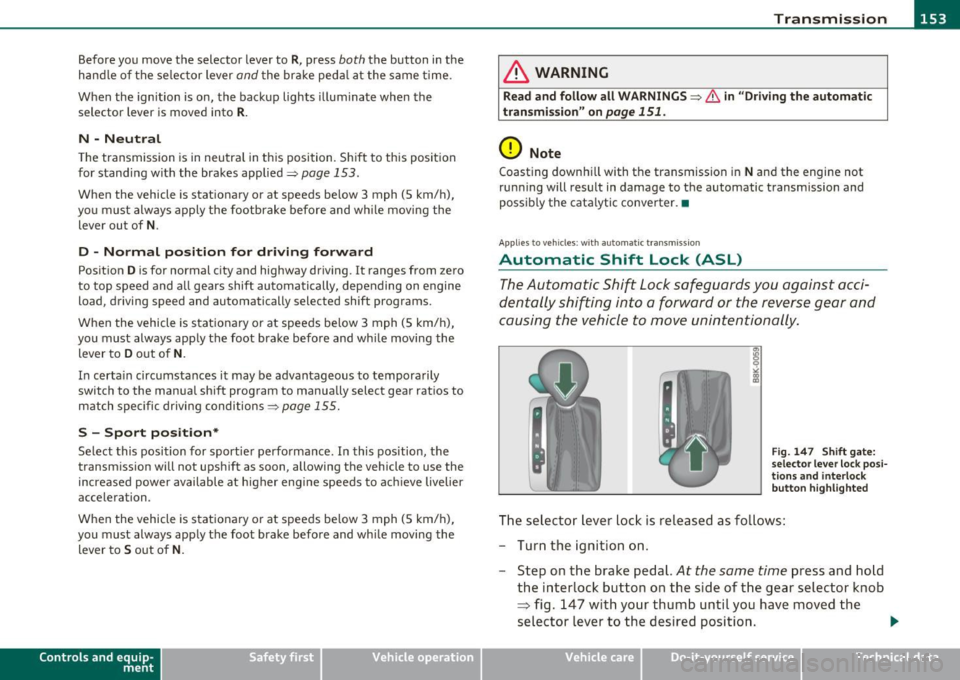
Fig. 14 7 S hift gate:
s e le ctor lever lock pos i
tio ns and in te rlo ck
bu tton hi ghligh ted
The selector lever lock is released as fo llows:
- Turn the ignit ion on.
- Step on the brake pedal.
At the same time press and hold
the interlock button on the s ide of the gear selector knob
=> fig . 147 with your thumb until you have moved the
selector lever to the desired position. .,
Vehicle care Do-it-yourselt service iTechnical data
Page 156 of 362
1111 ...... __ T _r_ a_ n _ s_ m __ is_ s_io _ n _____________________________________________________ _
Automatic selector lever lock
The selector lever is locked in the P and N positions when the ignition
is turned on . To move the lever from these positions the driver must
depress the brake pedal. As a reminder to the driver, the following
warning appears in the instrument cluster display when the selector
is in
P and N:
When stationary apply footbrake while selecting gear
A time delay element prevents the selector lever from locking when
it is moved through the
N position (going from R to D). The locking
element will lock the selector lever if the lever is left in N (Neutral) for
more than approximately 1 second, without the brake pedal being
pressed .
At speeds above about 3 mph (5 km/h) the Automatic Shift Lock is
automatically deactivated in the
N position.
Interlock button
The lock button on the selector lever prevents the lever from being
accidentally shifted into ce rtain positions. Pressing this button deac
tivates the selector lever lock. Depending on the direction of the
shift, the selector lever locks at different positions . The positions are
highlighted in the illustration ~
page 153, fig. 147.
Ignition key safety interlock
The key cannot be removed from the ignition unless the selector lever
is in the
P park position . When the ignition key is removed, the
selector lever will be locked in the
P position. •
Applies to vehicle s: with au toma tic tr ansm is si on
Kick-down
The kick-down feature allows the vehicle to generate
maximum acceleration.
When you press the accelerator pedal beyond the resistance point
that is reached at full throttle, the transmission will select a lower
gear ratio based on vehicle speed and engine RPM . The engine RPM will be controlled to produce maximum vehicle acceleration as
long
as you continue to press the accelerator pedal beyond this resistance
point .
& WARNING
Be careful when using the kick-down feature on slippery roads.
Rapid acceleration may cause the vehicle to skid. •
Applies to ve hicles : with automatic t ransm iss ion
Dynamic shift program (DSP)
The automatic transmission is electronically controlled.
The transmission is self adapting and will automatically select the
best shift program suited to the driving conditions and driving style .
The transmission will select one of the
economy programs when you
drive at a steady speed or a gradually changing speed without heavy
acceleration . This achieves optimum fuel efficiency, with early
upshifting and delayed downshifting.
The transmission will automatically select the
sporty shift programs
when you drive at higher speeds, or with heavy acceleration and
frequently changing speeds. Upshifts are delayed to make full use of
engine power . Downshifting takes place at higher engine speeds than
in the economy programs.
The selection of the most suitable shift program is a continuous,
automatic process . The driver can also make the transmission switch
to a sporty program by
quickly pressing down the gas pedal.
This causes the transmission to shift down to a lower gear to achieve rapid acceleration, e.g. for quickly passing another vehicle. You do
not need to press the gas pedal into the kick -down range. After the
transmission has upshifted, the original program is selected
according to your driving style.
An additional shift program allows the automatic transmission to
select the proper gear for uphill and downhill gradients.
Page 157 of 362
Transmission Ill _______________ ___.
This keeps the transmission from shifting up and down unnecessarily
on hills . Th e transmission will shift down to a lower gear when the
driver presses the brake pedal on a downhill gradient . This makes use
of the braking effect of the engine without the need to shift down
manually .•
Ap plies to vehicl es : w ith au tom atic transm iss io n
Manual shift program
Using the manual shift program you can manually select
gears .
Contro ls a nd e quip
m en t Fig. 148 Center
console: shifting the
tiptronic manually
Fig. 149 Display :
manual shift program,
selected gear high
lig hted
Vehicle OP-eration
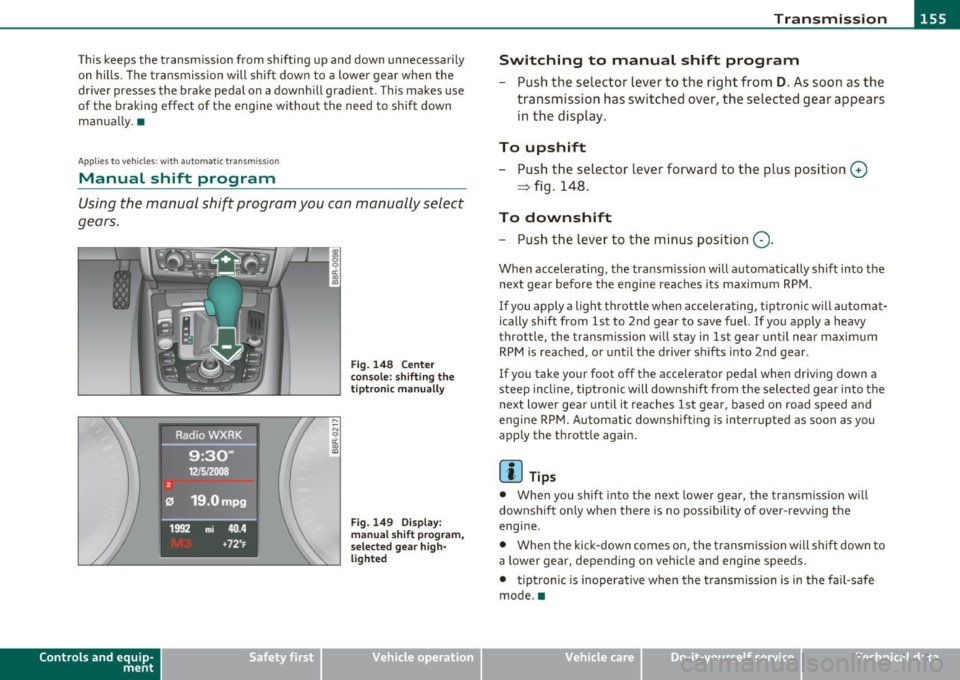
Switching to manual shift program
-Push the selector lever to the right from D. As soon as the
transmission has switched over, the selected gear appears
in the display.
To upshift
- Push the selector lever forward to the plus position 0
~ fig. 148.
To downshift
- Push the lever to the minus position Q.
When accelerating, the transmission will automat ica lly shift into the
next gear before the engine reaches its maximum RPM.
If you apply a light throttle when accelerating, tiptr onic will automat
ically shift from 1st to 2nd gear to save fuel. If you apply a heavy
throttle, the transmission will stay in 1st gear until near maximum
RPM is reached, or until the dr iver sh ifts i nto 2nd gear.
If you take your foot off the accelerator pedal when driving down a
steep incline , tiptronic will downshift from the selected gear into the
next lower gear until it reaches 1st gear , based on road speed and
eng ine RPM. Automatic downshifting is interrupted as soon as you
apply the throttle again.
[ i ] Tips
• When you shif t into the next lower gear, the transmission will
downshift on ly when there is no possibility of over-revving the
engine.
• When the kick-down comes on, the transmission will shift down to
a lower gear, depending on vehicle and engine speeds.
• tiptronic is inoperative when the transmission is in the fail-safe
mode. •
Vehicle care Do-it-yourselt service iTechnical data
Page 168 of 362

lffll.__ __ H_o_ m_ e_ L_ in_ k_® ____________________________________________________ _
Homelink®
Universal remote control
Applies to veh icles: w ith Hom elin k® un iversal re m ote contro l
General information
The Homelink ® feature can learn up to three radio
frequency codes for most current transmitters used for
operating garage doors, estate gates , home or outdoor
lighting systems, and other devices.
Yo u must fi rst p rogr am the Home link® tra nsmi tte r be fore you can
use the system=>
page 167, "Programming the Homelink ® trans
m itter".
In order to program the Homelink ® transm itter fo r devices utilizing
rolling code, a second person on a ladder who can sa fely reach t he
garage door opener motor is recommended. It is also necessary to
locate the "learn" button on yo ur garage door opener motor . Re fer to
t he oper ating ins truc tions fo r th e opene r, as the loca tion and color o f
this button may vary by manufacturer .
Yo u can still use the original remote control for the device at any
t ime .
& WARNING
• Never use the Homelink'"' transmitter with any garage door
opener that does have not the safety stop and rever se feature as
required by fed eral safety standards. This includes any garage
door opener model manufactured before April
l , 1982 .
• A garage door opener which cannot detect an object, signaling
the door to stop and reverse does not meet current federal safety
standards . Using a garage door opener without these features
increases risk of serious injury or death.
& WARNING (cont inu ed )
• For safety reasons never release the parking brake o r start the
engine while anyone i s standing in front of the vehicle .
• A ga rage door or an estate gate may sometimes be set in
motion when the Homelink ® remote control is being
programmed. If the device is repeatedly activated, this can over
s train motor and dam age its electri cal components · an over
heated motor is a fi re hazard!
• To avoid pos sible injurie s
or property damage , plea se always
make absolutely certain that no persons or objects are located in
the range of motion of any equipment being operated.
[ i ] Tips
• If you would like mo re inf orma tion o n Hom eli nk ®, whe re to
purchase the Homelink ® compat ible products, or would like to
purc hase the Homeli nk® Home Lighting Pac kage, p lease ca ll to ll
free : 1-800-355-3515 .
• F or Declaration of Compliance to United Sta tes FCC an d Indus try
Canada regulations=>
page 343. •
Page 169 of 362

_________________________________________________ H_ o_ m_ e_ L_in _ k_® _ __.fflll
App lies to veh icles : w ith Home link® un iversa l remote control
Progr amming the Homelink ® tr ansmitter
The transmitter is programmed in two phases . For rolling
code transmitters, a third phase is also necessary .
,,,,, r, o: o "'' '''"
Fig. 161 Ove rhead
console: Homelink ®
keypa d
Fig. 162 Rad iator
g rille
Phase 1: progr amming the overhe ad keyp ad
1. Make sure your vehicle is within operating range of the
r emote controlled garage door opener .
2 . Set the parking brake:::::>
& in "General information " on
page 166.
3. Turn the ignition on. Do not start the engine!
Con tro ls a nd e quip
m en t Vehicle
OP-eration
4. Press and hold the two outside Homelink ® buttons G)and
@ for approximately
20 seconds until indicator light@
:::::> fig. 161 begins to flash . Then release both buttons. Do
not hold the buttons for longer than
30 seconds .
- This procedure only needs to be performed
once. It erases
the factory-set default codes and does not have to be repeated to program additional remote controls.
5. Press and hold the Homelink ® button G), @ or@ until
the indicator light @starts flashing
slowly . Release the
button.
- The system will remain in programming mode for 5
minutes .
Co to the front of the vehicle and proceed with
phase
2 .
Phase 2: at the rad iator g rille
6. Point the o rigi nal r emote control to the m iddle of the
radiator grille of your vehicle=> fig.
162 .
7. Hold the original remote control at a distance between O
S in. (0-13 cm) (use the shortest distance possible) .
8 . Press and hold the activation button on the remote
control.
- May be different in Canada . If so, press and re-press
(cycle) the activation button on your remote control every
two seconds.
9. The emergency flashers will flash
three tim es (after about
15-60 seconds) when the programming is successful.
Release the button on the remote control.
- To program more devices , repeat steps 4 to 9.
Vehicle care Do-it-yourselt service iTechnical data
Page 239 of 362
Intelligent technology
--------------------------------------------------' "---.L==--
The system operates across the entire speed range in combination
w ith the ABS sys tem. If the A nti-L o ck Brak e System (A BS) mal fun c
tions, the ESP will also shut down.
How the system works
The Anti-Lock Brake System (ABS), Elect ronic D ifferential Lock (EDL)
and the Anti-Slip Regul ation System (AS R) are in teg rated in the e lec
tronic stab ilizat ion program . In addition to the data prov ided by
th ese fun ctions, the ESP control unit re quires addi tional meas ure
ment data provided by hig h pe rformance senso rs . The ro tat ional
speed of the vehicle about its vertical axis, veh icle acceleration in the
fore-and-a ft and lateral d irect ions, the brake pressure , a nd the
steerin g ang le are all measured .
Th e d irec tion in whi ch the driver w ishes to tra ve l is d ete rm ined wi th
the a id of the steering a ngle and ve hicle speed and is con tinually
c omp ared wi th the a ctu al b ehavior o f the ve hicl e. If t he two do no t
match, for example, when the vehicle starts hydroplani ng on a wet
roa d, E SP w ill automatica lly bra ke the approp riate whee l to correct
the problem.
Th e ve hicle is t hen stab ilized by the fo rces acting on the whee l during
bra king .
If the ve hicl e is oversteering (the vehicle tu rns too s harp ly
and the rear whee ls slide toward the outside of a curve), the brakes
a re mainly a pplied on the whee l tha t is o n the o uts ide of t he curve. In
the case of a vehicle that is
understeering (the vehicle does not turn
shar ply enough and push es out o f a curve), the b rakes are ap plied as
needed on the whee l th at is on the inside of the curve or additionally
on the ot her wheels . An acoustic s ignal indicates w hen ESP bra ke
applica tion cuts in=> &.
T he system operates across the entire speed range in combination
w ith the A BS system =>
page 241. If the A nti-Lo ck Br ake Sys tem
(ABS) ma lfunctions, the ESP w ill be o ut of act ion as we ll.
Activating
When you turn on the engine, ESP wi ll automatica lly be activated and
w ill pe rfor m a self- tes t. As soo n as t he tes t is co mplete d, th e sys tem
is in normal operating mo de.
Controls and equip
ment Safety first Vehicle operation
Yo
u can activate a deactivated ESP or deactivated ESP/ ASR if required
b y pressi ng the =>
page 236, fi g. 1 9 8 => page 236, fig . 19 7 bu tton.
Wh en they are activated, the message
Stabilisation program on
appears briefly in t he di sp lay .
Deactivating
The ES P shoul d no rma lly be acti va te d a ll the tim e. I f necess ary, y ou
can deact ivate A nti-Slip Reg ulat io n (ASR) or th e Electro nic Sta biliza
t ion Progr am ( ES P) by p ress ing the button =>
page 23 6, fig. 198.
• Deactivating ASR: Tap th e button . In cer tain exceptional s itua
t ions (e.g. driving with tire chains), the Anti -Slip Reg ulation (ASR) can
be dea ct iva te d =>
page 238. The m ess age ASR off Caution! Limited
driving stability
a pp ears in the d isp lay as well.
• Deactivating ESP/ASR Press the but ton for mor e tha n 3 seconds .
With the ESP/ ASR deactivated, the indicator light comes on, see
=>
p age 15. The m ess age Warning! Restri cted stability ap pears in
the display as we ll.
& WARNING
The Electronic Stabilization Program is nevertheless subje ct to the
laws of physics . It is particularly important to pay attention to
this fact on wet and slippery roads. It is therefore important that
you always adapt your driving to the condition of the road and
traffic conditions . Do not allow the increased safety provided by
the Electronic Stabilization Program system to lull you into accepting additional safety risks .
u
Vehicle care Do-it-yourself service Technical data
Page 240 of 362
Intelligent t echnology
'-----------------------------------------------
Electronic differential lock (EDL)
The elec tronic differen tial lock monitors the rotational
speed of the drive wheels.
G en era l not es
The electronic differentia l lock (EDL) helps the ca r to sta rt moving,
accelerate and climb a gradient on surfaces provid ing poor or almost
no grip . W ithout ED L, this would be d iff icu lt, if not impossible.
How the sy stem works
The EDL operates automatically. It mo nitors the rota tional speed of
wheels with the help of the ABS sensors~
page 241. If a not iceab le
slip is detected at the wheels (e.g . on slippery g round on one side),
the spinn ing wheels are braked and power is transferred to the other
wheels . This is done up to a speed of about 60 mph (100 km/h).
No ises from the brake system signal that wheel sp in is being
controlled.
Driv ing off
When d riving off, always be s ure to keep road conditions in mind as
you accelerate. If one drive wheel spins because it is on a surface with
less grip, apply
plenty of throttle until the car starts to move.
O verheating of bra kes
To prevent the disc b rake of the bra ked wheel from ove rhea ting if
subjected to excessive loads on this wheel, the EDL cuts out tempo
ra rily. The vehicle remains operat io nal and be haves in the same way
as a veh icle without EDL.
As soon as the brake has coo led down, EDL switches on again auto
matically.
& WARNING
• When ac ce le rating on s lippery surfa ce s, su ch as on ic e or snow,
alwa ys be ca reful when depre ssing the accele rator pedal. Even
& W ARNING (continue d)
with the EDL working , the dri ve wheels c an spin and reduce your
ability to contr ol your car . Ri sk of cra sh!
• The inc reased s afety afforded by E DL does not me an that you
can take safety ri sks. Alwa ys adapt your d rivin g style to the r oad
conditions and t raffic situation .
[ i ] Tips
If a fau lt occurs in the ABS, the EDL is also not funct ion ing. This is
ind ic a ted by the ABS warn ing light ~
page 17. •
Anti-Slip Regulation System (ASR)
The Anti-Slip Regulation System prevents the driven
wheels from spinning when the car is accelerating.
General notes
The Anti-Sl ip Regu lation System (ASR) is integrated in the electronic
stabiliza tion prog ram ( ESP) . When the ve hicle s tarts up and acceler
ates, the wheels are prevented from sp inning by adjusting the engine
powe r to match the amount of g rip available from the road surface .
How the system works
ASR performs au toma tic a lly, i.e. witho ut the dr ive r's intervent ion.
With the aid of the ABS sensors~
page 241, ASR monitors the speed
of the driven wheels. If the whee ls start to spi n, eng ine torq ue is
reduced automatically unti l the tires find enough grip to lock onto
t he road s urface . The system is active across the en tire spee d range.
Th e ASR works in con ju nction with the ABS .
If a malfunction shou ld
occur in the ABS, the ASR wi ll also be out of action.
Act ivating
T he ESP is automatica lly activated when the engine is started and it
performs a self-test . You can act ivate a deact ivated ASR if required by _,,