airbag AUDI A5 COUPE 2011 Owners Manual
[x] Cancel search | Manufacturer: AUDI, Model Year: 2011, Model line: A5 COUPE, Model: AUDI A5 COUPE 2011Pages: 362, PDF Size: 84.88 MB
Page 5 of 362
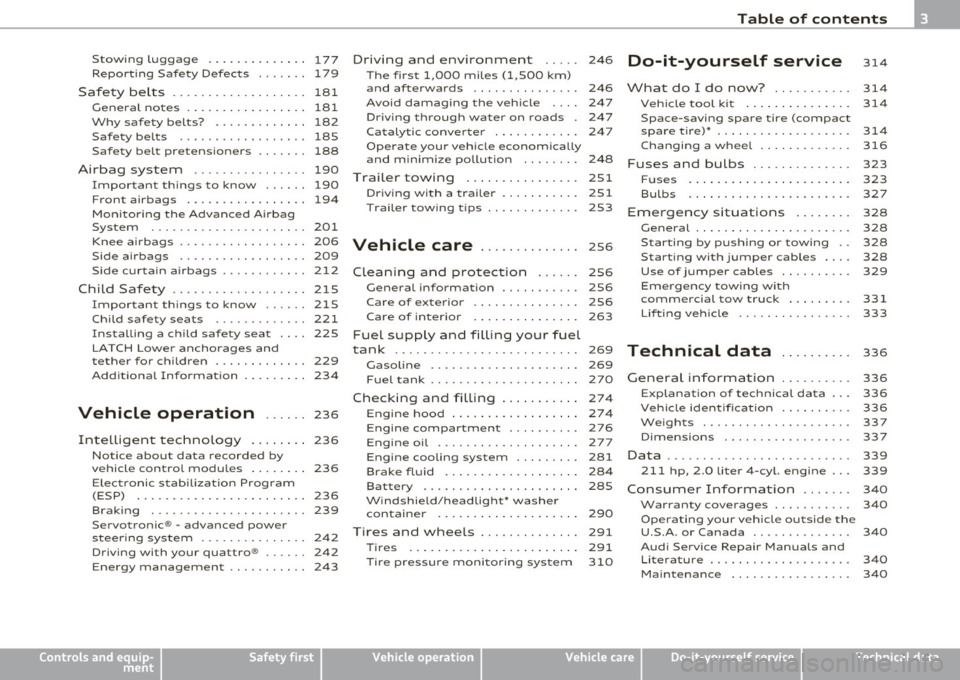
Stowing Luggage ........... ... 177
Repor ting Safe ty Defects . . . . . . . 179
Safety be lts . . . . . . . . . . . . . . . . . . . 181
General no tes ........ ......... 181
Why safety belts? . . . . . . . . . . . . . 182
Safety belts . . . . . . . . . . . . . . . . . . 185
Safety belt pretensioners . . . . . . . 188
Airbag system ................ 190
Important th ings to know ...... 190
Front airbags ................. 194
Mon ito ring the Advanced A irbag
System ...................... 201
Knee ai rbags . . . . . . . . . . . . . . . . . . 206
Side airbags . . . . . . . . . . . . . . . . . . 209
Side curtain airbags ......... ... 212
Chil d Safe ty ................... 215
I mportant things to know ...... 215
Child safety seats ............. 221
Installing a child safety seat . . . . 225
LATCH Lowe r ancho rages and
tether for children . . . . . . . . . . . . . 229
Add it ional Informat ion
234
Vehicle operation ...... 236
Intelligent technology . . . . . . . . 236
Notice abo ut data recorded by
vehicle contro l modu les . . . . . . . . 236
E lect ronic s tab iliza tion Program
(ESP) . . . . . . . . . . . . . . . . . . . . . . . . 236
Braking ...................... 239
Servotronic ® -advanced power
steer ing sys tem . . . . . . . . . . . . . . . 242
Dr iving with your quattro ® . . . . . . 242
Energy management . . . . . . . . . . . 243
Controls and equip
ment Safety first
Driving
and environment ..... 246
The first 1,000 miles (1,500 km)
and afterwards . . . . . . . . . . . . . . . 246
Avoid damaging the vehicle 247
Dr iving through water on roads . 247
Ca talytic conve rter . . . . . . . . . . . . 247
Operate your veh icle economica lly
and m inimize po llution . . . . . . . . 24 8
Trailer towing . . . . . . . . . . . . . . . . 251
Dr iving wi th a trailer . . . . . . . . . . . 251
T railer tow ing tips . . . . . . . . . . . . . 253
Vehicle care .............. 2s6
Clea nin g and protect ion ...... 256
General information . . . . . . . . . . . 256
Care of exterior . . . . . . . . . . . . . . . 256
Care of interior . . . . . . . . . . . . . . . 263
Fuel supply and filling your fuel
tank .......................... 269
Gasol ine . . . . . . . . . . . . . . . . . . . . . 269
F u el tank .................... . 270
Checking and filling . . . . . . . . . . . 274
Eng ine hood . . . . . . . . . . . . . . . . . . 274
Engine compartment . . . . . . . . . . 276
Engine oil . . . . . . . . . . . . . . . . . . . . 277
Engine cooling system . . . . . . . . . 281
Brake fluid . . . . . . . . . . . . . . . . . . . 284
Bat tery . . . . . . . . . . . . . . . . . . . . . . 285
W indshield/headlight* washer
container . . . . . . . . . . . . . . . . . . . . 290
Tires and wheels .............. 291
Tires 291
T ir e pressure monitor ing system 310
Table of contents
Do-it-yourself service
What do I do now? .......... .
Vehic le tool k it ........ ...... .
Space -saving spare tire (compact
spare tire)* ....... ........ ... .
Cha nging a whee l ........... . .
Fuses and bulbs ......... .... .
Fu ses ... ......... .......... .
Bulbs ...................... .
Emergency situations ....... .
General . ........... ......... .
Starti ng by pushing or towi ng ..
Starting with jumper cables ... .
Use of jumper cables ......... .
Emergency towing w ith
commercial tow truck ........ .
Lif ting vehicle ............... .
Technical data
General information
Explana tion of technica l da ta .. .
Vehicle ident ification ......... .
Weights .................... .
Dimensions ................. .
Data ................ ... ...... .
211 hp, 2.0 Liter 4-cyl. engine .. .
Consumer Information ...... .
Warranty coverages .......... .
Operating your vehicle outside the
U.S.A . or Canada ............. .
Audi Service Repair Manuals and
Literature ................... .
Maintenance ............... . . 314
314
314
314
316
323
323
327
328
328
328
328
329
331
333
336
336
336
336
337
337
339
339
340
340
340
340
340
Vehicle operation
Vehicle care Do-it-yourself service Technical data
Page 11 of 362
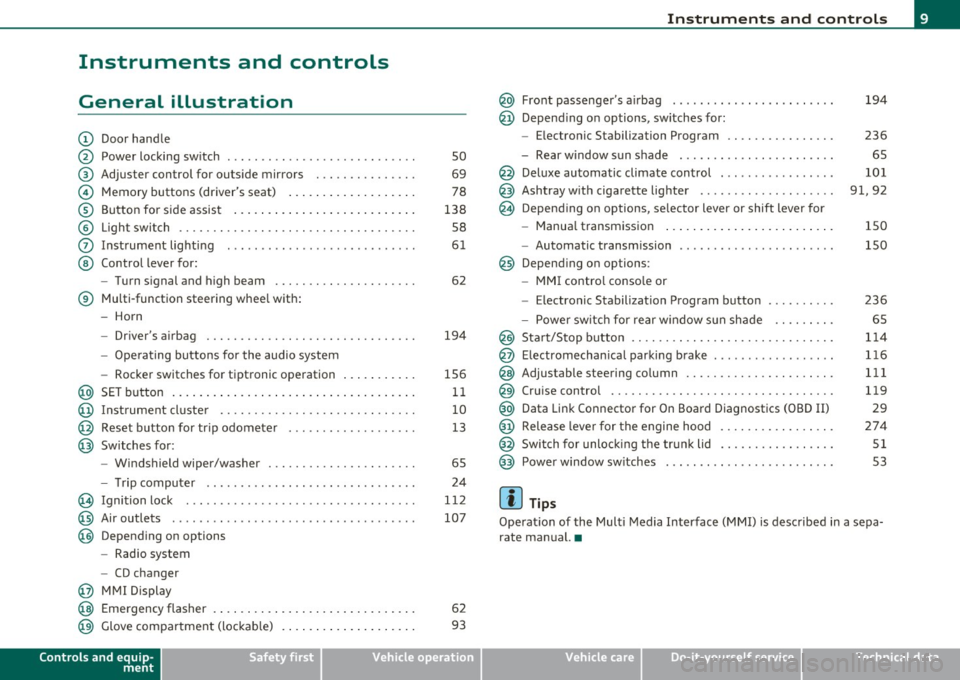
Instruments and controls
General illustration
(D Door handle
@ Power locking switch ....... .. .......... ... .. .. . .
@ Adjuster control for outside mirrors . .. .. ......... .
© Memory buttons (driver's seat) .... ... ........... .
® Button for side assist ........... ............... .
© Light switch ........... .. .... .. .. .. .. ...... ... .
0 Instrument lighting . ....... ................... .
@ Control lever for:
- Turn signal and high beam ......... .. .. ....... .
® Multi-function steering wheel with:
- Horn
- Driver's airbag ....... .. .... .... .. .. ...... ... .
- Operating buttons for the audio system
- Rocker switches for tiptronic operation ... .. ..... .
@ SET button .............. ..... ..... ........... .
@ Instrument cluster .... ....... .... .. .. .. .. .. .. . .
@ Reset button for trip odometer .................. .
@ Switches for:
- Windshield wiper/washer ................ .. ... .
- Tr ip computer .. .......... . .. .... .. .. .... ... .
@ Ignition lock ..... .. .................. ... .. ... .
@ Air outlets ........... ... .. ..... ... ........... .
@ Depending on options
- Radio system
- CD changer
@ MMI Display
so
69
78
138 SB
61
62
194
1S6 11
10
13
6S 24
112
107
@ Emergency flasher . . . . . . . . . . . . . . . . . . . . . . . . . . . . . . 62
@ Glove compartment (lockab le) . . . . . . . . . . . . . . . . . . . . 93
Controls and equip
ment Safety first
Instruments and controls
@ Front passenger
's airbag ....... .. .. . .. .. .. .. .. . .
@ Depending on options, sw itches for :
- Electronic Stabili zation Program .. .. .. ......... .
- Rear window sun shade . .... .... .. .. .. .. .. .. . .
@ Deluxe automatic climate control . ... ............ .
@ Ashtray w ith cigarette lighter ........ .... .. .. .. . .
@ Depending on options, selector lever or shift lever for
- Manual transmission ..... ................ .. . .
- Automatic transmission
@ Depending on options :
- MMI contro l conso le or
- Electronic Stabilization Program button
- Power switch for rear window sun shade ...... .. .
@ Start/Stop button ........ .. .. .. ...... ......... .
@ E lectromechanica l parking brake ............... .. .
@ Adjustable steering column ............. .. .... .. .
@ Cruise control ......... .. .... .. .. .. .. ......... .
@ Data Link Connector for On Board Diagnostics (OBD II)
@ Release lever for the engine hood ........ .. .... .. .
@ Switch for unlock ing the trunk lid ........... ..... .
@ Power window switches . .... .. .. .. .... .. .. ..... .
(I) Tips
194
236
65
101
91,92
150
lSO
236
65
114
116 1 11
119 29
274
Sl
S3
Operation of the Multi Media Interface (MMI) is described in a sepa
rate manual. •
Vehicle care Technical data
Page 16 of 362
Instruments and warning /indicator lights
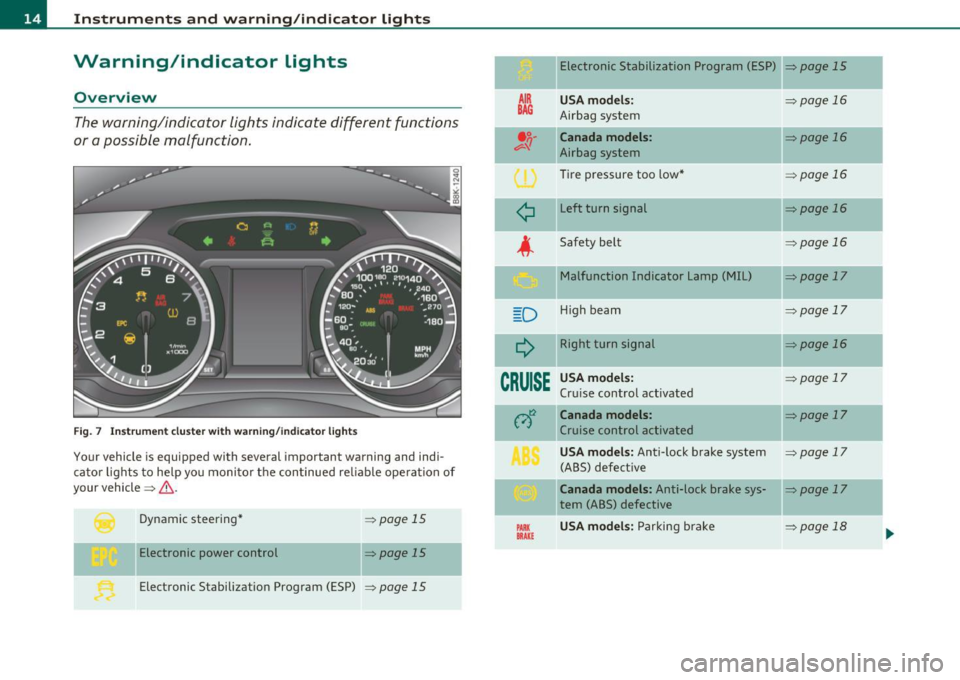
Warning/indicator lights
Overview
The warning/indicator lights indicate different functions
or a possible malfunction.
F ig . 7 Inst rum ent cluster with wa rning/in dicato r lig hts
Your vehicle is equipped with several important warning and indi
cato r lights to he lp yo u moni to r the continued re liable ope ration of
your vehicle =>& .
Dynamic steering *
Electronic power control =>
page
15
=> page 15
Electronic Stabilization Program (ESP) => page 15
AIR
BAG
¢
D
CRUISE
PARIC BRAKE
Electronic Stabilization Program (ESP)
USA model s:
Airbag system
Canada models :
Airbag system
Tire pressure too low *
Left turn signal
Safety belt Malfunction Indicator Lamp (MIL)
H igh beam
Right turn signal
USA model s:
Cr uise control activated
Canada mode ls :
Cruise control activated
USA model s: Anti-Lock brake system
(ABS) defect ive
Canada models: Anti-lock brake sys
tem (ABS) defective
USA model s: Parking bra ke =>page
15
=>
page 16
=> page 16
=> page 16
=>page 16
=>page 16
=>page 17
=>page 17
=> page 16
=> page 17
=>page 17
=> page 17
=> page 17
-
=> page 18 .,,,
Page 18 of 362
Instruments and warning /indicator lights
If the • indicator lamp illuminates, the system has switched the ESP
off. In this case , yo u ca n swi tch the ignition off and then on to switch
the ESP on again. The system is functioning completely when the
ind icator lamp switches off.
If the • ind icator lamp illuminates, the ESP was switched off wi th the
[,$ OFF) button.
S tabili sation p rogra m and ABS faul t ! See owner' s m anual
If the indicator lamp and the ABS ind icator lamp illuminate and
the driver message appears, the ABS or e lectronic differentia l lock is
ma lfunction ing. This also interrupts the ESP. The brakes still function
with their normal power, but ABS is not active .
Drive to your authorized Audi dealer immedia tely to have the
ma lfunction corrected.
For more information abo ut the ESP=>
page 236. •
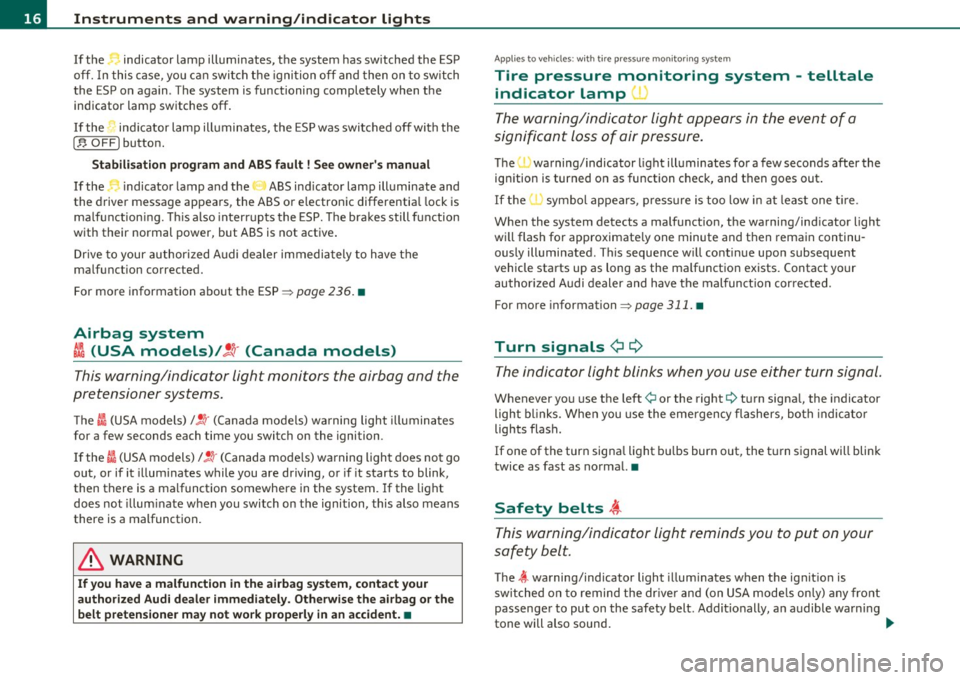
Airbag system
~i (USA models) /!l (Canada models)
This warning/indicator light monitors the airbag and the
pretensioner systems.
T he Cl (USA models) l! !r (Canada mode ls) wa rning light illuminates
for a few seconds each time you switch on the ignition .
If the
I (USA models)/ !~· (Canada mode ls) warning light does not go
out, or if it illuminates while you are driving, or if it starts to blink ,
then there is a malfunction somewhere in the system. If the light
does not illum inate when you switch on the ignition, this also means
there is a malfunction .
& WARNING
If you have a malfuncti on in the airbag s ystem , cont act your
authorized Aud i dealer imm ediately. Otherw ise the airbag or the
belt pretensioner m ay n ot wo rk properly in an accident. •
App lies to veh icles: with t ire p ress ure mon it o ring sys tem
Tire pressure monitoring system -telltale
indicator lamp '
The warning/indicator light appears in the event of a
significant loss of air pressure.
The 'warning/indicator light illuminates for a few seconds after the
ignition is turned on as function check, and then goes out .
If the ' \symbol appears, p ress ure is too low i n at least one t ire.
When the system detects a malfunction, the warning/ind icator light
w ill flash for approximate ly one minute and then rema in continu
ously illuminated . This seque nce w ill co ntinue upo n subsequent
vehicle starts up as long as the ma lf u nctio n exists. Contact yo ur
au thor ized A udi dealer and have the malfunct ion corrected.
For more information=>
page 311. •
Turn signals ¢¢
The indicator light blinks when you use either turn signal .
Whenever you use the left¢ or the right¢ turn signa l, the indicator
light bl inks. When you use the eme rgency flashers, bo th indicato r
lights flash .
If one of the turn signa l light bu lbs burn out , the t urn signal will blink
twice as fast as normal. •
Safety belts ,i
This warning/indicator light reminds you to put on your
safety belt.
The ~ warning/indicator light illum inates when the ignit ion is
switched on to remind the dr ive r and (on USA mode ls only) any fron t
passenger to put on the safety belt. Additionally, a n audible warn ing
tone will also sound . _.,,
Page 52 of 362
Opening and closing
-Tur n the me chanical key i n th e lo ck of the d river's door to
the lock position @=> & in "General descr iption" on
pag e 45.
If the power locki ng system f ail s, there is eme rge ncy locki ng for the
passenger 's door=>
page 51.
& WARNING
Read and follow all WARNINGS=> & in "General descript ion" on
page 45.
[IJ Tips
• After the ignit ion is swi tched on, the power locking sys tem swi tch
and the unlocking button for the rear lid
c;:; i n the door are enabled .•
Locking and unlocking the vehicle from
inside
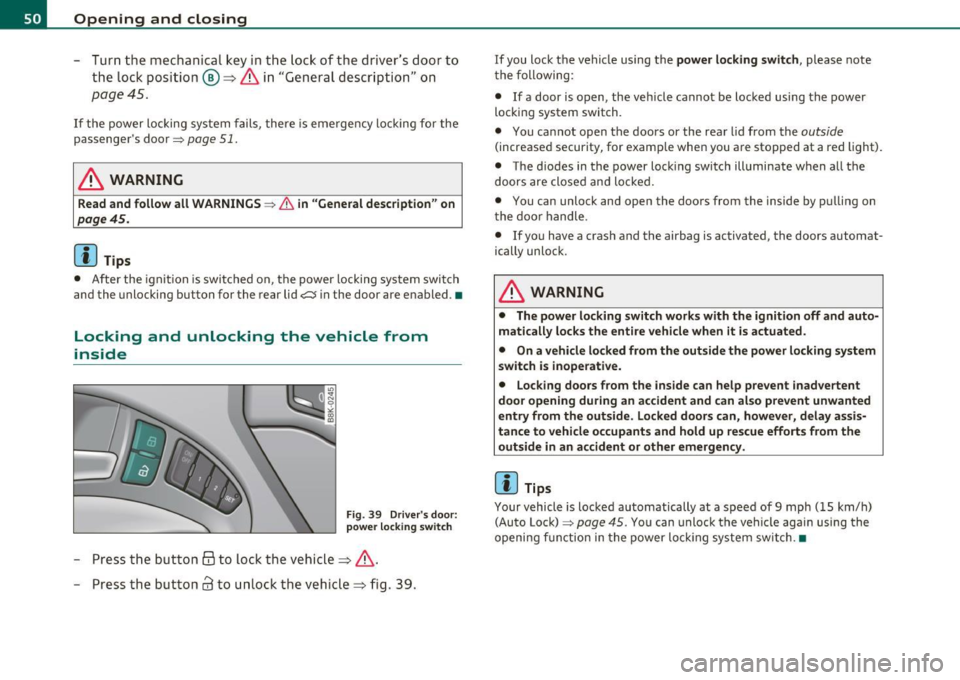
Fig . 39 Driver 's door :
power lo cking switch
- Press the b utto n @ to lo ck the vehicl e=> & .
- Press the but ton
63 to u nloc k the veh icle => fig. 39.
If you lock the vehicle using the power locking switch , please note
t he following:
• If a door is open, the veh icle cannot be locked using the power
loc kin g system switch.
• You ca nnot open the doors or the rear lid from the
outside
(increased security, for examp le when you are sto pped at a red light).
• The diodes in the power loc king switch ill uminate when a ll the
doors are close d an d lock ed .
• You can unlock and open the doors from the inside by p ulling on
t he doo r handle .
• If yo u have a crash and the airbag is activated, the doors automat
ically unlo ck.
& WARNING
• The power locking switch works with the ignition off and auto
matically locks the entire vehicle when it is actuated .
• On a vehicle locked from the outside the power locking system
switch is inoperati ve.
• Locking doors from the inside can help prevent inadvertent
door opening during an accident and can al so prevent unwanted
entry from the outside. Locked doors can, however, delay assis
tance to vehicle occupants and hold up rescue efforts from the outside in an accident or other emergency .
[IJ Tips
Your vehicle is loc ked automatically at a speed of 9 mph ( 15 km/h)
(Auto Lock)=>
page 45. You can unlock t he vehicle again using the
openi ng f unction in the power loc king system sw itch. •
Page 64 of 362

Clear vision
(I) Tips
The system works above a speed of about 6 mph (10 km/h) .•
Emergency flashers ~
The emergency flashers makes other motorists aware
that you or your vehicle are in an emergency situation.
Fig. 54 Emergency
flasher switch
- Press the switch ~=> fig. 54 to turn the emergency
flashers on or off.
When the emergency flashers are on, all four turn signals blink at the
same time. The turn signal indicator lights¢ Q in the instrument
cluster, as well as the light in the emergency flasher switch
d1. blink
likewise . The emergency flashers also work when the ignition is
turned off.
The emergency flashers will turn on automatically if you are in an
acciden t where the airbag has deployed.
[]] Tips
You should turn on the emergency flashers when:
• you are the last vehicle standing in a traffic jam so that any other
vehicles coming can see you, or when •
your vehicle has broken down or you are in an emergency situa
tion , or when
• your vehicle is being towed by a tow truck or if you are towing
another vehicle behind you .•
Turn signals -¢¢ and high beam l[D lever
The lever on the left side of the steering column is used to
operate the turn signals and the high beam as well as the
headlight flasher .
Fig. 55 Turn signal
and high beam lever
The turn signal and high beam lever has the following func
tions:
Turn signals¢ Q ©@
- Push the lever up as far as it can go to turn on the right
turn signal or down to turn on the left turn signal
=> fig. 55.
- Move the lever briefly until you meet resistance and
release it to flash three times .
- Move the lever (up or down) until you meet resistance and
hold it there to determine the flashing time for the turn
signals. _,,,
Page 75 of 362
Seats and storage
General recommendations
Why is your seat adjustment so important?
The safety belts and the airbag system can only provide
maximum protection if the front seats are correctly
adju sted.
Th ere a re various ways of adjusting t he front seats to provide safe and
comfortable support for the driver and the front passenger . Ad just
your seat properly so that :
• you can easily and quickly reach a ll the switc hes and contro ls in the
ins trumen t pa nel
• your body is properly supported thus reducing phys ica l stress and
fatigue
• the safety be lts and airbag system can offer maximum protection
=>
page 190 .
In the following sections, you w ill see exact ly how you can best ad just
your sea ts .
Th ere are special regulations a nd instr uctions for install ing a child
safety seat on the front passenger's sea t. Always follow the informa
tion regarding child safety p rovided in=>
page 215, "Child Safety ".
& WARNING
Incorrect seating posit ion of the dri ver and all other passengers
can result in seriou s personal injury.
• Always keep your feet on the floor when the vehicle is in
motion -never put your feet on top of the instrument panel, out
of the window o r on top of the seat cush ion. This applies especially
to the passengers.
If your seating po sition is incorrect, you
increase the ri sk of injury in the case of sudden braking or an acci-
Controls and equip
ment Safety first
Seats and storage
& WARNING
(con tinu ed)
dent . If the airbag inflates and the seating position is incorrect ,
this could result in per sonal injury or even death .
• It is important for both the dri ver and front passenger to keep
a distan ce of at least 10 inche s (25 cm) between themselves and
the steering wheel and /or instrument panel. If you 're sitting any
closer than this , the airbag system cannot protect you properly. In
addition, the front seats and head restraints must be adjusted to
your body height so that they can give you maximum protection .
• Always try to keep as much distance as possible between your
self and the steering wheel or instrument panel.
• Do not adjust the driver's or front passenger 's seat while the
vehicle is moving. You r seat may move unexpectedly , causing
sudden loss of vehicle control and personal injury . If you adjust
your seat while the vehicle is moving , you are out of position. •
Driver's seat
The correct seat position is important for saf e and
re lax ed driving.
W e recomme nd that you a djust the drive r's sea t in the
f ollowing man ner :
- Ad just the seat in fore and aft direction so that you can
easily pus h the pedals to the floor w hile keeping your
knees slightly bent=>
& in "Why is yo ur seat a djus tme nt
so importa nt?" .
- Adjust the seatback so that when yo u sit with yo ur back
agai nst t he seatback , you can st ill grasp t he top of the
steering w heel. ..,
Vehicle care Technical data
Page 76 of 362
Seats and storage
-Adjust the head restraint so the upper edge is as even as
possible with the top of your head. If that is not possible,
try to adjust the head restraint so that it is as close to this
position as possible=>
page 80.
& WARNING
Never place any objects in the driver's footwell. An object could
get into the pedal area and interfere with pedal function. In case
of sudden braking or an accident, you would not be able to brake
or accelerate. •
Front passenger's seat
Always move the front passenger seat into the rearmost
position.
To avoid contact with the airbag while it is deploying, do not
sit any closer to the instrument panel than necessary and
always wear the three-point safety belt provided adjusted
correctly. We recommend that you adjust the passenger's
seat in the following manner:
- Bring the backrest up to an (almost) upright position.
Do
not ride with the seat reclined.
- Adjust the head restraint so the upper edge is as even as
possible with the top of your head. If that is not possible,
try to adjust the head restraint so that it is as close to this
position as possible=>
page 80.
-Place your feet on the floor in front of the passenger's
seat. •
Adjusting front seats manually
Applies to veh icles: wit h manually adjustab le seats
Seat adjustment controls
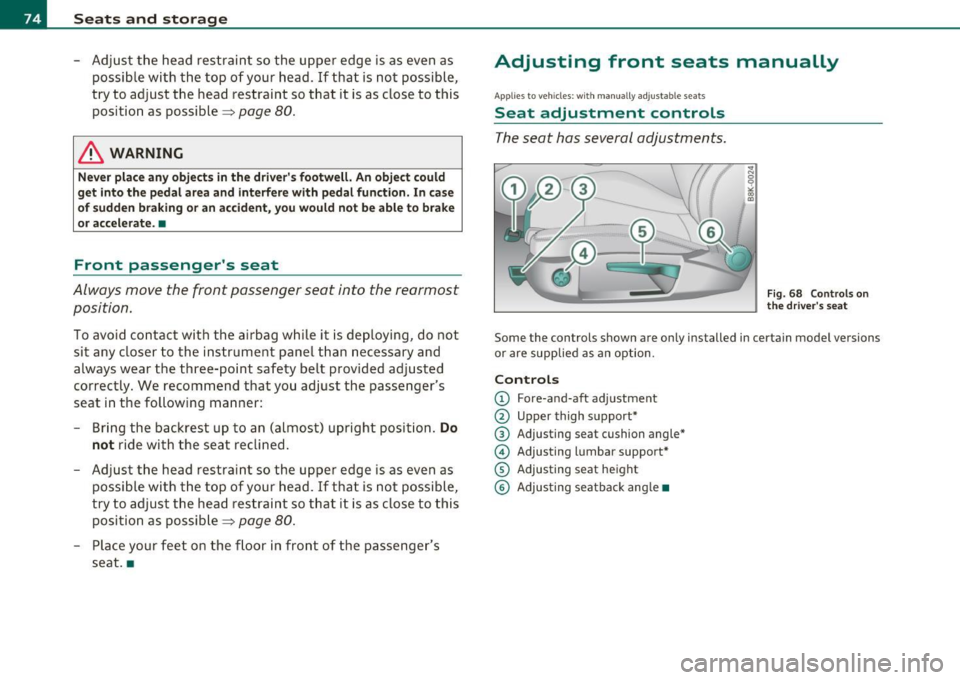
The seat has several adjustments.
Fig. 68 Controls on
the driver's seat
Some the controls shown are only installed in certain model versions
or are supplied as an option.
Controls
© Fore-and-aft adjustment
@ Upper thigh support"
@ Adjusting seat cushion angle*
© Adjusting lumbar support*
© Adjusting seat height
© Adjusting seatback angle •
Page 95 of 362

Storage
General overview
There are numerous places to store items in your vehicle.
Glove compartment
Storage compartment in the roof
Coat hooks
Storage in the tr im panels in the luggage
compartment
ln. WARNING
:::>page 93
::::>page94
=> page 94
• Alway s remove object s from the instrument panel. Any items
not put away could slide around in side the vehicle while dr iving or
when accelerating
or when applying the brake s or when driving
around a corner.
• When you are driving make sure that anything you may have
placed in the center console or other sto rage locat ions cannot fall
out into the footwells. In ca se of sudden braking you would not be
able to brake, depress the clutch or accelerate.
• Any pieces of clothing that you have
hung up must not int er
fere with the driver 's view . The coat hooks a re designed only for
lightweight clothing . Never hang any clothing with hard, pointed
or heavy objects
in the pockets on the coat hooks. During sudden
braking or in an accident -especially if the airbag is deployed -
these objects could injure any passengers inside the vehicle. •
Controls and equip
ment Safety first
Seats and storage
Glove compartment
The glove compartment is illuminated and can be locked.
...
•
To open glove compartment
Fig. 94 Glov e
c om partment
- Pull the ha ndle in th e di rec tion of the arr ow ~ fig. 94 and
swi ng th e cov er d own to o pen .
To close glove compartment
- Push t he g love compartment lid upward u ntil the lock
engages.
T here are holders fo r a pen and a pad of paper in the glove compart
ment lid.
On the righ t side in the glove compartmen t is a holder with the key
body into which t he eme rgency key mus t be clip ped to be able to start
the vehicle.
ln. WARNING
To reduce the risk of personal injury in an accident or sudden stop, always keep the glove compartment closed while driving. •
Vehicle care Technical data
Page 113 of 362

________________________________________________ ..::O ::_ n :...:_ t:::: h:...:.:: e:....'....: ro~ a'.!d :=.._ _J-
On the road
Steering
Manually adjustable steering wheel
The h eight and reac h of th e steering wh eel c an be
a djusted.
First, adjust t he dr iver's se at correct ly.
Fi g. 10 6 Leve r und er
the ste ering column
- Pull the lever:::::, fig. 106 -A rrow-:::::, &.
- M ove t he steeri ng wheel to the d esir ed po sition.
- Push the lever against the steeri ng column un til it loc ks.
T here must be at least 10 inches (25 cm) between your chest and the
cen ter o f the stee ring whee l. If you canno t sit more than 10 inches
(25 cm) from the steer ing wheel , see if adaptive equ ipment is avail
able to help you reach the pedals and increase t he distance from the
steering wheel.
For detai led information on how to adjust the dr iver's seat , see
::>page 76.
Con tro ls a nd e quip
m en t Vehicle
OP-eration T
he steering wheel can be adjusted even whe n the ign ition is turned
off. For veh icles with seat memory, the individual positions for the
stee ring wheel ca n be st ored along wi th t he sea t pos it ion.
& WARNING
Improper use of steering wheel adjustment and improper seating
position can cause serious personal injury .
• Adjust the steer ing wheel column only when the vehicle is not
moving to prevent loss of vehicle control.
• Adjust the dri ver's seat or steering wheel so that there is a
minimum of 10 inches (25 cm) between your che st and the
steering wheel=>
page 172, fig. 164. If you cannot maintain th is
minimum distance , the airbag system cannot protect you prop
erly .
• If phy sical limitations prevent you from sitting 10 in ches (25
cm) or more from the steering wheel, check with your authorized
Audi dealer to see if adaptive equipment is available.
• If the steering wheel is al igned w ith your face , the supp le
mental driver 's airbag cannot provide as much protection in an
accident . Always make sure that the steering wheel is aligned with
your chest.
• Always hold the steering wheel with your hands at the 9 o 'clock
and 3 o'clo ck position s to reduce the risk of personal injury if the
driver 's airbag deploys .
• Never hold the steering wheel at the 12 o'clock po sition or with
your hands inside the steering wheel
rim or on the steer ing wheel
hub. Holding the stee ring wheel the wrong way can cause serious
injur ies to the hands, arms and head if the driver's airbag
deploys. •
Vehicle care Do-it-yourselt service iTechnical data