cruise control AUDI A5 COUPE 2012 User Guide
[x] Cancel search | Manufacturer: AUDI, Model Year: 2012, Model line: A5 COUPE, Model: AUDI A5 COUPE 2012Pages: 316, PDF Size: 78.59 MB
Page 107 of 316
@ Tips
For safety reasons, the stored speed is de
leted when the ign ition is turned off.
Changing stored speed
App lies to vehicles: with adaptive cruise co ntrol
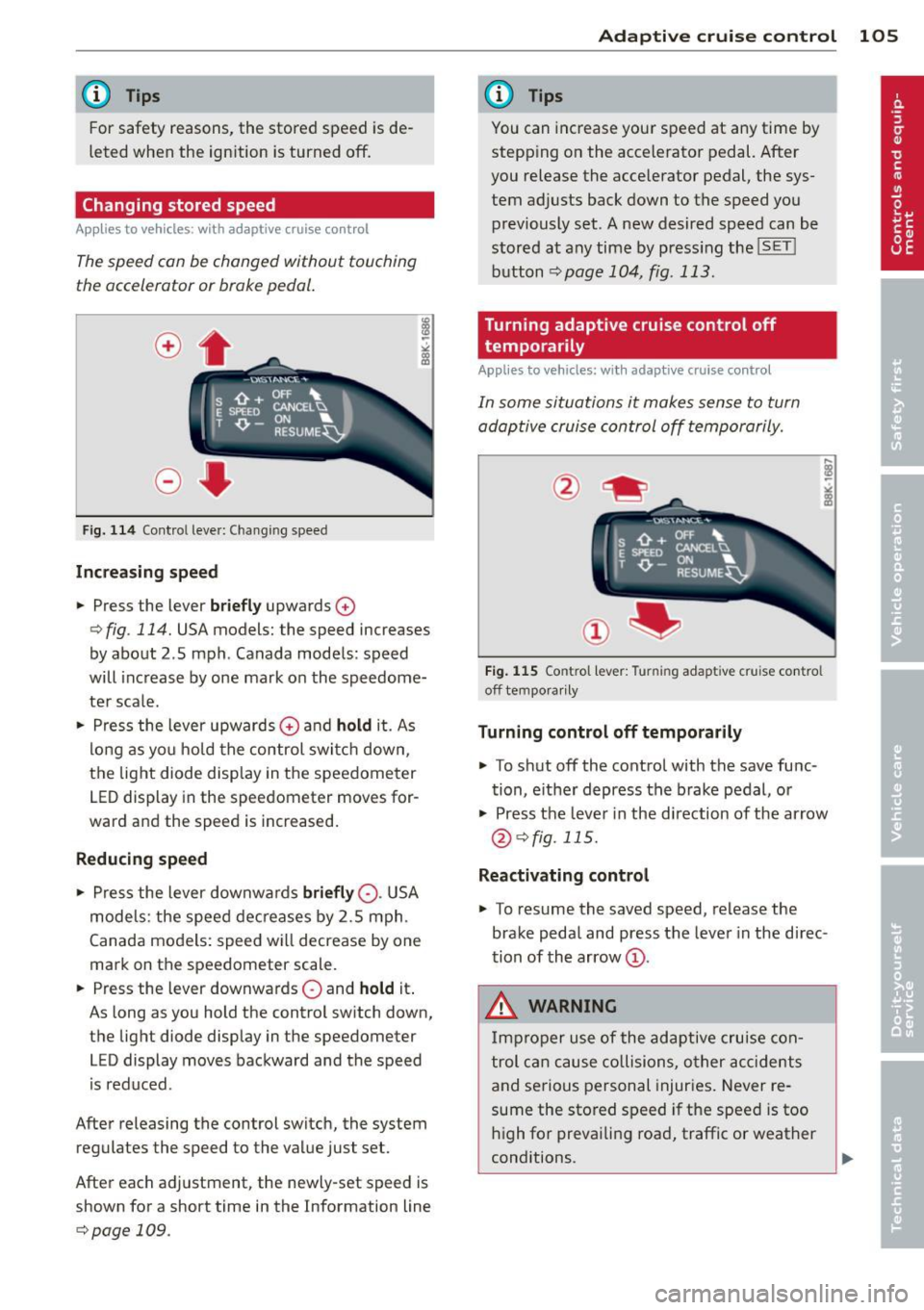
The speed con be changed without touching
the accelerator or broke pedal.
Fig. 114 Contro l leve r: Changing speed
Increasing speed
.. Press the lever briefly upwards 0
¢ fig. 114. USA models: the speed increases
by about 2 .5 mph . Canada models : speed
will increase by one mark on the speedome
ter sca le .
.. Press the lever upwards
0 and hold it. As
long as you hold the control switch down,
the light diode display in the speedometer
LED display in the speedometer moves for
ward and the speed is increased.
Reducing speed
.,. Press the lever downwa rds briefly 0-USA
models: the speed decreases by 2.5 mph.
Canada models: speed will decrease by one
mark on the speedometer scale .
.. Press the lever downwards
0 and hold it.
As long as you hold the control sw itch down,
the light diode display in the speedometer
LED display moves backward and the speed
i s reduced .
After releasing the control switch, the system
regulates the speed to the value just set.
After each adjustment, the newly-set speed is
shown for a short time in the Information line
¢page 109.
Adaptive cruise control 105
@ Tips
You can increase your speed at any time by
stepp ing on the accelerator pedal. After
you release the acce lerator pedal, the sys
tem adjusts back down to the speed you
previously set. A new desired speed can be
stored at any time by press ing the
!SET !
button ¢page 104, fig . 113.
Turning adaptive cruise control off
temporarily
Appl ies to vehicles: wit h adaptive cruise control
In some situations it makes sense to turn
adoptive cruise control off temporarily.
Fig. 115 Contro l l ever: Turnin g adapt ive cru ise contro l
off tempora rily
Turning control off temporarily
.. To shut off the control with the save func
tion, either depress the brake pedal, or
.. Press the lever in the d irection of the arrow
@¢fig. 115.
Reactivating control
.,. To resume the saved speed, release the
brake pedal and press the lever in the d irec
tion of the arrow
(D.
_&. WARNING
Improper use of the adaptive cruise con
trol can cause collisions, other accidents
and serious personal injuries. Never re-
sume the stored speed if the speed is too
high for prevailing road, traffic or weather
-
conditions. ..,.
Page 108 of 316

106 Adaptive cruise control
When the system is turned off temporarily, the speed stored at the time is retained.
How is the distance (time interval) set?
App lies to vehicles : with a daptive cruise co ntrol
Distance con be set in four stages.
Fig. 116 Contro l lever : Sett ing dist ance
,. Push the slider switch once to the right 0
or to the left O c> fig. 116. The distance cur
rently set is shown for 3 seconds in the in
strument cluster display.
,. Push the slider switch
again to the right 0
or to the left Oto increase or to decrease
the distance by one step .
Select distance
The distance at wh ich the adaptive cruise con
trol follows a vehicle in front is determined by
time interva ls . A time inte rval to a vehicle in
front is estab lished and maintained. This pro
duces a speed-dependent interval. The higher
the speed, the greater the safety interval in
yards (meters)
c> &. .
The distances prov ided are spec ified values.
These distances may exceed or fa ll short of
these target distances, depending on the driv
ing situation and the driving style of the vehi
cle ahead.
Distance 1 ,;;:::::,_,;;:::::, __ _
This setting is ideal for brisk driv ing in bump
er-to -bumper traffic. The distance is one sec
ond. This is the equiva lent of, for instance,
- a distance of 36 feet (11 meters) at a speed
of 25 mph (40 km/h) -
a distance of 72 feet (22 meters) at a speed
of 50 mph (80 km/h)
- a distance of 108 feet (33 meters) at a
speed of 75 mph (120 km/h)
Di sta nee 2 ,;;:::::, __ ,;;:::::, __
This setting is idea l for "keep ing pace" com
fortably in bumper-to-bumper traff ic. The dis
tance is 1.3 seconds. This is the equiva lent o f,
f or instance,
- a distance of 46 feet (14 meters) at a speed
of 25 mph (40 km/h)
- a distance of 95 feet (29 meters) at a speed
of 50 mph (80 km/h)
- a distance of 144 feet (44 meters) at a
speed of 75 mph (120 km/h)
Di sta n ce 3 ,;;:::::, ___ ,;;:::::, _
This setting is ideal for "keep ing pace" in
bumper-to-bumper traff ic and is the equ iva
lent of the generally recommended distance
that is "half of the speedometer speed". The
distance is 1.8 seconds. This is the equivalent
of, for instance,
- a distance of 66 feet (20 meters) at a speed
of 25 mph (40 km/h)
- a distance of 131 feet (40 meters) at a
speed of 50 mph (80 km/h)
- a distance of 197 feet (60 meters) at a
speed of 75 mph (120 km/h)
Di sta n ce 4 ,;;:::::, ____ ,;;:::::,
This setting is idea l for secondary road traffic.
The distance is 2 .3 seconds . Th is is the equiva
lent of, for instance,
- a distance of 82 feet (25 meters) at a speed
of 25 mph (40 km/h)
- a distance of 167 feet (51 meters) at a
speed of 50 mph (80 km/h)
- a distance of 249 feet ( 76 mete rs) at a
speed of 75 mph (120 km/h)
You can set the way your vehicle performs in
ACC mode when accelerating and braking in
the radio or MMI*
<=>page 111. Depending on
the driving program and distance you select,
Ill>
Page 109 of 316

your vehicle's acceleration and braking can range from dynamic (1) to comfortab le (5) .
I Driving dynamic
standard comfort
program
Distance 1 1 2 3
Distance 2 2 3 4
Distance 3 2 3 4
3 4 5
_& WARNING
-
When setting the dista nce, the dr ive r is re
sponsible for adhering to the respective
national and country-specific regulations .
- F ollowing other vehicles too closely in-
creases the risk of collisions and serious
persona l injury .
- Setting short distances to the traffic ahead red uces the t ime and distance
available to br ing your vehicle to a safe
stop and makes it even more necessary
to pay close attention to traffic.
- Always use good judgment and se lect a
safe following distance for the traffic, road and weather cond itions .
(j) Tips
The d istance setting is reset to the factory
default
DISTANC E 3 the next time the ig
nition is turned on.
Ad apti ve crui se control 10 7
Driver information
Displays in the instrument cluster
Applies to vehicles: with adaptive cruise control
Depending on the driving situation, driver in
formation is displayed in the instrument clus
ter .
Fig. 1 17 Ove rv iew inst ru me nt cl uster
@ Speedometer and indicator light display
@ Display in the instrument cluster
© Message in the inst rument cl uster display
@ Speedometer and indicator light
display
Important information concerning vehicle op
eration with adaptive c ruise control is shown
i n display area @. The desired speed you set is
indicated in the speedometer (LED lights
around the edge) .
T he indicator lights s how whether the system
has detected a vehicle traveling ahead.
@ Display in the instrument cluster
In disp lay area @ in format io n from the navi
ga tion system" and the tr ip comp ute r is d is
played in addition to in format ion about adap
tive cr uise contro l.
Page 110 of 316

108 Adapti ve crui se control
You can select among the different in forma
tion by repeated brief taps on the
I RESET I but
ton on the windshield wiper lever¢
page 23,
Operation.
© S tatus in dicator
The information in area © is not displayed
permanently. Information is disp layed only if
you set or change the speed setting, change
the time interval, when messages are dis
played or if the adaptive cruise control is
turned off for safety reasons.
Speedometer and indicator light display
App lies to vehicles: with adaptive cruise control
~
- ---
~
® @ ©
Fig . 118 Instrument clus ter: Indicator light
Desired spe ed
The desired speed set by the driver is dis
p layed by a red LED in the LED display in the
speedometer.
N
?3
" 00 a,
I f the des ired speed was set between two
lines on the speedometer using the
ISETI b ut
ton, the two closest light diodes wi ll come on
¢ page 107, fig. 117.
The system a llows only speeds from 20 to 95
mph (30 to 150 km/h) to be set. This speed
range is faint ly illuminated in the speedome
ter (LED lights) .
Indicator lights (symbols )
- @ Open r oad :
The ind icator light shows
that adapt ive cru ise contro l is active a nd
that no object is ahead of the veh icle. Astor
ed speed requested is maintai ned .
-@ Driving in traff ic: The ind icator light indi
cates that an object has been detected trav
eling in front. Your speed is adjusted accord- ing to the speed of the vehicle in front.
The
adaptive cruise contro l accelerates and
brakes automatica lly w ithin the system's op
eration parameters.
- ©
Dri ver i nte rvention prompt : The red
flashing warning light means
Reque st for
driver to as sume con trol.
You as the dr iver
must slow the vehicle with the foot brake.
The symbol tells you that the adaptive
cruise control is not able to slow the veh icle
down enough to keep a enough distance to
the vehicle in front of you. An warning tone
w ill also sound when the symbo l appears.
For more information about the driver inter
vention prompt
¢ page 111.
CJ) Tips
-If you use the accelera tor to go faste r
t han the speed of the object ahead of
you, the
d riv e r intervent ion p rompt wi ll
not be accompanied by a warning s ignal.
- If the speed you previously set is exceed
ed, the indicator light in the speedome
ter wi ll switch off.
Display in the instrument cluster
Applies to vehicles: wit h adaptive cruise control
F ig . 119 Display in the inst rume nt cluster
Scroll th roug h the available informa tion d is
plays by briefly tapping the
I RESET ! button at
the end of the windshield wiper lever. You can
se lect information from the tr ip computer,
navigation system* or adaptive cruise control.
@ Vehicle symbol
@ Distance
© Status
Page 111 of 316

@ Vehicle symbol
The vehicle symbol indicates whether the sys
tem has detected an object traveling in front.
-Vehicle outline : Open road, no vehicle
ahead.
- White vehicle: A vehicle is detected ahead .
-Red vehicle: Request for driver to assume
control.
@ Distance
Using the arrows and scale, you can detect
how far it is to the vehicle in front of you.
-Open road: No arrow appears when the ve
hicle is on an open road and there is no vehi
cle ahead.
- Driving in traffic: If a vehicle is detected
ahead, the arrow moves on the scale . The
green area represents the distance set.
When approaching s low ly, the arrow moves
from the
gray zone to the green zone on the
scale.
- Request for driver to assume control: When
approaching rapidly, the arrow serves as an
early warning signal. If the d istance select
ed is exceeded or possibly not reached, the
arrow moves into the
red zone on the scale .
In certa in driving situations, you as the driv
er will have to ta ke act ion
q page 111, Driv
er intervention prompt.
@Status
-The text ACC OFF appears in white letters
when adapt ive cruise control is turned off.
- The text
ACC AVAILABLE appears in wh ite
letters when the system is turned on but no
desired speed has been set .
- The text
OVERRIDE appears in white letters
when you exceed the desired speed by accel
erating .
- The text
DISTANCE! appears in red letters
when the interval to a vehicle traveling
ahead is too short and you have to slow you r
vehicle additionally with the foot brake .
- The text messages
DISTANCE 1 to DIS ·
TANCE 4
appear in green letters to ind icate
Adaptive cruise control 109
the time interval you have set and adaptive
cruise contro l is in management mode.
- If the driving program "standard" is re
placed by "comfort" or "dynamic" using the
MMI*, the above text message is supple
mented by an appropriate prompt, e.g.
DIS
TANCE 1 DYN .
System status indicator
Applies to vehicles: wit h adaptive cruise contro l
The text messages and symbols shown in this
area of the display ore not displayed perma
nently.
Fig. 120 System status indicator
Time intervals (such as~ ---- ~>
The different symbols for the time intervals
appear if you change the settings ~
fig. 120 .
The text message ... (three white dots) ap
pears if a setting cannot be implemented with
the operat ing lever . The following are possible
reasons:
- If you pull the contro l lever towards you to
resume speed but no requested speed was
set .
- If you push the lever up to increase (or down
to reduce) speed when no speed has been
set previously.
- If you push the lever up to increase (or down
to reduce) speed and this speed is outside
the range from 20 to 95 mp h (Canada mod
els: 30 to 150 km/h).
ACC functionality limited
The text message ACC functionality limited
appears when the ACC system does not detect ..,.
Page 112 of 316

110 Adaptive cruise control
any objects over an extended time period. For
the time being, the distance to vehicles up
ahead is not being controlled. The ACC system
is not switched off, so increased alertness is
required. The following may be reasons for
the text message ACC Functionally limited:
- The ACC sensor is dirty. The ACC system is
not reacting, or is not reacting correctly, to
vehicles traveling ahead .
- It is possible that you are driving on a road
with very light traffic
without anything at
the side of the road (e.g. guard rails, traffic
signs, trees). As soon as a vehicle is detected
by the system again, it returns to its control
range and the text message disappears.
The ACC sensor is located in the right front
trim grille
¢ page 102, fig . 110. If there is a
loss of operation due to heavy contamination,
this area should cleaned to restore proper op
eration.
ACC not available
The text message ACC not available appears,
for example, if the temperature of the brakes
is excessive . Adaptive cruise control is tempo
rarily not available. A warning tone sounds as
a reminder.
ACC not available!
The text message ACC not available! appears
in the event of a malfunction. Adaptive cruise
control is turned off. A warning tone sounds
as a reminder. Have the system inspected by a
qualified dealership.
ACC sensor blocked !
The text message ACC sensor blocked ! ap
pears when the ACC system can no longer
guarantee safe detection of objects. Adaptive
cruise control is turned off. A warning tone
sounds as a reminder.
To decide whether it is necessary to switch off
the ACC (ACC sensor blocked
!) or if it is only a
temporary condition (ACC Functionally limit
ed), the system will also takes into considera
tion the outside temperature and/or the wind
shield wiper operation. The
ACC sensor is dirty or blocked (e.g. leaves,
snow).
The sensor should be cleaned to restore prop
er sensor function¢
page 102, fig. 110.
Engine speed !
The text message Engine speed ! appears in
vehicles with manual transmission when the driver did not shift up or down in time while
using adaptive cruise control braking or accel
erating, causing the vehicle to exceed or not
reach the permitted limit speed. This causes
adaptive cruise control to deactivate automat
ically. A chime sounds as a reminder.
Parking brake!
The text message Parking brake! appears if
emergency braking was manually initiated
with the Electromechanical Parking Brake
(EPB). The adaptive cruise control is turned
off. This is accompanied by a warning tone.
Stabilisation program
The text message Stabilisation program ap
pears if the Electronic Stabilization Program
(ESP) has intervened. In this case the adaptive
cruise control is automatically turned off. This
is accompanied by a warning tone.
Speed
The set speed in mph (Canada km/h) always
appears when saving or changing the speed in
adaptive cruise control¢
page 104, How is
the speed stored?
and ¢ page 105, Changing
stored speed.
Speed too low
The text message Speed too low appears if
the current speed is too low
to set or to hold
the requested speed.
When setting a desired speed, it must be at
least 20 mph (30 km/h). At speeds below 12
mph (20 km/h), the cruise control is turned
off.
In speeds over 95 mph (150 km/h), the sys-
tem remains active and resumes the speed of .,..
Page 113 of 316

95 mph (150 km/h) if the driver removes the
foot from the accelerator .
Selector lever position!
The text message Selector lever position! ap
pears when the selector lever is moved to po
sition
N. In thi s position, adaptive cruise con
trol is not avai lab le .
Driver intervention prompt
Applies to vehicles: with adaptive cruise control
The driver intervention prompt co/ls on the
driver to toke over the situation.
Fig. 121 Instrument clus te r: Driver inte rven tion
pr ompt
In certain situations, the braking power of the
adaptive cruise control is not sufficient to
maintain an adequate distance from the ob
ject ahead . In this situation, the adaptive
cru ise control calls on
you as the driver to take
action.
The
driver intervention prompt alerts you vis
ually and audib ly .
- A red vehicle is shown in the instrument
cluster disp lay
¢ fig . 121 .
-The text DISTANCE! appears in the status
line .
Adaptive cruise control 111
- The indicator light in the Instrument cluster
blinks red.
- A warning tone sounds.
(0 Tips
-If the adaptive cruise control initiates
braking, the hydraulic brake system is
under pressure . Th erefore, the brake
pedal distance is shorter and the pedal
"feels" harder.
- Adaptive cruise contro l is swi tched off af
ter pressing the footbrake. The speed
saved up this point can be resumed.
- To resume the saved speed, re lease the
brake pedal and press the control lever
¢ page 105, Turning adaptive cruise
control off temporarily.
- If you use the accelerator to go faster
than the speed of the object ahead of
you, the
driver intervention prompt will
not be accompan ied by a warn ing signal.
- If the speed you previously set is exceed
ed, the indicator light in the speedome
ter will switch off.
MMI settings
App lies to vehicles: with adaptive cruise control
Individual settings for adoptive cruise control
con be selected in the MMI*.
Settings for the driving program can be ad
justed individually to the particular user and saved in the MM!*.
,,. Select:
I CAR ! function button > Adaptive
Cruise Control
> Driving program .
Setting the driving program
In the driving program menu you can adjust
the characteristics of adaptive cruise control
to what you want using
dynamic , standard or
comfort.
Saving settings
Your individua l settings are automatically
saved and assigned to the remote control key
being used ( remote key storage). If the key is .,..
Page 114 of 316

112 Adapti ve crui se control
given to another person, the saved settings
remain as they are.
System limitations
General information
App lies to vehicles: with adaptive cruise control
Some driving situations which affect the func
tion of the radar sensor are described below.
When driving, the adaptive cru ise control is
governed by physical and system-specified
limits. Also, under certain circumstances, the
ACC system may react unexpectedly or late
from the driver's po int of view. Therefore, al
ways be attentive and intervene, if necessary:
- when driving around curves¢
page 112
-when vehicles in front are not in line with
your vehicle ¢
page 112
-when other vehicles are changing lanes
r:=>page 113
-when other veh icles are difficult to detect
r:=> page 113.
A WARNING
The radar sensor's vision can be reduced by
rain, snow and heavy spray. This can result
in vehicles driving ahead being inade
quately d etected or, in some c ircumstan
ces, not detected at a ll.
If ne cess ary, take
a ction yourself!
When driving around curves
Applies to vehicles: with adaptive cruise control
Fig. 122 Vehicle entering a cu rve
Fig. 123 Ve hicle leav ing a cu rve
Entering a curve
When enter ing a curve, the adaptive cruise
control may react to a vehicle in the next lane
and apply the brakes in yo ur vehicle
r:=> fig. 122. The braking action can be overrid
den by depressing the accelera tor pedal.
Leaving a curv e
At the exit from very long curves the pred ic
t ive lane reading can cause the adaptive cruise
control to react to another vehicle in the next
lane and apply the b rakes in your vehicle
r=>fig . 123. The braking action can be over rid
den by depressi ng the acce le ra tor pedal.
, Vehicles offset to one side
Applies to vehicles: with adaptive cruise control
Fig. 124 Ve hicle traveling a head outside the detect ion
range of the radar sensor
Vehicles trave ling ahead and to one s ide can
not be detected by the adaptive cru ise contro l
unt il they are within the detect ion range of
the sensor.
Page 115 of 316

Lane changes by other vehicles
Applies to vehicles: with adaptive cruise control
Fig. 125 A vehicle changes lanes
Vehicles which move into your lane a short
d istance ahead cannot be identified by the
adapt ive cruise control until they are in the ra
dar sensor's detection range.
Vehicles that are difficult to detect
Applies to vehicles: with a daptive cruise control
Fig . 126 Two -wheeled vehicle driving ahead
Vehicles that are difficult to detect, e.g. two
wheeled vehicles ahead, vehicles with high ground clearance, protruding load, are fre
quently detected late or not at all, under
some circumstances.
Adaptive cruise control 113
Stationary vehicles
Applies to vehicles: wit h adaptive cruise control
Fig. 127 Turning and stationary veh icle
Fig. 128 Sheering out and stat ionary vehicle
If a vehicle that has been detected by the ACC
system turns
off or sheers out, and there is a
stationary vehicle ahead of that vehicle, the
ACC system does not respond to the station
ary veh icle
~ fig. 12 7 and ~ fig. 128.
Audi braking guard
Description
Appl ies to vehicles: wit h adaptive cruise control
Audi braking guard warns you of a threaten
ing collision with a vehicle ahead.
Fig. 129 D isplay in the instrument cluster
Page 116 of 316

114 Adaptive cruise control
The Audi braking guard is active from a speed
of approx. 20 mph (30 km/h) and works within the system limits¢
page 112 even when
the adaptive cruise contro l is deactivated.
A radar sensor is bui lt into the front of the ve
hicle
¢ page 102, fig. 110. The system is in
tended to measure the distance to reflective
surfaces. If a measurement is not possible,
the system does not respond .
When the measurement has taken p lace, the
system can assess a hazardous situation,
when a vehicle ahead suddenly brakes or when
your own vehicle is driving at high speed to
wards a much slower vehicle ahead . As soon
as the system assumes that a possible colli
sion with the vehicle ahead can on ly be avo id
ed by immediate all-out braking or by an
avoiding maneuver, a warning appears.
The system has a pre-set response time to be
able to warn in good t ime . This system re
sponse time is automat ically reduced if you
accelerate actively, for example to join a high
way. Braking, transverse acceleration and the
steering angle can lead to a reduced system
response time . The warning is deactivated if
you begin to overtake with fu ll acce leration.
The system draws your attention to two differ
ent hazardous situations:
Distance
The distance warn ing is issued in the event of
inadequate distance to the veh icle ahead ape
riod of more than 5 seconds . If the distance is
l ess than 30 feet (9 meters) at 50 mph
(80 km/h) , for example, an optical display is
faded in on the instrument cluster¢
fig. 129.
If the vehicle ahead brakes sharply, a collision
cannot be avoided , even in the case of an im
mediate response. In this case, increase the
distance to the vehicle ahead.
Speed
If there is a much slower veh icle ahead in your
la ne, or if the vehicle ahead brakes sharply,
the Audi braking guard ca lculates the point
from which a collision can only be avoided by all-out braking or
by an avoiding maneuver. If
a warning does sound, a possib le collision
with the vehicle in front can be avoided
through an evas ive maneuver or by braking .
T he warning is given in two stages:
-Pre-warning: An optical display appears in
the instrument cluster and a warning tone
so unds.
- Acute warning: If you do not respond to the
pre-warn ing, the second stage , the acute
warning, is issued . A brake jolt reminds you
to concentrate on the road again.
Under heavy brea king, brake assist
¢
page 209 also helps you obtain max imum
braking efficiency.
.&_ WARNING ~
Always pay attention to traffic, even when
the Audi braking guard is switched on. You
are a lways responsible for your speed and
the distance between your vehicle and oth·
er vehicles.
-Always keep the lega lly stipulated safety
d istance between your vehicle and the
veh icle ahead • danger of accident!
- The Audi braking guard does not respond
outside the system limits, for example if
you approach a stationary obstacle (end
of a traff ic jam or breakdown vehicle).
- Please observe that the Audi braking
guard is subject to restrictions in narrow
bends due to the field of vision of the ra
dar senso r. T his may possibly lead to ob
stacles not being detected.
- The radar sensor's
vision can be reduced
by rain, snow and heavy spray. This can
resu lt in vehicles driving ahead being in
adequately detected or, in some circum
stances, not detected at all. Always
watch where yo u are driving .
- Reflecting objects such as e.g . crash bar
riers or the entrance to a tunne l may im
pair the function of the radar sensor .