cruise control AUDI A5 COUPE 2012 Owners Manual
[x] Cancel search | Manufacturer: AUDI, Model Year: 2012, Model line: A5 COUPE, Model: AUDI A5 COUPE 2012Pages: 316, PDF Size: 78.59 MB
Page 4 of 316
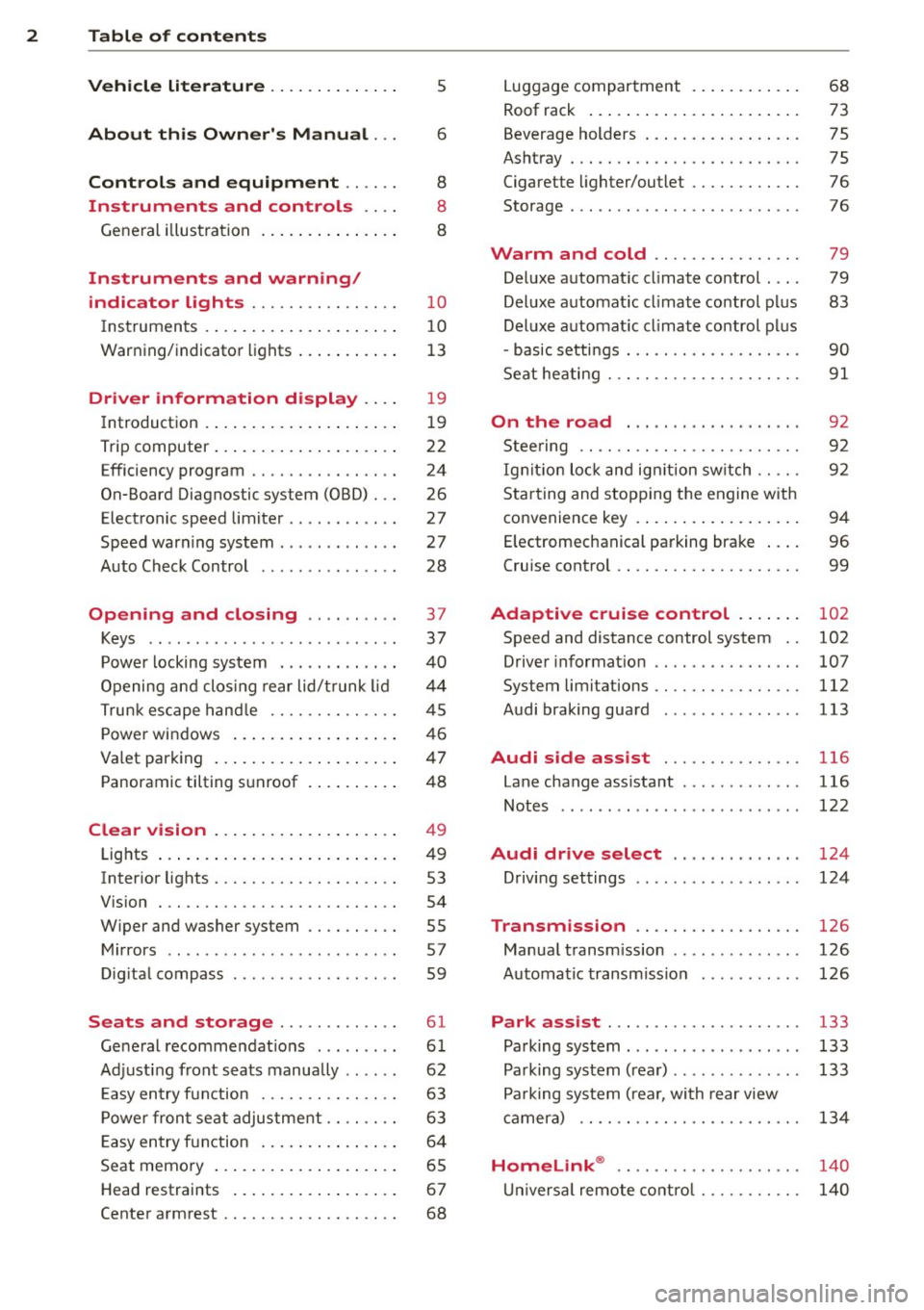
2 Table of contents Vehicle literature .. .. .. .. .. ... .
About this Owner's Manual ...
Controls and equipment .. ... .
Instruments and controls .. . .
General illus tration .... ... .. .. ... .
Instruments and warning/
indicator lights ........ .. .. .. . .
Ins truments . .. .. ..... ... .. .. ... .
War ning/ indi cator lights ... .. ... .. .
Driver information display .. . .
Introduct ion . .. .. ..... ... .. .. ... .
Trip computer .. .. ..... ... .. .. ... .
Efficiency program ........ .. .. ... .
On-Board Diagnostic system (OBD) . . .
Elect ronic speed limiter .. .. .. .. .. . .
Speed war ning system ...... ..... . .
Auto Check Control ........ ... .. . .
Opening and closing .. .. .. .. . .
Keys .. .. .. ................ ... . .
P owe r locking system . .. .. .. .. .. . .
Opening an d clos ing rear lid/t runk lid
Tr un k esc ape h and le ...... .. .. .. . .
P owe r win dows .. ..... ... .. .. ... .
Va let park ing .. . ...... ... .. .. ... .
Panoramic tilting s unroof . ... .. .. . .
Clear vision .. .. ..... ... .. .. ... .
Lights ..... ... .. ..... ... .. .. ... .
Inter ior lights . ........... .. .. ... .
V1s1on . .. .. .................... .
W iper and washer system .. .... ... .
M irrors .. .. ... .... .... .. .. .. .. . .
Di gita l compass ........... ... .. . .
Seats and storage ...... ..... . .
Ge neral recomme ndat ions ..... .. . .
Ad just ing front seats manually .. .. . .
E asy en try f unction ....... .. .. .. . .
P owe r fron t se at adjus tment . ... .. . .
E asy en try f unction .... ... .. .. ... .
Seat memo ry .. .. ..... ... .. .. ... .
H ead restraints .. ..... ... .. .. ... .
Center a rm rest ........... .. .. .. . .
5
6
8
8
8
10
1 0
13
1 9
1 9
22
24
26
27
27
28
37
37
40
44
45
46
47
4 8
4 9
4 9
53
54
55
57
59
61
6 1
62
63
63
6 4
65
6 7
68
Lugga ge compartment . ..... .... . .
Roof rack ..... .. .. ... ..... ... .. .
Beverage holders .... .. .. ... ... .. .
Ashtray ... .... .. ............. .. .
Cigarette lighter/outlet ......... .. .
Storage ...... ... .. ............. . 68
73
75
75
76
76
Warm and cold . . . . . . . . . . . . . . . . 79
Del uxe a utomat ic cl imate co ntrol . . . . 79
Del uxe a utomat ic cl imat e co ntrol pl us 83
Deluxe a utomat ic c limate co ntrol pl us
- basic setti ngs . . . . . . . . . . . . . . . . . . . 90
Seat heating . . . . . . . . . . . . . . . . . . . . .
91
On the road . . . . . . . . . . . . . . . . . . . 9 2
Stee ring . . . . . . . . . . . . . . . . . . . . . . . . 92
Ig nition loc k an d ign it ion sw itch . . . . . 92
S tar ting and stopping the engine with
convenience key . . . . . . . . . . . . . . . . . . 94
E lectromechanical pa rking bra ke . . . . 96
Cruise cont ro l . . . . . . . . . . . . . . . . . . . . 99
Adaptive cruise control . . . . . . . 102
Speed and distance control system . . 102
Driver informat io n . . . . . . . . . . . . . . . . 107
System limitations ... .......... .. . 112
Audi braking guard . . . . . . . . . . . . . . . 113
Audi side assist
Lane change ass istant ............ .
Not es ..... ... .. .. ... ....... ... .
Audi drive select .. ... .... .. .. .
D riving settings
Transmission
116
116
122
124
124
126
Manua l transm ission . . . . . . . . . . . . . . 126
Automa tic transmiss io n . . . . . . . . . . . 126
Park assist . . . . . . . . . . . . . . . . . . . . . 133
Pa rking sys tem . . . . . . . . . . . . . . . . . . . 133
Pa rking sys tem (rea r) . . . . . . . . . . . . . . 133
Pa rking sys tem ( rea r, wi th rear view
cam era) . . . . . . . . . . . . . . . . . . . . . . . .
13 4
Homelink ® . . . . . . . . . . . . . . . . . . . . 140
U niversa l remote cont rol . . . . . . . . . . . 14 0
Page 11 of 316

CD
@
®
©
®
®
(j)
Door handle
Power locking sw it ch
Memory buttons (dr iver's seat)
Button for side ass ist .. ... .. .
A ' l 1 r out ets .... ..... ... .. .. .
L ight switch
Control lever for :
- T urn signal and high beam . .
® Multi-function steering wheel
with:
- Horn
- Driver's airbag ..... .. .. .. .
- Operating buttons for the au-
dio system
- Rocker switches for tiptronic
operation ........... .... .
® ISETI button ............... .
@ Instrument cluster .... ... .. .
@ Reset button for trip odometer
@ Sw itches for:
- Windshield wiper/washer .. .
- Trip computer ....... ... .. .
@ Ignition lock . .......... ... .
~ Adjustable steer ing column
@ Control lever for :
- Cruise control ............ .
- Adaptive cruise control .... .
@ Instrument lighting .... .. .. .
@ Release lever for the engine
hood
.. .. ................. .
@ Data Link Connector for On
Board Diagnostics (OBD II) . .. .
@ Switch for unlocking the trunk
lid
. . .. .. .. .. ........... .. .
@ Adjuster control for outside m ir-
r ors
@ Power window switches
@ MMI Display
@ D epending on opt io n s:
- Radio system
- CD changer
@ Emergency flasher
@ Glove compartment ( lockable) .
@ Front passenger's airbag .. .. . 43
65
116
89
49
52
166
131 11
1 0
12
55
22
92
92
99
102 5 1
237 26
44
57
46
52
77
166
In strument s and control s 9
@ Depending on options, switches
for :
- Aud i drive select ... .. ... .. . 124
- Electron ic Stabili zation Pro-
gram
- Rear w indow sun shade .....
@ Deluxe automat ic cl imate con- 204
54
t
ro l .... .. .. .. ............ .
@) Depending on options, selector
lever or shift lever for
83
- Manual transmission ...... . 126
- Automatic transmission . . . . . 126
@ Ashtray with cigarette lighter 75 , 76
@ Depend ing on options:
- MMI control console or
- Aud i drive select . . . . . . . . . . . 124
- Electron ic Stabili zation Pro-
gram bu tton . . . . . . . . . . . . . . 204
- Power switch for rear window
sun shade . . . . . . . . . . . . . . . .
54
@ I S TAR T ENG IN E ST OPI button 94
@ Electromechanical parking
brake .. . , ... , .. . , ... , . . . . . 96
(D Tips
- Some of the equipment or features
shown in the genera l ill ustration may be
standard equipment on your vehicle or
may be opt ional equ ipment depending
on your model. Always ask your author
ized Aud i dealer if you have a quest ion
about your vehicle .
- Operat ion of the Multi Med ia Interface
(MMI) is described in a separate manual.
Page 16 of 316
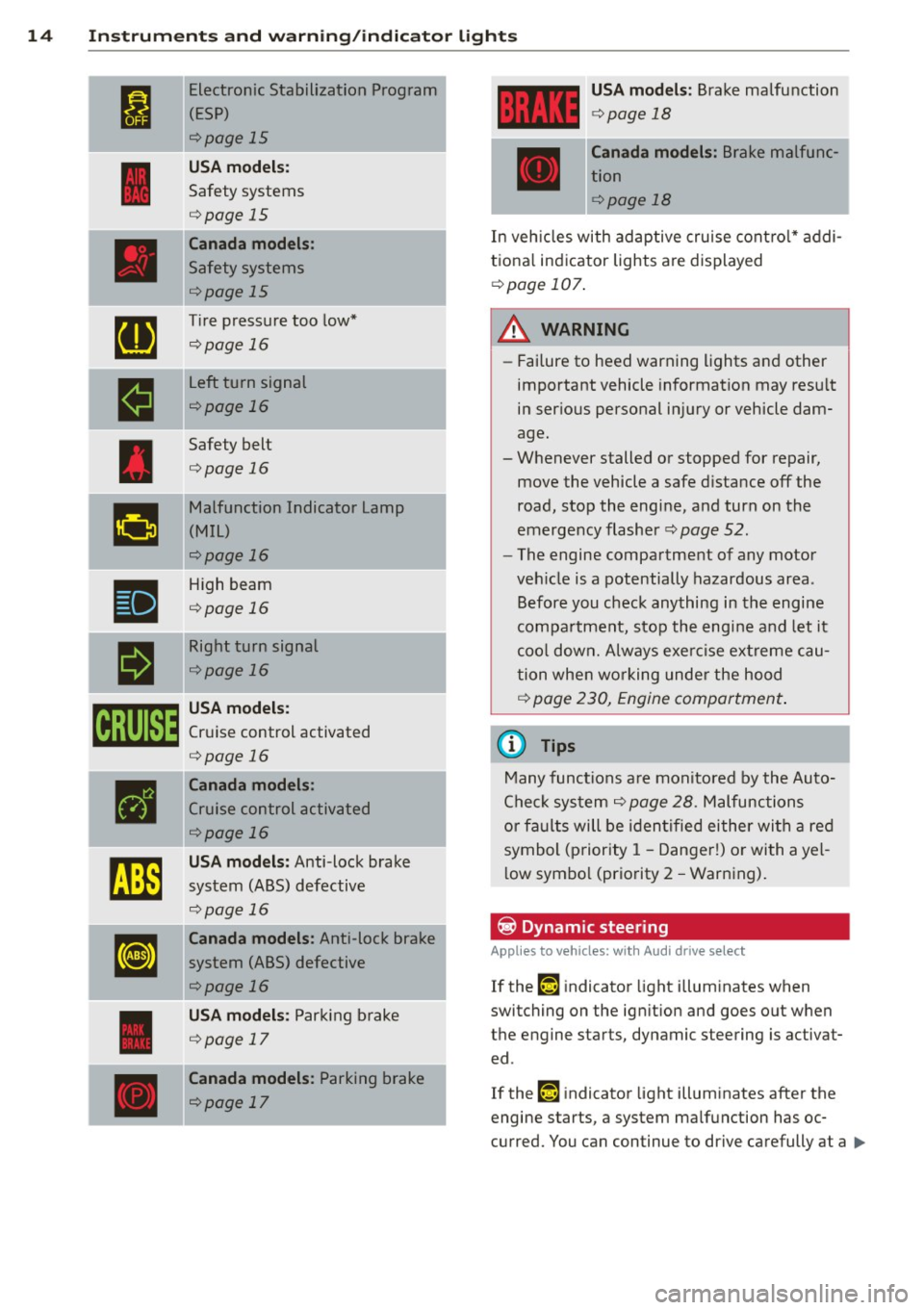
14 Instrum ent s and w arn ing /indic ato r light s
I
Electronic Stabilization Program
(ESP)
¢page 15
USA model s:
Safety systems
¢page 15
Canada model s:
Safety systems
¢page 15
[a
Tire pressure too low*
¢page 16
-
•
Left turn signal
¢page 16
Safety belt
¢page 16
g
Malfunction Indicator Lamp
(MIL)
¢page 16
•
High beam
¢page 16
a
Right turn signal
¢page 16
om
USA model s:
Cruise control activated
¢page 16
•
Canada models :
Cruise control activated
¢page 16
~
USA mod els: Anti-lock brake
system (ABS) defective
¢page 16
[IJ
Canada models : Anti-lock brake
system (ABS) defective
¢page 16
USA model s: Parking brake
¢page 17
Canada models : Parking brake
¢page 17
USA mod els: Brake malfunction
¢ page 18
Canada models : Brake malfunc
tion
¢page 18
In vehicles with adaptive cru ise cont ro l* addi
t iona l indicator lights are displayed
¢page 107.
A WARNING ~
-Failure to heed warning lights and other
important vehicle information may resu lt
in ser ious personal injury or vehicle dam
age.
- Whenever stalled or stopped for repair, move the vehicle a safe d istance
off the
road, stop the engine, and turn on the
emergency flasher
¢ page 52.
- The engine compartment of any motor
veh icle is a potentially hazardous area.
Before you check anything in the engine
compa rtment, stop the engine and let it
coo l down. Always exe rcise ex treme cau
tion when wo rking under the hood
¢ page 230, Engine compartment .
(D Tips
Many functions are monitored by the Auto
Check system
¢ page 28 . Malfunctions
or faults will be i den tified either wi th a re d
symbol (priority 1 -Danger!) or with a yel
l ow symbo l (priority
2 - Warning).
~ Dynamic steering
Applies to vehicles: with Audi drive select
If the ,-w j indicator light illuminates when
switching on the ign it ion and goes o ut w hen
the engine starts, dynamic steering is activat ed .
If the ,-w j indicator light illuminates after the
engine starts, a system ma lfunction has oc
curred. You can continue to drive carefully at a .,,.
Page 18 of 316
16 Instruments and warning/indicator lights
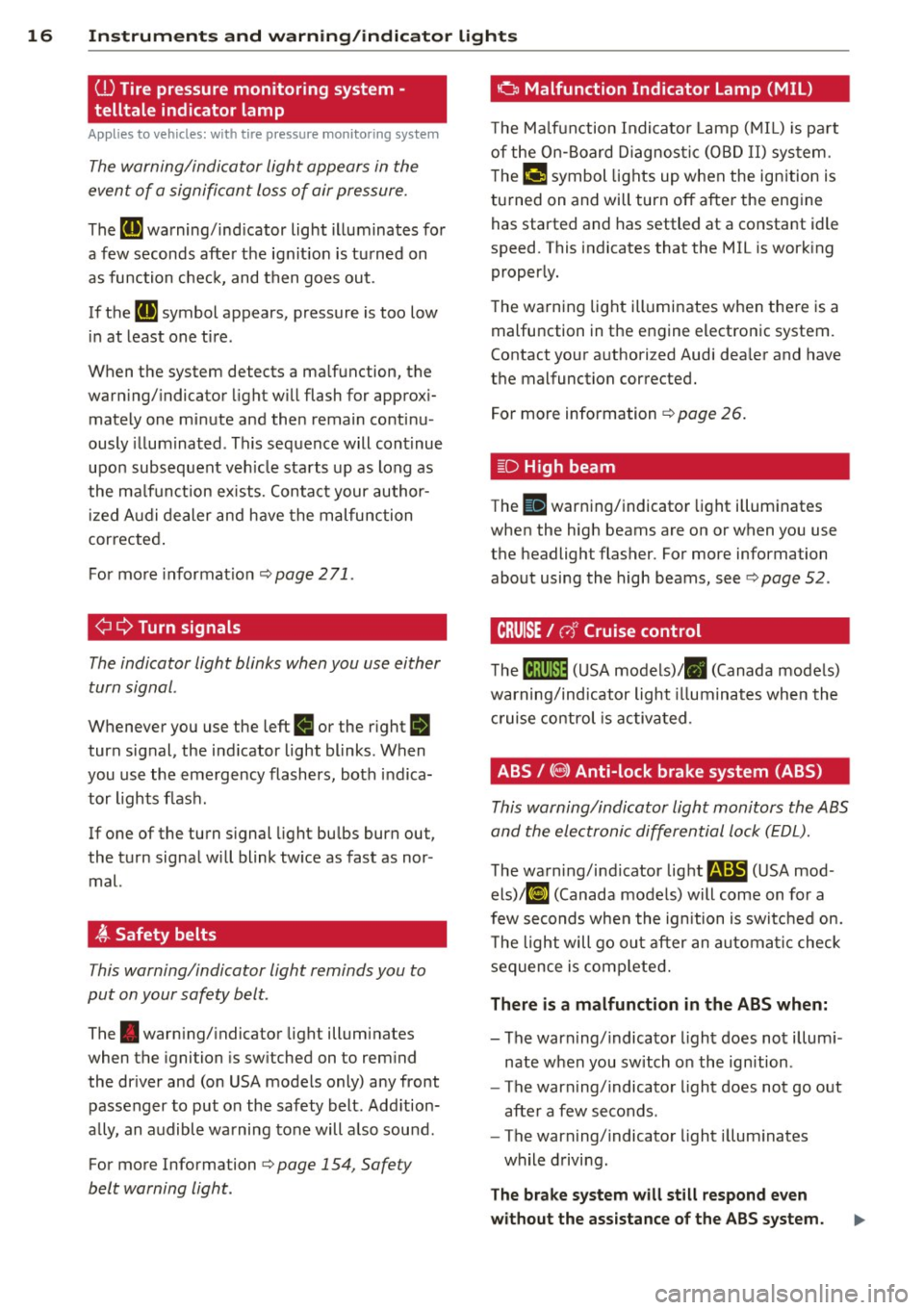
(l) Tire pressure monitoring system -
telltale indicator lamp
A ppl ies to vehicles: with tire pressure monit oring sys te m
The warning/indicator light appears in the
event of a significant loss of air pressure.
The ti) warning/ind icator light illuminates for
a few seconds after the ignit ion is turned on
as function check, and then goes out.
If the
(g symbol appears, pressure is too low
in at least one tire.
When the system detects a ma lfunction, the
warning/indicator light will flash for approx i
mately one minute and then remain continu
ously illum inated. Th is sequence will continue
upon subsequent vehicle starts up as long as
the ma lfunction ex ists. Contact your author
ized Audi dealer and have the malfunction
corrected .
For more informat ion
c::> page 2 71 .
¢i 9 Turn signals
The indicator light blinks when you use either
turn signal .
Whenever you use the left B or the right II
turn signal, the indicator light blinks. When
you use the emergency flashers , both indica
tor lights flash .
If one of the turn signal light bulbs burn out,
the turn signal will blink tw ice as fast as nor
mal.
~ Safety belts
This warning/indicator light reminds you to
put on your safety belt.
The . warning/ indicator light illum inates
when the ignition is switched on to remind
the dr iver and (on USA models only) any front
passenger to put on the safety belt. Add ition
a lly, an audible warning tone will a lso sound.
For more Information
c::> page 154, Safety
belt warning light.
o Malfunction Indicator Lamp (MIL)
The Ma lfunction Indicator Lamp (MIL) is part
of the On-Board Diagnostic (OBD II) system.
The
fcj symbol lights up when the ign ition is
turned on and will turn off after the engine
has started and has settled at a constant idle
speed. This indicates that the MIL is work ing
proper ly.
The warning light illuminates when there is a
malfunction in the engine electronic system.
Contact your authorized Audi dea ler and have
the malfunction corrected.
For more information
c::> page 26.
~D High beam
The II warning/indicator light illuminates
when the high beams are on or when you use
the headlight flasher. For more information
about using the high beams, see
c::> poge 52.
CRUISE/ (,)" Cruise control
Them! (USA models)/ . (Canada models)
warning/indicator light illuminates when the
cruise control is activated .
ABS/ (9) Anti-lock brake system (ABS)
This warning/indicator light monitors the ABS
and the electronic differential lock (EDL).
The warn ing/indicator light r4iS (USA mod
els)!Ei] (Canada models) will come on for a
few seconds when the ignition is switched on.
T he light will go out after an automatic check
sequence is completed.
There is a malfunction in the ABS when:
-The warning/indicator light does not i llum i
nate when you switch on the ignition .
- The warning/indicator light does not go out
after a few seconds.
- The warning/indicator light illuminates
while driving.
The brake system will still respond even
without the assistance of the ABS system.
Page 39 of 316
Opening and closing Keys
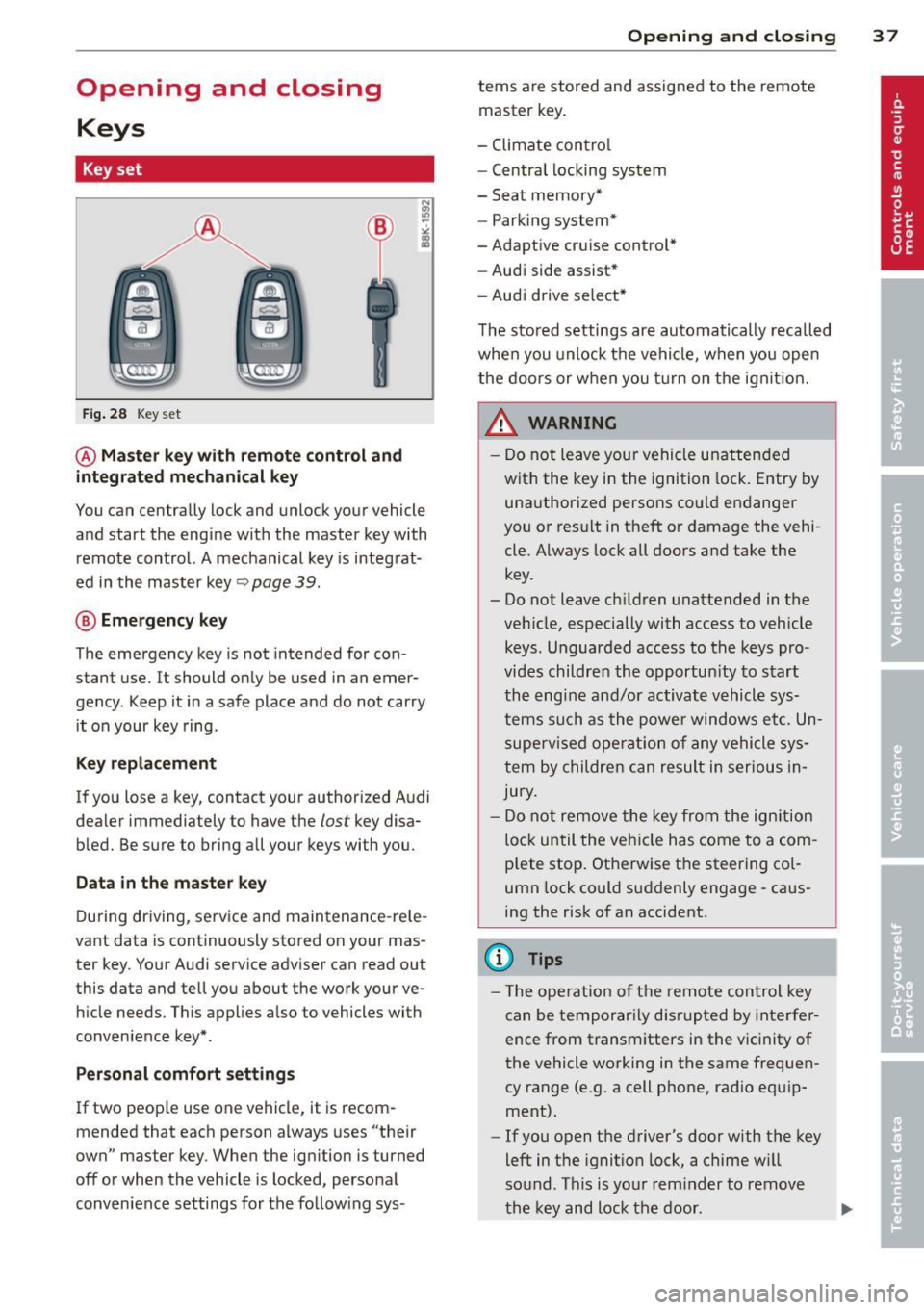
Key set
Fig. 28 Key set
@ Master key with remote control and
integrated mechanical key
You can centrally lock and unlock your vehicle
and start the engine with the master key with
remote control. A mechanical key is integrat
ed in the master key~
page 39.
® Emergency key
The emergency key is not intended for con
stant use.
It should only be used in an emer
gency . Keep it in a safe place and do not carry
it on your key ring .
Key replacement
If you lose a key, contact your authorized Audi
dealer immediately to have the
lost key disa
bled. Be sure to bring all your keys with you.
Data in the master key
During driving, service and maintenance-rele
vant data is continuously stored on your mas
ter key. Your Audi service adviser can read out
this data and tell you about the work your ve hicle needs. This applies a lso to vehicles with
conven ience key*.
Per sonal comfort settings
If two people use one vehicle, it is recom
mended that each person always uses "their
own" master key . When the ign ition is turned
off or when the vehicle is locked, personal
conven ience settings for the follow ing sys-
Opening and closing 3 7
terns are stored and assigned to the remote
master key.
- Climate contro l
- Centra l locking system
- Seat memory*
- Parking system*
-Adaptive cruise control*
- Audi side assist*
- Audi drive se lect*
The stored settings are automatically recalled
when you unlock the vehicle, when you open
the doors or when you turn on the ignit ion.
A WARNING
-
- Do not leave your vehicle unattended
with the key in the ignition lock. Entry by
unauthorized persons could endanger
you or result in theft or damage the vehi
cle . Always lock all doors and take the
key .
- Do not leave ch ildren unattended in the
veh icle, especially with access to vehicle
keys . Unguarded access to the keys pro
vides children the opportun ity to start
the engine and/or activate vehicle sys
tems such as the power windows etc. Un
supervised operation of any vehicle sys
tem by children can result in serious In
jury.
- Do not remove the key from the ignition
lock until the vehicle has come to a com
plete stop. Otherwise the steering col
umn lock could suddenly engage -caus
ing the risk of an accident.
@ Tips
- Th e operation of th e remote control key
can be temporarily disrupted by interfer
ence from transmitters in the vicinity of
the vehicle working in the same frequen
cy range (e .g. a cell phone, radio equ ip
ment).
- If you open the driver's door with the key
left in the ignit ion lock, a chime w ill
sound. Th is is your reminder to remove
the key and lock the door.
Page 101 of 316

Using the parking brake to perform emer
gency braking will slow your vehicle down
as if you had made a full brake application.
The laws of physics cannot be suspended
even w ith ESP and its associated compo
nents (ABS, ASR, EDS). In corne rs and
when road or weather conditions a re bad,
a full brak e application can cause the vehi
cle to skid or the rear end to break away -
r isking an accident.
Driver messages in the instrument
cluster
Caution: Vehicle parked too steep
This message appears when the park ing brake
is applied on an incline that exceeds about
30%.
In this case the braking power of the parking
brake may
not be adequate to prevent the ve
hicle from rolling unintentionally .
Press brake pedal to release parking brake
This driver message appears when the switch
to release the parking brake was pressed. The
parking brake can only be released if you step
on the brake pedal and at the same time press
the switch or you automatically release the
parking brake with the start ing ass ist
<=> page 98.
(p] Parking brake m alfunction!
This driver message appears together with
the yellow
IIJ symbo l when there is a parking
brake malfunction.
On the road 99
Cruise control
Switching on
The cruise control system makes it possible to
drive at a constant speed starting at 20 mph (30 km/h) .
Fig. 108 Contro l l ever w ith push-b utton
Fig. 109 D isp lay : Selected speed
.. Pull the lever to position @<=> fig. 108 to
sw itch the system on.
.. Drive at the speed to be controlled.
.. Press button @to set that speed.
a,
~ 0 er a, a,
The stored speed and the green symbol
[ijj(Q~i~ (US model) /. (Canadian model) are
shown in the display<=> fig. 109. The display
may vary, depending on the type of display in
your vehicle. The ind icator light
mJJlm (US model)/ . (Canad ian model) will
also light up in the instrument cluster .
The speed is kept constant by modifying en
gine power or through an active brake inter
vention.
A WARNING
- Always pay attention to the traffic
around you when the cruise control is in
operation. You are always responsible for ..,.
Page 102 of 316

100 On the road
you r speed and the distance between
your vehicle and othe r vehicles.
- For reasons of safety, cruise contro l
sho uld not be used in the city, in sto p
and-go traff ic, on twist ing roads and
w hen road conditions are poor (such as
ice, fog, gravel, heavy rain and hydro
planing) -you cou ld have an acc ident .
- Switch the cruise contro l off temporarily
when d rivi ng in turn ing lanes, highway
exits or in construction zones .
- Please note that unconsciously "resting" yo ur foot on the accelerator pedal causes
c ruise contro l not to brake. This is due to
the control system be ing ove rridden by
the drive r's ac celeration.
{O) Tips
- Vehicles with manual t ransmission: You
can attain the set speed only if the gea r
that is currently engaged wi ll allow it, or
if i t does not tax t he engine and allows it
to run smoothly . There fore shift into a
higher or lower gear in a timely manner.
- The bra ke ligh ts illuminate as soo n as
the b rakes app ly automatica lly.
Changing speed
.. Press the lever in the direction of the 0
r::!v page 99, fig. 108 or in the direction of the
0 to increase or decrease your speed.
.,. Let go of the lever to save that speed.
Change speed in increments of 1 mph (1 km/ h) by light ly pressing the lever. If you keep the
lever pressed down, you will alter your speed
in 5 mph (10 km/h) increments .
You can a lso press the accelerator pedal down
to increase your speed, e.g. if yo u want to
pass someone. The speed you saved earl ier
will resume as soon as you let off of the accel
erator pedal.
If, however, you exceed your saved speed by
5 mp h (10 km/h) for longer than 5 minutes,
the cruise contro l will be turned offtempora -rily. The green symbo
l in the d isp lay t urns
white, the saved speed is retained .
Pre-selecting speed
You can pre-select your desired speed while
the vehicle is not moving .
.,. Tur n on the ign ition.
.,. Pull leve r into posi tion 1
¢ page 99,
fig. 108 .
.. Press the lever in the 0 or 0 direction to
increase or decrease your speed .
.,. Let go of the lever to save that speed.
This function makes it possib le, for examp le,
to save the speed you want before driving on
the h ighway. Once on the h ighway, act ivate
the cru ise control by pulling the lever toward
(D .
Switching off
Temporary deactivat ion
.,. Step on the brake pedal, or
.,. Manual transmission: Keep the cl utch pedal
pressed down
Longer, o r
.,. Press t he leve r into position @(n ot clicked
into place)
¢ page 99, fig . 108, or
.,. Drive for longer than 5 m inutes a t more
t han 5 mph (10 km/h) above the stored
spee d.
Switching off completely
.,. Press lever into position @(clicked into
p lace), or
.,. Switch t he ignit ion off .
T he speed you saved will be retai ned if the
cr uise control ha s been switched off tempora
rily . To resume the saved speed, le t up o n the
brake or clutch pedal and p ull the leve r to po
sition
(D .
The saved speed w ill be erased afte r tu rning
t h e ignit io n off. .,..
Page 104 of 316

102 Adapti ve crui se control
Adaptive cruise control
Speed and distance
control system
Description
Applies to vehicles: with Audi adaptive cruise co ntrol
The adaptive cruise control driver assistance
program is a combined speed and distance
control system.
F ig. 110 Front bumper: Positio n of radar sensor
Any speed between about 20 mph (30 km/h)
and about 95 mph (150 km/h) can be set and
held with the adaptive cruise control. The sys
tem also regulates a pre -set distance from the
vehicle ahead within the limits of the system described.
Driving can be more relaxed, particularly on
long trips on interstates or on other highways
that a re generally straight .
H ow do es it work?
You can operate the adaptive cruise contro l
using the lever on the steering wheel column
c::> page 104, How is the speed stored? and
c::> page 106, How is the distance (time inter
val) set? .
Driver inform ation
Important information is brought up in the
speedometer and in the instrument cluster
d isplay as the vehicle is being driven
c:::, page 107, Driver information .
What is imp orta nt fo r you to kn ow
The adaptive cruise control is set with system
specified limits, that is, as a driver, you will have to adjust the speed and distance to the vehicle ahead in some instances
c:::,
page 111,
Driver intervention prompt
and c::, page 112,
System limitations.
A WARNING
--
Improper use of the adaptive cruise con
trol can cause collisions, other accidents
and serious personal injury.
- Never drive at speeds that are too high
for traffic, road and weather conditions.
- Never follow the vehicle in front so close ly that you cannot stop your veh icle safe
ly . The adaptive cruise control cannot
brake the vehicle safely when you follow
another vehicle too closely. Always re
member that the adaptive cruise control
has a braking powe r that is only about
25% of the veh icle's maximum braking
abi lity, the automatic braking function
cannot bring the vehicle to a stop .
- Never use adaptive cruise control on
roads where you cannot drive safely at a
steady speed, including city, stop-and-go
or heavy traffic, on winding roads or
when road cond it ions are poor (for exam
p le, on ice, gravel, in fog, heavy rain or
on wet roads that increase the risk of hy
d rop laning) .
- The radar sensor 's
vision can be reduced
by rain, snow and heavy spray. This can
resu lt in veh icles dr iving ahead be ing in
adequately detected or, in some circum
stances, not detected at a ll.
If necessary,
t ake action yourself!
- Always turn off adap tive c ruise control
when en ter ing turn la nes, highway exit
lanes and construction zones or similar
situations beca use the vehicle will a uto
mat ically acce le rate to the stored speed.
- Never rest your foot on the accelerator pedal, especially when t he adaptive
cruise contro l is being used because do
ing so will override the braking function
and prevent the brakes from being ap plied by the system when it detects a sit
uation when the brakes must be applied.
- Always remember that the adaptive
cru ise contro l has limits -it does not
Page 105 of 316

react when you drive towards an obstacle
or something else on or near the road
t h at is not moving, such as vehicles stop
ped in a traffic jam, a stalled or disabled
vehicle .
- Always remember that the adaptive
cruise control cannot detect a vehicle
that is driving towards you in your traffic lane and that it cannot detect narrow ve
hicles such as motorcycles and bicycles.
(D Tips
- Fo r safety reasons, the stored speed is
deleted when the ignition is turned off .
- The Electronic Stabilization Program
(ESP) and the Anti-Slip Regulation (ASR)
cannot be deactivated when the adaptive
cruise control is switched on. If the ESP
and the Anti-Slip Regulation (ASR) has been deactivated and you then switch on
the adaptive cruise control, the ESP func
tion will also be activated automatically.
- Damage caused by accidents (e.g. if the
vehicle is damaged when parking) can af
fect the radar sensor settings. This can
cause the system to malfunction or
switch off complete ly.
- The radar sensor cover is heated. In win
ter cond itions, you should still check be
fore driving to make sure it is free of ice
and snow. If necessary, clean the area
near the radar sensor carefully
9 fig. 110.
-To ensure that the radar sensor is not
blocked, foreign objects (e.g . stickers,
add-on parts) must not cover the area near the radar sensor
9 fig. 110. The
area near the radar sensor must not be painted, either.
- For Declaration of Compliance to United
States FCC and Industry Canada regula
tions
~ page 296.
Adaptive cruise control 103
How does adaptive cruise control work?
App lies to veh icles: w ith adaptive cru ise control
Vehicles traveling ahead are detected with
the aid of a radar sensor.
Fig. 111 Radar sensor measu re m ent range
A radar sensor is built into the front of the ve
hicle
9 fig. 111, which is subject to certain
system limits~
page 112. Stationary objects
are not taken into consideration. The system
is intended to measure the distance to reflec
tive surfaces. The system responds after the
distance measurement has taken place. If a
measurement is not possible, the system does
not respond .
Open road
When the road is clear, the adaptive cruise
control works like cruise control. It maintains
a constant target speed specified by the driv
er.
Driving in traffic
If a vehicle driving ahead is detected, the
adaptive c ruise control decelerates (within the
Limits of the system)
9 page 111, Driver in
tervention prompt
and 9 page 112, System
limitations
to its speed and after adjusting,
tries to maintain the set distance from the ve
hicle ahead . Th e vehicle may temporarily drive
slower than the set speed while adjusting
~.&. in Description on page 102.
If the vehicle in front accelerates, adaptive
cruise control also accelerates up to the speed
that you have set.
Situation requiring driver intervention
In some situat ions you will have to use the
footbrake to slow the vehicle down in order to .,..
Page 106 of 316

104 Adapti ve crui se control
keep a safe distance from vehicle in front of
you or to avoid a rear-end collision . In this sit
uation, a symbol appears and a warning tone
sounds
¢ page 111.
Passi ng anoth er vehicl e
If you move into the passi ng lane and no veh i
cle is detected ahead, the adaptive cruise con
trol accelerates to the speed you have set and maintains it.
Overrid e
You can increase your speed at any t ime by
stepp ing on the acce lerator pedal. After yo u
re lease the accelerator pedal, the system ad
justs back down to the speed you previously set .
@ Tips
Please note that the amount of accelera
tion the adaptive cruise control uses de pends on the Distance setting selected.
DISTANCE 1 gives you accelerat ion that is
dynamic and sporty . DISTANCE 4, o n the
other hand, g ives more moderate accelera
tion . For more information about the time
intervals ¢
page 106, How is the distance
(time interval) set?.
- Please note that if the adaptive cruise
control has begun braking the vehicle
and the driver chooses to brake the vehi
cle add itionally, the brakes may fee l
"hard" . This is simply due to the pressure
build- up of the initial braking.
- Adaptive cruise control is sw itched off af
ter pressing the footbrake . The speed
saved up this point can be resumed. To resume the saved speed, release the
brake pedal and pull the control lever
¢ page 105, Turning adaptive cruise
control off temporarily .
Switching the system on and off
Applies to vehicles: with adaptive cruise contro l
Fig. 112 Co ntrol lever : Sw itching o n and off
Sw itching the system on
.,. Pull the lever to position (D c::> fig. 112 .
Switching the system off
.,. Pres s the lever to pos it ion @ (latched).
How is the speed stored?
Applies to vehicles: wit h Audi adaptive cruise control
,' ts ~:_" ';;;", ' , E Sl'EEO CANCELU
. T ,0. -ON ... . RESUME~
Fig. 11 3 Control lever: Sto ring s peed
With the system switched on the speed is
stored as follows:
• Drive at the speed you want. The speed
must be between 20 and 95 mph (30 and
150 km/h).
.,. Press the
~ I S-ET ~I button c::> fig . 113 to store
the desired speed .
After the
I S ET I button is released, the current
speed is stored and ma intained .
The saved speed is now shown in the LED dis play in the speedometer by one or two illumi
nated red light diodes ¢
page 108 . At the
same t ime, the saved speed is also shown for
a short time in the Information line
¢ page 109. ...,