door lock AUDI A5 COUPE 2012 User Guide
[x] Cancel search | Manufacturer: AUDI, Model Year: 2012, Model line: A5 COUPE, Model: AUDI A5 COUPE 2012Pages: 316, PDF Size: 78.59 MB
Page 48 of 316
46 Opening and clo sing
Power windows
Controls
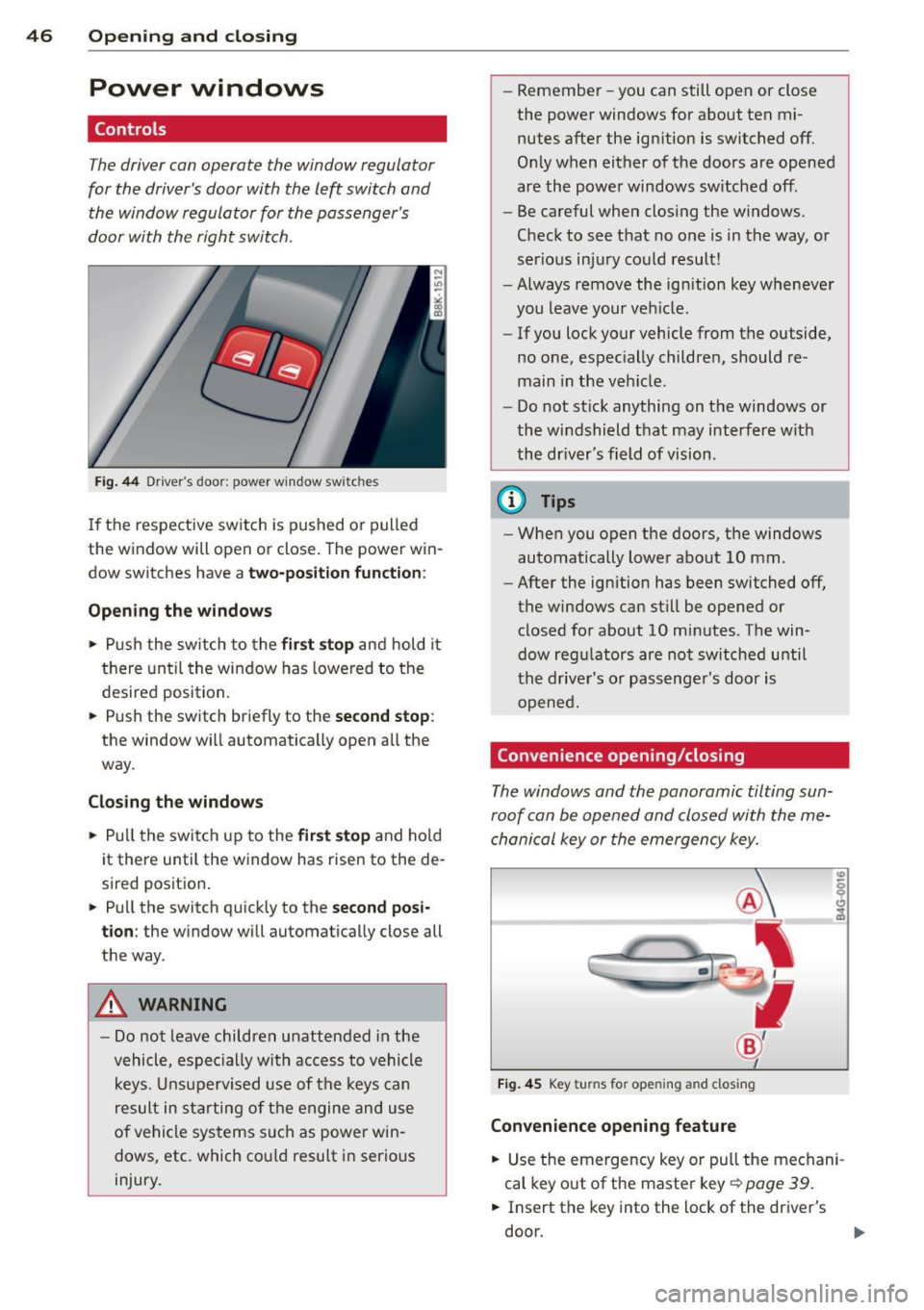
The driver can operate the window regulator
for the driver's door with the left switch and the window regulator for the passenger's
door with the right switch.
F ig. 44 Dr iver's door: power window switches
If th e respect ive sw itch is pushed o r pulled
the w indow will open or close . The power win
dow switches have a
two-position function :
Opening the windows
• Push the sw itch to the fir st stop and hold it
t h ere unt il t he wi ndow has lowered to the
desired position.
• Push the switch briefly to the
second stop :
the window wi ll automatically open all the
way.
Closing the windows
• Pull t he switch up to the first stop and ho ld
it there until the window has rise n to the de
sired posit ion .
• Pu ll the switch q uick ly to the
second posi
tion :
the window will automat ically close all
t h e way.
A WARNING
- Do not leave children unattended in the
vehicle, espe cially with acc ess to vehicle
k eys. U nsuperv ised use of the keys can
result in st arting of t he engine and u se
of ve hicle sys tems such as power win
dows, etc. which co uld resu lt in serio us
injury. -
Remember -you can still open or close
the powe r windows for about ten mi
nutes after the ign ition is switched off.
O nl y when either of the doors are opened
are the powe r windows sw itched off.
- Be careful when clos ing the windows.
Check to see t hat no o ne is in the way , or
ser io us inj ury co uld result!
- Always remove the ign it ion key wheneve r
you leave your ve hicle .
- If you lock your vehicle from the outside,
no one, espec ial ly childre n, should re
main in the veh icle.
- Do not st ick anything on t he windows or
the w indshield that may interfere w ith
the dr iver's field of vision.
(D Tips
- When you open the do ors, the windows
automatically lowe r abo ut 10 mm.
- After the ignition has been switched off ,
the windows can st ill be opened or
closed for about 10 mi nutes. The win
dow reg ulators are no t sw itche d until
the drive r's or passenge r's door is
o pene d.
Convenience opening/closing
The windows and the panoramic tilting sun
ro of can be ope ned and closed with the me
cha nical key or the emergency key.
Fi g. 4 5 Key turns for opening and closing
Convenience opening feature
• Use the emergency key or pull the me chani
cal key o ut of the maste r key¢
page 39.
• Insert the key into the lock of the driver's
do or.
Page 49 of 316
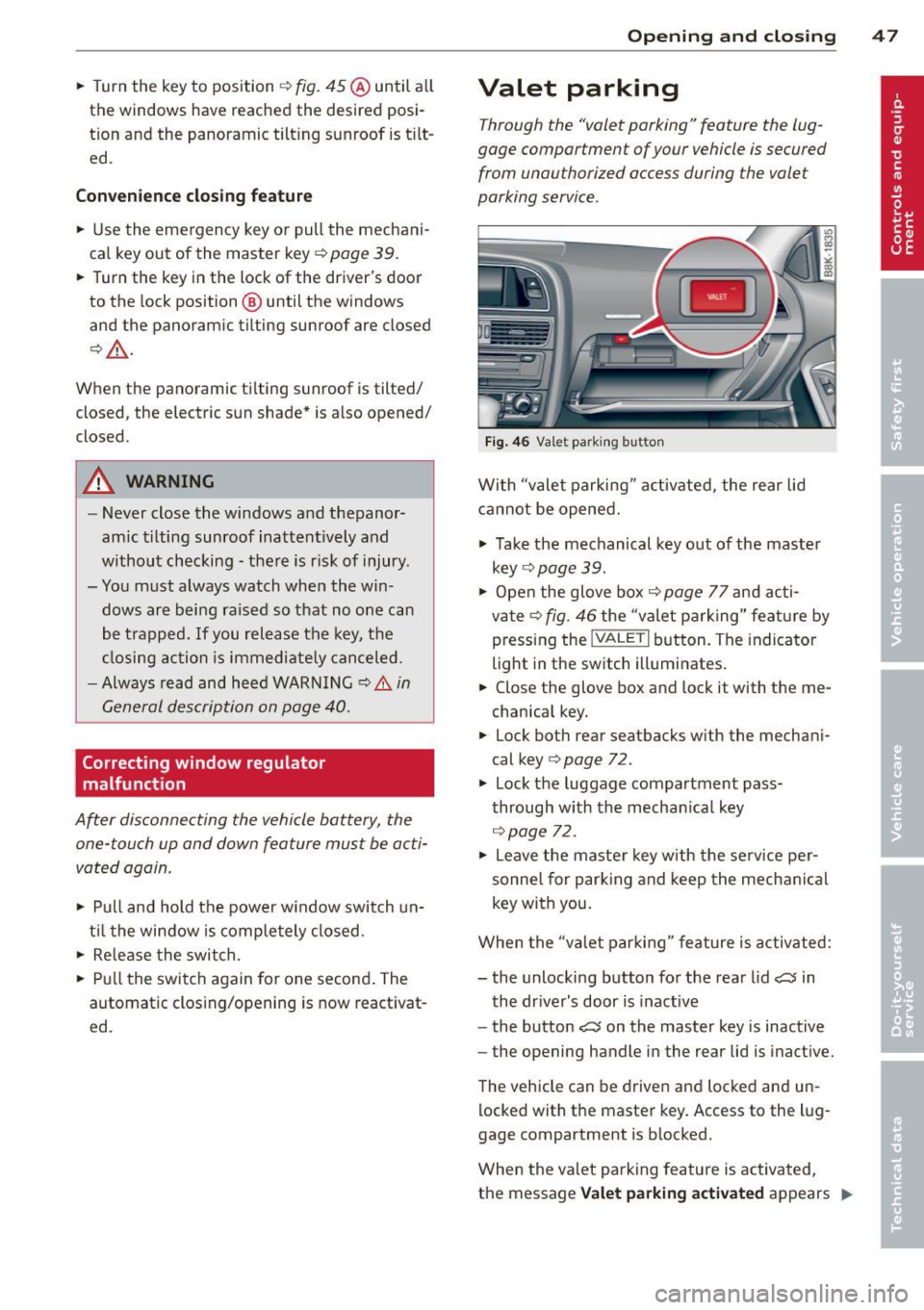
.. Turn the key to position ¢ fig. 45 @until a ll
the windows have reached the desired posi
t ion and the panoramic tilt ing sunroof is t ilt
ed .
Convenience closing feature
.. Use the emergency key or pull the mechani
ca l key out of the master key ¢
page 39 .
.. Turn the key in the lock of the driver's door
to the lock position ® until the windows
and the panoramic tilting sunroof are closed
¢ ,& .
When the panoramic ti lting sunroof is tilted/
closed, the electric sun shade* is also opened/
closed.
A WARNING
- Never close the windows and thepanor
amic tilting sunroof inattentively and
without checking -there is risk of injury .
- You must always watch when the win dows are being raised so that no one can
be trapped. If you release the key, the
closing action is immediate ly canceled .
- Always read and heed WARNING ¢
IJ::,. in
General description on page 40.
Correcting window regulator
malfunction
After disconnecting the vehicle battery, the
one-touch up and down feature must be acti
vated again.
.. Pull and hold the power w indow switch un
til the window is completely closed.
.. Re lease the switch.
.. Pu ll the switch again for one second. The
automatic clos ing/opening is now reactivat
ed .
Opening and closing 47
Valet parking
Through the "valet parking" feature the lug
gage compartment of your vehicle is secured
from unauthorized access during the valet
parking service .
Fig . 46 Vale t parking button
With "valet parking " activated, the rear lid
cannot be opened.
.,. Take the mechanical key out of the master
key
r::!;> page 39.
.. Open the glove box¢ page 77 and acti
vate¢
fig. 46 the "valet parking" feature by
pressing the
! VALET I button. The indicator
light in the switch illuminates.
.. Close the glove box and lock it with the me
chanica l key .
.. Lock both rear seatbacks with the mechani
cal key ¢
page 72.
.,. Lock the luggage compartment pass
through with the mechan ica l key
¢ page 72.
.. Leave the master key with the service per
sonne l for parking and keep the mechanica l
key with you .
When the "va let parking" feature is activated:
- the unlocking button for the rear lid
~ in
the driver's door is inact ive
- the button~ on the master key is inactive
- the opening handle in the rear lid is inactive.
The vehicle can be driven and locked and un
locked with the master key. Access to the lug
gage compartment is b locked.
When the valet parking feature is activated,
the message
Valet parking activated appears II>
Page 50 of 316

48 Openin g and clo sing
in the instrument cluster display when you
switch the ignition on .
Panoramic tilting
sunroof
Tilting and closing
"'
" co 00
F ig. 47 Section of headline r: Sw itch fo r panoram ic t ilt ·
ing sunroof
., To tilt the panoramic tilting sunroof, press
the switch briefly .
., To close the panoramic tilting sunroof, pull
the switch briefly .
., To set an intermediate pos ition, press/pull
the switch until the roof reaches the des ired
pos it ion .
After the ignit ion is swi tched off, you can st ill
operate the Panorama for about 10 minutes .
As soon as the driver's or passenger's door is
opened, the sw itch is inoperative .
Sun blind
The sun blind can be opened and closed man
ually in any position.
A WARNING
Pay careful attention when clos ing the
panoramic tilting sunroof - otherwise seri
ous inju ry could result! For this reason, al
ways remove the ignition key when leaving the vehicle.
- Never leave ch ildren o r persons requ iring
assi stan ce a lone in the vehicle, especi ally
when they c ould access the veh icle keys.
Unsupervised use of the keys can res ult
in t he engine being started or use of ve
hicle systems such as the power win -dows, etc. w
hich could res ult in serious
in jury. The doors could be locked with
the remote key, delaying he lp in an
emergency.
- The panoramic tilting sunroof w ill con
tinue to operate until the ign ition key
has bee n removed and one of the front
doors has been opened.
(D Note
A lways close your panoramic t ilting sun
roof when leav ing your vehicle. Sudden
r ain can cause damage to the inte rior
equipment of yo ur vehicle, particular ly the
electronic equipment .
@ Tips
-Information on convenience opening/
closing
~ page 46 .
Emergency closing of the panoramic
tilting sunroof
If the s unroof detects an object in its path
when it is closing, it wi ll open aga in automati
ca lly. In this case, you can close the roof with
the power emergency closing function .
., Within five seconds after the sunroo f opens
automatically, pu ll the switch until the roof
closes.
Page 55 of 316
Auto-blink
• Move the lever (up or down) just to the
point of resistance to use the turn signa ls
for as long as you need them, for example
when changing lanes .
• Move the lever (up or down) just to the
point of resistance and then release it right
away to make the turn signals blink
three
times .
You can use th is feature for example
when changing lanes on highways .
High beam ~D
• Push the lever forward @ to switch on the
high beam.
• Pull the lever back towards you to switch off
the high beam .
Headlight flasher ~D
• Pull the lever toward the steering wheel@
to use the headlight flasher.
Notes on these features
- The turn signals only work with the ignition
turned on. The indicator lights
R or Bin
the instrument cluster also blink.
- After you have turned a corner, the turn sig
nal switches off automatica lly.
- Th e
high beam works only when the head
lights are on. The indicator light
II in the
instrument cluster illuminates when the
high beams are on.
- The
headlight flasher works only as long as
you hold the lever -even if there are no
lights switched on. The indicator light
II in
the instrument cluster illum inates when you
use the head light flasher.
(D Note
Do not use the high beam or headlight
flasher if you know that these could blind
oncoming traffic.
Clear vision 53
Interior Lights
Front interior lights
The front interior lights also contain reading
lights for the driver and passenger .
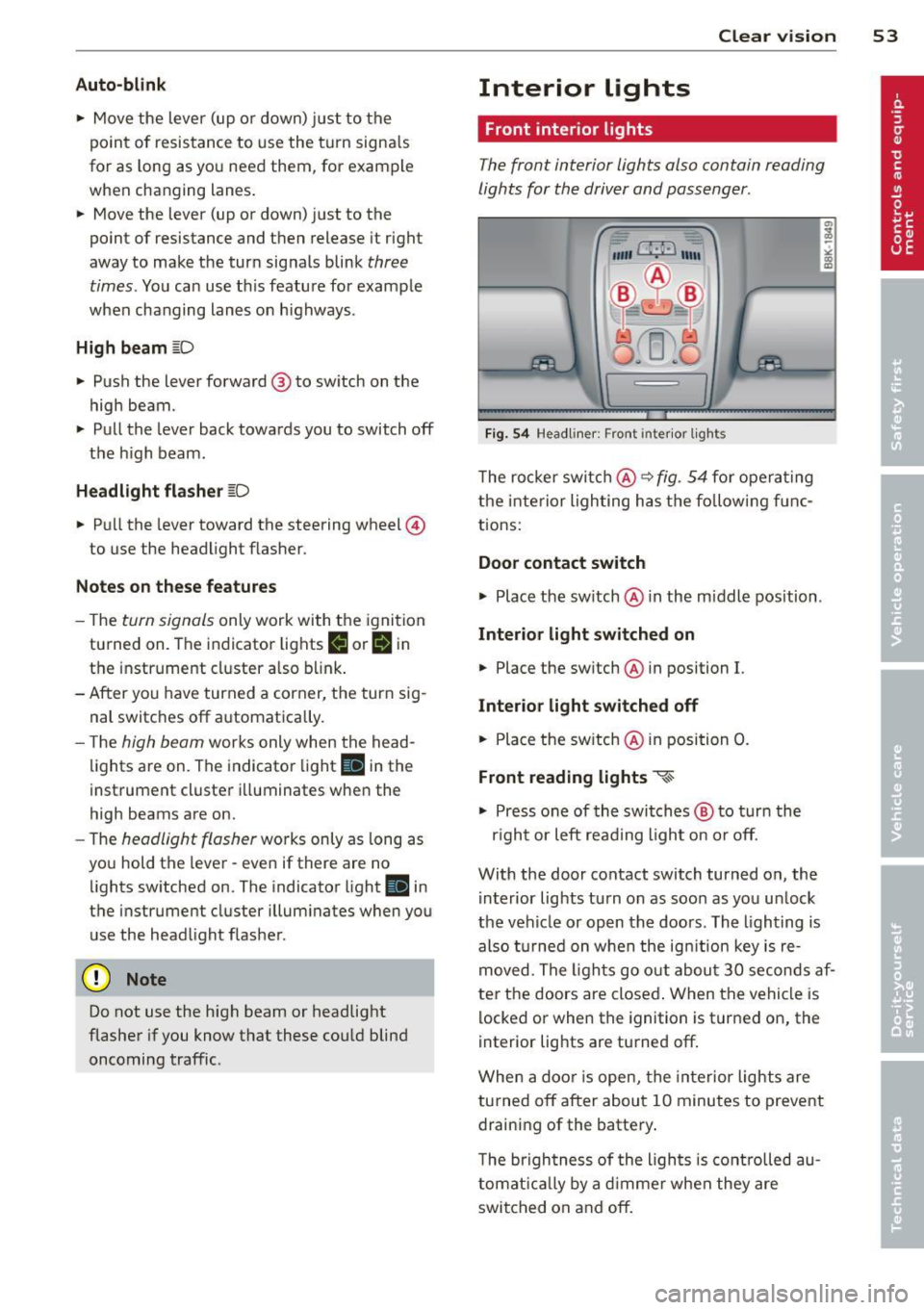
Fig. 54 Headliner: Front inter ior lights
The rocker switch@ ~ fig. 54 for operating
the interior lighting has the follow ing f unc
tions:
Door contact switch
.,.. Place the switch @ in the m iddle position .
Interior light switched on
• Place the sw itch @ in position I.
Interior light switched off
• Place the switch @ in position 0.
Front reading lights ~
.,.. Press one of the switches @ to turn the
r ig ht or left read ing l ight on or off.
With the door contact switch turned on, the i nterior lights tu rn on as soon as you un lock
the vehicle or open the doors. The lighting is
also turned on when the ignit ion key is re
moved. The lights go out about 30 seconds af
ter the doors are closed . When the vehicle is
locked or when the ignition is turned on, the
interior lights are turned off.
When a door is open, the interior lights are
turned off after about 10 minutes to prevent
draining of the battery.
T he brigh tness of the ligh ts is controlled au
tomatically by a dimmer when they are
switched on and off.
Page 67 of 316

When the front seats are moved forward,
their origina l position is stored . When it is
moved back, the seat automatically stops in
this position. To move the seat even further
back, you have to release the switch @ and re
activate it.
The head restraints from the front seats, de
pending on the seat height that has been set,
are automatically retracted when the seat
backs are folded down . They return to their
or iginal pos ition aga in when the seatbacks for
the front seats are raised .
(D Tips
With the driver's or passenger's door
closed, the correspond ing switch to move
the seat is inoperative.
Seat memory
Memory for driver's seat
Applies to vehicles: with seat memo ry
The seat adjustment settings for two drivers
can be stored using the memory buttons in
the driver's door.
Fig. 70 Drive r's door: Seat memory
In addition to the setting for the driver's seat ,
the exterior rear view mirror setting can be
stored and recalled through seat memory if
the vehicle is properly equipped.
Storing and recalling settings
With the help of the memory buttons 1 and 2
c:> fig. 70 the settings for two different drivers
can be stored and recalled
c:> page 65.
The current settings are also automatically as signed to the remote control key being used
Seats and storage 65
when the vehicle is locked . When the vehicle
is un locked, the settings assigned to the re
mote control key being used are automatica lly
recalled.
Turning seat memory on and off
If the I ON/OFF I switch is depressed, the seat
memory is inoperative. The word
OFF in the
I ON/O FF I switch illuminates.
Al l the stored sett ings are retained. We rec
ommend using the
ION/O FF I switch and deac
tivating the seat memory if the vehicle is only
going to be used
temporarily by a driver
whose settings are not going to be stored.
Storing and recalling settings
Applies to vehicles : with seat memory
Before you can store or recall your settings,
the
ION/OFF I switch on the seat memory must
be engaged (not ra ised) .
Storing settings
.,. Adjust the driver's seat .
.,. Adjust the two exterior mirrors.
.,. Press the
ISETI button and hold it down . In
addition, press one of the memory buttons
for at least one second .
.,. Release the buttons . The settings are now
sto red under the corresponding memory
button.
Recalling settings
.,. If the driver's door is open, tap the corre
sponding memory button briefly .
.,. If the driver's door is closed, press the ap
propriate memory button until the stored
position is reached.
Successful storage is confirmed audibly and by the light in the
ISETI button i llum inating
c:> page 65, fig. 70 .
When the vehicle is locked , the current set
tings are stored and assigned to the remote control key. But the settings stored under
memo ry buttons 1 to 2 are not deleted. They
can be recalled at any time. When the vehicle ..,.
Page 73 of 316
Enlarging cargo capacity of the luggage
compartment
Applies to vehicles: with fold ing rear sea tback
The seat backs can be folded forward to en
large the cargo capacity .
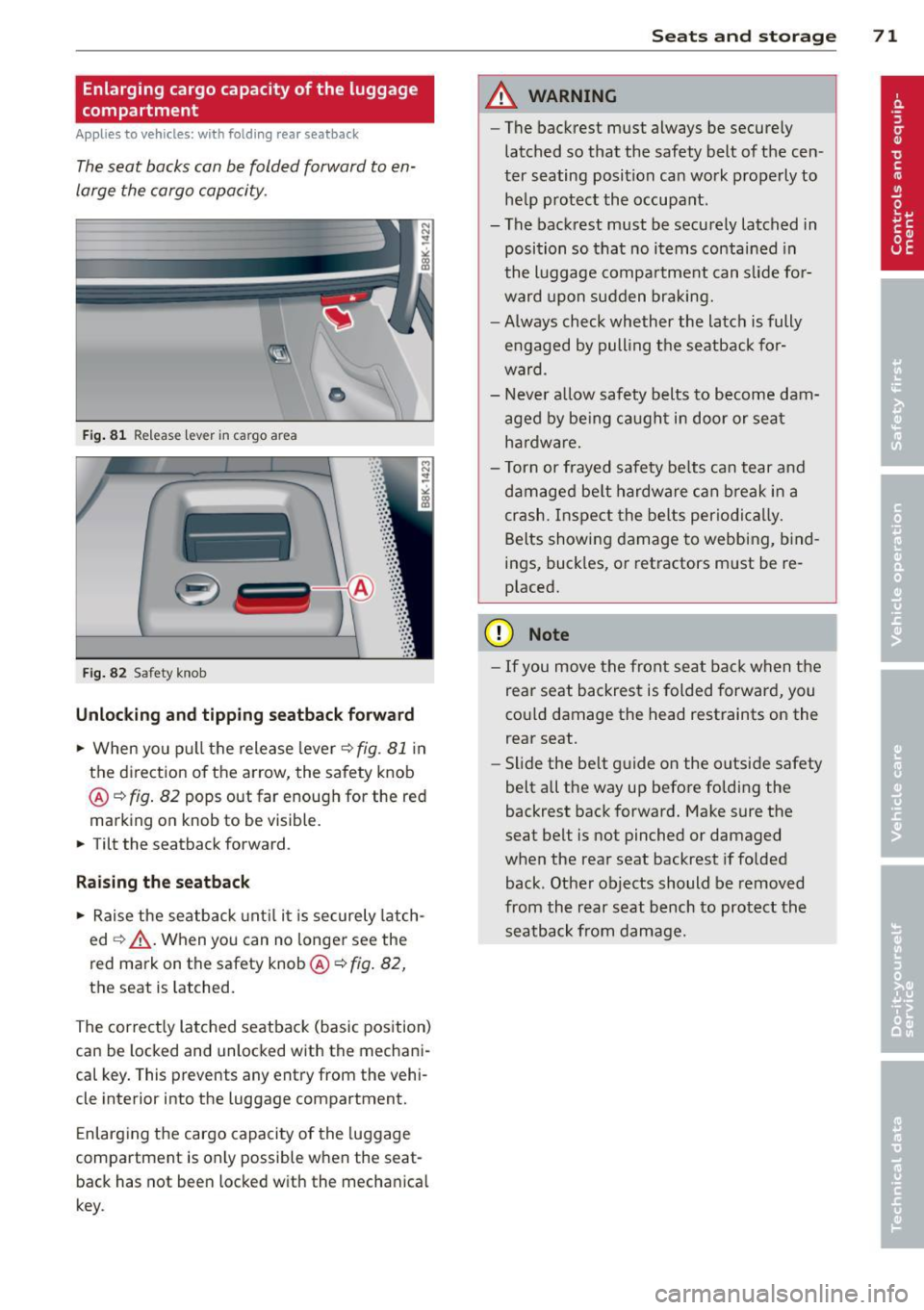
Fig. 81 Release lever in cargo area
'
-
-
. -~ .
Fig. 82 Safety knob
•
·:: ·:: ·:: · : : ·::
· ::
... : :·: ·::
· ::
·:: ·:: · ::
· ::
· :: ·:: ~: :
· ::
· ::
· ::
· :: ... .. ...
Unlocking and tipping seatback forward
.. When you pu ll the release lever c::> fig . 81 in
the direction of the arrow, the safety knob
@ c::>
fig. 82 pops out far enough for the red
marking on knob to be visible.
.. Tilt the seatback forward .
Raising the seatback
.. Raise the seatback until it is securely latch
ed
c::> _& . When you can no longer see the
red mark on the safety knob @c::>
fig. 82,
the seat is Latched.
The correct ly Latched seatback (basic pos ition)
can be Locked and unlocked with the mechani
cal key. This prevents any entry from the vehi
cle inter ior into the Luggage compartment.
Enlarging the cargo capacity of the luggage
compartment is only possible when the seat back has not been locked with the mechanical
key .
Seats and storage 71
A WARNING
-The backrest must always be secure ly
latched so that the safety belt of th e cen
ter seating position can work properly to
he lp protect the occupant.
- The backrest must be securely Latched in
position so that no items contained in
the Luggage compartment can slide fo r
ward upon sudden braking.
- Always check whether the Latch is fully
e ngaged by pull ing the seatback for
ward.
- Never allow safety belts to become dam
aged by being caught in door or seat
hardware.
- Torn or frayed safety be lts can tear and
damaged belt hardware can break in a
crash. Inspect the belts periodically.
Belts showing damage to webbing, bind
ings, buckles, or retractors must be re
placed.
(D Note
- If you move the front seat back when the
rear seat backrest is folded forward, you
co uld damage the head restraints on the
rear seat .
- Slide the be lt guide on the outside safety
belt all the way up before folding the
backrest back forward. Make sure the
seat belt is not pinched or damaged
when the rear seat backrest if folded
back . Other objects should be removed
from the rear seat bench to protect the
seatback from damage.
Page 92 of 316

90 Warm and cold
If the climate control is operating in cool
ing mode, a ir flows primarily from the
vents in the center console. To achieve ad
equate cooling, you should never close
these vents completely.
Economical use of the climate control
system
A ppl ies to vehicles: w it h Deluxe au toma tic clima te co n
tro l p lus
Economical use of the climate control system
helps save fuel.
When the climate contro l system is working in
coo ling mode, engine performance is reduced
and fuel consumption is affected. To keep the
time the cl imate control system is on as short
as possible, you should do the follow ing:
.. To save fuel, turn off cooling mode by press
ing the AC button (indicator light goes out) .
.. In add ition, if you open the window or the
panoramic sliding/tilt ing sunroof* while
dr iv ing, turn off cooling mode by pressing
the AC button (indicator light goes out) .
.. If the vehicle is extremely hot due to the
heat of the sun, briefly open doors and win
dows.
@ For the sake of the environment
When you save fuel, you reduce em ission s
from the vehicle.
Deluxe automatic
climate control plus -
basic settings
General information
Ap plies to veh icles: w it h Deluxe automat ic climate co n
tro l p lus
The basic climate control settings can be ad
justed in the radio or MM!*.
.. Select: Funct ion button ICARI > Control but
ton
AC .
The follow ing funct ions can be selected: -
Auto reci rculat.
q page 90
- Synchronization
q page 90
Automatic recirculation
App lies to vehicles : with Del uxe a uto mat ic clima te con
tro l pl us
An air quality sensor detects increased con
centrations of pollutants in the outside air
and automatically switches to recirculation
mode.
We recommend that you always keep auto
matic recirculation ON to prevent polluted
outside air from entering the vehicle interior.
If the
air quality sensor located in the climate
control system detects polluted outside air,
the sensor dec ides whether the air pollut io n
can be reduced by the factory-installed pollu
tant filter or w hether it is necessary to switc h
to recirculation. With heavy concentr ations of
po llutants, the climate control system is
switched automatica lly to recirc ulation mode
and the supply of o utside air is blocked . As
soon as the concentration of pollutants in the
outside air drops, fresh air is supplied to the
vehicle interior aga in .
In the event that the windows fog up during
automatic recircu lation, press the~ button
immediately .
Under certain operating conditions, automatic
recirculation is switched off automatically.
When outside temperatures are below about
SO °F (+10 °C), automatic recirculat ion is lim
ited to 30 seconds. When outside tempera
tures are be low about 30 °F (-1 °C), automatic
recirculation is lim ited to 15 seconds .
Synchronization
Applies to veh icles : with Del uxe a uto mat ic climate con
tr ol pl us
One climate control setting for all seats.
After Syn chronization is set to On , all of the
subsequent climate control settings (except
for seat heating *) for the driver are transfer-
red to the front passenger. ..,.
Page 95 of 316

~ Insert the key into the ignition lock .
~ Manual transmission: Fully depress the
clutch peda l and move the sh ift lever to the
neutral position.
~ Automa tic transmission*: Step on the brake
pedal and move the selector lever to the
P
or N position .
~ Press the key~ fig. 105 -the eng ine will
sta rt.
By pressing the key
without stepp ing on the
clutch or the brake, the ig nition is switched o n
and off. With the ignit io n on, t he steer ing
wheel is un locked.
You can only remove the key w ith the ignition
sw itched off . T o do this, you have to p ress on
the key aga in. Wi th an a utomat ic transm is
sion, the se lecto r lever must be in the
P posi
tion .
When starting the engine, ma jor e lectr ica l
l oads are switched off tempo ra rily .
After start ing a cold engine, there may be a
brief period of increased no ise because the oi l
p ressu re must fi rst build up in the hydraulic
va lve adjusters. This is normal and not a cause
fo r concern.
If the engine should not start immediately,
the starting p rocess is automatically stopped
after a sho rt time . Repeat sta rting p rocedu re.
Driver me ssage in the in strument cluster
display
Press brake pedal to start engine
This message appea rs if you do not step on
the brake pedal to sta rt the eng ine on a veh i
cle with an automat ic transm iss ion.
Press clutch pedal to start engine
This message appears if you do not step on
the clutch peda l to start the engine on a ve hi
cle with a manua l transm ission .
Engage Nor P to start engine
T his message appears when attempting to
start the engine if the se lector lever for the
automatic transmission is not in the
P or N
On th e ro ad 93
posit ion . The engine can only be started wi th
the se lecto r in these positions .
Shift to P, otherwise vehicle can roll away.
Doors do not lock if lever is not in P .
This message appears for safety reasons
along with a warn ing signal.
It a ppears if the
se lector lever for the automatic transmission
is not in the
P position after the ignition is
switched off . Move the selector lever to the
P
pos ition, ot herwise the vehicle is not secured
against ro lling away . You also cannot lock the
vehicle us ing the locking b utton o n the doo r
hand le o r us ing the remo te key .
.8, WARNING
-Always take the key w ith you whe never
you leave your ve hicle. O therw ise, the
en gine cou ld be sta rted o r ele ct rical
eq uip me nt s uch as the power windows
could be operated. This can lead to seri
ous injury.
- Never leave children or persons re quiring
assistance unattended in the ve hicle. The
doors can be locked using the remote
transmitter, preventing people from es caping from t he veh icle on t heir own in
the ev ent of an e merge ncy. D epe nding
on t he time of yea r, peop le inside the ve
hicle can be expo sed to very high o r very
low tempe ra tur es.
- Never re mo ve the ign ition key from the
ig nition lo ok while the veh icle i s m oving .
O the rwise, the s teering lock could su d
d enly en gage and yo u wo uld not be a ble
to steer the vehicle .
@ Note
- In th e even t of a m alf un ct io n in the ele c
t ronic ignit io n loc k a symbol in the in
strument cl uste r flashes with the mes
sage
Ignition lock defective .
-Avo id hi gh engine spee ds, fas t a ccelera
tion or heavy engine loa ds while the en
gine is still cold . This could damage the
eng ine.
Page 96 of 316

94 On the road
@ For the sake of the environment
To avoid unnecessary engine wear and to reduce exhaust emissions, do not let your
veh icle stand and warm up. Be ready to
drive off immediately after start ing your
veh icle. Maintain moderate speed until the
engine is comp letely warm. Remember,
the engine performs best at operating
temperature.
@ Tips
- If the key cannot be removed from the
ignition lock, you have to pull the me
chanical key out of the master key in or
der to be ab le to loc k the vehicle The ve
hicle can be locked with the mechanica l
key
~page 39.
-If you open the driver's door wi th the ig
nit ion switched on, a buzzer sounds and
the message
Ignition i s on appears in
the instr ument cluster disp lay . Switch
the ignition off.
Stopping the engine
> Bring the vehicle to a full stop.
> Automatic transmission*: Move the selec
tor lever to the
P or N position .
> Press on the ignition key. The engine is
turned off.
Emergency off
If it is necessary in unusual circumstances, the
engine can be switched off wh ile the vehicle is
mov ing . The engine will be switched off if you
p ress on the key for an extended period .
_& WARNING
-Never turn off the eng ine unti l the vehi
cle has come to a complete stop.
- T he brake booster and se rvotronic only
work when the engine is running. With
the ignition turned off, you have to apply
more force when steering or braking .
Since you cannot steer and stop norma l
ly, this can lead to accidents and serious
injuries. -
The radiator fan can continue to run for
up to 10 minutes even after you have
turned off the engine and removed the
ignit ion key. The radiator fan can also
turn on again if the engine coolant heats
up because of intense sunlight or heat
bu ild-up in the engine compa rtment.
(D Note
Do not stop the engine immediately after
hard or extended driving . Keep the engine
runn ing for approximate ly two minutes to
prevent excess ive heat bu ild-up .
Starting and stopping
the engine with
convenience key
St t· th ng ·n ith the
button
Applies to vehicles: wit h co nvenience key
This button switches on the ignition and
starts the engine.
Fig. 106 Conven ience key: STAR T ENGINE STOP button
> Manual transmission: Fully depress the
clutch pedal and move the shift lever to the
neutral posit ion.
> Automatic transmission*: Step on the brake
pedal and move the selector leve r to
P or N
~ .&. -
> Pr ess on the !START ENGINE STOPI b utton
~ fig. 106 -the engine will start.
By pressing the
! START ENGINE STOPI button
without depressing the clut ch or the brake
peal, the ignition is switched on and switched
off by pressing it again.
IJi,,
Page 97 of 316

If the engine does not start immediately, stop
trying after 10 seconds and then try to restart
the eng ine about 30 seconds later .
After a cold engine is star ted, there may be a
brief period of increased noise because oil
pressure must first bui ld up in the hydraulic
va lve adjusters. This is normal and not a cause
for concern.
Driv er m essa ge in th e in strument clu ster
disp lay
No ke y ident ified
This message appears when the
I S TAR T ENGINE STOP ! button is pressed if
there is no master key inside the vehicle or if
the system does no t recogni ze it. For exam
ple, the master key cannot be recognized if it
is covered by an object (e .g . aluminum brief
case) which
screens the radio signal. Electron
i c devices such as ce ll phones can also inter
fere wi th the radio signal.
Press brake ped al to start engine
This message appears if you press the
I STAR T ENGIN E ST OP ! button to start the en
g ine and do not depress the b rake pedal. The
engine can on ly be sta rted if the brake pedal
is depressed.
Press clutch ped al to start engin e
This message appears with a manual trans
miss ion when you press the
I S TAR T ENGIN E ST OP ! button to start the en
g ine and do not depress the clu tch pedal. The
engine can on ly be started when the clutch
pedal is dep ressed .
Engage Nor P to st art engine
This message appears when attempting to
start the engine if the selector lever fo r the
automatic t ransmission is not in the
P or N
position . Th e engine can on ly be started w ith
the selector in these posit ions.
!II Key not in vehicle
This message appears along with the II! sym
bo l if t he maste r key is removed from the ve
h icle w ith the engine r unning. It is intended
On th e ro ad 95
to remind you (e .g. when changing dr ive rs)
not to continue the journey without the mas
ter key.
If t he mas ter key is no longer in the ve hicle,
you cannot switch on the ignition after stop
ping the engine and you also cannot start the
engine aga in. Moreover, you cannot lock the
vehicle from the outside with the key.
Shift to P, oth erwise vehicle can roll away.
D oors do not lock if le ver i s not in P .
This message app ears for safety reasons
a long with a warn ing signal. It appears if the
selector leve r for the automa tic transmission
is not in the
P position when sw itching off the
ignition with the
I STAR T ENGIN E ST OP ! but
ton . Move the se lector lever to the
P position,
othe rwise the veh icle is not se cured against
ro lling away. You also cannot lock the veh icle
u sing the lock ing b utton on the door hand le
or using the remote key.
Convenience key defective ! Use ignition
lock
T his message appears if the vehicle has to be
started not w ith the
I S T AR T ENGINE ST OPI
button but with the ig nition key.
A WARNING
- Never a llow the engine to run in confined
spaces - danger of asphyx iation.
- Never turn off t he engine until the vehi
cle has come to a complete stop.
- The brake booster and servotron ic only
work when the engine is runn ing . With
the ignition turned off, you have to apply
more force when steering or brak ing.
Since you can not steer and stop normal
ly, th is can lead to acc idents and serious
in ju ries .
(D Note
-Avo id h igh engine rpm, full thrott le and
heavy engine loads until the eng ine has
reached operating temperature - other-
w ise you risk engine damag e.
- T he engine cannot be started by pushing
o r towing the vehicle.
Ill-