steering AUDI A5 COUPE 2012 User Guide
[x] Cancel search | Manufacturer: AUDI, Model Year: 2012, Model line: A5 COUPE, Model: AUDI A5 COUPE 2012Pages: 316, PDF Size: 78.59 MB
Page 55 of 316
Auto-blink
• Move the lever (up or down) just to the
point of resistance to use the turn signa ls
for as long as you need them, for example
when changing lanes .
• Move the lever (up or down) just to the
point of resistance and then release it right
away to make the turn signals blink
three
times .
You can use th is feature for example
when changing lanes on highways .
High beam ~D
• Push the lever forward @ to switch on the
high beam.
• Pull the lever back towards you to switch off
the high beam .
Headlight flasher ~D
• Pull the lever toward the steering wheel@
to use the headlight flasher.
Notes on these features
- The turn signals only work with the ignition
turned on. The indicator lights
R or Bin
the instrument cluster also blink.
- After you have turned a corner, the turn sig
nal switches off automatica lly.
- Th e
high beam works only when the head
lights are on. The indicator light
II in the
instrument cluster illuminates when the
high beams are on.
- The
headlight flasher works only as long as
you hold the lever -even if there are no
lights switched on. The indicator light
II in
the instrument cluster illum inates when you
use the head light flasher.
(D Note
Do not use the high beam or headlight
flasher if you know that these could blind
oncoming traffic.
Clear vision 53
Interior Lights
Front interior lights
The front interior lights also contain reading
lights for the driver and passenger .
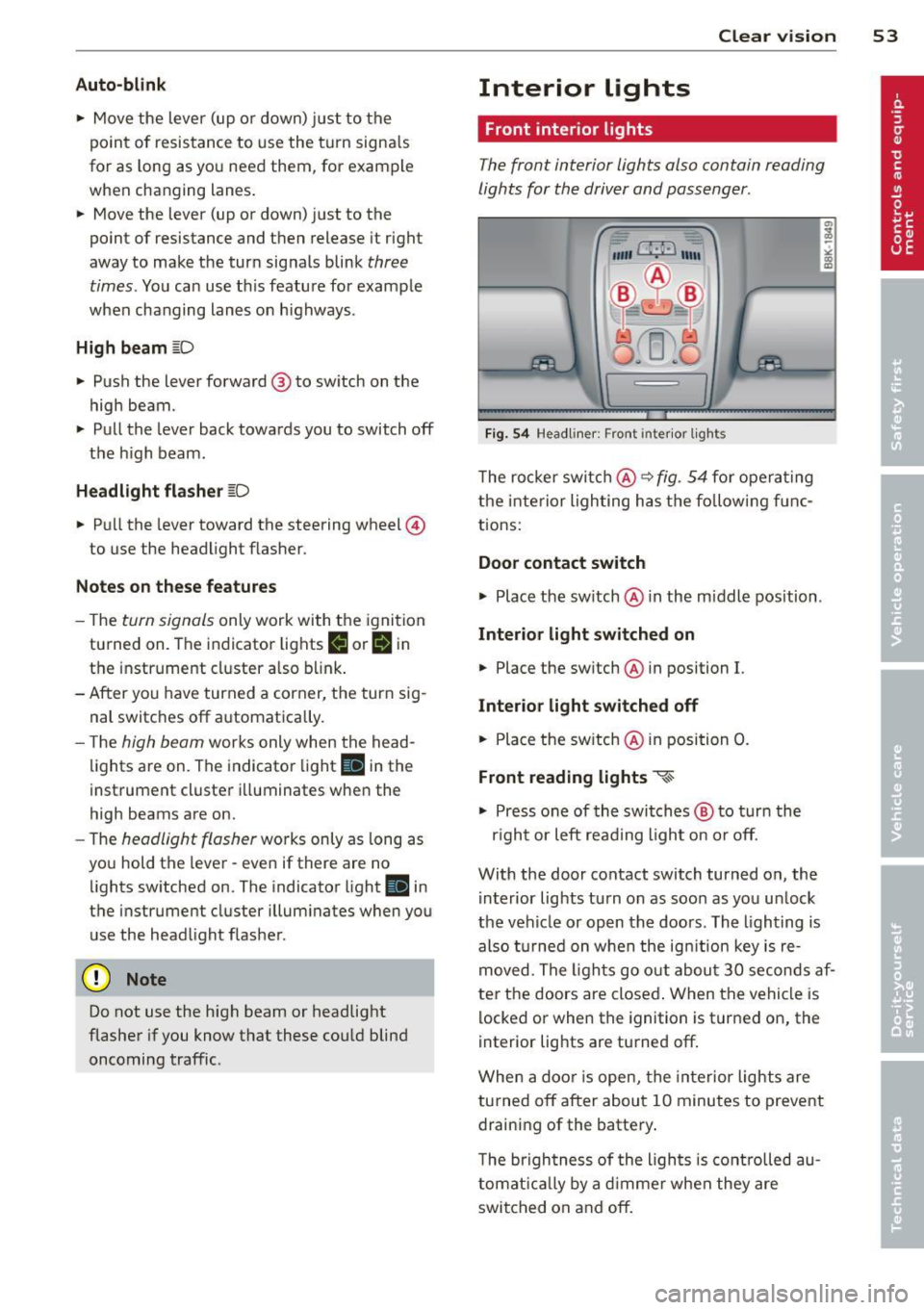
Fig. 54 Headliner: Front inter ior lights
The rocker switch@ ~ fig. 54 for operating
the interior lighting has the follow ing f unc
tions:
Door contact switch
.,.. Place the switch @ in the m iddle position .
Interior light switched on
• Place the sw itch @ in position I.
Interior light switched off
• Place the switch @ in position 0.
Front reading lights ~
.,.. Press one of the switches @ to turn the
r ig ht or left read ing l ight on or off.
With the door contact switch turned on, the i nterior lights tu rn on as soon as you un lock
the vehicle or open the doors. The lighting is
also turned on when the ignit ion key is re
moved. The lights go out about 30 seconds af
ter the doors are closed . When the vehicle is
locked or when the ignition is turned on, the
interior lights are turned off.
When a door is open, the interior lights are
turned off after about 10 minutes to prevent
draining of the battery.
T he brigh tness of the ligh ts is controlled au
tomatically by a dimmer when they are
switched on and off.
Page 63 of 316

Seats and storage
General recommen
dations
Why is your seat adjustment so important?
The safety belts and the airbag system can
only provide maximum protection if the front
seats are correctly adjusted.
There are various ways of adjusting the front
seats to provide safe and comfortable support
for the driver and the front passenger. Adjust
your seat properly so that :
- you can easily and quick ly reach all the
switches and controls in the instrument
panel
- your body is properly supported thus reduc ing physical stress and fatigue
- the safety belts and airbag system can offe r
maximum protection
¢ page 162.
In the following sections, you will see exactly
how you can best adjust your seats .
There are special regulations and instructions
for installing a child safety seat on the front passenger's seat. Always follow the informa
tion regard ing child safety provided in
¢ page 186, Child Safety.
A WARNING
Incorrect seating position of the driver and
all other passengers can result in serious
personal injury.
- Always keep your feet on the f loor when
the vehicle is in motion -never p ut your
feet on top of the instrument panel, out
of the w indow or on top of the seat cush
ion. Th is applies especially to the passen
gers . If your seating position is incorrect,
you increase the r isk of injury in the case
of sudden braking or an acc ident. If the
airbag inflates and the seating position
is incorrect, this could result in persona l
injury or even death.
- It is important for bo th the driver and
front passenger to keep a distance of a t
Seat s an d sto rage 61
least 10 inches (25 cm) between them
selves and the steering wheel and/or in
strument panel. If you're s itting any
closer than th is, the airbag system can
not protect you properly. In addition, the
front seats and head restraints must be
adjusted to your body height so that t hey
can give you maximum protect ion.
- Always try to keep as much distance as
possible between yourself and the s teer
ing wheel o r instrument pane l.
- Do not adjust the driver's or front pas
senger's seat whi le the vehicle is moving.
Your sea t may move unexpected ly, caus
ing sudden loss of vehicle cont rol and
personal injury . If you adjust yo ur seat
while the veh icle is moving, yo u are out
of posit ion.
Driver's seat
The correct seat position is important for safe
and relaxed driving.
We recommend that you adjus t the dr iver's
seat in the fo llowing manner:
.,. Adjust t he seat in fore and aft direction so
that you can easily push the peda ls to the
floor wh ile keeping your knees s lightly bent
i:::> A in Why is your seat adjustment so im
portant? on page 61.
.,. Adjust the seatback so that when you sit
w ith your back against the seatback, you can
still grasp the top of the steering wheel.
.,. Adjust the head restraint so the upper edge
is as even as possible with the top of your head . If that is not poss ible , try to adjust
the head res traint so that it is as close to
this pos ition as possib le
i:::> page 67.
A WARNING
Never place any objects in the dr iver's foot
well. An object could get into the pedal
area and interfere with pedal funct ion . In
case of sudden braking or an acc ident, you
wo uld not be able to brake or accelerate.
Page 94 of 316

92 On the road
On the road
Steering
Manually adjustable steering wheel
The height and reach of the steering wheel
can be adjusted .
Fig. 104 Lever under the s tee ring colum n
First, adjust the driver's seat correctly .
• Pull the lever
o fig . 104 -Arrow -o &_.
" a, a,
• Move the steering whee l to the desired po
s it ion.
• Push the lever aga inst the steering column
u ntil it locks.
There must be at least 10 inches (25 cm) be tween your chest and the center of the steer
ing wheel. If you cannot si t more than 10 in
ches (25 cm) from the steering whee l, see if
adaptive equipment is available to help you
reach the pedals and increase the distance
from the steering whee l.
F or detai led information on how to adjust the
driver's seat, see
o page 63.
The steering wheel can be adjusted even when
the ign ition is turned off. For vehicles wi th
seat memory, the individual positions for the
steering wheel can be stored a long with the
seat position .
A WARNING
Improper use of steering wheel adjust
ment and improper seating position can
cause serious personal injury .
-Adjust the steer ing whee l co lumn on ly
when the vehicle is not moving to pre
vent loss of veh icle control.
-
- Adjust the driver's seat or steering whee l
so that there is a m inimum of 10 inches
(25 cm) between your chest and the
steer ing whee l
r::;,page 145, fig . 162 . If
you cannot maintain th is m inimum dis
tance, the a irbag system cannot protect
you properly.
- If physical limitations prevent you from
sitting 10 inches (25 cm) or more from
the steering wheel, check with your au
thorized Audi dealer to see if adaptive equ ipment is ava ilable .
- If the steer ing whee l is aligned with your
face, the supplementa l dr iver's a irbag
cannot provide as much protection in an
accident. Always make sure that the
steer ing whee l is aligned with your
chest .
- Always hold the steering wheel with your
hands at the 9 o'clock and 3 o'clock posi
tions to reduce the risk of persona l injury
if the driver's airbag deploys.
- Never hold the steering wheel at the 12 o'clock position or with your hands inside
the steeri ng wheel rim or on the steering
wheel hub. Holding the steer ing wheel
the wrong way can cause serious injuries
to the hands, arms and head if the driv
er's airbag deploys.
Ignition lock and ignition switch
Starting engine with the key
The igni tion is switched on and the engine
started with the ignition key .
Fig. 105 Ig nitio n key
Page 96 of 316

94 On the road
@ For the sake of the environment
To avoid unnecessary engine wear and to reduce exhaust emissions, do not let your
veh icle stand and warm up. Be ready to
drive off immediately after start ing your
veh icle. Maintain moderate speed until the
engine is comp letely warm. Remember,
the engine performs best at operating
temperature.
@ Tips
- If the key cannot be removed from the
ignition lock, you have to pull the me
chanical key out of the master key in or
der to be ab le to loc k the vehicle The ve
hicle can be locked with the mechanica l
key
~page 39.
-If you open the driver's door wi th the ig
nit ion switched on, a buzzer sounds and
the message
Ignition i s on appears in
the instr ument cluster disp lay . Switch
the ignition off.
Stopping the engine
> Bring the vehicle to a full stop.
> Automatic transmission*: Move the selec
tor lever to the
P or N position .
> Press on the ignition key. The engine is
turned off.
Emergency off
If it is necessary in unusual circumstances, the
engine can be switched off wh ile the vehicle is
mov ing . The engine will be switched off if you
p ress on the key for an extended period .
_& WARNING
-Never turn off the eng ine unti l the vehi
cle has come to a complete stop.
- T he brake booster and se rvotronic only
work when the engine is running. With
the ignition turned off, you have to apply
more force when steering or braking .
Since you cannot steer and stop norma l
ly, this can lead to accidents and serious
injuries. -
The radiator fan can continue to run for
up to 10 minutes even after you have
turned off the engine and removed the
ignit ion key. The radiator fan can also
turn on again if the engine coolant heats
up because of intense sunlight or heat
bu ild-up in the engine compa rtment.
(D Note
Do not stop the engine immediately after
hard or extended driving . Keep the engine
runn ing for approximate ly two minutes to
prevent excess ive heat bu ild-up .
Starting and stopping
the engine with
convenience key
St t· th ng ·n ith the
button
Applies to vehicles: wit h co nvenience key
This button switches on the ignition and
starts the engine.
Fig. 106 Conven ience key: STAR T ENGINE STOP button
> Manual transmission: Fully depress the
clutch pedal and move the shift lever to the
neutral posit ion.
> Automatic transmission*: Step on the brake
pedal and move the selector leve r to
P or N
~ .&. -
> Pr ess on the !START ENGINE STOPI b utton
~ fig. 106 -the engine will start.
By pressing the
! START ENGINE STOPI button
without depressing the clut ch or the brake
peal, the ignition is switched on and switched
off by pressing it again.
IJi,,
Page 97 of 316

If the engine does not start immediately, stop
trying after 10 seconds and then try to restart
the eng ine about 30 seconds later .
After a cold engine is star ted, there may be a
brief period of increased noise because oil
pressure must first bui ld up in the hydraulic
va lve adjusters. This is normal and not a cause
for concern.
Driv er m essa ge in th e in strument clu ster
disp lay
No ke y ident ified
This message appears when the
I S TAR T ENGINE STOP ! button is pressed if
there is no master key inside the vehicle or if
the system does no t recogni ze it. For exam
ple, the master key cannot be recognized if it
is covered by an object (e .g . aluminum brief
case) which
screens the radio signal. Electron
i c devices such as ce ll phones can also inter
fere wi th the radio signal.
Press brake ped al to start engine
This message appears if you press the
I STAR T ENGIN E ST OP ! button to start the en
g ine and do not depress the b rake pedal. The
engine can on ly be sta rted if the brake pedal
is depressed.
Press clutch ped al to start engin e
This message appears with a manual trans
miss ion when you press the
I S TAR T ENGIN E ST OP ! button to start the en
g ine and do not depress the clu tch pedal. The
engine can on ly be started when the clutch
pedal is dep ressed .
Engage Nor P to st art engine
This message appears when attempting to
start the engine if the selector lever fo r the
automatic t ransmission is not in the
P or N
position . Th e engine can on ly be started w ith
the selector in these posit ions.
!II Key not in vehicle
This message appears along with the II! sym
bo l if t he maste r key is removed from the ve
h icle w ith the engine r unning. It is intended
On th e ro ad 95
to remind you (e .g. when changing dr ive rs)
not to continue the journey without the mas
ter key.
If t he mas ter key is no longer in the ve hicle,
you cannot switch on the ignition after stop
ping the engine and you also cannot start the
engine aga in. Moreover, you cannot lock the
vehicle from the outside with the key.
Shift to P, oth erwise vehicle can roll away.
D oors do not lock if le ver i s not in P .
This message app ears for safety reasons
a long with a warn ing signal. It appears if the
selector leve r for the automa tic transmission
is not in the
P position when sw itching off the
ignition with the
I STAR T ENGIN E ST OP ! but
ton . Move the se lector lever to the
P position,
othe rwise the veh icle is not se cured against
ro lling away. You also cannot lock the veh icle
u sing the lock ing b utton on the door hand le
or using the remote key.
Convenience key defective ! Use ignition
lock
T his message appears if the vehicle has to be
started not w ith the
I S T AR T ENGINE ST OPI
button but with the ig nition key.
A WARNING
- Never a llow the engine to run in confined
spaces - danger of asphyx iation.
- Never turn off t he engine until the vehi
cle has come to a complete stop.
- The brake booster and servotron ic only
work when the engine is runn ing . With
the ignition turned off, you have to apply
more force when steering or brak ing.
Since you can not steer and stop normal
ly, th is can lead to acc idents and serious
in ju ries .
(D Note
-Avo id h igh engine rpm, full thrott le and
heavy engine loads until the eng ine has
reached operating temperature - other-
w ise you risk engine damag e.
- T he engine cannot be started by pushing
o r towing the vehicle.
Ill-
Page 98 of 316

96 On the road
-If the engine has been under heavy load
for an extended period, heat builds up in
the engine compartment after the en
gine is switched off -there is a risk of
damaging the engine. Allow the engine
to run at idle for about 2 m inutes befo re
switching it off .
@ Tips
If you open the driver's door with the igni
tion switched on, a buzzer sounds and the
message
Ignition i s on appears in the in
strument cluster display . Switch the igni
tion off.
Switching engine off with the button
Applies to vehicles: w it h conve nience key
.,. Bring your vehicle to a complete stop.
.,. Automatic transmission* : Move the selector
lever to the
P or N pos ition.
> Pre ss the I STAR T ENGINE STOP I button
c::>page 94, fig. 106 .
Emerg enc y OFF function
If necessary, the engine can be switched off
with the selector lever in the
R , D or S* posi
tions. To do so, step on the brake pedal and press and hold the
I START ENGINE S T OP I but
ton (veh icle speed must be less than 6 mph/
10 km/h.
& WARNING
- Never turn off the eng ine unti l the vehi
cle has come to a comple te stop.
- The brake booste r and se rvotronic only
work when t he engine
is running. With
the ignition turned off, yo u have to apply
more force when steering or braki ng .
Since you cannot steer and stop norma l
ly, this can lead to accidents and serious
injuries.
- For safety reasons, you should always
park your vehicle with the se lector lever
in P. Otherwise, the veh icle could inad
vertently roll away. -
After the engine has been switched off,
the radiator fan can cont inue to run for
up to 10 minutes -even with the ignition
switched off. It can also sw itch on again
after some t ime if the coolant tempera
ture rises as the result of a heat bu ildup
or if the engine is hot and the engine
compartment is additionally heated by
the s un's rays .
Q;) Note
If the engine has been under heavy load
fo r an extended period, heat bu ilds up in
the engine compartment after the engine i s switched off -there is a r isk of damag ing
the engine. Allow the engine to run at id le
for abo ut 2 minutes before switching it
off .
Electromechanical
parking brake
Operation
The ele ctromechanical parking brake replaces
the hand brake.
Fig . 107 Center console: Parking b rake
> Pull on the switch @ c::> fig. 107 to apply the
parking brake. The indicator light in the
sw itch illuminates .
.,. Step on the brake pedal or the accelerator
pedal and press the switch at the same t ime
to re lease the park ing brake. The indicator
light in the sw itch goes out .
Your vehicle is equipped with an electrome chanical parking brake . The parking brake is
designed to p revent the veh icle from rolling
u nintentionally and replaces the hand b rake. .,..
Page 99 of 316

In addition to the norma l functions of a tradi
tional hand brake, the electromechanica l
parking brake provides various convenience
and safety functions.
When start ing f rom re st
- T he integ ral starting assist helps you when
driving by automatically releasing the park
ing brake ¢
page 98, Starting from rest.
-When starting on inclines, the starting as
sist prevents the vehicle from unintentional
l y rolling back. The braking force of the
parking brake is not released until sufficient
driv ing force has been built up at the
wheels .
Emergenc y bra ke function
An emergency brake ensures that the vehicle
can be slowed down even if the
normal brakes
fa il¢
page 98, Emergency braking .
Indicator light s
-If the parking brake is closed w ith the igni
tion
s witch ed on the . (USA models) /
• (Canada models) indicator lights come
on in the instrument cluster and the switch.
-If the parking brake is closed with the igni
tion
s witched off the . (USA models) I
• (Canada models) indicator lights come
on in the instrument cluster and the switch
for about 20 seconds.
A WARNING
If a gear or a drive range (automat ic trans
m ission) is engaged with the vehicle sta
tionary and the engine run ning, you must
in no inst ance accelerate o r release the
cl utch carelessly. Otherwise the veh icle
wi ll start to move immediately -risk of an
accident.
CJ) Note
If the . symbol in the disp lay o r the
- (USA
models) ;II (Canada mode ls)
ind icator light in the instr ument cluster
flashes, there is a ma lfunction in the brake
system. By pressing the
! SETI button, you
can br ing up a driver message which ex-
On th e ro ad 97
plains the ma lf u nction in more detail. If
the driver message
P ark ing brake! ap
pears, the re is an operating malfunct ion in
the parking brake which you should have
repaired immed iate ly by an authorized Au
di dealer or other qualified workshop
¢page 30.
(D Tips
-You can apply the parking brake at any
time -even with the ign ition turned off.
The ignit ion must be turned on in order
to release the par king b rake .
- Occasional noises when the parking
brake is applied and released are normal
and are not a cause fo r conce rn.
- When the vehicle is parked, the park ing
brake goes throug h a self-test cycle at
regu lar inte rva ls. Any associated noises
are normal.
Parking
Various rules apply to prevent the parked ve
hicle from rolling away accidentally.
Parking
"' Stop the vehicle with t he foot brake .
"' Pull the switch to apply the parking brake.
"' Automatic transmission*: Move the selector
lever to
P .
"' Tur n the engine off¢_&.
"' Ma nual transmiss ion: Shift into 1s t gear.
In addition on inclines and grades
"' Turn the steering wheel so that your vehicle
w ill roll aga inst the curb in case it shou ld
start to move.
A WARNING
- When you leave you r vehicle -even i f on
ly briefly -always remove t he ignition
key. This app lies pa rticularly when chil
dren remain in the vehicle. Otherwise t he
children could start the eng ine, release
the park ing brake or operate electrical
equ ipme nt (e.g. power windows). There
is the risk of an acc ident.
Page 104 of 316

102 Adapti ve crui se control
Adaptive cruise control
Speed and distance
control system
Description
Applies to vehicles: with Audi adaptive cruise co ntrol
The adaptive cruise control driver assistance
program is a combined speed and distance
control system.
F ig. 110 Front bumper: Positio n of radar sensor
Any speed between about 20 mph (30 km/h)
and about 95 mph (150 km/h) can be set and
held with the adaptive cruise control. The sys
tem also regulates a pre -set distance from the
vehicle ahead within the limits of the system described.
Driving can be more relaxed, particularly on
long trips on interstates or on other highways
that a re generally straight .
H ow do es it work?
You can operate the adaptive cruise contro l
using the lever on the steering wheel column
c::> page 104, How is the speed stored? and
c::> page 106, How is the distance (time inter
val) set? .
Driver inform ation
Important information is brought up in the
speedometer and in the instrument cluster
d isplay as the vehicle is being driven
c:::, page 107, Driver information .
What is imp orta nt fo r you to kn ow
The adaptive cruise control is set with system
specified limits, that is, as a driver, you will have to adjust the speed and distance to the vehicle ahead in some instances
c:::,
page 111,
Driver intervention prompt
and c::, page 112,
System limitations.
A WARNING
--
Improper use of the adaptive cruise con
trol can cause collisions, other accidents
and serious personal injury.
- Never drive at speeds that are too high
for traffic, road and weather conditions.
- Never follow the vehicle in front so close ly that you cannot stop your veh icle safe
ly . The adaptive cruise control cannot
brake the vehicle safely when you follow
another vehicle too closely. Always re
member that the adaptive cruise control
has a braking powe r that is only about
25% of the veh icle's maximum braking
abi lity, the automatic braking function
cannot bring the vehicle to a stop .
- Never use adaptive cruise control on
roads where you cannot drive safely at a
steady speed, including city, stop-and-go
or heavy traffic, on winding roads or
when road cond it ions are poor (for exam
p le, on ice, gravel, in fog, heavy rain or
on wet roads that increase the risk of hy
d rop laning) .
- The radar sensor 's
vision can be reduced
by rain, snow and heavy spray. This can
resu lt in veh icles dr iving ahead be ing in
adequately detected or, in some circum
stances, not detected at a ll.
If necessary,
t ake action yourself!
- Always turn off adap tive c ruise control
when en ter ing turn la nes, highway exit
lanes and construction zones or similar
situations beca use the vehicle will a uto
mat ically acce le rate to the stored speed.
- Never rest your foot on the accelerator pedal, especially when t he adaptive
cruise contro l is being used because do
ing so will override the braking function
and prevent the brakes from being ap plied by the system when it detects a sit
uation when the brakes must be applied.
- Always remember that the adaptive
cru ise contro l has limits -it does not
Page 116 of 316

114 Adaptive cruise control
The Audi braking guard is active from a speed
of approx. 20 mph (30 km/h) and works within the system limits¢
page 112 even when
the adaptive cruise contro l is deactivated.
A radar sensor is bui lt into the front of the ve
hicle
¢ page 102, fig. 110. The system is in
tended to measure the distance to reflective
surfaces. If a measurement is not possible,
the system does not respond .
When the measurement has taken p lace, the
system can assess a hazardous situation,
when a vehicle ahead suddenly brakes or when
your own vehicle is driving at high speed to
wards a much slower vehicle ahead . As soon
as the system assumes that a possible colli
sion with the vehicle ahead can on ly be avo id
ed by immediate all-out braking or by an
avoiding maneuver, a warning appears.
The system has a pre-set response time to be
able to warn in good t ime . This system re
sponse time is automat ically reduced if you
accelerate actively, for example to join a high
way. Braking, transverse acceleration and the
steering angle can lead to a reduced system
response time . The warning is deactivated if
you begin to overtake with fu ll acce leration.
The system draws your attention to two differ
ent hazardous situations:
Distance
The distance warn ing is issued in the event of
inadequate distance to the veh icle ahead ape
riod of more than 5 seconds . If the distance is
l ess than 30 feet (9 meters) at 50 mph
(80 km/h) , for example, an optical display is
faded in on the instrument cluster¢
fig. 129.
If the vehicle ahead brakes sharply, a collision
cannot be avoided , even in the case of an im
mediate response. In this case, increase the
distance to the vehicle ahead.
Speed
If there is a much slower veh icle ahead in your
la ne, or if the vehicle ahead brakes sharply,
the Audi braking guard ca lculates the point
from which a collision can only be avoided by all-out braking or
by an avoiding maneuver. If
a warning does sound, a possib le collision
with the vehicle in front can be avoided
through an evas ive maneuver or by braking .
T he warning is given in two stages:
-Pre-warning: An optical display appears in
the instrument cluster and a warning tone
so unds.
- Acute warning: If you do not respond to the
pre-warn ing, the second stage , the acute
warning, is issued . A brake jolt reminds you
to concentrate on the road again.
Under heavy brea king, brake assist
¢
page 209 also helps you obtain max imum
braking efficiency.
.&_ WARNING ~
Always pay attention to traffic, even when
the Audi braking guard is switched on. You
are a lways responsible for your speed and
the distance between your vehicle and oth·
er vehicles.
-Always keep the lega lly stipulated safety
d istance between your vehicle and the
veh icle ahead • danger of accident!
- The Audi braking guard does not respond
outside the system limits, for example if
you approach a stationary obstacle (end
of a traff ic jam or breakdown vehicle).
- Please observe that the Audi braking
guard is subject to restrictions in narrow
bends due to the field of vision of the ra
dar senso r. T his may possibly lead to ob
stacles not being detected.
- The radar sensor's
vision can be reduced
by rain, snow and heavy spray. This can
resu lt in vehicles driving ahead being in
adequately detected or, in some circum
stances, not detected at all. Always
watch where yo u are driving .
- Reflecting objects such as e.g . crash bar
riers or the entrance to a tunne l may im
pair the function of the radar sensor .
Page 126 of 316
124 Audi drive select
Audi drive select Driving settings
Introduction
App lies to vehicles: w it h drive se lect
Audi drive select provides the possibility to ex
perience different types of vehicle settings in
one vehicle. For instance, using the three
COMFORT, AUTO and DYNAMIC modes, the
driver can switch from a sporty to a comforta
ble driving mode with the press of a button.
Additionally, in vehicles with MMI*, the vehi
cle setup for INDIVIDUAL* mode can be cus
tomized by you. This makes it possible to
combine settings such as a sporty engine tun ing with light steering.
A WARNING
- Improper use of the Audi drive select can
cause collisions, other accidents and seri
ous personal injury.
- Never drive at speeds that are too high
for traffic, road and weather conditions.
Description
App lies to vehicles: w it h drive se lect
The vehicle setup in each mode depends on
the vehicle's features. However, the engine
and servotronic are always affected. The auto
matic transmission*, dynamic steering* and
adaptive dampers* are also adjustable.
Depending on the mode, the
engine and auto
matic transmission*
respond more quickly or
in a more balanced manner to accelerator
pedal movements.
The
Servotronic (steering servo assistance)
c::> page 209 can also be adapted to driving
situations.
Dynamic steering* changes the steering ratio
as a function of the driving speed in order to
optimize the driver's required steering effort.
This sets the steering to be less sensitive at
higher speeds in order to provide greater con
trol over the vehicle. At reduced speeds, how
ever, steering is more direct in order to keep the steering effort as minimal as possible
when the driver is maneuvering the vehicle. At
low and average speeds, dynamic steering ad
ditionally provides more responsive steering
performance. The driver can set the basic
steering ratio characteristics .
The
adaptive dampers* use sensors to record
information regarding steering movements,
braking and acceleration operations by the
driver, road surface, driving speed, and load.
This makes it possible to adapt damping to
the driving situation virtually in real time. Au
di drive select also makes it possible to satisfy
the desire for sporty suspension (DYNAMIC)
and comfortable suspension (COMFORT) with
out giving up balanced tuning (AUTO).
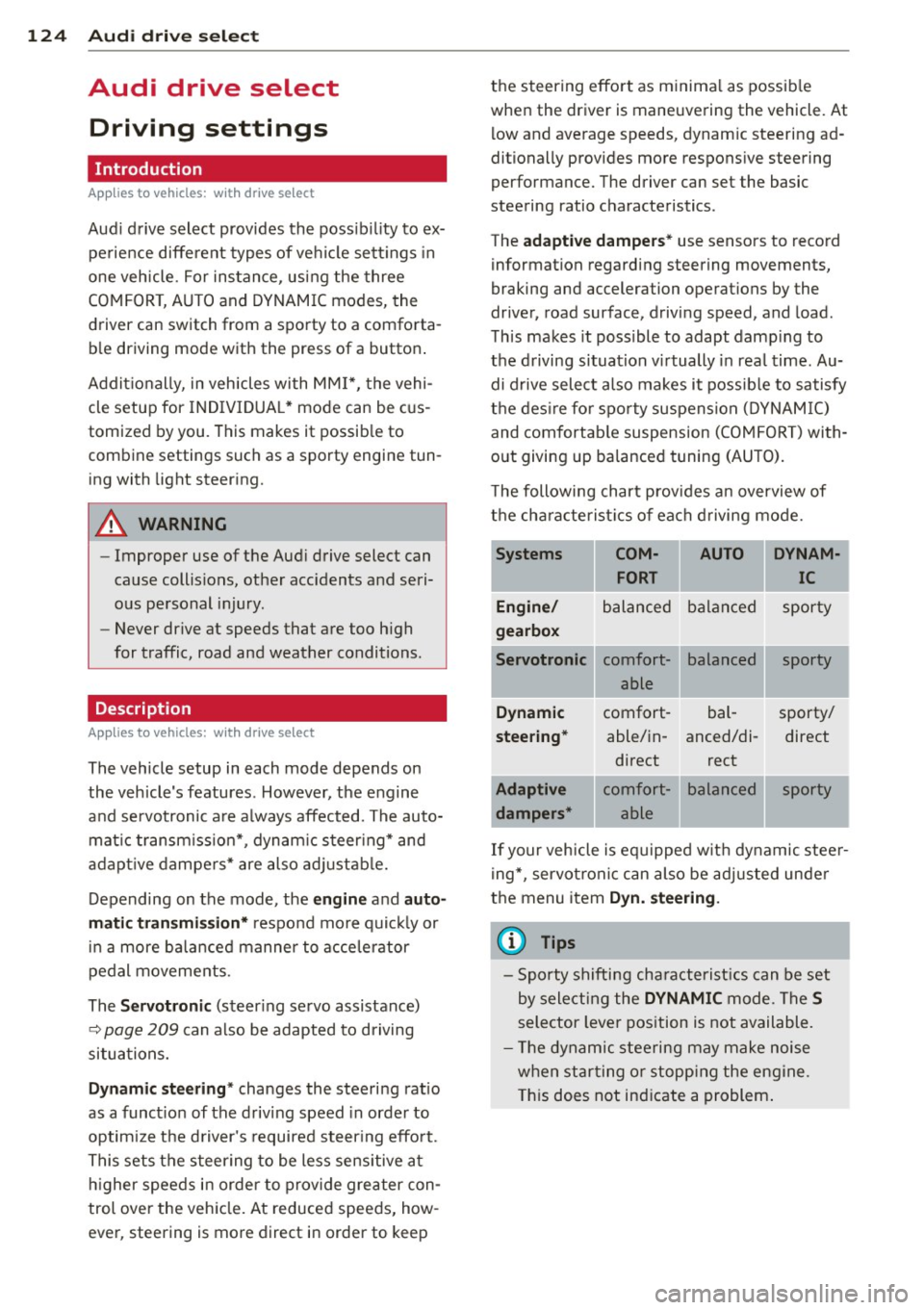
The following chart provides an overview of
the characteristics of each driving mode.
Systems
Engine/
gearbox
Servotronic
Dynamic
steering*
Adaptive dampers* COM-
AUTO DYNAM-
FORT IC
balanced balanced sporty
comfort- able
comfort- able/in-
direct
comfort- able balanced
bal-
anced/di-
rect
balanced sporty
sporty/ direct
sporty
.
.
If your vehicle is equipped with dynamic steer
ing*, servotronic can also be adjusted under
the menu item
Dyn. steering.
(D Tips
-Sporty shifting characteristics can be set
by selecting the
DYNAMIC mode. The S
selector lever position is not available.
- The dynamic steering may make noise
when starting or stopping the engine.
This does not indicate a problem.