turn signal AUDI A5 COUPE 2012 User Guide
[x] Cancel search | Manufacturer: AUDI, Model Year: 2012, Model line: A5 COUPE, Model: AUDI A5 COUPE 2012Pages: 316, PDF Size: 78.59 MB
Page 113 of 316

95 mph (150 km/h) if the driver removes the
foot from the accelerator .
Selector lever position!
The text message Selector lever position! ap
pears when the selector lever is moved to po
sition
N. In thi s position, adaptive cruise con
trol is not avai lab le .
Driver intervention prompt
Applies to vehicles: with adaptive cruise control
The driver intervention prompt co/ls on the
driver to toke over the situation.
Fig. 121 Instrument clus te r: Driver inte rven tion
pr ompt
In certain situations, the braking power of the
adaptive cruise control is not sufficient to
maintain an adequate distance from the ob
ject ahead . In this situation, the adaptive
cru ise control calls on
you as the driver to take
action.
The
driver intervention prompt alerts you vis
ually and audib ly .
- A red vehicle is shown in the instrument
cluster disp lay
¢ fig . 121 .
-The text DISTANCE! appears in the status
line .
Adaptive cruise control 111
- The indicator light in the Instrument cluster
blinks red.
- A warning tone sounds.
(0 Tips
-If the adaptive cruise control initiates
braking, the hydraulic brake system is
under pressure . Th erefore, the brake
pedal distance is shorter and the pedal
"feels" harder.
- Adaptive cruise contro l is swi tched off af
ter pressing the footbrake. The speed
saved up this point can be resumed.
- To resume the saved speed, re lease the
brake pedal and press the control lever
¢ page 105, Turning adaptive cruise
control off temporarily.
- If you use the accelerator to go faster
than the speed of the object ahead of
you, the
driver intervention prompt will
not be accompan ied by a warn ing signal.
- If the speed you previously set is exceed
ed, the indicator light in the speedome
ter will switch off.
MMI settings
App lies to vehicles: with adaptive cruise control
Individual settings for adoptive cruise control
con be selected in the MMI*.
Settings for the driving program can be ad
justed individually to the particular user and saved in the MM!*.
,,. Select:
I CAR ! function button > Adaptive
Cruise Control
> Driving program .
Setting the driving program
In the driving program menu you can adjust
the characteristics of adaptive cruise control
to what you want using
dynamic , standard or
comfort.
Saving settings
Your individua l settings are automatically
saved and assigned to the remote control key
being used ( remote key storage). If the key is .,..
Page 118 of 316

116 Audi side assist
Audi side assist
Lane change assistant
Description
App lies to vehicles: with si de ass ist
The side assist helps you when changing
lanes .
a::ro
AUDI
.ii 0 0
Fig. 130 Rear bum per: Pos ition of radar senso rs ( not
vis ible on outs ide)
Fig. 131 Signal ligh t on t he outside mirror -driver's
side
Side assist uses radar sensors (not visib le on
outside) ¢
fig. 130 to help the d river check
blind spots, and see what is happening in traf
fic behind the vehicle
¢ page 117, fig. 133.
Signal lights are built into both outside mir
rors @¢
fig. 131. The signa l light on the left
outside mirror assists when moving over into
the left lane and the signa l light on the right
outside mirror assists when moving over into
the right lane.
The signal light comes on to te ll you that side
assist has detected a vehicle on that side and
that the position of this other vehicle should
be taken into account if you were to change
lanes . This is called the
informational stage
signal ¢
page 118 . The informational stage signal
is designed so that you notice it only
when you are looking in the outs ide mirror.
When you activate the turn signal and side as
s ist detects a vehicle in a notable location, the
corresponding signal on the outside mirror
flashes briefly and brightly several times. This
is the
alert stage signal¢ page 118.
Activating and deactivating
Applies to vehicles: wit h side assist
Fig. 132 Driver 's door: S ide ass ist button
Activating
"' Press the¢ fig. 132 button. The indicator
on the button lights up.
Deactivating
"' Press the button again . The indicator light
on the button goes out .
The system works at speeds faster than 19 mph (30 km/h) .
A WARNING
--Improper reliance on the side assist sys-
tem can cause collis ions and serious per
sonal injury:
- Never rely on ly on side assist when
changing lanes .
- Always check rear view mirrors to make
sure that it is safe to change lanes.
- Side assist cannot detect all vehicles un
der all conditions- danger of acc ident!
- Side assist cannot detect vehicles in time
to a lert you when they approach from
behind at very high speed, or fall drop
back very quickly.
11>
Page 119 of 316

-The radar sensor's vision can be reduced
or entirely blocked by rain, snow, and
heavy spray. This can result in side assist
not adequately detecting vehicles or, in
some cases, not detecting them at all.
Always keep an eye on the d irection you
are traveling and the relevant area
around the vehicle.
- Please note that side assist indicates
there are approaching vehicles, o r vehi
cles in your blind spot, only after your ve
hicle has reached a driving speed of at
least 19 mph (30 km/h).
- Side ass ist signal does not work around
tight corners (turning radius less than
328 feet or 100 m).
- Side assist is no replacement for the driv
er's full attention . The driver alone is re
sponsible for lane changes and similar
driving maneuvers. A lways keep an eye
on the direction you are traveling and the
relevant area around the vehicle.
(D Note
-To ensure that you do not adversely af
fect side assist, do not block the area on
the rear bumper where the radar sensors
are located with foreign objects (such as
stickers or bicycle racks).
- Make sure that the signal light on the
outside m irror is not blocked by st ickers
or other items.
@ Tips
- Side assist automatically deactivates if it
detects that the radar sensors are
blocked
9 page 122. The indicator light
on the button goes out .
- The area on the bumper where the radar
sensors are located must consistently re
main free of snow, ice, and heavy soiling
so that side assist can function properly.
Follow the additional notes on
.:!>page 122 .
-Additional tinting on the front side w in
dows can make it harder to see and cor
rectly understand the signal light on the
outside mirror.
Aud i side assist 11 7
-For Declaration of Compliance to United
States FCC and Industry Canada regula
t ions ¢
page 296.
Sensor detection area
Applies to vehicles: wit h side assist
t
Fig. 133 Schemat ic illustrat ion : Sensor detect ion area
The detection¢ fig. 133 of the radar sensor
detection area is made up of:
- the approach area (light red area)
(D, about
230 feet (70 m) behind the vehicle, and
- the "blind spot" (dark red area)@.
The radar sensors cover the adjacent left and
right lanes. Other lanes are
not covered by the
radar sensors.
(D Tips
Side assist does not measure actual lane
width. The system assumes a fixed lane
width . Detection in the left and right lanes
i s based on this assumed lane width .
When driving on narrow roads o r when
driving to the left or right of the center of
a travel lane, it is possib le that vehicles
will be detected that are
not in the lane
next to the lane you are using
¢page 121.
Operation
App lies to vehicles: wit h side assist
Side assist compares the distance and differ
ence in speed of detected vehicles with the
speed of your vehicle . Whenever the differ
ence in speed and distance is registered as no·
table if you were to change lanes, a signal
light appears on the respective m irror.
Ill-
Page 120 of 316

118 Audi side assist
The signal can light up i f you are passed by a
vehicle or if yo u are passing another vehicle.
If you p ass another vehicle slowly (difference
in speed less than 9 mp h, or 15 km/h), the
signal light will come on as soon as the other
ve hicle is in your blind spot and is detected by
side assist . When the difference in speed is
greater, the signa l light will not come on.
Informational and alert stage signals
App lies to vehicles: with side assist
Side assist has two s ignal stages:
- the informationa l stage signal, and
- the a le rt stage signa l.
Side assist helps you by using the appropriate
signal s tage, depending on whethe r or not
you have activated the turn signal, and thus
have indicated that you are or are not chang
ing lanes.
Informational stage signal
As long as you have not activated the turn sig
nal, side assist informs you of detec ted vehi
cles that are registered as being in a notable
l ocation if you were to change lanes. Whenev
er the detected vehicle's difference in speed
and distance is registered by side assist as no
table, the signal light on the respective m irror
produces muted illum ination.
The brightness of the informational stage sig
na l is designed not to be as intense, so that it
does not interfere with your view of the road
when you are driving and have no intention of
changing lanes . When you look in the outside
mirror, you can clearly see the informat ional
stage signa l.
Alert stage signal
When you activate the turn signal, and side
assist has detected a vehicle in a notable loca
tion on that part icular side, the signal light on
this side mirror flashes bright ly . The repeated
brief and b right flashing of the alert stage
signal reminds you to carefully check traffic to
the rea r in the outside mirror and over you r shou
lder, so that you can safely complete the
lane change
Q .&. in Safety tips on page 122.
(D Tips
The brightness of the s ignal light on the
outside mirrors can be adjusted with the
MMI* ¢page 121.
Driving situation: Fast approaching
vehicles
Applies to vehicles: with side assist
Fig . 134 Side assist: Fast approac hing veh icles
(!) Signal on outside mirror does not light
up
No vehicle was dete cted by the sensors. The
s ignal on the outside mirror does not light up
~ .&. in Safety tips on page 122.
@ Informational stage signal lights up
A fast approach ing vehicle - in the left-hand
l ane fo r example - was detected by the sen
sors. Although th is vehicle is still fa r away, it
shou ld be taken into account if you were to
change lanes, due to the considerable differ
ence in speed. The informationa l stage signal
on the outside mirror lights up ¢
page 118. ..,.
Page 121 of 316
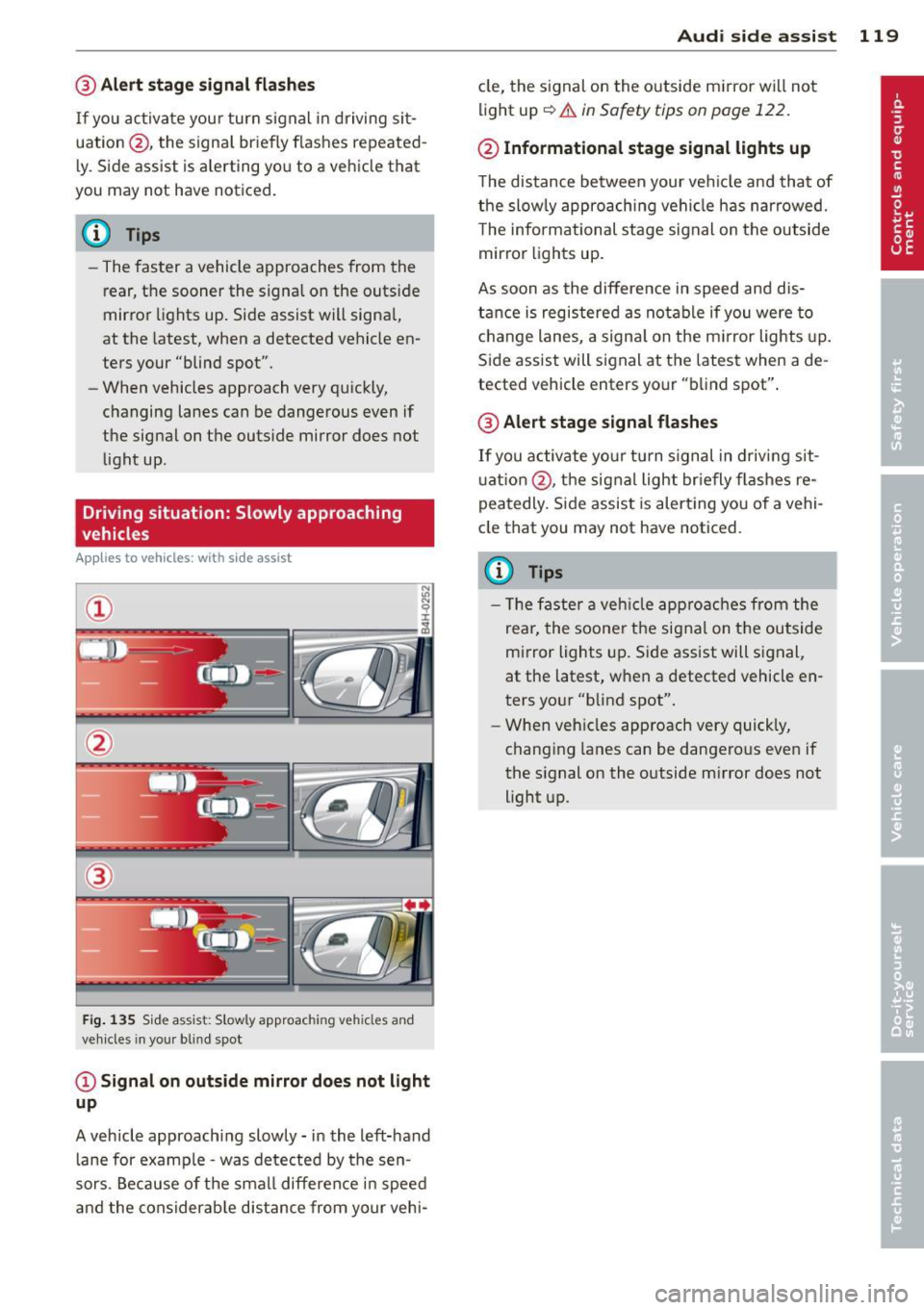
@ Alert stage signal flashes
If you activate your turn signal in driving sit
uation @, the signa l briefly f lashes repeated
ly. Side assist is a lerting yo u to a vehicle that
you may not have noticed.
@ Tips
- The faster a vehicle approaches from the
rear, the sooner the signa l on the outside
mirror lights up. Side assist will signa l,
at the latest, when a detected vehicle en
ters your "blind spot".
- When vehicles approach very quickly,
changing lanes can be dangerous even if
the signal on the outside mirror does not
light up.
Driving situation: Slowly approaching
vehicles
A ppl ies to vehicles : wit h side ass is t
®
F ig . 135 Side assist: Slowly approac hing veh icles and
veh icles in you r b lin d spo t
@Signal on outside mirror does not light
up
A vehicle approaching slowly -in the left-hand
lane for examp le -was detected by the sen
sors. Because of the small difference in speed
and the considerab le distance from your vehi-
Audi side assist 119
cle, the signal on the outside mirror wi ll not
light up~.&
in Safety tips on page 122.
@ Informational stage signal lights up
The distance between your ve hicle and that of
the slowly approaching vehicle has narrowed.
T he informational stage signal on the outside
mirror lights up.
As soon as the difference in speed and dis
tance is registered as notable if you were to
change lanes, a signal on the m irror lights up.
Side assist will signal at the latest when a de
tected vehicle enters your "blind spot".
@ Alert stage signal flashes
If you activate your turn signal in driving sit
u ation @, the signal light briefly fla shes re
peatedly. Side assist is alert ing you of a vehi
cle that you may not have noticed.
(D Tips
- Th e faster a vehicle approaches from the
rear, the soone r the signal on the outside
mirror lights up. Side assist will signal,
at the latest, when a detected vehicle en
ters your "blind spot".
- When vehicles approach very quickly,
changing lanes can be dangerous even if
the signal on the outside m irror does not
light up.
Page 122 of 316
120 Audi side assist
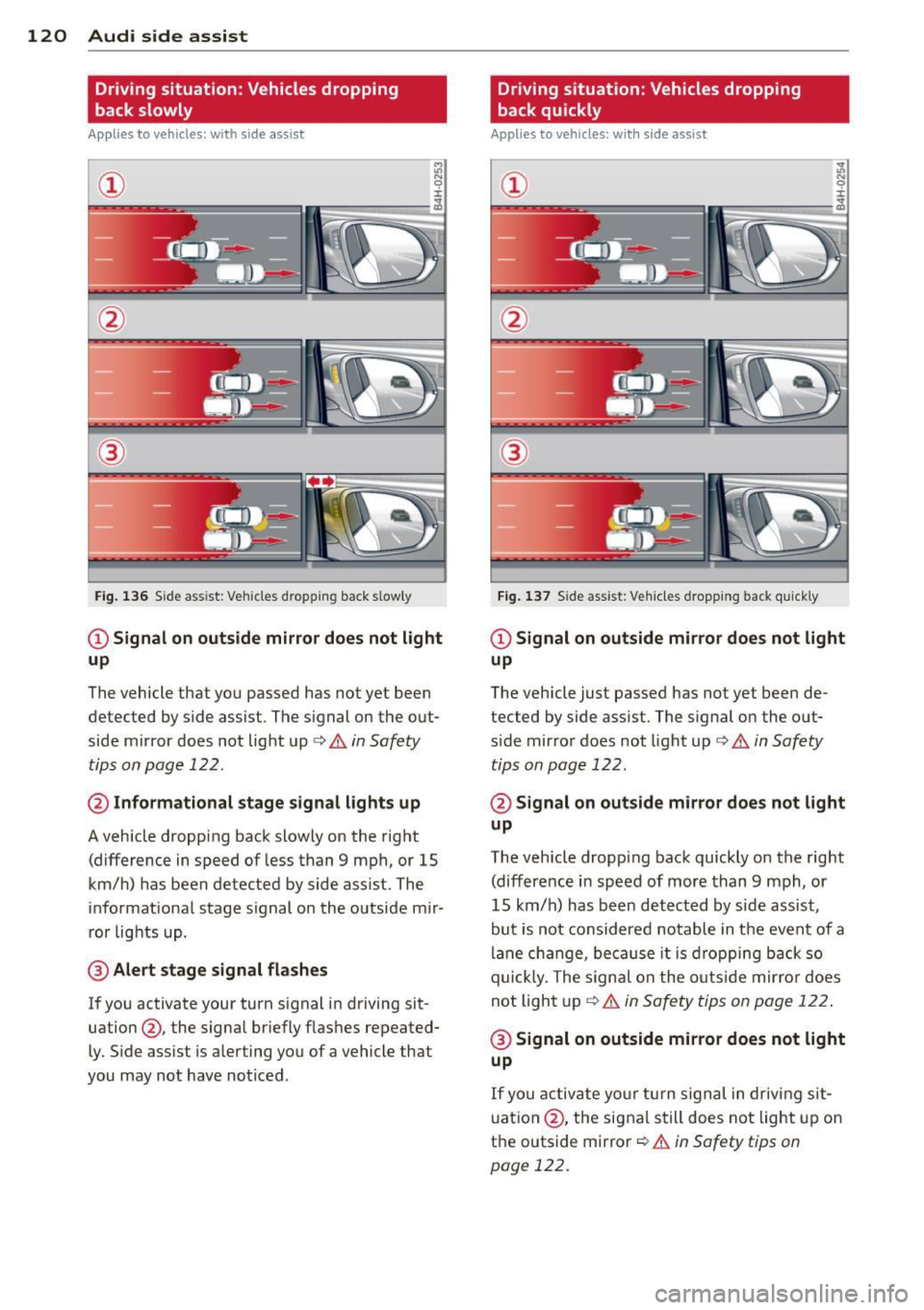
Driving situation: Vehicles dropping
back slowly
Applies to vehicles: with side assist
i:i N 9 J:
-------::~
®
Fig. 136 Side ass ist: Veh icles dropp ing back s low ly
CD Signal on outside mirror does not light
up
The vehicle that you passed has not yet been
detected by side assist . The signal on the out
side mirror does not light up¢
A in Safety
tips on page 122 .
@ Informational stage signal lights up
A vehicle dropping back slowly on the right
(difference in speed of less than 9 mph, or 15
km/h) has been detected by side assist. The
informational stage signal on the outside mir
ror lights up.
@ Alert stage signal flashes
If you activate your turn signal in driving sit
uation@, the signal briefly flashes repeated
ly. Side assist is alerting you of a vehicle that
you may not have noticed .
Driving situation: Vehicles dropping
back quickly
Applies to vehicles: with side assist
®
Fig. 137 Side assist: Ve hicles dropp ing back quickly
CD Signal on outside mirror does not light
up
The vehicle just passed has not yet been de
tected by side assist. The signal on the out
s ide mirror does not light up
Q A in Safety
tips on page 122.
@ Signal on outside mirror does not light
up
The vehicle dropping back quickly on the right
(difference in speed of more than 9 mph, or
15 km/h) has been detected by side assist ,
but is not considered notable in the event of a
lane change, because it is dropping back so
quick ly. The signal on the outs ide mirro r does
not light up¢
A in Safety tips on page 122 .
@ Signal on outside mirror does not light
up
If you activate your turn signal in driving sit
uation @, the signal still does not light up on
the outside mirror ¢
A in Safety tips on
page 122.
Page 123 of 316
Setting the signal brightness on the
outside mirror
Applies to vehicles: with s ide assist
The signal brightness can be set in the radio
orMMI* .
~ Select: Function button ICARI > Audi side
assist -lamp .
~ Rotate the control knob to adjust the dis
played brightness of the signal light on the
outside mirrors.
The brightness of the signal light for both the informational and alert stages is automatical
ly adjusted to ambient light conditions . In ad
dition, you can adjust the
basic brightness
separately, via the brightness function.
While making the adjustment, the new brightness setting is displayed briefly . The
brightness displayed is that of the informa
tional stage signal. The alert stage signal
brightness is linked to the informational stage
signal brightness.
The informational stage signal brightness
should be adjusted so that you notice the sig
nal illumination when you look in the outside
mirror, but not when you look forward
through the windshield .
In very dark or light surroundings , the auto
matic brightness setting adjusts signal light
brightness to maximum or minimum intensi
ty, as needed. In circumstances such as these,
you may not notice any change in the bright
ness on the outside mirror when adjusting the
basic brightness.
You may not notice the change until lighting
conditions are normal again .
@ Tips
-Side assist is not active when the basic
brightness is adjusted . The signal light
comes on briefly to help you make the
adjustment .
- Your settings are automatically stored
and assigned to the remote control key
being used .
Audi side assist 121
General information
Applies to vehicles: with side assist
Side assist has limits and cannot detect vehi
cles under all road and weather conditions.
Please remember system limitations and nev
er rely on the system , especially when :
- driving through curves
~page 121,
-lanes are of different widths ¢ page 121.
When driving through curves
Applies to vehicles: with side assist
Side assist cannot detect vehicles in curves
with a turning radius of less than 328 feet
(100 m).
When driving through a curve, it is possible
that side assist may register a vehicle two
lanes over, and the signal on the outside mir
ror will light up.
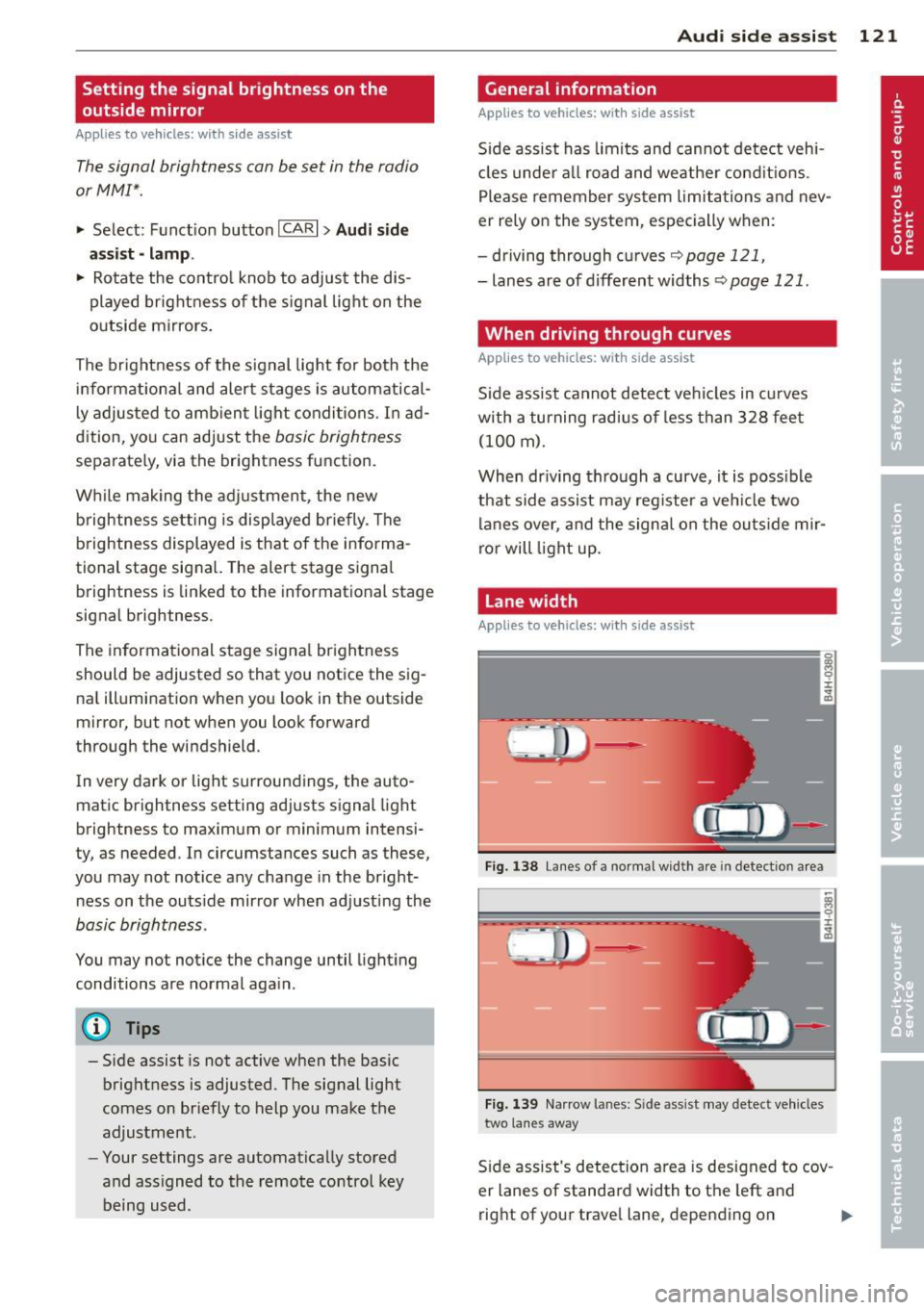
Lane width
Applies to vehicles: with side assist
Fig. 138 Lane s of a normal wid th are in detectio n area
Fig. 139 Narrow la n es: S ide assist may detect vehicles
two lanes away
Side assist's detection area is designed to cov
er lanes of standard width to the left and
right of your travel lane, depending on ..,.
Page 124 of 316

122 Audi side assist
whether you drive in the center of your lane or
closer to the edge.
If you d rive in narrow lanes, side assist's de
tection area may also incl ude other lanes -es
pecia lly if you tend to drive on the edge of
your lane¢
fig. 139. Under these conditions,
ve hicles can also be detected that are two
lanes away, and side assist then could switch
between the informat ional and warn ing stage
signals .
When dr iv in g in very w ide lanes, vehicles in
the adjacent lane may not be detected be
cause they are not inside the detection area.
Notes
Messages in instrument cluster display
Applies to vehicles: with side assist
If side assist turns off automatically, the indi
cator light on the button wi ll go out and you
will see a message in the instrument cluster
d isplay:
Audi side assist not available : sensors
blocked
The s ide assist sensors are built into the rear
bumper on the left and right (not visible on
the outside)
¢page 116, fig. 130. To ensure
that you do not adversely affect the way side
assist funct ions, foreign objects (such as st ick
e rs or b icycle racks) should not be attached to
the area on the rear bumper where the sen
sors are located. If side assist functions are
adversely affected, you will see this message
in the instrument cluster display. Remove any
thing that may be blocking the sensors .
If no ve hicl e is detected for a longer period of
time while driving , side assist will also switch
off a utomatica lly.
Audi side assist currently not available
If there is a temporary problem (such as the
vehicle's batte ry charge being low), s ide ass ist
cannot be activated temporarily .
Audi side assist: system fault
Have the system checked by an authorized Au
di dealer or qualified workshop.
Safety tips
Applies to vehicles: with side assist
The side assist detection may be limited when
driving aro und narrow street corners, on hilly
streets, and under poor weather conditions.
It is possible that the radar sensors may a lso
detect other objects, such as high or stag
gered guardrails.
Side assist does not measure actual lane
width. The system assumes a fixed lane width.
Detection in the left and right lanes is based
on this assumed lane width. When driving on
narrow roads or when driv ing to the left or
right of the center of a trave l lane, it is poss i
ble that vehicles will be detected that are
not
in the lane next to the lane you are using.
A WARNING
-
- I mproper reliance on the side assist sys-
tem can cause collis ion s and serio us per
sonal injury:
- Never rely on ly on s ide assist when
changing lanes.
- Always check rear view mirrors to make
sure that it is safe to change lanes.
- Side assist cannot detect all vehicles un
der all conditions- danger of accident!
- Side assist cannot detect vehicles in time
to a lert you when they approach from
behind at very high speed, or fall drop
back very qu ickly.
- The radar sensor's
vision can be reduced
or entire ly blocked by rain, snow, and
heavy spray. This can result in side assist
not adequately detecting vehicles or, in
some cases, not detecting them at all.
Always keep an eye on the direction you
are traveling and the relevant area
around the vehicle.
Page 125 of 316

-Please note that side assist indicates
there are approaching vehicles, or vehi
cles in your blind spot, only after your ve
hicle has reached a driving speed of at
least 19 mph (30 km/h).
- Side assist signal does not work around
tight corners (turning radius less than 328 feet, or 100 m) .
- Side assist is no replacement for the driv
er's full attention. The driver alone is re
sponsible for lane changes and similar driving maneuvers. Always keep an eye
on the direction you are traveling and the
relevant area around the vehicle.
{[) Note
To ensure that side assist is not adversely
affected, you should not block the area on
the rear bumper where the radar sensors
are located with foreign objects (such as
with stickers or bicycle racks).
@ Tips
If the positions of the radar sensors have
been changed as a result of a rear end-col
lision, for instance, have side assist
checked by an authorized Audi dealer for
safety reasons.
Audi side assist 123
Page 135 of 316
Park assist
Parking system
Applies to vehicles: with parking system
Different park assist systems may be used for
parking or maneuvering, depending on the
vehicle's features.
Parking system (rear)*:
For the parking system (rear), the acoustic
park assist system is installed in the rear of
the vehicle
¢ page 133.
The rear parking assist system uses ultrasonic
sensors to determine the distance of the vehi
cle from a detected obstacle. There are a total
of four sensors located on the rear bumper
(two in the middle and two on the sides) .
Parking system (rear, with rear view
camera)*:
For the parking system (rear, with rear view
camera),
the rear acoustic park assist system
is integrated in the rear of the vehicle and the
rear view camera is integrated in the rear lid
¢page 136.
The parking system (rear , with rear view cam
era)
uses ultrasonic sensors to determine the
distance of the vehicle from a detected obsta
cle . There are a total of four sensors located
on the rear bumper (two in the m iddle and
two on the sides).
Parking system (rear)
Rear acoustic park assist
App lies to vehicles: with parking system (rear)
The rear acoustic park assist warns you of ob
stacles or objects behind your car.
Description
The rear acoust ic parking assist system deter
mines the distance of the vehicle from an ob
stacle using ultrasonic sensors. There are 4
sensors in the rear bumper.
The range at which the sensors start to meas
ure is
about :
Park assist 133
To the side 2 ft (0.60 m)
Center rear 5.2 ft (1.60 m)
Activation
Acoustic parking assist is activated automati
ca lly when
reverse gear is engaged. A brief
tone confirms that the system is activated.
Warning tones
Distance warning is given by warning tones
which are generated by the rear signal genera
tor. The vo lume and the pitch of the warning
tones can be adjusted in the MMI*
¢page 134.
Reversing
Distance warning when reversing starts when
an obstacle is detected in the range of the
parking assist system . As the distance de
creases, the time interval between the aud ible
tones becomes shorter.
When the distance is less than 1 ft (0.30 m),
the tone becomes continuous. At this point
you should stop backing up.
Please note that low objects already signalled
by a warning can disappear from the system's
detection range and will not continue to be
signalled.
If the distance to an obstacle remains the
same, the volume of the distance warning is
gradually reduced after about 4 seconds. Ap
proaching another obstacle will result in the
distance warning sounding at the normal vol
ume again.
Malfunctions in the system
If a warning tone is audible for about five sec
onds when you turn on the ignition, there is a
malfunction in the system. Have the problem
corrected by your authorized Audi dealer.
Keep the sensors in the rear bumper clean and
free from ice so that the acoustic park assist system can function properly. .,..