turn signal AUDI A5 COUPE 2012 Owner's Manual
[x] Cancel search | Manufacturer: AUDI, Model Year: 2012, Model line: A5 COUPE, Model: AUDI A5 COUPE 2012Pages: 316, PDF Size: 78.59 MB
Page 139 of 316
switched on, or the start-up phase is
completed.
- Keep the sensors in the rear b umper and
the rear view camera lens clean and free
of snow and ice, so that the parking sys
tem can work properly. Please follow the
additional notes on
c:;, page 139.
Reverse Parking
A ppl ies to vehicles: with parkin g system (rear, with rea r
view ca mera)
Parking mode 1 can be used when parking in
a garage or parking space.
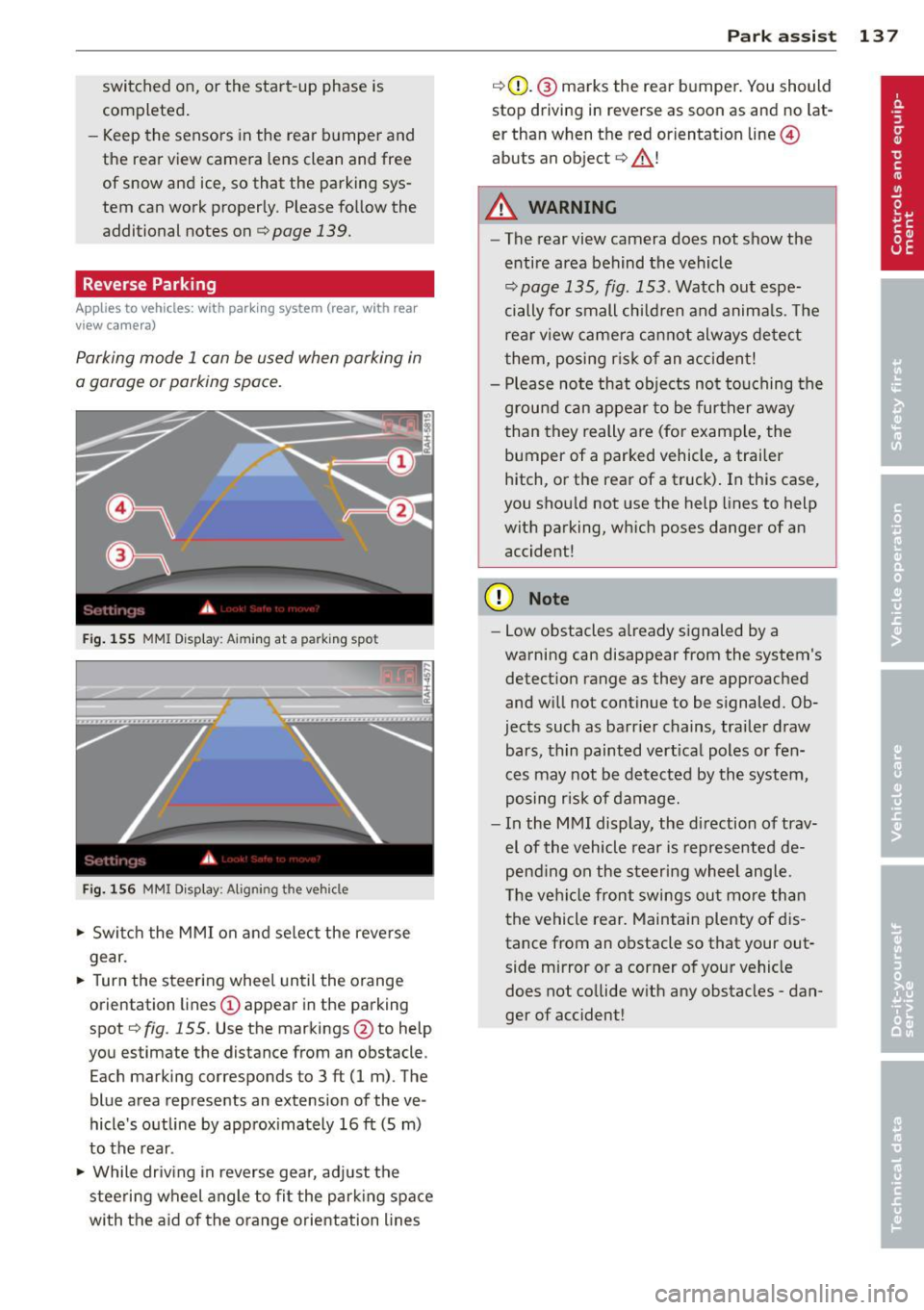
F ig . 155 MMI Disp lay: Aiming at a parking spot
Fi g. 156 MMI Display: Aligning the vehicle
.,. Switc h the MMI on and se lect the reverse
gear.
.,. Turn the steering wheel until the orange
orientation lines
(D appear in the parking
spot
c:;, fig. 155. Use the markings @to help
you estimate the distance from an obstacle .
Each marking corresponds to 3
ft (1 m). The
blue area represents an extension of the ve
hicle's outline by approx imately 16
ft (5 m)
to the rear.
.,. While driving in reverse gear, adj ust the
steering wheel angle to fi t the park ing space
with the aid of the orange orientation lines
Par k ass ist 137
c:;,G)_ @ marks the rear bumper. You should
stop driving in reverse as soon as and no lat
er than when the red orientat ion line ©
abuts an object
c:;, _&. !
A WARNING
- The rear view camera does not show the
entire area behind the vehicle
c:;, page 135, fig. 153. Watch out espe
cially for small children and anima ls. The
rear view camera ca nnot always detect
them, posing r is k of an accident!
- Please note that objects not touching the
g rou nd can appear to be further away
than they really are (for example, the
bumper of a parked vehicle, a trailer
hitch, or the rear of a truck). In this case,
you shou ld not use the help lines to help
with parking, which poses danger of an accident!
(D Note
- Low obstacles a lready signaled by a
warning can disappear from the system's detection range as they are approached
and w ill not continue to be signaled. Ob
jects such as barrier chains, trailer draw bars, th in painted vert ica l poles or fen
ces may not be detected by the system,
posing risk of damage.
- In the MMI display, the di rection of trav
el of the vehicle rear is represented de
pend ing on the s teering wheel angle.
The vehi cle front swings out mo re than
the vehicle rear. Maintain plenty of dis
tance from an obstacle so that your out
side mirror or a corner of your vehicle
does not co llide w ith any obstacles -dan
ger of accident!
Page 140 of 316
138 Park ass is t
Parallel Parking
App lies to vehicles: with park ing system (rear, with rear
view camera)
Use parking mode 2 to help you park on the
edge of a street.
..
-...;~ !!!!la-lP.!""" --3.::JI
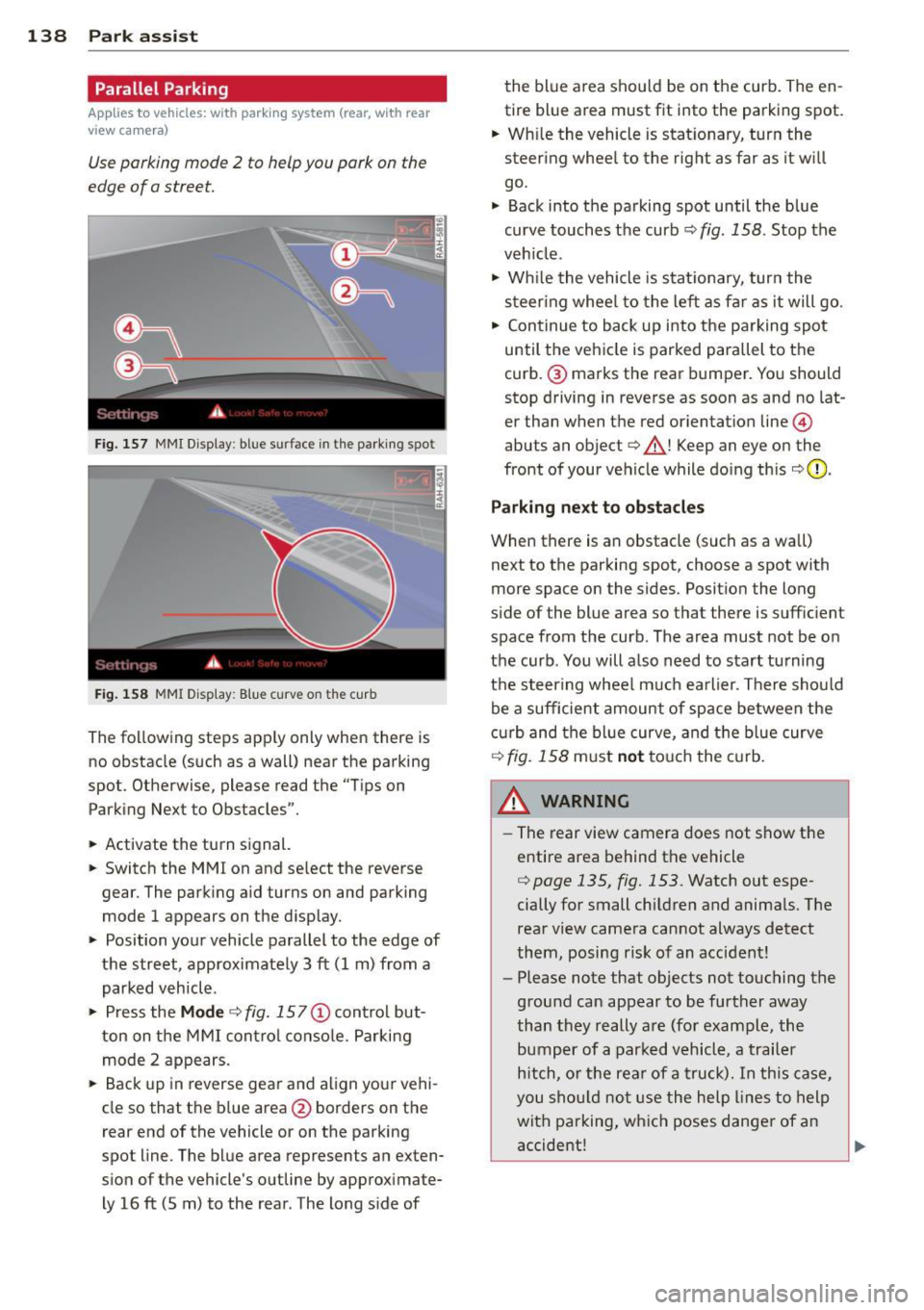
Fig. 157 MMI Display : blue surfa ce in the parking spot
Fi g. 158 MMI Display: Blue curve on the curb
The following steps apply only when there is
no obstacle (such as a wall) near the parking
spot. Otherwise, please read the "Tips on
Parking Next to Obstacles".
.. Activate the turn signal.
.. Switch the MMI on and select the reverse
gear. The parking aid turns on and parking
mode 1 appears on the disp lay.
.. Position your vehicle parallel to the edge of
the street, approximately 3 ft (1 m) from a
parked vehicle .
" Press the
Mod e ¢ fig. 15 7@ control but
ton on the MMI contro l conso le. Parking
mode 2 appears.
.. Back up in reverse gear and align your vehi
cle so that the blue area
@ borders on the
rear end of the vehicle or on the parking
spot line. The blue area represents an exten
sion of the vehicle's outline by approximate
ly 16 ft (5 m) to the rear . The long side of the blue area
should be on the curb. The en
tire blue area must fit into the parking spot.
.. Wh ile the vehicle is stat ionary, turn the
steering whee l to the rig ht as far as it will
go.
" Back into the parking spot until the blue
curve touches the curb~
fig. 158. Stop the
vehicle .
" Wh ile the vehicle is s ta ti onary, tur n the
steer ing whee l to the left as f ar as it will go .
.. Continue to back up into the pa rking spot
until the vehicle is parked parallel to the
curb .@ marks the rear bumper. You should
stop driving in reverse as soon as and no lat
er than when the red orientation line@
abuts an object¢_&. ! Keep an eye on the
front of your vehicle while do ing this
¢ 6) .
Parking ne xt to obstacl es
When there is an obstacle (such as a wa ll)
next to the parking spot, choose a spot with
more space on the sides. Positio n the long
s ide of the blue area so that there is suff ic ient
space from the curb . The area must not be on
the curb . You will a lso need to start tu rning
t h e steer ing wheel much ea rlier . There should
be a sufficient amount of space between the
curb and the bl ue curve, and t he b lue curve
¢ fig. 158 m ust not to uch the c urb.
A WARNING
- The rear view camera does not show the
entire area behind the vehicle
¢ page 135, fig. 153. Watch out espe
cially for small children and anima ls. The
rea r view camera ca nnot always detect
them, posing risk of an accident!
- Please note that objects not touching the
ground can appear to be further away
than th ey really are (for example, the
bumper of a parked vehicl e, a trail er
h itch, o r th e rea r of a truck). In this case,
you s hould not use the help l ines to help
with parking, which poses dange r of an
accident!
'---------------_J ""
Page 141 of 316
(D Note
In the MMI display, the direction of travel
of the vehicle rear is represented depend
ing on the steering wheel angle. The vehi
cle front sw ings out more than the vehicle
rear. Maintain plenty of distance from an
obstacle so that you r outside m irror or a
corner of your veh icle does not co llide w ith
any obsta cles -danger of acc ident!
(D Tips
The left or r ight orientation li nes and sur
faces will be displayed, depend ing on the
tur n signa l be ing used.
Adjusting the display and warning tones
A ppl ies to vehicles: with pa rk in g system (rear, with rea r
view camera)
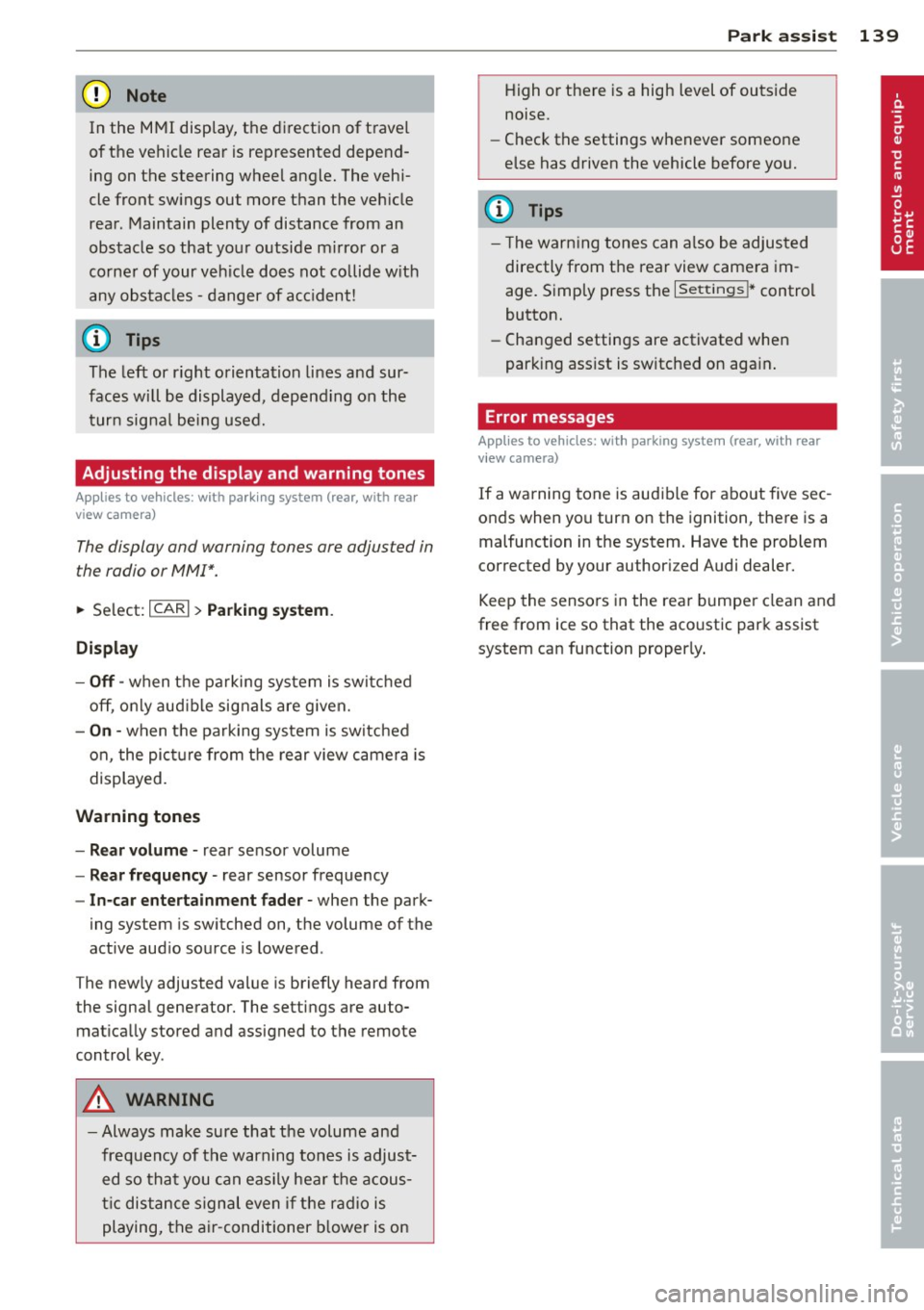
The display and warning tones are adjusted in
the radio or MM!*.
~ Select: ICARI > Pa rking system .
Display
-Off -when the pa rking system is switched
off, only aud ib le signals are given.
- On -when the parking system is switched
on, the pict ure from the rear view camera is
displayed.
Warning tones
- Rear volume -rear sensor volume
-Rear frequency -rear sensor frequency
-In -car entertainment fader -when the park-
ing system is sw itched on, the volume of the
active audio source is lowered .
The newly adjusted value is briefly heard from
the signal generator. The settings are auto
mat ically stored and assigned to the remote
control key.
A WARNING
- Always make sure that the volume and
frequency of t he warning tones is adjust
ed so that you can easily hea r th e acous
ti c dis tance s ign al even if the r adio is
playing, the a ir-conditioner b lower is on
-
P ark a ssis t 139
High o r there is a high level of outside
noise.
- Check the settings whenever someone
else has driven the vehicle before you.
(D Tips
- T he war ning tones can also be adjus ted
directly from t he rear view camera im
age. S imply press the
I Sett ings !* contro l
button.
- Changed settings are activated when
parking assist is switched on again .
' Error messages
Applies to vehicles: wit h parking system (rear, wit h rear
v iew camera)
If a warning tone is aud ible for about five sec
onds when yo u turn on the ignition, there is a
malfunction in the system. Have the problem
corrected by your author ized Audi dealer.
Keep the senso rs in the rea r bu mpe r clean and
free from ice so that the acoustic park assist
system can function properly .
Page 207 of 316
vertical axis, vehicle acceleration in the fore
and-aft and lateral directions , the brake pres
sure, and the steering ang le are all measured .
The direction in which the d river wishes to
travel is determined with the aid of the steer
ing angle and vehicle speed and is continually
compared with the actual behavior of the ve
h icle. If the two do not match, for examp le,
when the vehicle starts hydroplaning on a wet
road, ESP will automatically brake the appro
priate wheel to correct the problem.
The vehicle is then stabili zed by the forces act
ing on the wheel dur ing braking. If the vehicle
is
oversteering (the veh icle turns too sharply
and the rear wheels sl ide toward the outs ide
of a curve), the brakes are main ly applied on
the wheel that is on the outside of the curve.
I n the case of a ve hicle that is
understeering
(the vehicle does not turn sha rply enough and
pushes out of a curve) , the brakes are applied
as needed on the whee l that is on the inside of
the curve o r additiona lly on the other wheels.
An acoust ic signal indicates when ESP brake
application cuts in
q .& .
The system operates across the entire speed
range in combination with the ABS system
q page 208. If the Anti-Lock Brake System
(ABS) malfunctions, the ESP will be out of ac
tion as well.
Acti vating
When you turn on the engine, ESP wi ll auto
matica lly be activated and will perfo rm a se lf
test. As soon as the test is completed, the sys
tem is in normal operating mode .
You can activate a deactivated ESP or deacti
vated ESP/ASR if required by pressing the
qfig. 196 q fig . 195 button. When they are
activated, the message
Stabilisation prog ram
on
appears briefly in the d isplay.
D eacti vating
The ESP sho uld normally be activated all the
time. If necessary, you can deactivate Anti
Slip Regulation (ASR) or the Electron ic Stabili
zation Program (ESP) by pressing the button
<:::;, fig. 196 .
Intellig ent technolog y 205
-Dea cti vating ASR: Tap the b utton. In cer
tain exceptional situations (e.g . driving with
tire chains), the Anti -Slip Regu lation (ASR)
can be deactivated
q page 206. The mes
sage
ASR off Caution ! Limited d riv ing sta
bilit y
appears in the display as we ll.
- Deacti vating ESP /A SR Press the button for
more than 3 seconds. Wi th the ESP/ASR de
activated, the ind icator light comes on, see
c:::;, page 15 . The message War ning! R estrict
ed stability
appea rs in the d isp lay as well.
.8, WARNING -
The Electronic Stabi liz a tion Program is
neverthe less subjec t to the laws o f phys
ics. It is part icu la rly important to pay a t
tention to this fact on wet and slippery roads. It is therefo re important that you
a lways adapt your driving to the condit ion
of the road and traff ic conditions. Do not
allow the increased safety provided by the Elect ronic Stabilization Program system to
lull you into accepting addit iona l safety
r isks.
Electronic differential lock (EDL)
The electronic differential lock monitors the
rotational speed of the drive wheels .
General not es
The electronic d ifferential lock ( E0L) he lps the
car to star t moving, acce lerate and climb a
gradient on surfaces providing poor or almos t
no grip . Without EDL, this would be d iff icult,
if not impossible .
How the sy stem works
The EDL operates automatically. It mon itors
the rotational speed of wheels with the he lp
of the ABS sensors
q page 208 . If a noticea
ble
slip is detected at the wheels (e .g . on s lip
pery ground
on one side), the sp inning wheels
are braked and power is t ransferred to the
othe r whee ls. Thi s is done up to a speed of
abo ut 60 mph (100 km/h) . Noises from the
brake system signa l that wheel spin is be ing
controlled .
Ill>
•
•
Page 312 of 316
310 Index
V
Valet parking .. .. .......... .. .. .... .. 47
Vanity mirror . . . . . . . . . . . . . . . . . . . . . . . . 54
Vehicle-care products ....... .. .. .. .. . 221
Vehicle Identification Number (VIN) .... 290
Vehicle jack .... ... .... .... .. .. .. .. . 277
Vehicle literature . . . . . . . . . . . . . . . . . . . . . 5
Vehicle tool kit ....... ..... .. .. .. .. .
273
Ventilation
Deluxe automatic climate control . . . . . .
79
De luxe automatic climate control plus . . 83
w
Warning/indicator lights .... .. .. .... .. 10
Adaptive cruise control . . . . . . . . . . . . . 108
Airbag system .. .. .... ... .. .. .. .. .. 15
Anti-lock brake system (ABS) ... .. .. . . 16
Brake system . . . . . . . . . . . . . . . . . . . . . . 18
Cruise control ................ .... .. 16
El ectrom echanical parking brake ...... 17
El ectronic power control ... .. .. .. .. . . 15
Elect ronic stabilization program (ESP) .. 15
High beam .. .. .......... .. .. .... .. 16
Malfunction Indicator Lamp (MIL) .....
16
Safety belt .............. .. .. .... .. 16
Tire pressure monitoring system .. .... 16
Turn signals .. .. .. .... ... .. .. .. .. .. 16
Warning lights .. .......... .. .. .... .. 13
Warranty coverages ...... .. .. .. .... . 293
Washer reservoir .............. .... . 251
Washing .... ... .......... .. .. .... . 221
Automatic car wash ........... .... . 222
by hand .... ... .......... .. .. .... . 222
General information .............. . 221
with a power washer ...... .... ..... 223
Waxing ..... ... .......... .. .. .... . 223
Wear indicato r ... ...... .... ... .. .. . 262
Weights . ................. .... ..... 290
What happens if you wear your safety belt
too loose? ... ... .......... .. .. .... .
158
What happens to unbelted occupants? .. 155
What impairs driving sa fety? . . . . . . . . . . 145
What should I do after changing a
wheel? .. .... ............... .. .. .. .
259
What should I do after replacing wheels? 259
Wheel bolts
Torque . ... .... .. .. ... ........ .. ..
269
Wheels .... .... ............... .... 252
Cast alloy . .. .. .. ............. .. .. 225
Ch ecking tire pressure .............. 258
Cold tire inflation pressure .......... 256
General notes .... ... .......... .. .. 252
G lossary of tire and loading terminolo-
gy ....... .... .. .. ........... ....
253
New tire s and wheels ............. .. 263
Tires and vehicle load limits ... .. .. .. 260
When must a safety belt be replaced? . . 157
When must the airbag system be inspect-
ed? .... .. .. .. .. .. .. ... ........ ....
173
When should I adjust the ti re pressures? 259
When should I check the tire pressures? . 259
Where can I find the tire pressures for my
car? ....... .... ............... ....
258
Why safety belts? . . . . . . . . . . . . . . 154, 155
Window regulators
Malfunctions .... ... .......... .. .. .
47
Power locks ... .. .. ........... .. .. . 46
Windows
Cleaning .. .. .. .. ............. .... 224
Windshield defogging/defrosting . . .
83, 88
Windshield washer fluid
Low level .. .. .. .. ............. .. .. .
35
Windshield wipers . ............... ... 55
Fau lty .... .... ................... .
36
Replacing windshield wiper blades .. .. . 56
Service position . . . . . . . . . . . . . . . . . . . . 56
Washer reservo ir .................. 251
Winter operation
Batt ery ... .... ............... ....
247
Coola nt system .. .. ........... .. .. 244
Defrosting windows . . . . . . . . . . . . . 82, 88
Front seat heating . ............ .. .. . 91
Tires ..... .... ............... .... 210
Windows . .. .. .. ............. .... 224
Winter tires ..... .. ... .......... .. .. 267
All-wheel drive ... .. ........... .. .. 267
Wiper blades
Replacing windshiel d wiper blades .... .
56
also refer to Windshield wip ers .. .. .. . 56