brake AUDI A5 COUPE 2012 Owner's Manual
[x] Cancel search | Manufacturer: AUDI, Model Year: 2012, Model line: A5 COUPE, Model: AUDI A5 COUPE 2012Pages: 316, PDF Size: 78.59 MB
Page 99 of 316

In addition to the norma l functions of a tradi
tional hand brake, the electromechanica l
parking brake provides various convenience
and safety functions.
When start ing f rom re st
- T he integ ral starting assist helps you when
driving by automatically releasing the park
ing brake ¢
page 98, Starting from rest.
-When starting on inclines, the starting as
sist prevents the vehicle from unintentional
l y rolling back. The braking force of the
parking brake is not released until sufficient
driv ing force has been built up at the
wheels .
Emergenc y bra ke function
An emergency brake ensures that the vehicle
can be slowed down even if the
normal brakes
fa il¢
page 98, Emergency braking .
Indicator light s
-If the parking brake is closed w ith the igni
tion
s witch ed on the . (USA models) /
• (Canada models) indicator lights come
on in the instrument cluster and the switch.
-If the parking brake is closed with the igni
tion
s witched off the . (USA models) I
• (Canada models) indicator lights come
on in the instrument cluster and the switch
for about 20 seconds.
A WARNING
If a gear or a drive range (automat ic trans
m ission) is engaged with the vehicle sta
tionary and the engine run ning, you must
in no inst ance accelerate o r release the
cl utch carelessly. Otherwise the veh icle
wi ll start to move immediately -risk of an
accident.
CJ) Note
If the . symbol in the disp lay o r the
- (USA
models) ;II (Canada mode ls)
ind icator light in the instr ument cluster
flashes, there is a ma lfunction in the brake
system. By pressing the
! SETI button, you
can br ing up a driver message which ex-
On th e ro ad 97
plains the ma lf u nction in more detail. If
the driver message
P ark ing brake! ap
pears, the re is an operating malfunct ion in
the parking brake which you should have
repaired immed iate ly by an authorized Au
di dealer or other qualified workshop
¢page 30.
(D Tips
-You can apply the parking brake at any
time -even with the ign ition turned off.
The ignit ion must be turned on in order
to release the par king b rake .
- Occasional noises when the parking
brake is applied and released are normal
and are not a cause fo r conce rn.
- When the vehicle is parked, the park ing
brake goes throug h a self-test cycle at
regu lar inte rva ls. Any associated noises
are normal.
Parking
Various rules apply to prevent the parked ve
hicle from rolling away accidentally.
Parking
"' Stop the vehicle with t he foot brake .
"' Pull the switch to apply the parking brake.
"' Automatic transmission*: Move the selector
lever to
P .
"' Tur n the engine off¢_&.
"' Ma nual transmiss ion: Shift into 1s t gear.
In addition on inclines and grades
"' Turn the steering wheel so that your vehicle
w ill roll aga inst the curb in case it shou ld
start to move.
A WARNING
- When you leave you r vehicle -even i f on
ly briefly -always remove t he ignition
key. This app lies pa rticularly when chil
dren remain in the vehicle. Otherwise t he
children could start the eng ine, release
the park ing brake or operate electrical
equ ipme nt (e.g. power windows). There
is the risk of an acc ident.
Page 100 of 316

98 On the road
-When the vehicle is locked, no one - par
t icu larly not ch ildren should remain in
the vehicle. Locked doors make it more
difficult for emergency workers to get in
to the vehicle - putt ing lives at risk.
Starting from rest
The starting assist function ensures that the
parking brake is released automatically upon
starting .
Stopping and applying parking brake
.. Pu ll the switch to apply the parking brake.
Starting and automatically releasing the
parking brake
.. When you start to drive as usua l, the park
ing brake is automatically re leased and your
vehicle begins to move.
When stopping at a traffic signal or stopping
in city traffic on vehicles with an automatic
transmission, the park ing brake can be ap
plied. The veh icle does not have to be held
with the footbrake. The park ing brake elimi
nates the tendency to creep with a drive range
engaged. As soon as you dr ive off as usual,
the park ing brake is released automatically
and the veh icle sta rts to move.
Starting on slopes
When starting on inclines, the start ing ass ist
prevents the vehicle from unintentionally roll
i ng back . The braking force of the parking
brake is not released until sufficient dr iving
fo rce has been built up at the whee ls.
(D Tips
For safety reasons, the park ing brake is re
leased automatically only when the dr iv
er 's safety belt is engaged in the buck le.
Starting off with a trailer
To prevent rolling back unintentionally on an
incline, do the following:
• Keep the switch pulled and depress the ac
celerator . The parking brake stays applied
and prevents the vehicle from roll ing back
ward .
• You can re lease the switch once you a re sure
that you are developing enough driving
force at the wheels by depressing the accel
erator.
Depending on the weight of the rig (vehicle
and t railer) and the severity of the incline, yo u
may roll backwa rds as you start . You can pre
vent rolling backwards by holding the parking
brake switch pulled out and accelerating -just
as you would when starting on a hill with a
convent ional hand brake.
Emergency braking
In the event that the conventional brake sys
tem fails or locks.
.. In an emergency, pull the switch and con
tinue to pull it to slow your vehicle down
w ith the park ing brake.
• As soon as you release the switch or acceler-
ate, the brak ing process stops.
If you pull the switch and hold it above a
speed of about 5 mph (8 km/h), the emergen cy brak ing funct ion is initiated . The vehicle is
braked at all four wheels by activating the hy
draulic brake system . The brake performance
i s sim ilar to making an emergency stop~& .
In order not to act ivate the emergency brak
i ng by mistake, an audib le warning tone (buz
zer) sounds when the switch is pulled. As soon
as the switch is re leased, or the accelerator
pedal is depressed, emergency braking stops.
A WARNING
Emergency braking should only be used in
an emergency, when the norma l foot brake
has failed or the brake pedal is obstructed. .,..
Page 101 of 316

Using the parking brake to perform emer
gency braking will slow your vehicle down
as if you had made a full brake application.
The laws of physics cannot be suspended
even w ith ESP and its associated compo
nents (ABS, ASR, EDS). In corne rs and
when road or weather conditions a re bad,
a full brak e application can cause the vehi
cle to skid or the rear end to break away -
r isking an accident.
Driver messages in the instrument
cluster
Caution: Vehicle parked too steep
This message appears when the park ing brake
is applied on an incline that exceeds about
30%.
In this case the braking power of the parking
brake may
not be adequate to prevent the ve
hicle from rolling unintentionally .
Press brake pedal to release parking brake
This driver message appears when the switch
to release the parking brake was pressed. The
parking brake can only be released if you step
on the brake pedal and at the same time press
the switch or you automatically release the
parking brake with the start ing ass ist
<=> page 98.
(p] Parking brake m alfunction!
This driver message appears together with
the yellow
IIJ symbo l when there is a parking
brake malfunction.
On the road 99
Cruise control
Switching on
The cruise control system makes it possible to
drive at a constant speed starting at 20 mph (30 km/h) .
Fig. 108 Contro l l ever w ith push-b utton
Fig. 109 D isp lay : Selected speed
.. Pull the lever to position @<=> fig. 108 to
sw itch the system on.
.. Drive at the speed to be controlled.
.. Press button @to set that speed.
a,
~ 0 er a, a,
The stored speed and the green symbol
[ijj(Q~i~ (US model) /. (Canadian model) are
shown in the display<=> fig. 109. The display
may vary, depending on the type of display in
your vehicle. The ind icator light
mJJlm (US model)/ . (Canad ian model) will
also light up in the instrument cluster .
The speed is kept constant by modifying en
gine power or through an active brake inter
vention.
A WARNING
- Always pay attention to the traffic
around you when the cruise control is in
operation. You are always responsible for ..,.
Page 102 of 316

100 On the road
you r speed and the distance between
your vehicle and othe r vehicles.
- For reasons of safety, cruise contro l
sho uld not be used in the city, in sto p
and-go traff ic, on twist ing roads and
w hen road conditions are poor (such as
ice, fog, gravel, heavy rain and hydro
planing) -you cou ld have an acc ident .
- Switch the cruise contro l off temporarily
when d rivi ng in turn ing lanes, highway
exits or in construction zones .
- Please note that unconsciously "resting" yo ur foot on the accelerator pedal causes
c ruise contro l not to brake. This is due to
the control system be ing ove rridden by
the drive r's ac celeration.
{O) Tips
- Vehicles with manual t ransmission: You
can attain the set speed only if the gea r
that is currently engaged wi ll allow it, or
if i t does not tax t he engine and allows it
to run smoothly . There fore shift into a
higher or lower gear in a timely manner.
- The bra ke ligh ts illuminate as soo n as
the b rakes app ly automatica lly.
Changing speed
.. Press the lever in the direction of the 0
r::!v page 99, fig. 108 or in the direction of the
0 to increase or decrease your speed.
.,. Let go of the lever to save that speed.
Change speed in increments of 1 mph (1 km/ h) by light ly pressing the lever. If you keep the
lever pressed down, you will alter your speed
in 5 mph (10 km/h) increments .
You can a lso press the accelerator pedal down
to increase your speed, e.g. if yo u want to
pass someone. The speed you saved earl ier
will resume as soon as you let off of the accel
erator pedal.
If, however, you exceed your saved speed by
5 mp h (10 km/h) for longer than 5 minutes,
the cruise contro l will be turned offtempora -rily. The green symbo
l in the d isp lay t urns
white, the saved speed is retained .
Pre-selecting speed
You can pre-select your desired speed while
the vehicle is not moving .
.,. Tur n on the ign ition.
.,. Pull leve r into posi tion 1
¢ page 99,
fig. 108 .
.. Press the lever in the 0 or 0 direction to
increase or decrease your speed .
.,. Let go of the lever to save that speed.
This function makes it possib le, for examp le,
to save the speed you want before driving on
the h ighway. Once on the h ighway, act ivate
the cru ise control by pulling the lever toward
(D .
Switching off
Temporary deactivat ion
.,. Step on the brake pedal, or
.,. Manual transmission: Keep the cl utch pedal
pressed down
Longer, o r
.,. Press t he leve r into position @(n ot clicked
into place)
¢ page 99, fig . 108, or
.,. Drive for longer than 5 m inutes a t more
t han 5 mph (10 km/h) above the stored
spee d.
Switching off completely
.,. Press lever into position @(clicked into
p lace), or
.,. Switch t he ignit ion off .
T he speed you saved will be retai ned if the
cr uise control ha s been switched off tempora
rily . To resume the saved speed, le t up o n the
brake or clutch pedal and p ull the leve r to po
sition
(D .
The saved speed w ill be erased afte r tu rning
t h e ignit io n off. .,..
Page 104 of 316

102 Adapti ve crui se control
Adaptive cruise control
Speed and distance
control system
Description
Applies to vehicles: with Audi adaptive cruise co ntrol
The adaptive cruise control driver assistance
program is a combined speed and distance
control system.
F ig. 110 Front bumper: Positio n of radar sensor
Any speed between about 20 mph (30 km/h)
and about 95 mph (150 km/h) can be set and
held with the adaptive cruise control. The sys
tem also regulates a pre -set distance from the
vehicle ahead within the limits of the system described.
Driving can be more relaxed, particularly on
long trips on interstates or on other highways
that a re generally straight .
H ow do es it work?
You can operate the adaptive cruise contro l
using the lever on the steering wheel column
c::> page 104, How is the speed stored? and
c::> page 106, How is the distance (time inter
val) set? .
Driver inform ation
Important information is brought up in the
speedometer and in the instrument cluster
d isplay as the vehicle is being driven
c:::, page 107, Driver information .
What is imp orta nt fo r you to kn ow
The adaptive cruise control is set with system
specified limits, that is, as a driver, you will have to adjust the speed and distance to the vehicle ahead in some instances
c:::,
page 111,
Driver intervention prompt
and c::, page 112,
System limitations.
A WARNING
--
Improper use of the adaptive cruise con
trol can cause collisions, other accidents
and serious personal injury.
- Never drive at speeds that are too high
for traffic, road and weather conditions.
- Never follow the vehicle in front so close ly that you cannot stop your veh icle safe
ly . The adaptive cruise control cannot
brake the vehicle safely when you follow
another vehicle too closely. Always re
member that the adaptive cruise control
has a braking powe r that is only about
25% of the veh icle's maximum braking
abi lity, the automatic braking function
cannot bring the vehicle to a stop .
- Never use adaptive cruise control on
roads where you cannot drive safely at a
steady speed, including city, stop-and-go
or heavy traffic, on winding roads or
when road cond it ions are poor (for exam
p le, on ice, gravel, in fog, heavy rain or
on wet roads that increase the risk of hy
d rop laning) .
- The radar sensor 's
vision can be reduced
by rain, snow and heavy spray. This can
resu lt in veh icles dr iving ahead be ing in
adequately detected or, in some circum
stances, not detected at a ll.
If necessary,
t ake action yourself!
- Always turn off adap tive c ruise control
when en ter ing turn la nes, highway exit
lanes and construction zones or similar
situations beca use the vehicle will a uto
mat ically acce le rate to the stored speed.
- Never rest your foot on the accelerator pedal, especially when t he adaptive
cruise contro l is being used because do
ing so will override the braking function
and prevent the brakes from being ap plied by the system when it detects a sit
uation when the brakes must be applied.
- Always remember that the adaptive
cru ise contro l has limits -it does not
Page 105 of 316

react when you drive towards an obstacle
or something else on or near the road
t h at is not moving, such as vehicles stop
ped in a traffic jam, a stalled or disabled
vehicle .
- Always remember that the adaptive
cruise control cannot detect a vehicle
that is driving towards you in your traffic lane and that it cannot detect narrow ve
hicles such as motorcycles and bicycles.
(D Tips
- Fo r safety reasons, the stored speed is
deleted when the ignition is turned off .
- The Electronic Stabilization Program
(ESP) and the Anti-Slip Regulation (ASR)
cannot be deactivated when the adaptive
cruise control is switched on. If the ESP
and the Anti-Slip Regulation (ASR) has been deactivated and you then switch on
the adaptive cruise control, the ESP func
tion will also be activated automatically.
- Damage caused by accidents (e.g. if the
vehicle is damaged when parking) can af
fect the radar sensor settings. This can
cause the system to malfunction or
switch off complete ly.
- The radar sensor cover is heated. In win
ter cond itions, you should still check be
fore driving to make sure it is free of ice
and snow. If necessary, clean the area
near the radar sensor carefully
9 fig. 110.
-To ensure that the radar sensor is not
blocked, foreign objects (e.g . stickers,
add-on parts) must not cover the area near the radar sensor
9 fig. 110. The
area near the radar sensor must not be painted, either.
- For Declaration of Compliance to United
States FCC and Industry Canada regula
tions
~ page 296.
Adaptive cruise control 103
How does adaptive cruise control work?
App lies to veh icles: w ith adaptive cru ise control
Vehicles traveling ahead are detected with
the aid of a radar sensor.
Fig. 111 Radar sensor measu re m ent range
A radar sensor is built into the front of the ve
hicle
9 fig. 111, which is subject to certain
system limits~
page 112. Stationary objects
are not taken into consideration. The system
is intended to measure the distance to reflec
tive surfaces. The system responds after the
distance measurement has taken place. If a
measurement is not possible, the system does
not respond .
Open road
When the road is clear, the adaptive cruise
control works like cruise control. It maintains
a constant target speed specified by the driv
er.
Driving in traffic
If a vehicle driving ahead is detected, the
adaptive c ruise control decelerates (within the
Limits of the system)
9 page 111, Driver in
tervention prompt
and 9 page 112, System
limitations
to its speed and after adjusting,
tries to maintain the set distance from the ve
hicle ahead . Th e vehicle may temporarily drive
slower than the set speed while adjusting
~.&. in Description on page 102.
If the vehicle in front accelerates, adaptive
cruise control also accelerates up to the speed
that you have set.
Situation requiring driver intervention
In some situat ions you will have to use the
footbrake to slow the vehicle down in order to .,..
Page 106 of 316

104 Adapti ve crui se control
keep a safe distance from vehicle in front of
you or to avoid a rear-end collision . In this sit
uation, a symbol appears and a warning tone
sounds
¢ page 111.
Passi ng anoth er vehicl e
If you move into the passi ng lane and no veh i
cle is detected ahead, the adaptive cruise con
trol accelerates to the speed you have set and maintains it.
Overrid e
You can increase your speed at any t ime by
stepp ing on the acce lerator pedal. After yo u
re lease the accelerator pedal, the system ad
justs back down to the speed you previously set .
@ Tips
Please note that the amount of accelera
tion the adaptive cruise control uses de pends on the Distance setting selected.
DISTANCE 1 gives you accelerat ion that is
dynamic and sporty . DISTANCE 4, o n the
other hand, g ives more moderate accelera
tion . For more information about the time
intervals ¢
page 106, How is the distance
(time interval) set?.
- Please note that if the adaptive cruise
control has begun braking the vehicle
and the driver chooses to brake the vehi
cle add itionally, the brakes may fee l
"hard" . This is simply due to the pressure
build- up of the initial braking.
- Adaptive cruise control is sw itched off af
ter pressing the footbrake . The speed
saved up this point can be resumed. To resume the saved speed, release the
brake pedal and pull the control lever
¢ page 105, Turning adaptive cruise
control off temporarily .
Switching the system on and off
Applies to vehicles: with adaptive cruise contro l
Fig. 112 Co ntrol lever : Sw itching o n and off
Sw itching the system on
.,. Pull the lever to position (D c::> fig. 112 .
Switching the system off
.,. Pres s the lever to pos it ion @ (latched).
How is the speed stored?
Applies to vehicles: wit h Audi adaptive cruise control
,' ts ~:_" ';;;", ' , E Sl'EEO CANCELU
. T ,0. -ON ... . RESUME~
Fig. 11 3 Control lever: Sto ring s peed
With the system switched on the speed is
stored as follows:
• Drive at the speed you want. The speed
must be between 20 and 95 mph (30 and
150 km/h).
.,. Press the
~ I S-ET ~I button c::> fig . 113 to store
the desired speed .
After the
I S ET I button is released, the current
speed is stored and ma intained .
The saved speed is now shown in the LED dis play in the speedometer by one or two illumi
nated red light diodes ¢
page 108 . At the
same t ime, the saved speed is also shown for
a short time in the Information line
¢ page 109. ...,
Page 107 of 316
@ Tips
For safety reasons, the stored speed is de
leted when the ign ition is turned off.
Changing stored speed
App lies to vehicles: with adaptive cruise co ntrol
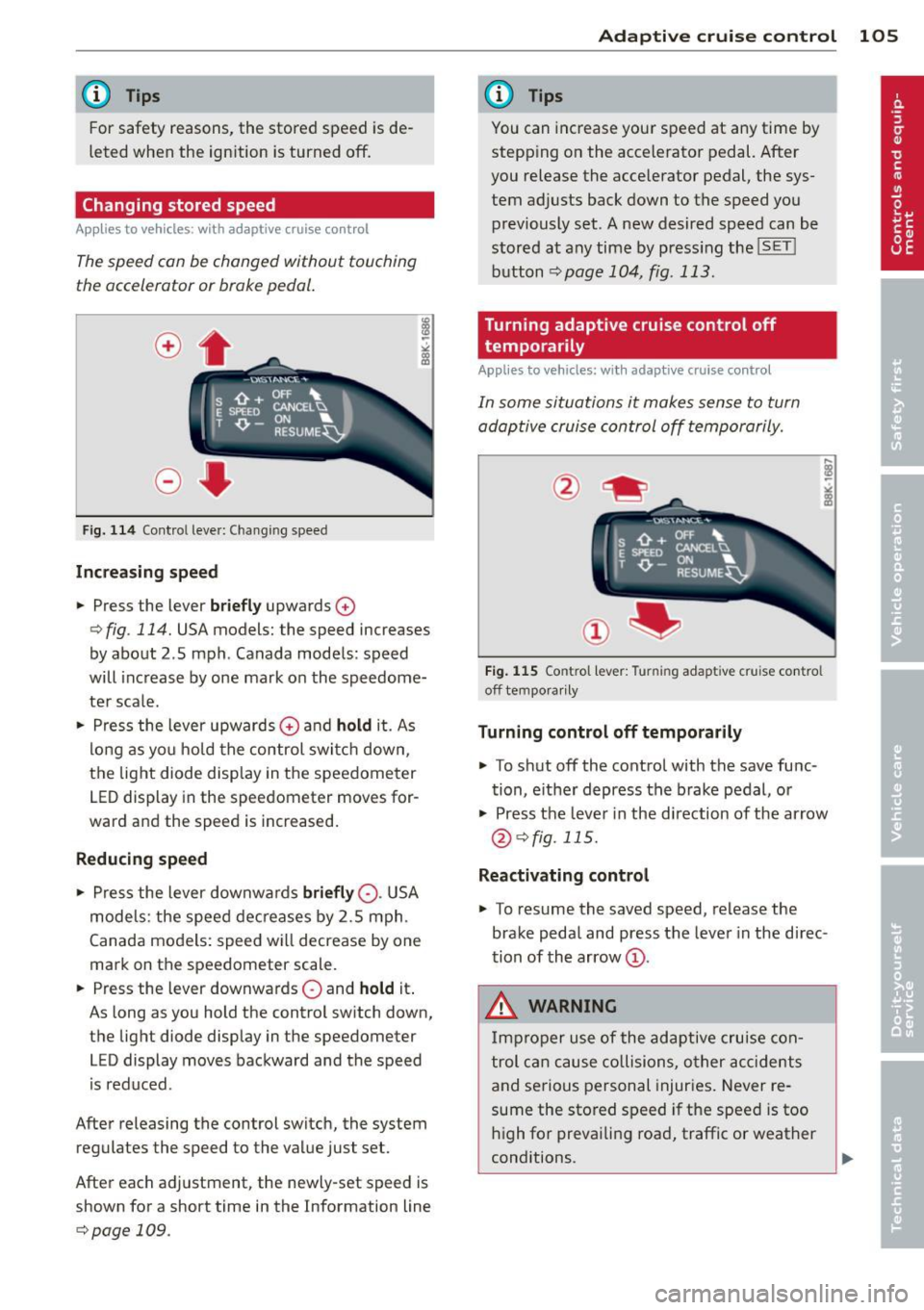
The speed con be changed without touching
the accelerator or broke pedal.
Fig. 114 Contro l leve r: Changing speed
Increasing speed
.. Press the lever briefly upwards 0
¢ fig. 114. USA models: the speed increases
by about 2 .5 mph . Canada models : speed
will increase by one mark on the speedome
ter sca le .
.. Press the lever upwards
0 and hold it. As
long as you hold the control switch down,
the light diode display in the speedometer
LED display in the speedometer moves for
ward and the speed is increased.
Reducing speed
.,. Press the lever downwa rds briefly 0-USA
models: the speed decreases by 2.5 mph.
Canada models: speed will decrease by one
mark on the speedometer scale .
.. Press the lever downwards
0 and hold it.
As long as you hold the control sw itch down,
the light diode display in the speedometer
LED display moves backward and the speed
i s reduced .
After releasing the control switch, the system
regulates the speed to the value just set.
After each adjustment, the newly-set speed is
shown for a short time in the Information line
¢page 109.
Adaptive cruise control 105
@ Tips
You can increase your speed at any time by
stepp ing on the accelerator pedal. After
you release the acce lerator pedal, the sys
tem adjusts back down to the speed you
previously set. A new desired speed can be
stored at any time by press ing the
!SET !
button ¢page 104, fig . 113.
Turning adaptive cruise control off
temporarily
Appl ies to vehicles: wit h adaptive cruise control
In some situations it makes sense to turn
adoptive cruise control off temporarily.
Fig. 115 Contro l l ever: Turnin g adapt ive cru ise contro l
off tempora rily
Turning control off temporarily
.. To shut off the control with the save func
tion, either depress the brake pedal, or
.. Press the lever in the d irection of the arrow
@¢fig. 115.
Reactivating control
.,. To resume the saved speed, release the
brake pedal and press the lever in the d irec
tion of the arrow
(D.
_&. WARNING
Improper use of the adaptive cruise con
trol can cause collisions, other accidents
and serious personal injuries. Never re-
sume the stored speed if the speed is too
high for prevailing road, traffic or weather
-
conditions. ..,.
Page 110 of 316

108 Adapti ve crui se control
You can select among the different in forma
tion by repeated brief taps on the
I RESET I but
ton on the windshield wiper lever¢
page 23,
Operation.
© S tatus in dicator
The information in area © is not displayed
permanently. Information is disp layed only if
you set or change the speed setting, change
the time interval, when messages are dis
played or if the adaptive cruise control is
turned off for safety reasons.
Speedometer and indicator light display
App lies to vehicles: with adaptive cruise control
~
- ---
~
® @ ©
Fig . 118 Instrument clus ter: Indicator light
Desired spe ed
The desired speed set by the driver is dis
p layed by a red LED in the LED display in the
speedometer.
N
?3
" 00 a,
I f the des ired speed was set between two
lines on the speedometer using the
ISETI b ut
ton, the two closest light diodes wi ll come on
¢ page 107, fig. 117.
The system a llows only speeds from 20 to 95
mph (30 to 150 km/h) to be set. This speed
range is faint ly illuminated in the speedome
ter (LED lights) .
Indicator lights (symbols )
- @ Open r oad :
The ind icator light shows
that adapt ive cru ise contro l is active a nd
that no object is ahead of the veh icle. Astor
ed speed requested is maintai ned .
-@ Driving in traff ic: The ind icator light indi
cates that an object has been detected trav
eling in front. Your speed is adjusted accord- ing to the speed of the vehicle in front.
The
adaptive cruise contro l accelerates and
brakes automatica lly w ithin the system's op
eration parameters.
- ©
Dri ver i nte rvention prompt : The red
flashing warning light means
Reque st for
driver to as sume con trol.
You as the dr iver
must slow the vehicle with the foot brake.
The symbol tells you that the adaptive
cruise control is not able to slow the veh icle
down enough to keep a enough distance to
the vehicle in front of you. An warning tone
w ill also sound when the symbo l appears.
For more information about the driver inter
vention prompt
¢ page 111.
CJ) Tips
-If you use the accelera tor to go faste r
t han the speed of the object ahead of
you, the
d riv e r intervent ion p rompt wi ll
not be accompanied by a warning s ignal.
- If the speed you previously set is exceed
ed, the indicator light in the speedome
ter wi ll switch off.
Display in the instrument cluster
Applies to vehicles: wit h adaptive cruise control
F ig . 119 Display in the inst rume nt cluster
Scroll th roug h the available informa tion d is
plays by briefly tapping the
I RESET ! button at
the end of the windshield wiper lever. You can
se lect information from the tr ip computer,
navigation system* or adaptive cruise control.
@ Vehicle symbol
@ Distance
© Status
Page 111 of 316

@ Vehicle symbol
The vehicle symbol indicates whether the sys
tem has detected an object traveling in front.
-Vehicle outline : Open road, no vehicle
ahead.
- White vehicle: A vehicle is detected ahead .
-Red vehicle: Request for driver to assume
control.
@ Distance
Using the arrows and scale, you can detect
how far it is to the vehicle in front of you.
-Open road: No arrow appears when the ve
hicle is on an open road and there is no vehi
cle ahead.
- Driving in traffic: If a vehicle is detected
ahead, the arrow moves on the scale . The
green area represents the distance set.
When approaching s low ly, the arrow moves
from the
gray zone to the green zone on the
scale.
- Request for driver to assume control: When
approaching rapidly, the arrow serves as an
early warning signal. If the d istance select
ed is exceeded or possibly not reached, the
arrow moves into the
red zone on the scale .
In certa in driving situations, you as the driv
er will have to ta ke act ion
q page 111, Driv
er intervention prompt.
@Status
-The text ACC OFF appears in white letters
when adapt ive cruise control is turned off.
- The text
ACC AVAILABLE appears in wh ite
letters when the system is turned on but no
desired speed has been set .
- The text
OVERRIDE appears in white letters
when you exceed the desired speed by accel
erating .
- The text
DISTANCE! appears in red letters
when the interval to a vehicle traveling
ahead is too short and you have to slow you r
vehicle additionally with the foot brake .
- The text messages
DISTANCE 1 to DIS ·
TANCE 4
appear in green letters to ind icate
Adaptive cruise control 109
the time interval you have set and adaptive
cruise contro l is in management mode.
- If the driving program "standard" is re
placed by "comfort" or "dynamic" using the
MMI*, the above text message is supple
mented by an appropriate prompt, e.g.
DIS
TANCE 1 DYN .
System status indicator
Applies to vehicles: wit h adaptive cruise contro l
The text messages and symbols shown in this
area of the display ore not displayed perma
nently.
Fig. 120 System status indicator
Time intervals (such as~ ---- ~>
The different symbols for the time intervals
appear if you change the settings ~
fig. 120 .
The text message ... (three white dots) ap
pears if a setting cannot be implemented with
the operat ing lever . The following are possible
reasons:
- If you pull the contro l lever towards you to
resume speed but no requested speed was
set .
- If you push the lever up to increase (or down
to reduce) speed when no speed has been
set previously.
- If you push the lever up to increase (or down
to reduce) speed and this speed is outside
the range from 20 to 95 mp h (Canada mod
els: 30 to 150 km/h).
ACC functionality limited
The text message ACC functionality limited
appears when the ACC system does not detect ..,.