lights AUDI A5 COUPE 2012 Owner's Manual
[x] Cancel search | Manufacturer: AUDI, Model Year: 2012, Model line: A5 COUPE, Model: AUDI A5 COUPE 2012Pages: 316, PDF Size: 78.59 MB
Page 56 of 316

54 Clear vis ion
Rear interior lights
There are reading lights in the rear for the
passengers.
Fi g. 55 Headliner: Rear read ing lights
The reading lights are switched on and off us
ing the but tons
~~-
Vision
Sun visors
Using the sun visors makes driving safer.
Fig. 56 Sun viso r
The sun visors for the dr iver and passenger
can be pulled out of the ir brackets in the cen
ter of the vehicle and turned towards the the doors
q fig. 56 (D .
Vanity mirror
The vanity mir rors on the sun visors are cov
e red. When the l id is opened @, the m irror
light in the headline r turns on automa tically.
It tur ns off when the lid is closed and the visor
i s folded up again.
Sun shade
Applies to vehicles: with sun shade
'ii,) ~Clf • -----
Fig . 57 with MMJ: Button for rear window su n s hade
F ig . 58 without MMI: Button for rear window sun
s h ade
"' To extend/retract the rear window sun
shade, press the bu tton
0 ¢ fig. 58 . In ve
hicles with MM I*, the bu tton is l ocated
above the climate c ontrol system¢
fig. 57.
The rea r window sun shade can be set in the
MM I* so that it retracts autom atically when
dr iv ing in reverse. Sele ct
!CAR !> Wind ow >
Rear wind ow sun shade > On
to do this. The
s u n shade is extended again as soon as the ve
hicle is traveling forward at a speed greater
than 9 mph (1S km/h) if the ignition has not
been switched off in the meant ime. The cur
rent setting is automatically stored and as
s igned to the remote key .
@ Tips
-Pressing the button likl severa l times
consecutive ly can trigge r the overload
protect ion . The sun shade can on ly be ex
t ended/retracted agai n after a brief wait
ing period.
- The rear window sun shade only func
tions when the vehicle interior is warmer
t han 14°F (- 10°().
Page 57 of 316

Wiper and washer system
Switching the windshield wipers on
Fig. S9 W indshield w iper leve r
Move the windshield wiper lever to the corre
spond ing pos ition:
@ -Windshie ld w iper off
(D -Interva l mode. To extend/shorten the
wipe r intervals , move the switch @ to the
left/right. In veh icles with a rain sensor*, the
windshie ld wipers are act ivated automat ically
start ing at a speed of 2 mp h (4 km/h) . The
h igher the sensitivity of the rain sensor* is set
(switch @ to the right), the earlier the wind
shie ld wipers react to mois ture on the wi nd
shield.
@ -Slow wiping
®-Fast wiping
©-Sing le wipe
® -Clean the wi ndshield . T o e liminate water
d ro pl ets , the w indshield wiper performs one
afterwipe operation after several seconds
while driving. You can switch this function off
by mov ing the lever to position ® within 10
seconds of the afterw ipe operation . The after
wipe function is reactivated the next time the
ignit io n is switched on .
C lea ning the headlights *. The headlight wash
er system* only functions when the light is
switched on . The headlights are automatically
cleaned the first t ime and every fifth time the
lever is moved to position ®· T hey are also
cleaned every time you hold the lever in posi
tion ® for longer than 2 seconds. Clear vi
sion 55
A WARNING
- The rain sensor is only intended to assist
the dr iver. The driver is st ill responsible
for manually switch ing the wipers on ac
cording to the visibility cond it ions .
- The windsh ield may not be treated with
wate r-repell ing windsh ield coating
age nts. Unfavo rable cond it io ns, such as
we tness, dar kne ss, low sun, can result in
increased glare. Wiper blade chatter is
also possib le .
- Prope rly f unct ion ing windsh ield wiper
blades are req uired for a clea r view and
safe driving
~ page 56, Replacing
windshield wiper blades .
(D Note
-In the case of fros t, check whethe r the
w indshield wiper blades are frozen to
t he windsh ield. Sw itch ing on the wind
shield wipe rs can damage the wiper
blades!
- Prior to using a car wash, the windshield
wiper system must be switched off ( lever
in posit ion 0). Th is helps to prevent unin
tentional switch ing on and damage to
the windsh ield wiper system.
(D Tips
- The windshield w ipers are switched off
when the ign it ion is turned off. Act ivate
the windsh ield wipers after the ignition
is switched bac k on by moving the wind
shield w iper lever to any position .
- Worn or d irty windshield wipe r blades
result in streaking . This ca n affect the
rain sensor* funct ion . Check yo ur wind
shield wiper blades regularly.
- T he ra in sensor* is part of the interval
w ip ing system. Turning off the ignition
w ill also deactivate the ra in se nsor* . To
reactiva te the sensor, swit ch off the in
terval wiping function, then switch it
back on aga in .
- Th e washer f luid no zz les o f the w ind
shield washer system are heated at low
temperatures when the ignition is on .
Page 60 of 316

58 Clear vis ion
@ Tips
If there shou ld be a malfunction in the
electrical system, you can still adjust the
exterior mirrors by pressing the edge of
the mirror .
Dimming the mirrors
N
..
-
" ~==============~ l8
Fig. 63 Aut oma tic d imm ing re arview mirror*
Manual anti -glar e adju stm ent
.. Move the small lever (located on the bot
tom edge of the mirror) to the rear.
Automaticall y dimming mirrors *
.. To d im the rearv iew mirror and both exteri
or mirrors, p ress the @button. The d iode
@ turns on . The rearview and exterior m ir
rors dim automatically when light shines on
them, for example from head lights on ave
hicle to the rear .
A WARNING
Electrolyte fluid can leak from automatic
dimming mirrors if the glass is broken.
Electrolyte fluid can irritate skin, eyes and
respi ratory system .
- Repeated or prolonged exposure to elec
trolyte can cause irritation to the resp ira
tory system, espec ially among people
with asthma or other respiratory cond i
t ions. Get fres h air immedia tely by leav
ing t he vehicle or, if that is not possible,
o pen windows and doors all the way.
- If elec trolyte gets in to the eyes, flush
them thoro ughly with large amounts of
clean water for at least 15 min utes;
medica l attention is recommended .
-If electrolyte contacts skin, flush affect
ed area with clean water for at least 15 minutes and then wash affected area
with soap and water; medical attention is recommended . Thoroughly wash af
fected clothing and shoes before reuse.
- If swallowed and person is conscious,
rinse mouth with water for at least 15
minutes. Do not induc e vomiting unless
instructed to do so by medi cal professio
na l. Get medical attention immediately .
(D Note
Liquid electrolyte leaking from b roken m ir
r o r glass w ill damage any plastic surfaces
i t comes in contac t with. Clean up spilled
electrolyte imme diately wi th clean water
and a sponge .
(D Tips
-Switching off the dimming function of
the inside rear view mir ror also deacti
va tes the automatic dimming func tion of
the exterior mirrors .
- The automatic dimming m irrors do not
dim when the interior lighting is turned
on or the reverse gear is selected .
- Au toma tic dimm ing for t he mirror on ly
operates properly if the sun shade * for
the rear window is not in use or the light
striking the inside mirror is not hindered
by other objects .
Page 99 of 316

In addition to the norma l functions of a tradi
tional hand brake, the electromechanica l
parking brake provides various convenience
and safety functions.
When start ing f rom re st
- T he integ ral starting assist helps you when
driving by automatically releasing the park
ing brake ¢
page 98, Starting from rest.
-When starting on inclines, the starting as
sist prevents the vehicle from unintentional
l y rolling back. The braking force of the
parking brake is not released until sufficient
driv ing force has been built up at the
wheels .
Emergenc y bra ke function
An emergency brake ensures that the vehicle
can be slowed down even if the
normal brakes
fa il¢
page 98, Emergency braking .
Indicator light s
-If the parking brake is closed w ith the igni
tion
s witch ed on the . (USA models) /
• (Canada models) indicator lights come
on in the instrument cluster and the switch.
-If the parking brake is closed with the igni
tion
s witched off the . (USA models) I
• (Canada models) indicator lights come
on in the instrument cluster and the switch
for about 20 seconds.
A WARNING
If a gear or a drive range (automat ic trans
m ission) is engaged with the vehicle sta
tionary and the engine run ning, you must
in no inst ance accelerate o r release the
cl utch carelessly. Otherwise the veh icle
wi ll start to move immediately -risk of an
accident.
CJ) Note
If the . symbol in the disp lay o r the
- (USA
models) ;II (Canada mode ls)
ind icator light in the instr ument cluster
flashes, there is a ma lfunction in the brake
system. By pressing the
! SETI button, you
can br ing up a driver message which ex-
On th e ro ad 97
plains the ma lf u nction in more detail. If
the driver message
P ark ing brake! ap
pears, the re is an operating malfunct ion in
the parking brake which you should have
repaired immed iate ly by an authorized Au
di dealer or other qualified workshop
¢page 30.
(D Tips
-You can apply the parking brake at any
time -even with the ign ition turned off.
The ignit ion must be turned on in order
to release the par king b rake .
- Occasional noises when the parking
brake is applied and released are normal
and are not a cause fo r conce rn.
- When the vehicle is parked, the park ing
brake goes throug h a self-test cycle at
regu lar inte rva ls. Any associated noises
are normal.
Parking
Various rules apply to prevent the parked ve
hicle from rolling away accidentally.
Parking
"' Stop the vehicle with t he foot brake .
"' Pull the switch to apply the parking brake.
"' Automatic transmission*: Move the selector
lever to
P .
"' Tur n the engine off¢_&.
"' Ma nual transmiss ion: Shift into 1s t gear.
In addition on inclines and grades
"' Turn the steering wheel so that your vehicle
w ill roll aga inst the curb in case it shou ld
start to move.
A WARNING
- When you leave you r vehicle -even i f on
ly briefly -always remove t he ignition
key. This app lies pa rticularly when chil
dren remain in the vehicle. Otherwise t he
children could start the eng ine, release
the park ing brake or operate electrical
equ ipme nt (e.g. power windows). There
is the risk of an acc ident.
Page 109 of 316

your vehicle's acceleration and braking can range from dynamic (1) to comfortab le (5) .
I Driving dynamic
standard comfort
program
Distance 1 1 2 3
Distance 2 2 3 4
Distance 3 2 3 4
3 4 5
_& WARNING
-
When setting the dista nce, the dr ive r is re
sponsible for adhering to the respective
national and country-specific regulations .
- F ollowing other vehicles too closely in-
creases the risk of collisions and serious
persona l injury .
- Setting short distances to the traffic ahead red uces the t ime and distance
available to br ing your vehicle to a safe
stop and makes it even more necessary
to pay close attention to traffic.
- Always use good judgment and se lect a
safe following distance for the traffic, road and weather cond itions .
(j) Tips
The d istance setting is reset to the factory
default
DISTANC E 3 the next time the ig
nition is turned on.
Ad apti ve crui se control 10 7
Driver information
Displays in the instrument cluster
Applies to vehicles: with adaptive cruise control
Depending on the driving situation, driver in
formation is displayed in the instrument clus
ter .
Fig. 1 17 Ove rv iew inst ru me nt cl uster
@ Speedometer and indicator light display
@ Display in the instrument cluster
© Message in the inst rument cl uster display
@ Speedometer and indicator light
display
Important information concerning vehicle op
eration with adaptive c ruise control is shown
i n display area @. The desired speed you set is
indicated in the speedometer (LED lights
around the edge) .
T he indicator lights s how whether the system
has detected a vehicle traveling ahead.
@ Display in the instrument cluster
In disp lay area @ in format io n from the navi
ga tion system" and the tr ip comp ute r is d is
played in addition to in format ion about adap
tive cr uise contro l.
Page 110 of 316

108 Adapti ve crui se control
You can select among the different in forma
tion by repeated brief taps on the
I RESET I but
ton on the windshield wiper lever¢
page 23,
Operation.
© S tatus in dicator
The information in area © is not displayed
permanently. Information is disp layed only if
you set or change the speed setting, change
the time interval, when messages are dis
played or if the adaptive cruise control is
turned off for safety reasons.
Speedometer and indicator light display
App lies to vehicles: with adaptive cruise control
~
- ---
~
® @ ©
Fig . 118 Instrument clus ter: Indicator light
Desired spe ed
The desired speed set by the driver is dis
p layed by a red LED in the LED display in the
speedometer.
N
?3
" 00 a,
I f the des ired speed was set between two
lines on the speedometer using the
ISETI b ut
ton, the two closest light diodes wi ll come on
¢ page 107, fig. 117.
The system a llows only speeds from 20 to 95
mph (30 to 150 km/h) to be set. This speed
range is faint ly illuminated in the speedome
ter (LED lights) .
Indicator lights (symbols )
- @ Open r oad :
The ind icator light shows
that adapt ive cru ise contro l is active a nd
that no object is ahead of the veh icle. Astor
ed speed requested is maintai ned .
-@ Driving in traff ic: The ind icator light indi
cates that an object has been detected trav
eling in front. Your speed is adjusted accord- ing to the speed of the vehicle in front.
The
adaptive cruise contro l accelerates and
brakes automatica lly w ithin the system's op
eration parameters.
- ©
Dri ver i nte rvention prompt : The red
flashing warning light means
Reque st for
driver to as sume con trol.
You as the dr iver
must slow the vehicle with the foot brake.
The symbol tells you that the adaptive
cruise control is not able to slow the veh icle
down enough to keep a enough distance to
the vehicle in front of you. An warning tone
w ill also sound when the symbo l appears.
For more information about the driver inter
vention prompt
¢ page 111.
CJ) Tips
-If you use the accelera tor to go faste r
t han the speed of the object ahead of
you, the
d riv e r intervent ion p rompt wi ll
not be accompanied by a warning s ignal.
- If the speed you previously set is exceed
ed, the indicator light in the speedome
ter wi ll switch off.
Display in the instrument cluster
Applies to vehicles: wit h adaptive cruise control
F ig . 119 Display in the inst rume nt cluster
Scroll th roug h the available informa tion d is
plays by briefly tapping the
I RESET ! button at
the end of the windshield wiper lever. You can
se lect information from the tr ip computer,
navigation system* or adaptive cruise control.
@ Vehicle symbol
@ Distance
© Status
Page 118 of 316

116 Audi side assist
Audi side assist
Lane change assistant
Description
App lies to vehicles: with si de ass ist
The side assist helps you when changing
lanes .
a::ro
AUDI
.ii 0 0
Fig. 130 Rear bum per: Pos ition of radar senso rs ( not
vis ible on outs ide)
Fig. 131 Signal ligh t on t he outside mirror -driver's
side
Side assist uses radar sensors (not visib le on
outside) ¢
fig. 130 to help the d river check
blind spots, and see what is happening in traf
fic behind the vehicle
¢ page 117, fig. 133.
Signal lights are built into both outside mir
rors @¢
fig. 131. The signa l light on the left
outside mirror assists when moving over into
the left lane and the signa l light on the right
outside mirror assists when moving over into
the right lane.
The signal light comes on to te ll you that side
assist has detected a vehicle on that side and
that the position of this other vehicle should
be taken into account if you were to change
lanes . This is called the
informational stage
signal ¢
page 118 . The informational stage signal
is designed so that you notice it only
when you are looking in the outs ide mirror.
When you activate the turn signal and side as
s ist detects a vehicle in a notable location, the
corresponding signal on the outside mirror
flashes briefly and brightly several times. This
is the
alert stage signal¢ page 118.
Activating and deactivating
Applies to vehicles: wit h side assist
Fig. 132 Driver 's door: S ide ass ist button
Activating
"' Press the¢ fig. 132 button. The indicator
on the button lights up.
Deactivating
"' Press the button again . The indicator light
on the button goes out .
The system works at speeds faster than 19 mph (30 km/h) .
A WARNING
--Improper reliance on the side assist sys-
tem can cause collis ions and serious per
sonal injury:
- Never rely on ly on side assist when
changing lanes .
- Always check rear view mirrors to make
sure that it is safe to change lanes.
- Side assist cannot detect all vehicles un
der all conditions- danger of acc ident!
- Side assist cannot detect vehicles in time
to a lert you when they approach from
behind at very high speed, or fall drop
back very quickly.
11>
Page 120 of 316

118 Audi side assist
The signal can light up i f you are passed by a
vehicle or if yo u are passing another vehicle.
If you p ass another vehicle slowly (difference
in speed less than 9 mp h, or 15 km/h), the
signal light will come on as soon as the other
ve hicle is in your blind spot and is detected by
side assist . When the difference in speed is
greater, the signa l light will not come on.
Informational and alert stage signals
App lies to vehicles: with side assist
Side assist has two s ignal stages:
- the informationa l stage signal, and
- the a le rt stage signa l.
Side assist helps you by using the appropriate
signal s tage, depending on whethe r or not
you have activated the turn signal, and thus
have indicated that you are or are not chang
ing lanes.
Informational stage signal
As long as you have not activated the turn sig
nal, side assist informs you of detec ted vehi
cles that are registered as being in a notable
l ocation if you were to change lanes. Whenev
er the detected vehicle's difference in speed
and distance is registered by side assist as no
table, the signal light on the respective m irror
produces muted illum ination.
The brightness of the informational stage sig
na l is designed not to be as intense, so that it
does not interfere with your view of the road
when you are driving and have no intention of
changing lanes . When you look in the outside
mirror, you can clearly see the informat ional
stage signa l.
Alert stage signal
When you activate the turn signal, and side
assist has detected a vehicle in a notable loca
tion on that part icular side, the signal light on
this side mirror flashes bright ly . The repeated
brief and b right flashing of the alert stage
signal reminds you to carefully check traffic to
the rea r in the outside mirror and over you r shou
lder, so that you can safely complete the
lane change
Q .&. in Safety tips on page 122.
(D Tips
The brightness of the s ignal light on the
outside mirrors can be adjusted with the
MMI* ¢page 121.
Driving situation: Fast approaching
vehicles
Applies to vehicles: with side assist
Fig . 134 Side assist: Fast approac hing veh icles
(!) Signal on outside mirror does not light
up
No vehicle was dete cted by the sensors. The
s ignal on the outside mirror does not light up
~ .&. in Safety tips on page 122.
@ Informational stage signal lights up
A fast approach ing vehicle - in the left-hand
l ane fo r example - was detected by the sen
sors. Although th is vehicle is still fa r away, it
shou ld be taken into account if you were to
change lanes, due to the considerable differ
ence in speed. The informationa l stage signal
on the outside mirror lights up ¢
page 118. ..,.
Page 121 of 316
@ Alert stage signal flashes
If you activate your turn signal in driving sit
uation @, the signa l briefly f lashes repeated
ly. Side assist is a lerting yo u to a vehicle that
you may not have noticed.
@ Tips
- The faster a vehicle approaches from the
rear, the sooner the signa l on the outside
mirror lights up. Side assist will signa l,
at the latest, when a detected vehicle en
ters your "blind spot".
- When vehicles approach very quickly,
changing lanes can be dangerous even if
the signal on the outside mirror does not
light up.
Driving situation: Slowly approaching
vehicles
A ppl ies to vehicles : wit h side ass is t
®
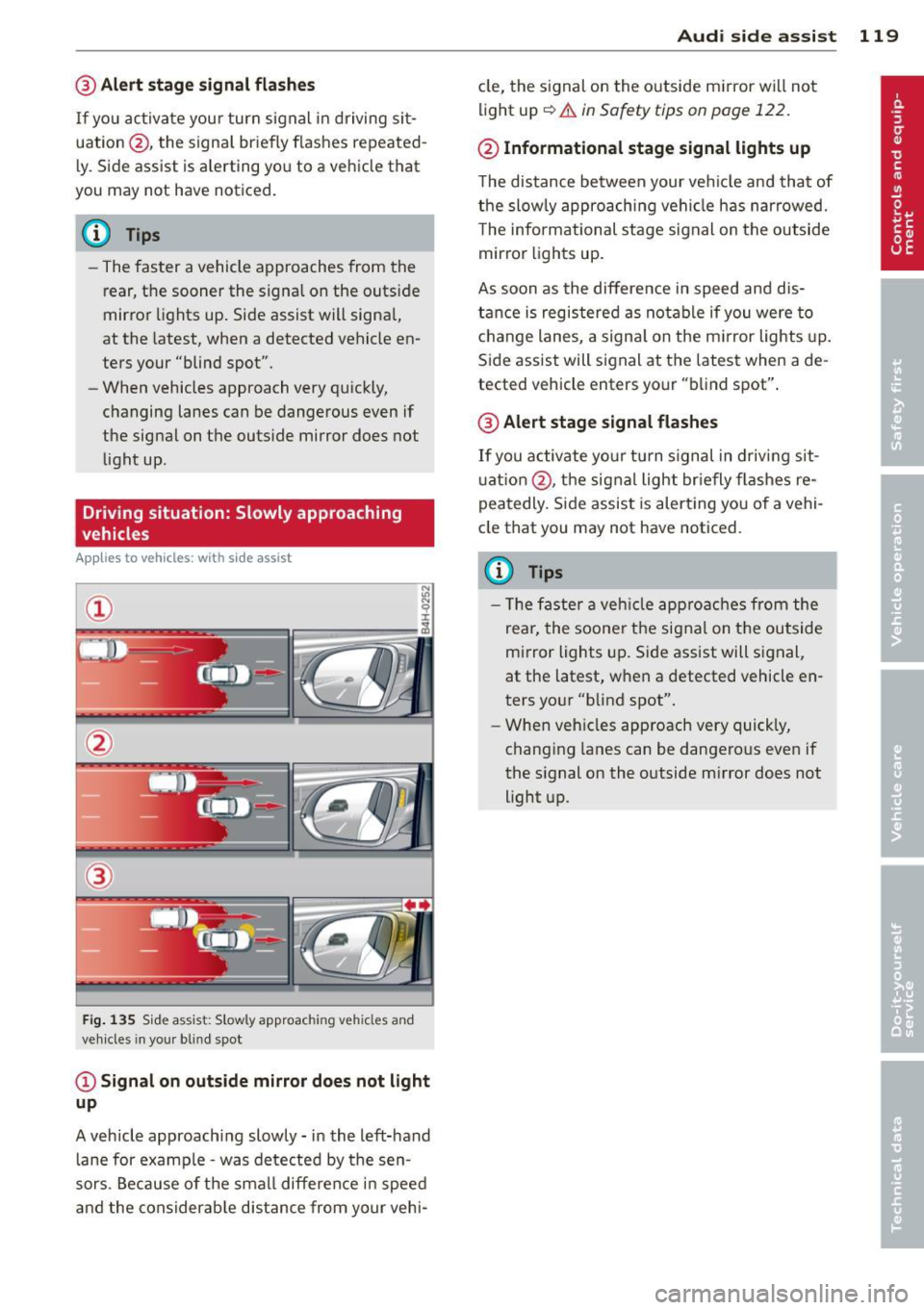
F ig . 135 Side assist: Slowly approac hing veh icles and
veh icles in you r b lin d spo t
@Signal on outside mirror does not light
up
A vehicle approaching slowly -in the left-hand
lane for examp le -was detected by the sen
sors. Because of the small difference in speed
and the considerab le distance from your vehi-
Audi side assist 119
cle, the signal on the outside mirror wi ll not
light up~.&
in Safety tips on page 122.
@ Informational stage signal lights up
The distance between your ve hicle and that of
the slowly approaching vehicle has narrowed.
T he informational stage signal on the outside
mirror lights up.
As soon as the difference in speed and dis
tance is registered as notable if you were to
change lanes, a signal on the m irror lights up.
Side assist will signal at the latest when a de
tected vehicle enters your "blind spot".
@ Alert stage signal flashes
If you activate your turn signal in driving sit
u ation @, the signal light briefly fla shes re
peatedly. Side assist is alert ing you of a vehi
cle that you may not have noticed.
(D Tips
- Th e faster a vehicle approaches from the
rear, the soone r the signal on the outside
mirror lights up. Side assist will signal,
at the latest, when a detected vehicle en
ters your "blind spot".
- When vehicles approach very quickly,
changing lanes can be dangerous even if
the signal on the outside m irror does not
light up.
Page 122 of 316
120 Audi side assist
Driving situation: Vehicles dropping
back slowly
Applies to vehicles: with side assist
i:i N 9 J:
-------::~
®
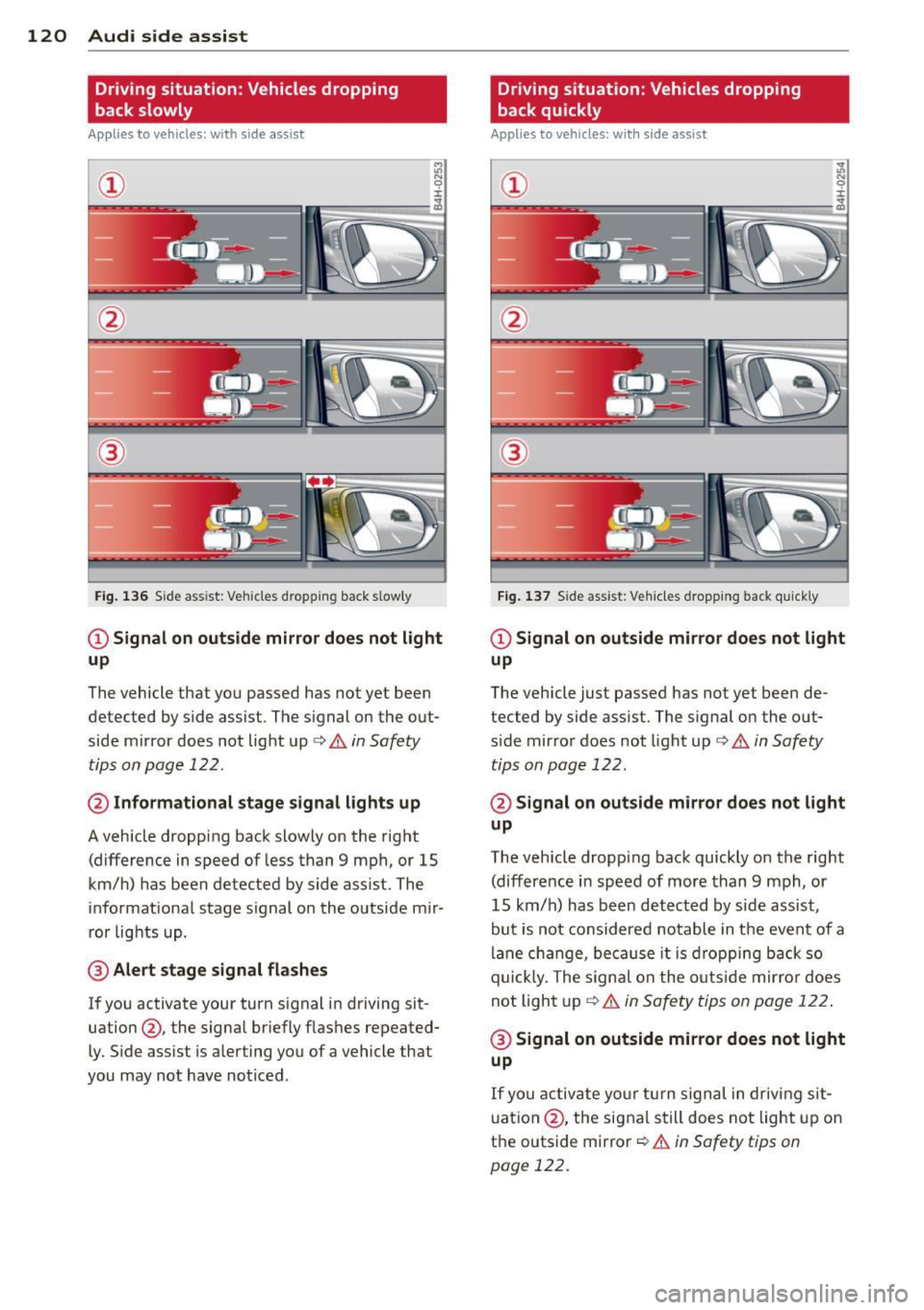
Fig. 136 Side ass ist: Veh icles dropp ing back s low ly
CD Signal on outside mirror does not light
up
The vehicle that you passed has not yet been
detected by side assist . The signal on the out
side mirror does not light up¢
A in Safety
tips on page 122 .
@ Informational stage signal lights up
A vehicle dropping back slowly on the right
(difference in speed of less than 9 mph, or 15
km/h) has been detected by side assist. The
informational stage signal on the outside mir
ror lights up.
@ Alert stage signal flashes
If you activate your turn signal in driving sit
uation@, the signal briefly flashes repeated
ly. Side assist is alerting you of a vehicle that
you may not have noticed .
Driving situation: Vehicles dropping
back quickly
Applies to vehicles: with side assist
®
Fig. 137 Side assist: Ve hicles dropp ing back quickly
CD Signal on outside mirror does not light
up
The vehicle just passed has not yet been de
tected by side assist. The signal on the out
s ide mirror does not light up
Q A in Safety
tips on page 122.
@ Signal on outside mirror does not light
up
The vehicle dropping back quickly on the right
(difference in speed of more than 9 mph, or
15 km/h) has been detected by side assist ,
but is not considered notable in the event of a
lane change, because it is dropping back so
quick ly. The signal on the outs ide mirro r does
not light up¢
A in Safety tips on page 122 .
@ Signal on outside mirror does not light
up
If you activate your turn signal in driving sit
uation @, the signal still does not light up on
the outside mirror ¢
A in Safety tips on
page 122.