steering AUDI A5 COUPE 2013 User Guide
[x] Cancel search | Manufacturer: AUDI, Model Year: 2013, Model line: A5 COUPE, Model: AUDI A5 COUPE 2013Pages: 294, PDF Size: 73.84 MB
Page 74 of 294
72 On the road
• Automatic transmission: Step on the brake
pedal and move th e se lector lever to the P
or
N position.
• Press the key c::>
fig. 74 -the eng ine will
start.
Sw itching the i gni tion on /off
If you wou ld like to switch the ignition on
without starting the engine, follow these
steps :
• Inse rt the key into the ignition lock .
• Press the key briefly
wi thout pressing the
c lutch pedal (for man ual transmissions) or
the brake peda l (for automatic transmis
s ions) .
• To sw itch the igni tion off, press the key
again.
When starting the engine, major e lectr ical
loads are swi tched off temporarily .
You can on ly remove the key with the ignition
switched off.
I f the engine should not sta rt immediately,
the starting process is automatically stopped
after a short time. Repeat starting procedure .
A WARNING
-Never allow the engine to run in confined
spaces -danger of asphyxiation .
- Never remove the ign ition key from the
ignition look whi le the vehicle is moving.
Otherw ise, the steering lock cou ld sud
denly engage and you would not be able
to steer the vehicle.
- Always take the key with you whenever
you leave your vehicle . Otherwise, the
engine could be started or electr ica l
equipment such as the power w indows
c ou ld be operated. This can lead to seri
o us inj ury.
- Never leave children or persons requiring
assistance u nattended in the vehicle . The
doors c an be locked using the remo te
transmitter, preventing people from es
caping from the vehicle on their own in
the event of an eme rgency. Depending
on the time of year, people inside the ve- h
icle can be exposed to very high or very
low temperatu res.
@ Note
Avoid high eng ine rpm, f ull throttle and
heavy engine loads unti l the engine has
r eached operating tempe rat ure -other
wise you risk eng ine damage.
@ For the sake of the environment
Do not let the engine run w hile parked to
warm up. Begin driving immediately. This
reduces unnecessary emissions.
(D Tips
- If the key cannot be removed from the
ignition lock, you have to pull the me
chanical key out of the master key in or
der to be able to lock the vehi-
cle c::>
page 35 .
-After starting a cold engine, there may
be a brief period of increased noise be
cause the oil pressure must first bu ild up
in the hydraulic valve ad justers. This is
normal and not a cause for concern.
- If you leave the veh icle with the ignition
switched on, the ignit ion w ill switch off
afte r a certain per iod of t ime . P lease
no te that electrical eq uipment such as
exterior ligh ts will sw itch off as well
when that happens .
Page 75 of 294
Starting the vehicle with the emergency
key
Applies to vehicles: with ignition lock
You can use the emergency key as an ignition
key in an emergency.
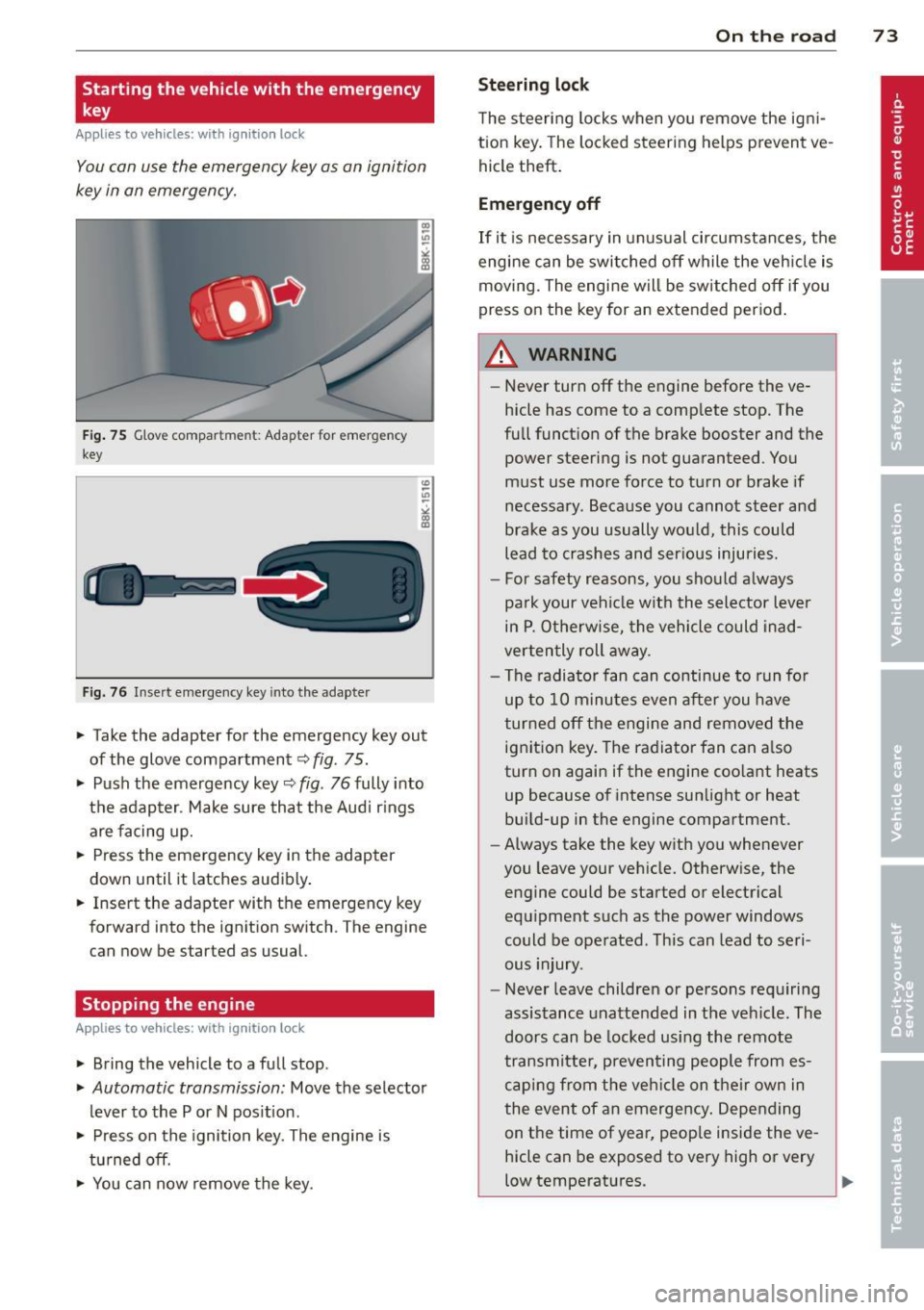
Fig . 75 G love compar tmen t: Adapter for emergency
key
Fig. 76 Insert emergency key into the adapter
.,.. Take the adapter for the emergency key out
of the glove compartment
<=:> fig . 75 .
.,.. Push the emergency key~
fig. 76 fully into
the adap ter . Make sure that the Audi r ings
are facing up.
.,.. Press the emergency key in the adapter
down until it latches audibly .
.,.. Insert the adapter with the emergency key
forward into the ignition switch . The engine
can now be started as usual.
Stopping the engine
App lies to vehicles: with ig ni tion loc k
.,.. Bring the vehicle to a full stop.
.,.. Automatic transmission: Move the selector
lever to the P or N pos ition .
.,.. Press on the ignition key. The engine is
tu rned off.
.,.. You can now remove the key.
On th e road 73
Ste ering lock
The steering locks when yo u remove the ig ni
tion key . The lo cked steering helps prevent ve
hicle theft .
Emergency off
If it is necessary in unus ual circumstances, the
engine can be switched off while the veh icle is
moving. The engine will be switched off if you
press on the key for an extended period .
A WARNING
-Never turn off the engine before the ve
hicle has come to a comp lete stop. The
full funct ion of the brake booster and the
power steering is not guaranteed . You
must use more force to turn or brake if
necessary. Because you cannot steer and
brake as you usually wo uld, this could
lead to crashes and ser ious injuries.
- For safety reasons , you should always
pa rk your vehicle w ith the selector lever
in P . Otherwise, the vehicle could inad
verten tly roll away .
- The radiator fan can continue to run fo r
up to 10 minutes even after you have
turned off the engine and removed the ignition key. The radiator fan can a lso
turn on again if the engine coo lant heats
up because of intense sunlight or heat
build-up in the engine compartment.
- Always take the key with you whenever
you leave your vehicle. Otherw ise, the
engine could be started or electrical
equipment such as the power windows
could be operated . This can lead to seri
ous injury.
- Never leave children or persons requiring
assistance unattended in the vehicle. The
doors can be locked using the remote
transmitter, preven ting people from es
caping from the veh icle on their own in
the event of an emergency. Depending
on the time of year, peop le inside the ve
hicle can be exposed to very high or very
low temperatures .
Page 77 of 294
in the hy draulic valve adjus ters. This is
norma l and not a cause for concern .
- If you leave the vehicle with the ignit ion
switched on, the ignition will switch off
after a certain pe riod of time . Please
note that e lectr ica l equipment such as
exterior lights will swi tch off as well
when tha t happens .
Switching engine off
Applies to vehicles: with conven ie nce key
.,. Bring your vehicle to a complete stop .
.,. Automat ic transm iss ion: Move the se lector
lever to the P or N pos it ion.
.. Press the
!S TAR T ENGINE STOPI button
~ page 74, fig. 77.
St eering lock
The steering locks when you turn the engine
off us ing the
I STAR T ENGIN E STOP I button
and open the dr iver's door. The locked stee r
i ng helps prevent vehi cle theft.
Emergency off
If necessary , the eng ine can be sw itched off
with the selector lever in the R or D/S pos i
tions. To do so , step on the brake peda l and
p ress and hold the
I S TA RT ENGINE STO PI bu t
ton vehicle speed must be less than 6 mph (10 km/h).
A WARNING
- Never turn off the eng ine before the ve
hicle has come to a complete stop . The
full function of the brake booster and the
power steering is not guaranteed. You
must use more force to turn or brake if
necessary . Because you cannot steer and
brake as you usua lly would, t his could
lead to crashes and serious injur ies .
- For safety reasons, you should always
par k your vehicle with the se lector lever
in P. Otherwise, the ve hicle co uld i nad
vertent ly roll away.
- T he rad iator fan ca n con tinue to ru n for
u p to 10 mi nutes eve n after yo u have
t ur ned o ff the eng ine and removed the
On th e ro ad 75
ignition key. The radiator fan can a lso
turn on again if the engine coo lant heats
up because of intense sunlight or heat
bu ild-up in the engine compa rtment.
- Always take the key w ith you whenever
you leave your ve hicle. Otherw ise, the
engine could be started or electrical
equ ipme nt such as the power windows
could be ope rated. This can lead to seri
ous injury.
0 Note
If the engine has been under heavy load
fo r an extended pe riod, heat bu ilds up in
the engine compartm ent after the engine
i s sw itched off -th ere is a r is k of damag ing
the engine . A llow the engi ne to run at id le
fo r abo ut two minutes before switching it
off.
Driver messages
Ignition is o n
This message appears and a warning tone
sou nds if you open the d river's door when the
ignition is sw itched on .
No key ident ified
This message appears when the
I S TART ENG IN E STOP I bu tton is pressed if
there is no master key ins ide the veh icle or if
the system does not recognize it . Fo r exam
ple , the master key cannot be recogni zed if it
is covered by an obje ct (e.g . al uminum brief
case) which
screens t he radio s ignal. Elec tron
ic dev ices such as cell phones can also inter
fere with the radio s ignal.
Pre ss brak e pedal to start engine
This message appears if you do not press the
brake pedal to start the eng ine in a vehicle
with an automat ic transm iss ion.
Press clutch pedal to start engine
T his message appears if you do not press the
clutch pedal to start the engine in a veh icle
with a manual tr ansmission . ..,.
Page 79 of 294
Emergency brake fun ction
An emergency brake ensures that the vehicle
can be slowed down even if the
normal b rakes
fail
c::> page 78, Emergency broking.
Ind icat or light s
-If the par king b rake is closed w ith the igni
t ion
s wit ched on the . (USA models)/
• (Canada models) indicato r lights come
on in the instrument cluster and the switch .
-If the par king brake is closed w ith the igni
tion
s witc hed off the . (USA models)/
• (Canada mode ls) indicator lights come
on in the instrument cluster and the switc h
for about 20 seconds.
A WARNING
If a gear or a drive range (automat ic trans
m ission) is engaged with the vehicle sta
tionary and the engine runn ing, you must
in no instance accelerate or release the
clutch carelessly. Othe rwise the vehicle
w ill sta rt to move immediately- r isk of an
accident.
(D Note
If the . symbol in the display or the
.. (USA models) . (Canada models)
ind icator light in the instr ument cluster
flashes, there is a ma lfunction in the b rake
system. By press ing the
!SETI button, you
can bring up a driver message which ex
plains the malfunction in more detail. If
the driver message
Pa rking brake! ap
pears, there is an operating malfunction in
the parking brake which you should have
repaired immediately by an authorized
Aud i dealer or other q ual ified workshop
c::> poge 15.
(j) Tips
- You can apply the parking brake at any
time -even w ith the ignition switched
off . T he ignit io n must be tu rned on in o r
der to release the parking b rake.
On th e ro ad 77
-Occasional noises when the parking
brake is app lied and released are normal
and are not a cause for concern.
- When the vehicle is pa rked, the park ing
brake goes through a self -test cycle at
regu lar interva ls. Any associated noises
are normal.
Parking
Parking
.,. Press the brake pedal to stop the veh icle .
.,. Pull the button
@ c::> page 76, fig. 78 to set
the parking brake .
.,. Automatic transmission: Move the selector
lever to P.
.,. Tur n the engine off
c::> &_ .
.,. Manual transmiss ion: Shift into 1s t gear.
In addition on inclines and grades
.,. Turn the steering wheel so that your vehicle
w ill roll aga inst the curb in case it shou ld
start to move.
_&. WARNING
- When you leave you r vehicle -even i f on
ly briefly -always remove the ignition
key. This app lies particularly when chil
dren remain in the vehicle. Otherwise the
children could start the eng ine, release
the parking brake or operate electrical
equ ipment (e .g . power windows) . There
is the risk of an acc ident .
- When the veh icle is locked, no one -par
ticularly not childre n should rema in in
the vehicle . Locked doors make it mo re
difficult for emergency wo rke rs to get in
to the vehicle -put ting lives at risk .
Starting from rest
The starting assist function ensures that the
parking broke is released automatically upon starting.
Stopping and applying p arking brake
.,. Pull the switch @ c::> page 76, fig. 78 to ap-
ply the parking brake .
Ill>-
Page 94 of 294
92 Transmission
& WARNING
Hill descent control cannot overcome
physical limitations, so it may not be able
to maintain a constant speed under all
conditions. Always be ready to apply the
brakes.
Manual shift program
Applies to vehicles: with S tronic transmission
Using the manual shift program you can
manually select gears .
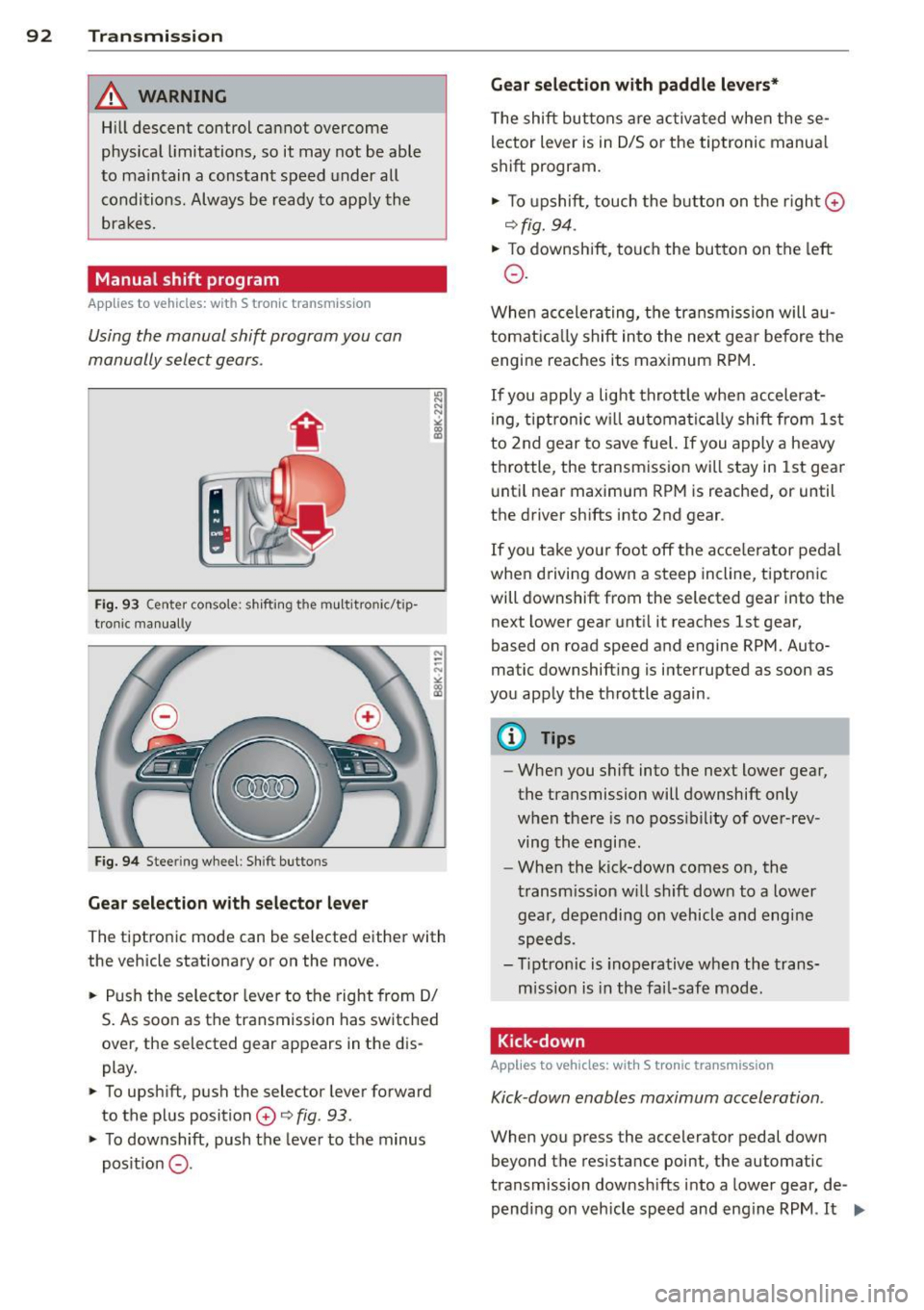
Fig. 93 C en ter conso le : shift in g th e mu ltitro nic/t ip
tron i c manually
Fig. 94 Steering wheel : Shi ft buttons
Gear selection with selector lever
"' N N N
" "' a)
The tiptronic mode can be s elected either with
the vehicle stationary or on the move.
.. Push the selector lever to the right from 0/
S. As soon as the transmission has switched
over , the selected gear appears in the dis
play .
.. To upshift, push the selector lever forward
to the plus position
0 o fig . 93 .
.. To downshift, push the lever to the minus
pos it ion
0 -
Gear selection with paddle levers*
The shift buttons are activated when these
lector lever is in 0/5 or the tiptronic manua l
shift program.
.. To upshift, touch the button on the right ©
ofig. 94 .
.. To downshift, touch the button on the left
0 .
When accelerating, the transmission will au
tomatically shift into the next gea r before the
engine reaches its maximum RPM.
If you apply a light throttle when accelerat
ing, tiptronic will automatically shift from 1st
to 2nd gear to save fuel. If you apply a heavy
throttle , the transmission will stay in 1st gear
until near maximum RPM is reached, or until
the drive r shifts into 2nd gear .
If you take you r foot off the acce le rator pedal
when dr iving down a steep incline, tiptronic
will downshift from the selected gear into the
next lower gear until it reaches 1st gear,
based on road speed and engine RPM. Auto
matic downshifting is interrupted as soon as
you apply the throttle again.
@ Tips
-When you shift into the next lower gear,
the transmission will downshift only
when there is no possibility of over-rev
ving the engi ne.
- When the kick-down comes on, the
transmission will shift down to a lower
gear, depending on vehicl e and engine
speeds .
- Tiptronic is inoperative when the trans
mission is in the fail-safe mode .
Kick-down
Applies to vehicles: with S tronic transmission
Kick-down enables maximum acceleration .
When you press the accelerator pedal down
beyond the resistance point, the automatic
transmission downshifts into a lower gear, de
pending on vehicle speed and engine RPM .
It ...
Page 95 of 294
shifts up into the ne xt higher gea r once the
maximum specified engine RPM is reached .
A WARNING
Please note that the wheels could spin on
slick or slippery roads when kick-down is
active.
Launch Control Program
Applies to vehicles: with S tronic transmission
The Launch Control Program provides the
best ac celeration possible when starting from
a s top .
Requirement: The engine must be at operat
i ng temperature and the steering wheel must
not be turned.
... Press the
I~ OFF I button ¢ page 187 while
the engine is running . The
II indicator light
i ll uminates in the instrument cluster and
T raction control (ASR ): Off. Wa rn ing! Re
stricted stabil it y
appears in the driver infor
mation system d isplay .
... Move the selector lever to the D/S position
o r se lect t he
dynamic d riving mode in Aud i
drive selec t* ¢ page 110 .
... Press the br ake ped al stro ng ly w it h your left
f oot and hold it down for at least one sec
ond.
... At t he same time, press the accelerato r
peda l down completely with your right foot
unti l the engine reaches and maintains a
high RPM.
... Remove your foot from the brake peda l
within 5 seconds¢_&. .
A WARNING
-Always adapt you r d rivi ng to the traffic
flow.
- Only use the Launch Control P rogram
when roa d and tr affic cond it ions allow it
and ot her dr ivers will not be end angered
o r annoyed by yo ur driv ing and the vehi
cl e's acce leration .
- P lease note th at t he driving wheels can
spin and the vehicle can brea k away
-
Tran sm iss ion 93
when ASR is switched off, especially
when t he road is sli ppery .
- Once you have accelerated, you shou ld
sw itch the ASR back on by pressing the
I ~ OFFI button.
(D Tips
- The transmission temperature may in
crease s ignificantly after using the
launch control program. I f that happens,
the program may not be ava ilable for a
few minutes. It w ill be available again af
t er a cool-down per iod .
- When accelerating using the Launch
Cont ro l program, a ll vehicle parts are
subjec t to heavy loads . T his can r esult in
increase d wear .
Transmission malfunction
Applies to vehicles: with S tronic transmission
[O] Tran smission: Press brake pedal and s e
lect gear again.
P ress the brake pedal and select the desire d
selector lever position again. You ca n the n
continue d riving.
[O] Transmis sion overheating: Pleas e driv e
conservatively .
The transmiss ion temperature has increased
s ignificantly due to the sporty driving manner.
D rive in a less sporty ma nner until the tem
perature returns to the normal range and the
i ndicato r light switches of.
[O] Transmission malfunction: You can con
tinue driving
There is a system malfunction in the transmis
s ion. You may cont inue driving. Drive to yo ur
authori zed Aud i dea ler or qualified repa ir fa
c ili ty soon to have the malfunction corrected .
[O] Transmission malfunction : Limited dr iv-
ing functionality
""°
Page 111 of 294
Audi drive select Driving settings
Introduction
App lies to vehicles: w it h drive se lect
Aud i drive select provides the possibility to ex
perience different types of veh icle sett ings in
one veh icle. For instance, using the three
C o mfort , Au to and Dyna mic modes, the driv
er can switch from a sporty to a comfortab le
driving mode with the press of a button.
Addit ionally, in vehicles with MM I*, the vehi
cle setup for
Indi vidual * mode can be cus
tomized by you. This makes it possib le to
combine settings such as a sporty engine tun
ing with comfortable steering.
A WARNING
Improper use of the Audi drive select can
cause collisions, other acc idents and seri
ous personal injury.
Description
Ap plies to vehicles: w it h drive se lect
The vehicle setup in each mode depends on
the vehicle's features. However, the engine,
automatic t ransmission* and steering are al
ways involved.
.
Engine and automatic transmi ssio n*
Depending on the mode, the engine and the
automatic transmission respond quicker or in
a more ba lanced manner to acce lerator pedal
movements. In the sporty dynamic mode, the
automatic t ransmission shifts at h igher R PMs .
Steering
The steering adapts in terms of steering effort
and steering ratios . Indirect steer ing that
moves eas ily, like the stee ring in comfort
mode, is best su ited to long dr ives on a high
way. In contrast, dynam ic mode prov ides
sporty, di rect steering .
The follow ing applies to vehicles with dynam ic
steer ing*: the stee ring ratio changes based on
ve hicle speed in order to maintain optimum
Aud i dri ve sel ect 109
steering effort for the drive r at all times. This
sets the steering to be less sensitive at higher
speeds in order to provide improved vehicle
control. At reduced speeds, however, steer ing
is more d irect in order to keep the steering ef
fort as minimal as poss ible when the driver is
maneuveri ng the vehicle . At low and average
speeds, dynamic steering addit iona lly pro
vides more responsive stee ring pe rformance.
Adapt ive dampers*
The adaptive dampers* use sensors to record
i nformation regarding steering movements,
braking and acceleration ope rations by the
drive r, road surface, driving speed, and load.
T his makes it possible to adapt damp ing to
the d riving situation v irtually i n rea l time.
Audi drive select also makes it possible to sat isfy the desire for sporty s uspension (Dynam
ic) and comfortable suspension (Comfort)
without giv ing up ba lanced tuning (Auto).
Sport diff ere ntial *
As a component of the all whee l dr ive system
(quattro ®)
q page 190, the sport differential*
distributes the driving power to the rear ax le
depending on the situation . The distribution
of power var ies depending on the mode se
lected. The goal is a high level of agility and
ability to accelerate on curves . The ve hicle is
very respons ive to steering .
Adaptive crui se control *
The behav ior when accelerating can be adjust
ed from comfortab le to sporty, depending on
the drive select mode. Adaptive cru ise control
also responds to the driv ing behavior of the
vehicle ahead in a mo re conservative or spo rty
manner .
Engine sound*
The sound of the eng ine is adapted to the se
lected mode and ranges from subtle to sporty.
0) Tips
- In some models, the maximum vehicle
speed can only be reached in the
Auto
and D ynamic modes.
Page 112 of 294
110 Audi drive select
-For vehicles with an automatic transmis
sion*, se lecting the
Dynamic mode re
su lts in sporty shifting characteristics.
The S gear position engages automati
cally.
- In vehicles that have dynamic steering*,
operating noise is heard when starting or
stopping the eng ine . This does not ind i
cate a problem .
Selecting the driving mode
Applies to vehicles: w ith drive se lect
You can choose between Comfort, Auto, Dy
namic
and Individual * modes.
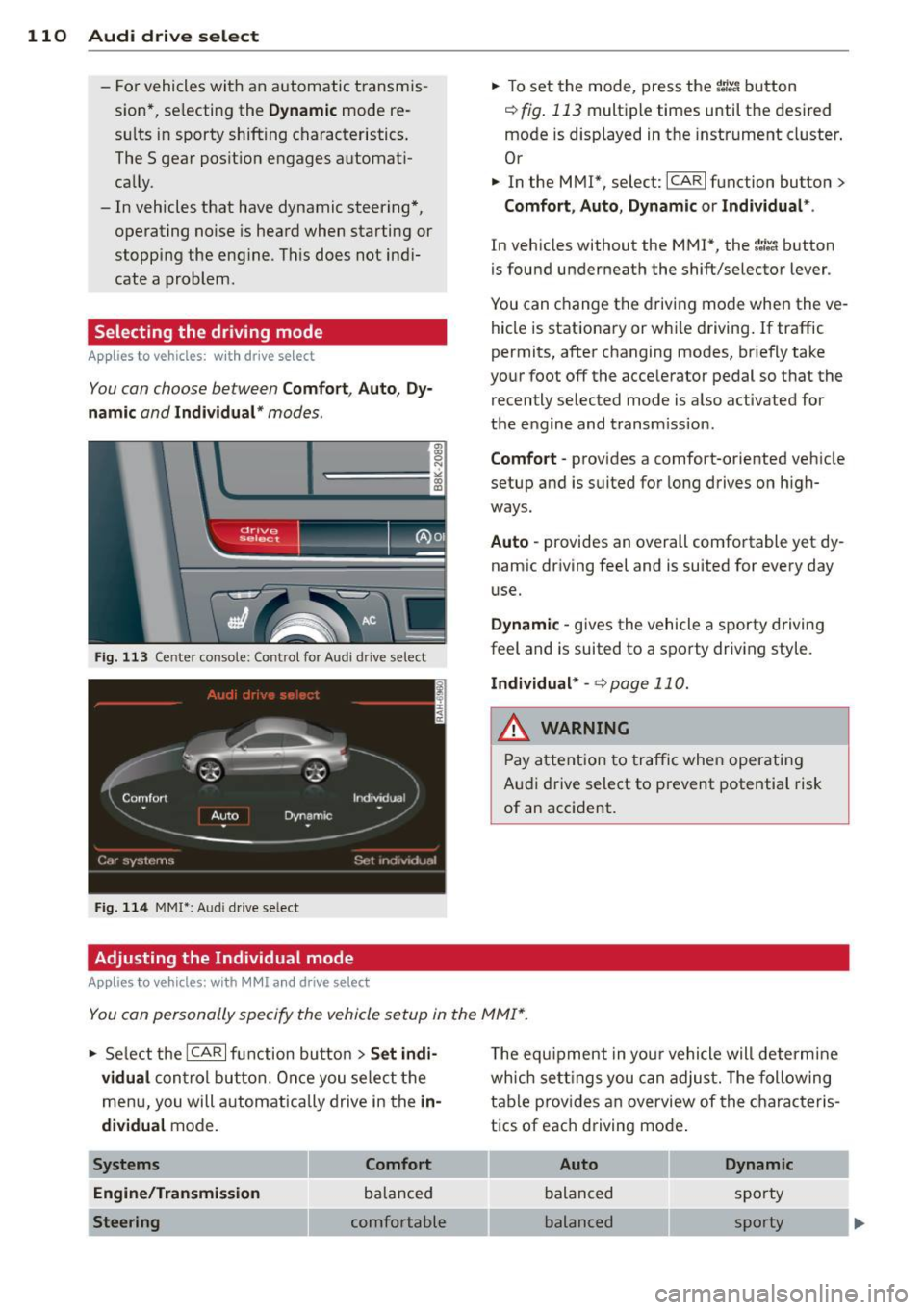
Fig. 113 Center console: Control for Au di dri ve select
Fig. 114 MMI•: Aud i drive select
Adjusting the Individual mode
Applies to vehicles: with MMI a nd drive se lect
.,. To set the mode, press the f:l:-.i button
~ fig. 113 multiple times until the desired
mode is displayed in the instrument cluster .
Or
.,. In the MMI*, select: ICARlfunction button>
Comfort, Auto, Dynamic or Individual *.
In vehicles without the MMI*, the~:/;,~ button
is found underneath the shift/selector lever.
You can change the driving mode when the ve
hicle is stationary or while driving. If traffic
permits, after changing modes, briefly take
your foot off the accelerator pedal so that the recently selected mode is also activated for
the engine and transm ission .
Comfort -provides a comfort-oriented vehicle
setup and is suited for long drives on h igh
ways .
Auto -provides an overall comfortable yet dy
namic driving feel and is suited for every day
use.
Dynamic -gives the vehicle a sporty driving
feel and is suited to a sporty driving style.
Individual * -¢page 110.
& WARNING
Pay atte ntion to traffic when operating
Audi drive select to prevent potential risk
of an accident.
You can personally specify the vehicle setup in the MMI* .
.,. Select the ICAR I function button > Set indi
vidual
control button. Once you select the
menu, you will automatically drive in the
in·
dividual
mode.
Systems Comfort
Engine/Transmission
balanced
Steering comfortable T
he equipment in your vehicle will determine
wh ich sett ings you can adjust. The following
table provides an overview of the characteris
tics of each driving mode .
Auto Dynamic
balanced sporty
balanced sporty
Page 113 of 294
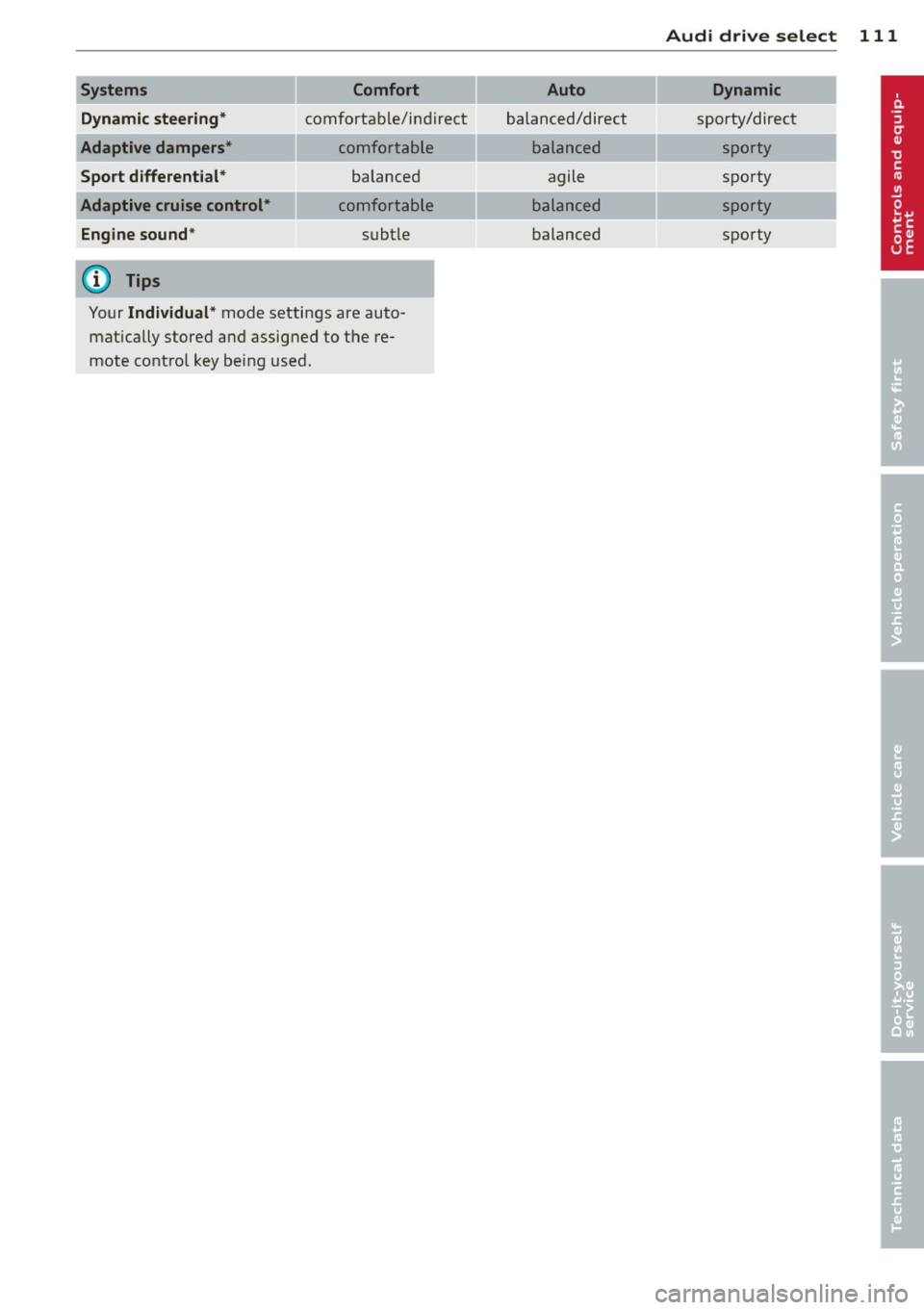
Systems Comfort
Dynamic steering*
comfortable/ind ire ct
Adaptive dampers* comfortable
Sport differential* balanced
Adaptive cruise control* comfortable
Engine sound * subtle
(D) Tips
Your Individual* mode settings are auto
matically stored and assigned to the re
mote control key being used.
Audi drive select 111
Auto Dynamic
balanced/direct sporty/direct
balanced sporty
agile sporty
balanced sporty
balanced sporty
Page 118 of 294
116 Park ass is t
@ Tips
- The rear view camera picture is avai lable
as soon as the MMI D isplay or the MMI is
switched on, or the start-up phase is
completed.
- Keep the sensors in the rear bumper and the rear view camera lens clean and free
of snow and ice, so that the parking sys
tem can work properly . Please follow the
additional notes on~
pag e 118.
Reverse Park ing
App lies to vehicles: with parking system (rear, wit h rear
view came ra)
Parking mod e 1 can be used when parking in
a garage or parking space.
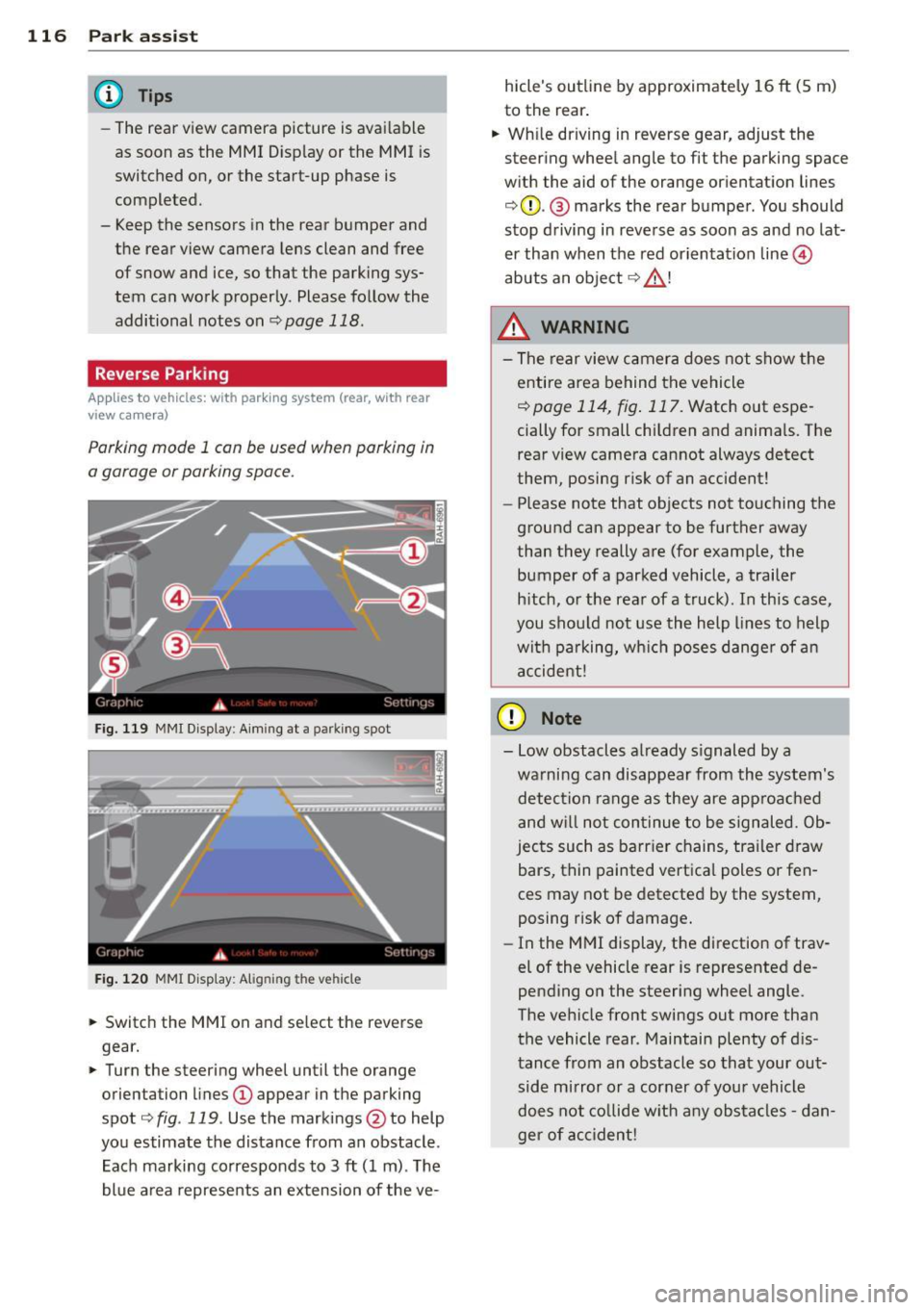
F ig. 1 19 MMI Di splay : Aim ing at a p arkin g spot
Fig . 120 MMI Disp lay: Ali gning th e vehi cle
"' Switch the MMI on and se lect the reverse
gear.
"' Turn the steering wheel until the orange
orienta tion lines
(D appear in the parking
spot ¢
fig. 119 . Use the mark ings @to help
yo u estimate the distance from an obstacle .
Each marking corresponds to 3
ft (1 m) . T he
blue a rea represents an extension of the ve- hicle's outline by approximate
ly 16
ft (5 m)
to the rear .
"' Wh ile driving in reverse gear, adjust the
steering whee l angle to fit the parking space
w ith the aid of the orange or ientation lines
¢ 0 . @ marks the rear bumper . You should
stop d riving in reve rse as soon as and no lat
er than when the red orientation line©
abuts a n obje ct ¢ _&. !
_& WARNING
- The rear view c amera does not show t he
e ntire area behind t he vehicle
¢
page 114, fig . 117. Watch out espe
cially for small children and anima ls. The
rear view camera cannot always detect
them, posing risk of an accident!
- Please note that objects not touching the
ground can appear to be further away
than they really a re (for example, the
bumper of a parked vehicle , a trailer
h itch, o r the rea r of a truck). In this case,
you shou ld not use the h elp lines to help
wit h pa rking, wh ich poses danger of a n
a ccident!
(D Note
- Low obstacles a lready s ignaled by a
wa rning can disappear from th e system's
detec tion range as they are approa ched
and w ill not con tinue to be signaled. Ob
jec ts such as barr ier chains, tr ailer draw
bars, thin painted vertica l poles or fen
ces may not be detecte d by the system,
posing risk of damage.
- In the MMI display, t he direction of trav
el of the vehicle rear is represented de
pending on the steering wheel angle.
The ve hicle fro nt swings out more tha n
the vehicle rear . Maintain plenty of d is
tance from an obstacle so that your out side mirror o r a corner of you r vehicle
d oes not co llide w it h any obs ta cl es -d an
ger of accident!