turn signal AUDI A5 COUPE 2013 User Guide
[x] Cancel search | Manufacturer: AUDI, Model Year: 2013, Model line: A5 COUPE, Model: AUDI A5 COUPE 2013Pages: 294, PDF Size: 73.84 MB
Page 114 of 294
112 Park assist
Park assist
Parking system
Applies to vehicles: with pa rking system
Different park assist systems may be used for
parking or maneuvering, depending on the
vehicle's features.
Parking system (rear)*:
For the parking system (rear), the acoustic
park assist system is installed in the rear of
the vehicle
¢ page 112.
The rear parking assist system uses ultrason ic
sensors to determine the distance of the vehi
cle from a detected obstacle. There are a total
of four sensors located on the rear bumper
(two in the middle and two on the sides).
Parking system (rear, with rear view
camera)*:
For the parking system (rear, with rear view
camera),
the rear acoustic park assist system
is integrated in the rear of the vehicle and the
rear view camera is integrated in the rear lid
¢page 115.
The parking system (rear, with rear view cam
era)
uses ultrasonic sensors to determine the
distance of the vehicle from a detected obsta
cle . There are a total of four sensors located
on the rear bumper (two in the middle and
two on the sides).
Parking system (rear)
Rear acoustic park assist
App lies to vehicles: with parking system (rear)
The rear acoustic park assist warns you of ob
stacles or objects behind your car.
Description
The rear acoustic parking ass ist system deter
mines the distance of the vehicle from an ob
stacle using ultrasonic sensors. There are 4
sensors in the rear bumper.
The range at which the senso rs start to meas
ure is
about :
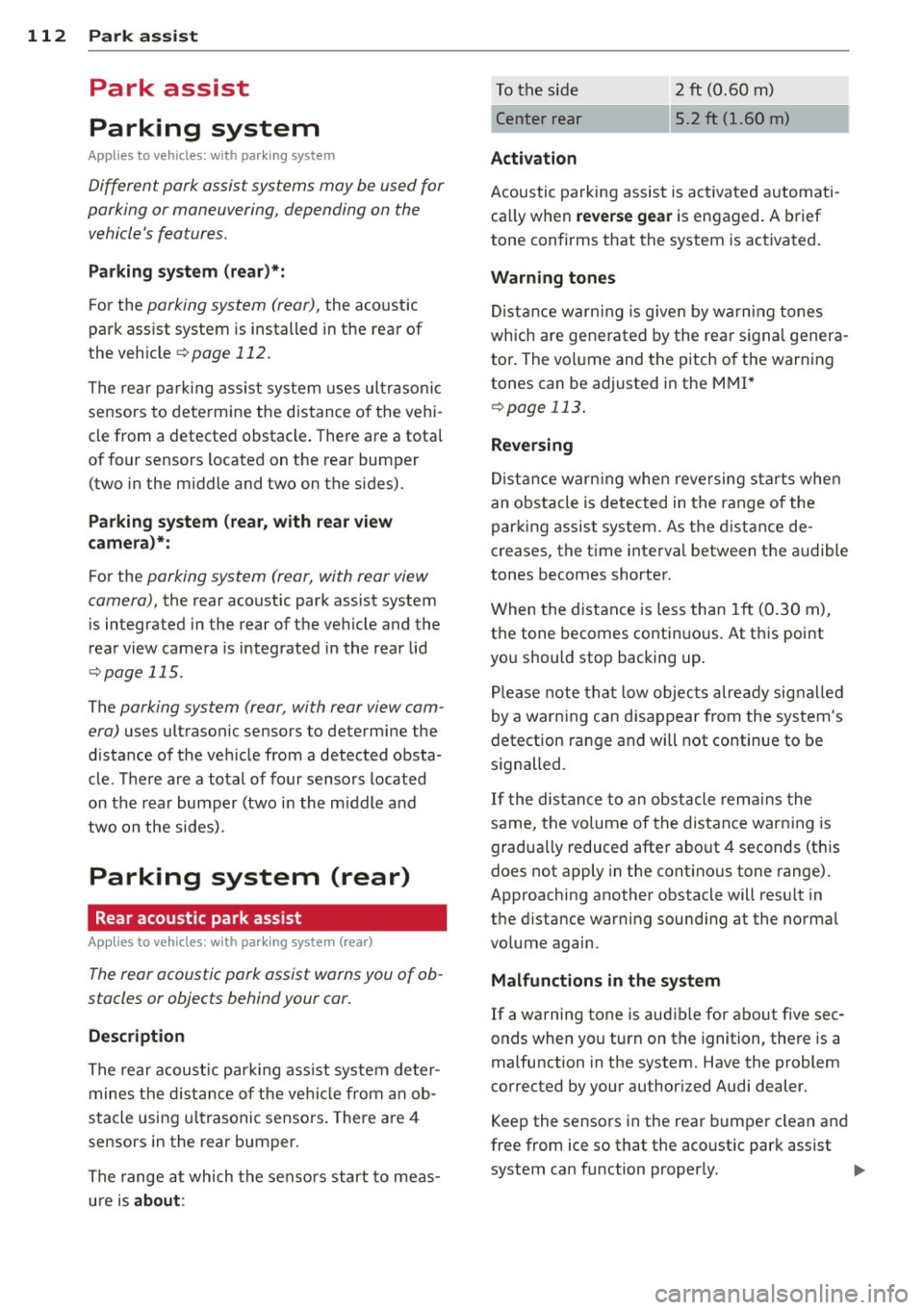
To the side 2 ft (0.60 m)
Center rear 5.2 ft (1.60 m)
Activation
Acoustic parking assist is activated automati
ca lly when
reverse gear is engaged. A brief
tone confirms that the system is activated.
Warning tones
Distance warning is given by warn ing tones
which are generated by the rear signal genera
tor. The volume and the pitch of the warning
tones can be adjusted in the MMI*
¢page 113.
Reversing
Distance warning when reversing starts when
an obstacle is detected in the range of the
parking assist system . As the distance de
creases, the time interval between the audible
tones becomes shorter.
When the distance is less than 1ft (0.30 m),
the tone becomes continuous. At this point
you should stop backing up .
Please note that low objects already signalled
by a warning can disappear from the system's
detection range and will not continue to be
signalled .
If the distance to an obstacle remains the
same, the volume of the distance warning is
gradua lly reduced after about 4 seconds (this
does not apply in the continous tone range).
Approaching another obstacle will resu lt in
the distance warning sounding at the normal
volume again.
Malfunctions in the system
If a warning tone is audible for about five sec
onds when you turn on the ignition , there is a
malfunction in the system. Have the problem
corrected by your authorized Audi dealer.
Keep the sensors in the rear bumper clean and
free from ice so that the acoustic park assist
system can function properly.
Page 118 of 294
116 Park ass is t
@ Tips
- The rear view camera picture is avai lable
as soon as the MMI D isplay or the MMI is
switched on, or the start-up phase is
completed.
- Keep the sensors in the rear bumper and the rear view camera lens clean and free
of snow and ice, so that the parking sys
tem can work properly . Please follow the
additional notes on~
pag e 118.
Reverse Park ing
App lies to vehicles: with parking system (rear, wit h rear
view came ra)
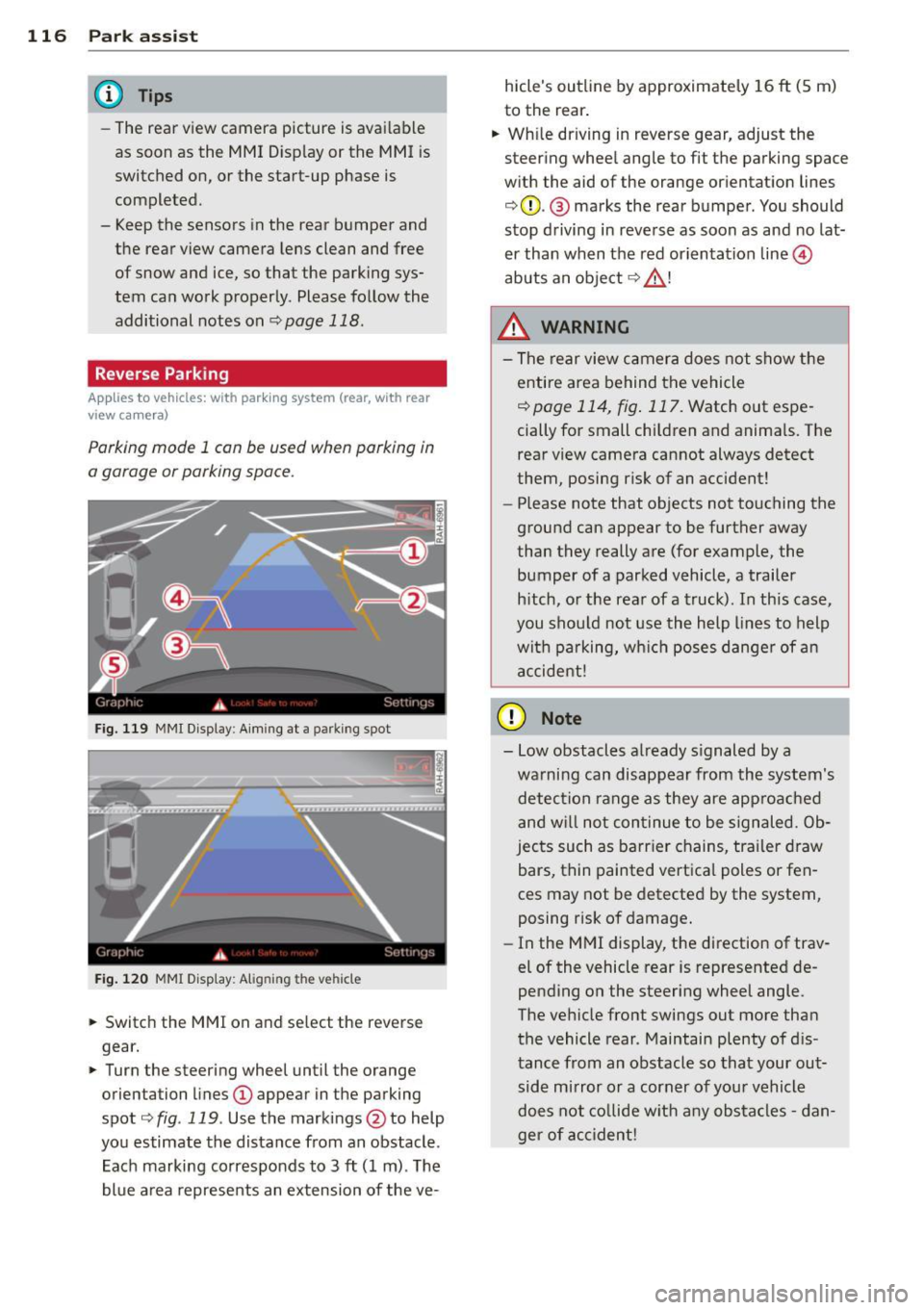
Parking mod e 1 can be used when parking in
a garage or parking space.
F ig. 1 19 MMI Di splay : Aim ing at a p arkin g spot
Fig . 120 MMI Disp lay: Ali gning th e vehi cle
"' Switch the MMI on and se lect the reverse
gear.
"' Turn the steering wheel until the orange
orienta tion lines
(D appear in the parking
spot ¢
fig. 119 . Use the mark ings @to help
yo u estimate the distance from an obstacle .
Each marking corresponds to 3
ft (1 m) . T he
blue a rea represents an extension of the ve- hicle's outline by approximate
ly 16
ft (5 m)
to the rear .
"' Wh ile driving in reverse gear, adjust the
steering whee l angle to fit the parking space
w ith the aid of the orange or ientation lines
¢ 0 . @ marks the rear bumper . You should
stop d riving in reve rse as soon as and no lat
er than when the red orientation line©
abuts a n obje ct ¢ _&. !
_& WARNING
- The rear view c amera does not show t he
e ntire area behind t he vehicle
¢
page 114, fig . 117. Watch out espe
cially for small children and anima ls. The
rear view camera cannot always detect
them, posing risk of an accident!
- Please note that objects not touching the
ground can appear to be further away
than they really a re (for example, the
bumper of a parked vehicle , a trailer
h itch, o r the rea r of a truck). In this case,
you shou ld not use the h elp lines to help
wit h pa rking, wh ich poses danger of a n
a ccident!
(D Note
- Low obstacles a lready s ignaled by a
wa rning can disappear from th e system's
detec tion range as they are approa ched
and w ill not con tinue to be signaled. Ob
jec ts such as barr ier chains, tr ailer draw
bars, thin painted vertica l poles or fen
ces may not be detecte d by the system,
posing risk of damage.
- In the MMI display, t he direction of trav
el of the vehicle rear is represented de
pending on the steering wheel angle.
The ve hicle fro nt swings out more tha n
the vehicle rear . Maintain plenty of d is
tance from an obstacle so that your out side mirror o r a corner of you r vehicle
d oes not co llide w it h any obs ta cl es -d an
ger of accident!
Page 119 of 294
Parallel Parking
Applies to vehicles: with parking system (rear, with rear
view ca mera)
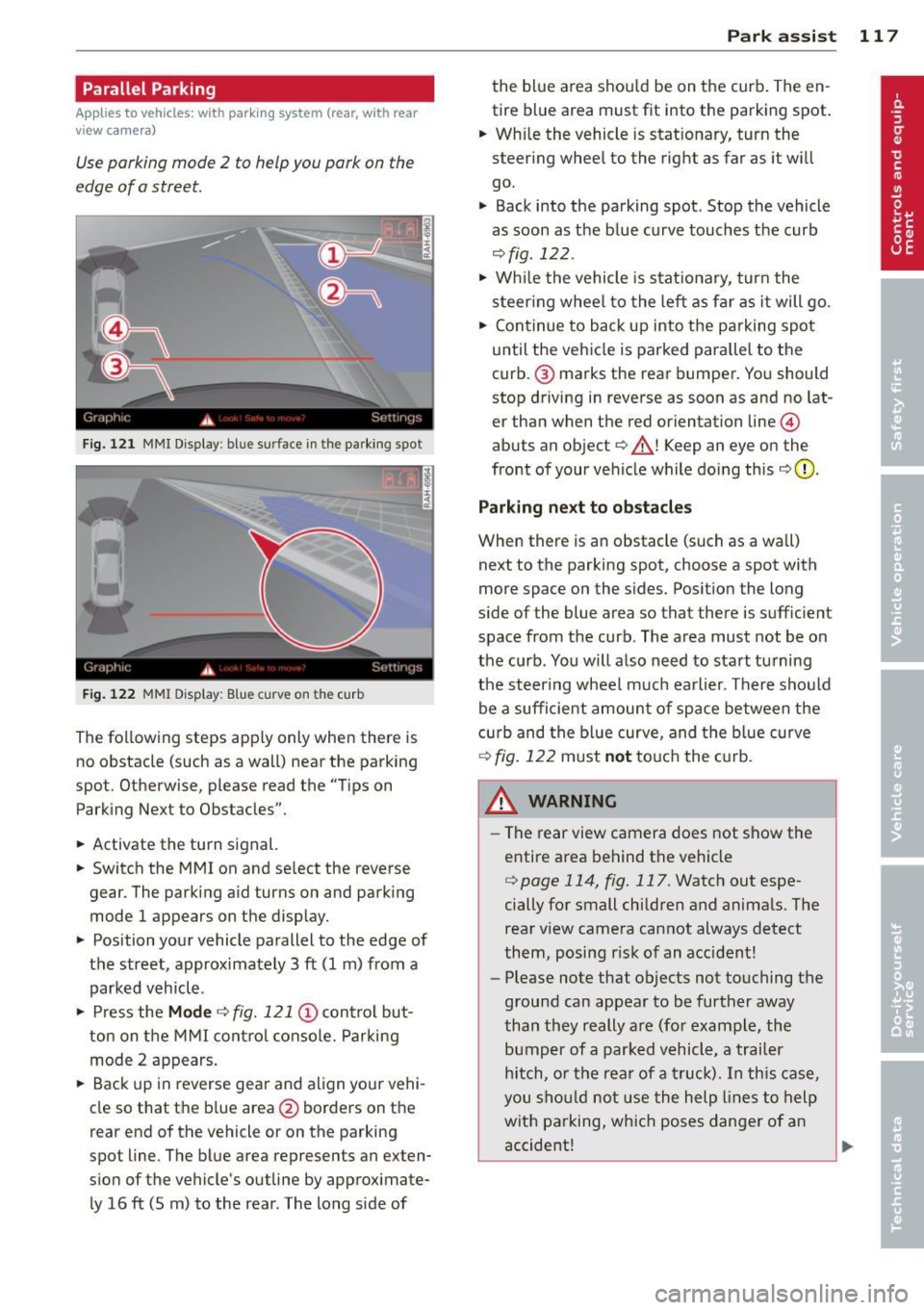
Use parking mode 2 to help you pork on the
edge of o street.
F ig. 121 MMI Display : blue surface in the park ing spot
Fig. 122 MMI Disp lay: Blue curve on t he c urb
The following steps app ly only when there is
no obstacle (such as a wall) near the parking
spot. Otherwise, please read the "Tips on
Parking Next to Obstacles".
• Activate the turn signal.
• Switch the MMI on and se lect the reverse
gear. The parking aid turns on and park ing
mode 1 appears on the display.
• Position your vehicle parallel to the edge of
the street, approximately 3 ft (1 m) from a parked vehicle .
• Press the
Mode ¢ fig. 121 © control but
ton on the MMI control console. Parking
mode 2 appears.
• Back up in reverse gear and align your vehi
cle so that the b lue area
@ borders on the
rear end of the vehicle or on the parking
spot line . The blue area represents an exten
s ion of the vehicle's outline by approximate
ly 16 ft (5 m) to the rear . The long s ide of
Park assist 11 7
the blue a rea shou ld be on the curb. The en
tire blue area must fit into the parking spot.
• Wh ile the vehicle is stat ionary, turn the
steer ing whee l to the right as far as it wi ll
go.
• Back into the parking spot . Stop the vehicle
as soon as the blue curve touches the curb
¢ fig . 122 .
• Wh ile the vehicle is stationary, turn the
s t eering whee l to the left as far as it will go.
• Continue to back up into the parking spot
until the vehicle is parked parallel to the
curb .@ marks the rear bumper. You should
stop driving in reverse as soon as and no lat
er than when the red orientat ion line @
abuts an object¢_& ! Keep an eye on the
front of your vehicle while doing this
¢ 0 .
Parking next to obstacles
When there is an obstacle (such as a wall)
next to the parking spot, choose a spot with
more space on the sides. Posit ion the long
s ide of the blue area so that there is suff ic ient
space from the curb. The area must not be on
the curb . You will also need to start tu rning
the steer ing wheel much earlier. There should
be a sufficient amount of space between the
c urb and the blue curve, and the blue curve
¢ fig. 122 must not touch the curb.
&_ WARNING
- The rear view camera does not show the
entire area behind the vehicle
¢ page 114 , fig. 117. Watch out espe
cially for small children and animals. The
rear view camera cannot always detect
them, posing r isk of an accident!
- Please note that objects not touching the
ground can appear to be further away
than they really are (for example, the
bumper of a parked vehicle, a trailer
hitch, or the rear of a truck). In this case,
you should not use the help lines to help
with parking, which poses danger of an
accident!
.__ _____________ _J ...
Page 120 of 294
118 Park assis t
In the MMI display, the d irection of t ravel
of the vehicle rea r is represented depend
ing on the steering wheel angle. The vehi
cle front sw ings out more than the ve hicle
rear. Maintain plenty of distance from an
obstacle so that your o utside mirror or a
corne r of your veh icle does not co llide with
any obs ta cl es -danger of ac cident!
@ Tips
The left or right orientation li nes and sur
faces wi ll be displayed, depending on the
t urn sig na l being used.
Adjusting the display and warning tones
A ppl ies to vehicles: with pa rk in g system (rear, with rea r
view ca mera )
The display and warning tones are adjusted in
the radio or MM!*.
"' Se lect:
I CARI f u nction button > Parking sys ·
tern .
Or
"' Se lect: ~I C~A~R~I funct ion button > Car systems
control button > Dr iver assist > Parking aid .
Display
- Off -when the parking system is switched
off, on ly aud ible signals are given .
-On -when t he parking system is switched
on, the pict ure from the rear view camera is
displayed.
Warning tones
- Rear volume -
rear sensor volume
-Rear frequency -rear sensor frequency
-Music volum e while parking -when the
park ing system is switched on, the volume
of the act ive a udio source is lowered.
The new ly adjusted value is briefly heard from
the signal gene rator. The sett ings a re auto
mat ica lly stored and assigned to the remote
con trol key.
_& WARNING
- Alw ays m ake su re th at the volume and
freq uency of the warning tones is adjus t-
-
ed so that you can easily hear the acous
tic d istance signa l even if the radio is
playing, the air-cond it ioner blower is on
Hi gh or there is a hig h level of outside
noise.
- Check the settings w henever someone
else has driven the vehicle before you.
(D Tips
- The warn ing tones can also be adjusted
directly from the rear view camera im
age. Simply press the Settings* contro l
butto n.
- Changed settings are activated when
park ing ass ist is switc hed on aga in.
Error messages
App lies to vehicles: wit h parking system (rear, wit h rear
v iew camera)
If a warning tone is aud ible for about five sec
onds when you turn on the ignition, there is a
malfunction in the system . Have the problem
cor rected by your author ized Audi dealer.
Keep the senso rs in the rear bumpe r clean and
free from ice so that the acoustic park assist
system can function properly.
Page 122 of 294
120 Homelink® Programming the transmitter (version
A)
Applies to vehicles: with Homelink
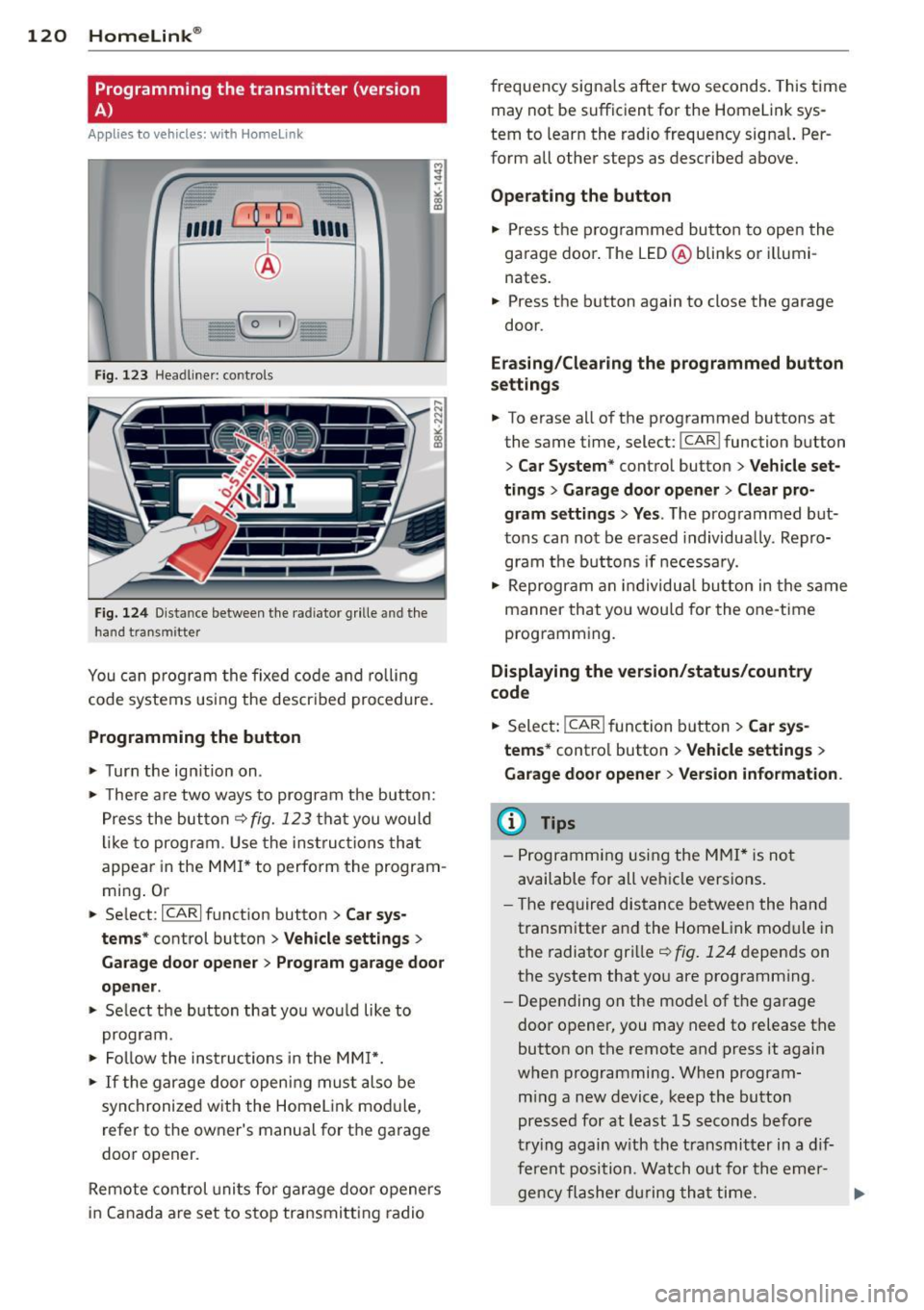
Fig. 123 Head line r: controls
Fig. 124 Dista nce between the radiator grille and the
hand transm itter
You can program the fixed code and rolling
code systems using the described procedure.
Programming the button
.,. Turn the ignition on .
.,. There are two ways to program the button:
Press the button
q fig. 123 that you would
like to program . Use the instructions that
appear in the MMI* to perform the program
ming. Or
.,. Select :
~IC~A~R~I function button > Car sys
tems*
control button > Vehicle settings>
Garage door opener> Program garage door
opener .
.,. Select the button that you would like to
program.
.,. Follow the instructions in the
MMI*.
.,. If the garage door opening must also be
synchronized with the Homelink module,
refer to the owner's manual for the garage
door opener.
Remote control units for garage door openers
in Canada are set to stop transmitting radio frequency
signals after two seconds. This time
may not be sufficient for the Homelink sys
tem to learn the radio frequency signal. Per
form all other steps as described above.
Operating the button
.,. Press the programmed button to open the
garage door. The LED@blinks or illumi
nates .
.,. Press the button again to close the garage
door.
Erasing/Clearing the programmed button
settings
.,. To erase all of the programmed buttons at
the same time, select:
I CAR ! function button
> Car System* control button > Vehicle set·
tings
> Garage door opener> Clear pro
gram settings> Yes .
The programmed but
tons can not be erased individually. Repro
gram the buttons if necessary .
.,. Reprogram an individual button in the same
manner that you would for the one-time
programming .
Displaying the version/status/country
code
.,. Select: !CAR ! function button> Car sys
tems*
control button > Vehicle settings >
Garage door opener > Version information .
@ Tips
- Programming using the MMI* is not
available for all vehicle versions.
- The required distance between the hand
transmitter and the Homelink module in
the radiator grille
q fig. 124 depends on
the system that you are programming .
- Depending on the model of the garage
door opener, you may need to release the
button on the remote and press it again
when programming. When program
ming a new device, keep the button
pressed for at least 15 seconds before
trying again with the transmitter in a dif
ferent position . Watch out for the emer-
gency flasher during that time. .,..
Page 252 of 294
250 Tire s and wheel s
When the malfunction indicator is illuminat
ed, the system may not be able to detect or
signal low t ire pressure as intended. TPMS
malfunctions may occur for a variety of rea
sons, including the installation of replace
ment or a lternate tires or wheels on the vehi
cle that prevent the TPMS from funct ioning
properly . Always check the TPMS malfunct ion
tellta le afte r replacing one or more t ires or
wheels on your veh icle to ensure that the re
p lacement or a lternate tires and wheels allow
the TPMS to continue to function properly.
Tire pressure indicator appears
Applies to vehicles: with tire pressure monitoring system
The tire pressure indicator in the instrument
cluster informs you if the tire pressure is too
low or if there is a system malfunction.
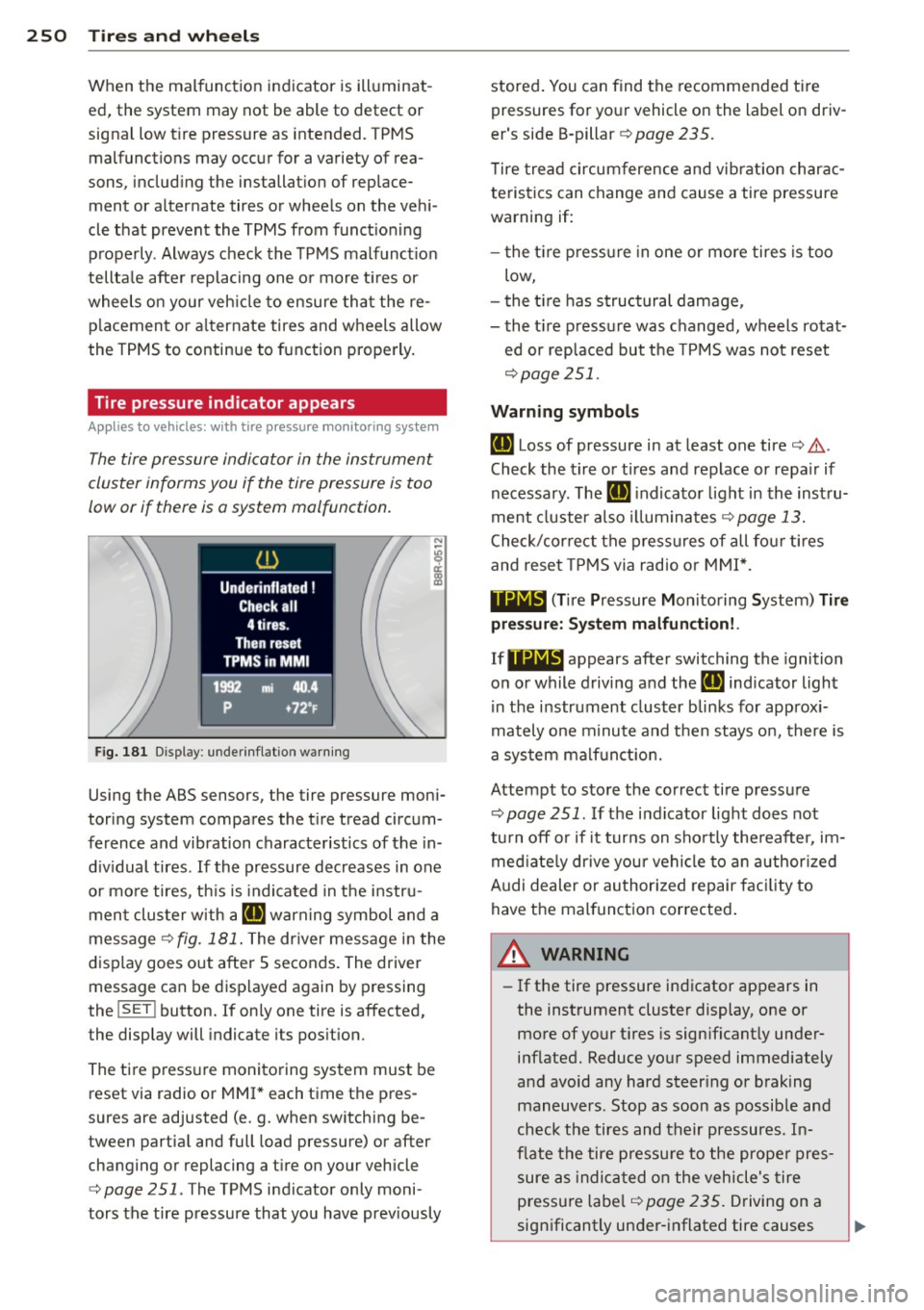
N
I
F ig. 181 Display : underinflatio n warning
Using the ABS sensors, the tire pressure moni
toring system compares the t ire tread circum
ference and vibration characteristics of the in
d iv idual tires . If the pressure decreases in one
or more tires, th is is indicated in the instru
ment cluster w ith a
IE warning symbol and a
message¢
fig. 181 . The driver message in the
display goes out after 5 seconds. The driver
message can be displayed again by pressing
the
! SE T! button. If on ly one tire is affected,
the display will indicate its pos it ion.
The tire pressure monitoring system must be reset via radio or MMI * each time the pres
sures are adjusted (e. g . when switching be
tween partia l and full load pressure) or after
changing or replacing a t ire on your vehicle
¢
page 251 . The TPMS indicator only moni
tors the tire pressure that you have prev iously stored
. You can find the recommended tire
pressures for yo ur vehicle on the label on driv
er's side B-pillar ¢
page 235.
Tire tread circumference and vibration charac
teristics can change and cause a tire pressure
warning if:
- the t ire p ress ure in one or more tires is too
low,
- the t ire has structural damage ,
- the t ire pressure was changed, wheels rotat-
ed or rep laced but the TPMS was not reset
¢ page 251.
Warning symbols
IE Loss of pressure in at least one tire¢.&. .
Check the tire or tires and replace or repa ir if
necessary. The
IE i ndicato r light in the inst ru
ment cluster a lso illuminates
¢ page 13.
Check/cor rect the press ures of all fo ur tires
and reset TPMS via radio or MMI*.
11@1~1 (Tir e Pressure Mon itoring System) Tir e
pr ess ure : Sy ste m malfun cti on!.
If11Nlf:1 appears after switching the ignition
on or while driving and the
IE indicator light
in the instrument cluster blinks for approx i
mately one minute and then stays on, there is
a system malf unct ion.
Attempt to store the correct tire pressure
¢ page 251. If the indicator light does not
tu rn
off or if it turns on sho rtly the reafter, im
med iate ly dr ive you r vehicle to a n author ized
A udi dealer or authorized repair fac ility to
have the malfunction corrected .
A WARNING
=
-If the tire pressure indicator appears in
the instrument cluster display, one or
more of your t ires is sign ificant ly under
inflated. Reduce your speed immediately
and avoid any hard steer ing or braking
maneuvers. Stop as soon as possib le and
check the tires and their pressures. In
flate the tire pressu re to the prope r pres
sure as indicated on the vehicle's tire
pressu re labe l¢
page 235. D riving on a
significantly under-inflated tire causes
Page 286 of 294
284 Index
Important things to do before driving .. 124
Improperly worn safety belts ..... .. ... 140
Indicator lights ............ .. .. .. .. .. 13
Airbag system ............. .. .... . 153
Dynamic steering ...... ... .. .. .. .. . 189
PASSENGER AIR BAG OFF ........ .. . 153
also refer to Warn ing/ indicator l ights .. 13
Infant seats ... ............. .. .... . 172
I nstall ing child safety seats
Safety belts ..... ....... ... .. .... . 176
Installing the upper tethe r strap on the
anchorage . .. ................ ... .. . 183
Instruments Adjusting the lighting ..... .. .. .. .. .. 46
I nstruments and controls ............. 10
General illustration ........ ..... .. ... 8
I nter ior lights
Fr ont .. .. .. .. . .......... .. .. .. .. .. 46
Rear .. .. .... ............. .. .... .. 46
Intermittent (windshield wipers) . .. .... 49
l
Jump- starting 263
Jumper cables . ............... ..... . 264
K
Key ... .. .. .. ............. .... .... .. 33
Battery replacement . . . . . . . . . . . . . . . . 34
Check light . . . . . . . . . . . . . . . . . . . . . . . . 34
Emergency key . . . . . . . . . . . . . . . . . 33, 73
Ignition/engine on/off . . . . . . . . . . . . . . . 71
Key replacement ........... .. .... .. 33
Mechanical key . . . . . . . . . . . . . . . . . 33, 34
removing . . . . . . . . . . . . . . . . . . . . . . . . . 73
unlocking/locking . . . . . . . . . . . 3S, 36, 37
Kick-down . . . . . . . . . . . . . . . . . . . . . . . . . . 92
tiptronic . . . . . . . . . . . . . . . . . . . . . . . . . . 85
Knee airbags .... .......... .. .. .. .. . 157
Description ................. ..... . 157
How they work .............. ..... . 158
Important safety instructions . . . . . . . . 159
L
Lane Change Assistant
refer to side assist ......... ... .... . 105 LATCH .....
.... .. ............. .... 180
Description . ..... ................ . 181
Installing a ch ild restra int ........ ... 181
Location .. .... .. ............. .... 180
Mounting and releasing the anchorage
hook ........ ... ................ . 181
Launch Control Program ......... .. .. . 93
Leather .. .. .. .. .. ... .......... .. .. 207
Cleaning .. .... .. ............. .... 208
Leaving home ... .. ... .......... .... . 44
Left hand drive .... ................ .. 45
Lifting jack ..... .. .......... ...... . 256
Lifting vehicle ... .. ... .......... .... 267
Light adaptive light .... ................ .. 43
Coming/Leaving home ............... 44
Daytime running lights . . . . . . . . . . 43, 44
Exterior lighting . . . . . . . . . . . . . . . . 43, 44
Fog lights/rear fog lig ht(s) . . . . . . . . . . . 43
I nterior/reading .. ..... ........... .. 46
Low beam ..... .. ..... ........... .. 43
Rear fog lights . .. ................ .. 43
S ide marker lights ... .......... .. .. . 43
T rave l mode . .. .. ............. .. .. . 45
Light/rain sensor Headlights .. .. .. .......... ...... .. 43
Intermittent (w indshield w ipers) ..... . 49
Sensor defective .. ... .......... .. .. . 22
Lights Emergency flashers . . . . . . . . . . . . . . . . . 45
High beam ...... ................ .. 44
Turn signals . .. .. ..... ........... .. 44
Locking Rear lid . . . . . . . . . . . . . . . . . . . . . . . . . . . 39
Locking/unlocking at the lock cylinder ................ .. 3 7
by remote control ............. ..... 35
with the centra l locking switch . .. .. .. . 36
with the convenience key ........ .. .. . 36
Low beams ..... .. ................ .. 43
Lower anchorage locator button ....... 181
Lower universal anchorage bars (Canada) 180
Lower universal anchorages (Canada) ... 180
Luggage Stow ing ...... .. .......... ...... . 130
Page 291 of 294
Tires and wheels
Checking tire pressure .. ... .. .. .. .. . 237
Cold tire inflat ion pressure ... .. .. .. . 235
Dimensions . ............. .... .. ... 242
General notes ............ .... .. ... 231
Glossary of t ire and load ing termino lo -
gy .. .. .. .. .. ........ ... .. ... ... . 232
New tires and wheels ......... .... .. 242
Replacing .. ............. .. .. .. .. . 24 3
Snow ch ain s ............. .... .. ... 2 47
Tires and vehicle load lim its . ... .. .. . 239
Wheel bo lts . . . . . . . . . . . . . . . . . . . . . . 24 8
Winte r tires . ... .. .... ... .. .. .. ... 246
T ire se rv ice life ............ .... .. ... 2 41
Tool kit ... .. .. ............. .. .. ... 252
Torn or frayed sa fety belts ... .. .. .. .. . 13 7
Touch-up paint ............. ... ... .. 203
T owing
Front eyelet ............. .... .. ... 266
Rear eye let . ............. .... .. ... 266
Tow truck procedures ........... .... 265
TPMS Tire pressure monitoring system .. .. . 250
T railer towing .. ........... .. .. .. ... 19 7
Opera ting ins truc tions ..... .. .. .. .. . 19 7
Technical req uirements . . . . . . . . 197, 198
Tips ..... .. ... .. .. ..... ... .. .. ... 199
T ransm ission . ............. .... .. .. .. 82
6 -speed man ual tra nsmissi on . .. .. .. .. 8 2
S t ron ic .. .. ............. .. .. .. .. .. 8 8
tiptronic . . . . . . . . . . . . . . . . . . . . . . . . . . 82
Transm ission malf unct ion (ind icator lamp) 93
T ransm ission ma lf u nct ion (ind icator light) 87
T ransport Canada .......... .... .. ... 13 2
T ravel mode . . . . . . . . . . . . . . . . . . . . . . . . 45
Tread Wear Indicato r (TWI) . ... .. .. .. . 24 1
T rip computer
Fu el cons umption . . . . . . . . . . . . . . . . . . 25
Mi leage .. .. ............. .... .. .. .. 25
Sing le -tr ip memory .... ... .. .. .. .. .. 25
Total -trip memo ry . . . . . . . . . . . . . . . . . . 25
T rip odometer .. ........... .. .. .. .... 12
Trunk
refer to Luggage compartment . . . 63, 130
Trunk escape hand le . . . . . . . . . . . . . . . . . . 39
Trunk lid
refer to Rea r lid . . . . . . . . . . . . . . . . . . . . 39
Inde x 289
Turn signals ... .... ... .. .. ..... ... .. . 44
Warning/indicator lights ..... ... .. .. . 23
u
U ndercoa ting ... .. .. .. .. ...... ... .. 20 5
Un fastening safety belts . .... ... ... .. 139
Unidirectional tires .... .. ..... ... .. .. 231
U ni form tire quality g rading ...... .. .. 245
Unl ocking
Rea r lid ...... ... .. ................ 39
Unl ocking/locking
at the lock cy linder ............. .... . 37
by remote control ................. . 35
with t he centra l locking sw itch ..... .. . 36
with t he conven ience key ........... .. 36
U se of j umper cab les .. .. ..... ... .. .. 264
V
Vale t parking . ..... .. . .. .. ..... ... .. . 42
Vanity mirrors . .. .. .. ... ....... ...... 48
Vehicle-ca re products ... .. .. .... ... .. 200
Vehicle electri ca l sys tem . . . . . . . . . . . . . . 17
Vehicle Ident ificat ion Number (VIN) .. .. 269
Vehicle jac k . .. .. .... . ... ...... ... .. 256
Vehicle key . . . . . . . . . . . . . . . . . . . . . . . . . 33
Vehicle literature .. ................. .. 5
Vehicle tool kit .. .. ............... .. 252
Ventilat ion .... ... .. ................ 67
w
Warning/indicator lights . . . . . . . . . . 10, 13
Airbag system ... .. ... ....... ...... 20
Anti -lock brak ing system (ABS) . . . . . . . . 19
B rake system .. .. .. . .. .... .... .. .. . 15
El ectromechani ca l pa rking brake . .. .. . 16
El ec tronic power con trol . . . . . . . . . . . . . 20
El ec tronic Stab ili zat ion Con trol (ESC) .. . 19
Generator . . . . . . . . . . . . . . . . . . . . . . . . . 17
Malfunction Ind icator Lamp (MIL) . ... . 20
Safety be lt . . . . . . . . . . . . . . . . . . . . . . . . 17
Safety systems . .. ................. . 20
Turn signals . .. .. ................. . 23
Warranty coverages . .. .. ..... ... .. .. 273
Washe r reservo ir .. .. ... ....... ..... 230
•
•