brake light AUDI A5 COUPE 2013 Owner's Manual
[x] Cancel search | Manufacturer: AUDI, Model Year: 2013, Model line: A5 COUPE, Model: AUDI A5 COUPE 2013Pages: 294, PDF Size: 73.84 MB
Page 92 of 294
90 Transmi ssion
When st a tiona ry apply brake ped al while se
lecti ng gear
The se lector lever lo ck only funct ions when
the vehicle is stationary and at speeds up to
3 mph (5 km/h). At higher speeds, the lock is
automatically deactivated i n the N position .
The se lector lever is not loc ked when s hifting
q ui ckly thro ugh N, for examp le from R to D/5.
This makes it possible to free the veh icle when
it is stuck by " rocking" it . The selector lever
l ock engages if the lever stays in N longer
than 1 second when the brake pedal is not pressed.
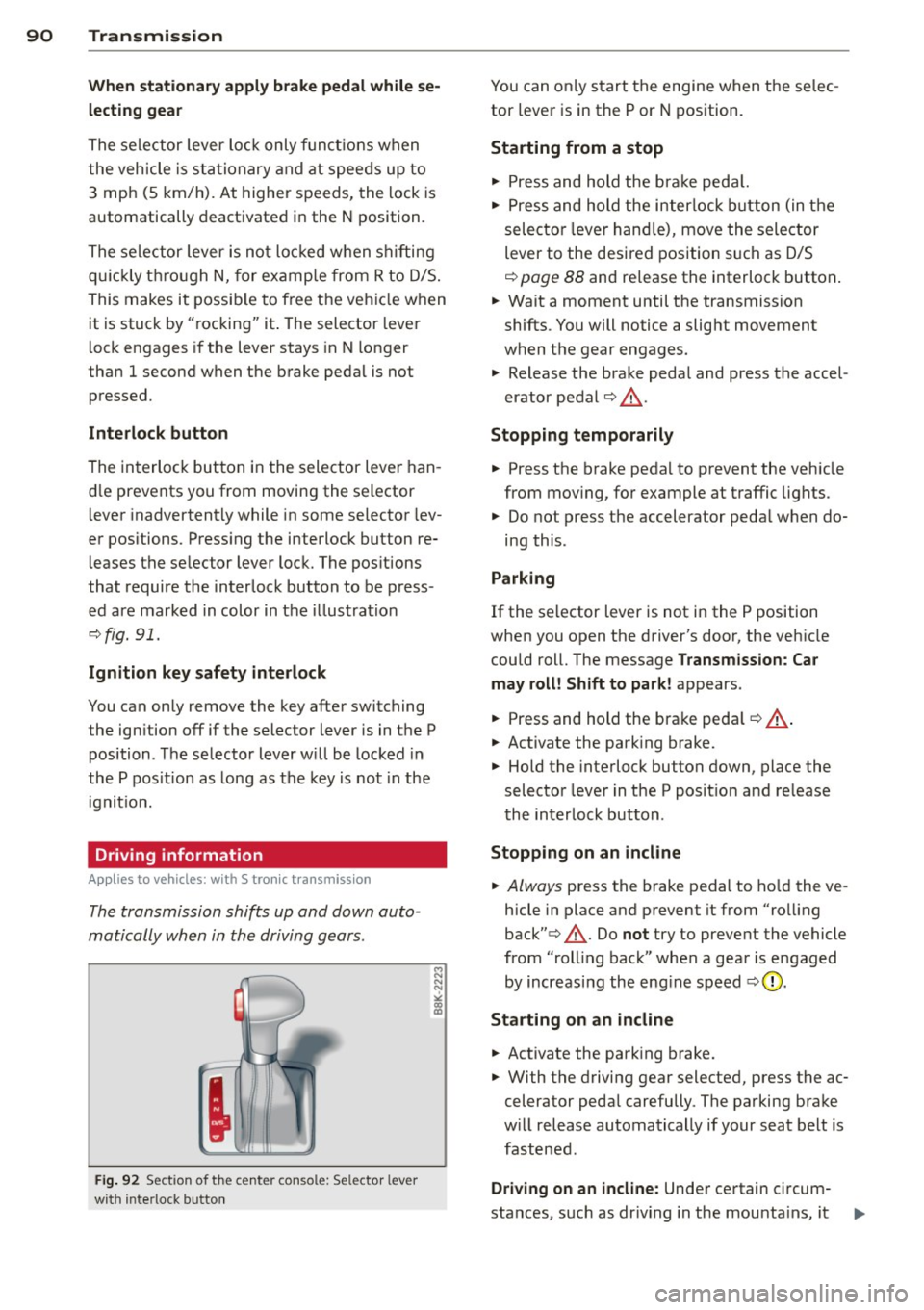
Inte rlock button
The interlock button in the selector lever han
d le prevents you from moving the selector
l ever inadvertently while in some selector lev
er positions. Press ing the interlock button re
leases the se lector lever lock. The pos itions
that require the interlock button to be press
ed are marked in color in the i llustration
~ fig.91.
Ignition key safety inte rlock
You can only remove the key after switching
the ign it ion off if the selec tor lever is in the P
position . T he selector lever w ill be locked in
the P pos ition as long as the key is not in the
ignit io n.
Driving information
App lies to vehicles: with S tronic transmission
The transmission shifts up and down auto
matically when in the driving gears .
Fig. 92 Sect io n of the ce n ter conso le: Sele ctor lev er
w it h inte rlock b utton
M N N N
" CD CD
You can on ly start the engine when the se lec
tor lever is in the P or N position.
Sta rting from a stop
" Press and hold the b ra ke peda l.
.. Press and hold the interlock button (in the
selecto r lever hand le), move the selector
lever to the desired position s uch as D/5
~ page 88 and re lease the interlock button .
.. Wait a moment until the transmission
shifts. You will notice a slight movement
when the gear engages.
.. Release the brake peda l and press the accel
erator pedal¢& .
Stopping t emporarily
.. Press the brake peda l to prevent the veh icle
from mov ing, for example at traffic lights .
.. Do not press the accelerator peda l when do-
ing this .
Parking
If the selector lever is not in the P position
when you open the driver's door, the veh icle
could roll. The message
Transmission : Car
may roll! Shift to park!
appears .
.. Press and hold the brake pedal¢ ,&. .
.. Activate the park ing brake.
.. Hold the interlock button down, place the
selector lever in the P posit ion and re lease
the interlock button .
Stopping on an incline
.. Always press the brake pedal to ho ld the ve
hicle in place and preven t it from "ro lling
back" ¢,&. . Do
not try to prevent the vehicle
from "roll ing back" when a gear is engaged
by increasing the eng ine speed
~ CD .
St arting on an incline
.. Activate the park ing brake .
.. With the driving gear selected, press the ac
celera tor peda l carefully . The parking brake
w ill release automatically if your seat be lt is
fastened .
Driving o n an incline: Under certain c ircum-
sta nces, such as dr iv ing in the mounta ins, it ..,_
Page 94 of 294
92 Transmission
& WARNING
Hill descent control cannot overcome
physical limitations, so it may not be able
to maintain a constant speed under all
conditions. Always be ready to apply the
brakes.
Manual shift program
Applies to vehicles: with S tronic transmission
Using the manual shift program you can
manually select gears .
Fig. 93 C en ter conso le : shift in g th e mu ltitro nic/t ip
tron i c manually
Fig. 94 Steering wheel : Shi ft buttons
Gear selection with selector lever
"' N N N
" "' a)
The tiptronic mode can be s elected either with
the vehicle stationary or on the move.
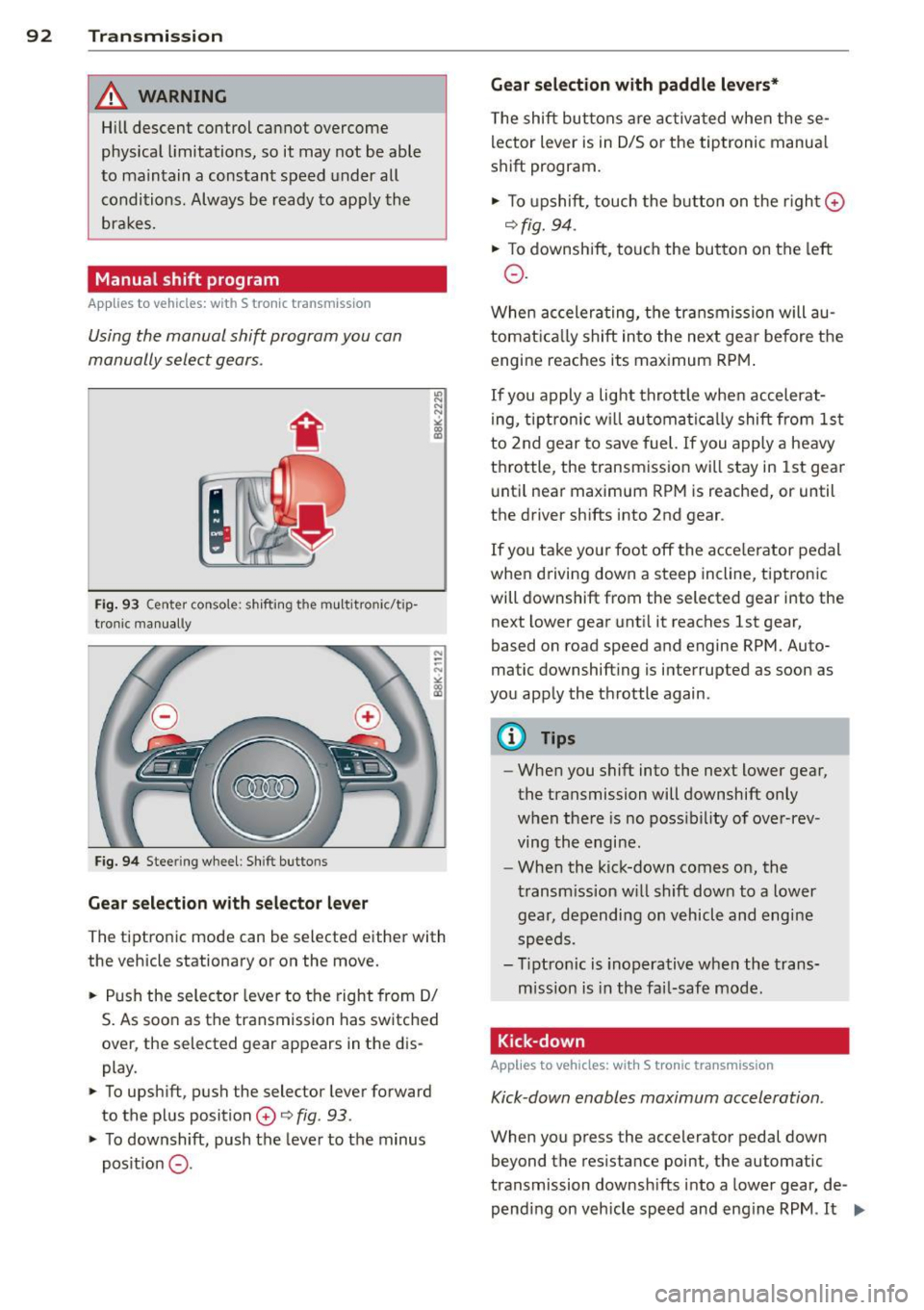
.. Push the selector lever to the right from 0/
S. As soon as the transmission has switched
over , the selected gear appears in the dis
play .
.. To upshift, push the selector lever forward
to the plus position
0 o fig . 93 .
.. To downshift, push the lever to the minus
pos it ion
0 -
Gear selection with paddle levers*
The shift buttons are activated when these
lector lever is in 0/5 or the tiptronic manua l
shift program.
.. To upshift, touch the button on the right ©
ofig. 94 .
.. To downshift, touch the button on the left
0 .
When accelerating, the transmission will au
tomatically shift into the next gea r before the
engine reaches its maximum RPM.
If you apply a light throttle when accelerat
ing, tiptronic will automatically shift from 1st
to 2nd gear to save fuel. If you apply a heavy
throttle , the transmission will stay in 1st gear
until near maximum RPM is reached, or until
the drive r shifts into 2nd gear .
If you take you r foot off the acce le rator pedal
when dr iving down a steep incline, tiptronic
will downshift from the selected gear into the
next lower gear until it reaches 1st gear,
based on road speed and engine RPM. Auto
matic downshifting is interrupted as soon as
you apply the throttle again.
@ Tips
-When you shift into the next lower gear,
the transmission will downshift only
when there is no possibility of over-rev
ving the engi ne.
- When the kick-down comes on, the
transmission will shift down to a lower
gear, depending on vehicl e and engine
speeds .
- Tiptronic is inoperative when the trans
mission is in the fail-safe mode .
Kick-down
Applies to vehicles: with S tronic transmission
Kick-down enables maximum acceleration .
When you press the accelerator pedal down
beyond the resistance point, the automatic
transmission downshifts into a lower gear, de
pending on vehicle speed and engine RPM .
It ...
Page 95 of 294
shifts up into the ne xt higher gea r once the
maximum specified engine RPM is reached .
A WARNING
Please note that the wheels could spin on
slick or slippery roads when kick-down is
active.
Launch Control Program
Applies to vehicles: with S tronic transmission
The Launch Control Program provides the
best ac celeration possible when starting from
a s top .
Requirement: The engine must be at operat
i ng temperature and the steering wheel must
not be turned.
... Press the
I~ OFF I button ¢ page 187 while
the engine is running . The
II indicator light
i ll uminates in the instrument cluster and
T raction control (ASR ): Off. Wa rn ing! Re
stricted stabil it y
appears in the driver infor
mation system d isplay .
... Move the selector lever to the D/S position
o r se lect t he
dynamic d riving mode in Aud i
drive selec t* ¢ page 110 .
... Press the br ake ped al stro ng ly w it h your left
f oot and hold it down for at least one sec
ond.
... At t he same time, press the accelerato r
peda l down completely with your right foot
unti l the engine reaches and maintains a
high RPM.
... Remove your foot from the brake peda l
within 5 seconds¢_&. .
A WARNING
-Always adapt you r d rivi ng to the traffic
flow.
- Only use the Launch Control P rogram
when roa d and tr affic cond it ions allow it
and ot her dr ivers will not be end angered
o r annoyed by yo ur driv ing and the vehi
cl e's acce leration .
- P lease note th at t he driving wheels can
spin and the vehicle can brea k away
-
Tran sm iss ion 93
when ASR is switched off, especially
when t he road is sli ppery .
- Once you have accelerated, you shou ld
sw itch the ASR back on by pressing the
I ~ OFFI button.
(D Tips
- The transmission temperature may in
crease s ignificantly after using the
launch control program. I f that happens,
the program may not be ava ilable for a
few minutes. It w ill be available again af
t er a cool-down per iod .
- When accelerating using the Launch
Cont ro l program, a ll vehicle parts are
subjec t to heavy loads . T his can r esult in
increase d wear .
Transmission malfunction
Applies to vehicles: with S tronic transmission
[O] Tran smission: Press brake pedal and s e
lect gear again.
P ress the brake pedal and select the desire d
selector lever position again. You ca n the n
continue d riving.
[O] Transmis sion overheating: Pleas e driv e
conservatively .
The transmiss ion temperature has increased
s ignificantly due to the sporty driving manner.
D rive in a less sporty ma nner until the tem
perature returns to the normal range and the
i ndicato r light switches of.
[O] Transmission malfunction: You can con
tinue driving
There is a system malfunction in the transmis
s ion. You may cont inue driving. Drive to yo ur
authori zed Aud i dea ler or qualified repa ir fa
c ili ty soon to have the malfunction corrected .
[O] Transmission malfunction : Limited dr iv-
ing functionality
""°
Page 100 of 294
98 Audi adaptive cruise control and braking guard
Switching on and off
Applies to vehicles: with Audi adaptive cruise co ntrol
Fig. 101 Selec tor lever: switching on/off
Fig . 102 Instrument clus te r: adap tive cru ise control
You can set any speed between 20 mph and
95 mph (30 and 150 km/h).
Indicator lamps and messages in the instru
ment cluster display inform you about the cur
r ent system status and settings.
Switching adaptive cruise control on
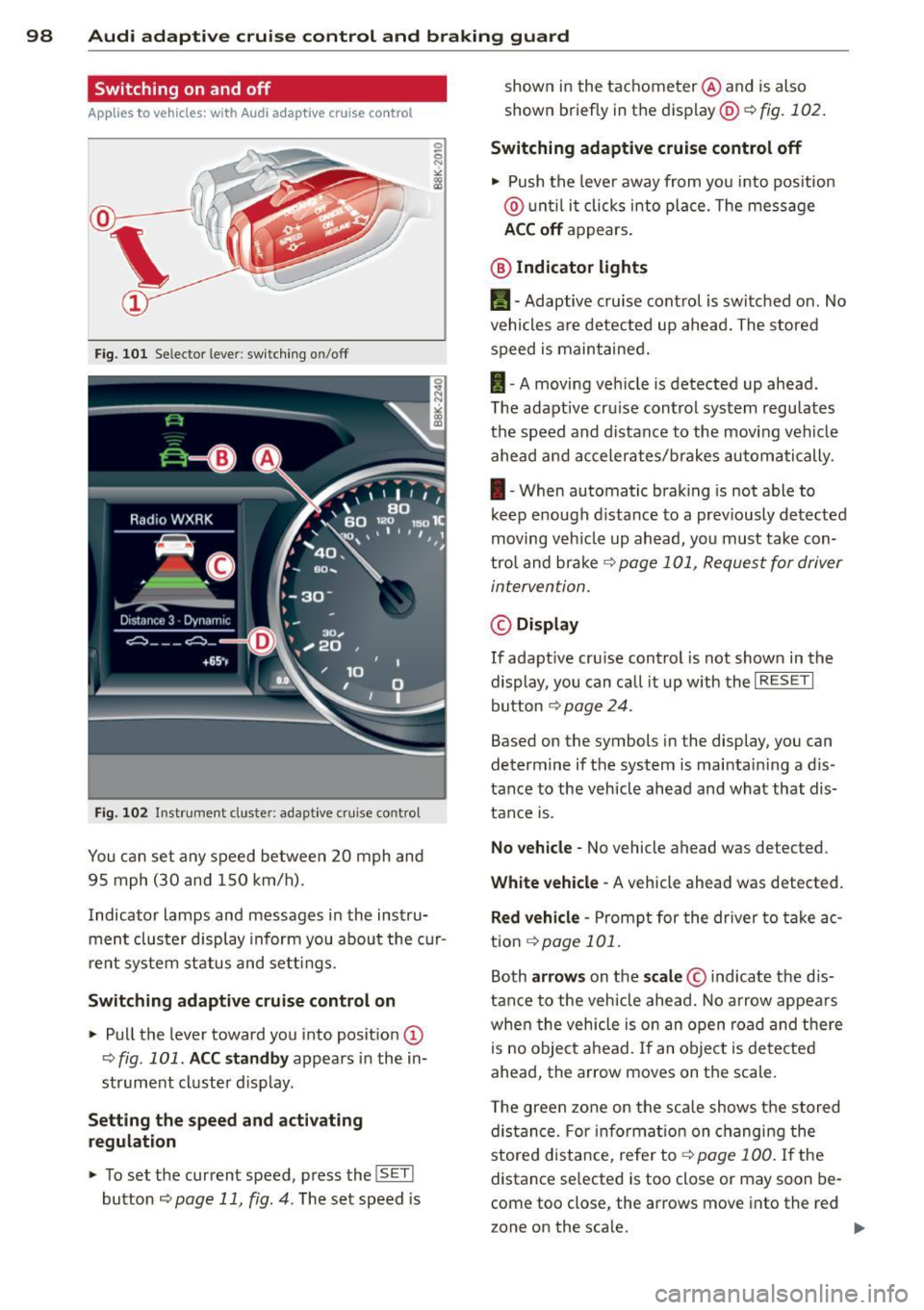
.. Pull the lever toward you into posit ion @
-:>fig . 101 . ACC standby appears in the in
strument cluster d isplay .
Setting the speed and activating
regulation
.. To set the current speed , press the ISET !
button r:::> page 11 , fig. 4. The set speed is shown in the tachometer
@and is also
shown briefly in the display@r:::>fig.
102.
Switching adaptive cruise control off
.. Push the lever away from you into pos itio n
@ unt il it clicks into place. The message
ACC off appears.
@ Indicator lights
II-Adaptive cruise control is switched on. No
vehicles are detected up ahead. The stored
speed is maintained.
I -A moving vehicle is detected up ahead .
T he adapt ive cru ise control system regulates
the speed and distance to the moving vehicle
ahead and accelerates/brakes automatically.
I -When automatic braking is not able to
keep e nough d istance to a prev iously detected
moving veh icle up ahead, you must take con
trol and brake
r:::> page 101, Request for driver
intervention.
© Display
If adapt ive cru ise control is not shown in the
display, you can call it up w ith the
I RESET I
button r:::> page 24.
Based on the symbols in the display, you can
determine if the system is maintai ning a d is
tance to the vehicle ahead and what that dis
tance is.
No vehicle -No vehicle ahead was de tected .
White vehicle -A vehicle ahead was detected .
Red vehicle -Prompt for the driver to take ac
tion
r:::> page 101 .
Both arrows on the scale© indicate the dis
tance to the vehicle ahead. No arrow appears
when the vehicle is on an open road and there
is no object ahead. If an object is detected
ahead, the arrow moves on the scale .
T he green zone on the scale shows the stored
distance. For information on changing the
stored distance, refe r to ~
page 100 . If the
distance se lected is too close or may soon be
com e too close , the arrows move into the re d
z one on the sca le.
Page 103 of 294
Audi adaptive cruise control and braking guard 101
Setting the driving mode for vehicles with
Audi drive select*
Refer to <=> page 1 10.
(D Tips
Yo ur setti ngs a re automatically store d an d
assig ned to the remote contro l key be in g
used.
Request for driver intervention
A pp lies to vehicles: w ith Audi a daptive cruise control
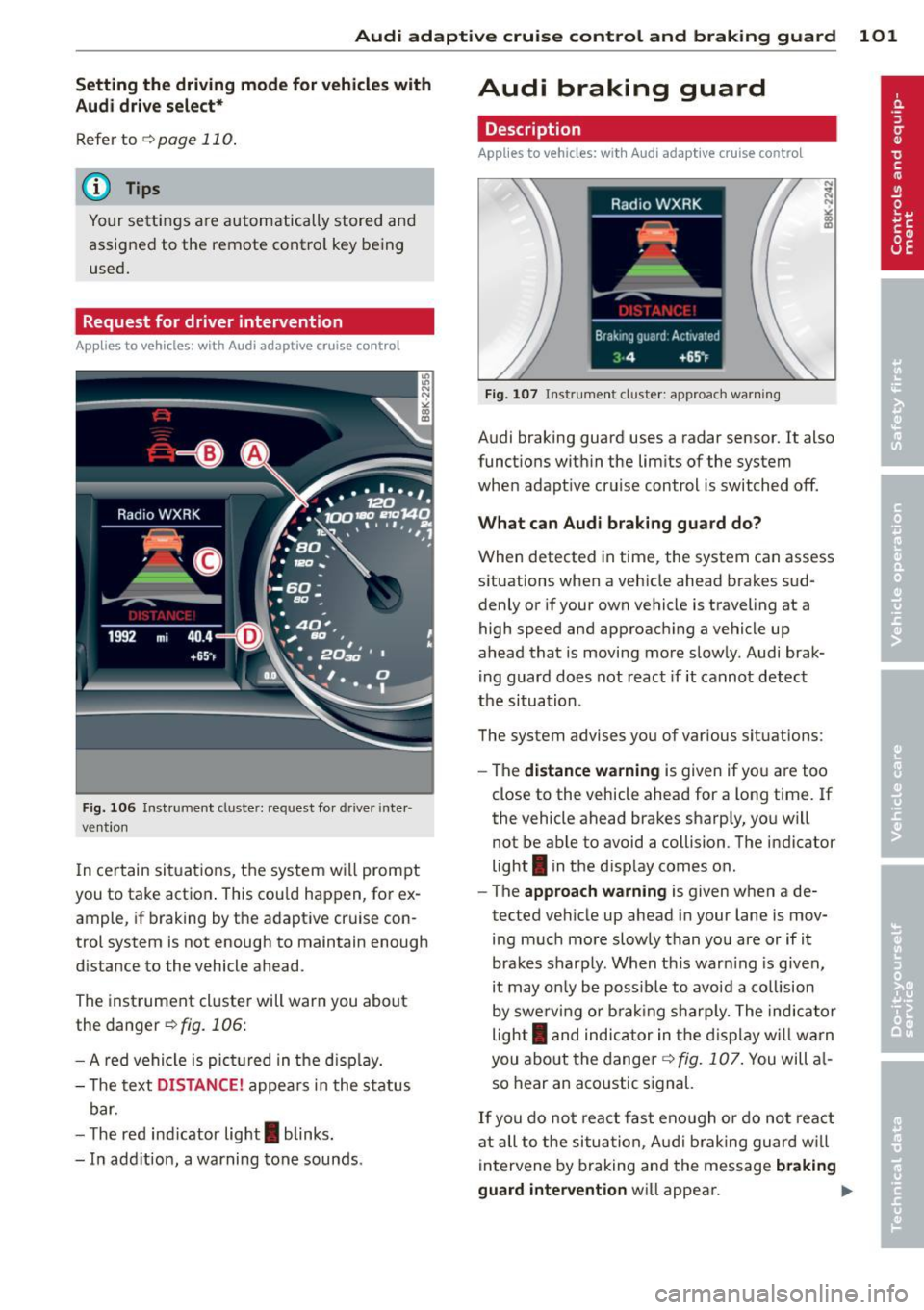
Fig. 106 Inst rumen t cl uster: reques t fo r drive r in te r·
ve ntio n
In ce rtain si tuations, t he sys tem w ill prom pt
you to take actio n. This cou ld ha ppen, for ex
ample, if braking by the a daptive cr uise con
trol system is not enough to maintain enough
d istance to the vehicle ahead.
The inst rument cluste r will war n you about
the danger
<=>fig. 106:
- A red ve hicle is pic tured in the d is pla y.
- The text
DISTANCE! appea rs in the s ta tus
b ar.
- T he r ed indi cator lig ht
I blinks .
- In add it ion, a warning tone sounds.
Audi braking guard
Description
App lies to vehicles: wi th Audi ada ptive c ruise con tro l
Fig. 10 7 In str um ent clus ter: approach warnin g
Audi braking guard uses a radar sensor . It also
funct ions wit hin the lim its of the system
whe n adapt ive cruise control is switched off.
What can Audi braking guard do?
When detected in time, the system can assess
situations when a veh icle ahead brakes s ud
denly or if your own vehicle is t raveling at a
high speed and approac hing a ve hicle up
ahead that is movi ng mo re sl ow ly. Audi brak
ing guard does not react if it canno t detect
the si tua tion.
The system advis es yo u of various s ituations:
- The
distance wa rning is given if yo u are too
close to the vehicle ahead for a long time. If
the vehicle ahead bra kes sharply , yo u will
not be ab le to avoid a collision . The ind icator
light
I in the d isp lay comes o n.
- The
approach warning is given when a de
tected ve hicle up ahead i n your lane is mov
ing m uch mo re sl owly than you are or if i t
brake s sh arp ly. W hen t his war ning is g iven,
it may on ly be poss ible to avoi d a co llision
by swe rving or b ra kin g sharp ly. The indic ator
light
I a nd indic ator in t he di spl ay w ill war n
you abo ut the d ange r¢
fig . 107. You will a l
so hear an aco ustic s ignal.
If y o u do no t rea ct fas t eno ugh o r do not r eact
at all to the si tuat ion, A udi brak ing g uard w ill
i nt ervene by braking and the message
braking
guard intervention
w ill appea r. ~
Page 121 of 294
Homelink®
Universal remote
control
Description
Appl ies to vehicles: with Horne Link
The Homelink universal remote control can
be programmed with the remote control for
devices that are already present.
With Home Link, you can control devices such
as the garage door, security systems, house
l ights, etc. comfortab ly from the inside of you
vehicle .
H ome Link makes it possible for you to rep lace
three differen t remote controls from dev ices
in your home with one universal remote. This
feature works for most garage door and exte
rior door motor signals. Programming the in
dividual remote control for your remote con
trol takes p lace near the center of the radiator
grille. There is a control module attached at
this location.
A one-t ime programming of the sensor must
be performed before you are able to use sys
tems with Homelink. If the system does not
activate after performing the one-t ime pro
gramming, check whether the system uses a rolling codec:>
page 122 for veh icles without
the MMI*.
_& WARNING
- Never use the Homelink ® transmitter
with any garage door opener that does
have not the safety stop and reverse fea
ture as requ ired by federa l safety stand
ards. This includes any garage door open
er model manufactured before April 1,
1982.
- A garage door opener which cannot de
tect an object, signaling the door to stop
and reverse does not meet current feder
al safety standards. Us ing a garage door
opener without these features increases
risk of serious injury or death.
Homelink ® 119
-For safety reasons never release the
parking brake or start the engine while
anyone is standing in front of the vehicle.
- A garage door or an estate gate may
sometimes be set in motion when the
Homelink ® remote control is being pro
grammed. If the device is repeatedly ac
tivated, th is can overstrain motor and
damage its e lectrical components -an
overheated motor is a fire hazard!
- To avo id possible injuries or property
damage, please always make abso lutely
certain that no persons or objects are lo
cated in the range of motion of any
equipment being ope rated .
(D Tips
-If you would like more information on
Homelink ®, where to purchase the
Homel ink ® compatible products, or
would like to purchase the Homelink ®
Home Lighting Package, please call to ll
free: 1-800-355-3515.
- For Declaration of Compliance to United
States FCC and Industry Canada regu la
tions c:>
page 276.
Page 187 of 294
Intelligent technology Notice about data
recorded by vehicle
control modules
Your vehicle is not equipped with an Event Da
ta Recorder (EDR), installed by some manu
facturers for the express purpose of capturing
data for retrieval after an accident or crash
event. EDR's are sometimes called "crash re
corders".
Some state laws restrict the retr ieval or down
loading of data stored by EDR's that were in
stalled in a vehicle for the express purpose of
retrieving data after an accident or crash
event without the owner's consent.
Although your vehicle is not equipped with an
EDR, it is equipped with a number of electron
ic control modules for various vehicle systems
such as, for examp le, engine function, emis
sion control, as well as for the airbags and
safety belts.
These electronic control modules also record
vehicle-related data during norma l vehicle op
eration for diagnostic and repair purposes.
The recording capacity of the electronic con
trol modules is limited to data (no sound is re
corded) and only a small amount of data is ac
tually recorded over a very limited period of
time and stored when a system fault or other
condition is sensed by a control unit. Some of
the data then stored may relate to vehicle
speed, direction, braking as we ll as restraint
system use and performance in the event of a
crash or other condition. Stored data can only be read and downloaded with special equip
ment.
Electronic Stabilization
Control (ESC)
Description
ESC helps to improve road holding and vehicle
dynamics to help reduce the probability of
skidding and loss of veh icle control. It works
only when the engine is running. ESC detects
Intelligent technology 185
certain difficult driving situations, including
when the vehicle is beginning to spin (yaw)
out of control and helps you to get the veh icle
back under control by se lectively braking the
wheels, and/or reducing engine power and
providing steering ass istance to help hold the
vehicle on the driver's intended course. The in
dicator light
JjJ in the instrument cluster
blinks when ESC is taking action to help you
control the vehicle.
ESC has limitations .
It is important to remem
ber that ESC cannot overcome the laws of
physics.
It will not always be able to help out
under all conditions you may come up against.
For example, ESC may not always be able to
help you master situations where there is a
sudden change in the coefficient of friction of
the road surface. When there is a section of dry road that is suddenly covered with water,
slush or snow, ESC cannot perform the same
way it would on the dry surface. If the vehicle
hydroplanes (rides on a cushion of water in
stead of the road surface), ESC will not be
able to help you steer the vehicle because con
tact with the pavement has been interrupted
and the vehicle cannot be braked or steered .
During fast cornering, particularly on winding
roads, ESC cannot always deal as effectively
with difficult driving situations than at lower
speeds. When towing a trailer, ESC is not able
to help you regain control as it would if you
were not tow ing a trailer.
A lways adjust your speed and driving style to
road, traffic; and weather conditions. ESC can
not override the vehicle's physical limits, in
crease the available traction, or keep a vehicle
on the road if road departure is a result of
driver inattention. Instead, ESC improves the
poss ibility of keeping the vehicle under con
trol and on the road dur ing extreme maneu
vers by using the driver's steering inputs to
help keep the vehicle going in the intended di
rection. If you are traveling at a speed that
causes you to run off the road before ESC can
provide any assistance, you may not experi
ence the benefits of ESC.
•
•
Page 190 of 294
188 Intelligent technology
Braking
What affects braking efficiency?
New brake pads
During the first 250 miles (400 km), new
b rake pads do not possess their fu ll braking
effect , they have to be "broken in" first¢.&. .
You can compensate for this slightly reduced braking power by push ing harder on the brake
pedal. Avoid heavy braking loads during the
break-in per iod.
Operating condition s and d riv ing hab it s
The brakes on today's automob iles are st ill
subject to wea r, depending largely on operat
ing conditions and driving habits¢.&. . On
vehicles that are e ither driven mostly in stop
and-go city traffic or are driven hard, the b rake pads should be checked by your author
ized Audi dealer more often than specified in
the
Warranty & Maint enan ce booklet . Failure
to have your b rake pads inspected can res ult
in red uced brake pe rformance.
On steep slopes, you shou ld use the brak ing
effect of the engine. This way, you p revent un
necessa ry wear on the brake system. If yo u
must use yo ur brakes, do not hol d the brakes
down continuously. P ump the brakes at inter
va ls.
Operating noise
Noises may occur when braking depending on
the speed, brak ing fo rce and outside condi
tions such as temperature and humidity.
Effect of water and road salt
In ce rtain situat ions, for example after driving
through water , in heavy ra in, after overn ight
conde nsation or afte r washing your car, the
b rak ing effect can be redu ced by mois ture or
ice on the brake rotors and brake pads . The
brakes must be dried first with a few careful
brake applications .
A t higher speeds and with the w indshield w ip
ers turned on, the brake pads press against
the brake rotors for a short amount of time .
This occurs at regular intervals witho ut the driver noticing and p
rovides fo r bette r brake
response time under wet conditions .
T he effec tiveness of the brakes can be red uced
when the vehicle is d riven on a sa lt -covered
r oad and the brakes are not used . Likewise,
you clean off accumulated salt coating from brake d iscs and pads with a few cautio us ap
plicat ions of the brake ¢ .&. .
Corro sio n
The re may be a tendency for di rt to b uild up
on the brake pads and corrosion to form on
the discs if the car is not driven regularly or only fo r short trips w ith litt le use of the
brakes.
If the brakes are not used frequently, o r if cor
rosion has formed on the discs, it is advisable
to clean off the pads and d iscs by braking
firmly a few times from a moderately high
speed ¢.&. .
Fault s in the brak e syst e m
If you s hou ld notice a sudden increase i n
brake pedal trave l, then one of the two brake
c ircuits may have failed ¢.&. .
Low brake fluid level
Malfunctions can occ ur in the b ra ke system if
the brake fluid level is too low. The brake fluid
l evel is monitored electronica lly.
Brake booster
T he bra ke booster inc reases the pressure that
you generate wi th the b rake peda l. It works
o n ly when the engine is runn ing .¢ .&.
Brake lining wear status
Brake lining wear may be checked by visual in
spect ion of the condition of the brake pads
th rough the ope nings in the wheel. If neces
sary, the wheel may be removed for t his in
spect ion ¢
page 253, Changing a wheel.
_& WARNING ,____
-New b rake pads don't have the best stop
p ing power and m ust be "broken-in" dur-
ing the initial 100 to 150 miles (150 to
11>-
Page 191 of 294
200 kilometers) of normal city driving.
You can compensate for this by press ing
the brake pedal more firm ly. This also
applies later when new pads are instal
led .
- You should perform brak ing maneuvers
for the purpose of clean ing the brake
system only if road cond it ions permit.
Other road users must not be put at r isk -
you may cause an acc ident!
- Before descending a steep grade, reduce
speed and shift transmiss ion into a lowe r
gear or lowe r driving range. Do not ride
the brakes or hold the pedal down too long or too often . This cou ld cause the
brakes to get hot and diminish braking
efficiency.
- Do not "ride the brakes" by resting your
foot on the pedal when yo u do not intend
to brake. Th is may cause the brakes to
overheat, premature wear and increased
stopp ing distance.
- Under certain climat ic and operating
condit ions such as passing through wa
ter, driving in heavy rain or after wash ing
the vehicle, the effect iveness of the
brakes can be reduced. In winter, ice ca n
a ccumulate on the brake pads, linings,
dis cs and d rums. Carefully apply brakes
f or a test . Brakes will dry and ice coat
ings will be cleaned off after a few ca re
ful brake applications.
- Driv ing fo r an ex tended period of time on
salt-covered roads without using your
brakes can also affect braking efficiency.
Clean off accumulated salt coating from
brake discs and pads w ith a few caref ul
brake applicat ions.
- If you damage the front spoiler, or if you install a different spoiler, be sure the air
flow to the front brakes is not obstruct
ed . Otherwise the brake system co uld
overheat reducing the effectiveness of
t h e ent ire brake system.
- Failur e of one bra ke c ircuit will impair
t h e braking capability resulting in an in
cr eased stop ping distan ce. Avoid driv ing
the vehicle and have it towed to t he near-
Int ellig ent technolog y 189
est a uthorized Audi dea ler or q ualified
workshop.
- Never let the ve hicle roll to a stop with
the engine shut off.
- If the brake booster is not working, for
examp le when towing you r vehicle, or
because the brake booster has somehow
been damaged, the bra ke pedal must be
pressed considerably harder to make up
for the lack of booster assistance .
Electro-mechanical
power assist, dynamic
steering
The electro-mechanical power assist helps
the driver when steering.
Power steer ing adapts electronically based on
the ve hicle speed .
Indicator lights and messages
• Steering d efective! Do not driv e vehi cle!
If this indicato r light tur ns on and stays on
and t his message appears, the power steer ing
may have failed .
Do
not continue dr iv ing . See your author ized
Audi dealer or other qualified repair facility
fo r ass istance.
':r,y Dy namic steer ing: System fault! You can
continue driving
If the indicator light turns on and the mes
sage appears, the steering may be more diffi
cu lt to move or more sensit ive tha n usual. The
steering wheel may a lso be at an ang le when
dr iv ing straight .
Drive slowly to your a uthorized Audi dea ler or
qualified workshop to have the ma lf u nction
corrected .
'Taj Dynamic steering: init ializing
If this drive r message appears and t he in dica
tor light is flashing on the instrumen t panel,
dynamic steering * is being rei nitialized. Once
you start the engine afte r this is finished, the .,..
•
•
Page 197 of 294
@ For the sake of the environment
Even when the Emission Control System is
operating properly, the exhaust gas can
have a sulfur-like exhaust gas smell under
some operating states. This depends on
the sulfur content of the fuel being used.
Using a different brand of fuel may help,
or filling the tank w ith lead-free super
grade gasoline.
Operate your vehicle
economically and minimize pollution
General
Your personal style of driving will determine
the economy of your vehicle, as well as ex
haust and noise levels.
Fuel economy, environmental impact, and
wear on you r engine, bra kes and t ires largely
depend on th ree factors:
= your persona l dr iving style
- operating conditions
- technica l lim itations
I f you anticipate what yo u need to do next and
drive economically, you can easi ly cut your
fuel consumption by 10-15 percent. This sec
tion will give you some t ips on how you can
he lp the environment and your pocketbook.
@ Tips
The consumpt ion estimates as published
by ENVIRONMENTAL PROTECTION AGENCY
(EPA) and Transport Canada may not corre
spond to your actual consumption on the
road, wh ich will vary depending upon vehi
cle load and speed, road and weather con
ditions, tr ip length, etc.
Drive smoothly and keep a lookout
ahead
Vehicles use the most fuel when they are ac
celerating.
" Avoid unnecessary accele rat ing and braking.
Dri vin g and en vironm ent 195
Vehicles use the most fue l when they a re ac
ce lerating. If you anticipate what is going to
happen next, you will need to brake less and,
th us, acce lerate less. Let the vehicle coast
whenever possible -for example when you see
that the next traff ic light is red.
Avoid full throttle
Driving at moderate speeds saves fuel and
improves your mileage.
" Try and keep well below your car's maxi-
mum speed.
Acce lerating gently red uces fue l cons ump
tion, engine wear, and does not disturb the environment.
Fuel consumpt ion, exhaust emiss ions and en
gine noise increase disproportionately at high
speeds . If you drive at approximately th ree
quarters of top speed, fuel consumption w ill
be reduced by one half. Never drive faster
than the posted speed limit and weather con
ditions perm it.
Reducing unnecessary idling
Even when your car is just idling it burns up
fuel .
" Shut the eng ine off when you are not driv
ing the vehicle.
" Do not warm up the ve hicle by letting the
eng ine run at idle .
It makes sense to shut off the engine in traffic
jams, when wa it ing for tra ins to pass at rail
road crossings, or at traffic lig hts t hat have
long waits on red . T ur ning the eng ine off for
just 30-40 seconds saves mo re fuel than is
bur ned star ting the e ngine again.
It takes a long t ime for the engine to warm up
fully when it is run ning at idle . However, wea r
and noxious emissions are espec ia lly high
whe n the eng ine is wa rm ing up. So yo u shou ld
drive away as soon a s you start the e ngine and
avo id r unning at high rpms whi le the engine is
still warming up.
Ill-
•
•