light AUDI A5 COUPE 2013 Owner's Manual
[x] Cancel search | Manufacturer: AUDI, Model Year: 2013, Model line: A5 COUPE, Model: AUDI A5 COUPE 2013Pages: 294, PDF Size: 73.84 MB
Page 32 of 294
30 Driver information display
the approp riate service on your vehicle. You
a lso have the possibility to reset the oil
change schedule after having performed an
oil change according to Audi specifications.
Select
I CAR I function button > Service interval
display > Reset oil change interval
or ICARI
function button> Car systems control button
> Servicing & checks > Reset oil change inter
val.
(CT;) Note
If you disconnect the battery terminals, no
calculations can be made for the service
interva l display during this time and no
service reminder will appear. Remember
that observing the proper serv ice interva ls
is vitally important to extending the life of
your vehicle, particularly the engine, and
maintaining its value. Even if the mileage
driven is low, the maximum period of one
year from one serv ice to the next must not
be exceeded.
@ Tips
-Do not reset the display between oil
changes, otherw ise the display will be in
correct.
- The information in the Service Reminder
remains stored even when the vehicle
battery is disconnected.
On-Board Diagnostic
system (OBD)
Malfunction Indicator Lamp (MIL)
The Malfunction Indicator Lamp (MIL) II in
the instrument cluster is part of the On-Board
Diagnostic (OBD II) system.
The warning/indicator light illuminates when
the ignition is switched on and goes out after
the engine starts and the idle has stabi lized .
This indicates that the MIL is working proper
l y.
If the light does not go out after the engine
is started, or illuminates while you are driv
ing, a malfunction may exist in the engine sys- tern.
If the
light illuminates, the catalytic con
verter could be damaged.
Continue driving
with reduced power (avoid
ing sustained high speeds and/or rapid accel
erations) and have the condition corrected.
Contact your authorized Audi dea ler.
If the light illuminates, the electronic speed
limiter may also be malfunct ioning. For more
information
q page 31, El ectronic speed
limiter .
An improperly closed fuel filler cap may also
cause the MIL light to illuminate
~page 213.
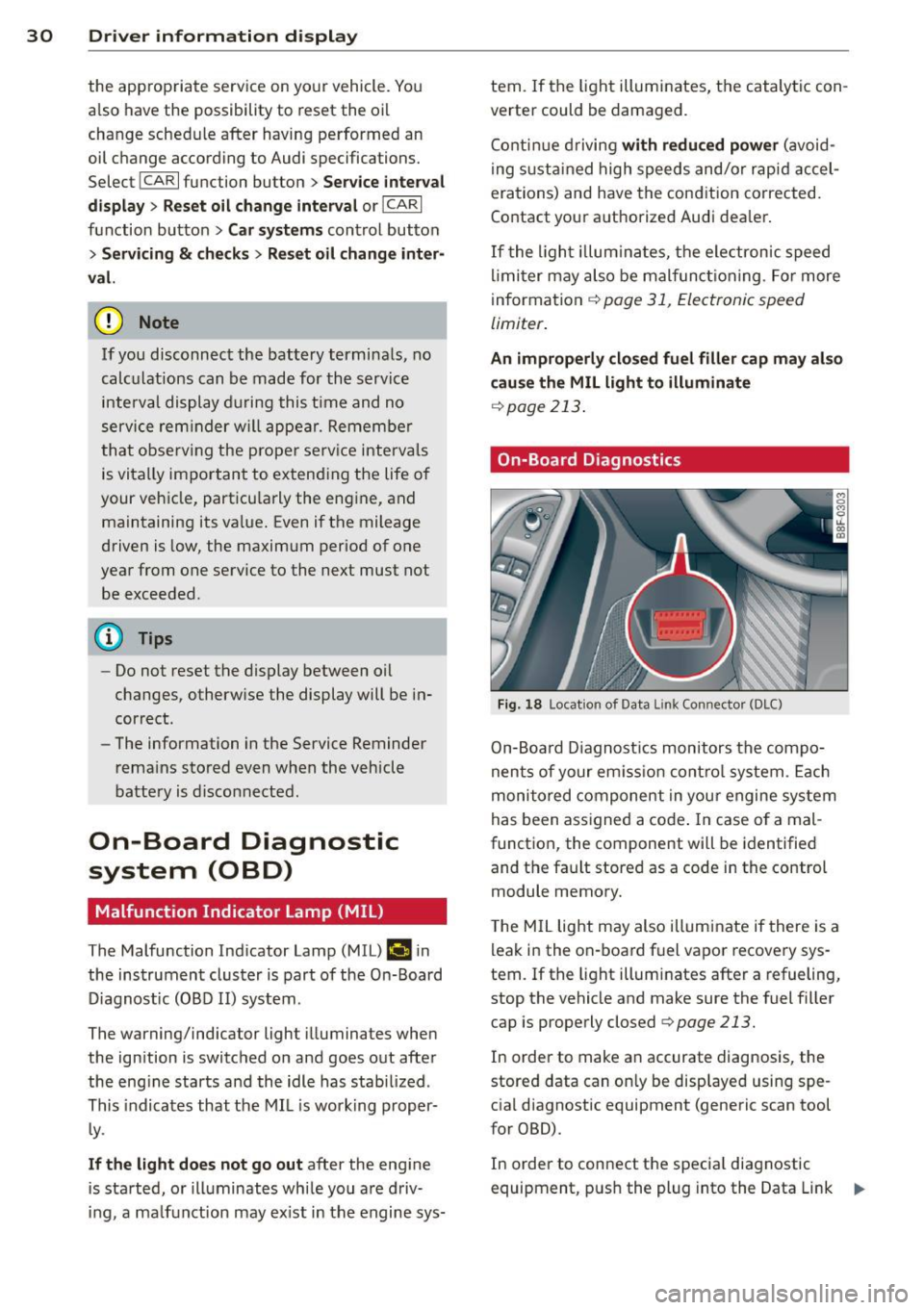
On-Board Diagnostics
Fig. 18 Locat ion of Data L ink Connector (DLC)
On-Board Diagnostics monitors the compo
nents of your em ission control system . Each
monitored component in your engine system
has been assigned a code . In case o f a mal
function, the component will be identified
and the fault stored as a code in the control
module memory.
T he MIL light may also illuminate if there is a
leak in the on-board fuel vapor recovery sys
tem.
If the light illuminates after a refueling,
stop the vehicle and make sure the fuel filler
cap is properly closed
q page 213.
In order to make an accurate diagnosis, the
stored data can on ly be displayed using spe
cial diagnostic equipment (generic scan tool
for OBD).
In order to connect the special diagnostic
equipment, push the plug into the Data Link ..,.
Page 33 of 294
Connector (DLC). The DLC is located to the
right of the hood release¢
fig. 18.
Your authorized Audi dealer or qualified work
shop can interpret the code and perform the
necessary repair.
~ WARNING
Do not use the diagnostic connector for
personal use. Incorrect usage can cause
malfunctions, which can increase the risk
of a coll is ion!
Electronic speed limiter
-
Your veh icle may be factory equipped with
tires that are rated for a maximum speed of 130 mph (210 km/h). This is may be less than
the maximum speed of your ve hicle. To reduce
the risk of sudden tire failure and loss of con
trol if the vehicle is operated at excess ive
speeds, your vehicle has an e lectronic speed
limiter. The electronic speed limiter prevents
your vehicle from going faster than the t ire
speed rating. For more information
¢page 242.
If the engine contro l unit receives fau lty vehi
cle roadspeed signals, the Malfunction Indica
tor Light (MIL)
(llllij will illuminate . If this oc
curs, contact the nearest authorized Audi
dealer for assistance .
A WARNING
-
Always observe the posted speed limits
and adjust your speed to suit prevailing
road, traffic and weather conditions. Never
drive your vehicle faster than the maxi
mum speed rating of the tires insta lled .
Driver information display 31
Page 36 of 294
34 Openin g and clo sing
keys. Unguarded access to the keys pro
vides children the opportunity to start the engine and/or act ivate vehicle sys
tems such as the power w indows etc . Un
supervised operation of any veh icle sys
tem by ch ildren can res ult in serious in
Jury.
- Do not remove the key from the ignition
lock until the vehicle has come to a com
plete stop. Otherwise the steering col
um n loc k co uld suddenly e ngage -caus
ing the risk of an accident.
@ Tips
- The operation of the remote contro l key
c a n be tempo rarily disrupted by in terfer
ence from tran smi tters in t he v ici nity of
the veh icle work ing in the same frequen
cy ra nge (e.g . a ce ll phone, radio equip
ment).
- Fo r security reasons, replacement keys
are on ly available from Aud i dea le rs .
- Fo r De clarat ion o f Compliance to United
States FCC and Industry Canada regu la
tions ¢
page 2 76.
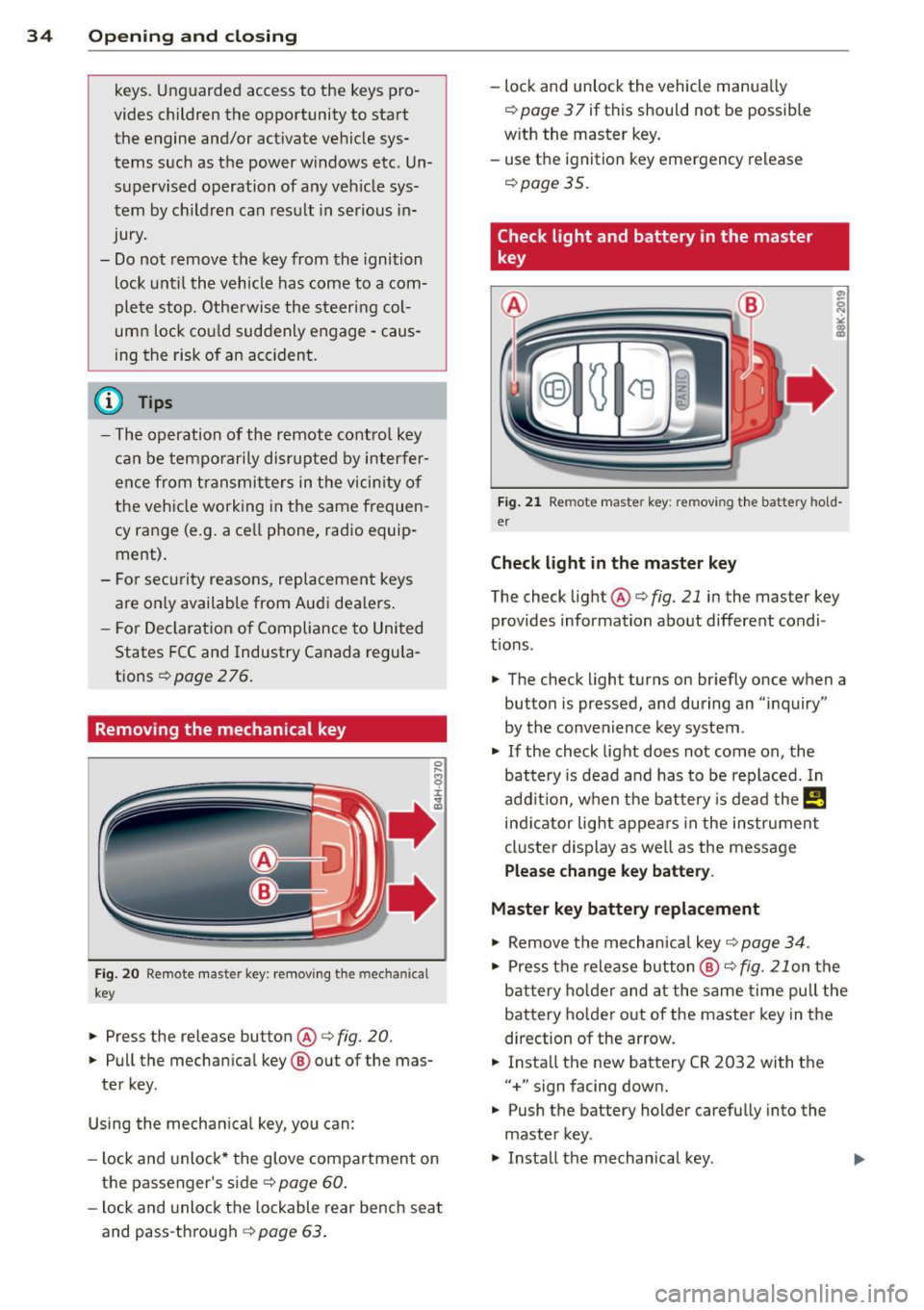
Remov ing the mechanic al key
Fig . 20 Remot e mas ter key: re mov ing the mec hanic al
key
.. Press the release button@¢ fig. 20.
.. Pu ll the mecha nical key @ out of the mas
te r key .
Using the mechan ica l key, you can :
- l ock and unlock* the glove compartmen t on
the passenger's side ¢
page 60.
-lock and unlock t he lockable rear bench seat
and pass -th ro ugh ¢
page 63.
-lock and unlock the vehicle manua lly
¢
page 3 7 if this should not be possible
w ith the master key.
- use the ignition key emergency release
¢ page 35.
Check light and battery in the master
key
•
Fig. 21 Re mote mas ter key: re m ov ing th e bat te ry h old
er
Check light in the master key
The check light@¢ fig. 21 in the mas ter key
provides information about different condi
t ions .
.. The check light turns on br iefly once when a
button is pressed , and during an " inquiry"
by the convenience key system .
.. If the check light does not come on , the
battery is dead and has to be replaced. In
add it ion, when the battery is dead the
!,I
ind icator light appe ars in the instrument
cl uster display as we ll as the message
Plea se change key battery.
Master key battery replacement
.. Remove the mechan ica l key ¢ page 34 .
.. Press t he re lease button @¢ fig. 21on the
bat tery ho lde r and at the same time pu ll the
battery ho lder out of the maste r key in the
d irection of the ar row .
.. Insta ll the new battery CR
2032 with the
"+ " sign facing down .
.. Push the battery holder carefully into the
master key.
.,. Install the mechanical key .
Page 39 of 294
- You cannot open the doors or the rear lid
from the outside (increased security, for ex
amp le when you are stopped at a red light).
- The diodes in the power locking switc h illu
minate when all the doors are closed and
locked.
- You can unlock and open the doors from the
i nside by pul ling on the door hand le .
- If you have a crash and the airbag is activat
ed , the doors automatically un lock .
_& WARNING
- The power locking switch works with the
ignition off and automatically locks the
entire vehicle when it is actuated .
- On a vehicle locked from the outside the
power locking system switch is inopera
t ive.
- locked doors make it more difficult for
emergency workers to get into the vehi
cle, which puts lives at risk . Do not leave
anyone behind in the veh icle, especially
children .
@ Tips
Your vehicle is locked automatically at a
speed of 9 mph (15 km/h) (Auto lock)
Qpage 32. You can un lock the vehicle
aga in using the opening function in the
powe r locking system switch~-
Setting power locking
In the radio/MM!*, you can set which doors
the centrol locking system will unlock .
~ Select : ICARI funct ion button > Central lock
ing .
Or
~ Select: ~ IC_A_R~I funct ion button > Car system s
control button > Vehicle settings > (C entral
locking )* .
Sin gle door unlocki ng /Unl ock door s* -
you
can specify which doors u nlock when you open
the vehicle .
- Se lecting
off / All and pressing the Ii button
on the remote control key unlocks the entire
vehicle.
Opening and clo sin g 3 7
- Select ing o n/Dri ver and pressing the~ but
ton on the remote control key once u nlocks
only the driver's door . In vehicles w ith a con
ven ience key*, only the door whose handle
you pull w ill unlock . If you press the @! but
ton tw ice, the entire vehicle will u nlock . If
you press the [@] button, t he e ntire ve hicle
w ill always lock .
Luggage comp. lock /Lock e xterio r trunk han
dl e -
If you select On , you can no longer open
the luggage compartment us ing the rear lid
hand le
Q page 39, fig. 28 . In this case, the
r ear lid can be opened with the
l""I bu tton on
the maste r key
Q poge 35, fig. 22 or with the
I"" I* button in the driver's door .
Tone when locking -if you select On, a tone
will sound when yo u loc k the vehicle .
Auto Lock /Lock when driv ing -if you select
On, the entire vehicle w ill lock automatically
when the speed reaches 9 mph (15 km/h) .
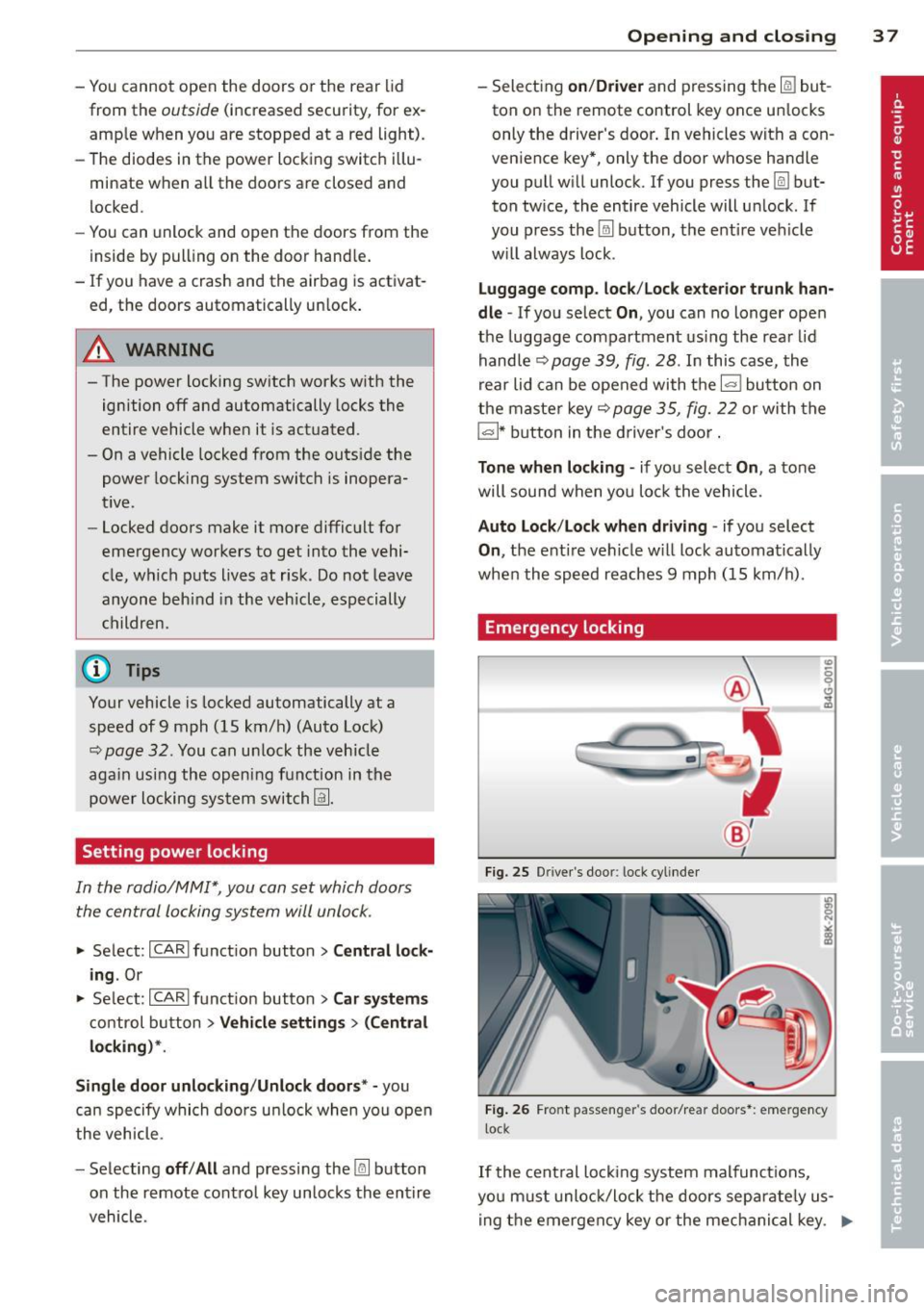
Emergency locking
Fig. 25 D rive r's doo r: lock cylinder
Fig . 26 Fro nt p assen ger 's doo r/rear doors*: eme rgency
lock
If the cent ral locking system malfunct ions,
yo u m ust unlock/lock the doors separate ly us
ing the emergency key or the mec hanical key . .,,.
Page 41 of 294
Rear lid
Opening/closing rear lid
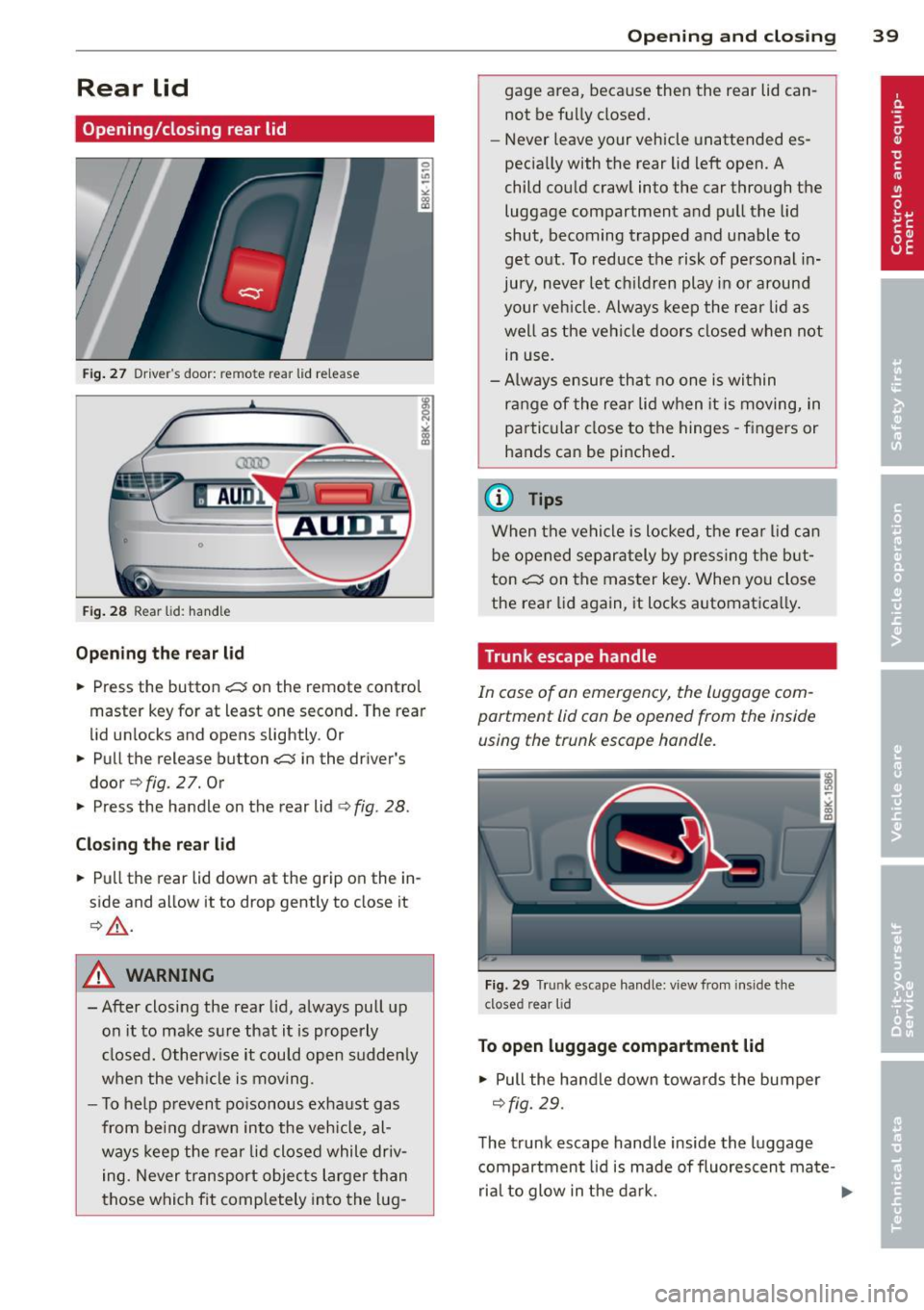
Fig. 27 Drive r"s door: re m ote rear lid rele ase
Fig. 28 Rear lid: handle
Opening the rear lid
.,. Press the button .c::5 on the remote control
master key for at least one second. The rear
lid unlocks and opens slightly . Or
.,. Pull the release button
.c::5 in the driver's
door
q fig. 2 7. Or
.,. Press the handle on the rear lid
¢fig . 28.
Closing the rear lid
.,. Pull the rear lid down at the grip on the in
side and allow it to drop gently to close it
¢ ,&. .
A WARNING
-After closing the rear lid, always pull up
on it to make sure that it is properly
closed. Otherwise it could open sudden ly
when the veh icle is moving .
- To help prevent poisonous exhaust gas
from being drawn into the vehicle, al
ways keep the rear lid closed while driv
ing. Never transport objects larger than
those which fit comp letely into the lug-
Opening and closing 39
gage area, because then the rear lid can
not be fully closed.
- Never leave your vehicle unattended es
pecia lly with the rear lid left open. A
child could craw l into the car through the
luggage compartment and pull the lid
shut, becoming trapped and unable to
get out. To reduce the risk of personal in
jury, never let childre n play in or around
your vehicle. Always keep the rear lid as
well as the vehicle doors closed when not
in use.
- Always ensure that no one is within
range of the rear lid when it is moving, in
particular close to the hinges -fingers or
hands can be pinched .
@ Tips
When the vehicle is locked, the rear lid can
be opened separately by pressing the but
ton
.c::5 on the master key . When you close
the rear lid aga in, it locks automat ica lly.
Trunk escape handle
In case of an emergency, the luggag e com
partment lid can be opened from the inside using the trunk escape handle .
Fig . 29 T run k escape handle: view fr om ins ide the
closed rear lid
To open luggage compartment lid
.,. Pull the handle down towards the bumper
¢fig. 29.
The trunk escape handle inside the luggage
compartment lid is made of fluorescen t ma te-
rial to glow in the dark. .,..
Page 44 of 294
42 Opening and clo sing
Emergency closing of the panoramic
tilting sunroof
If the sunroof detects an object in its path
when it is closing , it will open again a utomati
cally. In this case, you can close the roof with
the power emergency closing function .
.. Within five seconds after the sunroof opens
automatically, pull the switch until the roof
closes .
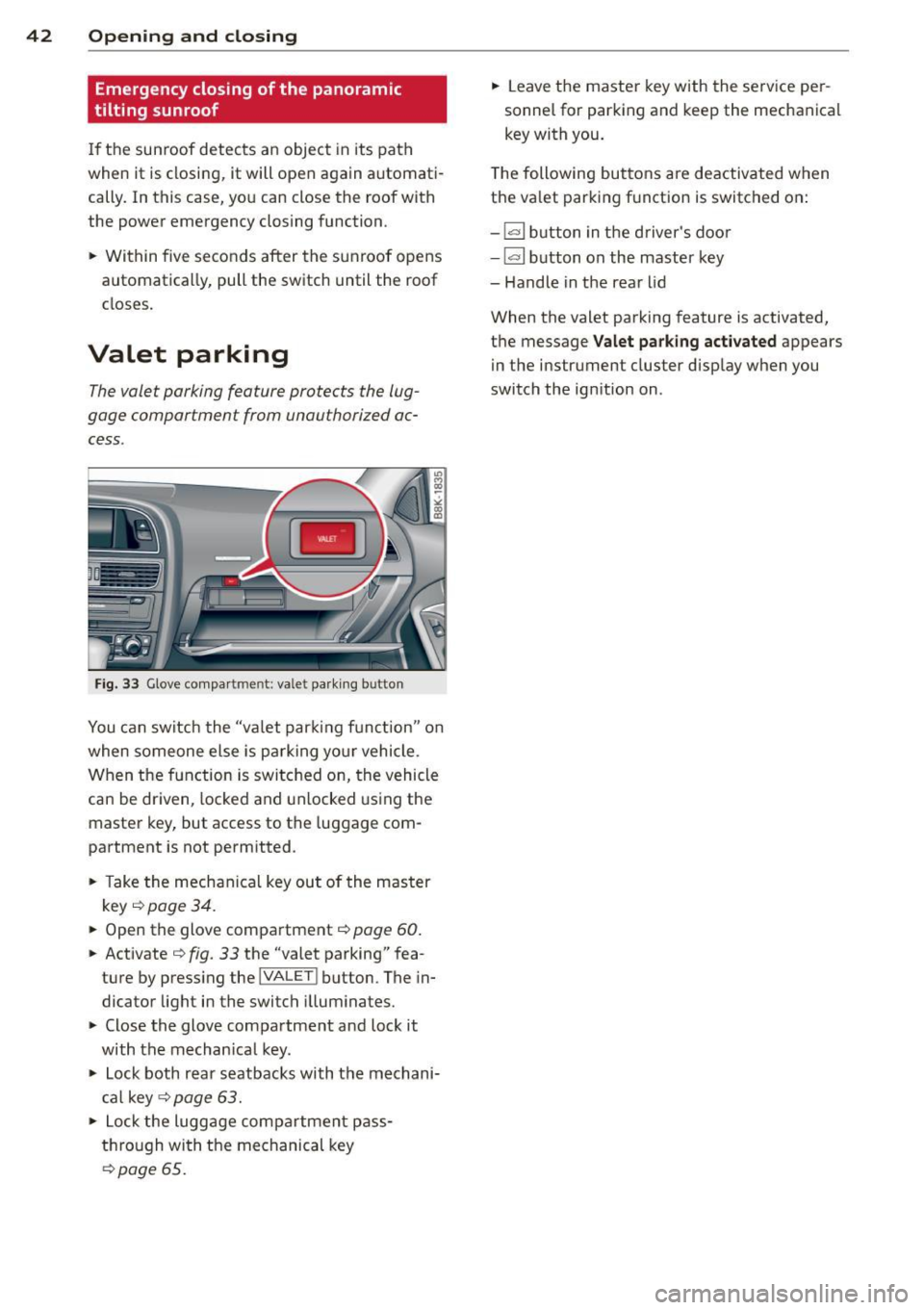
Valet parking
The valet parking feature protects the lug
gage comportment from unau thorized ac
cess .
Fig. 33 Glove co mpar tmen t: va let park ing b utton
You can switch the "va let par kin g f unct ion" o n
when someone else is pa rk ing yo ur vehicle.
When the function is switched on, the vehicle
can be driven, locked and unlocked us ing the
master key, but access to the luggage com
partment is not permitted .
.. Take the mechanica l key out of the master
k ey
c::> page 34 .
.. Open the glove compa rtment c::> page 60 .
.. Activate c::> fig. 33 the "valet parking" fea
ture by press ing the
!VA LE T ! button . The in
dicator light in the switch illum inates .
.. Close the glove compa rtment and lock it
with the mechan ical key .
.. Lock both rear seatbacks with the mechani
cal key
<=::> page 63 .
.. Lock the luggage com partment pass
t h rough wi th the mechanical key
c::> poge 65.
.. Leave the master key with the se rv ice pe r
sonnel for parking and keep the mechanica l
key with you.
T he following buttons are deactivated w hen
the va let parking f unction is switched on:
- 1""' 1 button in the d river 's doo r
-la l button on the master key
- Handle in the rear lid
When the valet parking feature is activated,
t h e message
Valet parking activated appears
i n the instrument clus ter disp lay when you
switch the ign ition on .
Page 45 of 294
Clear vision Lights
Switching the lights on and off
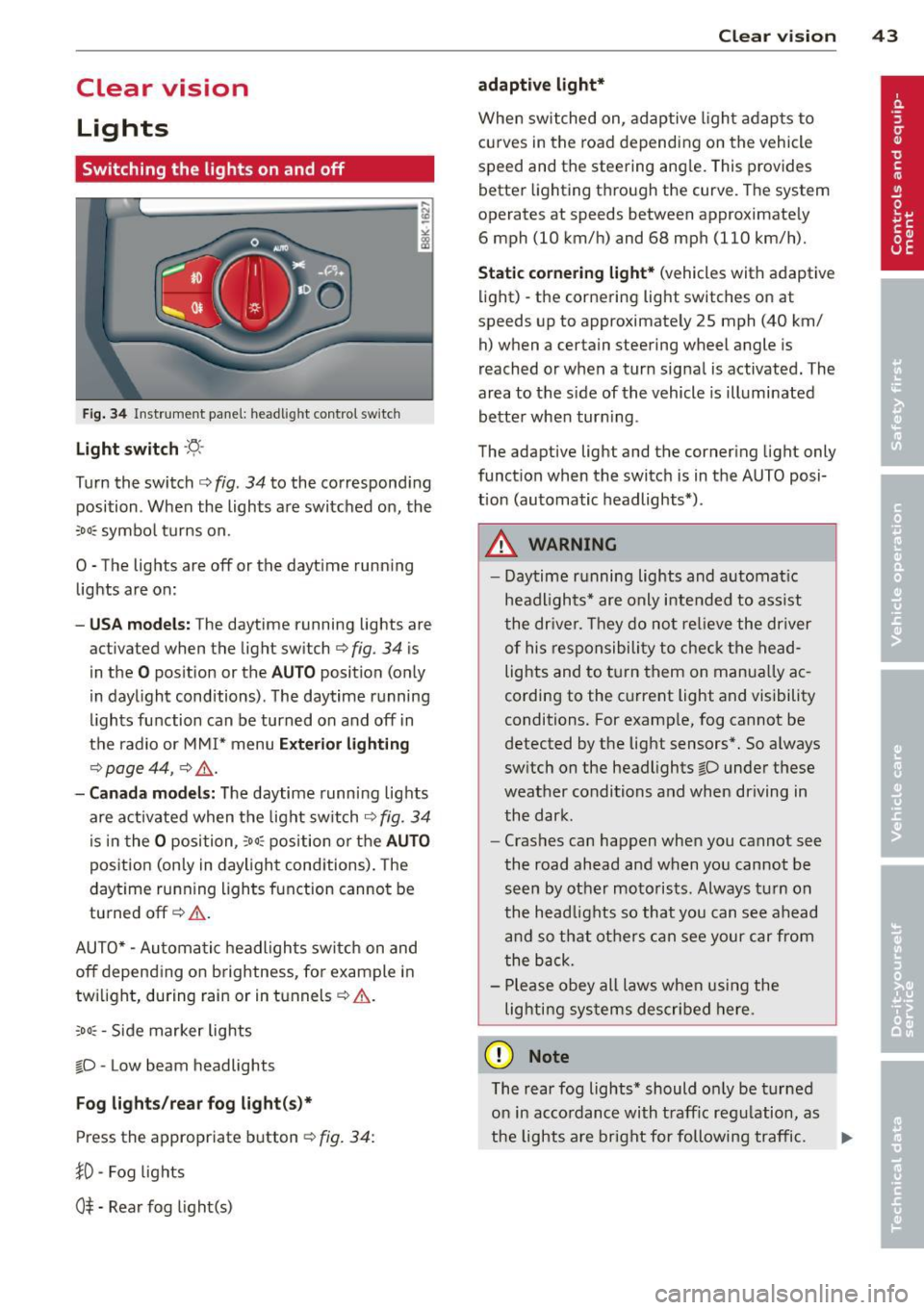
F ig . 34 Instrument pane l: headlight control switch
Light switch ·'t/,·
Turn the switch c> fig. 34 to the correspond ing
position . When the lights are switched on, the
:oo: symbol turns on.
0 • The lights are off or the daytime running
lights are on:
-USA mod els : The daytime running lights are
activated when the light switch
c> fig . 34 is
in the
O position or the AUTO position (only
in daylight conditions) . The daytime running
lights function can be turned on and off in
the radio or MMI* menu
E xterior li ghtin g
¢ page 44 , c> &_.
-Ca nada mod els: The daytime runn ing lights
are activated when the light switch
¢ fig . 34
is i n the O position, :oo : position or the AUTO
posit ion (on ly in daylight cond itions). The
daytime running lights function cannot be
turned off¢&. .
AUTO* -Automatic headlights switch on and
off depending on b rightness, for example in
tw ilight, during rain or in tunnels ¢,& .
:oo: -Side marker lights
~D -Low beam headlights
Fog light s/rear fog ligh t(s)*
Press the appropriate button c> fig. 34:
1D -Fog lights
0$ -Rear fog light(s)
Clear vi sion 43
adaptive light*
When switched on, adaptive ligh t adap ts to
curves in the road depend ing on the vehicle
speed and the steering angle. This provides
better lighting through the curve. The system
operates at speeds between approximately
6 mph (10 km/h) and 68 mph (110 km/h).
Static corner ing light * (vehicles with adaptive
light) -the cornering light switches on at
speeds up to approximately 25 mph (40 km/
h) when a certain steering wheel angle is
reached or when a turn signal is activated. The
area to the s ide of the vehicle is illuminated
better whe n turn ing .
The adaptive light and the cornering light only
function when the switch is in the AUTO posi
tion (automatic headlights*) .
A WARNING
-Daytime running lights and automatic
headlights* are only intended to ass ist
the driver . T hey do no t re lieve the driver
of his responsibility to chec k the head
lights and to t urn them on manua lly ac
cording to the current light and visibility
conditions. For example, fog cannot be
detected by the light sensors*. So a lways
switch on the headlights
~D under these
weather conditions and when driving in
the dark .
- Cras hes can happen when you cannot see
the road ahead and when yo u cannot be
seen by other motorists. Always turn on
the head lights so that you can see ahead
and so that others can see your car from
the b ack.
- Please obey all laws when using the
lig hting sys tems described here.
(D Note
The rear fog lights* should on ly be turned
on in accordance with t raff ic regulation, as
the lights are bright for following traffic. ..,.
Page 46 of 294
44 Clear vis ion
@ Tips
- The light sensor* for headlight control is
located in the rear view m irror mount.
You should therefore not apply any st ick
ers to the windsh ield in this area in order
to prevent malfunctions or failures.
- Some exterior lighting functions can be
adjusted
c> page 44.
- When you remove your key from the igni
tion while the vehicle's lights are turned
on, a buzzer sounds as long as the driv
er's door is open .
- In cool or damp weather, the ins ide of
the headlights, turn signals and tail lights can fog over due to the tempera
ture difference between the inside and
outside. They will clea r shor tly after
switching them on. This does not affect
the service life of the lighting.
- In the even t of a light sensor malfunc
tion, the driver is no tified in the instru
ment cluster disp lay¢
page 22.
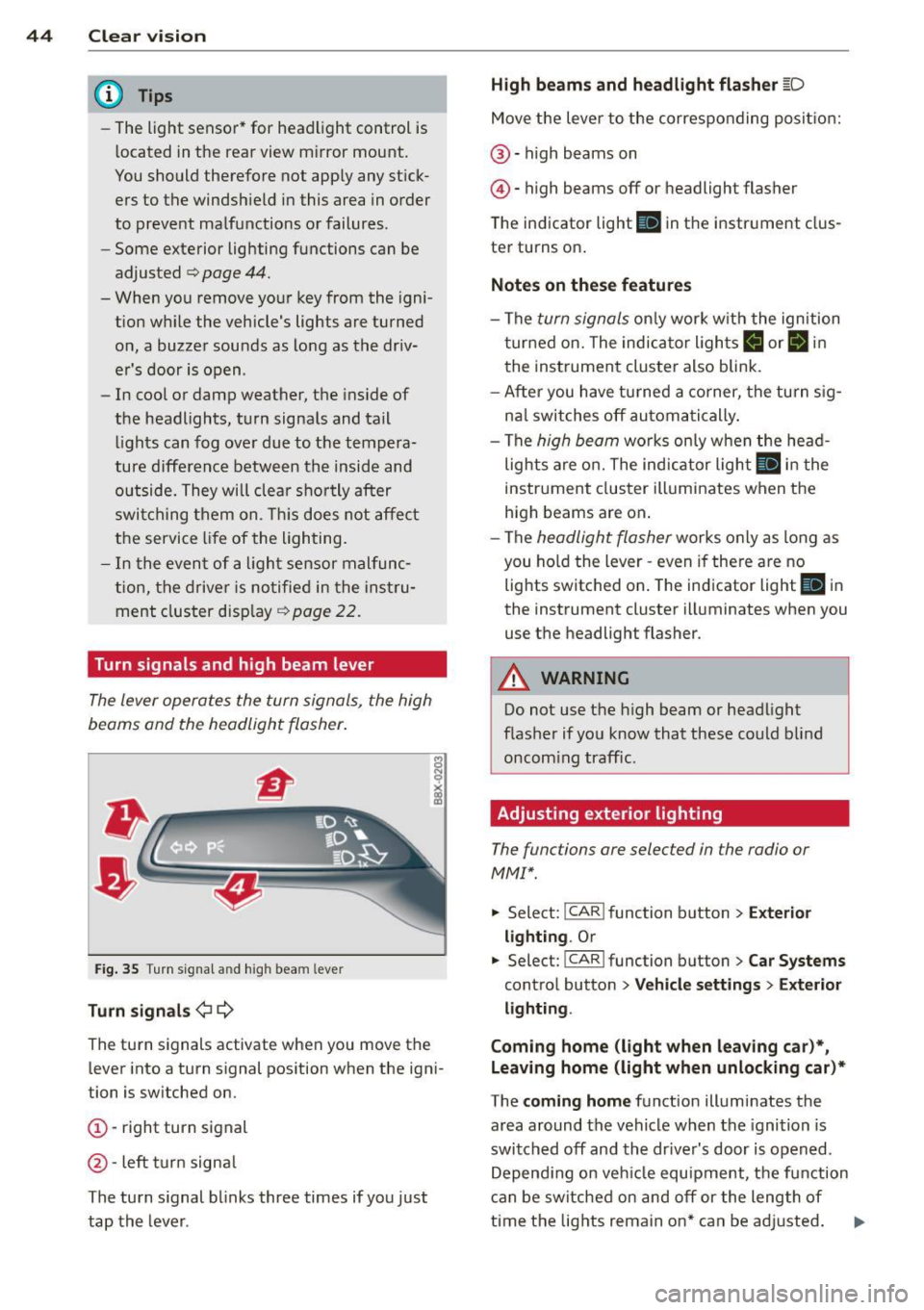
Turn signals and high beam lever
The lever operates the turn signals, the high
beams and the headlight flasher .
Fig. 35 T u rn s ig na l and h ig h beam leve r
Turn sign als ¢i ¢
The turn signals activate when you move the
l ever into a turn s ignal pos ition when the ign i
tion is switched on.
(D -right turn signal
@-left tur n signa l
The turn s ignal blinks three times if you just
tap the lever .
High be ams and headlight flasher [D
Move the lever to the correspon ding posit io n:
@ -high beams on
@ -high beams off or headlight flasher
The indicator light
II in the i nstr ument clus
te r turns on .
Notes on thes e features
- The turn signals on ly work w ith the ign ition
t ur ned on. The indicator lights
B or II in
t he instrument cluster also blink.
- After you have turned a co rner, the tu rn s ig
na l switches off au toma tically .
- The
high beam works on ly w hen the head
lights a re o n. The ind icator light
II in the
instrument cluster ill uminates when the
high beams are on .
- The
headligh t flasher works only as long as
you ho ld the lever -even if the re a re no
lights switched on . The ind icator light
II i n
the instrument cluster illuminates when you
use the headlight flasher.
A WARNING
--
Do not use the h igh beam or headlight
flashe r if you know that these could blind
oncom ing traffic.
Adjusting exterior lighting
The functions ore selected in the radio or
MMI" .
.,. Select: I CAR ! function button > Ext erio r
light ing .
Or
.,. Select: !CAR I function button> Car S ystems
control button > Ve hicle s etting s> Exterior
lighting .
Coming home (light when leav ing car }*,
Leav ing home (light when unlocking car )*
The coming home function illuminates the
area around the vehicle when the ignition is
switched off and th e dr ive r's door is open ed.
Depend ing on veh icle equ ipment, the function
can be switched on and off or the length of
time the lig hts remain on* can be ad justed . ..,.
Page 47 of 294
The leavin g home function il luminates the
area around the vehicle when unlocking it.
This function can be switched on and off.
The
c o ming h om e and lea ving home func
tions on ly operate when it is dark and the
light switch is in the AUTO position
¢ page 43, fig. 34.
Auto headlight s*
When the light switch is in the A UTO
¢
page 43 position, the switch-on po int of the
lights can be changed in the automatic driving
light function.
Daytime running lights
USA m odel s:
You can switch the dayt ime run
ni ng lights
on and o ff .
Canada mod els:
The function cannot be
turned off .
It is activated a utomat ica lly each
time the ignition is switched on.
Travel mode*
The headlight beam is asymmetrical. This pro
v ides stronger illum ination on the side of the
road on wh ich you are driving .
If you are driv
i ng in a count ry that d rives on the opposite
side of the road from your own country, th is
will cau se glare for on coming dr ivers. To pre
vent glare:
- Trave l mode must be selected in vehicles
with Xenon headlights*.
- In veh icles with halogen headlights, ce rtain
areas of the head light lenses must be cov
ered w ith wate rproof adhesive covers that
prevent light from passing thro ugh. Fo r
more information, please see your author
ized Audi dea ler or author ized repa ir faci lity .
(D Tips
When trave l mode is activated, a display in
the dr iver information system indicates
this each time you switch the ignit io n on.
Clear vi sion 45
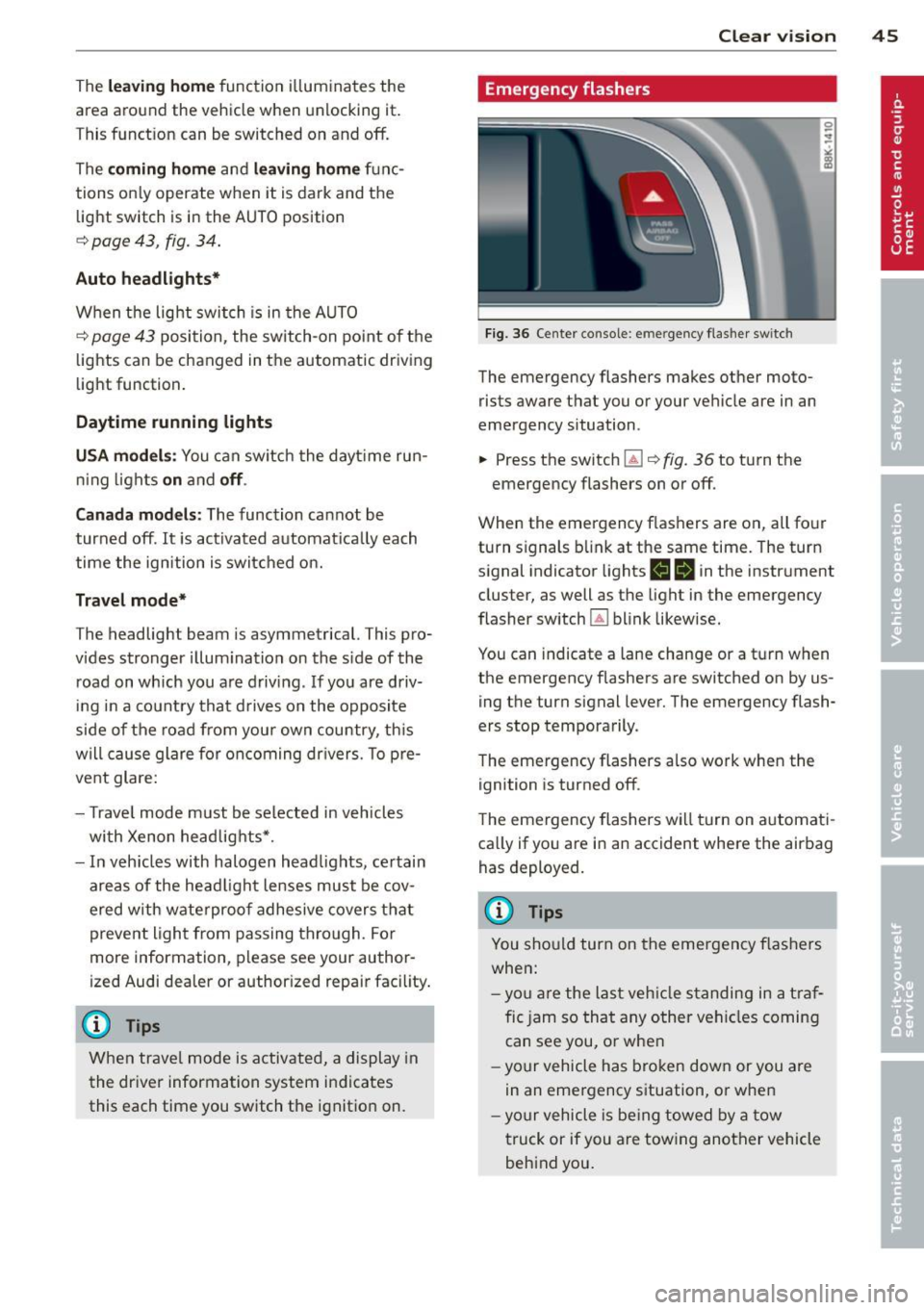
Emergency flashers
F ig. 36 Center console: emergency flasher switch
The emergency flashers makes other moto
rists aware that you or your vehicle are in an
emergency situation .
.,. Press the switch ~¢
fig. 36 to turn the
emergency flashers on or off.
When the emergency flas hers are on, all four
turn signals b link at the same time. The turn
s ignal indicator lights
1111 in the instrument
cluster, as well as the light in the emergency
flasher switch ~ blink likewise.
You can indicate a lane change or a t urn w hen
the emergency flashers are switched on by us
ing the turn signal lever. The emergency flash
ers stop temporarily.
T he emergency flashers also work when the
ignition is turned off.
T he emergency flashers wi ll turn on a utomat i
ca lly if yo u are in an accident where the airbag
has deployed.
(D Tips
You sho uld turn on the emergency f las hers
when:
- yo u are the last veh icle standing in a t raf
fic jam so that any other vehi cles coming
can see you, or whe n
- your vehicle has bro ken down or you are
in an emergency s ituation, o r when
- yo ur vehicle is be ing towed by a tow
truck or if you are tow ing another vehicle
beh ind you.
Page 48 of 294
46 Clear vis ion
Interior lights
Front /rear interior lights
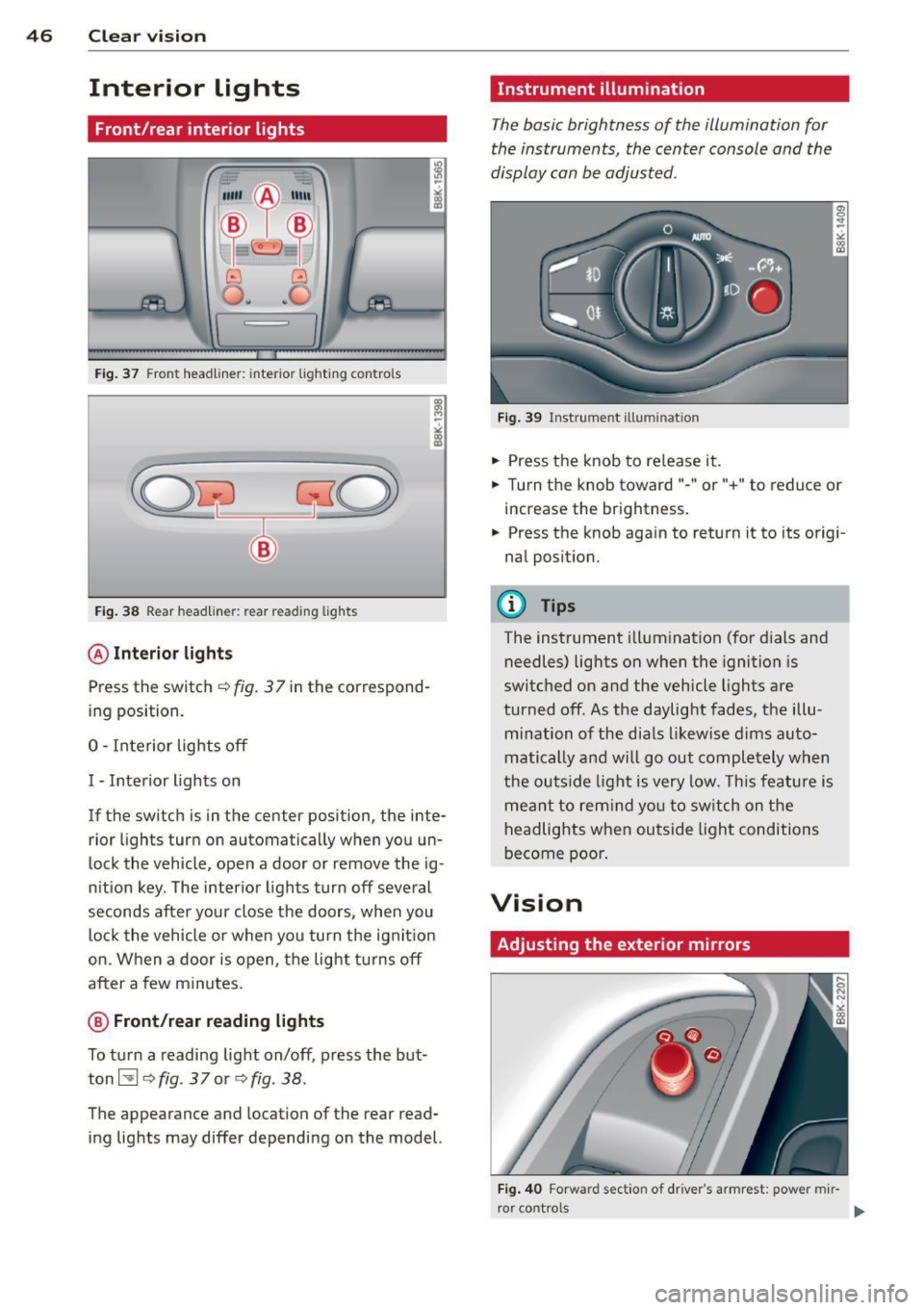
Fig . 37 Front headliner: inte rior lighting controls
Fig. 38 Rear headliner: rear reading lights
@Interio r ligh ts
Press the switch ~ fig. 3 7 in the correspond
ing position.
0 -Interior lights off
I -Interior lights on
If the switch is in the center position, the inte
rior l ights turn on automatically when you un
lock the vehicle, open a door or remove the ig
n ition key. The interior lights turn off several
seconds after your close the doors , when you
lock the vehicle or when you turn the ign it ion
on. When a door is open, the light tu rns off
after a few minutes.
@ Front /rear r eading lights
To turn a reading light on/off, press the but
ton~
~ fig. 37 or ~fig. 38.
The appearance and location of the rear read
ing lights may differ depending on the model.
Instrument illumination
The basic brightness of the illumination for
the instruments, the center console and the
display can be adjusted .
Fig . 39 Inst rume nt illu mination
.,. Press the knob to re lease it .
.,. Turn the knob toward "-" or"+" to reduce or
increase the brightness .
.,. Press the knob again to return it to its origi
nal posit ion.
(!') Tips
The instrument illumination (for dials and
needles) lights on when the ignition is
switc hed on and the vehicle lights are
turned off. As the daylight fades, the illu
mination of the dia ls likewise dims auto
matically and wi ll go out completely when
the ou tside light is very low. This feature is
meant to rem ind yo u to sw itch on the
headlights when ou tside light conditions
become poo r.
Vision
Adjusting the exterior mirrors
Fig . 4 0 Forward section of driver's armrest: power mir
r or controls