light AUDI A5 COUPE 2013 Workshop Manual
[x] Cancel search | Manufacturer: AUDI, Model Year: 2013, Model line: A5 COUPE, Model: AUDI A5 COUPE 2013Pages: 294, PDF Size: 73.84 MB
Page 92 of 294
90 Transmi ssion
When st a tiona ry apply brake ped al while se
lecti ng gear
The se lector lever lo ck only funct ions when
the vehicle is stationary and at speeds up to
3 mph (5 km/h). At higher speeds, the lock is
automatically deactivated i n the N position .
The se lector lever is not loc ked when s hifting
q ui ckly thro ugh N, for examp le from R to D/5.
This makes it possible to free the veh icle when
it is stuck by " rocking" it . The selector lever
l ock engages if the lever stays in N longer
than 1 second when the brake pedal is not pressed.
Inte rlock button
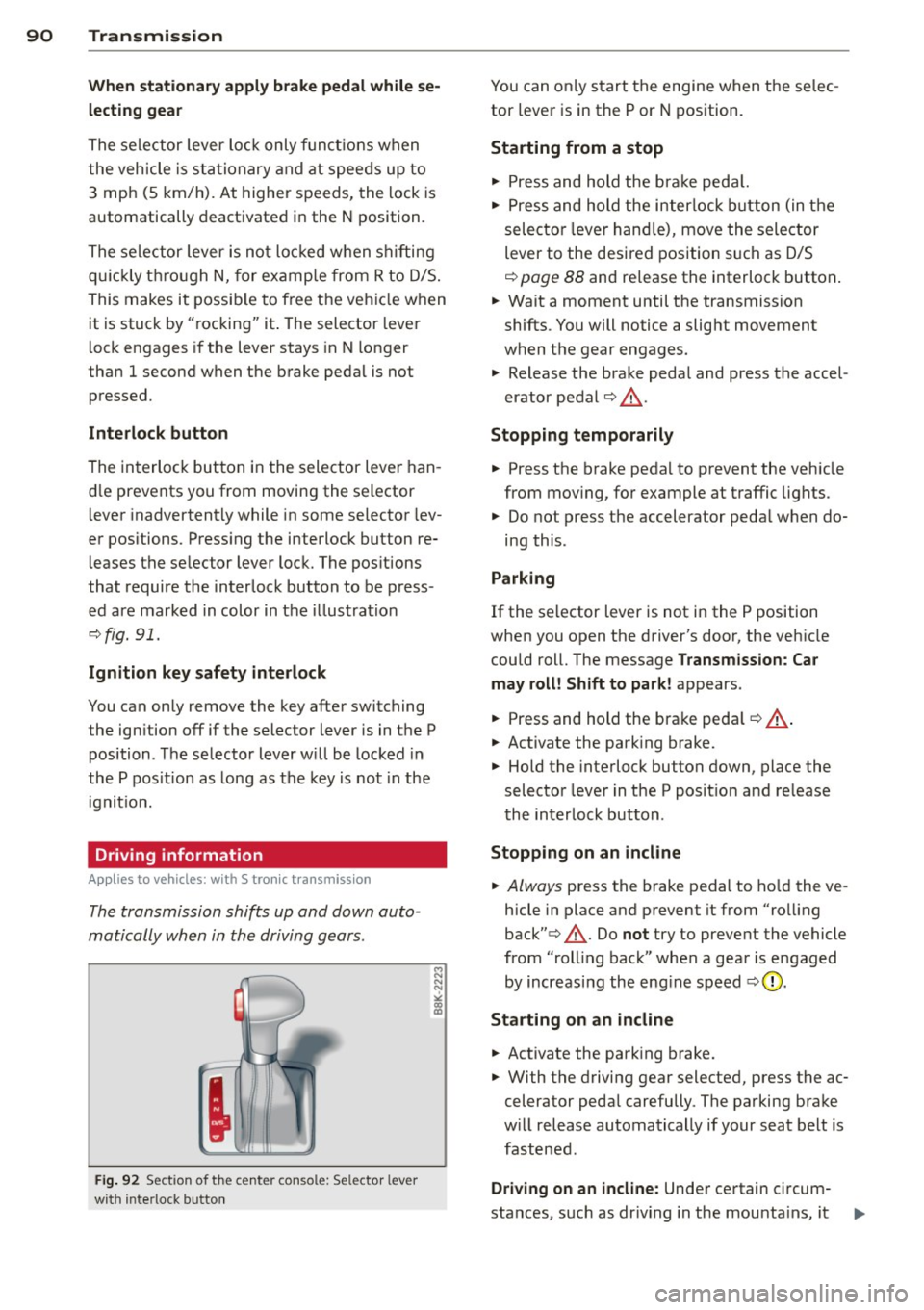
The interlock button in the selector lever han
d le prevents you from moving the selector
l ever inadvertently while in some selector lev
er positions. Press ing the interlock button re
leases the se lector lever lock. The pos itions
that require the interlock button to be press
ed are marked in color in the i llustration
~ fig.91.
Ignition key safety inte rlock
You can only remove the key after switching
the ign it ion off if the selec tor lever is in the P
position . T he selector lever w ill be locked in
the P pos ition as long as the key is not in the
ignit io n.
Driving information
App lies to vehicles: with S tronic transmission
The transmission shifts up and down auto
matically when in the driving gears .
Fig. 92 Sect io n of the ce n ter conso le: Sele ctor lev er
w it h inte rlock b utton
M N N N
" CD CD
You can on ly start the engine when the se lec
tor lever is in the P or N position.
Sta rting from a stop
" Press and hold the b ra ke peda l.
.. Press and hold the interlock button (in the
selecto r lever hand le), move the selector
lever to the desired position s uch as D/5
~ page 88 and re lease the interlock button .
.. Wait a moment until the transmission
shifts. You will notice a slight movement
when the gear engages.
.. Release the brake peda l and press the accel
erator pedal¢& .
Stopping t emporarily
.. Press the brake peda l to prevent the veh icle
from mov ing, for example at traffic lights .
.. Do not press the accelerator peda l when do-
ing this .
Parking
If the selector lever is not in the P position
when you open the driver's door, the veh icle
could roll. The message
Transmission : Car
may roll! Shift to park!
appears .
.. Press and hold the brake pedal¢ ,&. .
.. Activate the park ing brake.
.. Hold the interlock button down, place the
selector lever in the P posit ion and re lease
the interlock button .
Stopping on an incline
.. Always press the brake pedal to ho ld the ve
hicle in place and preven t it from "ro lling
back" ¢,&. . Do
not try to prevent the vehicle
from "roll ing back" when a gear is engaged
by increasing the eng ine speed
~ CD .
St arting on an incline
.. Activate the park ing brake .
.. With the driving gear selected, press the ac
celera tor peda l carefully . The parking brake
w ill release automatically if your seat be lt is
fastened .
Driving o n an incline: Under certain c ircum-
sta nces, such as dr iv ing in the mounta ins, it ..,_
Page 94 of 294
92 Transmission
& WARNING
Hill descent control cannot overcome
physical limitations, so it may not be able
to maintain a constant speed under all
conditions. Always be ready to apply the
brakes.
Manual shift program
Applies to vehicles: with S tronic transmission
Using the manual shift program you can
manually select gears .
Fig. 93 C en ter conso le : shift in g th e mu ltitro nic/t ip
tron i c manually
Fig. 94 Steering wheel : Shi ft buttons
Gear selection with selector lever
"' N N N
" "' a)
The tiptronic mode can be s elected either with
the vehicle stationary or on the move.
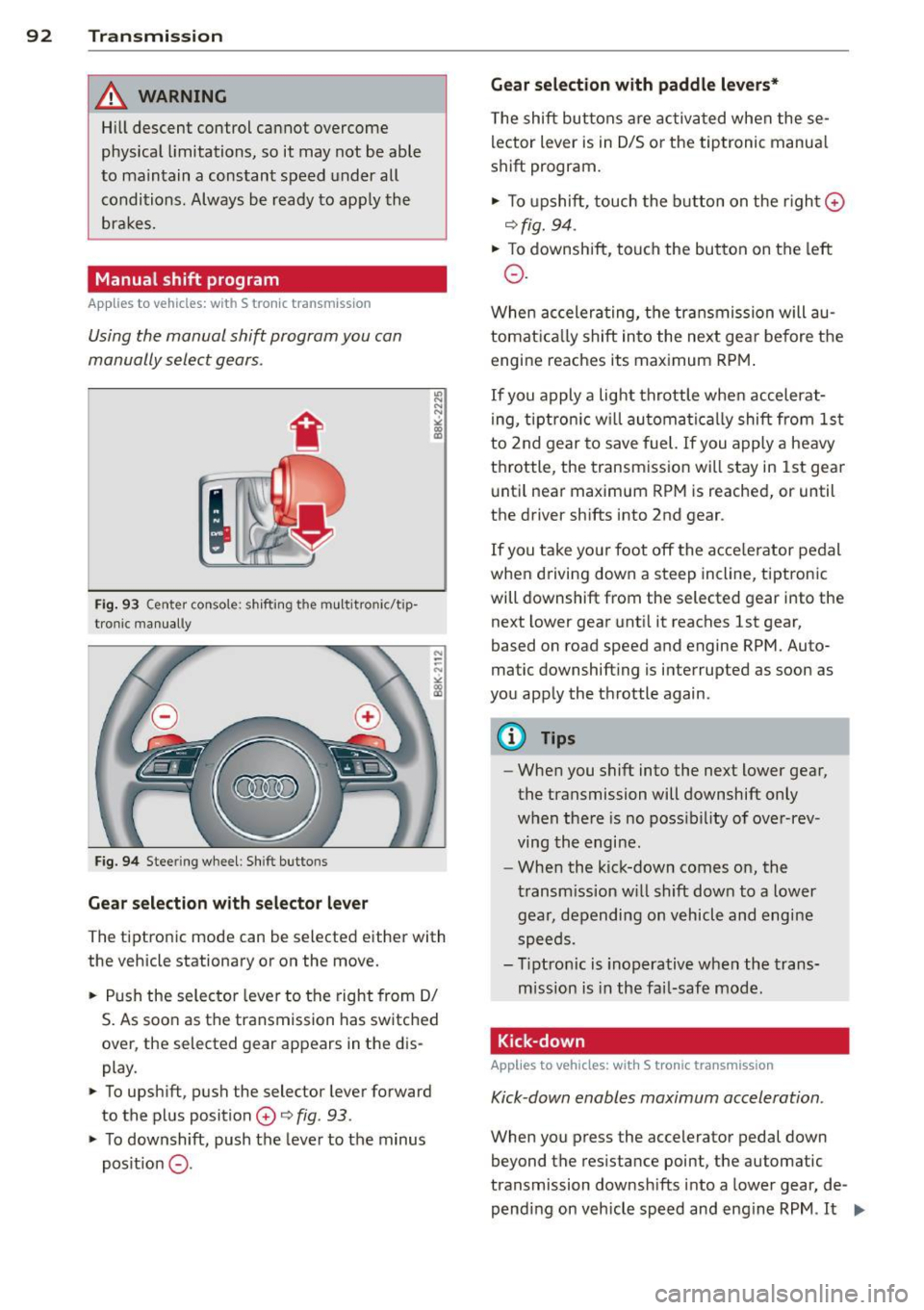
.. Push the selector lever to the right from 0/
S. As soon as the transmission has switched
over , the selected gear appears in the dis
play .
.. To upshift, push the selector lever forward
to the plus position
0 o fig . 93 .
.. To downshift, push the lever to the minus
pos it ion
0 -
Gear selection with paddle levers*
The shift buttons are activated when these
lector lever is in 0/5 or the tiptronic manua l
shift program.
.. To upshift, touch the button on the right ©
ofig. 94 .
.. To downshift, touch the button on the left
0 .
When accelerating, the transmission will au
tomatically shift into the next gea r before the
engine reaches its maximum RPM.
If you apply a light throttle when accelerat
ing, tiptronic will automatically shift from 1st
to 2nd gear to save fuel. If you apply a heavy
throttle , the transmission will stay in 1st gear
until near maximum RPM is reached, or until
the drive r shifts into 2nd gear .
If you take you r foot off the acce le rator pedal
when dr iving down a steep incline, tiptronic
will downshift from the selected gear into the
next lower gear until it reaches 1st gear,
based on road speed and engine RPM. Auto
matic downshifting is interrupted as soon as
you apply the throttle again.
@ Tips
-When you shift into the next lower gear,
the transmission will downshift only
when there is no possibility of over-rev
ving the engi ne.
- When the kick-down comes on, the
transmission will shift down to a lower
gear, depending on vehicl e and engine
speeds .
- Tiptronic is inoperative when the trans
mission is in the fail-safe mode .
Kick-down
Applies to vehicles: with S tronic transmission
Kick-down enables maximum acceleration .
When you press the accelerator pedal down
beyond the resistance point, the automatic
transmission downshifts into a lower gear, de
pending on vehicle speed and engine RPM .
It ...
Page 95 of 294
shifts up into the ne xt higher gea r once the
maximum specified engine RPM is reached .
A WARNING
Please note that the wheels could spin on
slick or slippery roads when kick-down is
active.
Launch Control Program
Applies to vehicles: with S tronic transmission
The Launch Control Program provides the
best ac celeration possible when starting from
a s top .
Requirement: The engine must be at operat
i ng temperature and the steering wheel must
not be turned.
... Press the
I~ OFF I button ¢ page 187 while
the engine is running . The
II indicator light
i ll uminates in the instrument cluster and
T raction control (ASR ): Off. Wa rn ing! Re
stricted stabil it y
appears in the driver infor
mation system d isplay .
... Move the selector lever to the D/S position
o r se lect t he
dynamic d riving mode in Aud i
drive selec t* ¢ page 110 .
... Press the br ake ped al stro ng ly w it h your left
f oot and hold it down for at least one sec
ond.
... At t he same time, press the accelerato r
peda l down completely with your right foot
unti l the engine reaches and maintains a
high RPM.
... Remove your foot from the brake peda l
within 5 seconds¢_&. .
A WARNING
-Always adapt you r d rivi ng to the traffic
flow.
- Only use the Launch Control P rogram
when roa d and tr affic cond it ions allow it
and ot her dr ivers will not be end angered
o r annoyed by yo ur driv ing and the vehi
cl e's acce leration .
- P lease note th at t he driving wheels can
spin and the vehicle can brea k away
-
Tran sm iss ion 93
when ASR is switched off, especially
when t he road is sli ppery .
- Once you have accelerated, you shou ld
sw itch the ASR back on by pressing the
I ~ OFFI button.
(D Tips
- The transmission temperature may in
crease s ignificantly after using the
launch control program. I f that happens,
the program may not be ava ilable for a
few minutes. It w ill be available again af
t er a cool-down per iod .
- When accelerating using the Launch
Cont ro l program, a ll vehicle parts are
subjec t to heavy loads . T his can r esult in
increase d wear .
Transmission malfunction
Applies to vehicles: with S tronic transmission
[O] Tran smission: Press brake pedal and s e
lect gear again.
P ress the brake pedal and select the desire d
selector lever position again. You ca n the n
continue d riving.
[O] Transmis sion overheating: Pleas e driv e
conservatively .
The transmiss ion temperature has increased
s ignificantly due to the sporty driving manner.
D rive in a less sporty ma nner until the tem
perature returns to the normal range and the
i ndicato r light switches of.
[O] Transmission malfunction: You can con
tinue driving
There is a system malfunction in the transmis
s ion. You may cont inue driving. Drive to yo ur
authori zed Aud i dea ler or qualified repa ir fa
c ili ty soon to have the malfunction corrected .
[O] Transmission malfunction : Limited dr iv-
ing functionality
""°
Page 100 of 294
98 Audi adaptive cruise control and braking guard
Switching on and off
Applies to vehicles: with Audi adaptive cruise co ntrol
Fig. 101 Selec tor lever: switching on/off
Fig . 102 Instrument clus te r: adap tive cru ise control
You can set any speed between 20 mph and
95 mph (30 and 150 km/h).
Indicator lamps and messages in the instru
ment cluster display inform you about the cur
r ent system status and settings.
Switching adaptive cruise control on
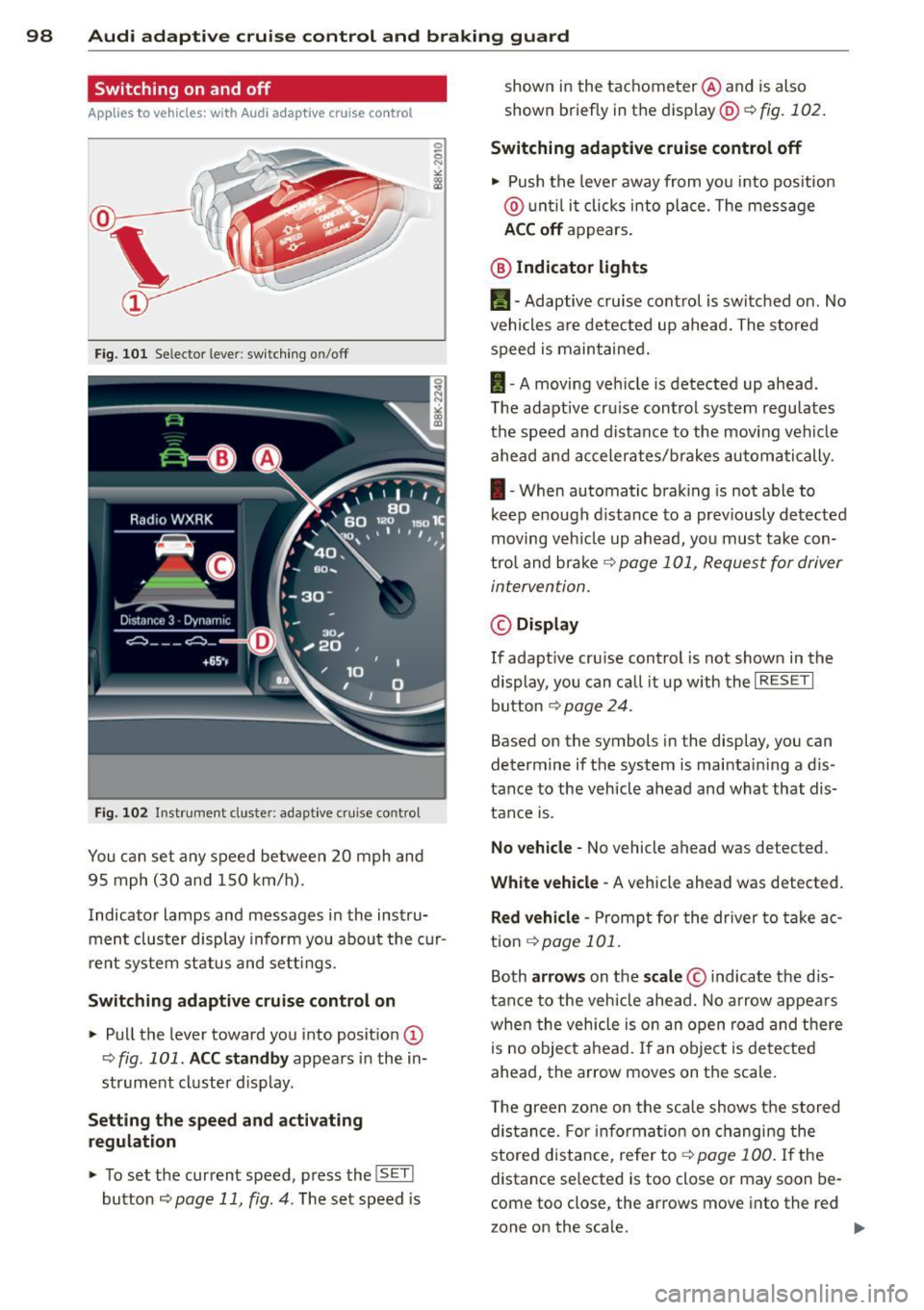
.. Pull the lever toward you into posit ion @
-:>fig . 101 . ACC standby appears in the in
strument cluster d isplay .
Setting the speed and activating
regulation
.. To set the current speed , press the ISET !
button r:::> page 11 , fig. 4. The set speed is shown in the tachometer
@and is also
shown briefly in the display@r:::>fig.
102.
Switching adaptive cruise control off
.. Push the lever away from you into pos itio n
@ unt il it clicks into place. The message
ACC off appears.
@ Indicator lights
II-Adaptive cruise control is switched on. No
vehicles are detected up ahead. The stored
speed is maintained.
I -A moving vehicle is detected up ahead .
T he adapt ive cru ise control system regulates
the speed and distance to the moving vehicle
ahead and accelerates/brakes automatically.
I -When automatic braking is not able to
keep e nough d istance to a prev iously detected
moving veh icle up ahead, you must take con
trol and brake
r:::> page 101, Request for driver
intervention.
© Display
If adapt ive cru ise control is not shown in the
display, you can call it up w ith the
I RESET I
button r:::> page 24.
Based on the symbols in the display, you can
determine if the system is maintai ning a d is
tance to the vehicle ahead and what that dis
tance is.
No vehicle -No vehicle ahead was de tected .
White vehicle -A vehicle ahead was detected .
Red vehicle -Prompt for the driver to take ac
tion
r:::> page 101 .
Both arrows on the scale© indicate the dis
tance to the vehicle ahead. No arrow appears
when the vehicle is on an open road and there
is no object ahead. If an object is detected
ahead, the arrow moves on the scale .
T he green zone on the scale shows the stored
distance. For information on changing the
stored distance, refe r to ~
page 100 . If the
distance se lected is too close or may soon be
com e too close , the arrows move into the re d
z one on the sca le.
Page 103 of 294
Audi adaptive cruise control and braking guard 101
Setting the driving mode for vehicles with
Audi drive select*
Refer to <=> page 1 10.
(D Tips
Yo ur setti ngs a re automatically store d an d
assig ned to the remote contro l key be in g
used.
Request for driver intervention
A pp lies to vehicles: w ith Audi a daptive cruise control
Fig. 106 Inst rumen t cl uster: reques t fo r drive r in te r·
ve ntio n
In ce rtain si tuations, t he sys tem w ill prom pt
you to take actio n. This cou ld ha ppen, for ex
ample, if braking by the a daptive cr uise con
trol system is not enough to maintain enough
d istance to the vehicle ahead.
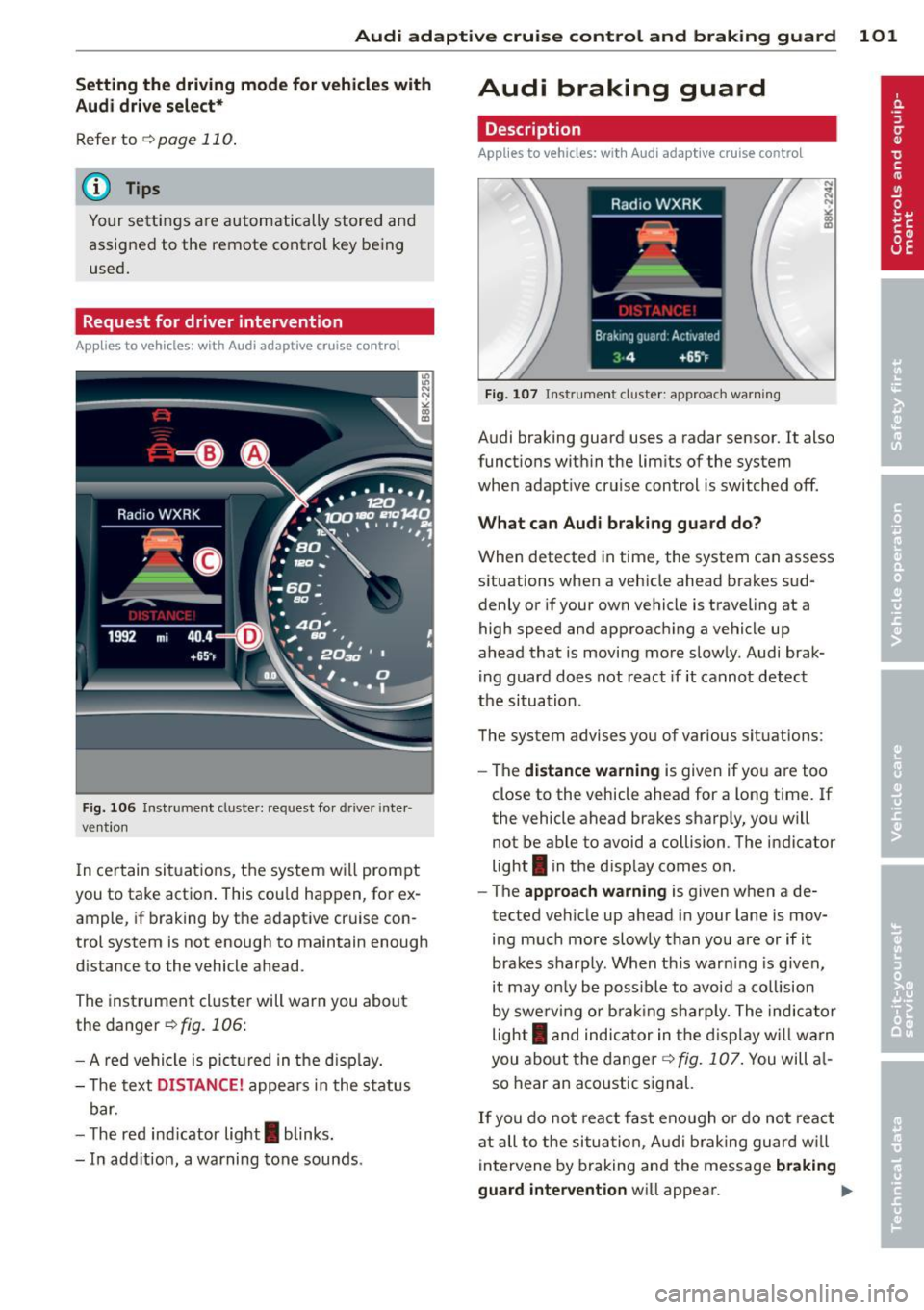
The inst rument cluste r will war n you about
the danger
<=>fig. 106:
- A red ve hicle is pic tured in the d is pla y.
- The text
DISTANCE! appea rs in the s ta tus
b ar.
- T he r ed indi cator lig ht
I blinks .
- In add it ion, a warning tone sounds.
Audi braking guard
Description
App lies to vehicles: wi th Audi ada ptive c ruise con tro l
Fig. 10 7 In str um ent clus ter: approach warnin g
Audi braking guard uses a radar sensor . It also
funct ions wit hin the lim its of the system
whe n adapt ive cruise control is switched off.
What can Audi braking guard do?
When detected in time, the system can assess
situations when a veh icle ahead brakes s ud
denly or if your own vehicle is t raveling at a
high speed and approac hing a ve hicle up
ahead that is movi ng mo re sl ow ly. Audi brak
ing guard does not react if it canno t detect
the si tua tion.
The system advis es yo u of various s ituations:
- The
distance wa rning is given if yo u are too
close to the vehicle ahead for a long time. If
the vehicle ahead bra kes sharply , yo u will
not be ab le to avoid a collision . The ind icator
light
I in the d isp lay comes o n.
- The
approach warning is given when a de
tected ve hicle up ahead i n your lane is mov
ing m uch mo re sl owly than you are or if i t
brake s sh arp ly. W hen t his war ning is g iven,
it may on ly be poss ible to avoi d a co llision
by swe rving or b ra kin g sharp ly. The indic ator
light
I a nd indic ator in t he di spl ay w ill war n
you abo ut the d ange r¢
fig . 107. You will a l
so hear an aco ustic s ignal.
If y o u do no t rea ct fas t eno ugh o r do not r eact
at all to the si tuat ion, A udi brak ing g uard w ill
i nt ervene by braking and the message
braking
guard intervention
w ill appea r. ~
Page 116 of 294
114 Park assist
Vehicles with the parking system are equipped
with a rear view camera in addition to the
acoustic parking system.
You can choose between two modes to assist
you with parking. For example, you can use
"parking mode 1" when parking in a parking
space or garage
c:> fig . 115. When you want to
park parallel to the edge of the street, select
"parking mode 2"
c:>fig . 116.
The rear acoustic park assist system is inte
grated in the rear of the vehicle and the rear
view camera is integrated in the rear lid
c:>page 115.
A WARNING
- T he rear view camera has blind spots, in
wh ich objects cannot be detected . Be es
pecially careful to check for small chil
dren and animals before backing up.
Small children and anima ls w ill not al
ways be detected by the sensors.
General Information
Appl ies to vehicles: w it h parking system (rear, wit h rear
v iew camera)
~--
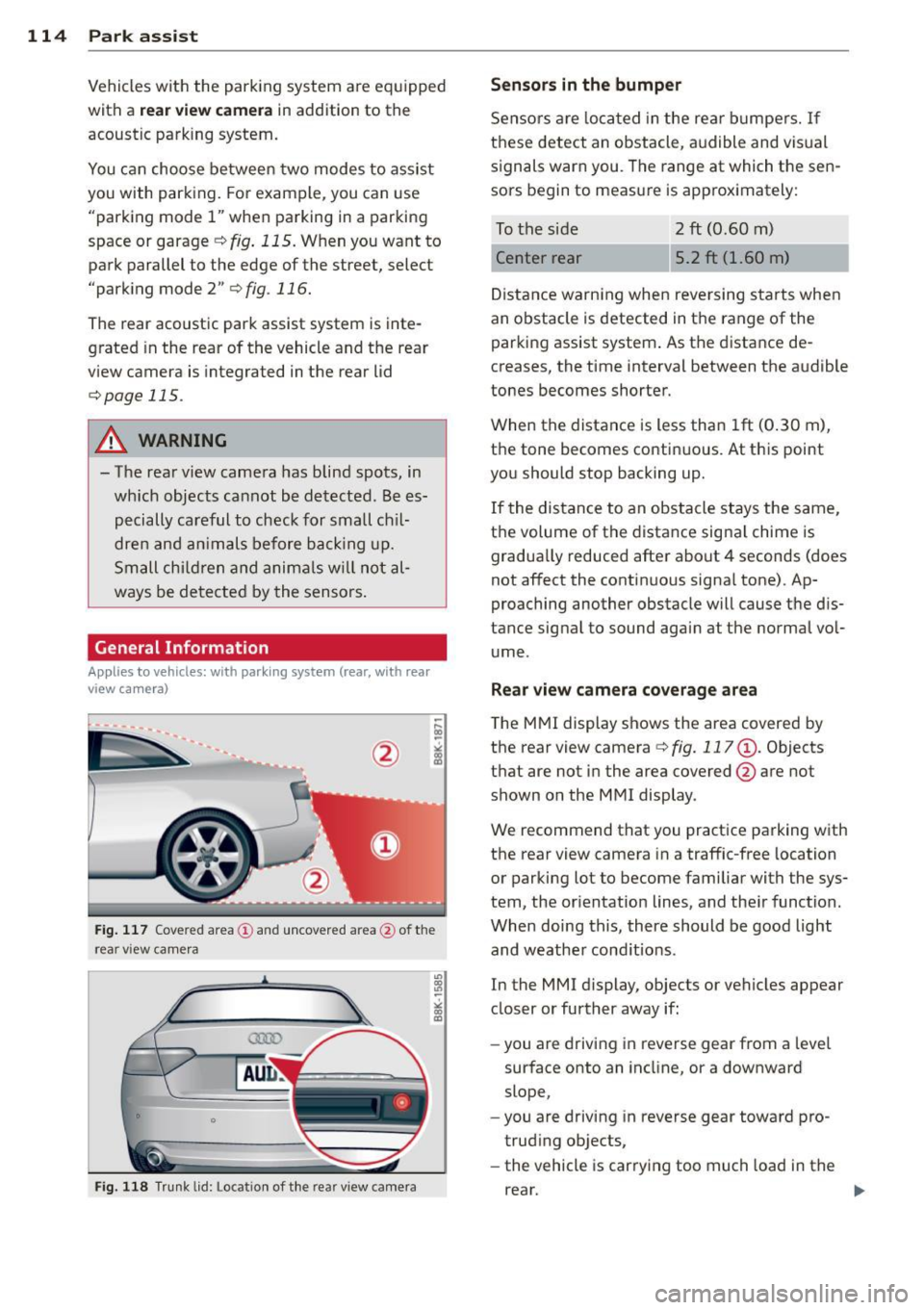
Fig. 117 Cove red area (!) and uncovered area @ of the
rea r view came ra
• 0
F ig. 118 Trun k lid : Location of the rear view camera
"'
"' "'
~
Sensors are loca ted in the rear bumpers. If
these detect an obstacle, audible and visual
signals warn you. The range at which the sen
sors begin to measure is approx imately:
To the side
2 ft (0 .60 m)
Center rear 5.2 ft (1.60 m)
Distance warning when reversing starts when
an obstacle is detected in the range of the parking assist system . As the distance de
creases, the time interval between the audible
tones becomes shorter.
When the distance is less than 1ft
(0.30 m),
the tone becomes continuous. At this point
you should stop backing up.
If the distance to an obstacle stays the same,
the volume of the distance signal chime is
gradually reduced after about 4 seconds (does
not affect the contin uous signa l tone) . Ap
proaching another obstacle will cause the dis
tance signal to sound again at the normal vol
ume.
Rear view camera coverage area
The MMI display shows the area covered by
the rear view camera
c:> fig. 117 (D . Objects
that are not in the area covered @are not
shown on the MMI display .
We recommend that you practice parking with
the rear view camera in a traffic-free location
or parking lot to become familiar with the sys
tem, the orientation lines, and the ir function.
When doing this, there should be good light
and weathe r cond itions.
In the MMI display, objects or vehicles appear
closer or further away if:
- you are driving in reverse gear from a level
surface onto an incline, or a downward
slope,
- you are driving in reverse gear toward pro
trud ing objects,
- the vehicle is carrying too much load in the
rear.
Page 121 of 294
Homelink®
Universal remote
control
Description
Appl ies to vehicles: with Horne Link
The Homelink universal remote control can
be programmed with the remote control for
devices that are already present.
With Home Link, you can control devices such
as the garage door, security systems, house
l ights, etc. comfortab ly from the inside of you
vehicle .
H ome Link makes it possible for you to rep lace
three differen t remote controls from dev ices
in your home with one universal remote. This
feature works for most garage door and exte
rior door motor signals. Programming the in
dividual remote control for your remote con
trol takes p lace near the center of the radiator
grille. There is a control module attached at
this location.
A one-t ime programming of the sensor must
be performed before you are able to use sys
tems with Homelink. If the system does not
activate after performing the one-t ime pro
gramming, check whether the system uses a rolling codec:>
page 122 for veh icles without
the MMI*.
_& WARNING
- Never use the Homelink ® transmitter
with any garage door opener that does
have not the safety stop and reverse fea
ture as requ ired by federa l safety stand
ards. This includes any garage door open
er model manufactured before April 1,
1982.
- A garage door opener which cannot de
tect an object, signaling the door to stop
and reverse does not meet current feder
al safety standards. Us ing a garage door
opener without these features increases
risk of serious injury or death.
Homelink ® 119
-For safety reasons never release the
parking brake or start the engine while
anyone is standing in front of the vehicle.
- A garage door or an estate gate may
sometimes be set in motion when the
Homelink ® remote control is being pro
grammed. If the device is repeatedly ac
tivated, th is can overstrain motor and
damage its e lectrical components -an
overheated motor is a fire hazard!
- To avo id possible injuries or property
damage, please always make abso lutely
certain that no persons or objects are lo
cated in the range of motion of any
equipment being ope rated .
(D Tips
-If you would like more information on
Homelink ®, where to purchase the
Homel ink ® compatible products, or
would like to purchase the Homelink ®
Home Lighting Package, please call to ll
free: 1-800-355-3515.
- For Declaration of Compliance to United
States FCC and Industry Canada regu la
tions c:>
page 276.
Page 123 of 294
-For security reasons, we recommend that
you clear the programmed buttons be
fore se lling the vehicle .
Programming the transmitter (version
B)
Applies to vehicles: with Home Link
,,,,, r ,o :O·,) ,,;;~
®
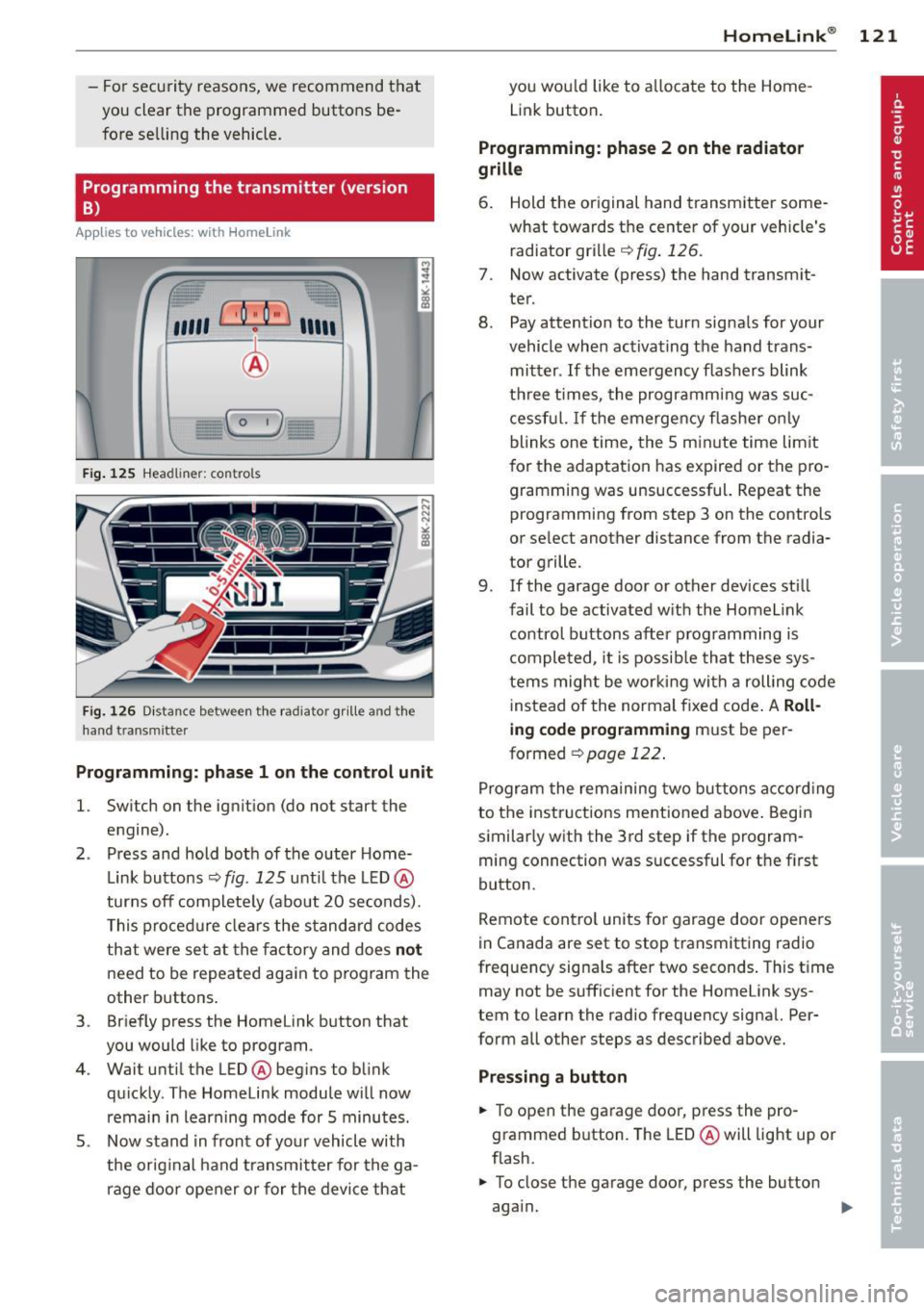
Fig. 125 Hea dli ner: c o n tro ls
Fig. 126 Dis ta n ce betw een th e radiato r gri lle a nd the
hand t rans mitte r
Programming: phase 1 on the control unit
l. Switch on the ignition (do not start the
engine) .
2 . Press and hold both of the outer Home
Link buttons ¢
fig. 125 unti l the LED @
turns off completely (about 20 seconds).
This procedure clears the standard codes
that were set at the factory and does
not
need to be repeated again to program the
other buttons .
3 . Briefly press the Homelink button that
you would like to program .
4. Wait until the LED @beg ins to blink
quickly . The Homelink module will now
remain in learning mode for 5 minutes.
5 . Now stand in front of your vehicle with
the original hand transmitter for the ga
rage door opener or for the device that
Homelink ® 121
you wou ld like to allocate to the Home
Link button .
Programming: phase 2 on the radiator
grille
6. Hold the or iginal hand transmitter some
what towards the center of your vehicle's radiator grille ¢
fig. 126.
7. Now activate (press) the hand transm it
ter.
8. Pay attention to the turn sig nals for your
vehicle when activating the hand trans
mitter .
If the emergency flashers blink
three times, the programm ing was suc
cessful. If the emergency flasher only
blinks one time, the 5 minute time lim it
for the adaptation has expired or the pro
gramming was unsuccessful. Repeat the
programming from step 3 on the controls
or se lect another distance from the radia
tor grille.
9. If the garage door or other devices still
fail to be activated with the Homelink control buttons after programming is
completed, it is possible that these sys
tems might be working with a roll ing code
instead of the normal fixed code . A
Roll
ing code programming must be per
formed
¢ page 122 .
Program the remaining two buttons according
to the instructions ment ioned above . Begin
similarly with the 3rd step if the program
ming connection was successful for the f irst
button .
Remote contro l units for garage door openers
in Canada are set to stop transmitting radio
frequency signa ls after two seconds . This time
may not be sufficient for the Homelink sys
tem to learn the radio frequency sign al. Per
form all other steps as described above.
Pressing a button
.,. To open the garage door, press the pro
grammed b utton. The LED @ will light up or
flash .
.,. To close the garage door, press the button
aga in.
Page 124 of 294
122 Homelink®
Erasing the button s
.. Switch on the igni tion (do not start the en
gine) .
.. Press and ho ld both of the o uter buttons
until the LED @ turns off complete ly (about
20 seconds) to erase all of the buttons si
multaneously .
.. Programmed buttons cannot be erased indi
vidually . Reprogram the buttons if necessa
ry.
Reprog ramming the button s
.. Switch on the ignition (do not start the en
gine).
.. To reprogram an ind ividual button, press
and hold the des ired button unt il the L ED @
begins to blink (about 10 seconds) . Re lease
the button .
.. Wait until the L ED@ begins to blink quic k
ly . T he Homelink module will now remain in
l earning mode for 5 minutes .
.. Cont in u e with step 5 .
(D Tips
-The requ ired distance between the hand
transmitter and the Homelin k module in
the radiator grille¢
fig. 126 depends on
the system that you are programming.
- Depending on the mode l of the garage
door opener, you may need to release the
button on the remote and press it again
when programming. When program ming a new dev ice, keep the button
pressed for at least 15 seco nds befo re
trying again with the transmitte r in a dif
ferent pos it ion. Watch out fo r the emer
gency flasher duri ng t hat time.
- Fo r secu rity reaso ns, we recommend that
you clear the programmed but tons be
fore se lling the vehicle.
Programming the rolling code
Applies to veh icles: w ith Homelink
Additionally, a rolling code programming for
the Homelink universal remote control is re
quired for some systems .
Identifying the rolling code
.. Press the previously programmed HomeLink
button again and hold it down .
.. Look at the LED@¢
page 121, fig . 125 . If
the L ED blinks q uickly, the feat ures, such as
the garage door opene r, a re eq uipped w ith
t he rol ling code.
.. Program the rolling code as follows:
Activating the garage door opener motor
unit
.. Locate the setting but ton on the garage
door opene r motor un it. The exac t loca tion
and colo r of the bu tton may vary depending
on the garage door opener manufacturer .
.. Press the setting button on the garage door
opener motor unit ( usua lly this will activate
a "setting light display" on the motor unit).
Now you will have about
3 0 seconds time to
pe rform the Homelink button programm ing
on the controls .
Programming on the controls
.. Quickly press the p rev iously programmed
Homelink b utton .
.. Press the Home link button once more to
end the roll ing code programm ing .
After the controls have been programmed, the garage door opener s hou ld recognize the
Homelink signa l and operate when the Home
Li nk button is pressed. Now you may program
the other buttons as needed .
(D Tips
-Programming the rolling code can be
performed quicke r and more easily with
th e help of a second person. The Home
Li nk button may need to be pressed a
t hird t ime to en d the adjus tment pro ce
dure for some garage door openers.
Page 126 of 294
124 Driving Safely
Driving Safely
General notes
Safe driving habits
Please remember -safety first!
This chapter contains important information,
tips, instructions and warnings that you need
to read and observe for your own safety, the
safety of your passengers and others. We have
summarized here what you need to know
about safety belts, airbags, child restraints as
well as child safety. Your safety is for us
priori
ty number 1.
Always observe the information
and warnings in this section -for your own
safety as well as that of your passengers.
The information in this section applies to all
model versions of your vehicle. Some of the
features described in this sections may be
standard equipment on some models, or may
be optional equipment on others. If you are
not sure, ask your authorized Audi dealer.
A WARNING
-Always make sure that you follow the in
structions and heed the WARNINGS in
this Manual. It is in your interest and in
the interest of your passengers.
- Always keep the complete Owner's Liter
ature in your Audi when you lend or sell
your vehicle so that this important infor
mation will always be available to the
driver and passengers.
- Always keep the Owner's literature handy
so that you can find it easily if you have
questions.
Safety equipment
The safety features are part of the occupant
restraint system and work together to help
reduce the risk of injury in a wide variety of
accident situations.
Your safety and the safety of your passengers
should not be left to chance. Advances in
technology have made a variety of features
available to help reduce the risk of injury in an accident.
The following is a list of just a few of
the safety features in your Audi:
- sophisticated safety belts for driver and all
passenger seating positions,
- belt force limiters for the seats,
- belt pretensioners for the seats,
- head restraints for each seating position,
- front airbags,
- side airbags in the front seats,
- side curtain airbags,
- special LATCH anchorages for child re-
straints,
- adjustable steering column.
These individual safety features, can work to gether as a system to help protect you and
your passengers in a wide range of accidents.
These features cannot work as a system if
they are not always correctly adjusted and cor
rectly used.
Safety is everybody's responsibility!
Important things to do before driving
Safety is everybody's job! Vehicle and occu
pant safety always depends on the informed and careful driver.
For your safety and the safety of your passen
gers,
before driving always:
.,. Make sure that all lights and signals a re op
erating correctly.
.,. Make sure that the tire pressure is correct.
.,. Make sure that all windows are clean and
afford good visibility to the outside.
.,. Secure all luggage and other items carefully
qpage59 .
.,. Make sure that nothing can interfere with
the pedals.
.,. Adjust front seat, head restraint and mir
rors correctly for your height.
.,. Instruct rear seat passengers to adjust the
head restraints according to their height.
.,. Make sure to use the right child restraint
correctly to protect children¢
page 166,
Child Safety. "'