warning light AUDI A5 COUPE 2013 Owner's Manual
[x] Cancel search | Manufacturer: AUDI, Model Year: 2013, Model line: A5 COUPE, Model: AUDI A5 COUPE 2013Pages: 294, PDF Size: 73.84 MB
Page 45 of 294
Clear vision Lights
Switching the lights on and off
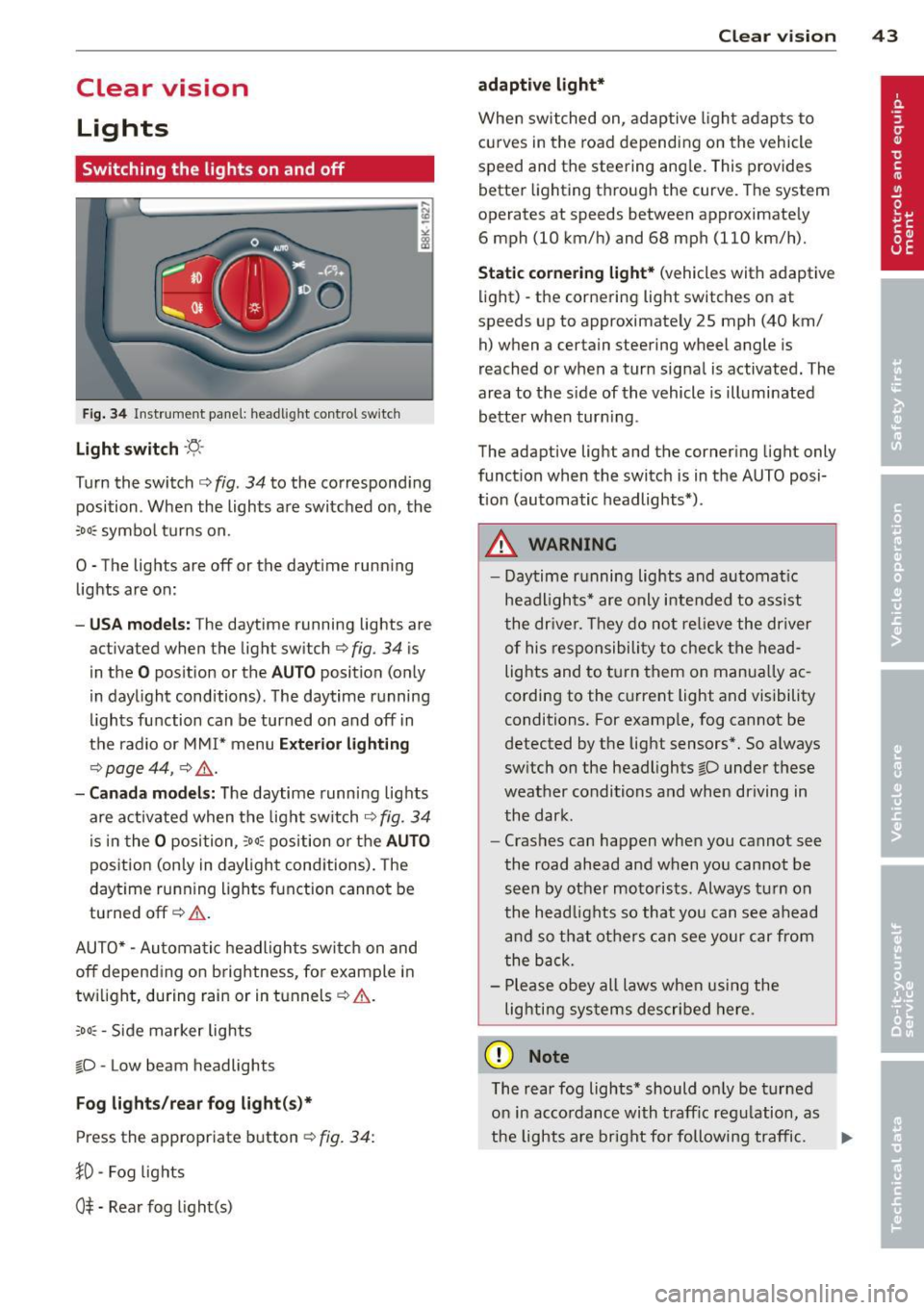
F ig . 34 Instrument pane l: headlight control switch
Light switch ·'t/,·
Turn the switch c> fig. 34 to the correspond ing
position . When the lights are switched on, the
:oo: symbol turns on.
0 • The lights are off or the daytime running
lights are on:
-USA mod els : The daytime running lights are
activated when the light switch
c> fig . 34 is
in the
O position or the AUTO position (only
in daylight conditions) . The daytime running
lights function can be turned on and off in
the radio or MMI* menu
E xterior li ghtin g
¢ page 44 , c> &_.
-Ca nada mod els: The daytime runn ing lights
are activated when the light switch
¢ fig . 34
is i n the O position, :oo : position or the AUTO
posit ion (on ly in daylight cond itions). The
daytime running lights function cannot be
turned off¢&. .
AUTO* -Automatic headlights switch on and
off depending on b rightness, for example in
tw ilight, during rain or in tunnels ¢,& .
:oo: -Side marker lights
~D -Low beam headlights
Fog light s/rear fog ligh t(s)*
Press the appropriate button c> fig. 34:
1D -Fog lights
0$ -Rear fog light(s)
Clear vi sion 43
adaptive light*
When switched on, adaptive ligh t adap ts to
curves in the road depend ing on the vehicle
speed and the steering angle. This provides
better lighting through the curve. The system
operates at speeds between approximately
6 mph (10 km/h) and 68 mph (110 km/h).
Static corner ing light * (vehicles with adaptive
light) -the cornering light switches on at
speeds up to approximately 25 mph (40 km/
h) when a certain steering wheel angle is
reached or when a turn signal is activated. The
area to the s ide of the vehicle is illuminated
better whe n turn ing .
The adaptive light and the cornering light only
function when the switch is in the AUTO posi
tion (automatic headlights*) .
A WARNING
-Daytime running lights and automatic
headlights* are only intended to ass ist
the driver . T hey do no t re lieve the driver
of his responsibility to chec k the head
lights and to t urn them on manua lly ac
cording to the current light and visibility
conditions. For example, fog cannot be
detected by the light sensors*. So a lways
switch on the headlights
~D under these
weather conditions and when driving in
the dark .
- Cras hes can happen when you cannot see
the road ahead and when yo u cannot be
seen by other motorists. Always turn on
the head lights so that you can see ahead
and so that others can see your car from
the b ack.
- Please obey all laws when using the
lig hting sys tems described here.
(D Note
The rear fog lights* should on ly be turned
on in accordance with t raff ic regulation, as
the lights are bright for following traffic. ..,.
Page 46 of 294
44 Clear vis ion
@ Tips
- The light sensor* for headlight control is
located in the rear view m irror mount.
You should therefore not apply any st ick
ers to the windsh ield in this area in order
to prevent malfunctions or failures.
- Some exterior lighting functions can be
adjusted
c> page 44.
- When you remove your key from the igni
tion while the vehicle's lights are turned
on, a buzzer sounds as long as the driv
er's door is open .
- In cool or damp weather, the ins ide of
the headlights, turn signals and tail lights can fog over due to the tempera
ture difference between the inside and
outside. They will clea r shor tly after
switching them on. This does not affect
the service life of the lighting.
- In the even t of a light sensor malfunc
tion, the driver is no tified in the instru
ment cluster disp lay¢
page 22.
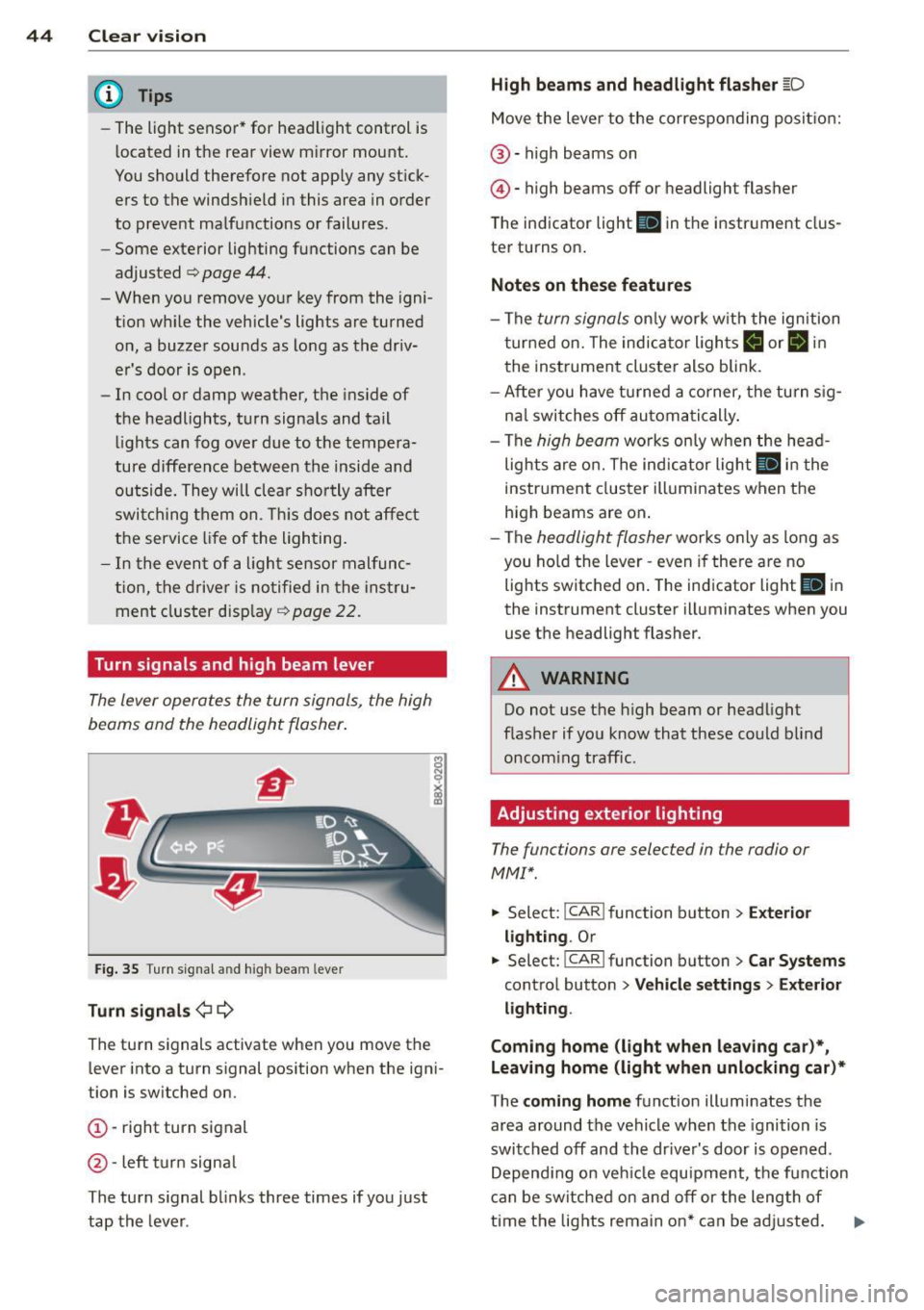
Turn signals and high beam lever
The lever operates the turn signals, the high
beams and the headlight flasher .
Fig. 35 T u rn s ig na l and h ig h beam leve r
Turn sign als ¢i ¢
The turn signals activate when you move the
l ever into a turn s ignal pos ition when the ign i
tion is switched on.
(D -right turn signal
@-left tur n signa l
The turn s ignal blinks three times if you just
tap the lever .
High be ams and headlight flasher [D
Move the lever to the correspon ding posit io n:
@ -high beams on
@ -high beams off or headlight flasher
The indicator light
II in the i nstr ument clus
te r turns on .
Notes on thes e features
- The turn signals on ly work w ith the ign ition
t ur ned on. The indicator lights
B or II in
t he instrument cluster also blink.
- After you have turned a co rner, the tu rn s ig
na l switches off au toma tically .
- The
high beam works on ly w hen the head
lights a re o n. The ind icator light
II in the
instrument cluster ill uminates when the
high beams are on .
- The
headligh t flasher works only as long as
you ho ld the lever -even if the re a re no
lights switched on . The ind icator light
II i n
the instrument cluster illuminates when you
use the headlight flasher.
A WARNING
--
Do not use the h igh beam or headlight
flashe r if you know that these could blind
oncom ing traffic.
Adjusting exterior lighting
The functions ore selected in the radio or
MMI" .
.,. Select: I CAR ! function button > Ext erio r
light ing .
Or
.,. Select: !CAR I function button> Car S ystems
control button > Ve hicle s etting s> Exterior
lighting .
Coming home (light when leav ing car }*,
Leav ing home (light when unlocking car )*
The coming home function illuminates the
area around the vehicle when the ignition is
switched off and th e dr ive r's door is open ed.
Depend ing on veh icle equ ipment, the function
can be switched on and off or the length of
time the lig hts remain on* can be ad justed . ..,.
Page 49 of 294
Turn the knob to the desired position:
Q/ P -In th is position , you can adjust the
d river's and front passenger's ex ter io r mir ro rs
by turning the knob in the des ired direc tion.
(ijjl -The mirrors are heated depending on the
ou tside temperature.
P assenger exter ior mirro r tilt function*
( only with memory for exterior mirrows)
To help yo u see the curb when backing into a
pa rking space, the surface of the m irror tilt s
slig htly . The knob m ust be in the P posit io n
for this to ha ppen .
You can adjust the t ilt ed mir ro r sur face by
turn ing t he knob in the des ired direction .
When you move out of reve rse and into ano th
er gear, the new mi rror posit ion is stored and
assigned to the key you are using .
The mirro r goes back into its origina l posit io n
once yo u drive forward faster tha n 9 mph
(15 km/h) or sw itch the ignition off .
,&. WARNING
Curved mirror su rfaces (convex or spheri
cal *) increase yo ur field of view . Remem
ber that vehicles or other objects will ap
pea r smaller and farther away than w hen
seen in a flat m irr or. If you use this mirror
to estimate distances of following veh icles
when changing lanes, you co uld estimate
incorrectly and ca use an accide nt.
(D Note
- If you wash the veh icle in an automatic
ca r wash, yo u must fold the exte rior m ir
r o rs in to reduce the r is k of damage to
the m irrors .
(D Tips
-The exterior mirror setti ngs are sto red
with the memory functio n* ~
page 57 .
- If there should be a malfunction in the
electr ica l system, you can st ill adjust the
exter ior mir ro rs by press ing the edge of
the mi rror.
-
Clear vi sion 4 7
Dimming the mirrors
N
~
><
~===~=======~ ~
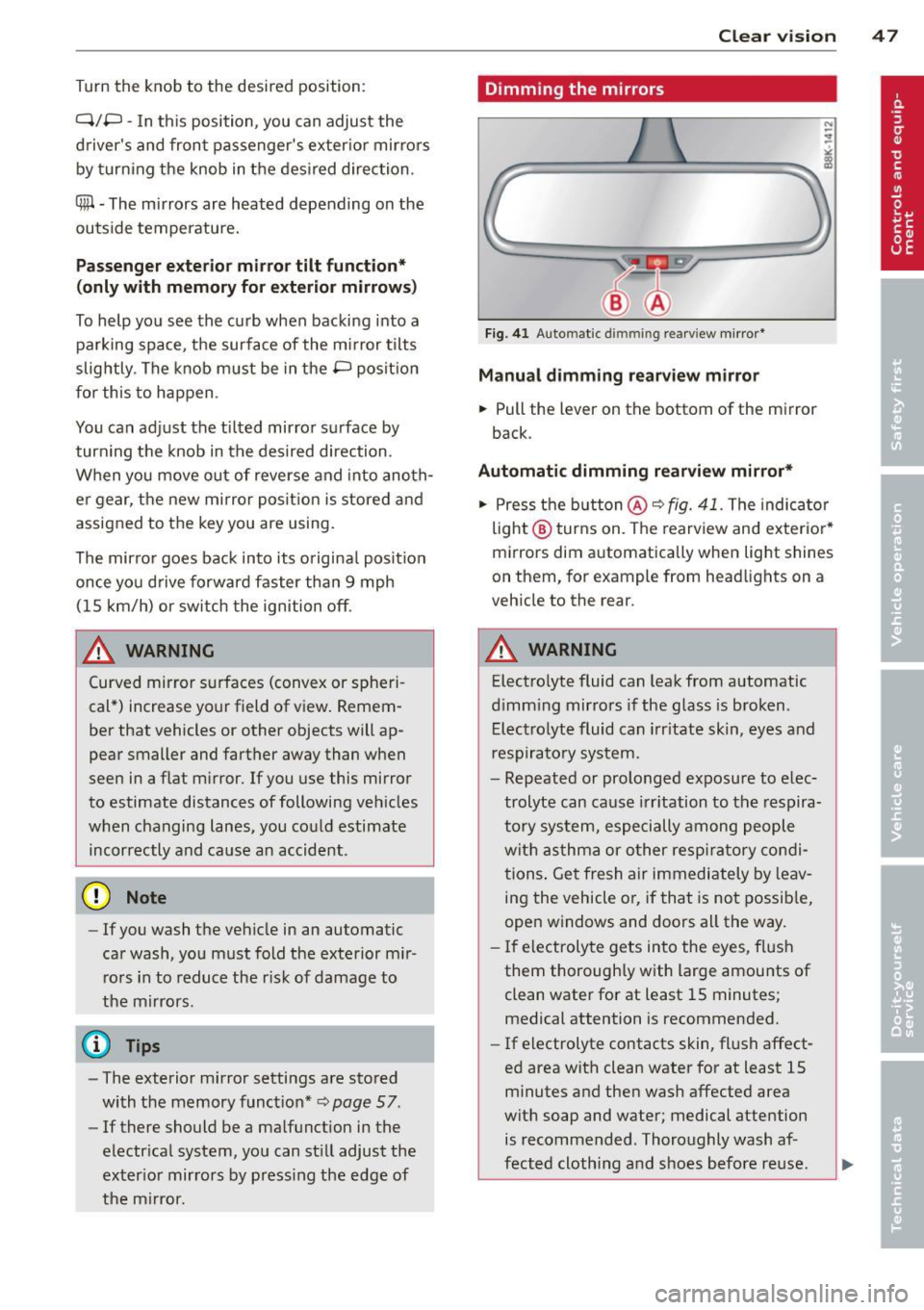
Fig. 41 Auto matic dimmin g rearv iew mirro r*
Manu al d imming rearview mir ror
.,. Pull the lever on the bottom of the mirror
back .
Automat ic dimming rearview mirror*
.,. Press the button@~ fig. 41. The indicator
light @ turns on . The rearview and exterio r*
mi rrors dim a utomatically when light shines
on them, for example from headlights on a
veh icle to the rear .
A WARNING
-
Electrolyte fluid can leak from aut omatic
d imm ing mirrors if the glass is broken .
E lec trolyt e fluid can irritate skin, eyes and
res pirato ry system.
- Repeated or prolonged exposu re to elec
trolyte can ca use i rritation to the respira
to ry sy stem, especially among people
wit h asthma or o ther resp iratory co ndi
tions . Ge t fresh a ir immediately by leav
ing the vehicle o r, if that is no t possib le,
open w indows and doors all the way.
- If electroly te gets in to the eyes, f lush
them thorough ly with large amounts of
clean water for at least 15 minutes;
medical attention is recommended.
- If electrolyte contacts skin, fl ush affect
ed area with clean water for at least 15
minutes a nd the n wash affected area
wit h soap and water; medical attention
is recommended. Thoroughly wash af
fected cloth ing and shoes before re use .
.
Page 50 of 294
48 Clear vision
-If swallowed and person is conscious,
rinse mouth with water for at least 15
minutes. Do not induce vomiting unless
instructed to do so by medical professio
nal. Get medical attention immediately.
d) Note
Liquid electrolyte leaking from broken mir
ror glass will damage any plastic surfaces
it comes in contact with. Clean up spilled
electrolyte immediately with clean water
and a sponge.
@ Tips
- Switching off the dimming function of
the inside rear view mirror also deacti
vates the automatic dimming function of
the exterior mirrors.
-Automatic dimming for the mirror only
operates properly if the sun shade* for
the rear window is not in use or the light
striking the inside mirror is not hindered
by other objects.
- The automatic dimming mirrors do not
dim when the interior lighting is turned
on or the reverse gear is selected.
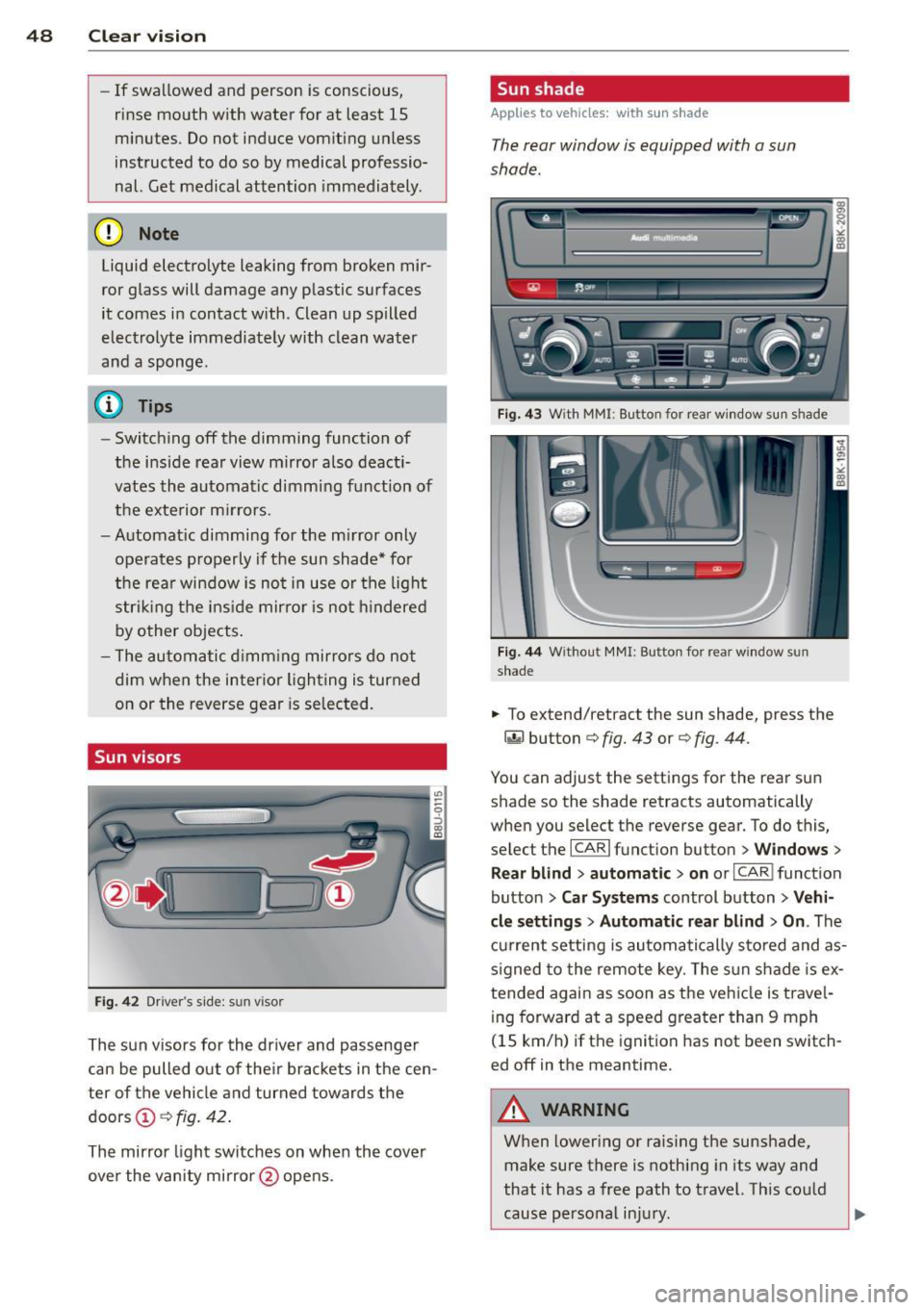
Sun visors
Fig. 42 Drive r's side : su n v isor
The sun visors for the driver and passenger
can be pulled out of their brackets in the cen
ter of the vehicle and turned towards the
doors
Ci) c::> fig. 42.
The mirror light switches on when the cover
over the vanity mirror @opens .
Sun shade
Applies to vehicles: with sun shade
The rear window is equipped with a sun
shade.
Fig. 43 W ith MM I: Bu tton for rear window sun s hade
Fig. 44 Withou t MMI : Bu tton for rea r win dow s un
shade
.. To extend/ret ract the sun shade, press the
~ button c::> fig. 43 or c::> fig. 44 .
You can adjust the settings for the rear sun
shade so the shade retracts automatically
when you select the reverse gear. To do this,
select the
I CAR I function button > Windows >
Rear blind> automatic> on or I CAR I function
button
> Car Systems control button > Vehi
cle settings> Automatic rear blind > On .
The
current setting is automatically stored and as
signed to the remote key. The sun shade is ex
tended again as soon as the vehicle is travel ing forward at a speed greater than 9 mph
(1 S km/h) if the ignition has not been switch
ed off in the meantime.
_8 WARNING
= When lowering or raising the sunshade,
make sure there is nothing in its way and
that it has a free path to travel. This could
cause personal injury.
-
Page 51 of 294
@ Tips
-Pressing the button~ several times
consecutively can trigger the overload protection. The sun shade can only be ex
tended/retracted again after a brief wa it
i ng per iod.
- The rear window sun shade only func
tions when the veh icle inter ior is warmer
than 14°F (-10°C).
Wiper and washer system
Switching the windshield wipers on
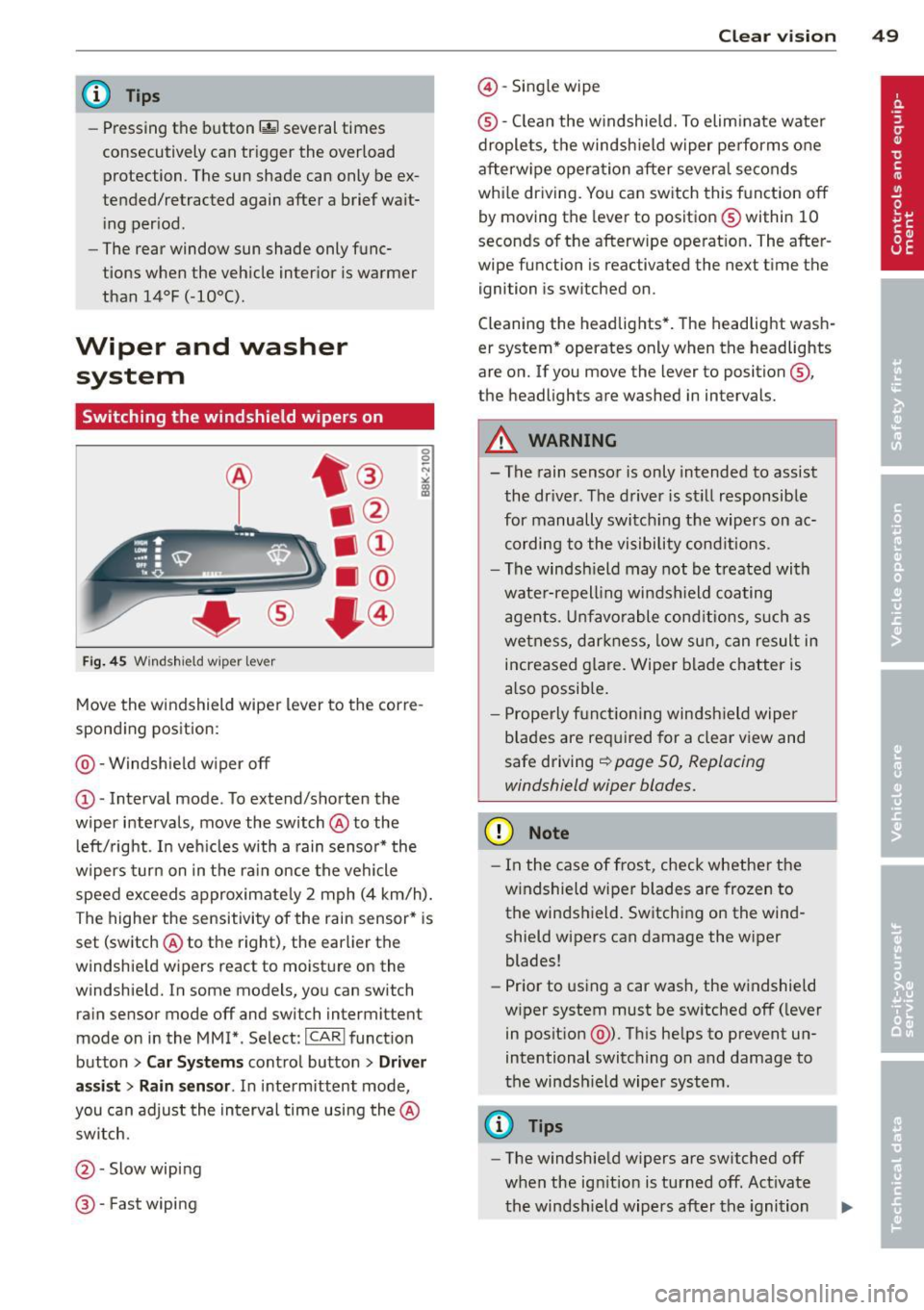
Fi g. 45 Windshield wiper lever
Move the windshield wiper lever to the corre
spond ing position:
@ -Windshie ld w iper
off
CD -Interval mode. To extend/shorten the
wiper intervals, move the switch @to the
l eft/right. I n veh icles with a rain sensor* the
wipers turn on in the ra in once the vehicle
speed exceeds approximate ly 2 mph (4 km/h).
The highe r the sensitivity of the rain sensor* is
set (switch @to the right), the earlier the
windshie ld w ipers react to moistu re on the
windshie ld. In some models, you can switch
rain sensor mode
off and switch intermittent
mode on in the MMI*. Select:
ICAR I funct ion
button
> Car Systems contro l button > Driver
as sis t > Rain s en sor .
In inte rmittent mode '
you can adjust the interval time using the @
sw itch.
@ -Slow wip ing
® -Fast wiping
Clear vi sion 49
@ -Single wipe
® -C lean the w indshie ld. To elim ina te wate r
drople ts, the windsh ield w iper pe rform s one
afterw ipe operation after severa l se conds
whi le dr iving. You can sw itch this f unction
off
by moving the leve r to positio n® within 10
seconds of the afterwipe operat ion . The after
wipe function is reactivated the next t ime the
ignition is switched on .
Cleaning the headlights* . The headlight wash
er system * operates only when the headlights
are o n. If you move the lever to position @,
the headlights are washed in intervals.
A WARNING
- The rain senso r is only intended to assist
the dr iver. The d river is st ill responsib le
for manually switc hing the wipers on ac
cording to the vi sibility cond itions.
- The windsh ield may not b e treated with
wate r-repell ing windsh ield coating
agen ts. Un fa vo rable cond iti ons, s uch as
we tnes s, d arkn ess, low sun, can result in
increased g lare. Wiper blade c hatter is
a lso possib le .
- P rope rly f unct io ni ng win dsh ield wipe r
b lades are re quired for a clear view and
safe driving
~ page 50, Replacing
windshield wiper blades.
(D Note
- I n the case of frost, check whethe r the
w indshield wiper blades are frozen to
the winds hield. Switchi ng on the wind
shield wipers can damage the wiper
blades!
- Pr ior to using a car wash, the windshield
w iper system must be sw itched
off ( lever
in posit ion @). T his he lps to prevent un
intentional switching on and damage to
t he windsh ield wiper system.
@ Tips
- The windshiel d w ipers are switched off
when the ig nition is tu rned off. Act ivate
t he windsh ield wipers after the ignition
Page 52 of 294
50 Clear vis ion
is sw itched b ack on by mov ing the
winds hield wiper lever to any position .
- Worn or dirty windshie ld wiper b lades
r es ult in streaking. This can affect the
rain sensor* function. Check your wind
shield wiper b lades regularly.
- The was her fluid nozzles of the wind
s h ield washer system are heated at low
temperatures when t he ignit ion is on.
- When stopping temporarily, (e .g . at a
traff ic light) the set speed of the wind
shield wipers is automatically red uced by
one speed.
Replacing windshield wiper blades
Wiper blades in good condition help keep the
windshield clear.
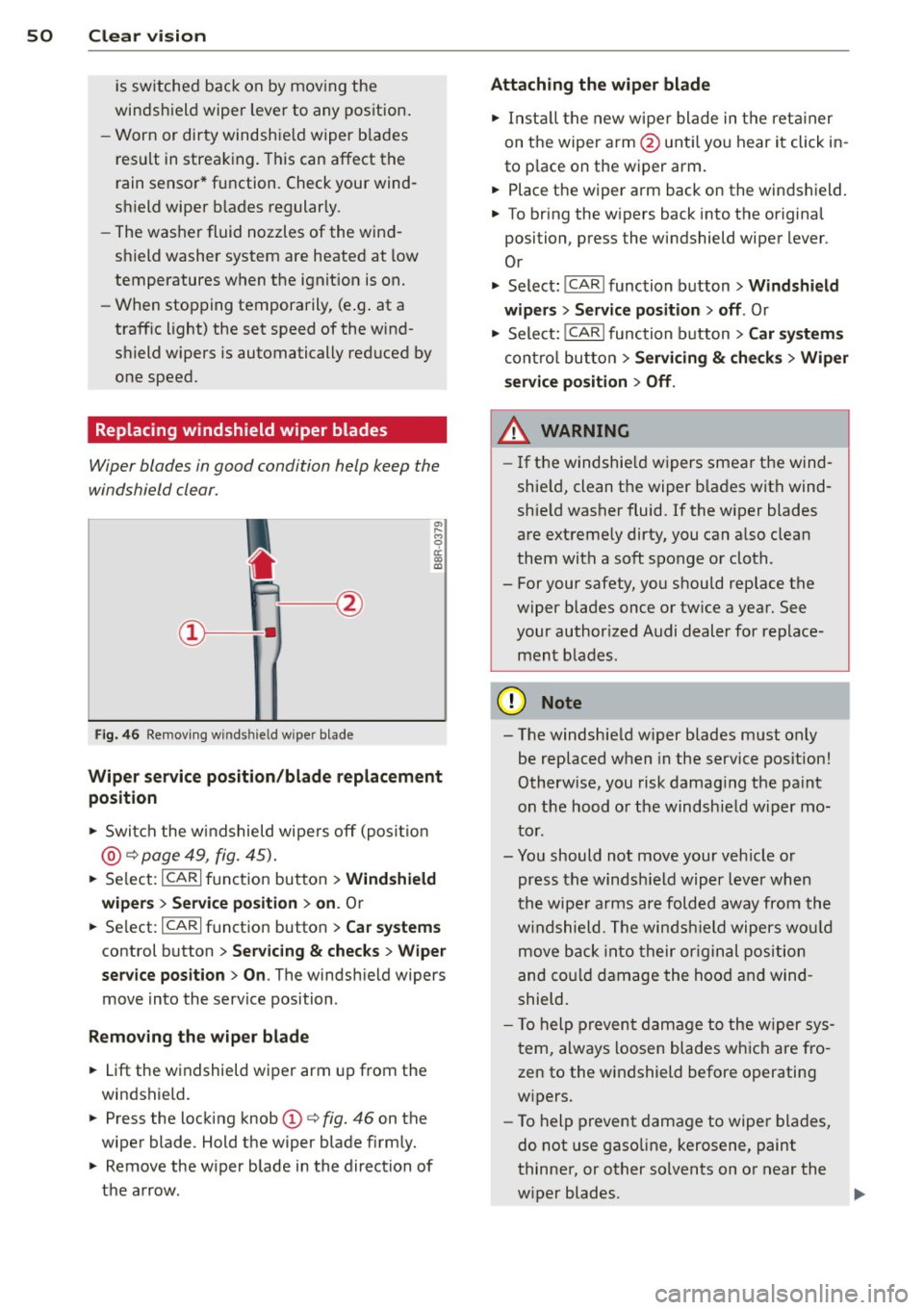
F ig . 4 6 Remov ing windshie ld w iper blade
Wiper service position /blade replacement
position
.. Swi tch the w indshield wiper s off (posi tion
@ ¢page 49, fig. 45).
.. Se lect:
ICARI f u nct ion button > Wind shield
wipers
> Ser vice po sition > on . Or
.. Se lect:
I CARI f u nction button > Car sy stem s
control button > Servicing & checks > Wiper
service position > On .
The windsh ield wipers
move into the service position .
Removing the wip er blade
.. Lift the w indshield wiper arm up from the
windshield.
.. Press the locking knob(!)¢ fig. 46 on the
wiper blade. Hold the wiper blade firm ly.
.. Remove the w iper blade in the direction of
the arrow .
Attaching the wipe r blade
.. Inst all the new wiper blade in t he reta iner
on the wiper a rm @ unt il you hear it click in
to p lace on the wiper arm.
.. Place the wiper arm back on the winds hield.
.. To bring the w ipers back into the original
position, press the windshield wiper lever .
Or
.. Select:
!CAR I function button> Windshield
wip ers
> Service po sition > off . Or
.. Select:
!CAR I function b utton> Car sy stem s
cont ro l butto n > Servicing & che cks > Wip er
s ervi ce po sition
> Off .
A WARNING
=
-If the windshie ld wipers smea r the wind-
shie ld, clean the wiper b lades with wind
shie ld washer fluid. If the wiper blades
are ext remely dirty, you can a lso clean
them with a soft sponge o r cloth.
- For your safety, you shou ld replace the
wiper blades once or twice a year. See
your author ized Audi dealer for replace
men t blad es.
(D Note
- The windshie ld w iper blades m ust only
be replaced when in the service pos ition!
Otherw ise, you risk damag ing the pa int
on t he hood o r the windsh ie ld w iper mo
to r.
- Yo u should not move your veh icle or
press the windsh ield wiper lever when
the wipe r arms are folded away from the
w indshield. The winds hield wipers wo uld
move back into their or iginal position
and co uld damage the hoo d and wind
shield.
- T o help preven t damage to the w iper sys
t em, always loosen blades w hich are fro
zen to the windshield before operating
w ipers .
- To help prevent damage to wiper b lades,
do not use gasoline, kerosene, paint
thinne r, or other solvents on or near the
w iper blades.
Page 55 of 294
Seats and storage
General recommen
dations
Why is your seat adjustment so important?
The safety belts and the airbag system can
only provide maximum protection if the front
seats are correctly adjusted.
There are various ways of adjusting the front
seats to provide safe and comfortable support
for the driver and the front passenger. Adjust
your seat properly so that :
- you can easily and quick ly reach all the
switches and controls in the instrument
panel
- your body is properly supported thus reduc ing physical stress and fatigue
- the safety belts and airbag system can offe r
maximum protection
¢ page 142.
In the following sections, you will see exactly
how you can best adjust your seats .
There are special regulations and instructions
for installing a child safety seat on the front passenger's seat. Always follow the informa
tion regard ing child safety provided in
¢ page 166, Child Safety.
.&_ WARNING
-
Refer to ¢ page 124, Driving Safely for
important information, tips, suggestions
and warnings that you should read and fol
low for your own safety and the safety of
your passengers.
.&_ WARNING
Incorrect seating position of the driver and
all other passengers can result in serious
personal injury.
- Always keep your feet on the floor when
the vehicle is in motion -never put your
feet on top of the instrument panel, out of the w indow or on top of the seat cush
ion. This app lies especially to the passen-
S eat s an d sto rage 53
gers . If your seating position is incorrect,
you increase the risk of injury in the case
of sudden braking or an accident . If the
airbag inflates and the seating position
is incorrect, this cou ld result in pe rsonal
in jury or even death.
- It is important for both the driver and front passenger to keep a distance of at least 10 inches (25 cm) between them
selves and the steering wheel and/or in
strumen t panel. If you're s itting any
closer than th is, the airbag system can
not protect you properly. In addition, the
front seats and head restraints m ust be
adj usted to your body height so that they
can give you max imum protect ion.
- Always try to keep as much distance as
possible between yourself and the steer
ing wheel or instrument panel.
- Do not adjust the driver's or front pas senger's seat whi le the vehicle is moving.
Your seat may move unexpectedly, caus
ing sudden loss of veh icle control and
pe rsonal injury. If you adjust you r seat
while the veh icle is moving, you are ou t
of posit ion.
Driver's seat
The correct seat position is important for safe
and relaxed driving .
We recommend that you adjust the dr iver's
seat in the follow ing manner:
.., Adjust the seat in fore and aft direction so
that you can easily push the pedals to the
floor wh ile keeping your knees slightly bent
¢ .&, in Why is your seat adjustment so im
portant? on page 53.
"" Adjust the seatback so that when you sit
w ith your back against the seatback , you can
s ti ll grasp the top of t he steering wheel.
... App lies to vehicles with adjustable head re
straints: Adjust the head restraint so the up
per edge is as even as possible wit h the top
of your head. If that is not possib le, try to
adjust the head restraint so that it is as .,.
Page 60 of 294
58 Seats and storage
they are stored, these seat profiles can be
se lected at any time .
I n addition to the driver's seat settings, you
can also stor e and access the exterior mir ror
adj ustment settings* using the remote con
trol key or memory button .
Remote control key
Applies to vehicles: with seat memo ry
To assign the driver 's seat settings to the re
mote control key when locking the vehicle, the
function must be activated in the radio or
MMI*
.. Se lect :
ICARI function button > Seat adjust
ment > Driver's seat > Remote control key
>
on.Or
> Select: ICARI function button> Car systems
control button > Vehicle settings > Seats>
Driver's seat> Remote control key> On .
@ Tips
If you do not want another d river's set
tings to be assigned to the remote key,
switch off the memory function using the
radio or MMI* or the
ION/OFF I button
qpage58.
Memory buttons
Applies to vehicles: with seat memo ry
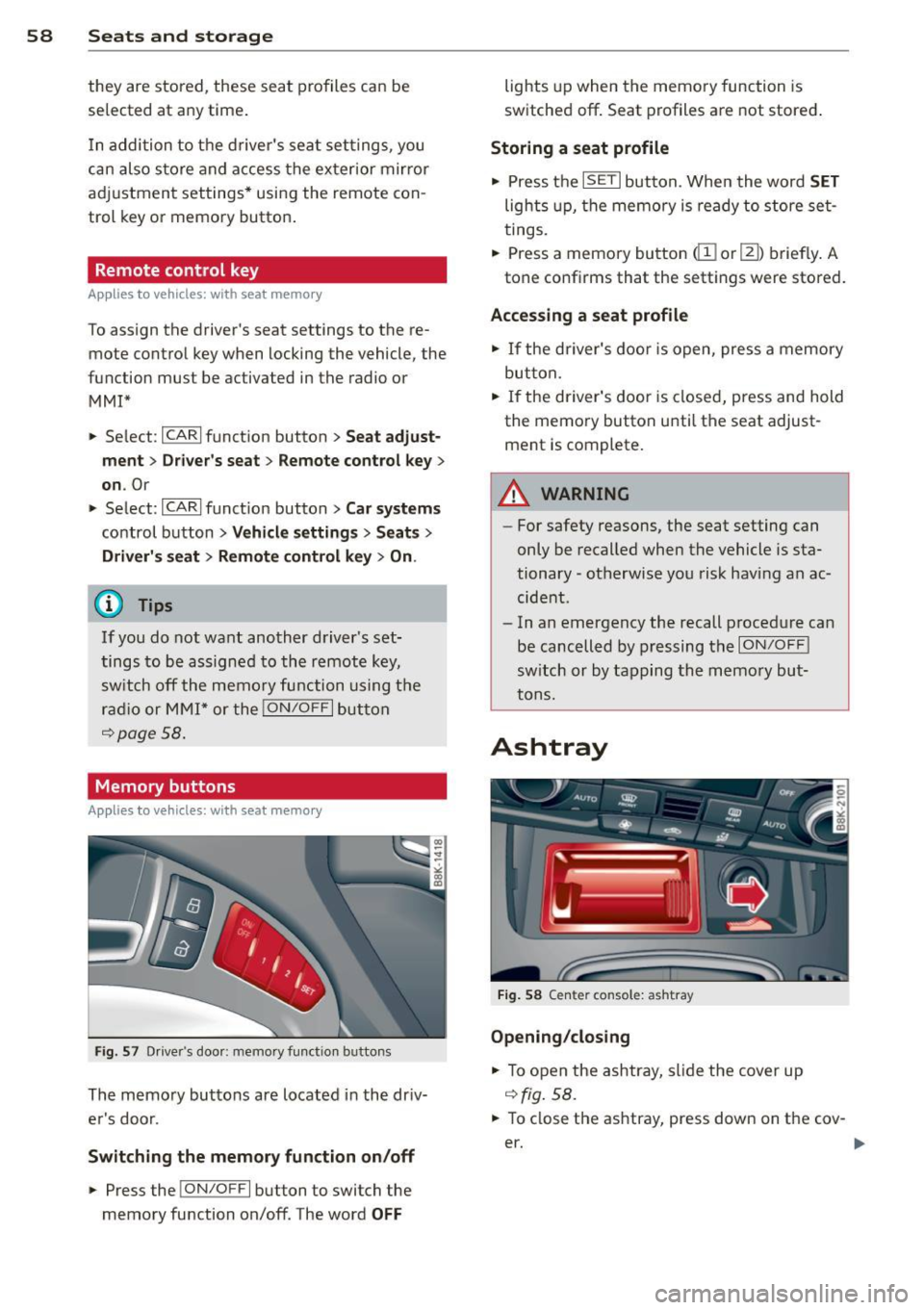
F ig. 57 Driver's doo r: memory function buttons
The memory buttons are located in the driv
e r's door.
Switching the memory function on/off
.. Press the !ON/O FF I button to switch the
memory function on/off. The word
OFF
lights up when the memo ry function is
switched off . Seat profiles are not stored .
Storing a seat profile
.. Press the ISETI button. When the word SET
lights up, the memory is ready to store set
tings .
.. Press a memory button
dil or~) briefly. A
tone conf irms that the sett ings were stored.
Accessing a seat profile
.. If the driver's door is open, press a memory
but ton.
.. If the driver's door is closed, press and hold
the memory button until the seat adjust ment is complete.
A WARNING
- For safety reasons, the seat setting can
only be recalled when the vehicle is sta
tionary -otherwise you risk having an ac
cident.
- In an emergency the recall procedure ca n
be cancelled by pressing the
ION/OF F!
sw itch or by tapping the memory but
tons.
Ashtray
Fig. 58 Center co nsole: ashtray
Opening/closing
.. To open the ashtray, slide the cover up
qfig. 58.
.. To close the ashtray, press down on the cov-
er. ..,.
Page 61 of 294
Emptying the ashtray
• To remove the insert , slide the latch to the
right
r:!) fig. 58 -arrow-.
• To install the insert , press it down into the
mount.
A WARNING
Never put waste paper in the ashtray . Hot
ashes or other hot objects in the ashtray
could set waste paper on fire.
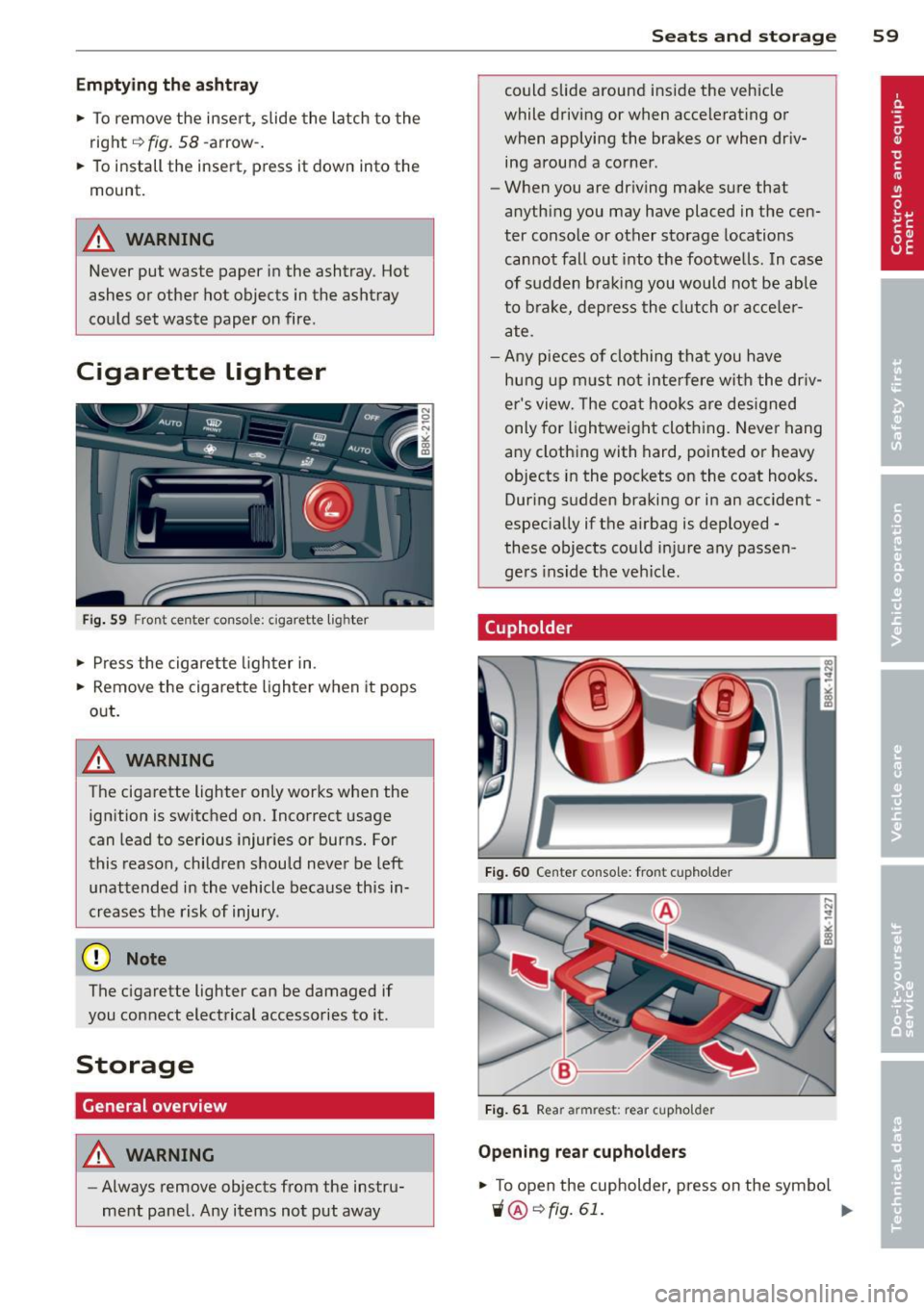
Cigarette Lighter
Fig . 59 Fron t cen te r con so le: cigarette ligh ter
• Press the cigarette lighter in.
• Remove the cigarette lighter when it pops
out.
A WARNING
The cigarette lighter only works when the ign ition is switched on. Incorrect usage
can lead to serious injuries or burns. For
this reason, children should never be left
unattended in the vehicle because this in
creases the risk of injury .
(D Note
The cigarette lighter can be damaged if
you connect electrical accessories to it .
Storage
General overview
A WARNING
-Always remove objects from the instru
ment panel. Any items not put away
Seats and storage 59
could slide around inside the vehicle
while driving or when accelerat ing or
when applying the brakes or when driv
ing around a corner .
- When you are dr iving make sure that
anyth ing you may have placed in the cen
ter conso le or other storage locations
cannot fall out into the footwells . In case
of sudden braking you would not be able
to brake, dep ress the clutch or acce le r
ate.
- Any pieces of clothing that you have
hung up must not interfere wit h the driv
er's view. The coat hooks are designed
only for lightweight clothing. Never hang
any clothing with hard, pointed or heavy
objects in the pockets on the coat hooks.
During sudden braking or in an accident -
especially if the a irbag is deployed -
these objects could injure any passen
ge rs in side the vehicle.
Cupholder
Fig. 60 Cen ter c on sol e: fr ont cupholde r
Fig. 61 Rea r armrest: rear cupho ld er
Opening rear cupholders
• To open the cupholder, press on the symbo l
'i@ ¢ fig. 61 . ....
Page 68 of 294
66 Seat s a nd s tor ag e
8_ WARNING
-
- The ski sack is intended only for the
transportation of skis and other light ob
jects . To reduce the risk of serious per
sonal injury, never transport heavy or
pointed objects in the ski sack.
- When brak ing rapidly or during an acci
dent, the load could be displaced and
ca use injury to occupants.
- Sharp edges on the load must be covered
for protect ion. Always fasten the belt
t ightly around the sack and its contents
¢ fig. 70.
-For safety reasons, do not transport
more than two pairs of skis in the ski
sack .
- You must sec ure the ski sac k with the
st rap after loading.
- Make su re a ll objects that you are t rans
porting in the pass-through are secured.
Otherwise they cou ld slide around during
sudden braking maneuvers and cause in
jury.
(D Tips
- Never stow the sk i sack away when it is
still wet or damp (for examp le, snow
melting from skis). Allow it to dry com
plete ly before stowing it away.
- When transporting skis or snowboards, tighten the securing strap between the bindings.
- Position skis in the ski sack wit h the
pointed ends facing the front and ski
po les with the pointed ends facing the
rear.
- You can lock or un lock the pass-through
u sing the mechanical key. This prevents
any access to the luggage compartment
from the vehicle interior .
Parcel shelf
The parcel shelf behind the rear seatback can
be used to car ry light items of cloth ing .
8_ WARNING
No heavy or hard objects should be p laced
on the parcel shelf. They are a hazard to
the veh icle occupants during s udden brak
i ng . The is a risk of injury .
(D Note
Please make sure that the heating w ires
for the rear window defogger are not dam
age by abrasive objects .
(D Tips
To ensure problem-free ven tilation , the
vent ilation slots between the rear window
and the pa rcel she lf must not be covered .